Skip to content
  • Home
  • Recent
  • Tags
  • 0 Unread 0
  • Categories
  • Unreplied
  • Popular
  • GitHub
  • Docu
  • Hilfe
Skins
  • Light
  • Brite
  • Cerulean
  • Cosmo
  • Flatly
  • Journal
  • Litera
  • Lumen
  • Lux
  • Materia
  • Minty
  • Morph
  • Pulse
  • Sandstone
  • Simplex
  • Sketchy
  • Spacelab
  • United
  • Yeti
  • Zephyr
  • Dark
  • Cyborg
  • Darkly
  • Quartz
  • Slate
  • Solar
  • Superhero
  • Vapor

  • Default (No Skin)
  • No Skin
Collapse
ioBroker Logo

Community Forum

donate donate
  1. ioBroker Community Home
  2. Deutsch
  3. ioBroker Allgemein
  4. Harmony hub local Nutzung wird eingestellt.

NEWS

  • Monatsrückblick Januar/Februar 2026 ist online!
    BluefoxB
    Bluefox
    16
    1
    221

  • Jahresrückblick 2025 – unser neuer Blogbeitrag ist online! ✨
    BluefoxB
    Bluefox
    17
    1
    4.4k

  • Neuer Blogbeitrag: Monatsrückblick - Dezember 2025 🎄
    BluefoxB
    Bluefox
    13
    1
    1.3k

Harmony hub local Nutzung wird eingestellt.

Scheduled Pinned Locked Moved ioBroker Allgemein
246 Posts 66 Posters 48.2k Views
  • Oldest to Newest
  • Newest to Oldest
  • Most Votes
Reply
  • Reply as topic
Log in to reply
This topic has been deleted. Only users with topic management privileges can see it.
  • JohGreJ Offline
    JohGreJ Offline
    JohGre
    wrote on last edited by
    #58

    > Das hier könnte dir helfen. Ich mache das derzeit noch über einen Shell-Sensor Pimatic und hole mir darüber die Variable rein. Ich schaue aber gerade wie ich das direkt in ioBroker bekomme. Ach, IP-Adresse ändern nicht vergessen.

    Super, you made my day. Danke habs schon installiert und läuft.

    nuc i5: RaspberryMatic, ioBroker, pi-hole, SQL-Server, OMV-NAS, Influx-DB & Grafana, OpenHab, tasmoadmin

    1 Reply Last reply
    0
    • M Offline
      M Offline
      Master77
      wrote on last edited by
      #59

      @aleks-83:

      Ich nutze eine alte harmony smart companion ohne Display.

      Jetzt habe ich erstmal im Router den Zugriff für den Hub auf das Internet komplett gesperrt.

      Werde mal testen wie schlimm es wird…

      EDIT :

      Mein Hub ist nicht träge. Alles funktioniert wie gewünscht.

      Ich kann lediglich meine Aktionen nicht mehr anpassen. ` Was heißt denn du kannst sie nicht mehr anpassen? Muss der Hub für's anpassen Internet haben? Ist bei mir schon so lange her, kann mich da gar nicht mehr dran erinnern.

      Gruß Markus

      Gesendet von unterwegs mit Tapatalk

      1 Reply Last reply
      0
      • K Offline
        K Offline
        Kuddel
        wrote on last edited by
        #60

        @BarnyXX:

        Schau dir mal den Link in meinem vorherigen Betreig an.

        `#!/usr/bin/python3
        #
        # Logitech Harmony Class using websocket instead of old (removed) api
        # Credit for finding/sharing knowledge about the api goes to:
        #	https://github.com/jlynch630/Harmony.NET
        #	https://github.com/chadcb/harmonyhub
        #
        # This is a very early version. Consider it Alpha 
        # 
        # Written by: EScape 2018
        
        import json
        import time
        import requests
        import websocket
        from websocket import create_connection
        
        class harmonysock:
        
        	def __init__(self, host, port='8088', protocol='http', hubid='', timeout=30):
        		self.hub_ip = host
        		self.hub_port = port
        		self.harmony_api = 'http://'+self.hub_ip+":"+self.hub_port
        		self.timeout = timeout
        		if hubid != '':
        			self.hub_id = hubid
        		else:
        			self.hub_id = self.gethubid()
        		#print('hubid:', self.hub_id)
        		self.hubsocket = create_connection('ws://' + self.hub_ip + ':' + self.hub_port + '/?domain=svcs.myharmony.com&hubId=' + self.hub_id)
        		self.cacheconfig=''
        
        	def hubconfig(self, refresh=False):
        		if self.cacheconfig=='' or refresh:
        			self.cacheconfig = self.getconfig()
        		return self.cacheconfig
        
        	def startactivity(self, activity):
        		headers = {'Content-type': 'application/json', 'Accept': 'text/plain', 'Origin': 'http//:localhost.nebula.myharmony.com'}
        		response = ''
        		try:
        			response = requests.post(self.harmony_api, json={"cmd": "harmony.activityengine?runactivity", "params":{"activityId":activity}}, headers=headers)
        			print(response.text)
        		except:
        			return False
        		if response.status_code == 200:
        			return True
        		else:
        			return False
        		
        	def gethubid(self):
        		headers = {'Content-type': 'application/json', 'Accept': 'text/plain', 'Origin': 'http//:localhost.nebula.myharmony.com'}
        		r = requests.post(self.harmony_api, json={"id": 111, "cmd": "connect.discoveryinfo?get", "params": {}}, headers=headers)
        		hub_data = json.loads(r.text)
        		hub_id = hub_data['data']['remoteId']
        		return hub_id
        		
        	def getconfig(self):
        		payload={}
        		#payload['hubId']=self.hub_id #Doesn't even need the hubid?
        		payload['timeout']=self.timeout
        		payload['hbus']={}
        		payload['hbus']['cmd']='vnd.logitech.harmony/vnd.logitech.harmony.engine?config'
        		payload['hbus']['id']='0'
        		payload['hbus']['params']='{"verb":"get"}'
        		self.hubsocket.send(json.dumps(payload))
        		hubsocket_data = self.hubsocket.recv()
        		hub_data = json.loads(hubsocket_data)
        		return hub_data['data']
        
        	def getstate(self):
        		payload={}
        		#payload['hubId']=self.hub_id #Doesn't even need the hubid?
        		payload['timeout']=self.timeout
        		payload['hbus']={}
        		payload['hbus']['cmd']='vnd.logitech.connect/vnd.logitech.statedigest?get'
        		payload['hbus']['id']='0'
        		payload['hbus']['params']='{"verb":"get","format":"json"}'
        		self.hubsocket.send(json.dumps(payload))
        		hubsocket_data = self.hubsocket.recv()
        		hub_data=json.loads(hubsocket_data)
        		return hub_data['data']
        		
        	def currentactivity(self):
        		state = self.getstate()
        		return state['activityId']
        		
        	def listactivities(self):
        		base=self.hubconfig()['activity']
        		list={}
        		for item in base:
        			list[item['label']]=item['id']
        		return list
        	
        	def listdevices(self):
        		base=self.hubconfig()['device']
        		list={}
        		for item in base:
        			list[item['label']]=item['id']
        		return list
        		
        	def getactivitybyname(self, name):
        		all = self.listactivities()
        		if name in all:
        			return all[name]
        		else:
        			return None
        			
        	def startactivity(self, activity):
        		#If the activity is a number it is assumed to be an ID, otherwise a label (name) 
        		if activity.isdigit():
        			activityid=activity
        		else:
        			activityid=self.getactivitybyname(activity)
        		headers = {'Content-type': 'application/json', 'Accept': 'text/plain', 'Origin': 'http//:localhost.nebula.myharmony.com'}
        		try:
        			response = requests.post(self.harmony_api, json={"cmd": "harmony.activityengine?runactivity", "params":{"activityId":activityid}}, headers=headers)
        		except:
        			return False
        		if response.status_code == 200:
        			return True
        		else:
        			return False		
        			
        	def sendkey(self, device='', key='', hold=False):
        		stroke={}
        		stroke['deviceId']=device
        		stroke['command']=key
        		stroke['type']='IRCommand'
        		payload={}
        		#payload['hubId']=self.hub_id #Doesn't even need the hubid?
        		payload['timeout']=self.timeout
        		payload['hbus']={}
        		payload['hbus']['cmd']='vnd.logitech.harmony/vnd.logitech.harmony.engine?holdAction'
        		payload['hbus']['id']='222'
        		payload['hbus']['params']={}
        		payload['hbus']['params']['action']=json.dumps(stroke)
        		if hold:
        			payload['hbus']['params']['status']='hold'
        		else:
        			payload['hbus']['params']['status']='press'
        		payload['hbus']['params']['timestamp']="0"
        		self.hubsocket.send(json.dumps(payload))
        		return True
        
        harmony = harmonysock('192.168.66.34')
        
        #current = harmony.getstate()
        all_activitydata = harmony.listactivities()
        activity = harmony.currentactivity()
        #print(all_activitydata)
        
        for i in all_activitydata:
            if activity == all_activitydata[i]:
                print(i)` 
        
        Das hier könnte dir helfen. Ich mache das derzeit noch über einen Shell-Sensor Pimatic und hole mir darüber die Variable rein. Ich schaue aber gerade wie ich das direkt in ioBroker bekomme. Ach, IP-Adresse ändern nicht vergessen.
        
        Ganz schön viel Code.
        
        Brauche wirklich alle Zeichen für die Abfrage der currentActivity?
        
        Ich hab bis jetzt folgendes gemacht:
        
        unter /opt/iobroker/skripts/ harmony.sh erstellt
        
        den code 1 zu 1 eingefügt
        
        die ip geändert
        
        chmod 777 harmony.sh
        
        ./harmony.sh
        
        Fehler:
        
        `~~[code]~~kuddel@ioBroker-MASTER:/opt/iobroker/skripts# ./harmony.sh
        Traceback (most recent call last):
          File "./harmony.sh", line 15, in <module>
            import websocket
        ImportError: No module named 'websocket'
        root@ioBroker-MASTER:/opt/iobroker/skripts#
        [/code]</module>`
        
        Fehlt mir ein Module ?
        
        Was muss ich jetzt machen?[/i]
        ``` ` 
        1 Reply Last reply
        0
        • BarnyXXB Offline
          BarnyXXB Offline
          BarnyXX
          wrote on last edited by
          #61

          Benenn erstmal die Datei in .py um. Dann kannst du mit:

          pip3 install websocket-client


          oder

          pip install websocket-client
          

          die Websocket-Geschichte installieren.

          1 Reply Last reply
          0
          • BarnyXXB Offline
            BarnyXXB Offline
            BarnyXX
            wrote on last edited by
            #62

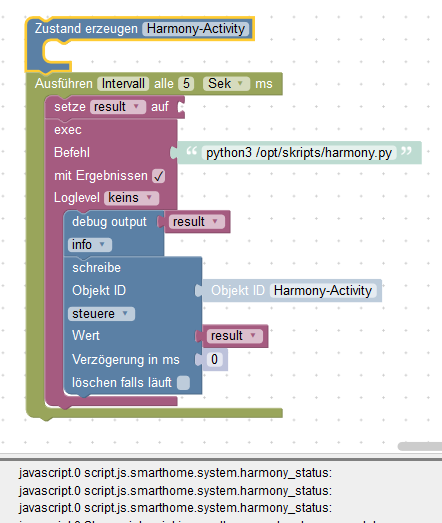
            Hier das Blockly dazu. Geht bestimmt auch einfacher, aber so funktioniert es bei mir. Ich frage den Hub alle 5 Sekunden ab. Das sollte reichen.
            5733_bildschirmfoto-20181220145543-592x551.png

            1 Reply Last reply
            0
            • K Offline
              K Offline
              Kuddel
              wrote on last edited by
              #63
              kuddel@ioBroker-MASTER:/# apt-get install websocket-client
              Paketlisten werden gelesen... Fertig
              Abhängigkeitsbaum wird aufgebaut.
              Statusinformationen werden eingelesen.... Fertig
              E: Paket websocket-client kann nicht gefunden werden.


              Mein ioBroker läuft auf einer Debian 9.4 VM

              1 Reply Last reply
              0
              • A Offline
                A Offline
                aleks-83
                wrote on last edited by
                #64

                @Master77:

                @aleks-83:

                Ich nutze eine alte harmony smart companion ohne Display.

                Jetzt habe ich erstmal im Router den Zugriff für den Hub auf das Internet komplett gesperrt.

                Werde mal testen wie schlimm es wird…

                EDIT :

                Mein Hub ist nicht träge. Alles funktioniert wie gewünscht.

                Ich kann lediglich meine Aktionen nicht mehr anpassen. Was heißt denn du kannst sie nicht mehr anpassen? Muss der Hub für's anpassen Internet haben? Ist bei mir schon so lange her, kann mich da gar nicht mehr dran erinnern.

                Scheint so.

                Bis heute morgen konnte ich meine Aktionen alle noch anpassen und verändern.

                Wenn ich jetzt (nachdem ich den Internet Zugriff gesperrt habe) versuche eine Aktion zu ändern erhalte ich die Fehlermeldung dass keine Kommunikation mit dem Server möglich ist.

                = Dell Optiplex Micro - 10GB RAM - 200GB SSD - Debian VM =
                = Node.js v20.19.6 = NPM 10.8.2 = JS Controller 7.0.7 =

                Ubiquiti UAP-AC-LR - UAP-AC-Lite - Synology DS716+II - Fritz!Box 7490
                Glasfaser 400

                1 Reply Last reply
                0
                • A Offline
                  A Offline
                  aleks-83
                  wrote on last edited by
                  #65

                  @hauwech:

                  Vielleicht hilft es, wenn die IOBroker user analog zu den fhem-usern beim Logitech Support hier https://support.logitech.com/de_de/harmonysupportticket ein wenig für Nachdruck sorgen. `

                  Erledigt.

                  Bitte alle mitmachen! :!:

                  = Dell Optiplex Micro - 10GB RAM - 200GB SSD - Debian VM =
                  = Node.js v20.19.6 = NPM 10.8.2 = JS Controller 7.0.7 =

                  Ubiquiti UAP-AC-LR - UAP-AC-Lite - Synology DS716+II - Fritz!Box 7490
                  Glasfaser 400

                  1 Reply Last reply
                  0
                  • BarnyXXB Offline
                    BarnyXXB Offline
                    BarnyXX
                    wrote on last edited by
                    #66

                    @Kuddel:

                    kuddel@ioBroker-MASTER:/# apt-get install websocket-client
                    Paketlisten werden gelesen... Fertig
                    Abhängigkeitsbaum wird aufgebaut.
                    Statusinformationen werden eingelesen.... Fertig
                    E: Paket websocket-client kann nicht gefunden werden.


                    Mein ioBroker läuft auf einer Debian 9.4 VM `

                    Meiner auch. Du musst das mit PIP installieren.

                    1 Reply Last reply
                    0
                    • A Offline
                      A Offline
                      albert
                      wrote on last edited by
                      #67

                      @aleks-83:

                      @hauwech:

                      Vielleicht hilft es, wenn die IOBroker user analog zu den fhem-usern beim Logitech Support hier https://support.logitech.com/de_de/harmonysupportticket ein wenig für Nachdruck sorgen. `

                      Erledigt.

                      Bitte alle mitmachen! :!: `

                      Danke für den Link, ich habe auch dort Nachgefragt

                      1 Reply Last reply
                      0
                      • BarnyXXB Offline
                        BarnyXXB Offline
                        BarnyXX
                        wrote on last edited by
                        #68

                        Achso, wenn du pip nicht installiert hast, musst du es mit apt-get install python-pip oder python3-pip installieren.

                        1 Reply Last reply
                        0
                        • K Offline
                          K Offline
                          Kuddel
                          wrote on last edited by
                          #69

                          Das Skript läuft, wertet aber leider Aktivität nicht korrekt aus:

                          3467_harmony.png

                          1 Reply Last reply
                          0
                          • BarnyXXB Offline
                            BarnyXXB Offline
                            BarnyXX
                            wrote on last edited by
                            #70

                            @Kuddel:

                            Das Skript läuft, wertet aber leider Aktivität nicht korrekt aus:

                            harmony.PNG `

                            Trag mal als Variablenname Result ein, wie bei mir im Screenshot

                            1 Reply Last reply
                            0
                            • BarnyXXB Offline
                              BarnyXXB Offline
                              BarnyXX
                              wrote on last edited by
                              #71

                              Und du musst vorher eine Variable erzeugen. Das Blockly sollte so aussehen wie bei mir.

                              1 Reply Last reply
                              0
                              • K Offline
                                K Offline
                                Kuddel
                                wrote on last edited by
                                #72

                                @BarnyXX:

                                Und du musst vorher eine Variable erzeugen. Das Blockly sollte so aussehen wie bei mir. `

                                3467_harmony.png

                                Der Status wird nicht ausgelesen. hmmm

                                1 Reply Last reply
                                0
                                • JohGreJ Offline
                                  JohGreJ Offline
                                  JohGre
                                  wrote on last edited by
                                  #73
                                  var cronStr       = '*/30 * * * * *';
                                  
                                  function getActivity() {
                                      exec("./opt/iobroker/harmoy_websocket.sh", function(err, stdout, stderr) {
                                          if (err) {
                                              log(stderr,'error');
                                              log('Harmony Aktivitistatus konnten nicht abgefragt werden', 'error');
                                              return;
                                          }
                                          //log(stdout);
                                          if (getState('javascript.1.HIFI.HarmonyActivityState').val != stdout.trim()) {
                                              log("set new HarmonyActivityState: " + stdout.trim() + " oldVal: " + getState('javascript.1.HIFI.HarmonyActivityState').val);
                                              setState('javascript.1.HIFI.HarmonyActivityState'/*HarmonyActivityState*/, stdout.trim());
                                          }
                                      });
                                  }
                                  
                                  //setTimeout(getActivity,1000);
                                  
                                  schedule(cronStr, getActivity);
                                  
                                  on('javascript.1.HIFI.HarmonyActivityState', function (obj) {
                                      log("HarmonyActivityState changed: " + obj.state.val);
                                  }); 


                                  hier mein JS-Code, der zumindest bei mir funktioniert. Mein Shellscript heißt harmoy_websocket.sh, das musst du entsprechend anpassen. ich werte dann das Ergebnis aus und kann dann entsprechend reagieren. Derzeit teste ich nur, da mein Hub noch downgegraded ist.

                                  nuc i5: RaspberryMatic, ioBroker, pi-hole, SQL-Server, OMV-NAS, Influx-DB & Grafana, OpenHab, tasmoadmin

                                  1 Reply Last reply
                                  0
                                  • K Offline
                                    K Offline
                                    Kuddel
                                    wrote on last edited by
                                    #74

                                    Ich habe jetzt auch erst einmal ein Downgrade als Workaround gemacht.

                                    Auf Dauer ist das natürlich keine Lösung.

                                    Parallel werde ich dein Skript weiter testen.

                                    Vielen Dank schon einmal

                                    1 Reply Last reply
                                    0
                                    • foxriver76F Offline
                                      foxriver76F Offline
                                      foxriver76
                                      Developer
                                      wrote on last edited by
                                      #75

                                      @Pman:

                                      Die offizielle Harmony App ist für lokale Verbindungen schon vor langer Zeit auf die Websocketverbindung gewechselt. Wenn wir uns jetzt die Arbeit machen und die Websocket-API implementieren ist halt die Frage ob und wann Logitech wieder irgendwas ändert. Mein Eindruck ist, dass sie gar keine lokalen Verbindungen mehr wollen, weder über XMPP noch über Websocket. Der Vorteil wenn alles über Cloud läuft ist, dass man automatisch eine Verbindungsverschlüsselung über SSL bekommt. Der Nachteil ist, dass man ohne Internet plötzlich nicht mehr den TV steuern kann, vor dem man sitzt. Weswegen (noch?) die lokale Websocketverbindung existiert. Eine dokumentierte API, ob nun über Cloud oder lokal, wäre schön, erscheint mir aber nach Logitechs jüngsten Aussagen eher unwahrscheinlich. `

                                      Ich bastle gerade mal ein bisschen dran rum, in der Hoffnung, dass Logitech nicht den nächsten Bitch-Move hinter herschiebt. Tust du derzeit etwas in die Richtung, nicht dass wir da doppelte Arbeit machen?

                                      Videotutorials & mehr

                                      Hier könnt ihr mich unterstützen.

                                      1 Reply Last reply
                                      0
                                      • H Online
                                        H Online
                                        helfi9999
                                        wrote on last edited by
                                        #76

                                        Hi,

                                        habe nur den Hub wie kann ich den downgraden.

                                        Irgendwie klappt das bei mir nicht.

                                        Wenn ich mit Alt + F9 in menü gehe weiß ich nicht welchen ich nehmen soll. :(

                                        Intel NUC mit Iobroker

                                        1 Reply Last reply
                                        0
                                        • K Offline
                                          K Offline
                                          Kuddel
                                          wrote on last edited by
                                          #77

                                          Habe die Harmony Elite ausgewählt. Habe allerdings auch einen Hub + Elite. Musste also beide downgraden

                                          1 Reply Last reply
                                          0
                                          Reply
                                          • Reply as topic
                                          Log in to reply
                                          • Oldest to Newest
                                          • Newest to Oldest
                                          • Most Votes


                                          Support us

                                          ioBroker
                                          Community Adapters
                                          Donate
                                          FAQ Cloud / IOT
                                          HowTo: Node.js-Update
                                          HowTo: Backup/Restore
                                          Downloads
                                          BLOG

                                          572

                                          Online

                                          32.7k

                                          Users

                                          82.4k

                                          Topics

                                          1.3m

                                          Posts
                                          Community
                                          Impressum | Datenschutz-Bestimmungen | Nutzungsbedingungen | Einwilligungseinstellungen
                                          ioBroker Community 2014-2025
                                          logo
                                          • Login

                                          • Don't have an account? Register

                                          • Login or register to search.
                                          • First post
                                            Last post
                                          0
                                          • Home
                                          • Recent
                                          • Tags
                                          • Unread 0
                                          • Categories
                                          • Unreplied
                                          • Popular
                                          • GitHub
                                          • Docu
                                          • Hilfe