




-
@pitybull sagte in [Aufruf] Test Shelly Adapter:
der Log steht Oben.
npm 6.4.1
node v10.15.1kannst Du mir bitte den Teil aus dem Log wo der Shelly Adapter startet. Fängt mit
starting. Version 3.0.1 in ...
an
@Stuebi
Ok. hier nochmal der komplette log vom Aktuallisieren bis Fehlermeldungen. Gerade nochmal neu upgedatet auf 3.0.1host.raspberrypi 2019-05-22 14:51:30.145 info Restart adapter system.adapter.shelly.0 because enabled host.raspberrypi 2019-05-22 14:51:30.145 error instance system.adapter.shelly.0 terminated with code 1 () host.raspberrypi 2019-05-22 14:51:30.144 error Caught by controller[0]: at startup (bootstrap_node.js:149:9) host.raspberrypi 2019-05-22 14:51:30.144 error Caught by controller[0]: at run (bootstrap_node.js:383:7) host.raspberrypi 2019-05-22 14:51:30.144 error Caught by controller[0]: at Module.runMain (module.js:604:10) host.raspberrypi 2019-05-22 14:51:30.144 error Caught by controller[0]: at Function.Module._load (module.js:438:3) host.raspberrypi 2019-05-22 14:51:30.144 error Caught by controller[0]: at tryModuleLoad (module.js:446:12) host.raspberrypi 2019-05-22 14:51:30.143 error Caught by controller[0]: at Module.load (module.js:487:32) host.raspberrypi 2019-05-22 14:51:30.143 error Caught by controller[0]: at Object.Module._extensions..js (module.js:579:10) host.raspberrypi 2019-05-22 14:51:30.143 error Caught by controller[0]: at Module._compile (module.js:542:28) host.raspberrypi 2019-05-22 14:51:30.143 error Caught by controller[0]: at Object.runInThisContext (vm.js:97:10) host.raspberrypi 2019-05-22 14:51:30.143 error Caught by controller[0]: at createScript (vm.js:56:10) host.raspberrypi 2019-05-22 14:51:30.142 error Caught by controller[0]: SyntaxError: Unexpected token function host.raspberrypi 2019-05-22 14:51:30.142 error Caught by controller[0]: ^^^^^^^^ host.raspberrypi 2019-05-22 14:51:30.142 error Caught by controller[0]: async function getAllDevices() { host.raspberrypi 2019-05-22 14:51:30.141 error Caught by controller[0]: /opt/iobroker/node_modules/iobroker.shelly/shelly.js:84 host.raspberrypi 2019-05-22 14:51:29.824 info instance system.adapter.shelly.0 started with pid 6113 host.raspberrypi 2019-05-22 14:51:29.822 info object change system.adapter.shelly.0 host.raspberrypi 2019-05-22 14:51:22.499 info Update repository "default" under "http://download.iobroker.net/sources-dist.json" iobroker 2019-05-22 14:51:17.908 info 2 iobroker 2019-05-22 14:51:17.908 info upload [3] shelly.admin /opt/iobroker/node_modules/iobroker.shelly/admin/i18n/fr/translations.json i18n/fr/translations.json application/json iobroker 2019-05-22 14:51:17.732 info upload [4] shelly.admin /opt/iobroker/node_modules/iobroker.shelly/admin/i18n/it/translations.json i18n/it/translations.json application/json iobroker 2019-05-22 14:51:17.675 info upload [5] shelly.admin /opt/iobroker/node_modules/iobroker.shelly/admin/i18n/nl/translations.json i18n/nl/translations.json application/json iobroker 2019-05-22 14:51:17.616 info upload [6] shelly.admin /opt/iobroker/node_modules/iobroker.shelly/admin/i18n/pl/translations.json i18n/pl/translations.json application/json iobroker 2019-05-22 14:51:17.554 info upload [7] shelly.admin /opt/iobroker/node_modules/iobroker.shelly/admin/i18n/pt/translations.json i18n/pt/translations.json application/json iobroker 2019-05-22 14:51:17.496 info upload [8] shelly.admin /opt/iobroker/node_modules/iobroker.shelly/admin/i18n/ru/translations.json i18n/ru/translations.json application/json iobroker 2019-05-22 14:51:17.430 info upload [9] shelly.admin /opt/iobroker/node_modules/iobroker.shelly/admin/i18n/zh-cn/translations.json i18n/zh-cn/translations.json application/json iobroker 2019-05-22 14:51:17.360 info upload [10] shelly.admin /opt/iobroker/node_modules/iobroker.shelly/admin/index_m.html index_m.html text/html iobroker 2019-05-22 14:51:17.218 info upload [11] shelly.admin /opt/iobroker/node_modules/iobroker.shelly/admin/shelly.png shelly.png image/png iobroker 2019-05-22 14:51:17.093 info upload [12] shelly.admin /opt/iobroker/node_modules/iobroker.shelly/admin/words.js words.js application/javascript iobroker 2019-05-22 14:51:17.074 info got /opt/iobroker/node_modules/iobroker.shelly/admin iobroker 2019-05-22 14:49:16.007 info npm install https://github.com/schmupu/ioBroker.shelly/tarball/master --production --save --prefix "/opt/iobroker" (System call) iobroker 2019-05-22 14:49:14.866 info install https://github.com/schmupu/ioBroker.shelly/tarball/master iobroker 2019-05-22 14:49:13.954 info url "https://github.com/schmupu/ioBroker.shelly/tarball/master" shelly host.raspberrypi 2019-05-22 14:49:01.171 info instance system.adapter.shelly.0 terminated with code 0 (OK) shelly.0 2019-05-22 14:49:01.116 info terminating -
@Stuebi
Ok. hier nochmal der komplette log vom Aktuallisieren bis Fehlermeldungen. Gerade nochmal neu upgedatet auf 3.0.1host.raspberrypi 2019-05-22 14:51:30.145 info Restart adapter system.adapter.shelly.0 because enabled host.raspberrypi 2019-05-22 14:51:30.145 error instance system.adapter.shelly.0 terminated with code 1 () host.raspberrypi 2019-05-22 14:51:30.144 error Caught by controller[0]: at startup (bootstrap_node.js:149:9) host.raspberrypi 2019-05-22 14:51:30.144 error Caught by controller[0]: at run (bootstrap_node.js:383:7) host.raspberrypi 2019-05-22 14:51:30.144 error Caught by controller[0]: at Module.runMain (module.js:604:10) host.raspberrypi 2019-05-22 14:51:30.144 error Caught by controller[0]: at Function.Module._load (module.js:438:3) host.raspberrypi 2019-05-22 14:51:30.144 error Caught by controller[0]: at tryModuleLoad (module.js:446:12) host.raspberrypi 2019-05-22 14:51:30.143 error Caught by controller[0]: at Module.load (module.js:487:32) host.raspberrypi 2019-05-22 14:51:30.143 error Caught by controller[0]: at Object.Module._extensions..js (module.js:579:10) host.raspberrypi 2019-05-22 14:51:30.143 error Caught by controller[0]: at Module._compile (module.js:542:28) host.raspberrypi 2019-05-22 14:51:30.143 error Caught by controller[0]: at Object.runInThisContext (vm.js:97:10) host.raspberrypi 2019-05-22 14:51:30.143 error Caught by controller[0]: at createScript (vm.js:56:10) host.raspberrypi 2019-05-22 14:51:30.142 error Caught by controller[0]: SyntaxError: Unexpected token function host.raspberrypi 2019-05-22 14:51:30.142 error Caught by controller[0]: ^^^^^^^^ host.raspberrypi 2019-05-22 14:51:30.142 error Caught by controller[0]: async function getAllDevices() { host.raspberrypi 2019-05-22 14:51:30.141 error Caught by controller[0]: /opt/iobroker/node_modules/iobroker.shelly/shelly.js:84 host.raspberrypi 2019-05-22 14:51:29.824 info instance system.adapter.shelly.0 started with pid 6113 host.raspberrypi 2019-05-22 14:51:29.822 info object change system.adapter.shelly.0 host.raspberrypi 2019-05-22 14:51:22.499 info Update repository "default" under "http://download.iobroker.net/sources-dist.json" iobroker 2019-05-22 14:51:17.908 info 2 iobroker 2019-05-22 14:51:17.908 info upload [3] shelly.admin /opt/iobroker/node_modules/iobroker.shelly/admin/i18n/fr/translations.json i18n/fr/translations.json application/json iobroker 2019-05-22 14:51:17.732 info upload [4] shelly.admin /opt/iobroker/node_modules/iobroker.shelly/admin/i18n/it/translations.json i18n/it/translations.json application/json iobroker 2019-05-22 14:51:17.675 info upload [5] shelly.admin /opt/iobroker/node_modules/iobroker.shelly/admin/i18n/nl/translations.json i18n/nl/translations.json application/json iobroker 2019-05-22 14:51:17.616 info upload [6] shelly.admin /opt/iobroker/node_modules/iobroker.shelly/admin/i18n/pl/translations.json i18n/pl/translations.json application/json iobroker 2019-05-22 14:51:17.554 info upload [7] shelly.admin /opt/iobroker/node_modules/iobroker.shelly/admin/i18n/pt/translations.json i18n/pt/translations.json application/json iobroker 2019-05-22 14:51:17.496 info upload [8] shelly.admin /opt/iobroker/node_modules/iobroker.shelly/admin/i18n/ru/translations.json i18n/ru/translations.json application/json iobroker 2019-05-22 14:51:17.430 info upload [9] shelly.admin /opt/iobroker/node_modules/iobroker.shelly/admin/i18n/zh-cn/translations.json i18n/zh-cn/translations.json application/json iobroker 2019-05-22 14:51:17.360 info upload [10] shelly.admin /opt/iobroker/node_modules/iobroker.shelly/admin/index_m.html index_m.html text/html iobroker 2019-05-22 14:51:17.218 info upload [11] shelly.admin /opt/iobroker/node_modules/iobroker.shelly/admin/shelly.png shelly.png image/png iobroker 2019-05-22 14:51:17.093 info upload [12] shelly.admin /opt/iobroker/node_modules/iobroker.shelly/admin/words.js words.js application/javascript iobroker 2019-05-22 14:51:17.074 info got /opt/iobroker/node_modules/iobroker.shelly/admin iobroker 2019-05-22 14:49:16.007 info npm install https://github.com/schmupu/ioBroker.shelly/tarball/master --production --save --prefix "/opt/iobroker" (System call) iobroker 2019-05-22 14:49:14.866 info install https://github.com/schmupu/ioBroker.shelly/tarball/master iobroker 2019-05-22 14:49:13.954 info url "https://github.com/schmupu/ioBroker.shelly/tarball/master" shelly host.raspberrypi 2019-05-22 14:49:01.171 info instance system.adapter.shelly.0 terminated with code 0 (OK) shelly.0 2019-05-22 14:49:01.116 info terminating -
ja du hast recht... :)
wie kann ich das ändern?Plattform: linux Die Architektur: arm CPUs: 4 Geschwindigkeit: 1200 MHz Modell: ARMv7 Processor rev 4 (v7l) RAM: 927.3 MB System uptime: 02:28:13 Node.js: v6.11.5 NPM: 6.4.1 Adapter zählen: 240 Uptime: 02:27:59 -
ja du hast recht... :)
wie kann ich das ändern?Plattform: linux Die Architektur: arm CPUs: 4 Geschwindigkeit: 1200 MHz Modell: ARMv7 Processor rev 4 (v7l) RAM: 927.3 MB System uptime: 02:28:13 Node.js: v6.11.5 NPM: 6.4.1 Adapter zählen: 240 Uptime: 02:27:59@pitybull sagte in [Aufruf] Test Shelly Adapter:
ja du hast recht... :)
wie kann ich das ändern?Plattform: linux Die Architektur: arm CPUs: 4 Geschwindigkeit: 1200 MHz Modell: ARMv7 Processor rev 4 (v7l) RAM: 927.3 MB System uptime: 02:28:13 Node.js: v6.11.5 NPM: 6.4.1 Adapter zählen: 240 Uptime: 02:27:59ich bin da keine Experte, habe aber den Tipp bekommen einmal
which nodeauf dem Raspi (Linux) aufzurufen und die Links auf 6 aufzulösen.
-
Hi,
habe meine Shellies alle über mqtt mit mosquitto verbunden. Aber der Adapter hätte hier definitiv Vorteile, allerdings bekomme ich Fehlermeldungen, sobald ich mehrere Shelly verbinde (Port von 1883 auf 1882 korrigieren).
Mein Netzwerk:
Da meine Fritzbox bei zu vielen Geräten überfordert ist, habe ich über meinen Server, wo auch ioBroker läuft, einen wifi AccessPoint über Docker laufen. Alle Shellies, bisher 10 Stück, sind mit diesem AccessPoint verbunden. Geräte vom Docker Netzwerk können auch mit dem Standard Fritzbox/Server Netzwerk kommunizieren.Kommunikation mit mqtt vom Server zu den Shellies funktioniert eigentlich einwandfrei.
Wenn ich nun den neuen Shelly Adapter verwende, bekomme ich ab dem zweiten Shelly folgende Log's:
2019-05-25 18:02:50.686 - info: shelly.0 Destroy 172.17.0.2 (shelly1 / shelly1-554FF7 / SHSW-1#554FF7#1)
2019-05-25 18:02:50.692 - info: shelly.0 Shelly device 172.17.0.2 (shelly1 / shelly1-2C8A39 / SHSW-1#2C8A39#1) with MQTT connected!
2019-05-25 18:02:52.601 - info: shelly.0 Destroy 172.17.0.2 (shelly1 / shelly1-2C8A39 / SHSW-1#2C8A39#1)
2019-05-25 18:02:52.604 - info: shelly.0 Shelly device 172.17.0.2 (shelly1 / shelly1-554FF7 / SHSW-1#554FF7#1) with MQTT connected!
2019-05-25 18:02:54.592 - info: shelly.0 Destroy 172.17.0.2 (shelly1 / shelly1-554FF7 / SHSW-1#554FF7#1)
2019-05-25 18:02:54.597 - info: shelly.0 Shelly device 172.17.0.2 (shelly1 / shelly1-2C8A39 / SHSW-1#2C8A39#1) with MQTT connected!
2019-05-25 18:02:56.619 - info: shelly.0 Destroy 172.17.0.2 (shelly1 / shelly1-2C8A39 / SHSW-1#2C8A39#1)
2019-05-25 18:02:56.623 - info: shelly.0 Shelly device 172.17.0.2 (shelly1 / shelly1-554FF7 / SHSW-1#554FF7#1) with MQTT connected!
Ich gehe davon aus, dass ein Device immer mit dem nachfolgendem Device ersetzt wird, weil hier die IP der Docker Bridge angezeigt wird (172.17.0.2). Unter den Objektinfos der beiden Shellies stehen allerdings die korrekten IPs.
Kann ich hier was korrigieren? Oder ist diese Konstellation einfach nicht möglich?
Der Software AccessPoint soll nur zum Übergang dienen, bis ich einen bezahlbaren Wifi6 AP in die Hände bekomme. Daher ist das hier kein sehr wichtiger Fall. Aber evtl liegt es nur an einer Kleinigkeit.Danke & Gruß,
Giuseppe -
Hi,
habe meine Shellies alle über mqtt mit mosquitto verbunden. Aber der Adapter hätte hier definitiv Vorteile, allerdings bekomme ich Fehlermeldungen, sobald ich mehrere Shelly verbinde (Port von 1883 auf 1882 korrigieren).
Mein Netzwerk:
Da meine Fritzbox bei zu vielen Geräten überfordert ist, habe ich über meinen Server, wo auch ioBroker läuft, einen wifi AccessPoint über Docker laufen. Alle Shellies, bisher 10 Stück, sind mit diesem AccessPoint verbunden. Geräte vom Docker Netzwerk können auch mit dem Standard Fritzbox/Server Netzwerk kommunizieren.Kommunikation mit mqtt vom Server zu den Shellies funktioniert eigentlich einwandfrei.
Wenn ich nun den neuen Shelly Adapter verwende, bekomme ich ab dem zweiten Shelly folgende Log's:
2019-05-25 18:02:50.686 - info: shelly.0 Destroy 172.17.0.2 (shelly1 / shelly1-554FF7 / SHSW-1#554FF7#1)
2019-05-25 18:02:50.692 - info: shelly.0 Shelly device 172.17.0.2 (shelly1 / shelly1-2C8A39 / SHSW-1#2C8A39#1) with MQTT connected!
2019-05-25 18:02:52.601 - info: shelly.0 Destroy 172.17.0.2 (shelly1 / shelly1-2C8A39 / SHSW-1#2C8A39#1)
2019-05-25 18:02:52.604 - info: shelly.0 Shelly device 172.17.0.2 (shelly1 / shelly1-554FF7 / SHSW-1#554FF7#1) with MQTT connected!
2019-05-25 18:02:54.592 - info: shelly.0 Destroy 172.17.0.2 (shelly1 / shelly1-554FF7 / SHSW-1#554FF7#1)
2019-05-25 18:02:54.597 - info: shelly.0 Shelly device 172.17.0.2 (shelly1 / shelly1-2C8A39 / SHSW-1#2C8A39#1) with MQTT connected!
2019-05-25 18:02:56.619 - info: shelly.0 Destroy 172.17.0.2 (shelly1 / shelly1-2C8A39 / SHSW-1#2C8A39#1)
2019-05-25 18:02:56.623 - info: shelly.0 Shelly device 172.17.0.2 (shelly1 / shelly1-554FF7 / SHSW-1#554FF7#1) with MQTT connected!
Ich gehe davon aus, dass ein Device immer mit dem nachfolgendem Device ersetzt wird, weil hier die IP der Docker Bridge angezeigt wird (172.17.0.2). Unter den Objektinfos der beiden Shellies stehen allerdings die korrekten IPs.
Kann ich hier was korrigieren? Oder ist diese Konstellation einfach nicht möglich?
Der Software AccessPoint soll nur zum Übergang dienen, bis ich einen bezahlbaren Wifi6 AP in die Hände bekomme. Daher ist das hier kein sehr wichtiger Fall. Aber evtl liegt es nur an einer Kleinigkeit.Danke & Gruß,
Giuseppe@GiuseppeS sagte in [Aufruf] Test Shelly Adapter:
der beiden Shellies stehen allerdings die korrekten IP
interessante Konstellation. Ich schaue einmal Morgen in Ruhe. Funktioniert es denn wenn Du Dich mit dem MQTT Adapter verbindest?
-
Hi,
habe meine Shellies alle über mqtt mit mosquitto verbunden. Aber der Adapter hätte hier definitiv Vorteile, allerdings bekomme ich Fehlermeldungen, sobald ich mehrere Shelly verbinde (Port von 1883 auf 1882 korrigieren).
Mein Netzwerk:
Da meine Fritzbox bei zu vielen Geräten überfordert ist, habe ich über meinen Server, wo auch ioBroker läuft, einen wifi AccessPoint über Docker laufen. Alle Shellies, bisher 10 Stück, sind mit diesem AccessPoint verbunden. Geräte vom Docker Netzwerk können auch mit dem Standard Fritzbox/Server Netzwerk kommunizieren.Kommunikation mit mqtt vom Server zu den Shellies funktioniert eigentlich einwandfrei.
Wenn ich nun den neuen Shelly Adapter verwende, bekomme ich ab dem zweiten Shelly folgende Log's:
2019-05-25 18:02:50.686 - info: shelly.0 Destroy 172.17.0.2 (shelly1 / shelly1-554FF7 / SHSW-1#554FF7#1)
2019-05-25 18:02:50.692 - info: shelly.0 Shelly device 172.17.0.2 (shelly1 / shelly1-2C8A39 / SHSW-1#2C8A39#1) with MQTT connected!
2019-05-25 18:02:52.601 - info: shelly.0 Destroy 172.17.0.2 (shelly1 / shelly1-2C8A39 / SHSW-1#2C8A39#1)
2019-05-25 18:02:52.604 - info: shelly.0 Shelly device 172.17.0.2 (shelly1 / shelly1-554FF7 / SHSW-1#554FF7#1) with MQTT connected!
2019-05-25 18:02:54.592 - info: shelly.0 Destroy 172.17.0.2 (shelly1 / shelly1-554FF7 / SHSW-1#554FF7#1)
2019-05-25 18:02:54.597 - info: shelly.0 Shelly device 172.17.0.2 (shelly1 / shelly1-2C8A39 / SHSW-1#2C8A39#1) with MQTT connected!
2019-05-25 18:02:56.619 - info: shelly.0 Destroy 172.17.0.2 (shelly1 / shelly1-2C8A39 / SHSW-1#2C8A39#1)
2019-05-25 18:02:56.623 - info: shelly.0 Shelly device 172.17.0.2 (shelly1 / shelly1-554FF7 / SHSW-1#554FF7#1) with MQTT connected!
Ich gehe davon aus, dass ein Device immer mit dem nachfolgendem Device ersetzt wird, weil hier die IP der Docker Bridge angezeigt wird (172.17.0.2). Unter den Objektinfos der beiden Shellies stehen allerdings die korrekten IPs.
Kann ich hier was korrigieren? Oder ist diese Konstellation einfach nicht möglich?
Der Software AccessPoint soll nur zum Übergang dienen, bis ich einen bezahlbaren Wifi6 AP in die Hände bekomme. Daher ist das hier kein sehr wichtiger Fall. Aber evtl liegt es nur an einer Kleinigkeit.Danke & Gruß,
Giuseppe@GiuseppeS , ich habe eine kleine Sache geändert. Damit sollte es gehen. Kannst Du über Adapter -> GitHub Katze und dann Shelly auswählen laden. Danach die Instanz neu starten. Version 3.0.2
-
Ok, danke für die Rückmeldung. Werde ich heute testen. Direkt über den mqtt Adapter funktioniert übrigens alles. Das nutze ich aktuell.
@GiuseppeS sagte in [Aufruf] Test Shelly Adapter:
Ok, danke für die Rückmeldung. Werde ich heute testen. Direkt über den mqtt Adapter funktioniert übrigens alles. Das nutze ich aktuell.
ja, ich habe es umgebaut, jetzt sollte es funktionieren. Bin auf Deine Testergebnisse gespannt.
-
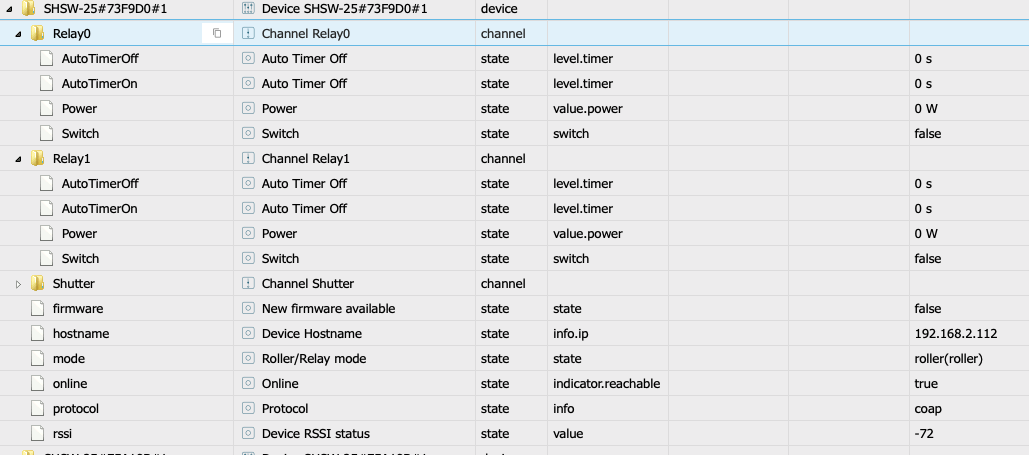
Hallo, setzte mich grade als Einsteiger mit iobroker auseinander und habe ein Problem mit dem shutter mode . Ich habe meherer Shelly 2.5 mit denen ich meine Rolladen steuere. Wie kann ich diese jetzt im iobroker ansteuern. Mir kommt es vor, als ob einige Punkte bei meinen Objekten fehlen. Über den switch von Relay0 oder 1 passiert auch nichts.
-
Hallo, setzte mich grade als Einsteiger mit iobroker auseinander und habe ein Problem mit dem shutter mode . Ich habe meherer Shelly 2.5 mit denen ich meine Rolladen steuere. Wie kann ich diese jetzt im iobroker ansteuern. Mir kommt es vor, als ob einige Punkte bei meinen Objekten fehlen. Über den switch von Relay0 oder 1 passiert auch nichts.
@Andi888 , der Ordner shutter sollte nicht leer sein. Hier findest du die States open, Close, Pause und Position zum Schalten der Rollläden.
Wenn der Ordner nicht gefüllt ist starte die Shelly Instanz nochmals neu. Dann sollten alle Objekte angelegt werden -
ich habe auch den Adapter upgedatet... jetzt geht irgendwie nichts mehr.
das Log sagt nichts ?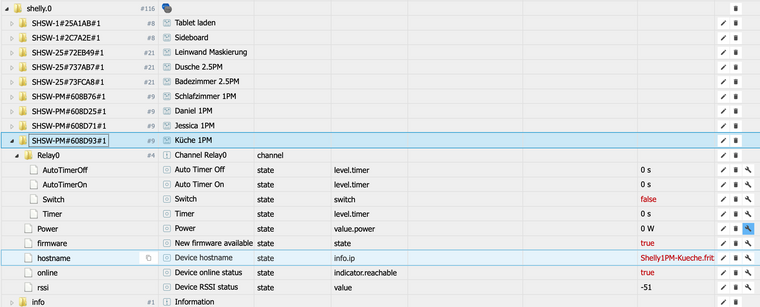
keines der Geräte ist via iobroker erreichbar, also reagiert auf das Relay switch... Der Adapter ist grün.
shelly.0	2019-05-28 18:06:46.981	debug	system.adapter.admin.0: logging true
shelly.0	2019-05-28 18:05:57.879	debug	stateChange shelly.0.SHSW-PM#608D93#1.Relay0.Switch {"val":true,"ack":false,"ts":1559059557875,"q":0,"from":"system.adapter.admin.0","user":"system.user.admin","lc":1559059557875}
shelly.0	2019-05-28 18:05:53.000	debug	system.adapter.admin.0: logging false
shelly.0	2019-05-28 18:05:31.809	info	Listening for Shelly packets in the network
shelly.0	2019-05-28 18:05:31.731	info	Stating Shelly adapter in CoAP modus.
shelly.0	2019-05-28 18:05:31.536	info	starting. Version 3.0.2 in /opt/iobroker/node_modules/iobroker.shelly, node: v8.15.0
shelly.0	2019-05-28 18:05:31.502	debug	statesDB connected
shelly.0	2019-05-28 18:05:31.480	debug	objectDB connected
shelly.0	2019-05-28 18:05:28.107	info	Closing Adapter
shelly.0	2019-05-28 18:05:28.089	info	Closing Adapter
shelly.0	2019-05-28 18:05:27.204	debug	system.adapter.admin.0: logging false
shelly.0	2019-05-28 18:04:49.911	info	Listening for Shelly packets in the network
shelly.0	2019-05-28 18:04:49.808	info	Stating Shelly adapter in CoAP modus.
shelly.0	2019-05-28 18:04:49.641	info	starting. Version 3.0.2 in /opt/iobroker/node_modules/iobroker.shelly, node: v8.15.0
shelly.0	2019-05-28 18:04:49.597	debug	statesDB connected
shelly.0	2019-05-28 18:04:49.573	debug	objectDB connected
shelly.0	2019-05-28 18:04:46.185	info	Closing Adapter
shelly.0	2019-05-28 18:06:46.982	debug	system.adapter.admin.0: logging true
Info:
ich habe heute ein alle Shelly's in ein neuen wlan umgezogen. Die Ip Adresse und alles ist gleich geblieben. Ich kann alle Shellys vis WebIF normal erreichen und schalten. (zurück ins alte wlan hilft auch nicht)einen Shelly 2.5PM habe ich aus dem ObjektBaum gelöscht... der wird durch den Adapter auch nicht gefunden und wieder angelegt.
Muss ich die Shelly mit dem Adapter, jetzt zusätzlich konfigurieren?In den Adapter Setting, habe ich all-IP und die iobroker spezifische versucht. Ohne Erfolg.
Idee, was ich machen kann??
-
ich habe auch den Adapter upgedatet... jetzt geht irgendwie nichts mehr.
das Log sagt nichts ?keines der Geräte ist via iobroker erreichbar, also reagiert auf das Relay switch... Der Adapter ist grün.
shelly.0	2019-05-28 18:06:46.981	debug	system.adapter.admin.0: logging true
shelly.0	2019-05-28 18:05:57.879	debug	stateChange shelly.0.SHSW-PM#608D93#1.Relay0.Switch {"val":true,"ack":false,"ts":1559059557875,"q":0,"from":"system.adapter.admin.0","user":"system.user.admin","lc":1559059557875}
shelly.0	2019-05-28 18:05:53.000	debug	system.adapter.admin.0: logging false
shelly.0	2019-05-28 18:05:31.809	info	Listening for Shelly packets in the network
shelly.0	2019-05-28 18:05:31.731	info	Stating Shelly adapter in CoAP modus.
shelly.0	2019-05-28 18:05:31.536	info	starting. Version 3.0.2 in /opt/iobroker/node_modules/iobroker.shelly, node: v8.15.0
shelly.0	2019-05-28 18:05:31.502	debug	statesDB connected
shelly.0	2019-05-28 18:05:31.480	debug	objectDB connected
shelly.0	2019-05-28 18:05:28.107	info	Closing Adapter
shelly.0	2019-05-28 18:05:28.089	info	Closing Adapter
shelly.0	2019-05-28 18:05:27.204	debug	system.adapter.admin.0: logging false
shelly.0	2019-05-28 18:04:49.911	info	Listening for Shelly packets in the network
shelly.0	2019-05-28 18:04:49.808	info	Stating Shelly adapter in CoAP modus.
shelly.0	2019-05-28 18:04:49.641	info	starting. Version 3.0.2 in /opt/iobroker/node_modules/iobroker.shelly, node: v8.15.0
shelly.0	2019-05-28 18:04:49.597	debug	statesDB connected
shelly.0	2019-05-28 18:04:49.573	debug	objectDB connected
shelly.0	2019-05-28 18:04:46.185	info	Closing Adapter
shelly.0	2019-05-28 18:06:46.982	debug	system.adapter.admin.0: logging true
Info:
ich habe heute ein alle Shelly's in ein neuen wlan umgezogen. Die Ip Adresse und alles ist gleich geblieben. Ich kann alle Shellys vis WebIF normal erreichen und schalten. (zurück ins alte wlan hilft auch nicht)einen Shelly 2.5PM habe ich aus dem ObjektBaum gelöscht... der wird durch den Adapter auch nicht gefunden und wieder angelegt.
Muss ich die Shelly mit dem Adapter, jetzt zusätzlich konfigurieren?In den Adapter Setting, habe ich all-IP und die iobroker spezifische versucht. Ohne Erfolg.
Idee, was ich machen kann??
@dos1973 , was passiert wenn Du in der Shelly App den Status änderst, siehst Du das in den ioBroker Shelly Objekten?
Hast Du bei Shellys ein Passwort unter "Restrict Login" gesetzt?
Befinden sich ioBroker und die Shellys im gleichen Subnetz?
Was mich wundert ist, dass online auf true steht!VG
Stübi -
ändern des status im webvif hat keine Reaktion in iobroker
nein, kein Passwort. habe auch in iobroker den admin rausgelöst
ja, alles im 192.168.10.xx

Support us
421
Online32.7k
Users82.5k
Topics1.3m
Posts