




Fehler bei Yahka-Adapter Installation (Windows)
-
Immer noch der Fehler…
4867_2018-07-24_15_18_32-window.jpg -
Gibt einen neuen Fehler jetzt
4867_yahka.jpg -
Oder probiere mal mit vorheriger Vorschlag. Ich hatte letzte Woche auch komischen Fehler bis ich npm 4.x installiert hattest…
Viele hat Probleme mit npm v5. und v6.x. Probiere mal "npm install -g npm@4" um downgrade npm auf 4.x `
-
Gibts das OpenSSL bei dir? Ansonsten das noch installieren? Alles strange … bei anderen geht das und auch bei unseren Appvexyor tests und so ... `
Das habe ich auch bereits installiert. Muss das in ein spezielles Verzeichnis?
-
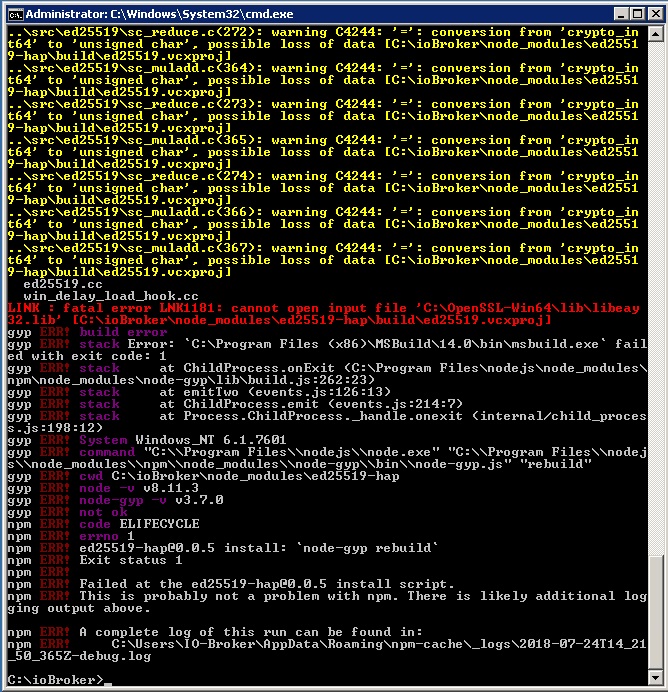
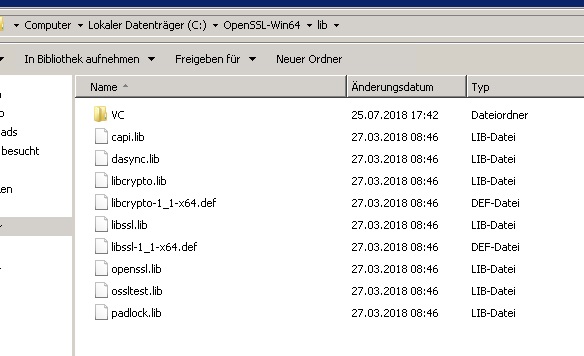
Ja, ist da wo er anmeckert.
4867_openssl_pfad.jpg -
Ja, ist da wo er anmeckert. `
Hallo
Das Problem hatte ich vorhin auch (mit openSSL 1.1.0f): Datei existierte nicht.
Bei der Version openSSL 1.0.2l gab es sie aber und die Installation vom Yahka-Adapter lief durch.
Hoffe bei dir klappts nun auch?
LG
Patrick
-
Hallo,
bei mir kommt folgender Fehler:
$ ./iobroker add yahka  --host DESKTOP-P9BVQ1I
NPM version: 6.4.0
npm install iobroker.yahka --production --save --prefix "C:/Users/Jörg/ioBroker" (System call)
gyp
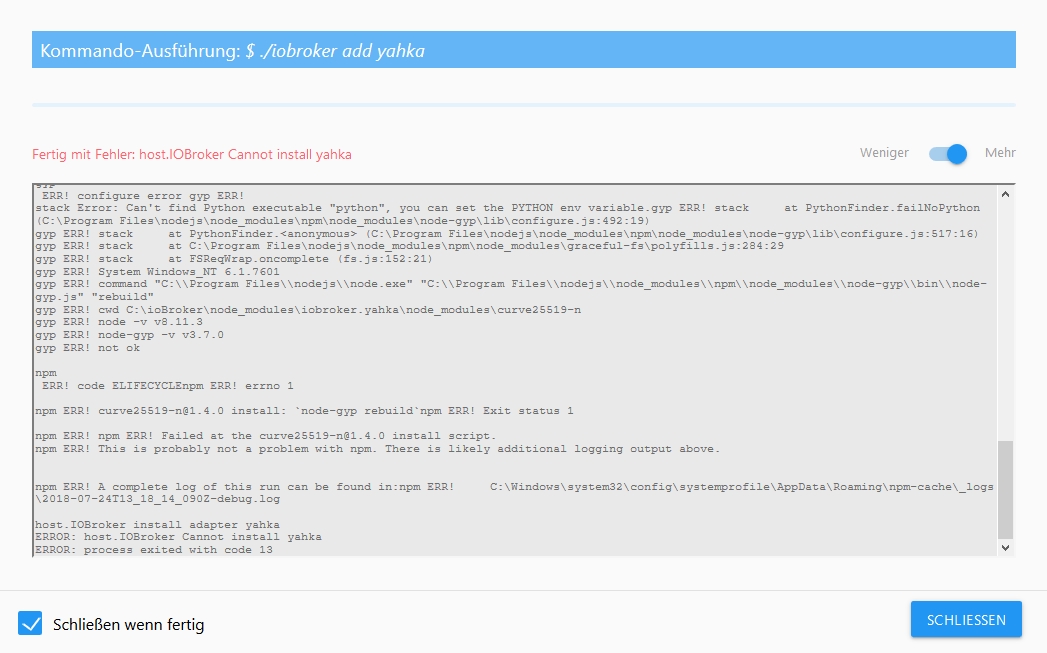
 ERR! configure error gyp ERR! stack Error: Can't find Python executable "python", you can set the PYTHON env variable.

gyp
ERR!

stack
     at PythonFinder.failNoPython (C:\Program Files\nodejs\node_modules\npm\node_modules\node-gyp\lib\configure.js:484:19)gyp ERR! stack     at PythonFinder. <anonymous>(C:\Program Files\nodejs\node_modules\npm\node_modules\node-gyp\lib\configure.js:509:16)
gyp
ERR!
 stack
     at C:\Program Files\nodejs\node_modules\npm\node_modules\graceful-fs\polyfills.js:284:29gyp
ERR!
 stack     at FSReqWrap.oncomplete (fs.js:152:21)
gyp
 ERR! System Windows_NT 10.0.17134
gyp
 ERR!

command
 "C:\\Program Files\\nodejs\\node.exe" "C:\\Program Files\\nodejs\\node_modules\\npm\\node_modules\\node-gyp\\bin\\node-gyp.js" "rebuild"
gyp
 ERR! cwd C:\Users\Jörg\ioBroker\node_modules\iobroker.yahka\node_modules\curve25519-n
gyp ERR! node -v v8.11.4gyp
ERR! node-gyp -v
 v3.8.0gyp ERR!

not ok
npm
 ERR! code ELIFECYCLEnpm
ERR!
 errno
 1
npm
 ERR! curve25519-n@1.4.0 install: `node-gyp rebuild`npm ERR! Exit status 1
npm ERR!
npm ERR! Failed at the curve25519-n@1.4.0 install script.
npm
ERR! This is probably not a problem with npm. There is likely additional logging output above.

npm ERR! A complete log of this run can be found in:npm ERR!     C:\WINDOWS\system32\config\systemprofile\AppData\Roaming\npm-cache\_logs\2018-11-27T16_08_44_284Z-debug.log

host.DESKTOP-P9BVQ1I install adapter yahka
NPM version: 6.4.0
npm install iobroker.yahka --production --save --prefix "C:/Users/Jörg/ioBroker" (System call)
gyp
 ERR! configure error gyp ERR! stack
 Error: Can't find Python executable "python", you can set the PYTHON env variable.gyp ERR! stack     at PythonFinder.failNoPython (C:\Program Files\nodejs\node_modules\npm\node_modules\node-gyp\lib\configure.js:484:19)
gyp ERR!
stack     at PythonFinder. <anonymous>(C:\Program Files\nodejs\node_modules\npm\node_modules\node-gyp\lib\configure.js:509:16)gyp ERR! stack     at C:\Program Files\nodejs\node_modules\npm\node_modules\graceful-fs\polyfills.js:284:29

gyp

ERR!
 stack     at FSReqWrap.oncomplete (fs.js:152:21)
gyp
 ERR!
System Windows_NT 10.0.17134
gyp
 ERR! command "C:\\Program Files\\nodejs\\node.exe" "C:\\Program Files\\nodejs\\node_modules\\npm\\node_modules\\node-gyp\\bin\\node-gyp.js" "rebuild"gyp
ERR!
cwd
 C:\Users\Jörg\ioBroker\node_modules\iobroker.yahka\node_modules\curve25519-n
gyp

ERR! node -v v8.11.4
gyp

ERR!
node-gyp -v v3.8.0
gyp

ERR!

not ok

npm
 ERR! code ELIFECYCLEnpm ERR! errno 1

npm
 ERR! curve25519-n@1.4.0 install: `node-gyp rebuild`npm ERR! Exit status 1
npm ERR!

npm
 ERR! Failed at the curve25519-n@1.4.0 install script.npm

ERR!
 This is probably not a problem with npm. There is likely additional logging output above.

npm ERR! A complete log of this run can be found in:npm ERR!     C:\WINDOWS\system32\config\systemprofile\AppData\Roaming\npm-cache\_logs\2018-11-27T16_08_50_986Z-debug.log

host.DESKTOP-P9BVQ1I install adapter yahka
NPM version: 6.4.0
npm install iobroker.yahka --production --save --prefix "C:/Users/Jörg/ioBroker" (System call)
gyp
 ERR! configure error
gyp
 ERR! stack Error: Can't find Python executable "python", you can set the PYTHON env variable.gyp ERR! stack     at PythonFinder.failNoPython (C:\Program Files\nodejs\node_modules\npm\node_modules\node-gyp\lib\configure.js:484:19)
gyp
 ERR! stack     at PythonFinder. <anonymous>(C:\Program Files\nodejs\node_modules\npm\node_modules\node-gyp\lib\configure.js:509:16)gyp ERR! stack     at C:\Program Files\nodejs\node_modules\npm\node_modules\graceful-fs\polyfills.js:284:29
gyp ERR! stack     at FSReqWrap.oncomplete (fs.js:152:21)

gyp ERR! System Windows_NT 10.0.17134
gyp ERR! command
 "C:\\Program Files\\nodejs\\node.exe" "C:\\Program Files\\nodejs\\node_modules\\npm\\node_modules\\node-gyp\\bin\\node-gyp.js" "rebuild"gyp ERR!
cwd C:\Users\Jörg\ioBroker\node_modules\iobroker.yahka\node_modules\curve25519-ngyp ERR! node -v v8.11.4
gyp ERR! node-gyp -v v3.8.0

gyp ERR! not ok
npm
 ERR! code ELIFECYCLEnpm ERR! errno
 1
npm
 ERR! curve25519-n@1.4.0 install: `node-gyp rebuild`npm ERR! Exit status 1
npm ERR!
npm
ERR! Failed at the curve25519-n@1.4.0 install script.npm ERR! This is probably not a problem with npm. There is likely additional logging output above.

npm ERR! A complete log of this run can be found in:npm ERR!     C:\WINDOWS\system32\config\systemprofile\AppData\Roaming\npm-cache\_logs\2018-11-27T16_08_57_588Z-debug.log

host.DESKTOP-P9BVQ1I install adapter yahka
ERROR: host.DESKTOP-P9BVQ1I Cannot install yahka
ERROR: process exited with code 13</anonymous></anonymous></anonymous>
Jemand eine Idee?
-
Servus,
das ist eigentlich installiert.
VG
-
HI,
ich wage mich mal wieder ran.
In welchem Pfad muss es denn?
BuildTools etc. ist alles installiert.
Und Python habe ich damals schon mal gebraucht bei der ioBroker installation. Kann das trotzdem in einem falschen Pfad liegen?
Danke
-
Hi,
also ich habe folgendes gefunden und probiert ; leider nicht vom erfolg gekrönt:
npm --add-python-to-path='true' --debug install --global windows-build-toolsdavor:
npm install --global --production windows-build-toolsnpm install --global node-gypDas kommt, wenn man zumindest nach dem Fehler sucht.
Unter Systemvariablen kann man unter "path" einen "link" hinzufügen.
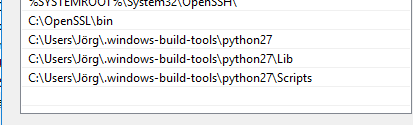
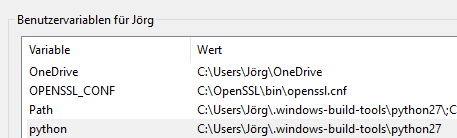
Aber da komme ich irgendwie nicht weiter.
VG
Jörg


Hey! Du scheinst an dieser Unterhaltung interessiert zu sein, hast aber noch kein Konto.
Hast du es satt, bei jedem Besuch durch die gleichen Beiträge zu scrollen? Wenn du dich für ein Konto anmeldest, kommst du immer genau dorthin zurück, wo du zuvor warst, und kannst dich über neue Antworten benachrichtigen lassen (entweder per E-Mail oder Push-Benachrichtigung). Du kannst auch Lesezeichen speichern und Beiträge positiv bewerten, um anderen Community-Mitgliedern deine Wertschätzung zu zeigen.
Mit deinem Input könnte dieser Beitrag noch besser werden 💗
Registrieren Anmelden322
Online33.0k
Benutzer83.6k
Themen1.3m
Beiträge