Skip to content
  • Home
  • Aktuell
  • Tags
  • 0 Ungelesen 0
  • Kategorien
  • Unreplied
  • Beliebt
  • GitHub
  • Docu
  • Hilfe
Skins
  • Light
  • Brite
  • Cerulean
  • Cosmo
  • Flatly
  • Journal
  • Litera
  • Lumen
  • Lux
  • Materia
  • Minty
  • Morph
  • Pulse
  • Sandstone
  • Simplex
  • Sketchy
  • Spacelab
  • United
  • Yeti
  • Zephyr
  • Dark
  • Cyborg
  • Darkly
  • Quartz
  • Slate
  • Solar
  • Superhero
  • Vapor

  • Standard: (Kein Skin)
  • Kein Skin
Einklappen
ioBroker Logo

Community Forum

donate donate
  1. ioBroker Community Home
  2. Deutsch
  3. ioBroker Allgemein
  4. Fehler bei Yahka-Adapter Installation (Windows)

NEWS

  • Monatsrückblick Januar/Februar 2026 ist online!
    BluefoxB
    Bluefox
    17
    1
    456

  • Jahresrückblick 2025 – unser neuer Blogbeitrag ist online! ✨
    BluefoxB
    Bluefox
    17
    1
    5.1k

  • Neuer Blogbeitrag: Monatsrückblick - Dezember 2025 🎄
    BluefoxB
    Bluefox
    13
    1
    1.4k

Fehler bei Yahka-Adapter Installation (Windows)

Geplant Angeheftet Gesperrt Verschoben ioBroker Allgemein
39 Beiträge 5 Kommentatoren 1.9k Aufrufe
  • Älteste zuerst
  • Neuste zuerst
  • Meiste Stimmen
Antworten
  • In einem neuen Thema antworten
Anmelden zum Antworten
Dieses Thema wurde gelöscht. Nur Nutzer mit entsprechenden Rechten können es sehen.
  • surfer09S Offline
    surfer09S Offline
    surfer09
    schrieb am zuletzt editiert von
    #29

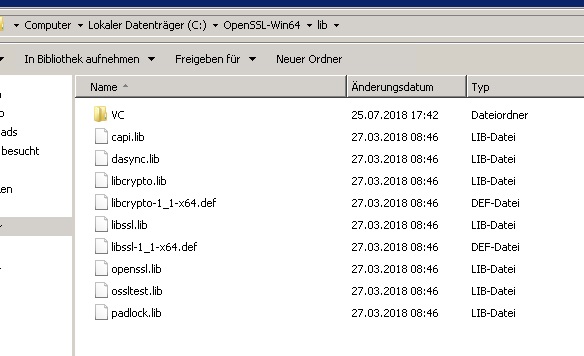
    Ja, ist da wo er anmeckert.
    4867_openssl_pfad.jpg

    IO-Broker Master/Slave auf Windows 11 64bit, NPM 10.9.4, Node 22.21.1 js-controller 7.0.7

    1 Antwort Letzte Antwort
    0
    • apollon77A Offline
      apollon77A Offline
      apollon77
      schrieb am zuletzt editiert von
      #30

      Aber er sucht ein file was da nicht ist … ehrlich habe ich jetzt keine Idee mehr. Bei Vielen Usern geht es. :-(

      Gesendet vom Handy ...

      Beitrag hat geholfen? Votet rechts unten im Beitrag :-) https://paypal.me/Apollon77 / https://github.com/sponsors/Apollon77

      • Debug-Log für Instanz einschalten? Admin -> Instanzen -> Expertenmodus -> Instanz aufklappen - Loglevel ändern
      • Logfiles auf Platte /opt/iobroker/log/… nutzen, Admin schneidet Zeilen ab
      1 Antwort Letzte Antwort
      0
      • P Offline
        P Offline
        Pat_83
        schrieb am zuletzt editiert von
        #31

        @surfer09:

        Ja, ist da wo er anmeckert. `

        Hallo

        Das Problem hatte ich vorhin auch (mit openSSL 1.1.0f): Datei existierte nicht.

        Bei der Version openSSL 1.0.2l gab es sie aber und die Installation vom Yahka-Adapter lief durch.

        Hoffe bei dir klappts nun auch?

        LG

        Patrick

        1 Antwort Letzte Antwort
        0
        • N Offline
          N Offline
          nousefor82
          schrieb am zuletzt editiert von
          #32

          Hallo,

          @surfer09: hast du das Problem behoben?

          @Patrick: wie bekomme ich die neu version 1.0.2l denn auf dem rechner installiert?

          Vielen Dank,

          Jörg

          1 Antwort Letzte Antwort
          0
          • N Offline
            N Offline
            nousefor82
            schrieb am zuletzt editiert von
            #33

            Hallo,

            bei mir kommt folgender Fehler:

            $ ./iobroker add yahka  --host DESKTOP-P9BVQ1I
            NPM version: 6.4.0
            npm install iobroker.yahka --production --save --prefix "C:/Users/Jörg/ioBroker" (System call)
            gyp
             ERR! configure error gyp ERR! stack Error: Can't find Python executable "python", you can set the PYTHON env variable.
            
            gyp 
            ERR!
            
            stack
                 at PythonFinder.failNoPython (C:\Program Files\nodejs\node_modules\npm\node_modules\node-gyp\lib\configure.js:484:19)gyp ERR! stack     at PythonFinder. <anonymous>(C:\Program Files\nodejs\node_modules\npm\node_modules\node-gyp\lib\configure.js:509:16)
            gyp 
            ERR!
             stack
                 at C:\Program Files\nodejs\node_modules\npm\node_modules\graceful-fs\polyfills.js:284:29gyp 
            ERR!
             stack     at FSReqWrap.oncomplete (fs.js:152:21)
            gyp
             ERR! System Windows_NT 10.0.17134
            gyp
             ERR!
            
            command
             "C:\\Program Files\\nodejs\\node.exe" "C:\\Program Files\\nodejs\\node_modules\\npm\\node_modules\\node-gyp\\bin\\node-gyp.js" "rebuild"
            gyp
             ERR! cwd C:\Users\Jörg\ioBroker\node_modules\iobroker.yahka\node_modules\curve25519-n
            gyp ERR! node -v v8.11.4gyp 
            ERR! node-gyp -v
             v3.8.0gyp ERR!
            
            not ok 
            npm
             ERR! code ELIFECYCLEnpm 
            ERR!
             errno
             1
            npm
             ERR! curve25519-n@1.4.0 install: `node-gyp rebuild`npm ERR! Exit status 1
            npm ERR! 
            npm ERR! Failed at the curve25519-n@1.4.0 install script.
            npm 
            ERR! This is probably not a problem with npm. There is likely additional logging output above.
            
            npm ERR! A complete log of this run can be found in:npm ERR!     C:\WINDOWS\system32\config\systemprofile\AppData\Roaming\npm-cache\_logs\2018-11-27T16_08_44_284Z-debug.log
            
            host.DESKTOP-P9BVQ1I install adapter yahka
            NPM version: 6.4.0
            npm install iobroker.yahka --production --save --prefix "C:/Users/Jörg/ioBroker" (System call)
            gyp
             ERR! configure error gyp ERR! stack
             Error: Can't find Python executable "python", you can set the PYTHON env variable.gyp ERR! stack     at PythonFinder.failNoPython (C:\Program Files\nodejs\node_modules\npm\node_modules\node-gyp\lib\configure.js:484:19)
            gyp ERR! 
            stack     at PythonFinder. <anonymous>(C:\Program Files\nodejs\node_modules\npm\node_modules\node-gyp\lib\configure.js:509:16)gyp ERR! stack     at C:\Program Files\nodejs\node_modules\npm\node_modules\graceful-fs\polyfills.js:284:29
            
            gyp
            
            ERR!
             stack     at FSReqWrap.oncomplete (fs.js:152:21)
            gyp
             ERR! 
            System Windows_NT 10.0.17134
            gyp
             ERR! command "C:\\Program Files\\nodejs\\node.exe" "C:\\Program Files\\nodejs\\node_modules\\npm\\node_modules\\node-gyp\\bin\\node-gyp.js" "rebuild"gyp 
            ERR! 
            cwd
             C:\Users\Jörg\ioBroker\node_modules\iobroker.yahka\node_modules\curve25519-n
            gyp
            
            ERR! node -v v8.11.4
            gyp
            
            ERR! 
            node-gyp -v v3.8.0
            gyp
            
            ERR!
            
            not ok
            
            npm
             ERR! code ELIFECYCLEnpm ERR! errno 1
            
            npm
             ERR! curve25519-n@1.4.0 install: `node-gyp rebuild`npm ERR! Exit status 1
            npm ERR! 
            
            npm
             ERR! Failed at the curve25519-n@1.4.0 install script.npm
            
            ERR!
             This is probably not a problem with npm. There is likely additional logging output above.
            
            npm ERR! A complete log of this run can be found in:npm ERR!     C:\WINDOWS\system32\config\systemprofile\AppData\Roaming\npm-cache\_logs\2018-11-27T16_08_50_986Z-debug.log
            
            host.DESKTOP-P9BVQ1I install adapter yahka
            NPM version: 6.4.0
            npm install iobroker.yahka --production --save --prefix "C:/Users/Jörg/ioBroker" (System call)
            gyp
             ERR! configure error 
            gyp
             ERR! stack Error: Can't find Python executable "python", you can set the PYTHON env variable.gyp ERR! stack     at PythonFinder.failNoPython (C:\Program Files\nodejs\node_modules\npm\node_modules\node-gyp\lib\configure.js:484:19)
            gyp
             ERR! stack     at PythonFinder. <anonymous>(C:\Program Files\nodejs\node_modules\npm\node_modules\node-gyp\lib\configure.js:509:16)gyp ERR! stack     at C:\Program Files\nodejs\node_modules\npm\node_modules\graceful-fs\polyfills.js:284:29
            gyp ERR! stack     at FSReqWrap.oncomplete (fs.js:152:21)
            
            gyp ERR! System Windows_NT 10.0.17134
            gyp ERR! command
             "C:\\Program Files\\nodejs\\node.exe" "C:\\Program Files\\nodejs\\node_modules\\npm\\node_modules\\node-gyp\\bin\\node-gyp.js" "rebuild"gyp ERR! 
            cwd C:\Users\Jörg\ioBroker\node_modules\iobroker.yahka\node_modules\curve25519-ngyp ERR! node -v v8.11.4
            gyp ERR! node-gyp -v v3.8.0
            
            gyp ERR! not ok 
            npm
             ERR! code ELIFECYCLEnpm ERR! errno
             1
            npm
             ERR! curve25519-n@1.4.0 install: `node-gyp rebuild`npm ERR! Exit status 1
            npm ERR! 
            npm 
            ERR! Failed at the curve25519-n@1.4.0 install script.npm ERR! This is probably not a problem with npm. There is likely additional logging output above.
            
            npm ERR! A complete log of this run can be found in:npm ERR!     C:\WINDOWS\system32\config\systemprofile\AppData\Roaming\npm-cache\_logs\2018-11-27T16_08_57_588Z-debug.log
            
            host.DESKTOP-P9BVQ1I install adapter yahka
            ERROR: host.DESKTOP-P9BVQ1I Cannot install yahka
            ERROR: process exited with code 13</anonymous></anonymous></anonymous>
            

            Jemand eine Idee?

            1 Antwort Letzte Antwort
            0
            • apollon77A Offline
              apollon77A Offline
              apollon77
              schrieb am zuletzt editiert von
              #34

              Ja Python fehlt und das heißt meistens das für Windows Build Tools fehlen Google mal danach oder suche hier im Forum bzw bei yahka auf der GitHub Seite.

              Gesendet vom Handy …

              Beitrag hat geholfen? Votet rechts unten im Beitrag :-) https://paypal.me/Apollon77 / https://github.com/sponsors/Apollon77

              • Debug-Log für Instanz einschalten? Admin -> Instanzen -> Expertenmodus -> Instanz aufklappen - Loglevel ändern
              • Logfiles auf Platte /opt/iobroker/log/… nutzen, Admin schneidet Zeilen ab
              1 Antwort Letzte Antwort
              0
              • N Offline
                N Offline
                nousefor82
                schrieb am zuletzt editiert von
                #35

                Servus,

                das ist eigentlich installiert.

                VG

                1 Antwort Letzte Antwort
                0
                • apollon77A Offline
                  apollon77A Offline
                  apollon77
                  schrieb am zuletzt editiert von
                  #36

                  Dann wohl nicht im Pfad sonst wäre der fehle nicht wie ist …

                  Gesendet vom Handy ...

                  Beitrag hat geholfen? Votet rechts unten im Beitrag :-) https://paypal.me/Apollon77 / https://github.com/sponsors/Apollon77

                  • Debug-Log für Instanz einschalten? Admin -> Instanzen -> Expertenmodus -> Instanz aufklappen - Loglevel ändern
                  • Logfiles auf Platte /opt/iobroker/log/… nutzen, Admin schneidet Zeilen ab
                  1 Antwort Letzte Antwort
                  0
                  • N Offline
                    N Offline
                    nousefor82
                    schrieb am zuletzt editiert von
                    #37

                    HI,

                    ich wage mich mal wieder ran.

                    In welchem Pfad muss es denn?

                    BuildTools etc. ist alles installiert.

                    Und Python habe ich damals schon mal gebraucht bei der ioBroker installation. Kann das trotzdem in einem falschen Pfad liegen?

                    Danke

                    1 Antwort Letzte Antwort
                    0
                    • apollon77A Offline
                      apollon77A Offline
                      apollon77
                      schrieb am zuletzt editiert von
                      #38

                      Naja windows hat die PATH variable die man auch irgendwo editieren kann … habe vergessen wo (Windows zu lange her). da muss der Pfad zu Python drin sein

                      Beitrag hat geholfen? Votet rechts unten im Beitrag :-) https://paypal.me/Apollon77 / https://github.com/sponsors/Apollon77

                      • Debug-Log für Instanz einschalten? Admin -> Instanzen -> Expertenmodus -> Instanz aufklappen - Loglevel ändern
                      • Logfiles auf Platte /opt/iobroker/log/… nutzen, Admin schneidet Zeilen ab
                      1 Antwort Letzte Antwort
                      0
                      • N Offline
                        N Offline
                        nousefor82
                        schrieb am zuletzt editiert von
                        #39

                        Hi,

                        also ich habe folgendes gefunden und probiert ; leider nicht vom erfolg gekrönt:

                        npm --add-python-to-path='true' --debug install --global windows-build-tools
                        

                        davor:

                        npm install --global --production windows-build-tools
                        
                        npm install --global node-gyp
                        

                        Das kommt, wenn man zumindest nach dem Fehler sucht.

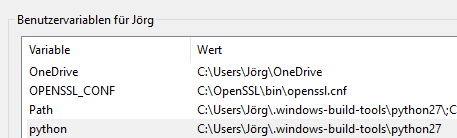
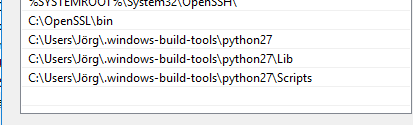
                        Unter Systemvariablen kann man unter "path" einen "link" hinzufügen.
                        8143_variablen.png
                        8143_variablen1.png

                        Aber da komme ich irgendwie nicht weiter.

                        VG

                        Jörg

                        1 Antwort Letzte Antwort
                        0
                        Antworten
                        • In einem neuen Thema antworten
                        Anmelden zum Antworten
                        • Älteste zuerst
                        • Neuste zuerst
                        • Meiste Stimmen


                        Support us

                        ioBroker
                        Community Adapters
                        Donate
                        FAQ Cloud / IOT
                        HowTo: Node.js-Update
                        HowTo: Backup/Restore
                        Downloads
                        BLOG

                        610

                        Online

                        32.7k

                        Benutzer

                        82.5k

                        Themen

                        1.3m

                        Beiträge
                        Community
                        Impressum | Datenschutz-Bestimmungen | Nutzungsbedingungen | Einwilligungseinstellungen
                        ioBroker Community 2014-2025
                        logo
                        • Anmelden

                        • Du hast noch kein Konto? Registrieren

                        • Anmelden oder registrieren, um zu suchen
                        • Erster Beitrag
                          Letzter Beitrag
                        0
                        • Home
                        • Aktuell
                        • Tags
                        • Ungelesen 0
                        • Kategorien
                        • Unreplied
                        • Beliebt
                        • GitHub
                        • Docu
                        • Hilfe