




Adapter: iobroker.backitup (stable Release)
-
Hallo
ich habe heute den aktuellen Adapter installiert und auch manuell ein komplett Backup gestartet. Meines ist nur von 192 auf 195MB hoch. Im Verlauf der Wochen wurden es immer mal einige MB mehr, aber es werden ja auch regelmäßig Adapter aktualisiert, die einen größeren Funktionsumfang haben.
Also bei meiner Installation würde ich das für normal halten.
-
Wieviele Backups liegen aktuell Lokal bei dir ab und was hast du in der Config eingestellt, wieviele erhalten bleiben sollen?
Gesendet von iPhone mit Tapatalk `
So, der Vollständigkeit halber: Backitup läuft (jetzt) so wie erwartet! Vielen Dank für den Adapter und die Unterstützung!
-
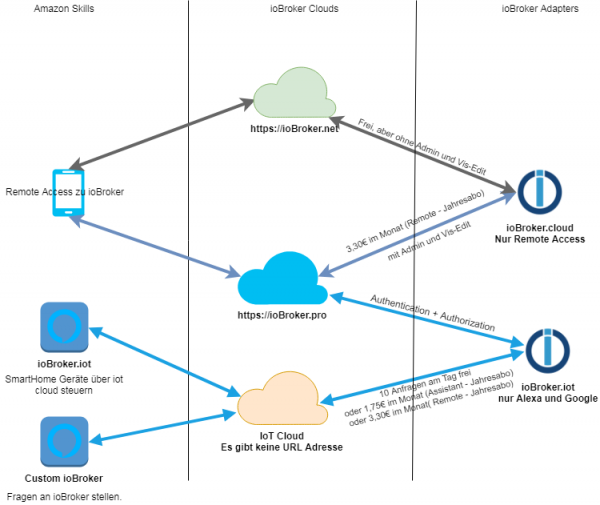
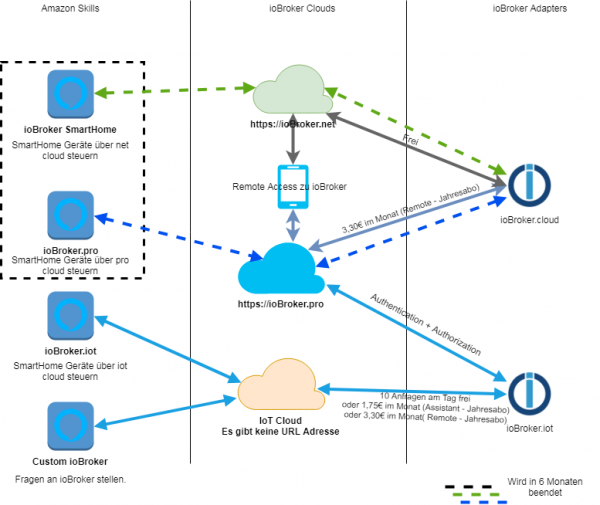
Wie verhält sich das Backup , wenn nun das IOBroker System sich ändert?
IOT, Pro, Free Cloud….kann man in 6 Monaten noch ein altes Backup einspielen , das dann noch funktioniert?
-
Die Frage zielte vornehmlich auf die neuen Änderungen, die gerade eingeführt werden.
Hat das Auswirkungen auf den Adapter?
Auf die Backups, die ich z.B. Heute mache ohne die neuen Skills IOT, Pro etc. und dann zurückspielen möchte, es dann aber die Freecloud und andere Einstellungen nicht mehr gibt.
-
Hallo Zusammen,
habe den Adapter mal installiert aber leider funktioniert er nicht und finde keine Lösung. Es wird zwar auf dem PRI ein Backup erzeugt, aber dies wird nicht auf die NAS per CIFS oder FTP oder sonst wie kopiert.
Gestartet...
[DEBUG] [mount] start with {"mountType":"CIFS","type":"storage","source":"Local","mount":"192.168.7.200","fileDir":"/opt/iobroker/node_modules/iobroker.backitup","smb":"vers=2.0","sudo":false,"deleteOldBackup":true,"ownDir":false,"bkpType":"Minimal","dir":"TMBackup/IOB","dirMinimal":"sharename/backupDir","dirTotal":"sharename/backupDir","user":"hm-iob","pass":"****"}
[ERROR] [mount] - [undefined /bin/sh: 1: ***Password***,rw,file_mode=0777,dir_mode=0777: not found

Usage:
 mount [-lhV]
 mount -a [options]
 mount [options] [--source] <source> | [--target] <directory>
 mount [options] <source> <directory>
 mount <operation> <mountpoint> [<target>]

Mount a filesystem.

Options:
 -a, --all               mount all filesystems mentioned in fstab
 -c, --no-canonicalize   don't canonicalize paths
 -f, --fake              dry run; skip the mount(2) syscall
 -F, --fork              fork off for each device (use with -a)
 -T, --fstab <path>      alternative file to /etc/fstab
 -i, --internal-only     don't call the mount. <type>helpers
 -l, --show-labels       show also filesystem labels
 -n, --no-mtab           don't write to /etc/mtab
 -o, --options     comma-separated list of mount options
 -O, --test-opts   limit the set of filesystems (use with -a)
 -r, --read-only         mount the filesystem read-only (same as -o ro)
 -t, --types       limit the set of filesystem types
     --source <src>      explicitly specifies source (path, label, uuid)
     --target <target>   explicitly specifies mountpoint
 -v, --verbose           say what is being done
 -w, --rw, --read-write  mount the filesystem read-write (default)

 -h, --help     display this help and exit
 -V, --version  output version information and exit

Source:
 -L, --label <label>     synonym for LABEL= <label>-U, --uuid <uuid>       synonym for UUID= <uuid>LABEL= <label>specifies device by filesystem label
 UUID= <uuid>specifies device by filesystem UUID
 PARTLABEL= <label>specifies device by partition label
 PARTUUID= <uuid>specifies device by partition UUID
 <device>                specifies device by path
 <directory>             mountpoint for bind mounts (see --bind/rbind)
 <file>                  regular file for loopdev setup

Operations:
 -B, --bind              mount a subtree somewhere else (same as -o bind)
 -M, --move              move a subtree to some other place
 -R, --rbind             mount a subtree and all submounts somewhere else
 --make-shared           mark a subtree as shared
 --make-slave            mark a subtree as slave
 --make-private          mark a subtree as private
 --make-unbindable       mark a subtree as unbindable
 --make-rshared          recursively mark a whole subtree as shared
 --make-rslave           recursively mark a whole subtree as slave
 --make-rprivate         recursively mark a whole subtree as private
 --make-runbindable      recursively mark a whole subtree as unbindable

For more details see mount(8).

[ERROR] [mount] - [IGNORED] Error: Command failed: mount -t cifs -o user=hm-iob,password=****password****,rw,file_mode=0777,dir_mode=0777 //192.168.7.200/TMBackup/IOB /opt/iobroker/backups
/bin/sh: 1: ****password***,rw,file_mode=0777,dir_mode=0777: not found

Usage:
 mount [-lhV]
 mount -a [options]
 mount [options] [--source] <source> | [--target] <directory>
 mount [options] <source> <directory>
 mount <operation> <mountpoint> [<target>]

Mount a filesystem.

Options:
 -a, --all               mount all filesystems mentioned in fstab
 -c, --no-canonicalize   don't canonicalize paths
 -f, --fake              dry run; skip the mount(2) syscall
 -F, --fork              fork off for each device (use with -a)
 -T, --fstab <path>      alternative file to /etc/fstab
 -i, --internal-only     don't call the mount. <type>helpers
 -l, --show-labels       show also filesystem labels
 -n, --no-mtab           don't write to /etc/mtab
 -o, --options     comma-separated list of mount options
 -O, --test-opts   limit the set of filesystems (use with -a)
 -r, --read-only         mount the filesystem read-only (same as -o ro)
 -t, --types       limit the set of filesystem types
     --source <src>      explicitly specifies source (path, label, uuid)
     --target <target>   explicitly specifies mountpoint
 -v, --verbose           say what is being done
 -w, --rw, --read-write  mount the filesystem read-write (default)

 -h, --help     display this help and exit
 -V, --version  output version information and exit

Source:
 -L, --label <label>     synonym for LABEL= <label>-U, --uuid <uuid>       synonym for UUID= <uuid>LABEL= <label>specifies device by filesystem label
 UUID= <uuid>specifies device by filesystem UUID
 PARTLABEL= <label>specifies device by partition label
 PARTUUID= <uuid>specifies device by partition UUID
 <device>                specifies device by path
 <directory>             mountpoint for bind mounts (see --bind/rbind)
 <file>                  regular file for loopdev setup

Operations:
 -B, --bind              mount a subtree somewhere else (same as -o bind)
 -M, --move              move a subtree to some other place
 -R, --rbind             mount a subtree and all submounts somewhere else
 --make-shared           mark a subtree as shared
 --make-slave            mark a subtree as slave
 --make-private          mark a subtree as private
 --make-unbindable       mark a subtree as unbindable
 --make-rshared          recursively mark a whole subtree as shared
 --make-rslave           recursively mark a whole subtree as slave
 --make-rprivate         recursively mark a whole subtree as private
 --make-runbindable      recursively mark a whole subtree as unbindable

For more details see mount(8).

[DEBUG] [minimal] start with {"type":"creator","time":"02:00","debugging":false,"everyXDays":"1","deleteBackupAfter":0,"mysqlEnabled":false,"redisEnabled":false,"cifs":{"enabled":true,"mountType":"CIFS","type":"storage","source":"Local","mount":"//192.168.7.200","fileDir":"/opt/iobroker/node_modules/iobroker.backitup","smb":"vers=2.0","sudo":false,"deleteOldBackup":true,"ownDir":false,"bkpType":"Minimal","dir":"/TMBackup/IOB","dirMinimal":"sharename/backupDir","dirTotal":"sharename/backupDir","user":"hm-iob","pass":"****","context":{"fileNames":[],"errors":{},"done":[],"types":[]},"adapter":null},"dir":"/opt/iobroker","redis":{"enabled":false,"type":"creator","ftp":{"enabled":false,"type":"storage","source":"Local","host":"","deleteOldBackup":false,"ownDir":false,"bkpType":"Minimal","dir":"/backupDir","dirMinimal":"/backupDir/minimal","dirTotal":"/backupDir/total","user":"","pass":"","port":"21"},"cifs":{"enabled":true,"mountType":"CIFS","type":"storage","source":"Local","mount":"192.168.7.200","fileDir":"/opt/iobroker/node_modules/iobroker.backitup","smb":"vers=2.0","sudo":false,"deleteOldBackup":true,"ownDir":false,"bkpType":"Minimal","dir":"TMBackup/IOB","dirMinimal":"sharename/backupDir","dirTotal":"sharename/backupDir","user":"hm-iob","pass":"***Passwort***"},"dropbox":{"enabled":false,"type":"storage","source":"Local","deleteOldBackup":false,"accessToken":"","ownDir":false,"bkpType":"Minimal","dir":"/backupDir","dirMinimal":"/backupDir/minimal","dirTotal":"/backupDir/total"},"path":"/var/lib/redis"},"history":{"enabled":true,"type":"message","entriesNumber":"25","systemLang":"de"},"email":{"enabled":false,"notificationsType":"Telegram","type":"message","instance":"","NoticeType":"longEmailNotice","emailReceiver":"xxx@xxx.com","emailSender":"xxx@xxx.com","systemLang":"de"},"pushover":{"enabled":false,"notificationsType":"Telegram","type":"message","instance":"","SilentNotice":false,"NoticeType":"longPushoverNotice","systemLang":"de"},"backupDir":"/opt/iobroker/backups"}
[DEBUG] [minimal] - Backup created: /opt/iobroker/backups/minimal_2018_12_11-21_28_51_backupiobroker.tar.gz

[DEBUG] [minimal] - done
[DEBUG] [cifs] start with {"mountType":"CIFS","type":"storage","source":"Local","mount":"//192.168.7.200","fileDir":"/opt/iobroker/node_modules/iobroker.backitup","smb":"vers=2.0","sudo":false,"deleteOldBackup":true,"ownDir":false,"bkpType":"Minimal","dir":"/TMBackup/IOB","dirMinimal":"sharename/backupDir","dirTotal":"sharename/backupDir","user":"hm-iob","pass":"****","backupDir":"/opt/iobroker/backups","deleteBackupAfter":0}
[DEBUG] [cifs] - done
[DEBUG] [clean] start with {"deleteBackupAfter":0}
[DEBUG] [clean] - done
[DEBUG] [history] start with {"type":"creator","time":"02:00","debugging":false,"everyXDays":"1","deleteBackupAfter":0,"mysqlEnabled":false,"redisEnabled":false,"cifs":{"enabled":true,"mountType":"CIFS","type":"storage","source":"Local","mount":"//192.168.7.200","fileDir":"/opt/iobroker/node_modules/iobroker.backitup","smb":"vers=2.0","sudo":false,"deleteOldBackup":true,"ownDir":false,"bkpType":"Minimal","dir":"/TMBackup/IOB","dirMinimal":"sharename/backupDir","dirTotal":"sharename/backupDir","user":"hm-iob","pass":"****","context":{"fileNames":["/opt/iobroker/backups/minimal_2018_12_11-21_28_51_backupiobroker.tar.gz"],"errors":{},"done":["minimal"],"types":["minimal"]},"adapter":null},"dir":"/opt/iobroker","redis":{"enabled":false,"type":"creator","ftp":{"enabled":false,"type":"storage","source":"Local","host":"","deleteOldBackup":false,"ownDir":false,"bkpType":"Minimal","dir":"/backupDir","dirMinimal":"/backupDir/minimal","dirTotal":"/backupDir/total","user":"","pass":"","port":"21"},"cifs":{"enabled":true,"mountType":"CIFS","type":"storage","source":"Local","mount":"192.168.7.200","fileDir":"/opt/iobroker/node_modules/iobroker.backitup","smb":"vers=2.0","sudo":false,"deleteOldBackup":true,"ownDir":false,"bkpType":"Minimal","dir":"TMBackup/IOB","dirMinimal":"sharename/backupDir","dirTotal":"sharename/backupDir","user":"hm-iob","pass":"***Passwort***"},"dropbox":{"enabled":false,"type":"storage","source":"Local","deleteOldBackup":false,"accessToken":"","ownDir":false,"bkpType":"Minimal","dir":"/backupDir","dirMinimal":"/backupDir/minimal","dirTotal":"/backupDir/total"},"path":"/var/lib/redis"},"history":{"enabled":true,"type":"message","entriesNumber":"25","systemLang":"de","time":"11\. Dezember 2018 um 21:28 Uhr"},"email":{"enabled":false,"notificationsType":"Telegram","type":"message","instance":"","NoticeType":"longEmailNotice","emailReceiver":"xxx@xxx.com","emailSender":"xxx@xxx.com","systemLang":"de"},"pushover":{"enabled":false,"notificationsType":"Telegram","type":"message","instance":"","SilentNotice":false,"NoticeType":"longPushoverNotice","systemLang":"de"},"backupDir":"/opt/iobroker/backups"}
[DEBUG] [history] - done
[DEBUG] [umount] start with {"mountType":"CIFS","type":"storage","source":"Local","mount":"//192.168.7.200","fileDir":"/opt/iobroker/node_modules/iobroker.backitup","smb":"vers=2.0","sudo":false,"deleteOldBackup":true,"ownDir":false,"bkpType":"Minimal","dir":"/TMBackup/IOB","dirMinimal":"sharename/backupDir","dirTotal":"sharename/backupDir","user":"hm-iob","pass":"****","backupDir":"/opt/iobroker/backups"}</file></directory></device></uuid></label></uuid></label></uuid></uuid></label></label></target></src></type></path></target></mountpoint></operation></directory></directory></file></directory></device></uuid></label></uuid></label></uuid></uuid></label></label></target></src></type></path></target></mountpoint></operation></directory></directory>
Ich habe den Hostnamen versucht. Die IP und auch beim Pfad habe ich alles Groß, alles klein und so wie es ist versucht. Ich habe vom Mac aus mit Forklifter und dem Finder den Pfad per smb überprüft. auf dem Mac geht der Pfad. Nur halt vom RPI aus nicht.
Wer hat eine Idee was ich noch machen kann?
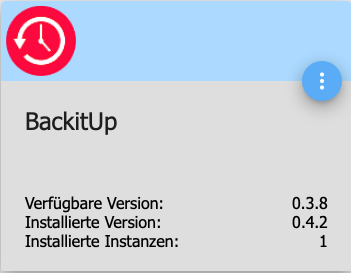
nebenbei….. angeboten wird Version 0.3.8 und installiert wird 0.4.2 ;-)
Danke
Gruß
Rainer
13307_version.png -
Hallo Zusammen,
habe den Adapter mal installiert aber leider funktioniert er nicht und finde keine Lösung. Es wird zwar auf dem PRI ein Backup erzeugt, aber dies wird nicht auf die NAS per CIFS oder FTP oder sonst wie kopiert.
Gestartet...
[DEBUG] [mount] start with {"mountType":"CIFS","type":"storage","source":"Local","mount":"192.168.7.200","fileDir":"/opt/iobroker/node_modules/iobroker.backitup","smb":"vers=2.0","sudo":false,"deleteOldBackup":true,"ownDir":false,"bkpType":"Minimal","dir":"TMBackup/IOB","dirMinimal":"sharename/backupDir","dirTotal":"sharename/backupDir","user":"hm-iob","pass":"****"}
[ERROR] [mount] - [undefined /bin/sh: 1: ***Password***,rw,file_mode=0777,dir_mode=0777: not found

Usage:
 mount [-lhV]
 mount -a [options]
 mount [options] [--source] <source> | [--target] <directory>
 mount [options] <source> <directory>
 mount <operation> <mountpoint> [<target>]

Mount a filesystem.

Options:
 -a, --all               mount all filesystems mentioned in fstab
 -c, --no-canonicalize   don't canonicalize paths
 -f, --fake              dry run; skip the mount(2) syscall
 -F, --fork              fork off for each device (use with -a)
 -T, --fstab <path>      alternative file to /etc/fstab
 -i, --internal-only     don't call the mount. <type>helpers
 -l, --show-labels       show also filesystem labels
 -n, --no-mtab           don't write to /etc/mtab
 -o, --options     comma-separated list of mount options
 -O, --test-opts   limit the set of filesystems (use with -a)
 -r, --read-only         mount the filesystem read-only (same as -o ro)
 -t, --types       limit the set of filesystem types
     --source <src>      explicitly specifies source (path, label, uuid)
     --target <target>   explicitly specifies mountpoint
 -v, --verbose           say what is being done
 -w, --rw, --read-write  mount the filesystem read-write (default)

 -h, --help     display this help and exit
 -V, --version  output version information and exit

Source:
 -L, --label <label>     synonym for LABEL= <label>-U, --uuid <uuid>       synonym for UUID= <uuid>LABEL= <label>specifies device by filesystem label
 UUID= <uuid>specifies device by filesystem UUID
 PARTLABEL= <label>specifies device by partition label
 PARTUUID= <uuid>specifies device by partition UUID
 <device>                specifies device by path
 <directory>             mountpoint for bind mounts (see --bind/rbind)
 <file>                  regular file for loopdev setup

Operations:
 -B, --bind              mount a subtree somewhere else (same as -o bind)
 -M, --move              move a subtree to some other place
 -R, --rbind             mount a subtree and all submounts somewhere else
 --make-shared           mark a subtree as shared
 --make-slave            mark a subtree as slave
 --make-private          mark a subtree as private
 --make-unbindable       mark a subtree as unbindable
 --make-rshared          recursively mark a whole subtree as shared
 --make-rslave           recursively mark a whole subtree as slave
 --make-rprivate         recursively mark a whole subtree as private
 --make-runbindable      recursively mark a whole subtree as unbindable

For more details see mount(8).

[ERROR] [mount] - [IGNORED] Error: Command failed: mount -t cifs -o user=hm-iob,password=****password****,rw,file_mode=0777,dir_mode=0777 //192.168.7.200/TMBackup/IOB /opt/iobroker/backups
/bin/sh: 1: ****password***,rw,file_mode=0777,dir_mode=0777: not found

Usage:
 mount [-lhV]
 mount -a [options]
 mount [options] [--source] <source> | [--target] <directory>
 mount [options] <source> <directory>
 mount <operation> <mountpoint> [<target>]

Mount a filesystem.

Options:
 -a, --all               mount all filesystems mentioned in fstab
 -c, --no-canonicalize   don't canonicalize paths
 -f, --fake              dry run; skip the mount(2) syscall
 -F, --fork              fork off for each device (use with -a)
 -T, --fstab <path>      alternative file to /etc/fstab
 -i, --internal-only     don't call the mount. <type>helpers
 -l, --show-labels       show also filesystem labels
 -n, --no-mtab           don't write to /etc/mtab
 -o, --options     comma-separated list of mount options
 -O, --test-opts   limit the set of filesystems (use with -a)
 -r, --read-only         mount the filesystem read-only (same as -o ro)
 -t, --types       limit the set of filesystem types
     --source <src>      explicitly specifies source (path, label, uuid)
     --target <target>   explicitly specifies mountpoint
 -v, --verbose           say what is being done
 -w, --rw, --read-write  mount the filesystem read-write (default)

 -h, --help     display this help and exit
 -V, --version  output version information and exit

Source:
 -L, --label <label>     synonym for LABEL= <label>-U, --uuid <uuid>       synonym for UUID= <uuid>LABEL= <label>specifies device by filesystem label
 UUID= <uuid>specifies device by filesystem UUID
 PARTLABEL= <label>specifies device by partition label
 PARTUUID= <uuid>specifies device by partition UUID
 <device>                specifies device by path
 <directory>             mountpoint for bind mounts (see --bind/rbind)
 <file>                  regular file for loopdev setup

Operations:
 -B, --bind              mount a subtree somewhere else (same as -o bind)
 -M, --move              move a subtree to some other place
 -R, --rbind             mount a subtree and all submounts somewhere else
 --make-shared           mark a subtree as shared
 --make-slave            mark a subtree as slave
 --make-private          mark a subtree as private
 --make-unbindable       mark a subtree as unbindable
 --make-rshared          recursively mark a whole subtree as shared
 --make-rslave           recursively mark a whole subtree as slave
 --make-rprivate         recursively mark a whole subtree as private
 --make-runbindable      recursively mark a whole subtree as unbindable

For more details see mount(8).

[DEBUG] [minimal] start with {"type":"creator","time":"02:00","debugging":false,"everyXDays":"1","deleteBackupAfter":0,"mysqlEnabled":false,"redisEnabled":false,"cifs":{"enabled":true,"mountType":"CIFS","type":"storage","source":"Local","mount":"//192.168.7.200","fileDir":"/opt/iobroker/node_modules/iobroker.backitup","smb":"vers=2.0","sudo":false,"deleteOldBackup":true,"ownDir":false,"bkpType":"Minimal","dir":"/TMBackup/IOB","dirMinimal":"sharename/backupDir","dirTotal":"sharename/backupDir","user":"hm-iob","pass":"****","context":{"fileNames":[],"errors":{},"done":[],"types":[]},"adapter":null},"dir":"/opt/iobroker","redis":{"enabled":false,"type":"creator","ftp":{"enabled":false,"type":"storage","source":"Local","host":"","deleteOldBackup":false,"ownDir":false,"bkpType":"Minimal","dir":"/backupDir","dirMinimal":"/backupDir/minimal","dirTotal":"/backupDir/total","user":"","pass":"","port":"21"},"cifs":{"enabled":true,"mountType":"CIFS","type":"storage","source":"Local","mount":"192.168.7.200","fileDir":"/opt/iobroker/node_modules/iobroker.backitup","smb":"vers=2.0","sudo":false,"deleteOldBackup":true,"ownDir":false,"bkpType":"Minimal","dir":"TMBackup/IOB","dirMinimal":"sharename/backupDir","dirTotal":"sharename/backupDir","user":"hm-iob","pass":"***Passwort***"},"dropbox":{"enabled":false,"type":"storage","source":"Local","deleteOldBackup":false,"accessToken":"","ownDir":false,"bkpType":"Minimal","dir":"/backupDir","dirMinimal":"/backupDir/minimal","dirTotal":"/backupDir/total"},"path":"/var/lib/redis"},"history":{"enabled":true,"type":"message","entriesNumber":"25","systemLang":"de"},"email":{"enabled":false,"notificationsType":"Telegram","type":"message","instance":"","NoticeType":"longEmailNotice","emailReceiver":"xxx@xxx.com","emailSender":"xxx@xxx.com","systemLang":"de"},"pushover":{"enabled":false,"notificationsType":"Telegram","type":"message","instance":"","SilentNotice":false,"NoticeType":"longPushoverNotice","systemLang":"de"},"backupDir":"/opt/iobroker/backups"}
[DEBUG] [minimal] - Backup created: /opt/iobroker/backups/minimal_2018_12_11-21_28_51_backupiobroker.tar.gz

[DEBUG] [minimal] - done
[DEBUG] [cifs] start with {"mountType":"CIFS","type":"storage","source":"Local","mount":"//192.168.7.200","fileDir":"/opt/iobroker/node_modules/iobroker.backitup","smb":"vers=2.0","sudo":false,"deleteOldBackup":true,"ownDir":false,"bkpType":"Minimal","dir":"/TMBackup/IOB","dirMinimal":"sharename/backupDir","dirTotal":"sharename/backupDir","user":"hm-iob","pass":"****","backupDir":"/opt/iobroker/backups","deleteBackupAfter":0}
[DEBUG] [cifs] - done
[DEBUG] [clean] start with {"deleteBackupAfter":0}
[DEBUG] [clean] - done
[DEBUG] [history] start with {"type":"creator","time":"02:00","debugging":false,"everyXDays":"1","deleteBackupAfter":0,"mysqlEnabled":false,"redisEnabled":false,"cifs":{"enabled":true,"mountType":"CIFS","type":"storage","source":"Local","mount":"//192.168.7.200","fileDir":"/opt/iobroker/node_modules/iobroker.backitup","smb":"vers=2.0","sudo":false,"deleteOldBackup":true,"ownDir":false,"bkpType":"Minimal","dir":"/TMBackup/IOB","dirMinimal":"sharename/backupDir","dirTotal":"sharename/backupDir","user":"hm-iob","pass":"****","context":{"fileNames":["/opt/iobroker/backups/minimal_2018_12_11-21_28_51_backupiobroker.tar.gz"],"errors":{},"done":["minimal"],"types":["minimal"]},"adapter":null},"dir":"/opt/iobroker","redis":{"enabled":false,"type":"creator","ftp":{"enabled":false,"type":"storage","source":"Local","host":"","deleteOldBackup":false,"ownDir":false,"bkpType":"Minimal","dir":"/backupDir","dirMinimal":"/backupDir/minimal","dirTotal":"/backupDir/total","user":"","pass":"","port":"21"},"cifs":{"enabled":true,"mountType":"CIFS","type":"storage","source":"Local","mount":"192.168.7.200","fileDir":"/opt/iobroker/node_modules/iobroker.backitup","smb":"vers=2.0","sudo":false,"deleteOldBackup":true,"ownDir":false,"bkpType":"Minimal","dir":"TMBackup/IOB","dirMinimal":"sharename/backupDir","dirTotal":"sharename/backupDir","user":"hm-iob","pass":"***Passwort***"},"dropbox":{"enabled":false,"type":"storage","source":"Local","deleteOldBackup":false,"accessToken":"","ownDir":false,"bkpType":"Minimal","dir":"/backupDir","dirMinimal":"/backupDir/minimal","dirTotal":"/backupDir/total"},"path":"/var/lib/redis"},"history":{"enabled":true,"type":"message","entriesNumber":"25","systemLang":"de","time":"11\. Dezember 2018 um 21:28 Uhr"},"email":{"enabled":false,"notificationsType":"Telegram","type":"message","instance":"","NoticeType":"longEmailNotice","emailReceiver":"xxx@xxx.com","emailSender":"xxx@xxx.com","systemLang":"de"},"pushover":{"enabled":false,"notificationsType":"Telegram","type":"message","instance":"","SilentNotice":false,"NoticeType":"longPushoverNotice","systemLang":"de"},"backupDir":"/opt/iobroker/backups"}
[DEBUG] [history] - done
[DEBUG] [umount] start with {"mountType":"CIFS","type":"storage","source":"Local","mount":"//192.168.7.200","fileDir":"/opt/iobroker/node_modules/iobroker.backitup","smb":"vers=2.0","sudo":false,"deleteOldBackup":true,"ownDir":false,"bkpType":"Minimal","dir":"/TMBackup/IOB","dirMinimal":"sharename/backupDir","dirTotal":"sharename/backupDir","user":"hm-iob","pass":"****","backupDir":"/opt/iobroker/backups"}</file></directory></device></uuid></label></uuid></label></uuid></uuid></label></label></target></src></type></path></target></mountpoint></operation></directory></directory></file></directory></device></uuid></label></uuid></label></uuid></uuid></label></label></target></src></type></path></target></mountpoint></operation></directory></directory>
Ich habe den Hostnamen versucht. Die IP und auch beim Pfad habe ich alles Groß, alles klein und so wie es ist versucht. Ich habe vom Mac aus mit Forklifter und dem Finder den Pfad per smb überprüft. auf dem Mac geht der Pfad. Nur halt vom RPI aus nicht.
Wer hat eine Idee was ich noch machen kann?
nebenbei….. angeboten wird Version 0.3.8 und installiert wird 0.4.2 ;-)
Danke
Gruß
Rainer `
Wenn du 0.3.8 angezeigt bekommst, ist dein System auf Stable gestellt und du hast den Adapter über github installiert.
Laut log hast du die cifs-utils nicht installiert.
Bitte schaue in die doku … da ist alles erklärt.
Als erstes musst du sudo apt-get install cifs-utils ausführen.
Gesendet von iPhone mit Tapatalk
-
Die Frage zielte vornehmlich auf die neuen Änderungen, die gerade eingeführt werden.
Hat das Auswirkungen auf den Adapter?
Auf die Backups, die ich z.B. Heute mache ohne die neuen Skills IOT, Pro etc. und dann zurückspielen möchte, es dann aber die Freecloud und andere Einstellungen nicht mehr gibt. `
Ich glaube nicht, dass es die free cloud in einem halben Jahr nicht mehr geben wird.
Auch andere Adapter wird es in einem halben Jahr noch geben.
Wenn du jetzt die free cloud nutzt und in einem halben Jahr dann iot, dann wird natürlich mit so einem alten backup auch der Stand von heute wiederhergestellt.
Mache doch einfach jeden Tag oder alle 3 Tage ein Backup und gut.
Ich behalte meine nicht länger als 10 Tage auf dem Server.
Die total backups mache ich alle 3 Tage und behalte maximal die letzten 5 Stück.
Gesendet von iPhone mit Tapatalk
-
Dein Optimismus in Ehren, aber die Abschaltung scheint beschlossene Sache zu sein.
Schau mal bei den Bekanntmachungen in den Weihnachtsaktions Thread. Dort hat Bluefox es angekündigt.
-
Passt zwar hier nicht hin, aber da hast du etwas falsch verstanden…
 ~~<link_text text="https://uploads.tapatalk-cdn.com/201812 ... 39bbf2.jpg">https://uploads.tapatalk-cdn.com/20181211/1f8a4cf26263a06a1645266b5d39bbf2.jpg</link_text>" />
~~<link_text text="https://uploads.tapatalk-cdn.com/201812 ... 39bbf2.jpg">https://uploads.tapatalk-cdn.com/20181211/1f8a4cf26263a06a1645266b5d39bbf2.jpg</link_text>" />Gesendet von iPhone mit Tapatalk~~
-
Das Bild meine ich nicht.
Ist auf Seite 7 des Threads glaube ich ( Weihnachtsaktion)
3723_clouds_und_skills-page-2__3_.png
3723_clouds_und_skills-page-1.png -
Hi Simantec,
ich hab nix eingestellt. die Installation ist so gekommen wie sie angeboten wird.
z.b. VIS ist version 1.1.7.
Hallo Zusammen,
habe den Adapter mal installiert aber leider funktioniert er nicht und finde keine Lösung. Es wird zwar auf dem PRI ein Backup erzeugt, aber dies wird nicht auf die NAS per CIFS oder FTP oder sonst wie kopiert.
Gestartet...
[DEBUG] [mount] start with {"mountType":"CIFS","type":"storage","source":"Local","mount":"192.168.7.200","fileDir":"/opt/iobroker/node_modules/iobroker.backitup","smb":"vers=2.0","sudo":false,"deleteOldBackup":true,"ownDir":false,"bkpType":"Minimal","dir":"TMBackup/IOB","dirMinimal":"sharename/backupDir","dirTotal":"sharename/backupDir","user":"hm-iob","pass":"****"}
[ERROR] [mount] - [undefined /bin/sh: 1: ***Password***,rw,file_mode=0777,dir_mode=0777: not found

Usage:
 mount [-lhV]
 mount -a [options]
 mount [options] [--source] <source> | [--target] <directory>
 mount [options] <source> <directory>
 mount <operation> <mountpoint> [<target>]

Mount a filesystem.

Options:
 -a, --all               mount all filesystems mentioned in fstab
 -c, --no-canonicalize   don't canonicalize paths
 -f, --fake              dry run; skip the mount(2) syscall
 -F, --fork              fork off for each device (use with -a)
 -T, --fstab <path>      alternative file to /etc/fstab
 -i, --internal-only     don't call the mount. <type>helpers
 -l, --show-labels       show also filesystem labels
 -n, --no-mtab           don't write to /etc/mtab
 -o, --options     comma-separated list of mount options
 -O, --test-opts   limit the set of filesystems (use with -a)
 -r, --read-only         mount the filesystem read-only (same as -o ro)
 -t, --types       limit the set of filesystem types
     --source <src>      explicitly specifies source (path, label, uuid)
     --target <target>   explicitly specifies mountpoint
 -v, --verbose           say what is being done
 -w, --rw, --read-write  mount the filesystem read-write (default)

 -h, --help     display this help and exit
 -V, --version  output version information and exit

Source:
 -L, --label <label>     synonym for LABEL= <label>-U, --uuid <uuid>       synonym for UUID= <uuid>LABEL= <label>specifies device by filesystem label
 UUID= <uuid>specifies device by filesystem UUID
 PARTLABEL= <label>specifies device by partition label
 PARTUUID= <uuid>specifies device by partition UUID
 <device>                specifies device by path
 <directory>             mountpoint for bind mounts (see --bind/rbind)
 <file>                  regular file for loopdev setup

Operations:
 -B, --bind              mount a subtree somewhere else (same as -o bind)
 -M, --move              move a subtree to some other place
 -R, --rbind             mount a subtree and all submounts somewhere else
 --make-shared           mark a subtree as shared
 --make-slave            mark a subtree as slave
 --make-private          mark a subtree as private
 --make-unbindable       mark a subtree as unbindable
 --make-rshared          recursively mark a whole subtree as shared
 --make-rslave           recursively mark a whole subtree as slave
 --make-rprivate         recursively mark a whole subtree as private
 --make-runbindable      recursively mark a whole subtree as unbindable

For more details see mount(8).

[ERROR] [mount] - [IGNORED] Error: Command failed: mount -t cifs -o user=hm-iob,password=****password****,rw,file_mode=0777,dir_mode=0777 //192.168.7.200/TMBackup/IOB /opt/iobroker/backups
/bin/sh: 1: ****password***,rw,file_mode=0777,dir_mode=0777: not found

Usage:
 mount [-lhV]
 mount -a [options]
 mount [options] [--source] <source> | [--target] <directory>
 mount [options] <source> <directory>
 mount <operation> <mountpoint> [<target>]

Mount a filesystem.

Options:
 -a, --all               mount all filesystems mentioned in fstab
 -c, --no-canonicalize   don't canonicalize paths
 -f, --fake              dry run; skip the mount(2) syscall
 -F, --fork              fork off for each device (use with -a)
 -T, --fstab <path>      alternative file to /etc/fstab
 -i, --internal-only     don't call the mount. <type>helpers
 -l, --show-labels       show also filesystem labels
 -n, --no-mtab           don't write to /etc/mtab
 -o, --options     comma-separated list of mount options
 -O, --test-opts   limit the set of filesystems (use with -a)
 -r, --read-only         mount the filesystem read-only (same as -o ro)
 -t, --types       limit the set of filesystem types
     --source <src>      explicitly specifies source (path, label, uuid)
     --target <target>   explicitly specifies mountpoint
 -v, --verbose           say what is being done
 -w, --rw, --read-write  mount the filesystem read-write (default)

 -h, --help     display this help and exit
 -V, --version  output version information and exit

Source:
 -L, --label <label>     synonym for LABEL= <label>-U, --uuid <uuid>       synonym for UUID= <uuid>LABEL= <label>specifies device by filesystem label
 UUID= <uuid>specifies device by filesystem UUID
 PARTLABEL= <label>specifies device by partition label
 PARTUUID= <uuid>specifies device by partition UUID
 <device>                specifies device by path
 <directory>             mountpoint for bind mounts (see --bind/rbind)
 <file>                  regular file for loopdev setup

Operations:
 -B, --bind              mount a subtree somewhere else (same as -o bind)
 -M, --move              move a subtree to some other place
 -R, --rbind             mount a subtree and all submounts somewhere else
 --make-shared           mark a subtree as shared
 --make-slave            mark a subtree as slave
 --make-private          mark a subtree as private
 --make-unbindable       mark a subtree as unbindable
 --make-rshared          recursively mark a whole subtree as shared
 --make-rslave           recursively mark a whole subtree as slave
 --make-rprivate         recursively mark a whole subtree as private
 --make-runbindable      recursively mark a whole subtree as unbindable

For more details see mount(8).

[DEBUG] [minimal] start with {"type":"creator","time":"02:00","debugging":false,"everyXDays":"1","deleteBackupAfter":0,"mysqlEnabled":false,"redisEnabled":false,"cifs":{"enabled":true,"mountType":"CIFS","type":"storage","source":"Local","mount":"//192.168.7.200","fileDir":"/opt/iobroker/node_modules/iobroker.backitup","smb":"vers=2.0","sudo":false,"deleteOldBackup":true,"ownDir":false,"bkpType":"Minimal","dir":"/TMBackup/IOB","dirMinimal":"sharename/backupDir","dirTotal":"sharename/backupDir","user":"hm-iob","pass":"****","context":{"fileNames":[],"errors":{},"done":[],"types":[]},"adapter":null},"dir":"/opt/iobroker","redis":{"enabled":false,"type":"creator","ftp":{"enabled":false,"type":"storage","source":"Local","host":"","deleteOldBackup":false,"ownDir":false,"bkpType":"Minimal","dir":"/backupDir","dirMinimal":"/backupDir/minimal","dirTotal":"/backupDir/total","user":"","pass":"","port":"21"},"cifs":{"enabled":true,"mountType":"CIFS","type":"storage","source":"Local","mount":"192.168.7.200","fileDir":"/opt/iobroker/node_modules/iobroker.backitup","smb":"vers=2.0","sudo":false,"deleteOldBackup":true,"ownDir":false,"bkpType":"Minimal","dir":"TMBackup/IOB","dirMinimal":"sharename/backupDir","dirTotal":"sharename/backupDir","user":"hm-iob","pass":"***Passwort***"},"dropbox":{"enabled":false,"type":"storage","source":"Local","deleteOldBackup":false,"accessToken":"","ownDir":false,"bkpType":"Minimal","dir":"/backupDir","dirMinimal":"/backupDir/minimal","dirTotal":"/backupDir/total"},"path":"/var/lib/redis"},"history":{"enabled":true,"type":"message","entriesNumber":"25","systemLang":"de"},"email":{"enabled":false,"notificationsType":"Telegram","type":"message","instance":"","NoticeType":"longEmailNotice","emailReceiver":"xxx@xxx.com","emailSender":"xxx@xxx.com","systemLang":"de"},"pushover":{"enabled":false,"notificationsType":"Telegram","type":"message","instance":"","SilentNotice":false,"NoticeType":"longPushoverNotice","systemLang":"de"},"backupDir":"/opt/iobroker/backups"}
[DEBUG] [minimal] - Backup created: /opt/iobroker/backups/minimal_2018_12_11-21_28_51_backupiobroker.tar.gz

[DEBUG] [minimal] - done
[DEBUG] [cifs] start with {"mountType":"CIFS","type":"storage","source":"Local","mount":"//192.168.7.200","fileDir":"/opt/iobroker/node_modules/iobroker.backitup","smb":"vers=2.0","sudo":false,"deleteOldBackup":true,"ownDir":false,"bkpType":"Minimal","dir":"/TMBackup/IOB","dirMinimal":"sharename/backupDir","dirTotal":"sharename/backupDir","user":"hm-iob","pass":"****","backupDir":"/opt/iobroker/backups","deleteBackupAfter":0}
[DEBUG] [cifs] - done
[DEBUG] [clean] start with {"deleteBackupAfter":0}
[DEBUG] [clean] - done
[DEBUG] [history] start with {"type":"creator","time":"02:00","debugging":false,"everyXDays":"1","deleteBackupAfter":0,"mysqlEnabled":false,"redisEnabled":false,"cifs":{"enabled":true,"mountType":"CIFS","type":"storage","source":"Local","mount":"//192.168.7.200","fileDir":"/opt/iobroker/node_modules/iobroker.backitup","smb":"vers=2.0","sudo":false,"deleteOldBackup":true,"ownDir":false,"bkpType":"Minimal","dir":"/TMBackup/IOB","dirMinimal":"sharename/backupDir","dirTotal":"sharename/backupDir","user":"hm-iob","pass":"****","context":{"fileNames":["/opt/iobroker/backups/minimal_2018_12_11-21_28_51_backupiobroker.tar.gz"],"errors":{},"done":["minimal"],"types":["minimal"]},"adapter":null},"dir":"/opt/iobroker","redis":{"enabled":false,"type":"creator","ftp":{"enabled":false,"type":"storage","source":"Local","host":"","deleteOldBackup":false,"ownDir":false,"bkpType":"Minimal","dir":"/backupDir","dirMinimal":"/backupDir/minimal","dirTotal":"/backupDir/total","user":"","pass":"","port":"21"},"cifs":{"enabled":true,"mountType":"CIFS","type":"storage","source":"Local","mount":"192.168.7.200","fileDir":"/opt/iobroker/node_modules/iobroker.backitup","smb":"vers=2.0","sudo":false,"deleteOldBackup":true,"ownDir":false,"bkpType":"Minimal","dir":"TMBackup/IOB","dirMinimal":"sharename/backupDir","dirTotal":"sharename/backupDir","user":"hm-iob","pass":"***Passwort***"},"dropbox":{"enabled":false,"type":"storage","source":"Local","deleteOldBackup":false,"accessToken":"","ownDir":false,"bkpType":"Minimal","dir":"/backupDir","dirMinimal":"/backupDir/minimal","dirTotal":"/backupDir/total"},"path":"/var/lib/redis"},"history":{"enabled":true,"type":"message","entriesNumber":"25","systemLang":"de","time":"11\. Dezember 2018 um 21:28 Uhr"},"email":{"enabled":false,"notificationsType":"Telegram","type":"message","instance":"","NoticeType":"longEmailNotice","emailReceiver":"xxx@xxx.com","emailSender":"xxx@xxx.com","systemLang":"de"},"pushover":{"enabled":false,"notificationsType":"Telegram","type":"message","instance":"","SilentNotice":false,"NoticeType":"longPushoverNotice","systemLang":"de"},"backupDir":"/opt/iobroker/backups"}
[DEBUG] [history] - done
[DEBUG] [umount] start with {"mountType":"CIFS","type":"storage","source":"Local","mount":"//192.168.7.200","fileDir":"/opt/iobroker/node_modules/iobroker.backitup","smb":"vers=2.0","sudo":false,"deleteOldBackup":true,"ownDir":false,"bkpType":"Minimal","dir":"/TMBackup/IOB","dirMinimal":"sharename/backupDir","dirTotal":"sharename/backupDir","user":"hm-iob","pass":"****","backupDir":"/opt/iobroker/backups"}</file></directory></device></uuid></label></uuid></label></uuid></uuid></label></label></target></src></type></path></target></mountpoint></operation></directory></directory></file></directory></device></uuid></label></uuid></label></uuid></uuid></label></label></target></src></type></path></target></mountpoint></operation></directory></directory>
Ich habe den Hostnamen versucht. Die IP und auch beim Pfad habe ich alles Groß, alles klein und so wie es ist versucht. Ich habe vom Mac aus mit Forklifter und dem Finder den Pfad per smb überprüft. auf dem Mac geht der Pfad. Nur halt vom RPI aus nicht.
Wer hat eine Idee was ich noch machen kann?
nebenbei….. angeboten wird Version 0.3.8 und installiert wird 0.4.2 ;-)
Danke
Gruß
Rainer `
Wenn du 0.3.8 angezeigt bekommst, ist dein System auf Stable gestellt und du hast den Adapter über github installiert.
Laut log hast du die cifs-utils nicht installiert.
Bitte schaue in die doku … da ist alles erklärt.
Als erstes musst du sudo apt-get install cifs-utils ausführen.
Gesendet von iPhone mit Tapatalk `
Die Utils sind drauf
root@All-In-One_RasPi:/home/pi# apt-get install cifs-utils
Paketlisten werden gelesen... Fertig
Abhängigkeitsbaum wird aufgebaut.
Statusinformationen werden eingelesen.... Fertig
cifs-utils ist schon die neueste Version (2:6.7-1).
0 aktualisiert, 0 neu installiert, 0 zu entfernen und 0 nicht aktualisiert.
root@All-In-One_RasPi:/home/pi#
Gruß
Rainer
-
Schalte mal auf smb 1 um.
Gesendet von iPhone mit Tapatalk `
Hi Simatec,
leider das selbe.
Gruß
Rainer
-
Ich habe ein merkwürdiges Problem, wenn ich beim Totalbackup nicht die Option "ioBroker stoppen" aktiviere.
Das Backup startet und dann kommt in Abständen die Meldung
[DEBUG] [mount] start with {"mountType":"CIFS","type":"storage","source":"Local","mount":"192.168.200.156","fileDir":"/opt/iobroker/node_modules/iobroker.backitup","smb":"vers=2.0","sudo":true,"deleteOldBackup":true,"ownDir":true,"bkpType":"Minimal","dir":"bu/iobroker/Odroid_XU4/complete","dirMinimal":"bu/iobroker/Odroid_XU4/Standard","dirTotal":"bu/iobroker/Odroid_XU4/complete","user":"iobroker","pass":"****"}
[DEBUG] [mount] - done
[DEBUG] [total] start with {"type":"creator","time":"03:00","debugging":true,"everyXDays":"1","nameSuffix":"XOU4","deleteBackupAfter":0,"cifs":{"enabled":true,"mountType":"CIFS","type":"storage","source":"Local","mount":"//192.168.200.156","fileDir":"/opt/iobroker/node_modules/iobroker.backitup","smb":"vers=2.0","sudo":true,"deleteOldBackup":true,"ownDir":true,"bkpType":"Minimal","dir":"/bu/iobroker/Odroid_XU4/complete","dirMinimal":"bu/iobroker/Odroid_XU4/Standard","dirTotal":"bu/iobroker/Odroid_XU4/complete","user":"iobroker","pass":"****","context":{"fileNames":[],"errors":{},"done":["mount"],"types":[]},"adapter":null},"history":{"enabled":true,"type":"message","entriesNumber":"25","systemLang":"de"},"telegram":{"enabled":true,"notificationsType":"Telegram","type":"message","instance":"telegram.2","SilentNotice":true,"NoticeType":"longTelegramNotice","User":"allTelegramUsers","systemLang":"de"},"email":{"enabled":true,"notificationsType":"Telegram","type":"message","instance":"email.0","NoticeType":"longEmailNotice","emailReceiver":"xxx@xxx.com","emailSender":"xxx@xxx.com","systemLang":"de"},"pushover":{"enabled":true,"notificationsType":"Telegram","type":"message","instance":"","SilentNotice":false,"NoticeType":"longPushoverNotice","systemLang":"de"},"dir":"/opt/iobroker","redis":{"enabled":true,"ftp":{"enabled":false,"type":"storage","source":"Local","host":"192.168.200.156","deleteOldBackup":false,"ownDir":false,"bkpType":"Minimal","dir":"","dirMinimal":"/backupDir/minimal","dirTotal":"/backupDir/total","user":"iobroker","pass":"iobroker.Pty92","port":"21"},"cifs":{"enabled":true,"mountType":"CIFS","type":"storage","source":"Local","mount":"192.168.200.156","fileDir":"/opt/iobroker/node_modules/iobroker.backitup","smb":"vers=2.0","sudo":true,"deleteOldBackup":true,"ownDir":true,"bkpType":"Minimal","dir":"bu/iobroker/Odroid_XU4/complete","dirMinimal":"bu/iobroker/Odroid_XU4/Standard","dirTotal":"bu/iobroker/Odroid_XU4/complete","user":"iobroker","pass":"iobroker.Pty92"},"dropbox":{"enabled":false,"type":"storage","source":"Local","deleteOldBackup":false,"accessToken":"","ownDir":false,"bkpType":"Minimal","dir":"","dirMinimal":"","dirTotal":""},"path":"/opt/iobroker/iobroker-data/states.rdb"},"stopIoB":false,"backupDir":"/opt/iobroker/backups"}
[DEBUG] [total] - TAR started...
[DEBUG] [total] - Ignore dir: /opt/iobroker/backups
[DEBUG] [total] - Packed 4MB so far...
...
[DEBUG] [total] - Packed 4MB so far...
...
[DEBUG] [total] - Packed 4MB so far...
...
Aber letzten Endes wird das Backup nie fertig, der Prozess läuft ewig, die Streams sind geöffnet
io.backit  7250        iobroker   16w      REG       0,30  4249591   45777001 /opt/iobroker/backups/total_2018_12_13-15_33_23_XOU4_backupiobroker.tar.gz
node       7250 7259   iobroker   16w      REG       0,30  4249591   45777001 /opt/iobroker/backups/total_2018_12_13-15_33_23_XOU4_backupiobroker.tar.gz
V8         7250 7260   iobroker   16w      REG       0,30  4249591   45777001 /opt/iobroker/backups/total_2018_12_13-15_33_23_XOU4_backupiobroker.tar.gz
V8         7250 7261   iobroker   16w      REG       0,30  4249591   45777001 /opt/iobroker/backups/total_2018_12_13-15_33_23_XOU4_backupiobroker.tar.gz
V8         7250 7262   iobroker   16w      REG       0,30  4249591   45777001 /opt/iobroker/backups/total_2018_12_13-15_33_23_XOU4_backupiobroker.tar.gz
V8         7250 7263   iobroker   16w      REG       0,30  4249591   45777001 /opt/iobroker/backups/total_2018_12_13-15_33_23_XOU4_backupiobroker.tar.gz
node       7250 7271   iobroker   16w      REG       0,30  4249591   45777001 /opt/iobroker/backups/total_2018_12_13-15_33_23_XOU4_backupiobroker.tar.gz
node       7250 7272   iobroker   16w      REG       0,30  4249591   45777001 /opt/iobroker/backups/total_2018_12_13-15_33_23_XOU4_backupiobroker.tar.gz
node       7250 7273   iobroker   16w      REG       0,30  4249591   45777001 /opt/iobroker/backups/total_2018_12_13-15_33_23_XOU4_backupiobroker.tar.gz
node       7250 7274   iobroker   16w      REG       0,30  4249591   45777001 /opt/iobroker/backups/total_2018_12_13-15_33_23_XOU4_backupiobroker.tar.gz
aber es passiert nichts weiter. Immerhin wird beim Beenden des Adapters alles geschlossen (bis auf umount).

Es sieht so aus, als ob der Adapter immer ungefähr an derselben Stelle hängen bleibt. Wie kann ich das herausbekommen?
Jede Nacht einen Adapter mehr beenden ist nicht unbedingt die Lösung.
-
Hallo,
ich habe heute meine Rasberry neu aufgesetzt, alles aktualisisert was aktualisiert werden kann und danach das Minimal-Backup zurückgespielt. Alles super geklappt - vielen DANK!!
Jetzt ist mir ist aber aufgefallen, das ich keine neuen Backups mehr auf das NAS schieben kann:
….. gelöscht
EDIT:
Hat sich erledigt. Ich musste noch SMB 1 einstellen. Ist die Einstellung neu?
Na egal, jetzt geht es wieder - juchu!
Gruß
Salti
-
Ich habe ein merkwürdiges Problem, wenn ich beim Totalbackup nicht die Option "ioBroker stoppen" aktiviere.
Das Backup startet und dann kommt in Abständen die Meldung
[DEBUG] [mount] start with {"mountType":"CIFS","type":"storage","source":"Local","mount":"192.168.200.156","fileDir":"/opt/iobroker/node_modules/iobroker.backitup","smb":"vers=2.0","sudo":true,"deleteOldBackup":true,"ownDir":true,"bkpType":"Minimal","dir":"bu/iobroker/Odroid_XU4/complete","dirMinimal":"bu/iobroker/Odroid_XU4/Standard","dirTotal":"bu/iobroker/Odroid_XU4/complete","user":"iobroker","pass":"****"}
[DEBUG] [mount] - done
[DEBUG] [total] start with {"type":"creator","time":"03:00","debugging":true,"everyXDays":"1","nameSuffix":"XOU4","deleteBackupAfter":0,"cifs":{"enabled":true,"mountType":"CIFS","type":"storage","source":"Local","mount":"//192.168.200.156","fileDir":"/opt/iobroker/node_modules/iobroker.backitup","smb":"vers=2.0","sudo":true,"deleteOldBackup":true,"ownDir":true,"bkpType":"Minimal","dir":"/bu/iobroker/Odroid_XU4/complete","dirMinimal":"bu/iobroker/Odroid_XU4/Standard","dirTotal":"bu/iobroker/Odroid_XU4/complete","user":"iobroker","pass":"****","context":{"fileNames":[],"errors":{},"done":["mount"],"types":[]},"adapter":null},"history":{"enabled":true,"type":"message","entriesNumber":"25","systemLang":"de"},"telegram":{"enabled":true,"notificationsType":"Telegram","type":"message","instance":"telegram.2","SilentNotice":true,"NoticeType":"longTelegramNotice","User":"allTelegramUsers","systemLang":"de"},"email":{"enabled":true,"notificationsType":"Telegram","type":"message","instance":"email.0","NoticeType":"longEmailNotice","emailReceiver":"xxx@xxx.com","emailSender":"xxx@xxx.com","systemLang":"de"},"pushover":{"enabled":true,"notificationsType":"Telegram","type":"message","instance":"","SilentNotice":false,"NoticeType":"longPushoverNotice","systemLang":"de"},"dir":"/opt/iobroker","redis":{"enabled":true,"ftp":{"enabled":false,"type":"storage","source":"Local","host":"192.168.200.156","deleteOldBackup":false,"ownDir":false,"bkpType":"Minimal","dir":"","dirMinimal":"/backupDir/minimal","dirTotal":"/backupDir/total","user":"iobroker","pass":"iobroker.Pty92","port":"21"},"cifs":{"enabled":true,"mountType":"CIFS","type":"storage","source":"Local","mount":"192.168.200.156","fileDir":"/opt/iobroker/node_modules/iobroker.backitup","smb":"vers=2.0","sudo":true,"deleteOldBackup":true,"ownDir":true,"bkpType":"Minimal","dir":"bu/iobroker/Odroid_XU4/complete","dirMinimal":"bu/iobroker/Odroid_XU4/Standard","dirTotal":"bu/iobroker/Odroid_XU4/complete","user":"iobroker","pass":"iobroker.Pty92"},"dropbox":{"enabled":false,"type":"storage","source":"Local","deleteOldBackup":false,"accessToken":"","ownDir":false,"bkpType":"Minimal","dir":"","dirMinimal":"","dirTotal":""},"path":"/opt/iobroker/iobroker-data/states.rdb"},"stopIoB":false,"backupDir":"/opt/iobroker/backups"}
[DEBUG] [total] - TAR started...
[DEBUG] [total] - Ignore dir: /opt/iobroker/backups
[DEBUG] [total] - Packed 4MB so far...
...
[DEBUG] [total] - Packed 4MB so far...
...
[DEBUG] [total] - Packed 4MB so far...
...
Aber letzten Endes wird das Backup nie fertig, der Prozess läuft ewig, die Streams sind geöffnet
io.backit  7250        iobroker   16w      REG       0,30  4249591   45777001 /opt/iobroker/backups/total_2018_12_13-15_33_23_XOU4_backupiobroker.tar.gz
node       7250 7259   iobroker   16w      REG       0,30  4249591   45777001 /opt/iobroker/backups/total_2018_12_13-15_33_23_XOU4_backupiobroker.tar.gz
V8         7250 7260   iobroker   16w      REG       0,30  4249591   45777001 /opt/iobroker/backups/total_2018_12_13-15_33_23_XOU4_backupiobroker.tar.gz
V8         7250 7261   iobroker   16w      REG       0,30  4249591   45777001 /opt/iobroker/backups/total_2018_12_13-15_33_23_XOU4_backupiobroker.tar.gz
V8         7250 7262   iobroker   16w      REG       0,30  4249591   45777001 /opt/iobroker/backups/total_2018_12_13-15_33_23_XOU4_backupiobroker.tar.gz
V8         7250 7263   iobroker   16w      REG       0,30  4249591   45777001 /opt/iobroker/backups/total_2018_12_13-15_33_23_XOU4_backupiobroker.tar.gz
node       7250 7271   iobroker   16w      REG       0,30  4249591   45777001 /opt/iobroker/backups/total_2018_12_13-15_33_23_XOU4_backupiobroker.tar.gz
node       7250 7272   iobroker   16w      REG       0,30  4249591   45777001 /opt/iobroker/backups/total_2018_12_13-15_33_23_XOU4_backupiobroker.tar.gz
node       7250 7273   iobroker   16w      REG       0,30  4249591   45777001 /opt/iobroker/backups/total_2018_12_13-15_33_23_XOU4_backupiobroker.tar.gz
node       7250 7274   iobroker   16w      REG       0,30  4249591   45777001 /opt/iobroker/backups/total_2018_12_13-15_33_23_XOU4_backupiobroker.tar.gz
aber es passiert nichts weiter. Immerhin wird beim Beenden des Adapters alles geschlossen (bis auf umount).
filename="13-12-_2018_16-08-36.jpg" index="0">~~
Es sieht so aus, als ob der Adapter immer ungefähr an derselben Stelle hängen bleibt. Wie kann ich das herausbekommen?
Jede Nacht einen Adapter mehr beenden ist nicht unbedingt die Lösung. `
Du benutzt sicher keinen Redis-Server oder?
Da kann es sein, dass iob gerade Zustände schreibt und du deshalb auf die Datei gerade nicht zugreifen kannst.
Für alle die keinen Redis-Server nutzen, wäre generell zu empfehlen, iob beim total zu stoppen.
Gesendet von iPhone mit Tapatalk
-
Hallo,
ich habe heute meine Rasberry neu aufgesetzt, alles aktualisisert was aktualisiert werden kann und danach das Minimal-Backup zurückgespielt. Alles super geklappt - vielen DANK!!
Jetzt ist mir ist aber aufgefallen, das ich keine neuen Backups mehr auf das NAS schieben kann:
….. gelöscht
EDIT:
Hat sich erledigt. Ich musste noch SMB 1 einstellen. Ist die Einstellung neu?
Na egal, jetzt geht es wieder - juchu!
Gruß
Salti `
Ja die smb Auswahl war ein Userwunsch und ist neu.
Gesendet von iPhone mit Tapatalk
-
Update bleibt hängen
Doch, der ioBroker läuft zusammen mit Redis und Redis-Backup ist aktiviert.
Anbei eine Liste der aktiven Adapter:
Adapter    "admin"         : 3.5.10   , installed 3.5.10
Adapter    "backitup"      : 0.4.2    , installed 0.4.2
Adapter    "dwd"           : 2.4.3    , installed 2.4.3
Adapter    "email"         : 1.0.4    , installed 1.0.4
Adapter    "flot"          : 1.9.2    , installed 1.9.2
Adapter    "fullcalendar"  : 0.2.4    , installed 0.2.4
Adapter    "history"       : 1.8.5    , installed 1.8.5
Adapter    "hm-rega"       : 2.0.0    , installed 2.0.0
Adapter    "hm-rpc"        : 1.8.0    , installed 1.8.0
Adapter    "hs100"         : 1.0.8    , installed 1.0.8
Adapter    "influxdb"      : 1.6.2    , installed 1.6.2
Adapter    "info"          : 1.0.2    , installed 1.0.2
Adapter    "javascript"    : 4.0.5    , installed 4.0.5
Controller "js-controller" : 1.4.2    , installed 1.5.3
Adapter    "js2fs"         : 0.1.5    , installed 0.1.5
Adapter    "mqtt"          : 2.0.4    , installed 2.0.4
Adapter    "openweathermap": 0.1.0    , installed 0.1.0
Adapter    "ping"          : 1.3.2    , installed 1.3.2
Adapter    "simple-api"    : 2.0.0    , installed 2.0.0
Adapter    "systeminfo"    : 0.2.2    , installed 0.2.2
Adapter    "tankerkoenig"  : 1.0.4    , installed 1.0.4
Adapter    "telegram"      : 1.3.6    , installed 1.3.6
Adapter    "tr-064"        : 0.4.18   , installed 0.4.18
Adapter    "tvspielfilm"   : 1.0.4    , installed 1.0.4
Adapter    "vis"           : 1.1.8    , installed 1.1.7
Adapter    "vis-bars"      : 0.1.4    , installed 0.1.4
Adapter    "vis-canvas-gauges": 0.1.5   , installed 0.1.5
Adapter    "vis-colorpicker": 1.1.1   , installed 1.1.1
Adapter    "vis-fancyswitch": 1.1.0   , installed 1.1.0
Adapter    "vis-google-fonts": 0.1.0   , installed 0.1.0
Adapter    "vis-history"   : 0.2.7    , installed 0.2.7
Adapter    "vis-hqwidgets" : 1.1.2    , installed 1.1.2
Adapter    "vis-jqui-mfd"  : 1.0.12   , installed 1.0.12
Adapter    "vis-justgage"  : 1.0.0    , installed 1.0.0
Adapter    "vis-keyboard"  : 0.0.2    , installed 0.0.2
Adapter    "vis-lcars"     : 1.0.4    , installed 1.0.4
Adapter    "vis-map"       : 1.0.2    , installed 1.0.2
Adapter    "vis-metro"     : 1.1.2    , installed 1.1.2
Adapter    "vis-players"   : 0.1.5    , installed 0.1.5
Adapter    "vis-plumb"     : 1.0.1    , installed 1.0.1
Adapter    "vis-rgraph"    : 0.0.2    , installed 0.0.2
Adapter    "vis-timeandweather": 1.1.7   , installed 1.1.7
Adapter    "vis-weather"   : 2.2.0    , installed 2.2.0
Adapter    "weatherunderground": 2.0.4   , installed 2.0.4
Adapter    "web"           : 2.4.1    , installed 2.4.1
Adapter    "yr"            : 2.0.3    , installed 2.0.3
zu SMB-Einstellung
Die "Anforderung" die SMB-Version einstellen zu können (und ob sudo oder nicht) ist von mir. SMBv1 ist ein Auslaufmodell, es sollte mind. SMBv2 genutzt werden. Im eigenen einbruchsicheren LAN kann natürlich gemacht werden, was man möchte.




445
Online32.7k
Users82.5k
Topics1.3m
Posts