



Skip to content
  • Home
  • Recent
  • Tags
  • 0 Unread 0
  • Categories
  • Unreplied
  • Popular
  • GitHub
  • Docu
  • Hilfe
Skins
  • Light
  • Brite
  • Cerulean
  • Cosmo
  • Flatly
  • Journal
  • Litera
  • Lumen
  • Lux
  • Materia
  • Minty
  • Morph
  • Pulse
  • Sandstone
  • Simplex
  • Sketchy
  • Spacelab
  • United
  • Yeti
  • Zephyr
  • Dark
  • Cyborg
  • Darkly
  • Quartz
  • Slate
  • Solar
  • Superhero
  • Vapor

  • Default (No Skin)
  • No Skin
Collapse
ioBroker Logo

Community Forum

donate donate
  1. ioBroker Community Home
  2. Deutsch
  3. Error/Bug
  4. HILFE: iobroker läuft nicht mehr

NEWS

  • Jahresrückblick 2025 – unser neuer Blogbeitrag ist online! ✨
    BluefoxB
    Bluefox
    17
    1
    3.3k

  • Neuer Blogbeitrag: Monatsrückblick - Dezember 2025 🎄
    BluefoxB
    Bluefox
    13
    1
    1.1k

  • Weihnachtsangebot 2025! 🎄
    BluefoxB
    Bluefox
    25
    1
    2.4k

HILFE: iobroker läuft nicht mehr

Scheduled Pinned Locked Moved Error/Bug
30 Posts 7 Posters 3.4k Views
  • Oldest to Newest
  • Newest to Oldest
  • Most Votes
Reply
  • Reply as topic
Log in to reply
This topic has been deleted. Only users with topic management privileges can see it.
  • StabilostickS Offline
    StabilostickS Offline
    Stabilostick
    wrote on last edited by
    #5

    Evtl. bring die Reinstallation des js-controllers etwas?

    sudo iobroker stop
    sudo npm install -g npm@4
    sudo npm install iobroker.js-controller --production
    sudo iobroker start
    

    Edit: npm eingefügt

    1 Reply Last reply
    0
    • M Offline
      M Offline
      Morrio
      wrote on last edited by
      #6

      Hallo,

      ich schließe mich den Problemen an. Habe genau die selben Fehlermeldungen.

      Habe mich längere Zeit nicht um meine Installation gekümmert und wollte jetzt wieder einsteigen. Bei den Updates etc ist dann das Problem aufgetreten.

      @Stabilostick:

      Evtl. bring die Reinstallation des js-controllers etwas?

      sudo iobroker stop
      sudo npm install iobroker.js-controller --production
      sudo iobroker start
      ```` `  
      

      Hier kommt bei mir die Fehlermeldung wie im Anhang gezeigt.

      Grüße
      3734_npm_install.png

      1 Reply Last reply
      0
      • D Offline
        D Offline
        daniello
        wrote on last edited by
        #7

        Wollte mich anschließen .. aber was ich als Log beifügen wollte hat irgendwie dazu geführt, dass ich iobroker wieder starten konnte .. vielleicht hilfts.

        nodejs: v8.11.1

        npm: 6.2.0

        sudo iobroker start

        pi@raspi:~ $ sudo iobroker start
        module.js:549
            throw err;
            ^
        
        Error: Cannot find module '/opt/iobroker/node_modules/iobroker.js-controller/iobroker.js'
            at Function.Module._resolveFilename (module.js:547:15)
            at Function.Module._load (module.js:474:25)
            at Function.Module.runMain (module.js:693:10)
            at startup (bootstrap_node.js:188:16)
            at bootstrap_node.js:609:3
        pi@raspi:~ $


        npm install iobroker .js-controller –production

        > iobroker.js-controller@1.4.2 preinstall /opt/iobroker/node_modules/iobroker.js-controller
        > node lib/preinstall_check.js
        
        NPM version: 6.2.0
        npm version >= 5: disabling package-lock
        
        > unix-dgram@0.2.3 install /opt/iobroker/node_modules/unix-dgram
        > node-gyp rebuild
        
        make: Entering directory '/opt/iobroker/node_modules/unix-dgram/build'
          CXX(target) Release/obj.target/unix_dgram/src/unix_dgram.o
          SOLINK_MODULE(target) Release/obj.target/unix_dgram.node
          COPY Release/unix_dgram.node
        make: Leaving directory '/opt/iobroker/node_modules/unix-dgram/build'
        
        > iobroker.js-controller@1.4.2 install /opt/iobroker/node_modules/iobroker.js-controller
        > node iobroker.js setup first
        
        + iobroker.js-controller@1.4.2
        added 341 packages from 239 contributors and audited 1773 packages in 94.343s
        found 11 vulnerabilities (8 low, 3 high)
          run `npm audit fix` to fix them, or `npm audit` for details
        
        
        1 Reply Last reply
        0
        • StabilostickS Offline
          StabilostickS Offline
          Stabilostick
          wrote on last edited by
          #8

          Habe oben noch

          sudo npm install -g npm@4
          

          eingefügt.

          npm 5.6.0 sollte man gar nicht verwenden. Und mit npm>5.7.0 habe ich wegen automatisch gelöschter Pakete auf Raspberries schlechte Erfahrungen gemacht.

          1 Reply Last reply
          0
          • D Offline
            D Offline
            daniello
            wrote on last edited by
            #9

            ist 6.2.0 auch böse? Ach so .. sehe grad .. das "Größerzeichen".

            Kann ich mit Deinem Befehl ein Downgrade machen?

            Und wird NPM dann nicht verändert, wenn ich in per Shell ein

            sudo apt-get update && sudo apt-get upgrade -y
            

            absetzte?

            1 Reply Last reply
            0
            • paul53P Offline
              paul53P Offline
              paul53
              wrote on last edited by
              #10

              @daniello:

              Kann ich mit Deinem Befehl ein Downgrade machen? `
              Ja.
              @daniello:

              Und wird NPM dann nicht verändert, wenn ich in per Shell ein

              sudo apt-get update && sudo apt-get upgrade -y
              

              absetzte? `
              Ja, wobei es passieren kann, dass hinterher kein NPM mehr existiert.

              Bitte verzichtet auf Chat-Nachrichten, denn die Handhabung ist grauenhaft !
              Produktiv: RPi 2 mit S.USV, HM-MOD-RPI und SLC-USB-Stick mit root fs

              1 Reply Last reply
              0
              • D Offline
                D Offline
                daniello
                wrote on last edited by
                #11

                stimmt .. das hatte ich schon .. kein NPM .. musste erstmal drauf kommen :-(

                Danke!

                1 Reply Last reply
                0
                • D Offline
                  D Offline
                  daniello
                  wrote on last edited by
                  #12

                  Hab ich mal gemacht das

                  sudo npm install -g npm@4
                  /usr/bin/npm -> /usr/lib/node_modules/npm/bin/npm-cli.js
                  + npm@4.6.1
                  added 297 packages from 135 contributors and updated 2 packages in 26.683s
                  

                  erhalte aber noch immer

                  npm -v 6.2.0

                  1 Reply Last reply
                  0
                  • StabilostickS Offline
                    StabilostickS Offline
                    Stabilostick
                    wrote on last edited by
                    #13

                    Dann hast du noch ein zweites npm mal ohne -g installiert. Wenn du keine Lust hast, den Fehler zu suchen oder was zu löschen, mach im ioBroker-Ordner noch mal den Befehl ohne -g

                    1 Reply Last reply
                    0
                    • D Offline
                      D Offline
                      daniello
                      wrote on last edited by
                      #14

                      Mit Lust hat das nichts zu tun .. eher mit Ahnungslosigkeit :-)

                      Hat nichts geändert:

                      pi@raspi:/opt/iobroker $ sudo npm install npm@4
                      + npm@4.6.1
                      added 299 packages from 591 contributors and audited 4433 packages in 50.961s
                      found 80 vulnerabilities (22 low, 44 moderate, 14 high)
                        run `npm audit fix` to fix them, or `npm audit` for details
                      pi@raspi:/opt/iobroker $ npm -v
                      6.2.0
                      
                      
                      1 Reply Last reply
                      0
                      • StabilostickS Offline
                        StabilostickS Offline
                        Stabilostick
                        wrote on last edited by
                        #15

                        Ups, da war ich zu voreilig. Aber keine Sorge, nichts kaputt.

                        1 Reply Last reply
                        0
                        • StabilostickS Offline
                          StabilostickS Offline
                          Stabilostick
                          wrote on last edited by
                          #16

                          Tipp mal ein````
                          which npm

                          1 Reply Last reply
                          0
                          • D Offline
                            D Offline
                            daniello
                            wrote on last edited by
                            #17

                            Hatte schon geschaut .. gibt nur einen Eintrag:

                            /usr/local/bin/npm

                            1 Reply Last reply
                            0
                            • StabilostickS Offline
                              StabilostickS Offline
                              Stabilostick
                              wrote on last edited by
                              #18

                              Der hat vorhin aber nach /usr/bin/npm installiert…

                              1 Reply Last reply
                              0
                              • paul53P Offline
                                paul53P Offline
                                paul53
                                wrote on last edited by
                                #19

                                Die Version 6.2.0 ist wahrscheinlich die in /usr/local/bin (im Suchpfad vorn). Da npm und npx nur (relative) Links sind, solltest Du sie in absolute Links auf die Version 4.6.1 ändern: Austausch der .. vorne gegen /usr. Das musste ich auch machen.

                                root@rpihm:~# ls -l /usr/local/bin/np*
                                lrwxrwxrwx 1 root staff 40 Jul 19 20:29 /usr/local/bin/npm -> /usr/lib/node_modules/npm/bin/npm-cli.js
                                lrwxrwxrwx 1 root staff 40 Jul 19 20:29 /usr/local/bin/npx -> /usr/lib/node_modules/npm/bin/npx-cli.js


                                EDIT: Sehr einfach mit WinSCP "Verknüpfung bearbeiten"
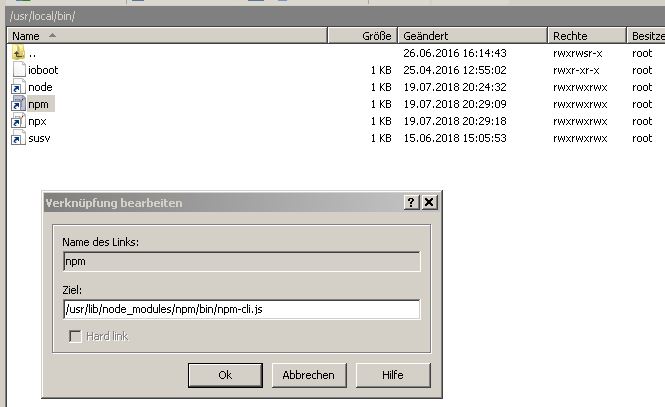
                                493_winscp_verkn_pfung_bearbeiten.jpg

                                Bitte verzichtet auf Chat-Nachrichten, denn die Handhabung ist grauenhaft !
                                Produktiv: RPi 2 mit S.USV, HM-MOD-RPI und SLC-USB-Stick mit root fs

                                1 Reply Last reply
                                0
                                • D Offline
                                  D Offline
                                  daniello
                                  wrote on last edited by
                                  #20

                                  hmm npx wird dan rot .. glaube da passt was nicht.

                                  Mir ist auch nicht ganz klar was ich nach dem ändern auf Absolut machen soll .. nochmal das Downgrade auf npm 4 versuchen?

                                  1 Reply Last reply
                                  0
                                  • paul53P Offline
                                    paul53P Offline
                                    paul53
                                    wrote on last edited by
                                    #21

                                    @daniello:

                                    npx wird dan rot .. glaube da passt was nicht. `
                                    Gibt es die Datei /usr/lib/node_modules/npm/bin/npx-cli.js ?

                                    ls -l /usr/lib/node_modules/npm/bin/npx-cli.js
                                    

                                    Dann sollte es funktionieren. Was sagt jetzt ?

                                    npm -v
                                    

                                    Bitte verzichtet auf Chat-Nachrichten, denn die Handhabung ist grauenhaft !
                                    Produktiv: RPi 2 mit S.USV, HM-MOD-RPI und SLC-USB-Stick mit root fs

                                    1 Reply Last reply
                                    0
                                    • D Offline
                                      D Offline
                                      daniello
                                      wrote on last edited by
                                      #22

                                      Ja .. die Datei gibt es .. wird aber trotzdem rot .. merkwürdig.

                                      npm -v sagt jetzt 4.6.1

                                      Wie kommt das .. warum wurde vorher die 6.x angezeigt .. verwirrt

                                      1 Reply Last reply
                                      0
                                      • paul53P Offline
                                        paul53P Offline
                                        paul53
                                        wrote on last edited by
                                        #23

                                        @daniello:

                                        Ja .. die Datei gibt es .. wird aber trotzdem rot .. merkwürdig. `
                                        Was sagt ?

                                        ls -l /usr/local/bin/np*
                                        

                                        @daniello:

                                        npm -v sagt jetzt 4.6.1 `
                                        So sollte es sein.
                                        @daniello:

                                        warum wurde vorher die 6.x angezeigt `
                                        Weil der Link /usr/local/bin/npm auf die Version 6.2.0 gezeigt hatte, die außerdem installiert ist (im Verzeichnis /usr/local).

                                        Bitte verzichtet auf Chat-Nachrichten, denn die Handhabung ist grauenhaft !
                                        Produktiv: RPi 2 mit S.USV, HM-MOD-RPI und SLC-USB-Stick mit root fs

                                        1 Reply Last reply
                                        0
                                        • D Offline
                                          D Offline
                                          daniello
                                          wrote on last edited by
                                          #24
                                          pi@raspi:~ $ ls -l /usr/local/bin/np*
                                          lrwxrwxrwx 1 pi staff 40 Jul 28 11:35 /usr/local/bin/npm -> /usr/lib/node_modules/npm/bin/npm-cli.js
                                          lrwxrwxrwx 1 pi staff 38 Jul 28 12:25 /usr/local/bin/npx -> ../lib/node_modules/npm/bin/npx-cli.js
                                          pi@raspi:~ $


                                          Hmm .. soll ich die 6.2 einfach da lassen oder irgendwie deinstallieren?

                                          1 Reply Last reply
                                          0
                                          Reply
                                          • Reply as topic
                                          Log in to reply
                                          • Oldest to Newest
                                          • Newest to Oldest
                                          • Most Votes


                                          Support us

                                          ioBroker
                                          Community Adapters
                                          Donate

                                          285

                                          Online

                                          32.7k

                                          Users

                                          82.3k

                                          Topics

                                          1.3m

                                          Posts
                                          Community
                                          Impressum | Datenschutz-Bestimmungen | Nutzungsbedingungen | Einwilligungseinstellungen
                                          ioBroker Community 2014-2025
                                          logo
                                          • Login

                                          • Don't have an account? Register

                                          • Login or register to search.
                                          • First post
                                            Last post
                                          0
                                          • Home
                                          • Recent
                                          • Tags
                                          • Unread 0
                                          • Categories
                                          • Unreplied
                                          • Popular
                                          • GitHub
                                          • Docu
                                          • Hilfe
