Skip to content
  • Home
  • Recent
  • Tags
  • 0 Unread 0
  • Categories
  • Unreplied
  • Popular
  • GitHub
  • Docu
  • Hilfe
Skins
  • Light
  • Brite
  • Cerulean
  • Cosmo
  • Flatly
  • Journal
  • Litera
  • Lumen
  • Lux
  • Materia
  • Minty
  • Morph
  • Pulse
  • Sandstone
  • Simplex
  • Sketchy
  • Spacelab
  • United
  • Yeti
  • Zephyr
  • Dark
  • Cyborg
  • Darkly
  • Quartz
  • Slate
  • Solar
  • Superhero
  • Vapor

  • Default (No Skin)
  • No Skin
Collapse
ioBroker Logo

Community Forum

donate donate
  1. ioBroker Community Home
  2. Deutsch
  3. Visualisierung
  4. Wie aus einem HTML-Widget ein neues Widget machen?

NEWS

  • Jahresrückblick 2025 – unser neuer Blogbeitrag ist online! ✨
    BluefoxB
    Bluefox
    16
    1
    1.9k

  • Neuer Blogbeitrag: Monatsrückblick - Dezember 2025 🎄
    BluefoxB
    Bluefox
    13
    1
    906

  • Weihnachtsangebot 2025! 🎄
    BluefoxB
    Bluefox
    25
    1
    2.2k

Wie aus einem HTML-Widget ein neues Widget machen?

Scheduled Pinned Locked Moved Visualisierung
79 Posts 5 Posters 17.7k Views 1 Watching
  • Oldest to Newest
  • Newest to Oldest
  • Most Votes
Reply
  • Reply as topic
Log in to reply
This topic has been deleted. Only users with topic management privileges can see it.
  • BluefoxB Offline
    BluefoxB Offline
    Bluefox
    wrote on last edited by
    #42

    Irgendwie so:

    ! ````
    @font-face {
    font-family: 'IC';
    src: url('icomoon.ttf');
    ! }
    ! .communicate-var_nav {
    background: #e2e1f4;
    width: 100%;
    height: 100%;
    display: inline-flex;
    }
    ! .communicate-link_bg {
    background:#7A56A0;
    color:white;
    z-index:2;
    }
    ! .communicate-link_title {
    position: relative;
    z-index:3;
    ! height:100%;
    }
    ! .communicate-link_title:hover {
    left: 0;
    width:10px;
    font-weight: bold;
    background: #E01B6A;
    -webkit-transition: all 0.3s ease-in-out;
    -moz-transition: all 0.3s ease-in-out;
    -o-transition: all 0.3s ease-in-out;
    -ms-transition: all 0.3s ease-in-out;
    transition: all 0.3s ease-in-out;
    }
    ! .communicate-link_bg, .communicate-img {
    -webkit-transition:all .5s ease-in-out;
    -moz-transition:all .5s ease-in-out;
    -o-transition:all .5s ease-in-out;
    -ms-transition:all .5s ease-in-out;
    transition:all .5s ease-in-out;
    height: 100%;
    }
    .communicate-link_bg:hover, .communicate-img:hover{
    -webkit-transition: all 0.3s ease-in-out;
    -moz-transition: all 0.3s ease-in-out;
    -o-transition: all 0.3s ease-in-out;
    -ms-transition: all 0.3s ease-in-out;
    transition: all 0.3s ease-in-out;
    }
    ! .communicate-link_bg:hover {
    width:100%;
    background: #E01B6A;
    background: blue;
    }
    ! .communicate-img:hover{
    -webkit-transform:rotate(360deg);
    -moz-transform:rotate(360deg);
    -o-transform:rotate(360deg);
    -ms-transform:rotate(360deg);
    transform:rotate(360deg);
    }
    .communicate-p {
    ! position: absolute;
    left: 0.7em;
    }
    ! .communicate-p1 {
    font-size: 13px;
    margin: 0;
    padding: 0;
    line-height: 40px;
    color: #fff;
    text-shadow: 0 -1px 0 rgba(0,0,0,1);
    border-bottom: 1px solid rgba(0,0,0,0.3);
    box-shadow: 0 1px 1px rgba(255,255,255,0.2);
    letter-spacing: 1px;
    }
    ! .communicate-notification_box {
    width: calc(100% - 4px);
    height: calc(100% - 4px);
    margin: 0 auto;
    border-radius: 5px;
    background: rgba(0,0,0,0.55);
    border: 1px solid rgba(0,0,0,0.2);
    text-align: center;
    box-shadow: 0 0 5px rgba(0,0,0,0.5), 0 2px 2px rgba(0,0,0,0.1);
    }
    ! .communicate-p2 {
    font-size: 13px;
    margin: 0;
    padding: 0;
    line-height: 20px;
    color: #fff;
    text-shadow: 0 -1px 0 rgba(0,0,0,1);
    letter-spacing: 1px;
    }
    ! .communicate-dialog {
    width: 100px;
    height: 50px;
    position: absolute;
    z-index: 999;
    border-radius: 5px;
    background: rgba(0,0,0,0.55);
    border: 1px solid rgba(0,0,0,0.2);
    text-align: center;
    box-shadow: 0 0 5px rgba(0,0,0,0.5), 0 2px 2px rgba(0,0,0,0.1);
    }

    [48_img_001.png](/assets/uploads/files/48_img_001.png)
    1 Reply Last reply
    0
    • C Offline
      C Offline
      Communicate
      wrote on last edited by
      #43

      Hallo bluefox,

      das sieht schon sehr sehr gut aus - vielen dank mal wieder!

      Zwei Fragen bleiben aber einmal wieder:

      1. Ich bekomme es einfach nicht hin, die größe und die position des dialogs

      zu verändern. Hier mein Versuch:

      (Es geht um NotificationD2).

      2. Kann ich das aussehen des Sliders irgendwie verändern?

      Ich freue mich auf eine Rückmeldung von Dir.

      P.S.: Meinst Du ich soll das ganze Widget set dann zur Verfügung stellen oder ist das zu speziell auf mich zugeschnitten?

      1 Reply Last reply
      0
      • C Offline
        C Offline
        Communicate
        wrote on last edited by
        #44

        so, die grundsätzliche breite kann ich jetzt verändern:

        $(el).click(function () {

        $dialog.css({top: $(el).position().top, left: $(el).position().left, width:1000});

        $dialog.show();

        $value.html($input.val());

        $input.bind('onmouseup', function () {

        $value.html($input.val());

        });

        jetzt stellt sich nur noch die Frage, wie kann ich denn den absoluten Wert (hier 1000) mit einer Variablen

        (also mit einer WIdget-Eigenschaft) ersetzen, so dass ich das auch steuern kann?

        Irgendwann verstehe ich das ganze hoffentlich auch :roll: :)

        1 Reply Last reply
        0
        • C Offline
          C Offline
          Communicate
          wrote on last edited by
          #45

          So, einen großen Schritt weiter bin ich schonmal :)

          Folgendes ermöglicht mir, die Breite des Dialogfeldes anzugeben.

          Was ich nicht hinbekomme ist die Verkünpfung zu den Widget eigenschaften.

          Folgendes geht nämlich nicht:

          ! ioBroker.vis communicate Widget-Set
          ! version: "0.0.1"
          ! Copyright 10.2015-2016 Communicatenick@communicate-online.de
          ! -->

          Fehler laut Chrome console:

          Error: Error: can't render tplCommunicateNotificationD2 w00023 (SyntaxError: Unexpected token <)

          Was mache ich falsch?
          5278_unbenannt.png

          1 Reply Last reply
          0
          • C Offline
            C Offline
            Communicate
            wrote on last edited by
            #46

            so, da war wohl meon Denkfehler :lol:

            so funktionierts:

            nur die widgetaktualisierung funktioniert nicht

            Und dAnn hab ich noch das Problem, dass ich den Dialog gerne unterhalb des Widgets positionieren möchte. Dafür müsste ich aber die Höhe des Widgets kennen, diese steht aber in .Data nicht drin. Gibt es dafür auch noch eine Idee?

            1 Reply Last reply
            0
            • C Offline
              C Offline
              Communicate
              wrote on last edited by
              #47

              Hallo Bluefox,

              im Moment scheitere ich "nur" noch daran, die höhe des Widgets zu ermitteln, da diese anscheinend

              nicht im data-objekt enthalten ist.

              Hast Du hier noch einen Trick für mich?

              Wenn das erledigt ist, würde ich den Thread erstmal beenden und das ganze verfeinern und dann als komplettes Widget-Set

              veröffentlichen.

              Weitere Detailfragen würde ich dann in separaten Einzel-Threads stellen, was meinst Du?

              Gruß

              Dominic

              1 Reply Last reply
              0
              • BluefoxB Offline
                BluefoxB Offline
                Bluefox
                wrote on last edited by
                #48

                Es gibt zwei Möglichkeiten, wie man das ermitteln konnte:

                • dynamisch: $(el).position().left + $(el).width() und $(el).position().top + $(el).height()

                • statisch: Dialog-Funktion erweiten

                –----------------------------

                dialog: function (el, data, view) {

                console.log(JSON.stringify(vis.views[view].widgets[data.wid].style, null, 2));

                ….

                }


                debugger;vis.binds.communicate.dialog(el, this.data, this.view) %>>

                –----------------------------

                1 Reply Last reply
                0
                • C Offline
                  C Offline
                  Communicate
                  wrote on last edited by
                  #49

                  Hallo Bluefox,

                  ich dachte ja, ich wäre durch :-)

                  Könntest Du mir verraten, wie ich im Dialog auch HTML Anweisungen (also z.B. Buttons oder auch einfach nur z.B. eine

                  Anweisung)

                  einbauen kann?

                  So hab ich es versucht, aber das geht nicht:

                  ! dialog: function (el, data) {
                  ! if (!$(el).find('.heating-dialog').length) {
                  ! setTimeout(function () {
                  ! var weite = data.weite;
                  ! weite += "px";
                  ! console.log('weite:'+weite);
                  ! debugger;
                  ! var $dialog = $('

                  <snap class="communicate-range-val"></snap>');

                  var $value = $dialog.find('.communicate-range-val');

                  var $input = $dialog.find('input');

                  $dialog.click(function () {

                  console.log(JSON.stringify($dialog, null, 2));

                  ****Test

                  $dialog.write(

                  Test2

                  )****

                  $input.unbind('onmouseup');

                  $(this).hide();

                  });

                  $input.change(function () {

                  alert($(this).val());

                  });

                  $(el).parent().append($dialog);

                  $(el).click(function () {

                  console.log('weite1:'+weite);

                  console.log('weite2:'+weite);

                  $dialog.css({top: $(el).position().top+ $(el).height(), left: $(el).position().left, width: $(el).width()-2 });

                  $dialog.show();

                  $value.html($input.val());

                  $input.bind('onmouseup', function () {

                  $value.html($input.val());

                  });

                  });

                  });

                  }

                  }

                  };

                  Irgendwann krieg ichs dann auch fertig … (hoffentlich :) )

                  1 Reply Last reply
                  0
                  • C Offline
                    C Offline
                    Communicate
                    wrote on last edited by
                    #50

                    … ich habs jetzt den ganzen Tag probiert, komme aber nicht weiter...

                    Sehe ich es richtig, dass das "$" für JQuery steht?

                    Die Welt von Javascript ist doch einfach noch zu neu für mich...

                    Ich krieg es einfach nicht hin, im Dialog auch HTML Anweisungen (also z.B. Buttons oder auch einfach nur z.B. eine

                    Anweisung)

                    einzubauen.

                    Auch sonstige jquery anweisungen (z.B.

                    <code>buttons: [
                        {
                          text: "Ok",
                          icons: {
                            primary: "ui-icon-heart"
                          },</code>
                    

                    bekomme ich einfach nicht korrekt unter :-(

                    1 Reply Last reply
                    0
                    • BluefoxB Offline
                      BluefoxB Offline
                      Bluefox
                      wrote on last edited by
                      #51

                      Mach statt:

                      var $dialog = $('<snap class="communicate-range-val"></snap>');


                      Das:

                      var text = '' +
                          '
                      
                      Test
                      
                      ' +
                          '<snap class="communicate-range-val"></snap>' +
                          '';
                      var $dialog = $(text);


                      > Sehe ich es richtig, dass das "$" für JQuery steht?
                      Ja.

                      > Auch sonstige jquery anweisungen (z.B.
                      Frage habe ich nicht verstanden.

                      Du bist erster Kommunity-User, der Widget-Set schreibt. Es ist normal, dass du Fragen hast. ;)

                      1 Reply Last reply
                      0
                      • C Offline
                        C Offline
                        Communicate
                        wrote on last edited by
                        #52

                        Hallo Bluefox,

                        danke, das hat wieder einmal geholfen.

                        Ich würde mit dem Slider ja gerne die Thermostate steuern.

                        Mit folgendem Befehl wollte ich die aktuell eingestellte Temperatur für den Slider als Ausgangspunkt ermitteln.

                        var act_soll_temp=vis.states[data.oid_control + '.val']
                                        console.log("Aktuell:" + act_soll_temp)
                        

                        Problem ist, dass mir das console.log nur ein Aktuell:undefined zurück

                        gibt.

                        Wie komme ich an den wert, der hinter dem Device steckt, dass in oid_control eingetragen ist?

                        Gruß

                        Dominic

                        1 Reply Last reply
                        0
                        • BluefoxB Offline
                          BluefoxB Offline
                          Bluefox
                          wrote on last edited by
                          #53

                          Du machst schon alles richtig.

                          Vermutlich ist OID falsch. Mach doch

                          var act_soll_temp = vis.states[data.oid_control + '.val'];
                          console.log("Aktuell [" + data.oid_control + "]:" + act_soll_temp);
                          debugger;


                          Und schaue was nicht passt.

                          1 Reply Last reply
                          0
                          • C Offline
                            C Offline
                            Communicate
                            wrote on last edited by
                            #54

                            so, das hat funktioniert, danke. Habs jetzt hinbekommen.

                            Hast Du noch einen Tipp für mich, wie ich Buttons zusätzlich zum Schieberegler implemetnieren kann?

                            Ich bekomme zwar die Buttons hin - aber die Werte werden nicht übernommen.

                            Kanns Du noch mal schauen?

                            ! ````
                            dialog: function (el, data) {
                            !

                            ! if (!$(el).find('.heating-dialog').length) {
                            setTimeout(function () {

                            ! var weite = data.weite;
                            weite += "px";
                            console.log('weite:'+weite);
                            ! var act_soll_temp = vis.states[data.oid_control + '.val'];
                            console.log("Aktuell [" + data.oid_control + "]:" + act_soll_temp);
                            ! var text = '' +

                                        '
                            

                            ! Test
                            ! ' +

                            ! ' ' +
                            !
                            '' +
                            ! '   '+
                            '' + '   '+
                            '' +

                                                    '';
                            

                            ! var $dialog = $(text);
                            ! var $value = $dialog.find('.communicate-range-val');
                            var $input = $dialog.find('input');
                            ! $dialog.click(function () {
                            console.log(JSON.stringify($dialog, null, 2));

                                            console.log(JSON.stringify('Input:'+$input, null, 2));
                                            console.log("Input_log:"+$input);
                                            console.log(JSON.parse(JSON.stringify($input)));
                            

                            ! $input.unbind('onmouseup');
                            $(this).hide();
                            });
                            $input.change(function () {
                            alert($(this).val());
                            vis.setValue(data.oid_control, $(this).val())
                            });
                            $(el).parent().append($dialog);
                            $(el).click(function () {

                                                $dialog.css({top: $(el).position().top+ $(el).height(), left: $(el).position().left, width: $(el).width()-2, height:$(el).height() });
                            
                                                $dialog.show();
                                                $value.html($input.val());
                                                $input.bind('onmouseup', function () {
                                                    $value.html($input.val());
                                                });
                                            });
                                        });
                                    }
                                }
                            };
                            

                            ! ````

                            1 Reply Last reply
                            0
                            • BluefoxB Offline
                              BluefoxB Offline
                              Bluefox
                              wrote on last edited by
                              #55

                              @Communicate:

                              so, das hat funktioniert, danke. Habs jetzt hinbekommen.

                              Hast Du noch einen Tipp für mich, wie ich Buttons zusätzlich zum Schieberegler implemetnieren kann?

                              Ich bekomme zwar die Buttons hin - aber die Werte werden nicht übernommen.

                              Kanns Du noch mal schauen?

                              ! ````
                              dialog: function (el, data) {
                              !

                              ! if (!$(el).find('.heating-dialog').length) {
                              setTimeout(function () {

                              ! var weite = data.weite;
                              weite += "px";
                              console.log('weite:'+weite);
                              ! var act_soll_temp = vis.states[data.oid_control + '.val'];
                              console.log("Aktuell [" + data.oid_control + "]:" + act_soll_temp);
                              ! var text = '' +

                                          '
                              

                              ! Test
                              ! ' +

                              ! ' ' +
                              !
                              '' +
                              ! '   '+
                              '' + '   '+
                              '' +

                                                      '';
                              

                              ! var $dialog = $(text);
                              ! var $value = $dialog.find('.communicate-range-val');
                              var $input = $dialog.find('input');
                              ! $dialog.click(function () {
                              console.log(JSON.stringify($dialog, null, 2));

                                              console.log(JSON.stringify('Input:'+$input, null, 2));
                                              console.log("Input_log:"+$input);
                                              console.log(JSON.parse(JSON.stringify($input)));
                              

                              ! $input.unbind('onmouseup');
                              $(this).hide();
                              });
                              $input.change(function () {
                              alert($(this).val());
                              vis.setValue(data.oid_control, $(this).val())
                              });
                              $(el).parent().append($dialog);
                              $(el).click(function () {

                                                  $dialog.css({top: $(el).position().top+ $(el).height(), left: $(el).position().left, width: $(el).width()-2, height:$(el).height() });
                                                  
                                                  $dialog.show();
                                                  $value.html($input.val());
                                                  $input.bind('onmouseup', function () {
                                                      $value.html($input.val());
                                                  });
                                              });
                                          });
                                      }
                                  }
                              };
                              

                              ! ```` `

                              Du solltest die buttons so ändern:

                              '' + '   '+

                              '' +

                              Und dann die auch abfragen:

                              $dialog.find('.communicate-button').click(function () {
                                    alert(parseFloat($(this).data('value')));
                                    vis.setValue(data.oid_control, parseFloat($(this).data('value')));
                              });


                              Einfügen nach var $dialog = $(text);.

                              1 Reply Last reply
                              0
                              • C Offline
                                C Offline
                                Communicate
                                wrote on last edited by
                                #56

                                Hallo Bluefox, einen ersten Versuch das ganze zu Veröffentlichen habe ich im circle-widget thread gemacht. Ende vom Lied ist, das ein User sein System durch das js - Controller update zerschossen hat und ein anderer erst nach diversen Anläufen die Widgets zum Laufen bekommen hat. Von beiden wurde auch bemängelt, dass es keinen Log Level gibt.

                                Daher folgende Frage : wie hast du denn z.B. die hqwidgets als separat installierbaren Adapter hinbekommen ? Welche Schritte sind dafür notwendig um aus dem Widgetset einen eigenen Adapter zu erstellen? Gruss Dominic

                                von unterwegs gesendet

                                1 Reply Last reply
                                0
                                • C Offline
                                  C Offline
                                  Communicate
                                  wrote on last edited by
                                  #57

                                  Hat sonst vielleicht jemand, der schon mal einen Adapter etwickelt hat eine Idee, wie ich aus einem widgetset einen Adapter machen kann?

                                  1 Reply Last reply
                                  0
                                  • BluefoxB Offline
                                    BluefoxB Offline
                                    Bluefox
                                    wrote on last edited by
                                    #58

                                    Hallo Communicate,

                                    habe momentan viel um die Ohren.

                                    Warum nimmst du nicht ioBroker.vis-template und rufst nicht

                                    grunt rename --name=mynewname --email=email@mail.com --author="Author Name"
                                    

                                    auf?

                                    Steht doch alles da: https://github.com/ioBroker/ioBroker.vis-template

                                    Oder geht es nicht?

                                    1 Reply Last reply
                                    0
                                    • C Offline
                                      C Offline
                                      Communicate
                                      wrote on last edited by
                                      #59

                                      Hallo Bluefox, vielen dank für die Rückmeldung. Bei mir siehts im Moment auch nicht viel besser aus mit der Freizeit - also alles gut.

                                      Ich glaube, ich habe mein Problem nicht richtig dargestellt. Im Prinzip geht es mir darum, wie ich das fertig Widgetset mit der Community teilen kann. Ich hatte jetzt einfach das Unterverzeichnis aus node-modules gepackt und im Forum hochgeleaden. Die User müssen das dann entpacken und bei sich ein iobroker visdebug communicate machen.

                                      Und hier ist die Frage, wie man das eleganter lösen kann. Der Erste User hatte js - Controller 0.14 -> da ging visdebug nicht. Beim aktualisieren auf js - Controller 15 hat er sich sein System zerschossen. Und deswegen frage ich mich, ob es nicht einen Userfreundlicheren weg gibt. Die hqwidgets lassen sich ja z.B. auch direkt von github installieren. In Prinzip stelle ich mir vor, einen github Zugang zu eröffnen , dort mein widgetset zu hinterlegen und die User können es dann ganz einfach installieren. Nur wie geht's das?

                                      von unterwegs gesendet

                                      1 Reply Last reply
                                      0
                                      • C Offline
                                        C Offline
                                        Communicate
                                        wrote on last edited by
                                        #60

                                        So, den github Zugang hab ich schonmal. Jetzt muss ich aus

                                        dem Widgetset nur noch einen Adapter machen . Vielleicht gibt's dazu ja auch irgendwo ne Anleitung

                                        , die ich einfach nicht kenne

                                        von unterwegs gesendet

                                        1 Reply Last reply
                                        0
                                        • BluefoxB Offline
                                          BluefoxB Offline
                                          Bluefox
                                          wrote on last edited by
                                          #61

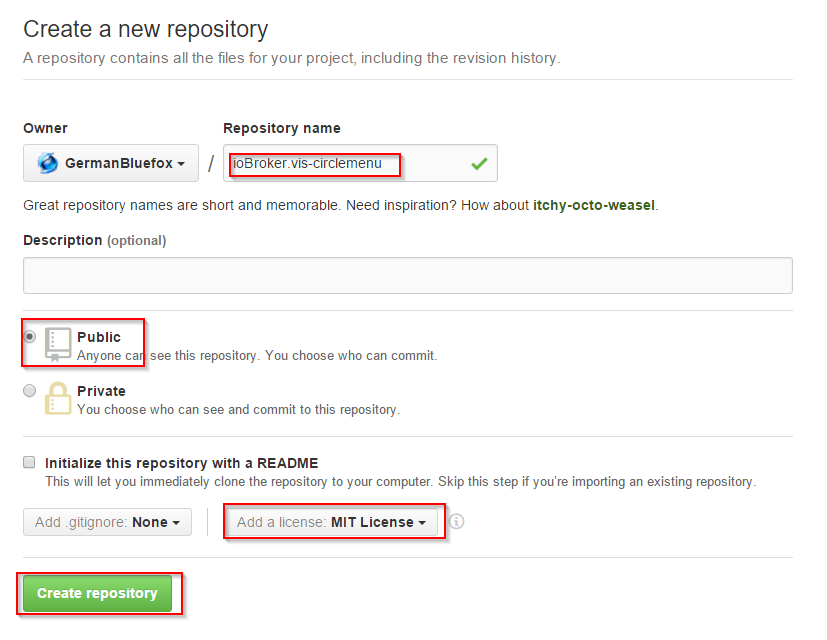
                                          Also erst eine aussagekräftige Name ausdenken :)
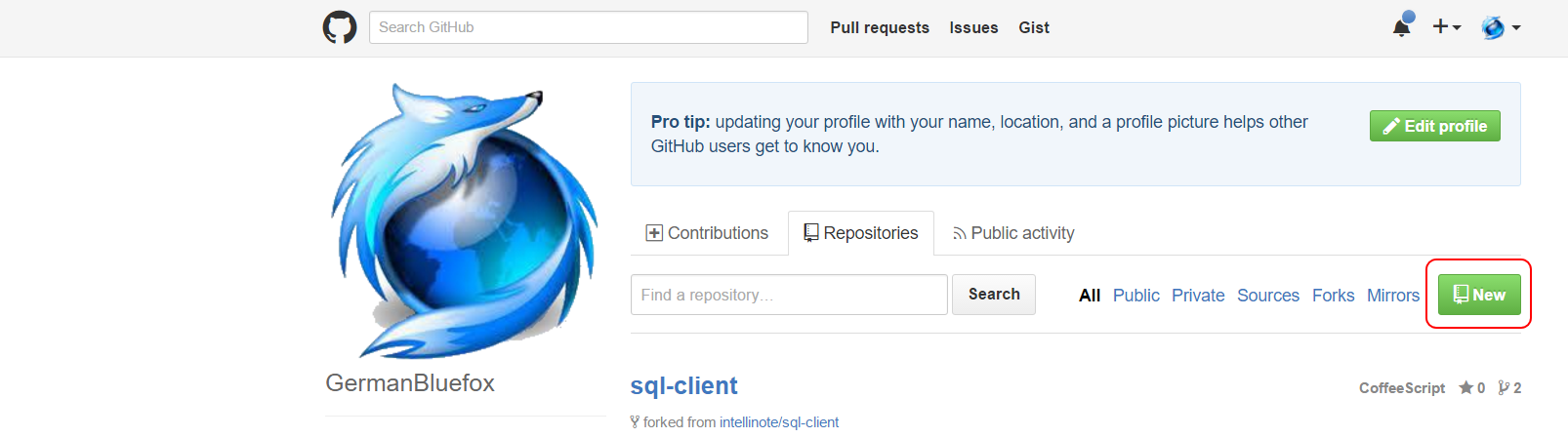
                                          48_2015-12-06_17_20_12-germanbluefox.png
                                          48_2015-12-06_17_45_02-create_a_new_repository.png
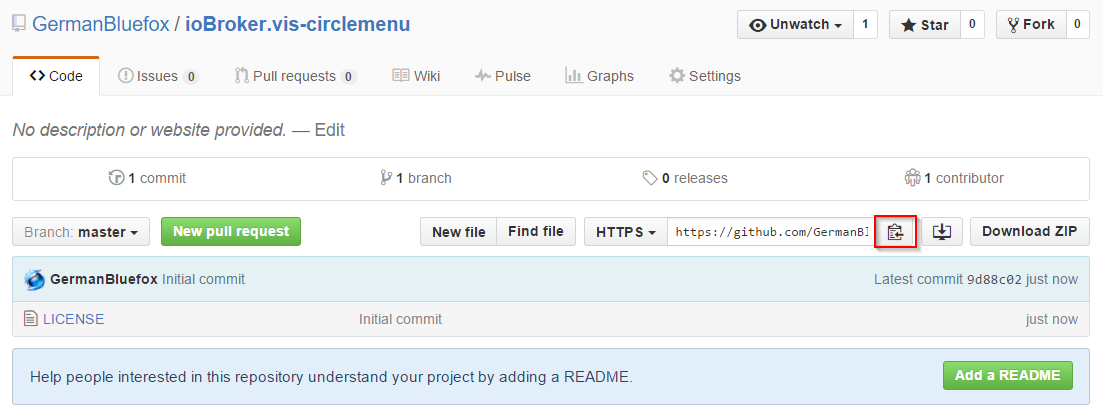
                                          URL von Repository copieren
                                          48_2015-12-06_17_45_41-germanbluefox_iobroker.vis-circlemenu.png
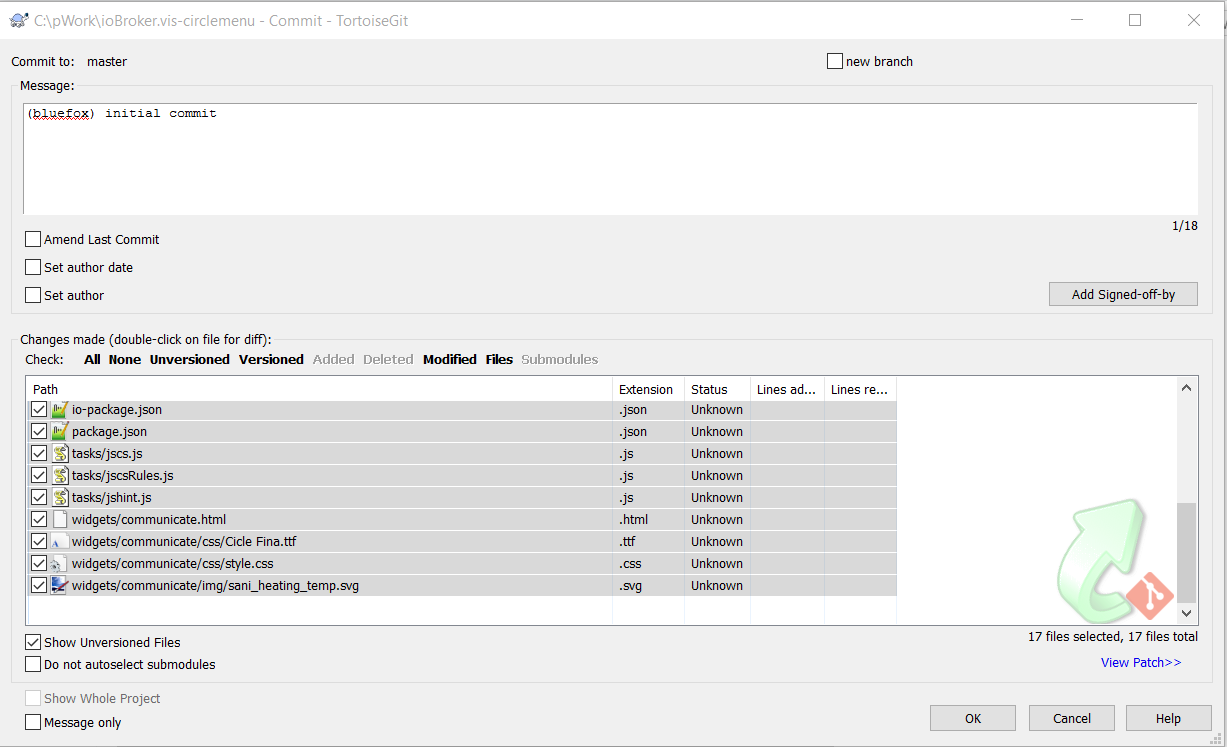
                                          Lokal auf dem Rechne Clonen. Ich verwende unter windows https://tortoisegit.org/TortouseGit+ WinGit https://git-scm.com/download/win
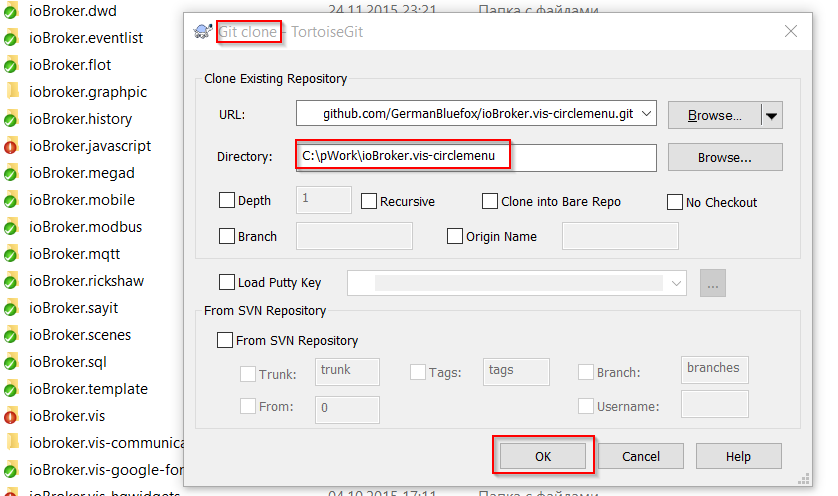
                                          48_2015-12-06_17_46_39-pwork.png

                                          Danach deine Dateien dorthin kopieren.
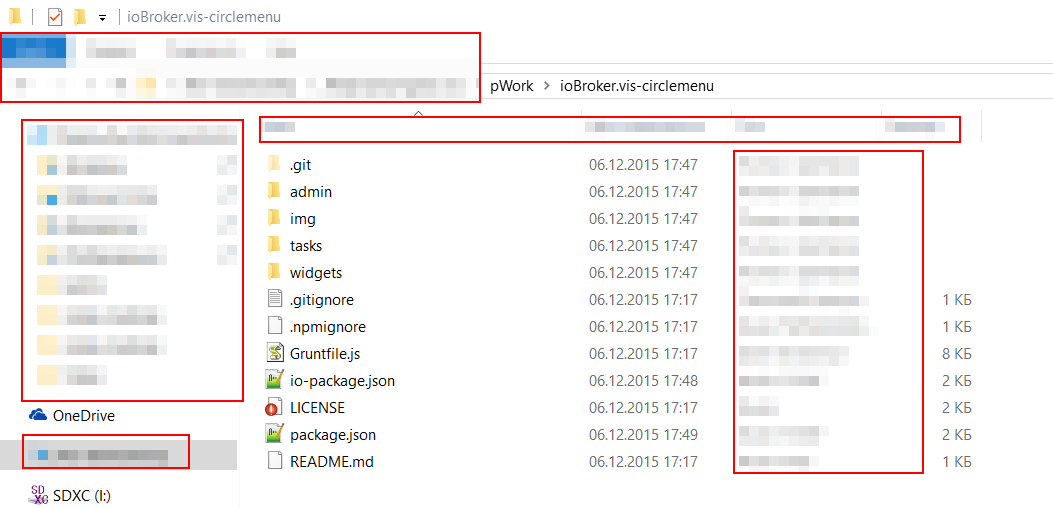
                                          48_2015-12-06_17_53_15-iobroker.vis-circlemenu.png
                                          Alle communicate oder was auch immer mit neuen Namen ersetzten.

                                          Unbedingt in package.json auch URLs anpassen.

                                          ! ````
                                          {
                                          "name": "iobroker.vis-circlemenu",
                                          "description": "circlemenu Widgets for ioBroker.vis",
                                          "version": "0.0.1",
                                          "author": {
                                          "name": "circlemenu",
                                          "email": "dominic@bialas24.de"
                                          },
                                          "contributors": [
                                          "communicate dominic@bialas24.de"
                                          ],
                                          "homepage": "https://github.com/GermanBluefox/ioBroker.vis-circlemenu",
                                          "repository": {
                                          "type": "git",
                                          "url": "https://github.com/GermanBluefox/ioBroker.vis-circlemenu"
                                          },
                                          "licenses": [
                                          {
                                          "type": "MIT",
                                          "url": "https://github.com/GermanBluefox/ioBroker.vis-circlemenu/blob/master/LICENSE"
                                          }
                                          ],
                                          "keywords": [
                                          "ioBroker",
                                          "GUI",
                                          "circlemenu vis"
                                          ],
                                          "devDependencies": {
                                          "grunt": "^0.4.5",
                                          "grunt-replace": "^0.9.3",
                                          "grunt-contrib-jshint": "^0.11.2",
                                          "grunt-jscs": "^2.0.0",
                                          "grunt-http": "^1.6.0",
                                          "grunt-contrib-clean": "^0.6.0",
                                          "grunt-contrib-compress": "^0.13.0",
                                          "grunt-contrib-copy": "^0.8.0",
                                          "grunt-exec": "^0.4.6"
                                          },
                                          "bugs": {
                                          "url": "https://github.com/GermanBluefox/ioBroker.vis-circlemenu/issues"
                                          },
                                          "main": "widgets/circlemenu.html",
                                          "scripts": {
                                          "test": "echo "Error: no test specified" && exit 1"
                                          },
                                          "license": "MIT"
                                          }/dominic@bialas24.de

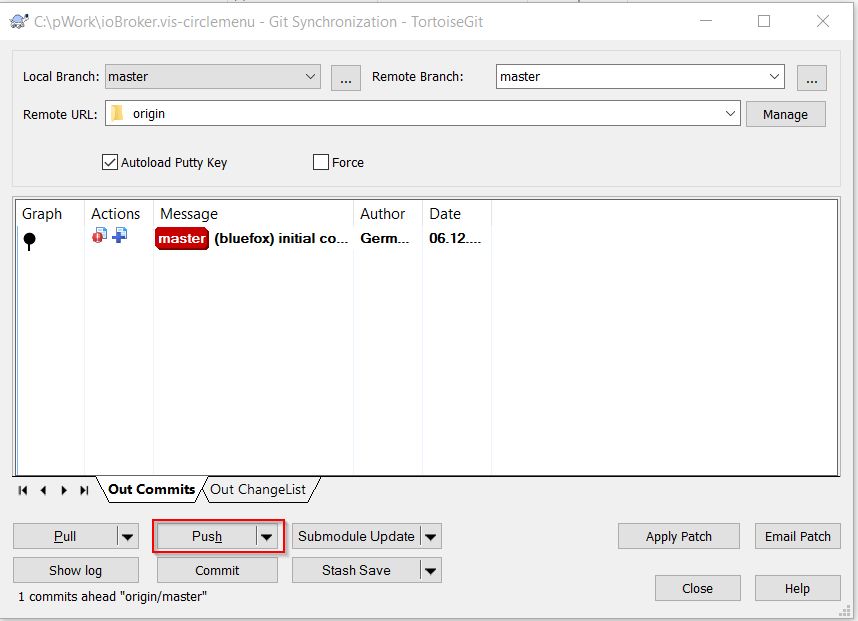
                                          Ein Commit machen und dann push.
                                           ![48_2015-12-06_17_58_40-pwork.png](/assets/uploads/files/48_2015-12-06_17_58_40-pwork.png) 
                                           ![48_2015-12-06_17_59_00-pwork.png](/assets/uploads/files/48_2015-12-06_17_59_00-pwork.png) 
                                          
                                          Man kann hier anschauen, was gelungen ist:
                                          
                                          [https://github.com/GermanBluefox/ioBrok … circlemenu](https://github.com/GermanBluefox/ioBroker.vis-circlemenu)
                                          
                                          Man sollte die Attrubutes auf English nennen.
                                          
                                          
                                              data-vis-attrs3="schrift_groesse;schrift_groesse_oben;Einheit;"
                                              data-vis-attrs4="weite[40]/slider,0,1000,1;"
                                          
                                          
                                          Bei mir geht übrigens nicht.
                                          1 Reply Last reply
                                          0
                                          Reply
                                          • Reply as topic
                                          Log in to reply
                                          • Oldest to Newest
                                          • Newest to Oldest
                                          • Most Votes


                                          Support us

                                          ioBroker
                                          Community Adapters
                                          Donate

                                          511

                                          Online

                                          32.6k

                                          Users

                                          82.2k

                                          Topics

                                          1.3m

                                          Posts
                                          Community
                                          Impressum | Datenschutz-Bestimmungen | Nutzungsbedingungen | Einwilligungseinstellungen
                                          ioBroker Community 2014-2025
                                          logo
                                          • Login

                                          • Don't have an account? Register

                                          • Login or register to search.
                                          • First post
                                            Last post
                                          0
                                          • Home
                                          • Recent
                                          • Tags
                                          • Unread 0
                                          • Categories
                                          • Unreplied
                                          • Popular
                                          • GitHub
                                          • Docu
                                          • Hilfe