




Yahka Adapter in iobroker im Docker Container
-
dachte man sieht da was ...
npm i iobroker.yahka
sudo: /etc/sudo.conf is world writable
sudo: /etc/sudo.conf is world writable
sudo: error in /etc/sudo.conf, line 0 while loading plugin "sudoers_policy"
sudo: /usr/lib/sudo/sudoers.so must be only be writable by owner
sudo: fatal error, unable to load plugins -
dachte man sieht da was ...
npm i iobroker.yahka
sudo: /etc/sudo.conf is world writable
sudo: /etc/sudo.conf is world writable
sudo: error in /etc/sudo.conf, line 0 while loading plugin "sudoers_policy"
sudo: /usr/lib/sudo/sudoers.so must be only be writable by owner
sudo: fatal error, unable to load plugins -
@tomme sagte in Yahka Adapter in iobroker im Docker Container:
dachte man sieht da was ...
Was sehen !?
und in welchen Verzeichniss stehst du damit :
und warum willst du das machen mit
npm i iobroker.yahka@glasfaser sagte in Yahka Adapter in iobroker im Docker Container:
rum willst du das machen mit
ich wollte es mal ohne iobroker probieren das stand in dem issue am ende
-
@glasfaser sagte in Yahka Adapter in iobroker im Docker Container:
rum willst du das machen mit
ich wollte es mal ohne iobroker probieren das stand in dem issue am ende
-
du kannst viel mit npm machen ,
aber auch im richtigen Verzeichniss mußt du auch dazu stehen .@glasfaser also im opt iobroker nochmal probieren stimmt das hab ich vergessen zu wechseln
-
@glasfaser also im opt iobroker nochmal probieren stimmt das hab ich vergessen zu wechseln
-
-
@glasfaser sagte in Yahka Adapter in iobroker im Docker Container:
@tomme
hast du das gerade aktuell dazu gesehn
https://forum.iobroker.net/post/988213was hat homebridge damit zu tun? der container wo das drin läuft ist bei mir im moment auf stop
-
@glasfaser also im opt iobroker nochmal probieren stimmt das hab ich vergessen zu wechseln
root@iobroker:~# cd /opt/iobroker
root@iobroker:/opt/iobroker# apt install nano
Reading package lists... Done
Building dependency tree... Done
Reading state information... Done
E: Unable to locate package nano
root@iobroker:/opt/iobroker# npm install --save @homebridge/ciao@1.1.5
sudo: /etc/sudo.conf is world writable
sudo: /etc/sudo.conf is world writable
sudo: error in /etc/sudo.conf, line 0 while loading plugin "sudoers_policy"
sudo: /usr/lib/sudo/sudoers.so must be only be writable by owner
sudo: fatal error, unable to load plugins
root@iobroker:/opt/iobroker# sudo npm i iobroker.yahka
sudo: /etc/sudo.conf is world writable
sudo: /etc/sudo.conf is world writable
sudo: error in /etc/sudo.conf, line 0 while loading plugin "sudoers_policy"
sudo: /usr/lib/sudo/sudoers.so must be only be writable by owner
sudo: fatal error, unable to load plugins
root@iobroker:/opt/iobroker#
das hat erstmal nix gebracht
-
@glasfaser sagte in Yahka Adapter in iobroker im Docker Container:
@tomme
hast du das gerade aktuell dazu gesehn
https://forum.iobroker.net/post/988213was hat homebridge damit zu tun? der container wo das drin läuft ist bei mir im moment auf stop
-
@tomme sagte in Yahka Adapter in iobroker im Docker Container:
was hat homebridge damit zu tun?
ich kenne den Yahka Adapter nicht , eventuell eine Paket abhängigkeit .
@glasfaser nee das kann auf unterschiedlichen systemen laufen oder in nem apple tv zum beispiel
ich meine die homebridge -
@tomme sagte in Yahka Adapter in iobroker im Docker Container:
was hat homebridge damit zu tun?
ich kenne den Yahka Adapter nicht , eventuell eine Paket abhängigkeit .
Tomme ich muß dich erstmal verlassen mein weib bröckelt hier schon und einkaufen war ich auch noch nicht ... hier brennt gleich die luft ... ich danke dir erstmal und setze mich nachher nochmal dran ... vielen dank du hast mir echt weiter geholfen!!!! auch wenn das mit yahka nicht geht zur not lasse ich den weg was solls war nur einer von 45 adaptern die ich laufen habe
ich melde mich! danke!!!!!!!!!!!!!!!!!!!!!!! -
@tomme sagte in Yahka Adapter in iobroker im Docker Container:
was hat homebridge damit zu tun?
ich kenne den Yahka Adapter nicht , eventuell eine Paket abhängigkeit .
so ich habe noch eine weile rumgefummelt aber ohne erfolg ...
im moment kann ich nicht einmal ein backup wieder einspielen ... er zeigt einfach keine an im lokalen ordner ... ich kann zwar eins machen und das steht auch in der backitup übersicht und wird auch unter backups abgelegt aber ein restore ist nicht möglich da es nicht angezeigt wird ... läuft also ... ich habe wenn ich den container neu gemacht habe auch den ordner /opt/iobroker gelöscht sonst ließ sich kein neuer Container anlegen wenn der Ordner nicht leer ist ... aber trotzdem kann ich die backups nicht finden die ich kurz zuvor gemacht habe und auch die nicht wo alle einstellungen drin sind ...
bei yahka hat sich auch nichts getan und in der console bekomme ich fehler bei egal welchen befehl ich ausführen will ... selbst restore über die kommandozeile schlägt fehl da ich iobroker stopen soll was aber nicht geht da endet ein daemon mit pid xyz aber wenn ich dann iob status eingebe steht da gestartet und restore geht nicht weil iob noch läuft ...
aber schön schnell neu aufsetzen geht dank deiner hilfe ja jetzt mit 2 klicks ... habe mir ein template von dem stack gemacht ... das ist total cool!
und logs kann ich jetzt auch sehen wie auch die konsole aber da ist bestimmt auch was faul egal was ich mache meckert der rum:sudo mount -t cifs -o user=Tomme,password=8005,vers=2.1,rw,file_mode=0777,dir_mode=0777 //192.168.7.1/ioBrokerPi /mnt/LaptopIoBrokerPi sudo: /etc/sudo.conf is world writable sudo: /etc/sudo.conf is world writable sudo: error in /etc/sudo.conf, line 0 while loading plugin "sudoers_policy" sudo: /usr/lib/sudo/sudoers.so must be only be writable by owner sudo: fatal error, unable to load pluginsoder
root@iobroker:/opt/iobroker# sudo iobroker stop
sudo: /etc/sudo.conf is world writable
sudo: /etc/sudo.conf is world writable
sudo: error in /etc/sudo.conf, line 0 while loading plugin "sudoers_policy"
sudo: /usr/lib/sudo/sudoers.so must be only be writable by owner
sudo: fatal error, unable to load plugins
oder
root@iobroker:/opt/iobroker# iob start
Starting iobroker controller daemon...
iobroker controller daemon started. PID: 3086
root@iobroker:/opt/iobroker# iob stop
iobroker controller daemon is not running
root@iobroker:/opt/iobroker# iob restore 0
Stop iobroker first!
root@iobroker:/opt/iobroker# iob status
iobroker is running on this host.


Objects type: jsonl
States  type: jsonl
root@iobroker:/opt/iobroker
im log kann ich auch nichts finden:
 --------------------------------------------------------------------------------
-------------------------     2023-05-07 02:01:56      -------------------------
--------------------------------------------------------------------------------
-----                                                                      -----
----- ██╗  ██████╗  ██████╗  ██████╗   ██████╗  ██╗  ██╗ ███████╗ ██████╗  -----
----- ██║ ██╔═══██╗ ██╔══██╗ ██╔══██╗ ██╔═══██╗ ██║ ██╔╝ ██╔════╝ ██╔══██╗ -----
----- ██║ ██║   ██║ ██████╔╝ ██████╔╝ ██║   ██║ █████╔╝  █████╗   ██████╔╝ -----
----- ██║ ██║   ██║ ██╔══██╗ ██╔══██╗ ██║   ██║ ██╔═██╗  ██╔══╝   ██╔══██╗ -----
----- ██║ ╚██████╔╝ ██████╔╝ ██║  ██║ ╚██████╔╝ ██║  ██╗ ███████╗ ██║  ██║ -----
----- ╚═╝  ╚═════╝  ╚═════╝  ╚═╝  ╚═╝  ╚═════╝  ╚═╝  ╚═╝ ╚══════╝ ╚═╝  ╚═╝ -----
-----                                                                      -----
-----              Welcome to your ioBroker Docker container!              -----
-----                    Startupscript is now running!                     -----
-----                          Please be patient!                          -----
--------------------------------------------------------------------------------

--------------------------------------------------------------------------------
-----                          System Information                          -----
-----                    arch:                aarch64                      -----
-----                    hostname:            iobroker                     -----
-----                                                                      -----
-----                          Version Information                         -----
-----                    image:               v8.0.1                       -----
-----                    build:               2023-04-26T23:45:40+00:00    -----
-----                    node:                v18.16.0                     -----
-----                    npm:                 9.5.1                        -----
-----                                                                      -----
-----                        Environment Variables                         -----
-----                    SETGID:              1000                         -----
-----                    SETUID:              1000                         -----
--------------------------------------------------------------------------------

--------------------------------------------------------------------------------
-----                   Step 1 of 5: Preparing container                   -----
--------------------------------------------------------------------------------

Updating Linux packages on first run... Done.

Registering maintenance script as command... Done.

--------------------------------------------------------------------------------
-----             Step 2 of 5: Detecting ioBroker installation             -----
--------------------------------------------------------------------------------

There is no data detected in /opt/iobroker.
Restoring initial ioBroker installation... Done.

--------------------------------------------------------------------------------
-----             Step 3 of 5: Checking ioBroker installation              -----
--------------------------------------------------------------------------------

(Re)setting permissions (This might take a while! Please be patient!)... Done.

Fixing "sudo-bug" by replacing sudo with gosu... Done.

Initializing a fresh installation of ioBroker... Done.

Hostname in ioBroker does not match the hostname of this container.
Updating hostname to "iobroker"... The host for instance "system.adapter.admin.0" was changed from "buildkitsandbox" to "iobroker".
The host for instance "system.adapter.discovery.0" was changed from "buildkitsandbox" to "iobroker".
The host for instance "system.adapter.backitup.0" was changed from "buildkitsandbox" to "iobroker".
Done.

--------------------------------------------------------------------------------
-----                Step 4 of 5: Applying special settings                -----
--------------------------------------------------------------------------------

Some adapters have special requirements/ settings which can be activated by the use of environment variables.
For more information see ioBroker Docker Image Docs (https://docs.buanet.de/iobroker-docker-image/docs/).


--------------------------------------------------------------------------------
-----                    Step 5 of 5: ioBroker startup                     -----
--------------------------------------------------------------------------------

Starting ioBroker...

##### #### ### ## # iobroker.js-controller log output # ## ### #### #####
host.iobroker check instance "system.adapter.admin.0" for host "iobroker"
host.iobroker check instance "system.adapter.discovery.0" for host "iobroker"
host.iobroker check instance "system.adapter.backitup.0" for host "iobroker"
================================== > LOG REDIRECT system.adapter.admin.0 => true [system.adapter.admin.0.logging]
Send diag info: {"uuid":"31948c05-a528-4702-bc62-fcf8ffbbd5aa","language":"de","country":"","hosts":[{"version":"4.0.24","platform":"Javascript/Node.js","type":"linux"}],"node":"v18.16.0","arch":"arm64","docker":true,"adapters":{"admin":{"version":"6.3.5","platform":"Javascript/Node.js"},"discovery":{"version":"3.1.0","platform":"Javascript/Node.js"},"backitup":{"version":"2.6.19","platform":"Javascript/Node.js"}},"statesType":"jsonl","objectsType":"jsonl","noInstances":3,"compactMode":false,"noCompactInstances":0,"model":"Cortex-A72","cpus":4,"mem":8190754816,"ostype":"Linux","city":""}
================================== > LOG REDIRECT system.adapter.admin.0 => false [Process stopped]
================================== > LOG REDIRECT system.adapter.admin.0 => false [system.adapter.admin.0.logging]
Send diag info: {"uuid":"31948c05-a528-4702-bc62-fcf8ffbbd5aa","language":"de","country":"","hosts":[{"version":"4.0.24","platform":"Javascript/Node.js","type":"linux"}],"node":"v18.16.0","arch":"arm64","docker":true,"adapters":{"admin":{"version":"6.3.5","platform":"Javascript/Node.js"},"discovery":{"version":"3.1.0","platform":"Javascript/Node.js"},"backitup":{"version":"2.6.19","platform":"Javascript/Node.js"}},"statesType":"jsonl","objectsType":"jsonl","noInstances":3,"compactMode":false,"noCompactInstances":0,"model":"Cortex-A72","cpus":4,"mem":8190754816,"ostype":"Linux","city":""}
================================== > LOG REDIRECT system.adapter.admin.0 => true [system.adapter.admin.0.logging]
ich mache für "heute" erstmal schluss ... bis später ...
-
so ich habe noch eine weile rumgefummelt aber ohne erfolg ...
im moment kann ich nicht einmal ein backup wieder einspielen ... er zeigt einfach keine an im lokalen ordner ... ich kann zwar eins machen und das steht auch in der backitup übersicht und wird auch unter backups abgelegt aber ein restore ist nicht möglich da es nicht angezeigt wird ... läuft also ... ich habe wenn ich den container neu gemacht habe auch den ordner /opt/iobroker gelöscht sonst ließ sich kein neuer Container anlegen wenn der Ordner nicht leer ist ... aber trotzdem kann ich die backups nicht finden die ich kurz zuvor gemacht habe und auch die nicht wo alle einstellungen drin sind ...
bei yahka hat sich auch nichts getan und in der console bekomme ich fehler bei egal welchen befehl ich ausführen will ... selbst restore über die kommandozeile schlägt fehl da ich iobroker stopen soll was aber nicht geht da endet ein daemon mit pid xyz aber wenn ich dann iob status eingebe steht da gestartet und restore geht nicht weil iob noch läuft ...
aber schön schnell neu aufsetzen geht dank deiner hilfe ja jetzt mit 2 klicks ... habe mir ein template von dem stack gemacht ... das ist total cool!
und logs kann ich jetzt auch sehen wie auch die konsole aber da ist bestimmt auch was faul egal was ich mache meckert der rum:sudo mount -t cifs -o user=Tomme,password=8005,vers=2.1,rw,file_mode=0777,dir_mode=0777 //192.168.7.1/ioBrokerPi /mnt/LaptopIoBrokerPi sudo: /etc/sudo.conf is world writable sudo: /etc/sudo.conf is world writable sudo: error in /etc/sudo.conf, line 0 while loading plugin "sudoers_policy" sudo: /usr/lib/sudo/sudoers.so must be only be writable by owner sudo: fatal error, unable to load pluginsoder
root@iobroker:/opt/iobroker# sudo iobroker stop
sudo: /etc/sudo.conf is world writable
sudo: /etc/sudo.conf is world writable
sudo: error in /etc/sudo.conf, line 0 while loading plugin "sudoers_policy"
sudo: /usr/lib/sudo/sudoers.so must be only be writable by owner
sudo: fatal error, unable to load plugins
oder
root@iobroker:/opt/iobroker# iob start
Starting iobroker controller daemon...
iobroker controller daemon started. PID: 3086
root@iobroker:/opt/iobroker# iob stop
iobroker controller daemon is not running
root@iobroker:/opt/iobroker# iob restore 0
Stop iobroker first!
root@iobroker:/opt/iobroker# iob status
iobroker is running on this host.


Objects type: jsonl
States  type: jsonl
root@iobroker:/opt/iobroker
im log kann ich auch nichts finden:
 --------------------------------------------------------------------------------
-------------------------     2023-05-07 02:01:56      -------------------------
--------------------------------------------------------------------------------
-----                                                                      -----
----- ██╗  ██████╗  ██████╗  ██████╗   ██████╗  ██╗  ██╗ ███████╗ ██████╗  -----
----- ██║ ██╔═══██╗ ██╔══██╗ ██╔══██╗ ██╔═══██╗ ██║ ██╔╝ ██╔════╝ ██╔══██╗ -----
----- ██║ ██║   ██║ ██████╔╝ ██████╔╝ ██║   ██║ █████╔╝  █████╗   ██████╔╝ -----
----- ██║ ██║   ██║ ██╔══██╗ ██╔══██╗ ██║   ██║ ██╔═██╗  ██╔══╝   ██╔══██╗ -----
----- ██║ ╚██████╔╝ ██████╔╝ ██║  ██║ ╚██████╔╝ ██║  ██╗ ███████╗ ██║  ██║ -----
----- ╚═╝  ╚═════╝  ╚═════╝  ╚═╝  ╚═╝  ╚═════╝  ╚═╝  ╚═╝ ╚══════╝ ╚═╝  ╚═╝ -----
-----                                                                      -----
-----              Welcome to your ioBroker Docker container!              -----
-----                    Startupscript is now running!                     -----
-----                          Please be patient!                          -----
--------------------------------------------------------------------------------

--------------------------------------------------------------------------------
-----                          System Information                          -----
-----                    arch:                aarch64                      -----
-----                    hostname:            iobroker                     -----
-----                                                                      -----
-----                          Version Information                         -----
-----                    image:               v8.0.1                       -----
-----                    build:               2023-04-26T23:45:40+00:00    -----
-----                    node:                v18.16.0                     -----
-----                    npm:                 9.5.1                        -----
-----                                                                      -----
-----                        Environment Variables                         -----
-----                    SETGID:              1000                         -----
-----                    SETUID:              1000                         -----
--------------------------------------------------------------------------------

--------------------------------------------------------------------------------
-----                   Step 1 of 5: Preparing container                   -----
--------------------------------------------------------------------------------

Updating Linux packages on first run... Done.

Registering maintenance script as command... Done.

--------------------------------------------------------------------------------
-----             Step 2 of 5: Detecting ioBroker installation             -----
--------------------------------------------------------------------------------

There is no data detected in /opt/iobroker.
Restoring initial ioBroker installation... Done.

--------------------------------------------------------------------------------
-----             Step 3 of 5: Checking ioBroker installation              -----
--------------------------------------------------------------------------------

(Re)setting permissions (This might take a while! Please be patient!)... Done.

Fixing "sudo-bug" by replacing sudo with gosu... Done.

Initializing a fresh installation of ioBroker... Done.

Hostname in ioBroker does not match the hostname of this container.
Updating hostname to "iobroker"... The host for instance "system.adapter.admin.0" was changed from "buildkitsandbox" to "iobroker".
The host for instance "system.adapter.discovery.0" was changed from "buildkitsandbox" to "iobroker".
The host for instance "system.adapter.backitup.0" was changed from "buildkitsandbox" to "iobroker".
Done.

--------------------------------------------------------------------------------
-----                Step 4 of 5: Applying special settings                -----
--------------------------------------------------------------------------------

Some adapters have special requirements/ settings which can be activated by the use of environment variables.
For more information see ioBroker Docker Image Docs (https://docs.buanet.de/iobroker-docker-image/docs/).


--------------------------------------------------------------------------------
-----                    Step 5 of 5: ioBroker startup                     -----
--------------------------------------------------------------------------------

Starting ioBroker...

##### #### ### ## # iobroker.js-controller log output # ## ### #### #####
host.iobroker check instance "system.adapter.admin.0" for host "iobroker"
host.iobroker check instance "system.adapter.discovery.0" for host "iobroker"
host.iobroker check instance "system.adapter.backitup.0" for host "iobroker"
================================== > LOG REDIRECT system.adapter.admin.0 => true [system.adapter.admin.0.logging]
Send diag info: {"uuid":"31948c05-a528-4702-bc62-fcf8ffbbd5aa","language":"de","country":"","hosts":[{"version":"4.0.24","platform":"Javascript/Node.js","type":"linux"}],"node":"v18.16.0","arch":"arm64","docker":true,"adapters":{"admin":{"version":"6.3.5","platform":"Javascript/Node.js"},"discovery":{"version":"3.1.0","platform":"Javascript/Node.js"},"backitup":{"version":"2.6.19","platform":"Javascript/Node.js"}},"statesType":"jsonl","objectsType":"jsonl","noInstances":3,"compactMode":false,"noCompactInstances":0,"model":"Cortex-A72","cpus":4,"mem":8190754816,"ostype":"Linux","city":""}
================================== > LOG REDIRECT system.adapter.admin.0 => false [Process stopped]
================================== > LOG REDIRECT system.adapter.admin.0 => false [system.adapter.admin.0.logging]
Send diag info: {"uuid":"31948c05-a528-4702-bc62-fcf8ffbbd5aa","language":"de","country":"","hosts":[{"version":"4.0.24","platform":"Javascript/Node.js","type":"linux"}],"node":"v18.16.0","arch":"arm64","docker":true,"adapters":{"admin":{"version":"6.3.5","platform":"Javascript/Node.js"},"discovery":{"version":"3.1.0","platform":"Javascript/Node.js"},"backitup":{"version":"2.6.19","platform":"Javascript/Node.js"}},"statesType":"jsonl","objectsType":"jsonl","noInstances":3,"compactMode":false,"noCompactInstances":0,"model":"Cortex-A72","cpus":4,"mem":8190754816,"ostype":"Linux","city":""}
================================== > LOG REDIRECT system.adapter.admin.0 => true [system.adapter.admin.0.logging]
ich mache für "heute" erstmal schluss ... bis später ...
-
-
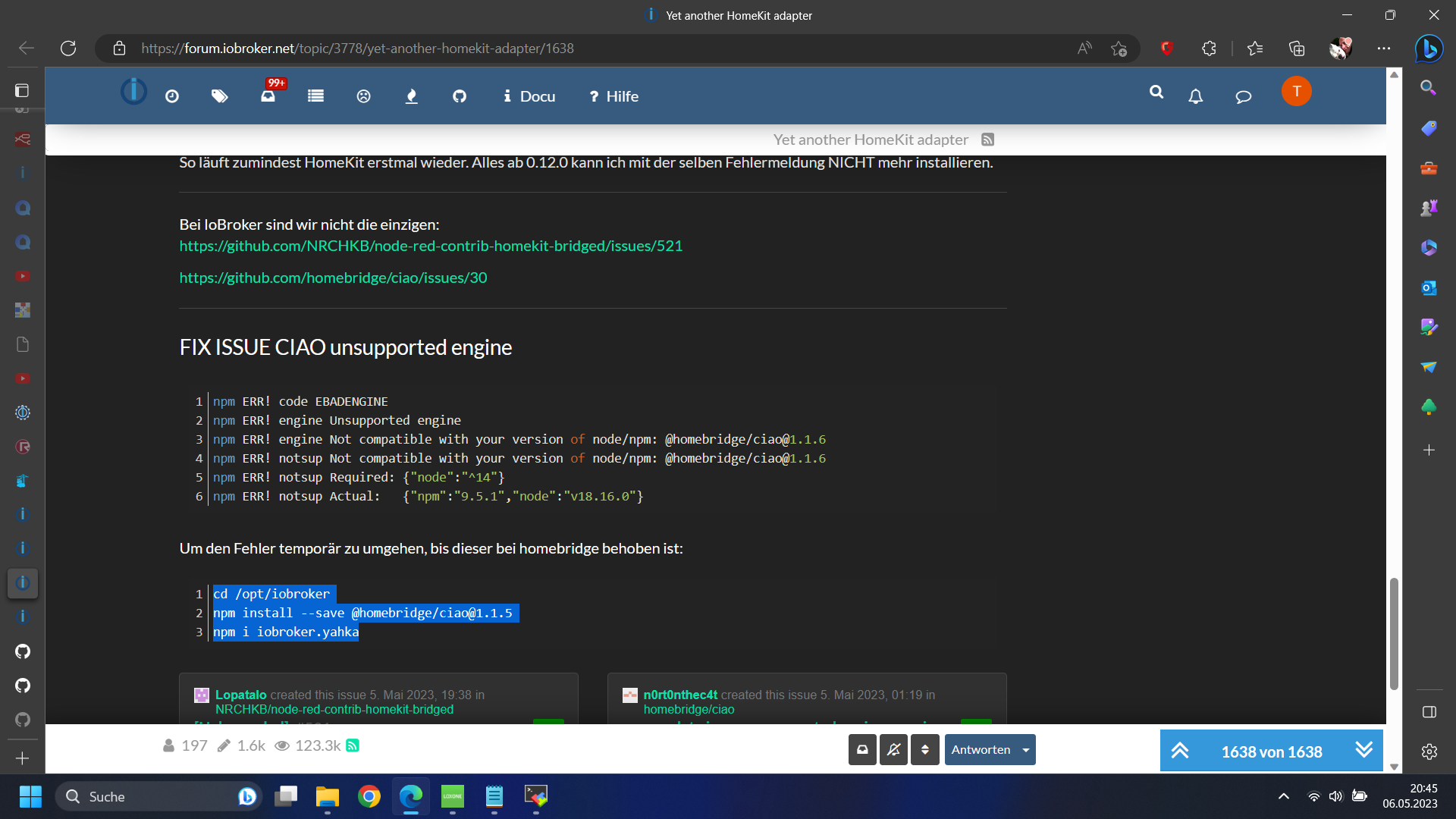
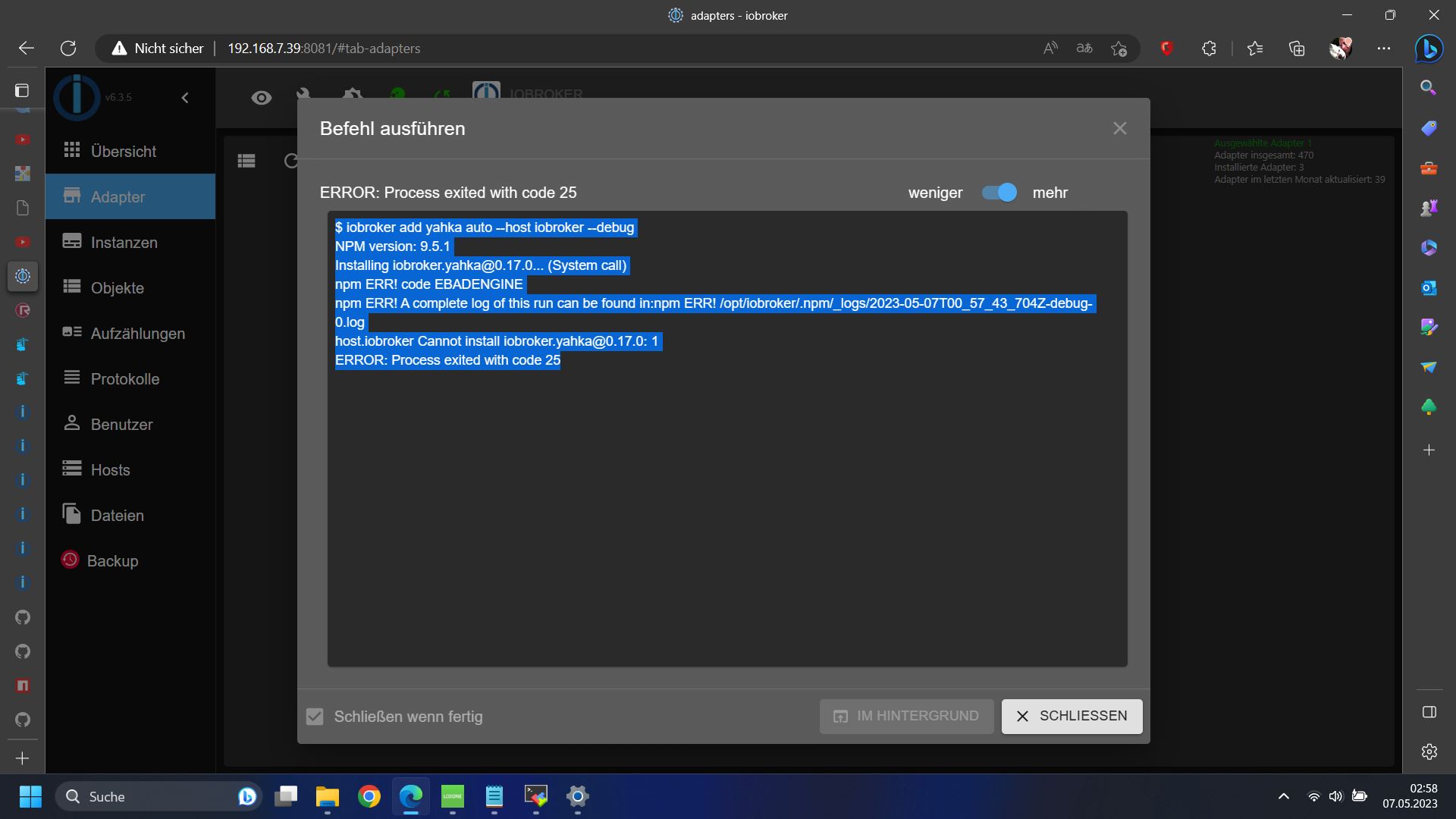
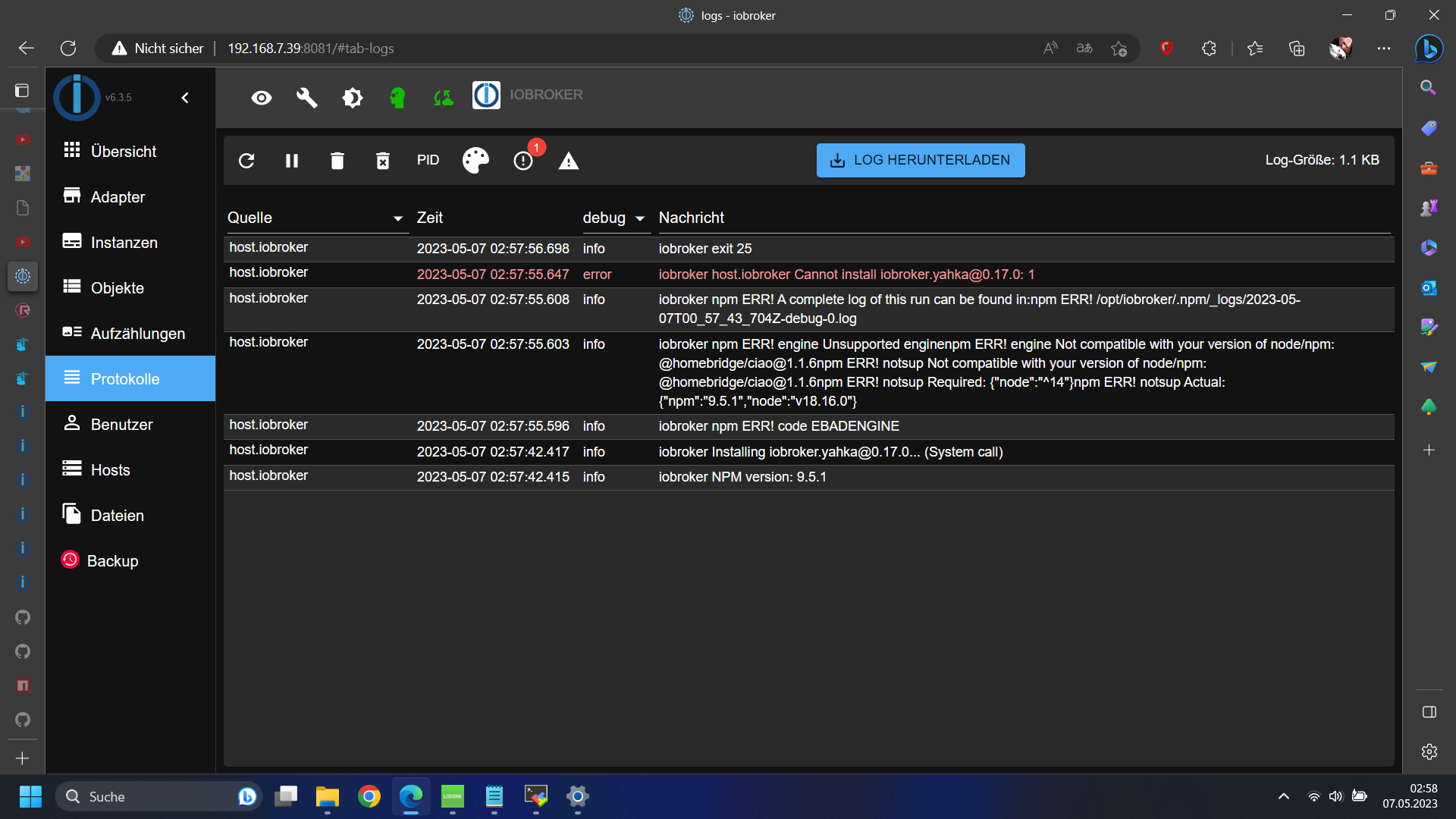
iobroker npm ERR! engine Unsupported enginenpm ERR! engine Not compatible with your version of node/npm: @homebridge/ciao@1.1.6npm ERR! notsup Not compatible with your version of node/npm: @homebridge/ciao@1.1.6npm ERR! notsup Required: {"node":"^14"}npm ERR! notsup Actual: {"npm":"9.5.1","node":"v18.16.0"}wie ich das weg kriegen soll weiß ich auch nicht ... auch bei npm kommt:
root@iobroker:/opt/iobroker/backups# npm install ciao@1.1.5 sudo: /etc/sudo.conf is world writable sudo: /etc/sudo.conf is world writable sudo: error in /etc/sudo.conf, line 0 while loading plugin "sudoers_policy" sudo: /usr/lib/sudo/sudoers.so must be only be writable by owner sudo: fatal error, unable to load plugins root@iobroker:/opt/iobroker/backups# -
iobroker npm ERR! engine Unsupported enginenpm ERR! engine Not compatible with your version of node/npm: @homebridge/ciao@1.1.6npm ERR! notsup Not compatible with your version of node/npm: @homebridge/ciao@1.1.6npm ERR! notsup Required: {"node":"^14"}npm ERR! notsup Actual: {"npm":"9.5.1","node":"v18.16.0"}wie ich das weg kriegen soll weiß ich auch nicht ... auch bei npm kommt:
root@iobroker:/opt/iobroker/backups# npm install ciao@1.1.5 sudo: /etc/sudo.conf is world writable sudo: /etc/sudo.conf is world writable sudo: error in /etc/sudo.conf, line 0 while loading plugin "sudoers_policy" sudo: /usr/lib/sudo/sudoers.so must be only be writable by owner sudo: fatal error, unable to load plugins root@iobroker:/opt/iobroker/backups#@tomme
Moin Tomme,
zunächst: das eigentliche Problem mit dem Yahka-Adpater liegt hier begründet:
npm update issues unsupported engine warning.
Es gibt schon einen PullRequest zur Behebung des Fehlers. Der muss jetzt nur noch in eine neue Version einfließen.
Dein anderes Problem mit der "sudo.conf" müsste daran liegen, dass Du die Befehle mit sudo aufrufst. Das brauchst Du nicht, Du bist schon root.Ich würde aber empfehlen zu warten, bis das eigentliche Problem gelöst ist.
Zu Deinem Problem, dass Du keine Backups einspielen kannst fällt mir aktuell auch nicht viel ein.
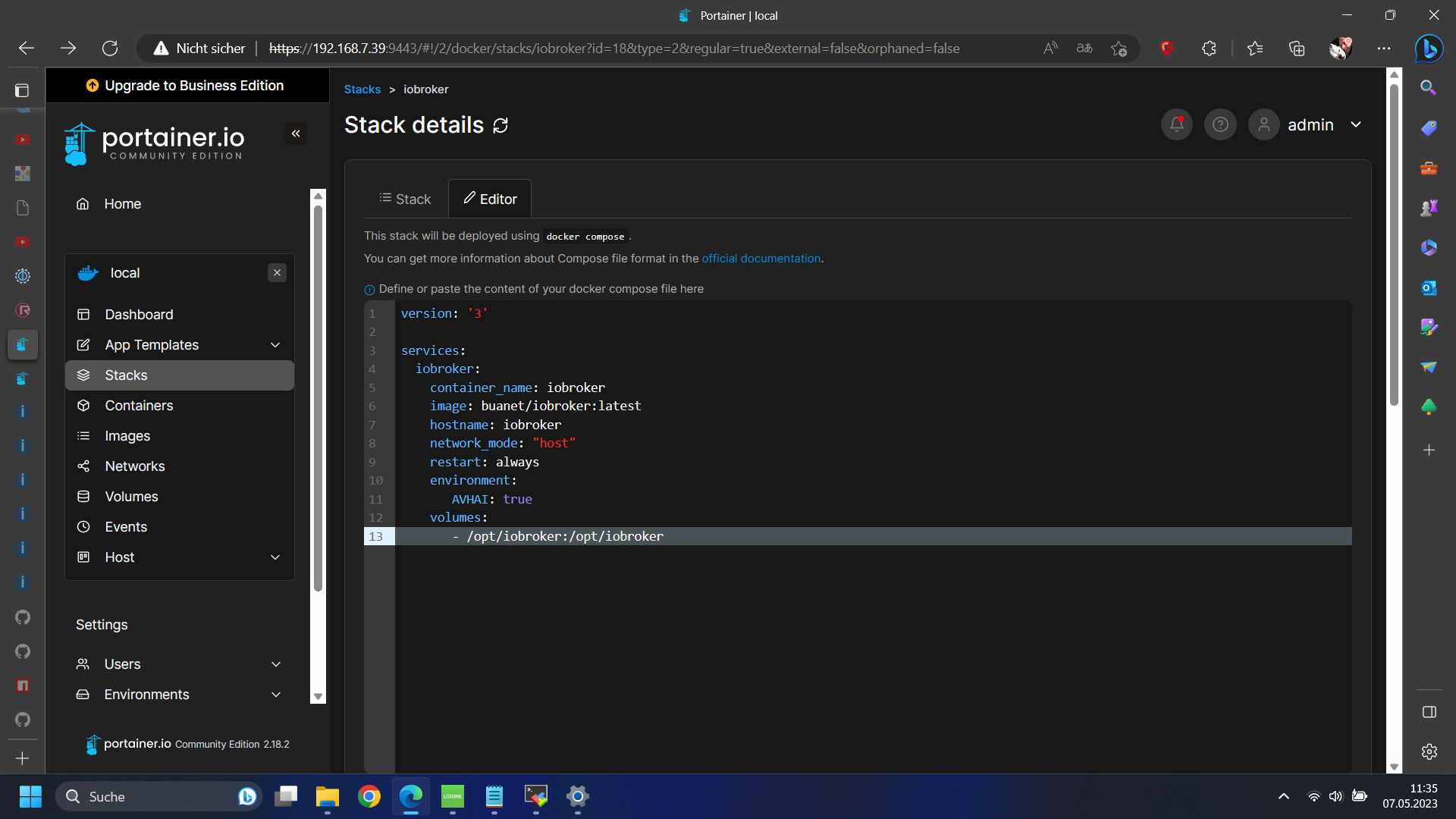
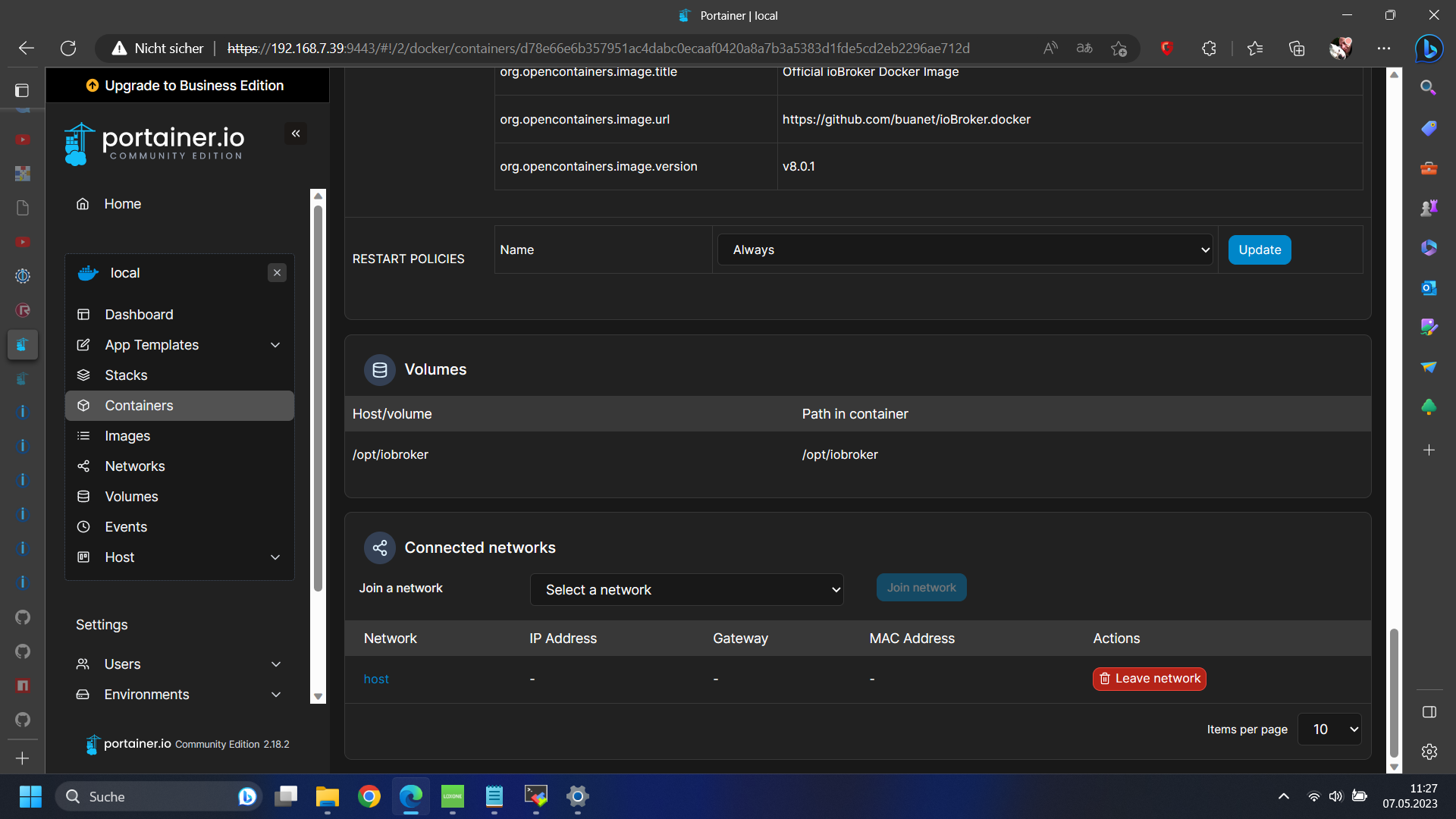
Eigentlich nur folgende Fragen:- Hast Du etwas an der Volumes-Konfiguration im Stack geändert?
- Wie sieht Deine Konfiguration des Backitup-Adapters aus?
2a. Speicherort ist "NAS/Kopieren"?
2b. Dann unter "NAS/Kopieren" Verbindungstyp = "Copy"; den Pfad unten kannst Du leer lassen
Gruß Thomas
-
Guten Morgähn Thomas,
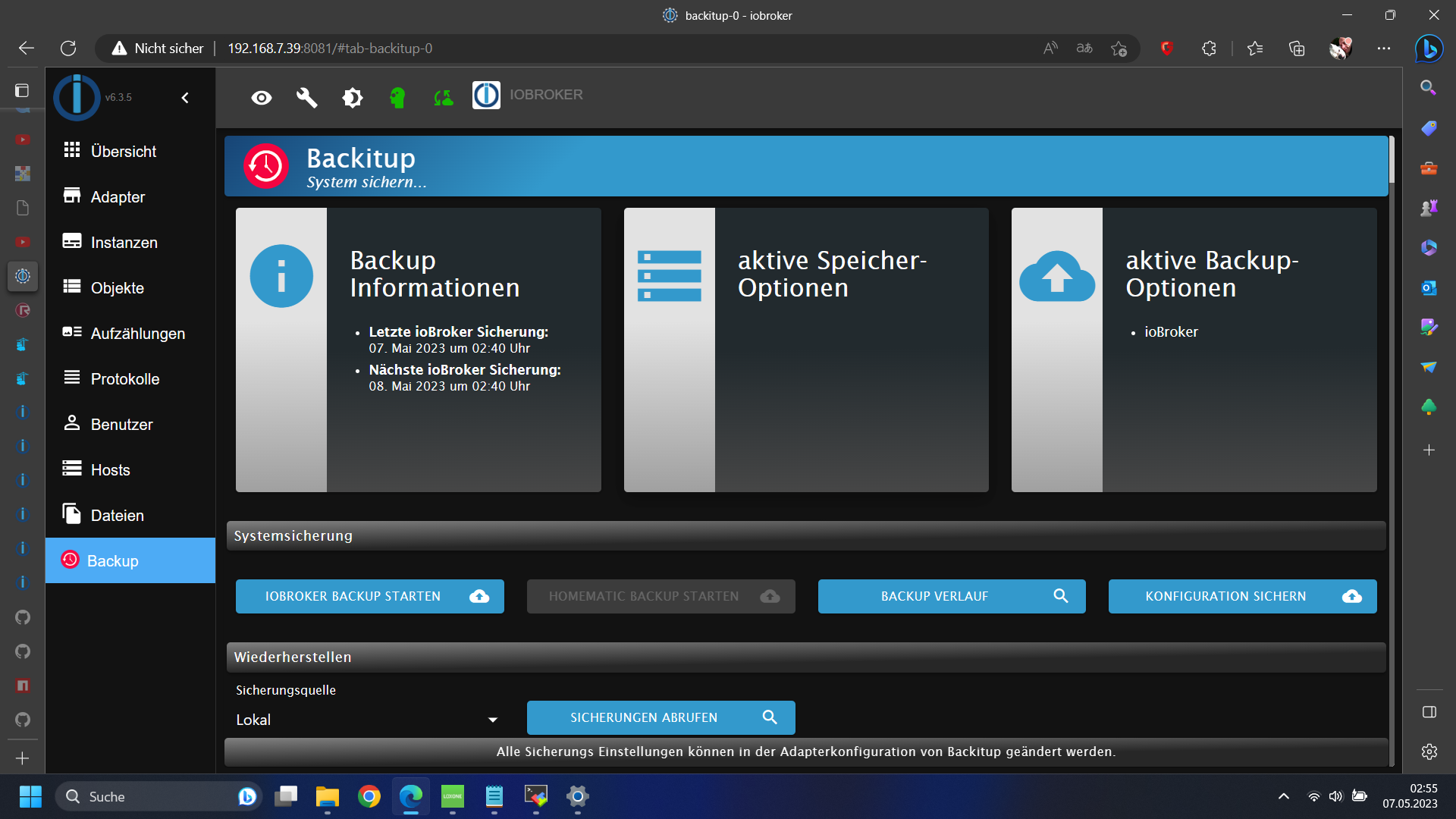
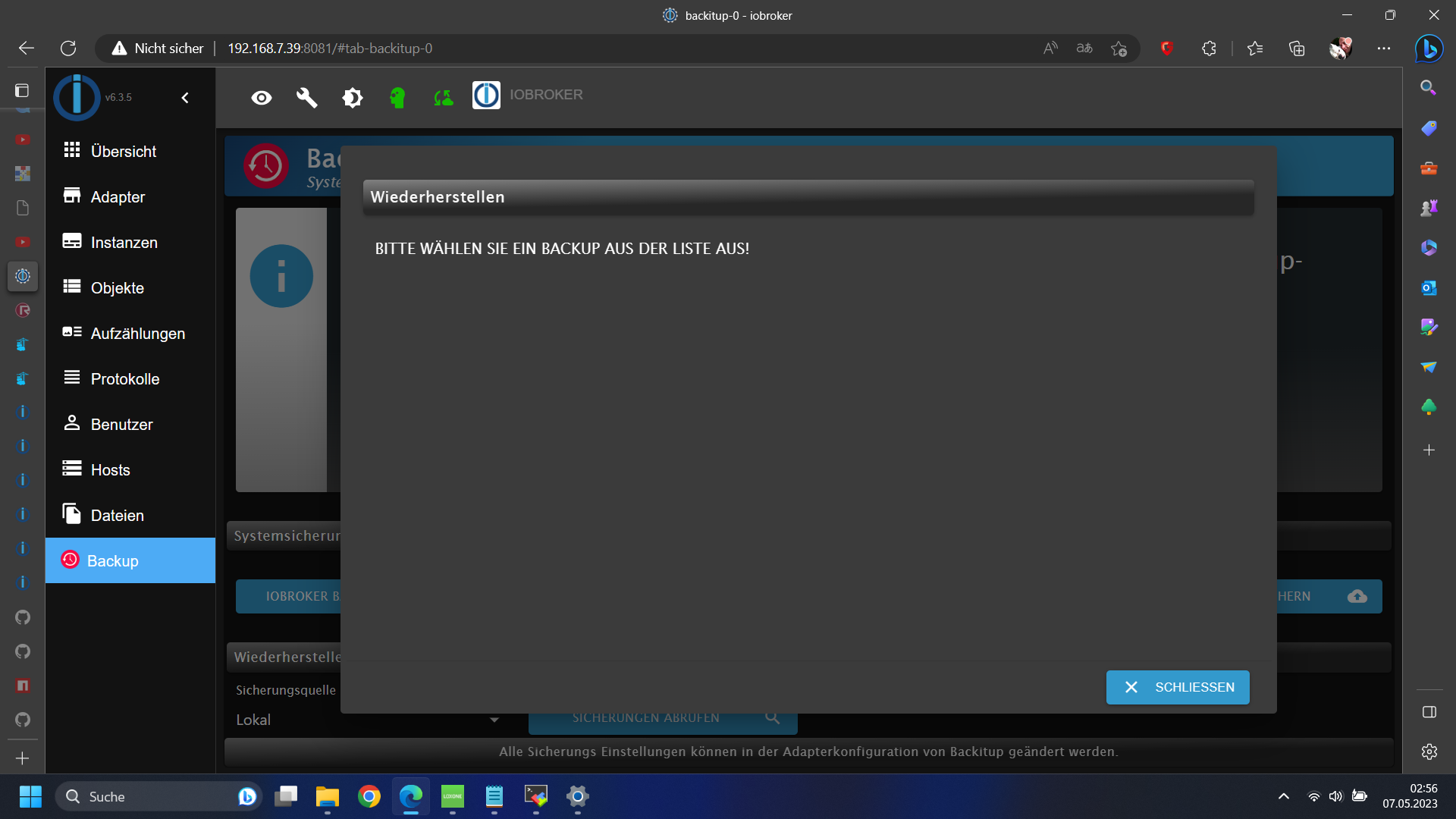
Backitup ist in seiner Grundeinstellung weil ich mit mount mit oder ohne sudo keine Verknüpfung zu meinem Windows Rechner hin bekomme. cifs-utils ist standardmäßig installiert und aktuell aber smbclient lässt sich auch nicht installieren wegen fehlender quellenroot@iobroker:/opt/iobroker# apt install smbclient -y Reading package lists... Done Building dependency tree... Done Reading state information... Done Package smbclient is not available, but is referred to by another package. This may mean that the package is missing, has been obsoleted, or is only available from another source E: Package 'smbclient' has no installation candidate root@iobroker:/opt/iobroker# apt install cifs-utils -y Reading package lists... Done Building dependency tree... Done Reading state information... Done cifs-utils is already the newest version (2:6.11-3.1+deb11u1). 0 upgraded, 0 newly installed, 0 to remove and 0 not upgraded. root@iobroker:/opt/iobroker# mount -t cifs -o user=Tomme,password=8005,rw,file_mode=0777,dir_mode=0777,vers=2.0 //192.168.7.1/BackItUp/ /opt/iobroker/backups Unable to apply new capability set. root@iobroker:/opt/iobroker#ich habe mir dann die Backups in /opt/iobroker/backups per sftp kopiert kann sie aber nicht sehen wenn ich auf restore gehe ... er zeigt nicht einmal das ganz frisch selbst erstellte ab ...
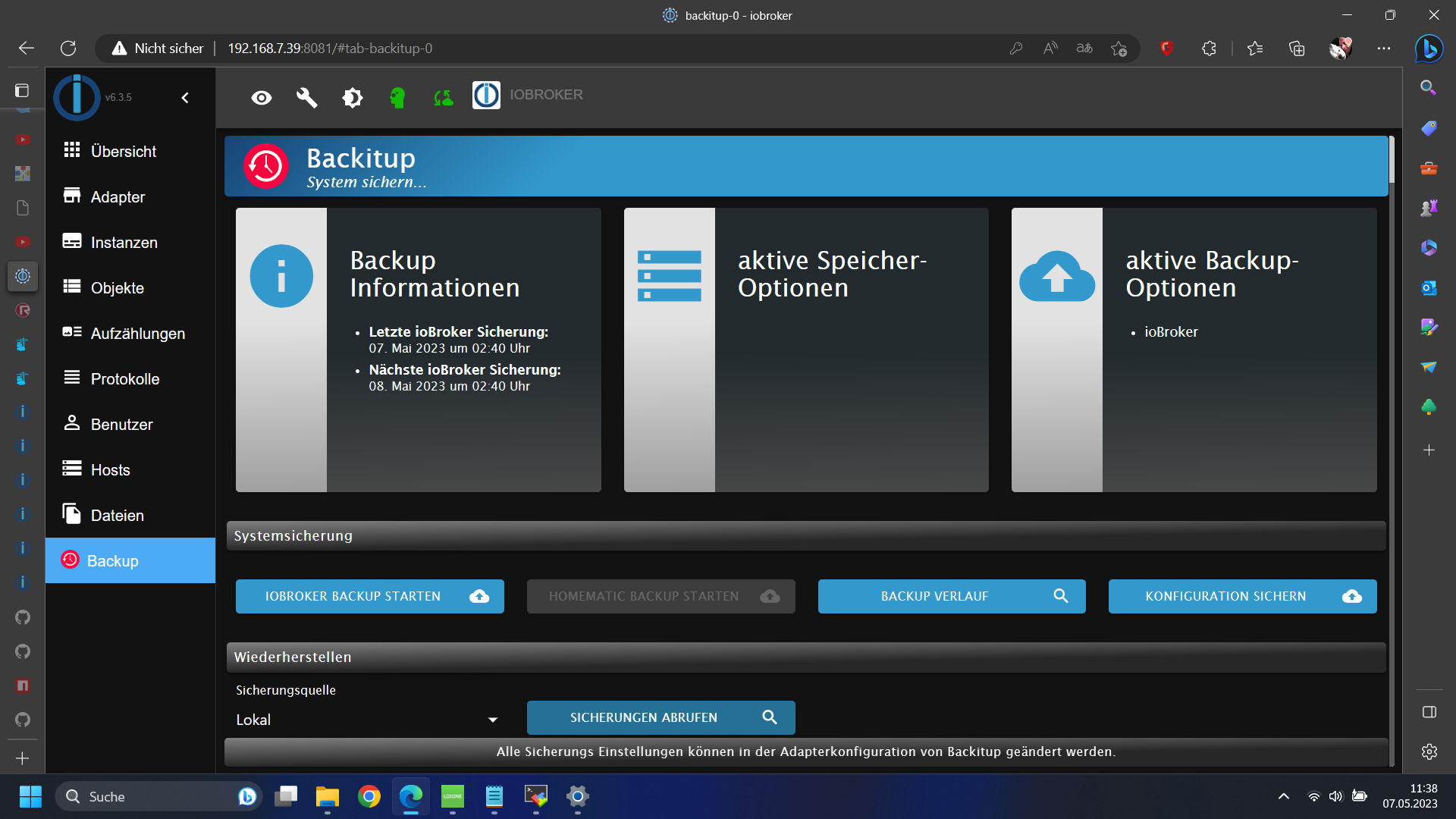
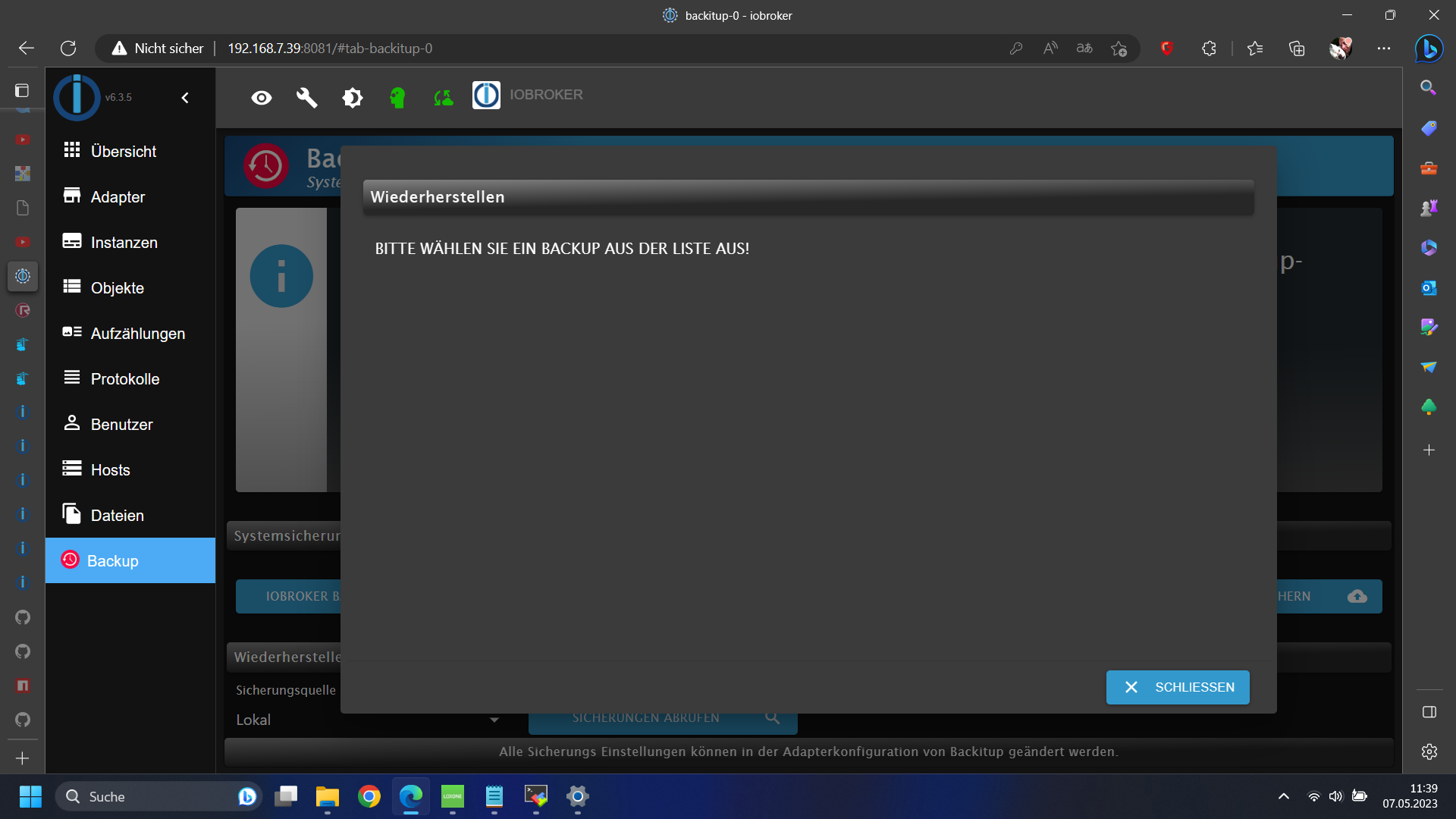
Das mit Yahka war zwar Auslöser aber ich kann erstmal gut ohne überleben das stört mich jetzt nicht so sehr.
an dem stack den wir gestern erstellt haben habe ich nichts verändert siehe:

Hey! Du scheinst an dieser Unterhaltung interessiert zu sein, hast aber noch kein Konto.
Hast du es satt, bei jedem Besuch durch die gleichen Beiträge zu scrollen? Wenn du dich für ein Konto anmeldest, kommst du immer genau dorthin zurück, wo du zuvor warst, und kannst dich über neue Antworten benachrichtigen lassen (entweder per E-Mail oder Push-Benachrichtigung). Du kannst auch Lesezeichen speichern und Beiträge positiv bewerten, um anderen Community-Mitgliedern deine Wertschätzung zu zeigen.
Mit deinem Input könnte dieser Beitrag noch besser werden 💗
Registrieren Anmelden169
Online33.0k
Benutzende83.7k
Themen1.3m
Beiträge