




Backitup und Synology Problem
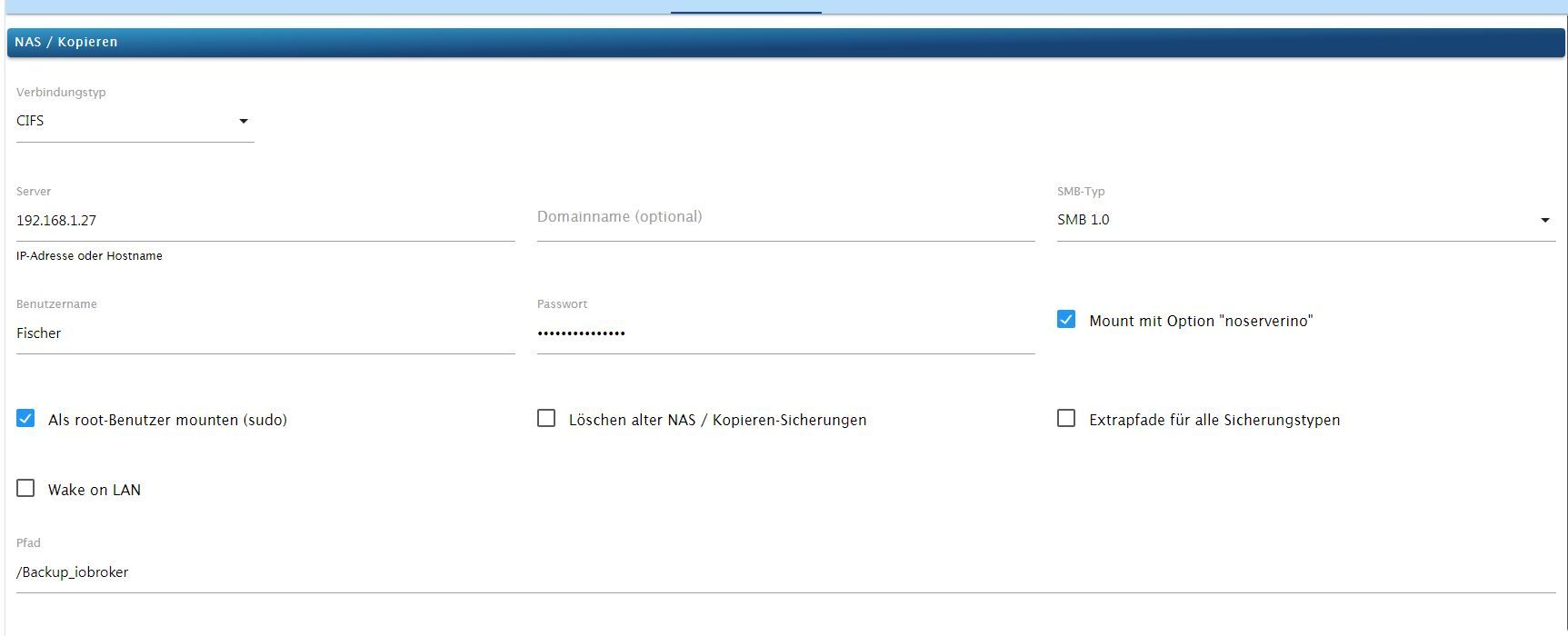
-
@haselchen sagte in Backitup und Synology Problem:
Mach es per FTP
Leg einen gemeinsamen Ordner an auf der Syno.
Ich hab dir mal nen Screenshot gemacht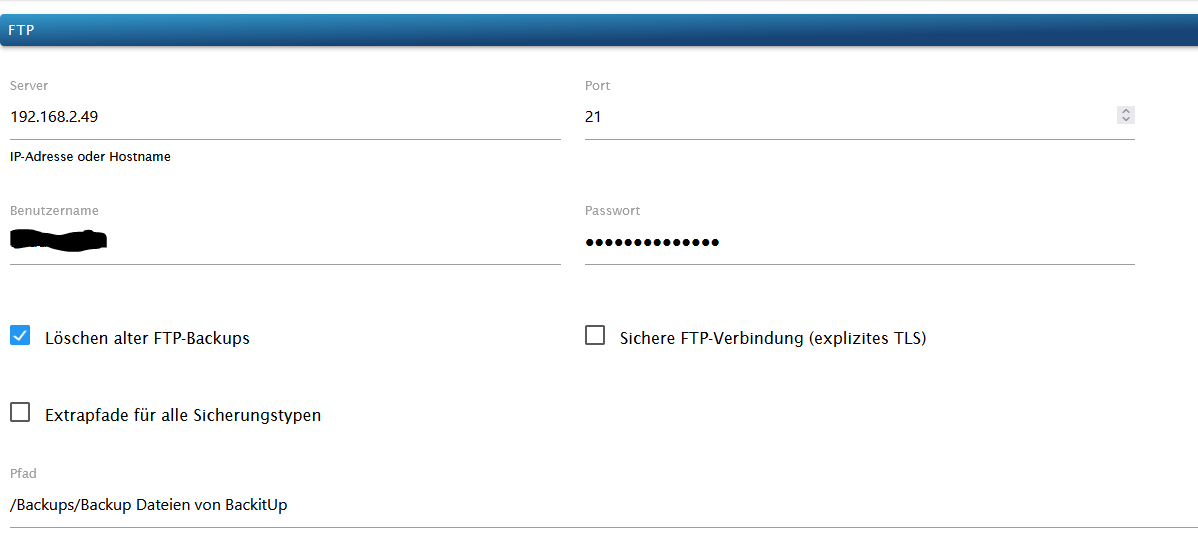
Das Backup wird in den Ordner gemacht und auch in den Backup Ordner von Iobroker


Und hier die Dateien, die in den originalen Ordner abgelegt werden

Klappt auch nicht.
Bekomme auch ein Fehler.
Backup Ordner bleibt leer.[iobroker] Error: Maximum number of tries exceeded. Please contact the site manager. backitup.0 2023-04-15 14:07:09.032 error [iobroker/ftp] Error: Maximum number of tries exceeded. Please contact the site manager.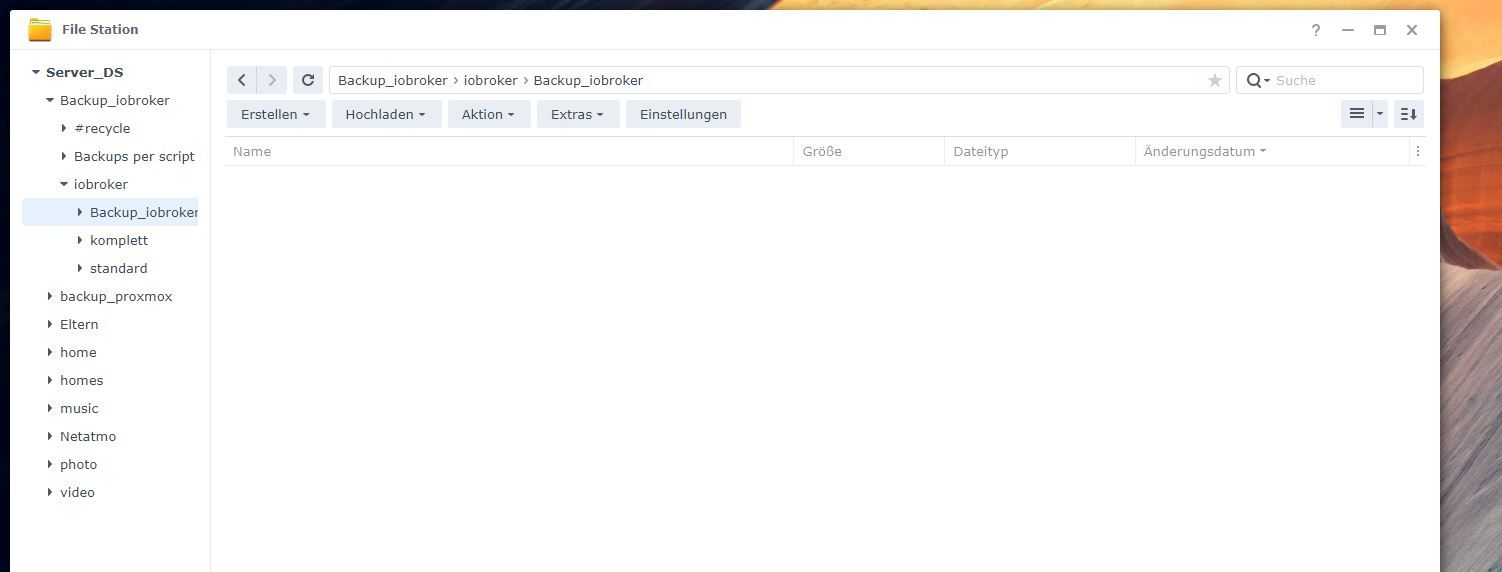
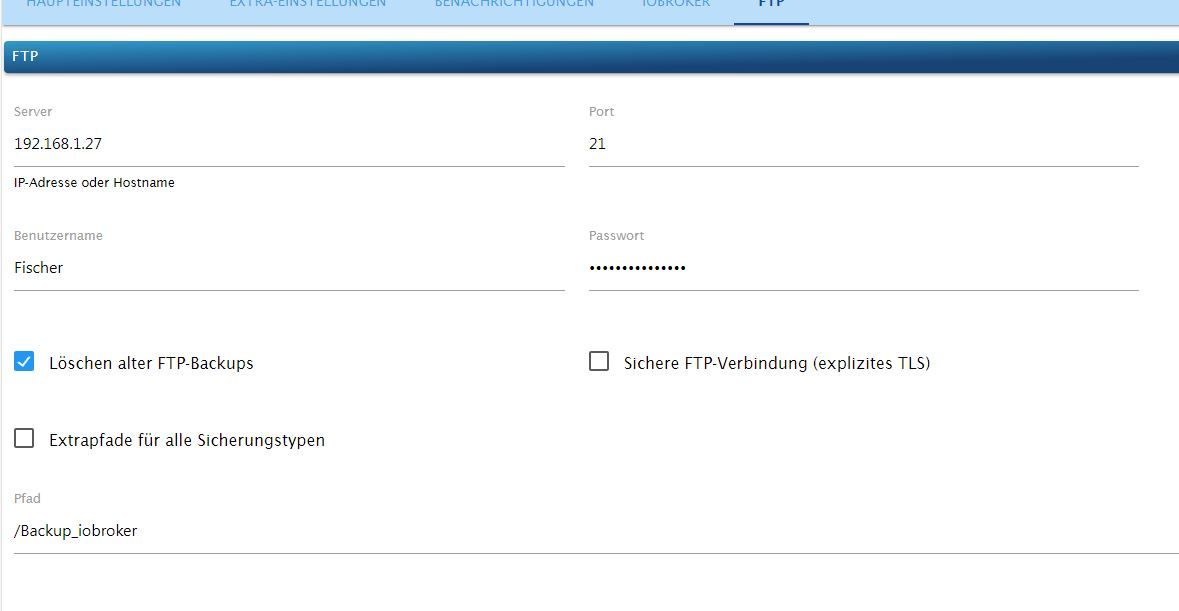
Started iobroker ... [DEBUG] [iobroker] start with {"type":"creator","workDir":"/opt/iobroker/node_modules/iobroker.js-controller/iobroker.js","time":"02:00","debugging":true,"slaveBackup":"Single","everyXDays":"1","deleteBackupAfter":0,"ftp":{"enabled":true,"type":"storage","source":"ftp","host":"192.168.1.27","debugging":true,"deleteOldBackup":true,"ownDir":false,"bkpType":"Minimal","dir":"/Backup_iobroker","dirMinimal":"/backupDir/minimal","user":"Fischer","pass":"****","port":"21","secure":false,"ignoreErrors":false},"ignoreErrors":false,"dir":"/opt/iobroker","historyHTML":{"enabled":true,"type":"message","entriesNumber":"25","ignoreErrors":false,"systemLang":"de"},"historyJSON":{"enabled":true,"type":"message","entriesNumber":"25","ignoreErrors":false,"systemLang":"de"},"telegram":{"enabled":true,"notificationsType":"Telegram","type":"message","instance":"telegram.0","SilentNotice":true,"NoticeType":"shortTelegramNotice","User":"allTelegramUsers","onlyError":true,"telegramWaiting":0,"hostName":"","ignoreErrors":false,"systemLang":"de"},"email":{"enabled":true,"notificationsType":"Telegram","type":"message","instance":"","NoticeType":"longEmailNotice","emailReceiver":"xxx@xxx.com","emailSender":"xxx@xxx.com","onlyError":false,"emailWaiting":0,"hostName":"","ignoreErrors":false,"systemLang":"de"},"pushover":{"enabled":true,"notificationsType":"Telegram","type":"message","instance":"","SilentNotice":false,"NoticeType":"longPushoverNotice","deviceID":"","onlyError":false,"pushoverWaiting":0,"hostName":"","ignoreErrors":false,"systemLang":"de"},"whatsapp":{"enabled":true,"notificationsType":"Telegram","type":"message","instance":"","NoticeType":"longWhatsappNotice","onlyError":false,"whatsappWaiting":0,"hostName":"","ignoreErrors":false,"systemLang":"de"},"signal":{"enabled":true,"notificationsType":"Telegram","type":"message","instance":"","NoticeType":"longSignalNotice","onlyError":false,"signalWaiting":0,"hostName":"","ignoreErrors":false,"systemLang":"de"},"matrix":{"enabled":true,"notificationsType":"Telegram","type":"message","instance":"","NoticeType":"longMatrixNotice","onlyError":false,"matrixWaiting":0,"hostName":"","ignoreErrors":false,"systemLang":"de"},"backupDir":"/opt/iobroker/backups"} [DEBUG] [iobroker] - host.Iobroker 152411 states saved [DEBUG] [iobroker] - host.Iobroker 17906 objects saved [DEBUG] [iobroker] - Backup created: /opt/iobroker/backups/iobroker_2023_04_15-14_12_21_backupiobroker.tar.gz [DEBUG] [iobroker] - done [ERROR] [ftp] - Error: Maximum number of tries exceeded. Please contact the site manager. [DEBUG] [ftp] start with {"type":"storage","source":"ftp","host":"192.168.1.27","debugging":true,"deleteOldBackup":true,"ownDir":false,"bkpType":"Minimal","dir":"/Backup_iobroker","dirMinimal":"/backupDir/minimal","user":"Fischer","pass":"****","port":"21","secure":false,"ignoreErrors":false,"deleteBackupAfter":0}Synology DS218+ & 2 x Fujitsu Esprimo (VM/Container) + FritzBox7590 + 2 AVM 3000 Repeater & Homematic & HUE & Osram & Xiaomi, NPM 10.9.7, Nodejs 22.22.2 ,JS Controller 7.0.7 ,Admin 7.8.24
-
@haselchen sagte in Backitup und Synology Problem:
Mach es per FTP
Leg einen gemeinsamen Ordner an auf der Syno.
Ich hab dir mal nen Screenshot gemachtDas Backup wird in den Ordner gemacht und auch in den Backup Ordner von Iobroker
Und hier die Dateien, die in den originalen Ordner abgelegt werden
Klappt auch nicht.
Bekomme auch ein Fehler.
Backup Ordner bleibt leer.[iobroker] Error: Maximum number of tries exceeded. Please contact the site manager. backitup.0 2023-04-15 14:07:09.032 error [iobroker/ftp] Error: Maximum number of tries exceeded. Please contact the site manager. Started iobroker ... [DEBUG] [iobroker] start with {"type":"creator","workDir":"/opt/iobroker/node_modules/iobroker.js-controller/iobroker.js","time":"02:00","debugging":true,"slaveBackup":"Single","everyXDays":"1","deleteBackupAfter":0,"ftp":{"enabled":true,"type":"storage","source":"ftp","host":"192.168.1.27","debugging":true,"deleteOldBackup":true,"ownDir":false,"bkpType":"Minimal","dir":"/Backup_iobroker","dirMinimal":"/backupDir/minimal","user":"Fischer","pass":"****","port":"21","secure":false,"ignoreErrors":false},"ignoreErrors":false,"dir":"/opt/iobroker","historyHTML":{"enabled":true,"type":"message","entriesNumber":"25","ignoreErrors":false,"systemLang":"de"},"historyJSON":{"enabled":true,"type":"message","entriesNumber":"25","ignoreErrors":false,"systemLang":"de"},"telegram":{"enabled":true,"notificationsType":"Telegram","type":"message","instance":"telegram.0","SilentNotice":true,"NoticeType":"shortTelegramNotice","User":"allTelegramUsers","onlyError":true,"telegramWaiting":0,"hostName":"","ignoreErrors":false,"systemLang":"de"},"email":{"enabled":true,"notificationsType":"Telegram","type":"message","instance":"","NoticeType":"longEmailNotice","emailReceiver":"xxx@xxx.com","emailSender":"xxx@xxx.com","onlyError":false,"emailWaiting":0,"hostName":"","ignoreErrors":false,"systemLang":"de"},"pushover":{"enabled":true,"notificationsType":"Telegram","type":"message","instance":"","SilentNotice":false,"NoticeType":"longPushoverNotice","deviceID":"","onlyError":false,"pushoverWaiting":0,"hostName":"","ignoreErrors":false,"systemLang":"de"},"whatsapp":{"enabled":true,"notificationsType":"Telegram","type":"message","instance":"","NoticeType":"longWhatsappNotice","onlyError":false,"whatsappWaiting":0,"hostName":"","ignoreErrors":false,"systemLang":"de"},"signal":{"enabled":true,"notificationsType":"Telegram","type":"message","instance":"","NoticeType":"longSignalNotice","onlyError":false,"signalWaiting":0,"hostName":"","ignoreErrors":false,"systemLang":"de"},"matrix":{"enabled":true,"notificationsType":"Telegram","type":"message","instance":"","NoticeType":"longMatrixNotice","onlyError":false,"matrixWaiting":0,"hostName":"","ignoreErrors":false,"systemLang":"de"},"backupDir":"/opt/iobroker/backups"} [DEBUG] [iobroker] - host.Iobroker 152411 states saved [DEBUG] [iobroker] - host.Iobroker 17906 objects saved [DEBUG] [iobroker] - Backup created: /opt/iobroker/backups/iobroker_2023_04_15-14_12_21_backupiobroker.tar.gz [DEBUG] [iobroker] - done [ERROR] [ftp] - Error: Maximum number of tries exceeded. Please contact the site manager. [DEBUG] [ftp] start with {"type":"storage","source":"ftp","host":"192.168.1.27","debugging":true,"deleteOldBackup":true,"ownDir":false,"bkpType":"Minimal","dir":"/Backup_iobroker","dirMinimal":"/backupDir/minimal","user":"Fischer","pass":"****","port":"21","secure":false,"ignoreErrors":false,"deleteBackupAfter":0}MinimalBackup?
Das gibt es seit Urzeiten nicht mehr, wenn ich das richtig sehe. Mit welchen Versionen biste denn da unterwegs?
iob diaganschauen.
-
-
@haselchen ja das passt soweit.
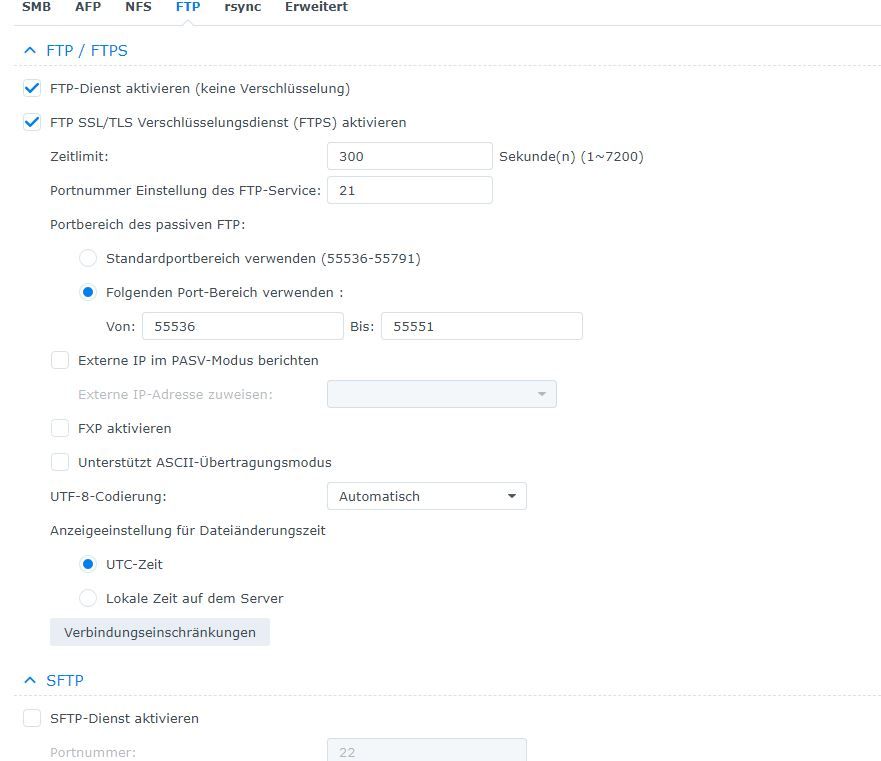
Hast du denn den Ordner , dessen Pfad du im Adapter angegeben hast, in der Syno angelegt unter gemeinsame Ordner?
Mach das mal wie bei mir.
Backups Ordner anlegen in Gemeinsame Ordner und dann so den Pfad angeben wie bei mirSynology DS218+ & 2 x Fujitsu Esprimo (VM/Container) + FritzBox7590 + 2 AVM 3000 Repeater & Homematic & HUE & Osram & Xiaomi, NPM 10.9.7, Nodejs 22.22.2 ,JS Controller 7.0.7 ,Admin 7.8.24
-
MinimalBackup?
Das gibt es seit Urzeiten nicht mehr, wenn ich das richtig sehe. Mit welchen Versionen biste denn da unterwegs?
iob diaganschauen.
Sorry bin Anfänger.
(dmesg -T) wo finde ich das`?iob diag kommt das raus.
======== Start marking the full check here =========
Skript v.2023-04-02 *** BASE SYSTEM *** Architecture : x86_64 Docker : false Virtualization : lxc Distributor ID: Ubuntu Description: Ubuntu 22.04.2 LTS Release: 22.04 Codename: jammy PRETTY_NAME="Ubuntu 22.04.2 LTS" NAME="Ubuntu" VERSION_ID="22.04" VERSION="22.04.2 LTS (Jammy Jellyfish)" VERSION_CODENAME=jammy ID=ubuntu ID_LIKE=debian HOME_URL="https://www.ubuntu.com/" SUPPORT_URL="https://help.ubuntu.com/" BUG_REPORT_URL="https://bugs.launchpad.net/ubuntu/" PRIVACY_POLICY_URL="https://www.ubuntu.com/legal/terms-and-policies/privacy-policy" UBUNTU_CODENAME=jammy Systemuptime and Load: 14:41:04 up 2:51, 2 users, load average: 0.90, 1.06, 1.00 CPU threads: 2 *** Time and Time Zones *** Local time: Sat 2023-04-15 14:41:05 CEST Universal time: Sat 2023-04-15 12:41:05 UTC RTC time: n/a Time zone: Europe/Berlin (CEST, +0200) System clock synchronized: yes NTP service: inactive RTC in local TZ: no *** User and Groups *** vitali /home/vitali vitali sudo iobroker *** X-Server-Setup *** X-Server: false Desktop: Terminal: tty Boot Target: graphical.target *** MEMORY *** total used free shared buff/cache available Mem: 4.1G 2.2G 1.4G 0.0K 504M 1.9G Swap: 512M 0.0K 511M Total: 4.6G 2.2G 1.9G 4096 M total memory 2167 M used memory 345 M active memory 2151 M inactive memory 1423 M free memory 0 M buffer memory 504 M swap cache 512 M total swap 0 M used swap 511 M free swap *** FILESYSTEM *** Filesystem Type Size Used Avail Use% Mounted on /dev/mapper/pve-vm--100--disk--0 ext4 20G 4.2G 15G 23% / none tmpfs 492K 4.0K 488K 1% /dev tmpfs tmpfs 2.9G 0 2.9G 0% /dev/shm tmpfs tmpfs 1.2G 128K 1.2G 1% /run tmpfs tmpfs 5.0M 0 5.0M 0% /run/lock tmpfs tmpfs 576M 0 576M 0% /run/user/1001 Messages concerning ext4 filesystem in dmesg: dmesg: read kernel buffer failed: Operation not permitted Show mounted filesystems (real ones only): TARGET SOURCE FSTYPE OPTIONS / /dev/mapper/pve-vm--100--disk--0 ext4 rw,relatime,stripe=16 Files in neuralgic directories: /var: 523M /var/ 240M /var/lib 225M /var/cache 219M /var/cache/apt 145M /var/lib/apt/lists /opt/iobroker/backups: 446M /opt/iobroker/backups/ /opt/iobroker/iobroker-data: 602M /opt/iobroker/iobroker-data/ 371M /opt/iobroker/iobroker-data/files 165M /opt/iobroker/iobroker-data/backup-objects 65M /opt/iobroker/iobroker-data/files/vis.0 51M /opt/iobroker/iobroker-data/files/javascript.admin The five largest files in iobroker-data are: 41M /opt/iobroker/iobroker-data/states.jsonl 33M /opt/iobroker/iobroker-data/files/devices.admin/static/js/main.10538062.js.map 26M /opt/iobroker/iobroker-data/objects.jsonl 19M /opt/iobroker/iobroker-data/files/web.admin/static/js/main.a5972028.js.map 19M /opt/iobroker/iobroker-data/files/iot.admin/static/js/main.2975a411.js.map *** NodeJS-Installation *** /usr/bin/nodejs v18.16.0 /usr/bin/node v18.16.0 /usr/bin/npm 9.5.1 /usr/bin/npx 9.5.1 nodejs: Installed: 18.16.0-deb-1nodesource1 Candidate: 18.16.0-deb-1nodesource1 Version table: *** 18.16.0-deb-1nodesource1 500 500 https://deb.nodesource.com/node_18.x jammy/main amd64 Packages 100 /var/lib/dpkg/status 12.22.9~dfsg-1ubuntu3 500 500 http://archive.ubuntu.com/ubuntu jammy/universe amd64 Packages Temp directories causing npm8 problem: 0 No problems detected *** ioBroker-Installation *** ioBroker Status iobroker is running on this host. Objects type: jsonl States type: jsonl Core adapters versions js-controller: 4.0.24 admin: 6.3.6 javascript: 7.0.1 Adapters from github: 0 Adapter State + system.adapter.accuweather.0 : accuweather : Iobroker - enabled + system.adapter.admin.0 : admin : Iobroker - enabled, port: 8081, bind: 192.168.1.18, run as: admin + system.adapter.alexa2.0 : alexa2 : Iobroker - enabled + system.adapter.backitup.0 : backitup : Iobroker - enabled system.adapter.daswetter.0 : daswetter : Iobroker - enabled system.adapter.devices.0 : devices : Iobroker - disabled + system.adapter.discovery.0 : discovery : Iobroker - enabled system.adapter.dwd.0 : dwd : Iobroker - enabled + system.adapter.harmony.0 : harmony : Iobroker - enabled + system.adapter.hmip.0 : hmip : Iobroker - enabled + system.adapter.hs100.0 : hs100 : Iobroker - enabled system.adapter.ical.0 : ical : Iobroker - enabled system.adapter.ical.1 : ical : Iobroker - enabled system.adapter.ical.2 : ical : Iobroker - enabled system.adapter.ical.3 : ical : Iobroker - enabled system.adapter.icons-icons8.0 : icons-icons8 : Iobroker - disabled system.adapter.icons-material-png.0 : icons-material-png : Iobroker - disabled system.adapter.icons-material-svg.0 : icons-material-svg : Iobroker - disabled system.adapter.icons-mfd-png.0 : icons-mfd-png : Iobroker - disabled system.adapter.icons-mfd-svg.0 : icons-mfd-svg : Iobroker - disabled system.adapter.icons-ultimate-png.0 : icons-ultimate-png : Iobroker - disabled + system.adapter.info.0 : info : Iobroker - enabled + system.adapter.iot.0 : iot : Iobroker - enabled + system.adapter.javascript.0 : javascript : Iobroker - enabled system.adapter.javascript.1 : javascript : Iobroker - disabled + system.adapter.km200.0 : km200 : Iobroker - enabled system.adapter.mihome-vacuum.0 : mihome-vacuum : Iobroker - disabled, port: 54321 + system.adapter.mihome-vacuum.1 : mihome-vacuum : Iobroker - enabled, port: 54321 + system.adapter.mqtt.0 : mqtt : Iobroker - enabled, port: 1884, bind: 192.168.1.18 system.adapter.netatmo.0 : netatmo : Iobroker - disabled system.adapter.openweathermap.0 : openweathermap : Iobroker - enabled + system.adapter.ping.0 : ping : Iobroker - enabled system.adapter.robonect.0 : robonect : Iobroker - disabled + system.adapter.scenes.0 : scenes : Iobroker - enabled system.adapter.shelly.0 : shelly : Iobroker - disabled, port: 1884, bind: 192.168.1.18 + system.adapter.simple-api.0 : simple-api : Iobroker - enabled, port: 8087, bind: 0.0.0.0, run as: admin + system.adapter.sonoff.0 : sonoff : Iobroker - enabled, port: 1883, bind: 0.0.0.0 system.adapter.synology.0 : synology : Iobroker - disabled, port: 5000 + system.adapter.tankerkoenig.0 : tankerkoenig : Iobroker - enabled system.adapter.telegram.0 : telegram : Iobroker - disabled, port: 8443, bind: 0.0.0.0 + system.adapter.terminal.0 : terminal : Iobroker - enabled, port: 8088, bind: 192.168.1.18, run as: admin system.adapter.vis-bars.0 : vis-bars : Iobroker - disabled system.adapter.vis-canvas-gauges.0 : vis-canvas-gauges : Iobroker - disabled system.adapter.vis-fancyswitch.0 : vis-fancyswitch : Iobroker - disabled system.adapter.vis-hqwidgets.0 : vis-hqwidgets : Iobroker - disabled system.adapter.vis-justgage.0 : vis-justgage : Iobroker - disabled system.adapter.vis-materialdesign.0 : vis-materialdesign : Iobroker - disabled system.adapter.vis-metro.0 : vis-metro : Iobroker - disabled system.adapter.vis-players.0 : vis-players : Iobroker - disabled system.adapter.vis-plumb.0 : vis-plumb : Iobroker - disabled system.adapter.vis-rgraph.0 : vis-rgraph : Iobroker - disabled system.adapter.vis-timeandweather.0 : vis-timeandweather : Iobroker - disabled system.adapter.vis-weather.0 : vis-weather : Iobroker - disabled system.adapter.vis.0 : vis : Iobroker - enabled + system.adapter.web.0 : web : Iobroker - enabled, port: 8082, bind: 0.0.0.0, run as: admin system.adapter.yr.0 : yr : Iobroker - enabled system.adapter.zigbee.0 : zigbee : Iobroker - disabled, port: /dev/serial/by-id/usb-Texas_Instruments_CC2538_USB_CDC-if00 + instance is alive Enabled adapters with bindings + system.adapter.admin.0 : admin : Iobroker - enabled, port: 8081, bind: 192.168.1.18, run as: admin + system.adapter.mihome-vacuum.1 : mihome-vacuum : Iobroker - enabled, port: 54321 + system.adapter.mqtt.0 : mqtt : Iobroker - enabled, port: 1884, bind: 192.168.1.18 + system.adapter.simple-api.0 : simple-api : Iobroker - enabled, port: 8087, bind: 0.0.0.0, run as: admin + system.adapter.sonoff.0 : sonoff : Iobroker - enabled, port: 1883, bind: 0.0.0.0 + system.adapter.terminal.0 : terminal : Iobroker - enabled, port: 8088, bind: 192.168.1.18, run as: admin + system.adapter.web.0 : web : Iobroker - enabled, port: 8082, bind: 0.0.0.0, run as: admin ioBroker-Repositories stable : http://download.iobroker.net/sources-dist.json beta : http://download.iobroker.net/sources-dist-latest.json Active repo(s): stable Installed ioBroker-Instances Used repository: stable Adapter "accuweather" : 1.2.1 , installed 1.2.1 Adapter "admin" : 6.3.5 , installed 6.3.6 Adapter "alexa2" : 3.23.2 , installed 3.23.2 Adapter "backitup" : 2.6.16 , installed 2.6.16 Adapter "daswetter" : 3.1.7 , installed 3.1.7 Adapter "devices" : 1.1.2 , installed 1.1.2 Adapter "discovery" : 3.1.0 , installed 3.1.0 Adapter "dwd" : 2.8.3 , installed 2.8.3 Adapter "harmony" : 1.2.2 , installed 1.2.2 Adapter "hmip" : 1.20.0 , installed 1.20.0 Adapter "hs100" : 2.1.2 , installed 2.1.2 Adapter "ical" : 1.13.2 , installed 1.13.2 Adapter "icons-icons8" : 0.0.1 , installed 0.0.1 Adapter "icons-material-png": 0.1.0, installed 0.1.0 Adapter "icons-material-svg": 0.1.0, installed 0.1.0 Adapter "icons-mfd-png": 1.1.0 , installed 1.1.0 Adapter "icons-mfd-svg": 1.1.0 , installed 1.1.0 Adapter "icons-ultimate-png": 1.0.1, installed 1.0.1 Adapter "info" : 1.9.19 , installed 1.9.26 Adapter "iot" : 1.14.2 , installed 1.14.5 Adapter "javascript" : 6.1.4 , installed 7.0.1 Controller "js-controller": 4.0.24 , installed 4.0.24 Adapter "km200" : 2.0.3 , installed 2.0.3 Adapter "mihome-vacuum": 3.9.5 , installed 3.9.5 Adapter "mqtt" : 4.0.7 , installed 4.0.7 Adapter "netatmo" : 2.0.5 , installed 3.1.0 Adapter "openweathermap": 0.3.3 , installed 0.3.8 Adapter "ping" : 1.5.3 , installed 1.5.3 Adapter "robonect" : 0.1.4 , installed 0.1.4 Adapter "scenes" : 2.3.9 , installed 2.3.9 Adapter "shelly" : 6.3.1 , installed 6.4.0 Adapter "simple-api" : 2.7.2 , installed 2.7.2 Adapter "socketio" : 4.2.0 , installed 6.3.4 Adapter "sonoff" : 2.5.1 , installed 2.5.1 Adapter "synology" : 2.1.13 , installed 2.1.13 Adapter "tankerkoenig" : 3.3.7 , installed 3.3.7 Adapter "telegram" : 1.15.2 , installed 1.15.6 Adapter "terminal" : 1.0.0 , installed 1.0.0 Adapter "vis" : 1.4.16 , installed 1.4.16 Adapter "vis-bars" : 0.1.4 , installed 0.1.4 Adapter "vis-canvas-gauges": 1.0.1, installed 1.0.1 Adapter "vis-fancyswitch": 1.1.0 , installed 1.1.0 Adapter "vis-hqwidgets": 1.3.0 , installed 1.3.1 Adapter "vis-justgage" : 1.0.2 , installed 1.0.2 Adapter "vis-metro" : 1.2.0 , installed 1.2.0 Adapter "vis-players" : 0.1.6 , installed 0.1.6 Adapter "vis-plumb" : 1.0.2 , installed 1.0.2 Adapter "vis-rgraph" : 0.0.2 , installed 0.0.2 Adapter "vis-timeandweather": 1.2.2, installed 1.2.2 Adapter "vis-weather" : 2.5.6 , installed 2.5.6 Adapter "web" : 4.3.0 , installed 5.5.2 Adapter "ws" : 1.3.0 , installed 2.3.6 Adapter "yr" : 5.3.0 , installed 5.3.0 Adapter "zigbee" : 1.8.10 , installed 1.8.10 Objects and States Please stand by - This may take a while Objects: 17902 States: 152407 *** OS-Repositories and Updates *** Hit:1 https://deb.nodesource.com/node_18.x jammy InRelease Hit:2 http://archive.ubuntu.com/ubuntu jammy InRelease Get:3 http://archive.ubuntu.com/ubuntu jammy-updates InRelease [119 kB] Get:4 http://archive.ubuntu.com/ubuntu jammy-security InRelease [110 kB] Fetched 229 kB in 2s (128 kB/s) Reading package lists... Pending Updates: 0 *** Listening Ports *** Active Internet connections (only servers) Proto Recv-Q Send-Q Local Address Foreign Address State User Inode PID/Program name tcp 0 0 0.0.0.0:1883 0.0.0.0:* LISTEN 1000 8681579 106878/io.sonoff.0 tcp 0 0 127.0.0.1:25 0.0.0.0:* LISTEN 0 8164525 289/master tcp 0 0 192.168.1.18:8081 0.0.0.0:* LISTEN 1000 8678239 106682/io.admin.0 tcp 0 0 127.0.0.1:9000 0.0.0.0:* LISTEN 1000 8678819 106661/iobroker.js- tcp 1 0 127.0.0.1:9001 0.0.0.0:* LISTEN 1000 8678115 106661/iobroker.js- tcp 0 0 0.0.0.0:111 0.0.0.0:* LISTEN 0 8161739 1/systemd tcp 0 0 192.168.1.18:1884 0.0.0.0:* LISTEN 1000 8681480 106852/io.mqtt.0 tcp 0 0 0.0.0.0:51841 0.0.0.0:* LISTEN 111 8271412 26963/rpc.statd tcp 0 0 127.0.0.53:53 0.0.0.0:* LISTEN 106 8645138 97515/systemd-resol tcp6 0 0 :::61991 :::* LISTEN 1000 8681661 106935/io.harmony.0 tcp6 0 0 ::1:25 :::* LISTEN 0 8164526 289/master tcp6 0 0 :::111 :::* LISTEN 0 8161741 1/systemd tcp6 0 0 :::22 :::* LISTEN 0 8160970 1/systemd tcp6 0 0 :::8088 :::* LISTEN 1000 8680237 107054/io.terminal. tcp6 0 0 :::8082 :::* LISTEN 1000 8680294 107088/io.web.0 tcp6 0 0 :::8087 :::* LISTEN 1000 8680140 107028/io.simple-ap tcp6 0 0 :::47687 :::* LISTEN 111 8271418 26963/rpc.statd udp 0 0 127.0.0.53:53 0.0.0.0:* 106 8645137 97515/systemd-resol udp 0 0 0.0.0.0:111 0.0.0.0:* 0 8161740 1/systemd udp 0 0 0.0.0.0:53422 0.0.0.0:* 1000 8679330 106811/io.mihome-va udp 0 0 0.0.0.0:61991 0.0.0.0:* 1000 8681662 106935/io.harmony.0 udp 0 0 0.0.0.0:33546 0.0.0.0:* 111 8271409 26963/rpc.statd udp 0 0 127.0.0.1:851 0.0.0.0:* 0 8271404 26963/rpc.statd udp6 0 0 :::60588 :::* 111 8271415 26963/rpc.statd udp6 0 0 :::111 :::* 0 8161742 1/systemd *** Log File - Last 25 Lines *** 2023-04-15 14:40:13.257 - info: ical.1 (168527) starting. Version 1.13.2 in /opt/iobroker/node_modules/iobroker.ical, node: v18.16.0, js-controller: 4.0.24 2023-04-15 14:40:17.257 - info: ical.2 (168396) Terminated (NO_ERROR): Without reason 2023-04-15 14:40:17.324 - info: host.Iobroker instance system.adapter.dwd.0 started with pid 168691 2023-04-15 14:40:17.819 - info: host.Iobroker instance system.adapter.ical.2 terminated with code 0 (NO_ERROR) 2023-04-15 14:40:17.906 - info: ical.0 (168571) starting. Version 1.13.2 in /opt/iobroker/node_modules/iobroker.ical, node: v18.16.0, js-controller: 4.0.24 2023-04-15 14:40:21.409 - info: ical.1 (168527) Terminated (NO_ERROR): Without reason 2023-04-15 14:40:21.410 - info: mihome-vacuum.1 (106811) State value to set for "mihome-vacuum.1.info.water_box" has to be type "string" but received type "boolean" 2023-04-15 14:40:21.710 - info: dwd.0 (168691) starting. Version 2.8.3 in /opt/iobroker/node_modules/iobroker.dwd, node: v18.16.0, js-controller: 4.0.24 2023-04-15 14:40:21.970 - info: host.Iobroker instance system.adapter.ical.1 terminated with code 0 (NO_ERROR) 2023-04-15 14:40:22.227 - info: dwd.0 (168691) Terminated (ADAPTER_REQUESTED_TERMINATION): Without reason 2023-04-15 14:40:22.749 - info: host.Iobroker instance system.adapter.dwd.0 terminated with code 11 (ADAPTER_REQUESTED_TERMINATION) 2023-04-15 14:40:24.809 - info: ical.0 (168571) Terminated (NO_ERROR): Without reason 2023-04-15 14:40:25.345 - info: host.Iobroker instance system.adapter.ical.0 terminated with code 0 (NO_ERROR) 2023-04-15 14:40:42.502 - info: mihome-vacuum.1 (106811) State value to set for "mihome-vacuum.1.info.water_box" has to be type "string" but received type "boolean" 2023-04-15 14:41:03.709 - info: mihome-vacuum.1 (106811) State value to set for "mihome-vacuum.1.info.water_box" has to be type "string" but received type "boolean" 2023-04-15 14:41:24.802 - info: mihome-vacuum.1 (106811) State value to set for "mihome-vacuum.1.info.water_box" has to be type "string" but received type "boolean" 2023-04-15 14:41:54.726 - info: mihome-vacuum.1 (106811) State value to set for "mihome-vacuum.1.info.water_box" has to be type "string" but received type "boolean" 2023-04-15 14:42:00.117 - info: host.Iobroker instance system.adapter.ical.0 started with pid 170664 2023-04-15 14:42:04.909 - info: host.Iobroker instance system.adapter.ical.1 started with pid 170799 2023-04-15 14:42:05.567 - info: ical.0 (170664) starting. Version 1.13.2 in /opt/iobroker/node_modules/iobroker.ical, node: v18.16.0, js-controller: 4.0.24 2023-04-15 14:42:09.173 - info: host.Iobroker instance system.adapter.ical.2 started with pid 171163 2023-04-15 14:42:13.927 - info: host.Iobroker instance system.adapter.ical.3 started with pid 171588 -
Hast du denn den Ordner , dessen Pfad du im Adapter angegeben hast, in der Syno angelegt unter gemeinsame Ordner?
Mach das mal wie bei mir.
Backups Ordner anlegen in Gemeinsame Ordner und dann so den Pfad angeben wie bei mir@haselchen Ja hatte schon einen Ordner.
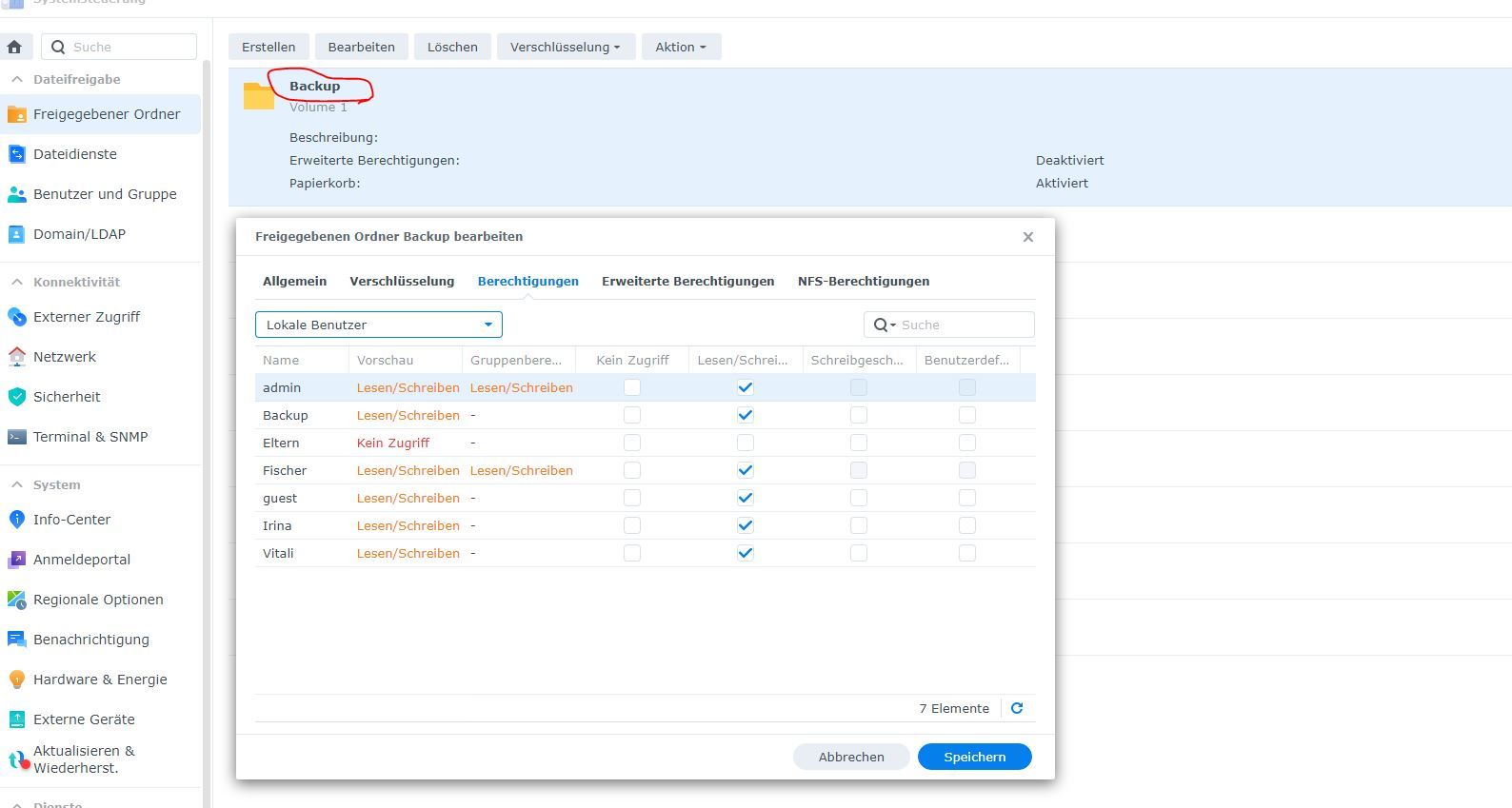
Ich habe jetzt noch einen Ordner erstellt und versucht. Aber gleiches Problem.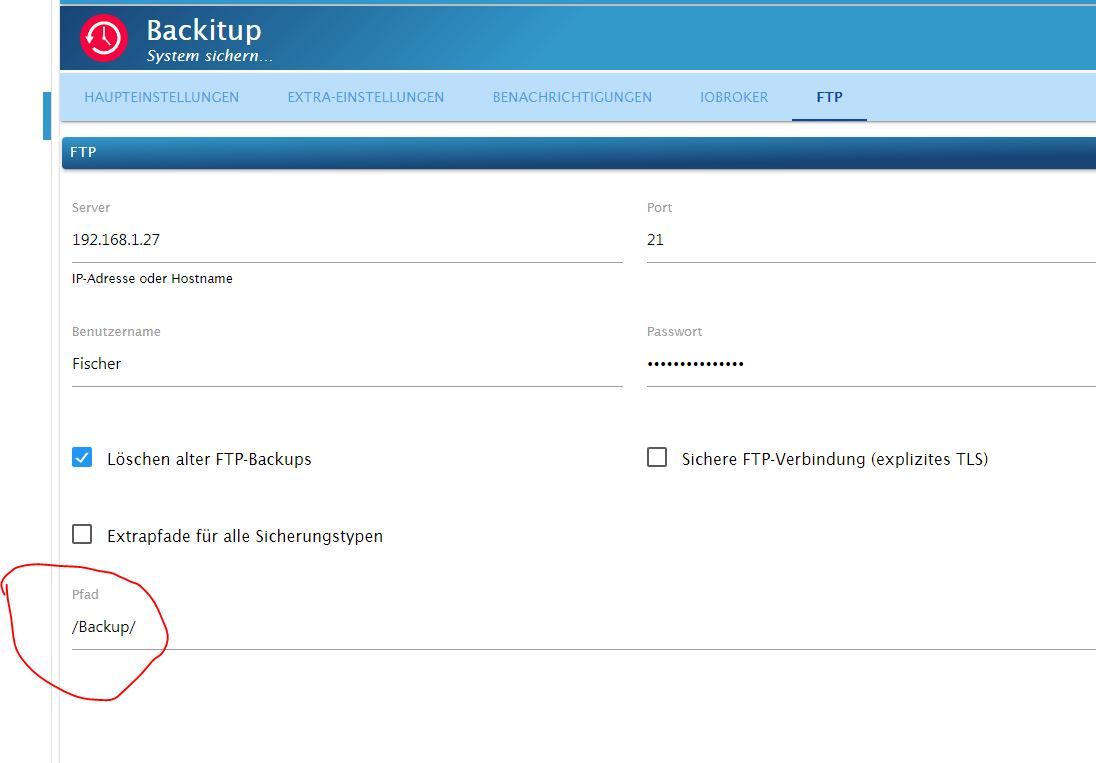
-
@haselchen Ja hatte schon einen Ordner.
Ich habe jetzt noch einen Ordner erstellt und versucht. Aber gleiches Problem. Du sollst den Pfad so schreiben wie ich es habe
-
@haselchen Ja hatte schon einen Ordner.
Ich habe jetzt noch einen Ordner erstellt und versucht. Aber gleiches Problem. -
-
@thomas-braun was meinst du damit genau?
Das System hatte ich erst vor kurzem neu aufgesetzt.LXC muss man bei Netzwerkgeschichten ggf. als 'privileged' oder so aufsetzen. Hab ich aber nix mit am Hut, war nur über das LXC-Setup gestolpert.
-
Sorry bin Anfänger.
(dmesg -T) wo finde ich das`?iob diag kommt das raus.
======== Start marking the full check here =========
Skript v.2023-04-02 *** BASE SYSTEM *** Architecture : x86_64 Docker : false Virtualization : lxc Distributor ID: Ubuntu Description: Ubuntu 22.04.2 LTS Release: 22.04 Codename: jammy PRETTY_NAME="Ubuntu 22.04.2 LTS" NAME="Ubuntu" VERSION_ID="22.04" VERSION="22.04.2 LTS (Jammy Jellyfish)" VERSION_CODENAME=jammy ID=ubuntu ID_LIKE=debian HOME_URL="https://www.ubuntu.com/" SUPPORT_URL="https://help.ubuntu.com/" BUG_REPORT_URL="https://bugs.launchpad.net/ubuntu/" PRIVACY_POLICY_URL="https://www.ubuntu.com/legal/terms-and-policies/privacy-policy" UBUNTU_CODENAME=jammy Systemuptime and Load: 14:41:04 up 2:51, 2 users, load average: 0.90, 1.06, 1.00 CPU threads: 2 *** Time and Time Zones *** Local time: Sat 2023-04-15 14:41:05 CEST Universal time: Sat 2023-04-15 12:41:05 UTC RTC time: n/a Time zone: Europe/Berlin (CEST, +0200) System clock synchronized: yes NTP service: inactive RTC in local TZ: no *** User and Groups *** vitali /home/vitali vitali sudo iobroker *** X-Server-Setup *** X-Server: false Desktop: Terminal: tty Boot Target: graphical.target *** MEMORY *** total used free shared buff/cache available Mem: 4.1G 2.2G 1.4G 0.0K 504M 1.9G Swap: 512M 0.0K 511M Total: 4.6G 2.2G 1.9G 4096 M total memory 2167 M used memory 345 M active memory 2151 M inactive memory 1423 M free memory 0 M buffer memory 504 M swap cache 512 M total swap 0 M used swap 511 M free swap *** FILESYSTEM *** Filesystem Type Size Used Avail Use% Mounted on /dev/mapper/pve-vm--100--disk--0 ext4 20G 4.2G 15G 23% / none tmpfs 492K 4.0K 488K 1% /dev tmpfs tmpfs 2.9G 0 2.9G 0% /dev/shm tmpfs tmpfs 1.2G 128K 1.2G 1% /run tmpfs tmpfs 5.0M 0 5.0M 0% /run/lock tmpfs tmpfs 576M 0 576M 0% /run/user/1001 Messages concerning ext4 filesystem in dmesg: dmesg: read kernel buffer failed: Operation not permitted Show mounted filesystems (real ones only): TARGET SOURCE FSTYPE OPTIONS / /dev/mapper/pve-vm--100--disk--0 ext4 rw,relatime,stripe=16 Files in neuralgic directories: /var: 523M /var/ 240M /var/lib 225M /var/cache 219M /var/cache/apt 145M /var/lib/apt/lists /opt/iobroker/backups: 446M /opt/iobroker/backups/ /opt/iobroker/iobroker-data: 602M /opt/iobroker/iobroker-data/ 371M /opt/iobroker/iobroker-data/files 165M /opt/iobroker/iobroker-data/backup-objects 65M /opt/iobroker/iobroker-data/files/vis.0 51M /opt/iobroker/iobroker-data/files/javascript.admin The five largest files in iobroker-data are: 41M /opt/iobroker/iobroker-data/states.jsonl 33M /opt/iobroker/iobroker-data/files/devices.admin/static/js/main.10538062.js.map 26M /opt/iobroker/iobroker-data/objects.jsonl 19M /opt/iobroker/iobroker-data/files/web.admin/static/js/main.a5972028.js.map 19M /opt/iobroker/iobroker-data/files/iot.admin/static/js/main.2975a411.js.map *** NodeJS-Installation *** /usr/bin/nodejs v18.16.0 /usr/bin/node v18.16.0 /usr/bin/npm 9.5.1 /usr/bin/npx 9.5.1 nodejs: Installed: 18.16.0-deb-1nodesource1 Candidate: 18.16.0-deb-1nodesource1 Version table: *** 18.16.0-deb-1nodesource1 500 500 https://deb.nodesource.com/node_18.x jammy/main amd64 Packages 100 /var/lib/dpkg/status 12.22.9~dfsg-1ubuntu3 500 500 http://archive.ubuntu.com/ubuntu jammy/universe amd64 Packages Temp directories causing npm8 problem: 0 No problems detected *** ioBroker-Installation *** ioBroker Status iobroker is running on this host. Objects type: jsonl States type: jsonl Core adapters versions js-controller: 4.0.24 admin: 6.3.6 javascript: 7.0.1 Adapters from github: 0 Adapter State + system.adapter.accuweather.0 : accuweather : Iobroker - enabled + system.adapter.admin.0 : admin : Iobroker - enabled, port: 8081, bind: 192.168.1.18, run as: admin + system.adapter.alexa2.0 : alexa2 : Iobroker - enabled + system.adapter.backitup.0 : backitup : Iobroker - enabled system.adapter.daswetter.0 : daswetter : Iobroker - enabled system.adapter.devices.0 : devices : Iobroker - disabled + system.adapter.discovery.0 : discovery : Iobroker - enabled system.adapter.dwd.0 : dwd : Iobroker - enabled + system.adapter.harmony.0 : harmony : Iobroker - enabled + system.adapter.hmip.0 : hmip : Iobroker - enabled + system.adapter.hs100.0 : hs100 : Iobroker - enabled system.adapter.ical.0 : ical : Iobroker - enabled system.adapter.ical.1 : ical : Iobroker - enabled system.adapter.ical.2 : ical : Iobroker - enabled system.adapter.ical.3 : ical : Iobroker - enabled system.adapter.icons-icons8.0 : icons-icons8 : Iobroker - disabled system.adapter.icons-material-png.0 : icons-material-png : Iobroker - disabled system.adapter.icons-material-svg.0 : icons-material-svg : Iobroker - disabled system.adapter.icons-mfd-png.0 : icons-mfd-png : Iobroker - disabled system.adapter.icons-mfd-svg.0 : icons-mfd-svg : Iobroker - disabled system.adapter.icons-ultimate-png.0 : icons-ultimate-png : Iobroker - disabled + system.adapter.info.0 : info : Iobroker - enabled + system.adapter.iot.0 : iot : Iobroker - enabled + system.adapter.javascript.0 : javascript : Iobroker - enabled system.adapter.javascript.1 : javascript : Iobroker - disabled + system.adapter.km200.0 : km200 : Iobroker - enabled system.adapter.mihome-vacuum.0 : mihome-vacuum : Iobroker - disabled, port: 54321 + system.adapter.mihome-vacuum.1 : mihome-vacuum : Iobroker - enabled, port: 54321 + system.adapter.mqtt.0 : mqtt : Iobroker - enabled, port: 1884, bind: 192.168.1.18 system.adapter.netatmo.0 : netatmo : Iobroker - disabled system.adapter.openweathermap.0 : openweathermap : Iobroker - enabled + system.adapter.ping.0 : ping : Iobroker - enabled system.adapter.robonect.0 : robonect : Iobroker - disabled + system.adapter.scenes.0 : scenes : Iobroker - enabled system.adapter.shelly.0 : shelly : Iobroker - disabled, port: 1884, bind: 192.168.1.18 + system.adapter.simple-api.0 : simple-api : Iobroker - enabled, port: 8087, bind: 0.0.0.0, run as: admin + system.adapter.sonoff.0 : sonoff : Iobroker - enabled, port: 1883, bind: 0.0.0.0 system.adapter.synology.0 : synology : Iobroker - disabled, port: 5000 + system.adapter.tankerkoenig.0 : tankerkoenig : Iobroker - enabled system.adapter.telegram.0 : telegram : Iobroker - disabled, port: 8443, bind: 0.0.0.0 + system.adapter.terminal.0 : terminal : Iobroker - enabled, port: 8088, bind: 192.168.1.18, run as: admin system.adapter.vis-bars.0 : vis-bars : Iobroker - disabled system.adapter.vis-canvas-gauges.0 : vis-canvas-gauges : Iobroker - disabled system.adapter.vis-fancyswitch.0 : vis-fancyswitch : Iobroker - disabled system.adapter.vis-hqwidgets.0 : vis-hqwidgets : Iobroker - disabled system.adapter.vis-justgage.0 : vis-justgage : Iobroker - disabled system.adapter.vis-materialdesign.0 : vis-materialdesign : Iobroker - disabled system.adapter.vis-metro.0 : vis-metro : Iobroker - disabled system.adapter.vis-players.0 : vis-players : Iobroker - disabled system.adapter.vis-plumb.0 : vis-plumb : Iobroker - disabled system.adapter.vis-rgraph.0 : vis-rgraph : Iobroker - disabled system.adapter.vis-timeandweather.0 : vis-timeandweather : Iobroker - disabled system.adapter.vis-weather.0 : vis-weather : Iobroker - disabled system.adapter.vis.0 : vis : Iobroker - enabled + system.adapter.web.0 : web : Iobroker - enabled, port: 8082, bind: 0.0.0.0, run as: admin system.adapter.yr.0 : yr : Iobroker - enabled system.adapter.zigbee.0 : zigbee : Iobroker - disabled, port: /dev/serial/by-id/usb-Texas_Instruments_CC2538_USB_CDC-if00 + instance is alive Enabled adapters with bindings + system.adapter.admin.0 : admin : Iobroker - enabled, port: 8081, bind: 192.168.1.18, run as: admin + system.adapter.mihome-vacuum.1 : mihome-vacuum : Iobroker - enabled, port: 54321 + system.adapter.mqtt.0 : mqtt : Iobroker - enabled, port: 1884, bind: 192.168.1.18 + system.adapter.simple-api.0 : simple-api : Iobroker - enabled, port: 8087, bind: 0.0.0.0, run as: admin + system.adapter.sonoff.0 : sonoff : Iobroker - enabled, port: 1883, bind: 0.0.0.0 + system.adapter.terminal.0 : terminal : Iobroker - enabled, port: 8088, bind: 192.168.1.18, run as: admin + system.adapter.web.0 : web : Iobroker - enabled, port: 8082, bind: 0.0.0.0, run as: admin ioBroker-Repositories stable : http://download.iobroker.net/sources-dist.json beta : http://download.iobroker.net/sources-dist-latest.json Active repo(s): stable Installed ioBroker-Instances Used repository: stable Adapter "accuweather" : 1.2.1 , installed 1.2.1 Adapter "admin" : 6.3.5 , installed 6.3.6 Adapter "alexa2" : 3.23.2 , installed 3.23.2 Adapter "backitup" : 2.6.16 , installed 2.6.16 Adapter "daswetter" : 3.1.7 , installed 3.1.7 Adapter "devices" : 1.1.2 , installed 1.1.2 Adapter "discovery" : 3.1.0 , installed 3.1.0 Adapter "dwd" : 2.8.3 , installed 2.8.3 Adapter "harmony" : 1.2.2 , installed 1.2.2 Adapter "hmip" : 1.20.0 , installed 1.20.0 Adapter "hs100" : 2.1.2 , installed 2.1.2 Adapter "ical" : 1.13.2 , installed 1.13.2 Adapter "icons-icons8" : 0.0.1 , installed 0.0.1 Adapter "icons-material-png": 0.1.0, installed 0.1.0 Adapter "icons-material-svg": 0.1.0, installed 0.1.0 Adapter "icons-mfd-png": 1.1.0 , installed 1.1.0 Adapter "icons-mfd-svg": 1.1.0 , installed 1.1.0 Adapter "icons-ultimate-png": 1.0.1, installed 1.0.1 Adapter "info" : 1.9.19 , installed 1.9.26 Adapter "iot" : 1.14.2 , installed 1.14.5 Adapter "javascript" : 6.1.4 , installed 7.0.1 Controller "js-controller": 4.0.24 , installed 4.0.24 Adapter "km200" : 2.0.3 , installed 2.0.3 Adapter "mihome-vacuum": 3.9.5 , installed 3.9.5 Adapter "mqtt" : 4.0.7 , installed 4.0.7 Adapter "netatmo" : 2.0.5 , installed 3.1.0 Adapter "openweathermap": 0.3.3 , installed 0.3.8 Adapter "ping" : 1.5.3 , installed 1.5.3 Adapter "robonect" : 0.1.4 , installed 0.1.4 Adapter "scenes" : 2.3.9 , installed 2.3.9 Adapter "shelly" : 6.3.1 , installed 6.4.0 Adapter "simple-api" : 2.7.2 , installed 2.7.2 Adapter "socketio" : 4.2.0 , installed 6.3.4 Adapter "sonoff" : 2.5.1 , installed 2.5.1 Adapter "synology" : 2.1.13 , installed 2.1.13 Adapter "tankerkoenig" : 3.3.7 , installed 3.3.7 Adapter "telegram" : 1.15.2 , installed 1.15.6 Adapter "terminal" : 1.0.0 , installed 1.0.0 Adapter "vis" : 1.4.16 , installed 1.4.16 Adapter "vis-bars" : 0.1.4 , installed 0.1.4 Adapter "vis-canvas-gauges": 1.0.1, installed 1.0.1 Adapter "vis-fancyswitch": 1.1.0 , installed 1.1.0 Adapter "vis-hqwidgets": 1.3.0 , installed 1.3.1 Adapter "vis-justgage" : 1.0.2 , installed 1.0.2 Adapter "vis-metro" : 1.2.0 , installed 1.2.0 Adapter "vis-players" : 0.1.6 , installed 0.1.6 Adapter "vis-plumb" : 1.0.2 , installed 1.0.2 Adapter "vis-rgraph" : 0.0.2 , installed 0.0.2 Adapter "vis-timeandweather": 1.2.2, installed 1.2.2 Adapter "vis-weather" : 2.5.6 , installed 2.5.6 Adapter "web" : 4.3.0 , installed 5.5.2 Adapter "ws" : 1.3.0 , installed 2.3.6 Adapter "yr" : 5.3.0 , installed 5.3.0 Adapter "zigbee" : 1.8.10 , installed 1.8.10 Objects and States Please stand by - This may take a while Objects: 17902 States: 152407 *** OS-Repositories and Updates *** Hit:1 https://deb.nodesource.com/node_18.x jammy InRelease Hit:2 http://archive.ubuntu.com/ubuntu jammy InRelease Get:3 http://archive.ubuntu.com/ubuntu jammy-updates InRelease [119 kB] Get:4 http://archive.ubuntu.com/ubuntu jammy-security InRelease [110 kB] Fetched 229 kB in 2s (128 kB/s) Reading package lists... Pending Updates: 0 *** Listening Ports *** Active Internet connections (only servers) Proto Recv-Q Send-Q Local Address Foreign Address State User Inode PID/Program name tcp 0 0 0.0.0.0:1883 0.0.0.0:* LISTEN 1000 8681579 106878/io.sonoff.0 tcp 0 0 127.0.0.1:25 0.0.0.0:* LISTEN 0 8164525 289/master tcp 0 0 192.168.1.18:8081 0.0.0.0:* LISTEN 1000 8678239 106682/io.admin.0 tcp 0 0 127.0.0.1:9000 0.0.0.0:* LISTEN 1000 8678819 106661/iobroker.js- tcp 1 0 127.0.0.1:9001 0.0.0.0:* LISTEN 1000 8678115 106661/iobroker.js- tcp 0 0 0.0.0.0:111 0.0.0.0:* LISTEN 0 8161739 1/systemd tcp 0 0 192.168.1.18:1884 0.0.0.0:* LISTEN 1000 8681480 106852/io.mqtt.0 tcp 0 0 0.0.0.0:51841 0.0.0.0:* LISTEN 111 8271412 26963/rpc.statd tcp 0 0 127.0.0.53:53 0.0.0.0:* LISTEN 106 8645138 97515/systemd-resol tcp6 0 0 :::61991 :::* LISTEN 1000 8681661 106935/io.harmony.0 tcp6 0 0 ::1:25 :::* LISTEN 0 8164526 289/master tcp6 0 0 :::111 :::* LISTEN 0 8161741 1/systemd tcp6 0 0 :::22 :::* LISTEN 0 8160970 1/systemd tcp6 0 0 :::8088 :::* LISTEN 1000 8680237 107054/io.terminal. tcp6 0 0 :::8082 :::* LISTEN 1000 8680294 107088/io.web.0 tcp6 0 0 :::8087 :::* LISTEN 1000 8680140 107028/io.simple-ap tcp6 0 0 :::47687 :::* LISTEN 111 8271418 26963/rpc.statd udp 0 0 127.0.0.53:53 0.0.0.0:* 106 8645137 97515/systemd-resol udp 0 0 0.0.0.0:111 0.0.0.0:* 0 8161740 1/systemd udp 0 0 0.0.0.0:53422 0.0.0.0:* 1000 8679330 106811/io.mihome-va udp 0 0 0.0.0.0:61991 0.0.0.0:* 1000 8681662 106935/io.harmony.0 udp 0 0 0.0.0.0:33546 0.0.0.0:* 111 8271409 26963/rpc.statd udp 0 0 127.0.0.1:851 0.0.0.0:* 0 8271404 26963/rpc.statd udp6 0 0 :::60588 :::* 111 8271415 26963/rpc.statd udp6 0 0 :::111 :::* 0 8161742 1/systemd *** Log File - Last 25 Lines *** 2023-04-15 14:40:13.257 - info: ical.1 (168527) starting. Version 1.13.2 in /opt/iobroker/node_modules/iobroker.ical, node: v18.16.0, js-controller: 4.0.24 2023-04-15 14:40:17.257 - info: ical.2 (168396) Terminated (NO_ERROR): Without reason 2023-04-15 14:40:17.324 - info: host.Iobroker instance system.adapter.dwd.0 started with pid 168691 2023-04-15 14:40:17.819 - info: host.Iobroker instance system.adapter.ical.2 terminated with code 0 (NO_ERROR) 2023-04-15 14:40:17.906 - info: ical.0 (168571) starting. Version 1.13.2 in /opt/iobroker/node_modules/iobroker.ical, node: v18.16.0, js-controller: 4.0.24 2023-04-15 14:40:21.409 - info: ical.1 (168527) Terminated (NO_ERROR): Without reason 2023-04-15 14:40:21.410 - info: mihome-vacuum.1 (106811) State value to set for "mihome-vacuum.1.info.water_box" has to be type "string" but received type "boolean" 2023-04-15 14:40:21.710 - info: dwd.0 (168691) starting. Version 2.8.3 in /opt/iobroker/node_modules/iobroker.dwd, node: v18.16.0, js-controller: 4.0.24 2023-04-15 14:40:21.970 - info: host.Iobroker instance system.adapter.ical.1 terminated with code 0 (NO_ERROR) 2023-04-15 14:40:22.227 - info: dwd.0 (168691) Terminated (ADAPTER_REQUESTED_TERMINATION): Without reason 2023-04-15 14:40:22.749 - info: host.Iobroker instance system.adapter.dwd.0 terminated with code 11 (ADAPTER_REQUESTED_TERMINATION) 2023-04-15 14:40:24.809 - info: ical.0 (168571) Terminated (NO_ERROR): Without reason 2023-04-15 14:40:25.345 - info: host.Iobroker instance system.adapter.ical.0 terminated with code 0 (NO_ERROR) 2023-04-15 14:40:42.502 - info: mihome-vacuum.1 (106811) State value to set for "mihome-vacuum.1.info.water_box" has to be type "string" but received type "boolean" 2023-04-15 14:41:03.709 - info: mihome-vacuum.1 (106811) State value to set for "mihome-vacuum.1.info.water_box" has to be type "string" but received type "boolean" 2023-04-15 14:41:24.802 - info: mihome-vacuum.1 (106811) State value to set for "mihome-vacuum.1.info.water_box" has to be type "string" but received type "boolean" 2023-04-15 14:41:54.726 - info: mihome-vacuum.1 (106811) State value to set for "mihome-vacuum.1.info.water_box" has to be type "string" but received type "boolean" 2023-04-15 14:42:00.117 - info: host.Iobroker instance system.adapter.ical.0 started with pid 170664 2023-04-15 14:42:04.909 - info: host.Iobroker instance system.adapter.ical.1 started with pid 170799 2023-04-15 14:42:05.567 - info: ical.0 (170664) starting. Version 1.13.2 in /opt/iobroker/node_modules/iobroker.ical, node: v18.16.0, js-controller: 4.0.24 2023-04-15 14:42:09.173 - info: host.Iobroker instance system.adapter.ical.2 started with pid 171163 2023-04-15 14:42:13.927 - info: host.Iobroker instance system.adapter.ical.3 started with pid 171588@thexbrain sagte in Backitup und Synology Problem:
Nur mal so nebenbei , wie passt das zusammen , bzw. wie bekommt man das hin !?
Sorry bin Anfänger.
Active repo(s): stable
Adapter "admin" : 6.3.5 , installed 6.3.6
github:	6.4.3 for 13 days
latest:	6.4.3 for 15 days
stable:	6.3.5 for 3 months
Adapter "javascript" : 6.1.4 , installed 7.0.1
ist :
github: 7.0.3 latest: 7.0.3 for 29 days stable: 6.1.4 for 5 months -
@haselchen sagte in Backitup und Synology Problem:
Mach es per FTP
Leg einen gemeinsamen Ordner an auf der Syno.
Ich hab dir mal nen Screenshot gemachtDas Backup wird in den Ordner gemacht und auch in den Backup Ordner von Iobroker
Und hier die Dateien, die in den originalen Ordner abgelegt werden
Klappt auch nicht.
Bekomme auch ein Fehler.
Backup Ordner bleibt leer.[iobroker] Error: Maximum number of tries exceeded. Please contact the site manager. backitup.0 2023-04-15 14:07:09.032 error [iobroker/ftp] Error: Maximum number of tries exceeded. Please contact the site manager. Started iobroker ... [DEBUG] [iobroker] start with {"type":"creator","workDir":"/opt/iobroker/node_modules/iobroker.js-controller/iobroker.js","time":"02:00","debugging":true,"slaveBackup":"Single","everyXDays":"1","deleteBackupAfter":0,"ftp":{"enabled":true,"type":"storage","source":"ftp","host":"192.168.1.27","debugging":true,"deleteOldBackup":true,"ownDir":false,"bkpType":"Minimal","dir":"/Backup_iobroker","dirMinimal":"/backupDir/minimal","user":"Fischer","pass":"****","port":"21","secure":false,"ignoreErrors":false},"ignoreErrors":false,"dir":"/opt/iobroker","historyHTML":{"enabled":true,"type":"message","entriesNumber":"25","ignoreErrors":false,"systemLang":"de"},"historyJSON":{"enabled":true,"type":"message","entriesNumber":"25","ignoreErrors":false,"systemLang":"de"},"telegram":{"enabled":true,"notificationsType":"Telegram","type":"message","instance":"telegram.0","SilentNotice":true,"NoticeType":"shortTelegramNotice","User":"allTelegramUsers","onlyError":true,"telegramWaiting":0,"hostName":"","ignoreErrors":false,"systemLang":"de"},"email":{"enabled":true,"notificationsType":"Telegram","type":"message","instance":"","NoticeType":"longEmailNotice","emailReceiver":"xxx@xxx.com","emailSender":"xxx@xxx.com","onlyError":false,"emailWaiting":0,"hostName":"","ignoreErrors":false,"systemLang":"de"},"pushover":{"enabled":true,"notificationsType":"Telegram","type":"message","instance":"","SilentNotice":false,"NoticeType":"longPushoverNotice","deviceID":"","onlyError":false,"pushoverWaiting":0,"hostName":"","ignoreErrors":false,"systemLang":"de"},"whatsapp":{"enabled":true,"notificationsType":"Telegram","type":"message","instance":"","NoticeType":"longWhatsappNotice","onlyError":false,"whatsappWaiting":0,"hostName":"","ignoreErrors":false,"systemLang":"de"},"signal":{"enabled":true,"notificationsType":"Telegram","type":"message","instance":"","NoticeType":"longSignalNotice","onlyError":false,"signalWaiting":0,"hostName":"","ignoreErrors":false,"systemLang":"de"},"matrix":{"enabled":true,"notificationsType":"Telegram","type":"message","instance":"","NoticeType":"longMatrixNotice","onlyError":false,"matrixWaiting":0,"hostName":"","ignoreErrors":false,"systemLang":"de"},"backupDir":"/opt/iobroker/backups"} [DEBUG] [iobroker] - host.Iobroker 152411 states saved [DEBUG] [iobroker] - host.Iobroker 17906 objects saved [DEBUG] [iobroker] - Backup created: /opt/iobroker/backups/iobroker_2023_04_15-14_12_21_backupiobroker.tar.gz [DEBUG] [iobroker] - done [ERROR] [ftp] - Error: Maximum number of tries exceeded. Please contact the site manager. [DEBUG] [ftp] start with {"type":"storage","source":"ftp","host":"192.168.1.27","debugging":true,"deleteOldBackup":true,"ownDir":false,"bkpType":"Minimal","dir":"/Backup_iobroker","dirMinimal":"/backupDir/minimal","user":"Fischer","pass":"****","port":"21","secure":false,"ignoreErrors":false,"deleteBackupAfter":0}@thexbrain sagte in Backitup und Synology Problem:
Maximum number of tries exceeded. Please contact the site manager.
Das System hatte ich erst vor kurzem neu aufgesetzt.
Das sieht mir so aus ... als würde dein Syn den Zugriff von deinem neuen lxc blocken .
schaue mal in den Sicherheitseistellungen von der Syn mal nach , bzw. auch in der Firewall
Eventuell auch :
https://www.synology-forum.de/threads/max-number-of-tries-exeeded.85250/
und
... ich hoffe du hast den admin nicht mehr aktiv , denn dies ist eine Sicheheitslücker auf der Syn !?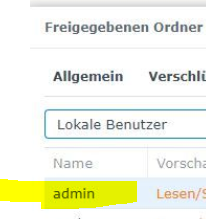
Synology 918+ 16GB - ioBroker in Docker v9 , VISO auf Trekstor Primebook C13 13,3" , Hikvision Domkameras mit Surveillance Station .. CCU RaspberryMatic in Synology VM .. Zigbee CC2538+CC2592 .. Sonoff .. KNX .. Modbus ..
-
@thexbrain sagte in Backitup und Synology Problem:
Maximum number of tries exceeded. Please contact the site manager.
Das System hatte ich erst vor kurzem neu aufgesetzt.
Das sieht mir so aus ... als würde dein Syn den Zugriff von deinem neuen lxc blocken .
schaue mal in den Sicherheitseistellungen von der Syn mal nach , bzw. auch in der Firewall
Eventuell auch :
https://www.synology-forum.de/threads/max-number-of-tries-exeeded.85250/
und
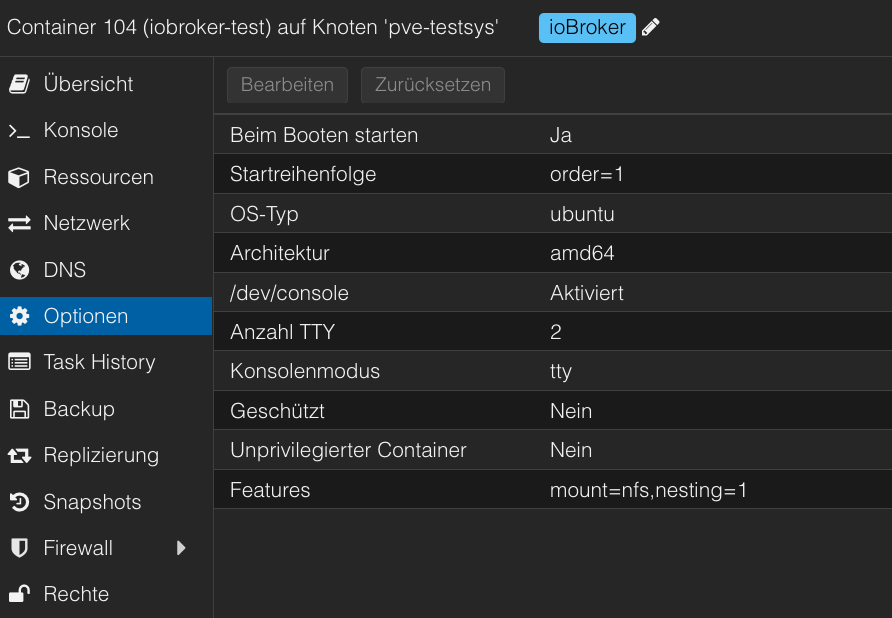
... ich hoffe du hast den admin nicht mehr aktiv , denn dies ist eine Sicheheitslücker auf der Syn !?@thexbrain Ein LXC muss für CIFS oder NFS privilegiert ausgeführt werden.
Sollte dann in den Optionen so ausschauen
Bildschirmfoto 2023-04-17 um 19.29.02.png -
@thexbrain Ein LXC muss für CIFS oder NFS privilegiert ausgeführt werden.
Sollte dann in den Optionen so ausschauen
Bildschirmfoto 2023-04-17 um 19.29.02.png





Hey! Du scheinst an dieser Unterhaltung interessiert zu sein, hast aber noch kein Konto.
Hast du es satt, bei jedem Besuch durch die gleichen Beiträge zu scrollen? Wenn du dich für ein Konto anmeldest, kommst du immer genau dorthin zurück, wo du zuvor warst, und kannst dich über neue Antworten benachrichtigen lassen (entweder per E-Mail oder Push-Benachrichtigung). Du kannst auch Lesezeichen speichern und Beiträge positiv bewerten, um anderen Community-Mitgliedern deine Wertschätzung zu zeigen.
Mit deinem Input könnte dieser Beitrag noch besser werden 💗
Registrieren Anmelden448
Online33.0k
Benutzer83.5k
Themen1.3m
Beiträge