



Skip to content
  • Home
  • Aktuell
  • Tags
  • 0 Ungelesen 0
  • Kategorien
  • Unreplied
  • Beliebt
  • GitHub
  • Docu
  • Hilfe
Skins
  • Light
  • Brite
  • Cerulean
  • Cosmo
  • Flatly
  • Journal
  • Litera
  • Lumen
  • Lux
  • Materia
  • Minty
  • Morph
  • Pulse
  • Sandstone
  • Simplex
  • Sketchy
  • Spacelab
  • United
  • Yeti
  • Zephyr
  • Dark
  • Cyborg
  • Darkly
  • Quartz
  • Slate
  • Solar
  • Superhero
  • Vapor

  • Standard: (Kein Skin)
  • Kein Skin
Einklappen
ioBroker Logo

Community Forum

donate donate
  1. ioBroker Community Home
  2. Deutsch
  3. ioBroker Allgemein
  4. RAM-Probleme und Abstürze nach Wechsel auf 64-Bit

NEWS

  • Jahresrückblick 2025 – unser neuer Blogbeitrag ist online! ✨
    BluefoxB
    Bluefox
    17
    1
    4.2k

  • Neuer Blogbeitrag: Monatsrückblick - Dezember 2025 🎄
    BluefoxB
    Bluefox
    13
    1
    1.2k

  • Weihnachtsangebot 2025! 🎄
    BluefoxB
    Bluefox
    25
    1
    2.6k

RAM-Probleme und Abstürze nach Wechsel auf 64-Bit

Geplant Angeheftet Gesperrt Verschoben ioBroker Allgemein
46 Beiträge 9 Kommentatoren 4.2k Aufrufe 5 Watching
  • Älteste zuerst
  • Neuste zuerst
  • Meiste Stimmen
Antworten
  • In einem neuen Thema antworten
Anmelden zum Antworten
Dieses Thema wurde gelöscht. Nur Nutzer mit entsprechenden Rechten können es sehen.
  • R robson

    @wildbill sagte in RAM-Probleme und Abstürze nach Wechsel auf 64-Bit:

    @robson Dann würde ich es jetzt einmal komplett neu installieren (wer weiss, was das wiederholte Steckerziehen bereits angercihtet hat), iobroker neu drauf aus dem Backup und erst einmal ohne influx beobachten, wie es sich verhält. Wenn Du das eh noch nicht nutzst, dann lass es mal weg. Wenn der RAM dann reicht, hast Du den Übeltäter, wenn nicht, dann kannst Du das zumindest ausschließen.

    Gruss, Jürgen

    Danke dir. Ich habe jetzt erst mal Influx und Grafana stillgelegt. Mal schauen, ob das System jetzt wieder stabil rennt.

    Ich hatte Grafana und Influx 1 ja auch auf meinem 32-Bit System stabil laufen. Ich konnte/kann mir irgendwie einfach nicht vorstellen, dass die 64-Bit Varianten solch einen Speicherhunger haben und - obwohl nicht aktiv genutzt - RAM von 300-500 MB zusätzlich allokieren.

    Thomas BraunT Online
    Thomas BraunT Online
    Thomas Braun
    Most Active
    schrieb am zuletzt editiert von
    #12

    @robson

    Tendenziell sind 64bit-Anwendungen etwas speicherhungriger, weil der adressierbare Adressraum auch viel größer ist.

    Linux-Werkzeugkasten:
    https://forum.iobroker.net/topic/42952/der-kleine-iobroker-linux-werkzeugkasten
    NodeJS Fixer Skript:
    https://forum.iobroker.net/topic/68035/iob-node-fix-skript
    iob_diag: curl -sLf -o diag.sh https://iobroker.net/diag.sh && bash diag.sh

    1 Antwort Letzte Antwort
    0
    • R Offline
      R Offline
      robson
      schrieb am zuletzt editiert von robson
      #13

      Mir ist mein System letzte Nacht trotz deaktivierter InfluxDB-Instanz und einer minimalen Anzahl an laufenden Adaptern wieder abgestürzt.

      Ich würde nun vorerst wieder auf 32 Bit wechseln wollen - damit lief alles stabil. Sogar mit InfluxDB v1 im Hintergrund.

      Weiß jemand, ob es ein Problem darstellt, wenn der Kernel auf 64-Bit, das OS aber nun auf 32-Bit läuft? Ein Downgrade des Kernels scheint nicht leicht zu sein habe ich gelesen.

      Thomas BraunT 1 Antwort Letzte Antwort
      0
      • R robson

        Mir ist mein System letzte Nacht trotz deaktivierter InfluxDB-Instanz und einer minimalen Anzahl an laufenden Adaptern wieder abgestürzt.

        Ich würde nun vorerst wieder auf 32 Bit wechseln wollen - damit lief alles stabil. Sogar mit InfluxDB v1 im Hintergrund.

        Weiß jemand, ob es ein Problem darstellt, wenn der Kernel auf 64-Bit, das OS aber nun auf 32-Bit läuft? Ein Downgrade des Kernels scheint nicht leicht zu sein habe ich gelesen.

        Thomas BraunT Online
        Thomas BraunT Online
        Thomas Braun
        Most Active
        schrieb am zuletzt editiert von Thomas Braun
        #14

        @robson sagte in RAM-Probleme und Abstürze nach Wechsel auf 64-Bit:

        wenn der Kernel auf 64-Bit, das OS aber nun auf 32-Bit läuft?

        Wie willst du da hinfummeln?
        Installier es neu. Allerdings wird es kein ursächliches Problem mit der 64bit-Version sein.

        Linux-Werkzeugkasten:
        https://forum.iobroker.net/topic/42952/der-kleine-iobroker-linux-werkzeugkasten
        NodeJS Fixer Skript:
        https://forum.iobroker.net/topic/68035/iob-node-fix-skript
        iob_diag: curl -sLf -o diag.sh https://iobroker.net/diag.sh && bash diag.sh

        R 1 Antwort Letzte Antwort
        0
        • Thomas BraunT Thomas Braun

          @robson sagte in RAM-Probleme und Abstürze nach Wechsel auf 64-Bit:

          wenn der Kernel auf 64-Bit, das OS aber nun auf 32-Bit läuft?

          Wie willst du da hinfummeln?
          Installier es neu. Allerdings wird es kein ursächliches Problem mit der 64bit-Version sein.

          R Offline
          R Offline
          robson
          schrieb am zuletzt editiert von
          #15

          @thomas-braun
          Ich installiere es auch gerade neu. Aber der Kernel bleibt doch auf 64-Bit auch wenn ich ein neues OS auf die SD-Karte aufspiele oder nicht?
          Sobald es läuft, frage ich die Kernelversion mal ab.

          Thomas BraunT 1 Antwort Letzte Antwort
          0
          • R robson

            @thomas-braun
            Ich installiere es auch gerade neu. Aber der Kernel bleibt doch auf 64-Bit auch wenn ich ein neues OS auf die SD-Karte aufspiele oder nicht?
            Sobald es läuft, frage ich die Kernelversion mal ab.

            Thomas BraunT Online
            Thomas BraunT Online
            Thomas Braun
            Most Active
            schrieb am zuletzt editiert von
            #16

            @robson sagte in RAM-Probleme und Abstürze nach Wechsel auf 64-Bit:

            Aber der Kernel bleibt doch auf 64-Bit auch wenn ich ein neues OS auf die SD-Karte aufspiele oder nicht?

            Warum sollte der Kernel stehen bleiben? Wenn das komplett neuinstalliert wird, dann kommt auch der Kernel aus dem Installationsmedium mit.

            Linux-Werkzeugkasten:
            https://forum.iobroker.net/topic/42952/der-kleine-iobroker-linux-werkzeugkasten
            NodeJS Fixer Skript:
            https://forum.iobroker.net/topic/68035/iob-node-fix-skript
            iob_diag: curl -sLf -o diag.sh https://iobroker.net/diag.sh && bash diag.sh

            R 1 Antwort Letzte Antwort
            0
            • Thomas BraunT Thomas Braun

              @robson sagte in RAM-Probleme und Abstürze nach Wechsel auf 64-Bit:

              Aber der Kernel bleibt doch auf 64-Bit auch wenn ich ein neues OS auf die SD-Karte aufspiele oder nicht?

              Warum sollte der Kernel stehen bleiben? Wenn das komplett neuinstalliert wird, dann kommt auch der Kernel aus dem Installationsmedium mit.

              R Offline
              R Offline
              robson
              schrieb am zuletzt editiert von
              #17

              @thomas-braun
              Du hast Recht. Ich dachte, die Kernelinformation seien in den RAM geschrieben worden. Wieder was dazu gelernt.

              1 Antwort Letzte Antwort
              0
              • R Offline
                R Offline
                robson
                schrieb am zuletzt editiert von robson
                #18

                Hallo zusammen,

                leider ist mein Raspi wieder ohne ersichtlichen Grund abgestürzt. Ich hatte meine SSD vergangenen Montag komplett neu formatiert und das 32-Bit OS installiert. Danach ioBroker. Nach Einspielen des Backups (1-2 Std Wartezeit) waren noch knapp 900 MB frei und alles lief reibungslos.
                Nachmittags sind wir bis eben in den Urlaub gefahren. Bereits am Abend konnte ich nicht mehr auf ioBroker (weder Web UI noch SSH) zugreifen. InfluxDB und Grafana waren nicht installiert - lediglich ioBroker mit meinem Backup.

                Ich kann es mir dieses Mal nicht mit einem Speicherengpass erklären.
                Hat jemand eine Idee, was ich noch prüfen kann?
                Es ist bereits der zweite Pi 4B mit 2GB, den ich angeschlossen habe.

                Alternativ würde ich ioBroker auf einer Synology NAS per Docker installieren. Das ist aber Neuland für mich. Mit dem Raspi war ich bisher immer gut zufrieden.

                Für Hinweise bin ich dankbar.

                Thomas BraunT Ro75R 2 Antworten Letzte Antwort
                0
                • R robson

                  Hallo zusammen,

                  leider ist mein Raspi wieder ohne ersichtlichen Grund abgestürzt. Ich hatte meine SSD vergangenen Montag komplett neu formatiert und das 32-Bit OS installiert. Danach ioBroker. Nach Einspielen des Backups (1-2 Std Wartezeit) waren noch knapp 900 MB frei und alles lief reibungslos.
                  Nachmittags sind wir bis eben in den Urlaub gefahren. Bereits am Abend konnte ich nicht mehr auf ioBroker (weder Web UI noch SSH) zugreifen. InfluxDB und Grafana waren nicht installiert - lediglich ioBroker mit meinem Backup.

                  Ich kann es mir dieses Mal nicht mit einem Speicherengpass erklären.
                  Hat jemand eine Idee, was ich noch prüfen kann?
                  Es ist bereits der zweite Pi 4B mit 2GB, den ich angeschlossen habe.

                  Alternativ würde ich ioBroker auf einer Synology NAS per Docker installieren. Das ist aber Neuland für mich. Mit dem Raspi war ich bisher immer gut zufrieden.

                  Für Hinweise bin ich dankbar.

                  Thomas BraunT Online
                  Thomas BraunT Online
                  Thomas Braun
                  Most Active
                  schrieb am zuletzt editiert von Thomas Braun
                  #19

                  @robson sagte in RAM-Probleme und Abstürze nach Wechsel auf 64-Bit:

                  Es ist bereits der zweite Pi 4B mit 2GB, den ich angeschlossen habe.

                  2GB ist meiner Meinung nach die unterste Grenze, da muss man aber schon was genauer schauen. Ich würde mindestens 4GB vorsehen.

                  Linux-Werkzeugkasten:
                  https://forum.iobroker.net/topic/42952/der-kleine-iobroker-linux-werkzeugkasten
                  NodeJS Fixer Skript:
                  https://forum.iobroker.net/topic/68035/iob-node-fix-skript
                  iob_diag: curl -sLf -o diag.sh https://iobroker.net/diag.sh && bash diag.sh

                  1 Antwort Letzte Antwort
                  0
                  • R robson

                    Hallo zusammen,

                    leider ist mein Raspi wieder ohne ersichtlichen Grund abgestürzt. Ich hatte meine SSD vergangenen Montag komplett neu formatiert und das 32-Bit OS installiert. Danach ioBroker. Nach Einspielen des Backups (1-2 Std Wartezeit) waren noch knapp 900 MB frei und alles lief reibungslos.
                    Nachmittags sind wir bis eben in den Urlaub gefahren. Bereits am Abend konnte ich nicht mehr auf ioBroker (weder Web UI noch SSH) zugreifen. InfluxDB und Grafana waren nicht installiert - lediglich ioBroker mit meinem Backup.

                    Ich kann es mir dieses Mal nicht mit einem Speicherengpass erklären.
                    Hat jemand eine Idee, was ich noch prüfen kann?
                    Es ist bereits der zweite Pi 4B mit 2GB, den ich angeschlossen habe.

                    Alternativ würde ich ioBroker auf einer Synology NAS per Docker installieren. Das ist aber Neuland für mich. Mit dem Raspi war ich bisher immer gut zufrieden.

                    Für Hinweise bin ich dankbar.

                    Ro75R Offline
                    Ro75R Offline
                    Ro75
                    schrieb am zuletzt editiert von
                    #20

                    @robson liegt dein Raspi einfach so rum oder ist er "eingebaut"?

                    SERVER = Beelink U59 16GB DDR4 RAM 512GB SSD, FB 7490, FritzDect 200+301+440, ConBee II, Zigbee Aqara Sensoren + NOUS A1Z, NOUS A1T, Philips Hue ** ioBroker, REDIS, influxdb2, Grafana, PiHole, Plex-Mediaserver, paperless-ngx (Docker), MariaDB + phpmyadmin *** VIS-Runtime = Intel NUC 8GB RAM 128GB SSD + 24" Touchscreen

                    R 1 Antwort Letzte Antwort
                    0
                    • Ro75R Ro75

                      @robson liegt dein Raspi einfach so rum oder ist er "eingebaut"?

                      R Offline
                      R Offline
                      robson
                      schrieb am zuletzt editiert von
                      #21

                      @ro75
                      Er ist in einem Passiven-Kühlkörper-Gehäuse eingebaut. Überhitzung war bisher auch im Sommer nie ein Problem.

                      Ro75R 1 Antwort Letzte Antwort
                      0
                      • R robson

                        @ro75
                        Er ist in einem Passiven-Kühlkörper-Gehäuse eingebaut. Überhitzung war bisher auch im Sommer nie ein Problem.

                        Ro75R Offline
                        Ro75R Offline
                        Ro75
                        schrieb am zuletzt editiert von
                        #22

                        @robson hast du bitte mal ein Bild davon?

                        SERVER = Beelink U59 16GB DDR4 RAM 512GB SSD, FB 7490, FritzDect 200+301+440, ConBee II, Zigbee Aqara Sensoren + NOUS A1Z, NOUS A1T, Philips Hue ** ioBroker, REDIS, influxdb2, Grafana, PiHole, Plex-Mediaserver, paperless-ngx (Docker), MariaDB + phpmyadmin *** VIS-Runtime = Intel NUC 8GB RAM 128GB SSD + 24" Touchscreen

                        R 1 Antwort Letzte Antwort
                        0
                        • Ro75R Ro75

                          @robson hast du bitte mal ein Bild davon?

                          R Offline
                          R Offline
                          robson
                          schrieb am zuletzt editiert von
                          #23

                          @ro75
                          Es ist zwar nicht meiner, jedoch nutze ich exakt dieses Gehäuse
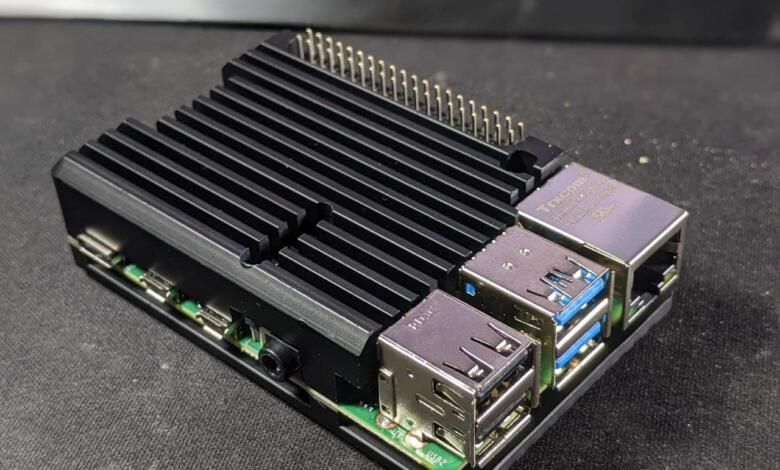
                          raspi_cooling_head-780x470.jpg
                          Die Wäremeleitpads wurden erst vor ein paar Wochen von mir erneuert.

                          Ro75R 1 Antwort Letzte Antwort
                          0
                          • R robson

                            @ro75
                            Es ist zwar nicht meiner, jedoch nutze ich exakt dieses Gehäuse
                            raspi_cooling_head-780x470.jpg
                            Die Wäremeleitpads wurden erst vor ein paar Wochen von mir erneuert.

                            Ro75R Offline
                            Ro75R Offline
                            Ro75
                            schrieb am zuletzt editiert von
                            #24

                            @robson OK, ich frage darum. Ich hatte mir für meine Raspi bei Geekworm ein Gehäuse gekauft gehabt. Schick verbaut inkl. SSD. Dann fingen die Probleme bei mir an. So wie bei dir beschrieben. Zuerst dachte ich, Speicherfehler - getstet - OK. Dann einen anderen Raspi dort eingebaut (der lief bisher ohne Probleme). Und der zeigte plötzlich die selben Fehler.

                            Kurz und knapp. Raspi's raus aus dem Gehäuse - also nackig - und siehe da die liefen wieder völlig problemlos.

                            Ro75.

                            SERVER = Beelink U59 16GB DDR4 RAM 512GB SSD, FB 7490, FritzDect 200+301+440, ConBee II, Zigbee Aqara Sensoren + NOUS A1Z, NOUS A1T, Philips Hue ** ioBroker, REDIS, influxdb2, Grafana, PiHole, Plex-Mediaserver, paperless-ngx (Docker), MariaDB + phpmyadmin *** VIS-Runtime = Intel NUC 8GB RAM 128GB SSD + 24" Touchscreen

                            R 1 Antwort Letzte Antwort
                            1
                            • Ro75R Ro75

                              @robson OK, ich frage darum. Ich hatte mir für meine Raspi bei Geekworm ein Gehäuse gekauft gehabt. Schick verbaut inkl. SSD. Dann fingen die Probleme bei mir an. So wie bei dir beschrieben. Zuerst dachte ich, Speicherfehler - getstet - OK. Dann einen anderen Raspi dort eingebaut (der lief bisher ohne Probleme). Und der zeigte plötzlich die selben Fehler.

                              Kurz und knapp. Raspi's raus aus dem Gehäuse - also nackig - und siehe da die liefen wieder völlig problemlos.

                              Ro75.

                              R Offline
                              R Offline
                              robson
                              schrieb am zuletzt editiert von robson
                              #25

                              @ro75
                              Danke dir. In meinem Fall würde ich das Gehäuse ausnehmen. Meine Installation lief seit 2019-2020 sehr stabil - auch in den heißen Sommertagen. Mein Raspi steht leider im Dachgeschoss - hohe Temperaturen.

                              Ich habe gerade das Log vom Tag des letzten Absturzes exportiert. Die Vis-Instanz taucht hier relativ häufig auf (ist aber aktuell deaktiviert). Zudem auch andere Fehler. Kann dies eine Ursache sein?

                              2023-04-04 04:17:16.003 - error: admin.0 (665) admin.0 already running
                              2023-04-04 04:17:16.007 - warn: admin.0 (665) Terminated (ADAPTER_ALREADY_RUNNING): Without reason
                              2023-04-04 04:17:16.659 - info: host.iobroker-raspi4 instance system.adapter.javascript.0 started with pid 749
                              2023-04-04 04:17:16.882 - error: host.iobroker-raspi4 instance system.adapter.admin.0 terminated with code 7 (ADAPTER_ALREADY_RUNNING)
                              2023-04-04 04:17:16.883 - info: host.iobroker-raspi4 Restart adapter system.adapter.admin.0 because enabled
                              2023-04-04 04:17:17.433 - info: host.iobroker-raspi4 iobroker npm-install: NPM version: 8.19.3
                              2023-04-04 04:17:17.434 - info: host.iobroker-raspi4 iobroker npm-install: Installing iobroker.vis@1.4.15... (System call)
                              2023-04-04 04:17:20.783 - info: host.iobroker-raspi4 instance system.adapter.telegram.0 started with pid 780
                              2023-04-04 04:17:21.055 - error: javascript.0 (749) javascript.0 already running
                              2023-04-04 04:17:21.060 - warn: javascript.0 (749) Terminated (ADAPTER_ALREADY_RUNNING): Without reason
                              2023-04-04 04:17:21.821 - error: host.iobroker-raspi4 instance system.adapter.javascript.0 terminated with code 7 (ADAPTER_ALREADY_RUNNING)
                              2023-04-04 04:17:21.822 - info: host.iobroker-raspi4 Restart adapter system.adapter.javascript.0 because enabled
                              2023-04-04 04:17:24.703 - error: telegram.0 (780) telegram.0 already running
                              2023-04-04 04:17:24.709 - warn: telegram.0 (780) Terminated (ADAPTER_ALREADY_RUNNING): Without reason
                              2023-04-04 04:17:24.743 - info: host.iobroker-raspi4 instance system.adapter.alexa2.0 started with pid 852
                              2023-04-04 04:17:25.450 - error: host.iobroker-raspi4 instance system.adapter.telegram.0 terminated with code 7 (ADAPTER_ALREADY_RUNNING)
                              2023-04-04 04:17:25.452 - info: host.iobroker-raspi4 Restart adapter system.adapter.telegram.0 because enabled
                              2023-04-04 04:17:27.342 - error: alexa2.0 (852) alexa2.0 already running
                              2023-04-04 04:17:27.347 - warn: alexa2.0 (852) Terminated (ADAPTER_ALREADY_RUNNING): Without reason
                              2023-04-04 04:17:28.081 - error: host.iobroker-raspi4 instance system.adapter.alexa2.0 terminated with code 7 (ADAPTER_ALREADY_RUNNING)
                              2023-04-04 04:17:28.083 - info: host.iobroker-raspi4 Restart adapter system.adapter.alexa2.0 because enabled
                              2023-04-04 04:17:28.689 - info: host.iobroker-raspi4 instance system.adapter.hm-rega.0 started with pid 875
                              2023-04-04 04:17:29.186 - info: vis.0 (860) starting. Version 1.4.15 in /opt/iobroker/node_modules/iobroker.vis, node: v16.19.1, js-controller: 4.0.24
                              2023-04-04 04:17:29.676 - error: vis.0 (860) Unhandled promise rejection. This error originated either by throwing inside of an async function without a catch block, or by rejecting a promise which was not handled with .catch().
                              2023-04-04 04:17:29.678 - error: vis.0 (860) unhandled promise rejection: Not exists
                              2023-04-04 04:17:29.680 - error: vis.0 (860) Error: Not exists
                              at Object.maybeCallbackWithError (/opt/iobroker/node_modules/@iobroker/js-controller-common/lib/common/tools.js:2983:17)
                              at ObjectsInRedisClient._readFile (/opt/iobroker/node_modules/@iobroker/db-objects-redis/lib/objects/objectsInRedisClient.js:1043:26)
                              at Immediate. (/opt/iobroker/node_modules/@iobroker/db-objects-redis/lib/objects/objectsInRedisClient.js:1092:29)
                              at processImmediate (node:internal/timers:468:21)
                              2023-04-04 04:17:29.681 - error: vis.0 (860) Not exists
                              2023-04-04 04:17:30.187 - info: vis.0 (860) terminating
                              2023-04-04 04:17:30.189 - warn: vis.0 (860) Terminated (UNCAUGHT_EXCEPTION): Without reason
                              2023-04-04 04:17:31.002 - error: host.iobroker-raspi4 iobroker npm-install: host.iobroker-raspi4 Cannot install iobroker.vis@1.4.15: 6
                              2023-04-04 04:17:31.351 - error: hm-rega.0 (875) hm-rega.0 already running
                              2023-04-04 04:17:31.355 - warn: hm-rega.0 (875) Terminated (ADAPTER_ALREADY_RUNNING): Without reason
                              2023-04-04 04:17:32.023 - error: host.iobroker-raspi4 instance system.adapter.hm-rega.0 terminated with code 7 (ADAPTER_ALREADY_RUNNING)
                              2023-04-04 04:17:32.024 - info: host.iobroker-raspi4 Restart adapter system.adapter.hm-rega.0 because enabled
                              2023-04-04 04:17:32.116 - info: host.iobroker-raspi4 iobroker npm-install: exit 25
                              2023-04-04 04:17:32.650 - info: host.iobroker-raspi4 instance system.adapter.hm-rpc.0 started with pid 886
                              2023-04-04 04:17:33.117 - warn: host.iobroker-raspi4 startInstance cannot find adapter "vis@1.4.15". Try to install it... 2 attempt
                              2023-04-04 04:17:33.118 - info: host.iobroker-raspi4 iobroker install vis@1.4.15 using installedFrom
                              2023-04-04 04:17:34.943 - error: hm-rpc.0 (886) hm-rpc.0 already running
                              2023-04-04 04:17:34.948 - warn: hm-rpc.0 (886) Terminated (ADAPTER_ALREADY_RUNNING): Without reason
                              
                              HomoranH DJMarc75D 2 Antworten Letzte Antwort
                              0
                              • R robson

                                @ro75
                                Danke dir. In meinem Fall würde ich das Gehäuse ausnehmen. Meine Installation lief seit 2019-2020 sehr stabil - auch in den heißen Sommertagen. Mein Raspi steht leider im Dachgeschoss - hohe Temperaturen.

                                Ich habe gerade das Log vom Tag des letzten Absturzes exportiert. Die Vis-Instanz taucht hier relativ häufig auf (ist aber aktuell deaktiviert). Zudem auch andere Fehler. Kann dies eine Ursache sein?

                                2023-04-04 04:17:16.003 - error: admin.0 (665) admin.0 already running
                                2023-04-04 04:17:16.007 - warn: admin.0 (665) Terminated (ADAPTER_ALREADY_RUNNING): Without reason
                                2023-04-04 04:17:16.659 - info: host.iobroker-raspi4 instance system.adapter.javascript.0 started with pid 749
                                2023-04-04 04:17:16.882 - error: host.iobroker-raspi4 instance system.adapter.admin.0 terminated with code 7 (ADAPTER_ALREADY_RUNNING)
                                2023-04-04 04:17:16.883 - info: host.iobroker-raspi4 Restart adapter system.adapter.admin.0 because enabled
                                2023-04-04 04:17:17.433 - info: host.iobroker-raspi4 iobroker npm-install: NPM version: 8.19.3
                                2023-04-04 04:17:17.434 - info: host.iobroker-raspi4 iobroker npm-install: Installing iobroker.vis@1.4.15... (System call)
                                2023-04-04 04:17:20.783 - info: host.iobroker-raspi4 instance system.adapter.telegram.0 started with pid 780
                                2023-04-04 04:17:21.055 - error: javascript.0 (749) javascript.0 already running
                                2023-04-04 04:17:21.060 - warn: javascript.0 (749) Terminated (ADAPTER_ALREADY_RUNNING): Without reason
                                2023-04-04 04:17:21.821 - error: host.iobroker-raspi4 instance system.adapter.javascript.0 terminated with code 7 (ADAPTER_ALREADY_RUNNING)
                                2023-04-04 04:17:21.822 - info: host.iobroker-raspi4 Restart adapter system.adapter.javascript.0 because enabled
                                2023-04-04 04:17:24.703 - error: telegram.0 (780) telegram.0 already running
                                2023-04-04 04:17:24.709 - warn: telegram.0 (780) Terminated (ADAPTER_ALREADY_RUNNING): Without reason
                                2023-04-04 04:17:24.743 - info: host.iobroker-raspi4 instance system.adapter.alexa2.0 started with pid 852
                                2023-04-04 04:17:25.450 - error: host.iobroker-raspi4 instance system.adapter.telegram.0 terminated with code 7 (ADAPTER_ALREADY_RUNNING)
                                2023-04-04 04:17:25.452 - info: host.iobroker-raspi4 Restart adapter system.adapter.telegram.0 because enabled
                                2023-04-04 04:17:27.342 - error: alexa2.0 (852) alexa2.0 already running
                                2023-04-04 04:17:27.347 - warn: alexa2.0 (852) Terminated (ADAPTER_ALREADY_RUNNING): Without reason
                                2023-04-04 04:17:28.081 - error: host.iobroker-raspi4 instance system.adapter.alexa2.0 terminated with code 7 (ADAPTER_ALREADY_RUNNING)
                                2023-04-04 04:17:28.083 - info: host.iobroker-raspi4 Restart adapter system.adapter.alexa2.0 because enabled
                                2023-04-04 04:17:28.689 - info: host.iobroker-raspi4 instance system.adapter.hm-rega.0 started with pid 875
                                2023-04-04 04:17:29.186 - info: vis.0 (860) starting. Version 1.4.15 in /opt/iobroker/node_modules/iobroker.vis, node: v16.19.1, js-controller: 4.0.24
                                2023-04-04 04:17:29.676 - error: vis.0 (860) Unhandled promise rejection. This error originated either by throwing inside of an async function without a catch block, or by rejecting a promise which was not handled with .catch().
                                2023-04-04 04:17:29.678 - error: vis.0 (860) unhandled promise rejection: Not exists
                                2023-04-04 04:17:29.680 - error: vis.0 (860) Error: Not exists
                                at Object.maybeCallbackWithError (/opt/iobroker/node_modules/@iobroker/js-controller-common/lib/common/tools.js:2983:17)
                                at ObjectsInRedisClient._readFile (/opt/iobroker/node_modules/@iobroker/db-objects-redis/lib/objects/objectsInRedisClient.js:1043:26)
                                at Immediate. (/opt/iobroker/node_modules/@iobroker/db-objects-redis/lib/objects/objectsInRedisClient.js:1092:29)
                                at processImmediate (node:internal/timers:468:21)
                                2023-04-04 04:17:29.681 - error: vis.0 (860) Not exists
                                2023-04-04 04:17:30.187 - info: vis.0 (860) terminating
                                2023-04-04 04:17:30.189 - warn: vis.0 (860) Terminated (UNCAUGHT_EXCEPTION): Without reason
                                2023-04-04 04:17:31.002 - error: host.iobroker-raspi4 iobroker npm-install: host.iobroker-raspi4 Cannot install iobroker.vis@1.4.15: 6
                                2023-04-04 04:17:31.351 - error: hm-rega.0 (875) hm-rega.0 already running
                                2023-04-04 04:17:31.355 - warn: hm-rega.0 (875) Terminated (ADAPTER_ALREADY_RUNNING): Without reason
                                2023-04-04 04:17:32.023 - error: host.iobroker-raspi4 instance system.adapter.hm-rega.0 terminated with code 7 (ADAPTER_ALREADY_RUNNING)
                                2023-04-04 04:17:32.024 - info: host.iobroker-raspi4 Restart adapter system.adapter.hm-rega.0 because enabled
                                2023-04-04 04:17:32.116 - info: host.iobroker-raspi4 iobroker npm-install: exit 25
                                2023-04-04 04:17:32.650 - info: host.iobroker-raspi4 instance system.adapter.hm-rpc.0 started with pid 886
                                2023-04-04 04:17:33.117 - warn: host.iobroker-raspi4 startInstance cannot find adapter "vis@1.4.15". Try to install it... 2 attempt
                                2023-04-04 04:17:33.118 - info: host.iobroker-raspi4 iobroker install vis@1.4.15 using installedFrom
                                2023-04-04 04:17:34.943 - error: hm-rpc.0 (886) hm-rpc.0 already running
                                2023-04-04 04:17:34.948 - warn: hm-rpc.0 (886) Terminated (ADAPTER_ALREADY_RUNNING): Without reason
                                
                                HomoranH Nicht stören
                                HomoranH Nicht stören
                                Homoran
                                Global Moderator Administrators
                                schrieb am zuletzt editiert von
                                #26

                                @robson sagte in RAM-Probleme und Abstürze nach Wechsel auf 64-Bit:

                                Meine Installation lief seit 2019-2020 sehr stabil

                                ist kein Grund die Temperatur grundsätzlich nicht als Grund zu sehen.

                                kein Support per PN! - Fragen im Forum stellen -

                                Benutzt das Voting rechts unten im Beitrag wenn er euch geholfen hat.

                                ioBroker freut sich auch über eine Spende für das Forum. Benutzt dazu den Spendenbutton im Header. Danke!

                                der Installationsfixer: curl -fsL https://iobroker.net/fix.sh | bash -

                                1 Antwort Letzte Antwort
                                0
                                • R robson

                                  @ro75
                                  Danke dir. In meinem Fall würde ich das Gehäuse ausnehmen. Meine Installation lief seit 2019-2020 sehr stabil - auch in den heißen Sommertagen. Mein Raspi steht leider im Dachgeschoss - hohe Temperaturen.

                                  Ich habe gerade das Log vom Tag des letzten Absturzes exportiert. Die Vis-Instanz taucht hier relativ häufig auf (ist aber aktuell deaktiviert). Zudem auch andere Fehler. Kann dies eine Ursache sein?

                                  2023-04-04 04:17:16.003 - error: admin.0 (665) admin.0 already running
                                  2023-04-04 04:17:16.007 - warn: admin.0 (665) Terminated (ADAPTER_ALREADY_RUNNING): Without reason
                                  2023-04-04 04:17:16.659 - info: host.iobroker-raspi4 instance system.adapter.javascript.0 started with pid 749
                                  2023-04-04 04:17:16.882 - error: host.iobroker-raspi4 instance system.adapter.admin.0 terminated with code 7 (ADAPTER_ALREADY_RUNNING)
                                  2023-04-04 04:17:16.883 - info: host.iobroker-raspi4 Restart adapter system.adapter.admin.0 because enabled
                                  2023-04-04 04:17:17.433 - info: host.iobroker-raspi4 iobroker npm-install: NPM version: 8.19.3
                                  2023-04-04 04:17:17.434 - info: host.iobroker-raspi4 iobroker npm-install: Installing iobroker.vis@1.4.15... (System call)
                                  2023-04-04 04:17:20.783 - info: host.iobroker-raspi4 instance system.adapter.telegram.0 started with pid 780
                                  2023-04-04 04:17:21.055 - error: javascript.0 (749) javascript.0 already running
                                  2023-04-04 04:17:21.060 - warn: javascript.0 (749) Terminated (ADAPTER_ALREADY_RUNNING): Without reason
                                  2023-04-04 04:17:21.821 - error: host.iobroker-raspi4 instance system.adapter.javascript.0 terminated with code 7 (ADAPTER_ALREADY_RUNNING)
                                  2023-04-04 04:17:21.822 - info: host.iobroker-raspi4 Restart adapter system.adapter.javascript.0 because enabled
                                  2023-04-04 04:17:24.703 - error: telegram.0 (780) telegram.0 already running
                                  2023-04-04 04:17:24.709 - warn: telegram.0 (780) Terminated (ADAPTER_ALREADY_RUNNING): Without reason
                                  2023-04-04 04:17:24.743 - info: host.iobroker-raspi4 instance system.adapter.alexa2.0 started with pid 852
                                  2023-04-04 04:17:25.450 - error: host.iobroker-raspi4 instance system.adapter.telegram.0 terminated with code 7 (ADAPTER_ALREADY_RUNNING)
                                  2023-04-04 04:17:25.452 - info: host.iobroker-raspi4 Restart adapter system.adapter.telegram.0 because enabled
                                  2023-04-04 04:17:27.342 - error: alexa2.0 (852) alexa2.0 already running
                                  2023-04-04 04:17:27.347 - warn: alexa2.0 (852) Terminated (ADAPTER_ALREADY_RUNNING): Without reason
                                  2023-04-04 04:17:28.081 - error: host.iobroker-raspi4 instance system.adapter.alexa2.0 terminated with code 7 (ADAPTER_ALREADY_RUNNING)
                                  2023-04-04 04:17:28.083 - info: host.iobroker-raspi4 Restart adapter system.adapter.alexa2.0 because enabled
                                  2023-04-04 04:17:28.689 - info: host.iobroker-raspi4 instance system.adapter.hm-rega.0 started with pid 875
                                  2023-04-04 04:17:29.186 - info: vis.0 (860) starting. Version 1.4.15 in /opt/iobroker/node_modules/iobroker.vis, node: v16.19.1, js-controller: 4.0.24
                                  2023-04-04 04:17:29.676 - error: vis.0 (860) Unhandled promise rejection. This error originated either by throwing inside of an async function without a catch block, or by rejecting a promise which was not handled with .catch().
                                  2023-04-04 04:17:29.678 - error: vis.0 (860) unhandled promise rejection: Not exists
                                  2023-04-04 04:17:29.680 - error: vis.0 (860) Error: Not exists
                                  at Object.maybeCallbackWithError (/opt/iobroker/node_modules/@iobroker/js-controller-common/lib/common/tools.js:2983:17)
                                  at ObjectsInRedisClient._readFile (/opt/iobroker/node_modules/@iobroker/db-objects-redis/lib/objects/objectsInRedisClient.js:1043:26)
                                  at Immediate. (/opt/iobroker/node_modules/@iobroker/db-objects-redis/lib/objects/objectsInRedisClient.js:1092:29)
                                  at processImmediate (node:internal/timers:468:21)
                                  2023-04-04 04:17:29.681 - error: vis.0 (860) Not exists
                                  2023-04-04 04:17:30.187 - info: vis.0 (860) terminating
                                  2023-04-04 04:17:30.189 - warn: vis.0 (860) Terminated (UNCAUGHT_EXCEPTION): Without reason
                                  2023-04-04 04:17:31.002 - error: host.iobroker-raspi4 iobroker npm-install: host.iobroker-raspi4 Cannot install iobroker.vis@1.4.15: 6
                                  2023-04-04 04:17:31.351 - error: hm-rega.0 (875) hm-rega.0 already running
                                  2023-04-04 04:17:31.355 - warn: hm-rega.0 (875) Terminated (ADAPTER_ALREADY_RUNNING): Without reason
                                  2023-04-04 04:17:32.023 - error: host.iobroker-raspi4 instance system.adapter.hm-rega.0 terminated with code 7 (ADAPTER_ALREADY_RUNNING)
                                  2023-04-04 04:17:32.024 - info: host.iobroker-raspi4 Restart adapter system.adapter.hm-rega.0 because enabled
                                  2023-04-04 04:17:32.116 - info: host.iobroker-raspi4 iobroker npm-install: exit 25
                                  2023-04-04 04:17:32.650 - info: host.iobroker-raspi4 instance system.adapter.hm-rpc.0 started with pid 886
                                  2023-04-04 04:17:33.117 - warn: host.iobroker-raspi4 startInstance cannot find adapter "vis@1.4.15". Try to install it... 2 attempt
                                  2023-04-04 04:17:33.118 - info: host.iobroker-raspi4 iobroker install vis@1.4.15 using installedFrom
                                  2023-04-04 04:17:34.943 - error: hm-rpc.0 (886) hm-rpc.0 already running
                                  2023-04-04 04:17:34.948 - warn: hm-rpc.0 (886) Terminated (ADAPTER_ALREADY_RUNNING): Without reason
                                  
                                  DJMarc75D Offline
                                  DJMarc75D Offline
                                  DJMarc75
                                  schrieb am zuletzt editiert von
                                  #27

                                  @robson wenn der Kühlkörper nicht zu 100% auf dem zu kühlenden Bauteil aufliegt dann gibts da auch keine effektive Kühlung mehr. Das würde ich mal prüfen.

                                  Lehrling seit 1975 !!!
                                  Beitrag geholfen ? dann gerne ein upvote rechts unten im Beitrag klicken ;)
                                  https://forum.iobroker.net/topic/51555/hinweise-f%C3%BCr-gute-forenbeitr%C3%A4ge

                                  K 1 Antwort Letzte Antwort
                                  0
                                  • DJMarc75D DJMarc75

                                    @robson wenn der Kühlkörper nicht zu 100% auf dem zu kühlenden Bauteil aufliegt dann gibts da auch keine effektive Kühlung mehr. Das würde ich mal prüfen.

                                    K Offline
                                    K Offline
                                    Kanumouse
                                    schrieb am zuletzt editiert von
                                    #28

                                    Hi,
                                    ich muss mich hier an dieser Stelle hinsichtlich der RAM-Auslastung auch einmal einklinken. Ich hatte mein System (lief 2 Jahre stabil) von der 32-Bit Buster-Version auf eine 64-Bit Bullseye-Version umgestellt (Neuinstallation mit Backup-Einspielung). Seidem habe ich eine hohe Speicherauslatung (nur noch 8-10% frei). Ich habe ca. 47 Instanzen und 38 Javaprogramme zu laufen. Sowohl die Instanzen auch als die Java-Programme habe ich hinsichtlich des Einflusses auf den Speicherbedarf schon gecheckt. Top und htop zeigen auch keine Auffälligkeiten hinsichtlich des Speicherbedarfs aus meiner Sicht.
                                    Die hohe Speicherauslastung bei meinem Pi 4 mit 4GB Ram führt insbesondere beim iobroker-Backup mit Backuitup zum Systemabsturz. Iobroker wird dann neu gestartet und im im Logfile finde ich dann Einträge das beim Wiederstart der Instanzen diese schon laufen.
                                    Die freie RAM-Kapazität von ca. 8% erscheint mir sehr wenig bei meiner Installation und scheint beim Backup zum Systemabsturz zu führen.
                                    Gibt es eventuell noch hilfreiche Tipps, wo ich noch Fehler suchen kann?
                                    Wie ist die „normale“ RAM-Auslastung bei vergleichbaren Installationen?

                                    Ro75R DJMarc75D ? 3 Antworten Letzte Antwort
                                    0
                                    • K Kanumouse

                                      Hi,
                                      ich muss mich hier an dieser Stelle hinsichtlich der RAM-Auslastung auch einmal einklinken. Ich hatte mein System (lief 2 Jahre stabil) von der 32-Bit Buster-Version auf eine 64-Bit Bullseye-Version umgestellt (Neuinstallation mit Backup-Einspielung). Seidem habe ich eine hohe Speicherauslatung (nur noch 8-10% frei). Ich habe ca. 47 Instanzen und 38 Javaprogramme zu laufen. Sowohl die Instanzen auch als die Java-Programme habe ich hinsichtlich des Einflusses auf den Speicherbedarf schon gecheckt. Top und htop zeigen auch keine Auffälligkeiten hinsichtlich des Speicherbedarfs aus meiner Sicht.
                                      Die hohe Speicherauslastung bei meinem Pi 4 mit 4GB Ram führt insbesondere beim iobroker-Backup mit Backuitup zum Systemabsturz. Iobroker wird dann neu gestartet und im im Logfile finde ich dann Einträge das beim Wiederstart der Instanzen diese schon laufen.
                                      Die freie RAM-Kapazität von ca. 8% erscheint mir sehr wenig bei meiner Installation und scheint beim Backup zum Systemabsturz zu führen.
                                      Gibt es eventuell noch hilfreiche Tipps, wo ich noch Fehler suchen kann?
                                      Wie ist die „normale“ RAM-Auslastung bei vergleichbaren Installationen?

                                      Ro75R Offline
                                      Ro75R Offline
                                      Ro75
                                      schrieb am zuletzt editiert von Ro75
                                      #29

                                      @kanumouse Was für ein System hast du denn? Grundsätzlich benötigt die 64Bit-Variante etwas meht Speicher. Bei meinem 4GB Raspi war dann bei der Anzahl der Adapter auch irgendwann das Limit erreicht.

                                      Ich hatte 3 Varianten für mich zur Lösung.

                                      1. Richte SWAP ein bzw. wenn bereits vorhanden - vergrößern.
                                      2. Adapter "ausmisten" und ggfs. durch JS ersetzen (SNMP, Ping, ODL , Luftdaten, WOL) geht ohne Probleme.
                                      3. Adapter mit geleichen Funktionen (mit enthalten) nutzen.

                                      EDIT: Bei 38 JS würde ich schauen ob das noch was optimiert werden kann.

                                      SERVER = Beelink U59 16GB DDR4 RAM 512GB SSD, FB 7490, FritzDect 200+301+440, ConBee II, Zigbee Aqara Sensoren + NOUS A1Z, NOUS A1T, Philips Hue ** ioBroker, REDIS, influxdb2, Grafana, PiHole, Plex-Mediaserver, paperless-ngx (Docker), MariaDB + phpmyadmin *** VIS-Runtime = Intel NUC 8GB RAM 128GB SSD + 24" Touchscreen

                                      1 Antwort Letzte Antwort
                                      0
                                      • K Kanumouse

                                        Hi,
                                        ich muss mich hier an dieser Stelle hinsichtlich der RAM-Auslastung auch einmal einklinken. Ich hatte mein System (lief 2 Jahre stabil) von der 32-Bit Buster-Version auf eine 64-Bit Bullseye-Version umgestellt (Neuinstallation mit Backup-Einspielung). Seidem habe ich eine hohe Speicherauslatung (nur noch 8-10% frei). Ich habe ca. 47 Instanzen und 38 Javaprogramme zu laufen. Sowohl die Instanzen auch als die Java-Programme habe ich hinsichtlich des Einflusses auf den Speicherbedarf schon gecheckt. Top und htop zeigen auch keine Auffälligkeiten hinsichtlich des Speicherbedarfs aus meiner Sicht.
                                        Die hohe Speicherauslastung bei meinem Pi 4 mit 4GB Ram führt insbesondere beim iobroker-Backup mit Backuitup zum Systemabsturz. Iobroker wird dann neu gestartet und im im Logfile finde ich dann Einträge das beim Wiederstart der Instanzen diese schon laufen.
                                        Die freie RAM-Kapazität von ca. 8% erscheint mir sehr wenig bei meiner Installation und scheint beim Backup zum Systemabsturz zu führen.
                                        Gibt es eventuell noch hilfreiche Tipps, wo ich noch Fehler suchen kann?
                                        Wie ist die „normale“ RAM-Auslastung bei vergleichbaren Installationen?

                                        DJMarc75D Offline
                                        DJMarc75D Offline
                                        DJMarc75
                                        schrieb am zuletzt editiert von
                                        #30

                                        @kanumouse sagte in RAM-Probleme und Abstürze nach Wechsel auf 64-Bit:

                                        Ich habe ca. 47 Instanzen

                                        @kanumouse sagte in RAM-Probleme und Abstürze nach Wechsel auf 64-Bit:

                                        Pi 4 mit 4GB Ram

                                        das ist zu wenig RAM für 47 Instanzen... oder andersrum - zu viele Instanzen für 4 GB RAM

                                        zeig doch mal

                                        iob diag
                                        

                                        Lehrling seit 1975 !!!
                                        Beitrag geholfen ? dann gerne ein upvote rechts unten im Beitrag klicken ;)
                                        https://forum.iobroker.net/topic/51555/hinweise-f%C3%BCr-gute-forenbeitr%C3%A4ge

                                        K 1 Antwort Letzte Antwort
                                        0
                                        • DJMarc75D DJMarc75

                                          @kanumouse sagte in RAM-Probleme und Abstürze nach Wechsel auf 64-Bit:

                                          Ich habe ca. 47 Instanzen

                                          @kanumouse sagte in RAM-Probleme und Abstürze nach Wechsel auf 64-Bit:

                                          Pi 4 mit 4GB Ram

                                          das ist zu wenig RAM für 47 Instanzen... oder andersrum - zu viele Instanzen für 4 GB RAM

                                          zeig doch mal

                                          iob diag

                                          
                                          K Offline
                                          K Offline
                                          Kanumouse
                                          schrieb am zuletzt editiert von Homoran
                                          #31

                                          @djmarc75

                                           Linux raspberrypi 6.1.21-v8+ #1642 SMP PREEMPT Mon Apr  3 17:24:16 BST 2023 aarch64
                                          
                                          The programs included with the Debian GNU/Linux system are free software;
                                          the exact distribution terms for each program are described in the
                                          individual files in /usr/share/doc/*/copyright.
                                          
                                          Debian GNU/Linux comes with ABSOLUTELY NO WARRANTY, to the extent
                                          permitted by applicable law.
                                          Last login: Sun Jul  9 10:15:32 2023 from 192.168.178.42
                                          pi@raspberrypi:~ $ iob diag
                                          
                                          *** ioBroker Diagnosis ***
                                          
                                          Please stretch the window of your terminal programm (puTTY) as wide as possible or switch to full screen
                                          
                                          The following checks may give hints to potential malconfigurations or errors, please post them in our forum:
                                          
                                          https://forum.iobroker.net
                                          
                                          Just copy and paste the Summary Page, including the ``` characters at start and end.
                                          It helps us to help you!
                                          
                                          Press any key to continue
                                          
                                          ======== Start marking the full check here =========
                                          
                                          Skript v.2023-04-16
                                          
                                          *** BASE SYSTEM ***
                                          Model           : Raspberry Pi 4 Model B Rev 1.5
                                          Architecture    : aarch64
                                          Docker          : false
                                          Virtualization  : none
                                          Distributor ID: Debian
                                          Description:    Debian GNU/Linux 11 (bullseye)
                                          Release:        11
                                          Codename:       bullseye
                                          
                                          PRETTY_NAME="Debian GNU/Linux 11 (bullseye)"
                                          NAME="Debian GNU/Linux"
                                          VERSION_ID="11"
                                          VERSION="11 (bullseye)"
                                          VERSION_CODENAME=bullseye
                                          ID=debian
                                          HOME_URL="https://www.debian.org/"
                                          SUPPORT_URL="https://www.debian.org/support"
                                          BUG_REPORT_URL="https://bugs.debian.org/"
                                          
                                          Systemuptime and Load:
                                           12:52:34 up 17:03,  1 user,  load average: 1.38, 1.43, 1.38
                                          CPU threads: 4
                                          
                                          Raspberry only:
                                          throttled=0x0
                                          Other values than 0x0 hint to temperature/voltage problems
                                          temp=49.6'C
                                          volt=0.9260V
                                          
                                          *** Time and Time Zones ***
                                                         Local time: Sun 2023-07-09 12:52:34 CEST
                                                     Universal time: Sun 2023-07-09 10:52:34 UTC
                                                           RTC time: n/a
                                                          Time zone: Europe/Berlin (CEST, +0200)
                                          System clock synchronized: yes
                                                        NTP service: active
                                                    RTC in local TZ: no
                                          
                                          *** User and Groups ***
                                          pi
                                          /home/pi
                                          pi adm dialout cdrom sudo audio video plugdev games users input render netdev gpio i2c spi iobroker
                                          
                                          *** X-Server-Setup ***
                                          X-Server:       false
                                          Desktop:        
                                          Terminal:       tty
                                          Boot Target:    multi-user.target
                                          
                                          *** MEMORY ***
                                                         total        used        free      shared  buff/cache   available
                                          Mem:            3.8G        3.2G        229M        0.0K        354M        476M
                                          Swap:            99M         14M         85M
                                          Total:          3.9G        3.2G        315M
                                          
                                                   3793 M total memory
                                                   3208 M used memory
                                                   1350 M active memory
                                                   2064 M inactive memory
                                                    229 M free memory
                                                     26 M buffer memory
                                                    328 M swap cache
                                                     99 M total swap
                                                     14 M used swap
                                                     85 M free swap
                                          
                                          Raspberry only:
                                          oom events: 0
                                          lifetime oom required: 0 Mbytes
                                          total time in oom handler: 0 ms
                                          max time spent in oom handler: 0 ms
                                          
                                          *** FILESYSTEM ***
                                          Filesystem     Type      Size  Used Avail Use% Mounted on
                                          /dev/root      ext4      917G  6.2G  874G   1% /
                                          devtmpfs       devtmpfs  1.7G     0  1.7G   0% /dev
                                          tmpfs          tmpfs     1.9G     0  1.9G   0% /dev/shm
                                          tmpfs          tmpfs     759M  1.1M  758M   1% /run
                                          tmpfs          tmpfs     5.0M  4.0K  5.0M   1% /run/lock
                                          /dev/sda1      vfat      255M   31M  225M  13% /boot
                                          tmpfs          tmpfs     380M     0  380M   0% /run/user/1000
                                          
                                          Messages concerning ext4 filesystem in dmesg:
                                          [Sat Jul  8 19:48:53 2023] Kernel command line: coherent_pool=1M 8250.nr_uarts=1 snd_bcm2835.enable_headphones=0 snd_bcm2835.enable_hdmi=0  smsc95xx.macaddr=D8:3A:DD:2D:3D:FC vc_mem.mem_base=0x3eb00000 vc_mem.mem_size=0x3ff00000  console=ttyAMA0,115200 console=tty1 root=PARTUUID=655495cf-02 rootfstype=ext4 fsck.repair=yes rootwait
                                          [Sat Jul  8 19:48:57 2023] EXT4-fs (sda2): mounted filesystem with ordered data mode. Quota mode: none.
                                          [Sat Jul  8 19:48:57 2023] VFS: Mounted root (ext4 filesystem) readonly on device 8:2.
                                          [Sat Jul  8 19:49:03 2023] EXT4-fs (sda2): re-mounted. Quota mode: none.
                                          
                                          Show mounted filesystems (real ones only):
                                          TARGET  SOURCE    FSTYPE OPTIONS
                                          /       /dev/sda2 ext4   rw,noatime
                                          `-/boot /dev/sda1 vfat   rw,relatime,fmask=0022,dmask=0022,codepage=437,iocharset=ascii,shortname=mixed,errors=remount-ro
                                          
                                          Files in neuralgic directories:
                                          
                                          /var:
                                          721M    /var/
                                          278M    /var/log
                                          249M    /var/log/journal/6aafba138cf14ffd8714a1a0ae174d1d
                                          249M    /var/log/journal
                                          188M    /var/cache
                                          
                                          Archived and active journals take up 248.0M in the file system.
                                          
                                          /opt/iobroker/backups:
                                          213M    /opt/iobroker/backups/
                                          
                                          /opt/iobroker/iobroker-data:
                                          1007M   /opt/iobroker/iobroker-data/
                                          403M    /opt/iobroker/iobroker-data/files
                                          362M    /opt/iobroker/iobroker-data/history_2023
                                          130M    /opt/iobroker/iobroker-data/backup-objects
                                          78M     /opt/iobroker/iobroker-data/files/icons-open-icon-library-png
                                          
                                          The five largest files in iobroker-data are:
                                          63M     /opt/iobroker/iobroker-data/objects.jsonl
                                          26M     /opt/iobroker/iobroker-data/states.jsonl
                                          19M     /opt/iobroker/iobroker-data/files/iot.admin/static/js/main.2975a411.js.map
                                          18M     /opt/iobroker/iobroker-data/files/text2command.admin/static/js/main.274a4d8d.js.map
                                          8.2M    /opt/iobroker/iobroker-data/files/vis.0/main/vis-views.json
                                          
                                          *** NodeJS-Installation ***
                                          
                                          /usr/bin/nodejs         v18.16.1
                                          /usr/bin/node           v18.16.1
                                          /usr/bin/npm            9.5.1
                                          /usr/bin/npx            9.5.1
                                          
                                          
                                          nodejs:
                                            Installed: 18.16.1-deb-1nodesource1
                                            Candidate: 18.16.1-deb-1nodesource1
                                            Version table:
                                           *** 18.16.1-deb-1nodesource1 500
                                                  500 https://deb.nodesource.com/node_18.x bullseye/main arm64 Packages
                                                  100 /var/lib/dpkg/status
                                               12.22.12~dfsg-1~deb11u4 500
                                                  500 http://security.debian.org/debian-security bullseye-security/main arm64 Packages
                                               12.22.12~dfsg-1~deb11u3 500
                                                  500 http://deb.debian.org/debian bullseye/main arm64 Packages
                                          
                                          Temp directories causing npm8 problem: 0
                                          No problems detected
                                          
                                          *** ioBroker-Installation ***
                                          
                                          ioBroker Status
                                          iobroker is running on this host.
                                          
                                          
                                          Objects type: jsonl
                                          States  type: jsonl
                                          
                                          MULTIHOSTSERVICE/enabled: false
                                          
                                          Core adapters versions
                                          js-controller:  4.0.24
                                          admin:          6.3.5
                                          javascript:     7.0.3
                                          
                                          Adapters from github:   15
                                          
                                          Adapter State
                                          + system.adapter.admin.0                  : admin                 : raspberrypi                              -  enabled, port: 8084, bind: 0.0.0.0, run as: admin
                                            system.adapter.admin.1                  : admin                 : raspberrypi                              - disabled, port: 8009, bind: 0.0.0.0, run as: admin
                                          + system.adapter.alexa2.0                 : alexa2                : raspberrypi                              -  enabled
                                          + system.adapter.backitup.0               : backitup              : raspberrypi                              -  enabled
                                            system.adapter.daswetter.0              : daswetter             : raspberrypi                              -  enabled
                                            system.adapter.dwd.0                    : dwd                   : raspberrypi                              -  enabled
                                          + system.adapter.ebus.0                   : ebus                  : raspberrypi                              -  enabled
                                          + system.adapter.email.0                  : email                 : raspberrypi                              -  enabled
                                            system.adapter.feiertage.0              : feiertage             : raspberrypi                              -  enabled
                                            system.adapter.flot.0                   : flot                  : raspberrypi                              - disabled
                                          + system.adapter.fritzbox.0               : fritzbox              : raspberrypi                              -  enabled
                                          + system.adapter.fritzdect.0              : fritzdect             : raspberrypi                              -  enabled
                                          + system.adapter.frontier_silicon.0       : frontier_silicon      : raspberrypi                              -  enabled
                                            system.adapter.gartenbewaesserung.0     : gartenbewaesserung    : raspberrypi                              - disabled
                                          + system.adapter.history.0                : history               : raspberrypi                              -  enabled
                                          + system.adapter.hm-rega.0                : hm-rega               : raspberrypi                              -  enabled
                                          + system.adapter.hm-rpc.0                 : hm-rpc                : raspberrypi                              -  enabled, port: 18701
                                          + system.adapter.hm-rpc.1                 : hm-rpc                : raspberrypi                              -  enabled, port: 12001
                                          + system.adapter.hm-rpc.2                 : hm-rpc                : raspberrypi                              -  enabled, port: 12010
                                          + system.adapter.hm-rpc.3                 : hm-rpc                : raspberrypi                              -  enabled, port: 12001
                                          + system.adapter.husqvarna-automower.0    : husqvarna-automower   : raspberrypi                              -  enabled
                                            system.adapter.ical.0                   : ical                  : raspberrypi                              -  enabled
                                            system.adapter.icons-addictive-flavour-png.0: icons-addictive-flavour-png: raspberrypi                              - disabled
                                            system.adapter.icons-icons8.0           : icons-icons8          : raspberrypi                              - disabled
                                            system.adapter.icons-mfd-png.0          : icons-mfd-png         : raspberrypi                              - disabled
                                            system.adapter.icons-mfd-svg.0          : icons-mfd-svg         : raspberrypi                              - disabled
                                            system.adapter.icons-open-icon-library-png.0: icons-open-icon-library-png: raspberrypi                              - disabled
                                            system.adapter.icons-ultimate-png.0     : icons-ultimate-png    : raspberrypi                              - disabled
                                          + system.adapter.info.0                   : info                  : raspberrypi                              -  enabled
                                          + system.adapter.iot.0                    : iot                   : raspberrypi                              -  enabled
                                          + system.adapter.javascript.0             : javascript            : raspberrypi                              -  enabled
                                          + system.adapter.logparser.0              : logparser             : raspberrypi                              -  enabled
                                          + system.adapter.modbus.0                 : modbus                : raspberrypi                              -  enabled
                                          + system.adapter.moma.0                   : moma                  : raspberrypi                              -  enabled
                                          + system.adapter.mqtt.0                   : mqtt                  : raspberrypi                              -  enabled, port: 1883, bind: 0.0.0.0
                                          + system.adapter.nina.0                   : nina                  : raspberrypi                              -  enabled
                                          + system.adapter.nut.0                    : nut                   : raspberrypi                              -  enabled
                                          + system.adapter.ping.0                   : ping                  : raspberrypi                              -  enabled
                                          + system.adapter.pollenflug.0             : pollenflug            : raspberrypi                              -  enabled
                                          + system.adapter.pushover.0               : pushover              : raspberrypi                              -  enabled
                                          + system.adapter.samsung_tizen.0          : samsung_tizen         : raspberrypi                              -  enabled, port: 8002
                                            system.adapter.schoolfree.0             : schoolfree            : raspberrypi                              -  enabled
                                          + system.adapter.shelly.0                 : shelly                : raspberrypi                              -  enabled, port: 5683, bind: 0.0.0.0
                                            system.adapter.socketio.0               : socketio              : raspberrypi                              - disabled, port: 8085, bind: 0.0.0.0, run as: admin
                                          + system.adapter.sourceanalytix.0         : sourceanalytix        : raspberrypi                              -  enabled
                                          + system.adapter.systeminfo.0             : systeminfo            : raspberrypi                              -  enabled
                                          + system.adapter.tankerkoenig.0           : tankerkoenig          : raspberrypi                              -  enabled
                                          + system.adapter.text2command.0           : text2command          : raspberrypi                              -  enabled
                                          + system.adapter.tr-064.0                 : tr-064                : raspberrypi                              -  enabled
                                          + system.adapter.trashschedule.0          : trashschedule         : raspberrypi                              -  enabled
                                          + system.adapter.tvprogram.0              : tvprogram             : raspberrypi                              -  enabled
                                            system.adapter.tvspielfilm.0            : tvspielfilm           : raspberrypi                              - disabled
                                          + system.adapter.upnp.0                   : upnp                  : raspberrypi                              -  enabled
                                            system.adapter.virtualpowermeter.0      : virtualpowermeter     : raspberrypi                              - disabled
                                            system.adapter.vis-bars.0               : vis-bars              : raspberrypi                              - disabled
                                            system.adapter.vis-canvas-gauges.0      : vis-canvas-gauges     : raspberrypi                              - disabled
                                            system.adapter.vis-fancyswitch.0        : vis-fancyswitch       : raspberrypi                              - disabled
                                            system.adapter.vis-google-fonts.0       : vis-google-fonts      : raspberrypi                              -  enabled
                                            system.adapter.vis-history.0            : vis-history           : raspberrypi                              - disabled
                                            system.adapter.vis-hqwidgets.0          : vis-hqwidgets         : raspberrypi                              - disabled
                                            system.adapter.vis-icontwo.0            : vis-icontwo           : raspberrypi                              - disabled
                                          + system.adapter.vis-inventwo.0           : vis-inventwo          : raspberrypi                              -  enabled
                                            system.adapter.vis-jqui-mfd.0           : vis-jqui-mfd          : raspberrypi                              - disabled
                                            system.adapter.vis-justgage.0           : vis-justgage          : raspberrypi                              - disabled
                                            system.adapter.vis-keyboard.0           : vis-keyboard          : raspberrypi                              - disabled
                                            system.adapter.vis-map.0                : vis-map               : raspberrypi                              - disabled
                                            system.adapter.vis-material.0           : vis-material          : raspberrypi                              - disabled
                                            system.adapter.vis-materialdesign.0     : vis-materialdesign    : raspberrypi                              - disabled
                                            system.adapter.vis-metro.0              : vis-metro             : raspberrypi                              - disabled
                                            system.adapter.vis-players.0            : vis-players           : raspberrypi                              - disabled
                                            system.adapter.vis-plumb.0              : vis-plumb             : raspberrypi                              - disabled
                                            system.adapter.vis-rgraph.0             : vis-rgraph            : raspberrypi                              - disabled
                                            system.adapter.vis-timeandweather.0     : vis-timeandweather    : raspberrypi                              - disabled
                                            system.adapter.vis-weather.0            : vis-weather           : raspberrypi                              - disabled
                                            system.adapter.vis.0                    : vis                   : raspberrypi                              -  enabled
                                            system.adapter.weatherunderground.0     : weatherunderground    : raspberrypi                              -  enabled
                                            system.adapter.web-speedy.0             : web-speedy            : raspberrypi                              - disabled
                                          + system.adapter.web.0                    : web                   : raspberrypi                              -  enabled, port: 8082, bind: 0.0.0.0, run as: admin
                                          + system.adapter.whatsapp-cmb.0           : whatsapp-cmb          : raspberrypi                              -  enabled
                                          
                                          + instance is alive
                                          
                                          Enabled adapters with bindings
                                          + system.adapter.admin.0                  : admin                 : raspberrypi                              -  enabled, port: 8084, bind: 0.0.0.0, run as: admin
                                          + system.adapter.hm-rpc.0                 : hm-rpc                : raspberrypi                              -  enabled, port: 18701
                                          + system.adapter.hm-rpc.1                 : hm-rpc                : raspberrypi                              -  enabled, port: 12001
                                          + system.adapter.hm-rpc.2                 : hm-rpc                : raspberrypi                              -  enabled, port: 12010
                                          + system.adapter.hm-rpc.3                 : hm-rpc                : raspberrypi                              -  enabled, port: 12001
                                          + system.adapter.mqtt.0                   : mqtt                  : raspberrypi                              -  enabled, port: 1883, bind: 0.0.0.0
                                          + system.adapter.samsung_tizen.0          : samsung_tizen         : raspberrypi                              -  enabled, port: 8002
                                          + system.adapter.shelly.0                 : shelly                : raspberrypi                              -  enabled, port: 5683, bind: 0.0.0.0
                                          + system.adapter.web.0                    : web                   : raspberrypi                              -  enabled, port: 8082, bind: 0.0.0.0, run as: admin
                                          
                                          ioBroker-Repositories
                                          Stable (default): http://download.iobroker.net/sources-dist.json
                                          Beta (latest) : http://download.iobroker.net/sources-dist-latest.json
                                          
                                          Active repo(s): Stable (default)
                                          
                                          Installed ioBroker-Instances
                                          Used repository: Stable (default)
                                          Adapter    "admin"        : 6.3.5    , installed 6.3.5
                                          Adapter    "alexa2"       : 3.23.2   , installed 3.23.2
                                          Adapter    "backitup"     : 2.6.23   , installed 2.6.23
                                          Adapter    "daswetter"    : 3.1.8    , installed 3.1.8
                                          Adapter    "dwd"          : 2.8.3    , installed 2.8.3
                                          Adapter    "ebus"         : 3.2.1    , installed 3.2.1
                                          Adapter    "email"        : 1.2.0    , installed 1.2.0
                                          Adapter    "feiertage"    : 1.1.0    , installed 1.1.0
                                          Adapter    "flot"         : 1.12.0   , installed 1.12.0
                                          Adapter    "fritzbox"     : 0.2.1    , installed 0.5.0
                                          Adapter    "fritzdect"    : 2.3.1    , installed 2.3.1
                                          Adapter    "frontier_silicon": 0.0.11, installed 0.0.11
                                          Adapter    "history"      : 2.2.4    , installed 2.2.4
                                          Adapter    "hm-rega"      : 3.0.46   , installed 3.0.46
                                          Adapter    "hm-rpc"       : 1.15.18  , installed 1.15.18
                                          Adapter    "ical"         : 1.13.3   , installed 1.13.3
                                          Adapter    "icons-addictive-flavour-png": 0.1.0, installed 0.1.0
                                          Adapter    "icons-icons8" : 0.0.1    , installed 0.0.1
                                          Adapter    "icons-mfd-png": 1.1.0    , installed 1.1.0
                                          Adapter    "icons-mfd-svg": 1.1.0    , installed 1.1.0
                                          Adapter    "icons-open-icon-library-png": 0.1.2, installed 0.1.3
                                          Adapter    "icons-ultimate-png": 1.0.1, installed 1.0.1
                                          Adapter    "info"         : 1.9.26   , installed 1.9.26
                                          Adapter    "iot"          : 1.14.5   , installed 1.14.5
                                          Adapter    "javascript"   : 7.0.3    , installed 7.0.3
                                          Controller "js-controller": 4.0.24   , installed 4.0.24
                                          Adapter    "logparser"    : 2.2.0    , installed 2.2.0
                                          Adapter    "modbus"       : 5.0.11   , installed 5.0.11
                                          Adapter    "moma"         : 1.2.9    , installed 1.2.9
                                          Adapter    "mqtt"         : 4.1.1    , installed 4.1.1
                                          Adapter    "nina"         : 0.0.25   , installed 0.0.25
                                          Adapter    "nut"          : 1.6.0    , installed 1.6.0
                                          Adapter    "ping"         : 1.5.3    , installed 1.5.3
                                          Adapter    "pollenflug"   : 1.0.6    , installed 1.0.6
                                          Adapter    "pushover"     : 3.0.3    , installed 3.0.3
                                          Adapter    "schoolfree"   : 1.1.1    , installed 1.1.1
                                          Adapter    "shelly"       : 6.4.1    , installed 6.4.1
                                          Adapter    "simple-api"   : 2.7.2    , installed 2.7.2
                                          Adapter    "socketio"     : 4.2.0    , installed 4.2.0
                                          Adapter    "systeminfo"   : 0.3.1    , installed 0.3.1
                                          Adapter    "tankerkoenig" : 3.3.7    , installed 3.3.7
                                          Adapter    "text2command" : 3.0.2    , installed 3.0.2
                                          Adapter    "tr-064"       : 4.2.18   , installed 4.2.18
                                          Adapter    "trashschedule": 2.2.0    , installed 2.2.0
                                          Adapter    "tvprogram"    : 1.1.2    , installed 1.1.2
                                          Adapter    "tvspielfilm"  : 2.0.4    , installed 2.0.4
                                          Adapter    "upnp"         : 1.0.21   , installed 1.0.21
                                          Adapter    "virtualpowermeter": 1.4.6, installed 1.4.6
                                          Adapter    "vis"          : 1.4.16   , installed 1.4.16
                                          Adapter    "vis-bars"     : 0.1.4    , installed 0.1.4
                                          Adapter    "vis-canvas-gauges": 1.0.1, installed 1.0.1
                                          Adapter    "vis-fancyswitch": 1.1.0  , installed 1.1.0
                                          Adapter    "vis-google-fonts": 1.0.4 , installed 1.0.4
                                          Adapter    "vis-history"  : 1.0.0    , installed 1.0.0
                                          Adapter    "vis-hqwidgets": 1.4.0    , installed 1.4.0
                                          Adapter    "vis-icontwo"  : 0.96.0   , installed 0.96.0
                                          Adapter    "vis-inventwo" : 3.3.1    , installed 3.3.1
                                          Adapter    "vis-jqui-mfd" : 1.0.12   , installed 1.0.12
                                          Adapter    "vis-justgage" : 1.0.2    , installed 1.0.2
                                          Adapter    "vis-keyboard" : 0.0.2    , installed 0.0.2
                                          Adapter    "vis-map"      : 1.0.4    , installed 1.0.4
                                          Adapter    "vis-metro"    : 1.2.0    , installed 1.2.0
                                          Adapter    "vis-players"  : 0.1.6    , installed 0.1.7
                                          Adapter    "vis-plumb"    : 1.0.2    , installed 1.0.2
                                          Adapter    "vis-rgraph"   : 0.0.2    , installed 0.0.2
                                          Adapter    "vis-timeandweather": 1.2.2, installed 1.2.2
                                          Adapter    "vis-weather"  : 2.5.6    , installed 2.5.6
                                          Adapter    "weatherunderground": 3.4.2, installed 3.4.2
                                          Adapter    "web"          : 4.3.0    , installed 4.3.0
                                          Adapter    "whatsapp-cmb" : 0.2.3    , installed 0.2.3
                                          Adapter    "ws"           : 1.3.0    , installed 1.3.0
                                          
                                          Objects and States
                                          Please stand by - This may take a while
                                          Objects:        34644
                                          States:         31976
                                          
                                          *** OS-Repositories and Updates ***
                                          Hit:1 http://deb.debian.org/debian bullseye InRelease
                                          Hit:2 http://deb.debian.org/debian bullseye-updates InRelease
                                          Hit:3 http://security.debian.org/debian-security bullseye-security InRelease
                                          Hit:4 http://archive.raspberrypi.org/debian bullseye InRelease
                                          Hit:5 https://deb.nodesource.com/node_18.x bullseye InRelease
                                          Hit:6 https://packagecloud.io/ookla/speedtest-cli/debian bullseye InRelease
                                          Reading package lists...
                                          Pending Updates: 0
                                          
                                          *** Listening Ports ***
                                          Active Internet connections (only servers)
                                          Proto Recv-Q Send-Q Local Address           Foreign Address         State       User       Inode      PID/Program name    
                                          tcp        0      0 192.168.178.31:12010    0.0.0.0:*               LISTEN      1001       2589795    292925/io.hm-rpc.2  
                                          tcp        0      0 192.168.178.31:12002    0.0.0.0:*               LISTEN      1001       2589798    292931/io.hm-rpc.3  
                                          tcp        0      0 192.168.178.31:12001    0.0.0.0:*               LISTEN      1001       2586754    292799/io.hm-rpc.1  
                                          tcp        0      0 0.0.0.0:8889            0.0.0.0:*               LISTEN      0          14615      860/ebusd           
                                          tcp        0      0 0.0.0.0:8888            0.0.0.0:*               LISTEN      0          14614      860/ebusd           
                                          tcp        0      0 127.0.0.1:3493          0.0.0.0:*               LISTEN      0          12734      847/upsd            
                                          tcp        0      0 0.0.0.0:22              0.0.0.0:*               LISTEN      0          13598      527/sshd: /usr/sbin 
                                          tcp        0      0 192.168.178.31:3493     0.0.0.0:*               LISTEN      0          12733      847/upsd            
                                          tcp        0      0 0.0.0.0:1883            0.0.0.0:*               LISTEN      1001       2587045    292980/io.mqtt.0    
                                          tcp        0      0 192.168.178.31:18701    0.0.0.0:*               LISTEN      1001       2585375    292743/io.hm-rpc.0  
                                          tcp        0      0 127.0.0.1:9001          0.0.0.0:*               LISTEN      1001       2586242    292364/iobroker.js- 
                                          tcp        0      0 127.0.0.1:9000          0.0.0.0:*               LISTEN      1001       2586246    292364/iobroker.js- 
                                          tcp6       0      0 :::22                   :::*                    LISTEN      0          13600      527/sshd: /usr/sbin 
                                          tcp6       0      0 :::8082                 :::*                    LISTEN      1001       2587441    293626/io.web.0     
                                          tcp6       0      0 :::8084                 :::*                    LISTEN      1001       2585105    292495/io.admin.0   
                                          tcp6       0      0 :::8000                 :::*                    LISTEN      1001       2607506    293596/io.upnp.0    
                                          udp        0      0 0.0.0.0:5683            0.0.0.0:*                           1001       2588401    293033/io.shelly.0  
                                          udp        0      0 0.0.0.0:42818           0.0.0.0:*                           1001       2590330    293596/io.upnp.0    
                                          udp        0      0 0.0.0.0:1900            0.0.0.0:*                           1001       2588553    293596/io.upnp.0    
                                          udp        0      0 0.0.0.0:68              0.0.0.0:*                           0          12529      717/dhcpcd          
                                          udp        0      0 0.0.0.0:35874           0.0.0.0:*                           108        13554      410/avahi-daemon: r 
                                          udp        0      0 192.168.178.31:5353     0.0.0.0:*                           1001       2588098    293066/io.tr-064.0  
                                          udp        0      0 0.0.0.0:5353            0.0.0.0:*                           108        13552      410/avahi-daemon: r 
                                          udp6       0      0 :::57858                :::*                                108        13555      410/avahi-daemon: r 
                                          udp6       0      0 :::546                  :::*                                0          12566      717/dhcpcd          
                                          udp6       0      0 :::5353                 :::*                                108        13553      410/avahi-daemon: r 
                                          
                                          *** Log File - Last 25 Lines ***
                                          
                                          2023-07-09 12:48:00.109  - info: host.raspberrypi instance system.adapter.daswetter.0 started with pid 347858
                                          2023-07-09 12:48:04.289  - info: daswetter.0 (347858) Plugin sentry Sentry Plugin disabled for this process because sending of statistic data is disabled for the system
                                          2023-07-09 12:48:04.711  - info: daswetter.0 (347858) starting. Version 3.1.8 in /opt/iobroker/node_modules/iobroker.daswetter, node: v18.16.1, js-controller: 4.0.24
                                          2023-07-09 12:48:33.068  - info: daswetter.0 (347858) still wrong data structure from server received! repaired...
                                          2023-07-09 12:48:34.635  - info: mqtt.0 (292980) Client [shellyht-C45BBE772B2A] connection closed: timeout
                                          2023-07-09 12:48:41.641  - info: daswetter.0 (347858) Terminated (ADAPTER_REQUESTED_TERMINATION): All data handled, adapter stopped until next scheduled moment
                                          2023-07-09 12:48:42.157  - info: daswetter.0 (347858) cleaned everything up...
                                          2023-07-09 12:48:42.185  - info: host.raspberrypi instance system.adapter.daswetter.0 terminated with code 11 (ADAPTER_REQUESTED_TERMINATION)
                                          2023-07-09 12:49:45.123  - debug: husqvarna-automower.0 (335302) [sendPingToServer]: WebSocket sends ping to server...
                                          2023-07-09 12:49:45.164  - debug: husqvarna-automower.0 (335302) [wss.on - pong]: WebSocket receives pong from server.
                                          2023-07-09 12:49:53.103  - info: ebus.0 (293127) installed ebusd version is 23.1
                                          2023-07-09 12:49:53.206  - info: ebus.0 (293127) all http done
                                          2023-07-09 12:49:53.282  - info: ebus.0 (293127) all history done
                                          2023-07-09 12:50:00.075  - info: host.raspberrypi instance system.adapter.dwd.0 started with pid 348544
                                          2023-07-09 12:50:04.148  - info: dwd.0 (348544) Plugin sentry Sentry Plugin disabled for this process because sending of statistic data is disabled for the system
                                          2023-07-09 12:50:04.695  - info: dwd.0 (348544) starting. Version 2.8.3 in /opt/iobroker/node_modules/iobroker.dwd, node: v18.16.1, js-controller: 4.0.24
                                          2023-07-09 12:50:17.795  - info: dwd.0 (348544) Terminated (ADAPTER_REQUESTED_TERMINATION): Without reason
                                          2023-07-09 12:50:18.358  - info: host.raspberrypi instance system.adapter.dwd.0 terminated with code 11 (ADAPTER_REQUESTED_TERMINATION)
                                          2023-07-09 12:51:07.006  - info: admin.0 (292495) ==> Connected system.user.admin from ::ffff:192.168.178.42
                                          2023-07-09 12:51:07.008  - info: admin.0 (292495) ==> Connected system.user.admin from ::ffff:192.168.178.42
                                          2023-07-09 12:52:22.967  - info: admin.0 (292495) <== Disconnect system.user.admin from ::ffff:192.168.178.42 
                                          2023-07-09 12:52:22.970  - info: admin.0 (292495) <== Disconnect system.user.admin from ::ffff:192.168.178.42 admin
                                          2023-07-09 12:52:53.525  - info: ebus.0 (293127) installed ebusd version is 23.1
                                          2023-07-09 12:52:53.649  - info: ebus.0 (293127) all http done
                                          2023-07-09 12:52:53.734  - info: ebus.0 (293127) all history done


                                          ============ Mark until here for C&P =============

                                          iob diag has finished.

                                          Press any key for a summary
                                          Copy text starting here:

                                          ======================= SUMMARY =======================
                                                               v.2023-04-16
                                          
                                          
                                          Operatingsystem:        Debian GNU/Linux 11 (bullseye)
                                          Kernel:                 6.1.21-v8+
                                          Installation:           Native
                                          Timezone:               Europe/Berlin (CEST, +0200)
                                          User-ID:                1000
                                          X-Server:               false
                                          Boot Target:            multi-user.target
                                          
                                          Pending OS-Updates:     0
                                          Pending iob updates:    0
                                          
                                          Nodejs-Installation:    /usr/bin/nodejs         v18.16.1
                                                                  /usr/bin/node           v18.16.1
                                                                  /usr/bin/npm            9.5.1
                                                                  /usr/bin/npx            9.5.1
                                          
                                          Recommended versions are nodejs 18.x.y and npm 9.x.y
                                          Your nodejs installation is correct
                                          
                                          MEMORY: 
                                                         total        used        free      shared  buff/cache   available
                                          Mem:            3.8G        3.3G        288M        0.0K        237M        402M
                                          Swap:            99M         40M         59M
                                          Total:          3.9G        3.3G        347M
                                          
                                          Active iob-Instances:   41
                                          Active repo(s): Stable (default)
                                          
                                          ioBroker Core:          js-controller           4.0.24
                                                                  admin                   6.3.5
                                          
                                          ioBroker Status:        iobroker is running on this host.
                                          
                                          
                                          Objects type: jsonl
                                          States  type: jsonl
                                          
                                          Status admin and web instance:
                                          + system.adapter.admin.0                  : admin                 : raspberrypi                              -  enabled, port: 8084, bind: 0.0.0.0, run as: admin
                                            system.adapter.admin.1                  : admin                 : raspberrypi                              - disabled, port: 8009, bind: 0.0.0.0, run as: admin
                                            system.adapter.web-speedy.0             : web-speedy            : raspberrypi                              - disabled
                                          + system.adapter.web.0                    : web                   : raspberrypi                              -  enabled, port: 8082, bind: 0.0.0.0, run as: admin
                                          
                                          Objects:                34644
                                          States:                 31976
                                          
                                          Size of iob-Database:
                                          
                                          63M     /opt/iobroker/iobroker-data/objects.jsonl
                                          28M     /opt/iobroker/iobroker-data/states.jsonl


                                          =================== END OF SUMMARY ====================
                                          

                                          pi@raspberrypi:~ $

                                          Hier mal das Ergebnis von iob diag.

                                          DJMarc75D HomoranH 2 Antworten Letzte Antwort
                                          0
                                          Antworten
                                          • In einem neuen Thema antworten
                                          Anmelden zum Antworten
                                          • Älteste zuerst
                                          • Neuste zuerst
                                          • Meiste Stimmen


                                          Support us

                                          ioBroker
                                          Community Adapters
                                          Donate
                                          FAQ Cloud / IOT
                                          HowTo: Node.js-Update
                                          HowTo: Backup/Restore
                                          Downloads
                                          BLOG

                                          555

                                          Online

                                          32.7k

                                          Benutzer

                                          82.4k

                                          Themen

                                          1.3m

                                          Beiträge
                                          Community
                                          Impressum | Datenschutz-Bestimmungen | Nutzungsbedingungen | Einwilligungseinstellungen
                                          ioBroker Community 2014-2025
                                          logo
                                          • Anmelden

                                          • Du hast noch kein Konto? Registrieren

                                          • Anmelden oder registrieren, um zu suchen
                                          • Erster Beitrag
                                            Letzter Beitrag
                                          0
                                          • Home
                                          • Aktuell
                                          • Tags
                                          • Ungelesen 0
                                          • Kategorien
                                          • Unreplied
                                          • Beliebt
                                          • GitHub
                                          • Docu
                                          • Hilfe
