




Restore läuft nicht weiter
-
@wendy2702 Besser oder geht das mit dem "Spoiler" auch nicht? :)
@adamantium Besser, aber optimal für soetwas sind die Code Tags </>
EDIT: Ich war mal so frei ;-)
-
Danke für das Anpassen.
Per SSH geht und dann kommt nach deinem genannten Befehl ein verdammt langer Text:
======================= SUMMARY ======================= v.2023-01-02 Operatingsystem: Debian GNU/Linux 11 (bullseye) Installation: Docker Timezone: Etc/UTC User-ID: 0 X-Server: false /home/iobroker/.diag.sh: line 235: systemctl: command not found Boot Target: Pending OS-Updates: 0 Nodejs-Installation: /usr/bin/nodejs v18.15.0 /usr/bin/node v18.15.0 /usr/bin/npm 9.5.0 /usr/bin/npx 9.5.0 ioBroker Core: js-controller 4.0.24 admin 6.3.5 ioBroker Status: iobroker is running on this host. Objects type: jsonl States type: jsonl Status admin: system.adapter.admin.0 : admin : edfa9db59fd4 - enabled, port: 8081, bind: 0.0.0.0, run as: admin Pending iob updates: 0 Active repo(s): stable Objects: 955 States: 671 Size of iob-Database: 11M /opt/iobroker/iobroker-data/objects.jsonl 776K /opt/iobroker/iobroker-data/states.jsonl =================== END OF SUMMARY ==================== -
Danke für das Anpassen.
Per SSH geht und dann kommt nach deinem genannten Befehl ein verdammt langer Text:
======================= SUMMARY ======================= v.2023-01-02 Operatingsystem: Debian GNU/Linux 11 (bullseye) Installation: Docker Timezone: Etc/UTC User-ID: 0 X-Server: false /home/iobroker/.diag.sh: line 235: systemctl: command not found Boot Target: Pending OS-Updates: 0 Nodejs-Installation: /usr/bin/nodejs v18.15.0 /usr/bin/node v18.15.0 /usr/bin/npm 9.5.0 /usr/bin/npx 9.5.0 ioBroker Core: js-controller 4.0.24 admin 6.3.5 ioBroker Status: iobroker is running on this host. Objects type: jsonl States type: jsonl Status admin: system.adapter.admin.0 : admin : edfa9db59fd4 - enabled, port: 8081, bind: 0.0.0.0, run as: admin Pending iob updates: 0 Active repo(s): stable Objects: 955 States: 671 Size of iob-Database: 11M /opt/iobroker/iobroker-data/objects.jsonl 776K /opt/iobroker/iobroker-data/states.jsonl =================== END OF SUMMARY ==================== -
@wendy2702 said in Restore läuft nicht weiter:
@adamantium Das ist aber nicht der lange text.
was kommt bei
iob start adminDer rattert schnell durch und dann kommt nur die Summary.
Was ich schnell kopieren konnte:Skript v.2023-01-02 *** BASE SYSTEM *** Architecture: x86_64 Docker: v8.0.0 Virtualization: Unknown (buanet/Synology?) Distributor ID: Debian Description: Debian GNU/Linux 11 (bullseye) Release: 11 Codename: bullseye PRETTY_NAME="Debian GNU/Linux 11 (bullseye)" NAME="Debian GNU/Linux" VERSION_ID="11" VERSION="11 (bullseye)" VERSION_CODENAME=bullseye ID=debian HOME_URL="https://www.debian.org/" SUPPORT_URL="https://www.debian.org/support" BUG_REPORT_URL="https://bugs.debian.org/" Systemuptime and Load: 16:14:39 up 2 days, 15:19, 0 users, load average: 1.62, 1.66, 1.75 CPU threads: 4 *** Time and Time Zones *** Fri Mar 31 14:14:39 UTC 2023 Fri Mar 31 16:14:39 CEST 2023 CEST +0200 Etc/UTC *** User and Groups *** root /root root *** X-Server-Setup *** X-Server: false Desktop: Terminal: /home/iobroker/.diag.sh: line 95: systemctl: command not found Boot Target: *** MEMORY *** total used free shared buff/cache available Mem: 15G 1.8G 9.8G 314M 4.3G 13G Swap: 7.6G 0.0K 7.6G Total: 23G 1.8G 17G 15926 M total memory 1836 M used memory 2439 M active memory 2552 M inactive memory 9810 M free memory 677 M buffer memory 3602 M swap cache 7583 M total swap 0 M used swap 7582 M free swap *** FILESYSTEM *** Filesystem Type Size Used Avail Use% Mounted on overlay overlay 5.0T 406G 4.6T 8% / tmpfs tmpfs 64M 0 64M 0% /dev tmpfs tmpfs 7.8G 0 7.8G 0% /sys/fs/cgroup shm tmpfs 64M 0 64M 0% /dev/shm /dev/mapper/cachedev1 ext4 5.0T 406G 4.6T 8% /opt/iobroker tmpfs tmpfs 7.8G 0 7.8G 0% /proc/asound tmpfs tmpfs 7.8G 0 7.8G 0% /proc/acpi tmpfs tmpfs 7.8G 0 7.8G 0% /proc/scsi tmpfs tmpfs 7.8G 0 7.8G 0% /sys/firmware Messages in dmesg: dmesg: read kernel buffer failed: Operation not permitted Show mounted filesystems (real ones only): TARGET SOURCE FSTYPE OPTIONS /opt/iobroker /dev/mapper/cachedev1[/Container/container-station-data/lib/docker/volumes/81067777c9c7fa38318a1880e7b0ef7213b9be8715bb9352d426074b4b77d050/_data] ext4 rw,relatime,lazytime,stripe=128,data=ordered,data_err=abort,jqfmt=vfsv0,usrjquota=aquota.user /etc/resolv.conf /dev/mapper/cachedev1[/Container/container-station-data/lib/docker/containers/edfa9db59fd46e4df32568df7051548c50058e2ef7cacec51939801b6ed54bed/resolv.conf] ext4 rw,relatime,lazytime,stripe=128,data=ordered,data_err=abort,jqfmt=vfsv0,usrjquota=aquota.user /etc/hostname /dev/mapper/cachedev1[/Container/container-station-data/lib/docker/containers/edfa9db59fd46e4df32568df7051548c50058e2ef7cacec51939801b6ed54bed/hostname] ext4 rw,relatime,lazytime,stripe=128,data=ordered,data_err=abort,jqfmt=vfsv0,usrjquota=aquota.user /etc/hosts /dev/mapper/cachedev1[/Container/container-station-data/lib/docker/containers/edfa9db59fd46e4df32568df7051548c50058e2ef7cacec51939801b6ed54bed/hosts] ext4 rw,relatime,lazytime,stripe=128,data=ordered,data_err=abort,jqfmt=vfsv0,usrjquota=aquota.user Files in neuralgic directories: /var: 33M /var/ 31M /var/lib 18M /var/lib/apt/lists 18M /var/lib/apt 13M /var/lib/dpkg /opt/iobroker/backups: 2.5M /opt/iobroker/backups/ /opt/iobroker/iobroker-data: 26M /opt/iobroker/iobroker-data/ 15M /opt/iobroker/iobroker-data/files 13M /opt/iobroker/iobroker-data/files/admin.admin/custom/static/js 13M /opt/iobroker/iobroker-data/files/admin.admin/custom/static 13M /opt/iobroker/iobroker-data/files/admin.admin/custom The five largest files in iobroker-data are: 11M /opt/iobroker/iobroker-data/objects.jsonl 6.3M /opt/iobroker/iobroker-data/files/admin.admin/custom/static/js/vendors-node_modules_iobroker_adapter-react-v5_assets_devices_parseNames_js-node_modules_iobr-99c23e.847b8ad9.chunk.js.map 2.8M /opt/iobroker/iobroker-data/files/admin.admin/custom/static/js/vendors-node_modules_iobroker_adapter-react-v5_assets_devices_parseNames_js-node_modules_iobr-99c23e.847b8ad9.chunk.js 1.6M /opt/iobroker/iobroker-data/files/admin.admin/custom/static/js/vendors-node_modules_mui_material_Accordion_index_js-node_modules_mui_material_AccordionDetai-57e02d.0886b730.chunk.js.map 788K /opt/iobroker/iobroker-data/states.jsonl *** NodeJS-Installation *** /usr/bin/nodejs v18.15.0 /usr/bin/node v18.15.0 /usr/bin/npm 9.5.0 /usr/bin/npx 9.5.0 nodejs: Installed: 18.15.0-deb-1nodesource1 Candidate: 18.15.0-deb-1nodesource1 Version table: *** 18.15.0-deb-1nodesource1 500 500 https://deb.nodesource.com/node_18.x bullseye/main amd64 Packages 100 /var/lib/dpkg/status 12.22.12~dfsg-1~deb11u3 500 500 http://deb.debian.org/debian-security bullseye-security/main amd64 Packages 12.22.5~dfsg-2~11u1 500 500 http://deb.debian.org/debian bullseye/main amd64 Packages Temp directories causing npm8 problem: 0 *** ioBroker-Installation *** ioBroker Status iobroker is running on this host. Objects type: jsonl States type: jsonl Core adapters versions js-controller: 4.0.24 ^Aadmin: 6.3.5 ^CBei "iob start admin" passiert nichts.
-
@wendy2702 said in Restore läuft nicht weiter:
@adamantium Das ist aber nicht der lange text.
was kommt bei
iob start adminDer rattert schnell durch und dann kommt nur die Summary.
Was ich schnell kopieren konnte:Skript v.2023-01-02 *** BASE SYSTEM *** Architecture: x86_64 Docker: v8.0.0 Virtualization: Unknown (buanet/Synology?) Distributor ID: Debian Description: Debian GNU/Linux 11 (bullseye) Release: 11 Codename: bullseye PRETTY_NAME="Debian GNU/Linux 11 (bullseye)" NAME="Debian GNU/Linux" VERSION_ID="11" VERSION="11 (bullseye)" VERSION_CODENAME=bullseye ID=debian HOME_URL="https://www.debian.org/" SUPPORT_URL="https://www.debian.org/support" BUG_REPORT_URL="https://bugs.debian.org/" Systemuptime and Load: 16:14:39 up 2 days, 15:19, 0 users, load average: 1.62, 1.66, 1.75 CPU threads: 4 *** Time and Time Zones *** Fri Mar 31 14:14:39 UTC 2023 Fri Mar 31 16:14:39 CEST 2023 CEST +0200 Etc/UTC *** User and Groups *** root /root root *** X-Server-Setup *** X-Server: false Desktop: Terminal: /home/iobroker/.diag.sh: line 95: systemctl: command not found Boot Target: *** MEMORY *** total used free shared buff/cache available Mem: 15G 1.8G 9.8G 314M 4.3G 13G Swap: 7.6G 0.0K 7.6G Total: 23G 1.8G 17G 15926 M total memory 1836 M used memory 2439 M active memory 2552 M inactive memory 9810 M free memory 677 M buffer memory 3602 M swap cache 7583 M total swap 0 M used swap 7582 M free swap *** FILESYSTEM *** Filesystem Type Size Used Avail Use% Mounted on overlay overlay 5.0T 406G 4.6T 8% / tmpfs tmpfs 64M 0 64M 0% /dev tmpfs tmpfs 7.8G 0 7.8G 0% /sys/fs/cgroup shm tmpfs 64M 0 64M 0% /dev/shm /dev/mapper/cachedev1 ext4 5.0T 406G 4.6T 8% /opt/iobroker tmpfs tmpfs 7.8G 0 7.8G 0% /proc/asound tmpfs tmpfs 7.8G 0 7.8G 0% /proc/acpi tmpfs tmpfs 7.8G 0 7.8G 0% /proc/scsi tmpfs tmpfs 7.8G 0 7.8G 0% /sys/firmware Messages in dmesg: dmesg: read kernel buffer failed: Operation not permitted Show mounted filesystems (real ones only): TARGET SOURCE FSTYPE OPTIONS /opt/iobroker /dev/mapper/cachedev1[/Container/container-station-data/lib/docker/volumes/81067777c9c7fa38318a1880e7b0ef7213b9be8715bb9352d426074b4b77d050/_data] ext4 rw,relatime,lazytime,stripe=128,data=ordered,data_err=abort,jqfmt=vfsv0,usrjquota=aquota.user /etc/resolv.conf /dev/mapper/cachedev1[/Container/container-station-data/lib/docker/containers/edfa9db59fd46e4df32568df7051548c50058e2ef7cacec51939801b6ed54bed/resolv.conf] ext4 rw,relatime,lazytime,stripe=128,data=ordered,data_err=abort,jqfmt=vfsv0,usrjquota=aquota.user /etc/hostname /dev/mapper/cachedev1[/Container/container-station-data/lib/docker/containers/edfa9db59fd46e4df32568df7051548c50058e2ef7cacec51939801b6ed54bed/hostname] ext4 rw,relatime,lazytime,stripe=128,data=ordered,data_err=abort,jqfmt=vfsv0,usrjquota=aquota.user /etc/hosts /dev/mapper/cachedev1[/Container/container-station-data/lib/docker/containers/edfa9db59fd46e4df32568df7051548c50058e2ef7cacec51939801b6ed54bed/hosts] ext4 rw,relatime,lazytime,stripe=128,data=ordered,data_err=abort,jqfmt=vfsv0,usrjquota=aquota.user Files in neuralgic directories: /var: 33M /var/ 31M /var/lib 18M /var/lib/apt/lists 18M /var/lib/apt 13M /var/lib/dpkg /opt/iobroker/backups: 2.5M /opt/iobroker/backups/ /opt/iobroker/iobroker-data: 26M /opt/iobroker/iobroker-data/ 15M /opt/iobroker/iobroker-data/files 13M /opt/iobroker/iobroker-data/files/admin.admin/custom/static/js 13M /opt/iobroker/iobroker-data/files/admin.admin/custom/static 13M /opt/iobroker/iobroker-data/files/admin.admin/custom The five largest files in iobroker-data are: 11M /opt/iobroker/iobroker-data/objects.jsonl 6.3M /opt/iobroker/iobroker-data/files/admin.admin/custom/static/js/vendors-node_modules_iobroker_adapter-react-v5_assets_devices_parseNames_js-node_modules_iobr-99c23e.847b8ad9.chunk.js.map 2.8M /opt/iobroker/iobroker-data/files/admin.admin/custom/static/js/vendors-node_modules_iobroker_adapter-react-v5_assets_devices_parseNames_js-node_modules_iobr-99c23e.847b8ad9.chunk.js 1.6M /opt/iobroker/iobroker-data/files/admin.admin/custom/static/js/vendors-node_modules_mui_material_Accordion_index_js-node_modules_mui_material_AccordionDetai-57e02d.0886b730.chunk.js.map 788K /opt/iobroker/iobroker-data/states.jsonl *** NodeJS-Installation *** /usr/bin/nodejs v18.15.0 /usr/bin/node v18.15.0 /usr/bin/npm 9.5.0 /usr/bin/npx 9.5.0 nodejs: Installed: 18.15.0-deb-1nodesource1 Candidate: 18.15.0-deb-1nodesource1 Version table: *** 18.15.0-deb-1nodesource1 500 500 https://deb.nodesource.com/node_18.x bullseye/main amd64 Packages 100 /var/lib/dpkg/status 12.22.12~dfsg-1~deb11u3 500 500 http://deb.debian.org/debian-security bullseye-security/main amd64 Packages 12.22.5~dfsg-2~11u1 500 500 http://deb.debian.org/debian bullseye/main amd64 Packages Temp directories causing npm8 problem: 0 *** ioBroker-Installation *** ioBroker Status iobroker is running on this host. Objects type: jsonl States type: jsonl Core adapters versions js-controller: 4.0.24 ^Aadmin: 6.3.5 ^CBei "iob start admin" passiert nichts.
@adamantium Im log sehe ich nichts auffälliges.
Und wenn du mit Browser auf die IP:8081 gehst kommt nichts?
Steht denn was im iobroker log:
cat /opt/iobroker/log/iobroker.current.log -
@wendy2702 said in Restore läuft nicht weiter:
@adamantium Das ist aber nicht der lange text.
was kommt bei
iob start adminDer rattert schnell durch und dann kommt nur die Summary.
Was ich schnell kopieren konnte:Skript v.2023-01-02 *** BASE SYSTEM *** Architecture: x86_64 Docker: v8.0.0 Virtualization: Unknown (buanet/Synology?) Distributor ID: Debian Description: Debian GNU/Linux 11 (bullseye) Release: 11 Codename: bullseye PRETTY_NAME="Debian GNU/Linux 11 (bullseye)" NAME="Debian GNU/Linux" VERSION_ID="11" VERSION="11 (bullseye)" VERSION_CODENAME=bullseye ID=debian HOME_URL="https://www.debian.org/" SUPPORT_URL="https://www.debian.org/support" BUG_REPORT_URL="https://bugs.debian.org/" Systemuptime and Load: 16:14:39 up 2 days, 15:19, 0 users, load average: 1.62, 1.66, 1.75 CPU threads: 4 *** Time and Time Zones *** Fri Mar 31 14:14:39 UTC 2023 Fri Mar 31 16:14:39 CEST 2023 CEST +0200 Etc/UTC *** User and Groups *** root /root root *** X-Server-Setup *** X-Server: false Desktop: Terminal: /home/iobroker/.diag.sh: line 95: systemctl: command not found Boot Target: *** MEMORY *** total used free shared buff/cache available Mem: 15G 1.8G 9.8G 314M 4.3G 13G Swap: 7.6G 0.0K 7.6G Total: 23G 1.8G 17G 15926 M total memory 1836 M used memory 2439 M active memory 2552 M inactive memory 9810 M free memory 677 M buffer memory 3602 M swap cache 7583 M total swap 0 M used swap 7582 M free swap *** FILESYSTEM *** Filesystem Type Size Used Avail Use% Mounted on overlay overlay 5.0T 406G 4.6T 8% / tmpfs tmpfs 64M 0 64M 0% /dev tmpfs tmpfs 7.8G 0 7.8G 0% /sys/fs/cgroup shm tmpfs 64M 0 64M 0% /dev/shm /dev/mapper/cachedev1 ext4 5.0T 406G 4.6T 8% /opt/iobroker tmpfs tmpfs 7.8G 0 7.8G 0% /proc/asound tmpfs tmpfs 7.8G 0 7.8G 0% /proc/acpi tmpfs tmpfs 7.8G 0 7.8G 0% /proc/scsi tmpfs tmpfs 7.8G 0 7.8G 0% /sys/firmware Messages in dmesg: dmesg: read kernel buffer failed: Operation not permitted Show mounted filesystems (real ones only): TARGET SOURCE FSTYPE OPTIONS /opt/iobroker /dev/mapper/cachedev1[/Container/container-station-data/lib/docker/volumes/81067777c9c7fa38318a1880e7b0ef7213b9be8715bb9352d426074b4b77d050/_data] ext4 rw,relatime,lazytime,stripe=128,data=ordered,data_err=abort,jqfmt=vfsv0,usrjquota=aquota.user /etc/resolv.conf /dev/mapper/cachedev1[/Container/container-station-data/lib/docker/containers/edfa9db59fd46e4df32568df7051548c50058e2ef7cacec51939801b6ed54bed/resolv.conf] ext4 rw,relatime,lazytime,stripe=128,data=ordered,data_err=abort,jqfmt=vfsv0,usrjquota=aquota.user /etc/hostname /dev/mapper/cachedev1[/Container/container-station-data/lib/docker/containers/edfa9db59fd46e4df32568df7051548c50058e2ef7cacec51939801b6ed54bed/hostname] ext4 rw,relatime,lazytime,stripe=128,data=ordered,data_err=abort,jqfmt=vfsv0,usrjquota=aquota.user /etc/hosts /dev/mapper/cachedev1[/Container/container-station-data/lib/docker/containers/edfa9db59fd46e4df32568df7051548c50058e2ef7cacec51939801b6ed54bed/hosts] ext4 rw,relatime,lazytime,stripe=128,data=ordered,data_err=abort,jqfmt=vfsv0,usrjquota=aquota.user Files in neuralgic directories: /var: 33M /var/ 31M /var/lib 18M /var/lib/apt/lists 18M /var/lib/apt 13M /var/lib/dpkg /opt/iobroker/backups: 2.5M /opt/iobroker/backups/ /opt/iobroker/iobroker-data: 26M /opt/iobroker/iobroker-data/ 15M /opt/iobroker/iobroker-data/files 13M /opt/iobroker/iobroker-data/files/admin.admin/custom/static/js 13M /opt/iobroker/iobroker-data/files/admin.admin/custom/static 13M /opt/iobroker/iobroker-data/files/admin.admin/custom The five largest files in iobroker-data are: 11M /opt/iobroker/iobroker-data/objects.jsonl 6.3M /opt/iobroker/iobroker-data/files/admin.admin/custom/static/js/vendors-node_modules_iobroker_adapter-react-v5_assets_devices_parseNames_js-node_modules_iobr-99c23e.847b8ad9.chunk.js.map 2.8M /opt/iobroker/iobroker-data/files/admin.admin/custom/static/js/vendors-node_modules_iobroker_adapter-react-v5_assets_devices_parseNames_js-node_modules_iobr-99c23e.847b8ad9.chunk.js 1.6M /opt/iobroker/iobroker-data/files/admin.admin/custom/static/js/vendors-node_modules_mui_material_Accordion_index_js-node_modules_mui_material_AccordionDetai-57e02d.0886b730.chunk.js.map 788K /opt/iobroker/iobroker-data/states.jsonl *** NodeJS-Installation *** /usr/bin/nodejs v18.15.0 /usr/bin/node v18.15.0 /usr/bin/npm 9.5.0 /usr/bin/npx 9.5.0 nodejs: Installed: 18.15.0-deb-1nodesource1 Candidate: 18.15.0-deb-1nodesource1 Version table: *** 18.15.0-deb-1nodesource1 500 500 https://deb.nodesource.com/node_18.x bullseye/main amd64 Packages 100 /var/lib/dpkg/status 12.22.12~dfsg-1~deb11u3 500 500 http://deb.debian.org/debian-security bullseye-security/main amd64 Packages 12.22.5~dfsg-2~11u1 500 500 http://deb.debian.org/debian bullseye/main amd64 Packages Temp directories causing npm8 problem: 0 *** ioBroker-Installation *** ioBroker Status iobroker is running on this host. Objects type: jsonl States type: jsonl Core adapters versions js-controller: 4.0.24 ^Aadmin: 6.3.5 ^CBei "iob start admin" passiert nichts.
@adamantium sagte in Restore läuft nicht weiter:
und dann kommt nur die Summary.
nur wenn du das Summary startest.
-
@wendy2702 said in Restore läuft nicht weiter:
@adamantium Das ist aber nicht der lange text.
was kommt bei
iob start adminDer rattert schnell durch und dann kommt nur die Summary.
Was ich schnell kopieren konnte:Skript v.2023-01-02 *** BASE SYSTEM *** Architecture: x86_64 Docker: v8.0.0 Virtualization: Unknown (buanet/Synology?) Distributor ID: Debian Description: Debian GNU/Linux 11 (bullseye) Release: 11 Codename: bullseye PRETTY_NAME="Debian GNU/Linux 11 (bullseye)" NAME="Debian GNU/Linux" VERSION_ID="11" VERSION="11 (bullseye)" VERSION_CODENAME=bullseye ID=debian HOME_URL="https://www.debian.org/" SUPPORT_URL="https://www.debian.org/support" BUG_REPORT_URL="https://bugs.debian.org/" Systemuptime and Load: 16:14:39 up 2 days, 15:19, 0 users, load average: 1.62, 1.66, 1.75 CPU threads: 4 *** Time and Time Zones *** Fri Mar 31 14:14:39 UTC 2023 Fri Mar 31 16:14:39 CEST 2023 CEST +0200 Etc/UTC *** User and Groups *** root /root root *** X-Server-Setup *** X-Server: false Desktop: Terminal: /home/iobroker/.diag.sh: line 95: systemctl: command not found Boot Target: *** MEMORY *** total used free shared buff/cache available Mem: 15G 1.8G 9.8G 314M 4.3G 13G Swap: 7.6G 0.0K 7.6G Total: 23G 1.8G 17G 15926 M total memory 1836 M used memory 2439 M active memory 2552 M inactive memory 9810 M free memory 677 M buffer memory 3602 M swap cache 7583 M total swap 0 M used swap 7582 M free swap *** FILESYSTEM *** Filesystem Type Size Used Avail Use% Mounted on overlay overlay 5.0T 406G 4.6T 8% / tmpfs tmpfs 64M 0 64M 0% /dev tmpfs tmpfs 7.8G 0 7.8G 0% /sys/fs/cgroup shm tmpfs 64M 0 64M 0% /dev/shm /dev/mapper/cachedev1 ext4 5.0T 406G 4.6T 8% /opt/iobroker tmpfs tmpfs 7.8G 0 7.8G 0% /proc/asound tmpfs tmpfs 7.8G 0 7.8G 0% /proc/acpi tmpfs tmpfs 7.8G 0 7.8G 0% /proc/scsi tmpfs tmpfs 7.8G 0 7.8G 0% /sys/firmware Messages in dmesg: dmesg: read kernel buffer failed: Operation not permitted Show mounted filesystems (real ones only): TARGET SOURCE FSTYPE OPTIONS /opt/iobroker /dev/mapper/cachedev1[/Container/container-station-data/lib/docker/volumes/81067777c9c7fa38318a1880e7b0ef7213b9be8715bb9352d426074b4b77d050/_data] ext4 rw,relatime,lazytime,stripe=128,data=ordered,data_err=abort,jqfmt=vfsv0,usrjquota=aquota.user /etc/resolv.conf /dev/mapper/cachedev1[/Container/container-station-data/lib/docker/containers/edfa9db59fd46e4df32568df7051548c50058e2ef7cacec51939801b6ed54bed/resolv.conf] ext4 rw,relatime,lazytime,stripe=128,data=ordered,data_err=abort,jqfmt=vfsv0,usrjquota=aquota.user /etc/hostname /dev/mapper/cachedev1[/Container/container-station-data/lib/docker/containers/edfa9db59fd46e4df32568df7051548c50058e2ef7cacec51939801b6ed54bed/hostname] ext4 rw,relatime,lazytime,stripe=128,data=ordered,data_err=abort,jqfmt=vfsv0,usrjquota=aquota.user /etc/hosts /dev/mapper/cachedev1[/Container/container-station-data/lib/docker/containers/edfa9db59fd46e4df32568df7051548c50058e2ef7cacec51939801b6ed54bed/hosts] ext4 rw,relatime,lazytime,stripe=128,data=ordered,data_err=abort,jqfmt=vfsv0,usrjquota=aquota.user Files in neuralgic directories: /var: 33M /var/ 31M /var/lib 18M /var/lib/apt/lists 18M /var/lib/apt 13M /var/lib/dpkg /opt/iobroker/backups: 2.5M /opt/iobroker/backups/ /opt/iobroker/iobroker-data: 26M /opt/iobroker/iobroker-data/ 15M /opt/iobroker/iobroker-data/files 13M /opt/iobroker/iobroker-data/files/admin.admin/custom/static/js 13M /opt/iobroker/iobroker-data/files/admin.admin/custom/static 13M /opt/iobroker/iobroker-data/files/admin.admin/custom The five largest files in iobroker-data are: 11M /opt/iobroker/iobroker-data/objects.jsonl 6.3M /opt/iobroker/iobroker-data/files/admin.admin/custom/static/js/vendors-node_modules_iobroker_adapter-react-v5_assets_devices_parseNames_js-node_modules_iobr-99c23e.847b8ad9.chunk.js.map 2.8M /opt/iobroker/iobroker-data/files/admin.admin/custom/static/js/vendors-node_modules_iobroker_adapter-react-v5_assets_devices_parseNames_js-node_modules_iobr-99c23e.847b8ad9.chunk.js 1.6M /opt/iobroker/iobroker-data/files/admin.admin/custom/static/js/vendors-node_modules_mui_material_Accordion_index_js-node_modules_mui_material_AccordionDetai-57e02d.0886b730.chunk.js.map 788K /opt/iobroker/iobroker-data/states.jsonl *** NodeJS-Installation *** /usr/bin/nodejs v18.15.0 /usr/bin/node v18.15.0 /usr/bin/npm 9.5.0 /usr/bin/npx 9.5.0 nodejs: Installed: 18.15.0-deb-1nodesource1 Candidate: 18.15.0-deb-1nodesource1 Version table: *** 18.15.0-deb-1nodesource1 500 500 https://deb.nodesource.com/node_18.x bullseye/main amd64 Packages 100 /var/lib/dpkg/status 12.22.12~dfsg-1~deb11u3 500 500 http://deb.debian.org/debian-security bullseye-security/main amd64 Packages 12.22.5~dfsg-2~11u1 500 500 http://deb.debian.org/debian bullseye/main amd64 Packages Temp directories causing npm8 problem: 0 *** ioBroker-Installation *** ioBroker Status iobroker is running on this host. Objects type: jsonl States type: jsonl Core adapters versions js-controller: 4.0.24 ^Aadmin: 6.3.5 ^CBei "iob start admin" passiert nichts.
@adamantium sagte in Restore läuft nicht weiter:
Docker: v8.0.0
host.dd14ecbc30a9 check instance "system.adapter.admin.0" for host "edfa9db59fd4"
Habe das schon zweimal mit dem Restore
pkill -u iobroker
iobroker host this
danach den Container neu starten
-
@adamantium Im log sehe ich nichts auffälliges.
Und wenn du mit Browser auf die IP:8081 gehst kommt nichts?
Steht denn was im iobroker log:
cat /opt/iobroker/log/iobroker.current.log@wendy2702 said in Restore läuft nicht weiter:
@adamantium Im log sehe ich nichts auffälliges.
Und wenn du mit Browser auf die IP:8081 gehst kommt nichts?
Steht denn was im iobroker log:
cat /opt/iobroker/log/iobroker.current.logDas passiert:
[Marcel@Marcel ~]$ docker exec -i -t iobroker bash root@edfa9db59fd4:/opt/iobroker# cat /opt/iobroker/log/iobroker.current.log 2023-03-31 14:14:58.367 - info: host.edfa9db59fd4 iobroker.js-controller versio n 4.0.24 js-controller starting 2023-03-31 14:14:58.373 - info: host.edfa9db59fd4 Copyright (c) 2014-2022 bluef ox, 2014 hobbyquaker 2023-03-31 14:14:58.374 - info: host.edfa9db59fd4 hostname: edfa9db59fd4, node: v18.15.0 2023-03-31 14:14:58.375 - info: host.edfa9db59fd4 ip addresses: 192.168.1.49 2023-03-31 14:14:58.791 - info: host.edfa9db59fd4 connected to Objects and Stat es 2023-03-31 14:14:58.826 - info: host.edfa9db59fd4 Node.js version has changed f rom unknown to 18.15.0 2023-03-31 14:14:58.899 - info: host.edfa9db59fd4 added notifications configura tion of host 2023-03-31 14:14:59.182 - info: host.edfa9db59fd4 3 instances found 2023-03-31 14:14:59.191 - info: host.edfa9db59fd4 starting 3 instances 2023-03-31 14:14:59.243 - info: host.edfa9db59fd4 instance system.adapter.admin .0 started with pid 588 2023-03-31 14:14:59.530 - info: host.edfa9db59fd4 Successfully updated capabili ties "cap_net_admin, cap_net_bind_service, cap_net_raw" for /usr/bin/node 2023-03-31 14:15:01.350 - info: admin.0 (588) starting. Version 6.3.5 in /opt/i obroker/node_modules/iobroker.admin, node: v18.15.0, js-controller: 4.0.24 2023-03-31 14:15:01.398 - info: admin.0 (588) requesting all states 2023-03-31 14:15:01.399 - info: admin.0 (588) requesting all objects 2023-03-31 14:15:01.596 - info: admin.0 (588) received all objects 2023-03-31 14:15:01.631 - info: admin.0 (588) Request actual repository... 2023-03-31 14:15:01.644 - info: host.edfa9db59fd4 Updating repository "stable" under "http://download.iobroker.net/sources-dist.json" 2023-03-31 14:15:01.651 - info: admin.0 (588) http server listening on port 808 1 2023-03-31 14:15:01.652 - info: admin.0 (588) Use link "http://localhost:8081" to configure. 2023-03-31 14:15:01.661 - info: admin.0 (588) socket.io server listening on por t 8081 2023-03-31 14:15:01.804 - warn: admin.0 (588) Repository cannot be read: Active repo - stable 2023-03-31 14:15:01.805 - warn: admin.0 (588) Active repository "stable" cannot be read 2023-03-31 14:15:03.215 - info: host.edfa9db59fd4 instance system.adapter.disco very.0 started with pid 603 2023-03-31 14:15:05.010 - info: discovery.0 (603) starting. Version 3.1.0 in /o pt/iobroker/node_modules/iobroker.discovery, node: v18.15.0, js-controller: 4.0. 24 2023-03-31 14:15:07.401 - info: host.edfa9db59fd4 instance system.adapter.backi tup.0 started with pid 630 2023-03-31 14:15:07.481 - info: admin.0 (588) Repository received successfully. 2023-03-31 14:15:09.494 - info: backitup.0 (630) starting. Version 2.5.12 in /o pt/iobroker/node_modules/iobroker.backitup, node: v18.15.0, js-controller: 4.0.2 4 2023-03-31 14:15:09.690 - info: backitup.0 (630) [iobroker] backup was activate d at 02:40 every 1 day(s) 2023-03-31 15:07:54.305 - info: admin.0 (588) ==> Connected system.user.admin f rom ::ffff:192.168.1.51 2023-03-31 15:08:51.640 - info: admin.0 (588) ==> Connected system.user.admin f rom ::ffff:192.168.1.51 2023-03-31 15:09:04.966 - info: host.edfa9db59fd4 stopInstance system.adapter.b ackitup.0 (force=false, process=true) 2023-03-31 15:09:04.975 - info: backitup.0 (630) Got terminate signal TERMINATE _YOURSELF 2023-03-31 15:09:04.977 - info: backitup.0 (630) cleaned everything up... 2023-03-31 15:09:04.978 - info: backitup.0 (630) terminating 2023-03-31 15:09:04.980 - info: backitup.0 (630) Terminated (ADAPTER_REQUESTED_ TERMINATION): Without reason 2023-03-31 15:09:05.015 - info: host.edfa9db59fd4 stopInstance system.adapter.b ackitup.0 send kill signal 2023-03-31 15:09:05.524 - info: host.edfa9db59fd4 instance system.adapter.backi tup.0 terminated with code 11 (ADAPTER_REQUESTED_TERMINATION) 2023-03-31 15:09:08.047 - info: host.edfa9db59fd4 instance system.adapter.backi tup.0 started with pid 3338 2023-03-31 15:09:09.778 - info: backitup.0 (3338) starting. Version 2.5.12 in / opt/iobroker/node_modules/iobroker.backitup, node: v18.15.0, js-controller: 4.0. 24 2023-03-31 15:09:09.846 - info: backitup.0 (3338) Restarting Adapter because of changed Sentry settings 2023-03-31 15:09:09.847 - warn: backitup.0 (3338) Restart initiated 2023-03-31 15:09:09.849 - info: backitup.0 (3338) cleaned everything up... 2023-03-31 15:09:09.897 - info: backitup.0 (3338) terminating 2023-03-31 15:09:09.898 - info: backitup.0 (3338) Terminated (NO_ERROR): Withou t reason 2023-03-31 15:09:10.450 - info: host.edfa9db59fd4 instance system.adapter.backi tup.0 terminated with code 0 (NO_ERROR) 2023-03-31 15:09:10.450 - info: host.edfa9db59fd4 Restart adapter system.adapte r.backitup.0 because enabled 2023-03-31 15:09:27.084 - info: host.edfa9db59fd4 instance system.adapter.backi tup.0 started with pid 3365 2023-03-31 15:09:28.707 - info: backitup.0 (3365) starting. Version 2.5.12 in / opt/iobroker/node_modules/iobroker.backitup, node: v18.15.0, js-controller: 4.0. 24 2023-03-31 15:09:28.854 - info: backitup.0 (3365) [iobroker] backup was activat ed at 02:40 every 1 day(s) 2023-03-31 15:09:30.646 - info: admin.0 (588) <== Disconnect system.user.admin from ::ffff:192.168.1.51 2023-03-31 15:09:34.037 - info: admin.0 (588) ==> Connected system.user.admin f rom ::ffff:192.168.1.51 2023-03-31 15:09:36.718 - error: backitup.0 (3365) FTP: Error: /backupDir: No s uch file or directory 2023-03-31 15:09:37.330 - error: backitup.0 (3365) FTP: Error: /backupDir: No s uch file or directory 2023-03-31 15:09:49.414 - info: host.edfa9db59fd4 stopInstance system.adapter.b ackitup.0 (force=false, process=true) 2023-03-31 15:09:49.419 - info: backitup.0 (3365) Got terminate signal TERMINAT E_YOURSELF 2023-03-31 15:09:49.421 - info: backitup.0 (3365) cleaned everything up... 2023-03-31 15:09:49.422 - info: backitup.0 (3365) terminating 2023-03-31 15:09:49.423 - info: backitup.0 (3365) Terminated (ADAPTER_REQUESTED _TERMINATION): Without reason 2023-03-31 15:09:49.458 - info: host.edfa9db59fd4 stopInstance system.adapter.b ackitup.0 send kill signal 2023-03-31 15:09:49.964 - info: host.edfa9db59fd4 instance system.adapter.backi tup.0 terminated with code 11 (ADAPTER_REQUESTED_TERMINATION) 2023-03-31 15:09:52.481 - info: host.edfa9db59fd4 instance system.adapter.backi tup.0 started with pid 3405 2023-03-31 15:09:54.063 - info: backitup.0 (3405) starting. Version 2.5.12 in / opt/iobroker/node_modules/iobroker.backitup, node: v18.15.0, js-controller: 4.0. 24 2023-03-31 15:09:54.199 - info: backitup.0 (3405) [iobroker] backup was activat ed at 02:40 every 1 day(s) 2023-03-31 15:09:54.924 - error: backitup.0 (3405) FTP: Error: /backup_iobroker : No such file or directory 2023-03-31 15:10:10.325 - info: host.edfa9db59fd4 stopInstance system.adapter.b ackitup.0 (force=false, process=true) 2023-03-31 15:10:10.330 - info: backitup.0 (3405) Got terminate signal TERMINAT E_YOURSELF 2023-03-31 15:10:10.332 - info: backitup.0 (3405) cleaned everything up... 2023-03-31 15:10:10.333 - info: backitup.0 (3405) terminating 2023-03-31 15:10:10.334 - info: backitup.0 (3405) Terminated (ADAPTER_REQUESTED _TERMINATION): Without reason 2023-03-31 15:10:10.369 - info: host.edfa9db59fd4 stopInstance system.adapter.b ackitup.0 send kill signal 2023-03-31 15:10:10.876 - info: host.edfa9db59fd4 instance system.adapter.backi tup.0 terminated with code 11 (ADAPTER_REQUESTED_TERMINATION) 2023-03-31 15:10:13.002 - info: admin.0 (588) <== Disconnect system.user.admin from ::ffff:192.168.1.51 2023-03-31 15:10:13.393 - info: host.edfa9db59fd4 instance system.adapter.backi tup.0 started with pid 3433 2023-03-31 15:10:14.908 - info: backitup.0 (3433) starting. Version 2.5.12 in / opt/iobroker/node_modules/iobroker.backitup, node: v18.15.0, js-controller: 4.0. 24 2023-03-31 15:10:15.028 - info: backitup.0 (3433) [iobroker] backup was activat ed at 02:40 every 1 day(s) 2023-03-31 15:10:15.743 - error: backitup.0 (3433) FTP: Error: /backup_iobroker /: No such file or directory 2023-03-31 15:10:17.465 - info: admin.0 (588) ==> Connected system.user.admin f rom ::ffff:192.168.1.51 2023-03-31 15:10:19.529 - error: backitup.0 (3433) FTP: Error: /backup_iobroker /: No such file or directory 2023-03-31 15:10:39.043 - info: host.edfa9db59fd4 stopInstance system.adapter.b ackitup.0 (force=false, process=true) 2023-03-31 15:10:39.047 - info: backitup.0 (3433) Got terminate signal TERMINAT E_YOURSELF 2023-03-31 15:10:39.048 - info: backitup.0 (3433) cleaned everything up... 2023-03-31 15:10:39.049 - info: backitup.0 (3433) terminating 2023-03-31 15:10:39.050 - info: backitup.0 (3433) Terminated (ADAPTER_REQUESTED _TERMINATION): Without reason 2023-03-31 15:10:39.086 - info: host.edfa9db59fd4 stopInstance system.adapter.b ackitup.0 send kill signal 2023-03-31 15:10:39.586 - info: host.edfa9db59fd4 instance system.adapter.backi tup.0 terminated with code 11 (ADAPTER_REQUESTED_TERMINATION) 2023-03-31 15:10:42.109 - info: host.edfa9db59fd4 instance system.adapter.backi tup.0 started with pid 3472 2023-03-31 15:10:43.835 - info: backitup.0 (3472) starting. Version 2.5.12 in / opt/iobroker/node_modules/iobroker.backitup, node: v18.15.0, js-controller: 4.0. 24 2023-03-31 15:10:43.983 - info: backitup.0 (3472) [iobroker] backup was activat ed at 02:40 every 1 day(s) 2023-03-31 15:11:29.524 - info: host.edfa9db59fd4 stopInstance system.adapter.b ackitup.0 (force=false, process=true) 2023-03-31 15:11:29.529 - info: backitup.0 (3472) Got terminate signal TERMINAT E_YOURSELF 2023-03-31 15:11:29.531 - info: backitup.0 (3472) cleaned everything up... 2023-03-31 15:11:29.531 - info: backitup.0 (3472) terminating 2023-03-31 15:11:29.533 - info: backitup.0 (3472) Terminated (ADAPTER_REQUESTED _TERMINATION): Without reason 2023-03-31 15:11:29.568 - info: host.edfa9db59fd4 stopInstance system.adapter.b ackitup.0 send kill signal 2023-03-31 15:11:30.067 - info: host.edfa9db59fd4 instance system.adapter.backi tup.0 terminated with code 11 (ADAPTER_REQUESTED_TERMINATION) 2023-03-31 15:11:31.686 - info: admin.0 (588) <== Disconnect system.user.admin from ::ffff:192.168.1.51 2023-03-31 15:11:32.594 - info: host.edfa9db59fd4 instance system.adapter.backi tup.0 started with pid 3523 2023-03-31 15:11:34.107 - info: backitup.0 (3523) starting. Version 2.5.12 in / opt/iobroker/node_modules/iobroker.backitup, node: v18.15.0, js-controller: 4.0. 24 2023-03-31 15:11:34.249 - info: backitup.0 (3523) [iobroker] backup was activat ed at 02:40 every 1 day(s) 2023-03-31 15:11:38.465 - info: admin.0 (588) ==> Connected system.user.admin f rom ::ffff:192.168.1.51 2023-03-31 15:12:20.313 - info: host.edfa9db59fd4 received SIGTERM 2023-03-31 15:12:20.315 - info: host.edfa9db59fd4 stopInstance system.adapter.a dmin.0 (force=false, process=true) 2023-03-31 15:12:20.315 - info: host.edfa9db59fd4 stopInstance system.adapter.d iscovery.0 (force=false, process=true) 2023-03-31 15:12:20.316 - info: host.edfa9db59fd4 stopInstance system.adapter.b ackitup.0 (force=false, process=true) 2023-03-31 15:12:20.322 - info: host.edfa9db59fd4 stopInstance system.adapter.a dmin.0 send kill signal 2023-03-31 15:12:20.322 - info: backitup.0 (3523) Got terminate signal TERMINAT E_YOURSELF 2023-03-31 15:12:20.323 - info: discovery.0 (603) Got terminate signal TERMINAT E_YOURSELF 2023-03-31 15:12:20.324 - info: host.edfa9db59fd4 stopInstance system.adapter.d iscovery.0 send kill signal 2023-03-31 15:12:20.325 - info: host.edfa9db59fd4 stopInstance system.adapter.b ackitup.0 send kill signal 2023-03-31 15:12:20.325 - info: admin.0 (588) Got terminate signal TERMINATE_YO URSELF 2023-03-31 15:12:20.325 - info: backitup.0 (3523) cleaned everything up... 2023-03-31 15:12:20.326 - info: backitup.0 (3523) terminating 2023-03-31 15:12:20.328 - info: backitup.0 (3523) Terminated (ADAPTER_REQUESTED _TERMINATION): Without reason 2023-03-31 15:12:20.328 - info: discovery.0 (603) terminating 2023-03-31 15:12:20.330 - info: discovery.0 (603) Terminated (ADAPTER_REQUESTED _TERMINATION): Without reason 2023-03-31 15:12:20.328 - info: admin.0 (588) terminating http server on port 8 081 2023-03-31 15:12:20.338 - info: admin.0 (588) terminating 2023-03-31 15:12:20.339 - info: admin.0 (588) Terminated (ADAPTER_REQUESTED_TER MINATION): Without reason 2023-03-31 15:12:20.873 - info: host.edfa9db59fd4 instance system.adapter.disco very.0 terminated with code 11 (ADAPTER_REQUESTED_TERMINATION) 2023-03-31 15:12:20.881 - info: host.edfa9db59fd4 instance system.adapter.backi tup.0 terminated with code 11 (ADAPTER_REQUESTED_TERMINATION) 2023-03-31 15:12:20.923 - info: host.edfa9db59fd4 instance system.adapter.admin .0 terminated with code 11 (ADAPTER_REQUESTED_TERMINATION) 2023-03-31 15:12:20.925 - info: host.edfa9db59fd4 All instances are stopped. 2023-03-31 15:12:21.141 - info: host.edfa9db59fd4 terminated 2023-03-31 15:26:48.156 - info: host.dd14ecbc30a9 iobroker.js-controller versio n 4.0.24 js-controller starting 2023-03-31 15:26:48.162 - info: host.dd14ecbc30a9 Copyright (c) 2014-2022 bluef ox, 2014 hobbyquaker 2023-03-31 15:26:48.163 - info: host.dd14ecbc30a9 hostname: dd14ecbc30a9, node: v18.15.0 2023-03-31 15:26:48.164 - info: host.dd14ecbc30a9 ip addresses: 192.168.1.49 2023-03-31 15:26:48.817 - info: host.dd14ecbc30a9 connected to Objects and Stat es 2023-03-31 15:26:48.842 - info: host.dd14ecbc30a9 added notifications configura tion of host 2023-03-31 15:26:49.199 - info: host.dd14ecbc30a9 Delete host system.host.edfa9 db59fd4 2023-03-31 15:26:49.249 - info: host.dd14ecbc30a9 Delete state "system.host.dd1 4ecbc30a9.versions.nodeCurrent" 2023-03-31 15:26:49.251 - info: host.dd14ecbc30a9 15 instances found 2023-03-31 15:26:49.266 - warn: host.dd14ecbc30a9 does not start any instances on this host 2023-03-31 15:26:49.343 - info: host.dd14ecbc30a9 Delete state "system.host.dd1 4ecbc30a9.versions.nodeNewest" 2023-03-31 15:26:49.396 - info: host.dd14ecbc30a9 Delete state "system.host.dd1 4ecbc30a9.versions.nodeNewestNext" 2023-03-31 15:26:49.449 - info: host.dd14ecbc30a9 Delete state "system.host.dd1 4ecbc30a9.versions.npmCurrent" 2023-03-31 15:26:49.500 - info: host.dd14ecbc30a9 Delete state "system.host.dd1 4ecbc30a9.versions.npmNewest" 2023-03-31 15:26:49.552 - info: host.dd14ecbc30a9 Delete state "system.host.dd1 4ecbc30a9.versions.npmNewestNext" 2023-03-31 15:26:49.603 - info: host.dd14ecbc30a9 Some obsolete host states del eted. 2023-03-31 15:48:40.806 - info: host.dd14ecbc30a9 received SIGINT 2023-03-31 15:48:40.860 - info: host.dd14ecbc30a9 terminated 2023-03-31 16:01:12.692 - info: host.dd14ecbc30a9 iobroker.js-controller versio n 4.0.24 js-controller starting 2023-03-31 16:01:12.697 - info: host.dd14ecbc30a9 Copyright (c) 2014-2022 bluef ox, 2014 hobbyquaker 2023-03-31 16:01:12.698 - info: host.dd14ecbc30a9 hostname: dd14ecbc30a9, node: v18.15.0 2023-03-31 16:01:12.699 - info: host.dd14ecbc30a9 ip addresses: 192.168.1.49 2023-03-31 16:01:13.348 - info: host.dd14ecbc30a9 connected to Objects and Stat es 2023-03-31 16:01:13.385 - info: host.dd14ecbc30a9 added notifications configura tion of host 2023-03-31 16:01:13.746 - info: host.dd14ecbc30a9 15 instances found 2023-03-31 16:01:13.758 - warn: host.dd14ecbc30a9 does not start any instances on this host 2023-03-31 16:59:01.051 - info: host.dd14ecbc30a9 iobroker.js-controller versio n 4.0.24 js-controller starting 2023-03-31 16:59:01.057 - info: host.dd14ecbc30a9 Copyright (c) 2014-2022 bluef ox, 2014 hobbyquaker 2023-03-31 16:59:01.057 - info: host.dd14ecbc30a9 hostname: dd14ecbc30a9, node: v18.15.0 2023-03-31 16:59:01.058 - info: host.dd14ecbc30a9 ip addresses: 192.168.1.49 2023-03-31 16:59:03.147 - error: host.dd14ecbc30a9-Server Cannot start inMem-ob jects on port 9001: Failed to lock DB file "/opt/iobroker/iobroker-data/objects. jsonl"! 2023-03-31 16:59:49.955 - info: host.dd14ecbc30a9 received SIGTERM 2023-03-31 16:59:49.996 - info: host.dd14ecbc30a9 terminated 2023-03-31 17:00:38.736 - info: host.dd14ecbc30a9 iobroker.js-controller versio n 4.0.24 js-controller starting 2023-03-31 17:00:38.743 - info: host.dd14ecbc30a9 Copyright (c) 2014-2022 bluef ox, 2014 hobbyquaker 2023-03-31 17:00:38.744 - info: host.dd14ecbc30a9 hostname: dd14ecbc30a9, node: v18.15.0 2023-03-31 17:00:38.744 - info: host.dd14ecbc30a9 ip addresses: 192.168.1.49 2023-03-31 17:00:39.460 - info: host.dd14ecbc30a9 connected to Objects and Stat es 2023-03-31 17:00:39.485 - info: host.dd14ecbc30a9 added notifications configura tion of host 2023-03-31 17:00:39.902 - info: host.dd14ecbc30a9 15 instances found 2023-03-31 17:00:39.914 - warn: host.dd14ecbc30a9 does not start any instances on this host root@edfa9db59fd4:/opt/iobroker# -
@wendy2702 said in Restore läuft nicht weiter:
@adamantium Im log sehe ich nichts auffälliges.
Und wenn du mit Browser auf die IP:8081 gehst kommt nichts?
Steht denn was im iobroker log:
cat /opt/iobroker/log/iobroker.current.logDas passiert:
[Marcel@Marcel ~]$ docker exec -i -t iobroker bash root@edfa9db59fd4:/opt/iobroker# cat /opt/iobroker/log/iobroker.current.log 2023-03-31 14:14:58.367 - info: host.edfa9db59fd4 iobroker.js-controller versio n 4.0.24 js-controller starting 2023-03-31 14:14:58.373 - info: host.edfa9db59fd4 Copyright (c) 2014-2022 bluef ox, 2014 hobbyquaker 2023-03-31 14:14:58.374 - info: host.edfa9db59fd4 hostname: edfa9db59fd4, node: v18.15.0 2023-03-31 14:14:58.375 - info: host.edfa9db59fd4 ip addresses: 192.168.1.49 2023-03-31 14:14:58.791 - info: host.edfa9db59fd4 connected to Objects and Stat es 2023-03-31 14:14:58.826 - info: host.edfa9db59fd4 Node.js version has changed f rom unknown to 18.15.0 2023-03-31 14:14:58.899 - info: host.edfa9db59fd4 added notifications configura tion of host 2023-03-31 14:14:59.182 - info: host.edfa9db59fd4 3 instances found 2023-03-31 14:14:59.191 - info: host.edfa9db59fd4 starting 3 instances 2023-03-31 14:14:59.243 - info: host.edfa9db59fd4 instance system.adapter.admin .0 started with pid 588 2023-03-31 14:14:59.530 - info: host.edfa9db59fd4 Successfully updated capabili ties "cap_net_admin, cap_net_bind_service, cap_net_raw" for /usr/bin/node 2023-03-31 14:15:01.350 - info: admin.0 (588) starting. Version 6.3.5 in /opt/i obroker/node_modules/iobroker.admin, node: v18.15.0, js-controller: 4.0.24 2023-03-31 14:15:01.398 - info: admin.0 (588) requesting all states 2023-03-31 14:15:01.399 - info: admin.0 (588) requesting all objects 2023-03-31 14:15:01.596 - info: admin.0 (588) received all objects 2023-03-31 14:15:01.631 - info: admin.0 (588) Request actual repository... 2023-03-31 14:15:01.644 - info: host.edfa9db59fd4 Updating repository "stable" under "http://download.iobroker.net/sources-dist.json" 2023-03-31 14:15:01.651 - info: admin.0 (588) http server listening on port 808 1 2023-03-31 14:15:01.652 - info: admin.0 (588) Use link "http://localhost:8081" to configure. 2023-03-31 14:15:01.661 - info: admin.0 (588) socket.io server listening on por t 8081 2023-03-31 14:15:01.804 - warn: admin.0 (588) Repository cannot be read: Active repo - stable 2023-03-31 14:15:01.805 - warn: admin.0 (588) Active repository "stable" cannot be read 2023-03-31 14:15:03.215 - info: host.edfa9db59fd4 instance system.adapter.disco very.0 started with pid 603 2023-03-31 14:15:05.010 - info: discovery.0 (603) starting. Version 3.1.0 in /o pt/iobroker/node_modules/iobroker.discovery, node: v18.15.0, js-controller: 4.0. 24 2023-03-31 14:15:07.401 - info: host.edfa9db59fd4 instance system.adapter.backi tup.0 started with pid 630 2023-03-31 14:15:07.481 - info: admin.0 (588) Repository received successfully. 2023-03-31 14:15:09.494 - info: backitup.0 (630) starting. Version 2.5.12 in /o pt/iobroker/node_modules/iobroker.backitup, node: v18.15.0, js-controller: 4.0.2 4 2023-03-31 14:15:09.690 - info: backitup.0 (630) [iobroker] backup was activate d at 02:40 every 1 day(s) 2023-03-31 15:07:54.305 - info: admin.0 (588) ==> Connected system.user.admin f rom ::ffff:192.168.1.51 2023-03-31 15:08:51.640 - info: admin.0 (588) ==> Connected system.user.admin f rom ::ffff:192.168.1.51 2023-03-31 15:09:04.966 - info: host.edfa9db59fd4 stopInstance system.adapter.b ackitup.0 (force=false, process=true) 2023-03-31 15:09:04.975 - info: backitup.0 (630) Got terminate signal TERMINATE _YOURSELF 2023-03-31 15:09:04.977 - info: backitup.0 (630) cleaned everything up... 2023-03-31 15:09:04.978 - info: backitup.0 (630) terminating 2023-03-31 15:09:04.980 - info: backitup.0 (630) Terminated (ADAPTER_REQUESTED_ TERMINATION): Without reason 2023-03-31 15:09:05.015 - info: host.edfa9db59fd4 stopInstance system.adapter.b ackitup.0 send kill signal 2023-03-31 15:09:05.524 - info: host.edfa9db59fd4 instance system.adapter.backi tup.0 terminated with code 11 (ADAPTER_REQUESTED_TERMINATION) 2023-03-31 15:09:08.047 - info: host.edfa9db59fd4 instance system.adapter.backi tup.0 started with pid 3338 2023-03-31 15:09:09.778 - info: backitup.0 (3338) starting. Version 2.5.12 in / opt/iobroker/node_modules/iobroker.backitup, node: v18.15.0, js-controller: 4.0. 24 2023-03-31 15:09:09.846 - info: backitup.0 (3338) Restarting Adapter because of changed Sentry settings 2023-03-31 15:09:09.847 - warn: backitup.0 (3338) Restart initiated 2023-03-31 15:09:09.849 - info: backitup.0 (3338) cleaned everything up... 2023-03-31 15:09:09.897 - info: backitup.0 (3338) terminating 2023-03-31 15:09:09.898 - info: backitup.0 (3338) Terminated (NO_ERROR): Withou t reason 2023-03-31 15:09:10.450 - info: host.edfa9db59fd4 instance system.adapter.backi tup.0 terminated with code 0 (NO_ERROR) 2023-03-31 15:09:10.450 - info: host.edfa9db59fd4 Restart adapter system.adapte r.backitup.0 because enabled 2023-03-31 15:09:27.084 - info: host.edfa9db59fd4 instance system.adapter.backi tup.0 started with pid 3365 2023-03-31 15:09:28.707 - info: backitup.0 (3365) starting. Version 2.5.12 in / opt/iobroker/node_modules/iobroker.backitup, node: v18.15.0, js-controller: 4.0. 24 2023-03-31 15:09:28.854 - info: backitup.0 (3365) [iobroker] backup was activat ed at 02:40 every 1 day(s) 2023-03-31 15:09:30.646 - info: admin.0 (588) <== Disconnect system.user.admin from ::ffff:192.168.1.51 2023-03-31 15:09:34.037 - info: admin.0 (588) ==> Connected system.user.admin f rom ::ffff:192.168.1.51 2023-03-31 15:09:36.718 - error: backitup.0 (3365) FTP: Error: /backupDir: No s uch file or directory 2023-03-31 15:09:37.330 - error: backitup.0 (3365) FTP: Error: /backupDir: No s uch file or directory 2023-03-31 15:09:49.414 - info: host.edfa9db59fd4 stopInstance system.adapter.b ackitup.0 (force=false, process=true) 2023-03-31 15:09:49.419 - info: backitup.0 (3365) Got terminate signal TERMINAT E_YOURSELF 2023-03-31 15:09:49.421 - info: backitup.0 (3365) cleaned everything up... 2023-03-31 15:09:49.422 - info: backitup.0 (3365) terminating 2023-03-31 15:09:49.423 - info: backitup.0 (3365) Terminated (ADAPTER_REQUESTED _TERMINATION): Without reason 2023-03-31 15:09:49.458 - info: host.edfa9db59fd4 stopInstance system.adapter.b ackitup.0 send kill signal 2023-03-31 15:09:49.964 - info: host.edfa9db59fd4 instance system.adapter.backi tup.0 terminated with code 11 (ADAPTER_REQUESTED_TERMINATION) 2023-03-31 15:09:52.481 - info: host.edfa9db59fd4 instance system.adapter.backi tup.0 started with pid 3405 2023-03-31 15:09:54.063 - info: backitup.0 (3405) starting. Version 2.5.12 in / opt/iobroker/node_modules/iobroker.backitup, node: v18.15.0, js-controller: 4.0. 24 2023-03-31 15:09:54.199 - info: backitup.0 (3405) [iobroker] backup was activat ed at 02:40 every 1 day(s) 2023-03-31 15:09:54.924 - error: backitup.0 (3405) FTP: Error: /backup_iobroker : No such file or directory 2023-03-31 15:10:10.325 - info: host.edfa9db59fd4 stopInstance system.adapter.b ackitup.0 (force=false, process=true) 2023-03-31 15:10:10.330 - info: backitup.0 (3405) Got terminate signal TERMINAT E_YOURSELF 2023-03-31 15:10:10.332 - info: backitup.0 (3405) cleaned everything up... 2023-03-31 15:10:10.333 - info: backitup.0 (3405) terminating 2023-03-31 15:10:10.334 - info: backitup.0 (3405) Terminated (ADAPTER_REQUESTED _TERMINATION): Without reason 2023-03-31 15:10:10.369 - info: host.edfa9db59fd4 stopInstance system.adapter.b ackitup.0 send kill signal 2023-03-31 15:10:10.876 - info: host.edfa9db59fd4 instance system.adapter.backi tup.0 terminated with code 11 (ADAPTER_REQUESTED_TERMINATION) 2023-03-31 15:10:13.002 - info: admin.0 (588) <== Disconnect system.user.admin from ::ffff:192.168.1.51 2023-03-31 15:10:13.393 - info: host.edfa9db59fd4 instance system.adapter.backi tup.0 started with pid 3433 2023-03-31 15:10:14.908 - info: backitup.0 (3433) starting. Version 2.5.12 in / opt/iobroker/node_modules/iobroker.backitup, node: v18.15.0, js-controller: 4.0. 24 2023-03-31 15:10:15.028 - info: backitup.0 (3433) [iobroker] backup was activat ed at 02:40 every 1 day(s) 2023-03-31 15:10:15.743 - error: backitup.0 (3433) FTP: Error: /backup_iobroker /: No such file or directory 2023-03-31 15:10:17.465 - info: admin.0 (588) ==> Connected system.user.admin f rom ::ffff:192.168.1.51 2023-03-31 15:10:19.529 - error: backitup.0 (3433) FTP: Error: /backup_iobroker /: No such file or directory 2023-03-31 15:10:39.043 - info: host.edfa9db59fd4 stopInstance system.adapter.b ackitup.0 (force=false, process=true) 2023-03-31 15:10:39.047 - info: backitup.0 (3433) Got terminate signal TERMINAT E_YOURSELF 2023-03-31 15:10:39.048 - info: backitup.0 (3433) cleaned everything up... 2023-03-31 15:10:39.049 - info: backitup.0 (3433) terminating 2023-03-31 15:10:39.050 - info: backitup.0 (3433) Terminated (ADAPTER_REQUESTED _TERMINATION): Without reason 2023-03-31 15:10:39.086 - info: host.edfa9db59fd4 stopInstance system.adapter.b ackitup.0 send kill signal 2023-03-31 15:10:39.586 - info: host.edfa9db59fd4 instance system.adapter.backi tup.0 terminated with code 11 (ADAPTER_REQUESTED_TERMINATION) 2023-03-31 15:10:42.109 - info: host.edfa9db59fd4 instance system.adapter.backi tup.0 started with pid 3472 2023-03-31 15:10:43.835 - info: backitup.0 (3472) starting. Version 2.5.12 in / opt/iobroker/node_modules/iobroker.backitup, node: v18.15.0, js-controller: 4.0. 24 2023-03-31 15:10:43.983 - info: backitup.0 (3472) [iobroker] backup was activat ed at 02:40 every 1 day(s) 2023-03-31 15:11:29.524 - info: host.edfa9db59fd4 stopInstance system.adapter.b ackitup.0 (force=false, process=true) 2023-03-31 15:11:29.529 - info: backitup.0 (3472) Got terminate signal TERMINAT E_YOURSELF 2023-03-31 15:11:29.531 - info: backitup.0 (3472) cleaned everything up... 2023-03-31 15:11:29.531 - info: backitup.0 (3472) terminating 2023-03-31 15:11:29.533 - info: backitup.0 (3472) Terminated (ADAPTER_REQUESTED _TERMINATION): Without reason 2023-03-31 15:11:29.568 - info: host.edfa9db59fd4 stopInstance system.adapter.b ackitup.0 send kill signal 2023-03-31 15:11:30.067 - info: host.edfa9db59fd4 instance system.adapter.backi tup.0 terminated with code 11 (ADAPTER_REQUESTED_TERMINATION) 2023-03-31 15:11:31.686 - info: admin.0 (588) <== Disconnect system.user.admin from ::ffff:192.168.1.51 2023-03-31 15:11:32.594 - info: host.edfa9db59fd4 instance system.adapter.backi tup.0 started with pid 3523 2023-03-31 15:11:34.107 - info: backitup.0 (3523) starting. Version 2.5.12 in / opt/iobroker/node_modules/iobroker.backitup, node: v18.15.0, js-controller: 4.0. 24 2023-03-31 15:11:34.249 - info: backitup.0 (3523) [iobroker] backup was activat ed at 02:40 every 1 day(s) 2023-03-31 15:11:38.465 - info: admin.0 (588) ==> Connected system.user.admin f rom ::ffff:192.168.1.51 2023-03-31 15:12:20.313 - info: host.edfa9db59fd4 received SIGTERM 2023-03-31 15:12:20.315 - info: host.edfa9db59fd4 stopInstance system.adapter.a dmin.0 (force=false, process=true) 2023-03-31 15:12:20.315 - info: host.edfa9db59fd4 stopInstance system.adapter.d iscovery.0 (force=false, process=true) 2023-03-31 15:12:20.316 - info: host.edfa9db59fd4 stopInstance system.adapter.b ackitup.0 (force=false, process=true) 2023-03-31 15:12:20.322 - info: host.edfa9db59fd4 stopInstance system.adapter.a dmin.0 send kill signal 2023-03-31 15:12:20.322 - info: backitup.0 (3523) Got terminate signal TERMINAT E_YOURSELF 2023-03-31 15:12:20.323 - info: discovery.0 (603) Got terminate signal TERMINAT E_YOURSELF 2023-03-31 15:12:20.324 - info: host.edfa9db59fd4 stopInstance system.adapter.d iscovery.0 send kill signal 2023-03-31 15:12:20.325 - info: host.edfa9db59fd4 stopInstance system.adapter.b ackitup.0 send kill signal 2023-03-31 15:12:20.325 - info: admin.0 (588) Got terminate signal TERMINATE_YO URSELF 2023-03-31 15:12:20.325 - info: backitup.0 (3523) cleaned everything up... 2023-03-31 15:12:20.326 - info: backitup.0 (3523) terminating 2023-03-31 15:12:20.328 - info: backitup.0 (3523) Terminated (ADAPTER_REQUESTED _TERMINATION): Without reason 2023-03-31 15:12:20.328 - info: discovery.0 (603) terminating 2023-03-31 15:12:20.330 - info: discovery.0 (603) Terminated (ADAPTER_REQUESTED _TERMINATION): Without reason 2023-03-31 15:12:20.328 - info: admin.0 (588) terminating http server on port 8 081 2023-03-31 15:12:20.338 - info: admin.0 (588) terminating 2023-03-31 15:12:20.339 - info: admin.0 (588) Terminated (ADAPTER_REQUESTED_TER MINATION): Without reason 2023-03-31 15:12:20.873 - info: host.edfa9db59fd4 instance system.adapter.disco very.0 terminated with code 11 (ADAPTER_REQUESTED_TERMINATION) 2023-03-31 15:12:20.881 - info: host.edfa9db59fd4 instance system.adapter.backi tup.0 terminated with code 11 (ADAPTER_REQUESTED_TERMINATION) 2023-03-31 15:12:20.923 - info: host.edfa9db59fd4 instance system.adapter.admin .0 terminated with code 11 (ADAPTER_REQUESTED_TERMINATION) 2023-03-31 15:12:20.925 - info: host.edfa9db59fd4 All instances are stopped. 2023-03-31 15:12:21.141 - info: host.edfa9db59fd4 terminated 2023-03-31 15:26:48.156 - info: host.dd14ecbc30a9 iobroker.js-controller versio n 4.0.24 js-controller starting 2023-03-31 15:26:48.162 - info: host.dd14ecbc30a9 Copyright (c) 2014-2022 bluef ox, 2014 hobbyquaker 2023-03-31 15:26:48.163 - info: host.dd14ecbc30a9 hostname: dd14ecbc30a9, node: v18.15.0 2023-03-31 15:26:48.164 - info: host.dd14ecbc30a9 ip addresses: 192.168.1.49 2023-03-31 15:26:48.817 - info: host.dd14ecbc30a9 connected to Objects and Stat es 2023-03-31 15:26:48.842 - info: host.dd14ecbc30a9 added notifications configura tion of host 2023-03-31 15:26:49.199 - info: host.dd14ecbc30a9 Delete host system.host.edfa9 db59fd4 2023-03-31 15:26:49.249 - info: host.dd14ecbc30a9 Delete state "system.host.dd1 4ecbc30a9.versions.nodeCurrent" 2023-03-31 15:26:49.251 - info: host.dd14ecbc30a9 15 instances found 2023-03-31 15:26:49.266 - warn: host.dd14ecbc30a9 does not start any instances on this host 2023-03-31 15:26:49.343 - info: host.dd14ecbc30a9 Delete state "system.host.dd1 4ecbc30a9.versions.nodeNewest" 2023-03-31 15:26:49.396 - info: host.dd14ecbc30a9 Delete state "system.host.dd1 4ecbc30a9.versions.nodeNewestNext" 2023-03-31 15:26:49.449 - info: host.dd14ecbc30a9 Delete state "system.host.dd1 4ecbc30a9.versions.npmCurrent" 2023-03-31 15:26:49.500 - info: host.dd14ecbc30a9 Delete state "system.host.dd1 4ecbc30a9.versions.npmNewest" 2023-03-31 15:26:49.552 - info: host.dd14ecbc30a9 Delete state "system.host.dd1 4ecbc30a9.versions.npmNewestNext" 2023-03-31 15:26:49.603 - info: host.dd14ecbc30a9 Some obsolete host states del eted. 2023-03-31 15:48:40.806 - info: host.dd14ecbc30a9 received SIGINT 2023-03-31 15:48:40.860 - info: host.dd14ecbc30a9 terminated 2023-03-31 16:01:12.692 - info: host.dd14ecbc30a9 iobroker.js-controller versio n 4.0.24 js-controller starting 2023-03-31 16:01:12.697 - info: host.dd14ecbc30a9 Copyright (c) 2014-2022 bluef ox, 2014 hobbyquaker 2023-03-31 16:01:12.698 - info: host.dd14ecbc30a9 hostname: dd14ecbc30a9, node: v18.15.0 2023-03-31 16:01:12.699 - info: host.dd14ecbc30a9 ip addresses: 192.168.1.49 2023-03-31 16:01:13.348 - info: host.dd14ecbc30a9 connected to Objects and Stat es 2023-03-31 16:01:13.385 - info: host.dd14ecbc30a9 added notifications configura tion of host 2023-03-31 16:01:13.746 - info: host.dd14ecbc30a9 15 instances found 2023-03-31 16:01:13.758 - warn: host.dd14ecbc30a9 does not start any instances on this host 2023-03-31 16:59:01.051 - info: host.dd14ecbc30a9 iobroker.js-controller versio n 4.0.24 js-controller starting 2023-03-31 16:59:01.057 - info: host.dd14ecbc30a9 Copyright (c) 2014-2022 bluef ox, 2014 hobbyquaker 2023-03-31 16:59:01.057 - info: host.dd14ecbc30a9 hostname: dd14ecbc30a9, node: v18.15.0 2023-03-31 16:59:01.058 - info: host.dd14ecbc30a9 ip addresses: 192.168.1.49 2023-03-31 16:59:03.147 - error: host.dd14ecbc30a9-Server Cannot start inMem-ob jects on port 9001: Failed to lock DB file "/opt/iobroker/iobroker-data/objects. jsonl"! 2023-03-31 16:59:49.955 - info: host.dd14ecbc30a9 received SIGTERM 2023-03-31 16:59:49.996 - info: host.dd14ecbc30a9 terminated 2023-03-31 17:00:38.736 - info: host.dd14ecbc30a9 iobroker.js-controller versio n 4.0.24 js-controller starting 2023-03-31 17:00:38.743 - info: host.dd14ecbc30a9 Copyright (c) 2014-2022 bluef ox, 2014 hobbyquaker 2023-03-31 17:00:38.744 - info: host.dd14ecbc30a9 hostname: dd14ecbc30a9, node: v18.15.0 2023-03-31 17:00:38.744 - info: host.dd14ecbc30a9 ip addresses: 192.168.1.49 2023-03-31 17:00:39.460 - info: host.dd14ecbc30a9 connected to Objects and Stat es 2023-03-31 17:00:39.485 - info: host.dd14ecbc30a9 added notifications configura tion of host 2023-03-31 17:00:39.902 - info: host.dd14ecbc30a9 15 instances found 2023-03-31 17:00:39.914 - warn: host.dd14ecbc30a9 does not start any instances on this host root@edfa9db59fd4:/opt/iobroker#@adamantium sagte in Restore läuft nicht weiter:
2023-03-31 15:26:49.266 - warn: host.dd14ecbc30a9 does not start any instances on this host
-
@adamantium sagte in Restore läuft nicht weiter:
Docker: v8.0.0
host.dd14ecbc30a9 check instance "system.adapter.admin.0" for host "edfa9db59fd4"
Habe das schon zweimal mit dem Restore
pkill -u iobroker
iobroker host this
danach den Container neu starten
@glasfaser said in Restore läuft nicht weiter:
@adamantium sagte in Restore läuft nicht weiter:
Docker: v8.0.0
host.dd14ecbc30a9 check instance "system.adapter.admin.0" for host "edfa9db59fd4"
Habe das schon zweimal mit dem Restore
pkill -u iobroker
iobroker host this
danach den Container neu starten
Die beiden Befehle per SSH?
-
@glasfaser said in Restore läuft nicht weiter:
@adamantium sagte in Restore läuft nicht weiter:
Docker: v8.0.0
host.dd14ecbc30a9 check instance "system.adapter.admin.0" for host "edfa9db59fd4"
Habe das schon zweimal mit dem Restore
pkill -u iobroker
iobroker host this
danach den Container neu starten
Die beiden Befehle per SSH?
Ja im Container bei ioBroker
-
@wendy2702 said in Restore läuft nicht weiter:
@adamantium Das ist aber nicht der lange text.
was kommt bei
iob start adminDer rattert schnell durch und dann kommt nur die Summary.
Was ich schnell kopieren konnte:Skript v.2023-01-02 *** BASE SYSTEM *** Architecture: x86_64 Docker: v8.0.0 Virtualization: Unknown (buanet/Synology?) Distributor ID: Debian Description: Debian GNU/Linux 11 (bullseye) Release: 11 Codename: bullseye PRETTY_NAME="Debian GNU/Linux 11 (bullseye)" NAME="Debian GNU/Linux" VERSION_ID="11" VERSION="11 (bullseye)" VERSION_CODENAME=bullseye ID=debian HOME_URL="https://www.debian.org/" SUPPORT_URL="https://www.debian.org/support" BUG_REPORT_URL="https://bugs.debian.org/" Systemuptime and Load: 16:14:39 up 2 days, 15:19, 0 users, load average: 1.62, 1.66, 1.75 CPU threads: 4 *** Time and Time Zones *** Fri Mar 31 14:14:39 UTC 2023 Fri Mar 31 16:14:39 CEST 2023 CEST +0200 Etc/UTC *** User and Groups *** root /root root *** X-Server-Setup *** X-Server: false Desktop: Terminal: /home/iobroker/.diag.sh: line 95: systemctl: command not found Boot Target: *** MEMORY *** total used free shared buff/cache available Mem: 15G 1.8G 9.8G 314M 4.3G 13G Swap: 7.6G 0.0K 7.6G Total: 23G 1.8G 17G 15926 M total memory 1836 M used memory 2439 M active memory 2552 M inactive memory 9810 M free memory 677 M buffer memory 3602 M swap cache 7583 M total swap 0 M used swap 7582 M free swap *** FILESYSTEM *** Filesystem Type Size Used Avail Use% Mounted on overlay overlay 5.0T 406G 4.6T 8% / tmpfs tmpfs 64M 0 64M 0% /dev tmpfs tmpfs 7.8G 0 7.8G 0% /sys/fs/cgroup shm tmpfs 64M 0 64M 0% /dev/shm /dev/mapper/cachedev1 ext4 5.0T 406G 4.6T 8% /opt/iobroker tmpfs tmpfs 7.8G 0 7.8G 0% /proc/asound tmpfs tmpfs 7.8G 0 7.8G 0% /proc/acpi tmpfs tmpfs 7.8G 0 7.8G 0% /proc/scsi tmpfs tmpfs 7.8G 0 7.8G 0% /sys/firmware Messages in dmesg: dmesg: read kernel buffer failed: Operation not permitted Show mounted filesystems (real ones only): TARGET SOURCE FSTYPE OPTIONS /opt/iobroker /dev/mapper/cachedev1[/Container/container-station-data/lib/docker/volumes/81067777c9c7fa38318a1880e7b0ef7213b9be8715bb9352d426074b4b77d050/_data] ext4 rw,relatime,lazytime,stripe=128,data=ordered,data_err=abort,jqfmt=vfsv0,usrjquota=aquota.user /etc/resolv.conf /dev/mapper/cachedev1[/Container/container-station-data/lib/docker/containers/edfa9db59fd46e4df32568df7051548c50058e2ef7cacec51939801b6ed54bed/resolv.conf] ext4 rw,relatime,lazytime,stripe=128,data=ordered,data_err=abort,jqfmt=vfsv0,usrjquota=aquota.user /etc/hostname /dev/mapper/cachedev1[/Container/container-station-data/lib/docker/containers/edfa9db59fd46e4df32568df7051548c50058e2ef7cacec51939801b6ed54bed/hostname] ext4 rw,relatime,lazytime,stripe=128,data=ordered,data_err=abort,jqfmt=vfsv0,usrjquota=aquota.user /etc/hosts /dev/mapper/cachedev1[/Container/container-station-data/lib/docker/containers/edfa9db59fd46e4df32568df7051548c50058e2ef7cacec51939801b6ed54bed/hosts] ext4 rw,relatime,lazytime,stripe=128,data=ordered,data_err=abort,jqfmt=vfsv0,usrjquota=aquota.user Files in neuralgic directories: /var: 33M /var/ 31M /var/lib 18M /var/lib/apt/lists 18M /var/lib/apt 13M /var/lib/dpkg /opt/iobroker/backups: 2.5M /opt/iobroker/backups/ /opt/iobroker/iobroker-data: 26M /opt/iobroker/iobroker-data/ 15M /opt/iobroker/iobroker-data/files 13M /opt/iobroker/iobroker-data/files/admin.admin/custom/static/js 13M /opt/iobroker/iobroker-data/files/admin.admin/custom/static 13M /opt/iobroker/iobroker-data/files/admin.admin/custom The five largest files in iobroker-data are: 11M /opt/iobroker/iobroker-data/objects.jsonl 6.3M /opt/iobroker/iobroker-data/files/admin.admin/custom/static/js/vendors-node_modules_iobroker_adapter-react-v5_assets_devices_parseNames_js-node_modules_iobr-99c23e.847b8ad9.chunk.js.map 2.8M /opt/iobroker/iobroker-data/files/admin.admin/custom/static/js/vendors-node_modules_iobroker_adapter-react-v5_assets_devices_parseNames_js-node_modules_iobr-99c23e.847b8ad9.chunk.js 1.6M /opt/iobroker/iobroker-data/files/admin.admin/custom/static/js/vendors-node_modules_mui_material_Accordion_index_js-node_modules_mui_material_AccordionDetai-57e02d.0886b730.chunk.js.map 788K /opt/iobroker/iobroker-data/states.jsonl *** NodeJS-Installation *** /usr/bin/nodejs v18.15.0 /usr/bin/node v18.15.0 /usr/bin/npm 9.5.0 /usr/bin/npx 9.5.0 nodejs: Installed: 18.15.0-deb-1nodesource1 Candidate: 18.15.0-deb-1nodesource1 Version table: *** 18.15.0-deb-1nodesource1 500 500 https://deb.nodesource.com/node_18.x bullseye/main amd64 Packages 100 /var/lib/dpkg/status 12.22.12~dfsg-1~deb11u3 500 500 http://deb.debian.org/debian-security bullseye-security/main amd64 Packages 12.22.5~dfsg-2~11u1 500 500 http://deb.debian.org/debian bullseye/main amd64 Packages Temp directories causing npm8 problem: 0 *** ioBroker-Installation *** ioBroker Status iobroker is running on this host. Objects type: jsonl States type: jsonl Core adapters versions js-controller: 4.0.24 ^Aadmin: 6.3.5 ^CBei "iob start admin" passiert nichts.
@adamantium sagte in Restore läuft nicht weiter:
Der rattert schnell durch und dann kommt nur die Summary.
Im Terminal kann man auf der ersten Seite nach oben scrollen und zusätzlich liegt ein Log von iob diag im Home des iobrokers.
-
Ja im Container bei ioBroker
@glasfaser said in Restore läuft nicht weiter:
Ja im Container bei ioBroker
Da macht er gar nichts...als wenn es nicht beachtet wird.
-
@glasfaser said in Restore läuft nicht weiter:
Ja im Container bei ioBroker
Da macht er gar nichts...als wenn es nicht beachtet wird.
@adamantium sagte in Restore läuft nicht weiter:
@glasfaser said in Restore läuft nicht weiter:
Ja im Container bei ioBroker
Da macht er gar nichts...als wenn es nicht beachtet wird.
??
Hier rein .. oder was machst du da
[Marcel@Marcel ~]$ docker exec -i -t iobroker bash root@edfa9db59fd4:/opt/iobroker# -
Theorie:
Bei jeder neuen Installation muss ich eine andere IP Adresse für den Container vergeben, da er sagt die alte wäre bereits belegt.
Heißt die Installation wo das Backup erstellt wurde hatte die 192.168.1.47...nun bin ich aber hinten bei der 1.49!
Kann es damit etwas zu tun haben?
-
Theorie:
Bei jeder neuen Installation muss ich eine andere IP Adresse für den Container vergeben, da er sagt die alte wäre bereits belegt.
Heißt die Installation wo das Backup erstellt wurde hatte die 192.168.1.47...nun bin ich aber hinten bei der 1.49!
Kann es damit etwas zu tun haben?
@adamantium sagte in Restore läuft nicht weiter:
Kann es damit etwas zu tun haben?
Nein, Kurzfassung :
der Container HOST hat beim erstellen einen Namen X und dein Restore hat den Namen Y .
das passt nicht
daher :iobroker host this -
@adamantium sagte in Restore läuft nicht weiter:
@glasfaser said in Restore läuft nicht weiter:
Ja im Container bei ioBroker
Da macht er gar nichts...als wenn es nicht beachtet wird.
??
Hier rein .. oder was machst du da
[Marcel@Marcel ~]$ docker exec -i -t iobroker bash root@edfa9db59fd4:/opt/iobroker#@glasfaser said in Restore läuft nicht weiter:
@adamantium sagte in Restore läuft nicht weiter:
@glasfaser said in Restore läuft nicht weiter:
Ja im Container bei ioBroker
Da macht er gar nichts...als wenn es nicht beachtet wird.
??
Hier rein .. oder was machst du da
[Marcel@Marcel ~]$ docker exec -i -t iobroker bash

root@edfa9db59fd4:/opt/iobroker#
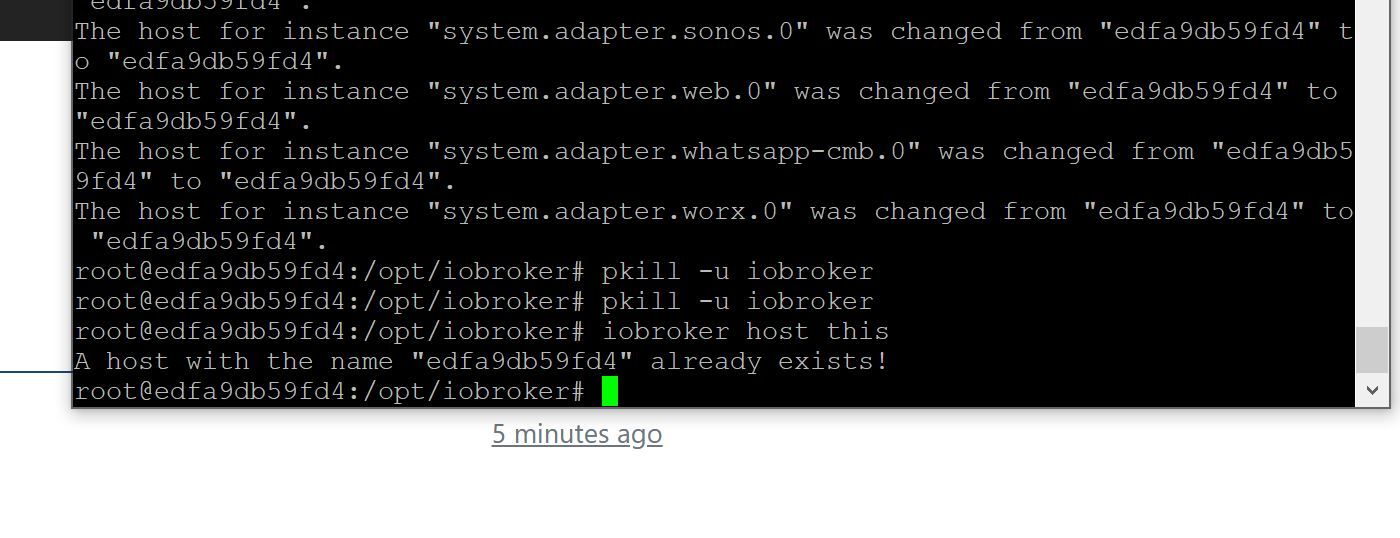
Bin in dem root:
-
@glasfaser said in Restore läuft nicht weiter:
@adamantium sagte in Restore läuft nicht weiter:
@glasfaser said in Restore läuft nicht weiter:
Ja im Container bei ioBroker
Da macht er gar nichts...als wenn es nicht beachtet wird.
??
Hier rein .. oder was machst du da
[Marcel@Marcel ~]$ docker exec -i -t iobroker bash

root@edfa9db59fd4:/opt/iobroker#
Bin in dem root:
Ja , er hat doch schon alles gemacht ( changed ) !!
Jetzt den Container neu starten -
Ja , er hat doch schon alles gemacht ( changed ) !!
Jetzt den Container neu starten@glasfaser said in Restore läuft nicht weiter:
Ja , er hat doch schon alles gemacht ( changed ) !!
Jetzt den Container neu startenHabe ich gemacht, hängt aber an der gleichen Stell.
Nun steht im Log:
2023-03-31 17:16:20.646  - info: host.edfa9db59fd4 iobroker.js-controller version 4.0.24 js-controller starting
2023-03-31 17:16:20.651  - info: host.edfa9db59fd4 Copyright (c) 2014-2022 bluefox, 2014 hobbyquaker
2023-03-31 17:16:20.652  - info: host.edfa9db59fd4 hostname: edfa9db59fd4, node: v18.15.0
2023-03-31 17:16:20.653  - info: host.edfa9db59fd4 ip addresses: 192.168.1.49
2023-03-31 17:16:21.375  - info: host.edfa9db59fd4 connected to Objects and States
2023-03-31 17:16:21.413  - info: host.edfa9db59fd4 added notifications configuration of host
2023-03-31 17:16:21.418  - info: host.edfa9db59fd4 Node.js version has changed from unknown to 18.15.0
2023-03-31 17:16:21.479  - info: host.edfa9db59fd4 Successfully updated capabilities "cap_net_admin, cap_net_bind_service, cap_net_raw" for /usr/bin/node
2023-03-31 17:16:21.744  - info: host.edfa9db59fd4 Delete host system.host.edfa9db59fd4
2023-03-31 17:16:21.790  - info: host.edfa9db59fd4 15 instances found
2023-03-31 17:16:21.818  - info: host.edfa9db59fd4 starting 2 instances
2023-03-31 17:16:21.824  - warn: host.edfa9db59fd4 startInstance cannot find adapter "javascript@6.1.4". Try to install it... 1 attempt
2023-03-31 17:16:21.826  - info: host.edfa9db59fd4 iobroker install javascript@6.1.4 using installedFrom
2023-03-31 17:16:21.932  - info: host.edfa9db59fd4 instance system.adapter.admin.0 started with pid 174
2023-03-31 17:16:24.091  - info: admin.0 (174) starting. Version 6.3.5 in /opt/iobroker/node_modules/iobroker.admin, node: v18.15.0, js-controller: 4.0.24
2023-03-31 17:16:24.145  - info: admin.0 (174) requesting all states
2023-03-31 17:16:24.146  - info: admin.0 (174) requesting all objects
2023-03-31 17:16:24.648  - info: admin.0 (174) received all objects
2023-03-31 17:16:24.855  - info: admin.0 (174) http server listening on port 8081
2023-03-31 17:16:24.856  - info: admin.0 (174) Use link "http://localhost:8081" to configure.
2023-03-31 17:16:24.865  - info: admin.0 (174) socket.io server listening on port 8081
2023-03-31 17:16:25.071  - info: host.edfa9db59fd4 iobroker npm-install: NPM version: 9.5.0
2023-03-31 17:16:25.073  - info: host.edfa9db59fd4 iobroker npm-install: Installing iobroker.javascript@6.1.4... (System call)
2023-03-31 17:16:25.888  - info: host.edfa9db59fd4 instance system.adapter.backitup.0 started with pid 225
2023-03-31 17:16:27.713  - info: backitup.0 (225) starting. Version 2.5.12 in /opt/iobroker/node_modules/iobroker.backitup, node: v18.15.0, js-controller: 4.0.24
2023-03-31 17:16:27.932  - info: backitup.0 (225) [iobroker] backup was activated at 3:00 every 2 day(s)
2023-03-31 17:16:39.920  - warn: admin.0 (174) Cannot update rating: timeout of 15000ms exceeded
2023-03-31 17:17:25.230  - error: backitup.0 (225) Error: read ECONNRESET
2023-03-31 17:17:30.369  - warn: admin.0 (174) Cannot check node.js versions: Error: read ECONNRESET



Hey! Du scheinst an dieser Unterhaltung interessiert zu sein, hast aber noch kein Konto.
Hast du es satt, bei jedem Besuch durch die gleichen Beiträge zu scrollen? Wenn du dich für ein Konto anmeldest, kommst du immer genau dorthin zurück, wo du zuvor warst, und kannst dich über neue Antworten benachrichtigen lassen (entweder per E-Mail oder Push-Benachrichtigung). Du kannst auch Lesezeichen speichern und Beiträge positiv bewerten, um anderen Community-Mitgliedern deine Wertschätzung zu zeigen.
Mit deinem Input könnte dieser Beitrag noch besser werden 💗
Registrieren Anmelden209
Online33.0k
Benutzer83.5k
Themen1.3m
Beiträge