




[Neuer Adapter] EuSec

-
Bitte:-)
======== Start marking the full check here =========
Skript v.2023-01-02 *** BASE SYSTEM *** Architecture: x86_64 Docker: false Virtualization: lxc Distributor ID: Ubuntu Description: Ubuntu 22.04.1 LTS Release: 22.04 Codename: jammy PRETTY_NAME="Ubuntu 22.04.1 LTS" NAME="Ubuntu" VERSION_ID="22.04" VERSION="22.04.1 LTS (Jammy Jellyfish)" VERSION_CODENAME=jammy ID=ubuntu ID_LIKE=debian HOME_URL="https://www.ubuntu.com/" SUPPORT_URL="https://help.ubuntu.com/" BUG_REPORT_URL="https://bugs.launchpad.net/ubuntu/" PRIVACY_POLICY_URL="https://www.ubuntu.com/legal/terms-and-policies/privacy-policy" UBUNTU_CODENAME=jammy Systemuptime and Load: 06:35:50 up 1 day, 11:41, 2 users, load average: 0.64, 0.55, 0.43 CPU threads: 4 *** Time and Time Zones *** Wed Feb 1 06:35:50 UTC 2023 Wed Feb 1 06:35:50 UTC 2023 UTC +0000 Etc/UTC *** X-Server-Setup *** X-Server: false Desktop: Terminal: Boot Target: graphical.target *** MEMORY *** total used free shared buff/cache available Mem: 8.2G 3.3G 3.6G 0.0K 1.3G 4.9G Swap: 512M 0B 512M Total: 8.7G 3.3G 4.1G 8192 M total memory 3272 M used memory 568 M active memory 3792 M inactive memory 3584 M free memory 0 M buffer memory 1335 M swap cache 512 M total swap 0 M used swap 512 M free swap *** FILESYSTEM *** Filesystem Type Size Used Avail Use% Mounted on /dev/mapper/pve-vm--200--disk--0 ext4 20G 7.6G 11G 42% / none tmpfs 492K 4.0K 488K 1% /dev tmpfs tmpfs 7.8G 0 7.8G 0% /dev/shm tmpfs tmpfs 3.2G 96K 3.2G 1% /run tmpfs tmpfs 5.0M 0 5.0M 0% /run/lock Messages in dmesg: dmesg: read kernel buffer failed: Operation not permitted Show mounted filesystems (real ones only): TARGET SOURCE FSTYPE OPTIONS / /dev/mapper/pve-vm--200--disk--0 ext4 rw,relatime,stripe=16 Files in neuralgic directories: /var: 2.6G /var/ 2.0G /var/log/journal/678b65fc11864452957ca5b3828797d4 2.0G /var/log/journal 2.0G /var/log 331M /var/cache /opt/iobroker/backups: 495M /opt/iobroker/backups/ /opt/iobroker/iobroker-data: 583M /opt/iobroker/iobroker-data/ 365M /opt/iobroker/iobroker-data/files 74M /opt/iobroker/iobroker-data/backup-objects 72M /opt/iobroker/iobroker-data/files/telegram.admin 51M /opt/iobroker/iobroker-data/files/javascript.admin The five largest files in iobroker-data are: 46M /opt/iobroker/iobroker-data/states.jsonl 34M /opt/iobroker/iobroker-data/objects.jsonl 19M /opt/iobroker/iobroker-data/files/iot.admin/static/js/main.904d455f.js.map 15M /opt/iobroker/iobroker-data/files/vis.0/Iobroker/vis-views.json 15M /opt/iobroker/iobroker-data/files/telegram.admin/rules/static/js/vendors-node_modules_iobroker_adapter-react-v5_assets_devices_parseNames_d_ts-node_modules_io-1d9f06.44fe4a3f.chunk.js.map *** NodeJS-Installation *** /usr/bin/nodejs v16.19.0 /root/.nvm/versions/node/v16.18.0/bin/node v16.18.0 /root/.nvm/versions/node/v16.18.0/bin/npm 9.4.0 /root/.nvm/versions/node/v16.18.0/bin/npx 9.4.0 nodejs: Installed: 16.19.0-deb-1nodesource1 Candidate: 16.19.0-deb-1nodesource1 Version table: *** 16.19.0-deb-1nodesource1 500 500 https://deb.nodesource.com/node_16.x jammy/main amd64 Packages 100 /var/lib/dpkg/status 12.22.9~dfsg-1ubuntu3 500 500 http://archive.ubuntu.com/ubuntu jammy/universe amd64 Packages Temp directories causing npm8 problem: 0 *** ioBroker-Installation *** ioBroker Status iobroker is running on this host. Objects type: jsonl States type: jsonl Core adapters versions js-controller: 4.0.24 admin: 6.3.5 javascript: 6.1.4 Adapters from github: 3 Adapter State + system.adapter.admin.0 : admin : iobroker - enabled, port: 8081, bind: 0.0.0.0, run as: admin system.adapter.apple-find-me.0 : apple-find-me : iobroker - disabled + system.adapter.backitup.0 : backitup : iobroker - enabled system.adapter.birthdays.0 : birthdays : iobroker - disabled + system.adapter.chromecast.0 : chromecast : iobroker - enabled + system.adapter.cloud.0 : cloud : iobroker - enabled system.adapter.daswetter.0 : daswetter : iobroker - enabled + system.adapter.discovery.0 : discovery : iobroker - enabled system.adapter.dwd.0 : dwd : iobroker - enabled + system.adapter.echarts.0 : echarts : iobroker - enabled + system.adapter.email.0 : email : iobroker - enabled system.adapter.eusec.0 : eusec : iobroker - enabled + system.adapter.fb-checkpresence.0 : fb-checkpresence : iobroker - enabled system.adapter.feiertage.0 : feiertage : iobroker - enabled system.adapter.flot.0 : flot : iobroker - enabled + system.adapter.followthesun.0 : followthesun : iobroker - enabled + system.adapter.geofency.0 : geofency : iobroker - enabled, port: 7999, bind: 0.0.0.0 + system.adapter.history.0 : history : iobroker - enabled + system.adapter.hm-rega.0 : hm-rega : iobroker - enabled + system.adapter.hm-rpc.0 : hm-rpc : iobroker - enabled, port: 0 + system.adapter.homeconnect.0 : homeconnect : iobroker - enabled system.adapter.hue-extended.0 : hue-extended : iobroker - disabled + system.adapter.hue.0 : hue : iobroker - enabled, port: 443 system.adapter.ical.0 : ical : iobroker - enabled system.adapter.icons-addictive-flavour-png.0: icons-addictive-flavour-png: iobroker - enabled system.adapter.icons-material-png.0 : icons-material-png : iobroker - enabled system.adapter.icons-material-svg.0 : icons-material-svg : iobroker - enabled system.adapter.icons-mfd-png.0 : icons-mfd-png : iobroker - enabled system.adapter.icons-mfd-svg.0 : icons-mfd-svg : iobroker - enabled system.adapter.icons-ultimate-png.0 : icons-ultimate-png : iobroker - enabled + system.adapter.influxdb.0 : influxdb : iobroker - enabled, port: 8086 + system.adapter.info.0 : info : iobroker - enabled + system.adapter.iot.0 : iot : iobroker - enabled + system.adapter.jarvis.0 : jarvis : iobroker - enabled + system.adapter.javascript.0 : javascript : iobroker - enabled system.adapter.klf200.0 : klf200 : iobroker - disabled + system.adapter.mihome-vacuum.0 : mihome-vacuum : iobroker - enabled, port: 54321 system.adapter.mobile.0 : mobile : iobroker - disabled + system.adapter.modbus.0 : modbus : iobroker - enabled + system.adapter.netatmo.0 : netatmo : iobroker - enabled + system.adapter.nina.0 : nina : iobroker - enabled + system.adapter.nuki-extended.0 : nuki-extended : iobroker - enabled system.adapter.openweathermap.0 : openweathermap : iobroker - enabled system.adapter.operating-hours.0 : operating-hours : iobroker - disabled system.adapter.parcel.0 : parcel : iobroker - disabled system.adapter.parser.0 : parser : iobroker - disabled system.adapter.places.0 : places : iobroker - disabled + system.adapter.pollenflug.0 : pollenflug : iobroker - enabled + system.adapter.proxmox.0 : proxmox : iobroker - enabled, port: 8006 + system.adapter.pvforecast.0 : pvforecast : iobroker - enabled system.adapter.rtspstream.0 : rtspstream : iobroker - enabled + system.adapter.shelly.0 : shelly : iobroker - enabled, port: 1882, bind: 0.0.0.0 + system.adapter.smartgarden.0 : smartgarden : iobroker - enabled + system.adapter.smartthings.0 : smartthings : iobroker - enabled + system.adapter.sonos.0 : sonos : iobroker - enabled + system.adapter.synology.0 : synology : iobroker - enabled, port: 5000 + system.adapter.synology.1 : synology : iobroker - enabled, port: 5000 + system.adapter.tankerkoenig.0 : tankerkoenig : iobroker - enabled system.adapter.telegram.0 : telegram : iobroker - disabled, port: 8443, bind: 0.0.0.0 + system.adapter.tr-064.0 : tr-064 : iobroker - enabled + system.adapter.tr-064.1 : tr-064 : iobroker - enabled + system.adapter.trashschedule.0 : trashschedule : iobroker - enabled + system.adapter.tuya.0 : tuya : iobroker - enabled system.adapter.unifi.0 : unifi : iobroker - disabled + system.adapter.upnp.0 : upnp : iobroker - enabled system.adapter.vis-bars.0 : vis-bars : iobroker - enabled system.adapter.vis-canvas-gauges.0 : vis-canvas-gauges : iobroker - enabled system.adapter.vis-colorpicker.0 : vis-colorpicker : iobroker - enabled system.adapter.vis-fancyswitch.0 : vis-fancyswitch : iobroker - enabled system.adapter.vis-google-fonts.0 : vis-google-fonts : iobroker - enabled system.adapter.vis-history.0 : vis-history : iobroker - enabled system.adapter.vis-hqwidgets.0 : vis-hqwidgets : iobroker - enabled system.adapter.vis-icontwo.0 : vis-icontwo : iobroker - enabled + system.adapter.vis-inventwo.0 : vis-inventwo : iobroker - enabled system.adapter.vis-material-advanced.0 : vis-material-advanced : iobroker - enabled system.adapter.vis-rgraph.0 : vis-rgraph : iobroker - enabled system.adapter.vis-timeandweather.0 : vis-timeandweather : iobroker - enabled system.adapter.vis.0 : vis : iobroker - enabled + system.adapter.vw-connect.0 : vw-connect : iobroker - enabled + system.adapter.vw-connect.1 : vw-connect : iobroker - enabled system.adapter.weatherunderground.0 : weatherunderground : iobroker - enabled + system.adapter.web.0 : web : iobroker - enabled, port: 8082, bind: 0.0.0.0, run as: admin + system.adapter.wolf-smartset.0 : wolf-smartset : iobroker - enabled + system.adapter.wolf.0 : wolf : iobroker - enabled, port: 12004, bind: 192.168.178.200 system.adapter.youtube.0 : youtube : iobroker - disabled system.adapter.yr.0 : yr : iobroker - enabled + instance is alive Enabled adapters with bindings + system.adapter.admin.0 : admin : iobroker - enabled, port: 8081, bind: 0.0.0.0, run as: admin + system.adapter.geofency.0 : geofency : iobroker - enabled, port: 7999, bind: 0.0.0.0 + system.adapter.hm-rpc.0 : hm-rpc : iobroker - enabled, port: 0 + system.adapter.hue.0 : hue : iobroker - enabled, port: 443 + system.adapter.influxdb.0 : influxdb : iobroker - enabled, port: 8086 + system.adapter.mihome-vacuum.0 : mihome-vacuum : iobroker - enabled, port: 54321 + system.adapter.proxmox.0 : proxmox : iobroker - enabled, port: 8006 + system.adapter.shelly.0 : shelly : iobroker - enabled, port: 1882, bind: 0.0.0.0 + system.adapter.synology.0 : synology : iobroker - enabled, port: 5000 + system.adapter.synology.1 : synology : iobroker - enabled, port: 5000 + system.adapter.web.0 : web : iobroker - enabled, port: 8082, bind: 0.0.0.0, run as: admin + system.adapter.wolf.0 : wolf : iobroker - enabled, port: 12004, bind: 192.168.178.200 ioBroker-Repositories stable : http://download.iobroker.net/sources-dist.json beta : http://download.iobroker.net/sources-dist-latest.json Active repo(s): stable Installed ioBroker-Instances Used repository: stable Adapter "admin" : 6.3.5 , installed 6.3.5 Adapter "alpha-ess" : 0.2.0 , installed 0.2.0 Adapter "apple-find-me": 0.0.14 , installed 0.0.14 Adapter "backitup" : 2.5.10 , installed 2.5.10 Adapter "birthdays" : 2.2.0 , installed 2.2.0 Adapter "chromecast" : 2.3.1 , installed 2.3.1 Adapter "cloud" : 4.3.0 , installed 4.3.0 Adapter "daswetter" : 3.1.4 , installed 3.1.4 Adapter "device-reminder": 1.2.9 , installed 1.2.9 Adapter "discovery" : 3.1.0 , installed 3.1.0 Adapter "dwd" : 2.8.3 , installed 2.8.3 Adapter "echarts" : 1.0.12 , installed 1.0.12 Adapter "email" : 1.1.4 , installed 1.1.4 Adapter "eusec" : 0.9.9 , installed 0.9.9 Adapter "fb-checkpresence": 1.1.20, installed 1.1.20 Adapter "feiertage" : 1.1.0 , installed 1.1.0 Adapter "flot" : 1.11.0 , installed 1.11.0 Adapter "followthesun" : 0.4.0 , installed 0.4.0 Adapter "geofency" : 1.2.4 , installed 1.2.4 Adapter "hid-community": 0.3.0 , installed 0.3.0 Adapter "history" : 2.2.4 , installed 2.2.4 Adapter "hm-rega" : 3.0.40 , installed 3.0.40 Adapter "hm-rpc" : 1.15.16 , installed 1.15.16 Adapter "homeconnect" : 1.1.1 , installed 1.1.1 Adapter "hue" : 3.7.1 , installed 3.7.1 Adapter "hue-extended" : 2.0.0 , installed 2.0.0 Adapter "ical" : 1.13.2 , installed 1.13.2 Adapter "icons-addictive-flavour-png": 0.1.0, installed 0.1.0 Adapter "icons-material-png": 0.1.0, installed 0.1.0 Adapter "icons-material-svg": 0.1.0, installed 0.1.0 Adapter "icons-mfd-png": 1.1.0 , installed 1.1.0 Adapter "icons-mfd-svg": 1.1.0 , installed 1.1.0 Adapter "icons-ultimate-png": 1.0.1, installed 1.0.1 Adapter "influxdb" : 3.2.0 , installed 3.2.0 Adapter "info" : 1.9.19 , installed 1.9.19 Adapter "iot" : 1.14.2 , installed 1.14.2 Adapter "jarvis" : 3.1.2 , installed 3.1.2 Adapter "javascript" : 6.1.4 , installed 6.1.4 Controller "js-controller": 4.0.24 , installed 4.0.24 Adapter "klf200" : 1.0.1 , installed 1.0.1 Adapter "mclighting" : 0.1.2 , installed 0.1.2 Adapter "mihome" : 1.4.0 , installed 1.4.0 Adapter "mihome-vacuum": 3.8.8 , installed 3.8.8 Adapter "mobile" : 1.0.1 , installed 1.0.1 Adapter "modbus" : 5.0.11 , installed 5.0.11 Adapter "netatmo" : 2.0.5 , installed 2.0.5 Adapter "nina" : 0.0.25 , installed 0.0.25 Adapter "nuki-extended": 2.3.1 , installed 2.3.1 Adapter "openweathermap": 0.3.3 , installed 0.3.3 Adapter "operating-hours": 0.0.19 , installed 0.0.19 Adapter "parcel" : 0.0.23 , installed 0.0.23 Adapter "parser" : 1.1.8 , installed 1.1.8 Adapter "places" : 1.1.2 , installed 1.1.2 Adapter "pollenflug" : 1.0.6 , installed 1.0.6 Adapter "proxmox" : 1.3.4 , installed 1.3.4 Adapter "pvforecast" : 2.3.0 , installed 2.3.0 Adapter "shelly" : 6.3.1 , installed 6.3.1 Adapter "simple-api" : 2.7.2 , installed 2.7.2 Adapter "smartgarden" : 2.0.0 , installed 2.0.0 Adapter "smartthings" : 0.0.4 , installed 0.0.4 Adapter "socketio" : 4.2.0 , installed 4.2.0 Adapter "sonos" : 2.2.3 , installed 2.2.3 Adapter "synology" : 2.1.13 , installed 2.1.13 Adapter "tankerkoenig" : 3.3.6 , installed 3.3.6 Adapter "telegram" : 1.15.2 , installed 1.15.2 Adapter "tr-064" : 4.2.17 , installed 4.2.17 Adapter "trashschedule": 2.2.0 , installed 2.2.0 Adapter "tuya" : 3.13.1 , installed 3.13.1 Adapter "tvprogram" : 1.1.2 , installed 1.1.2 Adapter "unifi" : 0.5.10 , installed 0.5.10 Adapter "upnp" : 1.0.21 , installed 1.0.21 Adapter "vis" : 1.4.15 , installed 1.4.15 Adapter "vis-bars" : 0.1.4 , installed 0.1.4 Adapter "vis-canvas-gauges": 1.0.1, installed 1.0.1 Adapter "vis-colorpicker": 1.2.0 , installed 1.2.0 Adapter "vis-fancyswitch": 1.1.0 , installed 1.1.0 Adapter "vis-google-fonts": 1.0.4 , installed 1.0.4 Adapter "vis-history" : 1.0.0 , installed 1.0.0 Adapter "vis-hqwidgets": 1.3.0 , installed 1.3.0 Adapter "vis-icontwo" : 0.90.0 , installed 0.90.0 Adapter "vis-inventwo" : 3.3.1 , installed 3.3.1 Adapter "vis-material-advanced": 1.7.2, installed 1.7.2 Adapter "vis-rgraph" : 0.0.2 , installed 0.0.2 Adapter "vis-timeandweather": 1.2.2, installed 1.2.2 Adapter "vw-connect" : 0.0.56 , installed 0.0.56 Adapter "weatherunderground": 3.4.2, installed 3.4.2 Adapter "web" : 4.3.0 , installed 4.3.0 Adapter "wolf" : 1.5.0 , installed 1.5.0 Adapter "wolf-smartset": 1.0.0 , installed 1.0.0 Adapter "ws" : 1.3.0 , installed 1.3.0 Adapter "youtube" : 4.1.0 , installed 4.1.0 Adapter "yr" : 5.3.0 , installed 5.3.0 Objects and States Please stand by - This may take a while Objects: 51213 States: 41765 *** OS-Repositories and Updates *** Hit:1 https://deb.nodesource.com/node_16.x jammy InReleaseZeitzone setzen und nodejs gescheit installieren.
-
Zeitzone setzen und nodejs gescheit installieren.
-
wie mache ich das bitte, bin neu Neuling auf dem Gebiet ioborker...
Das hat mit iobroker nix zu tun, das hat damit zu tun wie du deinen Container administrierst. Mit den Dingern hab ich aber nix mit am Hut.
Schau in die Anleitung, vielleicht steht da was drin:https://www.iobroker.net/#de/documentation/install/proxmox.md
Zur NodeJS-Installation:
Wo stand denn, das man nodejs als root per nvm installiert?
Das ist nämlich Murks. -
Das hat mit iobroker nix zu tun, das hat damit zu tun wie du deinen Container administrierst. Mit den Dingern hab ich aber nix mit am Hut.
Schau in die Anleitung, vielleicht steht da was drin:https://www.iobroker.net/#de/documentation/install/proxmox.md
Zur NodeJS-Installation:
Wo stand denn, das man nodejs als root per nvm installiert?
Das ist nämlich Murks. -
wie kann ich das mit dem nodejs beheben? Oder ist es besser das man Iobroker neu installiert?
@longbow sagte in [Neuer Adapter] EuSec:
wie kann ich das mit dem nodejs beheben?
Schau in meiner Signatur, da wird das mit den falschen Pfaden bei nodejs erklärt.
-
Alles.
@thomas-braun Kannst du mir auch bei meinem Problem vom Post weiter oben helfen?
-
@thomas-braun Kannst du mir auch bei meinem Problem vom Post weiter oben helfen?
Bei welchem?
-
Bei welchem?
@thomas-braun Seit geraumer Zeit läuft der Adapter nicht mehr richtig. Die Verbindung wird immer wieder getrennt und wieder hergestellt. Hatte sowas schon mal jemand?
eusec.0 2023-01-29 11:24:22.280 info Connected to station T8010P23220312FE on host 192.168.0.70 and port 22316 eusec.0 2023-01-29 11:24:17.255 info Disconnected from station T8010P23220312FE -
@thomas-braun Kannst du mir auch bei meinem Problem vom Post weiter oben helfen?
@lustig29 sagte in [Neuer Adapter] EuSec:
Kannst du mir auch bei meinem Problem vom Post weiter oben helfen?
Nein. Keine Ahnung.
Ist halt auch was dünn, so'n Zweizeiler. -
@longbow sagte in [Neuer Adapter] EuSec:
wie kann ich das mit dem nodejs beheben?
Schau in meiner Signatur, da wird das mit den falschen Pfaden bei nodejs erklärt.
guten Morgen, habe es alles gemacht wie es dort beschrieben ist, eine Abhilfe hat es leider nicht gebracht.
Hab ein neues System nach den Anleitungen gemacht.
Habe es mit auch alles angeschaut mit Nodejs, aber ich bekomme nur Fehlermeldungen. Der Adpater bleibt ohne Daten und Verbindung rotDebian GNU/Linux 11 iobroker-Test tty1 iobroker-Test login: root Password: Linux iobroker-Test 5.15.30-2-pve #1 SMP PVE 5.15.30-3 (Fri, 22 Apr 2022 18:08:27 +0200) x86_64 The programs included with the Debian GNU/Linux system are free software; the exact distribution terms for each program are described in the individual files in /usr/share/doc/*/copyright. Debian GNU/Linux comes with ABSOLUTELY NO WARRANTY, to the extent permitted by applicable law. Last login: Thu Feb 2 08:28:34 CET 2023 on tty1 root@iobroker-Test:~# apt install sudo curl Reading package lists... Done Building dependency tree... Done The following additional packages will be installed: libcurl4 The following NEW packages will be installed: curl libcurl4 sudo 0 upgraded, 3 newly installed, 0 to remove and 0 not upgraded. Need to get 1673 kB of archives. After this operation, 5895 kB of additional disk space will be used. Do you want to continue? [Y/n] y Err:1 http://deb.debian.org/debian bullseye/main amd64 libcurl4 amd64 7.74.0-1.3+deb11u3 Temporary failure resolving 'deb.debian.org' Err:2 http://deb.debian.org/debian bullseye/main amd64 curl amd64 7.74.0-1.3+deb11u3 Temporary failure resolving 'deb.debian.org' Err:3 http://deb.debian.org/debian bullseye/main amd64 sudo amd64 1.9.5p2-3 Temporary failure resolving 'deb.debian.org' E: Failed to fetch http://deb.debian.org/debian/pool/main/c/curl/libcurl4_7.74.0-1.3%2bdeb11u3_amd64.deb Temporary failure resolving 'deb.debian.org' E: Failed to fetch http://deb.debian.org/debian/pool/main/c/curl/curl_7.74.0-1.3%2bdeb11u3_amd64.deb Temporary failure resolving 'deb.debian.org' E: Failed to fetch http://deb.debian.org/debian/pool/main/s/sudo/sudo_1.9.5p2-3_amd64.deb Temporary failure resolving 'deb.debian.org' E: Unable to fetch some archives, maybe run apt-get update or try with --fix-missing? root@iobroker-Test:~# curl libcurl4 sudo -bash: curl: command not found root@iobroker-Test:~# curl -bash: curl: command not found root@iobroker-Test:~# apt install curl Reading package lists... Done Building dependency tree... Done The following additional packages will be installed: libcurl4 The following NEW packages will be installed: curl libcurl4 0 upgraded, 2 newly installed, 0 to remove and 0 not upgraded. Need to get 615 kB of archives. After this operation, 1196 kB of additional disk space will be used. Do you want to continue? [Y/n] y Err:1 http://deb.debian.org/debian bullseye/main amd64 libcurl4 amd64 7.74.0-1.3+deb11u3 Temporary failure resolving 'deb.debian.org' Err:2 http://deb.debian.org/debian bullseye/main amd64 curl amd64 7.74.0-1.3+deb11u3 Temporary failure resolving 'deb.debian.org' E: Failed to fetch http://deb.debian.org/debian/pool/main/c/curl/libcurl4_7.74.0-1.3%2bdeb11u3_amd64.deb Temporary failure resolving 'deb.debian.org' E: Failed to fetch http://deb.debian.org/debian/pool/main/c/curl/curl_7.74.0-1.3%2bdeb11u3_amd64.deb Temporary failure resolving 'deb.debian.org' E: Unable to fetch some archives, maybe run apt-get update or try with --fix-missing? root@iobroker-Test:~# apt install sudo Reading package lists... Done Building dependency tree... Done The following NEW packages will be installed: sudo 0 upgraded, 1 newly installed, 0 to remove and 0 not upgraded. Need to get 1059 kB of archives. After this operation, 4699 kB of additional disk space will be used. Err:1 http://deb.debian.org/debian bullseye/main amd64 sudo amd64 1.9.5p2-3 Temporary failure resolving 'deb.debian.org' E: Failed to fetch http://deb.debian.org/debian/pool/main/s/sudo/sudo_1.9.5p2-3_amd64.deb Temporary failure resolving 'deb.debian.org' E: Unable to fetch some archives, maybe run apt-get update or try with --fix-missing? root@iobroker-Test:~# apt-get update Err:1 http://deb.debian.org/debian bullseye InRelease Temporary failure resolving 'deb.debian.org' Err:2 http://security.debian.org bullseye-security InRelease Temporary failure resolving 'security.debian.org' Err:3 http://deb.debian.org/debian bullseye-updates InRelease Temporary failure resolving 'deb.debian.org' Reading package lists... Done W: Failed to fetch http://deb.debian.org/debian/dists/bullseye/InRelease Temporary failure resolving 'deb.debian.org' W: Failed to fetch http://deb.debian.org/debian/dists/bullseye-updates/InRelease Temporary failure resolving 'deb.debian.org' W: Failed to fetch http://security.debian.org/dists/bullseye-security/InRelease Temporary failure resolving 'security.debian.org' W: Some index files failed to download. They have been ignored, or old ones used instead. root@iobroker-Test:~# apt update && apt upgrade Err:1 http://deb.debian.org/debian bullseye InRelease Temporary failure resolving 'deb.debian.org' Err:2 http://security.debian.org bullseye-security InRelease Temporary failure resolving 'security.debian.org' Err:3 http://deb.debian.org/debian bullseye-updates InRelease Temporary failure resolving 'deb.debian.org' Reading package lists... Done Building dependency tree... Done All packages are up to date. W: Failed to fetch http://deb.debian.org/debian/dists/bullseye/InRelease Temporary failure resolving 'deb.debian.org' W: Failed to fetch http://deb.debian.org/debian/dists/bullseye-updates/InRelease Temporary failure resolving 'deb.debian.org' W: Failed to fetch http://security.debian.org/dists/bullseye-security/InRelease Temporary failure resolving 'security.debian.org' W: Some index files failed to download. They have been ignored, or old ones used instead. Reading package lists... Done Building dependency tree... Done Calculating upgrade... Done 0 upgraded, 0 newly installed, 0 to remove and 0 not upgraded. root@iobroker-Test:~# -
guten Morgen, habe es alles gemacht wie es dort beschrieben ist, eine Abhilfe hat es leider nicht gebracht.
Hab ein neues System nach den Anleitungen gemacht.
Habe es mit auch alles angeschaut mit Nodejs, aber ich bekomme nur Fehlermeldungen. Der Adpater bleibt ohne Daten und Verbindung rotDebian GNU/Linux 11 iobroker-Test tty1 iobroker-Test login: root Password: Linux iobroker-Test 5.15.30-2-pve #1 SMP PVE 5.15.30-3 (Fri, 22 Apr 2022 18:08:27 +0200) x86_64 The programs included with the Debian GNU/Linux system are free software; the exact distribution terms for each program are described in the individual files in /usr/share/doc/*/copyright. Debian GNU/Linux comes with ABSOLUTELY NO WARRANTY, to the extent permitted by applicable law. Last login: Thu Feb 2 08:28:34 CET 2023 on tty1 root@iobroker-Test:~# apt install sudo curl Reading package lists... Done Building dependency tree... Done The following additional packages will be installed: libcurl4 The following NEW packages will be installed: curl libcurl4 sudo 0 upgraded, 3 newly installed, 0 to remove and 0 not upgraded. Need to get 1673 kB of archives. After this operation, 5895 kB of additional disk space will be used. Do you want to continue? [Y/n] y Err:1 http://deb.debian.org/debian bullseye/main amd64 libcurl4 amd64 7.74.0-1.3+deb11u3 Temporary failure resolving 'deb.debian.org' Err:2 http://deb.debian.org/debian bullseye/main amd64 curl amd64 7.74.0-1.3+deb11u3 Temporary failure resolving 'deb.debian.org' Err:3 http://deb.debian.org/debian bullseye/main amd64 sudo amd64 1.9.5p2-3 Temporary failure resolving 'deb.debian.org' E: Failed to fetch http://deb.debian.org/debian/pool/main/c/curl/libcurl4_7.74.0-1.3%2bdeb11u3_amd64.deb Temporary failure resolving 'deb.debian.org' E: Failed to fetch http://deb.debian.org/debian/pool/main/c/curl/curl_7.74.0-1.3%2bdeb11u3_amd64.deb Temporary failure resolving 'deb.debian.org' E: Failed to fetch http://deb.debian.org/debian/pool/main/s/sudo/sudo_1.9.5p2-3_amd64.deb Temporary failure resolving 'deb.debian.org' E: Unable to fetch some archives, maybe run apt-get update or try with --fix-missing? root@iobroker-Test:~# curl libcurl4 sudo -bash: curl: command not found root@iobroker-Test:~# curl -bash: curl: command not found root@iobroker-Test:~# apt install curl Reading package lists... Done Building dependency tree... Done The following additional packages will be installed: libcurl4 The following NEW packages will be installed: curl libcurl4 0 upgraded, 2 newly installed, 0 to remove and 0 not upgraded. Need to get 615 kB of archives. After this operation, 1196 kB of additional disk space will be used. Do you want to continue? [Y/n] y Err:1 http://deb.debian.org/debian bullseye/main amd64 libcurl4 amd64 7.74.0-1.3+deb11u3 Temporary failure resolving 'deb.debian.org' Err:2 http://deb.debian.org/debian bullseye/main amd64 curl amd64 7.74.0-1.3+deb11u3 Temporary failure resolving 'deb.debian.org' E: Failed to fetch http://deb.debian.org/debian/pool/main/c/curl/libcurl4_7.74.0-1.3%2bdeb11u3_amd64.deb Temporary failure resolving 'deb.debian.org' E: Failed to fetch http://deb.debian.org/debian/pool/main/c/curl/curl_7.74.0-1.3%2bdeb11u3_amd64.deb Temporary failure resolving 'deb.debian.org' E: Unable to fetch some archives, maybe run apt-get update or try with --fix-missing? root@iobroker-Test:~# apt install sudo Reading package lists... Done Building dependency tree... Done The following NEW packages will be installed: sudo 0 upgraded, 1 newly installed, 0 to remove and 0 not upgraded. Need to get 1059 kB of archives. After this operation, 4699 kB of additional disk space will be used. Err:1 http://deb.debian.org/debian bullseye/main amd64 sudo amd64 1.9.5p2-3 Temporary failure resolving 'deb.debian.org' E: Failed to fetch http://deb.debian.org/debian/pool/main/s/sudo/sudo_1.9.5p2-3_amd64.deb Temporary failure resolving 'deb.debian.org' E: Unable to fetch some archives, maybe run apt-get update or try with --fix-missing? root@iobroker-Test:~# apt-get update Err:1 http://deb.debian.org/debian bullseye InRelease Temporary failure resolving 'deb.debian.org' Err:2 http://security.debian.org bullseye-security InRelease Temporary failure resolving 'security.debian.org' Err:3 http://deb.debian.org/debian bullseye-updates InRelease Temporary failure resolving 'deb.debian.org' Reading package lists... Done W: Failed to fetch http://deb.debian.org/debian/dists/bullseye/InRelease Temporary failure resolving 'deb.debian.org' W: Failed to fetch http://deb.debian.org/debian/dists/bullseye-updates/InRelease Temporary failure resolving 'deb.debian.org' W: Failed to fetch http://security.debian.org/dists/bullseye-security/InRelease Temporary failure resolving 'security.debian.org' W: Some index files failed to download. They have been ignored, or old ones used instead. root@iobroker-Test:~# apt update && apt upgrade Err:1 http://deb.debian.org/debian bullseye InRelease Temporary failure resolving 'deb.debian.org' Err:2 http://security.debian.org bullseye-security InRelease Temporary failure resolving 'security.debian.org' Err:3 http://deb.debian.org/debian bullseye-updates InRelease Temporary failure resolving 'deb.debian.org' Reading package lists... Done Building dependency tree... Done All packages are up to date. W: Failed to fetch http://deb.debian.org/debian/dists/bullseye/InRelease Temporary failure resolving 'deb.debian.org' W: Failed to fetch http://deb.debian.org/debian/dists/bullseye-updates/InRelease Temporary failure resolving 'deb.debian.org' W: Failed to fetch http://security.debian.org/dists/bullseye-security/InRelease Temporary failure resolving 'security.debian.org' W: Some index files failed to download. They have been ignored, or old ones used instead. Reading package lists... Done Building dependency tree... Done Calculating upgrade... Done 0 upgraded, 0 newly installed, 0 to remove and 0 not upgraded. root@iobroker-Test:~#das war bei mir mit dem Befehl cd /opt/iobroker
npm ls | grep -E 'github|ERR'cliffkirchhof@iobroker:/opt/iobroker$ npm ls | grep -E 'github|ERR' +-- eufy-security-client@2.4.0 (git+ssh://git@github.com/bropat/eufy-security-client.git#7fc2a45a75ee1bf69ced36d351d1ec6d623896f6) +-- iobroker.klf200@1.0.1 (git+ssh://git@github.com/MiSchroe/ioBroker.klf200.git#c0799c01cca44762617b9fa5e709d60a83a80f24) +-- iobroker.rtspstream@0.0.4 (git+ssh://git@github.com/dbweb-ch/ioBroker.rtspstream.git#adff9611d3ab1871cd94d2e779b9fd4fcc937353)e_text -
guten Morgen, habe es alles gemacht wie es dort beschrieben ist, eine Abhilfe hat es leider nicht gebracht.
Hab ein neues System nach den Anleitungen gemacht.
Habe es mit auch alles angeschaut mit Nodejs, aber ich bekomme nur Fehlermeldungen. Der Adpater bleibt ohne Daten und Verbindung rotDebian GNU/Linux 11 iobroker-Test tty1 iobroker-Test login: root Password: Linux iobroker-Test 5.15.30-2-pve #1 SMP PVE 5.15.30-3 (Fri, 22 Apr 2022 18:08:27 +0200) x86_64 The programs included with the Debian GNU/Linux system are free software; the exact distribution terms for each program are described in the individual files in /usr/share/doc/*/copyright. Debian GNU/Linux comes with ABSOLUTELY NO WARRANTY, to the extent permitted by applicable law. Last login: Thu Feb 2 08:28:34 CET 2023 on tty1 root@iobroker-Test:~# apt install sudo curl Reading package lists... Done Building dependency tree... Done The following additional packages will be installed: libcurl4 The following NEW packages will be installed: curl libcurl4 sudo 0 upgraded, 3 newly installed, 0 to remove and 0 not upgraded. Need to get 1673 kB of archives. After this operation, 5895 kB of additional disk space will be used. Do you want to continue? [Y/n] y Err:1 http://deb.debian.org/debian bullseye/main amd64 libcurl4 amd64 7.74.0-1.3+deb11u3 Temporary failure resolving 'deb.debian.org' Err:2 http://deb.debian.org/debian bullseye/main amd64 curl amd64 7.74.0-1.3+deb11u3 Temporary failure resolving 'deb.debian.org' Err:3 http://deb.debian.org/debian bullseye/main amd64 sudo amd64 1.9.5p2-3 Temporary failure resolving 'deb.debian.org' E: Failed to fetch http://deb.debian.org/debian/pool/main/c/curl/libcurl4_7.74.0-1.3%2bdeb11u3_amd64.deb Temporary failure resolving 'deb.debian.org' E: Failed to fetch http://deb.debian.org/debian/pool/main/c/curl/curl_7.74.0-1.3%2bdeb11u3_amd64.deb Temporary failure resolving 'deb.debian.org' E: Failed to fetch http://deb.debian.org/debian/pool/main/s/sudo/sudo_1.9.5p2-3_amd64.deb Temporary failure resolving 'deb.debian.org' E: Unable to fetch some archives, maybe run apt-get update or try with --fix-missing? root@iobroker-Test:~# curl libcurl4 sudo -bash: curl: command not found root@iobroker-Test:~# curl -bash: curl: command not found root@iobroker-Test:~# apt install curl Reading package lists... Done Building dependency tree... Done The following additional packages will be installed: libcurl4 The following NEW packages will be installed: curl libcurl4 0 upgraded, 2 newly installed, 0 to remove and 0 not upgraded. Need to get 615 kB of archives. After this operation, 1196 kB of additional disk space will be used. Do you want to continue? [Y/n] y Err:1 http://deb.debian.org/debian bullseye/main amd64 libcurl4 amd64 7.74.0-1.3+deb11u3 Temporary failure resolving 'deb.debian.org' Err:2 http://deb.debian.org/debian bullseye/main amd64 curl amd64 7.74.0-1.3+deb11u3 Temporary failure resolving 'deb.debian.org' E: Failed to fetch http://deb.debian.org/debian/pool/main/c/curl/libcurl4_7.74.0-1.3%2bdeb11u3_amd64.deb Temporary failure resolving 'deb.debian.org' E: Failed to fetch http://deb.debian.org/debian/pool/main/c/curl/curl_7.74.0-1.3%2bdeb11u3_amd64.deb Temporary failure resolving 'deb.debian.org' E: Unable to fetch some archives, maybe run apt-get update or try with --fix-missing? root@iobroker-Test:~# apt install sudo Reading package lists... Done Building dependency tree... Done The following NEW packages will be installed: sudo 0 upgraded, 1 newly installed, 0 to remove and 0 not upgraded. Need to get 1059 kB of archives. After this operation, 4699 kB of additional disk space will be used. Err:1 http://deb.debian.org/debian bullseye/main amd64 sudo amd64 1.9.5p2-3 Temporary failure resolving 'deb.debian.org' E: Failed to fetch http://deb.debian.org/debian/pool/main/s/sudo/sudo_1.9.5p2-3_amd64.deb Temporary failure resolving 'deb.debian.org' E: Unable to fetch some archives, maybe run apt-get update or try with --fix-missing? root@iobroker-Test:~# apt-get update Err:1 http://deb.debian.org/debian bullseye InRelease Temporary failure resolving 'deb.debian.org' Err:2 http://security.debian.org bullseye-security InRelease Temporary failure resolving 'security.debian.org' Err:3 http://deb.debian.org/debian bullseye-updates InRelease Temporary failure resolving 'deb.debian.org' Reading package lists... Done W: Failed to fetch http://deb.debian.org/debian/dists/bullseye/InRelease Temporary failure resolving 'deb.debian.org' W: Failed to fetch http://deb.debian.org/debian/dists/bullseye-updates/InRelease Temporary failure resolving 'deb.debian.org' W: Failed to fetch http://security.debian.org/dists/bullseye-security/InRelease Temporary failure resolving 'security.debian.org' W: Some index files failed to download. They have been ignored, or old ones used instead. root@iobroker-Test:~# apt update && apt upgrade Err:1 http://deb.debian.org/debian bullseye InRelease Temporary failure resolving 'deb.debian.org' Err:2 http://security.debian.org bullseye-security InRelease Temporary failure resolving 'security.debian.org' Err:3 http://deb.debian.org/debian bullseye-updates InRelease Temporary failure resolving 'deb.debian.org' Reading package lists... Done Building dependency tree... Done All packages are up to date. W: Failed to fetch http://deb.debian.org/debian/dists/bullseye/InRelease Temporary failure resolving 'deb.debian.org' W: Failed to fetch http://deb.debian.org/debian/dists/bullseye-updates/InRelease Temporary failure resolving 'deb.debian.org' W: Failed to fetch http://security.debian.org/dists/bullseye-security/InRelease Temporary failure resolving 'security.debian.org' W: Some index files failed to download. They have been ignored, or old ones used instead. Reading package lists... Done Building dependency tree... Done Calculating upgrade... Done 0 upgraded, 0 newly installed, 0 to remove and 0 not upgraded. root@iobroker-Test:~#@longbow sagte in [Neuer Adapter] EuSec:
Temporary failure resolving
Dein Netzwerk ist kaputt.
Und du möchstest nicht als root herumhampeln. -
@longbow sagte in [Neuer Adapter] EuSec:
Temporary failure resolving
Dein Netzwerk ist kaputt.
Und du möchstest nicht als root herumhampeln.sorry, ich verstehe es leider nicht ganz, was ist kaputt der iobroker läuft, bis auf den Adapter EuSec.
-
sorry, ich verstehe es leider nicht ganz, was ist kaputt der iobroker läuft, bis auf den Adapter EuSec.
Der Server deb.debian.org kann nicht erreicht werden. Warum auch immer. Vermutlich ein Knoten in deinem Netzwerk.
-
sorry, ich verstehe es leider nicht ganz, was ist kaputt der iobroker läuft, bis auf den Adapter EuSec.
@longbow
Eusec hat bekanntlich Probleme mit jpeg download und disconnected, schaue auf github und /oder weiter oben lesen.
Es gibt noch keine Lösung die mir bekannt istFür nächste mal Informiere dich was für Issues offen sind für den Adapter, und bitte ein paar post weiter oben lesen, das Problem ist bekannt
-
Der Server deb.debian.org kann nicht erreicht werden. Warum auch immer. Vermutlich ein Knoten in deinem Netzwerk.
Danke für den Tipp, habe es neu gemacht, hatte ein IP Adressen Fehler.
Aber jetzt geht der Adapter immer noch nicht.======== Start marking the full check here =========
Skript v.2023-01-02 *** BASE SYSTEM *** Architecture: x86_64 Docker: false Virtualization: lxc Distributor ID: Debian Description: Debian GNU/Linux 11 (bullseye) Release: 11 Codename: bullseye PRETTY_NAME="Debian GNU/Linux 11 (bullseye)" NAME="Debian GNU/Linux" VERSION_ID="11" VERSION="11 (bullseye)" VERSION_CODENAME=bullseye ID=debian HOME_URL="https://www.debian.org/" SUPPORT_URL="https://www.debian.org/support" BUG_REPORT_URL="https://bugs.debian.org/" Systemuptime and Load: 19:36:02 up 11 min, 1 user, load average: 0.33, 0.42, 0.48 CPU threads: 4 *** Time and Time Zones *** Thu Feb 2 18:36:02 UTC 2023 Thu Feb 2 19:36:02 CET 2023 CET +0100 Europe/Berlin *** User and Groups *** cliffkirchhof /home/cliffkirchhof cliffkirchhof sudo iobroker *** X-Server-Setup *** X-Server: false Desktop: Terminal: Boot Target: graphical.target *** MEMORY *** total used free shared buff/cache available Mem: 8.1G 492M 7.1G 0.0K 552M 7.6G Swap: 8.1G 0B 8.1G Total: 16G 492M 15G 8096 M total memory 492 M used memory 313 M active memory 665 M inactive memory 7050 M free memory 0 M buffer memory 552 M swap cache 8096 M total swap 0 M used swap 8096 M free swap *** FILESYSTEM *** Filesystem Type Size Used Avail Use% Mounted on /dev/mapper/pve-vm--210--disk--0 ext4 20G 2.2G 17G 12% / none tmpfs 492K 4.0K 488K 1% /dev udev devtmpfs 7.8G 0 7.8G 0% /dev/tty tmpfs tmpfs 7.8G 0 7.8G 0% /dev/shm tmpfs tmpfs 3.2G 96K 3.2G 1% /run tmpfs tmpfs 5.0M 0 5.0M 0% /run/lock Messages in dmesg: dmesg: read kernel buffer failed: Operation not permitted Show mounted filesystems (real ones only): TARGET SOURCE FSTYPE OPTIONS / /dev/mapper/pve-vm--210--disk--0 ext4 rw,relatime,stripe=16 Files in neuralgic directories: /var: 382M /var/ 222M /var/cache 218M /var/cache/apt 151M /var/cache/apt/archives 135M /var/lib /opt/iobroker/backups: 4.0K /opt/iobroker/backups/ /opt/iobroker/iobroker-data: 93M /opt/iobroker/iobroker-data/ 86M /opt/iobroker/iobroker-data/files 51M /opt/iobroker/iobroker-data/files/javascript.admin 32M /opt/iobroker/iobroker-data/files/javascript.admin/static/js 32M /opt/iobroker/iobroker-data/files/javascript.admin/static The five largest files in iobroker-data are: 6.9M /opt/iobroker/iobroker-data/files/javascript.admin/static/js/610.de0231c9.chunk.js.map 6.3M /opt/iobroker/iobroker-data/files/admin.admin/custom/static/js/vendors-node_modules_iobroker_adapter-react-v5_assets_devices_parseNames_js-node_modules_iobr-99c23e.847b8ad9.chunk.js.map 6.0M /opt/iobroker/iobroker-data/objects.jsonl 4.9M /opt/iobroker/iobroker-data/files/javascript.admin/static/js/848.7424922d.chunk.js.map 4.6M /opt/iobroker/iobroker-data/files/javascript.admin/vs/language/typescript/tsWorker.js *** NodeJS-Installation *** /usr/bin/nodejs v16.19.0 /usr/bin/node v16.19.0 /usr/bin/npm 8.19.3 /usr/bin/npx 8.19.3 nodejs: Installed: 16.19.0-deb-1nodesource1 Candidate: 16.19.0-deb-1nodesource1 Version table: *** 16.19.0-deb-1nodesource1 500 500 https://deb.nodesource.com/node_16.x bullseye/main amd64 Packages 100 /var/lib/dpkg/status 12.22.12~dfsg-1~deb11u3 500 500 http://security.debian.org bullseye-security/main amd64 Packages 12.22.5~dfsg-2~11u1 500 500 http://deb.debian.org/debian bullseye/main amd64 Packages Temp directories causing npm8 problem: 0 *** ioBroker-Installation *** ioBroker Status iobroker is running on this host. Objects type: jsonl States type: jsonl Core adapters versions js-controller: 4.0.24 admin: 6.3.5 javascript: 6.1.4 Adapters from github: 1 Adapter State + system.adapter.admin.0 : admin : iobroker-Final - enabled, port: 8081, bind: 0.0.0.0, run as: admin + system.adapter.backitup.0 : backitup : iobroker-Final - enabled + system.adapter.chromecast.0 : chromecast : iobroker-Final - enabled system.adapter.cloud.0 : cloud : iobroker-Final - disabled + system.adapter.discovery.0 : discovery : iobroker-Final - enabled + system.adapter.history.0 : history : iobroker-Final - enabled system.adapter.hue-extended.0 : hue-extended : iobroker-Final - disabled system.adapter.hue.0 : hue : iobroker-Final - disabled, port: 443 + system.adapter.javascript.0 : javascript : iobroker-Final - enabled system.adapter.sonos.0 : sonos : iobroker-Final - disabled system.adapter.synology.0 : synology : iobroker-Final - disabled, port: 5000 system.adapter.synology.1 : synology : iobroker-Final - disabled, port: 5000 system.adapter.vis.0 : vis : iobroker-Final - enabled + system.adapter.web.0 : web : iobroker-Final - enabled, port: 8082, bind: 0.0.0.0, run as: admin + instance is alive Enabled adapters with bindings + system.adapter.admin.0 : admin : iobroker-Final - enabled, port: 8081, bind: 0.0.0.0, run as: admin + system.adapter.web.0 : web : iobroker-Final - enabled, port: 8082, bind: 0.0.0.0, run as: admin ioBroker-Repositories stable : http://download.iobroker.net/sources-dist.json beta : http://download.iobroker.net/sources-dist-latest.json Active repo(s): stable Installed ioBroker-Instances Used repository: stable Adapter "admin" : 6.3.5 , installed 6.3.5 Adapter "backitup" : 2.5.10 , installed 2.5.10 Adapter "chromecast" : 2.3.1 , installed 2.3.1 Adapter "cloud" : 4.3.0 , installed 4.3.0 Adapter "discovery" : 3.1.0 , installed 3.1.0 Adapter "history" : 2.2.4 , installed 2.2.4 Adapter "hue" : 3.7.1 , installed 3.7.1 Adapter "hue-extended" : 2.0.0 , installed 2.0.0 Adapter "javascript" : 6.1.4 , installed 6.1.4 Controller "js-controller": 4.0.24 , installed 4.0.24 Adapter "simple-api" : 2.7.2 , installed 2.7.2 Adapter "socketio" : 4.2.0 , installed 4.2.0 Adapter "sonos" : 2.2.3 , installed 2.2.3 Adapter "synology" : 2.1.13 , installed 2.1.13 Adapter "vis" : 1.4.15 , installed 1.4.15 Adapter "web" : 4.3.0 , installed 4.3.0 Adapter "ws" : 1.3.0 , installed 1.3.0 Objects and States Please stand by - This may take a while Objects: 545 States: 464 *** OS-Repositories and Updates *** Hit:1 http://security.debian.org bullseye-security InRelease Hit:2 https://deb.nodesource.com/node_16.x bullseye InRelease Hit:3 http://deb.debian.org/debian bullseye InRelease Hit:4 http://deb.debian.org/debian bullseye-updates InRelease Reading package lists... Pending Updates: 0 *** Listening Ports *** Active Internet connections (only servers) Proto Recv-Q Send-Q Local Address Foreign Address State User Inode PID/Program name tcp 0 0 0.0.0.0:111 0.0.0.0:* LISTEN 0 235092916 1/init tcp 0 0 0.0.0.0:5355 0.0.0.0:* LISTEN 104 235093971 116/systemd-resolve tcp 0 0 127.0.0.1:25 0.0.0.0:* LISTEN 0 235095151 306/master tcp 0 0 127.0.0.1:9000 0.0.0.0:* LISTEN 1001 235094725 127/iobroker.js-con tcp 0 0 127.0.0.53:53 0.0.0.0:* LISTEN 104 235093977 116/systemd-resolve tcp 0 0 127.0.0.1:9001 0.0.0.0:* LISTEN 1001 235094718 127/iobroker.js-con tcp6 0 0 :::22 :::* LISTEN 0 235095055 1/init tcp6 0 0 :::111 :::* LISTEN 0 235092918 1/init tcp6 0 0 :::5355 :::* LISTEN 104 235093974 116/systemd-resolve tcp6 0 0 :::8082 :::* LISTEN 1001 235126555 2911/io.web.0 tcp6 0 0 :::8081 :::* LISTEN 1001 235112750 1107/io.admin.0 tcp6 0 0 ::1:25 :::* LISTEN 0 235095152 306/master udp 0 0 0.0.0.0:5353 0.0.0.0:* 1001 235096031 453/io.chromecast.0 udp 0 0 0.0.0.0:5355 0.0.0.0:* 104 235093970 116/systemd-resolve udp 0 0 127.0.0.53:53 0.0.0.0:* 104 235093976 116/systemd-resolve udp 0 0 0.0.0.0:111 0.0.0.0:* 0 235092917 1/init udp6 0 0 :::5355 :::* 104 235093973 116/systemd-resolve udp6 0 0 :::111 :::* 0 235092919 1/init *** Log File - Last 25 Lines *** 2023-02-02 19:31:22.989 - info: web.0 (2911) socket.io server listening on port 8082 2023-02-02 19:31:22.998 - info: web.0 (2911) Connect extension "eusec/build/lib/web.js" 2023-02-02 19:31:23.000 - info: web.0 (2911) http server listening on port 8082 2023-02-02 19:34:25.199 - info: host.iobroker-Final iobroker del eusec.0 --debug 2023-02-02 19:34:25.796 - info: host.iobroker-Final iobroker Delete instance "eusec.0" 2023-02-02 19:34:25.805 - info: host.iobroker-Final iobroker host.iobroker-Final Counted 1 instances of eusec.0 2023-02-02 19:34:25.812 - info: host.iobroker-Final iobroker host.iobroker-Final Counted 14 states of system.adapter.eusec.0 2023-02-02 19:34:25.817 - info: host.iobroker-Final iobroker host.iobroker-Final Counted 3 states (system.adapter.eusec.0.*) from states 2023-02-02 19:34:25.943 - info: host.iobroker-Final iobroker host.iobroker-Final Deleting 15 object(s). 2023-02-02 19:34:25.981 - info: host.iobroker-Final object deleted system.adapter.eusec.0 2023-02-02 19:34:25.982 - info: host.iobroker-Final iobroker host.iobroker-Final Deleting 3 state(s). 2023-02-02 19:34:26.997 - info: host.iobroker-Final iobroker exit 0 2023-02-02 19:35:24.489 - info: host.iobroker-Final iobroker del eusec --debug 2023-02-02 19:35:25.022 - info: host.iobroker-Final iobroker Delete adapter "eusec" 2023-02-02 19:35:25.040 - info: host.iobroker-Final iobroker host.iobroker-Final Counted 2 meta of eusec 2023-02-02 19:35:25.042 - info: host.iobroker-Final iobroker host.iobroker-Final Counted 1 adapter for eusec 2023-02-02 19:35:25.054 - info: host.iobroker-Final iobroker host.iobroker-Final Counted 1 states (system.adapter.eusec.*) from states 2023-02-02 19:35:25.213 - info: host.iobroker-Final iobroker host.iobroker-Final file eusec.admin deleted 2023-02-02 19:35:25.217 - info: host.iobroker-Final iobroker host.iobroker-Final object eusec deleted 2023-02-02 19:35:25.221 - info: host.iobroker-Final iobroker host.iobroker-Final object eusec.admin deleted 2023-02-02 19:35:25.221 - info: host.iobroker-Final iobroker host.iobroker-Final Deleting 3 object(s). 2023-02-02 19:35:25.227 - info: host.iobroker-Final iobroker host.iobroker-Final Deleting 1 state(s). 2023-02-02 19:35:28.863 - info: host.iobroker-Final iobroker removed 884 packages, and changed 1 package in 3s 2023-02-02 19:35:28.863 - info: host.iobroker-Final iobroker 66 packages are looking for funding run `npm fund` for details 2023-02-02 19:35:29.892 - info: host.iobroker-Final iobroker exit 0``` code_text -
Gibt es was neues, der Adapter bleibt rot, wie schon berichtet. der neu aufgesetzte ioborker läuft super.
Hier nix neues. Bei dir?
-
Hallo an alle,
ich möchte euch meinen ersten ioBroker Adapter "euSec", an dem ich gerade Arbeite, vorstellen:
https://github.com/bropat/ioBroker.euSec
Dieser Adapter ermöglicht die Steuerung von Eufy-Sicherheitsgeräten (https://www.eufylife.com/de/products/643/sicherheit) durch die Verbindung mit der Eufy-Cloud.
Nähere Infos findet ihr hier: https://bropat.github.io/ioBroker.eusec
Für jeweiligen Ratschläge und Verbesserungen bin ich sehr dankbar!
Grüße
@bropat falls jemand von euch die neue Homebase drei hat von Eufy, der könnte wenn er mag, seine Haustüre mit der Gesichtserkennung die die Homebase liefert öffnen.
Über den Datenpunkt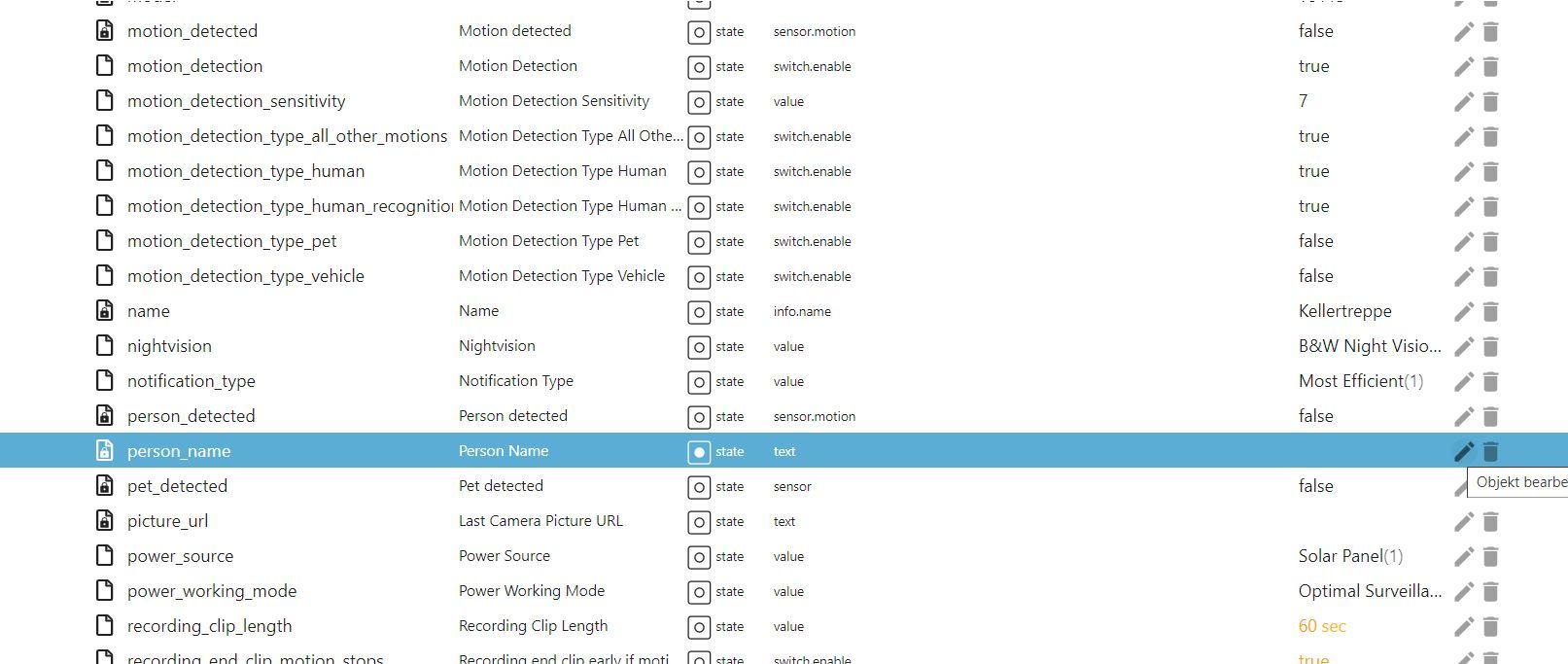
der Kamera, die an der Homebase 3 hängt Person name der dann aktualisiert wird wenn eine bekannte Person erkannt wird, zum Beipiel über ein kleines Blockly die Haustüre aufschließen zum Beispiel mit dem Nukischloss.
Vorraussetzung ist das ihr bekannte Gesichter in der Eufy App hinzufügen müßt, plus der Namensvergabe. Das Eufy System lernt immer mehr dazu und um so mehr Bilder ihr von euch oder Partner etc. in der Homebase sprich App freigebt um so schneller arbeitet es.Bei mir läuft das schon seit drei Wochen mehr oder weniger perfeckt. Das Problem ist wenn die Kameras die Person nicht beim ersten mal erkannt hat passiert natürlich bis zur nächsten Erkennung nix und ihr steht dann wie der Och·se vor der Tür.

Wollte es euch nur mal mitteilen Spass mach das schon. ;-)Ihr braucht aber auf jeden Fall die neue Homebase, die alten Kameras zum Beispiel C2 Doorbell etc. laufen auch mit ihr, müssen aber an die neue Homebase angelernt werden und natürlich ein Smartes Türschloss.
Grüße
Fabio -
@bropat falls jemand von euch die neue Homebase drei hat von Eufy, der könnte wenn er mag, seine Haustüre mit der Gesichtserkennung die die Homebase liefert öffnen.
Über den Datenpunktder Kamera, die an der Homebase 3 hängt Person name der dann aktualisiert wird wenn eine bekannte Person erkannt wird, zum Beipiel über ein kleines Blockly die Haustüre aufschließen zum Beispiel mit dem Nukischloss.
Vorraussetzung ist das ihr bekannte Gesichter in der Eufy App hinzufügen müßt, plus der Namensvergabe. Das Eufy System lernt immer mehr dazu und um so mehr Bilder ihr von euch oder Partner etc. in der Homebase sprich App freigebt um so schneller arbeitet es.Bei mir läuft das schon seit drei Wochen mehr oder weniger perfeckt. Das Problem ist wenn die Kameras die Person nicht beim ersten mal erkannt hat passiert natürlich bis zur nächsten Erkennung nix und ihr steht dann wie der Och·se vor der Tür.
Wollte es euch nur mal mitteilen Spass mach das schon. ;-)Ihr braucht aber auf jeden Fall die neue Homebase, die alten Kameras zum Beispiel C2 Doorbell etc. laufen auch mit ihr, müssen aber an die neue Homebase angelernt werden und natürlich ein Smartes Türschloss.
Grüße
Fabio



Hey! Du scheinst an dieser Unterhaltung interessiert zu sein, hast aber noch kein Konto.
Hast du es satt, bei jedem Besuch durch die gleichen Beiträge zu scrollen? Wenn du dich für ein Konto anmeldest, kommst du immer genau dorthin zurück, wo du zuvor warst, und kannst dich über neue Antworten benachrichtigen lassen (entweder per E-Mail oder Push-Benachrichtigung). Du kannst auch Lesezeichen speichern und Beiträge positiv bewerten, um anderen Community-Mitgliedern deine Wertschätzung zu zeigen.
Mit deinem Input könnte dieser Beitrag noch besser werden 💗
Registrieren AnmeldenSupport us
297
Online33.0k
Benutzer83.7k
Themen1.3m
Beiträge