Skip to content
  • Home
  • Aktuell
  • Tags
  • 0 Ungelesen 0
  • Kategorien
  • Unreplied
  • Beliebt
  • GitHub
  • Docu
  • Hilfe
Skins
  • Light
  • Brite
  • Cerulean
  • Cosmo
  • Flatly
  • Journal
  • Litera
  • Lumen
  • Lux
  • Materia
  • Minty
  • Morph
  • Pulse
  • Sandstone
  • Simplex
  • Sketchy
  • Spacelab
  • United
  • Yeti
  • Zephyr
  • Dark
  • Cyborg
  • Darkly
  • Quartz
  • Slate
  • Solar
  • Superhero
  • Vapor

  • Standard: (Kein Skin)
  • Kein Skin
Einklappen
ioBroker Logo

Community Forum

donate donate
  1. ioBroker Community Home
  2. Deutsch
  3. ioBroker Allgemein
  4. js-controller 4.0.24 Update (Stable)

NEWS

  • Neuer Blogbeitrag: Monatsrückblick - Dezember 2025 🎄
    BluefoxB
    Bluefox
    11
    1
    545

  • Weihnachtsangebot 2025! 🎄
    BluefoxB
    Bluefox
    24
    1
    1.7k

  • UPDATE 31.10.: Amazon Alexa - ioBroker Skill läuft aus ?
    apollon77A
    apollon77
    48
    3
    9.6k

js-controller 4.0.24 Update (Stable)

Geplant Angeheftet Gesperrt Verschoben ioBroker Allgemein
108 Beiträge 36 Kommentatoren 21.0k Aufrufe 34 Watching
  • Älteste zuerst
  • Neuste zuerst
  • Meiste Stimmen
Antworten
  • In einem neuen Thema antworten
Anmelden zum Antworten
Dieses Thema wurde gelöscht. Nur Nutzer mit entsprechenden Rechten können es sehen.
  • BananaJoeB BananaJoe

    @thomas-braun sagte in js-controller 4.0.24 Update (Beta):

    @bananajoe sagte in js-controller 4.0.24 Update (Beta):

    Ubuntu selbst bietet mir das Update auf v16.19.0 noch nicht an

    Ganz genau genommen wird dir ein nodejs auch nicht von Ubuntu sondern via nodesource angeboten. Wenn die es denn mal gebaut bekommen und es in ihr Repo packen.

    Schlecht formuliert, mit Ubuntu meinte ich das das Betriebssystem mir das Update noch nicht anbietet, du hast natürlich recht das die Info dafür aus dem eingebundenen Node-Repo kommt.

    Eine Idee welche Datei er das überprüfen will welche dann unerwartet zu Ende ist?

    Thomas BraunT Online
    Thomas BraunT Online
    Thomas Braun
    Most Active
    schrieb am zuletzt editiert von Thomas Braun
    #26

    @bananajoe sagte in js-controller 4.0.24 Update (Beta):

    Eine Idee welche Datei er das überprüfen will welche dann unerwartet zu Ende ist?

    Nein, müsste man mal im Code schauen gegen welche Datei da die Abfrage läuft.
    Ist aber auch glaube ich eher ein Thema für den Admin-Adapter.

    Linux-Werkzeugkasten:
    https://forum.iobroker.net/topic/42952/der-kleine-iobroker-linux-werkzeugkasten
    NodeJS Fixer Skript:
    https://forum.iobroker.net/topic/68035/iob-node-fix-skript
    iob_diag: curl -sLf -o diag.sh https://iobroker.net/diag.sh && bash diag.sh

    1 Antwort Letzte Antwort
    0
    • BananaJoeB BananaJoe

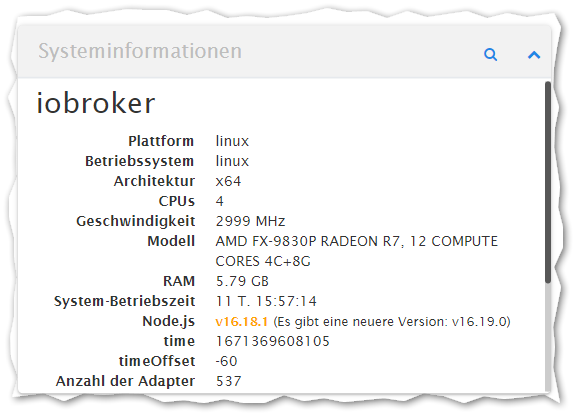
      Einen "Fehler" habe ich noch, ich meine das diese Meldung erst seit dem Update des JS-Controllers auf 4.0.24 kommt.
      Wenn ich den Admin-Adapter neu starte kommt immer einmal:

      2022-12-18 14:17:56.974  - warn: admin.2 (1314328) Cannot check node.js versions: Error: unexpected end of file
      

      Wobei er mir unter Info die richtige Version anzeigt:
      419c1d41-13b3-41e2-a334-82ad51718daf-image.png

      Ubuntu selbst bietet mir das Update auf v16.19.0 noch nicht an, das war in der Vergangenheit aber auch schon mal so.

      apollon77A Offline
      apollon77A Offline
      apollon77
      schrieb am zuletzt editiert von
      #27

      @bananajoe Also das hat eher nichts mit dem Update zu tun. Bitte eigenen Thread und mal die Ausgabe von "iob diag" posten

      Beitrag hat geholfen? Votet rechts unten im Beitrag :-) https://paypal.me/Apollon77 / https://github.com/sponsors/Apollon77

      • Debug-Log für Instanz einschalten? Admin -> Instanzen -> Expertenmodus -> Instanz aufklappen - Loglevel ändern
      • Logfiles auf Platte /opt/iobroker/log/… nutzen, Admin schneidet Zeilen ab
      1 Antwort Letzte Antwort
      0
      • OstfrieseUnterwegsO Offline
        OstfrieseUnterwegsO Offline
        OstfrieseUnterwegs
        schrieb am zuletzt editiert von
        #28

        iob diag ist ein neuer Befehl, sollte das nicht irgendwo im changelog, readme oder sonstwo erwähnt werden?

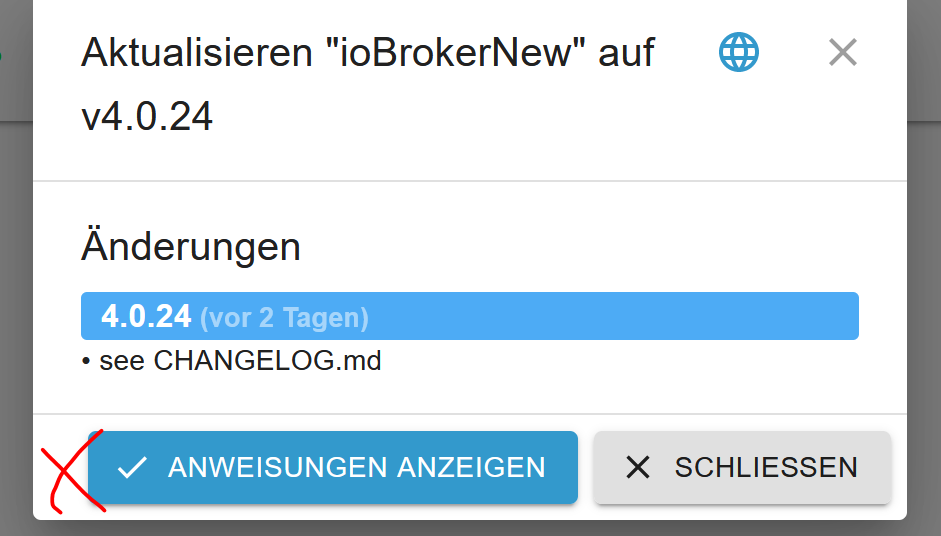
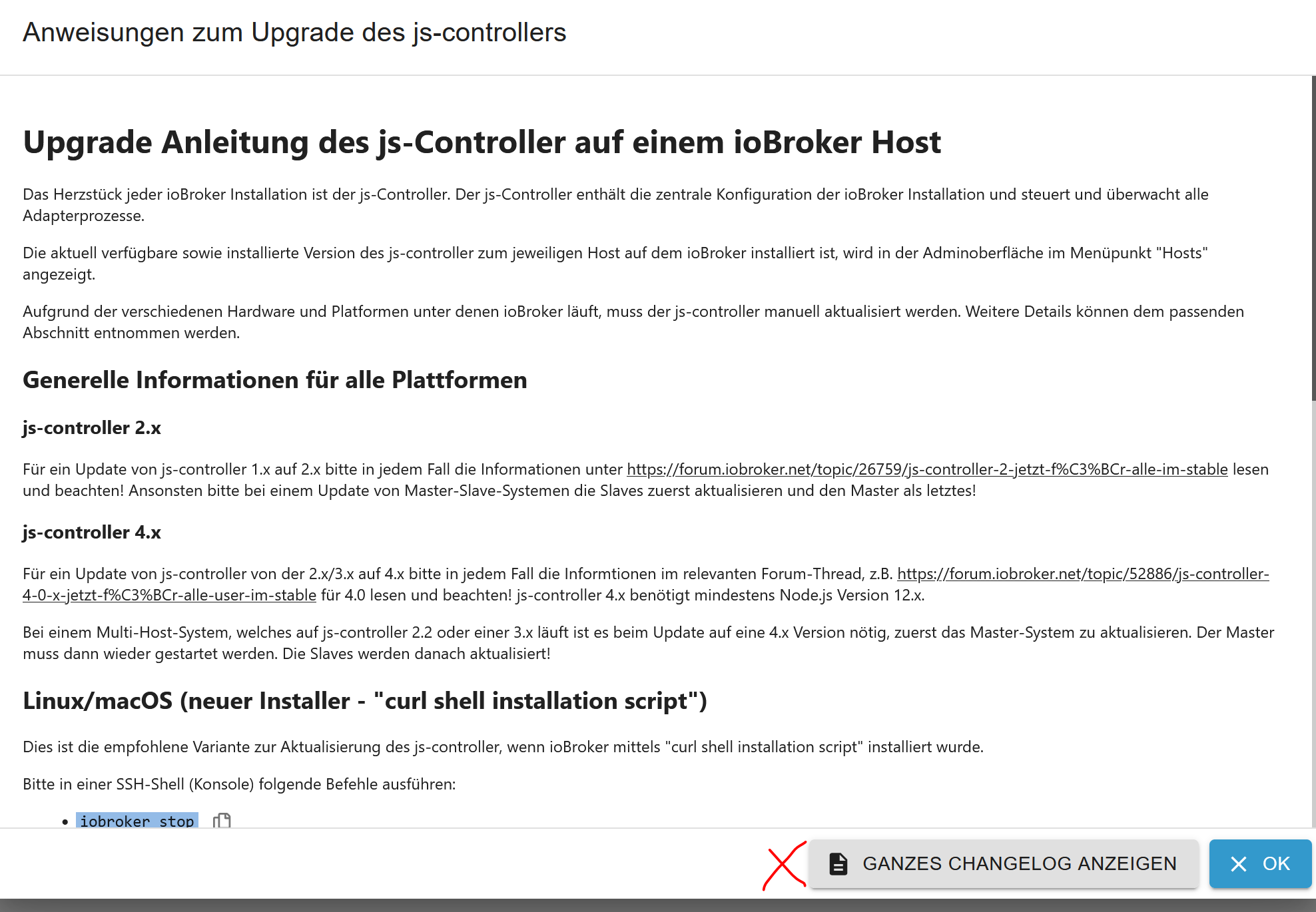
        Es wäre hilfreich, wenn beim klick auf den update button im UI nicht nur sinngemäß der Text: Guck doch in das changelog.md stehen würde, sondern das auch ein aktiver Link wäre. Soweit ich das sehe, kann man aus dem Admin UI an keiner Stelle das GIT repo für js-controller anspringen, ich zumindest muss dann immer meine Lesezeichen aus dem Browser bemühen.

        apollon77A FeuersturmF 2 Antworten Letzte Antwort
        0
        • OstfrieseUnterwegsO OstfrieseUnterwegs

          iob diag ist ein neuer Befehl, sollte das nicht irgendwo im changelog, readme oder sonstwo erwähnt werden?

          Es wäre hilfreich, wenn beim klick auf den update button im UI nicht nur sinngemäß der Text: Guck doch in das changelog.md stehen würde, sondern das auch ein aktiver Link wäre. Soweit ich das sehe, kann man aus dem Admin UI an keiner Stelle das GIT repo für js-controller anspringen, ich zumindest muss dann immer meine Lesezeichen aus dem Browser bemühen.

          apollon77A Offline
          apollon77A Offline
          apollon77
          schrieb am zuletzt editiert von
          #29

          @ostfrieseunterwegs "iob diag" gehört nicht zum controller, von daher andere Baustelle ... und der ist am Ende irrelevant es sei denn es gibt "diagnosefragen" :-)

          js.controller ist unter "Hosts" om Admin und da gibts auch nen Link zum Changelog

          Beitrag hat geholfen? Votet rechts unten im Beitrag :-) https://paypal.me/Apollon77 / https://github.com/sponsors/Apollon77

          • Debug-Log für Instanz einschalten? Admin -> Instanzen -> Expertenmodus -> Instanz aufklappen - Loglevel ändern
          • Logfiles auf Platte /opt/iobroker/log/… nutzen, Admin schneidet Zeilen ab
          1 Antwort Letzte Antwort
          1
          • OstfrieseUnterwegsO OstfrieseUnterwegs

            iob diag ist ein neuer Befehl, sollte das nicht irgendwo im changelog, readme oder sonstwo erwähnt werden?

            Es wäre hilfreich, wenn beim klick auf den update button im UI nicht nur sinngemäß der Text: Guck doch in das changelog.md stehen würde, sondern das auch ein aktiver Link wäre. Soweit ich das sehe, kann man aus dem Admin UI an keiner Stelle das GIT repo für js-controller anspringen, ich zumindest muss dann immer meine Lesezeichen aus dem Browser bemühen.

            FeuersturmF Online
            FeuersturmF Online
            Feuersturm
            schrieb am zuletzt editiert von
            #30

            @ostfrieseunterwegs sagte in js-controller 4.0.24 Update (Beta):

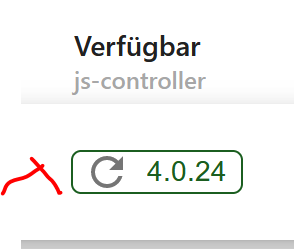
            Soweit ich das sehe, kann man aus dem Admin UI an keiner Stelle das GIT repo für js-controller anspringen, ich zumindest muss dann immer meine Lesezeichen aus dem Browser bemühen.

            Mit drei Klicks kommst du zum Changelog:
            d4262c28-f69e-48b2-a7cf-e2bf2fc4d96e-grafik.png
            und
            d9397671-d662-4b06-a09a-bf88c3fd58d0-grafik.png
            und dann
            04021571-53d1-4764-948e-4f24dfb73c5c-grafik.png

            OstfrieseUnterwegsO 1 Antwort Letzte Antwort
            1
            • H Offline
              H Offline
              harvey637
              schrieb am zuletzt editiert von
              #31

              Hmmmm,

              bei mir mit Problemen:

              Checking for uncompressed JSONL databases... This might take a while!
              
              npx: Installierte 12 in 6.213s
              No path given, using /opt/iobroker/iobroker-data
              Compressing /opt/iobroker/iobroker-data/states.jsonl
              Compressing /opt/iobroker/iobroker-data/objects.jsonl
              Compressed 2 JSONL files. Done
              
              ==========================================================================
                  Checking autostart (4/4)
              ==========================================================================
              
              Enabling autostart...
              Autostart enabled!
              
              ==========================================================================
              
                  Your installation was fixed successfully
                  Run iobroker start to start ioBroker again!
              
              ==========================================================================
              
              pi@raspberrypi:/opt/iobroker $ iobroker upgrade self
              Update js-controller from @4.0.23 to @4.0.24
              Stopped Objects DB
              Stopped States DB
              NPM version: 6.14.17
              Installing iobroker.js-controller@4.0.24... (System call)
              host.raspberrypi Cannot install iobroker.js-controller@4.0.24: 236


              Hmmm ?!?
              Irgend eine Idee?
              habe:
              rebootet
              nach nach laufenden iobroker Prozessen gesehen (keine)
              iobroker update, fix und dann upgrade self gemacht, mehrfach erfolglos :-(

              pi@raspberrypi:/opt/iobroker $ nodejs -v
              v14.21.1
              pi@raspberrypi:/opt/iobroker $ npm -v
              6.14.17
              
              
              H apollon77A 2 Antworten Letzte Antwort
              0
              • H harvey637

                Hmmmm,

                bei mir mit Problemen:

                Checking for uncompressed JSONL databases... This might take a while!
                
                npx: Installierte 12 in 6.213s
                No path given, using /opt/iobroker/iobroker-data
                Compressing /opt/iobroker/iobroker-data/states.jsonl
                Compressing /opt/iobroker/iobroker-data/objects.jsonl
                Compressed 2 JSONL files. Done
                
                ==========================================================================
                    Checking autostart (4/4)
                ==========================================================================
                
                Enabling autostart...
                Autostart enabled!
                
                ==========================================================================
                
                    Your installation was fixed successfully
                    Run iobroker start to start ioBroker again!
                
                ==========================================================================
                
                pi@raspberrypi:/opt/iobroker $ iobroker upgrade self
                Update js-controller from @4.0.23 to @4.0.24
                Stopped Objects DB
                Stopped States DB
                NPM version: 6.14.17
                Installing iobroker.js-controller@4.0.24... (System call)
                host.raspberrypi Cannot install iobroker.js-controller@4.0.24: 236


                Hmmm ?!?
                Irgend eine Idee?
                habe:
                rebootet
                nach nach laufenden iobroker Prozessen gesehen (keine)
                iobroker update, fix und dann upgrade self gemacht, mehrfach erfolglos :-(

                pi@raspberrypi:/opt/iobroker $ nodejs -v
                v14.21.1
                pi@raspberrypi:/opt/iobroker $ npm -v
                6.14.17
                
                
                H Offline
                H Offline
                harvey637
                schrieb am zuletzt editiert von
                #32

                natürlich auch mit "iobroker stop", also komplett wie in Thread beschrieben.

                H 1 Antwort Letzte Antwort
                0
                • H harvey637

                  natürlich auch mit "iobroker stop", also komplett wie in Thread beschrieben.

                  H Offline
                  H Offline
                  harvey637
                  schrieb am zuletzt editiert von
                  #33

                  @harvey637
                  erfolgreich gelöst mit update von NPM auf Version 9.2.0 - also jetzt alles ok!
                  Thx
                  Harvey

                  DJMarc75D FeuersturmF 2 Antworten Letzte Antwort
                  0
                  • H harvey637

                    @harvey637
                    erfolgreich gelöst mit update von NPM auf Version 9.2.0 - also jetzt alles ok!
                    Thx
                    Harvey

                    DJMarc75D Offline
                    DJMarc75D Offline
                    DJMarc75
                    schrieb am zuletzt editiert von
                    #34

                    @harvey637 na dann herzlichen Glückwunsch zur komplett verbogenen Installation :+1:

                    Lehrling seit 1975 !!!
                    Beitrag geholfen ? dann gerne ein upvote rechts unten im Beitrag klicken ;)
                    https://forum.iobroker.net/topic/51555/hinweise-f%C3%BCr-gute-forenbeitr%C3%A4ge

                    1 Antwort Letzte Antwort
                    0
                    • H harvey637

                      @harvey637
                      erfolgreich gelöst mit update von NPM auf Version 9.2.0 - also jetzt alles ok!
                      Thx
                      Harvey

                      FeuersturmF Online
                      FeuersturmF Online
                      Feuersturm
                      schrieb am zuletzt editiert von
                      #35

                      @harvey637 Schau mal in die Signatur von @Thomas-Braun wie du dein nodejs / npm wieder auf nodejs 16.x und npm 8.x gerade gezogen bekommst.

                      1 Antwort Letzte Antwort
                      0
                      • H harvey637

                        Hmmmm,

                        bei mir mit Problemen:

                        Checking for uncompressed JSONL databases... This might take a while!
                        
                        npx: Installierte 12 in 6.213s
                        No path given, using /opt/iobroker/iobroker-data
                        Compressing /opt/iobroker/iobroker-data/states.jsonl
                        Compressing /opt/iobroker/iobroker-data/objects.jsonl
                        Compressed 2 JSONL files. Done
                        
                        ==========================================================================
                            Checking autostart (4/4)
                        ==========================================================================
                        
                        Enabling autostart...
                        Autostart enabled!
                        
                        ==========================================================================
                        
                            Your installation was fixed successfully
                            Run iobroker start to start ioBroker again!
                        
                        ==========================================================================
                        
                        pi@raspberrypi:/opt/iobroker $ iobroker upgrade self
                        Update js-controller from @4.0.23 to @4.0.24
                        Stopped Objects DB
                        Stopped States DB
                        NPM version: 6.14.17
                        Installing iobroker.js-controller@4.0.24... (System call)
                        host.raspberrypi Cannot install iobroker.js-controller@4.0.24: 236


                        Hmmm ?!?
                        Irgend eine Idee?
                        habe:
                        rebootet
                        nach nach laufenden iobroker Prozessen gesehen (keine)
                        iobroker update, fix und dann upgrade self gemacht, mehrfach erfolglos :-(

                        pi@raspberrypi:/opt/iobroker $ nodejs -v
                        v14.21.1
                        pi@raspberrypi:/opt/iobroker $ npm -v
                        6.14.17
                        
                        
                        apollon77A Offline
                        apollon77A Offline
                        apollon77
                        schrieb am zuletzt editiert von
                        #36

                        @harvey637 „iob upgrade self --debug“ hätte die genaue Fehlermeldung ausgegeben

                        Beitrag hat geholfen? Votet rechts unten im Beitrag :-) https://paypal.me/Apollon77 / https://github.com/sponsors/Apollon77

                        • Debug-Log für Instanz einschalten? Admin -> Instanzen -> Expertenmodus -> Instanz aufklappen - Loglevel ändern
                        • Logfiles auf Platte /opt/iobroker/log/… nutzen, Admin schneidet Zeilen ab
                        1 Antwort Letzte Antwort
                        0
                        • FeuersturmF Online
                          FeuersturmF Online
                          Feuersturm
                          schrieb am zuletzt editiert von
                          #37

                          @apollon77 Master Slave System erfolgreich auf 4.0.24 aktualisiert und keine Probleme ersichtlich.

                          1 Antwort Letzte Antwort
                          1
                          • FeuersturmF Feuersturm

                            @ostfrieseunterwegs sagte in js-controller 4.0.24 Update (Beta):

                            Soweit ich das sehe, kann man aus dem Admin UI an keiner Stelle das GIT repo für js-controller anspringen, ich zumindest muss dann immer meine Lesezeichen aus dem Browser bemühen.

                            Mit drei Klicks kommst du zum Changelog:
                            d4262c28-f69e-48b2-a7cf-e2bf2fc4d96e-grafik.png
                            und
                            d9397671-d662-4b06-a09a-bf88c3fd58d0-grafik.png
                            und dann
                            04021571-53d1-4764-948e-4f24dfb73c5c-grafik.png

                            OstfrieseUnterwegsO Offline
                            OstfrieseUnterwegsO Offline
                            OstfrieseUnterwegs
                            schrieb am zuletzt editiert von
                            #38

                            @feuersturm @apollon77 ... Danke, danke. Da klicke ich nie mehr hin, weil ich die Anweisungen nicht mehr brauche. Ich finde es dennoch etwas unglücklich versteckt.

                            FeuersturmF 1 Antwort Letzte Antwort
                            0
                            • realwaxR Offline
                              realwaxR Offline
                              realwax
                              schrieb am zuletzt editiert von realwax
                              #39

                              Könnt Ihr mir helfen / einen Tipp geben?
                              Bin auf einem buatnet docker container auf meinen QNAP Container Station. Ich mache die node updates entsprechend Anleitung im Container und eben auch die js-controller updates. Bisweilen alles ohne Probleme. Das update bekomme ich nicht hin. Spannend ist - der user hat Zugriff auf die Verzeichnisse. Zur Sicherheit habe ich 777 drauf gelegt - kein Unterschied. DANKE!

                              root@iobrokerQNAP:/opt/iobroker# iob upgrade self --debug
                              Update js-controller from @4.0.23 to @4.0.24
                              Stopped Objects DB
                              Stopped States DB
                              NPM version: 8.19.2
                              Installing iobroker.js-controller@4.0.24... (System call)
                              npm ERR! code 128
                              npm ERR! An unknown git error occurred
                              npm ERR! command git --no-replace-objects clone https://git@github.com/iobroker-community-adapters/kodi-ws.git /root/.npm/_cacache/tmp/git-cloneBnDmuc --recurse-submodules --depth=1
                              npm ERR! fatal: could not create leading directories of '/root/.npm/_cacache/tmp/git-cloneBnDmuc': Permission denied
                              
                              npm ERR! A complete log of this run can be found in:
                              npm ERR!     /root/.npm/_logs/2022-12-19T14_46_28_684Z-debug-0.log
                              host.iobrokerQNAP Cannot install iobroker.js-controller@4.0.24: 128
                              
                              root@iobrokerQNAP:/opt/iobroker# node -v
                              v16.18.1
                              root@iobrokerQNAP:/opt/iobroker# npm -v
                              8.19.2
                              root@iobrokerQNAP:/opt/iobroker# 
                              
                              which nodejs node npm && nodejs -v && node -v && npm -v && sudo apt update && sudo apt update && apt policy nodejs
                              /usr/bin/node
                              /usr/bin/npm
                              
                              04 timing command:install Completed in 15606ms
                              505 verbose stack Error: An unknown git error occurred
                              505 verbose stack     at makeError (/usr/lib/node_modules/npm/node_modules/@npmcli/git/lib/make-error.js:28:13)
                              505 verbose stack     at /usr/lib/node_modules/npm/node_modules/@npmcli/git/lib/spawn.js:37:26
                              505 verbose stack     at processTicksAndRejections (node:internal/process/task_queues:96:5)
                              505 verbose stack     at async /usr/lib/node_modules/npm/node_modules/pacote/lib/git.js:262:19
                              505 verbose stack     at async Object.withTempDir (/usr/lib/node_modules/npm/node_modules/@npmcli/fs/lib/with-temp-dir.js:23:14)
                              505 verbose stack     at async Arborist.[nodeFromEdge] (/usr/lib/node_modules/npm/node_modules/@npmcli/arborist/lib/arborist/build-ideal-tree.js:1061:19)
                              505 verbose stack     at async Arborist.[buildDepStep] (/usr/lib/node_modules/npm/node_modules/@npmcli/arborist/lib/arborist/build-ideal-tree.js:930:11)
                              505 verbose stack     at async Arborist.buildIdealTree (/usr/lib/node_modules/npm/node_modules/@npmcli/arborist/lib/arborist/build-ideal-tree.js:211:7)
                              505 verbose stack     at async Promise.all (index 1)
                              505 verbose stack     at async Arborist.reify (/usr/lib/node_modules/npm/node_modules/@npmcli/arborist/lib/arborist/reify.js:153:5)
                              506 verbose cwd /opt/iobroker
                              507 verbose Linux 5.10.60-qnap
                              508 verbose node v16.18.1
                              509 verbose npm  v8.19.2
                              510 error code 128
                              511 error An unknown git error occurred
                              512 error command git --no-replace-objects clone https://git@github.com/iobroker-community-adapters/kodi-ws.git /root/.npm/_cacache/tmp/git-cloneUubCKS --recurse-submodules --depth=1
                              513 error fatal: could not create leading directories of '/root/.npm/_cacache/tmp/git-cloneUubCKS': Permission denied
                              514 verbose exit 128
                              515 timing npm Completed in 15988ms
                              516 verbose unfinished npm timer reify 1671460779892
                              517 verbose unfinished npm timer reify:loadTrees 1671460779904
                              518 verbose code 128
                              519 error A complete log of this run can be found in:
                              

                              Der root user kommt vom buatnet container.... ;)

                              FredFF Thomas BraunT 2 Antworten Letzte Antwort
                              0
                              • realwaxR realwax

                                Könnt Ihr mir helfen / einen Tipp geben?
                                Bin auf einem buatnet docker container auf meinen QNAP Container Station. Ich mache die node updates entsprechend Anleitung im Container und eben auch die js-controller updates. Bisweilen alles ohne Probleme. Das update bekomme ich nicht hin. Spannend ist - der user hat Zugriff auf die Verzeichnisse. Zur Sicherheit habe ich 777 drauf gelegt - kein Unterschied. DANKE!

                                root@iobrokerQNAP:/opt/iobroker# iob upgrade self --debug
                                Update js-controller from @4.0.23 to @4.0.24
                                Stopped Objects DB
                                Stopped States DB
                                NPM version: 8.19.2
                                Installing iobroker.js-controller@4.0.24... (System call)
                                npm ERR! code 128
                                npm ERR! An unknown git error occurred
                                npm ERR! command git --no-replace-objects clone https://git@github.com/iobroker-community-adapters/kodi-ws.git /root/.npm/_cacache/tmp/git-cloneBnDmuc --recurse-submodules --depth=1
                                npm ERR! fatal: could not create leading directories of '/root/.npm/_cacache/tmp/git-cloneBnDmuc': Permission denied
                                
                                npm ERR! A complete log of this run can be found in:
                                npm ERR!     /root/.npm/_logs/2022-12-19T14_46_28_684Z-debug-0.log
                                host.iobrokerQNAP Cannot install iobroker.js-controller@4.0.24: 128
                                
                                root@iobrokerQNAP:/opt/iobroker# node -v
                                v16.18.1
                                root@iobrokerQNAP:/opt/iobroker# npm -v
                                8.19.2
                                root@iobrokerQNAP:/opt/iobroker# 
                                
                                which nodejs node npm && nodejs -v && node -v && npm -v && sudo apt update && sudo apt update && apt policy nodejs
                                /usr/bin/node
                                /usr/bin/npm
                                
                                04 timing command:install Completed in 15606ms
                                505 verbose stack Error: An unknown git error occurred
                                505 verbose stack     at makeError (/usr/lib/node_modules/npm/node_modules/@npmcli/git/lib/make-error.js:28:13)
                                505 verbose stack     at /usr/lib/node_modules/npm/node_modules/@npmcli/git/lib/spawn.js:37:26
                                505 verbose stack     at processTicksAndRejections (node:internal/process/task_queues:96:5)
                                505 verbose stack     at async /usr/lib/node_modules/npm/node_modules/pacote/lib/git.js:262:19
                                505 verbose stack     at async Object.withTempDir (/usr/lib/node_modules/npm/node_modules/@npmcli/fs/lib/with-temp-dir.js:23:14)
                                505 verbose stack     at async Arborist.[nodeFromEdge] (/usr/lib/node_modules/npm/node_modules/@npmcli/arborist/lib/arborist/build-ideal-tree.js:1061:19)
                                505 verbose stack     at async Arborist.[buildDepStep] (/usr/lib/node_modules/npm/node_modules/@npmcli/arborist/lib/arborist/build-ideal-tree.js:930:11)
                                505 verbose stack     at async Arborist.buildIdealTree (/usr/lib/node_modules/npm/node_modules/@npmcli/arborist/lib/arborist/build-ideal-tree.js:211:7)
                                505 verbose stack     at async Promise.all (index 1)
                                505 verbose stack     at async Arborist.reify (/usr/lib/node_modules/npm/node_modules/@npmcli/arborist/lib/arborist/reify.js:153:5)
                                506 verbose cwd /opt/iobroker
                                507 verbose Linux 5.10.60-qnap
                                508 verbose node v16.18.1
                                509 verbose npm  v8.19.2
                                510 error code 128
                                511 error An unknown git error occurred
                                512 error command git --no-replace-objects clone https://git@github.com/iobroker-community-adapters/kodi-ws.git /root/.npm/_cacache/tmp/git-cloneUubCKS --recurse-submodules --depth=1
                                513 error fatal: could not create leading directories of '/root/.npm/_cacache/tmp/git-cloneUubCKS': Permission denied
                                514 verbose exit 128
                                515 timing npm Completed in 15988ms
                                516 verbose unfinished npm timer reify 1671460779892
                                517 verbose unfinished npm timer reify:loadTrees 1671460779904
                                518 verbose code 128
                                519 error A complete log of this run can be found in:
                                

                                Der root user kommt vom buatnet container.... ;)

                                FredFF Offline
                                FredFF Offline
                                FredF
                                Most Active Forum Testing
                                schrieb am zuletzt editiert von
                                #40

                                @realwax ioBroker vorher gestoppt?

                                realwaxR 1 Antwort Letzte Antwort
                                1
                                • realwaxR realwax

                                  Könnt Ihr mir helfen / einen Tipp geben?
                                  Bin auf einem buatnet docker container auf meinen QNAP Container Station. Ich mache die node updates entsprechend Anleitung im Container und eben auch die js-controller updates. Bisweilen alles ohne Probleme. Das update bekomme ich nicht hin. Spannend ist - der user hat Zugriff auf die Verzeichnisse. Zur Sicherheit habe ich 777 drauf gelegt - kein Unterschied. DANKE!

                                  root@iobrokerQNAP:/opt/iobroker# iob upgrade self --debug
                                  Update js-controller from @4.0.23 to @4.0.24
                                  Stopped Objects DB
                                  Stopped States DB
                                  NPM version: 8.19.2
                                  Installing iobroker.js-controller@4.0.24... (System call)
                                  npm ERR! code 128
                                  npm ERR! An unknown git error occurred
                                  npm ERR! command git --no-replace-objects clone https://git@github.com/iobroker-community-adapters/kodi-ws.git /root/.npm/_cacache/tmp/git-cloneBnDmuc --recurse-submodules --depth=1
                                  npm ERR! fatal: could not create leading directories of '/root/.npm/_cacache/tmp/git-cloneBnDmuc': Permission denied
                                  
                                  npm ERR! A complete log of this run can be found in:
                                  npm ERR!     /root/.npm/_logs/2022-12-19T14_46_28_684Z-debug-0.log
                                  host.iobrokerQNAP Cannot install iobroker.js-controller@4.0.24: 128
                                  
                                  root@iobrokerQNAP:/opt/iobroker# node -v
                                  v16.18.1
                                  root@iobrokerQNAP:/opt/iobroker# npm -v
                                  8.19.2
                                  root@iobrokerQNAP:/opt/iobroker# 
                                  
                                  which nodejs node npm && nodejs -v && node -v && npm -v && sudo apt update && sudo apt update && apt policy nodejs
                                  /usr/bin/node
                                  /usr/bin/npm
                                  
                                  04 timing command:install Completed in 15606ms
                                  505 verbose stack Error: An unknown git error occurred
                                  505 verbose stack     at makeError (/usr/lib/node_modules/npm/node_modules/@npmcli/git/lib/make-error.js:28:13)
                                  505 verbose stack     at /usr/lib/node_modules/npm/node_modules/@npmcli/git/lib/spawn.js:37:26
                                  505 verbose stack     at processTicksAndRejections (node:internal/process/task_queues:96:5)
                                  505 verbose stack     at async /usr/lib/node_modules/npm/node_modules/pacote/lib/git.js:262:19
                                  505 verbose stack     at async Object.withTempDir (/usr/lib/node_modules/npm/node_modules/@npmcli/fs/lib/with-temp-dir.js:23:14)
                                  505 verbose stack     at async Arborist.[nodeFromEdge] (/usr/lib/node_modules/npm/node_modules/@npmcli/arborist/lib/arborist/build-ideal-tree.js:1061:19)
                                  505 verbose stack     at async Arborist.[buildDepStep] (/usr/lib/node_modules/npm/node_modules/@npmcli/arborist/lib/arborist/build-ideal-tree.js:930:11)
                                  505 verbose stack     at async Arborist.buildIdealTree (/usr/lib/node_modules/npm/node_modules/@npmcli/arborist/lib/arborist/build-ideal-tree.js:211:7)
                                  505 verbose stack     at async Promise.all (index 1)
                                  505 verbose stack     at async Arborist.reify (/usr/lib/node_modules/npm/node_modules/@npmcli/arborist/lib/arborist/reify.js:153:5)
                                  506 verbose cwd /opt/iobroker
                                  507 verbose Linux 5.10.60-qnap
                                  508 verbose node v16.18.1
                                  509 verbose npm  v8.19.2
                                  510 error code 128
                                  511 error An unknown git error occurred
                                  512 error command git --no-replace-objects clone https://git@github.com/iobroker-community-adapters/kodi-ws.git /root/.npm/_cacache/tmp/git-cloneUubCKS --recurse-submodules --depth=1
                                  513 error fatal: could not create leading directories of '/root/.npm/_cacache/tmp/git-cloneUubCKS': Permission denied
                                  514 verbose exit 128
                                  515 timing npm Completed in 15988ms
                                  516 verbose unfinished npm timer reify 1671460779892
                                  517 verbose unfinished npm timer reify:loadTrees 1671460779904
                                  518 verbose code 128
                                  519 error A complete log of this run can be found in:
                                  

                                  Der root user kommt vom buatnet container.... ;)

                                  Thomas BraunT Online
                                  Thomas BraunT Online
                                  Thomas Braun
                                  Most Active
                                  schrieb am zuletzt editiert von
                                  #41

                                  @realwax sagte in js-controller 4.0.24 Update (Beta):

                                  ERR! fatal: could not create leading directories of '/root/.npm/_cacache/tmp/git-cloneBnDmuc': Permission denied

                                  Der verwendete User darf dem root nicht in dessen Home schreiben.
                                  Mit Standarduser in der Gruppe 'iobroker' hantieren.

                                  Linux-Werkzeugkasten:
                                  https://forum.iobroker.net/topic/42952/der-kleine-iobroker-linux-werkzeugkasten
                                  NodeJS Fixer Skript:
                                  https://forum.iobroker.net/topic/68035/iob-node-fix-skript
                                  iob_diag: curl -sLf -o diag.sh https://iobroker.net/diag.sh && bash diag.sh

                                  1 Antwort Letzte Antwort
                                  1
                                  • OstfrieseUnterwegsO OstfrieseUnterwegs

                                    @feuersturm @apollon77 ... Danke, danke. Da klicke ich nie mehr hin, weil ich die Anweisungen nicht mehr brauche. Ich finde es dennoch etwas unglücklich versteckt.

                                    FeuersturmF Online
                                    FeuersturmF Online
                                    Feuersturm
                                    schrieb am zuletzt editiert von Feuersturm
                                    #42

                                    @ostfrieseunterwegs sagte in js-controller 4.0.24 Update (Beta):

                                    @feuersturm @apollon77 ... Danke, danke. Da klicke ich nie mehr hin, weil ich die Anweisungen nicht mehr brauche. Ich finde es dennoch etwas unglücklich versteckt.

                                    @apollon77 könnte man hier einen statischen link setzen, welcher zum changelog führt oder wechselt die Ansicht, dass mal Themen für den js Controller aufgeführt werden und mal nur auf das changelog verwiesen wird?

                                    Edit: Admin issue angelegt: https://github.com/ioBroker/ioBroker.admin/issues/1842

                                    1 Antwort Letzte Antwort
                                    0
                                    • FredFF FredF

                                      @realwax ioBroker vorher gestoppt?

                                      realwaxR Offline
                                      realwaxR Offline
                                      realwax
                                      schrieb am zuletzt editiert von
                                      #43

                                      @fredf Ja gestoppt. In dem Fall im container mit pkill, da iobroker stop nicht funktioniert. (Ist eine buatnet Anleitung info)

                                      @Thomas-Braun

                                      Danke für die Info. Unmittelbar nach Anmeldung am container ist man root. Ich dachte der iobroker user zieht nicht im Container. Aber der iobroker wird dennoch unter seinem user (iobroker) ausgeführt. Vor dem letzten Update klappte das js-controller update unter root. Aber ich arbeite jetzt unter dem iobroker user (su iobroker) und alles ist gut. Auf den pi's ist das standard, aber dachte eben im Container geht's nicht. Nachsehen hilft :P

                                      Danke Thomas für Deinen unermüdlichen Support hier und die Hilfestellung!

                                      Thomas BraunT 1 Antwort Letzte Antwort
                                      0
                                      • realwaxR realwax

                                        @fredf Ja gestoppt. In dem Fall im container mit pkill, da iobroker stop nicht funktioniert. (Ist eine buatnet Anleitung info)

                                        @Thomas-Braun

                                        Danke für die Info. Unmittelbar nach Anmeldung am container ist man root. Ich dachte der iobroker user zieht nicht im Container. Aber der iobroker wird dennoch unter seinem user (iobroker) ausgeführt. Vor dem letzten Update klappte das js-controller update unter root. Aber ich arbeite jetzt unter dem iobroker user (su iobroker) und alles ist gut. Auf den pi's ist das standard, aber dachte eben im Container geht's nicht. Nachsehen hilft :P

                                        Danke Thomas für Deinen unermüdlichen Support hier und die Hilfestellung!

                                        Thomas BraunT Online
                                        Thomas BraunT Online
                                        Thomas Braun
                                        Most Active
                                        schrieb am zuletzt editiert von
                                        #44

                                        @realwax sagte in js-controller 4.0.24 Update (Beta):

                                        Unmittelbar nach Anmeldung am container ist man root.

                                        Und das erste was man tut ist in die Userrolle zu schlüpfen. Am besten gleich als solcher anmelden.

                                        Linux-Werkzeugkasten:
                                        https://forum.iobroker.net/topic/42952/der-kleine-iobroker-linux-werkzeugkasten
                                        NodeJS Fixer Skript:
                                        https://forum.iobroker.net/topic/68035/iob-node-fix-skript
                                        iob_diag: curl -sLf -o diag.sh https://iobroker.net/diag.sh && bash diag.sh

                                        realwaxR 1 Antwort Letzte Antwort
                                        1
                                        • Thomas BraunT Thomas Braun

                                          @realwax sagte in js-controller 4.0.24 Update (Beta):

                                          Unmittelbar nach Anmeldung am container ist man root.

                                          Und das erste was man tut ist in die Userrolle zu schlüpfen. Am besten gleich als solcher anmelden.

                                          realwaxR Offline
                                          realwaxR Offline
                                          realwax
                                          schrieb am zuletzt editiert von
                                          #45

                                          @thomas-braun Danke grundsätzlich gecheckt auf allen Installationen. Dachte nur am QNAP Docker geht's nicht. Und bisweilen hatte ich Glück nichts zu zerschießen...

                                          realwaxR 1 Antwort Letzte Antwort
                                          0
                                          Antworten
                                          • In einem neuen Thema antworten
                                          Anmelden zum Antworten
                                          • Älteste zuerst
                                          • Neuste zuerst
                                          • Meiste Stimmen


                                          Support us

                                          ioBroker
                                          Community Adapters
                                          Donate
                                          FAQ Cloud / IOT
                                          HowTo: Node.js-Update
                                          HowTo: Backup/Restore
                                          Downloads
                                          BLOG

                                          821

                                          Online

                                          32.5k

                                          Benutzer

                                          81.8k

                                          Themen

                                          1.3m

                                          Beiträge
                                          Community
                                          Impressum | Datenschutz-Bestimmungen | Nutzungsbedingungen | Einwilligungseinstellungen
                                          ioBroker Community 2014-2025
                                          logo
                                          • Anmelden

                                          • Du hast noch kein Konto? Registrieren

                                          • Anmelden oder registrieren, um zu suchen
                                          • Erster Beitrag
                                            Letzter Beitrag
                                          0
                                          • Home
                                          • Aktuell
                                          • Tags
                                          • Ungelesen 0
                                          • Kategorien
                                          • Unreplied
                                          • Beliebt
                                          • GitHub
                                          • Docu
                                          • Hilfe