




contrib tts lässt sich nicht installieren
-
dann kommt noch folgende meldung die installation wird nicht abgeschlossen und nodered geht im anschluss nicht mehr
2022-12-12T13:01:45.886Z Installieren : node-red-contrib-tts-ultimate 1.0.52 2022-12-12T13:01:45.904Z npm install --no-audit --no-update-notifier --no-fund --save --save-prefix=~ --production --engine-strict node-red-contrib-tts-ultimate@1.0.52 2022-12-12T13:01:46.178Z [err] npm 2022-12-12T13:01:46.179Z [err] WARN 2022-12-12T13:01:46.179Z [err] config production Use `--omit=dev` instead. 2022-12-12T13:01:56.967Z [err] npm 2022-12-12T13:01:56.967Z [err] WARN deprecated uuid@3.3.2: Please upgrade to version 7 or higher. Older versions may use Math.random() in certain circumstances, which is known to be problematic. See https://v8.dev/blog/math-random for details.@saranger Da Du Dein Backup ja noch hast. Dann probiere die radikale Methode.
geh in das Verzeichnis und lösche erst mal alle custom Nodes, indem Du das Verzeichnis node_modules löschst im
/opt/iobroker/iobroker-data/node-red
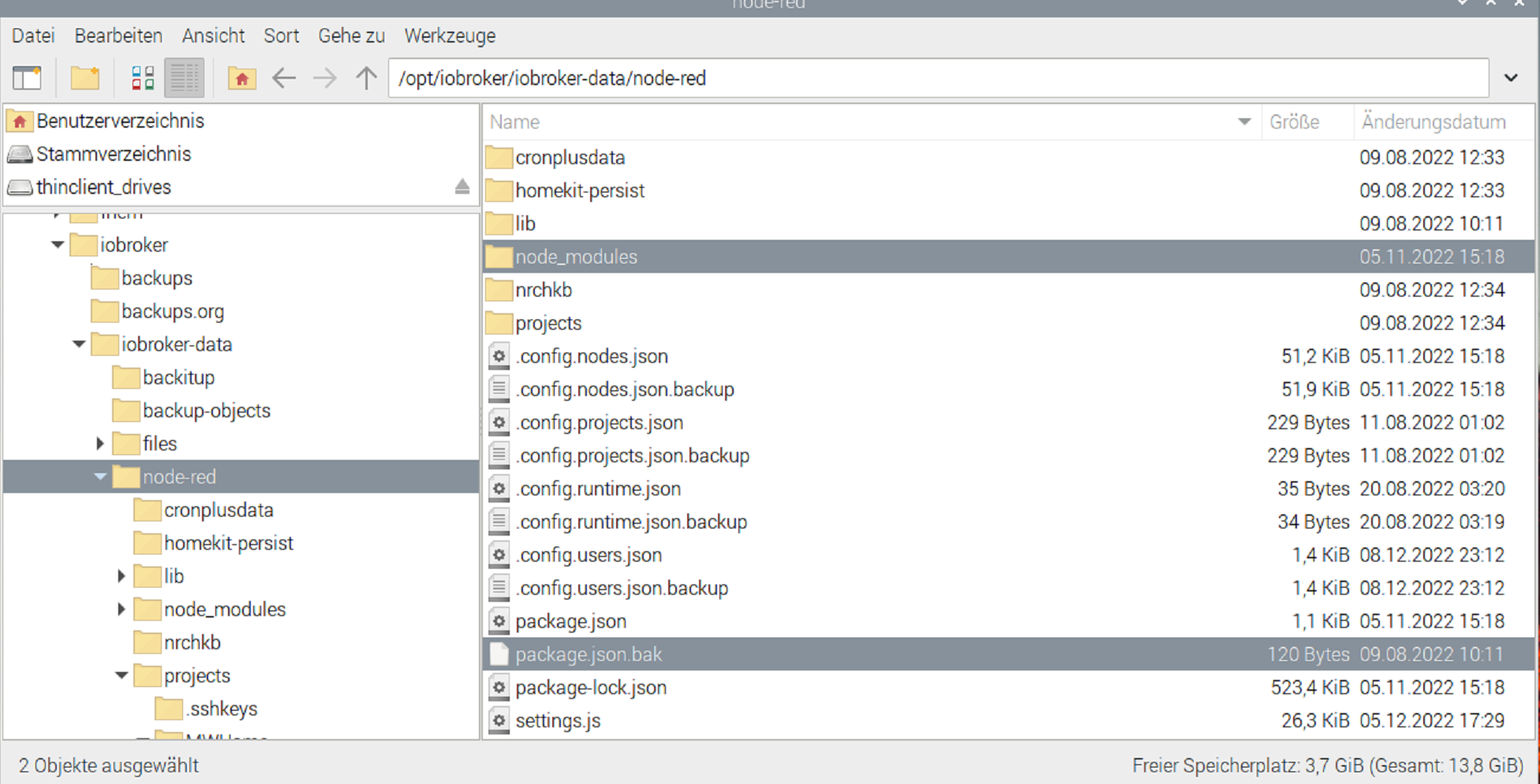
anschliessend, wenn Du in dem Verzeichnis bist - lässt Du alles mit npm install neu aufbauen
cd /opt/iobroker/iobroker-data/node-red
rm -r node_modules
npm install
Dein package-lock.json sollte noch gelöscht sein.
-
@mickym said in contrib tts lässt sich nicht installieren:
folgende mitteilung bekomm ich aus der Konsole
Welcome to Ubuntu 22.04.1 LTS (GNU/Linux 5.15.60-1-pve x86_64) * Documentation: https://help.ubuntu.com * Management: https://landscape.canonical.com * Support: https://ubuntu.com/advantage Last login: Mon Dec 12 13:43:08 CET 2022 on tty1 root@ioBroker:~# cd /opt/iobroker/iobroker-data/node-red root@ioBroker:/opt/iobroker/iobroker-data/node-red# rm -r node_modules root@ioBroker:/opt/iobroker/iobroker-data/node-red# npm install npm WARN deprecated request-promise-native@1.0.9: request-promise-native has been deprecated because it extends the now deprecated request package, see https://github.com/request/request/issues/3142 npm WARN deprecated har-validator@5.1.5: this library is no longer supported npm WARN deprecated querystring@0.2.0: The querystring API is considered Legacy. new code should use the URLSearchParams API instead. npm WARN deprecated formidable@1.2.2: Please upgrade to latest, formidable@v2 or formidable@v3! Check these notes: https://bit.ly/2ZEqIau npm WARN deprecated uuid@3.4.0: Please upgrade to version 7 or higher. Older versions may use Math.random() in certain circumstances, which is known to be problematic. See https://v8.dev/blog/math-random for details. npm WARN deprecated request@2.88.2: request has been deprecated, see https://github.com/request/request/issues/3142 npm WARN deprecated axios@0.19.2: Critical security vulnerability fixed in v0.21.1. For more information, see https://github.com/axios/axios/pull/3410 npm WARN deprecated node-red-contrib-sonospollytts@2.0.8: Package no longer supported. Contact Support at https://www.npmjs.com/support for more info. added 294 packages, and audited 295 packages in 38s 57 packages are looking for funding run `npm fund` for details 7 vulnerabilities (4 moderate, 3 high) To address all issues (including breaking changes), run: npm audit fix --force Run `npm audit` for details. npm notice npm notice New major version of npm available! 8.19.2 -> 9.2.0 npm notice Changelog: https://github.com/npm/cli/releases/tag/v9.2.0 npm notice Run npm install -g npm@9.2.0 to update! npm notice -
@mickym said in contrib tts lässt sich nicht installieren:
folgende mitteilung bekomm ich aus der Konsole
Welcome to Ubuntu 22.04.1 LTS (GNU/Linux 5.15.60-1-pve x86_64) * Documentation: https://help.ubuntu.com * Management: https://landscape.canonical.com * Support: https://ubuntu.com/advantage Last login: Mon Dec 12 13:43:08 CET 2022 on tty1 root@ioBroker:~# cd /opt/iobroker/iobroker-data/node-red root@ioBroker:/opt/iobroker/iobroker-data/node-red# rm -r node_modules root@ioBroker:/opt/iobroker/iobroker-data/node-red# npm install npm WARN deprecated request-promise-native@1.0.9: request-promise-native has been deprecated because it extends the now deprecated request package, see https://github.com/request/request/issues/3142 npm WARN deprecated har-validator@5.1.5: this library is no longer supported npm WARN deprecated querystring@0.2.0: The querystring API is considered Legacy. new code should use the URLSearchParams API instead. npm WARN deprecated formidable@1.2.2: Please upgrade to latest, formidable@v2 or formidable@v3! Check these notes: https://bit.ly/2ZEqIau npm WARN deprecated uuid@3.4.0: Please upgrade to version 7 or higher. Older versions may use Math.random() in certain circumstances, which is known to be problematic. See https://v8.dev/blog/math-random for details. npm WARN deprecated request@2.88.2: request has been deprecated, see https://github.com/request/request/issues/3142 npm WARN deprecated axios@0.19.2: Critical security vulnerability fixed in v0.21.1. For more information, see https://github.com/axios/axios/pull/3410 npm WARN deprecated node-red-contrib-sonospollytts@2.0.8: Package no longer supported. Contact Support at https://www.npmjs.com/support for more info. added 294 packages, and audited 295 packages in 38s 57 packages are looking for funding run `npm fund` for details 7 vulnerabilities (4 moderate, 3 high) To address all issues (including breaking changes), run: npm audit fix --force Run `npm audit` for details. npm notice npm notice New major version of npm available! 8.19.2 -> 9.2.0 npm notice Changelog: https://github.com/npm/cli/releases/tag/v9.2.0 npm notice Run npm install -g npm@9.2.0 to update! npm notice -
@mickym said in contrib tts lässt sich nicht installieren:
folgende mitteilung bekomm ich aus der Konsole
Welcome to Ubuntu 22.04.1 LTS (GNU/Linux 5.15.60-1-pve x86_64) * Documentation: https://help.ubuntu.com * Management: https://landscape.canonical.com * Support: https://ubuntu.com/advantage Last login: Mon Dec 12 13:43:08 CET 2022 on tty1 root@ioBroker:~# cd /opt/iobroker/iobroker-data/node-red root@ioBroker:/opt/iobroker/iobroker-data/node-red# rm -r node_modules root@ioBroker:/opt/iobroker/iobroker-data/node-red# npm install npm WARN deprecated request-promise-native@1.0.9: request-promise-native has been deprecated because it extends the now deprecated request package, see https://github.com/request/request/issues/3142 npm WARN deprecated har-validator@5.1.5: this library is no longer supported npm WARN deprecated querystring@0.2.0: The querystring API is considered Legacy. new code should use the URLSearchParams API instead. npm WARN deprecated formidable@1.2.2: Please upgrade to latest, formidable@v2 or formidable@v3! Check these notes: https://bit.ly/2ZEqIau npm WARN deprecated uuid@3.4.0: Please upgrade to version 7 or higher. Older versions may use Math.random() in certain circumstances, which is known to be problematic. See https://v8.dev/blog/math-random for details. npm WARN deprecated request@2.88.2: request has been deprecated, see https://github.com/request/request/issues/3142 npm WARN deprecated axios@0.19.2: Critical security vulnerability fixed in v0.21.1. For more information, see https://github.com/axios/axios/pull/3410 npm WARN deprecated node-red-contrib-sonospollytts@2.0.8: Package no longer supported. Contact Support at https://www.npmjs.com/support for more info. added 294 packages, and audited 295 packages in 38s 57 packages are looking for funding run `npm fund` for details 7 vulnerabilities (4 moderate, 3 high) To address all issues (including breaking changes), run: npm audit fix --force Run `npm audit` for details. npm notice npm notice New major version of npm available! 8.19.2 -> 9.2.0 npm notice Changelog: https://github.com/npm/cli/releases/tag/v9.2.0 npm notice Run npm install -g npm@9.2.0 to update! npm noticeNicht als root agieren. Insbesondere nicht in den Verzeichnissen.
Nie, nie, niemals als root! -
Nicht als root agieren. Insbesondere nicht in den Verzeichnissen.
Nie, nie, niemals als root!@thomas-braun sagte in contrib tts lässt sich nicht installieren:
Nicht als root agieren. Insbesondere nicht in den Verzeichnissen.
Nie, nie, niemals als root!Da hast Du natürlich Recht - da hab ich wieder mal nicht drauf geachtet. Danke für Hinweis. Dann auf jeden Fall nochmal machen - ich hoffe es hat mit den Rechten nichts zerschossen.
-
@thomas-braun sagte in contrib tts lässt sich nicht installieren:
Nicht als root agieren. Insbesondere nicht in den Verzeichnissen.
Nie, nie, niemals als root!Da hast Du natürlich Recht - da hab ich wieder mal nicht drauf geachtet. Danke für Hinweis. Dann auf jeden Fall nochmal machen - ich hoffe es hat mit den Rechten nichts zerschossen.
ah das hab ich auch nicht auf dem schirm gehabt, ich hab glaube gar keinen anderen user.
anbei wieder die meldung und nodered geht nicht
----------------------------------------------------------- 2022-12-12T13:16:47.946Z Installieren : node-red-contrib-tts-ultimate 1.0.52 2022-12-12T13:16:47.964Z npm install --no-audit --no-update-notifier --no-fund --save --save-prefix=~ --production --engine-strict node-red-contrib-tts-ultimate@1.0.52 2022-12-12T13:16:48.245Z [err] npm 2022-12-12T13:16:48.245Z [err] WARN config production Use `--omit=dev` instead. 2022-12-12T13:16:57.529Z [err] npm 2022-12-12T13:16:57.530Z [err] WARN deprecated uuid@3.3.2: Please upgrade to version 7 or higher. Older versions may use Math.random() in certain circumstances, which is known to be problematic. See https://v8.dev/blog/math-random for details. -
ah das hab ich auch nicht auf dem schirm gehabt, ich hab glaube gar keinen anderen user.
anbei wieder die meldung und nodered geht nicht
----------------------------------------------------------- 2022-12-12T13:16:47.946Z Installieren : node-red-contrib-tts-ultimate 1.0.52 2022-12-12T13:16:47.964Z npm install --no-audit --no-update-notifier --no-fund --save --save-prefix=~ --production --engine-strict node-red-contrib-tts-ultimate@1.0.52 2022-12-12T13:16:48.245Z [err] npm 2022-12-12T13:16:48.245Z [err] WARN config production Use `--omit=dev` instead. 2022-12-12T13:16:57.529Z [err] npm 2022-12-12T13:16:57.530Z [err] WARN deprecated uuid@3.3.2: Please upgrade to version 7 or higher. Older versions may use Math.random() in certain circumstances, which is known to be problematic. See https://v8.dev/blog/math-random for details.@saranger sagte in contrib tts lässt sich nicht installieren:
ich hab glaube gar keinen anderen user.
Das ist das erste was man in einem neuen Ubuntu tut. Eigentlich ist das in einer üblichen Installation eh schon im Installer so vorgesehen. Bei virtuellen Kisten wie gesagt die erste Aktion: User anlegen.
-
ah das hab ich auch nicht auf dem schirm gehabt, ich hab glaube gar keinen anderen user.
anbei wieder die meldung und nodered geht nicht
----------------------------------------------------------- 2022-12-12T13:16:47.946Z Installieren : node-red-contrib-tts-ultimate 1.0.52 2022-12-12T13:16:47.964Z npm install --no-audit --no-update-notifier --no-fund --save --save-prefix=~ --production --engine-strict node-red-contrib-tts-ultimate@1.0.52 2022-12-12T13:16:48.245Z [err] npm 2022-12-12T13:16:48.245Z [err] WARN config production Use `--omit=dev` instead. 2022-12-12T13:16:57.529Z [err] npm 2022-12-12T13:16:57.530Z [err] WARN deprecated uuid@3.3.2: Please upgrade to version 7 or higher. Older versions may use Math.random() in certain circumstances, which is known to be problematic. See https://v8.dev/blog/math-random for details. -
@thomas-braun said in contrib tts lässt sich nicht installieren:
iob fix
user hab ich jetzt angelegt und die beiden befehle hab ich auch ausgeführt
-
Ja ich glaube auch, dass da mit den Rechten insgesamt was nicht stimmt. Da übergebe ich lieber an @Thomas-Braun. Ich schau mal, ob ich auf meinem Testsystem die Node installieren kann.
-
@thomas-braun said in contrib tts lässt sich nicht installieren:
iob fix
user hab ich jetzt angelegt und die beiden befehle hab ich auch ausgeführt
-
@thomas-braun said in contrib tts lässt sich nicht installieren:
iob diag
bash: line 1: syntax error near unexpected token `<' bash: line 1: `<!doctype html><html lang="en"><head><meta charset="utf-8"/><link rel="icon" href="/www/favicon.ico"/><meta name="viewport" content="width=device-width,initial-scale=1"/><meta name="theme-color" content="#2196F3"><meta name="description" content="Remote access to personal ioBroker server via ioBroker.cloud"/><link rel="apple-touch-icon" href="/www/logo192.png"/><link rel="manifest" href="/www/manifest.json"/><title>ioBroker Cloud</title><style>#root,body,html{height:100%;width:100%;display:flex;overflow:hidden}</style><script defer="defer" src="/www/static/js/main.ae982c84.js"></script><link href="/www/static/css/main.59da0ebb.css" rel="stylesheet"></head><body><noscript>You need to enable JavaScript to run this app.</noscript><div id="root"></div></body></html>' -
@thomas-braun said in contrib tts lässt sich nicht installieren:
iob fix
user hab ich jetzt angelegt und die beiden befehle hab ich auch ausgeführt
@saranger Also auf meinem Testsystem konnte ich die Node installieren.
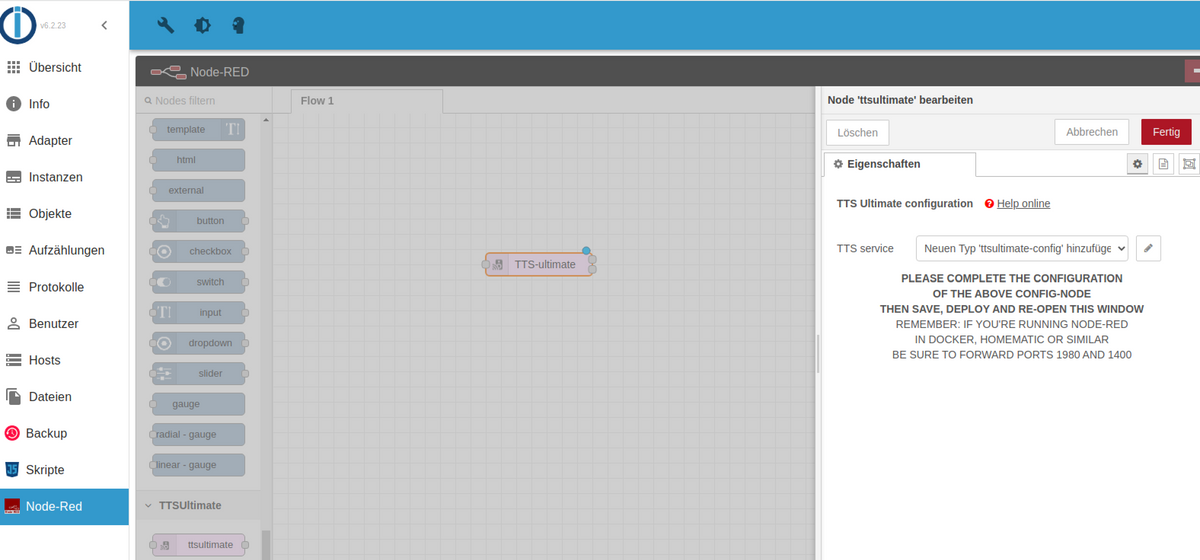
Die Meldungen ansonsten sind aber normal - habe hier mal das Log über die Installation über den Palletten-Manager:
-----------------------------------------------------------
2022-12-12T13:31:52.224Z Installieren : node-red-contrib-tts-ultimate 1.0.52

2022-12-12T13:31:52.226Z npm install --no-audit --no-update-notifier --no-fund --save --save-prefix=~ --production --engine-strict node-red-contrib-tts-ultimate@1.0.52
2022-12-12T13:31:52.406Z [err] npm
2022-12-12T13:31:52.406Z [err]  WARN config production Use `--omit=dev` instead.
2022-12-12T13:31:53.776Z [err] npm
2022-12-12T13:31:53.776Z [err]
2022-12-12T13:31:53.776Z [err] WARN deprecated querystring@0.2.0: The querystring API is considered Legacy. new code should use the URLSearchParams API instead.
2022-12-12T13:31:53.779Z [err] npm
2022-12-12T13:31:53.779Z [err]  WARN deprecated formidable@1.2.2: Please upgrade to latest, formidable@v2 or formidable@v3! Check these notes: https://bit.ly/2ZEqIau
2022-12-12T13:31:53.792Z [err] npm
2022-12-12T13:31:53.792Z [err]  WARN deprecated uuid@3.3.2: Please upgrade  to version 7 or higher.  Older versions may use Math.random() in certain circumstances, which is known to be problematic.  See https://v8.dev/blog/math-random for details.
2022-12-12T13:32:06.791Z [out]
2022-12-12T13:32:06.791Z [out] added 169 packages in 14s
2022-12-12T13:32:06.800Z rc=0
Das heisst diese Math.random Warnung kann man ignorieren.
Bei Dir fehlt nur die Erfolgsmeldung dass 169 Pakete installiert wurden. Vielleicht Geduld?
-
@saranger Also auf meinem Testsystem konnte ich die Node installieren.
Die Meldungen ansonsten sind aber normal - habe hier mal das Log über die Installation über den Palletten-Manager:
-----------------------------------------------------------
2022-12-12T13:31:52.224Z Installieren : node-red-contrib-tts-ultimate 1.0.52

2022-12-12T13:31:52.226Z npm install --no-audit --no-update-notifier --no-fund --save --save-prefix=~ --production --engine-strict node-red-contrib-tts-ultimate@1.0.52
2022-12-12T13:31:52.406Z [err] npm
2022-12-12T13:31:52.406Z [err]  WARN config production Use `--omit=dev` instead.
2022-12-12T13:31:53.776Z [err] npm
2022-12-12T13:31:53.776Z [err]
2022-12-12T13:31:53.776Z [err] WARN deprecated querystring@0.2.0: The querystring API is considered Legacy. new code should use the URLSearchParams API instead.
2022-12-12T13:31:53.779Z [err] npm
2022-12-12T13:31:53.779Z [err]  WARN deprecated formidable@1.2.2: Please upgrade to latest, formidable@v2 or formidable@v3! Check these notes: https://bit.ly/2ZEqIau
2022-12-12T13:31:53.792Z [err] npm
2022-12-12T13:31:53.792Z [err]  WARN deprecated uuid@3.3.2: Please upgrade  to version 7 or higher.  Older versions may use Math.random() in certain circumstances, which is known to be problematic.  See https://v8.dev/blog/math-random for details.
2022-12-12T13:32:06.791Z [out]
2022-12-12T13:32:06.791Z [out] added 169 packages in 14s
2022-12-12T13:32:06.800Z rc=0
Das heisst diese Math.random Warnung kann man ignorieren.
Bei Dir fehlt nur die Erfolgsmeldung dass 169 Pakete installiert wurden. Vielleicht Geduld?
-
@thomas-braun said in contrib tts lässt sich nicht installieren:
iob diag
bash: line 1: syntax error near unexpected token `<' bash: line 1: `<!doctype html><html lang="en"><head><meta charset="utf-8"/><link rel="icon" href="/www/favicon.ico"/><meta name="viewport" content="width=device-width,initial-scale=1"/><meta name="theme-color" content="#2196F3"><meta name="description" content="Remote access to personal ioBroker server via ioBroker.cloud"/><link rel="apple-touch-icon" href="/www/logo192.png"/><link rel="manifest" href="/www/manifest.json"/><title>ioBroker Cloud</title><style>#root,body,html{height:100%;width:100%;display:flex;overflow:hidden}</style><script defer="defer" src="/www/static/js/main.ae982c84.js"></script><link href="/www/static/css/main.59da0ebb.css" rel="stylesheet"></head><body><noscript>You need to enable JavaScript to run this app.</noscript><div id="root"></div></body></html>'anbei mal die Meldung noch im IObroker Log nach dem Versuch diese node zu installieren und das crashen von nodered
FATAL ERROR: Reached heap limit Allocation failed - JavaScript heap out of memory 2022-12-12 14:58:41.183 - warn: node-red.0 (2527) 1: 0xb06730 node::Abort() [node-red] 2022-12-12 14:58:41.183 - warn: node-red.0 (2527) 2: 0xa1b6d0 [node-red] 2022-12-12 14:58:41.184 - warn: node-red.0 (2527) 3: 0xce1e60 v8::Utils::ReportOOMFailure(v8::internal::Isolate*, char const*, bool) [node-red] 2022-12-12 14:58:41.185 - warn: node-red.0 (2527) 4: 0xce2207 v8::internal::V8::FatalProcessOutOfMemory(v8::internal::Isolate*, char const*, bool) [node-red] 2022-12-12 14:58:41.185 - warn: node-red.0 (2527) 5: 0xe99875 [node-red] 2022-12-12 14:58:41.186 - warn: node-red.0 (2527) 6: 0xea953d v8::internal::Heap::CollectGarbage(v8::internal::AllocationSpace, v8::internal::GarbageCollectionReason, v8::GCCallbackFlags) [node-red] 2022-12-12 14:58:41.187 - warn: node-red.0 (2527) 7: 0xeac23e v8::internal::Heap::AllocateRawWithRetryOrFailSlowPath(int, v8::internal::AllocationType, v8::internal::AllocationOrigin, v8::internal::AllocationAlignment) [node-red] 2022-12-12 14:58:41.187 - warn: node-red.0 (2527) 8: 0xe6d4b2 v8::internal::Factory::AllocateRaw(int, v8::internal::AllocationType, v8::internal::AllocationAlignment) [node-red] 2022-12-12 14:58:41.188 - warn: node-red.0 (2527) 9: 0xe65ac4 v8::internal::FactoryBase::AllocateRawWithImmortalMap(int, v8::internal::AllocationType, v8::internal::Map, v8::internal::AllocationAlignment) [node-red] 2022-12-12 14:58:41.189 - warn: node-red.0 (2527) 10: 0xe67d22 v8::internal::FactoryBase::NewDescriptorArray(int, int, v8::internal::AllocationType) [node-red] 2022-12-12 14:58:41.189 - warn: node-red.0 (2527) 11: 0x10b5d77 v8::internal::DescriptorArray::CopyUpTo(v8::internal::Isolate*, v8::internal::Handle, int, int) [node-red] 2022-12-12 14:58:41.191 - warn: node-red.0 (2527) 12: 0x10a3eb1 v8::internal::Map::CopyAddDescriptor(v8::internal::Isolate*, v8::internal::Handle, v8::internal::Descriptor*, v8::internal::TransitionFlag) [node-red] 13: 0x10a446c v8::internal::Map::CopyWithField(v8::internal::Isolate*, v8::internal::Handle, v8::internal::Handle, v8::internal::Handle, v8::internal::PropertyAttributes, v8::internal::PropertyConstness, v8::internal::Representation, v8::internal::TransitionFlag) [node-red] 2022-12-12 14:58:41.192 - warn: node-red.0 (2527) 14: 0x10a6298 v8::internal::Map::TransitionToDataProperty(v8::internal::Isolate*, v8::internal::Handle, v8::internal::Handle, v8::internal::Handle, v8::internal::PropertyAttributes, v8::internal::PropertyConstness, v8::internal::StoreOrigin) [node-red] 2022-12-12 14:58:41.192 - warn: node-red.0 (2527) 15: 0x1094df2 v8::internal::LookupIterator::PrepareTransitionToDataProperty(v8::internal::Handle, v8::internal::Handle, v8::internal::PropertyAttributes, v8::internal::StoreOrigin) [node-red] 2022-12-12 14:58:41.193 - warn: node-red.0 (2527) 16: 0x10b827a v8::internal::Object::AddDataProperty(v8::internal::LookupIterator*, v8::internal::Handle, v8::internal::PropertyAttributes, v8::Maybe, v8::internal::StoreOrigin) [node-red] 2022-12-12 14:58:41.194 - warn: node-red.0 (2527) 17: 0x10bc7a3 v8::internal::Object::SetProperty(v8::internal::LookupIterator*, v8::internal::Handle, v8::internal::StoreOrigin, v8::Maybe) [node-red] 2022-12-12 14:58:41.195 - warn: node-red.0 (2527) 18: 0x11efce6 v8::internal::Runtime::SetObjectProperty(v8::internal::Isolate*, v8::internal::Handle, v8::internal::Handle, v8::internal::Handle, v8::internal::StoreOrigin, v8::Maybe) [node-red] 2022-12-12 14:58:41.195 - warn: node-red.0 (2527) 19: 0x11f1269 v8::internal::Runtime_SetKeyedProperty(int, unsigned long*, v8::internal::Isolate*) [node-red] 2022-12-12 14:58:41.196 - warn: node-red.0 (2527) 20: 0x15da159 [node-red] 2022-12-12 14:58:41.208 - info: node-red.0 (2527) node-red exited with null 2022-12-12 14:58:46.208 - info: node-red.0 (2527) Starting node-red: --max-old-space-size=128 /opt/iobroker/node_modules/node-red/red.js -v --settings /opt/iobroker/iobroker-data/node-red/settings.js 2022-12-12 14:58:49.542 - warn: node-red.0 (2527) 12 Dec 14:58:49 - [warn] Projects disabled : editorTheme.projects.enabled=false 2022-12-12 14:58:50.138 - warn: node-red.0 (2527) <--- Last few GCs ---> [4805:0x5fcdf70] 3865 ms: Mark-sweep (reduce) 125.1 (131.4) -> 124.1 (131.4) MB, 50.5 / 0.0 ms (average mu = 0.147, current mu = 0.057) allocation failure scavenge might not succeed [4805:0x5fcdf70] 3916 ms: Mark-sweep (reduce) 125.2 (131.4) -> 124.3 (131.7) MB, 47.6 / 0.0 ms (average mu = 0.105, current mu = 0.061) allocation failure scavenge might not succeed <--- JS stacktrace ---> FATAL ERROR: Reached heap limit Allocation failed - JavaScript heap out of memory 2022-12-12 14:58:50.138 - warn: node-red.0 (2527) 1: 0xb06730 node::Abort() [node-red] 2022-12-12 14:58:50.139 - warn: node-red.0 (2527) 2: 0xa1b6d0 [node-red] 2022-12-12 14:58:50.140 - warn: node-red.0 (2527) 3: 0xce1e60 v8::Utils::ReportOOMFailure(v8::internal::Isolate*, char const*, bool) [node-red] 2022-12-12 14:58:50.141 - warn: node-red.0 (2527) 4: 0xce2207 v8::internal::V8::FatalProcessOutOfMemory(v8::internal::Isolate*, char const*, bool) [node-red] 2022-12-12 14:58:50.142 - warn: node-red.0 (2527) 5: 0xe99875 [node-red] 2022-12-12 14:58:50.143 - warn: node-red.0 (2527) 6: 0xea953d v8::internal::Heap::CollectGarbage(v8::internal::AllocationSpace, v8::internal::GarbageCollectionReason, v8::GCCallbackFlags) [node-red] 2022-12-12 14:58:50.145 - warn: node-red.0 (2527) 7: 0xeac23e v8::internal::Heap::AllocateRawWithRetryOrFailSlowPath(int, v8::internal::AllocationType, v8::internal::AllocationOrigin, v8::internal::AllocationAlignment) [node-red] 2022-12-12 14:58:50.146 - warn: node-red.0 (2527) 8: 0xe6d4b2 v8::internal::Factory::AllocateRaw(int, v8::internal::AllocationType, v8::internal::AllocationAlignment) [node-red] 2022-12-12 14:58:50.147 - warn: node-red.0 (2527) 9: 0xe67dcc v8::internal::FactoryBase::AllocateRawArray(int, v8::internal::AllocationType) [node-red] 2022-12-12 14:58:50.148 - warn: node-red.0 (2527) 10: 0xe67ea5 v8::internal::FactoryBase::NewFixedArrayWithFiller(v8::internal::Handle, int, v8::internal::Handle, v8::internal::AllocationType) [node-red] 2022-12-12 14:58:50.149 - warn: node-red.0 (2527) 11: 0x1016382 [node-red] 2022-12-12 14:58:50.150 - warn: node-red.0 (2527) 12: 0x101650c [node-red] 2022-12-12 14:58:50.151 - warn: node-red.0 (2527) 13: 0x1016668 [node-red] 2022-12-12 14:58:50.151 - warn: node-red.0 (2527) 14: 0x10744b5 v8::internal::JSObject::AddDataElement(v8::internal::Handle, unsigned int, v8::internal::Handle, v8::internal::PropertyAttributes) [node-red] 2022-12-12 14:58:50.152 - warn: node-red.0 (2527) 15: 0x10b820e v8::internal::Object::AddDataProperty(v8::internal::LookupIterator*, v8::internal::Handle, v8::internal::PropertyAttributes, v8::Maybe, v8::internal::StoreOrigin) [node-red] 2022-12-12 14:58:50.153 - warn: node-red.0 (2527) 16: 0x10bc7a3 v8::internal::Object::SetProperty(v8::internal::LookupIterator*, v8::internal::Handle, v8::internal::StoreOrigin, v8::Maybe) [node-red] 2022-12-12 14:58:50.154 - warn: node-red.0 (2527) 17: 0x11efce6 v8::internal::Runtime::SetObjectProperty(v8::internal::Isolate*, v8::internal::Handle, v8::internal::Handle, v8::internal::Handle, v8::internal::StoreOrigin, v8::Maybe) [node-red] 2022-12-12 14:58:50.154 - warn: node-red.0 (2527) 18: 0x11f1269 v8::internal::Runtime_SetKeyedProperty(int, unsigned long*, v8::internal::Isolate*) [node-red] 2022-12-12 14:58:50.155 - warn: node-red.0 (2527) 19: 0x15da159 [node-red] 2022-12-12 14:58:50.168 - info: node-red.0 (2527) node-red exited with null 2022-12-12 14:58:55.168 - info: node-red.0 (2527) Starting node-red: --max-old-space-size=128 /opt/iobroker/node_modules/node-red/red.js -v --settings /opt/iobroker/iobroker-data/node-red/settings.js 2022-12-12 14:58:58.450 - warn: node-red.0 (2527) 12 Dec 14:58:58 - [warn] Projects disabled : editorTheme.projects.enabled=false 2022-12-12 14:58:58.949 - warn: node-red.0 (2527) <--- Last few GCs ---> [4827:0x6ac1f70] 3718 ms: Mark-sweep 125.1 (133.9) -> 123.5 (134.4) MB, 44.0 / 0.0 ms (average mu = 0.240, current mu = 0.109) allocation failure scavenge might not succeed [4827:0x6ac1f70] 3767 ms: Mark-sweep 125.6 (134.4) -> 124.0 (134.9) MB, 43.5 / 0.0 ms (average mu = 0.177, current mu = 0.105) allocation failure scavenge might not succeed <--- JS stacktrace ---> FATAL ERROR: Reached heap limit Allocation failed - JavaScript heap out of memory 2022-12-12 14:58:58.951 - warn: node-red.0 (2527) 1: 0xb06730 node::Abort() [node-red] 2022-12-12 14:58:58.951 - warn: node-red.0 (2527) 2: 0xa1b6d0 [node-red] 3: 0xce1e60 v8::Utils::ReportOOMFailure(v8::internal::Isolate*, char const*, bool) [node-red] 2022-12-12 14:58:58.951 - warn: node-red.0 (2527) 4: 0xce2207 v8::internal::V8::FatalProcessOutOfMemory(v8::internal::Isolate*, char const*, bool) [node-red] 2022-12-12 14:58:58.955 - warn: node-red.0 (2527) 5: 0xe99875 [node-red] 6: 0xea953d v8::internal::Heap::CollectGarbage(v8::internal::AllocationSpace, v8::internal::GarbageCollectionReason, v8::GCCallbackFlags) [node-red] 7: 0xeac23e v8::internal::Heap::AllocateRawWithRetryOrFailSlowPath(int, v8::internal::AllocationType, v8::internal::AllocationOrigin, v8::internal::AllocationAlignment) [node-red] 8: 0xe6d77a v8::internal::Factory::NewFillerObject(int, bool, v8::internal::AllocationType, v8::internal::AllocationOrigin) [node-red] 9: 0x11e64e6 v8::internal::Runtime_AllocateInYoungGeneration(int, unsigned long*, v8::internal::Isolate*) [node-red] 10: 0x15da159 [node-red] 2022-12-12 14:58:58.968 - info: node-red.0 (2527) node-red exited with null 2022-12-12 14:59:00.775 - error: rpi2.0 (2689) Cannot evaluate: Filesystem 1K-blocks Used Available Use% Mounted on /dev/loop0 16337788 3655048 11827496 24% / /1024 2022-12-12 14:59:00.776 - error: rpi2.0 (2689) Cannot evaluate: Filesystem 1K-blocks Used Available Use% Mounted on /dev/loop0 16337788 3655048 11827496 24% / -
anbei mal die Meldung noch im IObroker Log nach dem Versuch diese node zu installieren und das crashen von nodered
FATAL ERROR: Reached heap limit Allocation failed - JavaScript heap out of memory 2022-12-12 14:58:41.183 - warn: node-red.0 (2527) 1: 0xb06730 node::Abort() [node-red] 2022-12-12 14:58:41.183 - warn: node-red.0 (2527) 2: 0xa1b6d0 [node-red] 2022-12-12 14:58:41.184 - warn: node-red.0 (2527) 3: 0xce1e60 v8::Utils::ReportOOMFailure(v8::internal::Isolate*, char const*, bool) [node-red] 2022-12-12 14:58:41.185 - warn: node-red.0 (2527) 4: 0xce2207 v8::internal::V8::FatalProcessOutOfMemory(v8::internal::Isolate*, char const*, bool) [node-red] 2022-12-12 14:58:41.185 - warn: node-red.0 (2527) 5: 0xe99875 [node-red] 2022-12-12 14:58:41.186 - warn: node-red.0 (2527) 6: 0xea953d v8::internal::Heap::CollectGarbage(v8::internal::AllocationSpace, v8::internal::GarbageCollectionReason, v8::GCCallbackFlags) [node-red] 2022-12-12 14:58:41.187 - warn: node-red.0 (2527) 7: 0xeac23e v8::internal::Heap::AllocateRawWithRetryOrFailSlowPath(int, v8::internal::AllocationType, v8::internal::AllocationOrigin, v8::internal::AllocationAlignment) [node-red] 2022-12-12 14:58:41.187 - warn: node-red.0 (2527) 8: 0xe6d4b2 v8::internal::Factory::AllocateRaw(int, v8::internal::AllocationType, v8::internal::AllocationAlignment) [node-red] 2022-12-12 14:58:41.188 - warn: node-red.0 (2527) 9: 0xe65ac4 v8::internal::FactoryBase::AllocateRawWithImmortalMap(int, v8::internal::AllocationType, v8::internal::Map, v8::internal::AllocationAlignment) [node-red] 2022-12-12 14:58:41.189 - warn: node-red.0 (2527) 10: 0xe67d22 v8::internal::FactoryBase::NewDescriptorArray(int, int, v8::internal::AllocationType) [node-red] 2022-12-12 14:58:41.189 - warn: node-red.0 (2527) 11: 0x10b5d77 v8::internal::DescriptorArray::CopyUpTo(v8::internal::Isolate*, v8::internal::Handle, int, int) [node-red] 2022-12-12 14:58:41.191 - warn: node-red.0 (2527) 12: 0x10a3eb1 v8::internal::Map::CopyAddDescriptor(v8::internal::Isolate*, v8::internal::Handle, v8::internal::Descriptor*, v8::internal::TransitionFlag) [node-red] 13: 0x10a446c v8::internal::Map::CopyWithField(v8::internal::Isolate*, v8::internal::Handle, v8::internal::Handle, v8::internal::Handle, v8::internal::PropertyAttributes, v8::internal::PropertyConstness, v8::internal::Representation, v8::internal::TransitionFlag) [node-red] 2022-12-12 14:58:41.192 - warn: node-red.0 (2527) 14: 0x10a6298 v8::internal::Map::TransitionToDataProperty(v8::internal::Isolate*, v8::internal::Handle, v8::internal::Handle, v8::internal::Handle, v8::internal::PropertyAttributes, v8::internal::PropertyConstness, v8::internal::StoreOrigin) [node-red] 2022-12-12 14:58:41.192 - warn: node-red.0 (2527) 15: 0x1094df2 v8::internal::LookupIterator::PrepareTransitionToDataProperty(v8::internal::Handle, v8::internal::Handle, v8::internal::PropertyAttributes, v8::internal::StoreOrigin) [node-red] 2022-12-12 14:58:41.193 - warn: node-red.0 (2527) 16: 0x10b827a v8::internal::Object::AddDataProperty(v8::internal::LookupIterator*, v8::internal::Handle, v8::internal::PropertyAttributes, v8::Maybe, v8::internal::StoreOrigin) [node-red] 2022-12-12 14:58:41.194 - warn: node-red.0 (2527) 17: 0x10bc7a3 v8::internal::Object::SetProperty(v8::internal::LookupIterator*, v8::internal::Handle, v8::internal::StoreOrigin, v8::Maybe) [node-red] 2022-12-12 14:58:41.195 - warn: node-red.0 (2527) 18: 0x11efce6 v8::internal::Runtime::SetObjectProperty(v8::internal::Isolate*, v8::internal::Handle, v8::internal::Handle, v8::internal::Handle, v8::internal::StoreOrigin, v8::Maybe) [node-red] 2022-12-12 14:58:41.195 - warn: node-red.0 (2527) 19: 0x11f1269 v8::internal::Runtime_SetKeyedProperty(int, unsigned long*, v8::internal::Isolate*) [node-red] 2022-12-12 14:58:41.196 - warn: node-red.0 (2527) 20: 0x15da159 [node-red] 2022-12-12 14:58:41.208 - info: node-red.0 (2527) node-red exited with null 2022-12-12 14:58:46.208 - info: node-red.0 (2527) Starting node-red: --max-old-space-size=128 /opt/iobroker/node_modules/node-red/red.js -v --settings /opt/iobroker/iobroker-data/node-red/settings.js 2022-12-12 14:58:49.542 - warn: node-red.0 (2527) 12 Dec 14:58:49 - [warn] Projects disabled : editorTheme.projects.enabled=false 2022-12-12 14:58:50.138 - warn: node-red.0 (2527) <--- Last few GCs ---> [4805:0x5fcdf70] 3865 ms: Mark-sweep (reduce) 125.1 (131.4) -> 124.1 (131.4) MB, 50.5 / 0.0 ms (average mu = 0.147, current mu = 0.057) allocation failure scavenge might not succeed [4805:0x5fcdf70] 3916 ms: Mark-sweep (reduce) 125.2 (131.4) -> 124.3 (131.7) MB, 47.6 / 0.0 ms (average mu = 0.105, current mu = 0.061) allocation failure scavenge might not succeed <--- JS stacktrace ---> FATAL ERROR: Reached heap limit Allocation failed - JavaScript heap out of memory 2022-12-12 14:58:50.138 - warn: node-red.0 (2527) 1: 0xb06730 node::Abort() [node-red] 2022-12-12 14:58:50.139 - warn: node-red.0 (2527) 2: 0xa1b6d0 [node-red] 2022-12-12 14:58:50.140 - warn: node-red.0 (2527) 3: 0xce1e60 v8::Utils::ReportOOMFailure(v8::internal::Isolate*, char const*, bool) [node-red] 2022-12-12 14:58:50.141 - warn: node-red.0 (2527) 4: 0xce2207 v8::internal::V8::FatalProcessOutOfMemory(v8::internal::Isolate*, char const*, bool) [node-red] 2022-12-12 14:58:50.142 - warn: node-red.0 (2527) 5: 0xe99875 [node-red] 2022-12-12 14:58:50.143 - warn: node-red.0 (2527) 6: 0xea953d v8::internal::Heap::CollectGarbage(v8::internal::AllocationSpace, v8::internal::GarbageCollectionReason, v8::GCCallbackFlags) [node-red] 2022-12-12 14:58:50.145 - warn: node-red.0 (2527) 7: 0xeac23e v8::internal::Heap::AllocateRawWithRetryOrFailSlowPath(int, v8::internal::AllocationType, v8::internal::AllocationOrigin, v8::internal::AllocationAlignment) [node-red] 2022-12-12 14:58:50.146 - warn: node-red.0 (2527) 8: 0xe6d4b2 v8::internal::Factory::AllocateRaw(int, v8::internal::AllocationType, v8::internal::AllocationAlignment) [node-red] 2022-12-12 14:58:50.147 - warn: node-red.0 (2527) 9: 0xe67dcc v8::internal::FactoryBase::AllocateRawArray(int, v8::internal::AllocationType) [node-red] 2022-12-12 14:58:50.148 - warn: node-red.0 (2527) 10: 0xe67ea5 v8::internal::FactoryBase::NewFixedArrayWithFiller(v8::internal::Handle, int, v8::internal::Handle, v8::internal::AllocationType) [node-red] 2022-12-12 14:58:50.149 - warn: node-red.0 (2527) 11: 0x1016382 [node-red] 2022-12-12 14:58:50.150 - warn: node-red.0 (2527) 12: 0x101650c [node-red] 2022-12-12 14:58:50.151 - warn: node-red.0 (2527) 13: 0x1016668 [node-red] 2022-12-12 14:58:50.151 - warn: node-red.0 (2527) 14: 0x10744b5 v8::internal::JSObject::AddDataElement(v8::internal::Handle, unsigned int, v8::internal::Handle, v8::internal::PropertyAttributes) [node-red] 2022-12-12 14:58:50.152 - warn: node-red.0 (2527) 15: 0x10b820e v8::internal::Object::AddDataProperty(v8::internal::LookupIterator*, v8::internal::Handle, v8::internal::PropertyAttributes, v8::Maybe, v8::internal::StoreOrigin) [node-red] 2022-12-12 14:58:50.153 - warn: node-red.0 (2527) 16: 0x10bc7a3 v8::internal::Object::SetProperty(v8::internal::LookupIterator*, v8::internal::Handle, v8::internal::StoreOrigin, v8::Maybe) [node-red] 2022-12-12 14:58:50.154 - warn: node-red.0 (2527) 17: 0x11efce6 v8::internal::Runtime::SetObjectProperty(v8::internal::Isolate*, v8::internal::Handle, v8::internal::Handle, v8::internal::Handle, v8::internal::StoreOrigin, v8::Maybe) [node-red] 2022-12-12 14:58:50.154 - warn: node-red.0 (2527) 18: 0x11f1269 v8::internal::Runtime_SetKeyedProperty(int, unsigned long*, v8::internal::Isolate*) [node-red] 2022-12-12 14:58:50.155 - warn: node-red.0 (2527) 19: 0x15da159 [node-red] 2022-12-12 14:58:50.168 - info: node-red.0 (2527) node-red exited with null 2022-12-12 14:58:55.168 - info: node-red.0 (2527) Starting node-red: --max-old-space-size=128 /opt/iobroker/node_modules/node-red/red.js -v --settings /opt/iobroker/iobroker-data/node-red/settings.js 2022-12-12 14:58:58.450 - warn: node-red.0 (2527) 12 Dec 14:58:58 - [warn] Projects disabled : editorTheme.projects.enabled=false 2022-12-12 14:58:58.949 - warn: node-red.0 (2527) <--- Last few GCs ---> [4827:0x6ac1f70] 3718 ms: Mark-sweep 125.1 (133.9) -> 123.5 (134.4) MB, 44.0 / 0.0 ms (average mu = 0.240, current mu = 0.109) allocation failure scavenge might not succeed [4827:0x6ac1f70] 3767 ms: Mark-sweep 125.6 (134.4) -> 124.0 (134.9) MB, 43.5 / 0.0 ms (average mu = 0.177, current mu = 0.105) allocation failure scavenge might not succeed <--- JS stacktrace ---> FATAL ERROR: Reached heap limit Allocation failed - JavaScript heap out of memory 2022-12-12 14:58:58.951 - warn: node-red.0 (2527) 1: 0xb06730 node::Abort() [node-red] 2022-12-12 14:58:58.951 - warn: node-red.0 (2527) 2: 0xa1b6d0 [node-red] 3: 0xce1e60 v8::Utils::ReportOOMFailure(v8::internal::Isolate*, char const*, bool) [node-red] 2022-12-12 14:58:58.951 - warn: node-red.0 (2527) 4: 0xce2207 v8::internal::V8::FatalProcessOutOfMemory(v8::internal::Isolate*, char const*, bool) [node-red] 2022-12-12 14:58:58.955 - warn: node-red.0 (2527) 5: 0xe99875 [node-red] 6: 0xea953d v8::internal::Heap::CollectGarbage(v8::internal::AllocationSpace, v8::internal::GarbageCollectionReason, v8::GCCallbackFlags) [node-red] 7: 0xeac23e v8::internal::Heap::AllocateRawWithRetryOrFailSlowPath(int, v8::internal::AllocationType, v8::internal::AllocationOrigin, v8::internal::AllocationAlignment) [node-red] 8: 0xe6d77a v8::internal::Factory::NewFillerObject(int, bool, v8::internal::AllocationType, v8::internal::AllocationOrigin) [node-red] 9: 0x11e64e6 v8::internal::Runtime_AllocateInYoungGeneration(int, unsigned long*, v8::internal::Isolate*) [node-red] 10: 0x15da159 [node-red] 2022-12-12 14:58:58.968 - info: node-red.0 (2527) node-red exited with null 2022-12-12 14:59:00.775 - error: rpi2.0 (2689) Cannot evaluate: Filesystem 1K-blocks Used Available Use% Mounted on /dev/loop0 16337788 3655048 11827496 24% / /1024 2022-12-12 14:59:00.776 - error: rpi2.0 (2689) Cannot evaluate: Filesystem 1K-blocks Used Available Use% Mounted on /dev/loop0 16337788 3655048 11827496 24% / -
@mickym nein du meinst den ram wenn ich im iobroker auf den noderedadapter gehe? Wieviel sollte man da geben?
Wie bist du denn da eigentlich insgesamt unterwegs?
free -ht sudo ln -s /usr/bin/node /usr/bin/nodejs &> /dev/null uname -m && test -f /opt/scripts/.docker_config/.thisisdocker && echo "Docker-Installation" || echo "Kein Docker" && type -P nodejs node npm && nodejs -v && node -v && npm -v && iob -v && whoami && groups && echo $XDG_SESSION_TYPE && echo $DESKTOP_SESSION && pwd && sudo apt update &> /dev/null && sudo apt update && apt policy nodejs -
@mickym nein du meinst den ram wenn ich im iobroker auf den noderedadapter gehe? Wieviel sollte man da geben?
-
@thomas-braun said in contrib tts lässt sich nicht installieren:
saranger@ioBroker:~$ free -ht
               total        used        free      shared  buff/cache   available
Mem:           4.0Gi       1.3Gi       2.4Gi       0.0Ki       293Mi       2.7Gi
Swap:          512Mi          0B       512Mi
Total:         4.5Gi       1.3Gi       2.9Gi
saranger@ioBroker:~$ sudo ln -s /usr/bin/node /usr/bin/nodejs &> /dev/null
[sudo] password for saranger:
Sorry, try again.
[sudo] password for saranger:
saranger@ioBroker:~$ uname -m && test -f /opt/scripts/.docker_config/.thisisdocker && echo "Docker-Installation" || echo "Kein Docker" && type -P nodejs node npm && nodejs -v && node -v && npm -v && iob -v && whoami && groups && echo $XDG_SESSION_TYPE && echo $DESKTOP_SESSION && pwd && sudo apt update &> /dev/null && sudo apt update && apt policy nodejs
x86_64
Kein Docker
/usr/bin/nodejs
/usr/bin/node
/usr/bin/npm
v16.18.1
v16.18.1
8.19.2
4.0.23
saranger
saranger sudo iobroker


/home/saranger
Hit:1 https://deb.nodesource.com/node_16.x jammy InRelease
Hit:2 http://archive.ubuntu.com/ubuntu jammy InRelease
Get:3 http://archive.ubuntu.com/ubuntu jammy-updates InRelease [114 kB]
Get:4 http://archive.ubuntu.com/ubuntu jammy-security InRelease [110 kB]
Fetched 224 kB in 1s (228 kB/s)
Reading package lists... Done
Building dependency tree... Done
Reading state information... Done
All packages are up to date.
nodejs:
  Installed: 16.18.1-deb-1nodesource1
  Candidate: 16.18.1-deb-1nodesource1
  Version table:
 *** 16.18.1-deb-1nodesource1 500
        500 https://deb.nodesource.com/node_16.x jammy/main amd64 Packages
        100 /var/lib/dpkg/status
     12.22.9~dfsg-1ubuntu3 500
        500 http://archive.ubuntu.com/ubuntu jammy/universe amd64 Packages
saranger@ioBroker:~$


Hey! Du scheinst an dieser Unterhaltung interessiert zu sein, hast aber noch kein Konto.
Hast du es satt, bei jedem Besuch durch die gleichen Beiträge zu scrollen? Wenn du dich für ein Konto anmeldest, kommst du immer genau dorthin zurück, wo du zuvor warst, und kannst dich über neue Antworten benachrichtigen lassen (entweder per E-Mail oder Push-Benachrichtigung). Du kannst auch Lesezeichen speichern und Beiträge positiv bewerten, um anderen Community-Mitgliedern deine Wertschätzung zu zeigen.
Mit deinem Input könnte dieser Beitrag noch besser werden 💗
Registrieren AnmeldenSupport us
361
Online33.0k
Benutzer83.6k
Themen1.3m
Beiträge