Skip to content
  • Home
  • Aktuell
  • Tags
  • 0 Ungelesen 0
  • Kategorien
  • Unreplied
  • Beliebt
  • GitHub
  • Docu
  • Hilfe
Skins
  • Light
  • Brite
  • Cerulean
  • Cosmo
  • Flatly
  • Journal
  • Litera
  • Lumen
  • Lux
  • Materia
  • Minty
  • Morph
  • Pulse
  • Sandstone
  • Simplex
  • Sketchy
  • Spacelab
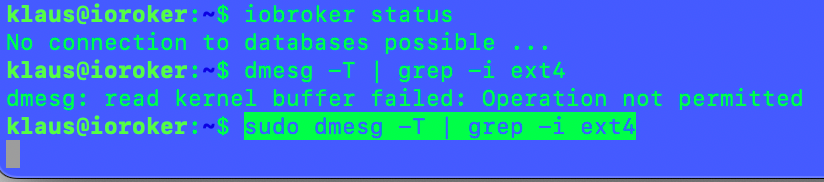
  • United
  • Yeti
  • Zephyr
  • Dark
  • Cyborg
  • Darkly
  • Quartz
  • Slate
  • Solar
  • Superhero
  • Vapor

  • Standard: (Kein Skin)
  • Kein Skin
Einklappen
ioBroker Logo

Community Forum

donate donate
  1. ioBroker Community Home
  2. Deutsch
  3. ioBroker Allgemein
  4. ioBroker nichts geht mehr

NEWS

  • Neuer Blogbeitrag: Monatsrückblick - Dezember 2025 🎄
    BluefoxB
    Bluefox
    11
    1
    328

  • Weihnachtsangebot 2025! 🎄
    BluefoxB
    Bluefox
    24
    1
    1.5k

  • UPDATE 31.10.: Amazon Alexa - ioBroker Skill läuft aus ?
    apollon77A
    apollon77
    48
    3
    9.5k

ioBroker nichts geht mehr
Geplant Angeheftet Gesperrt Verschoben ioBroker Allgemein
43 Beiträge 4 Kommentatoren 3.9k Aufrufe 3 Watching
  • Älteste zuerst
  • Neuste zuerst
  • Meiste Stimmen
Antworten
  • In einem neuen Thema antworten
Anmelden zum Antworten
Dieses Thema wurde gelöscht. Nur Nutzer mit entsprechenden Rechten können es sehen.
  • I iKlaus

    @thomas-braun

    jetzt geht nichts mehr :(

    gibt es PM möglichkeit ???

    Thomas BraunT Online
    Thomas BraunT Online
    Thomas Braun
    Most Active
    schrieb am zuletzt editiert von Thomas Braun
    #18

    @iklaus

    Rückmeldungen vom System hier rein.

    Linux-Werkzeugkasten:
    https://forum.iobroker.net/topic/42952/der-kleine-iobroker-linux-werkzeugkasten
    NodeJS Fixer Skript:
    https://forum.iobroker.net/topic/68035/iob-node-fix-skript
    iob_diag: curl -sLf -o diag.sh https://iobroker.net/diag.sh && bash diag.sh

    I 1 Antwort Letzte Antwort
    0
    • Thomas BraunT Thomas Braun

      @iklaus

      Rückmeldungen vom System hier rein.

      I Offline
      I Offline
      iKlaus
      schrieb am zuletzt editiert von
      #19

      @thomas-braun

      klaus@ioroker:/opt/iobroker$ sudo ln -s /usr/bin/node /usr/bin/nodejs
      ln: failed to create symbolic link '/usr/bin/nodejs': File exists
      klaus@ioroker:/opt/iobroker$

      Thomas BraunT 1 Antwort Letzte Antwort
      0
      • I iKlaus

        @thomas-braun

        klaus@ioroker:/opt/iobroker$ sudo ln -s /usr/bin/node /usr/bin/nodejs
        ln: failed to create symbolic link '/usr/bin/nodejs': File exists
        klaus@ioroker:/opt/iobroker$

        Thomas BraunT Online
        Thomas BraunT Online
        Thomas Braun
        Most Active
        schrieb am zuletzt editiert von Thomas Braun
        #20

        @iklaus

        Bitte CodeTags verwenden.
        Die Meldung ist aber i.O., kein Problem.

        Du machst übrigens keine Erstinstallation, nodejs@14 ist ja schon installiert.

        Linux-Werkzeugkasten:
        https://forum.iobroker.net/topic/42952/der-kleine-iobroker-linux-werkzeugkasten
        NodeJS Fixer Skript:
        https://forum.iobroker.net/topic/68035/iob-node-fix-skript
        iob_diag: curl -sLf -o diag.sh https://iobroker.net/diag.sh && bash diag.sh

        I 1 Antwort Letzte Antwort
        0
        • Thomas BraunT Thomas Braun

          @iklaus

          Bitte CodeTags verwenden.
          Die Meldung ist aber i.O., kein Problem.

          Du machst übrigens keine Erstinstallation, nodejs@14 ist ja schon installiert.

          I Offline
          I Offline
          iKlaus
          schrieb am zuletzt editiert von
          #21

          @thomas-braun

          Nein das system läuft schon einige Jahre und das recht stabiel !

          Jetzt startet das system und dann geht es nicht weiter und dann kommt

          Timeout.png

          das war es dann auch

          Skript v.0.0.8
          
          *** BASE SYSTEM ***
          Architecture: 	x86_64
          Docker: 	false
          Virtualization: none
          Distributor ID:	Ubuntu
          Description:	Ubuntu 22.04.1 LTS
          Release:	22.04
          Codename:	jammy
          
          PRETTY_NAME="Ubuntu 22.04.1 LTS"
          NAME="Ubuntu"
          VERSION_ID="22.04"
          VERSION="22.04.1 LTS (Jammy Jellyfish)"
          VERSION_CODENAME=jammy
          ID=ubuntu
          ID_LIKE=debian
          HOME_URL="https://www.ubuntu.com/"
          SUPPORT_URL="https://help.ubuntu.com/"
          BUG_REPORT_URL="https://bugs.launchpad.net/ubuntu/"
          PRIVACY_POLICY_URL="https://www.ubuntu.com/legal/terms-and-policies/privacy-policy"
          UBUNTU_CODENAME=jammy
          
          Systemuptime and Load:
           19:17:46 up 7 min,  1 user,  load average: 3.97, 2.22, 0.94
          CPU threads: 4
          
          *** Time and Time Zones ***
          Sun Dec  4 18:17:46 UTC 2022
          Sun Dec  4 19:17:46 CET 2022
          CET +0100
          Europe/Berlin
          
          *** User and Groups ***
          klaus
          /home/klaus
          klaus adm dialout cdrom sudo dip plugdev lxd iobroker
          
          *** X-Server-Setup ***
          X-Server: 	false
          Desktop: 	
          Terminal: 	tty
          
          *** MEMORY ***
                         total        used        free      shared  buff/cache   available
          Mem:            5.8G        2.5G        2.0G        1.0M        1.3G        3.0G
          Swap:           4.1G          0B        4.1G
          Total:          9.9G        2.5G        6.1G
          
                   5783 M total memory
                   2509 M used memory
                    646 M active memory
                   2610 M inactive memory
                   1967 M free memory
                    243 M buffer memory
                   1062 M swap cache
                   4095 M total swap
                      0 M used swap
                   4095 M free swap
          
          *** FILESYSTEM ***
          Filesystem     Type   Size  Used Avail Use% Mounted on
          tmpfs          tmpfs  579M  1.6M  577M   1% /run
          /dev/mmcblk1p2 ext4    57G   23G   31G  43% /
          tmpfs          tmpfs  2.9G     0  2.9G   0% /dev/shm
          tmpfs          tmpfs  5.0M     0  5.0M   0% /run/lock
          /dev/mmcblk1p1 vfat   511M  5.3M  506M   2% /boot/efi
          tmpfs          tmpfs  579M  4.0K  579M   1% /run/user/1000
          
          Show mounted filesystems (real ones only):
          TARGET             SOURCE         FSTYPE  OPTIONS
          /                  /dev/mmcblk1p2 ext4    rw,relatime
          |-/snap/core/14399 /dev/loop0     squashf ro,nodev,relatime,errors=continue
          `-/boot/efi        /dev/mmcblk1p1 vfat    rw,relatime,fmask=0022,dmask=0022,code
          
          Files in neuralgic directories:
          
          /var:
          4.0G	/var/
          3.2G	/var/log/journal/ebc6c748637145c2958424d6cf2be70d
          3.2G	/var/log/journal
          3.2G	/var/log
          678M	/var/lib
          
          /opt/iobroker/backups:
          50M	/opt/iobroker/backups/
          
          /opt/iobroker/iobroker-data:
          613M	/opt/iobroker/iobroker-data/
          290M	/opt/iobroker/iobroker-data/files
          150M	/opt/iobroker/iobroker-data/backup-objects
          48M	/opt/iobroker/iobroker-data/files/javascript.admin
          44M	/opt/iobroker/iobroker-data/node-red
          
          The five largest files in iobroker-data are:
          54M	/opt/iobroker/iobroker-data/objects.jsonl
          52M	/opt/iobroker/iobroker-data/states.jsonl
          27M	/opt/iobroker/iobroker-data/files/material/static/js/2.73100bd6.chunk.js.map
          21M	/opt/iobroker/iobroker-data/files/devices.admin/static/js/2.00a59c14.chunk.js.map
          12M	/opt/iobroker/iobroker-data/files/javascript.admin/static/js/790.1eb1f33b.chunk.js.map
          
          *** NodeJS-Installation ***
          
          /usr/bin/nodejs 	v16.18.1
          /usr/bin/node 		v16.18.1
          /usr/bin/npm 		8.19.2
          
          nodejs:
            Installed: 16.18.1-deb-1nodesource1
            Candidate: 16.18.1-deb-1nodesource1
            Version table:
           *** 16.18.1-deb-1nodesource1 500
                  500 https://deb.nodesource.com/node_16.x jammy/main amd64 Packages
                  100 /var/lib/dpkg/status
               12.22.9~dfsg-1ubuntu3 500
                  500 http://archive.ubuntu.com/ubuntu jammy/universe amd64 Packages
          
          Temp directories causing npm8 problem: 0
          
          *** ioBroker-Installation ***
          
          ioBroker Status
          No connection to databases possible ...
          
          Core adapters versions
          js-controller: 	4.0.23
          admin: 		6.2.23
          
          Adapters from github: 	3
          
          Enabled adapters with bindings
          
          ioBroker-Repositories
          No connection to databases possible ...
          
          ioBroker-Instances
          No connection to databases possible ...
          
          Objects and States
          Please stand by - This may take a while
          Objects: 	1
          States: 	1
          *** OS-Repositories and Updates ***
          Hit:1 https://deb.nodesource.com/node_16.x jammy InRelease
          Hit:2 https://dl.yarnpkg.com/debian stable InRelease                
          Get:3 http://security.ubuntu.com/ubuntu jammy-security InRelease [110 kB]
          Hit:4 http://archive.ubuntu.com/ubuntu jammy InRelease   
          Get:5 http://archive.ubuntu.com/ubuntu jammy-updates InRelease [114 kB]
          Fetched 224 kB in 1s (186 kB/s)                                     
          Reading package lists... Done
          Pending Updates: 0
          
          *** Listening Ports ***
          Active Internet connections (only servers)
          Proto Recv-Q Send-Q Local Address           Foreign Address         State       User       Inode      PID/Program name    
          tcp        0      0 127.0.0.1:9000          0.0.0.0:*               LISTEN      1001       37487      2848/iobroker.js-co 
          tcp        0      0 127.0.0.1:9001          0.0.0.0:*               LISTEN      1001       38387      2848/iobroker.js-co 
          tcp        0      0 0.0.0.0:1885            0.0.0.0:*               LISTEN      1001       38490      2936/io.mqtt.0      
          tcp        0      0 0.0.0.0:1886            0.0.0.0:*               LISTEN      1001       38491      2936/io.mqtt.0      
          tcp        0      0 0.0.0.0:22              0.0.0.0:*               LISTEN      0          28159      703/sshd: /usr/sbin 
          tcp        0      0 0.0.0.0:111             0.0.0.0:*               LISTEN      0          21682      1/init              
          tcp        0      0 0.0.0.0:3306            0.0.0.0:*               LISTEN      112        28815      787/mariadbd        
          tcp        0      0 127.0.0.1:6379          0.0.0.0:*               LISTEN      120        3912       651/redis-server 12 
          tcp        0      0 127.0.0.53:53           0.0.0.0:*               LISTEN      101        27948      626/systemd-resolve 
          tcp6       0      0 :::22                   :::*                    LISTEN      0          28161      703/sshd: /usr/sbin 
          tcp6       0      0 :::111                  :::*                    LISTEN      0          21683      1/init              
          tcp6       0      0 :::3306                 :::*                    LISTEN      112        28816      787/mariadbd        
          tcp6       0      0 :::7999                 :::*                    LISTEN      1001       36518      3014/io.geofency.0  
          tcp6       0      0 ::1:6379                :::*                    LISTEN      120        3913       651/redis-server 12 
          tcp6       0      0 :::8081                 :::*                    LISTEN      1001       39020      2866/io.admin.0     
          udp        0      0 127.0.0.53:53           0.0.0.0:*                           101        27947      626/systemd-resolve 
          udp        0      0 192.168.24.53:68        0.0.0.0:*                           100        27952      624/systemd-network 
          udp        0      0 0.0.0.0:111             0.0.0.0:*                           0          20644      1/init              
          udp        0      0 0.0.0.0:5353            0.0.0.0:*                           111        27326      638/avahi-daemon: r 
          udp        0      0 0.0.0.0:39045           0.0.0.0:*                           111        27328      638/avahi-daemon: r 
          udp6       0      0 :::52930                :::*                                111        27329      638/avahi-daemon: r 
          udp6       0      0 :::111                  :::*                                0          3389       1/init              
          udp6       0      0 :::5353                 :::*                                111        27327      638/avahi-daemon: r 
          
          
          Thomas BraunT 1 Antwort Letzte Antwort
          0
          • I iKlaus

            @thomas-braun

            Nein das system läuft schon einige Jahre und das recht stabiel !

            Jetzt startet das system und dann geht es nicht weiter und dann kommt

            Timeout.png

            das war es dann auch

            Skript v.0.0.8
            
            *** BASE SYSTEM ***
            Architecture: 	x86_64
            Docker: 	false
            Virtualization: none
            Distributor ID:	Ubuntu
            Description:	Ubuntu 22.04.1 LTS
            Release:	22.04
            Codename:	jammy
            
            PRETTY_NAME="Ubuntu 22.04.1 LTS"
            NAME="Ubuntu"
            VERSION_ID="22.04"
            VERSION="22.04.1 LTS (Jammy Jellyfish)"
            VERSION_CODENAME=jammy
            ID=ubuntu
            ID_LIKE=debian
            HOME_URL="https://www.ubuntu.com/"
            SUPPORT_URL="https://help.ubuntu.com/"
            BUG_REPORT_URL="https://bugs.launchpad.net/ubuntu/"
            PRIVACY_POLICY_URL="https://www.ubuntu.com/legal/terms-and-policies/privacy-policy"
            UBUNTU_CODENAME=jammy
            
            Systemuptime and Load:
             19:17:46 up 7 min,  1 user,  load average: 3.97, 2.22, 0.94
            CPU threads: 4
            
            *** Time and Time Zones ***
            Sun Dec  4 18:17:46 UTC 2022
            Sun Dec  4 19:17:46 CET 2022
            CET +0100
            Europe/Berlin
            
            *** User and Groups ***
            klaus
            /home/klaus
            klaus adm dialout cdrom sudo dip plugdev lxd iobroker
            
            *** X-Server-Setup ***
            X-Server: 	false
            Desktop: 	
            Terminal: 	tty
            
            *** MEMORY ***
                           total        used        free      shared  buff/cache   available
            Mem:            5.8G        2.5G        2.0G        1.0M        1.3G        3.0G
            Swap:           4.1G          0B        4.1G
            Total:          9.9G        2.5G        6.1G
            
                     5783 M total memory
                     2509 M used memory
                      646 M active memory
                     2610 M inactive memory
                     1967 M free memory
                      243 M buffer memory
                     1062 M swap cache
                     4095 M total swap
                        0 M used swap
                     4095 M free swap
            
            *** FILESYSTEM ***
            Filesystem     Type   Size  Used Avail Use% Mounted on
            tmpfs          tmpfs  579M  1.6M  577M   1% /run
            /dev/mmcblk1p2 ext4    57G   23G   31G  43% /
            tmpfs          tmpfs  2.9G     0  2.9G   0% /dev/shm
            tmpfs          tmpfs  5.0M     0  5.0M   0% /run/lock
            /dev/mmcblk1p1 vfat   511M  5.3M  506M   2% /boot/efi
            tmpfs          tmpfs  579M  4.0K  579M   1% /run/user/1000
            
            Show mounted filesystems (real ones only):
            TARGET             SOURCE         FSTYPE  OPTIONS
            /                  /dev/mmcblk1p2 ext4    rw,relatime
            |-/snap/core/14399 /dev/loop0     squashf ro,nodev,relatime,errors=continue
            `-/boot/efi        /dev/mmcblk1p1 vfat    rw,relatime,fmask=0022,dmask=0022,code
            
            Files in neuralgic directories:
            
            /var:
            4.0G	/var/
            3.2G	/var/log/journal/ebc6c748637145c2958424d6cf2be70d
            3.2G	/var/log/journal
            3.2G	/var/log
            678M	/var/lib
            
            /opt/iobroker/backups:
            50M	/opt/iobroker/backups/
            
            /opt/iobroker/iobroker-data:
            613M	/opt/iobroker/iobroker-data/
            290M	/opt/iobroker/iobroker-data/files
            150M	/opt/iobroker/iobroker-data/backup-objects
            48M	/opt/iobroker/iobroker-data/files/javascript.admin
            44M	/opt/iobroker/iobroker-data/node-red
            
            The five largest files in iobroker-data are:
            54M	/opt/iobroker/iobroker-data/objects.jsonl
            52M	/opt/iobroker/iobroker-data/states.jsonl
            27M	/opt/iobroker/iobroker-data/files/material/static/js/2.73100bd6.chunk.js.map
            21M	/opt/iobroker/iobroker-data/files/devices.admin/static/js/2.00a59c14.chunk.js.map
            12M	/opt/iobroker/iobroker-data/files/javascript.admin/static/js/790.1eb1f33b.chunk.js.map
            
            *** NodeJS-Installation ***
            
            /usr/bin/nodejs 	v16.18.1
            /usr/bin/node 		v16.18.1
            /usr/bin/npm 		8.19.2
            
            nodejs:
              Installed: 16.18.1-deb-1nodesource1
              Candidate: 16.18.1-deb-1nodesource1
              Version table:
             *** 16.18.1-deb-1nodesource1 500
                    500 https://deb.nodesource.com/node_16.x jammy/main amd64 Packages
                    100 /var/lib/dpkg/status
                 12.22.9~dfsg-1ubuntu3 500
                    500 http://archive.ubuntu.com/ubuntu jammy/universe amd64 Packages
            
            Temp directories causing npm8 problem: 0
            
            *** ioBroker-Installation ***
            
            ioBroker Status
            No connection to databases possible ...
            
            Core adapters versions
            js-controller: 	4.0.23
            admin: 		6.2.23
            
            Adapters from github: 	3
            
            Enabled adapters with bindings
            
            ioBroker-Repositories
            No connection to databases possible ...
            
            ioBroker-Instances
            No connection to databases possible ...
            
            Objects and States
            Please stand by - This may take a while
            Objects: 	1
            States: 	1
            *** OS-Repositories and Updates ***
            Hit:1 https://deb.nodesource.com/node_16.x jammy InRelease
            Hit:2 https://dl.yarnpkg.com/debian stable InRelease                
            Get:3 http://security.ubuntu.com/ubuntu jammy-security InRelease [110 kB]
            Hit:4 http://archive.ubuntu.com/ubuntu jammy InRelease   
            Get:5 http://archive.ubuntu.com/ubuntu jammy-updates InRelease [114 kB]
            Fetched 224 kB in 1s (186 kB/s)                                     
            Reading package lists... Done
            Pending Updates: 0
            
            *** Listening Ports ***
            Active Internet connections (only servers)
            Proto Recv-Q Send-Q Local Address           Foreign Address         State       User       Inode      PID/Program name    
            tcp        0      0 127.0.0.1:9000          0.0.0.0:*               LISTEN      1001       37487      2848/iobroker.js-co 
            tcp        0      0 127.0.0.1:9001          0.0.0.0:*               LISTEN      1001       38387      2848/iobroker.js-co 
            tcp        0      0 0.0.0.0:1885            0.0.0.0:*               LISTEN      1001       38490      2936/io.mqtt.0      
            tcp        0      0 0.0.0.0:1886            0.0.0.0:*               LISTEN      1001       38491      2936/io.mqtt.0      
            tcp        0      0 0.0.0.0:22              0.0.0.0:*               LISTEN      0          28159      703/sshd: /usr/sbin 
            tcp        0      0 0.0.0.0:111             0.0.0.0:*               LISTEN      0          21682      1/init              
            tcp        0      0 0.0.0.0:3306            0.0.0.0:*               LISTEN      112        28815      787/mariadbd        
            tcp        0      0 127.0.0.1:6379          0.0.0.0:*               LISTEN      120        3912       651/redis-server 12 
            tcp        0      0 127.0.0.53:53           0.0.0.0:*               LISTEN      101        27948      626/systemd-resolve 
            tcp6       0      0 :::22                   :::*                    LISTEN      0          28161      703/sshd: /usr/sbin 
            tcp6       0      0 :::111                  :::*                    LISTEN      0          21683      1/init              
            tcp6       0      0 :::3306                 :::*                    LISTEN      112        28816      787/mariadbd        
            tcp6       0      0 :::7999                 :::*                    LISTEN      1001       36518      3014/io.geofency.0  
            tcp6       0      0 ::1:6379                :::*                    LISTEN      120        3913       651/redis-server 12 
            tcp6       0      0 :::8081                 :::*                    LISTEN      1001       39020      2866/io.admin.0     
            udp        0      0 127.0.0.53:53           0.0.0.0:*                           101        27947      626/systemd-resolve 
            udp        0      0 192.168.24.53:68        0.0.0.0:*                           100        27952      624/systemd-network 
            udp        0      0 0.0.0.0:111             0.0.0.0:*                           0          20644      1/init              
            udp        0      0 0.0.0.0:5353            0.0.0.0:*                           111        27326      638/avahi-daemon: r 
            udp        0      0 0.0.0.0:39045           0.0.0.0:*                           111        27328      638/avahi-daemon: r 
            udp6       0      0 :::52930                :::*                                111        27329      638/avahi-daemon: r 
            udp6       0      0 :::111                  :::*                                0          3389       1/init              
            udp6       0      0 :::5353                 :::*                                111        27327      638/avahi-daemon: r 
            
            
            Thomas BraunT Online
            Thomas BraunT Online
            Thomas Braun
            Most Active
            schrieb am zuletzt editiert von
            #22

            @iklaus

            iobroker status
            iobroker start
            iobroker update
            

            Linux-Werkzeugkasten:
            https://forum.iobroker.net/topic/42952/der-kleine-iobroker-linux-werkzeugkasten
            NodeJS Fixer Skript:
            https://forum.iobroker.net/topic/68035/iob-node-fix-skript
            iob_diag: curl -sLf -o diag.sh https://iobroker.net/diag.sh && bash diag.sh

            I 1 Antwort Letzte Antwort
            0
            • Thomas BraunT Thomas Braun

              @iklaus

              iobroker status
              iobroker start
              iobroker update
              
              I Offline
              I Offline
              iKlaus
              schrieb am zuletzt editiert von
              #23

              @thomas-braun

              klaus@ioroker:~$ iobroker status
              No connection to databases possible ...
              
              Thomas BraunT 1 Antwort Letzte Antwort
              0
              • I iKlaus

                @thomas-braun

                klaus@ioroker:~$ iobroker status
                No connection to databases possible ...
                
                Thomas BraunT Online
                Thomas BraunT Online
                Thomas Braun
                Most Active
                schrieb am zuletzt editiert von
                #24

                @iklaus

                Und die anderen beiden Kommandos?

                Linux-Werkzeugkasten:
                https://forum.iobroker.net/topic/42952/der-kleine-iobroker-linux-werkzeugkasten
                NodeJS Fixer Skript:
                https://forum.iobroker.net/topic/68035/iob-node-fix-skript
                iob_diag: curl -sLf -o diag.sh https://iobroker.net/diag.sh && bash diag.sh

                I 1 Antwort Letzte Antwort
                0
                • Thomas BraunT Thomas Braun

                  @iklaus

                  Und die anderen beiden Kommandos?

                  I Offline
                  I Offline
                  iKlaus
                  schrieb am zuletzt editiert von
                  #25

                  @thomas-braun

                  klaus@ioroker:~$ iobroker start
                  klaus@ioroker:~$ iobroker update
                  No connection to databases possible ...
                  
                  Thomas BraunT 1 Antwort Letzte Antwort
                  0
                  • I iKlaus

                    @thomas-braun

                    klaus@ioroker:~$ iobroker start
                    klaus@ioroker:~$ iobroker update
                    No connection to databases possible ...
                    
                    Thomas BraunT Online
                    Thomas BraunT Online
                    Thomas Braun
                    Most Active
                    schrieb am zuletzt editiert von
                    #26

                    @iklaus

                    Was ist das eigentlich für Hardware da?
                    Das System läuft auf einer SD-Karte, aber auf x86_64 CPU, dann ist swap riiiiesig usw...

                    Linux-Werkzeugkasten:
                    https://forum.iobroker.net/topic/42952/der-kleine-iobroker-linux-werkzeugkasten
                    NodeJS Fixer Skript:
                    https://forum.iobroker.net/topic/68035/iob-node-fix-skript
                    iob_diag: curl -sLf -o diag.sh https://iobroker.net/diag.sh && bash diag.sh

                    I 1 Antwort Letzte Antwort
                    0
                    • Thomas BraunT Thomas Braun

                      @iklaus

                      Was ist das eigentlich für Hardware da?
                      Das System läuft auf einer SD-Karte, aber auf x86_64 CPU, dann ist swap riiiiesig usw...

                      I Offline
                      I Offline
                      iKlaus
                      schrieb am zuletzt editiert von
                      #27

                      @thomas-braun
                      ein mini PC extra dafür gekauft!

                      Thomas BraunT 1 Antwort Letzte Antwort
                      0
                      • I iKlaus

                        @thomas-braun
                        ein mini PC extra dafür gekauft!

                        Thomas BraunT Online
                        Thomas BraunT Online
                        Thomas Braun
                        Most Active
                        schrieb am zuletzt editiert von
                        #28

                        @iklaus

                        Es könnte sein, dass das Dateisystem zicken macht.

                        dmesg -T | grep -i ext4
                        

                        sagt?

                        Linux-Werkzeugkasten:
                        https://forum.iobroker.net/topic/42952/der-kleine-iobroker-linux-werkzeugkasten
                        NodeJS Fixer Skript:
                        https://forum.iobroker.net/topic/68035/iob-node-fix-skript
                        iob_diag: curl -sLf -o diag.sh https://iobroker.net/diag.sh && bash diag.sh

                        I 1 Antwort Letzte Antwort
                        0
                        • Thomas BraunT Thomas Braun

                          @iklaus

                          Es könnte sein, dass das Dateisystem zicken macht.

                          dmesg -T | grep -i ext4
                          

                          sagt?

                          I Offline
                          I Offline
                          iKlaus
                          schrieb am zuletzt editiert von
                          #29

                          @thomas-braun

                          klaus@ioroker:~$ dmesg -T | grep -i ext4
                          dmesg: read kernel buffer failed: Operation not permitted
                          
                          Thomas BraunT 1 Antwort Letzte Antwort
                          0
                          • I iKlaus

                            @thomas-braun

                            klaus@ioroker:~$ dmesg -T | grep -i ext4
                            dmesg: read kernel buffer failed: Operation not permitted
                            
                            Thomas BraunT Online
                            Thomas BraunT Online
                            Thomas Braun
                            Most Active
                            schrieb am zuletzt editiert von
                            #30

                            @iklaus

                            sudo dmesg -T | grep -i ext4
                            

                            Linux-Werkzeugkasten:
                            https://forum.iobroker.net/topic/42952/der-kleine-iobroker-linux-werkzeugkasten
                            NodeJS Fixer Skript:
                            https://forum.iobroker.net/topic/68035/iob-node-fix-skript
                            iob_diag: curl -sLf -o diag.sh https://iobroker.net/diag.sh && bash diag.sh

                            I 1 Antwort Letzte Antwort
                            0
                            • Thomas BraunT Thomas Braun

                              @iklaus

                              sudo dmesg -T | grep -i ext4
                              
                              I Offline
                              I Offline
                              iKlaus
                              schrieb am zuletzt editiert von
                              #31

                              @thomas-braun

                              Nach 5 minuten immer noch kweine antwort

                              keinantwort.png

                              Thomas BraunT 1 Antwort Letzte Antwort
                              0
                              • I iKlaus

                                @thomas-braun

                                Nach 5 minuten immer noch kweine antwort

                                keinantwort.png

                                Thomas BraunT Online
                                Thomas BraunT Online
                                Thomas Braun
                                Most Active
                                schrieb am zuletzt editiert von
                                #32

                                @iklaus

                                Laufen lassen...
                                Und bitte keine Screenshots aus Konsolistan.

                                Linux-Werkzeugkasten:
                                https://forum.iobroker.net/topic/42952/der-kleine-iobroker-linux-werkzeugkasten
                                NodeJS Fixer Skript:
                                https://forum.iobroker.net/topic/68035/iob-node-fix-skript
                                iob_diag: curl -sLf -o diag.sh https://iobroker.net/diag.sh && bash diag.sh

                                I 1 Antwort Letzte Antwort
                                0
                                • Thomas BraunT Thomas Braun

                                  @iklaus

                                  Laufen lassen...
                                  Und bitte keine Screenshots aus Konsolistan.

                                  I Offline
                                  I Offline
                                  iKlaus
                                  schrieb am zuletzt editiert von
                                  #33

                                  @thomas-braun dauert das immer soooooo lange steht immer noch und kein Ergebnis

                                  Thomas BraunT 2 Antworten Letzte Antwort
                                  0
                                  • I iKlaus

                                    @thomas-braun dauert das immer soooooo lange steht immer noch und kein Ergebnis

                                    Thomas BraunT Online
                                    Thomas BraunT Online
                                    Thomas Braun
                                    Most Active
                                    schrieb am zuletzt editiert von
                                    #34

                                    @iklaus

                                    Normalerweise nicht.
                                    Deutet aber auch auf ein Hardware/Kernel-nahes Problem hin.

                                    Linux-Werkzeugkasten:
                                    https://forum.iobroker.net/topic/42952/der-kleine-iobroker-linux-werkzeugkasten
                                    NodeJS Fixer Skript:
                                    https://forum.iobroker.net/topic/68035/iob-node-fix-skript
                                    iob_diag: curl -sLf -o diag.sh https://iobroker.net/diag.sh && bash diag.sh

                                    I 1 Antwort Letzte Antwort
                                    0
                                    • Thomas BraunT Thomas Braun

                                      @iklaus

                                      Normalerweise nicht.
                                      Deutet aber auch auf ein Hardware/Kernel-nahes Problem hin.

                                      I Offline
                                      I Offline
                                      iKlaus
                                      schrieb am zuletzt editiert von
                                      #35

                                      @thomas-braun das heisst kaputto :( ?

                                      Thomas BraunT 1 Antwort Letzte Antwort
                                      0
                                      • I iKlaus

                                        @thomas-braun das heisst kaputto :( ?

                                        Thomas BraunT Online
                                        Thomas BraunT Online
                                        Thomas Braun
                                        Most Active
                                        schrieb am zuletzt editiert von
                                        #36

                                        @iklaus

                                        sudo dmesg
                                        

                                        spuckt was aus?
                                        Kann lang sein, vermutlich reichen aber die letzen 20-30 Zeilen.

                                        Linux-Werkzeugkasten:
                                        https://forum.iobroker.net/topic/42952/der-kleine-iobroker-linux-werkzeugkasten
                                        NodeJS Fixer Skript:
                                        https://forum.iobroker.net/topic/68035/iob-node-fix-skript
                                        iob_diag: curl -sLf -o diag.sh https://iobroker.net/diag.sh && bash diag.sh

                                        I 1 Antwort Letzte Antwort
                                        0
                                        • I iKlaus

                                          @thomas-braun dauert das immer soooooo lange steht immer noch und kein Ergebnis

                                          Thomas BraunT Online
                                          Thomas BraunT Online
                                          Thomas Braun
                                          Most Active
                                          schrieb am zuletzt editiert von
                                          #37

                                          @iklaus

                                          Hier dauert das übrigens nur Sekundenbruchtteile:

                                          echad@chet:~ $ time dmesg -T | grep -i ext4
                                          [Tue Nov 29 18:39:43 2022] Kernel command line: coherent_pool=1M 8250.nr_uarts=1 snd_bcm2835.enable_compat_alsa=0 snd_bcm2835.enable_hdmi=1  smsc95xx.macaddr=E4:5F:01:0B:F7:93 vc_mem.mem_base=0x3eb00000 vc_mem.mem_size=0x3ff00000  console=tty1 root=PARTUUID=34b785c5-02 rootfstype=ext4 fsck.repair=yes rootwait
                                          [Tue Nov 29 18:39:45 2022] EXT4-fs (sda2): mounted filesystem with ordered data mode. Opts: (null). Quota mode: none.
                                          [Tue Nov 29 18:39:45 2022] VFS: Mounted root (ext4 filesystem) readonly on device 8:2.
                                          [Tue Nov 29 18:39:46 2022] EXT4-fs (sda2): re-mounted. Opts: (null). Quota mode: none.
                                          
                                          real    0m0.012s
                                          user    0m0.005s
                                          sys     0m0.013s
                                          

                                          Linux-Werkzeugkasten:
                                          https://forum.iobroker.net/topic/42952/der-kleine-iobroker-linux-werkzeugkasten
                                          NodeJS Fixer Skript:
                                          https://forum.iobroker.net/topic/68035/iob-node-fix-skript
                                          iob_diag: curl -sLf -o diag.sh https://iobroker.net/diag.sh && bash diag.sh

                                          1 Antwort Letzte Antwort
                                          0
                                          Antworten
                                          • In einem neuen Thema antworten
                                          Anmelden zum Antworten
                                          • Älteste zuerst
                                          • Neuste zuerst
                                          • Meiste Stimmen


                                          Support us

                                          ioBroker
                                          Community Adapters
                                          Donate
                                          FAQ Cloud / IOT
                                          HowTo: Node.js-Update
                                          HowTo: Backup/Restore
                                          Downloads
                                          BLOG

                                          385

                                          Online

                                          32.5k

                                          Benutzer

                                          81.7k

                                          Themen

                                          1.3m

                                          Beiträge
                                          Community
                                          Impressum | Datenschutz-Bestimmungen | Nutzungsbedingungen | Einwilligungseinstellungen
                                          ioBroker Community 2014-2025
                                          logo
                                          • Anmelden

                                          • Du hast noch kein Konto? Registrieren

                                          • Anmelden oder registrieren, um zu suchen
                                          • Erster Beitrag
                                            Letzter Beitrag
                                          0
                                          • Home
                                          • Aktuell
                                          • Tags
                                          • Ungelesen 0
                                          • Kategorien
                                          • Unreplied
                                          • Beliebt
                                          • GitHub
                                          • Docu
                                          • Hilfe