Skip to content
  • Home
  • Aktuell
  • Tags
  • 0 Ungelesen 0
  • Kategorien
  • Unreplied
  • Beliebt
  • GitHub
  • Docu
  • Hilfe
Skins
  • Light
  • Brite
  • Cerulean
  • Cosmo
  • Flatly
  • Journal
  • Litera
  • Lumen
  • Lux
  • Materia
  • Minty
  • Morph
  • Pulse
  • Sandstone
  • Simplex
  • Sketchy
  • Spacelab
  • United
  • Yeti
  • Zephyr
  • Dark
  • Cyborg
  • Darkly
  • Quartz
  • Slate
  • Solar
  • Superhero
  • Vapor

  • Standard: (Kein Skin)
  • Kein Skin
Einklappen
ioBroker Logo

Community Forum

donate donate
  1. ioBroker Community Home
  2. Deutsch
  3. ioBroker Allgemein
  4. Fehlermeldungen bei Installation mac

NEWS

  • Monatsrückblick Januar/Februar 2026 ist online!
    BluefoxB
    Bluefox
    17
    1
    490

  • Jahresrückblick 2025 – unser neuer Blogbeitrag ist online! ✨
    BluefoxB
    Bluefox
    17
    1
    5.2k

  • Neuer Blogbeitrag: Monatsrückblick - Dezember 2025 🎄
    BluefoxB
    Bluefox
    13
    1
    1.4k

Fehlermeldungen bei Installation mac

Geplant Angeheftet Gesperrt Verschoben ioBroker Allgemein
114 Beiträge 8 Kommentatoren 16.2k Aufrufe
  • Älteste zuerst
  • Neuste zuerst
  • Meiste Stimmen
Antworten
  • In einem neuen Thema antworten
Anmelden zum Antworten
Dieses Thema wurde gelöscht. Nur Nutzer mit entsprechenden Rechten können es sehen.
  • T Offline
    T Offline
    thoduh
    schrieb am zuletzt editiert von
    #62

    Also ehrlich, du bist echt der King :!:

    Jetzt läuft es wieder :D

    node-version: v8.2.1

    1 Antwort Letzte Antwort
    0
    • BuZZyB Offline
      BuZZyB Offline
      BuZZy
      schrieb am zuletzt editiert von
      #63

      Geht denn jetzt alles? Oder hast du noch Fehlermeldungen im log?

      Von unterwegs gesendet

      1 Antwort Letzte Antwort
      0
      • T Offline
        T Offline
        thoduh
        schrieb am zuletzt editiert von
        #64

        Ja geht alles, keine Fehler im Log :D

        Vielen vielen Dank nochmal für deinen Super-Support :!:

        Muss jetzt mal schauen wie das hier alles funktioniert bei iobroker…

        1 Antwort Letzte Antwort
        0
        • T Offline
          T Offline
          thoduh
          schrieb am zuletzt editiert von
          #65

          Beim hinzufügen von Adapter bekomme ich jetzt noch einen Fehler:

          $ ./iobroker add hm-rega
          npm install iobroker.hm-rega --production --prefix "/iobroker" (System call)
          npm
           WARN checkPermissions Missing write access to /iobroker/node_modules/engine.io-client/node_modulesnpm WARN checkPermissions Missing write access to /iobroker/node_modules/engine.io/node_modules
          npm WARN checkPermissions Missing write access to /iobroker/node_modules/express-session/node_modules
          npm WARN checkPermissions Missing write access to /iobroker/node_modules/npm/node_modules
          npm WARN checkPermissions Missing write access to /iobroker/node_modules/prompt/node_modules
          npm WARN checkPermissions Missing write access to /iobroker/node_modules/prompt/node_modules/winston/node_modules
          npm WARN checkPermissions Missing write access to /iobroker/node_modules/readable-stream/node_modules
          npm WARN checkPermissions Missing write access to /iobroker/node_modules/send/node_modules
          npm WARN checkPermissions Missing write access to /iobroker/node_modules/socket.io-adapter/node_modules
          npm WARN checkPermissions Missing write access to /iobroker/node_modules/socket.io-client/node_modules
          npm WARN checkPermissions Missing write access to /iobroker/node_modules/socket.io-parser/node_modules
          npm WARN checkPermissions Missing write access to /iobroker/node_modules/socket.io/node_modules
          npm WARN checkPermissions Missing write access to /iobroker/node_modules/tar.gz/node_modules
          npm 
          WARN checkPermissions Missing write access to /iobroker/node_modules/unix-dgram/node_modulesnpm WARN checkPermissions Missing write access to /iobroker/node_modules/utile/node_modules
          npm WARN checkPermissions Missing write access to /iobroker/node_modules/winston/node_modules
          
          npm
           ERR! path /iobroker/node_modules/engine.io-client/node_modulesnpm ERR! code EACCES
          npm ERR! errno -13
          npm ERR! syscall access
          
          npm ERR! Error: EACCES: permission denied, access '/iobroker/node_modules/engine.io-client/node_modules'npm
           ERR!  { Error: EACCES: permission denied, access '/iobroker/node_modules/engine.io-client/node_modules'
          npm ERR!   stack: 'Error: EACCES: permission denied, access \'/iobroker/node_modules/engine.io-client/node_modules\'',npm ERR!   errno: -13,
          npm ERR!   code: 'EACCES',
          npm ERR!   syscall: 'access',
          npm ERR!   path: '/iobroker/node_modules/engine.io-client/node_modules' }
          npm ERR! 
          npm ERR! Please try running this command again as root/Administrator.
          
          npm ERR! A complete log of this run can be found in:npm ERR!     /Users/MacMini/.npm/_logs/2017-07-27T15_56_32_482Z-debug.log
          
          ERROR: host.MacMini-LAN.fritz.box Cannot install iobroker.hm-rega: 243
          ERROR: process exited with code 25
          
          1 Antwort Letzte Antwort
          0
          • HomoranH Nicht stören
            HomoranH Nicht stören
            Homoran
            Global Moderator Administrators
            schrieb am zuletzt editiert von
            #66

            @thoduh:

            node-version: v8.2.1 `
            Die ist noch sehr neu und nicht von uns getestet.

            Bisher war die 4.x.x und neuerdings die 6.x.x die Empfohlene Version.

            die 8.x.x ist IMHO noch nicht als LTS-Version gekennzeichnet.

            Gruß

            Rainer

            kein Support per PN! - Fragen im Forum stellen -
            Benutzt das Voting rechts unten im Beitrag wenn er euch geholfen hat.
            Das Forum freut sich über eine Spende. Benutzt dazu den Spendenbutton im Header. Danke!
            der Installationsfixer: curl -fsL https://iobroker.net/fix.sh | bash -

            1 Antwort Letzte Antwort
            0
            • BuZZyB Offline
              BuZZyB Offline
              BuZZy
              schrieb am zuletzt editiert von
              #67

              Mach jetzt nochmal

              sudo chmod -R 777 /iobroker
              

              Dann versuch nochmal einen Adapter zu installieren.

              1 Antwort Letzte Antwort
              0
              • T Offline
                T Offline
                thoduh
                schrieb am zuletzt editiert von
                #68
                $ ./iobroker add hm-rega
                npm install iobroker.hm-rega --production --prefix "/iobroker" (System call)
                ERROR: module.js:487    throw err;
                    ^
                
                Error: Cannot find module 'mime'
                    at Function.Module._resolveFilename (module.js:485:15)
                    at Function.Module._load (module.js:437:25)
                    at Module.require (module.js:513:17)
                    at require (internal/module.js:11:18)
                    at Install.createInstance (/iobroker/node_modules/iobroker.js-controller/lib/setup/setupInstall.js:584:27)
                    at /iobroker/node_modules/iobroker.js-controller/lib/setup.js:741:41
                    at /iobroker/node_modules/iobroker.js-controller/lib/setup/setupInstall.js:157:39
                    at enableAdapters (/iobroker/node_modules/iobroker.js-controller/lib/setup/setupInstall.js:47:21)
                    at /iobroker/node_modules/iobroker.js-controller/lib/setup/setupInstall.js:156:21
                    at ChildProcess. <anonymous>(/iobroker/node_modules/iobroker.js-controller/lib/setup/setupInstall.js:325:31)
                
                ERROR: process exited with code 1</anonymous>
                

                habe iobroker gerade im Terminal mit ctrl+c abgebrochen und bekomme es jetzt wieder nicht zum laufen :shock:

                MacMini-LAN:iobroker MacMini$ cd node_modules/iobroker.js-controller
                -bash: cd: node_modules/iobroker.js-controller: No such file or directory
                MacMini-LAN:iobroker MacMini$
                

                Auch start oder stop funktioniert nicht…
                3149_bildschirmfoto_2017-07-27_um_18.24.58.png

                1 Antwort Letzte Antwort
                0
                • BuZZyB Offline
                  BuZZyB Offline
                  BuZZy
                  schrieb am zuletzt editiert von
                  #69

                  Durchsuch mal den ganzen Mac ob irgendwo der Ordner iobroker.js-controller vorhanden ist.

                  Mir gehen so langsam die Ideen aus, als letztes würde ich probieren auf die vom Rainer empfohlene Version vom Node zurück zu gehen (Node deinstallieren und dann node (6.x.x) installieren) und dann nochmal iobroker installieren.

                  Von unterwegs gesendet

                  1 Antwort Letzte Antwort
                  0
                  • T Offline
                    T Offline
                    thoduh
                    schrieb am zuletzt editiert von
                    #70

                    Also anscheinend gibt es diesen Ordner nicht mehr.

                    Habe so langsam auch meine Zweifel ob ich meine bisher funktionierende und gepflegte gut Hausautomatisierung einem so instabilen System anvertrauen sollte…

                    Werde am WE noch ein letztes mal danach schauen, denn wenn ich ständig an dem System zweifeln muss, ist das nichts für mich.

                    Trotzdem nochmals VIELEN DANK !

                    1 Antwort Letzte Antwort
                    0
                    • HomoranH Nicht stören
                      HomoranH Nicht stören
                      Homoran
                      Global Moderator Administrators
                      schrieb am zuletzt editiert von
                      #71

                      Ich werde nachher mal sehen, ob ich noch irgendwo mal IoB mit Nodejs 8.x installieren kann.

                      Dann sehen wir wenigstens, ob es daran liegt.

                      Gruß

                      Rainer

                      kein Support per PN! - Fragen im Forum stellen -
                      Benutzt das Voting rechts unten im Beitrag wenn er euch geholfen hat.
                      Das Forum freut sich über eine Spende. Benutzt dazu den Spendenbutton im Header. Danke!
                      der Installationsfixer: curl -fsL https://iobroker.net/fix.sh | bash -

                      1 Antwort Letzte Antwort
                      0
                      • BuZZyB Offline
                        BuZZyB Offline
                        BuZZy
                        schrieb am zuletzt editiert von
                        #72

                        Lass dir gesagt sein dass es absolut keine Probleme gibt und iobroker wirklich sehr sehr gut läuft. Aber wenn die richtigen Installationsbedingungen nicht gegeben sind (falsche node Version, falsche Berechtigungen, eventuell auch Einschränkungen von Apple die im Betriebssystem gemacht werden) kann das Programm (iobroker) nichts dafür. Versuch auf eine node 6.x.x Version runter zu gehen und dann nochmal installieren. :)

                        Ein Mac ist ja eigentlich auch kein "Server".. ;)

                        Von unterwegs gesendet

                        1 Antwort Letzte Antwort
                        0
                        • supernova1963S Offline
                          supernova1963S Offline
                          supernova1963
                          schrieb am zuletzt editiert von
                          #73

                          Hallo thoduh,

                          Also, wenn ich dich recht verstehe, willst du den Ordner ioBroker unbedingt im root Verzeichnis deiner Systemplatte platzieren und mit sudo chmod -R 777 /iobroker jedem alle Rechte auf diesen Verzeichnisbaum geben.

                          Kann ich dich irgendwie davon abbringen?

                          Ich würde den Ordner unter /User/MacMini/Documents/ioBrokerMac angelegen (ohne sudo!!!) und es funktioniert trotzdem (bzw. gerade deswegen).

                          cd /Users/MacMini/Documents
                          mkdir ioBrokerMac
                          cd /Users/MacMini/Documents/ioBrokerMac
                          npm install https://github.com/ioBroker/ioBroker.js-controller/tarball/master --production --prefix /Users/MacMini/Documents/ioBrokerMac
                          cd /Users/MacMini/Documents/ioBrokerMac/node_modules/iobroker.js-controller
                          # Hier ein sudo, sicherheitshalber, wenn MacMini kein Admin ist, sonst geht's auch ohne
                          sudo chmod +x iobroker
                          node controller.js


                          Wenn das nicht läuft, liegt's an der nicht getesteten node Version 8.x.

                          Es läuft bei mir zum Test auf einem Mac Mini Mac OS Sierra 10.12.6 (16G29) node -v = v6.11.1

                          Die Befehle: ./iobroker start, stop, … funktionieren bei mir derzeit auch nicht. Ich muß mal sehen, ob ich dahinter komme, oder ob es irgendwie mit der Installation zusammenhängt.

                          LG

                          Gernot

                          1 Antwort Letzte Antwort
                          0
                          • HomoranH Nicht stören
                            HomoranH Nicht stören
                            Homoran
                            Global Moderator Administrators
                            schrieb am zuletzt editiert von
                            #74

                            @supernova1963:

                            Wenn das nicht läuft, liegt's an der nicht getesteten node Version 8.x. `
                            Installation auf OPi plus2e läuft gerade.

                            Werde Nodejs 8.x nehmen

                            Gruß

                            Rainer

                            kein Support per PN! - Fragen im Forum stellen -
                            Benutzt das Voting rechts unten im Beitrag wenn er euch geholfen hat.
                            Das Forum freut sich über eine Spende. Benutzt dazu den Spendenbutton im Header. Danke!
                            der Installationsfixer: curl -fsL https://iobroker.net/fix.sh | bash -

                            1 Antwort Letzte Antwort
                            0
                            • AlCalzoneA Offline
                              AlCalzoneA Offline
                              AlCalzone
                              Developer
                              schrieb am zuletzt editiert von
                              #75

                              @thoduh:

                              Habe so langsam auch meine Zweifel ob ich meine bisher funktionierende und gepflegte gut Hausautomatisierung einem so instabilen System anvertrauen sollte… `
                              Sei mir nicht böse, aber ioBroker ist mittlerweile so stabil, dass 95% der Probleme vor dem Bildschirm zu erwarten sind, gerade bei Installationsproblemen.

                              Deine Probleme klingen mir schwer nach fehlenden Berechtigungen. Auf einem UNIX-artigen System wie OSX und Linux ist es außerdem ungewöhnlich direkt in "/" zu installieren.

                              Wenn du nicht wie in der Anleitung empfohlen auf ein User-Verzeichnis ausweichen willst (auf Linux wird "/opt/iobroker" empfohlen), könnte es notwendig sein, ein "sudo" vor die Befehle zu setzen, d.h.

                              sudo npm install ...
                              sudo iobroker add ...
                              ...etc
                              

                              Warum `sudo` böse ist: https://forum.iobroker.net/post/17109

                              1 Antwort Letzte Antwort
                              0
                              • HomoranH Nicht stören
                                HomoranH Nicht stören
                                Homoran
                                Global Moderator Administrators
                                schrieb am zuletzt editiert von
                                #76

                                @AlCalzone:

                                Deine Probleme klingen mir schwer nach fehlenden Berechtigungen `
                                Davon gehe ich ja auch aus.

                                Bin gerade dabei nodejs 8 zu testen, da ist dieser Teil der Anleitung:

                                ioBroker installieren
                                sudo mkdir /opt/iobroker
                                sudo chmod 777 /opt/iobroker
                                cd /opt/iobroker
                                sudo npm install iobroker --unsafe-perm
                                

                                das chmod 777 ist entscheidend.

                                Gruß

                                Rainer

                                kein Support per PN! - Fragen im Forum stellen -
                                Benutzt das Voting rechts unten im Beitrag wenn er euch geholfen hat.
                                Das Forum freut sich über eine Spende. Benutzt dazu den Spendenbutton im Header. Danke!
                                der Installationsfixer: curl -fsL https://iobroker.net/fix.sh | bash -

                                1 Antwort Letzte Antwort
                                0
                                • HomoranH Nicht stören
                                  HomoranH Nicht stören
                                  Homoran
                                  Global Moderator Administrators
                                  schrieb am zuletzt editiert von
                                  #77

                                  Update:

                                  Die Installation ist durch. Der OPi meinte noch ein Kernel-Update fahren zu müssen :(

                                  Die Installation sah auch etwas wild aus:

                                  ! ````
                                  root@OPi:~# node -v
                                  v8.2.1
                                  root@OPi:~# sudo mkdir /opt/iobroker
                                  root@OPi:~# sudo chmod 777 /opt/iobroker
                                  root@OPi:~# cd /opt/iobroker
                                  root@OPi:/opt/iobroker# sudo npm install iobroker --unsafe-perm
                                  ! > iobroker@1.0.0 install /opt/iobroker/node_modules/iobroker
                                  node lib/setup.js
                                  ! npm install iobroker.discovery --production --prefix /opt/iobroker
                                  node-pre-gyp info it worked if it ends with ok
                                  node-pre-gyp verb cli [ '/usr/bin/nodejs',
                                  node-pre-gyp verb cli '/opt/iobroker/node_modules/serialport/node_modules/.bin/node-pre-gyp',
                                  node-pre-gyp verb cli 'install',
                                  node-pre-gyp verb cli '--fallback-to-build' ]
                                  node-pre-gyp info using node-pre-gyp@0.6.32
                                  node-pre-gyp info using node@8.2.1 | linux | arm
                                  node-pre-gyp verb command install []
                                  node-pre-gyp info check checked for "/opt/iobroker/node_modules/serialport/build/Release/serialport.node" (not found)
                                  node-pre-gyp http GET https://github.com/EmergingTechnologyAdvisors/node-serialport/releases/download/4.0.7/serialport-v4.0.7-node-v57-linux-arm.tar .gz
                                  node-pre-gyp http 404 https://github.com/EmergingTechnologyAdvisors/node-serialport/releases/download/4.0.7/serialport-v4.0.7-node-v57-linux-arm.tar .gz
                                  node-pre-gyp ERR! Tried to download(404): https://github.com/EmergingTechnologyAdvisors/node-serialport/releases/download/4.0.7/serialport-v4.0.7-no de-v57-linux-arm.tar.gz
                                  node-pre-gyp ERR! Pre-built binaries not found for serialport@4.0.7 and node@8.2.1 (node-v57 ABI) (falling back to source compile with node-gyp)
                                  node-pre-gyp http 404 status code downloading tarball https://github.com/EmergingTechnologyAdvisors/node-serialport/releases/download/4.0.7/serialpo rt-v4.0.7-node-v57-linux-arm.tar.gz
                                  node-pre-gyp verb command build [ 'rebuild' ]
                                  ../src/serialport.cpp: In function ‘int getIntFromObject(v8::Localv8::object, std::string)’:
                                  ../src/serialport.cpp:90:52: warning: ‘v8::Local v8::int32v8::Value::ToInt32() const’ is deprecated (declared at /root/.node-gyp/8.2.1/include/node/v8.h:9336): Use maybe version [-Wdeprecated-declarations]
                                  return getValueFromObject(options, key)->ToInt32()->Int32Value();
                                  ^
                                  ../src/serialport.cpp: In function ‘double getDoubleFromObject(v8::Localv8::object, std::string)’:
                                  ../src/serialport.cpp:102:53: warning: ‘v8::Local v8::numberv8::Value::ToNumber() const’ is deprecated (declared at /root/.node-gyp/8.2.1/include/node/v8.h:9300): Use maybe version [-Wdeprecated-declarations]
                                  return getValueFromObject(options, key)->ToNumber()->NumberValue();
                                  ^
                                  ../src/serialport.cpp: In function ‘void EIO_AfterOpen(uv_work_t*)’:
                                  ../src/serialport.cpp:174:31: warning: ‘v8::Local v8::int32v8::Value::ToInt32() const’ is deprecated (declared at /root/.node-gyp/8.2.1/include/node/v8.h:9336): Use maybe version [-Wdeprecated-declarations]
                                  int fd = argv[1]->ToInt32()->Int32Value();
                                  ^
                                  ../src/serialport.cpp: In function ‘Nan::NAN_METHOD_RETURN_TYPE Update(Nan::NAN_METHOD_ARGS_TYPE)’:
                                  ../src/serialport.cpp:193:29: warning: ‘v8::Local v8::int32v8::Value::ToInt32() const’ is deprecated (declared at /root/.node-gyp/8.2.1/include/node/v8.h:9336): Use maybe version [-Wdeprecated-declarations]
                                  int fd = info[0]->ToInt32()->Int32Value();
                                  ^
                                  ../src/serialport.cpp:217:116: warning: ‘v8::Local v8::int32v8::Value::ToInt32() const’ is deprecated (declared at /root/.node-gyp/8.2.1/include/node/v8.h:9336): Use maybe version [-Wdeprecated-declarations]
                                  baton->baudRate = Nan::Get(options, Nan::Newv8::string("baudRate").ToLocalChecked()).ToLocalChecked()->ToInt32()->Int32Value();
                                  ^
                                  ../src/serialport.cpp: In function ‘Nan::NAN_METHOD_RETURN_TYPE Write(Nan::NAN_METHOD_ARGS_TYPE)’:
                                  ../src/serialport.cpp:252:29: warning: ‘v8::Local v8::int32v8::Value::ToInt32() const’ is deprecated (declared at /root/.node-gyp/8.2.1/include/node/v8.h:9336): Use maybe version [-Wdeprecated-declarations]
                                  int fd = info[0]->ToInt32()->Int32Value();
                                  ^
                                  ../src/serialport.cpp: In function ‘Nan::NAN_METHOD_RETURN_TYPE Close(Nan::NAN_METHOD_ARGS_TYPE)’:
                                  ../src/serialport.cpp:369:32: warning: ‘v8::Local v8::int32v8::Value::ToInt32() const’ is deprecated (declared at /root/.node-gyp/8.2.1/include/node/v8.h:9336): Use maybe version [-Wdeprecated-declarations]
                                  baton->fd = info[0]->ToInt32()->Int32Value();
                                  ^
                                  ../src/serialport.cpp: In function ‘Nan::NAN_METHOD_RETURN_TYPE Flush(Nan::NAN_METHOD_ARGS_TYPE)’:
                                  ../src/serialport.cpp:480:29: warning: ‘v8::Local v8::int32v8::Value::ToInt32() const’ is deprecated (declared at /root/.node-gyp/8.2.1/include/node/v8.h:9336): Use maybe version [-Wdeprecated-declarations]
                                  int fd = info[0]->ToInt32()->Int32Value();
                                  ^
                                  ../src/serialport.cpp: In function ‘Nan::NAN_METHOD_RETURN_TYPE Set(Nan::NAN_METHOD_ARGS_TYPE)’:
                                  ../src/serialport.cpp:528:29: warning: ‘v8::Local v8::int32v8::Value::ToInt32() const’ is deprecated (declared at /root/.node-gyp/8.2.1/include/node/v8.h:9336): Use maybe version [-Wdeprecated-declarations]
                                  int fd = info[0]->ToInt32()->Int32Value();
                                  ^
                                  ../src/serialport.cpp: In function ‘Nan::NAN_METHOD_RETURN_TYPE Drain(Nan::NAN_METHOD_ARGS_TYPE)’:
                                  ../src/serialport.cpp:585:29: warning: ‘v8::Local v8::int32v8::Value::ToInt32() const’ is deprecated (declared at /root/.node-gyp/8.2.1/include/node/v8.h:9336): Use maybe version [-Wdeprecated-declarations]
                                  int fd = info[0]->ToInt32()->Int32Value();
                                  ^
                                  ../src/serialport_unix.cpp: In function ‘OpenBatonPlatformOptions* ParsePlatformOptions(const v8::Localv8::object&)’:
                                  ../src/serialport_unix.cpp:44:109: warning: ‘v8::Local v8::int32v8::Value::ToInt32() const’ is deprecated (declared at /root/.node-gyp/8.2.1/include/node/v8.h:9336): Use maybe version [-Wdeprecated-declarations]
                                  result->vmin = Nan::Get(options, Nan::Newv8::string("vmin").ToLocalChecked()).ToLocalChecked()->ToInt32()->Int32Value();
                                  ^
                                  ../src/serialport_unix.cpp:45:111: warning: ‘v8::Local v8::int32v8::Value::ToInt32() const’ is deprecated (declared at /root/.node-gyp/8.2.1/include/node/v8.h:9336): Use maybe version [-Wdeprecated-declarations]
                                  result->vtime = Nan::Get(options, Nan::Newv8::string("vtime").ToLocalChecked()).ToLocalChecked()->ToInt32()->Int32Value();
                                  ^
                                  ../src/serialport_poller.cpp: In static member function ‘static Nan::NAN_METHOD_RETURN_TYPE SerialportPoller::New(Nan::NAN_METHOD_ARGS_TYPE)’:
                                  ../src/serialport_poller.cpp:86:31: warning: ‘v8::Local v8::int32v8::Value::ToInt32() const’ is deprecated (declared at /root/.node-gyp/8.2.1/include/node/v8.h:9336): Use maybe version [-Wdeprecated-declarations]
                                  obj->fd_ = info[0]->ToInt32()->Int32Value();
                                  ^
                                  node-pre-gyp info ok
                                  npm WARN saveError ENOENT: no such file or directory, open '/opt/iobroker/package.json'
                                  npm notice created a lockfile as package-lock.json. You should commit this file.
                                  npm WARN enoent ENOENT: no such file or directory, open '/opt/iobroker/package.json'
                                  npm WARN iobroker No description
                                  npm WARN iobroker No repository field.
                                  npm WARN iobroker No README data
                                  npm WARN iobroker No license field.
                                  ! npm install iobroker.admin --production --prefix /opt/iobroker
                                  npm WARN saveError ENOENT: no such file or directory, open '/opt/iobroker/package.json'
                                  npm WARN enoent ENOENT: no such file or directory, open '/opt/iobroker/package.json'
                                  npm WARN iobroker No description
                                  npm WARN iobroker No repository field.
                                  npm WARN iobroker No README data
                                  npm WARN iobroker No license field.
                                  ! npm install iobroker.js-controller --production --prefix /opt/iobroker
                                  npm WARN saveError ENOENT: no such file or directory, open '/opt/iobroker/package.json'
                                  npm WARN enoent ENOENT: no such file or directory, open '/opt/iobroker/package.json'
                                  npm WARN iobroker No description
                                  npm WARN iobroker No repository field.
                                  npm WARN iobroker No README data
                                  npm WARN iobroker No license field.
                                  ! Write "./iobroker start" to start the ioBroker
                                  : No such file or directory
                                  Auto-start was enabled. Write "update-rc.d -f iobroker.sh remove" to disable auto-start
                                  iobroker is started. Go to "http://ip-addr:8081" to open the admin UI.
                                  npm WARN enoent ENOENT: no such file or directory, open '/opt/iobroker/package.json'
                                  npm WARN iobroker No description
                                  npm WARN iobroker No repository field.
                                  npm WARN iobroker No README data
                                  npm WARN iobroker No license field.
                                  ! + iobroker@1.0.0
                                  added 46 packages in 444.962s
                                  root@OPi:/opt/iobroker# iobroker restart
                                  iobroker controller daemon is not running
                                  Starting iobroker controller daemon...
                                  iobroker controller daemon started. PID: 2039</v8::int32></v8::string></v8::int32></v8::string></v8::int32></v8::object></v8::int32></v8::int32></v8::int32></v8::int32></v8::int32></v8::string></v8::int32></v8::int32></v8::int32></v8::number></v8::object></v8::int32></v8::object>

                                  
                                  ABER ioBroker war …..nicht erreichbar.
                                  
                                  ein
                                  

                                  root@OPi:/opt/iobroker# iobroker restart

                                  brachte dann die Erkenntnis:
                                  

                                  iobroker controller daemon is not running
                                  Starting iobroker controller daemon...
                                  iobroker controller daemon started. PID: 2039

                                  
                                  Danach war dann der Admin unter <ip>:8081 erreichbar.
                                  
                                  Also am node 8.2.1 liegt es nicht.
                                  
                                  Ich habe die Installation als root durchgeführt.
                                  
                                  Gruß
                                  
                                  Rainer</ip>

                                  kein Support per PN! - Fragen im Forum stellen -
                                  Benutzt das Voting rechts unten im Beitrag wenn er euch geholfen hat.
                                  Das Forum freut sich über eine Spende. Benutzt dazu den Spendenbutton im Header. Danke!
                                  der Installationsfixer: curl -fsL https://iobroker.net/fix.sh | bash -

                                  1 Antwort Letzte Antwort
                                  0
                                  • HomoranH Nicht stören
                                    HomoranH Nicht stören
                                    Homoran
                                    Global Moderator Administrators
                                    schrieb am zuletzt editiert von
                                    #78

                                    Addendum:

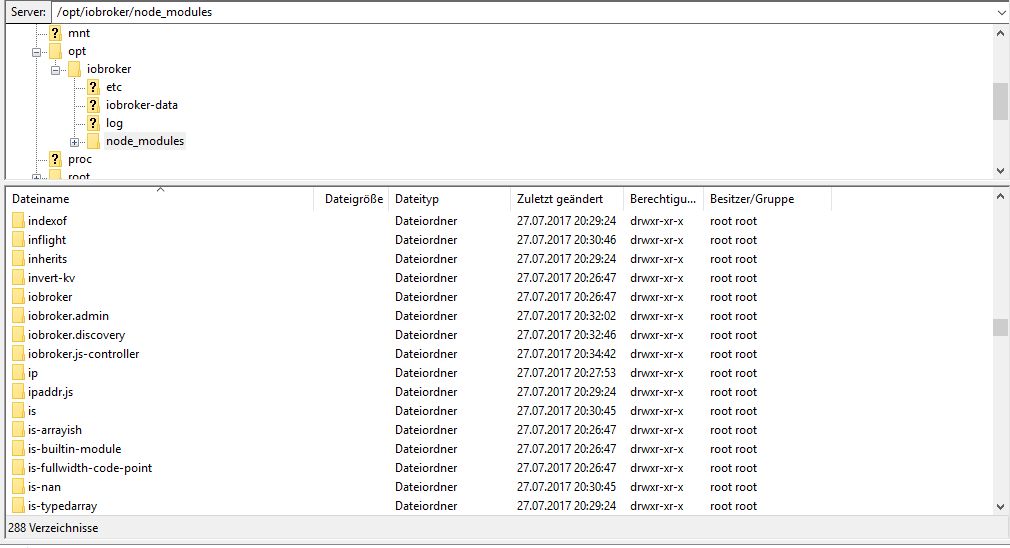
                                    Hier die Dateistruktur:
                                    144_iobroker_node8.jpg

                                    Gruß

                                    Rainer

                                    kein Support per PN! - Fragen im Forum stellen -
                                    Benutzt das Voting rechts unten im Beitrag wenn er euch geholfen hat.
                                    Das Forum freut sich über eine Spende. Benutzt dazu den Spendenbutton im Header. Danke!
                                    der Installationsfixer: curl -fsL https://iobroker.net/fix.sh | bash -

                                    1 Antwort Letzte Antwort
                                    0
                                    • BuZZyB Offline
                                      BuZZyB Offline
                                      BuZZy
                                      schrieb am zuletzt editiert von
                                      #79

                                      Funktioniert denn auch die Adapterinstallation bei dir Rainer?

                                      Von unterwegs gesendet

                                      1 Antwort Letzte Antwort
                                      0
                                      • HomoranH Nicht stören
                                        HomoranH Nicht stören
                                        Homoran
                                        Global Moderator Administrators
                                        schrieb am zuletzt editiert von
                                        #80

                                        Discovery und Admin hatte er ja schon während der Grundinstallation installiert,

                                        im Moment versuche ich den RPi2-Adapter zu installieren…

                                        ...und NEIN, Exit mit Code 1

                                        $ ./iobroker add rpi2
                                        npm install iobroker.rpi2 --production --prefix "/opt/iobroker" (System call)
                                        ERROR: module.js:487    throw err;
                                            ^
                                        
                                        Error: Cannot find module 'mime'
                                            at Function.Module._resolveFilename (module.js:485:15)
                                            at Function.Module._load (module.js:437:25)
                                            at Module.require (module.js:513:17)
                                            at require (internal/module.js:11:18)
                                            at Install.createInstance (/opt/iobroker/node_modules/iobroker.js-controller/lib/setup/setupInstall.js:584:27)
                                            at /opt/iobroker/node_modules/iobroker.js-controller/lib/setup.js:741:41
                                            at /opt/iobroker/node_modules/iobroker.js-controller/lib/setup/setupInstall.js:157:39
                                            at enableAdapters (/opt/iobroker/node_modules/iobroker.js-controller/lib/setup/setupInstall.js:47:21)
                                            at /opt/iobroker/node_modules/iobroker.js-controller/lib/setup/setupInstall.js:156:21
                                            at ChildProcess. <anonymous>(/opt/iobroker/node_modules/iobroker.js-controller/lib/setup/setupInstall.js:325:31)
                                        
                                        ERROR: process exited with code 1</anonymous>
                                        

                                        Ich teste noch mal welche

                                        EDIT1:

                                        $ ./iobroker add hm-rpc
                                        ERROR: module.js:487    throw err;
                                            ^
                                        
                                        Error: Cannot find module '/opt/iobroker/node_modules/iobroker.js-controller/iobroker.js'
                                            at Function.Module._resolveFilename (module.js:485:15)
                                            at Function.Module._load (module.js:437:25)
                                            at Function.Module.runMain (module.js:605:10)
                                            at startup (bootstrap_node.js:158:16)
                                            at bootstrap_node.js:575:3
                                        
                                        ERROR: process exited with code 1
                                        

                                        EDIT2:

                                        $ ./iobroker add hm-rega
                                        ERROR: module.js:487    throw err;
                                            ^
                                        
                                        Error: Cannot find module '/opt/iobroker/node_modules/iobroker.js-controller/iobroker.js'
                                            at Function.Module._resolveFilename (module.js:485:15)
                                            at Function.Module._load (module.js:437:25)
                                            at Function.Module.runMain (module.js:605:10)
                                            at startup (bootstrap_node.js:158:16)
                                            at bootstrap_node.js:575:3
                                        
                                        ERROR: process exited with code 1
                                        

                                        Gruß

                                        Rainer

                                        kein Support per PN! - Fragen im Forum stellen -
                                        Benutzt das Voting rechts unten im Beitrag wenn er euch geholfen hat.
                                        Das Forum freut sich über eine Spende. Benutzt dazu den Spendenbutton im Header. Danke!
                                        der Installationsfixer: curl -fsL https://iobroker.net/fix.sh | bash -

                                        1 Antwort Letzte Antwort
                                        0
                                        • BuZZyB Offline
                                          BuZZyB Offline
                                          BuZZy
                                          schrieb am zuletzt editiert von
                                          #81

                                          Wie sieht es denn aus wenn du es unter node 6.x.x versuchst?

                                          Von unterwegs gesendet

                                          1 Antwort Letzte Antwort
                                          0
                                          Antworten
                                          • In einem neuen Thema antworten
                                          Anmelden zum Antworten
                                          • Älteste zuerst
                                          • Neuste zuerst
                                          • Meiste Stimmen


                                          Support us

                                          ioBroker
                                          Community Adapters
                                          Donate
                                          FAQ Cloud / IOT
                                          HowTo: Node.js-Update
                                          HowTo: Backup/Restore
                                          Downloads
                                          BLOG

                                          482

                                          Online

                                          32.7k

                                          Benutzer

                                          82.5k

                                          Themen

                                          1.3m

                                          Beiträge
                                          Community
                                          Impressum | Datenschutz-Bestimmungen | Nutzungsbedingungen | Einwilligungseinstellungen
                                          ioBroker Community 2014-2025
                                          logo
                                          • Anmelden

                                          • Du hast noch kein Konto? Registrieren

                                          • Anmelden oder registrieren, um zu suchen
                                          • Erster Beitrag
                                            Letzter Beitrag
                                          0
                                          • Home
                                          • Aktuell
                                          • Tags
                                          • Ungelesen 0
                                          • Kategorien
                                          • Unreplied
                                          • Beliebt
                                          • GitHub
                                          • Docu
                                          • Hilfe