




Fehlermeldungen bei Installation mac
-
Lass dir gesagt sein dass es absolut keine Probleme gibt und iobroker wirklich sehr sehr gut läuft. Aber wenn die richtigen Installationsbedingungen nicht gegeben sind (falsche node Version, falsche Berechtigungen, eventuell auch Einschränkungen von Apple die im Betriebssystem gemacht werden) kann das Programm (iobroker) nichts dafür. Versuch auf eine node 6.x.x Version runter zu gehen und dann nochmal installieren. :)
Ein Mac ist ja eigentlich auch kein "Server".. ;)
Von unterwegs gesendet
-
Hallo thoduh,
Also, wenn ich dich recht verstehe, willst du den Ordner ioBroker unbedingt im root Verzeichnis deiner Systemplatte platzieren und mit sudo chmod -R 777 /iobroker jedem alle Rechte auf diesen Verzeichnisbaum geben.
Kann ich dich irgendwie davon abbringen?
Ich würde den Ordner unter /User/MacMini/Documents/ioBrokerMac angelegen (ohne sudo!!!) und es funktioniert trotzdem (bzw. gerade deswegen).
cd /Users/MacMini/Documents
mkdir ioBrokerMac
cd /Users/MacMini/Documents/ioBrokerMac
npm install https://github.com/ioBroker/ioBroker.js-controller/tarball/master --production --prefix /Users/MacMini/Documents/ioBrokerMac
cd /Users/MacMini/Documents/ioBrokerMac/node_modules/iobroker.js-controller
# Hier ein sudo, sicherheitshalber, wenn MacMini kein Admin ist, sonst geht's auch ohne
sudo chmod +x iobroker
node controller.js
Wenn das nicht läuft, liegt's an der nicht getesteten node Version 8.x.
Es läuft bei mir zum Test auf einem Mac Mini Mac OS Sierra 10.12.6 (16G29) node -v = v6.11.1
Die Befehle: ./iobroker start, stop, … funktionieren bei mir derzeit auch nicht. Ich muß mal sehen, ob ich dahinter komme, oder ob es irgendwie mit der Installation zusammenhängt.
LG
Gernot
-
Wenn das nicht läuft, liegt's an der nicht getesteten node Version 8.x. `
Installation auf OPi plus2e läuft gerade.Werde Nodejs 8.x nehmen
Gruß
Rainer
-
Habe so langsam auch meine Zweifel ob ich meine bisher funktionierende und gepflegte gut Hausautomatisierung einem so instabilen System anvertrauen sollte… `
Sei mir nicht böse, aber ioBroker ist mittlerweile so stabil, dass 95% der Probleme vor dem Bildschirm zu erwarten sind, gerade bei Installationsproblemen.Deine Probleme klingen mir schwer nach fehlenden Berechtigungen. Auf einem UNIX-artigen System wie OSX und Linux ist es außerdem ungewöhnlich direkt in "/" zu installieren.
Wenn du nicht wie in der Anleitung empfohlen auf ein User-Verzeichnis ausweichen willst (auf Linux wird "/opt/iobroker" empfohlen), könnte es notwendig sein, ein "sudo" vor die Befehle zu setzen, d.h.
sudo npm install ... sudo iobroker add ... ...etc -
Deine Probleme klingen mir schwer nach fehlenden Berechtigungen `
Davon gehe ich ja auch aus.Bin gerade dabei nodejs 8 zu testen, da ist dieser Teil der Anleitung:
ioBroker installieren
sudo mkdir /opt/iobroker
sudo chmod 777 /opt/iobroker
cd /opt/iobroker
sudo npm install iobroker --unsafe-perm
das chmod 777 ist entscheidend.
Gruß
Rainer
-
Update:
Die Installation ist durch. Der OPi meinte noch ein Kernel-Update fahren zu müssen :(
Die Installation sah auch etwas wild aus:
! ````
root@OPi:~# node -v
v8.2.1
root@OPi:~# sudo mkdir /opt/iobroker
root@OPi:~# sudo chmod 777 /opt/iobroker
root@OPi:~# cd /opt/iobroker
root@OPi:/opt/iobroker# sudo npm install iobroker --unsafe-perm
! > iobroker@1.0.0 install /opt/iobroker/node_modules/iobroker
node lib/setup.js
! npm install iobroker.discovery --production --prefix /opt/iobroker
node-pre-gyp info it worked if it ends with ok
node-pre-gyp verb cli [ '/usr/bin/nodejs',
node-pre-gyp verb cli '/opt/iobroker/node_modules/serialport/node_modules/.bin/node-pre-gyp',
node-pre-gyp verb cli 'install',
node-pre-gyp verb cli '--fallback-to-build' ]
node-pre-gyp info using node-pre-gyp@0.6.32
node-pre-gyp info using node@8.2.1 | linux | arm
node-pre-gyp verb command install []
node-pre-gyp info check checked for "/opt/iobroker/node_modules/serialport/build/Release/serialport.node" (not found)
node-pre-gyp http GET https://github.com/EmergingTechnologyAdvisors/node-serialport/releases/download/4.0.7/serialport-v4.0.7-node-v57-linux-arm.tar .gz
node-pre-gyp http 404 https://github.com/EmergingTechnologyAdvisors/node-serialport/releases/download/4.0.7/serialport-v4.0.7-node-v57-linux-arm.tar .gz
node-pre-gyp ERR! Tried to download(404): https://github.com/EmergingTechnologyAdvisors/node-serialport/releases/download/4.0.7/serialport-v4.0.7-no de-v57-linux-arm.tar.gz
node-pre-gyp ERR! Pre-built binaries not found for serialport@4.0.7 and node@8.2.1 (node-v57 ABI) (falling back to source compile with node-gyp)
node-pre-gyp http 404 status code downloading tarball https://github.com/EmergingTechnologyAdvisors/node-serialport/releases/download/4.0.7/serialpo rt-v4.0.7-node-v57-linux-arm.tar.gz
node-pre-gyp verb command build [ 'rebuild' ]
../src/serialport.cpp: In function ‘int getIntFromObject(v8::Localv8::object, std::string)’:
../src/serialport.cpp:90:52: warning: ‘v8::Local v8::int32v8::Value::ToInt32() const’ is deprecated (declared at /root/.node-gyp/8.2.1/include/node/v8.h:9336): Use maybe version [-Wdeprecated-declarations]
return getValueFromObject(options, key)->ToInt32()->Int32Value();
^
../src/serialport.cpp: In function ‘double getDoubleFromObject(v8::Localv8::object, std::string)’:
../src/serialport.cpp:102:53: warning: ‘v8::Local v8::numberv8::Value::ToNumber() const’ is deprecated (declared at /root/.node-gyp/8.2.1/include/node/v8.h:9300): Use maybe version [-Wdeprecated-declarations]
return getValueFromObject(options, key)->ToNumber()->NumberValue();
^
../src/serialport.cpp: In function ‘void EIO_AfterOpen(uv_work_t*)’:
../src/serialport.cpp:174:31: warning: ‘v8::Local v8::int32v8::Value::ToInt32() const’ is deprecated (declared at /root/.node-gyp/8.2.1/include/node/v8.h:9336): Use maybe version [-Wdeprecated-declarations]
int fd = argv[1]->ToInt32()->Int32Value();
^
../src/serialport.cpp: In function ‘Nan::NAN_METHOD_RETURN_TYPE Update(Nan::NAN_METHOD_ARGS_TYPE)’:
../src/serialport.cpp:193:29: warning: ‘v8::Local v8::int32v8::Value::ToInt32() const’ is deprecated (declared at /root/.node-gyp/8.2.1/include/node/v8.h:9336): Use maybe version [-Wdeprecated-declarations]
int fd = info[0]->ToInt32()->Int32Value();
^
../src/serialport.cpp:217:116: warning: ‘v8::Local v8::int32v8::Value::ToInt32() const’ is deprecated (declared at /root/.node-gyp/8.2.1/include/node/v8.h:9336): Use maybe version [-Wdeprecated-declarations]
baton->baudRate = Nan::Get(options, Nan::Newv8::string("baudRate").ToLocalChecked()).ToLocalChecked()->ToInt32()->Int32Value();
^
../src/serialport.cpp: In function ‘Nan::NAN_METHOD_RETURN_TYPE Write(Nan::NAN_METHOD_ARGS_TYPE)’:
../src/serialport.cpp:252:29: warning: ‘v8::Local v8::int32v8::Value::ToInt32() const’ is deprecated (declared at /root/.node-gyp/8.2.1/include/node/v8.h:9336): Use maybe version [-Wdeprecated-declarations]
int fd = info[0]->ToInt32()->Int32Value();
^
../src/serialport.cpp: In function ‘Nan::NAN_METHOD_RETURN_TYPE Close(Nan::NAN_METHOD_ARGS_TYPE)’:
../src/serialport.cpp:369:32: warning: ‘v8::Local v8::int32v8::Value::ToInt32() const’ is deprecated (declared at /root/.node-gyp/8.2.1/include/node/v8.h:9336): Use maybe version [-Wdeprecated-declarations]
baton->fd = info[0]->ToInt32()->Int32Value();
^
../src/serialport.cpp: In function ‘Nan::NAN_METHOD_RETURN_TYPE Flush(Nan::NAN_METHOD_ARGS_TYPE)’:
../src/serialport.cpp:480:29: warning: ‘v8::Local v8::int32v8::Value::ToInt32() const’ is deprecated (declared at /root/.node-gyp/8.2.1/include/node/v8.h:9336): Use maybe version [-Wdeprecated-declarations]
int fd = info[0]->ToInt32()->Int32Value();
^
../src/serialport.cpp: In function ‘Nan::NAN_METHOD_RETURN_TYPE Set(Nan::NAN_METHOD_ARGS_TYPE)’:
../src/serialport.cpp:528:29: warning: ‘v8::Local v8::int32v8::Value::ToInt32() const’ is deprecated (declared at /root/.node-gyp/8.2.1/include/node/v8.h:9336): Use maybe version [-Wdeprecated-declarations]
int fd = info[0]->ToInt32()->Int32Value();
^
../src/serialport.cpp: In function ‘Nan::NAN_METHOD_RETURN_TYPE Drain(Nan::NAN_METHOD_ARGS_TYPE)’:
../src/serialport.cpp:585:29: warning: ‘v8::Local v8::int32v8::Value::ToInt32() const’ is deprecated (declared at /root/.node-gyp/8.2.1/include/node/v8.h:9336): Use maybe version [-Wdeprecated-declarations]
int fd = info[0]->ToInt32()->Int32Value();
^
../src/serialport_unix.cpp: In function ‘OpenBatonPlatformOptions* ParsePlatformOptions(const v8::Localv8::object&)’:
../src/serialport_unix.cpp:44:109: warning: ‘v8::Local v8::int32v8::Value::ToInt32() const’ is deprecated (declared at /root/.node-gyp/8.2.1/include/node/v8.h:9336): Use maybe version [-Wdeprecated-declarations]
result->vmin = Nan::Get(options, Nan::Newv8::string("vmin").ToLocalChecked()).ToLocalChecked()->ToInt32()->Int32Value();
^
../src/serialport_unix.cpp:45:111: warning: ‘v8::Local v8::int32v8::Value::ToInt32() const’ is deprecated (declared at /root/.node-gyp/8.2.1/include/node/v8.h:9336): Use maybe version [-Wdeprecated-declarations]
result->vtime = Nan::Get(options, Nan::Newv8::string("vtime").ToLocalChecked()).ToLocalChecked()->ToInt32()->Int32Value();
^
../src/serialport_poller.cpp: In static member function ‘static Nan::NAN_METHOD_RETURN_TYPE SerialportPoller::New(Nan::NAN_METHOD_ARGS_TYPE)’:
../src/serialport_poller.cpp:86:31: warning: ‘v8::Local v8::int32v8::Value::ToInt32() const’ is deprecated (declared at /root/.node-gyp/8.2.1/include/node/v8.h:9336): Use maybe version [-Wdeprecated-declarations]
obj->fd_ = info[0]->ToInt32()->Int32Value();
^
node-pre-gyp info ok
npm WARN saveError ENOENT: no such file or directory, open '/opt/iobroker/package.json'
npm notice created a lockfile as package-lock.json. You should commit this file.
npm WARN enoent ENOENT: no such file or directory, open '/opt/iobroker/package.json'
npm WARN iobroker No description
npm WARN iobroker No repository field.
npm WARN iobroker No README data
npm WARN iobroker No license field.
! npm install iobroker.admin --production --prefix /opt/iobroker
npm WARN saveError ENOENT: no such file or directory, open '/opt/iobroker/package.json'
npm WARN enoent ENOENT: no such file or directory, open '/opt/iobroker/package.json'
npm WARN iobroker No description
npm WARN iobroker No repository field.
npm WARN iobroker No README data
npm WARN iobroker No license field.
! npm install iobroker.js-controller --production --prefix /opt/iobroker
npm WARN saveError ENOENT: no such file or directory, open '/opt/iobroker/package.json'
npm WARN enoent ENOENT: no such file or directory, open '/opt/iobroker/package.json'
npm WARN iobroker No description
npm WARN iobroker No repository field.
npm WARN iobroker No README data
npm WARN iobroker No license field.
! Write "./iobroker start" to start the ioBroker
: No such file or directory
Auto-start was enabled. Write "update-rc.d -f iobroker.sh remove" to disable auto-start
iobroker is started. Go to "http://ip-addr:8081" to open the admin UI.
npm WARN enoent ENOENT: no such file or directory, open '/opt/iobroker/package.json'
npm WARN iobroker No description
npm WARN iobroker No repository field.
npm WARN iobroker No README data
npm WARN iobroker No license field.
! + iobroker@1.0.0
added 46 packages in 444.962s
root@OPi:/opt/iobroker# iobroker restart
iobroker controller daemon is not running
Starting iobroker controller daemon...
iobroker controller daemon started. PID: 2039</v8::int32></v8::string></v8::int32></v8::string></v8::int32></v8::object></v8::int32></v8::int32></v8::int32></v8::int32></v8::int32></v8::string></v8::int32></v8::int32></v8::int32></v8::number></v8::object></v8::int32></v8::object>ABER ioBroker war …..nicht erreichbar. einroot@OPi:/opt/iobroker# iobroker restart
brachte dann die Erkenntnis:iobroker controller daemon is not running
Starting iobroker controller daemon...
iobroker controller daemon started. PID: 2039Danach war dann der Admin unter <ip>:8081 erreichbar. Also am node 8.2.1 liegt es nicht. Ich habe die Installation als root durchgeführt. Gruß Rainer</ip> -
Addendum:
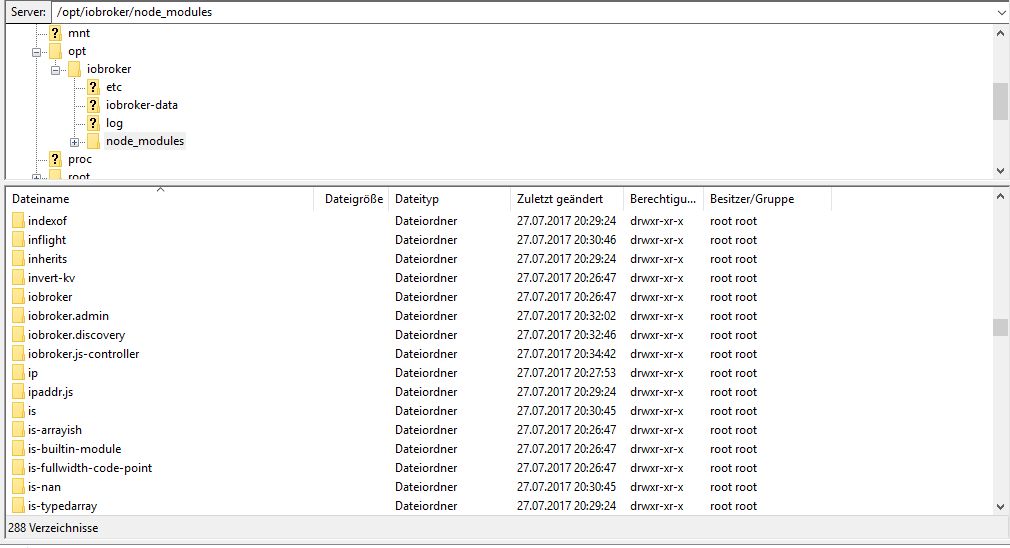
Hier die Dateistruktur:
Gruß
Rainer
-
Discovery und Admin hatte er ja schon während der Grundinstallation installiert,
im Moment versuche ich den RPi2-Adapter zu installieren…
...und NEIN, Exit mit Code 1
$ ./iobroker add rpi2
npm install iobroker.rpi2 --production --prefix "/opt/iobroker" (System call)
ERROR: module.js:487    throw err;
    ^

Error: Cannot find module 'mime'
    at Function.Module._resolveFilename (module.js:485:15)
    at Function.Module._load (module.js:437:25)
    at Module.require (module.js:513:17)
    at require (internal/module.js:11:18)
    at Install.createInstance (/opt/iobroker/node_modules/iobroker.js-controller/lib/setup/setupInstall.js:584:27)
    at /opt/iobroker/node_modules/iobroker.js-controller/lib/setup.js:741:41
    at /opt/iobroker/node_modules/iobroker.js-controller/lib/setup/setupInstall.js:157:39
    at enableAdapters (/opt/iobroker/node_modules/iobroker.js-controller/lib/setup/setupInstall.js:47:21)
    at /opt/iobroker/node_modules/iobroker.js-controller/lib/setup/setupInstall.js:156:21
    at ChildProcess. <anonymous>(/opt/iobroker/node_modules/iobroker.js-controller/lib/setup/setupInstall.js:325:31)

ERROR: process exited with code 1</anonymous>
Ich teste noch mal welche
EDIT1:
$ ./iobroker add hm-rpc
ERROR: module.js:487    throw err;
    ^

Error: Cannot find module '/opt/iobroker/node_modules/iobroker.js-controller/iobroker.js'
    at Function.Module._resolveFilename (module.js:485:15)
    at Function.Module._load (module.js:437:25)
    at Function.Module.runMain (module.js:605:10)
    at startup (bootstrap_node.js:158:16)
    at bootstrap_node.js:575:3

ERROR: process exited with code 1
EDIT2:
$ ./iobroker add hm-rega
ERROR: module.js:487    throw err;
    ^

Error: Cannot find module '/opt/iobroker/node_modules/iobroker.js-controller/iobroker.js'
    at Function.Module._resolveFilename (module.js:485:15)
    at Function.Module._load (module.js:437:25)
    at Function.Module.runMain (module.js:605:10)
    at startup (bootstrap_node.js:158:16)
    at bootstrap_node.js:575:3

ERROR: process exited with code 1
Gruß
Rainer
-
Jetzt lief gar nichts mehr, kein iobroker update, kein drüberinstallieren - da kam auch ENOSELF
npm ERR! code ENOSELF
npm ERR! Refusing to install package with name "iobroker" under a package
npm ERR! also called "iobroker". Did you name your project the same
npm ERR! as the dependency you're installing?
npm ERR!
npm ERR! For more information, see:
npm ERR!     <https: docs.npmjs.com/cli/install#limitations-of-npms-install-algorithm="">npm ERR! A complete log of this run can be found in:
npm ERR!     /root/.npm/_logs/2017-07-27T19_02_55_498Z-debug.log</https:>
Hab nochmal komplett gelöscht und Installiere nochmal unter Nodejs 8
Wenn das wieder schiefgeht lösch ich node8 und mach es unter node 6
Gruß
Rainer
-
Zweiter Anlauf mit Node8 hat auch nicht geklappt.
Erster Versuch mit Node6 brachte auch einen ENOSELF. Da das nicht sein konnte/durfte einen reboot gefahren.
Dann ordentlich mit Ähnlichen Warnungen durchgefahren:
! ````
root@OPi:/opt/iobroker# sudo npm install iobroker --unsafe-perm
! > iobroker@1.0.0 install /opt/iobroker/node_modules/iobroker
node lib/setup.js
! npm install iobroker.discovery --production --prefix /opt/iobroker
node-pre-gyp ERR! Tried to download(404): https://github.com/EmergingTechnologyAdvisors/node-serialport/releases/download/4.0.7/serialport-v4.0.7-node-v48-linux-arm.tar.gz
node-pre-gyp ERR! Pre-built binaries not found for serialport@4.0.7 and node@6.11.1 (node-v48 ABI) (falling back to source compile with node-gyp)
../src/serialport.cpp: In function ‘int getIntFromObject(v8::Localv8::object, std::string)’:
../src/serialport.cpp:90:52: warning: ‘v8::Local v8::int32v8::Value::ToInt32() const’ is deprecated (declared at /root/.node-gyp/6.11.1/include/node/v8.h:8209): Use maybe version [-Wdeprecated-declarations]
return getValueFromObject(options, key)->ToInt32()->Int32Value();
^
../src/serialport.cpp: In function ‘double getDoubleFromObject(v8::Localv8::object, std::string)’:
../src/serialport.cpp:102:53: warning: ‘v8::Local v8::numberv8::Value::ToNumber() const’ is deprecated (declared at /root/.node-gyp/6.11.1/include/node/v8.h:8173): Use maybe version [-Wdeprecated-declarations]
return getValueFromObject(options, key)->ToNumber()->NumberValue();
^
../src/serialport.cpp: In function ‘void EIO_AfterOpen(uv_work_t*)’:
../src/serialport.cpp:174:31: warning: ‘v8::Local v8::int32v8::Value::ToInt32() const’ is deprecated (declared at /root/.node-gyp/6.11.1/include/node/v8.h:8209): Use maybe version [-Wdeprecated-declarations]
int fd = argv[1]->ToInt32()->Int32Value();
^
../src/serialport.cpp: In function ‘Nan::NAN_METHOD_RETURN_TYPE Update(Nan::NAN_METHOD_ARGS_TYPE)’:
../src/serialport.cpp:193:29: warning: ‘v8::Local v8::int32v8::Value::ToInt32() const’ is deprecated (declared at /root/.node-gyp/6.11.1/include/node/v8.h:8209): Use maybe version [-Wdeprecated-declarations]
int fd = info[0]->ToInt32()->Int32Value();
^
../src/serialport.cpp:217:116: warning: ‘v8::Local v8::int32v8::Value::ToInt32() const’ is deprecated (declared at /root/.node-gyp/6.11.1/include/node/v8.h:8209): Use maybe version [-Wdeprecated-declarations]
baton->baudRate = Nan::Get(options, Nan::Newv8::string("baudRate").ToLocalChecked()).ToLocalChecked()->ToInt32()->Int32Value();
^
../src/serialport.cpp: In function ‘Nan::NAN_METHOD_RETURN_TYPE Write(Nan::NAN_METHOD_ARGS_TYPE)’:
../src/serialport.cpp:252:29: warning: ‘v8::Local v8::int32v8::Value::ToInt32() const’ is deprecated (declared at /root/.node-gyp/6.11.1/include/node/v8.h:8209): Use maybe version [-Wdeprecated-declarations]
int fd = info[0]->ToInt32()->Int32Value();
^
../src/serialport.cpp: In function ‘Nan::NAN_METHOD_RETURN_TYPE Close(Nan::NAN_METHOD_ARGS_TYPE)’:
../src/serialport.cpp:369:32: warning: ‘v8::Local v8::int32v8::Value::ToInt32() const’ is deprecated (declared at /root/.node-gyp/6.11.1/include/node/v8.h:8209): Use maybe version [-Wdeprecated-declarations]
baton->fd = info[0]->ToInt32()->Int32Value();
^
../src/serialport.cpp: In function ‘Nan::NAN_METHOD_RETURN_TYPE Flush(Nan::NAN_METHOD_ARGS_TYPE)’:
../src/serialport.cpp:480:29: warning: ‘v8::Local v8::int32v8::Value::ToInt32() const’ is deprecated (declared at /root/.node-gyp/6.11.1/include/node/v8.h:8209): Use maybe version [-Wdeprecated-declarations]
int fd = info[0]->ToInt32()->Int32Value();
^
../src/serialport.cpp: In function ‘Nan::NAN_METHOD_RETURN_TYPE Set(Nan::NAN_METHOD_ARGS_TYPE)’:
../src/serialport.cpp:528:29: warning: ‘v8::Local v8::int32v8::Value::ToInt32() const’ is deprecated (declared at /root/.node-gyp/6.11.1/include/node/v8.h:8209): Use maybe version [-Wdeprecated-declarations]
int fd = info[0]->ToInt32()->Int32Value();
^
../src/serialport.cpp: In function ‘Nan::NAN_METHOD_RETURN_TYPE Drain(Nan::NAN_METHOD_ARGS_TYPE)’:
../src/serialport.cpp:585:29: warning: ‘v8::Local v8::int32v8::Value::ToInt32() const’ is deprecated (declared at /root/.node-gyp/6.11.1/include/node/v8.h:8209): Use maybe version [-Wdeprecated-declarations]
int fd = info[0]->ToInt32()->Int32Value();
^
../src/serialport_unix.cpp: In function ‘OpenBatonPlatformOptions* ParsePlatformOptions(const v8::Localv8::object&)’:
../src/serialport_unix.cpp:44:109: warning: ‘v8::Local v8::int32v8::Value::ToInt32() const’ is deprecated (declared at /root/.node-gyp/6.11.1/include/node/v8.h:8209): Use maybe version [-Wdeprecated-declarations]
result->vmin = Nan::Get(options, Nan::Newv8::string("vmin").ToLocalChecked()).ToLocalChecked()->ToInt32()->Int32Value();
^
../src/serialport_unix.cpp:45:111: warning: ‘v8::Local v8::int32v8::Value::ToInt32() const’ is deprecated (declared at /root/.node-gyp/6.11.1/include/node/v8.h:8209): Use maybe version [-Wdeprecated-declarations]
result->vtime = Nan::Get(options, Nan::Newv8::string("vtime").ToLocalChecked()).ToLocalChecked()->ToInt32()->Int32Value();
^
../src/serialport_poller.cpp: In static member function ‘static Nan::NAN_METHOD_RETURN_TYPE SerialportPoller::New(Nan::NAN_METHOD_ARGS_TYPE)’:
../src/serialport_poller.cpp:86:31: warning: ‘v8::Local v8::int32v8::Value::ToInt32() const’ is deprecated (declared at /root/.node-gyp/6.11.1/include/node/v8.h:8209): Use maybe version [-Wdeprecated-declarations]
obj->fd_ = info[0]->ToInt32()->Int32Value();
^
npm WARN enoent ENOENT: no such file or directory, open '/opt/iobroker/package.json'
npm WARN iobroker No description
npm WARN iobroker No repository field.
npm WARN iobroker No README data
npm WARN iobroker No license field.
npm install iobroker.admin --production --prefix /opt/iobroker
npm WARN enoent ENOENT: no such file or directory, open '/opt/iobroker/package.json'
npm WARN iobroker No description
npm WARN iobroker No repository field.
npm WARN iobroker No README data
npm WARN iobroker No license field.
npm install iobroker.js-controller --production --prefix /opt/iobroker
npm WARN enoent ENOENT: no such file or directory, open '/opt/iobroker/package.json'
npm WARN iobroker No description
npm WARN iobroker No repository field.
npm WARN iobroker No README data
npm WARN iobroker No license field.
Write "./iobroker start" to start the ioBroker
: No such file or directory
Auto-start was enabled. Write "update-rc.d -f iobroker.sh remove" to disable auto-start
iobroker is started. Go to "http://ip-addr:8081" to open the admin UI.
/opt/iobroker
└─┬ iobroker@1.0.0
└─┬ yargs@7.1.0
├── camelcase@3.0.0
├─┬ cliui@3.2.0
│ ├─┬ strip-ansi@3.0.1
│ │ └── ansi-regex@2.1.1
│ └── wrap-ansi@2.1.0
├── decamelize@1.2.0
├── get-caller-file@1.0.2
├─┬ os-locale@1.4.0
│ └─┬ lcid@1.0.0
│ └── invert-kv@1.0.0
├─┬ read-pkg-up@1.0.1
│ ├─┬ find-up@1.1.2
│ │ ├── path-exists@2.1.0
│ │ └─┬ pinkie-promise@2.0.1
│ │ └── pinkie@2.0.4
│ └─┬ read-pkg@1.1.0
│ ├─┬ load-json-file@1.1.0
│ │ ├── graceful-fs@4.1.11
│ │ ├─┬ parse-json@2.2.0
│ │ │ └─┬ error-ex@1.3.1
│ │ │ └── is-arrayish@0.2.1
│ │ ├── pify@2.3.0
│ │ └─┬ strip-bom@2.0.0
│ │ └── is-utf8@0.2.1
│ ├─┬ normalize-package-data@2.4.0
│ │ ├── hosted-git-info@2.5.0
│ │ ├─┬ is-builtin-module@1.0.0
│ │ │ └── builtin-modules@1.1.1
│ │ ├── semver@5.4.1
│ │ └─┬ validate-npm-package-license@3.0.1
│ │ ├─┬ spdx-correct@1.0.2
│ │ │ └── spdx-license-ids@1.2.2
│ │ └── spdx-expression-parse@1.0.4
│ └── path-type@1.1.0
├── require-directory@2.1.1
├── require-main-filename@1.0.1
├── set-blocking@2.0.0
├─┬ string-width@1.0.2
│ ├── code-point-at@1.1.0
│ └─┬ is-fullwidth-code-point@1.0.0
│ └── number-is-nan@1.0.1
├── which-module@1.0.0
├── y18n@3.2.1
└── yargs-parser@5.0.0
! npm WARN enoent ENOENT: no such file or directory, open '/opt/iobroker/package.json'
npm WARN iobroker No description
npm WARN iobroker No repository field.
npm WARN iobroker No README data
npm WARN iobroker No license field.
root@OPi:/opt/iobroker# iobroker restart
iobroker controller daemon is not running
Starting iobroker controller daemon...
iobroker controller daemon started. PID: 1580</v8::int32></v8::string></v8::int32></v8::string></v8::int32></v8::object></v8::int32></v8::int32></v8::int32></v8::int32></v8::int32></v8::string></v8::int32></v8::int32></v8::int32></v8::number></v8::object></v8::int32></v8::object>und zum Schluss auch nicht selber gestartet. Installation von rpi2 hat geklappt. HM-rpc auc und hm-rega läuft gerade (zu dem Zeitpunkt war es unter node8 bereits beendet) Jetzt weiß ich nur nicht ob es unter node8 vielleicht nach einem reboot zu irgendeinem Zeitpunkt dann ebenfalls geklappt hätte??? Gruß Rainer -
Welches BS nutzst du?
ich habe das aktuelle Armbian (Jessie), das hat gestern noch schnell bei apt-get update && apt-get upgrade ein Kernel Update gefahren.
Die Versionen kann ich dir jetzt jedoch nicht sagen, da ich keinen Zugriff darauf habe.
Gruß
Rainer
-
Also, wenn ich dich recht verstehe, willst du den Ordner ioBroker unbedingt im root Verzeichnis deiner Systemplatte platzieren und mit sudo chmod -R 777 /iobroker jedem alle Rechte auf diesen Verzeichnisbaum geben.
Kann ich dich irgendwie davon abbringen?
Ich würde den Ordner unter /User/MacMini/Documents/ioBrokerMac angelegen (ohne sudo!!!) und es funktioniert trotzdem (bzw. gerade deswegen). `
Ich wollte ja garnicht ins root Verzeichnis, deinen Speicherort hatte ich ganz am Anfang schon probiert (siehe oben). hatte aber nicht funktioniert, deshalb jetzt im root…Nachdem ich iobroker nochmals neu installiert habe, läuft es auch bei mir. Auch das installieren von div. Adaptern funktioniert problemlos.
ABER: ich kann per````
MacMini-LAN:iobroker.js-controller MacMini$ ./ioBroker stop -
Im iobroker verzeichnis ausführen
sudo iobroker stopGruß
Rainer
-
Nachdem ich iobroker nochmals neu installiert habe, läuft es auch bei mir. Auch das installieren von div. Adaptern funktioniert problemlos.
ABER: ich kann per
MacMini-LAN:iobroker.js-controller MacMini$ ./ioBroker stopnicht stoppen ? `
@thoduh:Auch schon probiert…
MacMini-LAN:iobroker MacMini$ sudo iobroker stop sudo: iobroker: command not found ```` `Welcher Ordner ist es denn nun? ioBroker oder iobroker?
Wenn ich das richtig sehe, sollte aus dem Ordner
MacMini-LAN:iobroker MacMini$der Befehl````
./iobroker stopGruß Pix -
Da ich verzweifelt bin, hab ich verschiedene ausprobiert :lol:
Der Ordner "iobroker" ist eigentlich richtig…
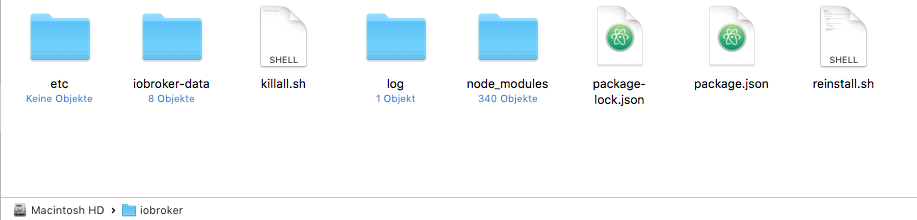
MacMini-LAN:/ MacMini$ cd iobroker
MacMini-LAN:iobroker MacMini$ ./iobroker stop
-bash: ./iobroker: No such file or directory
Gibt es keine andere Möglichkeit den iobroker zu stoppen?
3149_bildschirmfoto_2017-07-28_um_22.06.21.png -
Der Ordner "iobroker" ist eigentlich richtig… `
Aber der Befehl wars nicht. Einmal hattest du ioBroker statt iobroker grschrieben.Außerdem musst du immer ein sudo voranstellen wenn du nicht root/Administrator bist.
Gruß
Rainer



Hey! Du scheinst an dieser Unterhaltung interessiert zu sein, hast aber noch kein Konto.
Hast du es satt, bei jedem Besuch durch die gleichen Beiträge zu scrollen? Wenn du dich für ein Konto anmeldest, kommst du immer genau dorthin zurück, wo du zuvor warst, und kannst dich über neue Antworten benachrichtigen lassen (entweder per E-Mail oder Push-Benachrichtigung). Du kannst auch Lesezeichen speichern und Beiträge positiv bewerten, um anderen Community-Mitgliedern deine Wertschätzung zu zeigen.
Mit deinem Input könnte dieser Beitrag noch besser werden 💗
Registrieren Anmelden466
Online33.0k
Benutzer83.5k
Themen1.3m
Beiträge