




Fehlermeldungen bei Installation mac
-
Kurz als Hinweis:
NPM unterstützt das automatische holen und installieren von Githubrepos/.tar.gz Dateien.
Damit entfällt Schritt 2 komplett (der Download und das kopieren der Zip Datei)
Dementsprechend lautet der Befehl dann einfach
npm install https://github.com/ioBroker/ioBroker.js-controller/tarball/master --production --prefix /Users/Gernot/Documents/ioBrokerMac:)
Was mich zusätzlich wundert ist:
in der Docu steht
"ioBroker installieren: npm install iobroker –unsafe-perm"
Aber du (supernova1963) hast ja jetzt ioBroker.js-controller installiert...
Anscheinend wird ioBroker dann automatisch mit installiert.
Weil unter Linux installiert man ja wirklich einfach nur mit "sudo npm install iobroker --unsafe-perm"..
Hmmm.. Schauen wir mal was thoduh heute Abend dazu sagt.. :D Ich bin gespannt ob wir das Ding hier endlich zu machen können und die Docu für Mac neu schreiben können.. :D :D
-
Hallo Rainer,
Hast du außer dem chmod +x auch noch irgendwo ein chmod 777 o.ä. gemacht? ` Nein, mußte ich nur bei meinem 1. Versuch, da existierte das log-Verzeichnis bereits von einer anderen Programminstallation mit sudo.
@Homoran:Hast du als normaler User oder als Admin installiert? ` Als User mit Admin-Rechten, aber ohne sudo.
Gernot
-
Hallo BuZZy,
es wird wohl gelingen …
In der Installationsbeschreibung OS X ist als erstes dieser Link genannt: https://github.com/ioBroker/ioBroker.js-controller
und eine Zeile darunter wird direkt diese Datei heruntergeladen: https://github.com/ioBroker/ioBroker/archive/master.zip
Den Unterschied kenne ich nicht. Es ist aber definitiv nicht das Gleiche!
Was bedeutet eigentlich der Parameter "--unsafe-perm". Da du den "--production" Parameter mit der Pfadangabe "--prefix ..." empfohlen hattest habe ich diesen genommen. Ob es auch mit "--unsafe-perm --prefix ..." habe ich nicht getestet.
Gernot
-
Den Unterschied kenne ich nicht. Es ist aber definitiv nicht das Gleiche! `
Das erste ist nur der js-controller, also die Engine, das zweite ist das vollständige PaketIch kenne auch nur den Weg über npm bei RasPi & Co.
Die Anleitung installiert erst den js-controller, der wiederum den Rest über npm installiert.
Gruß
Rainer
-
Also jetzt verstehe ich es garnicht mehr. Gestern ist iobroker gelaufen (zwar mit Fehlern im Log, aber es ist gelaufen), da ich allerdings den Ordner kopiert hatte, wollte ich heute alles nochmal neu installieren.
sudo mkdir iobroker
sudo chmod -R 777 /iobroker
Bin diesmal direkt auf Macintosh HD geblieben, also keine Unterordner, direkt /iobroker.
Und bekomme es einfach nicht mehr fehlerfrei installiert :(
MacMini-LAN:~ MacMini$ cd /iobroker
MacMini-LAN:iobroker MacMini$ sudo npm install https://github.com/ioBroker/ioBroker/tarball/master --unsafe-perm
Password:

> iobroker@1.0.0 install /iobroker/node_modules/iobroker
> node lib/setup.js

npm install iobroker.discovery --production --prefix /iobroker
node-pre-gyp info it worked if it ends with ok
node-pre-gyp verb cli [ '/usr/local/bin/node',
node-pre-gyp verb cli   '/iobroker/node_modules/serialport/node_modules/.bin/node-pre-gyp',
node-pre-gyp verb cli   'install',
node-pre-gyp verb cli   '--fallback-to-build' ]
node-pre-gyp info using node-pre-gyp@0.6.32
node-pre-gyp info using node@8.2.1 | darwin | x64
node-pre-gyp verb command install []
node-pre-gyp info check checked for "/iobroker/node_modules/serialport/build/Release/serialport.node" (not found)
node-pre-gyp http GET https://github.com/EmergingTechnologyAdvisors/node-serialport/releases/download/4.0.7/serialport-v4.0.7-node-v57-darwin-x64.tar.gz
node-pre-gyp http 404 https://github.com/EmergingTechnologyAdvisors/node-serialport/releases/download/4.0.7/serialport-v4.0.7-node-v57-darwin-x64.tar.gz
node-pre-gyp ERR! Tried to download(404): https://github.com/EmergingTechnologyAdvisors/node-serialport/releases/download/4.0.7/serialport-v4.0.7-node-v57-darwin-x64.tar.gz
node-pre-gyp ERR! Pre-built binaries not found for serialport@4.0.7 and node@8.2.1 (node-v57 ABI) (falling back to source compile with node-gyp)
node-pre-gyp http 404 status code downloading tarball https://github.com/EmergingTechnologyAdvisors/node-serialport/releases/download/4.0.7/serialport-v4.0.7-node-v57-darwin-x64.tar.gz
node-pre-gyp verb command build [ 'rebuild' ]
../src/serialport.cpp:90:44: warning: 'ToInt32' is deprecated [-Wdeprecated-declarations]
  return getValueFromObject(options, key)->ToInt32()->Int32Value();
                                           ^
/Users/MacMini/.node-gyp/8.2.1/include/node/v8.h:9336:21: note: 'ToInt32' has been explicitly marked deprecated here
Local <int32>Value::ToInt32() const {
                    ^
../src/serialport.cpp:102:44: warning: 'ToNumber' is deprecated [-Wdeprecated-declarations]
  return getValueFromObject(options, key)->ToNumber()->NumberValue();
                                           ^
/Users/MacMini/.node-gyp/8.2.1/include/node/v8.h:9300:22: note: 'ToNumber' has been explicitly marked deprecated here
Local <number>Value::ToNumber() const {
                     ^
../src/serialport.cpp:174:23: warning: 'ToInt32' is deprecated [-Wdeprecated-declarations]
    int fd = argv[1]->ToInt32()->Int32Value();
                      ^
/Users/MacMini/.node-gyp/8.2.1/include/node/v8.h:9336:21: note: 'ToInt32' has been explicitly marked deprecated here
Local <int32>Value::ToInt32() const {
                    ^
../src/serialport.cpp:193:21: warning: 'ToInt32' is deprecated [-Wdeprecated-declarations]
  int fd = info[0]->ToInt32()->Int32Value();
                    ^
/Users/MacMini/.node-gyp/8.2.1/include/node/v8.h:9336:21: note: 'ToInt32' has been explicitly marked deprecated here
Local <int32>Value::ToInt32() const {
                    ^
../src/serialport.cpp:217:108: warning: 'ToInt32' is deprecated [-Wdeprecated-declarations]
  baton->baudRate = Nan::Get(options, Nan::New<v8::string>("baudRate").ToLocalChecked()).ToLocalChecked()->ToInt32()->Int32Value();
                                                                                                           ^
/Users/MacMini/.node-gyp/8.2.1/include/node/v8.h:9336:21: note: 'ToInt32' has been explicitly marked deprecated here
Local <int32>Value::ToInt32() const {
                    ^
../src/serialport.cpp:252:21: warning: 'ToInt32' is deprecated [-Wdeprecated-declarations]
  int fd = info[0]->ToInt32()->Int32Value();
                    ^
/Users/MacMini/.node-gyp/8.2.1/include/node/v8.h:9336:21: note: 'ToInt32' has been explicitly marked deprecated here
Local <int32>Value::ToInt32() const {
                    ^
../src/serialport.cpp:369:24: warning: 'ToInt32' is deprecated [-Wdeprecated-declarations]
  baton->fd = info[0]->ToInt32()->Int32Value();
                       ^
/Users/MacMini/.node-gyp/8.2.1/include/node/v8.h:9336:21: note: 'ToInt32' has been explicitly marked deprecated here
Local <int32>Value::ToInt32() const {
                    ^
../src/serialport.cpp:480:21: warning: 'ToInt32' is deprecated [-Wdeprecated-declarations]
  int fd = info[0]->ToInt32()->Int32Value();
                    ^
/Users/MacMini/.node-gyp/8.2.1/include/node/v8.h:9336:21: note: 'ToInt32' has been explicitly marked deprecated here
Local <int32>Value::ToInt32() const {
                    ^
../src/serialport.cpp:528:21: warning: 'ToInt32' is deprecated [-Wdeprecated-declarations]
  int fd = info[0]->ToInt32()->Int32Value();
                    ^
/Users/MacMini/.node-gyp/8.2.1/include/node/v8.h:9336:21: note: 'ToInt32' has been explicitly marked deprecated here
Local <int32>Value::ToInt32() const {
                    ^
../src/serialport.cpp:585:21: warning: 'ToInt32' is deprecated [-Wdeprecated-declarations]
  int fd = info[0]->ToInt32()->Int32Value();
                    ^
/Users/MacMini/.node-gyp/8.2.1/include/node/v8.h:9336:21: note: 'ToInt32' has been explicitly marked deprecated here
Local <int32>Value::ToInt32() const {
                    ^
10 warnings generated.
../src/serialport_unix.cpp:44:101: warning: 'ToInt32' is deprecated [-Wdeprecated-declarations]
  result->vmin = Nan::Get(options, Nan::New<v8::string>("vmin").ToLocalChecked()).ToLocalChecked()->ToInt32()->Int32Value();
                                                                                                    ^
/Users/MacMini/.node-gyp/8.2.1/include/node/v8.h:9336:21: note: 'ToInt32' has been explicitly marked deprecated here
Local <int32>Value::ToInt32() const {
                    ^
../src/serialport_unix.cpp:45:103: warning: 'ToInt32' is deprecated [-Wdeprecated-declarations]
  result->vtime = Nan::Get(options, Nan::New<v8::string>("vtime").ToLocalChecked()).ToLocalChecked()->ToInt32()->Int32Value();
                                                                                                      ^
/Users/MacMini/.node-gyp/8.2.1/include/node/v8.h:9336:21: note: 'ToInt32' has been explicitly marked deprecated here
Local <int32>Value::ToInt32() const {
                    ^
2 warnings generated.
../src/serialport_poller.cpp:86:23: warning: 'ToInt32' is deprecated [-Wdeprecated-declarations]
  obj->fd_ = info[0]->ToInt32()->Int32Value();
                      ^
/Users/MacMini/.node-gyp/8.2.1/include/node/v8.h:9336:21: note: 'ToInt32' has been explicitly marked deprecated here
Local <int32>Value::ToInt32() const {
                    ^
1 warning generated.
node-pre-gyp info ok
npm WARN saveError ENOENT: no such file or directory, open '/iobroker/package.json'
npm notice created a lockfile as package-lock.json. You should commit this file.
npm WARN enoent ENOENT: no such file or directory, open '/iobroker/package.json'
npm WARN iobroker No description
npm WARN iobroker No repository field.
npm WARN iobroker No README data
npm WARN iobroker No license field.

npm install iobroker.admin --production --prefix /iobroker
npm WARN saveError ENOENT: no such file or directory, open '/iobroker/package.json'
npm WARN enoent ENOENT: no such file or directory, open '/iobroker/package.json'
npm WARN iobroker No description
npm WARN iobroker No repository field.
npm WARN iobroker No README data
npm WARN iobroker No license field.

npm install iobroker.js-controller --production --prefix /iobroker
npm WARN saveError ENOENT: no such file or directory, open '/iobroker/package.json'
npm WARN enoent ENOENT: no such file or directory, open '/iobroker/package.json'
npm WARN iobroker No description
npm WARN iobroker No repository field.
npm WARN iobroker No README data
npm WARN iobroker No license field.

Write "./iobroker start" to start the ioBroker
Cannot create file /usr/bin/iobroker!. Non critical

-----------------------------------------------------
You can manually copy file into /usr/bin/. Just write:
    sudo cp /iobroker/node_modules/iobroker/install/iobroker /usr/bin/
    sudo chmod 777 /usr/bin/iobroker
-----------------------------------------------------
npm WARN enoent ENOENT: no such file or directory, open '/iobroker/package.json'
npm WARN iobroker No description
npm WARN iobroker No repository field.
npm WARN iobroker No README data
npm WARN iobroker No license field.

+ iobroker@1.0.0
added 46 packages in 130.318s
MacMini-LAN:iobroker MacMini$ cd node_modules/iobroker.js-controller
MacMini-LAN:iobroker.js-controller MacMini$ chmod +x iobroker
MacMini-LAN:iobroker.js-controller MacMini$ node controller.js
host.MacMini-LAN.fritz.box check instance "system.adapter.admin.0" for host "MacMini-LAN.fritz.box"
host.MacMini-LAN.fritz.box check instance "system.adapter.discovery.0" for host "MacMini-LAN.fritz.box"
{ Error: EACCES: permission denied, open '/iobroker/log/iobroker.2017-07-27.log'
  errno: -13,
  code: 'EACCES',
  syscall: 'open',
  path: '/iobroker/log/iobroker.2017-07-27.log' }
EACCES: permission denied, open '/iobroker/node_modules/iobroker.js-controller/lib/objects/../../../../iobroker-data/objects.json.bak'
Error: EACCES: permission denied, open '/iobroker/node_modules/iobroker.js-controller/lib/objects/../../../../iobroker-data/objects.json.bak'
    at Object.fs.openSync (fs.js:652:18)
    at Object.fs.writeFileSync (fs.js:1299:33)
    at saveConfig (/iobroker/node_modules/iobroker.js-controller/lib/objects/objectsInMemServer.js:1749:16)
    at ObjectsInMemServer.destroy (/iobroker/node_modules/iobroker.js-controller/lib/objects/objectsInMemServer.js:2677:26)
    at /iobroker/node_modules/iobroker.js-controller/controller.js:2244:49
    at Timeout.waitForInstances [as _onTimeout] (/iobroker/node_modules/iobroker.js-controller/controller.js:2197:49)
    at ontimeout (timers.js:469:11)
    at tryOnTimeout (timers.js:304:5)
    at Timer.listOnTimeout (timers.js:264:5)
MacMini-LAN:iobroker.js-controller MacMini$</int32></int32></v8::string></int32></v8::string></int32></int32></int32></int32></int32></int32></v8::string></int32></int32></number></int32>
Ich bin wieder alle Schritte mehrmals durchgegangen, alle bisherigen Versuche wiederholt und habe auch die Anleitung von supernova1963 probiert, alles ohne Erfolg.
Das kann doch nicht sein, seit Ewigkeiten läuft Homebridge bei mir bestens und mit iobroker gibt es so extreme Probleme…
Und gestern hat es doch funktioniert :(
-
Versuch es hiermit im Ordner /iobroker/
sudo npm install https://github.com/ioBroker/ioBroker.js-controller/tarball/master --production --prefix /iobrokerVorher den Inhalt von /iobroker komplett löschen
Welche Ausgabe bekommst du bei````
node -vVon unterwegs gesendet -
Beim hinzufügen von Adapter bekomme ich jetzt noch einen Fehler:
$ ./iobroker add hm-rega npm install iobroker.hm-rega --production --prefix "/iobroker" (System call) npm WARN checkPermissions Missing write access to /iobroker/node_modules/engine.io-client/node_modulesnpm WARN checkPermissions Missing write access to /iobroker/node_modules/engine.io/node_modules npm WARN checkPermissions Missing write access to /iobroker/node_modules/express-session/node_modules npm WARN checkPermissions Missing write access to /iobroker/node_modules/npm/node_modules npm WARN checkPermissions Missing write access to /iobroker/node_modules/prompt/node_modules npm WARN checkPermissions Missing write access to /iobroker/node_modules/prompt/node_modules/winston/node_modules npm WARN checkPermissions Missing write access to /iobroker/node_modules/readable-stream/node_modules npm WARN checkPermissions Missing write access to /iobroker/node_modules/send/node_modules npm WARN checkPermissions Missing write access to /iobroker/node_modules/socket.io-adapter/node_modules npm WARN checkPermissions Missing write access to /iobroker/node_modules/socket.io-client/node_modules npm WARN checkPermissions Missing write access to /iobroker/node_modules/socket.io-parser/node_modules npm WARN checkPermissions Missing write access to /iobroker/node_modules/socket.io/node_modules npm WARN checkPermissions Missing write access to /iobroker/node_modules/tar.gz/node_modules npm WARN checkPermissions Missing write access to /iobroker/node_modules/unix-dgram/node_modulesnpm WARN checkPermissions Missing write access to /iobroker/node_modules/utile/node_modules npm WARN checkPermissions Missing write access to /iobroker/node_modules/winston/node_modules npm ERR! path /iobroker/node_modules/engine.io-client/node_modulesnpm ERR! code EACCES npm ERR! errno -13 npm ERR! syscall access npm ERR! Error: EACCES: permission denied, access '/iobroker/node_modules/engine.io-client/node_modules'npm ERR! { Error: EACCES: permission denied, access '/iobroker/node_modules/engine.io-client/node_modules' npm ERR! stack: 'Error: EACCES: permission denied, access \'/iobroker/node_modules/engine.io-client/node_modules\'',npm ERR! errno: -13, npm ERR! code: 'EACCES', npm ERR! syscall: 'access', npm ERR! path: '/iobroker/node_modules/engine.io-client/node_modules' } npm ERR! npm ERR! Please try running this command again as root/Administrator. npm ERR! A complete log of this run can be found in:npm ERR! /Users/MacMini/.npm/_logs/2017-07-27T15_56_32_482Z-debug.log ERROR: host.MacMini-LAN.fritz.box Cannot install iobroker.hm-rega: 243 ERROR: process exited with code 25 -
node-version: v8.2.1 `
Die ist noch sehr neu und nicht von uns getestet.Bisher war die 4.x.x und neuerdings die 6.x.x die Empfohlene Version.
die 8.x.x ist IMHO noch nicht als LTS-Version gekennzeichnet.
Gruß
Rainer
-
$ ./iobroker add hm-rega
npm install iobroker.hm-rega --production --prefix "/iobroker" (System call)
ERROR: module.js:487    throw err;
    ^

Error: Cannot find module 'mime'
    at Function.Module._resolveFilename (module.js:485:15)
    at Function.Module._load (module.js:437:25)
    at Module.require (module.js:513:17)
    at require (internal/module.js:11:18)
    at Install.createInstance (/iobroker/node_modules/iobroker.js-controller/lib/setup/setupInstall.js:584:27)
    at /iobroker/node_modules/iobroker.js-controller/lib/setup.js:741:41
    at /iobroker/node_modules/iobroker.js-controller/lib/setup/setupInstall.js:157:39
    at enableAdapters (/iobroker/node_modules/iobroker.js-controller/lib/setup/setupInstall.js:47:21)
    at /iobroker/node_modules/iobroker.js-controller/lib/setup/setupInstall.js:156:21
    at ChildProcess. <anonymous>(/iobroker/node_modules/iobroker.js-controller/lib/setup/setupInstall.js:325:31)

ERROR: process exited with code 1</anonymous>
habe iobroker gerade im Terminal mit ctrl+c abgebrochen und bekomme es jetzt wieder nicht zum laufen :shock:
MacMini-LAN:iobroker MacMini$ cd node_modules/iobroker.js-controller
-bash: cd: node_modules/iobroker.js-controller: No such file or directory
MacMini-LAN:iobroker MacMini$
Auch start oder stop funktioniert nicht…
3149_bildschirmfoto_2017-07-27_um_18.24.58.png -
Durchsuch mal den ganzen Mac ob irgendwo der Ordner iobroker.js-controller vorhanden ist.
Mir gehen so langsam die Ideen aus, als letztes würde ich probieren auf die vom Rainer empfohlene Version vom Node zurück zu gehen (Node deinstallieren und dann node (6.x.x) installieren) und dann nochmal iobroker installieren.
Von unterwegs gesendet
-
Also anscheinend gibt es diesen Ordner nicht mehr.
Habe so langsam auch meine Zweifel ob ich meine bisher funktionierende und gepflegte gut Hausautomatisierung einem so instabilen System anvertrauen sollte…
Werde am WE noch ein letztes mal danach schauen, denn wenn ich ständig an dem System zweifeln muss, ist das nichts für mich.
Trotzdem nochmals VIELEN DANK !
-
Ich werde nachher mal sehen, ob ich noch irgendwo mal IoB mit Nodejs 8.x installieren kann.
Dann sehen wir wenigstens, ob es daran liegt.
Gruß
Rainer
-
Lass dir gesagt sein dass es absolut keine Probleme gibt und iobroker wirklich sehr sehr gut läuft. Aber wenn die richtigen Installationsbedingungen nicht gegeben sind (falsche node Version, falsche Berechtigungen, eventuell auch Einschränkungen von Apple die im Betriebssystem gemacht werden) kann das Programm (iobroker) nichts dafür. Versuch auf eine node 6.x.x Version runter zu gehen und dann nochmal installieren. :)
Ein Mac ist ja eigentlich auch kein "Server".. ;)
Von unterwegs gesendet
-
Hallo thoduh,
Also, wenn ich dich recht verstehe, willst du den Ordner ioBroker unbedingt im root Verzeichnis deiner Systemplatte platzieren und mit sudo chmod -R 777 /iobroker jedem alle Rechte auf diesen Verzeichnisbaum geben.
Kann ich dich irgendwie davon abbringen?
Ich würde den Ordner unter /User/MacMini/Documents/ioBrokerMac angelegen (ohne sudo!!!) und es funktioniert trotzdem (bzw. gerade deswegen).
cd /Users/MacMini/Documents
mkdir ioBrokerMac
cd /Users/MacMini/Documents/ioBrokerMac
npm install https://github.com/ioBroker/ioBroker.js-controller/tarball/master --production --prefix /Users/MacMini/Documents/ioBrokerMac
cd /Users/MacMini/Documents/ioBrokerMac/node_modules/iobroker.js-controller
# Hier ein sudo, sicherheitshalber, wenn MacMini kein Admin ist, sonst geht's auch ohne
sudo chmod +x iobroker
node controller.js
Wenn das nicht läuft, liegt's an der nicht getesteten node Version 8.x.
Es läuft bei mir zum Test auf einem Mac Mini Mac OS Sierra 10.12.6 (16G29) node -v = v6.11.1
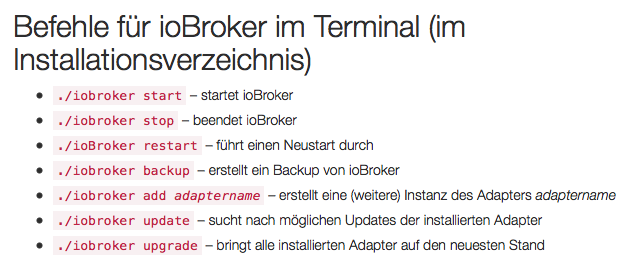
Die Befehle: ./iobroker start, stop, … funktionieren bei mir derzeit auch nicht. Ich muß mal sehen, ob ich dahinter komme, oder ob es irgendwie mit der Installation zusammenhängt.
LG
Gernot
-
Wenn das nicht läuft, liegt's an der nicht getesteten node Version 8.x. `
Installation auf OPi plus2e läuft gerade.Werde Nodejs 8.x nehmen
Gruß
Rainer
-
Habe so langsam auch meine Zweifel ob ich meine bisher funktionierende und gepflegte gut Hausautomatisierung einem so instabilen System anvertrauen sollte… `
Sei mir nicht böse, aber ioBroker ist mittlerweile so stabil, dass 95% der Probleme vor dem Bildschirm zu erwarten sind, gerade bei Installationsproblemen.Deine Probleme klingen mir schwer nach fehlenden Berechtigungen. Auf einem UNIX-artigen System wie OSX und Linux ist es außerdem ungewöhnlich direkt in "/" zu installieren.
Wenn du nicht wie in der Anleitung empfohlen auf ein User-Verzeichnis ausweichen willst (auf Linux wird "/opt/iobroker" empfohlen), könnte es notwendig sein, ein "sudo" vor die Befehle zu setzen, d.h.
sudo npm install ...
sudo iobroker add ...
...etc



Hey! Du scheinst an dieser Unterhaltung interessiert zu sein, hast aber noch kein Konto.
Hast du es satt, bei jedem Besuch durch die gleichen Beiträge zu scrollen? Wenn du dich für ein Konto anmeldest, kommst du immer genau dorthin zurück, wo du zuvor warst, und kannst dich über neue Antworten benachrichtigen lassen (entweder per E-Mail oder Push-Benachrichtigung). Du kannst auch Lesezeichen speichern und Beiträge positiv bewerten, um anderen Community-Mitgliedern deine Wertschätzung zu zeigen.
Mit deinem Input könnte dieser Beitrag noch besser werden 💗
Registrieren Anmelden500
Online33.0k
Benutzer83.5k
Themen1.3m
Beiträge