




(gelöst) Backitup Restore bringt EPERM-Error
-
@thomas-braun Danke für Deine Antwort!
Leider bin ich zu unerfahren mit LINUX, als das ich nun wüsste, was zu tun wäre

Kann mir dazu jemand Hilfestellung geben? Danke!
Das war auch primär an simatec gerichtet.
Wenn du da nichts herumgefummelt hast liegt es evtl. an den Mountoptionen des Adapters.Welches Dateisystem ist denn auf dem NAS in Verwendung?
-
Das war auch primär an simatec gerichtet.
Wenn du da nichts herumgefummelt hast liegt es evtl. an den Mountoptionen des Adapters.Welches Dateisystem ist denn auf dem NAS in Verwendung?
@thomas-braun Ok :-)
Das ist eine WD MyCloud, öhm, ehrlich gesagt, keine Ahnung, welches File System die hat.
Ich habe mit der bisher laufenden iobroker-Installation (2. SD-Karte) nochmal versucht, via CIFS ohne root-mount zu sichern. BackItUp ebenfalls V2.5.4
Da kommt folgende Fehlermeldung:[DEBUG] [mount] - noserverino option: false [DEBUG] [mount] - cifs-mount command: "mount -t cifs -o username=iobroker,password=****,rw,file_mode=0777,dir_mode=0777,vers=3.0 //mycloud/iobroker/ /opt/iobroker/backups" [DEBUG] [mount] - first mount attempt with smb option failed. try next mount attempt without smb option ... [DEBUG] [mount] - cifs-mount command: "mount -t cifs -o username=iobroker,password=****,rw,file_mode=0777,dir_mode=0777 //mycloud/iobroker/ /opt/iobroker/backups" [ERROR] [mount] - [undefined Error: Command failed: mount -t cifs -o username=iobroker,password=****,rw,file_mode=0777,dir_mode=0777 //mycloud/iobroker/ /opt/iobroker/backups mount: only root can use "--options" option [ERROR] [mount] - Error: Command failed: mount -t cifs -o username=iobroker,password=****,rw,file_mode=0777,dir_mode=0777 //mycloud/iobroker/ /opt/iobroker/backups mount: only root can use "--options" optionIch habe SMB3.0 eingestellt im BackItUp-Adapter, lt. MyCloud-Config kann sie SMB2 und SMB3, mit SMB2 allerdings gleiches Resultat.
-
@thomas-braun Ok :-)
Das ist eine WD MyCloud, öhm, ehrlich gesagt, keine Ahnung, welches File System die hat.
Ich habe mit der bisher laufenden iobroker-Installation (2. SD-Karte) nochmal versucht, via CIFS ohne root-mount zu sichern. BackItUp ebenfalls V2.5.4
Da kommt folgende Fehlermeldung:[DEBUG] [mount] - noserverino option: false [DEBUG] [mount] - cifs-mount command: "mount -t cifs -o username=iobroker,password=****,rw,file_mode=0777,dir_mode=0777,vers=3.0 //mycloud/iobroker/ /opt/iobroker/backups" [DEBUG] [mount] - first mount attempt with smb option failed. try next mount attempt without smb option ... [DEBUG] [mount] - cifs-mount command: "mount -t cifs -o username=iobroker,password=****,rw,file_mode=0777,dir_mode=0777 //mycloud/iobroker/ /opt/iobroker/backups" [ERROR] [mount] - [undefined Error: Command failed: mount -t cifs -o username=iobroker,password=****,rw,file_mode=0777,dir_mode=0777 //mycloud/iobroker/ /opt/iobroker/backups mount: only root can use "--options" option [ERROR] [mount] - Error: Command failed: mount -t cifs -o username=iobroker,password=****,rw,file_mode=0777,dir_mode=0777 //mycloud/iobroker/ /opt/iobroker/backups mount: only root can use "--options" optionIch habe SMB3.0 eingestellt im BackItUp-Adapter, lt. MyCloud-Config kann sie SMB2 und SMB3, mit SMB2 allerdings gleiches Resultat.
@alexathome Setz mal auf 3.1.1
Und die 'noserverino'-Option aktivieren. -
@thomas-braun Ok :-)
Das ist eine WD MyCloud, öhm, ehrlich gesagt, keine Ahnung, welches File System die hat.
Ich habe mit der bisher laufenden iobroker-Installation (2. SD-Karte) nochmal versucht, via CIFS ohne root-mount zu sichern. BackItUp ebenfalls V2.5.4
Da kommt folgende Fehlermeldung:[DEBUG] [mount] - noserverino option: false [DEBUG] [mount] - cifs-mount command: "mount -t cifs -o username=iobroker,password=****,rw,file_mode=0777,dir_mode=0777,vers=3.0 //mycloud/iobroker/ /opt/iobroker/backups" [DEBUG] [mount] - first mount attempt with smb option failed. try next mount attempt without smb option ... [DEBUG] [mount] - cifs-mount command: "mount -t cifs -o username=iobroker,password=****,rw,file_mode=0777,dir_mode=0777 //mycloud/iobroker/ /opt/iobroker/backups" [ERROR] [mount] - [undefined Error: Command failed: mount -t cifs -o username=iobroker,password=****,rw,file_mode=0777,dir_mode=0777 //mycloud/iobroker/ /opt/iobroker/backups mount: only root can use "--options" option [ERROR] [mount] - Error: Command failed: mount -t cifs -o username=iobroker,password=****,rw,file_mode=0777,dir_mode=0777 //mycloud/iobroker/ /opt/iobroker/backups mount: only root can use "--options" optionIch habe SMB3.0 eingestellt im BackItUp-Adapter, lt. MyCloud-Config kann sie SMB2 und SMB3, mit SMB2 allerdings gleiches Resultat.
@alexathome sagte in Backitup Restore bringt EPERM-Error:
WD MyCloud
Die kann NFS und das solltest Du auch nutzen:
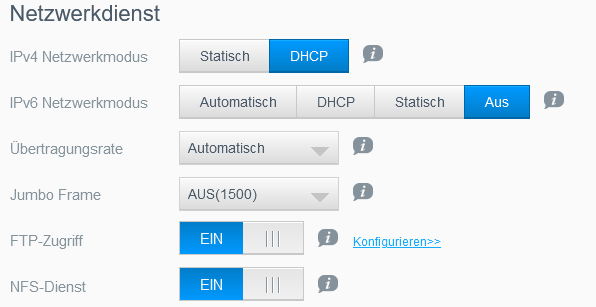
Einstellung Backitup:
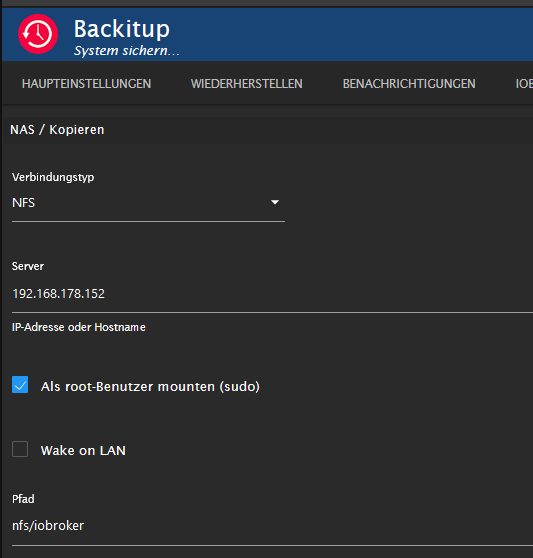
bei mir der Pfad "nfs/iobroker" --> den musst Du natürlich an Deinen Freigabenamen anpassen
Lehrling seit 1975 !!!
Beitrag geholfen ? dann gerne ein upvote rechts unten im Beitrag klicken ;)
https://forum.iobroker.net/topic/51555/hinweise-f%C3%BCr-gute-forenbeitr%C3%A4ge -
@alexathome Setz mal auf 3.1.1
Und die 'noserverino'-Option aktivieren.@thomas-braun Leider keine Besserung. Mir ist auch aufgefallen, dass der Mount bestehen bleibt, wenn man ein Wiederherstellen von NAS - Sicherungen abrufen startet (ohne ein Restore zu starten), daher auch der Unmount am Anfang.
Started iobroker ... [DEBUG] [mount] - mount activ... umount is started before mount!! [DEBUG] [mount] - device is busy... wait 2 Minutes!! [DEBUG] [mount] - noserverino option: true [DEBUG] [mount] - cifs-mount command: "mount -t cifs -o username=iobroker,password=****,noserverino,rw,file_mode=0777,dir_mode=0777,vers=3.1.1 //mycloud/iobroker/ /opt/iobroker/backups" [DEBUG] [mount] - first mount attempt with smb option failed. try next mount attempt without smb option ... [DEBUG] [mount] - cifs-mount command: "mount -t cifs -o username=iobroker,password=****,noserverino,rw,file_mode=0777,dir_mode=0777 //mycloud/iobroker/ /opt/iobroker/backups" [ERROR] [mount] - [undefined Error: Command failed: mount -t cifs -o username=iobroker,password=****,noserverino,rw,file_mode=0777,dir_mode=0777 //mycloud/iobroker/ /opt/iobroker/backups mount: only root can use "--options" option [ERROR] [mount] - Error: Command failed: mount -t cifs -o username=iobroker,password=****,noserverino,rw,file_mode=0777,dir_mode=0777 //mycloud/iobroker/ /opt/iobroker/backups mount: only root can use "--options" option -
@alexathome sagte in Backitup Restore bringt EPERM-Error:
WD MyCloud
Die kann NFS und das solltest Du auch nutzen:
Einstellung Backitup:
bei mir der Pfad "nfs/iobroker" --> den musst Du natürlich an Deinen Freigabenamen anpassen
@djmarc75 Danke!
Ich habe damit vorhin rumprobiert, konnte es aber ohne root-Zugriff nicht zum Laufen bringen. Ich versuche nun mal Deine Variante!EDIT: damit funktioniert es! Und es ist kein Problem, dass nach wie vor via root gemounted wird?
Mir ist weiterhin aufgefallen, dass nach erfolgreichem Ende des Sicherns der Mount bestehen bleibt. Soll das so sein??Ich hoffe jetzt bloß, dass auf meiner neuen Installation damit auch der Restore des Zigbee-Adapters funktioniert... das wäre mega.
-
@djmarc75 Danke!
Ich habe damit vorhin rumprobiert, konnte es aber ohne root-Zugriff nicht zum Laufen bringen. Ich versuche nun mal Deine Variante!EDIT: damit funktioniert es! Und es ist kein Problem, dass nach wie vor via root gemounted wird?
Mir ist weiterhin aufgefallen, dass nach erfolgreichem Ende des Sicherns der Mount bestehen bleibt. Soll das so sein??Ich hoffe jetzt bloß, dass auf meiner neuen Installation damit auch der Restore des Zigbee-Adapters funktioniert... das wäre mega.
@alexathome sagte in Backitup Restore bringt EPERM-Error:
der Mount bestehen bleibt
Woran siehst Du das?
In der Konsole mal prüfen ob tatsächlich der mount bestehen bleibt
mountLehrling seit 1975 !!!
Beitrag geholfen ? dann gerne ein upvote rechts unten im Beitrag klicken ;)
https://forum.iobroker.net/topic/51555/hinweise-f%C3%BCr-gute-forenbeitr%C3%A4ge -
@djmarc75 Danke!
Ich habe damit vorhin rumprobiert, konnte es aber ohne root-Zugriff nicht zum Laufen bringen. Ich versuche nun mal Deine Variante!EDIT: damit funktioniert es! Und es ist kein Problem, dass nach wie vor via root gemounted wird?
Mir ist weiterhin aufgefallen, dass nach erfolgreichem Ende des Sicherns der Mount bestehen bleibt. Soll das so sein??Ich hoffe jetzt bloß, dass auf meiner neuen Installation damit auch der Restore des Zigbee-Adapters funktioniert... das wäre mega.
@alexathome sagte in Backitup Restore bringt EPERM-Error:
Und es ist kein Problem, dass nach wie vor via root gemounted wird?
Nur root kann (ohne entsprechenden Eintrag in der /etc/fstab) mounten. Das passt.
-
@alexathome sagte in Backitup Restore bringt EPERM-Error:
der Mount bestehen bleibt
Woran siehst Du das?
In der Konsole mal prüfen ob tatsächlich der mount bestehen bleibt
mount@djmarc75 Ich habe auf dem NAS in das Verzeichnis eine txt-Datei gelegt, die ich auf dem Raspberry im Verzeichnis /opt/iobroker/backups sehe. Zudem wird mir "backups" via ls als gemounted angezeigt (grün hinterlegt).
Und mount bestätigt es:
//mycloud/iobroker/ on /opt/iobroker/backups type cifs (rw,relatime,vers=2.0,cache=strict,username=iobroker,uid=0,noforceuid,gid=0,noforcegid,addr=192.168.178.41,file_mode=0777,dir_mode=0777,soft,nounix,serverino,mapposix,rsize=65536,wsize=65536,echo_interval=60,actimeo=1)@Thomas-Braun Ok, danke :-)
-
@djmarc75 Ich habe auf dem NAS in das Verzeichnis eine txt-Datei gelegt, die ich auf dem Raspberry im Verzeichnis /opt/iobroker/backups sehe. Zudem wird mir "backups" via ls als gemounted angezeigt (grün hinterlegt).
Und mount bestätigt es:
//mycloud/iobroker/ on /opt/iobroker/backups type cifs (rw,relatime,vers=2.0,cache=strict,username=iobroker,uid=0,noforceuid,gid=0,noforcegid,addr=192.168.178.41,file_mode=0777,dir_mode=0777,soft,nounix,serverino,mapposix,rsize=65536,wsize=65536,echo_interval=60,actimeo=1)@Thomas-Braun Ok, danke :-)
-
@alexathome ist noch cifs
vll mal manuell unmounten.@djmarc75 Stimmt, war mir entgangen. Das scheint noch übergeblieben zu sein vom CIFS-Mount.
Ich habe nun manuell unmounted, erneut Backup via NFS gestartet, und jetzt hat auch der abschließende umount erfolgreich funktioniert.
Started iobroker ... [DEBUG] [mount] start with {"mountType":"NFS","type":"storage","source":"local","mount":"mycloud","debugging":true,"fileDir":"/opt/iobroker/iobroker-data/backitup","wakeOnLAN":false,"macAd":"20:DE:20:DE:20:DE","wolTime":"25","smb":"vers=3.1.1","sudo":true,"cifsDomain":"","clientInodes":true,"deleteOldBackup":true,"ownDir":false,"dir":"nfs/iobroker","dirMinimal":"sharename/backupDir","user":"iobroker","pass":"****","ignoreErrors":false} [DEBUG] [mount] - nfs-mount command: "sudo mount mycloud:/nfs/iobroker /opt/iobroker/backups" [DEBUG] [mount] - mount successfully completed [DEBUG] [mount] - done …Doing the Backup... [DEBUG] [umount] - mount activ, umount is started ... [DEBUG] [umount] start with {"mountType":"NFS","type":"storage","source":"local","mount":"mycloud","debugging":true,"fileDir":"/opt/iobroker/iobroker-data/backitup","wakeOnLAN":false,"macAd":"20:DE:20:DE:20:DE","wolTime":"25","smb":"vers=3.1.1","sudo":true,"cifsDomain":"","clientInodes":true,"deleteOldBackup":true,"ownDir":false,"dir":"/nfs/iobroker","dirMinimal":"sharename/backupDir","user":"iobroker","pass":"****","ignoreErrors":false,"backupDir":"/opt/iobroker/backups","influxDBEvents":[],"mySqlEvents":[],"pgSqlEvents":[]} [DEBUG] [umount] - umount successfully completed [DEBUG] [umount] - done -
@djmarc75 Stimmt, war mir entgangen. Das scheint noch übergeblieben zu sein vom CIFS-Mount.
Ich habe nun manuell unmounted, erneut Backup via NFS gestartet, und jetzt hat auch der abschließende umount erfolgreich funktioniert.
Started iobroker ... [DEBUG] [mount] start with {"mountType":"NFS","type":"storage","source":"local","mount":"mycloud","debugging":true,"fileDir":"/opt/iobroker/iobroker-data/backitup","wakeOnLAN":false,"macAd":"20:DE:20:DE:20:DE","wolTime":"25","smb":"vers=3.1.1","sudo":true,"cifsDomain":"","clientInodes":true,"deleteOldBackup":true,"ownDir":false,"dir":"nfs/iobroker","dirMinimal":"sharename/backupDir","user":"iobroker","pass":"****","ignoreErrors":false} [DEBUG] [mount] - nfs-mount command: "sudo mount mycloud:/nfs/iobroker /opt/iobroker/backups" [DEBUG] [mount] - mount successfully completed [DEBUG] [mount] - done …Doing the Backup... [DEBUG] [umount] - mount activ, umount is started ... [DEBUG] [umount] start with {"mountType":"NFS","type":"storage","source":"local","mount":"mycloud","debugging":true,"fileDir":"/opt/iobroker/iobroker-data/backitup","wakeOnLAN":false,"macAd":"20:DE:20:DE:20:DE","wolTime":"25","smb":"vers=3.1.1","sudo":true,"cifsDomain":"","clientInodes":true,"deleteOldBackup":true,"ownDir":false,"dir":"/nfs/iobroker","dirMinimal":"sharename/backupDir","user":"iobroker","pass":"****","ignoreErrors":false,"backupDir":"/opt/iobroker/backups","influxDBEvents":[],"mySqlEvents":[],"pgSqlEvents":[]} [DEBUG] [umount] - umount successfully completed [DEBUG] [umount] - doneIt worked like a charm!!

Zigbee erfolgreich auf meiner neuen Installation restored. Adapter erfolgreich gestartet, Leuchte erfolgreich angeschaltet!Allerdings ist wieder der mount (diesmal tatsächlich nfs) bestehen geblieben. Vielleicht war das ja auch ganz am Anfang die Ursache des Problems...
Ich muss korrigieren: erneutes ls -lhs ergab keinen mount mehr. Hat anscheinend einen Moment gedauert mit dem umount.Na, jedenfalls Mission erfüllt: Raspberry erfolgreich auf Bullseye aktualisiert, iobroker running.
Danke Euch vielmals!!



Hey! Du scheinst an dieser Unterhaltung interessiert zu sein, hast aber noch kein Konto.
Hast du es satt, bei jedem Besuch durch die gleichen Beiträge zu scrollen? Wenn du dich für ein Konto anmeldest, kommst du immer genau dorthin zurück, wo du zuvor warst, und kannst dich über neue Antworten benachrichtigen lassen (entweder per E-Mail oder Push-Benachrichtigung). Du kannst auch Lesezeichen speichern und Beiträge positiv bewerten, um anderen Community-Mitgliedern deine Wertschätzung zu zeigen.
Mit deinem Input könnte dieser Beitrag noch besser werden 💗
Registrieren Anmelden418
Online33.0k
Benutzer83.5k
Themen1.3m
Beiträge