




Zigbee Adapter 1.6.18 auf einmal keine Verbindung
-
habe nochmal den Befehl ls -l /dev/" ausgeführt ....da find ich aber das ttyZigbee!!
ls -l /dev/ total 0 crw-r--r-- 1 root root 10, 235 May 8 22:07 autofs drwxr-xr-x 2 root root 860 May 8 22:07 block drwxr-xr-x 2 root root 60 May 8 22:07 bsg crw-rw---- 1 root disk 10, 234 May 8 22:07 btrfs-control drwxr-xr-x 3 root root 60 May 8 22:07 bus drwxr-xr-x 2 root root 4120 May 28 20:52 char crw--w---- 1 root tty 5, 1 May 8 22:08 console lrwxrwxrwx 1 root root 11 May 8 22:07 core -> /proc/kcore drwxr-xr-x 2 root root 60 May 8 22:07 cpu crw------- 1 root root 10, 123 May 8 22:07 cpu_dma_latency crw------- 1 root root 10, 203 May 8 22:07 cuse drwxr-xr-x 6 root root 120 May 8 22:07 disk brw-rw---- 1 root disk 253, 0 May 8 22:07 dm-0 brw-rw---- 1 root disk 253, 1 May 8 22:07 dm-1 brw-rw---- 1 root disk 253, 10 May 8 22:07 dm-10 brw-rw---- 1 root disk 253, 11 May 8 22:07 dm-11 brw-rw---- 1 root disk 253, 12 May 8 22:07 dm-12 brw-rw---- 1 root disk 253, 13 May 8 22:07 dm-13 brw-rw---- 1 root disk 253, 14 May 8 22:07 dm-14 brw-rw---- 1 root disk 253, 15 May 8 22:07 dm-15 brw-rw---- 1 root disk 253, 16 May 8 22:07 dm-16 brw-rw---- 1 root disk 253, 17 May 28 21:02 dm-17 brw-rw---- 1 root disk 253, 18 May 8 22:07 dm-18 brw-rw---- 1 root disk 253, 19 May 8 22:07 dm-19 brw-rw---- 1 root disk 253, 2 May 8 22:07 dm-2 brw-rw---- 1 root disk 253, 20 May 8 22:07 dm-20 brw-rw---- 1 root disk 253, 21 May 28 21:02 dm-21 brw-rw---- 1 root disk 253, 22 May 8 22:07 dm-22 brw-rw---- 1 root disk 253, 23 May 8 22:07 dm-23 brw-rw---- 1 root disk 253, 24 May 8 22:38 dm-24 brw-rw---- 1 root disk 253, 25 May 28 20:44 dm-25 brw-rw---- 1 root disk 253, 26 May 28 21:02 dm-26 brw-rw---- 1 root disk 253, 27 May 8 22:07 dm-27 brw-rw---- 1 root disk 253, 3 May 8 22:07 dm-3 brw-rw---- 1 root disk 253, 4 May 8 22:07 dm-4 brw-rw---- 1 root disk 253, 5 May 8 22:07 dm-5 brw-rw---- 1 root disk 253, 6 May 8 22:07 dm-6 brw-rw---- 1 root disk 253, 7 May 8 22:07 dm-7 brw-rw---- 1 root disk 253, 8 May 8 22:07 dm-8 brw-rw---- 1 root disk 253, 9 May 8 22:07 dm-9 drwxr-xr-x 2 root root 60 May 8 22:07 dma_heap drwxr-xr-x 3 root root 100 May 8 22:07 dri crw------- 1 root root 236, 0 May 8 22:07 drm_dp_aux0 crw------- 1 root root 10, 126 May 8 22:07 ecryptfs lrwxrwxrwx 1 root root 13 May 8 22:07 fd -> /proc/self/fd crw-rw-rw- 1 root root 1, 7 May 8 22:07 full crw-rw-rw- 1 root root 10, 229 May 8 22:28 fuse crw------- 1 root root 254, 0 May 8 22:07 gpiochip0 crw------- 1 root root 10, 228 May 8 22:07 hpet drwxr-xr-x 2 root root 0 May 8 22:07 hugepages crw------- 1 root root 10, 183 May 8 22:07 hwrng crw------- 1 root root 89, 0 May 8 22:07 i2c-0 crw------- 1 root root 89, 1 May 8 22:07 i2c-1 crw------- 1 root root 89, 2 May 8 22:07 i2c-2 crw------- 1 root root 89, 3 May 8 22:07 i2c-3 crw------- 1 root root 89, 4 May 8 22:07 i2c-4 lrwxrwxrwx 1 root root 12 May 8 22:07 initctl -> /run/initctl drwxr-xr-x 3 root root 340 May 8 22:07 input crw-r--r-- 1 root root 1, 11 May 8 22:07 kmsg crw-rw---- 1 root kvm 10, 232 May 10 20:45 kvm drwxr-xr-x 2 root root 60 May 8 22:07 lightnvm crw-rw---- 1 root video 238, 0 May 8 22:07 lirc0 lrwxrwxrwx 1 root root 28 May 8 22:07 log -> /run/systemd/journal/dev-log brw-rw---- 1 root disk 7, 0 May 8 22:36 loop0 brw-rw---- 1 root disk 7, 1 May 8 22:36 loop1 brw-rw---- 1 root disk 7, 2 May 8 22:36 loop2 brw-rw---- 1 root disk 7, 3 May 8 22:36 loop3 brw-rw---- 1 root disk 7, 4 May 8 22:07 loop4 brw-rw---- 1 root disk 7, 5 May 8 22:07 loop5 brw-rw---- 1 root disk 7, 6 May 8 22:07 loop6 brw-rw---- 1 root disk 7, 7 May 8 22:07 loop7 crw-rw---- 1 root disk 10, 237 May 8 22:28 loop-control drwxr-xr-x 2 root root 620 May 8 22:07 mapper crw------- 1 root root 10, 227 May 8 22:07 mcelog crw------- 1 root root 235, 0 May 8 22:07 mei0 crw-r----- 1 root kmem 1, 1 May 8 22:07 mem drwxrwxrwt 2 root root 40 May 8 22:07 mqueue drwxr-xr-x 2 root root 60 May 8 22:07 net crw------- 1 root root 240, 0 May 8 22:07 ng0n1 crw-rw-rw- 1 root root 1, 3 May 8 22:07 null crw------- 1 root root 241, 0 May 8 22:07 nvme0 brw-rw---- 1 root disk 259, 0 May 8 22:07 nvme0n1 brw-rw---- 1 root disk 259, 1 May 8 22:07 nvme0n1p1 brw-rw---- 1 root disk 259, 2 May 8 22:07 nvme0n1p2 brw-rw---- 1 root disk 259, 3 May 8 22:07 nvme0n1p3 crw------- 1 root root 10, 144 May 8 22:07 nvram crw-r----- 1 root kmem 1, 4 May 8 22:07 port crw------- 1 root root 108, 0 May 8 22:07 ppp crw------- 1 root root 10, 1 May 8 22:07 psaux crw-rw-rw- 1 root tty 5, 2 May 28 21:02 ptmx crw------- 1 root root 246, 0 May 8 22:07 ptp0 drwxr-xr-x 2 root root 0 May 8 22:07 pts drwxr-xr-x 2 root root 520 May 8 22:07 pve crw-rw-rw- 1 root root 1, 8 May 8 22:07 random crw-rw-r-- 1 root root 10, 242 May 8 22:07 rfkill lrwxrwxrwx 1 root root 4 May 8 22:07 rtc -> rtc0 crw------- 1 root root 248, 0 May 8 22:07 rtc0 brw-rw---- 1 root disk 8, 0 May 8 22:07 sda drwxr-xr-x 4 root root 80 May 8 22:07 serial crw-rw---- 1 root disk 21, 0 May 8 22:07 sg0 drwxrwxrwt 16 root root 320 May 28 21:02 shm crw------- 1 root root 10, 231 May 8 22:07 snapshot drwxr-xr-x 3 root root 300 May 8 22:07 snd lrwxrwxrwx 1 root root 15 May 8 22:07 stderr -> /proc/self/fd/2 lrwxrwxrwx 1 root root 15 May 8 22:07 stdin -> /proc/self/fd/0 lrwxrwxrwx 1 root root 15 May 8 22:07 stdout -> /proc/self/fd/1 crw-rw-rw- 1 root tty 5, 0 May 8 22:07 tty crw--w---- 1 root tty 4, 0 May 8 22:07 tty0 crw--w---- 1 root tty 4, 1 May 8 22:08 tty1 crw--w---- 1 root tty 4, 10 May 8 22:07 tty10 crw--w---- 1 root tty 4, 11 May 8 22:07 tty11 crw--w---- 1 root tty 4, 12 May 8 22:07 tty12 crw--w---- 1 root tty 4, 13 May 8 22:07 tty13 crw--w---- 1 root tty 4, 14 May 8 22:07 tty14 crw--w---- 1 root tty 4, 15 May 8 22:07 tty15 crw--w---- 1 root tty 4, 16 May 8 22:07 tty16 crw--w---- 1 root tty 4, 17 May 8 22:07 tty17 crw--w---- 1 root tty 4, 18 May 8 22:07 tty18 crw--w---- 1 root tty 4, 19 May 8 22:07 tty19 crw--w---- 1 root tty 4, 2 May 8 22:07 tty2 crw--w---- 1 root tty 4, 20 May 8 22:07 tty20 crw--w---- 1 root tty 4, 21 May 8 22:07 tty21 crw--w---- 1 root tty 4, 22 May 8 22:07 tty22 crw--w---- 1 root tty 4, 23 May 8 22:07 tty23 crw--w---- 1 root tty 4, 24 May 8 22:07 tty24 crw--w---- 1 root tty 4, 25 May 8 22:07 tty25 crw--w---- 1 root tty 4, 26 May 8 22:07 tty26 crw--w---- 1 root tty 4, 27 May 8 22:07 tty27 crw--w---- 1 root tty 4, 28 May 8 22:07 tty28 crw--w---- 1 root tty 4, 29 May 8 22:07 tty29 crw--w---- 1 root tty 4, 3 May 8 22:07 tty3 crw--w---- 1 root tty 4, 30 May 8 22:07 tty30 crw--w---- 1 root tty 4, 31 May 8 22:07 tty31 crw--w---- 1 root tty 4, 32 May 8 22:07 tty32 crw--w---- 1 root tty 4, 33 May 8 22:07 tty33 crw--w---- 1 root tty 4, 34 May 8 22:07 tty34 crw--w---- 1 root tty 4, 35 May 8 22:07 tty35 crw--w---- 1 root tty 4, 36 May 8 22:07 tty36 crw--w---- 1 root tty 4, 37 May 8 22:07 tty37 crw--w---- 1 root tty 4, 38 May 8 22:07 tty38 crw--w---- 1 root tty 4, 39 May 8 22:07 tty39 crw--w---- 1 root tty 4, 4 May 8 22:07 tty4 crw--w---- 1 root tty 4, 40 May 8 22:07 tty40 crw--w---- 1 root tty 4, 41 May 8 22:07 tty41 crw--w---- 1 root tty 4, 42 May 8 22:07 tty42 crw--w---- 1 root tty 4, 43 May 8 22:07 tty43 crw--w---- 1 root tty 4, 44 May 8 22:07 tty44 crw--w---- 1 root tty 4, 45 May 8 22:07 tty45 crw--w---- 1 root tty 4, 46 May 8 22:07 tty46 crw--w---- 1 root tty 4, 47 May 8 22:07 tty47 crw--w---- 1 root tty 4, 48 May 8 22:07 tty48 crw--w---- 1 root tty 4, 49 May 8 22:07 tty49 crw--w---- 1 root tty 4, 5 May 8 22:07 tty5 crw--w---- 1 root tty 4, 50 May 8 22:07 tty50 crw--w---- 1 root tty 4, 51 May 8 22:07 tty51 crw--w---- 1 root tty 4, 52 May 8 22:07 tty52 crw--w---- 1 root tty 4, 53 May 8 22:07 tty53 crw--w---- 1 root tty 4, 54 May 8 22:07 tty54 crw--w---- 1 root tty 4, 55 May 8 22:07 tty55 crw--w---- 1 root tty 4, 56 May 8 22:07 tty56 crw--w---- 1 root tty 4, 57 May 8 22:07 tty57 crw--w---- 1 root tty 4, 58 May 8 22:07 tty58 crw--w---- 1 root tty 4, 59 May 8 22:07 tty59 crw--w---- 1 root tty 4, 6 May 8 22:07 tty6 crw--w---- 1 root tty 4, 60 May 8 22:07 tty60 crw--w---- 1 root tty 4, 61 May 8 22:07 tty61 crw--w---- 1 root tty 4, 62 May 8 22:07 tty62 crw--w---- 1 root tty 4, 63 May 8 22:07 tty63 crw--w---- 1 root tty 4, 7 May 8 22:07 tty7 crw--w---- 1 root tty 4, 8 May 8 22:07 tty8 crw--w---- 1 root tty 4, 9 May 8 22:07 tty9 crw-rw-rw- 1 root dialout 166, 0 May 28 20:52 ttyACM0 crw-rw-rw- 1 root dialout 166, 1 May 12 18:59 ttyACM1 lrwxrwxrwx 1 root root 7 May 8 22:07 ttyFhem -> ttyACM1 crw------- 1 root root 5, 3 May 8 22:07 ttyprintk crw-rw---- 1 root dialout 4, 64 May 8 22:07 ttyS0 crw-rw---- 1 root dialout 4, 65 May 8 22:07 ttyS1 crw-rw---- 1 root dialout 4, 74 May 8 22:07 ttyS10 crw-rw---- 1 root dialout 4, 75 May 8 22:07 ttyS11 crw-rw---- 1 root dialout 4, 76 May 8 22:07 ttyS12 crw-rw---- 1 root dialout 4, 77 May 8 22:07 ttyS13 crw-rw---- 1 root dialout 4, 78 May 8 22:07 ttyS14 crw-rw---- 1 root dialout 4, 79 May 8 22:07 ttyS15 crw-rw---- 1 root dialout 4, 80 May 8 22:07 ttyS16 crw-rw---- 1 root dialout 4, 81 May 8 22:07 ttyS17 crw-rw---- 1 root dialout 4, 82 May 8 22:07 ttyS18 crw-rw---- 1 root dialout 4, 83 May 8 22:07 ttyS19 crw-rw---- 1 root dialout 4, 66 May 8 22:07 ttyS2 crw-rw---- 1 root dialout 4, 84 May 8 22:07 ttyS20 crw-rw---- 1 root dialout 4, 85 May 8 22:07 ttyS21 crw-rw---- 1 root dialout 4, 86 May 8 22:07 ttyS22 crw-rw---- 1 root dialout 4, 87 May 8 22:07 ttyS23 crw-rw---- 1 root dialout 4, 88 May 8 22:07 ttyS24 crw-rw---- 1 root dialout 4, 89 May 8 22:07 ttyS25 crw-rw---- 1 root dialout 4, 90 May 8 22:07 ttyS26 crw-rw---- 1 root dialout 4, 91 May 8 22:07 ttyS27 crw-rw---- 1 root dialout 4, 92 May 8 22:07 ttyS28 crw-rw---- 1 root dialout 4, 93 May 8 22:07 ttyS29 crw-rw---- 1 root dialout 4, 67 May 8 22:07 ttyS3 crw-rw---- 1 root dialout 4, 94 May 8 22:07 ttyS30 crw-rw---- 1 root dialout 4, 95 May 8 22:07 ttyS31 crw-rw---- 1 root dialout 4, 68 May 8 22:07 ttyS4 crw-rw---- 1 root dialout 4, 69 May 8 22:07 ttyS5 crw-rw---- 1 root dialout 4, 70 May 8 22:07 ttyS6 crw-rw---- 1 root dialout 4, 71 May 8 22:07 ttyS7 crw-rw---- 1 root dialout 4, 72 May 8 22:07 ttyS8 crw-rw---- 1 root dialout 4, 73 May 8 22:07 ttyS9 lrwxrwxrwx 1 root root 7 May 28 20:52 ttyZigbee -> ttyACM0 crw-rw---- 1 root kvm 10, 124 May 8 22:07 udmabuf crw------- 1 root root 10, 239 May 8 22:07 uhid crw------- 1 root root 10, 223 May 8 22:07 uinput crw-rw-rw- 1 root root 1, 9 May 8 22:07 urandom crw------- 1 root root 10, 240 May 8 22:07 userio crw-rw---- 1 root tty 7, 0 May 8 22:07 vcs crw-rw---- 1 root tty 7, 1 May 8 22:07 vcs1 crw-rw---- 1 root tty 7, 2 May 8 22:07 vcs2 crw-rw---- 1 root tty 7, 3 May 8 22:07 vcs3 crw-rw---- 1 root tty 7, 4 May 8 22:07 vcs4 crw-rw---- 1 root tty 7, 5 May 8 22:07 vcs5 crw-rw---- 1 root tty 7, 6 May 8 22:07 vcs6 crw-rw---- 1 root tty 7, 128 May 8 22:07 vcsa crw-rw---- 1 root tty 7, 129 May 8 22:07 vcsa1 crw-rw---- 1 root tty 7, 130 May 8 22:07 vcsa2 crw-rw---- 1 root tty 7, 131 May 8 22:07 vcsa3 crw-rw---- 1 root tty 7, 132 May 8 22:07 vcsa4 crw-rw---- 1 root tty 7, 133 May 8 22:07 vcsa5 crw-rw---- 1 root tty 7, 134 May 8 22:07 vcsa6 crw-rw---- 1 root tty 7, 64 May 8 22:07 vcsu crw-rw---- 1 root tty 7, 65 May 8 22:07 vcsu1 crw-rw---- 1 root tty 7, 66 May 8 22:07 vcsu2 crw-rw---- 1 root tty 7, 67 May 8 22:07 vcsu3 crw-rw---- 1 root tty 7, 68 May 8 22:07 vcsu4 crw-rw---- 1 root tty 7, 69 May 8 22:07 vcsu5 crw-rw---- 1 root tty 7, 70 May 8 22:07 vcsu6 drwxr-xr-x 2 root root 60 May 8 22:07 vfio crw------- 1 root root 10, 127 May 8 22:07 vga_arbiter crw------- 1 root root 10, 137 May 8 22:07 vhci crw------- 1 root root 10, 238 May 8 22:07 vhost-net crw------- 1 root root 10, 241 May 8 22:07 vhost-vsock crw------- 1 root root 10, 130 May 8 22:07 watchdog crw------- 1 root root 244, 0 May 8 22:07 watchdog0 crw-rw-rw- 1 root root 1, 5 May 8 22:07 zero crw-rw-rw- 1 root root 10, 249 May 8 22:28 zfs@kusselin sagte in Zigbee Adapter 1.6.18 auf einmal keine Verbindung:
da find ich aber das ttyZigbee!!
auf ttyacm0 gemappt
kein Support per PN! - Fragen im Forum stellen - Benutzt das Voting rechts unten im Beitrag wenn er euch geholfen hat.
Das Forum freut sich über eine Spende. Benutzt dazu den Spendenbutton oben rechts. Danke!
der Installationsfixer: curl -fsL https://iobroker.net/fix.sh | bash - -
@kusselin sagte in Zigbee Adapter 1.6.18 auf einmal keine Verbindung:
da find ich aber das ttyZigbee!!
auf ttyacm0 gemappt
Und ttyACM0 schaut jetzt gut aus:
crw-rw-rw- 1 root dialout 166, 0 May 28 20:52 ttyACM0Jetzt müsste auch /dev/ttyZigbee wieder im Adapter eingetragen funktionieren.
-
@kusselin sagte in Zigbee Adapter 1.6.18 auf einmal keine Verbindung:
in dem Adaptereinstellungen eintragen muss?
Ja, versuch mal damit. Ich würde das aber trotzdem versuchen wieder sauber aufzusetzen. Ist nämlich nicht gesagt, dass der Stick immer dort landet. Deswegen werden ja da beim Durchreichen die Geräte nicht direkt angesprochen sondern man geht auf die Links und dann erst von dort auf die direkten Gerätedateien.
@thomas-braun sagte in Zigbee Adapter 1.6.18 auf einmal keine Verbindung:
@kusselin sagte in Zigbee Adapter 1.6.18 auf einmal keine Verbindung:
in dem Adaptereinstellungen eintragen muss?
Ja, versuch mal damit. Ich würde das aber trotzdem versuchen wieder sauber aufzusetzen. Ist nämlich nicht gesagt, dass der Stick immer dort landet. Deswegen werden ja da beim Durchreichen die Geräte nicht direkt angesprochen sondern man geht auf die Links und dann erst von dort auf die direkten Gerätedateien.
klappt auch nicht mit
/dev/ttyACM0:-(
hier meine configs:
nano /etc/udev/rules.d/49-custom.rules
KERNEL=="ttyACM[0-9]*", SUBSYSTEM=="tty", ATTRS{idVendor}=="0451", ATTRS{idProduct}=="16a8", SYMLINK="ttyZigbee"
SUBSYSTEMS=="usb", ATTRS{idVendor}=="0451", ATTRS{idProduct}=="16a8", GROUP="users", MODE="0666"

KERNEL=="ttyACM[0-9]*", SUBSYSTEM=="tty", ATTRS{idVendor}=="03eb", ATTRS{idProduct}=="204b", SYMLINK="ttyFhem"
SUBSYSTEMS=="usb", ATTRS{idVendor}=="03eb", ATTRS{idProduct}=="204b", GROUP="users", MODE="0666"
einmal der CUL Stick und der Zigbee Stick
Hier mein iobroker Container config:
arch: amd64
cores: 2
hostname: iobroker-live
memory: 8192
net0: name=eth0,bridge=vmbr0,gw=192.168.200.1,hwaddr=9A:A7:50:06:EF:AC,ip=192.168.200.38/24,ip6=dhcp,type=veth
ostype: ubuntu
rootfs: local-lvm:vm-200-disk-0,size=12G
swap: 1000
unprivileged: 1
lxc.cgroup.devices.allow: c 7:* rwm
lxc.mount.entry: /dev/ttyZigbee dev/ttyZigbee none bind,optional,create=file
alles so gemacht .....
Könnt iher da was erkennen?
-
@thomas-braun sagte in Zigbee Adapter 1.6.18 auf einmal keine Verbindung:
@kusselin sagte in Zigbee Adapter 1.6.18 auf einmal keine Verbindung:
in dem Adaptereinstellungen eintragen muss?
Ja, versuch mal damit. Ich würde das aber trotzdem versuchen wieder sauber aufzusetzen. Ist nämlich nicht gesagt, dass der Stick immer dort landet. Deswegen werden ja da beim Durchreichen die Geräte nicht direkt angesprochen sondern man geht auf die Links und dann erst von dort auf die direkten Gerätedateien.
klappt auch nicht mit
/dev/ttyACM0:-(
hier meine configs:
nano /etc/udev/rules.d/49-custom.rules
KERNEL=="ttyACM[0-9]*", SUBSYSTEM=="tty", ATTRS{idVendor}=="0451", ATTRS{idProduct}=="16a8", SYMLINK="ttyZigbee"
SUBSYSTEMS=="usb", ATTRS{idVendor}=="0451", ATTRS{idProduct}=="16a8", GROUP="users", MODE="0666"

KERNEL=="ttyACM[0-9]*", SUBSYSTEM=="tty", ATTRS{idVendor}=="03eb", ATTRS{idProduct}=="204b", SYMLINK="ttyFhem"
SUBSYSTEMS=="usb", ATTRS{idVendor}=="03eb", ATTRS{idProduct}=="204b", GROUP="users", MODE="0666"
einmal der CUL Stick und der Zigbee Stick
Hier mein iobroker Container config:
arch: amd64
cores: 2
hostname: iobroker-live
memory: 8192
net0: name=eth0,bridge=vmbr0,gw=192.168.200.1,hwaddr=9A:A7:50:06:EF:AC,ip=192.168.200.38/24,ip6=dhcp,type=veth
ostype: ubuntu
rootfs: local-lvm:vm-200-disk-0,size=12G
swap: 1000
unprivileged: 1
lxc.cgroup.devices.allow: c 7:* rwm
lxc.mount.entry: /dev/ttyZigbee dev/ttyZigbee none bind,optional,create=file
alles so gemacht .....
Könnt iher da was erkennen?
Sieht eigentlich schlüssig aus.
-
Sieht eigentlich schlüssig aus.
@thomas-braun haja...aber ich sehe hier was:
crw-rw-rw-  1 root dialout 166,   0 May 28 20:52 ttyACM0
crw-rw-rw-  1 root dialout 166,   1 May 12 18:59 ttyACM1
lrwxrwxrwx  1 root root           7 May  8 22:07 ttyFhem -> ttyACM1
lrwxrwxrwx  1 root root           7 May 28 20:52 ttyZigbee -> ttyACM0
ihr sagt Mappen hier funzt das doch nicht......
root/dialout ist korrekt so habe ich das verstanden mit den Rechten......und das zeigt aber auch ttyACM0 und ttyACM1
das eigentliche weiterleiten geschieht aber mit root/root auf ttyZigbee und das geht doch nicht<!!
Oder habe ich da was falsch verstanden???
-
bin mal auf debug gegangen..dann kommt das raus:
zigbee.0
	2022-05-28 21:29:09.255	info	Installed Version: iobroker.zigbee@1.6.16
zigbee.0
	2022-05-28 21:29:08.897	debug	Starting zigbee-herdsman...
zigbee.0
	2022-05-28 21:29:08.897	info	Starting Zigbee npm ...
zigbee.0
	2022-05-28 21:29:08.859	debug	Using zigbee-herdsman with settings: {"network":{"panID":6754,"extendedPanID":[221,221,221,221,221,221,221,221],"channelList":[11],"networkKey":[1,3,5,7,9,11,13,15,0,2,4,6,8,10,12,13]},"databasePath":"/opt/iobroker/iobroker-data/zigbee_0/shepherd.db","backupPath":"/opt/iobroker/iobroker-data/zigbee_0/nvbackup.json","serialPort":{"baudRate":115200,"rtscts":false,"path":"/dev/ttyZigbee","adapter":"zstack"},"adapter":{"forceStartWithInconsistentAdapterConfiguration":false}}
zigbee.0
	2022-05-28 21:29:08.824	info	starting. Version 1.6.16 in /opt/iobroker/node_modules/iobroker.zigbee, node: v14.19.1, js-controller: 4.0.23
zigbee.0
	2022-05-28 21:29:08.588	debug	Plugin sentry Initialize Plugin (enabled=true)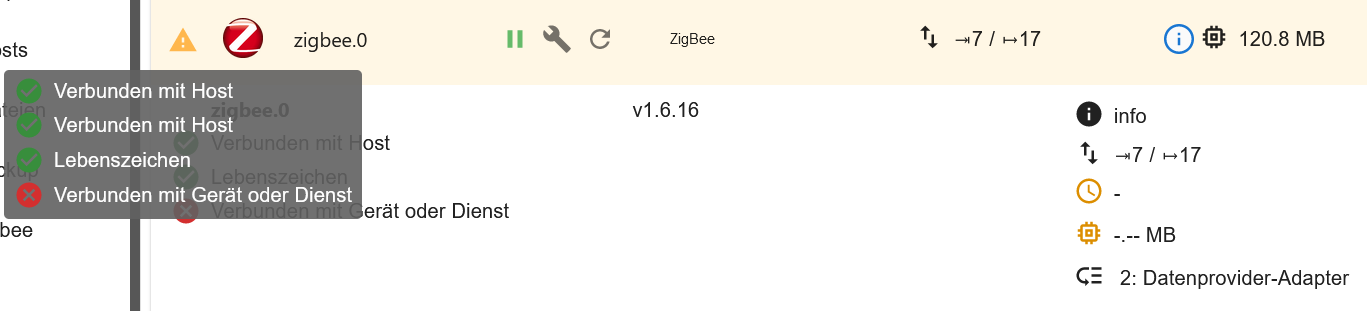
-
@thomas-braun haja...aber ich sehe hier was:
crw-rw-rw-  1 root dialout 166,   0 May 28 20:52 ttyACM0
crw-rw-rw-  1 root dialout 166,   1 May 12 18:59 ttyACM1
lrwxrwxrwx  1 root root           7 May  8 22:07 ttyFhem -> ttyACM1
lrwxrwxrwx  1 root root           7 May 28 20:52 ttyZigbee -> ttyACM0
ihr sagt Mappen hier funzt das doch nicht......
root/dialout ist korrekt so habe ich das verstanden mit den Rechten......und das zeigt aber auch ttyACM0 und ttyACM1
das eigentliche weiterleiten geschieht aber mit root/root auf ttyZigbee und das geht doch nicht<!!
Oder habe ich da was falsch verstanden???
@kusselin sagte in Zigbee Adapter 1.6.18 auf einmal keine Verbindung:
Oder habe ich da was falsch verstanden???
Dateien die mit l gekennzeichnet sind sind nur symlinks. Der Link geht auf ttyACM1 für ttyFhem und ttyACM0 für ttyZigbee. Sollte eigentlich passen.
getfacl /dev/ttyZigbeesagt?
-
@thomas-braun sagte in Zigbee Adapter 1.6.18 auf einmal keine Verbindung:
@kusselin sagte in Zigbee Adapter 1.6.18 auf einmal keine Verbindung:
in dem Adaptereinstellungen eintragen muss?
Ja, versuch mal damit. Ich würde das aber trotzdem versuchen wieder sauber aufzusetzen. Ist nämlich nicht gesagt, dass der Stick immer dort landet. Deswegen werden ja da beim Durchreichen die Geräte nicht direkt angesprochen sondern man geht auf die Links und dann erst von dort auf die direkten Gerätedateien.
klappt auch nicht mit
/dev/ttyACM0:-(
hier meine configs:
nano /etc/udev/rules.d/49-custom.rules
KERNEL=="ttyACM[0-9]*", SUBSYSTEM=="tty", ATTRS{idVendor}=="0451", ATTRS{idProduct}=="16a8", SYMLINK="ttyZigbee"
SUBSYSTEMS=="usb", ATTRS{idVendor}=="0451", ATTRS{idProduct}=="16a8", GROUP="users", MODE="0666"

KERNEL=="ttyACM[0-9]*", SUBSYSTEM=="tty", ATTRS{idVendor}=="03eb", ATTRS{idProduct}=="204b", SYMLINK="ttyFhem"
SUBSYSTEMS=="usb", ATTRS{idVendor}=="03eb", ATTRS{idProduct}=="204b", GROUP="users", MODE="0666"
einmal der CUL Stick und der Zigbee Stick
Hier mein iobroker Container config:
arch: amd64
cores: 2
hostname: iobroker-live
memory: 8192
net0: name=eth0,bridge=vmbr0,gw=192.168.200.1,hwaddr=9A:A7:50:06:EF:AC,ip=192.168.200.38/24,ip6=dhcp,type=veth
ostype: ubuntu
rootfs: local-lvm:vm-200-disk-0,size=12G
swap: 1000
unprivileged: 1
lxc.cgroup.devices.allow: c 7:* rwm
lxc.mount.entry: /dev/ttyZigbee dev/ttyZigbee none bind,optional,create=file
alles so gemacht .....
Könnt iher da was erkennen?
@kusselin sagte in Zigbee Adapter 1.6.18 auf einmal keine Verbindung:
Könnt iher da was erkennen?
@kusselin sagte in Zigbee Adapter 1.6.18 auf einmal keine Verbindung:
proxmox geupdatet habe auf 7.2.3
@kusselin sagte in Zigbee Adapter 1.6.18 auf einmal keine Verbindung:
lxc.cgroup.devices.allow
sollte eigentlich
lxc.cgroup2stehen
umgestiegen von Proxmox auf Unraid
-
@kusselin sagte in Zigbee Adapter 1.6.18 auf einmal keine Verbindung:
Oder habe ich da was falsch verstanden???
Dateien die mit l gekennzeichnet sind sind nur symlinks. Der Link geht auf ttyACM1 für ttyFhem und ttyACM0 für ttyZigbee. Sollte eigentlich passen.
getfacl /dev/ttyZigbeesagt?
@thomas-braun sagte in Zigbee Adapter 1.6.18 auf einmal keine Verbindung:
@kusselin sagte in Zigbee Adapter 1.6.18 auf einmal keine Verbindung:
Oder habe ich da was falsch verstanden???
Dateien die mit l gekennzeichnet sind sind nur symlinks. Der Link geht auf ttyACM1 für ttyFhem und ttyACM0 für ttyZigbee. Sollte eigentlich passen.
getfacl /dev/ttyZigbeesagt?
getfacl /dev/ttyZigbee
-bash: getfacl: command not found
whats that !!!!

jetzt gehts auf einmal wieder..nochmal neustart des containers gemacht ?????
Kanns nicht nachvollziehen!!
den befehl kann ich aber nicht ausführen Thomas
-
@kusselin sagte in Zigbee Adapter 1.6.18 auf einmal keine Verbindung:
Könnt iher da was erkennen?
@kusselin sagte in Zigbee Adapter 1.6.18 auf einmal keine Verbindung:
proxmox geupdatet habe auf 7.2.3
@kusselin sagte in Zigbee Adapter 1.6.18 auf einmal keine Verbindung:
lxc.cgroup.devices.allow
sollte eigentlich
lxc.cgroup2stehen
@crunchip sagte in Zigbee Adapter 1.6.18 auf einmal keine Verbindung:
@kusselin sagte in Zigbee Adapter 1.6.18 auf einmal keine Verbindung:
Könnt iher da was erkennen?
@kusselin sagte in Zigbee Adapter 1.6.18 auf einmal keine Verbindung:
proxmox geupdatet habe auf 7.2.3
@kusselin sagte in Zigbee Adapter 1.6.18 auf einmal keine Verbindung:
lxc.cgroup.devices.allow
sollte eigentlich
lxc.cgroup2stehen
kann das an dem "2" von cgroup liegen, das es manchmal nicht klappt?? Soll ich das wirklich ändern wenns jetzt weider geht?
ich frage halt..
-
@thomas-braun sagte in Zigbee Adapter 1.6.18 auf einmal keine Verbindung:
@kusselin sagte in Zigbee Adapter 1.6.18 auf einmal keine Verbindung:
Oder habe ich da was falsch verstanden???
Dateien die mit l gekennzeichnet sind sind nur symlinks. Der Link geht auf ttyACM1 für ttyFhem und ttyACM0 für ttyZigbee. Sollte eigentlich passen.
getfacl /dev/ttyZigbeesagt?
getfacl /dev/ttyZigbee
-bash: getfacl: command not found
whats that !!!!
jetzt gehts auf einmal wieder..nochmal neustart des containers gemacht ?????
Kanns nicht nachvollziehen!!
den befehl kann ich aber nicht ausführen Thomas
@kusselin sagte in Zigbee Adapter 1.6.18 auf einmal keine Verbindung:
den befehl kann ich aber nicht ausführen Thomas
Ja, war auch falsch gedacht von mir. Das konnte so auch nicht funktionieren.
-
@crunchip sagte in Zigbee Adapter 1.6.18 auf einmal keine Verbindung:
@kusselin sagte in Zigbee Adapter 1.6.18 auf einmal keine Verbindung:
Könnt iher da was erkennen?
@kusselin sagte in Zigbee Adapter 1.6.18 auf einmal keine Verbindung:
proxmox geupdatet habe auf 7.2.3
@kusselin sagte in Zigbee Adapter 1.6.18 auf einmal keine Verbindung:
lxc.cgroup.devices.allow
sollte eigentlich
lxc.cgroup2stehen
kann das an dem "2" von cgroup liegen, das es manchmal nicht klappt?? Soll ich das wirklich ändern wenns jetzt weider geht?
ich frage halt..
@kusselin normalerweise müsste da ein Fehler kommen, wenn du proxmox 7 installiert hast
umgestiegen von Proxmox auf Unraid
-
@kusselin hätte z.b bei pve6to7 sowas kommen müssen
INFO: Checking container configs for deprecated lxc.cgroup entries
WARN: The following CTs have 'lxc.cgroup' keys configured, which will be ignored in the new default unified cgroupv2:
    CT 200
    Often it can be enough to change to the new 'lxc.cgroup2' prefix after the upgrade to Proxmox VE 7.x



Hey! Du scheinst an dieser Unterhaltung interessiert zu sein, hast aber noch kein Konto.
Hast du es satt, bei jedem Besuch durch die gleichen Beiträge zu scrollen? Wenn du dich für ein Konto anmeldest, kommst du immer genau dorthin zurück, wo du zuvor warst, und kannst dich über neue Antworten benachrichtigen lassen (entweder per E-Mail oder Push-Benachrichtigung). Du kannst auch Lesezeichen speichern und Beiträge positiv bewerten, um anderen Community-Mitgliedern deine Wertschätzung zu zeigen.
Mit deinem Input könnte dieser Beitrag noch besser werden 💗
Registrieren Anmelden455
Online33.0k
Benutzer83.5k
Themen1.3m
Beiträge