Weiter zum Inhalt
  • Home
  • Aktuell
  • Tags
  • 0 Ungelesen 0
  • Kategorien
  • Unreplied
  • Beliebt
  • GitHub
  • Docu
  • Hilfe
Skins
  • Hell
  • Brite
  • Cerulean
  • Cosmo
  • Flatly
  • Journal
  • Litera
  • Lumen
  • Lux
  • Materia
  • Minty
  • Morph
  • Pulse
  • Sandstone
  • Simplex
  • Sketchy
  • Spacelab
  • United
  • Yeti
  • Zephyr
  • Dunkel
  • Cyborg
  • Darkly
  • Quartz
  • Slate
  • Solar
  • Superhero
  • Vapor

  • Standard: (Kein Skin)
  • Kein Skin
Einklappen
ioBroker Logo

Community Forum

donate donate
  1. ioBroker Community Home
  2. Deutsch
  3. ioBroker Allgemein
  4. ioBroker hat eine langsame Verbindung erkannt

NEWS

  • Monatsrückblick Januar/Februar 2026 ist online!
    BluefoxB
    Bluefox
    18
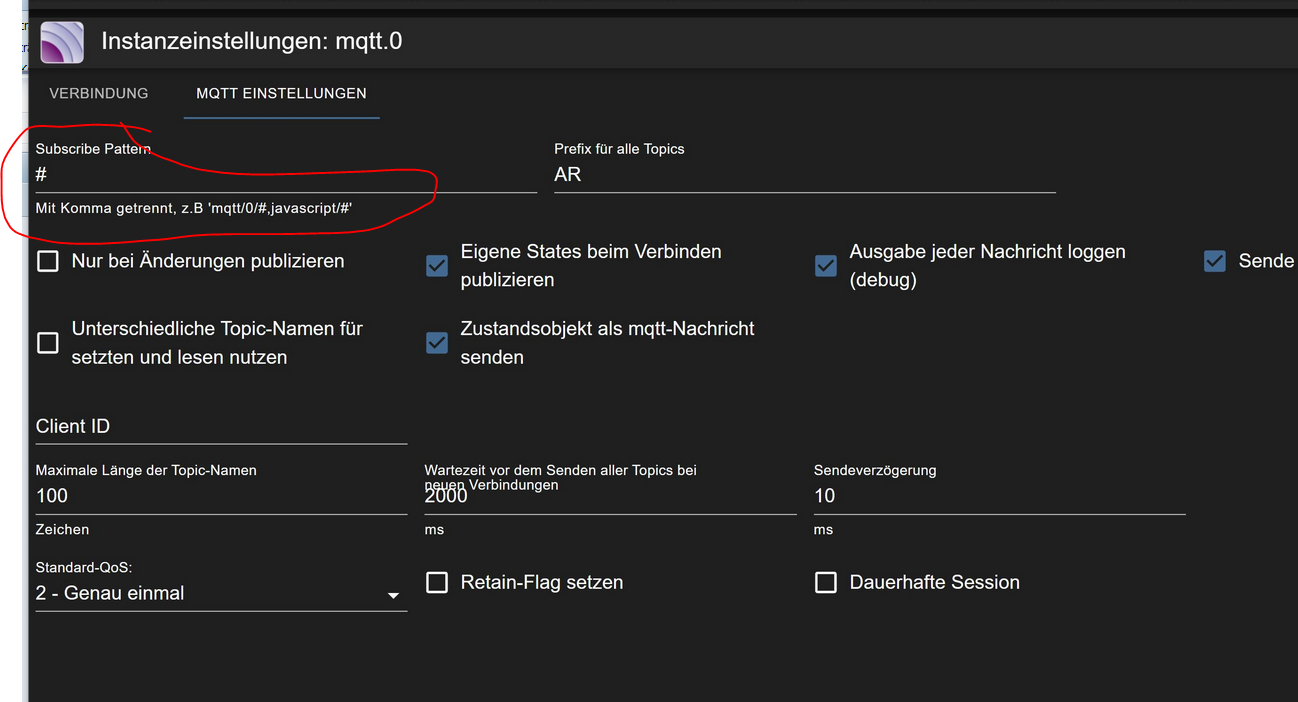
    1
    674

  • Jahresrückblick 2025 – unser neuer Blogbeitrag ist online! ✨
    BluefoxB
    Bluefox
    18
    1
    5.7k

  • Neuer Blogbeitrag: Monatsrückblick - Dezember 2025 🎄
    BluefoxB
    Bluefox
    13
    1
    1.5k

ioBroker hat eine langsame Verbindung erkannt

Geplant Angeheftet Gesperrt Verschoben ioBroker Allgemein
75 Beiträge 9 Kommentatoren 13.2k Aufrufe 10 Beobachtet
  • Älteste zuerst
  • Neuste zuerst
  • Meiste Stimmen
Antworten
  • In einem neuen Thema antworten
Anmelden zum Antworten
Dieses Thema wurde gelöscht. Nur Nutzer mit entsprechenden Rechten können es sehen.
  • A Atticus

    @thomas-braun sagte in ioBroker hat eine langsame Verbindung erkannt:

    free -ht --mega

    pi@ioBroker482:~ $ free -ht --mega
                  total        used        free      shared  buff/cache   available
    Mem:           7,9G        1,6G        5,8G         24M        429M        6,5G
    Swap:           99M          0B         99M
    Total:         8,0G        1,6G        5,9G
    pi@ioBroker482:~ $


    Wie bekomme ich die Ausgabe von "top" aus putty hier herein? Ich kann das irgendwie nicht kopieren

    HomoranH Nicht stören
    HomoranH Nicht stören
    Homoran
    Global Moderator Administrators
    schrieb am zuletzt editiert von
    #38

    @atticus sagte in ioBroker hat eine langsame Verbindung erkannt:

    Wie bekomme ich die Ausgabe von "top" aus putty hier herein? Ich kann das irgendwie nicht kopieren

    einfach markieren, dann ist es schon in der Zwischenablage

    kein Support per PN! - Fragen im Forum stellen -
    Benutzt das Voting rechts unten im Beitrag wenn er euch geholfen hat.
    Das Forum freut sich über eine Spende. Benutzt dazu den Spendenbutton im Header. Danke!
    der Installationsfixer: curl -fsL https://iobroker.net/fix.sh | bash -

    1 Antwort Letzte Antwort
    0
    • A Atticus

      @thomas-braun sagte in ioBroker hat eine langsame Verbindung erkannt:

      free -ht --mega

      pi@ioBroker482:~ $ free -ht --mega
                    total        used        free      shared  buff/cache   available
      Mem:           7,9G        1,6G        5,8G         24M        429M        6,5G
      Swap:           99M          0B         99M
      Total:         8,0G        1,6G        5,9G
      pi@ioBroker482:~ $


      Wie bekomme ich die Ausgabe von "top" aus putty hier herein? Ich kann das irgendwie nicht kopieren

      Thomas BraunT Online
      Thomas BraunT Online
      Thomas Braun
      Most Active
      schrieb am zuletzt editiert von
      #39

      @atticus sagte in ioBroker hat eine langsame Verbindung erkannt:

      Wie bekomme ich die Ausgabe von "top" aus putty hier herein? Ich kann das irgendwie nicht kopieren

      Weil es immer aufgefrischt wird?
      STRG-C in einem aussagekräftigen Moment drücken, top bleibt in der Konsole stehen. Konsolenfenster zuvor groß genug machen.

      Linux-Werkzeugkasten:
      https://forum.iobroker.net/topic/42952/der-kleine-iobroker-linux-werkzeugkasten
      NodeJS Fixer Skript:
      https://forum.iobroker.net/topic/68035/iob-node-fix-skript
      iob_diag: curl -sLf -o diag.sh https://iobroker.net/diag.sh && bash diag.sh

      A 1 Antwort Letzte Antwort
      0
      • Thomas BraunT Thomas Braun

        @atticus sagte in ioBroker hat eine langsame Verbindung erkannt:

        Wie bekomme ich die Ausgabe von "top" aus putty hier herein? Ich kann das irgendwie nicht kopieren

        Weil es immer aufgefrischt wird?
        STRG-C in einem aussagekräftigen Moment drücken, top bleibt in der Konsole stehen. Konsolenfenster zuvor groß genug machen.

        A Offline
        A Offline
        Atticus
        schrieb am zuletzt editiert von
        #40

        top

         430 iobroker  20   0  311600 204676  33988 R  99,3   2,5  12:46.12 iobroker.js-con
          732 iobroker  20   0  206952  95532  29140 S  79,2   1,2   9:06.56 io.mqtt.0
          526 iobroker  20   0  262528 155936  33996 S  28,1   1,9   3:49.33 io.javascript.0
          481 iobroker  20   0  218308 111968  34548 S  26,4   1,4   2:52.79 io.admin.0
          828 iobroker  20   0  220888 110996  29056 S  12,5   1,4   2:00.22 io.shelly.0
          747 iobroker  20   0  179548  61824  29044 S   2,3   0,8   0:12.93 io.ping.0
          556 iobroker  20   0  197500  85584  29244 S   1,7   1,1   0:23.91 io.sql.0
          626 iobroker  20   0  178228  67752  29080 S   1,7   0,8   0:11.25 io.hm-rpc.1
          604 iobroker  20   0  183728  71728  28964 S   1,0   0,9   0:12.60 io.hm-rega.0
           85 root      20   0       0      0      0 I   0,7   0,0   0:04.35 kworker/0:4-mm_percpu_wq
          511 iobroker  20   0  176820  59520  29000 S   0,7   0,7   0:06.77 io.history.0
          610 iobroker  20   0  175852  57760  29072 S   0,7   0,7   0:04.43 io.hm-rpc.0
         1070 iobroker  20   0  177068  65624  29684 S   0,7   0,8   0:15.62 io.fritzdect.0
         1121 iobroker  20   0  183368  67548  29748 S   0,7   0,8   0:04.89 io.iot.0
         1227 iobroker  20   0  174596  56340  29140 S   0,7   0,7   0:03.89 io.text2command
           11 root      20   0       0      0      0 R   0,3   0,0   0:00.89 ksoftirqd/0
           27 root      20   0       0      0      0 S   0,3   0,0   0:00.34 ksoftirqd/3
           88 root     -51   0       0      0      0 S   0,3   0,0   0:01.93 irq/47-mmc0
          496 iobroker  20   0  174876  55060  28960 S   0,3   0,7   0:03.47 io.email.0
          653 iobroker  20   0  176768  64876  29008 S   0,3   0,8   0:05.78 io.hm-rpc.2
          672 iobroker  20   0  176032  64656  28976 S   0,3   0,8   0:05.66 io.hm-rpc.3
          766 iobroker  20   0  174048  57032  28752 R   0,3   0,7   0:06.80 io.rpi2.0
          979 iobroker  20   0  174620  54696  28924 S   0,3   0,7   0:03.93 io.enocean.0
         1055 pi        20   0   12300   4156   3328 S   0,3   0,1   0:01.03 sshd
         1134 iobroker  20   0  175676  55896  28992 S   0,3   0,7   0:04.57 io.simple-api.0
         1333 iobroker  20   0  179456  65856  29016 S   0,3   0,8   0:04.48 io.web.0
         3313 pi        20   0   10452   2968   2536 R   0,3   0,0   0:00.04 top
         3319 iobroker  20   0    9376    760    652 S   0,3   0,0   0:00.01 ping
            1 root      20   0   15268   8132   6604 S   0,0   0,1   0:03.99 systemd
            2 root      20   0       0      0      0 S   0,0   0,0   0:00.01 kthreadd
            3 root       0 -20       0      0      0 I   0,0   0,0   0:00.00 rcu_gp
            4 root       0 -20       0      0      0 I   0,0   0,0   0:00.00 rcu_par_gp
            6 root       0 -20       0      0      0 I   0,0   0,0   0:00.00 kworker/0:0H-events_highpri
            8 root       0 -20       0      0      0 I   0,0   0,0   0:00.00 mm_percpu_wq
            9 root      20   0       0      0      0 S   0,0   0,0   0:00.00 rcu_tasks_rude_
           10 root      20   0       0      0      0 S   0,0   0,0   0:00.00 rcu_tasks_trace
           12 root      20   0       0      0      0 I   0,0   0,0   0:00.84 rcu_sched
           13 root      rt   0       0      0      0 S   0,0   0,0   0:00.00 migration/0
           14 root      20   0       0      0      0 S   0,0   0,0   0:00.00 cpuhp/0
           15 root      20   0       0      0      0 S   0,0   0,0   0:00.00 cpuhp/1
           16 root      rt   0       0      0      0 S   0,0   0,0   0:00.00 migration/1
           17 root      20   0       0      0      0 S   0,0   0,0   0:00.25 ksoftirqd/1
           19 root       0 -20       0      0      0 I   0,0   0,0   0:00.00 kworker/1:0H-kblockd
           20 root      20   0       0      0      0 S   0,0   0,0   0:00.00 cpuhp/2
           21 root      rt   0       0      0      0 S   0,0   0,0   0:00.00 migration/2
        pi@ioBroker482:~ $
        
        
        A 1 Antwort Letzte Antwort
        0
        • A Atticus

          top

           430 iobroker  20   0  311600 204676  33988 R  99,3   2,5  12:46.12 iobroker.js-con
            732 iobroker  20   0  206952  95532  29140 S  79,2   1,2   9:06.56 io.mqtt.0
            526 iobroker  20   0  262528 155936  33996 S  28,1   1,9   3:49.33 io.javascript.0
            481 iobroker  20   0  218308 111968  34548 S  26,4   1,4   2:52.79 io.admin.0
            828 iobroker  20   0  220888 110996  29056 S  12,5   1,4   2:00.22 io.shelly.0
            747 iobroker  20   0  179548  61824  29044 S   2,3   0,8   0:12.93 io.ping.0
            556 iobroker  20   0  197500  85584  29244 S   1,7   1,1   0:23.91 io.sql.0
            626 iobroker  20   0  178228  67752  29080 S   1,7   0,8   0:11.25 io.hm-rpc.1
            604 iobroker  20   0  183728  71728  28964 S   1,0   0,9   0:12.60 io.hm-rega.0
             85 root      20   0       0      0      0 I   0,7   0,0   0:04.35 kworker/0:4-mm_percpu_wq
            511 iobroker  20   0  176820  59520  29000 S   0,7   0,7   0:06.77 io.history.0
            610 iobroker  20   0  175852  57760  29072 S   0,7   0,7   0:04.43 io.hm-rpc.0
           1070 iobroker  20   0  177068  65624  29684 S   0,7   0,8   0:15.62 io.fritzdect.0
           1121 iobroker  20   0  183368  67548  29748 S   0,7   0,8   0:04.89 io.iot.0
           1227 iobroker  20   0  174596  56340  29140 S   0,7   0,7   0:03.89 io.text2command
             11 root      20   0       0      0      0 R   0,3   0,0   0:00.89 ksoftirqd/0
             27 root      20   0       0      0      0 S   0,3   0,0   0:00.34 ksoftirqd/3
             88 root     -51   0       0      0      0 S   0,3   0,0   0:01.93 irq/47-mmc0
            496 iobroker  20   0  174876  55060  28960 S   0,3   0,7   0:03.47 io.email.0
            653 iobroker  20   0  176768  64876  29008 S   0,3   0,8   0:05.78 io.hm-rpc.2
            672 iobroker  20   0  176032  64656  28976 S   0,3   0,8   0:05.66 io.hm-rpc.3
            766 iobroker  20   0  174048  57032  28752 R   0,3   0,7   0:06.80 io.rpi2.0
            979 iobroker  20   0  174620  54696  28924 S   0,3   0,7   0:03.93 io.enocean.0
           1055 pi        20   0   12300   4156   3328 S   0,3   0,1   0:01.03 sshd
           1134 iobroker  20   0  175676  55896  28992 S   0,3   0,7   0:04.57 io.simple-api.0
           1333 iobroker  20   0  179456  65856  29016 S   0,3   0,8   0:04.48 io.web.0
           3313 pi        20   0   10452   2968   2536 R   0,3   0,0   0:00.04 top
           3319 iobroker  20   0    9376    760    652 S   0,3   0,0   0:00.01 ping
              1 root      20   0   15268   8132   6604 S   0,0   0,1   0:03.99 systemd
              2 root      20   0       0      0      0 S   0,0   0,0   0:00.01 kthreadd
              3 root       0 -20       0      0      0 I   0,0   0,0   0:00.00 rcu_gp
              4 root       0 -20       0      0      0 I   0,0   0,0   0:00.00 rcu_par_gp
              6 root       0 -20       0      0      0 I   0,0   0,0   0:00.00 kworker/0:0H-events_highpri
              8 root       0 -20       0      0      0 I   0,0   0,0   0:00.00 mm_percpu_wq
              9 root      20   0       0      0      0 S   0,0   0,0   0:00.00 rcu_tasks_rude_
             10 root      20   0       0      0      0 S   0,0   0,0   0:00.00 rcu_tasks_trace
             12 root      20   0       0      0      0 I   0,0   0,0   0:00.84 rcu_sched
             13 root      rt   0       0      0      0 S   0,0   0,0   0:00.00 migration/0
             14 root      20   0       0      0      0 S   0,0   0,0   0:00.00 cpuhp/0
             15 root      20   0       0      0      0 S   0,0   0,0   0:00.00 cpuhp/1
             16 root      rt   0       0      0      0 S   0,0   0,0   0:00.00 migration/1
             17 root      20   0       0      0      0 S   0,0   0,0   0:00.25 ksoftirqd/1
             19 root       0 -20       0      0      0 I   0,0   0,0   0:00.00 kworker/1:0H-kblockd
             20 root      20   0       0      0      0 S   0,0   0,0   0:00.00 cpuhp/2
             21 root      rt   0       0      0      0 S   0,0   0,0   0:00.00 migration/2
          pi@ioBroker482:~ $
          
          
          A Offline
          A Offline
          Atticus
          schrieb am zuletzt editiert von
          #41

          noch mal top

             93 root      20   0       0      0      0 S   0,0   0,0   0:00.10 jbd2/sda2-8
             94 root       0 -20       0      0      0 I   0,0   0,0   0:00.00 ext4-rsv-conver
             95 root       0 -20       0      0      0 I   0,0   0,0   0:00.00 ipv6_addrconf
             98 root       0 -20       0      0      0 I   0,0   0,0   0:00.03 kworker/3:1H-kblockd
            113 root       0 -20       0      0      0 I   0,0   0,0   0:00.08 kworker/2:1H-kblockd
            121 root      20   0   45796   9284   8432 S   0,0   0,1   0:00.72 systemd-journal
            123 root      20   0       0      0      0 I   0,0   0,0   0:00.00 kworker/3:2-cgroup_destroy
            154 root      20   0       0      0      0 I   0,0   0,0   0:00.18 kworker/u8:2-events_unbound
            156 root      20   0   18592   4104   3236 S   0,0   0,1   0:00.52 systemd-udevd
            159 systemd+  20   0   14444   5008   4416 S   0,0   0,1   0:00.19 systemd-network
            188 root      20   0       0      0      0 S   0,0   0,0   0:00.00 vchiq-keep/0
            189 root      10 -10       0      0      0 S   0,0   0,0   0:00.00 SMIO
            199 root       0 -20       0      0      0 I   0,0   0,0   0:00.00 mmal-vchiq
            209 root       0 -20       0      0      0 I   0,0   0,0   0:00.00 mmal-vchiq
            211 root       0 -20       0      0      0 I   0,0   0,0   0:00.00 mmal-vchiq
            212 root       0 -20       0      0      0 I   0,0   0,0   0:00.00 mmal-vchiq
            213 root       0 -20       0      0      0 I   0,0   0,0   0:00.00 mmal-vchiq
            222 root       0 -20       0      0      0 I   0,0   0,0   0:00.00 cfg80211
            232 root       0 -20       0      0      0 I   0,0   0,0   0:00.00 brcmf_wq/mmc1:0
            234 root      20   0       0      0      0 S   0,0   0,0   0:00.00 brcmf_wdog/mmc1
            320 systemd+  20   0   22384   2852   2268 S   0,0   0,0   0:00.32 systemd-timesyn
            326 systemd+  20   0   19128   7496   6628 S   0,0   0,1   0:00.25 systemd-resolve
            354 root      20   0   25808   3032   2688 S   0,0   0,0   0:00.10 rsyslogd
            355 message+  20   0    6548   3036   2760 S   0,0   0,0   0:00.21 dbus-daemon
            356 root      20   0   13012   5668   5044 S   0,0   0,1   0:00.12 systemd-logind
            360 root      20   0    7948   2496   2320 S   0,0   0,0   0:00.02 cron
            363 avahi     20   0    5896   2972   2656 S   0,0   0,0   0:00.81 avahi-daemon
            365 root      20   0   27892   6636   5584 S   0,0   0,1   0:00.11 cupsd
            366 nobody    20   0    4320   2192   2020 S   0,0   0,0   0:00.03 thd
            373 root      20   0   27656     80      0 S   0,0   0,0   0:00.12 rngd
            378 root      20   0   10712   1872   1524 S   0,0   0,0   0:00.04 wpa_supplicant
            386 avahi     20   0    5768    252      0 S   0,0   0,0   0:00.00 avahi-daemon
            429 root      20   0   40484   8976   7936 S   0,0   0,1   0:00.09 cups-browsed
            446 root      20   0    4308   1436   1348 S   0,0   0,0   0:00.01 agetty
            448 root      20   0   10684   5528   4976 S   0,0   0,1   0:00.05 sshd
            496 iobroker  20   0  174876  55112  28960 S   0,0   0,7   0:03.57 io.email.0
            511 iobroker  20   0  177592  59196  29000 S   0,0   0,7   0:06.89 io.history.0
            537 iobroker  20   0  173512  62172  28876 S   0,0   0,8   0:05.51 io.node-red.0
            556 iobroker  20   0  197756  85712  29244 S   0,0   1,1   0:24.59 io.sql.0
            563 iobroker  20   0  208212  94028  29360 S   0,0   1,2   0:09.70 node-red
            575 iobroker  20   0  187248  78664  34636 S   0,0   1,0   0:09.37 io.telegram.0
            604 iobroker  20   0  183728  71596  28964 S   0,0   0,9   0:12.84 io.hm-rega.0
            610 iobroker  20   0  175984  57836  29072 S   0,0   0,7   0:04.54 io.hm-rpc.0
            626 iobroker  20   0  178608  67332  29080 S   0,0   0,8   0:11.58 io.hm-rpc.1
            653 iobroker  20   0  177024  64596  29008 S   0,0   0,8   0:06.06 io.hm-rpc.2
          pi@ioBroker482:~ $
          
          
          A 1 Antwort Letzte Antwort
          0
          • A Atticus

            noch mal top

               93 root      20   0       0      0      0 S   0,0   0,0   0:00.10 jbd2/sda2-8
               94 root       0 -20       0      0      0 I   0,0   0,0   0:00.00 ext4-rsv-conver
               95 root       0 -20       0      0      0 I   0,0   0,0   0:00.00 ipv6_addrconf
               98 root       0 -20       0      0      0 I   0,0   0,0   0:00.03 kworker/3:1H-kblockd
              113 root       0 -20       0      0      0 I   0,0   0,0   0:00.08 kworker/2:1H-kblockd
              121 root      20   0   45796   9284   8432 S   0,0   0,1   0:00.72 systemd-journal
              123 root      20   0       0      0      0 I   0,0   0,0   0:00.00 kworker/3:2-cgroup_destroy
              154 root      20   0       0      0      0 I   0,0   0,0   0:00.18 kworker/u8:2-events_unbound
              156 root      20   0   18592   4104   3236 S   0,0   0,1   0:00.52 systemd-udevd
              159 systemd+  20   0   14444   5008   4416 S   0,0   0,1   0:00.19 systemd-network
              188 root      20   0       0      0      0 S   0,0   0,0   0:00.00 vchiq-keep/0
              189 root      10 -10       0      0      0 S   0,0   0,0   0:00.00 SMIO
              199 root       0 -20       0      0      0 I   0,0   0,0   0:00.00 mmal-vchiq
              209 root       0 -20       0      0      0 I   0,0   0,0   0:00.00 mmal-vchiq
              211 root       0 -20       0      0      0 I   0,0   0,0   0:00.00 mmal-vchiq
              212 root       0 -20       0      0      0 I   0,0   0,0   0:00.00 mmal-vchiq
              213 root       0 -20       0      0      0 I   0,0   0,0   0:00.00 mmal-vchiq
              222 root       0 -20       0      0      0 I   0,0   0,0   0:00.00 cfg80211
              232 root       0 -20       0      0      0 I   0,0   0,0   0:00.00 brcmf_wq/mmc1:0
              234 root      20   0       0      0      0 S   0,0   0,0   0:00.00 brcmf_wdog/mmc1
              320 systemd+  20   0   22384   2852   2268 S   0,0   0,0   0:00.32 systemd-timesyn
              326 systemd+  20   0   19128   7496   6628 S   0,0   0,1   0:00.25 systemd-resolve
              354 root      20   0   25808   3032   2688 S   0,0   0,0   0:00.10 rsyslogd
              355 message+  20   0    6548   3036   2760 S   0,0   0,0   0:00.21 dbus-daemon
              356 root      20   0   13012   5668   5044 S   0,0   0,1   0:00.12 systemd-logind
              360 root      20   0    7948   2496   2320 S   0,0   0,0   0:00.02 cron
              363 avahi     20   0    5896   2972   2656 S   0,0   0,0   0:00.81 avahi-daemon
              365 root      20   0   27892   6636   5584 S   0,0   0,1   0:00.11 cupsd
              366 nobody    20   0    4320   2192   2020 S   0,0   0,0   0:00.03 thd
              373 root      20   0   27656     80      0 S   0,0   0,0   0:00.12 rngd
              378 root      20   0   10712   1872   1524 S   0,0   0,0   0:00.04 wpa_supplicant
              386 avahi     20   0    5768    252      0 S   0,0   0,0   0:00.00 avahi-daemon
              429 root      20   0   40484   8976   7936 S   0,0   0,1   0:00.09 cups-browsed
              446 root      20   0    4308   1436   1348 S   0,0   0,0   0:00.01 agetty
              448 root      20   0   10684   5528   4976 S   0,0   0,1   0:00.05 sshd
              496 iobroker  20   0  174876  55112  28960 S   0,0   0,7   0:03.57 io.email.0
              511 iobroker  20   0  177592  59196  29000 S   0,0   0,7   0:06.89 io.history.0
              537 iobroker  20   0  173512  62172  28876 S   0,0   0,8   0:05.51 io.node-red.0
              556 iobroker  20   0  197756  85712  29244 S   0,0   1,1   0:24.59 io.sql.0
              563 iobroker  20   0  208212  94028  29360 S   0,0   1,2   0:09.70 node-red
              575 iobroker  20   0  187248  78664  34636 S   0,0   1,0   0:09.37 io.telegram.0
              604 iobroker  20   0  183728  71596  28964 S   0,0   0,9   0:12.84 io.hm-rega.0
              610 iobroker  20   0  175984  57836  29072 S   0,0   0,7   0:04.54 io.hm-rpc.0
              626 iobroker  20   0  178608  67332  29080 S   0,0   0,8   0:11.58 io.hm-rpc.1
              653 iobroker  20   0  177024  64596  29008 S   0,0   0,8   0:06.06 io.hm-rpc.2
            pi@ioBroker482:~ $
            
            
            A Offline
            A Offline
            Atticus
            schrieb am zuletzt editiert von
            #42

            und noch mal top

              511 iobroker  20   0  177592  59196  29000 S   0,0   0,7   0:07.02 io.history.0
              537 iobroker  20   0  174092  62412  28876 S   0,0   0,8   0:05.59 io.node-red.0
              563 iobroker  20   0  208212  94028  29360 S   0,0   1,2   0:09.70 node-red
              575 iobroker  20   0  187504  78684  34636 S   0,0   1,0   0:09.49 io.telegram.0
              604 iobroker  20   0  183984  72288  28964 S   0,0   0,9   0:13.14 io.hm-rega.0
              610 iobroker  20   0  178032  60056  29072 S   0,0   0,7   0:04.80 io.hm-rpc.0
              626 iobroker  20   0  180920  69600  29080 S   0,0   0,9   0:11.97 io.hm-rpc.1
              653 iobroker  20   0  177280  64836  29008 S   0,0   0,8   0:06.26 io.hm-rpc.2
              687 iobroker  20   0  176420  59664  29056 S   0,0   0,7   0:04.58 io.hm-rpc.4
              717 iobroker  20   0  232544  72312  35552 S   0,0   0,9   0:07.22 io.mihome-vacuu
              766 iobroker  20   0  174240  57428  28752 S   0,0   0,7   0:07.43 io.rpi2.0
              849 iobroker  20   0  195692  84404  30312 S   0,0   1,0   0:13.80 io.zigbee.1
              864 iobroker  20   0  179620  65184  29624 S   0,0   0,8   0:09.33 io.hue.0
              881 iobroker  20   0  174688  54864  29000 S   0,0   0,7   0:04.24 io.discovery.0
              903 iobroker  20   0  180092  70472  33848 S   0,0   0,9   0:05.29 io.backitup.0
              916 iobroker  20   0  173736  54288  28872 S   0,0   0,7   0:03.90 io.ble.0
              931 iobroker  20   0  175840  58712  29108 S   0,0   0,7   0:04.82 io.doorbird.0
              938 root      20   0   12300   6352   5552 S   0,0   0,1   0:00.10 sshd
              979 iobroker  20   0  174620  55228  28924 S   0,0   0,7   0:04.18 io.enocean.0
             1003 root       0 -20       0      0      0 I   0,0   0,0   0:00.00 cifsiod
             1004 root       0 -20       0      0      0 I   0,0   0,0   0:00.00 smb3decryptd
             1005 root       0 -20       0      0      0 I   0,0   0,0   0:00.00 cifsfileinfoput
             1006 root       0 -20       0      0      0 I   0,0   0,0   0:00.00 cifsoplockd
             1007 root       0 -20       0      0      0 I   0,0   0,0   0:00.00 cifs-dfscache
             1036 pi        20   0   14696   7444   6484 S   0,0   0,1   0:00.14 systemd
             1037 pi        20   0   16912   3416   1772 S   0,0   0,0   0:00.00 (sd-pam)
             1055 pi        20   0   12300   4156   3328 S   0,0   0,1   0:01.45 sshd
             1056 pi        20   0    8488   3832   2920 S   0,0   0,0   0:00.14 bash
             1121 iobroker  20   0  183560  67592  29748 S   0,0   0,8   0:05.10 io.iot.0
             1134 iobroker  20   0  175940  56228  28992 S   0,0   0,7   0:04.77 io.simple-api.0
             1147 iobroker  20   0  177008  59476  28984 S   0,0   0,7   0:04.42 io.socketio.0
             1162 iobroker  20   0  178592  62216  29520 S   0,0   0,8   0:05.05 io.terminal.0
             1227 iobroker  20   0  174852  56672  29140 S   0,0   0,7   0:04.12 io.text2command
             1286 iobroker  20   0  191536  74680  30292 S   0,0   0,9   0:06.56 io.web-speedy.0
             1333 iobroker  20   0  179456  66008  29016 S   0,0   0,8   0:04.75 io.web.0
             1378 iobroker  20   0  175400  57584  31256 S   0,0   0,7   0:04.32 io.iqontrol.0
             2692 root      20   0       0      0      0 I   0,0   0,0   0:00.00 kworker/0:0-events
             2757 root      20   0       0      0      0 I   0,0   0,0   0:00.07 kworker/1:0-mm_percpu_wq
             2848 root      20   0       0      0      0 I   0,0   0,0   0:00.01 kworker/u8:0-events_unbound
             3437 root      20   0       0      0      0 I   0,0   0,0   0:00.00 kworker/0:1-events
             3648 root      20   0       0      0      0 I   0,0   0,0   0:00.00 kworker/3:0-cgroup_destroy
             3701 root      20   0       0      0      0 I   0,0   0,0   0:00.01 kworker/1:2-events_power_efficient
             3722 iobroker  20   0  172992  54416  28968 S   0,0   0,7   0:02.72 io.dwd.0


            Thomas BraunT HomoranH 2 Antworten Letzte Antwort
            0
            • A Atticus

              und noch mal top

                511 iobroker  20   0  177592  59196  29000 S   0,0   0,7   0:07.02 io.history.0
                537 iobroker  20   0  174092  62412  28876 S   0,0   0,8   0:05.59 io.node-red.0
                563 iobroker  20   0  208212  94028  29360 S   0,0   1,2   0:09.70 node-red
                575 iobroker  20   0  187504  78684  34636 S   0,0   1,0   0:09.49 io.telegram.0
                604 iobroker  20   0  183984  72288  28964 S   0,0   0,9   0:13.14 io.hm-rega.0
                610 iobroker  20   0  178032  60056  29072 S   0,0   0,7   0:04.80 io.hm-rpc.0
                626 iobroker  20   0  180920  69600  29080 S   0,0   0,9   0:11.97 io.hm-rpc.1
                653 iobroker  20   0  177280  64836  29008 S   0,0   0,8   0:06.26 io.hm-rpc.2
                687 iobroker  20   0  176420  59664  29056 S   0,0   0,7   0:04.58 io.hm-rpc.4
                717 iobroker  20   0  232544  72312  35552 S   0,0   0,9   0:07.22 io.mihome-vacuu
                766 iobroker  20   0  174240  57428  28752 S   0,0   0,7   0:07.43 io.rpi2.0
                849 iobroker  20   0  195692  84404  30312 S   0,0   1,0   0:13.80 io.zigbee.1
                864 iobroker  20   0  179620  65184  29624 S   0,0   0,8   0:09.33 io.hue.0
                881 iobroker  20   0  174688  54864  29000 S   0,0   0,7   0:04.24 io.discovery.0
                903 iobroker  20   0  180092  70472  33848 S   0,0   0,9   0:05.29 io.backitup.0
                916 iobroker  20   0  173736  54288  28872 S   0,0   0,7   0:03.90 io.ble.0
                931 iobroker  20   0  175840  58712  29108 S   0,0   0,7   0:04.82 io.doorbird.0
                938 root      20   0   12300   6352   5552 S   0,0   0,1   0:00.10 sshd
                979 iobroker  20   0  174620  55228  28924 S   0,0   0,7   0:04.18 io.enocean.0
               1003 root       0 -20       0      0      0 I   0,0   0,0   0:00.00 cifsiod
               1004 root       0 -20       0      0      0 I   0,0   0,0   0:00.00 smb3decryptd
               1005 root       0 -20       0      0      0 I   0,0   0,0   0:00.00 cifsfileinfoput
               1006 root       0 -20       0      0      0 I   0,0   0,0   0:00.00 cifsoplockd
               1007 root       0 -20       0      0      0 I   0,0   0,0   0:00.00 cifs-dfscache
               1036 pi        20   0   14696   7444   6484 S   0,0   0,1   0:00.14 systemd
               1037 pi        20   0   16912   3416   1772 S   0,0   0,0   0:00.00 (sd-pam)
               1055 pi        20   0   12300   4156   3328 S   0,0   0,1   0:01.45 sshd
               1056 pi        20   0    8488   3832   2920 S   0,0   0,0   0:00.14 bash
               1121 iobroker  20   0  183560  67592  29748 S   0,0   0,8   0:05.10 io.iot.0
               1134 iobroker  20   0  175940  56228  28992 S   0,0   0,7   0:04.77 io.simple-api.0
               1147 iobroker  20   0  177008  59476  28984 S   0,0   0,7   0:04.42 io.socketio.0
               1162 iobroker  20   0  178592  62216  29520 S   0,0   0,8   0:05.05 io.terminal.0
               1227 iobroker  20   0  174852  56672  29140 S   0,0   0,7   0:04.12 io.text2command
               1286 iobroker  20   0  191536  74680  30292 S   0,0   0,9   0:06.56 io.web-speedy.0
               1333 iobroker  20   0  179456  66008  29016 S   0,0   0,8   0:04.75 io.web.0
               1378 iobroker  20   0  175400  57584  31256 S   0,0   0,7   0:04.32 io.iqontrol.0
               2692 root      20   0       0      0      0 I   0,0   0,0   0:00.00 kworker/0:0-events
               2757 root      20   0       0      0      0 I   0,0   0,0   0:00.07 kworker/1:0-mm_percpu_wq
               2848 root      20   0       0      0      0 I   0,0   0,0   0:00.01 kworker/u8:0-events_unbound
               3437 root      20   0       0      0      0 I   0,0   0,0   0:00.00 kworker/0:1-events
               3648 root      20   0       0      0      0 I   0,0   0,0   0:00.00 kworker/3:0-cgroup_destroy
               3701 root      20   0       0      0      0 I   0,0   0,0   0:00.01 kworker/1:2-events_power_efficient
               3722 iobroker  20   0  172992  54416  28968 S   0,0   0,7   0:02.72 io.dwd.0


              Thomas BraunT Online
              Thomas BraunT Online
              Thomas Braun
              Most Active
              schrieb am zuletzt editiert von Thomas Braun
              #43

              @atticus

               430 iobroker  20   0  311600 204676  33988 R  99,3   2,5  12:46.12 iobroker.js-controller
               732 iobroker  20   0  206952  95532  29140 S  79,2   1,2   9:06.56 io.mqtt.0
              

              Alleine die beiden Prozesse drehen dir schon die Luft ab.
              Ich vermute, der mqtt ist falsch konfiguriert und läuft da gerade etwas 'Amok'.

              Linux-Werkzeugkasten:
              https://forum.iobroker.net/topic/42952/der-kleine-iobroker-linux-werkzeugkasten
              NodeJS Fixer Skript:
              https://forum.iobroker.net/topic/68035/iob-node-fix-skript
              iob_diag: curl -sLf -o diag.sh https://iobroker.net/diag.sh && bash diag.sh

              A 1 Antwort Letzte Antwort
              0
              • Thomas BraunT Thomas Braun

                @atticus

                 430 iobroker  20   0  311600 204676  33988 R  99,3   2,5  12:46.12 iobroker.js-controller
                 732 iobroker  20   0  206952  95532  29140 S  79,2   1,2   9:06.56 io.mqtt.0
                

                Alleine die beiden Prozesse drehen dir schon die Luft ab.
                Ich vermute, der mqtt ist falsch konfiguriert und läuft da gerade etwas 'Amok'.

                A Offline
                A Offline
                Atticus
                schrieb am zuletzt editiert von
                #44

                @thomas-braun so, den mqtt hab ich nach einem Neustart gestoppt.

                Was kann ich mit dem JavaScript Adapter machen?

                Thomas BraunT 1 Antwort Letzte Antwort
                0
                • A Atticus

                  und noch mal top

                    511 iobroker  20   0  177592  59196  29000 S   0,0   0,7   0:07.02 io.history.0
                    537 iobroker  20   0  174092  62412  28876 S   0,0   0,8   0:05.59 io.node-red.0
                    563 iobroker  20   0  208212  94028  29360 S   0,0   1,2   0:09.70 node-red
                    575 iobroker  20   0  187504  78684  34636 S   0,0   1,0   0:09.49 io.telegram.0
                    604 iobroker  20   0  183984  72288  28964 S   0,0   0,9   0:13.14 io.hm-rega.0
                    610 iobroker  20   0  178032  60056  29072 S   0,0   0,7   0:04.80 io.hm-rpc.0
                    626 iobroker  20   0  180920  69600  29080 S   0,0   0,9   0:11.97 io.hm-rpc.1
                    653 iobroker  20   0  177280  64836  29008 S   0,0   0,8   0:06.26 io.hm-rpc.2
                    687 iobroker  20   0  176420  59664  29056 S   0,0   0,7   0:04.58 io.hm-rpc.4
                    717 iobroker  20   0  232544  72312  35552 S   0,0   0,9   0:07.22 io.mihome-vacuu
                    766 iobroker  20   0  174240  57428  28752 S   0,0   0,7   0:07.43 io.rpi2.0
                    849 iobroker  20   0  195692  84404  30312 S   0,0   1,0   0:13.80 io.zigbee.1
                    864 iobroker  20   0  179620  65184  29624 S   0,0   0,8   0:09.33 io.hue.0
                    881 iobroker  20   0  174688  54864  29000 S   0,0   0,7   0:04.24 io.discovery.0
                    903 iobroker  20   0  180092  70472  33848 S   0,0   0,9   0:05.29 io.backitup.0
                    916 iobroker  20   0  173736  54288  28872 S   0,0   0,7   0:03.90 io.ble.0
                    931 iobroker  20   0  175840  58712  29108 S   0,0   0,7   0:04.82 io.doorbird.0
                    938 root      20   0   12300   6352   5552 S   0,0   0,1   0:00.10 sshd
                    979 iobroker  20   0  174620  55228  28924 S   0,0   0,7   0:04.18 io.enocean.0
                   1003 root       0 -20       0      0      0 I   0,0   0,0   0:00.00 cifsiod
                   1004 root       0 -20       0      0      0 I   0,0   0,0   0:00.00 smb3decryptd
                   1005 root       0 -20       0      0      0 I   0,0   0,0   0:00.00 cifsfileinfoput
                   1006 root       0 -20       0      0      0 I   0,0   0,0   0:00.00 cifsoplockd
                   1007 root       0 -20       0      0      0 I   0,0   0,0   0:00.00 cifs-dfscache
                   1036 pi        20   0   14696   7444   6484 S   0,0   0,1   0:00.14 systemd
                   1037 pi        20   0   16912   3416   1772 S   0,0   0,0   0:00.00 (sd-pam)
                   1055 pi        20   0   12300   4156   3328 S   0,0   0,1   0:01.45 sshd
                   1056 pi        20   0    8488   3832   2920 S   0,0   0,0   0:00.14 bash
                   1121 iobroker  20   0  183560  67592  29748 S   0,0   0,8   0:05.10 io.iot.0
                   1134 iobroker  20   0  175940  56228  28992 S   0,0   0,7   0:04.77 io.simple-api.0
                   1147 iobroker  20   0  177008  59476  28984 S   0,0   0,7   0:04.42 io.socketio.0
                   1162 iobroker  20   0  178592  62216  29520 S   0,0   0,8   0:05.05 io.terminal.0
                   1227 iobroker  20   0  174852  56672  29140 S   0,0   0,7   0:04.12 io.text2command
                   1286 iobroker  20   0  191536  74680  30292 S   0,0   0,9   0:06.56 io.web-speedy.0
                   1333 iobroker  20   0  179456  66008  29016 S   0,0   0,8   0:04.75 io.web.0
                   1378 iobroker  20   0  175400  57584  31256 S   0,0   0,7   0:04.32 io.iqontrol.0
                   2692 root      20   0       0      0      0 I   0,0   0,0   0:00.00 kworker/0:0-events
                   2757 root      20   0       0      0      0 I   0,0   0,0   0:00.07 kworker/1:0-mm_percpu_wq
                   2848 root      20   0       0      0      0 I   0,0   0,0   0:00.01 kworker/u8:0-events_unbound
                   3437 root      20   0       0      0      0 I   0,0   0,0   0:00.00 kworker/0:1-events
                   3648 root      20   0       0      0      0 I   0,0   0,0   0:00.00 kworker/3:0-cgroup_destroy
                   3701 root      20   0       0      0      0 I   0,0   0,0   0:00.01 kworker/1:2-events_power_efficient
                   3722 iobroker  20   0  172992  54416  28968 S   0,0   0,7   0:02.72 io.dwd.0


                  HomoranH Nicht stören
                  HomoranH Nicht stören
                  Homoran
                  Global Moderator Administrators
                  schrieb am zuletzt editiert von
                  #45

                  @atticus sagte in ioBroker hat eine langsame Verbindung erkannt:

                  und noch mal top

                  und das Wichtigste: der Header?

                  kein Support per PN! - Fragen im Forum stellen -
                  Benutzt das Voting rechts unten im Beitrag wenn er euch geholfen hat.
                  Das Forum freut sich über eine Spende. Benutzt dazu den Spendenbutton im Header. Danke!
                  der Installationsfixer: curl -fsL https://iobroker.net/fix.sh | bash -

                  A 1 Antwort Letzte Antwort
                  0
                  • A Atticus

                    @thomas-braun so, den mqtt hab ich nach einem Neustart gestoppt.

                    Was kann ich mit dem JavaScript Adapter machen?

                    Thomas BraunT Online
                    Thomas BraunT Online
                    Thomas Braun
                    Most Active
                    schrieb am zuletzt editiert von
                    #46

                    @atticus sagte in ioBroker hat eine langsame Verbindung erkannt:

                    Was kann ich mit dem JavaScript Adapter machen?

                    Deine skripte nochmal kritischen Auges durchgehen. Da ist vermutlich ein skript ungünstig angelegt.

                    Linux-Werkzeugkasten:
                    https://forum.iobroker.net/topic/42952/der-kleine-iobroker-linux-werkzeugkasten
                    NodeJS Fixer Skript:
                    https://forum.iobroker.net/topic/68035/iob-node-fix-skript
                    iob_diag: curl -sLf -o diag.sh https://iobroker.net/diag.sh && bash diag.sh

                    A 1 Antwort Letzte Antwort
                    0
                    • HomoranH Homoran

                      @atticus sagte in ioBroker hat eine langsame Verbindung erkannt:

                      und noch mal top

                      und das Wichtigste: der Header?

                      A Offline
                      A Offline
                      Atticus
                      schrieb am zuletzt editiert von
                      #47

                      @homoran

                      pi@ioBroker482:~ $ top
                      top - 21:36:28 up 37 min,  1 user,  load average: 0,59, 0,95, 1,41
                      Tasks: 153 total,   1 running, 152 sleeping,   0 stopped,   0 zombie
                      %Cpu(s): 12,7 us,  3,3 sy,  0,0 ni, 82,8 id,  0,2 wa,  0,0 hi,  1,0 si,  0,0 st
                      MiB Mem :   7898,2 total,   5395,4 free,   1639,4 used,    863,4 buff/cache
                      MiB Swap:    100,0 total,    100,0 free,      0,0 used.   6431,9 avail Mem
                      
                      
                      HomoranH 1 Antwort Letzte Antwort
                      0
                      • Thomas BraunT Thomas Braun

                        @atticus sagte in ioBroker hat eine langsame Verbindung erkannt:

                        Was kann ich mit dem JavaScript Adapter machen?

                        Deine skripte nochmal kritischen Auges durchgehen. Da ist vermutlich ein skript ungünstig angelegt.

                        A Offline
                        A Offline
                        Atticus
                        schrieb am zuletzt editiert von
                        #48

                        @thomas-braun ok, ich werde alle Skripte überprüfen.

                        Hier mal derMQTT-Adapter:
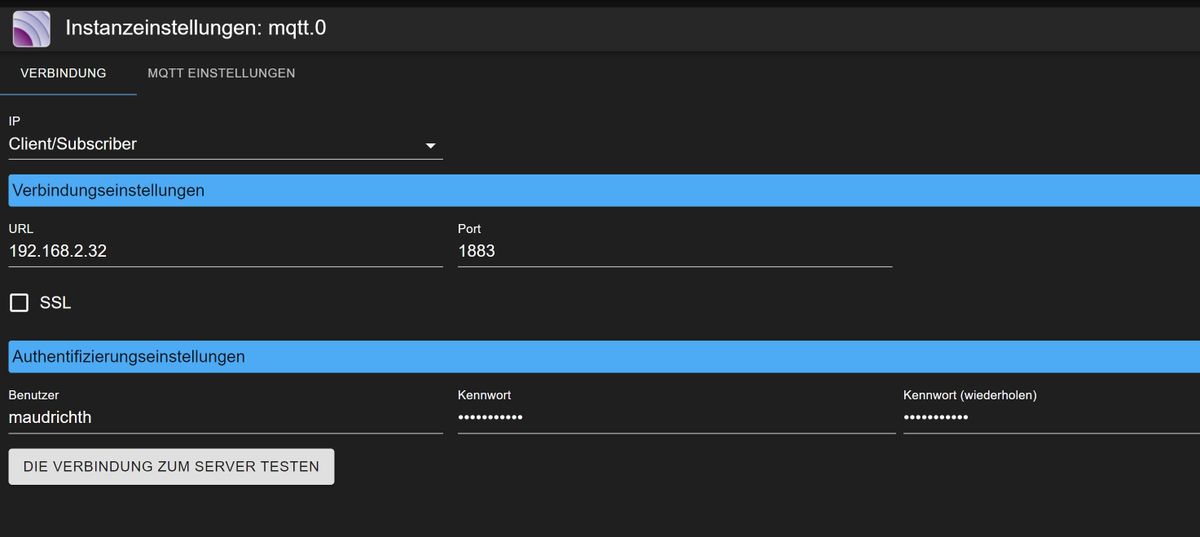
                        Config001.JPG

                        Config002.JPG

                        Was kann da falsch sein? Der Adapter ist mit einem Mqtt Mosqitto Server auf einem weiterem Raspberry verbunden.

                        Thomas BraunT 1 Antwort Letzte Antwort
                        0
                        • A Atticus

                          @homoran

                          pi@ioBroker482:~ $ top
                          top - 21:36:28 up 37 min,  1 user,  load average: 0,59, 0,95, 1,41
                          Tasks: 153 total,   1 running, 152 sleeping,   0 stopped,   0 zombie
                          %Cpu(s): 12,7 us,  3,3 sy,  0,0 ni, 82,8 id,  0,2 wa,  0,0 hi,  1,0 si,  0,0 st
                          MiB Mem :   7898,2 total,   5395,4 free,   1639,4 used,    863,4 buff/cache
                          MiB Swap:    100,0 total,    100,0 free,      0,0 used.   6431,9 avail Mem
                          
                          
                          HomoranH Nicht stören
                          HomoranH Nicht stören
                          Homoran
                          Global Moderator Administrators
                          schrieb am zuletzt editiert von
                          #49

                          @atticus sagte in ioBroker hat eine langsame Verbindung erkannt:

                          top - 21:36:28 up 37 min, 1 user, load average: 0,59, 0,95, 1,41

                          Immerhin geht die Load gerade zurück.

                          Das würde möglicherweise tatsächlich auf ein Script hinweisen, dass irgendwann Amok läuft.

                          Oder ist das due Folge von der Abschaltung des mqtt?

                          kein Support per PN! - Fragen im Forum stellen -
                          Benutzt das Voting rechts unten im Beitrag wenn er euch geholfen hat.
                          Das Forum freut sich über eine Spende. Benutzt dazu den Spendenbutton im Header. Danke!
                          der Installationsfixer: curl -fsL https://iobroker.net/fix.sh | bash -

                          A 1 Antwort Letzte Antwort
                          0
                          • A Atticus

                            @thomas-braun ok, ich werde alle Skripte überprüfen.

                            Hier mal derMQTT-Adapter:
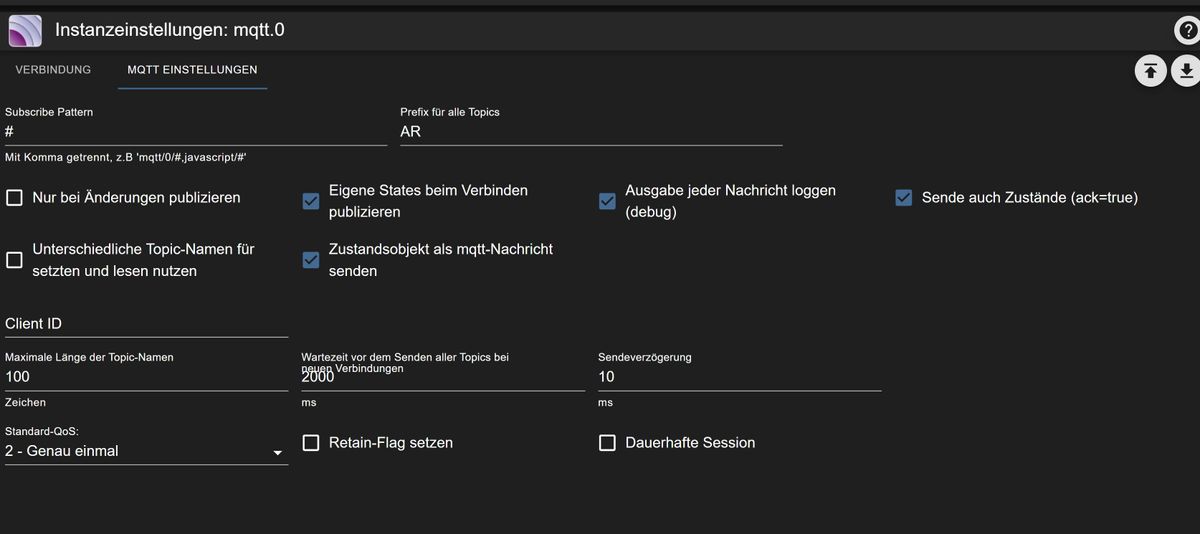
                            Config001.JPG

                            Config002.JPG

                            Was kann da falsch sein? Der Adapter ist mit einem Mqtt Mosqitto Server auf einem weiterem Raspberry verbunden.

                            Thomas BraunT Online
                            Thomas BraunT Online
                            Thomas Braun
                            Most Active
                            schrieb am zuletzt editiert von
                            #50

                            @atticus sagte in ioBroker hat eine langsame Verbindung erkannt:

                            Was kann da falsch sein?

                            Keine Ahnung, mqtt setze ich nicht ein.

                            Linux-Werkzeugkasten:
                            https://forum.iobroker.net/topic/42952/der-kleine-iobroker-linux-werkzeugkasten
                            NodeJS Fixer Skript:
                            https://forum.iobroker.net/topic/68035/iob-node-fix-skript
                            iob_diag: curl -sLf -o diag.sh https://iobroker.net/diag.sh && bash diag.sh

                            1 Antwort Letzte Antwort
                            0
                            • HomoranH Homoran

                              @atticus sagte in ioBroker hat eine langsame Verbindung erkannt:

                              top - 21:36:28 up 37 min, 1 user, load average: 0,59, 0,95, 1,41

                              Immerhin geht die Load gerade zurück.

                              Das würde möglicherweise tatsächlich auf ein Script hinweisen, dass irgendwann Amok läuft.

                              Oder ist das due Folge von der Abschaltung des mqtt?

                              A Offline
                              A Offline
                              Atticus
                              schrieb am zuletzt editiert von
                              #51

                              @homoran Das ist die Folge der Abschaltung des MQTT-Adapters.
                              Mit den Skripten bin ich noch zugange.

                              A 1 Antwort Letzte Antwort
                              0
                              • A Atticus

                                @homoran Das ist die Folge der Abschaltung des MQTT-Adapters.
                                Mit den Skripten bin ich noch zugange.

                                A Offline
                                A Offline
                                Atticus
                                schrieb am zuletzt editiert von
                                #52

                                MQTT möchte ich einsetzten, um die Shellies aus der Cloud zu bekommen und um diese nur lokal zu steuern.

                                crunchipC 1 Antwort Letzte Antwort
                                0
                                • A Atticus

                                  MQTT möchte ich einsetzten, um die Shellies aus der Cloud zu bekommen und um diese nur lokal zu steuern.

                                  crunchipC Abwesend
                                  crunchipC Abwesend
                                  crunchip
                                  Forum Testing Most Active
                                  schrieb am zuletzt editiert von
                                  #53

                                  @atticus das geht doch auch mit dem shelly Adapter, dafür muss man nicht zwangsläufig den mqtt Adapter benutzen

                                  umgestiegen von Proxmox auf Unraid

                                  A 1 Antwort Letzte Antwort
                                  0
                                  • crunchipC crunchip

                                    @atticus das geht doch auch mit dem shelly Adapter, dafür muss man nicht zwangsläufig den mqtt Adapter benutzen

                                    A Offline
                                    A Offline
                                    Atticus
                                    schrieb am zuletzt editiert von
                                    #54

                                    Hallo,
                                    ich will das Problem ja verstehen.
                                    Was hat der MQTT-Adapter gemacht? Warum produziert er so viel Systemlast?
                                    Es war ja Client konfiguriert, und hat sich mit einem Server auf einem anderen Raspberry verbunden. Und im Moment ist genau 1 Shelly (ein Shelly Plus 1PM) über MQTT verbunden, und das auch nur versuchsweise, also der Traffic hält sich sehr in Grenzen.

                                    arteckA 1 Antwort Letzte Antwort
                                    0
                                    • A Atticus

                                      Hallo,
                                      ich will das Problem ja verstehen.
                                      Was hat der MQTT-Adapter gemacht? Warum produziert er so viel Systemlast?
                                      Es war ja Client konfiguriert, und hat sich mit einem Server auf einem anderen Raspberry verbunden. Und im Moment ist genau 1 Shelly (ein Shelly Plus 1PM) über MQTT verbunden, und das auch nur versuchsweise, also der Traffic hält sich sehr in Grenzen.

                                      arteckA Offline
                                      arteckA Offline
                                      arteck
                                      Developer Most Active
                                      schrieb am zuletzt editiert von
                                      #55

                                      @atticus du prozessierst auf ALLES was vom system kommt
                                      83ce39d0-c085-433a-bc8a-9c5f970d3128-grafik.png

                                      zigbee hab ich, zwave auch, nuc's genauso und HA auch

                                      A 2 Antworten Letzte Antwort
                                      1
                                      • arteckA arteck

                                        @atticus du prozessierst auf ALLES was vom system kommt
                                        83ce39d0-c085-433a-bc8a-9c5f970d3128-grafik.png

                                        A Offline
                                        A Offline
                                        Atticus
                                        schrieb am zuletzt editiert von
                                        #56

                                        @arteck Ah ja,ok, Danke

                                        1 Antwort Letzte Antwort
                                        0
                                        • arteckA arteck

                                          @atticus du prozessierst auf ALLES was vom system kommt
                                          83ce39d0-c085-433a-bc8a-9c5f970d3128-grafik.png

                                          A Offline
                                          A Offline
                                          Atticus
                                          schrieb am zuletzt editiert von
                                          #57

                                          Hallo noch mal, also das scheint die Lösung des Problems zu sein.
                                          Ich habe den MQtt Adapter entsprechend angepasst, alles Skripte, die ich mal auf Verdacht angehalten habe, wieder aktiviert, und der Fehler ist nicht wieder aufgetaucht.
                                          Vielen Dank noch mal für Eure Unterstützung!
                                          Gruß
                                          Thomas

                                          A 1 Antwort Letzte Antwort
                                          0

                                          Hey! Du scheinst an dieser Unterhaltung interessiert zu sein, hast aber noch kein Konto.

                                          Hast du es satt, bei jedem Besuch durch die gleichen Beiträge zu scrollen? Wenn du dich für ein Konto anmeldest, kommst du immer genau dorthin zurück, wo du zuvor warst, und kannst dich über neue Antworten benachrichtigen lassen (entweder per E-Mail oder Push-Benachrichtigung). Du kannst auch Lesezeichen speichern und Beiträge positiv bewerten, um anderen Community-Mitgliedern deine Wertschätzung zu zeigen.

                                          Mit deinem Input könnte dieser Beitrag noch besser werden 💗

                                          Registrieren Anmelden
                                          Antworten
                                          • In einem neuen Thema antworten
                                          Anmelden zum Antworten
                                          • Älteste zuerst
                                          • Neuste zuerst
                                          • Meiste Stimmen


                                          Support us

                                          ioBroker
                                          Community Adapters
                                          Donate
                                          FAQ Cloud / IOT
                                          HowTo: Node.js-Update
                                          HowTo: Backup/Restore
                                          Downloads
                                          BLOG

                                          585

                                          Online

                                          32.7k

                                          Benutzer

                                          82.6k

                                          Themen

                                          1.3m

                                          Beiträge
                                          Community
                                          Impressum | Datenschutz-Bestimmungen | Nutzungsbedingungen | Einwilligungseinstellungen
                                          ioBroker Community 2014-2025
                                          logo
                                          • Anmelden

                                          • Du hast noch kein Konto? Registrieren

                                          • Anmelden oder registrieren, um zu suchen
                                          • Erster Beitrag
                                            Letzter Beitrag
                                          0
                                          • Home
                                          • Aktuell
                                          • Tags
                                          • Ungelesen 0
                                          • Kategorien
                                          • Unreplied
                                          • Beliebt
                                          • GitHub
                                          • Docu
                                          • Hilfe