




Frage zu Instanz web.0
-
@homoran said in Frage zu Instanz web.0:
@erich-1 sagte in Frage zu Instanz web.0:
Du meinst, ich muss in der Konsole eingeben: iob upload all
Wäre eine Möglichkeit.
Solange wir nicht wissen, was bei dir zu der Warnung führt ist alles möglich
Ich weiss das ja leider auch nicht. Wie kann ich das denn ermitteln bzw. wozu ist diese Instenaz erforderlich?
@erich-1 sagte in Frage zu Instanz web.0:
wozu ist diese Instenaz erforderlich?
für alles was über den dort eingestellten Port (Standard: 8082) erreicht werden soll. Üblicherweise Vis, flot, und andere Visualisierungen
@erich-1 sagte in Frage zu Instanz web.0:
Wie kann ich das denn ermitteln
indem du dir die Konfiguration ansiehst.
die Instanz neustartest und nachsiehst was dann im log steht
(dazu ggf. die Logstufe der Instanz auf debug stellen) -
@erich-1 sagte in Frage zu Instanz web.0:
wozu ist diese Instenaz erforderlich?
für alles was über den dort eingestellten Port (Standard: 8082) erreicht werden soll. Üblicherweise Vis, flot, und andere Visualisierungen
@erich-1 sagte in Frage zu Instanz web.0:
Wie kann ich das denn ermitteln
indem du dir die Konfiguration ansiehst.
die Instanz neustartest und nachsiehst was dann im log steht
(dazu ggf. die Logstufe der Instanz auf debug stellen)@homoran said in Frage zu Instanz web.0:
@erich-1 sagte in Frage zu Instanz web.0:
wozu ist diese Instenaz erforderlich?
für alles was über den dort eingestellten Port (Standard: 8082) erreicht werden soll. Üblicherweise Vis, flot, und andere Visualisierungen
@erich-1 sagte in Frage zu Instanz web.0:
Wie kann ich das denn ermitteln
indem du dir die Konfiguration ansiehst.
die Instanz neustartest und nachsiehst was dann im log steht
(dazu ggf. die Logstufe der Instanz auf debug stellen)Fehlermeldung im Protokoll nach Neustart:
State "web.0.info.connected" has no existing object, this might lead to an error in future versions -
@homoran said in Frage zu Instanz web.0:
@erich-1 sagte in Frage zu Instanz web.0:
wozu ist diese Instenaz erforderlich?
für alles was über den dort eingestellten Port (Standard: 8082) erreicht werden soll. Üblicherweise Vis, flot, und andere Visualisierungen
@erich-1 sagte in Frage zu Instanz web.0:
Wie kann ich das denn ermitteln
indem du dir die Konfiguration ansiehst.
die Instanz neustartest und nachsiehst was dann im log steht
(dazu ggf. die Logstufe der Instanz auf debug stellen)Fehlermeldung im Protokoll nach Neustart:
State "web.0.info.connected" has no existing object, this might lead to an error in future versions@erich-1 sagte in Frage zu Instanz web.0:
Fehlermeldung im Protokoll nach Neustart:
State "web.0.info.connected" has no existing object, this might lead to an error in future versionsdas ist das gesamte LOG?
und das ist ein Fehler? kein WARN?
Bitte vollständig in code-tags posten!die Instanz hast du vorher auf debug gestellt?
Und wie sieht die Config aus?
-
@erich-1 sagte in Frage zu Instanz web.0:
Fehlermeldung im Protokoll nach Neustart:
State "web.0.info.connected" has no existing object, this might lead to an error in future versionsdas ist das gesamte LOG?
und das ist ein Fehler? kein WARN?
Bitte vollständig in code-tags posten!die Instanz hast du vorher auf debug gestellt?
Und wie sieht die Config aus?
2022-02-27 00:00:43.369 - info: web.0 (54312) <== Disconnect system.user.admin from ::ffff:192.168.178.45 habpanel.0 2022-02-27 00:00:44.397 - warn: web.0 (54312) State "web.0.info.connected" has no existing object, this might lead to an error in future versions 2022-02-27 00:00:46.709 - info: web.0 (54312) ==> Connected system.user.admin from ::ffff:192.168.178.45 2022-02-27 00:00:47.710 - warn: web.0 (54312) State "web.0.info.connected" has no existing object, this might lead to an error in future versions 2022-02-27 00:01:33.567 - info: web.0 (54312) <== Disconnect system.user.admin from ::ffff:192.168.178.45 habpanel.0 2022-02-27 00:01:34.570 - warn: web.0 (54312) State "web.0.info.connected" has no existing object, this might lead to an error in future versions 2022-02-27 00:22:30.245 - info: web.0 (54312) <== Disconnect system.user.admin from ::ffff:192.168.178.91 habpanel.0 2022-02-27 00:22:30.484 - info: web.0 (54312) ==> Connected system.user.admin from ::ffff:192.168.178.91 2022-02-27 00:22:31.247 - warn: web.0 (54312) State "web.0.info.connected" has no existing object, this might lead to an error in future versions 2022-02-27 00:40:46.383 - info: web.0 (54312) <== Disconnect system.user.admin from ::ffff:192.168.178.91 habpanel.0 2022-02-27 00:40:47.388 - warn: web.0 (54312) State "web.0.info.connected" has no existing object, this might lead to an error in future versions 2022-02-27 00:41:09.600 - info: web.0 (54312) ==> Connected system.user.admin from ::ffff:192.168.178.91 2022-02-27 00:41:10.602 - warn: web.0 (54312) State "web.0.info.connected" has no existing object, this might lead to an error in future versions 2022-02-27 00:41:45.864 - info: web.0 (54312) <== Disconnect system.user.admin from ::ffff:192.168.178.91 habpanel.0 2022-02-27 00:41:46.868 - warn: web.0 (54312) State "web.0.info.connected" has no existing object, this might lead to an error in future versions 2022-02-27 01:29:18.663 - info: web.0 (54312) ==> Connected system.user.admin from ::ffff:192.168.178.45 2022-02-27 01:29:19.665 - warn: web.0 (54312) State "web.0.info.connected" has no existing object, this might lead to an error in future versions 2022-02-27 01:29:20.610 - info: web.0 (54312) <== Disconnect system.user.admin from ::ffff:192.168.178.45 habpanel.0 2022-02-27 01:29:20.970 - info: web.0 (54312) ==> Connected system.user.admin from ::ffff:192.168.178.45 2022-02-27 01:29:21.614 - warn: web.0 (54312) State "web.0.info.connected" has no existing object, this might lead to an error in future versions 2022-02-27 01:30:08.637 - info: web.0 (54312) <== Disconnect system.user.admin from ::ffff:192.168.178.45 habpanel.0 2022-02-27 01:30:09.640 - warn: web.0 (54312) State "web.0.info.connected" has no existing object, this might lead to an error in future versions 2022-02-27 07:00:43.842 - info: email.0 (13210) Send email: {"text":"Guten Morgen! Die Sonne ist in Laaber gerade aufgegangen!","to":"erich.kuttenberger@gmx.de","subject":"Sonnenaufgang","from":"ioBroker"} 2022-02-27 07:00:44.156 - info: email.0 (13210) sent to erich.kuttenberger@gmx.de 2022-02-27 09:05:50.692 - info: host.raspberrypi iobroker add fritzdect --host raspberrypi 2022-02-27 09:05:53.122 - info: host.raspberrypi iobroker NPM version: 6.14.16 2022-02-27 09:05:53.133 - info: host.raspberrypi iobroker npm install iobroker.fritzdect@2.2.3 --loglevel error --prefix "/opt/iobroker" (System call) 2022-02-27 09:06:08.752 - info: host.raspberrypi iobroker host.raspberrypi install adapter fritzdect 2022-02-27 09:06:08.796 - info: host.raspberrypi iobroker upload [4] fritzdect.admin /opt/iobroker/node_modules/iobroker.fritzdect/admin/words.js words.js application/javascript 2022-02-27 09:06:08.892 - info: host.raspberrypi iobroker upload [3] fritzdect.admin /opt/iobroker/node_modules/iobroker.fritzdect/admin/style.css style.css text/css 2022-02-27 09:06:08.952 - info: host.raspberrypi iobroker upload [2] fritzdect.admin /opt/iobroker/node_modules/iobroker.fritzdect/admin/index_m.html index_m.html text/html 2022-02-27 09:06:09.010 - info: host.raspberrypi iobroker upload [1] fritzdect.admin /opt/iobroker/node_modules/iobroker.fritzdect/admin/fritzdect_logo.png fritzdect_logo.png image/png 2022-02-27 09:06:09.076 - info: host.raspberrypi iobroker upload [0] fritzdect.admin /opt/iobroker/node_modules/iobroker.fritzdect/admin/admin.d.ts admin.d.ts video/mp2t 2022-02-27 09:06:09.171 - info: host.raspberrypi "system.adapter.vis.0" disabled 2022-02-27 09:06:09.204 - info: host.raspberrypi "system.adapter.vis.0" enabled 2022-02-27 09:06:09.209 - info: host.raspberrypi iobroker Adapter "system.adapter.vis.0" restarted. 2022-02-27 09:06:09.318 - info: host.raspberrypi iobroker host.raspberrypi object system.adapter.fritzdect created/updated 2022-02-27 09:06:09.386 - info: host.raspberrypi "system.adapter.vis.0" disabled 2022-02-27 09:06:09.388 - info: host.raspberrypi stopInstance system.adapter.vis.0 (force=false, process=true) 2022-02-27 09:06:09.421 - info: host.raspberrypi "system.adapter.vis.0" enabled 2022-02-27 09:06:09.422 - info: host.raspberrypi stopInstance system.adapter.vis.0 (force=false, process=true) 2022-02-27 09:06:09.427 - info: host.raspberrypi iobroker Adapter "system.adapter.vis.0" restarted. 2022-02-27 09:06:09.447 - info: host.raspberrypi iobroker host.raspberrypi create instance fritzdect 2022-02-27 09:06:09.464 - info: host.raspberrypi iobroker host.raspberrypi object system.adapter.fritzdect.0.logLevel created 2022-02-27 09:06:09.499 - info: host.raspberrypi iobroker host.raspberrypi object system.adapter.fritzdect.0.sigKill created 2022-02-27 09:06:09.535 - info: host.raspberrypi iobroker host.raspberrypi object system.adapter.fritzdect.0.eventLoopLag created 2022-02-27 09:06:09.569 - info: host.raspberrypi iobroker host.raspberrypi object system.adapter.fritzdect.0.outputCount created 2022-02-27 09:06:09.603 - info: host.raspberrypi iobroker host.raspberrypi object system.adapter.fritzdect.0.inputCount created 2022-02-27 09:06:09.639 - info: host.raspberrypi iobroker host.raspberrypi object system.adapter.fritzdect.0.uptime created 2022-02-27 09:06:09.675 - info: host.raspberrypi iobroker host.raspberrypi object system.adapter.fritzdect.0.memRss created 2022-02-27 09:06:09.711 - info: host.raspberrypi iobroker host.raspberrypi object system.adapter.fritzdect.0.memHeapTotal created 2022-02-27 09:06:09.749 - info: host.raspberrypi iobroker host.raspberrypi object system.adapter.fritzdect.0.memHeapUsed created 2022-02-27 09:06:09.785 - info: host.raspberrypi iobroker host.raspberrypi object system.adapter.fritzdect.0.cputime created 2022-02-27 09:06:09.824 - info: host.raspberrypi iobroker host.raspberrypi object system.adapter.fritzdect.0.cpu created 2022-02-27 09:06:09.863 - info: host.raspberrypi iobroker host.raspberrypi object system.adapter.fritzdect.0.compactMode created 2022-02-27 09:06:09.899 - info: host.raspberrypi iobroker host.raspberrypi object system.adapter.fritzdect.0.connected created 2022-02-27 09:06:09.939 - info: host.raspberrypi iobroker host.raspberrypi object system.adapter.fritzdect.0.alive created 2022-02-27 09:06:09.986 - info: host.raspberrypi iobroker host.raspberrypi object system.adapter.fritzdect.0 created 2022-02-27 09:06:10.541 - info: vis.0 (60471) starting. Version 1.4.5 in /opt/iobroker/node_modules/iobroker.vis, node: v14.19.0, js-controller: 3.3.22 2022-02-27 09:06:10.573 - error: vis.0 (60471) No license found for vis. Please get one on https://iobroker.net ! 2022-02-27 09:06:10.648 - info: vis.0 (60471) config.js changed. Upload. 2022-02-27 09:06:10.818 - info: vis.0 (60471) Changes in index.html detected => update cache.manifest 2022-02-27 09:06:10.860 - info: vis.0 (60471) Upload vis anew, while changes detected... 2022-02-27 09:06:11.027 - info: host.raspberrypi iobroker exit 0 2022-02-27 09:06:12.387 - info: host.raspberrypi "system.adapter.vis.0" disabled 2022-02-27 09:06:12.388 - info: host.raspberrypi stopInstance system.adapter.vis.0 (force=false, process=true) 2022-02-27 09:06:12.412 - info: host.raspberrypi "system.adapter.vis.0" enabled 2022-02-27 09:06:12.413 - info: host.raspberrypi stopInstance system.adapter.vis.0 (force=false, process=true) 2022-02-27 09:06:19.377 - info: vis.0 (60471) Uploaded. 0 2022-02-27 09:06:19.889 - info: vis.0 (60471) Terminated (NO_ERROR): Without reason 2022-02-27 09:06:20.448 - info: host.raspberrypi instance system.adapter.vis.0 terminated while should be started once 2022-02-27 09:07:55.747 - info: host.raspberrypi "system.adapter.fritzdect.0" enabled 2022-02-27 09:07:55.830 - info: host.raspberrypi instance system.adapter.fritzdect.0 started with pid 60498 2022-02-27 09:07:57.033 - info: fritzdect.0 (60498) starting. Version 2.2.3 in /opt/iobroker/node_modules/iobroker.fritzdect, node: v14.19.0, js-controller: 3.3.22 2022-02-27 09:07:57.062 - info: fritzdect.0 (60498) fritzdect entered ready 2022-02-27 09:07:57.095 - error: fritzdect.0 (60498) *** Adapter running, but doing nothing, credentials missing in Adaptper Settings !!! *** 2022-02-27 09:08:31.207 - info: web.0 (54312) Adapter is disabled => stop 2022-02-27 09:08:31.210 - info: host.raspberrypi "system.adapter.web.0" disabled 2022-02-27 09:08:31.212 - info: host.raspberrypi stopInstance system.adapter.web.0 (force=false, process=true) 2022-02-27 09:08:31.213 - info: web.0 (54312) terminated http server on port 8082 2022-02-27 09:08:31.245 - info: web.0 (54312) Got terminate signal TERMINATE_YOURSELF 2022-02-27 09:08:31.246 - info: host.raspberrypi stopInstance system.adapter.web.0 send kill signal 2022-02-27 09:08:31.248 - info: web.0 (54312) terminating 2022-02-27 09:08:31.252 - info: web.0 (54312) Terminated (NO_ERROR): Without reason 2022-02-27 09:08:31.803 - info: host.raspberrypi instance system.adapter.web.0 terminated with code 0 (NO_ERROR) 2022-02-27 09:08:32.938 - info: host.raspberrypi "system.adapter.web.0" enabled 2022-02-27 09:08:32.998 - info: host.raspberrypi instance system.adapter.web.0 started with pid 60514 2022-02-27 09:08:34.521 - info: web.0 (60514) starting. Version 3.4.16 in /opt/iobroker/node_modules/iobroker.web, node: v14.19.0, js-controller: 3.3.22 2022-02-27 09:08:34.749 - info: web.0 (60514) socket.io server listening on port 8082 2022-02-27 09:08:34.756 - info: web.0 (60514) habpanel server listening on port 8082 2022-02-27 09:08:34.757 - info: web.0 (60514) habpanel web extension - Install extension on /rest/habpanel/ 2022-02-27 09:08:34.758 - info: web.0 (60514) Connect extension "habpanel/lib/habpanelapi.js" 2022-02-27 09:08:34.771 - info: web.0 (60514) http server listening on port 8082 2022-02-27 09:08:35.752 - warn: web.0 (60514) State "web.0.info.connected" has no existing object, this might lead to an error in future versions 2022-02-27 09:15:33.026 - info: web.0 (60514) ==> Connected system.user.admin from ::ffff:192.168.178.91 2022-02-27 09:15:34.029 - warn: web.0 (60514) State "web.0.info.connected" has no existing object, this might lead to an error in future versions 2022-02-27 09:45:12.385 - info: shelly.0 (8011) State value to set for "shelly.0.SHSW-1#E8DB84D7335E#1.ext.switch1" has to be type "boolean" but received type "number" 2022-02-27 09:46:00.866 - info: shelly.0 (8011) State value to set for "shelly.0.SHSW-1#E8DB84D7335E#1.ext.switch1" has to be type "boolean" but received type "number" 2022-02-27 10:17:46.644 - info: host.raspberrypi iobroker add cloud --host raspberrypi 2022-02-27 10:17:49.139 - info: host.raspberrypi iobroker NPM version: 6.14.16 2022-02-27 10:17:49.141 - info: host.raspberrypi iobroker npm install iobroker.cloud@4.1.0 --loglevel error --prefix "/opt/iobroker" (System call) 2022-02-27 10:18:09.629 - info: host.raspberrypi iobroker host.raspberrypi install adapter cloud 2022-02-27 10:18:09.669 - info: host.raspberrypi iobroker upload [17] cloud.admin /opt/iobroker/node_modules/iobroker.cloud/admin/words.js words.js application/javascript 2022-02-27 10:18:09.757 - info: host.raspberrypi iobroker upload [16] cloud.admin /opt/iobroker/node_modules/iobroker.cloud/admin/jsonConfig.json jsonConfig.json application/json 2022-02-27 10:18:09.819 - info: host.raspberrypi iobroker upload [15] cloud.admin /opt/iobroker/node_modules/iobroker.cloud/admin/index_m.html index_m.html text/html 2022-02-27 10:18:09.878 - info: host.raspberrypi iobroker upload [14] cloud.admin /opt/iobroker/node_modules/iobroker.cloud/admin/img/info-big.png img/info-big.png image/png 2022-02-27 10:18:09.939 - info: host.raspberrypi iobroker upload [13] cloud.admin /opt/iobroker/node_modules/iobroker.cloud/admin/i18n/zh-cn/translations.json i18n/zh-cn/translations.json application/json 2022-02-27 10:18:10.007 - info: host.raspberrypi iobroker upload [12] cloud.admin /opt/iobroker/node_modules/iobroker.cloud/admin/i18n/ru/translations.json i18n/ru/translations.json application/json 2022-02-27 10:18:10.070 - info: host.raspberrypi iobroker upload [11] cloud.admin /opt/iobroker/node_modules/iobroker.cloud/admin/i18n/pt/translations.json i18n/pt/translations.json application/json 2022-02-27 10:18:10.130 - info: host.raspberrypi iobroker upload [10] cloud.admin /opt/iobroker/node_modules/iobroker.cloud/admin/i18n/pl/translations.json i18n/pl/translations.json application/json 2022-02-27 10:18:10.190 - info: host.raspberrypi iobroker upload [9] cloud.admin /opt/iobroker/node_modules/iobroker.cloud/admin/i18n/nl/translations.json i18n/nl/translations.json application/json 2022-02-27 10:18:10.253 - info: host.raspberrypi iobroker upload [8] cloud.admin /opt/iobroker/node_modules/iobroker.cloud/admin/i18n/it/translations.json i18n/it/translations.json application/json 2022-02-27 10:18:10.311 - info: host.raspberrypi iobroker upload [7] cloud.admin /opt/iobroker/node_modules/iobroker.cloud/admin/i18n/fr/translations.json i18n/fr/translations.json application/json 2022-02-27 10:18:10.372 - info: host.raspberrypi iobroker upload [6] cloud.admin /opt/iobroker/node_modules/iobroker.cloud/admin/i18n/es/translations.json i18n/es/translations.json application/json 2022-02-27 10:18:10.432 - info: host.raspberrypi iobroker upload [5] cloud.admin /opt/iobroker/node_modules/iobroker.cloud/admin/i18n/en/translations.json i18n/en/translations.json application/json 2022-02-27 10:18:10.491 - info: host.raspberrypi iobroker upload [4] cloud.admin /opt/iobroker/node_modules/iobroker.cloud/admin/i18n/de/translations.json i18n/de/translations.json application/json 2022-02-27 10:18:10.549 - info: host.raspberrypi iobroker upload [3] cloud.admin /opt/iobroker/node_modules/iobroker.cloud/admin/cloud.png cloud.png image/png 2022-02-27 10:18:10.608 - info: host.raspberrypi iobroker upload [2] cloud.admin /opt/iobroker/node_modules/iobroker.cloud/admin/blockly.js blockly.js application/javascript 2022-02-27 10:18:10.666 - info: host.raspberrypi iobroker upload [1] cloud.admin /opt/iobroker/node_modules/iobroker.cloud/admin/alexalogo.png alexalogo.png image/png 2022-02-27 10:18:10.723 - info: host.raspberrypi iobroker upload [0] cloud.admin /opt/iobroker/node_modules/iobroker.cloud/admin/actions.js actions.js application/javascript 2022-02-27 10:18:10.848 - info: host.raspberrypi iobroker host.raspberrypi object system.adapter.cloud created/updated 2022-02-27 10:18:10.906 - info: host.raspberrypi iobroker host.raspberrypi create instance cloud 2022-02-27 10:18:10.914 - info: host.raspberrypi iobroker host.raspberrypi object cloud.0.services created 2022-02-27 10:18:10.946 - info: host.raspberrypi iobroker host.raspberrypi object cloud.0.info.remoteTill created 2022-02-27 10:18:10.977 - info: host.raspberrypi iobroker host.raspberrypi object cloud.0.info.userOnCloud created 2022-02-27 10:18:11.010 - info: host.raspberrypi iobroker host.raspberrypi object cloud.0.info.connection created 2022-02-27 10:18:11.041 - info: host.raspberrypi iobroker host.raspberrypi object cloud.0.info created 2022-02-27 10:18:11.076 - info: host.raspberrypi iobroker host.raspberrypi object system.adapter.cloud.0.logLevel created 2022-02-27 10:18:11.108 - info: host.raspberrypi iobroker host.raspberrypi object system.adapter.cloud.0.sigKill created 2022-02-27 10:18:11.141 - info: host.raspberrypi iobroker host.raspberrypi object system.adapter.cloud.0.eventLoopLag created 2022-02-27 10:18:11.175 - info: host.raspberrypi iobroker host.raspberrypi object system.adapter.cloud.0.outputCount created 2022-02-27 10:18:11.209 - info: host.raspberrypi iobroker host.raspberrypi object system.adapter.cloud.0.inputCount created 2022-02-27 10:18:11.241 - info: host.raspberrypi iobroker host.raspberrypi object system.adapter.cloud.0.uptime created 2022-02-27 10:18:11.276 - info: host.raspberrypi iobroker host.raspberrypi object system.adapter.cloud.0.memRss created 2022-02-27 10:18:11.326 - info: host.raspberrypi iobroker host.raspberrypi object system.adapter.cloud.0.memHeapTotal created 2022-02-27 10:18:11.352 - info: host.raspberrypi iobroker host.raspberrypi object system.adapter.cloud.0.memHeapUsed created 2022-02-27 10:18:11.386 - info: host.raspberrypi iobroker host.raspberrypi object system.adapter.cloud.0.cputime created 2022-02-27 10:18:11.422 - info: host.raspberrypi iobroker host.raspberrypi object system.adapter.cloud.0.cpu created 2022-02-27 10:18:11.457 - info: host.raspberrypi iobroker host.raspberrypi object system.adapter.cloud.0.compactMode created 2022-02-27 10:18:11.490 - info: host.raspberrypi iobroker host.raspberrypi object system.adapter.cloud.0.connected created 2022-02-27 10:18:11.523 - info: host.raspberrypi iobroker host.raspberrypi object system.adapter.cloud.0.alive created 2022-02-27 10:18:11.555 - info: host.raspberrypi iobroker host.raspberrypi Set default value of cloud.0.info.userOnCloud: false 2022-02-27 10:18:11.585 - info: host.raspberrypi iobroker host.raspberrypi Set default value of cloud.0.info.connection: false 2022-02-27 10:18:11.632 - info: host.raspberrypi iobroker host.raspberrypi object system.adapter.cloud.0 created 2022-02-27 10:18:12.678 - info: host.raspberrypi iobroker exit 0 2022-02-27 11:21:33.614 - info: shelly.0 (8011) State value to set for "shelly.0.SHSW-1#E8DB84D7335E#1.ext.switch1" has to be type "boolean" but received type "number" 2022-02-27 11:25:25.537 - info: shelly.0 (8011) State value to set for "shelly.0.SHSW-1#E8DB84D7335E#1.ext.switch1" has to be type "boolean" but received type "number" 2022-02-27 11:25:55.191 - info: web.0 (60514) <== Disconnect system.user.admin from ::ffff:192.168.178.91 habpanel.0 2022-02-27 11:25:56.208 - warn: web.0 (60514) State "web.0.info.connected" has no existing object, this might lead to an error in future versions 2022-02-27 11:26:04.196 - info: web.0 (60514) Adapter is disabled => stop 2022-02-27 11:26:04.201 - info: web.0 (60514) terminated http server on port 8082 2022-02-27 11:26:04.200 - info: host.raspberrypi "system.adapter.web.0" disabled 2022-02-27 11:26:04.209 - info: host.raspberrypi stopInstance system.adapter.web.0 (force=false, process=true) 2022-02-27 11:26:04.244 - info: web.0 (60514) Got terminate signal TERMINATE_YOURSELF 2022-02-27 11:26:04.244 - info: host.raspberrypi stopInstance system.adapter.web.0 send kill signal 2022-02-27 11:26:04.248 - info: web.0 (60514) terminating 2022-02-27 11:26:04.251 - info: web.0 (60514) Terminated (NO_ERROR): Without reason 2022-02-27 11:26:04.805 - info: host.raspberrypi instance system.adapter.web.0 terminated with code 0 (NO_ERROR) 2022-02-27 11:26:08.110 - info: host.raspberrypi "system.adapter.web.0" enabled 2022-02-27 11:26:08.179 - info: host.raspberrypi instance system.adapter.web.0 started with pid 60946 2022-02-27 11:26:09.933 - info: web.0 (60946) starting. Version 3.4.16 in /opt/iobroker/node_modules/iobroker.web, node: v14.19.0, js-controller: 3.3.22 2022-02-27 11:26:10.165 - info: web.0 (60946) socket.io server listening on port 8082 2022-02-27 11:26:10.168 - info: web.0 (60946) habpanel server listening on port 8082 2022-02-27 11:26:10.169 - info: web.0 (60946) habpanel web extension - Install extension on /rest/habpanel/ 2022-02-27 11:26:10.170 - info: web.0 (60946) Connect extension "habpanel/lib/habpanelapi.js" 2022-02-27 11:26:10.184 - info: web.0 (60946) http server listening on port 8082 2022-02-27 11:26:11.169 - warn: web.0 (60946) State "web.0.info.connected" has no existing object, this might lead to an error in future versions 2022-02-27 12:12:22.624 - info: web.0 (60946) ==> Connected system.user.admin from ::ffff:192.168.178.91 2022-02-27 12:12:23.627 - warn: web.0 (60946) State "web.0.info.connected" has no existing object, this might lead to an error in future versions -
2022-02-27 00:00:43.369 - info: web.0 (54312) <== Disconnect system.user.admin from ::ffff:192.168.178.45 habpanel.0 2022-02-27 00:00:44.397 - warn: web.0 (54312) State "web.0.info.connected" has no existing object, this might lead to an error in future versions 2022-02-27 00:00:46.709 - info: web.0 (54312) ==> Connected system.user.admin from ::ffff:192.168.178.45 2022-02-27 00:00:47.710 - warn: web.0 (54312) State "web.0.info.connected" has no existing object, this might lead to an error in future versions 2022-02-27 00:01:33.567 - info: web.0 (54312) <== Disconnect system.user.admin from ::ffff:192.168.178.45 habpanel.0 2022-02-27 00:01:34.570 - warn: web.0 (54312) State "web.0.info.connected" has no existing object, this might lead to an error in future versions 2022-02-27 00:22:30.245 - info: web.0 (54312) <== Disconnect system.user.admin from ::ffff:192.168.178.91 habpanel.0 2022-02-27 00:22:30.484 - info: web.0 (54312) ==> Connected system.user.admin from ::ffff:192.168.178.91 2022-02-27 00:22:31.247 - warn: web.0 (54312) State "web.0.info.connected" has no existing object, this might lead to an error in future versions 2022-02-27 00:40:46.383 - info: web.0 (54312) <== Disconnect system.user.admin from ::ffff:192.168.178.91 habpanel.0 2022-02-27 00:40:47.388 - warn: web.0 (54312) State "web.0.info.connected" has no existing object, this might lead to an error in future versions 2022-02-27 00:41:09.600 - info: web.0 (54312) ==> Connected system.user.admin from ::ffff:192.168.178.91 2022-02-27 00:41:10.602 - warn: web.0 (54312) State "web.0.info.connected" has no existing object, this might lead to an error in future versions 2022-02-27 00:41:45.864 - info: web.0 (54312) <== Disconnect system.user.admin from ::ffff:192.168.178.91 habpanel.0 2022-02-27 00:41:46.868 - warn: web.0 (54312) State "web.0.info.connected" has no existing object, this might lead to an error in future versions 2022-02-27 01:29:18.663 - info: web.0 (54312) ==> Connected system.user.admin from ::ffff:192.168.178.45 2022-02-27 01:29:19.665 - warn: web.0 (54312) State "web.0.info.connected" has no existing object, this might lead to an error in future versions 2022-02-27 01:29:20.610 - info: web.0 (54312) <== Disconnect system.user.admin from ::ffff:192.168.178.45 habpanel.0 2022-02-27 01:29:20.970 - info: web.0 (54312) ==> Connected system.user.admin from ::ffff:192.168.178.45 2022-02-27 01:29:21.614 - warn: web.0 (54312) State "web.0.info.connected" has no existing object, this might lead to an error in future versions 2022-02-27 01:30:08.637 - info: web.0 (54312) <== Disconnect system.user.admin from ::ffff:192.168.178.45 habpanel.0 2022-02-27 01:30:09.640 - warn: web.0 (54312) State "web.0.info.connected" has no existing object, this might lead to an error in future versions 2022-02-27 07:00:43.842 - info: email.0 (13210) Send email: {"text":"Guten Morgen! Die Sonne ist in Laaber gerade aufgegangen!","to":"erich.kuttenberger@gmx.de","subject":"Sonnenaufgang","from":"ioBroker"} 2022-02-27 07:00:44.156 - info: email.0 (13210) sent to erich.kuttenberger@gmx.de 2022-02-27 09:05:50.692 - info: host.raspberrypi iobroker add fritzdect --host raspberrypi 2022-02-27 09:05:53.122 - info: host.raspberrypi iobroker NPM version: 6.14.16 2022-02-27 09:05:53.133 - info: host.raspberrypi iobroker npm install iobroker.fritzdect@2.2.3 --loglevel error --prefix "/opt/iobroker" (System call) 2022-02-27 09:06:08.752 - info: host.raspberrypi iobroker host.raspberrypi install adapter fritzdect 2022-02-27 09:06:08.796 - info: host.raspberrypi iobroker upload [4] fritzdect.admin /opt/iobroker/node_modules/iobroker.fritzdect/admin/words.js words.js application/javascript 2022-02-27 09:06:08.892 - info: host.raspberrypi iobroker upload [3] fritzdect.admin /opt/iobroker/node_modules/iobroker.fritzdect/admin/style.css style.css text/css 2022-02-27 09:06:08.952 - info: host.raspberrypi iobroker upload [2] fritzdect.admin /opt/iobroker/node_modules/iobroker.fritzdect/admin/index_m.html index_m.html text/html 2022-02-27 09:06:09.010 - info: host.raspberrypi iobroker upload [1] fritzdect.admin /opt/iobroker/node_modules/iobroker.fritzdect/admin/fritzdect_logo.png fritzdect_logo.png image/png 2022-02-27 09:06:09.076 - info: host.raspberrypi iobroker upload [0] fritzdect.admin /opt/iobroker/node_modules/iobroker.fritzdect/admin/admin.d.ts admin.d.ts video/mp2t 2022-02-27 09:06:09.171 - info: host.raspberrypi "system.adapter.vis.0" disabled 2022-02-27 09:06:09.204 - info: host.raspberrypi "system.adapter.vis.0" enabled 2022-02-27 09:06:09.209 - info: host.raspberrypi iobroker Adapter "system.adapter.vis.0" restarted. 2022-02-27 09:06:09.318 - info: host.raspberrypi iobroker host.raspberrypi object system.adapter.fritzdect created/updated 2022-02-27 09:06:09.386 - info: host.raspberrypi "system.adapter.vis.0" disabled 2022-02-27 09:06:09.388 - info: host.raspberrypi stopInstance system.adapter.vis.0 (force=false, process=true) 2022-02-27 09:06:09.421 - info: host.raspberrypi "system.adapter.vis.0" enabled 2022-02-27 09:06:09.422 - info: host.raspberrypi stopInstance system.adapter.vis.0 (force=false, process=true) 2022-02-27 09:06:09.427 - info: host.raspberrypi iobroker Adapter "system.adapter.vis.0" restarted. 2022-02-27 09:06:09.447 - info: host.raspberrypi iobroker host.raspberrypi create instance fritzdect 2022-02-27 09:06:09.464 - info: host.raspberrypi iobroker host.raspberrypi object system.adapter.fritzdect.0.logLevel created 2022-02-27 09:06:09.499 - info: host.raspberrypi iobroker host.raspberrypi object system.adapter.fritzdect.0.sigKill created 2022-02-27 09:06:09.535 - info: host.raspberrypi iobroker host.raspberrypi object system.adapter.fritzdect.0.eventLoopLag created 2022-02-27 09:06:09.569 - info: host.raspberrypi iobroker host.raspberrypi object system.adapter.fritzdect.0.outputCount created 2022-02-27 09:06:09.603 - info: host.raspberrypi iobroker host.raspberrypi object system.adapter.fritzdect.0.inputCount created 2022-02-27 09:06:09.639 - info: host.raspberrypi iobroker host.raspberrypi object system.adapter.fritzdect.0.uptime created 2022-02-27 09:06:09.675 - info: host.raspberrypi iobroker host.raspberrypi object system.adapter.fritzdect.0.memRss created 2022-02-27 09:06:09.711 - info: host.raspberrypi iobroker host.raspberrypi object system.adapter.fritzdect.0.memHeapTotal created 2022-02-27 09:06:09.749 - info: host.raspberrypi iobroker host.raspberrypi object system.adapter.fritzdect.0.memHeapUsed created 2022-02-27 09:06:09.785 - info: host.raspberrypi iobroker host.raspberrypi object system.adapter.fritzdect.0.cputime created 2022-02-27 09:06:09.824 - info: host.raspberrypi iobroker host.raspberrypi object system.adapter.fritzdect.0.cpu created 2022-02-27 09:06:09.863 - info: host.raspberrypi iobroker host.raspberrypi object system.adapter.fritzdect.0.compactMode created 2022-02-27 09:06:09.899 - info: host.raspberrypi iobroker host.raspberrypi object system.adapter.fritzdect.0.connected created 2022-02-27 09:06:09.939 - info: host.raspberrypi iobroker host.raspberrypi object system.adapter.fritzdect.0.alive created 2022-02-27 09:06:09.986 - info: host.raspberrypi iobroker host.raspberrypi object system.adapter.fritzdect.0 created 2022-02-27 09:06:10.541 - info: vis.0 (60471) starting. Version 1.4.5 in /opt/iobroker/node_modules/iobroker.vis, node: v14.19.0, js-controller: 3.3.22 2022-02-27 09:06:10.573 - error: vis.0 (60471) No license found for vis. Please get one on https://iobroker.net ! 2022-02-27 09:06:10.648 - info: vis.0 (60471) config.js changed. Upload. 2022-02-27 09:06:10.818 - info: vis.0 (60471) Changes in index.html detected => update cache.manifest 2022-02-27 09:06:10.860 - info: vis.0 (60471) Upload vis anew, while changes detected... 2022-02-27 09:06:11.027 - info: host.raspberrypi iobroker exit 0 2022-02-27 09:06:12.387 - info: host.raspberrypi "system.adapter.vis.0" disabled 2022-02-27 09:06:12.388 - info: host.raspberrypi stopInstance system.adapter.vis.0 (force=false, process=true) 2022-02-27 09:06:12.412 - info: host.raspberrypi "system.adapter.vis.0" enabled 2022-02-27 09:06:12.413 - info: host.raspberrypi stopInstance system.adapter.vis.0 (force=false, process=true) 2022-02-27 09:06:19.377 - info: vis.0 (60471) Uploaded. 0 2022-02-27 09:06:19.889 - info: vis.0 (60471) Terminated (NO_ERROR): Without reason 2022-02-27 09:06:20.448 - info: host.raspberrypi instance system.adapter.vis.0 terminated while should be started once 2022-02-27 09:07:55.747 - info: host.raspberrypi "system.adapter.fritzdect.0" enabled 2022-02-27 09:07:55.830 - info: host.raspberrypi instance system.adapter.fritzdect.0 started with pid 60498 2022-02-27 09:07:57.033 - info: fritzdect.0 (60498) starting. Version 2.2.3 in /opt/iobroker/node_modules/iobroker.fritzdect, node: v14.19.0, js-controller: 3.3.22 2022-02-27 09:07:57.062 - info: fritzdect.0 (60498) fritzdect entered ready 2022-02-27 09:07:57.095 - error: fritzdect.0 (60498) *** Adapter running, but doing nothing, credentials missing in Adaptper Settings !!! *** 2022-02-27 09:08:31.207 - info: web.0 (54312) Adapter is disabled => stop 2022-02-27 09:08:31.210 - info: host.raspberrypi "system.adapter.web.0" disabled 2022-02-27 09:08:31.212 - info: host.raspberrypi stopInstance system.adapter.web.0 (force=false, process=true) 2022-02-27 09:08:31.213 - info: web.0 (54312) terminated http server on port 8082 2022-02-27 09:08:31.245 - info: web.0 (54312) Got terminate signal TERMINATE_YOURSELF 2022-02-27 09:08:31.246 - info: host.raspberrypi stopInstance system.adapter.web.0 send kill signal 2022-02-27 09:08:31.248 - info: web.0 (54312) terminating 2022-02-27 09:08:31.252 - info: web.0 (54312) Terminated (NO_ERROR): Without reason 2022-02-27 09:08:31.803 - info: host.raspberrypi instance system.adapter.web.0 terminated with code 0 (NO_ERROR) 2022-02-27 09:08:32.938 - info: host.raspberrypi "system.adapter.web.0" enabled 2022-02-27 09:08:32.998 - info: host.raspberrypi instance system.adapter.web.0 started with pid 60514 2022-02-27 09:08:34.521 - info: web.0 (60514) starting. Version 3.4.16 in /opt/iobroker/node_modules/iobroker.web, node: v14.19.0, js-controller: 3.3.22 2022-02-27 09:08:34.749 - info: web.0 (60514) socket.io server listening on port 8082 2022-02-27 09:08:34.756 - info: web.0 (60514) habpanel server listening on port 8082 2022-02-27 09:08:34.757 - info: web.0 (60514) habpanel web extension - Install extension on /rest/habpanel/ 2022-02-27 09:08:34.758 - info: web.0 (60514) Connect extension "habpanel/lib/habpanelapi.js" 2022-02-27 09:08:34.771 - info: web.0 (60514) http server listening on port 8082 2022-02-27 09:08:35.752 - warn: web.0 (60514) State "web.0.info.connected" has no existing object, this might lead to an error in future versions 2022-02-27 09:15:33.026 - info: web.0 (60514) ==> Connected system.user.admin from ::ffff:192.168.178.91 2022-02-27 09:15:34.029 - warn: web.0 (60514) State "web.0.info.connected" has no existing object, this might lead to an error in future versions 2022-02-27 09:45:12.385 - info: shelly.0 (8011) State value to set for "shelly.0.SHSW-1#E8DB84D7335E#1.ext.switch1" has to be type "boolean" but received type "number" 2022-02-27 09:46:00.866 - info: shelly.0 (8011) State value to set for "shelly.0.SHSW-1#E8DB84D7335E#1.ext.switch1" has to be type "boolean" but received type "number" 2022-02-27 10:17:46.644 - info: host.raspberrypi iobroker add cloud --host raspberrypi 2022-02-27 10:17:49.139 - info: host.raspberrypi iobroker NPM version: 6.14.16 2022-02-27 10:17:49.141 - info: host.raspberrypi iobroker npm install iobroker.cloud@4.1.0 --loglevel error --prefix "/opt/iobroker" (System call) 2022-02-27 10:18:09.629 - info: host.raspberrypi iobroker host.raspberrypi install adapter cloud 2022-02-27 10:18:09.669 - info: host.raspberrypi iobroker upload [17] cloud.admin /opt/iobroker/node_modules/iobroker.cloud/admin/words.js words.js application/javascript 2022-02-27 10:18:09.757 - info: host.raspberrypi iobroker upload [16] cloud.admin /opt/iobroker/node_modules/iobroker.cloud/admin/jsonConfig.json jsonConfig.json application/json 2022-02-27 10:18:09.819 - info: host.raspberrypi iobroker upload [15] cloud.admin /opt/iobroker/node_modules/iobroker.cloud/admin/index_m.html index_m.html text/html 2022-02-27 10:18:09.878 - info: host.raspberrypi iobroker upload [14] cloud.admin /opt/iobroker/node_modules/iobroker.cloud/admin/img/info-big.png img/info-big.png image/png 2022-02-27 10:18:09.939 - info: host.raspberrypi iobroker upload [13] cloud.admin /opt/iobroker/node_modules/iobroker.cloud/admin/i18n/zh-cn/translations.json i18n/zh-cn/translations.json application/json 2022-02-27 10:18:10.007 - info: host.raspberrypi iobroker upload [12] cloud.admin /opt/iobroker/node_modules/iobroker.cloud/admin/i18n/ru/translations.json i18n/ru/translations.json application/json 2022-02-27 10:18:10.070 - info: host.raspberrypi iobroker upload [11] cloud.admin /opt/iobroker/node_modules/iobroker.cloud/admin/i18n/pt/translations.json i18n/pt/translations.json application/json 2022-02-27 10:18:10.130 - info: host.raspberrypi iobroker upload [10] cloud.admin /opt/iobroker/node_modules/iobroker.cloud/admin/i18n/pl/translations.json i18n/pl/translations.json application/json 2022-02-27 10:18:10.190 - info: host.raspberrypi iobroker upload [9] cloud.admin /opt/iobroker/node_modules/iobroker.cloud/admin/i18n/nl/translations.json i18n/nl/translations.json application/json 2022-02-27 10:18:10.253 - info: host.raspberrypi iobroker upload [8] cloud.admin /opt/iobroker/node_modules/iobroker.cloud/admin/i18n/it/translations.json i18n/it/translations.json application/json 2022-02-27 10:18:10.311 - info: host.raspberrypi iobroker upload [7] cloud.admin /opt/iobroker/node_modules/iobroker.cloud/admin/i18n/fr/translations.json i18n/fr/translations.json application/json 2022-02-27 10:18:10.372 - info: host.raspberrypi iobroker upload [6] cloud.admin /opt/iobroker/node_modules/iobroker.cloud/admin/i18n/es/translations.json i18n/es/translations.json application/json 2022-02-27 10:18:10.432 - info: host.raspberrypi iobroker upload [5] cloud.admin /opt/iobroker/node_modules/iobroker.cloud/admin/i18n/en/translations.json i18n/en/translations.json application/json 2022-02-27 10:18:10.491 - info: host.raspberrypi iobroker upload [4] cloud.admin /opt/iobroker/node_modules/iobroker.cloud/admin/i18n/de/translations.json i18n/de/translations.json application/json 2022-02-27 10:18:10.549 - info: host.raspberrypi iobroker upload [3] cloud.admin /opt/iobroker/node_modules/iobroker.cloud/admin/cloud.png cloud.png image/png 2022-02-27 10:18:10.608 - info: host.raspberrypi iobroker upload [2] cloud.admin /opt/iobroker/node_modules/iobroker.cloud/admin/blockly.js blockly.js application/javascript 2022-02-27 10:18:10.666 - info: host.raspberrypi iobroker upload [1] cloud.admin /opt/iobroker/node_modules/iobroker.cloud/admin/alexalogo.png alexalogo.png image/png 2022-02-27 10:18:10.723 - info: host.raspberrypi iobroker upload [0] cloud.admin /opt/iobroker/node_modules/iobroker.cloud/admin/actions.js actions.js application/javascript 2022-02-27 10:18:10.848 - info: host.raspberrypi iobroker host.raspberrypi object system.adapter.cloud created/updated 2022-02-27 10:18:10.906 - info: host.raspberrypi iobroker host.raspberrypi create instance cloud 2022-02-27 10:18:10.914 - info: host.raspberrypi iobroker host.raspberrypi object cloud.0.services created 2022-02-27 10:18:10.946 - info: host.raspberrypi iobroker host.raspberrypi object cloud.0.info.remoteTill created 2022-02-27 10:18:10.977 - info: host.raspberrypi iobroker host.raspberrypi object cloud.0.info.userOnCloud created 2022-02-27 10:18:11.010 - info: host.raspberrypi iobroker host.raspberrypi object cloud.0.info.connection created 2022-02-27 10:18:11.041 - info: host.raspberrypi iobroker host.raspberrypi object cloud.0.info created 2022-02-27 10:18:11.076 - info: host.raspberrypi iobroker host.raspberrypi object system.adapter.cloud.0.logLevel created 2022-02-27 10:18:11.108 - info: host.raspberrypi iobroker host.raspberrypi object system.adapter.cloud.0.sigKill created 2022-02-27 10:18:11.141 - info: host.raspberrypi iobroker host.raspberrypi object system.adapter.cloud.0.eventLoopLag created 2022-02-27 10:18:11.175 - info: host.raspberrypi iobroker host.raspberrypi object system.adapter.cloud.0.outputCount created 2022-02-27 10:18:11.209 - info: host.raspberrypi iobroker host.raspberrypi object system.adapter.cloud.0.inputCount created 2022-02-27 10:18:11.241 - info: host.raspberrypi iobroker host.raspberrypi object system.adapter.cloud.0.uptime created 2022-02-27 10:18:11.276 - info: host.raspberrypi iobroker host.raspberrypi object system.adapter.cloud.0.memRss created 2022-02-27 10:18:11.326 - info: host.raspberrypi iobroker host.raspberrypi object system.adapter.cloud.0.memHeapTotal created 2022-02-27 10:18:11.352 - info: host.raspberrypi iobroker host.raspberrypi object system.adapter.cloud.0.memHeapUsed created 2022-02-27 10:18:11.386 - info: host.raspberrypi iobroker host.raspberrypi object system.adapter.cloud.0.cputime created 2022-02-27 10:18:11.422 - info: host.raspberrypi iobroker host.raspberrypi object system.adapter.cloud.0.cpu created 2022-02-27 10:18:11.457 - info: host.raspberrypi iobroker host.raspberrypi object system.adapter.cloud.0.compactMode created 2022-02-27 10:18:11.490 - info: host.raspberrypi iobroker host.raspberrypi object system.adapter.cloud.0.connected created 2022-02-27 10:18:11.523 - info: host.raspberrypi iobroker host.raspberrypi object system.adapter.cloud.0.alive created 2022-02-27 10:18:11.555 - info: host.raspberrypi iobroker host.raspberrypi Set default value of cloud.0.info.userOnCloud: false 2022-02-27 10:18:11.585 - info: host.raspberrypi iobroker host.raspberrypi Set default value of cloud.0.info.connection: false 2022-02-27 10:18:11.632 - info: host.raspberrypi iobroker host.raspberrypi object system.adapter.cloud.0 created 2022-02-27 10:18:12.678 - info: host.raspberrypi iobroker exit 0 2022-02-27 11:21:33.614 - info: shelly.0 (8011) State value to set for "shelly.0.SHSW-1#E8DB84D7335E#1.ext.switch1" has to be type "boolean" but received type "number" 2022-02-27 11:25:25.537 - info: shelly.0 (8011) State value to set for "shelly.0.SHSW-1#E8DB84D7335E#1.ext.switch1" has to be type "boolean" but received type "number" 2022-02-27 11:25:55.191 - info: web.0 (60514) <== Disconnect system.user.admin from ::ffff:192.168.178.91 habpanel.0 2022-02-27 11:25:56.208 - warn: web.0 (60514) State "web.0.info.connected" has no existing object, this might lead to an error in future versions 2022-02-27 11:26:04.196 - info: web.0 (60514) Adapter is disabled => stop 2022-02-27 11:26:04.201 - info: web.0 (60514) terminated http server on port 8082 2022-02-27 11:26:04.200 - info: host.raspberrypi "system.adapter.web.0" disabled 2022-02-27 11:26:04.209 - info: host.raspberrypi stopInstance system.adapter.web.0 (force=false, process=true) 2022-02-27 11:26:04.244 - info: web.0 (60514) Got terminate signal TERMINATE_YOURSELF 2022-02-27 11:26:04.244 - info: host.raspberrypi stopInstance system.adapter.web.0 send kill signal 2022-02-27 11:26:04.248 - info: web.0 (60514) terminating 2022-02-27 11:26:04.251 - info: web.0 (60514) Terminated (NO_ERROR): Without reason 2022-02-27 11:26:04.805 - info: host.raspberrypi instance system.adapter.web.0 terminated with code 0 (NO_ERROR) 2022-02-27 11:26:08.110 - info: host.raspberrypi "system.adapter.web.0" enabled 2022-02-27 11:26:08.179 - info: host.raspberrypi instance system.adapter.web.0 started with pid 60946 2022-02-27 11:26:09.933 - info: web.0 (60946) starting. Version 3.4.16 in /opt/iobroker/node_modules/iobroker.web, node: v14.19.0, js-controller: 3.3.22 2022-02-27 11:26:10.165 - info: web.0 (60946) socket.io server listening on port 8082 2022-02-27 11:26:10.168 - info: web.0 (60946) habpanel server listening on port 8082 2022-02-27 11:26:10.169 - info: web.0 (60946) habpanel web extension - Install extension on /rest/habpanel/ 2022-02-27 11:26:10.170 - info: web.0 (60946) Connect extension "habpanel/lib/habpanelapi.js" 2022-02-27 11:26:10.184 - info: web.0 (60946) http server listening on port 8082 2022-02-27 11:26:11.169 - warn: web.0 (60946) State "web.0.info.connected" has no existing object, this might lead to an error in future versions 2022-02-27 12:12:22.624 - info: web.0 (60946) ==> Connected system.user.admin from ::ffff:192.168.178.91 2022-02-27 12:12:23.627 - warn: web.0 (60946) State "web.0.info.connected" has no existing object, this might lead to an error in future versions -
2022-02-27 00:00:43.369 - info: web.0 (54312) <== Disconnect system.user.admin from ::ffff:192.168.178.45 habpanel.0 2022-02-27 00:00:44.397 - warn: web.0 (54312) State "web.0.info.connected" has no existing object, this might lead to an error in future versions 2022-02-27 00:00:46.709 - info: web.0 (54312) ==> Connected system.user.admin from ::ffff:192.168.178.45 2022-02-27 00:00:47.710 - warn: web.0 (54312) State "web.0.info.connected" has no existing object, this might lead to an error in future versions 2022-02-27 00:01:33.567 - info: web.0 (54312) <== Disconnect system.user.admin from ::ffff:192.168.178.45 habpanel.0 2022-02-27 00:01:34.570 - warn: web.0 (54312) State "web.0.info.connected" has no existing object, this might lead to an error in future versions 2022-02-27 00:22:30.245 - info: web.0 (54312) <== Disconnect system.user.admin from ::ffff:192.168.178.91 habpanel.0 2022-02-27 00:22:30.484 - info: web.0 (54312) ==> Connected system.user.admin from ::ffff:192.168.178.91 2022-02-27 00:22:31.247 - warn: web.0 (54312) State "web.0.info.connected" has no existing object, this might lead to an error in future versions 2022-02-27 00:40:46.383 - info: web.0 (54312) <== Disconnect system.user.admin from ::ffff:192.168.178.91 habpanel.0 2022-02-27 00:40:47.388 - warn: web.0 (54312) State "web.0.info.connected" has no existing object, this might lead to an error in future versions 2022-02-27 00:41:09.600 - info: web.0 (54312) ==> Connected system.user.admin from ::ffff:192.168.178.91 2022-02-27 00:41:10.602 - warn: web.0 (54312) State "web.0.info.connected" has no existing object, this might lead to an error in future versions 2022-02-27 00:41:45.864 - info: web.0 (54312) <== Disconnect system.user.admin from ::ffff:192.168.178.91 habpanel.0 2022-02-27 00:41:46.868 - warn: web.0 (54312) State "web.0.info.connected" has no existing object, this might lead to an error in future versions 2022-02-27 01:29:18.663 - info: web.0 (54312) ==> Connected system.user.admin from ::ffff:192.168.178.45 2022-02-27 01:29:19.665 - warn: web.0 (54312) State "web.0.info.connected" has no existing object, this might lead to an error in future versions 2022-02-27 01:29:20.610 - info: web.0 (54312) <== Disconnect system.user.admin from ::ffff:192.168.178.45 habpanel.0 2022-02-27 01:29:20.970 - info: web.0 (54312) ==> Connected system.user.admin from ::ffff:192.168.178.45 2022-02-27 01:29:21.614 - warn: web.0 (54312) State "web.0.info.connected" has no existing object, this might lead to an error in future versions 2022-02-27 01:30:08.637 - info: web.0 (54312) <== Disconnect system.user.admin from ::ffff:192.168.178.45 habpanel.0 2022-02-27 01:30:09.640 - warn: web.0 (54312) State "web.0.info.connected" has no existing object, this might lead to an error in future versions 2022-02-27 07:00:43.842 - info: email.0 (13210) Send email: {"text":"Guten Morgen! Die Sonne ist in Laaber gerade aufgegangen!","to":"erich.kuttenberger@gmx.de","subject":"Sonnenaufgang","from":"ioBroker"} 2022-02-27 07:00:44.156 - info: email.0 (13210) sent to erich.kuttenberger@gmx.de 2022-02-27 09:05:50.692 - info: host.raspberrypi iobroker add fritzdect --host raspberrypi 2022-02-27 09:05:53.122 - info: host.raspberrypi iobroker NPM version: 6.14.16 2022-02-27 09:05:53.133 - info: host.raspberrypi iobroker npm install iobroker.fritzdect@2.2.3 --loglevel error --prefix "/opt/iobroker" (System call) 2022-02-27 09:06:08.752 - info: host.raspberrypi iobroker host.raspberrypi install adapter fritzdect 2022-02-27 09:06:08.796 - info: host.raspberrypi iobroker upload [4] fritzdect.admin /opt/iobroker/node_modules/iobroker.fritzdect/admin/words.js words.js application/javascript 2022-02-27 09:06:08.892 - info: host.raspberrypi iobroker upload [3] fritzdect.admin /opt/iobroker/node_modules/iobroker.fritzdect/admin/style.css style.css text/css 2022-02-27 09:06:08.952 - info: host.raspberrypi iobroker upload [2] fritzdect.admin /opt/iobroker/node_modules/iobroker.fritzdect/admin/index_m.html index_m.html text/html 2022-02-27 09:06:09.010 - info: host.raspberrypi iobroker upload [1] fritzdect.admin /opt/iobroker/node_modules/iobroker.fritzdect/admin/fritzdect_logo.png fritzdect_logo.png image/png 2022-02-27 09:06:09.076 - info: host.raspberrypi iobroker upload [0] fritzdect.admin /opt/iobroker/node_modules/iobroker.fritzdect/admin/admin.d.ts admin.d.ts video/mp2t 2022-02-27 09:06:09.171 - info: host.raspberrypi "system.adapter.vis.0" disabled 2022-02-27 09:06:09.204 - info: host.raspberrypi "system.adapter.vis.0" enabled 2022-02-27 09:06:09.209 - info: host.raspberrypi iobroker Adapter "system.adapter.vis.0" restarted. 2022-02-27 09:06:09.318 - info: host.raspberrypi iobroker host.raspberrypi object system.adapter.fritzdect created/updated 2022-02-27 09:06:09.386 - info: host.raspberrypi "system.adapter.vis.0" disabled 2022-02-27 09:06:09.388 - info: host.raspberrypi stopInstance system.adapter.vis.0 (force=false, process=true) 2022-02-27 09:06:09.421 - info: host.raspberrypi "system.adapter.vis.0" enabled 2022-02-27 09:06:09.422 - info: host.raspberrypi stopInstance system.adapter.vis.0 (force=false, process=true) 2022-02-27 09:06:09.427 - info: host.raspberrypi iobroker Adapter "system.adapter.vis.0" restarted. 2022-02-27 09:06:09.447 - info: host.raspberrypi iobroker host.raspberrypi create instance fritzdect 2022-02-27 09:06:09.464 - info: host.raspberrypi iobroker host.raspberrypi object system.adapter.fritzdect.0.logLevel created 2022-02-27 09:06:09.499 - info: host.raspberrypi iobroker host.raspberrypi object system.adapter.fritzdect.0.sigKill created 2022-02-27 09:06:09.535 - info: host.raspberrypi iobroker host.raspberrypi object system.adapter.fritzdect.0.eventLoopLag created 2022-02-27 09:06:09.569 - info: host.raspberrypi iobroker host.raspberrypi object system.adapter.fritzdect.0.outputCount created 2022-02-27 09:06:09.603 - info: host.raspberrypi iobroker host.raspberrypi object system.adapter.fritzdect.0.inputCount created 2022-02-27 09:06:09.639 - info: host.raspberrypi iobroker host.raspberrypi object system.adapter.fritzdect.0.uptime created 2022-02-27 09:06:09.675 - info: host.raspberrypi iobroker host.raspberrypi object system.adapter.fritzdect.0.memRss created 2022-02-27 09:06:09.711 - info: host.raspberrypi iobroker host.raspberrypi object system.adapter.fritzdect.0.memHeapTotal created 2022-02-27 09:06:09.749 - info: host.raspberrypi iobroker host.raspberrypi object system.adapter.fritzdect.0.memHeapUsed created 2022-02-27 09:06:09.785 - info: host.raspberrypi iobroker host.raspberrypi object system.adapter.fritzdect.0.cputime created 2022-02-27 09:06:09.824 - info: host.raspberrypi iobroker host.raspberrypi object system.adapter.fritzdect.0.cpu created 2022-02-27 09:06:09.863 - info: host.raspberrypi iobroker host.raspberrypi object system.adapter.fritzdect.0.compactMode created 2022-02-27 09:06:09.899 - info: host.raspberrypi iobroker host.raspberrypi object system.adapter.fritzdect.0.connected created 2022-02-27 09:06:09.939 - info: host.raspberrypi iobroker host.raspberrypi object system.adapter.fritzdect.0.alive created 2022-02-27 09:06:09.986 - info: host.raspberrypi iobroker host.raspberrypi object system.adapter.fritzdect.0 created 2022-02-27 09:06:10.541 - info: vis.0 (60471) starting. Version 1.4.5 in /opt/iobroker/node_modules/iobroker.vis, node: v14.19.0, js-controller: 3.3.22 2022-02-27 09:06:10.573 - error: vis.0 (60471) No license found for vis. Please get one on https://iobroker.net ! 2022-02-27 09:06:10.648 - info: vis.0 (60471) config.js changed. Upload. 2022-02-27 09:06:10.818 - info: vis.0 (60471) Changes in index.html detected => update cache.manifest 2022-02-27 09:06:10.860 - info: vis.0 (60471) Upload vis anew, while changes detected... 2022-02-27 09:06:11.027 - info: host.raspberrypi iobroker exit 0 2022-02-27 09:06:12.387 - info: host.raspberrypi "system.adapter.vis.0" disabled 2022-02-27 09:06:12.388 - info: host.raspberrypi stopInstance system.adapter.vis.0 (force=false, process=true) 2022-02-27 09:06:12.412 - info: host.raspberrypi "system.adapter.vis.0" enabled 2022-02-27 09:06:12.413 - info: host.raspberrypi stopInstance system.adapter.vis.0 (force=false, process=true) 2022-02-27 09:06:19.377 - info: vis.0 (60471) Uploaded. 0 2022-02-27 09:06:19.889 - info: vis.0 (60471) Terminated (NO_ERROR): Without reason 2022-02-27 09:06:20.448 - info: host.raspberrypi instance system.adapter.vis.0 terminated while should be started once 2022-02-27 09:07:55.747 - info: host.raspberrypi "system.adapter.fritzdect.0" enabled 2022-02-27 09:07:55.830 - info: host.raspberrypi instance system.adapter.fritzdect.0 started with pid 60498 2022-02-27 09:07:57.033 - info: fritzdect.0 (60498) starting. Version 2.2.3 in /opt/iobroker/node_modules/iobroker.fritzdect, node: v14.19.0, js-controller: 3.3.22 2022-02-27 09:07:57.062 - info: fritzdect.0 (60498) fritzdect entered ready 2022-02-27 09:07:57.095 - error: fritzdect.0 (60498) *** Adapter running, but doing nothing, credentials missing in Adaptper Settings !!! *** 2022-02-27 09:08:31.207 - info: web.0 (54312) Adapter is disabled => stop 2022-02-27 09:08:31.210 - info: host.raspberrypi "system.adapter.web.0" disabled 2022-02-27 09:08:31.212 - info: host.raspberrypi stopInstance system.adapter.web.0 (force=false, process=true) 2022-02-27 09:08:31.213 - info: web.0 (54312) terminated http server on port 8082 2022-02-27 09:08:31.245 - info: web.0 (54312) Got terminate signal TERMINATE_YOURSELF 2022-02-27 09:08:31.246 - info: host.raspberrypi stopInstance system.adapter.web.0 send kill signal 2022-02-27 09:08:31.248 - info: web.0 (54312) terminating 2022-02-27 09:08:31.252 - info: web.0 (54312) Terminated (NO_ERROR): Without reason 2022-02-27 09:08:31.803 - info: host.raspberrypi instance system.adapter.web.0 terminated with code 0 (NO_ERROR) 2022-02-27 09:08:32.938 - info: host.raspberrypi "system.adapter.web.0" enabled 2022-02-27 09:08:32.998 - info: host.raspberrypi instance system.adapter.web.0 started with pid 60514 2022-02-27 09:08:34.521 - info: web.0 (60514) starting. Version 3.4.16 in /opt/iobroker/node_modules/iobroker.web, node: v14.19.0, js-controller: 3.3.22 2022-02-27 09:08:34.749 - info: web.0 (60514) socket.io server listening on port 8082 2022-02-27 09:08:34.756 - info: web.0 (60514) habpanel server listening on port 8082 2022-02-27 09:08:34.757 - info: web.0 (60514) habpanel web extension - Install extension on /rest/habpanel/ 2022-02-27 09:08:34.758 - info: web.0 (60514) Connect extension "habpanel/lib/habpanelapi.js" 2022-02-27 09:08:34.771 - info: web.0 (60514) http server listening on port 8082 2022-02-27 09:08:35.752 - warn: web.0 (60514) State "web.0.info.connected" has no existing object, this might lead to an error in future versions 2022-02-27 09:15:33.026 - info: web.0 (60514) ==> Connected system.user.admin from ::ffff:192.168.178.91 2022-02-27 09:15:34.029 - warn: web.0 (60514) State "web.0.info.connected" has no existing object, this might lead to an error in future versions 2022-02-27 09:45:12.385 - info: shelly.0 (8011) State value to set for "shelly.0.SHSW-1#E8DB84D7335E#1.ext.switch1" has to be type "boolean" but received type "number" 2022-02-27 09:46:00.866 - info: shelly.0 (8011) State value to set for "shelly.0.SHSW-1#E8DB84D7335E#1.ext.switch1" has to be type "boolean" but received type "number" 2022-02-27 10:17:46.644 - info: host.raspberrypi iobroker add cloud --host raspberrypi 2022-02-27 10:17:49.139 - info: host.raspberrypi iobroker NPM version: 6.14.16 2022-02-27 10:17:49.141 - info: host.raspberrypi iobroker npm install iobroker.cloud@4.1.0 --loglevel error --prefix "/opt/iobroker" (System call) 2022-02-27 10:18:09.629 - info: host.raspberrypi iobroker host.raspberrypi install adapter cloud 2022-02-27 10:18:09.669 - info: host.raspberrypi iobroker upload [17] cloud.admin /opt/iobroker/node_modules/iobroker.cloud/admin/words.js words.js application/javascript 2022-02-27 10:18:09.757 - info: host.raspberrypi iobroker upload [16] cloud.admin /opt/iobroker/node_modules/iobroker.cloud/admin/jsonConfig.json jsonConfig.json application/json 2022-02-27 10:18:09.819 - info: host.raspberrypi iobroker upload [15] cloud.admin /opt/iobroker/node_modules/iobroker.cloud/admin/index_m.html index_m.html text/html 2022-02-27 10:18:09.878 - info: host.raspberrypi iobroker upload [14] cloud.admin /opt/iobroker/node_modules/iobroker.cloud/admin/img/info-big.png img/info-big.png image/png 2022-02-27 10:18:09.939 - info: host.raspberrypi iobroker upload [13] cloud.admin /opt/iobroker/node_modules/iobroker.cloud/admin/i18n/zh-cn/translations.json i18n/zh-cn/translations.json application/json 2022-02-27 10:18:10.007 - info: host.raspberrypi iobroker upload [12] cloud.admin /opt/iobroker/node_modules/iobroker.cloud/admin/i18n/ru/translations.json i18n/ru/translations.json application/json 2022-02-27 10:18:10.070 - info: host.raspberrypi iobroker upload [11] cloud.admin /opt/iobroker/node_modules/iobroker.cloud/admin/i18n/pt/translations.json i18n/pt/translations.json application/json 2022-02-27 10:18:10.130 - info: host.raspberrypi iobroker upload [10] cloud.admin /opt/iobroker/node_modules/iobroker.cloud/admin/i18n/pl/translations.json i18n/pl/translations.json application/json 2022-02-27 10:18:10.190 - info: host.raspberrypi iobroker upload [9] cloud.admin /opt/iobroker/node_modules/iobroker.cloud/admin/i18n/nl/translations.json i18n/nl/translations.json application/json 2022-02-27 10:18:10.253 - info: host.raspberrypi iobroker upload [8] cloud.admin /opt/iobroker/node_modules/iobroker.cloud/admin/i18n/it/translations.json i18n/it/translations.json application/json 2022-02-27 10:18:10.311 - info: host.raspberrypi iobroker upload [7] cloud.admin /opt/iobroker/node_modules/iobroker.cloud/admin/i18n/fr/translations.json i18n/fr/translations.json application/json 2022-02-27 10:18:10.372 - info: host.raspberrypi iobroker upload [6] cloud.admin /opt/iobroker/node_modules/iobroker.cloud/admin/i18n/es/translations.json i18n/es/translations.json application/json 2022-02-27 10:18:10.432 - info: host.raspberrypi iobroker upload [5] cloud.admin /opt/iobroker/node_modules/iobroker.cloud/admin/i18n/en/translations.json i18n/en/translations.json application/json 2022-02-27 10:18:10.491 - info: host.raspberrypi iobroker upload [4] cloud.admin /opt/iobroker/node_modules/iobroker.cloud/admin/i18n/de/translations.json i18n/de/translations.json application/json 2022-02-27 10:18:10.549 - info: host.raspberrypi iobroker upload [3] cloud.admin /opt/iobroker/node_modules/iobroker.cloud/admin/cloud.png cloud.png image/png 2022-02-27 10:18:10.608 - info: host.raspberrypi iobroker upload [2] cloud.admin /opt/iobroker/node_modules/iobroker.cloud/admin/blockly.js blockly.js application/javascript 2022-02-27 10:18:10.666 - info: host.raspberrypi iobroker upload [1] cloud.admin /opt/iobroker/node_modules/iobroker.cloud/admin/alexalogo.png alexalogo.png image/png 2022-02-27 10:18:10.723 - info: host.raspberrypi iobroker upload [0] cloud.admin /opt/iobroker/node_modules/iobroker.cloud/admin/actions.js actions.js application/javascript 2022-02-27 10:18:10.848 - info: host.raspberrypi iobroker host.raspberrypi object system.adapter.cloud created/updated 2022-02-27 10:18:10.906 - info: host.raspberrypi iobroker host.raspberrypi create instance cloud 2022-02-27 10:18:10.914 - info: host.raspberrypi iobroker host.raspberrypi object cloud.0.services created 2022-02-27 10:18:10.946 - info: host.raspberrypi iobroker host.raspberrypi object cloud.0.info.remoteTill created 2022-02-27 10:18:10.977 - info: host.raspberrypi iobroker host.raspberrypi object cloud.0.info.userOnCloud created 2022-02-27 10:18:11.010 - info: host.raspberrypi iobroker host.raspberrypi object cloud.0.info.connection created 2022-02-27 10:18:11.041 - info: host.raspberrypi iobroker host.raspberrypi object cloud.0.info created 2022-02-27 10:18:11.076 - info: host.raspberrypi iobroker host.raspberrypi object system.adapter.cloud.0.logLevel created 2022-02-27 10:18:11.108 - info: host.raspberrypi iobroker host.raspberrypi object system.adapter.cloud.0.sigKill created 2022-02-27 10:18:11.141 - info: host.raspberrypi iobroker host.raspberrypi object system.adapter.cloud.0.eventLoopLag created 2022-02-27 10:18:11.175 - info: host.raspberrypi iobroker host.raspberrypi object system.adapter.cloud.0.outputCount created 2022-02-27 10:18:11.209 - info: host.raspberrypi iobroker host.raspberrypi object system.adapter.cloud.0.inputCount created 2022-02-27 10:18:11.241 - info: host.raspberrypi iobroker host.raspberrypi object system.adapter.cloud.0.uptime created 2022-02-27 10:18:11.276 - info: host.raspberrypi iobroker host.raspberrypi object system.adapter.cloud.0.memRss created 2022-02-27 10:18:11.326 - info: host.raspberrypi iobroker host.raspberrypi object system.adapter.cloud.0.memHeapTotal created 2022-02-27 10:18:11.352 - info: host.raspberrypi iobroker host.raspberrypi object system.adapter.cloud.0.memHeapUsed created 2022-02-27 10:18:11.386 - info: host.raspberrypi iobroker host.raspberrypi object system.adapter.cloud.0.cputime created 2022-02-27 10:18:11.422 - info: host.raspberrypi iobroker host.raspberrypi object system.adapter.cloud.0.cpu created 2022-02-27 10:18:11.457 - info: host.raspberrypi iobroker host.raspberrypi object system.adapter.cloud.0.compactMode created 2022-02-27 10:18:11.490 - info: host.raspberrypi iobroker host.raspberrypi object system.adapter.cloud.0.connected created 2022-02-27 10:18:11.523 - info: host.raspberrypi iobroker host.raspberrypi object system.adapter.cloud.0.alive created 2022-02-27 10:18:11.555 - info: host.raspberrypi iobroker host.raspberrypi Set default value of cloud.0.info.userOnCloud: false 2022-02-27 10:18:11.585 - info: host.raspberrypi iobroker host.raspberrypi Set default value of cloud.0.info.connection: false 2022-02-27 10:18:11.632 - info: host.raspberrypi iobroker host.raspberrypi object system.adapter.cloud.0 created 2022-02-27 10:18:12.678 - info: host.raspberrypi iobroker exit 0 2022-02-27 11:21:33.614 - info: shelly.0 (8011) State value to set for "shelly.0.SHSW-1#E8DB84D7335E#1.ext.switch1" has to be type "boolean" but received type "number" 2022-02-27 11:25:25.537 - info: shelly.0 (8011) State value to set for "shelly.0.SHSW-1#E8DB84D7335E#1.ext.switch1" has to be type "boolean" but received type "number" 2022-02-27 11:25:55.191 - info: web.0 (60514) <== Disconnect system.user.admin from ::ffff:192.168.178.91 habpanel.0 2022-02-27 11:25:56.208 - warn: web.0 (60514) State "web.0.info.connected" has no existing object, this might lead to an error in future versions 2022-02-27 11:26:04.196 - info: web.0 (60514) Adapter is disabled => stop 2022-02-27 11:26:04.201 - info: web.0 (60514) terminated http server on port 8082 2022-02-27 11:26:04.200 - info: host.raspberrypi "system.adapter.web.0" disabled 2022-02-27 11:26:04.209 - info: host.raspberrypi stopInstance system.adapter.web.0 (force=false, process=true) 2022-02-27 11:26:04.244 - info: web.0 (60514) Got terminate signal TERMINATE_YOURSELF 2022-02-27 11:26:04.244 - info: host.raspberrypi stopInstance system.adapter.web.0 send kill signal 2022-02-27 11:26:04.248 - info: web.0 (60514) terminating 2022-02-27 11:26:04.251 - info: web.0 (60514) Terminated (NO_ERROR): Without reason 2022-02-27 11:26:04.805 - info: host.raspberrypi instance system.adapter.web.0 terminated with code 0 (NO_ERROR) 2022-02-27 11:26:08.110 - info: host.raspberrypi "system.adapter.web.0" enabled 2022-02-27 11:26:08.179 - info: host.raspberrypi instance system.adapter.web.0 started with pid 60946 2022-02-27 11:26:09.933 - info: web.0 (60946) starting. Version 3.4.16 in /opt/iobroker/node_modules/iobroker.web, node: v14.19.0, js-controller: 3.3.22 2022-02-27 11:26:10.165 - info: web.0 (60946) socket.io server listening on port 8082 2022-02-27 11:26:10.168 - info: web.0 (60946) habpanel server listening on port 8082 2022-02-27 11:26:10.169 - info: web.0 (60946) habpanel web extension - Install extension on /rest/habpanel/ 2022-02-27 11:26:10.170 - info: web.0 (60946) Connect extension "habpanel/lib/habpanelapi.js" 2022-02-27 11:26:10.184 - info: web.0 (60946) http server listening on port 8082 2022-02-27 11:26:11.169 - warn: web.0 (60946) State "web.0.info.connected" has no existing object, this might lead to an error in future versions 2022-02-27 12:12:22.624 - info: web.0 (60946) ==> Connected system.user.admin from ::ffff:192.168.178.91 2022-02-27 12:12:23.627 - warn: web.0 (60946) State "web.0.info.connected" has no existing object, this might lead to an error in future versions@erich-1 vorweg:
da ist kein einziger debug-Eintrag.Hast du wirklich unter Instanzen die Logstufe des Web-Adapters auf debug geschaltet?
und wie vermutetwarn: web.0 (60946) State "web.0.info.connected" has no existing object, this might lead to an error in future versionsist dies nur ein warn.einen Error sehe ich auch nirgends
der webserver läuft, und habpanel auch
2022-02-27 11:26:10.165 - info: web.0 (60946) socket.io server listening on port 8082 2022-02-27 11:26:10.168 - info: web.0 (60946) habpanel server listening on port 8082 2022-02-27 11:26:10.169 - info: web.0 (60946) habpanel web extension - Install extension on /rest/habpanel/ 2022-02-27 11:26:10.170 - info: web.0 (60946) Connect extension "habpanel/lib/habpanelapi.js" 2022-02-27 11:26:10.184 - info: web.0 (60946) http server listening on port 8082 -
@erich-1 vorweg:
da ist kein einziger debug-Eintrag.Hast du wirklich unter Instanzen die Logstufe des Web-Adapters auf debug geschaltet?
und wie vermutetwarn: web.0 (60946) State "web.0.info.connected" has no existing object, this might lead to an error in future versionsist dies nur ein warn.einen Error sehe ich auch nirgends
der webserver läuft, und habpanel auch
2022-02-27 11:26:10.165 - info: web.0 (60946) socket.io server listening on port 8082 2022-02-27 11:26:10.168 - info: web.0 (60946) habpanel server listening on port 8082 2022-02-27 11:26:10.169 - info: web.0 (60946) habpanel web extension - Install extension on /rest/habpanel/ 2022-02-27 11:26:10.170 - info: web.0 (60946) Connect extension "habpanel/lib/habpanelapi.js" 2022-02-27 11:26:10.184 - info: web.0 (60946) http server listening on port 8082@homoran said in Frage zu Instanz web.0:
@erich-1 vorweg:
da ist kein einziger debug-Eintrag.Hast du wirklich unter Instanzen die Logstufe des Web-Adapters auf debug geschaltet?
einen Error sehe ich auch nirgends
der webserver läuft, und habpanel auch
2022-02-27 11:26:10.165 - info: web.0 (60946) socket.io server listening on port 8082
 2022-02-27 11:26:10.168 - info: web.0 (60946) habpanel server listening on port 8082
 2022-02-27 11:26:10.169 - info: web.0 (60946) habpanel web extension - Install extension on /rest/habpanel/
2022-02-27 11:26:10.170 - info: web.0 (60946) Connect extension "habpanel/lib/habpanelapi.js"
2022-02-27 11:26:10.184 - info: web.0 (60946) http server listening on port 8082
Wie mache ich das?
-
Habe den selben Fehler in einer frischen iob Installation.
Aber noch nichts bei gedacht..... ^^.Hier der Debug-Log bei Adapterneustart:
web.0 2022-02-27 11:38:57.953 warn State "web.0.info.connected" has no existing object, this might lead to an error in future versions web.0 2022-02-27 11:38:56.965 info http server listening on port 8082 web.0 2022-02-27 11:38:56.950 debug Activating web files from objectDB web.0 2022-02-27 11:38:56.950 debug Activating extensions web.0 2022-02-27 11:38:56.950 info socket.io server listening on port 8082 web.0 2022-02-27 11:38:56.911 debug Activating IOSocket web.0 2022-02-27 11:38:56.908 debug Using http createServer web.0 2022-02-27 11:38:56.907 debug Activating states & socket info web.0 2022-02-27 11:38:56.805 info starting. Version 3.4.16 in /opt/iobroker/node_modules/iobroker.web, node: v14.19.0, js-controller: 4.0.15 web.0 2022-02-27 11:38:56.587 debug Plugin sentry Initialize Plugin (enabled=true) web.0 2022-02-27 11:38:56.559 debug States connected to redis: 127.0.0.1:9000 web.0 2022-02-27 11:38:56.553 debug States create User PubSub Client web.0 2022-02-27 11:38:56.552 debug States create System PubSub Client web.0 2022-02-27 11:38:56.548 debug Redis States: Use Redis connection: 127.0.0.1:9000 web.0 2022-02-27 11:38:56.538 debug Objects connected to redis: 127.0.0.1:9001 web.0 2022-02-27 11:38:56.534 debug Objects client initialize lua scripts web.0 2022-02-27 11:38:56.522 debug Objects create User PubSub Client web.0 2022-02-27 11:38:56.522 debug Objects create System PubSub Client web.0 2022-02-27 11:38:56.520 debug Objects client ready ... initialize now web.0 2022-02-27 11:38:56.476 debug Redis Objects: Use Redis connection: 127.0.0.1:9001 host.iobroker 2022-02-27 11:38:55.923 info instance system.adapter.web.0 started with pid 151704 host.iobroker 2022-02-27 11:38:53.362 info instance system.adapter.web.0 terminated with code 11 (ADAPTER_REQUESTED_TERMINATION) host.iobroker 2022-02-27 11:38:52.839 info stopInstance system.adapter.web.0 send kill signal web.0 2022-02-27 11:38:52.834 info Terminated (ADAPTER_REQUESTED_TERMINATION): Without reason web.0 2022-02-27 11:38:52.834 debug Plugin sentry destroyed web.0 2022-02-27 11:38:52.833 info terminating web.0 2022-02-27 11:38:52.833 info terminated http server on port 8082 web.0 2022-02-27 11:38:52.833 debug terminating http server on port 8082 web.0 2022-02-27 11:38:52.832 info Got terminate signal TERMINATE_YOURSELF host.iobroker 2022-02-27 11:38:52.828 info stopInstance system.adapter.web.0 (force=false, process=true) -
Habe den selben Fehler in einer frischen iob Installation.
Aber noch nichts bei gedacht..... ^^.Hier der Debug-Log bei Adapterneustart:
web.0 2022-02-27 11:38:57.953 warn State "web.0.info.connected" has no existing object, this might lead to an error in future versions web.0 2022-02-27 11:38:56.965 info http server listening on port 8082 web.0 2022-02-27 11:38:56.950 debug Activating web files from objectDB web.0 2022-02-27 11:38:56.950 debug Activating extensions web.0 2022-02-27 11:38:56.950 info socket.io server listening on port 8082 web.0 2022-02-27 11:38:56.911 debug Activating IOSocket web.0 2022-02-27 11:38:56.908 debug Using http createServer web.0 2022-02-27 11:38:56.907 debug Activating states & socket info web.0 2022-02-27 11:38:56.805 info starting. Version 3.4.16 in /opt/iobroker/node_modules/iobroker.web, node: v14.19.0, js-controller: 4.0.15 web.0 2022-02-27 11:38:56.587 debug Plugin sentry Initialize Plugin (enabled=true) web.0 2022-02-27 11:38:56.559 debug States connected to redis: 127.0.0.1:9000 web.0 2022-02-27 11:38:56.553 debug States create User PubSub Client web.0 2022-02-27 11:38:56.552 debug States create System PubSub Client web.0 2022-02-27 11:38:56.548 debug Redis States: Use Redis connection: 127.0.0.1:9000 web.0 2022-02-27 11:38:56.538 debug Objects connected to redis: 127.0.0.1:9001 web.0 2022-02-27 11:38:56.534 debug Objects client initialize lua scripts web.0 2022-02-27 11:38:56.522 debug Objects create User PubSub Client web.0 2022-02-27 11:38:56.522 debug Objects create System PubSub Client web.0 2022-02-27 11:38:56.520 debug Objects client ready ... initialize now web.0 2022-02-27 11:38:56.476 debug Redis Objects: Use Redis connection: 127.0.0.1:9001 host.iobroker 2022-02-27 11:38:55.923 info instance system.adapter.web.0 started with pid 151704 host.iobroker 2022-02-27 11:38:53.362 info instance system.adapter.web.0 terminated with code 11 (ADAPTER_REQUESTED_TERMINATION) host.iobroker 2022-02-27 11:38:52.839 info stopInstance system.adapter.web.0 send kill signal web.0 2022-02-27 11:38:52.834 info Terminated (ADAPTER_REQUESTED_TERMINATION): Without reason web.0 2022-02-27 11:38:52.834 debug Plugin sentry destroyed web.0 2022-02-27 11:38:52.833 info terminating web.0 2022-02-27 11:38:52.833 info terminated http server on port 8082 web.0 2022-02-27 11:38:52.833 debug terminating http server on port 8082 web.0 2022-02-27 11:38:52.832 info Got terminate signal TERMINATE_YOURSELF host.iobroker 2022-02-27 11:38:52.828 info stopInstance system.adapter.web.0 (force=false, process=true)@david-g sagte in Frage zu Instanz web.0:
Habe den selben Fehler
welchen?
ich sehe keinen Fehler.@erich-1 sagte in Frage zu Instanz web.0:
Wie mache ich das?
Was?
kein Support per PN! - Fragen im Forum stellen - Benutzt das Voting rechts unten im Beitrag wenn er euch geholfen hat.
Das Forum freut sich über eine Spende. Benutzt dazu den Spendenbutton oben rechts. Danke!
der Installationsfixer: curl -fsL https://iobroker.net/fix.sh | bash - -
@david-g sagte in Frage zu Instanz web.0:
Habe den selben Fehler
welchen?
ich sehe keinen Fehler.@erich-1 sagte in Frage zu Instanz web.0:
Wie mache ich das?
Was?
Dass die Instanz wie beim TE gelb bleibt (jedoch wunderbar funktioniert).
Meine Vermutung war, dass es was mit demweb.0 2022-02-27 11:38:57.953 warn State "web.0.info.connected" has no existing object, this might lead to an error in futurezu tun hat.
-
Dass die Instanz wie beim TE gelb bleibt (jedoch wunderbar funktioniert).
Meine Vermutung war, dass es was mit demweb.0 2022-02-27 11:38:57.953 warn State "web.0.info.connected" has no existing object, this might lead to an error in futurezu tun hat.
@david-g sagte in Frage zu Instanz web.0:
Meine Vermutung war, dass es was mit dem
web.0
2022-02-27 11:38:57.953	warn	State "web.0.info.connected" has no existing object, this might lead to an error in future
zu tun hat.nein!
diese Warnung ist für die Entwickler, dass dort ein Objekt fehlt, was gefixt werden musskein Support per PN! - Fragen im Forum stellen - Benutzt das Voting rechts unten im Beitrag wenn er euch geholfen hat.
Das Forum freut sich über eine Spende. Benutzt dazu den Spendenbutton oben rechts. Danke!
der Installationsfixer: curl -fsL https://iobroker.net/fix.sh | bash - -
@david-g sagte in Frage zu Instanz web.0:
Meine Vermutung war, dass es was mit dem
web.0
2022-02-27 11:38:57.953	warn	State "web.0.info.connected" has no existing object, this might lead to an error in future
zu tun hat.nein!
diese Warnung ist für die Entwickler, dass dort ein Objekt fehlt, was gefixt werden muss -
@erich-1 vorweg:
da ist kein einziger debug-Eintrag.Hast du wirklich unter Instanzen die Logstufe des Web-Adapters auf debug geschaltet?
und wie vermutetwarn: web.0 (60946) State "web.0.info.connected" has no existing object, this might lead to an error in future versionsist dies nur ein warn.einen Error sehe ich auch nirgends
der webserver läuft, und habpanel auch
2022-02-27 11:26:10.165 - info: web.0 (60946) socket.io server listening on port 8082 2022-02-27 11:26:10.168 - info: web.0 (60946) habpanel server listening on port 8082 2022-02-27 11:26:10.169 - info: web.0 (60946) habpanel web extension - Install extension on /rest/habpanel/ 2022-02-27 11:26:10.170 - info: web.0 (60946) Connect extension "habpanel/lib/habpanelapi.js" 2022-02-27 11:26:10.184 - info: web.0 (60946) http server listening on port 8082 -
@homoran said in Frage zu Instanz web.0:
@erich-1 vorweg:
Hast du wirklich unter Instanzen die Logstufe des Web-Adapters auf debug geschaltet?
Das meinte ich mit "Wie macht man das?" ...
@erich-1 sagte in Frage zu Instanz web.0:
Das meinte ich mit "Wie macht man das?" ...
- Instanzen
- expertenmodus
- Instanz web.0
- Logstufe auf debug ändern
-
@erich-1 sagte in Frage zu Instanz web.0:
Das meinte ich mit "Wie macht man das?" ...
- Instanzen
- expertenmodus
- Instanz web.0
- Logstufe auf debug ändern
2022-02-27 00:00:43.369 - info: web.0 (54312) <== Disconnect system.user.admin from ::ffff:192.168.178.45 habpanel.0 2022-02-27 00:00:44.397 - warn: web.0 (54312) State "web.0.info.connected" has no existing object, this might lead to an error in future versions 2022-02-27 00:00:46.709 - info: web.0 (54312) ==> Connected system.user.admin from ::ffff:192.168.178.45 2022-02-27 00:00:47.710 - warn: web.0 (54312) State "web.0.info.connected" has no existing object, this might lead to an error in future versions 2022-02-27 00:01:33.567 - info: web.0 (54312) <== Disconnect system.user.admin from ::ffff:192.168.178.45 habpanel.0 2022-02-27 00:01:34.570 - warn: web.0 (54312) State "web.0.info.connected" has no existing object, this might lead to an error in future versions 2022-02-27 00:22:30.245 - info: web.0 (54312) <== Disconnect system.user.admin from ::ffff:192.168.178.91 habpanel.0 2022-02-27 00:22:30.484 - info: web.0 (54312) ==> Connected system.user.admin from ::ffff:192.168.178.91 2022-02-27 00:22:31.247 - warn: web.0 (54312) State "web.0.info.connected" has no existing object, this might lead to an error in future versions 2022-02-27 00:40:46.383 - info: web.0 (54312) <== Disconnect system.user.admin from ::ffff:192.168.178.91 habpanel.0 2022-02-27 00:40:47.388 - warn: web.0 (54312) State "web.0.info.connected" has no existing object, this might lead to an error in future versions 2022-02-27 00:41:09.600 - info: web.0 (54312) ==> Connected system.user.admin from ::ffff:192.168.178.91 2022-02-27 00:41:10.602 - warn: web.0 (54312) State "web.0.info.connected" has no existing object, this might lead to an error in future versions 2022-02-27 00:41:45.864 - info: web.0 (54312) <== Disconnect system.user.admin from ::ffff:192.168.178.91 habpanel.0 2022-02-27 00:41:46.868 - warn: web.0 (54312) State "web.0.info.connected" has no existing object, this might lead to an error in future versions 2022-02-27 01:29:18.663 - info: web.0 (54312) ==> Connected system.user.admin from ::ffff:192.168.178.45 2022-02-27 01:29:19.665 - warn: web.0 (54312) State "web.0.info.connected" has no existing object, this might lead to an error in future versions 2022-02-27 01:29:20.610 - info: web.0 (54312) <== Disconnect system.user.admin from ::ffff:192.168.178.45 habpanel.0 2022-02-27 01:29:20.970 - info: web.0 (54312) ==> Connected system.user.admin from ::ffff:192.168.178.45 2022-02-27 01:29:21.614 - warn: web.0 (54312) State "web.0.info.connected" has no existing object, this might lead to an error in future versions 2022-02-27 01:30:08.637 - info: web.0 (54312) <== Disconnect system.user.admin from ::ffff:192.168.178.45 habpanel.0 2022-02-27 01:30:09.640 - warn: web.0 (54312) State "web.0.info.connected" has no existing object, this might lead to an error in future versions 2022-02-27 07:00:43.842 - info: email.0 (13210) Send email: {"text":"Guten Morgen! Die Sonne ist in Laaber gerade aufgegangen!","to":"erich.kuttenberger@gmx.de","subject":"Sonnenaufgang","from":"ioBroker"} 2022-02-27 07:00:44.156 - info: email.0 (13210) sent to erich.kuttenberger@gmx.de 2022-02-27 09:05:50.692 - info: host.raspberrypi iobroker add fritzdect --host raspberrypi 2022-02-27 09:05:53.122 - info: host.raspberrypi iobroker NPM version: 6.14.16 2022-02-27 09:05:53.133 - info: host.raspberrypi iobroker npm install iobroker.fritzdect@2.2.3 --loglevel error --prefix "/opt/iobroker" (System call) 2022-02-27 09:06:08.752 - info: host.raspberrypi iobroker host.raspberrypi install adapter fritzdect 2022-02-27 09:06:08.796 - info: host.raspberrypi iobroker upload [4] fritzdect.admin /opt/iobroker/node_modules/iobroker.fritzdect/admin/words.js words.js application/javascript 2022-02-27 09:06:08.892 - info: host.raspberrypi iobroker upload [3] fritzdect.admin /opt/iobroker/node_modules/iobroker.fritzdect/admin/style.css style.css text/css 2022-02-27 09:06:08.952 - info: host.raspberrypi iobroker upload [2] fritzdect.admin /opt/iobroker/node_modules/iobroker.fritzdect/admin/index_m.html index_m.html text/html 2022-02-27 09:06:09.010 - info: host.raspberrypi iobroker upload [1] fritzdect.admin /opt/iobroker/node_modules/iobroker.fritzdect/admin/fritzdect_logo.png fritzdect_logo.png image/png 2022-02-27 09:06:09.076 - info: host.raspberrypi iobroker upload [0] fritzdect.admin /opt/iobroker/node_modules/iobroker.fritzdect/admin/admin.d.ts admin.d.ts video/mp2t 2022-02-27 09:06:09.171 - info: host.raspberrypi "system.adapter.vis.0" disabled 2022-02-27 09:06:09.204 - info: host.raspberrypi "system.adapter.vis.0" enabled 2022-02-27 09:06:09.209 - info: host.raspberrypi iobroker Adapter "system.adapter.vis.0" restarted. 2022-02-27 09:06:09.318 - info: host.raspberrypi iobroker host.raspberrypi object system.adapter.fritzdect created/updated 2022-02-27 09:06:09.386 - info: host.raspberrypi "system.adapter.vis.0" disabled 2022-02-27 09:06:09.388 - info: host.raspberrypi stopInstance system.adapter.vis.0 (force=false, process=true) 2022-02-27 09:06:09.421 - info: host.raspberrypi "system.adapter.vis.0" enabled 2022-02-27 09:06:09.422 - info: host.raspberrypi stopInstance system.adapter.vis.0 (force=false, process=true) 2022-02-27 09:06:09.427 - info: host.raspberrypi iobroker Adapter "system.adapter.vis.0" restarted. 2022-02-27 09:06:09.447 - info: host.raspberrypi iobroker host.raspberrypi create instance fritzdect 2022-02-27 09:06:09.464 - info: host.raspberrypi iobroker host.raspberrypi object system.adapter.fritzdect.0.logLevel created 2022-02-27 09:06:09.499 - info: host.raspberrypi iobroker host.raspberrypi object system.adapter.fritzdect.0.sigKill created 2022-02-27 09:06:09.535 - info: host.raspberrypi iobroker host.raspberrypi object system.adapter.fritzdect.0.eventLoopLag created 2022-02-27 09:06:09.569 - info: host.raspberrypi iobroker host.raspberrypi object system.adapter.fritzdect.0.outputCount created 2022-02-27 09:06:09.603 - info: host.raspberrypi iobroker host.raspberrypi object system.adapter.fritzdect.0.inputCount created 2022-02-27 09:06:09.639 - info: host.raspberrypi iobroker host.raspberrypi object system.adapter.fritzdect.0.uptime created 2022-02-27 09:06:09.675 - info: host.raspberrypi iobroker host.raspberrypi object system.adapter.fritzdect.0.memRss created 2022-02-27 09:06:09.711 - info: host.raspberrypi iobroker host.raspberrypi object system.adapter.fritzdect.0.memHeapTotal created 2022-02-27 09:06:09.749 - info: host.raspberrypi iobroker host.raspberrypi object system.adapter.fritzdect.0.memHeapUsed created 2022-02-27 09:06:09.785 - info: host.raspberrypi iobroker host.raspberrypi object system.adapter.fritzdect.0.cputime created 2022-02-27 09:06:09.824 - info: host.raspberrypi iobroker host.raspberrypi object system.adapter.fritzdect.0.cpu created 2022-02-27 09:06:09.863 - info: host.raspberrypi iobroker host.raspberrypi object system.adapter.fritzdect.0.compactMode created 2022-02-27 09:06:09.899 - info: host.raspberrypi iobroker host.raspberrypi object system.adapter.fritzdect.0.connected created 2022-02-27 09:06:09.939 - info: host.raspberrypi iobroker host.raspberrypi object system.adapter.fritzdect.0.alive created 2022-02-27 09:06:09.986 - info: host.raspberrypi iobroker host.raspberrypi object system.adapter.fritzdect.0 created 2022-02-27 09:06:10.541 - info: vis.0 (60471) starting. Version 1.4.5 in /opt/iobroker/node_modules/iobroker.vis, node: v14.19.0, js-controller: 3.3.22 2022-02-27 09:06:10.573 - error: vis.0 (60471) No license found for vis. Please get one on https://iobroker.net ! 2022-02-27 09:06:10.648 - info: vis.0 (60471) config.js changed. Upload. 2022-02-27 09:06:10.818 - info: vis.0 (60471) Changes in index.html detected => update cache.manifest 2022-02-27 09:06:10.860 - info: vis.0 (60471) Upload vis anew, while changes detected... 2022-02-27 09:06:11.027 - info: host.raspberrypi iobroker exit 0 2022-02-27 09:06:12.387 - info: host.raspberrypi "system.adapter.vis.0" disabled 2022-02-27 09:06:12.388 - info: host.raspberrypi stopInstance system.adapter.vis.0 (force=false, process=true) 2022-02-27 09:06:12.412 - info: host.raspberrypi "system.adapter.vis.0" enabled 2022-02-27 09:06:12.413 - info: host.raspberrypi stopInstance system.adapter.vis.0 (force=false, process=true) 2022-02-27 09:06:19.377 - info: vis.0 (60471) Uploaded. 0 2022-02-27 09:06:19.889 - info: vis.0 (60471) Terminated (NO_ERROR): Without reason 2022-02-27 09:06:20.448 - info: host.raspberrypi instance system.adapter.vis.0 terminated while should be started once 2022-02-27 09:07:55.747 - info: host.raspberrypi "system.adapter.fritzdect.0" enabled 2022-02-27 09:07:55.830 - info: host.raspberrypi instance system.adapter.fritzdect.0 started with pid 60498 2022-02-27 09:07:57.033 - info: fritzdect.0 (60498) starting. Version 2.2.3 in /opt/iobroker/node_modules/iobroker.fritzdect, node: v14.19.0, js-controller: 3.3.22 2022-02-27 09:07:57.062 - info: fritzdect.0 (60498) fritzdect entered ready 2022-02-27 09:07:57.095 - error: fritzdect.0 (60498) *** Adapter running, but doing nothing, credentials missing in Adaptper Settings !!! *** 2022-02-27 09:08:31.207 - info: web.0 (54312) Adapter is disabled => stop 2022-02-27 09:08:31.210 - info: host.raspberrypi "system.adapter.web.0" disabled 2022-02-27 09:08:31.212 - info: host.raspberrypi stopInstance system.adapter.web.0 (force=false, process=true) 2022-02-27 09:08:31.213 - info: web.0 (54312) terminated http server on port 8082 2022-02-27 09:08:31.245 - info: web.0 (54312) Got terminate signal TERMINATE_YOURSELF 2022-02-27 09:08:31.246 - info: host.raspberrypi stopInstance system.adapter.web.0 send kill signal 2022-02-27 09:08:31.248 - info: web.0 (54312) terminating 2022-02-27 09:08:31.252 - info: web.0 (54312) Terminated (NO_ERROR): Without reason 2022-02-27 09:08:31.803 - info: host.raspberrypi instance system.adapter.web.0 terminated with code 0 (NO_ERROR) 2022-02-27 09:08:32.938 - info: host.raspberrypi "system.adapter.web.0" enabled 2022-02-27 09:08:32.998 - info: host.raspberrypi instance system.adapter.web.0 started with pid 60514 2022-02-27 09:08:34.521 - info: web.0 (60514) starting. Version 3.4.16 in /opt/iobroker/node_modules/iobroker.web, node: v14.19.0, js-controller: 3.3.22 2022-02-27 09:08:34.749 - info: web.0 (60514) socket.io server listening on port 8082 2022-02-27 09:08:34.756 - info: web.0 (60514) habpanel server listening on port 8082 2022-02-27 09:08:34.757 - info: web.0 (60514) habpanel web extension - Install extension on /rest/habpanel/ 2022-02-27 09:08:34.758 - info: web.0 (60514) Connect extension "habpanel/lib/habpanelapi.js" 2022-02-27 09:08:34.771 - info: web.0 (60514) http server listening on port 8082 2022-02-27 09:08:35.752 - warn: web.0 (60514) State "web.0.info.connected" has no existing object, this might lead to an error in future versions 2022-02-27 09:15:33.026 - info: web.0 (60514) ==> Connected system.user.admin from ::ffff:192.168.178.91 2022-02-27 09:15:34.029 - warn: web.0 (60514) State "web.0.info.connected" has no existing object, this might lead to an error in future versions 2022-02-27 09:45:12.385 - info: shelly.0 (8011) State value to set for "shelly.0.SHSW-1#E8DB84D7335E#1.ext.switch1" has to be type "boolean" but received type "number" 2022-02-27 09:46:00.866 - info: shelly.0 (8011) State value to set for "shelly.0.SHSW-1#E8DB84D7335E#1.ext.switch1" has to be type "boolean" but received type "number" 2022-02-27 10:17:46.644 - info: host.raspberrypi iobroker add cloud --host raspberrypi 2022-02-27 10:17:49.139 - info: host.raspberrypi iobroker NPM version: 6.14.16 2022-02-27 10:17:49.141 - info: host.raspberrypi iobroker npm install iobroker.cloud@4.1.0 --loglevel error --prefix "/opt/iobroker" (System call) 2022-02-27 10:18:09.629 - info: host.raspberrypi iobroker host.raspberrypi install adapter cloud 2022-02-27 10:18:09.669 - info: host.raspberrypi iobroker upload [17] cloud.admin /opt/iobroker/node_modules/iobroker.cloud/admin/words.js words.js application/javascript 2022-02-27 10:18:09.757 - info: host.raspberrypi iobroker upload [16] cloud.admin /opt/iobroker/node_modules/iobroker.cloud/admin/jsonConfig.json jsonConfig.json application/json 2022-02-27 10:18:09.819 - info: host.raspberrypi iobroker upload [15] cloud.admin /opt/iobroker/node_modules/iobroker.cloud/admin/index_m.html index_m.html text/html 2022-02-27 10:18:09.878 - info: host.raspberrypi iobroker upload [14] cloud.admin /opt/iobroker/node_modules/iobroker.cloud/admin/img/info-big.png img/info-big.png image/png 2022-02-27 10:18:09.939 - info: host.raspberrypi iobroker upload [13] cloud.admin /opt/iobroker/node_modules/iobroker.cloud/admin/i18n/zh-cn/translations.json i18n/zh-cn/translations.json application/json 2022-02-27 10:18:10.007 - info: host.raspberrypi iobroker upload [12] cloud.admin /opt/iobroker/node_modules/iobroker.cloud/admin/i18n/ru/translations.json i18n/ru/translations.json application/json 2022-02-27 10:18:10.070 - info: host.raspberrypi iobroker upload [11] cloud.admin /opt/iobroker/node_modules/iobroker.cloud/admin/i18n/pt/translations.json i18n/pt/translations.json application/json 2022-02-27 10:18:10.130 - info: host.raspberrypi iobroker upload [10] cloud.admin /opt/iobroker/node_modules/iobroker.cloud/admin/i18n/pl/translations.json i18n/pl/translations.json application/json 2022-02-27 10:18:10.190 - info: host.raspberrypi iobroker upload [9] cloud.admin /opt/iobroker/node_modules/iobroker.cloud/admin/i18n/nl/translations.json i18n/nl/translations.json application/json 2022-02-27 10:18:10.253 - info: host.raspberrypi iobroker upload [8] cloud.admin /opt/iobroker/node_modules/iobroker.cloud/admin/i18n/it/translations.json i18n/it/translations.json application/json 2022-02-27 10:18:10.311 - info: host.raspberrypi iobroker upload [7] cloud.admin /opt/iobroker/node_modules/iobroker.cloud/admin/i18n/fr/translations.json i18n/fr/translations.json application/json 2022-02-27 10:18:10.372 - info: host.raspberrypi iobroker upload [6] cloud.admin /opt/iobroker/node_modules/iobroker.cloud/admin/i18n/es/translations.json i18n/es/translations.json application/json 2022-02-27 10:18:10.432 - info: host.raspberrypi iobroker upload [5] cloud.admin /opt/iobroker/node_modules/iobroker.cloud/admin/i18n/en/translations.json i18n/en/translations.json application/json 2022-02-27 10:18:10.491 - info: host.raspberrypi iobroker upload [4] cloud.admin /opt/iobroker/node_modules/iobroker.cloud/admin/i18n/de/translations.json i18n/de/translations.json application/json 2022-02-27 10:18:10.549 - info: host.raspberrypi iobroker upload [3] cloud.admin /opt/iobroker/node_modules/iobroker.cloud/admin/cloud.png cloud.png image/png 2022-02-27 10:18:10.608 - info: host.raspberrypi iobroker upload [2] cloud.admin /opt/iobroker/node_modules/iobroker.cloud/admin/blockly.js blockly.js application/javascript 2022-02-27 10:18:10.666 - info: host.raspberrypi iobroker upload [1] cloud.admin /opt/iobroker/node_modules/iobroker.cloud/admin/alexalogo.png alexalogo.png image/png 2022-02-27 10:18:10.723 - info: host.raspberrypi iobroker upload [0] cloud.admin /opt/iobroker/node_modules/iobroker.cloud/admin/actions.js actions.js application/javascript 2022-02-27 10:18:10.848 - info: host.raspberrypi iobroker host.raspberrypi object system.adapter.cloud created/updated 2022-02-27 10:18:10.906 - info: host.raspberrypi iobroker host.raspberrypi create instance cloud 2022-02-27 10:18:10.914 - info: host.raspberrypi iobroker host.raspberrypi object cloud.0.services created 2022-02-27 10:18:10.946 - info: host.raspberrypi iobroker host.raspberrypi object cloud.0.info.remoteTill created 2022-02-27 10:18:10.977 - info: host.raspberrypi iobroker host.raspberrypi object cloud.0.info.userOnCloud created 2022-02-27 10:18:11.010 - info: host.raspberrypi iobroker host.raspberrypi object cloud.0.info.connection created 2022-02-27 10:18:11.041 - info: host.raspberrypi iobroker host.raspberrypi object cloud.0.info created 2022-02-27 10:18:11.076 - info: host.raspberrypi iobroker host.raspberrypi object system.adapter.cloud.0.logLevel created 2022-02-27 10:18:11.108 - info: host.raspberrypi iobroker host.raspberrypi object system.adapter.cloud.0.sigKill created 2022-02-27 10:18:11.141 - info: host.raspberrypi iobroker host.raspberrypi object system.adapter.cloud.0.eventLoopLag created 2022-02-27 10:18:11.175 - info: host.raspberrypi iobroker host.raspberrypi object system.adapter.cloud.0.outputCount created 2022-02-27 10:18:11.209 - info: host.raspberrypi iobroker host.raspberrypi object system.adapter.cloud.0.inputCount created 2022-02-27 10:18:11.241 - info: host.raspberrypi iobroker host.raspberrypi object system.adapter.cloud.0.uptime created 2022-02-27 10:18:11.276 - info: host.raspberrypi iobroker host.raspberrypi object system.adapter.cloud.0.memRss created 2022-02-27 10:18:11.326 - info: host.raspberrypi iobroker host.raspberrypi object system.adapter.cloud.0.memHeapTotal created 2022-02-27 10:18:11.352 - info: host.raspberrypi iobroker host.raspberrypi object system.adapter.cloud.0.memHeapUsed created 2022-02-27 10:18:11.386 - info: host.raspberrypi iobroker host.raspberrypi object system.adapter.cloud.0.cputime created 2022-02-27 10:18:11.422 - info: host.raspberrypi iobroker host.raspberrypi object system.adapter.cloud.0.cpu created 2022-02-27 10:18:11.457 - info: host.raspberrypi iobroker host.raspberrypi object system.adapter.cloud.0.compactMode created 2022-02-27 10:18:11.490 - info: host.raspberrypi iobroker host.raspberrypi object system.adapter.cloud.0.connected created 2022-02-27 10:18:11.523 - info: host.raspberrypi iobroker host.raspberrypi object system.adapter.cloud.0.alive created 2022-02-27 10:18:11.555 - info: host.raspberrypi iobroker host.raspberrypi Set default value of cloud.0.info.userOnCloud: false 2022-02-27 10:18:11.585 - info: host.raspberrypi iobroker host.raspberrypi Set default value of cloud.0.info.connection: false 2022-02-27 10:18:11.632 - info: host.raspberrypi iobroker host.raspberrypi object system.adapter.cloud.0 created 2022-02-27 10:18:12.678 - info: host.raspberrypi iobroker exit 0 2022-02-27 11:21:33.614 - info: shelly.0 (8011) State value to set for "shelly.0.SHSW-1#E8DB84D7335E#1.ext.switch1" has to be type "boolean" but received type "number" 2022-02-27 11:25:25.537 - info: shelly.0 (8011) State value to set for "shelly.0.SHSW-1#E8DB84D7335E#1.ext.switch1" has to be type "boolean" but received type "number" 2022-02-27 11:25:55.191 - info: web.0 (60514) <== Disconnect system.user.admin from ::ffff:192.168.178.91 habpanel.0 2022-02-27 11:25:56.208 - warn: web.0 (60514) State "web.0.info.connected" has no existing object, this might lead to an error in future versions 2022-02-27 11:26:04.196 - info: web.0 (60514) Adapter is disabled => stop 2022-02-27 11:26:04.201 - info: web.0 (60514) terminated http server on port 8082 2022-02-27 11:26:04.200 - info: host.raspberrypi "system.adapter.web.0" disabled 2022-02-27 11:26:04.209 - info: host.raspberrypi stopInstance system.adapter.web.0 (force=false, process=true) 2022-02-27 11:26:04.244 - info: web.0 (60514) Got terminate signal TERMINATE_YOURSELF 2022-02-27 11:26:04.244 - info: host.raspberrypi stopInstance system.adapter.web.0 send kill signal 2022-02-27 11:26:04.248 - info: web.0 (60514) terminating 2022-02-27 11:26:04.251 - info: web.0 (60514) Terminated (NO_ERROR): Without reason 2022-02-27 11:26:04.805 - info: host.raspberrypi instance system.adapter.web.0 terminated with code 0 (NO_ERROR) 2022-02-27 11:26:08.110 - info: host.raspberrypi "system.adapter.web.0" enabled 2022-02-27 11:26:08.179 - info: host.raspberrypi instance system.adapter.web.0 started with pid 60946 2022-02-27 11:26:09.933 - info: web.0 (60946) starting. Version 3.4.16 in /opt/iobroker/node_modules/iobroker.web, node: v14.19.0, js-controller: 3.3.22 2022-02-27 11:26:10.165 - info: web.0 (60946) socket.io server listening on port 8082 2022-02-27 11:26:10.168 - info: web.0 (60946) habpanel server listening on port 8082 2022-02-27 11:26:10.169 - info: web.0 (60946) habpanel web extension - Install extension on /rest/habpanel/ 2022-02-27 11:26:10.170 - info: web.0 (60946) Connect extension "habpanel/lib/habpanelapi.js" 2022-02-27 11:26:10.184 - info: web.0 (60946) http server listening on port 8082 2022-02-27 11:26:11.169 - warn: web.0 (60946) State "web.0.info.connected" has no existing object, this might lead to an error in future versions 2022-02-27 12:12:22.624 - info: web.0 (60946) ==> Connected system.user.admin from ::ffff:192.168.178.91 2022-02-27 12:12:23.627 - warn: web.0 (60946) State "web.0.info.connected" has no existing object, this might lead to an error in future versions 2022-02-27 12:44:40.669 - info: host.raspberrypi "system.adapter.web.0" disabled 2022-02-27 12:44:40.673 - info: host.raspberrypi stopInstance system.adapter.web.0 (force=false, process=true) 2022-02-27 12:44:40.690 - info: web.0 (60946) Got terminate signal TERMINATE_YOURSELF 2022-02-27 12:44:40.694 - info: host.raspberrypi stopInstance system.adapter.web.0 send kill signal 2022-02-27 12:44:40.694 - info: web.0 (60946) terminated http server on port 8082 2022-02-27 12:44:40.696 - info: web.0 (60946) terminating 2022-02-27 12:44:40.698 - info: web.0 (60946) Terminated (ADAPTER_REQUESTED_TERMINATION): Without reason 2022-02-27 12:44:41.308 - info: host.raspberrypi instance system.adapter.web.0 terminated with code 11 (ADAPTER_REQUESTED_TERMINATION) 2022-02-27 12:46:07.355 - info: host.raspberrypi "system.adapter.web.0" enabled 2022-02-27 12:46:07.441 - info: host.raspberrypi instance system.adapter.web.0 started with pid 61214 2022-02-27 12:46:08.960 - info: web.0 (61214) starting. Version 3.4.16 in /opt/iobroker/node_modules/iobroker.web, node: v14.19.0, js-controller: 3.3.22 2022-02-27 12:46:09.183 - info: web.0 (61214) socket.io server listening on port 8082 2022-02-27 12:46:09.187 - info: web.0 (61214) habpanel server listening on port 8082 2022-02-27 12:46:09.187 - info: web.0 (61214) habpanel web extension - Install extension on /rest/habpanel/ 2022-02-27 12:46:09.188 - info: web.0 (61214) Connect extension "habpanel/lib/habpanelapi.js" 2022-02-27 12:46:09.203 - info: web.0 (61214) http server listening on port 8082 2022-02-27 12:46:10.187 - warn: web.0 (61214) State "web.0.info.connected" has no existing object, this might lead to an error in future versions 2022-02-27 12:46:12.745 - info: web.0 (61214) ==> Connected system.user.admin from ::ffff:192.168.178.91 2022-02-27 12:46:13.215 - info: web.0 (61214) ==> Connected system.user.admin from ::ffff:192.168.178.91 2022-02-27 12:46:13.748 - warn: web.0 (61214) State "web.0.info.connected" has no existing object, this might lead to an error in future versions 2022-02-27 12:46:17.231 - info: web.0 (61214) <== Disconnect system.user.admin from ::ffff:192.168.178.91 habpanel.0 2022-02-27 12:46:18.235 - warn: web.0 (61214) State "web.0.info.connected" has no existing object, this might lead to an error in future versions 2022-02-27 12:48:42.734 - info: web.0 (61214) <== Disconnect system.user.admin from ::ffff:192.168.178.91 2022-02-27 12:48:43.738 - warn: web.0 (61214) State "web.0.info.connected" has no existing object, this might lead to an error in future versions 2022-02-27 14:26:37.635 - info: admin.0 (7983) Adapter rating updated 2022-02-27 14:26:47.760 - info: admin.0 (7983) Request actual repository... 2022-02-27 14:26:48.020 - info: host.raspberrypi Updating repository "default" under "http://download.iobroker.net/sources-dist.json" 2022-02-27 14:26:49.233 - info: admin.0 (7983) Repository received successfully. 2022-02-27 14:28:32.405 - info: host.raspberrypi "system.adapter.web.0" disabled 2022-02-27 14:28:32.419 - info: host.raspberrypi stopInstance system.adapter.web.0 (force=false, process=true) 2022-02-27 14:28:32.437 - info: web.0 (61214) Got terminate signal TERMINATE_YOURSELF 2022-02-27 14:28:32.440 - info: host.raspberrypi stopInstance system.adapter.web.0 send kill signal 2022-02-27 14:28:32.443 - info: web.0 (61214) terminated http server on port 8082 2022-02-27 14:28:32.445 - info: web.0 (61214) terminating 2022-02-27 14:28:32.448 - info: web.0 (61214) Terminated (ADAPTER_REQUESTED_TERMINATION): Without reason 2022-02-27 14:28:33.001 - info: host.raspberrypi instance system.adapter.web.0 terminated with code 11 (ADAPTER_REQUESTED_TERMINATION) 2022-02-27 14:28:59.149 - info: host.raspberrypi "system.adapter.web.0" enabled 2022-02-27 14:28:59.241 - info: host.raspberrypi instance system.adapter.web.0 started with pid 61493 2022-02-27 14:29:00.667 - info: web.0 (61493) Plugin sentry Sentry Plugin disabled for this process because data reporting is disabled on instance 2022-02-27 14:29:00.721 - info: web.0 (61493) starting. Version 3.4.16 in /opt/iobroker/node_modules/iobroker.web, node: v14.19.0, js-controller: 3.3.22 2022-02-27 14:29:00.971 - info: web.0 (61493) socket.io server listening on port 8082 2022-02-27 14:29:00.977 - info: web.0 (61493) habpanel server listening on port 8082 2022-02-27 14:29:00.977 - info: web.0 (61493) habpanel web extension - Install extension on /rest/habpanel/ 2022-02-27 14:29:00.978 - info: web.0 (61493) Connect extension "habpanel/lib/habpanelapi.js" 2022-02-27 14:29:00.985 - info: web.0 (61493) http server listening on port 8082 2022-02-27 14:29:01.974 - warn: web.0 (61493) State "web.0.info.connected" has no existing object, this might lead to an error in future versions 2022-02-27 14:30:36.205 - info: host.raspberrypi stopInstance system.adapter.web.0 (force=false, process=true) 2022-02-27 14:30:36.234 - info: web.0 (61493) Got terminate signal TERMINATE_YOURSELF 2022-02-27 14:30:36.237 - info: host.raspberrypi stopInstance system.adapter.web.0 send kill signal 2022-02-27 14:30:36.242 - info: web.0 (61493) terminated http server on port 8082 2022-02-27 14:30:36.244 - info: web.0 (61493) terminating 2022-02-27 14:30:36.248 - info: web.0 (61493) Terminated (ADAPTER_REQUESTED_TERMINATION): Without reason 2022-02-27 14:30:36.800 - info: host.raspberrypi instance system.adapter.web.0 terminated with code 11 (ADAPTER_REQUESTED_TERMINATION) 2022-02-27 14:30:39.288 - info: host.raspberrypi instance system.adapter.web.0 started with pid 61510 2022-02-27 14:30:40.359 - debug: web.0 (61510) Redis Objects: Use Redis connection: 127.0.0.1:9001 2022-02-27 14:30:40.400 - debug: web.0 (61510) Objects client ready ... initialize now 2022-02-27 14:30:40.404 - debug: web.0 (61510) Objects create System PubSub Client 2022-02-27 14:30:40.416 - debug: web.0 (61510) Objects create User PubSub Client 2022-02-27 14:30:40.417 - debug: web.0 (61510) Objects client initialize lua scripts 2022-02-27 14:30:40.432 - debug: web.0 (61510) Objects connected to redis: 127.0.0.1:9001 2022-02-27 14:30:40.441 - debug: web.0 (61510) objectDB connected 2022-02-27 14:30:40.444 - debug: web.0 (61510) Redis States: Use Redis connection: 127.0.0.1:9000 2022-02-27 14:30:40.456 - debug: web.0 (61510) States create System PubSub Client 2022-02-27 14:30:40.457 - debug: web.0 (61510) States create User PubSub Client 2022-02-27 14:30:40.465 - debug: web.0 (61510) States connected to redis: 127.0.0.1:9000 2022-02-27 14:30:40.466 - debug: web.0 (61510) statesDB connected 2022-02-27 14:30:40.705 - debug: web.0 (61510) Plugin sentry Initialize Plugin (enabled=true) 2022-02-27 14:30:40.707 - info: web.0 (61510) Plugin sentry Sentry Plugin disabled for this process because data reporting is disabled on instance 2022-02-27 14:30:40.762 - info: web.0 (61510) starting. Version 3.4.16 in /opt/iobroker/node_modules/iobroker.web, node: v14.19.0, js-controller: 3.3.22 2022-02-27 14:30:40.897 - debug: web.0 (61510) Activating states & socket info 2022-02-27 14:30:40.900 - debug: web.0 (61510) Using http createServer 2022-02-27 14:30:40.904 - debug: web.0 (61510) Activating IOSocket 2022-02-27 14:30:41.007 - info: web.0 (61510) socket.io server listening on port 8082 2022-02-27 14:30:41.008 - debug: web.0 (61510) Activating extensions 2022-02-27 14:30:41.011 - info: web.0 (61510) habpanel server listening on port 8082 2022-02-27 14:30:41.011 - info: web.0 (61510) habpanel web extension - Install extension on /rest/habpanel/ 2022-02-27 14:30:41.012 - info: web.0 (61510) Connect extension "habpanel/lib/habpanelapi.js" 2022-02-27 14:30:41.013 - debug: web.0 (61510) Activating web files from objectDB 2022-02-27 14:30:41.020 - info: web.0 (61510) http server listening on port 8082 2022-02-27 14:30:42.011 - warn: web.0 (61510) State "web.0.info.connected" has no existing object, this might lead to an error in future versions 2022-02-27 14:30:44.484 - info: host.raspberrypi "system.adapter.web.0" disabled 2022-02-27 14:30:44.487 - info: host.raspberrypi stopInstance system.adapter.web.0 (force=false, process=true) 2022-02-27 14:30:44.497 - info: web.0 (61510) Got terminate signal TERMINATE_YOURSELF 2022-02-27 14:30:44.503 - info: host.raspberrypi stopInstance system.adapter.web.0 send kill signal 2022-02-27 14:30:44.500 - debug: web.0 (61510) terminating http server on port 8082 2022-02-27 14:30:44.501 - info: web.0 (61510) terminated http server on port 8082 2022-02-27 14:30:44.502 - info: web.0 (61510) terminating 2022-02-27 14:30:44.504 - debug: web.0 (61510) Plugin sentry destroyed 2022-02-27 14:30:44.505 - info: web.0 (61510) Terminated (ADAPTER_REQUESTED_TERMINATION): Without reason 2022-02-27 14:30:45.055 - info: host.raspberrypi instance system.adapter.web.0 terminated with code 11 (ADAPTER_REQUESTED_TERMINATION) 2022-02-27 14:30:46.321 - info: host.raspberrypi "system.adapter.web.0" enabled 2022-02-27 14:30:46.387 - info: host.raspberrypi instance system.adapter.web.0 started with pid 61525 2022-02-27 14:30:47.479 - debug: web.0 (61525) Redis Objects: Use Redis connection: 127.0.0.1:9001 2022-02-27 14:30:47.521 - debug: web.0 (61525) Objects client ready ... initialize now 2022-02-27 14:30:47.534 - debug: web.0 (61525) Objects create System PubSub Client 2022-02-27 14:30:47.536 - debug: web.0 (61525) Objects create User PubSub Client 2022-02-27 14:30:47.537 - debug: web.0 (61525) Objects client initialize lua scripts 2022-02-27 14:30:47.550 - debug: web.0 (61525) Objects connected to redis: 127.0.0.1:9001 2022-02-27 14:30:47.558 - debug: web.0 (61525) objectDB connected 2022-02-27 14:30:47.561 - debug: web.0 (61525) Redis States: Use Redis connection: 127.0.0.1:9000 2022-02-27 14:30:47.569 - debug: web.0 (61525) States create System PubSub Client 2022-02-27 14:30:47.570 - debug: web.0 (61525) States create User PubSub Client 2022-02-27 14:30:47.578 - debug: web.0 (61525) States connected to redis: 127.0.0.1:9000 2022-02-27 14:30:47.579 - debug: web.0 (61525) statesDB connected 2022-02-27 14:30:47.789 - debug: web.0 (61525) Plugin sentry Initialize Plugin (enabled=true) 2022-02-27 14:30:47.791 - info: web.0 (61525) Plugin sentry Sentry Plugin disabled for this process because data reporting is disabled on instance 2022-02-27 14:30:47.845 - info: web.0 (61525) starting. Version 3.4.16 in /opt/iobroker/node_modules/iobroker.web, node: v14.19.0, js-controller: 3.3.22 2022-02-27 14:30:47.973 - debug: web.0 (61525) Activating states & socket info 2022-02-27 14:30:47.975 - debug: web.0 (61525) Using http createServer 2022-02-27 14:30:47.980 - debug: web.0 (61525) Activating IOSocket 2022-02-27 14:30:48.077 - info: web.0 (61525) socket.io server listening on port 8082 2022-02-27 14:30:48.078 - debug: web.0 (61525) Activating extensions 2022-02-27 14:30:48.081 - info: web.0 (61525) habpanel server listening on port 8082 2022-02-27 14:30:48.081 - info: web.0 (61525) habpanel web extension - Install extension on /rest/habpanel/ 2022-02-27 14:30:48.082 - info: web.0 (61525) Connect extension "habpanel/lib/habpanelapi.js" 2022-02-27 14:30:48.083 - debug: web.0 (61525) Activating web files from objectDB 2022-02-27 14:30:48.089 - info: web.0 (61525) http server listening on port 8082 2022-02-27 14:30:49.080 - warn: web.0 (61525) State "web.0.info.connected" has no existing object, this might lead to an error in future versions -
Selbes Problem mit web.0 bei mir. Blöderweise startet VIS nicht.
Log web.0
2022-03-10 21:30:10.592 - info: host.homebutler stopInstance system.adapter.web.0 (force=false, process=true)
2022-03-10 21:30:10.601 - info: web.0 (27805) Got terminate signal TERMINATE_YOURSELF
2022-03-10 21:30:10.608 - info: host.homebutler stopInstance system.adapter.web.0 send kill signal
2022-03-10 21:30:10.604 - debug: web.0 (27805) terminating http server on port 8082
2022-03-10 21:30:10.605 - info: web.0 (27805) terminated http server on port 8082
2022-03-10 21:30:10.606 - info: web.0 (27805) terminating
2022-03-10 21:30:10.608 - debug: web.0 (27805) Plugin sentry destroyed
2022-03-10 21:30:10.609 - info: web.0 (27805) Terminated (ADAPTER_REQUESTED_TERMINATION): Without reason
2022-03-10 21:30:11.185 - info: host.homebutler instance system.adapter.web.0 terminated with code 11 (ADAPTER_REQUESTED_TERMINATION)
2022-03-10 21:30:13.705 - info: host.homebutler instance system.adapter.web.0 started with pid 28352
2022-03-10 21:30:15.267 - debug: web.0 (28352) Redis Objects: Use Redis connection: 127.0.0.1:9001
2022-03-10 21:30:15.308 - debug: web.0 (28352) Objects client ready ... initialize now
2022-03-10 21:30:15.311 - debug: web.0 (28352) Objects create System PubSub Client
2022-03-10 21:30:15.313 - debug: web.0 (28352) Objects create User PubSub Client
2022-03-10 21:30:15.334 - debug: web.0 (28352) Objects client initialize lua scripts
2022-03-10 21:30:15.342 - debug: web.0 (28352) Objects connected to redis: 127.0.0.1:9001
2022-03-10 21:30:15.368 - debug: web.0 (28352) Redis States: Use Redis connection: 127.0.0.1:9000
2022-03-10 21:30:15.378 - debug: web.0 (28352) States create System PubSub Client
2022-03-10 21:30:15.379 - debug: web.0 (28352) States create User PubSub Client
2022-03-10 21:30:15.391 - debug: web.0 (28352) States connected to redis: 127.0.0.1:9000
2022-03-10 21:30:15.428 - debug: web.0 (28352) Plugin sentry Initialize Plugin (enabled=true)
2022-03-10 21:30:15.815 - info: web.0 (28352) starting. Version 3.4.16 in /opt/iobroker/node_modules/iobroker.web, node: v14.19.0, js-controller: 4.0.19
2022-03-10 21:30:15.939 - debug: web.0 (28352) Activating states & socket info
2022-03-10 21:30:15.942 - debug: web.0 (28352) Using http createServer
2022-03-10 21:30:15.949 - debug: web.0 (28352) Activating extensions
2022-03-10 21:30:15.950 - debug: web.0 (28352) Activating web files from objectDB
2022-03-10 21:30:15.956 - info: web.0 (28352) http server listening on port 8082
Log VIS
2022-03-10 21:35:46.655 - info: host.homebutler "system.adapter.vis.0" enabled
2022-03-10 21:35:48.047 - debug: vis.0 (3261) Redis Objects: Use Redis connection: 127.0.0.1:9001
2022-03-10 21:35:48.099 - debug: vis.0 (3261) Objects client ready ... initialize now
2022-03-10 21:35:48.102 - debug: vis.0 (3261) Objects create System PubSub Client
2022-03-10 21:35:48.104 - debug: vis.0 (3261) Objects create User PubSub Client
2022-03-10 21:35:48.132 - debug: vis.0 (3261) Objects client initialize lua scripts
2022-03-10 21:35:48.139 - debug: vis.0 (3261) Objects connected to redis: 127.0.0.1:9001
2022-03-10 21:35:48.164 - debug: vis.0 (3261) Redis States: Use Redis connection: 127.0.0.1:9000
2022-03-10 21:35:48.172 - debug: vis.0 (3261) States create System PubSub Client
2022-03-10 21:35:48.174 - debug: vis.0 (3261) States create User PubSub Client
2022-03-10 21:35:48.184 - debug: vis.0 (3261) States connected to redis: 127.0.0.1:9000
2022-03-10 21:35:48.248 - info: vis.0 (3261) starting. Version 1.4.5 in /opt/iobroker/node_modules/iobroker.vis, node: v14.19.0, js-controller: 4.0.19
2022-03-10 21:35:48.628 - info: vis.0 (3261) vis license is OK.
2022-03-10 21:35:49.239 - info: vis.0 (3261) Terminated (NO_ERROR): Without reason
2022-03-10 21:35:49.779 - info: host.homebutler instance system.adapter.vis.0 terminated while should be started once
Ergebnis:
-
@hausautomation-digital was zeigt die Browserconsole?
-
@crunchip said in Frage zu Instanz web.0:
@hausautomation-digital was zeigt die Browserconsole?
Was meinst Du damit?

-
@crunchip said in Frage zu Instanz web.0:
Browserconsole
Sorry, hab mich grad erst schlau gemacht. ;)
AbortError: Actor 'Conduits' destroyed before query 'RuntimeMessage' was resolved 2 ConduitsParent.jsm:362
Unchecked lastError value: Error: Could not establish connection. Receiving end does not exist. SymBfw.js:115
Unchecked lastError value: Error: Could not establish connection. Receiving end does not exist. 2 SymBfw.js:116
Unchecked lastError value: Error: Could not establish connection. Receiving end does not exist. SymBfw.js:115
Unchecked lastError value: Error: Could not establish connection. Receiving end does not exist. SymBfw.js:116
Unchecked lastError value: Error: Could not establish connection. Receiving end does not exist. 2 SymBfw.js:115
Unchecked lastError value: Error: Could not establish connection. Receiving end does not exist. SymBfw.js:115
TypeError: a is undefined BfwNotificationCenterProxy.js:6:65
Unchecked lastError value: Error: Could not establish connection. Receiving end does not exist. SymBfw.js:116
Unchecked lastError value: Error: Could not establish connection. Receiving end does not exist. SymBfw.js:115
Unchecked lastError value: Error: Could not establish connection. Receiving end does not exist. SymBfw.js:116
Unchecked lastError value: Error: Could not establish connection. Receiving end does not exist. SymBfw.js:115
Unchecked lastError value: Error: Could not establish connection. Receiving end does not exist. SymBfw.js:116
Unchecked lastError value: Error: Could not establish connection. Receiving end does not exist. 2 SymBfw.js:115
Unchecked lastError value: Error: Could not establish connection. Receiving end does not exist. SymBfw.js:116
Unchecked lastError value: Error: Could not establish connection. Receiving end does not exist. 2 SymBfw.js:115
Unchecked lastError value: Error: Could not establish connection. Receiving end does not exist. SymBfw.js:116
Unchecked lastError value: Error: Could not establish connection. Receiving end does not exist. 2 SymBfw.js:115
Alternate Service Mapping found: https://adservice.google.de:-1 to https://googleads.g.doubleclick.net:443 2
Promise rejected after context unloaded: Actor 'Conduits' destroyed before query 'RuntimeMessage' was resolved
SymBfwCS.js:90
AbortError: Actor 'Conduits' destroyed before query 'RuntimeMessage' was resolved 12 ConduitsParent.jsm:362
Unchecked lastError value: Error: Could not establish connection. Receiving end does not exist. SymBfw.js:115
Unchecked lastError value: Error: Could not establish connection. Receiving end does not exist. SymBfw.js:116
Unchecked lastError value: Error: Could not establish connection. Receiving end does not exist. SymBfw.js:115
Unchecked lastError value: Error: Could not establish connection. Receiving end does not exist. 2 SymBfw.js:116
Unchecked lastError value: Error: Could not establish connection. Receiving end does not exist. 2 SymBfw.js:115
Unchecked lastError value: Error: Could not establish connection. Receiving end does not exist. SymBfw.js:115
Unchecked lastError value: Error: Could not establish connection. Receiving end does not exist. SymBfw.js:115
TypeError: a is undefined BfwNotificationCenterProxy.js:6:65
Unchecked lastError value: Error: Could not establish connection. Receiving end does not exist. SymBfw.js:116
Unchecked lastError value: Error: Could not establish connection. Receiving end does not exist. 2 SymBfw.js:115
Unchecked lastError value: Error: Could not establish connection. Receiving end does not exist. SymBfw.js:116
Unchecked lastError value: Error: Could not establish connection. Receiving end does not exist. SymBfw.js:115
Unchecked lastError value: Error: Could not establish connection. Receiving end does not exist. SymBfw.js:116
Unchecked lastError value: Error: Could not establish connection. Receiving end does not exist. SymBfw.js:115
Promise rejected after context unloaded: Actor 'Conduits' destroyed before query 'RuntimeMessage' was resolved
3 SymBfwCS.js:90
Unchecked lastError value: Error: Could not establish connection. Receiving end does not exist. 4 SymBfw.js:115
TypeError: a is undefined BfwNotificationCenterProxy.js:6:65
Unchecked lastError value: Error: Could not establish connection. Receiving end does not exist. SymBfw.js:116
Unchecked lastError value: Error: Could not establish connection. Receiving end does not exist. SymBfw.js:115
Unchecked lastError value: Error: Could not establish connection. Receiving end does not exist. SymBfw.js:116
Unchecked lastError value: Error: Could not establish connection. Receiving end does not exist. 2 SymBfw.js:115
Unchecked lastError value: Error: Could not establish connection. Receiving end does not exist. SymBfw.js:116
Unchecked lastError value: Error: Could not establish connection. Receiving end does not exist. SymBfw.js:115
Unchecked lastError value: Error: Could not establish connection. Receiving end does not exist. SymBfw.js:116
Unchecked lastError value: Error: Could not establish connection. Receiving end does not exist. SymBfw.js:115
Unchecked lastError value: Error: Could not establish connection. Receiving end does not exist. SymBfw.js:116
Unchecked lastError value: Error: Could not establish connection. Receiving end does not exist. 2 SymBfw.js:115
Unchecked lastError value: Error: Could not establish connection. Receiving end does not exist. SymBfw.js:116
Unchecked lastError value: Error: Could not establish connection. Receiving end does not exist. SymBfw.js:115
Unchecked lastError value: Error: Could not establish connection. Receiving end does not exist. SymBfw.js:116
Unchecked lastError value: Error: Could not establish connection. Receiving end does not exist. SymBfw.js:115
Unchecked lastError value: Error: Could not establish connection. Receiving end does not exist. SymBfw.js:115
AbortError: Actor 'ExtensionContent' destroyed before query 'DetectLanguage' was resolved 5 ExtensionCommon.jsm:727
Promise rejected after context unloaded: Actor 'Conduits' destroyed before query 'RuntimeMessage' was resolved
SymBfwCS.js:90
    sendMessage moz-extension://c0d11057-17ed-4a1d-881e-c84a0db224c7/content/scripts/SymBfwCS.js:90
Unchecked lastError value: Error: An unexpected error occurred 5 SymBfw.js:102
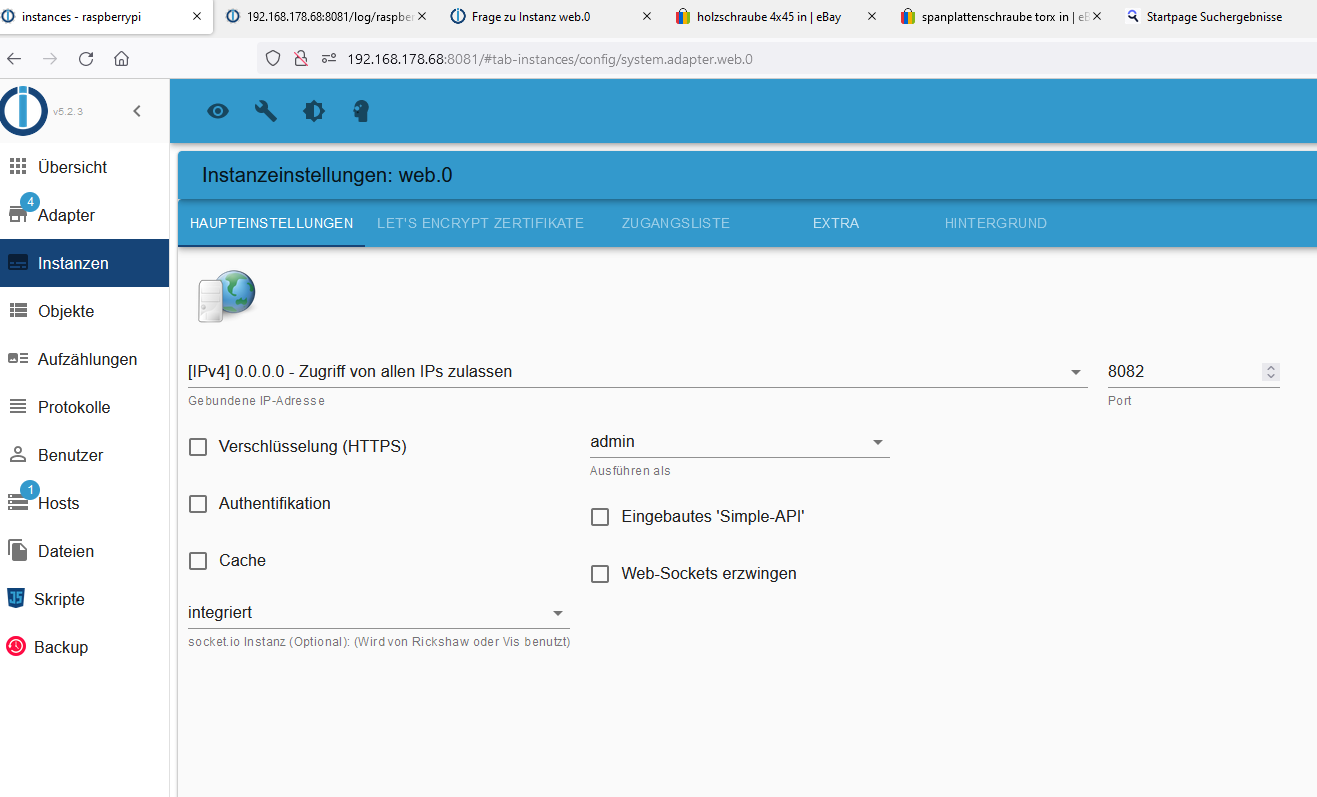


Hey! Du scheinst an dieser Unterhaltung interessiert zu sein, hast aber noch kein Konto.
Hast du es satt, bei jedem Besuch durch die gleichen Beiträge zu scrollen? Wenn du dich für ein Konto anmeldest, kommst du immer genau dorthin zurück, wo du zuvor warst, und kannst dich über neue Antworten benachrichtigen lassen (entweder per E-Mail oder Push-Benachrichtigung). Du kannst auch Lesezeichen speichern und Beiträge positiv bewerten, um anderen Community-Mitgliedern deine Wertschätzung zu zeigen.
Mit deinem Input könnte dieser Beitrag noch besser werden 💗
Registrieren AnmeldenSupport us
291
Online33.0k
Benutzer83.5k
Themen1.3m
Beiträge