




Probleme mit FritzDect Adapter
-
@markus-hofbauer sagte in Probleme mit FritzDect Adapter:
Hallo,
hat keiner der Profis noch eine Idee was ich noch machen könnte?Ich würde an deiner Stelle als nächstes alle Datenpunkte von Fritzdect löschen, den Adapter vorher deinstallieren und dann eine Neuinstallation des Adapter vornehmen. Die Gerätedaten kommen ja im Adapter an. Der Adapter schreibt die Daten aber nicht in die DP, warum auch immer.
tschuess
@sokomoto Das hab ich alles schon zig mal gemacht. Hab jetzt versuchsweise den Adapter auf einem anderen Pi mit iobroker (der läuft normalerweise aber nicht) installiert. Da bekomme ich das selbe Ergebnis oder Fehler. Bist du sicher das es am Adapter liegt?
Gruß Markus -
@sokomoto Das hab ich alles schon zig mal gemacht. Hab jetzt versuchsweise den Adapter auf einem anderen Pi mit iobroker (der läuft normalerweise aber nicht) installiert. Da bekomme ich das selbe Ergebnis oder Fehler. Bist du sicher das es am Adapter liegt?
Gruß Markus@markus-hofbauer sagte in Probleme mit FritzDect Adapter:
@sokomoto Das hab ich alles schon zig mal gemacht. Hab jetzt versuchsweise den Adapter auf einem anderen Pi mit iobroker (der läuft normalerweise aber nicht) installiert. Da bekomme ich das selbe Ergebnis oder Fehler. Bist du sicher das es am Adapter liegt?
Wie schauen den die Datenpunkte jetzt aus, nachdem sie neu angelegt wurden. Was sagt der Zeitstempel, letzte Änderung, bei der Celsius/Temperatur zum Beispiel ?

tschuess
-
@markus-hofbauer sagte in Probleme mit FritzDect Adapter:
@sokomoto Das hab ich alles schon zig mal gemacht. Hab jetzt versuchsweise den Adapter auf einem anderen Pi mit iobroker (der läuft normalerweise aber nicht) installiert. Da bekomme ich das selbe Ergebnis oder Fehler. Bist du sicher das es am Adapter liegt?
Wie schauen den die Datenpunkte jetzt aus, nachdem sie neu angelegt wurden. Was sagt der Zeitstempel, letzte Änderung, bei der Celsius/Temperatur zum Beispiel ?
tschuess
-
@sokomoto Der schreibt mir gar keine Datenpunkte mehr. Ich sehe nur noch den Admin Ordner.
Gruß Markus@markus-hofbauer sagte in Probleme mit FritzDect Adapter:
@sokomoto Der schreibt mir gar keine Datenpunkte mehr. Ich sehe nur noch den Admin Ordner.
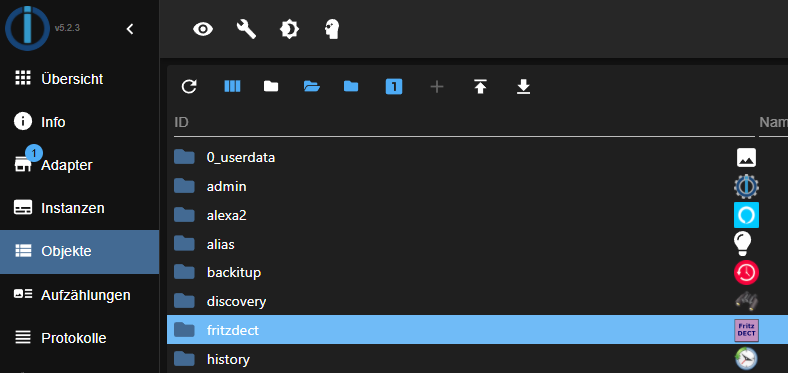
Das kann nicht sein, hier müssen mehrere Ordner sein :
-
@markus-hofbauer sagte in Probleme mit FritzDect Adapter:
@sokomoto Der schreibt mir gar keine Datenpunkte mehr. Ich sehe nur noch den Admin Ordner.
Das kann nicht sein, hier müssen mehrere Ordner sein :
-
@sokomoto Tja ist aber leider so.

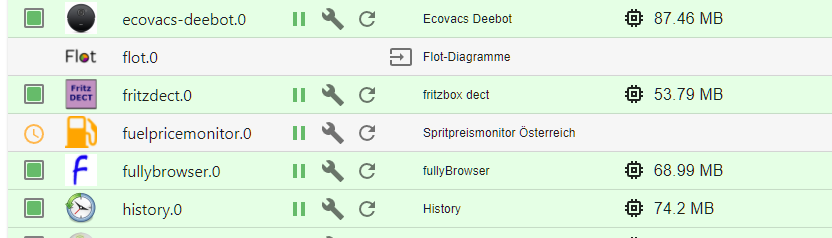

Die Fehlermeldungen kommen immer dann wenn ich den Adapter neu starte.
Gruß MarkusZeig mal einen vollständigen Neustart im LogFile.
Am besten per
iobroker logs --watchUnd auch mal schauen wie es bei nodeJS aussieht:
which nodejs node npm && nodejs -v && node -v && npm -v && whoami && pwd && sudo apt update &> /dev/null && sudo apt update && apt policy nodejs -
Zeig mal einen vollständigen Neustart im LogFile.
Am besten per
iobroker logs --watchUnd auch mal schauen wie es bei nodeJS aussieht:
which nodejs node npm && nodejs -v && node -v && npm -v && whoami && pwd && sudo apt update &> /dev/null && sudo apt update && apt policy nodejs@thomas-braun Hallo
2022-01-22 14:17:55.258  - info: host.raspberrypi stopInstance system.adapter.fritzdect.0 (force=false, process=true)
2022-01-22 14:17:55.317  - info: fritzdect.0 (20362) Got terminate signal TERMINATE_YOURSELF
2022-01-22 14:17:55.321  - info: host.raspberrypi stopInstance system.adapter.fritzdect.0 send kill signal
2022-01-22 14:17:55.326  - info: fritzdect.0 (20362) cleaned everything up...
2022-01-22 14:17:55.328  - info: fritzdect.0 (20362) terminating
2022-01-22 14:17:55.329  - info: fritzdect.0 (20362) Terminated (ADAPTER_REQUESTED_TERMINATION): Without reason
2022-01-22 14:17:55.342  - error: fritzdect.0 (20362) Unhandled promise rejection. This error originated either by throwing inside of an async function without a catch block, or by rejecting a promise which was not handled with .catch().
2022-01-22 14:17:55.343  - error: fritzdect.0 (20362) unhandled promise rejection: undefined
2022-01-22 14:17:55.344  - error: fritzdect.0 (20362) undefined
2022-01-22 14:17:55.258  - info: host.raspberrypi stopInstance system.adapter.fritzdect.0 (force=false, process=true)
2022-01-22 14:17:55.317  - info: fritzdect.0 (20362) Got terminate signal TERMINATE_YOURSELF
2022-01-22 14:17:55.321  - info: host.raspberrypi stopInstance system.adapter.fritzdect.0 send kill signal
2022-01-22 14:17:55.326  - info: fritzdect.0 (20362) cleaned everything up...
2022-01-22 14:17:55.328  - info: fritzdect.0 (20362) terminating
2022-01-22 14:17:55.329  - info: fritzdect.0 (20362) Terminated (ADAPTER_REQUESTED_TERMINATION): Without reason
2022-01-22 14:17:55.342  - error: fritzdect.0 (20362) Unhandled promise rejection. This error originated either by throwing inside of an async function without a catch block, or by rejecting a promise which was not handled with .catch().
2022-01-22 14:17:55.343  - error: fritzdect.0 (20362) unhandled promise rejection: undefined
2022-01-22 14:17:55.344  - error: fritzdect.0 (20362) undefined
2022-01-22 14:17:55.912  - info: host.raspberrypi instance system.adapter.fritzdect.0 terminated with code 11 (ADAPTER_REQUESTED_TERMINATION)
2022-01-22 14:17:55.912  - info: host.raspberrypi instance system.adapter.fritzdect.0 terminated with code 11 (ADAPTER_REQUESTED_TERMINATION)
2022-01-22 14:17:58.410  - info: host.raspberrypi instance system.adapter.fritzdect.0 started with pid 21360
2022-01-22 14:17:58.410  - info: host.raspberrypi instance system.adapter.fritzdect.0 started with pid 21360
2022-01-22 14:17:59.767  - info: fritzdect.0 (21360) starting. Version 2.2.3 in /opt/iobroker/node_modules/iobroker.fritzdect, node: v14.18.3, js-controller: 3.3.22
2022-01-22 14:17:59.800  - info: fritzdect.0 (21360) fritzdect entered ready
2022-01-22 14:17:59.840  - info: fritzdect.0 (21360) fritzdect uses USER: ich
2022-01-22 14:18:00.056  - info: host.raspberrypi instance system.adapter.daswetter.0 started with pid 21375
2022-01-22 14:18:00.232  - info: fritzdect.0 (21360) checking user permissions
2022-01-22 14:18:00.245  - error: fritzdect.0 (21360) errorHandlerTypeError: Converting circular structure to JSON
    --> starting at object with constructor 'Socket'
    |     property 'parser' -> object with constructor 'HTTPParser'
    --- property 'socket' closes the circle
2022-01-22 14:18:00.246  - error: fritzdect.0 (21360) fritzbox returned this {}
2022-01-22 14:18:00.247  - error: fritzdect.0 (21360) no response part in returned message
2022-01-22 14:17:59.767  - info: fritzdect.0 (21360) starting. Version 2.2.3 in /opt/iobroker/node_modules/iobroker.fritzdect, node: v14.18.3, js-controller: 3.3.22
2022-01-22 14:17:59.800  - info: fritzdect.0 (21360) fritzdect entered ready
2022-01-22 14:17:59.840  - info: fritzdect.0 (21360) fritzdect uses USER: ich
2022-01-22 14:18:00.056  - info: host.raspberrypi instance system.adapter.daswetter.0 started with pid 21375
2022-01-22 14:18:00.232  - info: fritzdect.0 (21360) checking user permissions
2022-01-22 14:18:00.245  - error: fritzdect.0 (21360) errorHandlerTypeError: Converting circular structure to JSON
    --> starting at object with constructor 'Socket'
    |     property 'parser' -> object with constructor 'HTTPParser'
    --- property 'socket' closes the circle
2022-01-22 14:18:00.246  - error: fritzdect.0 (21360) fritzbox returned this {}
2022-01-22 14:18:00.247  - error: fritzdect.0 (21360) no response part in returned message
2022-01-22 14:18:01.798  - info: daswetter.0 (21375) starting. Version 3.0.9 in /opt/iobroker/node_modules/iobroker.daswetter, node: v14.18.3, js-controller: 3.3.22
2022-01-22 14:18:01.798  - info: daswetter.0 (21375) starting. Version 3.0.9 in /opt/iobroker/node_modules/iobroker.daswetter, node: v14.18.3, js-controller: 3.3.22
2022-01-22 14:18:03.004  - info: daswetter.0 (21375) Terminated (ADAPTER_REQUESTED_TERMINATION): All data handled, adapter stopped until next scheduled moment
2022-01-22 14:18:03.004  - info: daswetter.0 (21375) Terminated (ADAPTER_REQUESTED_TERMINATION): All data handled, adapter stopped until next scheduled moment
2022-01-22 14:18:03.533  - info: daswetter.0 (21375) cleaned everything up...
2022-01-22 14:18:03.559  - info: host.raspberrypi instance system.adapter.daswetter.0 terminated with code 11 (ADAPTER_REQUESTED_TERMINATION)
2022-01-22 14:18:03.533  - info: daswetter.0 (21375) cleaned everything up...
2022-01-22 14:18:03.559  - info: host.raspberrypi instance system.adapter.daswetter.0 terminated with code 11 (ADAPTER_REQUESTED_TERMINATION)
pi@raspberrypi:~ $ which nodejs node npm && nodejs -v && node -v && npm -v && whoami && pwd && sudo apt update &> /dev/null && sudo apt update && apt policy nodejs /usr/bin/node /usr/bin/npm pi@raspberrypi:~ $Hoffe der letzte Befehl war so richtig?
Gruß Markus -
@thomas-braun Hallo
2022-01-22 14:17:55.258  - info: host.raspberrypi stopInstance system.adapter.fritzdect.0 (force=false, process=true)
2022-01-22 14:17:55.317  - info: fritzdect.0 (20362) Got terminate signal TERMINATE_YOURSELF
2022-01-22 14:17:55.321  - info: host.raspberrypi stopInstance system.adapter.fritzdect.0 send kill signal
2022-01-22 14:17:55.326  - info: fritzdect.0 (20362) cleaned everything up...
2022-01-22 14:17:55.328  - info: fritzdect.0 (20362) terminating
2022-01-22 14:17:55.329  - info: fritzdect.0 (20362) Terminated (ADAPTER_REQUESTED_TERMINATION): Without reason
2022-01-22 14:17:55.342  - error: fritzdect.0 (20362) Unhandled promise rejection. This error originated either by throwing inside of an async function without a catch block, or by rejecting a promise which was not handled with .catch().
2022-01-22 14:17:55.343  - error: fritzdect.0 (20362) unhandled promise rejection: undefined
2022-01-22 14:17:55.344  - error: fritzdect.0 (20362) undefined
2022-01-22 14:17:55.258  - info: host.raspberrypi stopInstance system.adapter.fritzdect.0 (force=false, process=true)
2022-01-22 14:17:55.317  - info: fritzdect.0 (20362) Got terminate signal TERMINATE_YOURSELF
2022-01-22 14:17:55.321  - info: host.raspberrypi stopInstance system.adapter.fritzdect.0 send kill signal
2022-01-22 14:17:55.326  - info: fritzdect.0 (20362) cleaned everything up...
2022-01-22 14:17:55.328  - info: fritzdect.0 (20362) terminating
2022-01-22 14:17:55.329  - info: fritzdect.0 (20362) Terminated (ADAPTER_REQUESTED_TERMINATION): Without reason
2022-01-22 14:17:55.342  - error: fritzdect.0 (20362) Unhandled promise rejection. This error originated either by throwing inside of an async function without a catch block, or by rejecting a promise which was not handled with .catch().
2022-01-22 14:17:55.343  - error: fritzdect.0 (20362) unhandled promise rejection: undefined
2022-01-22 14:17:55.344  - error: fritzdect.0 (20362) undefined
2022-01-22 14:17:55.912  - info: host.raspberrypi instance system.adapter.fritzdect.0 terminated with code 11 (ADAPTER_REQUESTED_TERMINATION)
2022-01-22 14:17:55.912  - info: host.raspberrypi instance system.adapter.fritzdect.0 terminated with code 11 (ADAPTER_REQUESTED_TERMINATION)
2022-01-22 14:17:58.410  - info: host.raspberrypi instance system.adapter.fritzdect.0 started with pid 21360
2022-01-22 14:17:58.410  - info: host.raspberrypi instance system.adapter.fritzdect.0 started with pid 21360
2022-01-22 14:17:59.767  - info: fritzdect.0 (21360) starting. Version 2.2.3 in /opt/iobroker/node_modules/iobroker.fritzdect, node: v14.18.3, js-controller: 3.3.22
2022-01-22 14:17:59.800  - info: fritzdect.0 (21360) fritzdect entered ready
2022-01-22 14:17:59.840  - info: fritzdect.0 (21360) fritzdect uses USER: ich
2022-01-22 14:18:00.056  - info: host.raspberrypi instance system.adapter.daswetter.0 started with pid 21375
2022-01-22 14:18:00.232  - info: fritzdect.0 (21360) checking user permissions
2022-01-22 14:18:00.245  - error: fritzdect.0 (21360) errorHandlerTypeError: Converting circular structure to JSON
    --> starting at object with constructor 'Socket'
    |     property 'parser' -> object with constructor 'HTTPParser'
    --- property 'socket' closes the circle
2022-01-22 14:18:00.246  - error: fritzdect.0 (21360) fritzbox returned this {}
2022-01-22 14:18:00.247  - error: fritzdect.0 (21360) no response part in returned message
2022-01-22 14:17:59.767  - info: fritzdect.0 (21360) starting. Version 2.2.3 in /opt/iobroker/node_modules/iobroker.fritzdect, node: v14.18.3, js-controller: 3.3.22
2022-01-22 14:17:59.800  - info: fritzdect.0 (21360) fritzdect entered ready
2022-01-22 14:17:59.840  - info: fritzdect.0 (21360) fritzdect uses USER: ich
2022-01-22 14:18:00.056  - info: host.raspberrypi instance system.adapter.daswetter.0 started with pid 21375
2022-01-22 14:18:00.232  - info: fritzdect.0 (21360) checking user permissions
2022-01-22 14:18:00.245  - error: fritzdect.0 (21360) errorHandlerTypeError: Converting circular structure to JSON
    --> starting at object with constructor 'Socket'
    |     property 'parser' -> object with constructor 'HTTPParser'
    --- property 'socket' closes the circle
2022-01-22 14:18:00.246  - error: fritzdect.0 (21360) fritzbox returned this {}
2022-01-22 14:18:00.247  - error: fritzdect.0 (21360) no response part in returned message
2022-01-22 14:18:01.798  - info: daswetter.0 (21375) starting. Version 3.0.9 in /opt/iobroker/node_modules/iobroker.daswetter, node: v14.18.3, js-controller: 3.3.22
2022-01-22 14:18:01.798  - info: daswetter.0 (21375) starting. Version 3.0.9 in /opt/iobroker/node_modules/iobroker.daswetter, node: v14.18.3, js-controller: 3.3.22
2022-01-22 14:18:03.004  - info: daswetter.0 (21375) Terminated (ADAPTER_REQUESTED_TERMINATION): All data handled, adapter stopped until next scheduled moment
2022-01-22 14:18:03.004  - info: daswetter.0 (21375) Terminated (ADAPTER_REQUESTED_TERMINATION): All data handled, adapter stopped until next scheduled moment
2022-01-22 14:18:03.533  - info: daswetter.0 (21375) cleaned everything up...
2022-01-22 14:18:03.559  - info: host.raspberrypi instance system.adapter.daswetter.0 terminated with code 11 (ADAPTER_REQUESTED_TERMINATION)
2022-01-22 14:18:03.533  - info: daswetter.0 (21375) cleaned everything up...
2022-01-22 14:18:03.559  - info: host.raspberrypi instance system.adapter.daswetter.0 terminated with code 11 (ADAPTER_REQUESTED_TERMINATION)
pi@raspberrypi:~ $ which nodejs node npm && nodejs -v && node -v && npm -v && whoami && pwd && sudo apt update &> /dev/null && sudo apt update && apt policy nodejs /usr/bin/node /usr/bin/npm pi@raspberrypi:~ $Hoffe der letzte Befehl war so richtig?
Gruß MarkusMach mal:
sudo ln -s /usr/bin/node /usr/bin/nodejs which nodejs node npm && nodejs -v && node -v && npm -v && whoami && pwd && sudo apt update &> /dev/null && sudo apt update && apt policy nodejs -
Mach mal:
sudo ln -s /usr/bin/node /usr/bin/nodejs which nodejs node npm && nodejs -v && node -v && npm -v && whoami && pwd && sudo apt update &> /dev/null && sudo apt update && apt policy nodejs@thomas-braun Hallo
pi@raspberrypi:~ $ sudo ln -s /usr/bin/node /usr/bin/nodejs
pi@raspberrypi:~ $ which nodejs node npm && nodejs -v && node -v && npm -v && whoami && pwd && sudo apt update &> /dev/null && sudo apt update && apt policy nodejs
/usr/bin/nodejs
/usr/bin/node
/usr/bin/npm
v14.18.3
v14.18.3
6.14.15
pi
/home/pi
OK:1 http://raspbian.raspberrypi.org/raspbian bullseye InRelease
OK:2 http://archive.raspberrypi.org/debian bullseye InRelease
OK:3 https://deb.nodesource.com/node_14.x bullseye InRelease
Paketlisten werden gelesen... Fertig
Abh▒ngigkeitsbaum wird aufgebaut... Fertig
Statusinformationen werden eingelesen... Fertig
Aktualisierung f▒r 1 Paket verf▒gbar. F▒hren Sie ▒apt list --upgradable▒ aus, um es anzuzeigen.
nodejs:
  Installiert:           14.18.3-deb-1nodesource1
  Installationskandidat: 14.18.3-deb-1nodesource1
  Versionstabelle:
 *** 14.18.3-deb-1nodesource1 500
        500 https://deb.nodesource.com/node_14.x bullseye/main armhf Packages
        100 /var/lib/dpkg/status
     12.22.5~dfsg-2~11u1 500
        500 http://raspbian.raspberrypi.org/raspbian bullseye/main armhf Packages
pi@raspberrypi:~ $
Gruß Markus
-
@thomas-braun Hallo
pi@raspberrypi:~ $ sudo ln -s /usr/bin/node /usr/bin/nodejs
pi@raspberrypi:~ $ which nodejs node npm && nodejs -v && node -v && npm -v && whoami && pwd && sudo apt update &> /dev/null && sudo apt update && apt policy nodejs
/usr/bin/nodejs
/usr/bin/node
/usr/bin/npm
v14.18.3
v14.18.3
6.14.15
pi
/home/pi
OK:1 http://raspbian.raspberrypi.org/raspbian bullseye InRelease
OK:2 http://archive.raspberrypi.org/debian bullseye InRelease
OK:3 https://deb.nodesource.com/node_14.x bullseye InRelease
Paketlisten werden gelesen... Fertig
Abh▒ngigkeitsbaum wird aufgebaut... Fertig
Statusinformationen werden eingelesen... Fertig
Aktualisierung f▒r 1 Paket verf▒gbar. F▒hren Sie ▒apt list --upgradable▒ aus, um es anzuzeigen.
nodejs:
  Installiert:           14.18.3-deb-1nodesource1
  Installationskandidat: 14.18.3-deb-1nodesource1
  Versionstabelle:
 *** 14.18.3-deb-1nodesource1 500
        500 https://deb.nodesource.com/node_14.x bullseye/main armhf Packages
        100 /var/lib/dpkg/status
     12.22.5~dfsg-2~11u1 500
        500 http://raspbian.raspberrypi.org/raspbian bullseye/main armhf Packages
pi@raspberrypi:~ $
Gruß Markus
Das passt.
cd /opt/iobroker
npm ls iobroker.fritzdect
(Nebenbei: Das ausstehende Updrade noch einspielen)
-
Das passt.
cd /opt/iobroker
npm ls iobroker.fritzdect
(Nebenbei: Das ausstehende Updrade noch einspielen)
@thomas-braun Hallo
pi@raspberrypi:~ $ ^C
pi@raspberrypi:~ $ apt list --upgradable
Auflistung... Fertig
rpi-eeprom/stable 13.4-1 armhf [aktualisierbar von: 13.3-1]
N: Es gibt 1 zus▒tzliche Version. Bitte verwenden Sie die Option ▒-a▒, um sie anzuzeigen.
pi@raspberrypi:~ $ apt list --upgradable -a
Auflistung... Fertig
rpi-eeprom/stable 13.4-1 armhf [aktualisierbar von: 13.3-1]
rpi-eeprom/now 13.3-1 armhf  [Installiert,aktualisierbar auf: 13.4-1]

pi@raspberrypi:~ $ cd /opt/iobroker
pi@raspberrypi:/opt/iobroker $ npm ls iobroker.fritzdect
iobroker.inst@3.0.0 /opt/iobroker
`-- iobroker.fritzdect@2.2.3

pi@raspberrypi:/opt/iobroker $
Wie aktualisiere ich das?
Gruß Markus -
@thomas-braun Hallo
pi@raspberrypi:~ $ ^C
pi@raspberrypi:~ $ apt list --upgradable
Auflistung... Fertig
rpi-eeprom/stable 13.4-1 armhf [aktualisierbar von: 13.3-1]
N: Es gibt 1 zus▒tzliche Version. Bitte verwenden Sie die Option ▒-a▒, um sie anzuzeigen.
pi@raspberrypi:~ $ apt list --upgradable -a
Auflistung... Fertig
rpi-eeprom/stable 13.4-1 armhf [aktualisierbar von: 13.3-1]
rpi-eeprom/now 13.3-1 armhf  [Installiert,aktualisierbar auf: 13.4-1]

pi@raspberrypi:~ $ cd /opt/iobroker
pi@raspberrypi:/opt/iobroker $ npm ls iobroker.fritzdect
iobroker.inst@3.0.0 /opt/iobroker
`-- iobroker.fritzdect@2.2.3

pi@raspberrypi:/opt/iobroker $
Wie aktualisiere ich das?
Gruß MarkusOT:
iobroker stop
sudo apt update
sudo apt full-upgrade
sudo reboot
BTT: Welche Firmware ist da auf der Fritzbox? Und der user heißt 'ich'? Sonderzeichen im Passwort? Bindestrich oder sowas?
-
OT:
iobroker stop
sudo apt update
sudo apt full-upgrade
sudo reboot
BTT: Welche Firmware ist da auf der Fritzbox? Und der user heißt 'ich'? Sonderzeichen im Passwort? Bindestrich oder sowas?
@thomas-braun Hallo
Ja der User wurde nur mal zu Testzwecken angelegt. Um zu schauen ob es am User liegt. Keine Sonderzeichen oder sonstiges im Passwort.
Modell: FRITZ!Box 7582
Aktueller Energieverbrauch: 19 %
FRITZ!OS: 07.16 - Version aktuellGruß Markus
-
@thomas-braun Hallo
Ja der User wurde nur mal zu Testzwecken angelegt. Um zu schauen ob es am User liegt. Keine Sonderzeichen oder sonstiges im Passwort.
Modell: FRITZ!Box 7582
Aktueller Energieverbrauch: 19 %
FRITZ!OS: 07.16 - Version aktuellGruß Markus
Keine Ahnung. Mach vielleicht in Issue auf.
-
@thomas-braun Hallo
2022-01-22 14:17:55.258  - info: host.raspberrypi stopInstance system.adapter.fritzdect.0 (force=false, process=true)
2022-01-22 14:17:55.317  - info: fritzdect.0 (20362) Got terminate signal TERMINATE_YOURSELF
2022-01-22 14:17:55.321  - info: host.raspberrypi stopInstance system.adapter.fritzdect.0 send kill signal
2022-01-22 14:17:55.326  - info: fritzdect.0 (20362) cleaned everything up...
2022-01-22 14:17:55.328  - info: fritzdect.0 (20362) terminating
2022-01-22 14:17:55.329  - info: fritzdect.0 (20362) Terminated (ADAPTER_REQUESTED_TERMINATION): Without reason
2022-01-22 14:17:55.342  - error: fritzdect.0 (20362) Unhandled promise rejection. This error originated either by throwing inside of an async function without a catch block, or by rejecting a promise which was not handled with .catch().
2022-01-22 14:17:55.343  - error: fritzdect.0 (20362) unhandled promise rejection: undefined
2022-01-22 14:17:55.344  - error: fritzdect.0 (20362) undefined
2022-01-22 14:17:55.258  - info: host.raspberrypi stopInstance system.adapter.fritzdect.0 (force=false, process=true)
2022-01-22 14:17:55.317  - info: fritzdect.0 (20362) Got terminate signal TERMINATE_YOURSELF
2022-01-22 14:17:55.321  - info: host.raspberrypi stopInstance system.adapter.fritzdect.0 send kill signal
2022-01-22 14:17:55.326  - info: fritzdect.0 (20362) cleaned everything up...
2022-01-22 14:17:55.328  - info: fritzdect.0 (20362) terminating
2022-01-22 14:17:55.329  - info: fritzdect.0 (20362) Terminated (ADAPTER_REQUESTED_TERMINATION): Without reason
2022-01-22 14:17:55.342  - error: fritzdect.0 (20362) Unhandled promise rejection. This error originated either by throwing inside of an async function without a catch block, or by rejecting a promise which was not handled with .catch().
2022-01-22 14:17:55.343  - error: fritzdect.0 (20362) unhandled promise rejection: undefined
2022-01-22 14:17:55.344  - error: fritzdect.0 (20362) undefined
2022-01-22 14:17:55.912  - info: host.raspberrypi instance system.adapter.fritzdect.0 terminated with code 11 (ADAPTER_REQUESTED_TERMINATION)
2022-01-22 14:17:55.912  - info: host.raspberrypi instance system.adapter.fritzdect.0 terminated with code 11 (ADAPTER_REQUESTED_TERMINATION)
2022-01-22 14:17:58.410  - info: host.raspberrypi instance system.adapter.fritzdect.0 started with pid 21360
2022-01-22 14:17:58.410  - info: host.raspberrypi instance system.adapter.fritzdect.0 started with pid 21360
2022-01-22 14:17:59.767  - info: fritzdect.0 (21360) starting. Version 2.2.3 in /opt/iobroker/node_modules/iobroker.fritzdect, node: v14.18.3, js-controller: 3.3.22
2022-01-22 14:17:59.800  - info: fritzdect.0 (21360) fritzdect entered ready
2022-01-22 14:17:59.840  - info: fritzdect.0 (21360) fritzdect uses USER: ich
2022-01-22 14:18:00.056  - info: host.raspberrypi instance system.adapter.daswetter.0 started with pid 21375
2022-01-22 14:18:00.232  - info: fritzdect.0 (21360) checking user permissions
2022-01-22 14:18:00.245  - error: fritzdect.0 (21360) errorHandlerTypeError: Converting circular structure to JSON
    --> starting at object with constructor 'Socket'
    |     property 'parser' -> object with constructor 'HTTPParser'
    --- property 'socket' closes the circle
2022-01-22 14:18:00.246  - error: fritzdect.0 (21360) fritzbox returned this {}
2022-01-22 14:18:00.247  - error: fritzdect.0 (21360) no response part in returned message
2022-01-22 14:17:59.767  - info: fritzdect.0 (21360) starting. Version 2.2.3 in /opt/iobroker/node_modules/iobroker.fritzdect, node: v14.18.3, js-controller: 3.3.22
2022-01-22 14:17:59.800  - info: fritzdect.0 (21360) fritzdect entered ready
2022-01-22 14:17:59.840  - info: fritzdect.0 (21360) fritzdect uses USER: ich
2022-01-22 14:18:00.056  - info: host.raspberrypi instance system.adapter.daswetter.0 started with pid 21375
2022-01-22 14:18:00.232  - info: fritzdect.0 (21360) checking user permissions
2022-01-22 14:18:00.245  - error: fritzdect.0 (21360) errorHandlerTypeError: Converting circular structure to JSON
    --> starting at object with constructor 'Socket'
    |     property 'parser' -> object with constructor 'HTTPParser'
    --- property 'socket' closes the circle
2022-01-22 14:18:00.246  - error: fritzdect.0 (21360) fritzbox returned this {}
2022-01-22 14:18:00.247  - error: fritzdect.0 (21360) no response part in returned message
2022-01-22 14:18:01.798  - info: daswetter.0 (21375) starting. Version 3.0.9 in /opt/iobroker/node_modules/iobroker.daswetter, node: v14.18.3, js-controller: 3.3.22
2022-01-22 14:18:01.798  - info: daswetter.0 (21375) starting. Version 3.0.9 in /opt/iobroker/node_modules/iobroker.daswetter, node: v14.18.3, js-controller: 3.3.22
2022-01-22 14:18:03.004  - info: daswetter.0 (21375) Terminated (ADAPTER_REQUESTED_TERMINATION): All data handled, adapter stopped until next scheduled moment
2022-01-22 14:18:03.004  - info: daswetter.0 (21375) Terminated (ADAPTER_REQUESTED_TERMINATION): All data handled, adapter stopped until next scheduled moment
2022-01-22 14:18:03.533  - info: daswetter.0 (21375) cleaned everything up...
2022-01-22 14:18:03.559  - info: host.raspberrypi instance system.adapter.daswetter.0 terminated with code 11 (ADAPTER_REQUESTED_TERMINATION)
2022-01-22 14:18:03.533  - info: daswetter.0 (21375) cleaned everything up...
2022-01-22 14:18:03.559  - info: host.raspberrypi instance system.adapter.daswetter.0 terminated with code 11 (ADAPTER_REQUESTED_TERMINATION)
pi@raspberrypi:~ $ which nodejs node npm && nodejs -v && node -v && npm -v && whoami && pwd && sudo apt update &> /dev/null && sudo apt update && apt policy nodejs /usr/bin/node /usr/bin/npm pi@raspberrypi:~ $Hoffe der letzte Befehl war so richtig?
Gruß Markus@markus-hofbauer sagte in Probleme mit FritzDect Adapter:
@thomas-braun Hallo
2022-01-22 14:17:59.840  - info: fritzdect.0 (21360) fritzdect uses USER: ich
2022-01-22 14:18:00.056  - info: host.raspberrypi instance system.adapter.daswetter.0 started with pid 21375
2022-01-22 14:18:00.232  - info: fritzdect.0 (21360) checking user permissions
2022-01-22 14:18:00.245  - error: fritzdect.0 (21360) errorHandlerTypeError: Converting circular structure to JSON
    --> starting at object with constructor 'Socket'
    |     property 'parser' -> object with constructor 'HTTPParser'
    --- property 'socket' closes the circle
Ich denke diese Fehlermeldung ist das Problem, eindeutig ein Adapterfehler in meinen Augen.
Hier kann nur der Entwickler weiterhelfen.tschuess
-
@thomas-braun Hallo
Ja der User wurde nur mal zu Testzwecken angelegt. Um zu schauen ob es am User liegt. Keine Sonderzeichen oder sonstiges im Passwort.
Modell: FRITZ!Box 7582
Aktueller Energieverbrauch: 19 %
FRITZ!OS: 07.16 - Version aktuellGruß Markus
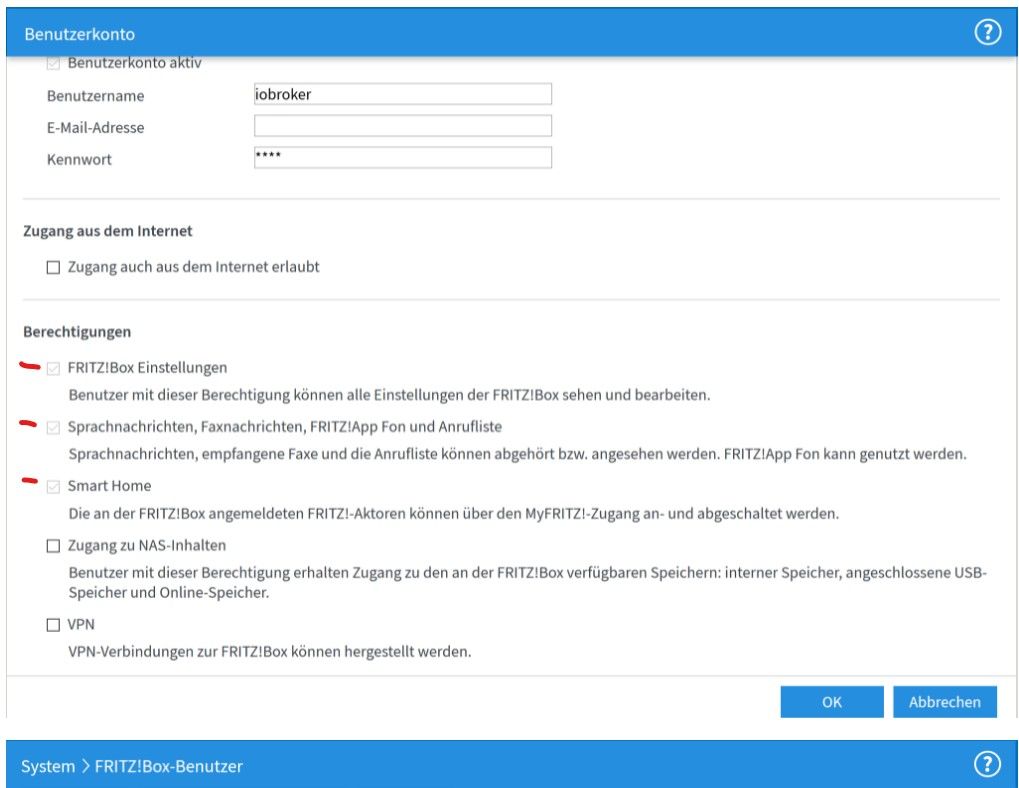
@markus-hofbauer
und die Berechtigungen sind richtig gesetzt ?
-
@markus-hofbauer
und die Berechtigungen sind richtig gesetzt ?
@michael-schmitt Ja.
Gruß Markus -
sorry alles dummes Zeug was ich geschrieben hatte - bitte löschen/ignorieren.
-
@michael-schmitt Ja.
Gruß Markus@markus-hofbauer
Trage im Adapter versuchsweise die Anmeldedaten des Hauptusers der Fritzbox ein (also der mit ALLEN Rechten).
Starte dann den Adapter neu, wenn Problem weiterhin, den kompletten iobroker neu, wenn dann weiterhin nicht geht, die Fritzbox neu (in dieser Reihenfolge)
Log vom Adapter bitte posten, nur warn und error!MfG Ulrich
-
@markus-hofbauer
Trage im Adapter versuchsweise die Anmeldedaten des Hauptusers der Fritzbox ein (also der mit ALLEN Rechten).
Starte dann den Adapter neu, wenn Problem weiterhin, den kompletten iobroker neu, wenn dann weiterhin nicht geht, die Fritzbox neu (in dieser Reihenfolge)
Log vom Adapter bitte posten, nur warn und error!@zahnheinrich Hallo
Adapter Neustart:fritzdect.0 2022-01-23 20:56:10.087 error no response part in returned message fritzdect.0 2022-01-23 20:56:10.086 error fritzbox returned this {} fritzdect.0 2022-01-23 20:56:10.086 error errorHandlerTypeError: Converting circular structure to JSON --> starting at object with constructor 'Socket' | property 'parser' -> object with constructor 'HTTPParser' --- property 'socket' closes the circle fritzdect.0 2022-01-23 20:07:31.634 error adapter disabled fritzdect.0 2022-01-23 20:07:27.083 error undefined fritzdect.0 2022-01-23 20:07:27.082 error unhandled promise rejection: undefined fritzdect.0 2022-01-23 20:07:27.081 error Unhandled promise rejection. This error originated either by throwing inside of an async function without a catch block, or by rejecting a promise which was not handled with .catch().Iobroker Neustart:
fritzdect.0
2022-01-23 21:03:30.580	error	no response part in returned message

fritzdect.0
2022-01-23 21:03:30.579	error	fritzbox returned this {}

fritzdect.0
2022-01-23 21:03:30.578	error	errorHandlerTypeError: Converting circular structure to JSON --> starting at object with constructor 'Socket' | property 'parser' -> object with constructor 'HTTPParser' --- property 'socket' closes the circle
Fritzbox Neustart und Adapter Neustart:
fritzdect.0
2022-01-23 21:48:39.086	error	no response part in returned message

fritzdect.0
2022-01-23 21:48:39.085	error	fritzbox returned this {}

fritzdect.0
2022-01-23 21:48:39.083	error	errorHandlerTypeError: Converting circular structure to JSON --> starting at object with constructor 'Socket' | property 'parser' -> object with constructor 'HTTPParser' --- property 'socket' closes the circle

fritzdect.0
2022-01-23 21:48:14.255	error	undefined

fritzdect.0
2022-01-23 21:48:14.255	error	unhandled promise rejection: undefined

fritzdect.0
2022-01-23 21:48:14.254	error	Unhandled promise rejection. This error originated either by throwing inside of an async function without a catch block, or by rejecting a promise which was not handled with .catch().
Gruß Markus




Hey! Du scheinst an dieser Unterhaltung interessiert zu sein, hast aber noch kein Konto.
Hast du es satt, bei jedem Besuch durch die gleichen Beiträge zu scrollen? Wenn du dich für ein Konto anmeldest, kommst du immer genau dorthin zurück, wo du zuvor warst, und kannst dich über neue Antworten benachrichtigen lassen (entweder per E-Mail oder Push-Benachrichtigung). Du kannst auch Lesezeichen speichern und Beiträge positiv bewerten, um anderen Community-Mitgliedern deine Wertschätzung zu zeigen.
Mit deinem Input könnte dieser Beitrag noch besser werden 💗
Registrieren Anmelden308
Online33.0k
Benutzer83.5k
Themen1.3m
Beiträge