




Admin zeigt nur noch eine leere Webseite an? [gelöst]
-
@paradoxxa sagte in Admin zeigt nur noch eine leere Webseite an?:
info: admin.0 (108) starting. Version 5.2.3
Du hast Edit gemacht ...
Admin ist doch da
@glasfaser said in Admin zeigt nur noch eine leere Webseite an?:
@paradoxxa sagte in Admin zeigt nur noch eine leere Webseite an?:
info: admin.0 (108) starting. Version 5.2.3
Du hast Edit gemacht ...
Admin ist doch daJa, es wird aber nicht die oberfläche geladen sondern nichts angezeigt.
Der Seitenquelltext gibt folgendes her:
<!doctype html><html lang="en"><head><meta charset="utf-8"/><link rel="icon" href="./favicon.ico"/><meta name="viewport" content="width=device-width,initial-scale=1,user-scalable=no"/><meta name="theme-color" content="#000000"/><meta name="description" content="admin - ioBroker"/><link rel="apple-touch-icon" href="./logo192.png"/><link rel="stylesheet" href="./css/leaflet.css"/><link rel="manifest" href="./manifest.json"/><script type="text/javascript" onerror="setTimeout(function(){window.location.reload()}, 5000)" src="./lib/js/socket.io.js"></script><script type="text/javascript" src="./lib/js/sparkline.js"></script><title>Admin</title><script>window.loginHideLogo="false",window.loginMotto="",window.login="true",window.loginLogo="",window.loginLink="",window.loginTitle="",window.vendorPrefix="",window.loginBackgroundColor="",window.disableDataReporting="@@disableDataReporting@@"</script><style>body{background-color:;background-image:url();background-size:cover}.root{background-color:rgba(255,255,255,.87);border-radius:10px}.unsupported{width:200px;background-color:#aaa;margin:auto;margin-top:3rem;padding:10px;line-height:25px;border-radius:4px;text-align:center}.leaflet-container{height:400px;width:100%}</style><script>window.addEventListener("load",(function e(n){window.removeEventListener("load",e,!1);if(window.navigator.userAgent.indexOf("MSIE ")>0||navigator.userAgent.match(/Trident.*rv\:11\./)){const e=document.getElementById("root");e.classList.add("unsupported"),e.innerHTML="Browser is not supported. Please use Firefox or Chrome."}}),!1)</script><link href="./static/css/5.66aabfbf.chunk.css" rel="stylesheet"><link href="./static/css/main.950070b4.chunk.css" rel="stylesheet"></head><body><noscript>You need to enable JavaScript to run this app.</noscript><div id="root"></div><script>!function(e){function t(t){for(var n,o,u=t[0],f=t[1],i=t[2],l=0,d=[];l<u.length;l++)o=u[l],Object.prototype.hasOwnProperty.call(a,o)&&a[o]&&d.push(a[o][0]),a[o]=0;for(n in f)Object.prototype.hasOwnProperty.call(f,n)&&(e[n]=f[n]);for(s&&s(t);d.length;)d.shift()();return c.push.apply(c,i||[]),r()}function r(){for(var e,t=0;t<c.length;t++){for(var r=c[t],n=!0,o=1;o<r.length;o++){var f=r[o];0!==a[f]&&(n=!1)}n&&(c.splice(t--,1),e=u(u.s=r[0]))}return e}var n={},o={4:0},a={4:0},c=[];function u(t){if(n[t])return n[t].exports;var r=n[t]={i:t,l:!1,exports:{}};return e[t].call(r.exports,r,r.exports,u),r.l=!0,r.exports}u.e=function(e){var t=[];o[e]?t.push(o[e]):0!==o[e]&&{6:1}[e]&&t.push(o[e]=new Promise((function(t,r){for(var n="static/css/"+({}[e]||e)+"."+{0:"31d6cfe0",1:"31d6cfe0",2:"31d6cfe0",6:"41d5431a",7:"31d6cfe0",8:"31d6cfe0",9:"31d6cfe0",10:"31d6cfe0",11:"31d6cfe0",12:"31d6cfe0",13:"31d6cfe0",14:"31d6cfe0",15:"31d6cfe0",16:"31d6cfe0"}[e]+".chunk.css",a=u.p+n,c=document.getElementsByTagName("link"),f=0;f<c.length;f++){var i=(s=c[f]).getAttribute("data-href")||s.getAttribute("href");if("stylesheet"===s.rel&&(i===n||i===a))return t()}var l=document.getElementsByTagName("style");for(f=0;f<l.length;f++){var s;if((i=(s=l[f]).getAttribute("data-href"))===n||i===a)return t()}var d=document.createElement("link");d.rel="stylesheet",d.type="text/css",d.onload=t,d.onerror=function(t){var n=t&&t.target&&t.target.src||a,c=new Error("Loading CSS chunk "+e+" failed.\n("+n+")");c.code="CSS_CHUNK_LOAD_FAILED",c.request=n,delete o[e],d.parentNode.removeChild(d),r(c)},d.href=a,document.getElementsByTagName("head")[0].appendChild(d)})).then((function(){o[e]=0})));var r=a[e];if(0!==r)if(r)t.push(r[2]);else{var n=new Promise((function(t,n){r=a[e]=[t,n]}));t.push(r[2]=n);var c,f=document.createElement("script");f.charset="utf-8",f.timeout=120,u.nc&&f.setAttribute("nonce",u.nc),f.src=function(e){return u.p+"static/js/"+({}[e]||e)+"."+{0:"0349f77e",1:"961894c5",2:"3d1b50fc",6:"630fb469",7:"34479e94",8:"d988ca16",9:"992f72fe",10:"c6cfac01",11:"5d187238",12:"490971aa",13:"7d21ae26",14:"f5e1a630",15:"1f242916",16:"bbbe6952"}[e]+".chunk.js"}(e);var i=new Error;c=function(t){f.onerror=f.onload=null,clearTimeout(l);var r=a[e];if(0!==r){if(r){var n=t&&("load"===t.type?"missing":t.type),o=t&&t.target&&t.target.src;i.message="Loading chunk "+e+" failed.\n("+n+": "+o+")",i.name="ChunkLoadError",i.type=n,i.request=o,r[1](i)}a[e]=void 0}};var l=setTimeout((function(){c({type:"timeout",target:f})}),12e4);f.onerror=f.onload=c,document.head.appendChild(f)}return Promise.all(t)},u.m=e,u.c=n,u.d=function(e,t,r){u.o(e,t)||Object.defineProperty(e,t,{enumerable:!0,get:r})},u.r=function(e){"undefined"!=typeof Symbol&&Symbol.toStringTag&&Object.defineProperty(e,Symbol.toStringTag,{value:"Module"}),Object.defineProperty(e,"__esModule",{value:!0})},u.t=function(e,t){if(1&t&&(e=u(e)),8&t)return e;if(4&t&&"object"==typeof e&&e&&e.__esModule)return e;var r=Object.create(null);if(u.r(r),Object.defineProperty(r,"default",{enumerable:!0,value:e}),2&t&&"string"!=typeof e)for(var n in e)u.d(r,n,function(t){return e[t]}.bind(null,n));return r},u.n=function(e){var t=e&&e.__esModule?function(){return e.default}:function(){return e};return u.d(t,"a",t),t},u.o=function(e,t){return Object.prototype.hasOwnProperty.call(e,t)},u.p="./",u.oe=function(e){throw console.error(e),e};var f=this["webpackJsonpsrc-rx"]=this["webpackJsonpsrc-rx"]||[],i=f.push.bind(f);f.push=t,f=f.slice();for(var l=0;l<f.length;l++)t(f[l]);var s=i;r()}([])</script><script src="./static/js/5.bde6ca2f.chunk.js"></script><script src="./static/js/main.1892293b.chunk.js"></script></body></html> -
@paradoxxa sagte in Admin zeigt nur noch eine leere Webseite an?:
- system.adapter.admin.0 : admin : buanet-iobroker-Broken - enabled, port: 8081, bind: 0.0.0.0 (SSL), run as: admin
Admin Webseite leer (eine weiße Webseite).
Was heißt bei dir weiße Seite , kann ich nicht viel mit anfangen !?
Browser Cache mal geleert .
oder Stelle mal um
iobroker set admin.0 --secure false@glasfaser said in Admin zeigt nur noch eine leere Webseite an?:
Was heißt bei dir weiße Seite , kann ich nicht viel mit anfangen !?
Browser Cache mal geleert .
oder Stelle mal um
iobroker set admin.0 --secure falseNach dem Umstellen bleibt das Ergebnis mit http://ip:8081 gleich. Der Browser zeigt nur eine weiße Fläche an.
-
@glasfaser said in Admin zeigt nur noch eine leere Webseite an?:
Was heißt bei dir weiße Seite , kann ich nicht viel mit anfangen !?
Browser Cache mal geleert .
oder Stelle mal um
iobroker set admin.0 --secure falseNach dem Umstellen bleibt das Ergebnis mit http://ip:8081 gleich. Der Browser zeigt nur eine weiße Fläche an.
@paradoxxa sagte in Admin zeigt nur noch eine leere Webseite an?:
Der Browser zeigt nur eine weiße Fläche an.
Anderen Browser mal genutzt.
wenn nicht mache mal :
iob u admin -
@paradoxxa sagte in Admin zeigt nur noch eine leere Webseite an?:
Der Browser zeigt nur eine weiße Fläche an.
Anderen Browser mal genutzt.
wenn nicht mache mal :
iob u admin@glasfaser said in Admin zeigt nur noch eine leere Webseite an?:
Anderen Browser mal genutzt.
Ja klar, Chrome und Edge und normal Firefox.
-
@glasfaser said in Admin zeigt nur noch eine leere Webseite an?:
Anderen Browser mal genutzt.
Ja klar, Chrome und Edge und normal Firefox.
@paradoxxa sagte in Admin zeigt nur noch eine leere Webseite an?:
Ja klar,
So klar ist das nicht ... das weist nur du ... deshalb meine Frage dazu .
Was ist jetzt mit dem Befehl geworden
-
@paradoxxa sagte in Admin zeigt nur noch eine leere Webseite an?:
Der Browser zeigt nur eine weiße Fläche an.
Anderen Browser mal genutzt.
wenn nicht mache mal :
iob u admin@glasfaser said in Admin zeigt nur noch eine leere Webseite an?:
wenn nicht mache mal :
iob u adminiob u admin upload [14] admin.admin /opt/iobroker/node_modules/iobroker.admin/admin/words.js words.js application/javascript upload [13] admin.admin /opt/iobroker/node_modules/iobroker.admin/admin/jsonConfig.json jsonConfig.json application/json upload [12] admin.admin /opt/iobroker/node_modules/iobroker.admin/admin/index_m.html index_m.html text/html upload [11] admin.admin /opt/iobroker/node_modules/iobroker.admin/admin/index.html index.html text/html upload [10] admin.admin /opt/iobroker/node_modules/iobroker.admin/admin/i18n/zh-cn/translations.json i18n/zh-cn/translations.json appli cation/json upload [9] admin.admin /opt/iobroker/node_modules/iobroker.admin/admin/i18n/ru/translations.json i18n/ru/translations.json application/ json upload [8] admin.admin /opt/iobroker/node_modules/iobroker.admin/admin/i18n/pt/translations.json i18n/pt/translations.json application/ json upload [7] admin.admin /opt/iobroker/node_modules/iobroker.admin/admin/i18n/pl/translations.json i18n/pl/translations.json application/ json upload [6] admin.admin /opt/iobroker/node_modules/iobroker.admin/admin/i18n/nl/translations.json i18n/nl/translations.json application/ json upload [5] admin.admin /opt/iobroker/node_modules/iobroker.admin/admin/i18n/it/translations.json i18n/it/translations.json application/ json upload [4] admin.admin /opt/iobroker/node_modules/iobroker.admin/admin/i18n/fr/translations.json i18n/fr/translations.json application/ json upload [3] admin.admin /opt/iobroker/node_modules/iobroker.admin/admin/i18n/es/translations.json i18n/es/translations.json application/ json upload [2] admin.admin /opt/iobroker/node_modules/iobroker.admin/admin/i18n/en/translations.json i18n/en/translations.json application/ json upload [1] admin.admin /opt/iobroker/node_modules/iobroker.admin/admin/i18n/de/translations.json i18n/de/translations.json application/ json upload [0] admin.admin /opt/iobroker/node_modules/iobroker.admin/admin/admin.png admin.png image/png r -
@glasfaser said in Admin zeigt nur noch eine leere Webseite an?:
wenn nicht mache mal :
iob u adminiob u admin upload [14] admin.admin /opt/iobroker/node_modules/iobroker.admin/admin/words.js words.js application/javascript upload [13] admin.admin /opt/iobroker/node_modules/iobroker.admin/admin/jsonConfig.json jsonConfig.json application/json upload [12] admin.admin /opt/iobroker/node_modules/iobroker.admin/admin/index_m.html index_m.html text/html upload [11] admin.admin /opt/iobroker/node_modules/iobroker.admin/admin/index.html index.html text/html upload [10] admin.admin /opt/iobroker/node_modules/iobroker.admin/admin/i18n/zh-cn/translations.json i18n/zh-cn/translations.json appli cation/json upload [9] admin.admin /opt/iobroker/node_modules/iobroker.admin/admin/i18n/ru/translations.json i18n/ru/translations.json application/ json upload [8] admin.admin /opt/iobroker/node_modules/iobroker.admin/admin/i18n/pt/translations.json i18n/pt/translations.json application/ json upload [7] admin.admin /opt/iobroker/node_modules/iobroker.admin/admin/i18n/pl/translations.json i18n/pl/translations.json application/ json upload [6] admin.admin /opt/iobroker/node_modules/iobroker.admin/admin/i18n/nl/translations.json i18n/nl/translations.json application/ json upload [5] admin.admin /opt/iobroker/node_modules/iobroker.admin/admin/i18n/it/translations.json i18n/it/translations.json application/ json upload [4] admin.admin /opt/iobroker/node_modules/iobroker.admin/admin/i18n/fr/translations.json i18n/fr/translations.json application/ json upload [3] admin.admin /opt/iobroker/node_modules/iobroker.admin/admin/i18n/es/translations.json i18n/es/translations.json application/ json upload [2] admin.admin /opt/iobroker/node_modules/iobroker.admin/admin/i18n/en/translations.json i18n/en/translations.json application/ json upload [1] admin.admin /opt/iobroker/node_modules/iobroker.admin/admin/i18n/de/translations.json i18n/de/translations.json application/ json upload [0] admin.admin /opt/iobroker/node_modules/iobroker.admin/admin/admin.png admin.png image/png rJa ... und Admin erreichbar
-
Ja ... und Admin erreichbar
@glasfaser said in Admin zeigt nur noch eine leere Webseite an?:
@paradoxxa
Ja ... und Admin erreichbar
Leider Nein -
Zuletzt hab ich den sql Adapter ausprobiert. Also installiert und einige Datenpunkte eingetragen.
Den sql Adapter hab ich mit iobroker stop sql.0 angehalten.Etwas gekürzt die Logs:
iobroker logs 2022-01-09 17:51:15.663 - info: host.buanet-iobroker instance system.adapter.daswetter.0 terminated with code 11 (ADAPTER_REQUESTED_TERMINATION) 2022-01-09 17:55:54.110 - info: host.buanet-iobroker iobroker.js-controller version 3.3.22 js-controller starting 2022-01-09 17:55:54.117 - info: host.buanet-iobroker Copyright (c) 2014-2021 bluefox, 2014 hobbyquaker 2022-01-09 17:55:54.118 - info: host.buanet-iobroker hostname: buanet-iobroker, node: v12.22.8 2022-01-09 17:55:54.119 - info: host.buanet-iobroker ip addresses: 172.17.0.2 2022-01-09 17:55:55.197 - info: host.buanet-iobroker connected to Objects and States 2022-01-09 17:55:55.406 - info: host.buanet-iobroker added notifications configuration of host 2022-01-09 17:55:55.645 - info: host.buanet-iobroker Plugin sentry Sentry Plugin disabled for this process because sending of statistic data is disabled for the system 2022-01-09 17:55:55.811 - info: host.buanet-iobroker 42 instances found 2022-01-09 17:55:55.892 - info: host.buanet-iobroker starting 27 instances 2022-01-09 17:55:56.021 - info: host.buanet-iobroker instance system.adapter.admin.0 started with pid 108 2022-01-09 17:55:58.011 - info: admin.0 (108) Plugin sentry Sentry Plugin disabled for this process because sending of statistic data is disabled for the system 2022-01-09 17:55:58.030 - info: admin.0 (108) starting. Version 5.2.3 in /opt/iobroker/node_modules/iobroker.admin, node: v12.22.8, js-controller: 3.3.22 2022-01-09 17:55:58.136 - info: admin.0 (108) requesting all states 2022-01-09 17:55:58.137 - info: admin.0 (108) requesting all objects 2022-01-09 17:56:00.140 - info: host.buanet-iobroker instance system.adapter.javascript.0 started with pid 136 2022-01-09 17:56:00.684 - info: admin.0 (108) received all objects 2022-01-09 17:56:01.384 - info: admin.0 (108) https server listening on port 8081 2022-01-09 17:56:01.386 - info: admin.0 (108) Use link "https://localhost:8081" to configure. 2022-01-09 17:56:03.691 - info: javascript.0 (136) Plugin sentry Sentry Plugin disabled for this process because sending of statistic data is disabled for the system 2022-01-09 17:56:03.705 - info: javascript.0 (136) starting. Version 5.2.13 in /opt/iobroker/node_modules/iobroker.javascript, node: v12.22.8, js-controller: 3.3.22 2022-01-09 17:56:03.807 - info: javascript.0 (136) requesting all states 2022-01-09 17:56:03.809 - info: javascript.0 (136) requesting all objects 2022-01-09 17:56:05.400 - info: host.buanet-iobroker instance system.adapter.telegram.0 started with pid 151 2022-01-09 17:56:05.446 - info: javascript.0 (136) received all states 2022-01-09 17:56:06.081 - info: javascript.0 (136) received all objects 2022-01-09 17:56:08.051 - info: host.buanet-iobroker instance system.adapter.history.0 started with pid 162 2022-01-09 17:56:09.703 - info: telegram.0 (151) starting. Version 1.10.0 in /opt/iobroker/node_modules/iobroker.telegram, node: v12.22.8, js-controller: 3.3.22 2022-01-09 17:56:10.708 - info: history.0 (162) Plugin sentry Sentry Plugin disabled for this process because sending of statistic data is disabled for the system 2022-01-09 17:56:10.735 - info: history.0 (162) starting. Version 1.9.14 in /opt/iobroker/node_modules/iobroker.history, node: v12.22.8, js-controller: 3.3.22 2022-01-09 17:56:10.970 - info: history.0 (162) enabled logging .... 2022-01-09 17:56:12.768 - info: host.buanet-iobroker instance system.adapter.hm-rpc.0 started with pid 195 2022-01-09 17:56:16.167 - info: host.buanet-iobroker instance system.adapter.hm-rega.0 started with pid 206 2022-01-09 17:56:16.954 - info: hm-rpc.0 (195) Plugin sentry Sentry Plugin disabled for this process because sending of statistic data is disabled for the system 2022-01-09 17:56:17.046 - info: hm-rpc.0 (195) starting. Version 1.14.50 in /opt/iobroker/node_modules/iobroker.hm-rpc, node: v12.22.8, js-controller: 3.3.22 2022-01-09 17:56:17.603 - info: hm-rpc.0 (195) xmlrpc server is trying to listen on 0.0.0.0:42001 2022-01-09 17:56:17.606 - info: hm-rpc.0 (195) xmlrpc client is trying to connect to 192.168.188.12:42010/ with ["http://192.168.188.11:42001","buanet-iobroker:hm-rpc.0"] 2022-01-09 17:56:18.168 - info: javascript.0 (136) Start javascript script.js.Landroid-M500 2022-01-09 17:56:18.257 - warn: javascript.0 (136) State "Object ID" not found 2022-01-09 17:56:18.261 - warn: javascript.0 (136) at setState (/opt/iobroker/node_modules/iobroker.javascript/lib/sandbox.js:1439:20) 2022-01-09 17:56:18.263 - warn: javascript.0 (136) at script.js.Landroid-M500:223:1 2022-01-09 17:56:18.264 - warn: javascript.0 (136) at script.js.Landroid-M500:488:3 2022-01-09 17:56:18.267 - info: javascript.0 (136) script.js.Landroid-M500: ... 2022-01-09 17:56:20.366 - info: host.buanet-iobroker instance system.adapter.sonoff.0 started with pid 221 2022-01-09 17:56:21.595 - info: hm-rega.0 (206) Plugin sentry Sentry Plugin disabled for this process because sending of statistic data is disabled for the system 2022-01-09 17:56:21.659 - info: hm-rega.0 (206) starting. Version 3.0.33 in /opt/iobroker/node_modules/iobroker.hm-rega, node: v12.22.8, js-controller: 3.3.22 2022-01-09 17:56:22.085 - info: hm-rega.0 (206) subscribe .BidCoS-RF.50.PRESS_SHORT 2022-01-09 17:56:22.295 - info: hm-rega.0 (206) ReGaHSS 192.168.188.12 up 2022-01-09 17:56:22.784 - info: hm-rega.0 (206) time difference local-ccu 1s 2022-01-09 17:56:23.212 - info: sonoff.0 (221) Plugin sentry Sentry Plugin disabled for this process because sending of statistic data is disabled for the system 2022-01-09 17:56:23.268 - warn: javascript.0 (136) script.js.Landroid-M500: Aktuelle Systemzeit: 17:56:23 2022-01-09 17:56:23.271 - info: sonoff.0 (221) starting. Version 2.4.5 in /opt/iobroker/node_modules/iobroker.sonoff, node: v12.22.8, js-controller: 3.3.22 2022-01-09 17:56:23.364 - info: sonoff.0 (221) Starting MQTT authenticated server on port 1883 2022-01-09 17:56:24.063 - info: host.buanet-iobroker instance system.adapter.tr-064.0 started with pid 241 2022-01-09 17:56:24.838 - info: hm-rega.0 (206) request state values 2022-01-09 17:56:27.165 - info: tr-064.0 (241) Plugin sentry Sentry Plugin disabled for this process because sending of statistic data is disabled for the system 2022-01-09 17:56:27.251 - info: tr-064.0 (241) starting. Version 4.2.14 in /opt/iobroker/node_modules/iobroker.tr-064, node: v12.22.8, js-controller: 3.3.22 2022-01-09 17:56:28.319 - info: host.buanet-iobroker instance system.adapter.ping.0 started with pid 268 2022-01-09 17:56:29.137 - info: hm-rega.0 (206) Updated all datapoints 2022-01-09 17:56:29.150 - info: hm-rega.0 (206) got 10 variables 2022-01-09 17:56:29.521 - info: hm-rega.0 (206) added/updated 10 variables 2022-01-09 17:56:29.522 - info: hm-rega.0 (206) deleted 0 variables 2022-01-09 17:56:29.540 - info: hm-rega.0 (206) got 7 programs 2022-01-09 17:56:29.562 - info: hm-rega.0 (206) update rooms to enum.rooms 2022-01-09 17:56:29.717 - info: hm-rega.0 (206) update functions to enum.functions 2022-01-09 17:56:29.891 - info: hm-rega.0 (206) update favorites to enum.favorites 2022-01-09 17:56:30.116 - info: hm-rega.0 (206) added/updated 7 programs 2022-01-09 17:56:30.117 - info: hm-rega.0 (206) deleted 0 programs 2022-01-09 17:56:30.741 - info: ping.0 (268) Plugin sentry Sentry Plugin disabled for this process because sending of statistic data is disabled for the system 2022-01-09 17:56:30.757 - info: ping.0 (268) starting. Version 1.5.0 in /opt/iobroker/node_modules/iobroker.ping, node: v12.22.8, js-controller: 3.3.22 2022-01-09 17:56:31.970 - info: host.buanet-iobroker instance system.adapter.modbus.0 started with pid 284 2022-01-09 17:56:33.549 - info: modbus.0 (284) Plugin sentry Sentry Plugin disabled for this process because data reporting is disabled on instance 2022-01-09 17:56:33.606 - info: modbus.0 (284) starting. Version 3.4.14 in /opt/iobroker/node_modules/iobroker.modbus, node: v12.22.8, js-controller: 3.3.22 2022-01-09 17:56:33.800 - info: javascript.0 (136) script.js.EnergieManager.Heizteppich: Heizteppich Modbus TCP Status Alive aus 2022-01-09 17:56:33.817 - warn: sonoff.0 (221) Client "DVES_F944E9" not connected 2022-01-09 17:56:35.105 - info: modbus.0 (284) Connected to slave 192.168.188.43 2022-01-09 17:56:35.133 - info: javascript.0 (136) script.js.EnergieManager.Heizteppich: Heizteppich Modbus TCP Status Alive an 2022-01-09 17:56:35.184 - warn: sonoff.0 (221) Client "DVES_F944E9" not connected 2022-01-09 17:56:35.971 - info: host.buanet-iobroker instance system.adapter.info.0 started with pid 299 2022-01-09 17:56:38.718 - info: javascript.0 (136) script.js.EnergieManager.Tasmota-Verbrauch: Tasmota Verbrauch: Verbrauchswerte aktualisiert: 1 | Reboots korrigiert: 0 | Unveränderte Werte: 7 2022-01-09 17:56:38.808 - info: info.0 (299) Plugin sentry Sentry Plugin disabled for this process because sending of statistic data is disabled for the system 2022-01-09 17:56:38.887 - info: javascript.0 (136) script.js.EnergieManager.PVA-Statistik: Tasmota Verbrauch: Verbrauchswerte aktualisiert: 1 | Reboots korrigiert: 0 | Unveränderte Werte: 3 2022-01-09 17:56:38.899 - info: info.0 (299) starting. Version 1.9.8 in /opt/iobroker/node_modules/iobroker.info, node: v12.22.8, js-controller: 3.3.22 2022-01-09 17:56:38.920 - info: javascript.0 (136) script.js.EnergieManager.ETA-Statistik: Tasmota Verbrauch: Verbrauchswerte aktualisiert: 1 | Reboots korrigiert: 0 | Unveränderte Werte: 2 2022-01-09 17:56:39.006 - info: info.0 (299) Reading/updating systemdata. 2022-01-09 17:56:40.116 - info: host.buanet-iobroker instance system.adapter.web.0 started with pid 355 2022-01-09 17:56:40.360 - info: info.0 (299) State value to set for "info.0.sysinfo.cpu.info.speed" has to be type "string" but received type "number" 2022-01-09 17:56:40.438 - info: info.0 (299) State value to set for "info.0.sysinfo.cpu.info.cache-l3" has to be type "number" but received type "string" 2022-01-09 17:56:40.618 - info: info.0 (299) cpu Temp res = {"main":35,"cores":[33,34],"max":35,"socket":[],"chipset":null} 2022-01-09 17:56:43.987 - info: host.buanet-iobroker instance system.adapter.worx.0 started with pid 554 2022-01-09 17:56:47.709 - info: hm-rpc.0 (195) Connected 2022-01-09 17:56:47.724 - info: hm-rpc.0 (195) xmlrpc <- listDevices ["buanet-iobroker:hm-rpc.0"] 2022-01-09 17:56:48.043 - info: hm-rpc.0 (195) xmlrpc -> 0 devices 2022-01-09 17:56:48.300 - info: host.buanet-iobroker instance system.adapter.text2command.0 started with pid 678 2022-01-09 17:56:48.989 - info: worx.0 (554) Plugin sentry Sentry Plugin disabled for this process because sending of statistic data is disabled for the system 2022-01-09 17:56:49.043 - info: worx.0 (554) starting. Version 1.5.5 in /opt/iobroker/node_modules/iobroker.worx, node: v12.22.8, js-controller: 3.3.22 2022-01-09 17:56:49.123 - info: worx.0 (554) worx is selected 2022-01-09 17:56:49.669 - info: hm-rpc.0 (195) xmlrpc <- newDevices 212 2022-01-09 17:56:49.769 - info: hm-rpc.0 (195) new HMIP devices/channels after filter: 0 2022-01-09 17:56:50.479 - warn: admin.0 (108) Cannot parse "undefined" 2022-01-09 17:56:50.512 - info: text2command.0 (678) Plugin sentry Sentry Plugin disabled for this process because sending of statistic data is disabled for the system 2022-01-09 17:56:50.535 - info: text2command.0 (678) starting. Version 2.1.1 in /opt/iobroker/node_modules/iobroker.text2command, node: v12.22.8, js-controller: 3.3.22 2022-01-09 17:56:50.943 - info: worx.0 (554) found DoubleShedule, create states... 2022-01-09 17:56:50.945 - info: worx.0 (554) found OneTimeShedule, create states... 2022-01-09 17:56:50.945 - info: worx.0 (554) found PartyModus, create states... 2022-01-09 17:56:53.746 - info: vis.0 (697) starting. Version 1.4.5 in /opt/iobroker/node_modules/iobroker.vis, node: v12.22.8, js-controller: 3.3.22 2022-01-09 17:56:54.040 - info: vis.0 (697) vis license is OK. 2022-01-09 17:56:55.324 - info: vis.0 (697) Terminated (NO_ERROR): Without reason 2022-01-09 17:56:55.920 - info: host.buanet-iobroker instance system.adapter.vis.0 terminated while should be started once 2022-01-09 17:56:56.198 - info: host.buanet-iobroker instance scheduled system.adapter.daswetter.0 */15 * * * * 2022-01-09 17:56:56.218 - info: host.buanet-iobroker instance system.adapter.daswetter.0 started with pid 718 2022-01-09 17:57:00.082 - info: host.buanet-iobroker instance system.adapter.shelly.0 started with pid 747 2022-01-09 17:57:02.552 - info: shelly.0 (747) Plugin sentry Sentry Plugin disabled for this process because sending of statistic data is disabled for the system 2022-01-09 17:57:02.575 - info: shelly.0 (747) starting. Version 4.0.8 in /opt/iobroker/node_modules/iobroker.shelly, node: v12.22.8, js-controller: 3.3.22 2022-01-09 17:57:02.610 - info: shelly.0 (747) Starting Adapter shelly.0 in version 4.0.8 2022-01-09 17:57:02.759 - info: shelly.0 (747) Starting Shelly adapter in MQTT modus. Listening on 0.0.0.0:1882 2022-01-09 17:57:04.239 - info: host.buanet-iobroker instance system.adapter.echarts.0 started with pid 762 2022-01-09 17:57:06.016 - info: sonoff.0 (221) Client [DVES_CBDCE2] connected with secret 1641747426007_9197 2022-01-09 17:57:06.331 - info: sonoff.0 (221) Client [DVES_WASCHMASCHINE_224D63] connected with secret 1641747426328_4018 2022-01-09 17:57:06.655 - info: sonoff.0 (221) Client [DVES_F944E9] connected with secret 1641747426654_5721 2022-01-09 17:57:06.679 - info: sonoff.0 (221) Client [DVES_PI_92DC6D] connected with secret 1641747426678_6317 2022-01-09 17:57:06.698 - info: sonoff.0 (221) Client [DVES_F977E7] connected with secret 1641747426694_2357 2022-01-09 17:57:06.722 - info: sonoff.0 (221) Client [DVES_F9252E] connected with secret 1641747426721_8271 2022-01-09 17:57:06.732 - info: sonoff.0 (221) Client [DVES_TROCKNER_923E8C] connected with secret 1641747426731_8271 2022-01-09 17:57:06.746 - info: sonoff.0 (221) Client [DVES_TV_92E227] connected with secret 1641747426745_6408 2022-01-09 17:57:06.840 - info: echarts.0 (762) starting. Version 1.0.3 in /opt/iobroker/node_modules/iobroker.echarts, node: v12.22.8, js-controller: 3.3.22@paradoxxa sagte in Admin zeigt nur noch eine leere Webseite an?:
2022-01-09 17:55:54.119 - info: host.buanet-iobroker ip addresses:
172.17.0.2Wie ist dein Container aufgebaut !?
Auf welchen System !?bzw. unter welcher IP ist ioBroker erreichbar
-
@paradoxxa sagte in Admin zeigt nur noch eine leere Webseite an?:
2022-01-09 17:55:54.119 - info: host.buanet-iobroker ip addresses:
172.17.0.2Wie ist dein Container aufgebaut !?
Auf welchen System !?bzw. unter welcher IP ist ioBroker erreichbar
@glasfaser said in Admin zeigt nur noch eine leere Webseite an?:
2022-01-09 17:55:54.119 - info: host.buanet-iobroker ip addresses: 172.17.0.2
Wie ist dein Container aufgebaut !?
Auf welchen System !?
bzw. unter welcher IP ist ioBroker erreichbarDas läuft auf einer Synology NAS und hat die IP 192.168.188.11
-
@glasfaser sagte in Admin zeigt nur noch eine leere Webseite an?:
Wie ist dein Container aufgebaut !?
in bridge /
MacvlanGleichzeitig funktionieren die andern Webdienste wie VIS Runtime, VIS Editor und der FLOT Editor.
diese sind erreichbar !?
-
@glasfaser sagte in Admin zeigt nur noch eine leere Webseite an?:
Wie ist dein Container aufgebaut !?
in bridge /
MacvlanGleichzeitig funktionieren die andern Webdienste wie VIS Runtime, VIS Editor und der FLOT Editor.
diese sind erreichbar !?
@glasfaser said in Admin zeigt nur noch eine leere Webseite an?:
in bridge /
MacvlanGleichzeitig funktionieren die andern Webdienste wie VIS Runtime, VIS Editor und der FLOT Editor.
diese sind erreichbar !?
Genau, das ist im Bridge Mode
Die anderen Dienste sind erreichbar und funktional.
-
Admin zusätzlich installieren ;
iobroker add admin --port 8089ENV auch eintragen
dann ?
192.168.188.11:8089
-
@glasfaser said in Admin zeigt nur noch eine leere Webseite an?:
in bridge /
MacvlanGleichzeitig funktionieren die andern Webdienste wie VIS Runtime, VIS Editor und der FLOT Editor.
diese sind erreichbar !?
Genau, das ist im Bridge Mode
Die anderen Dienste sind erreichbar und funktional.
@paradoxxa sagte in Admin zeigt nur noch eine leere Webseite an?:
im Bridge Mode
Zeige mal deine Einstellungen davon . inkl. ENV und der Port Einstellungen .
Die kann ich oben nicht im Syn Log von dir sehen
-
Admin zusätzlich installieren ;
iobroker add admin --port 8089ENV auch eintragen
dann ?
192.168.188.11:8089
@glasfaser said in Admin zeigt nur noch eine leere Webseite an?:
Admin zusätzlich installieren ;
iobroker add admin --port 8089ENV auch eintragen
dann ?
192.168.188.11:8089Das verhält sich genau gleich wie die andere Instanz. Nichts wird angezeigt.
-
@paradoxxa sagte in Admin zeigt nur noch eine leere Webseite an?:
im Bridge Mode
Zeige mal deine Einstellungen davon . inkl. ENV und der Port Einstellungen .
Die kann ich oben nicht im Syn Log von dir sehen
@glasfaser said in Admin zeigt nur noch eine leere Webseite an?:
Zeige mal deine Einstellungen davon . inkl. ENV und der Port Einstellungen .
Die kann ich oben nicht im Syn Log von dir sehen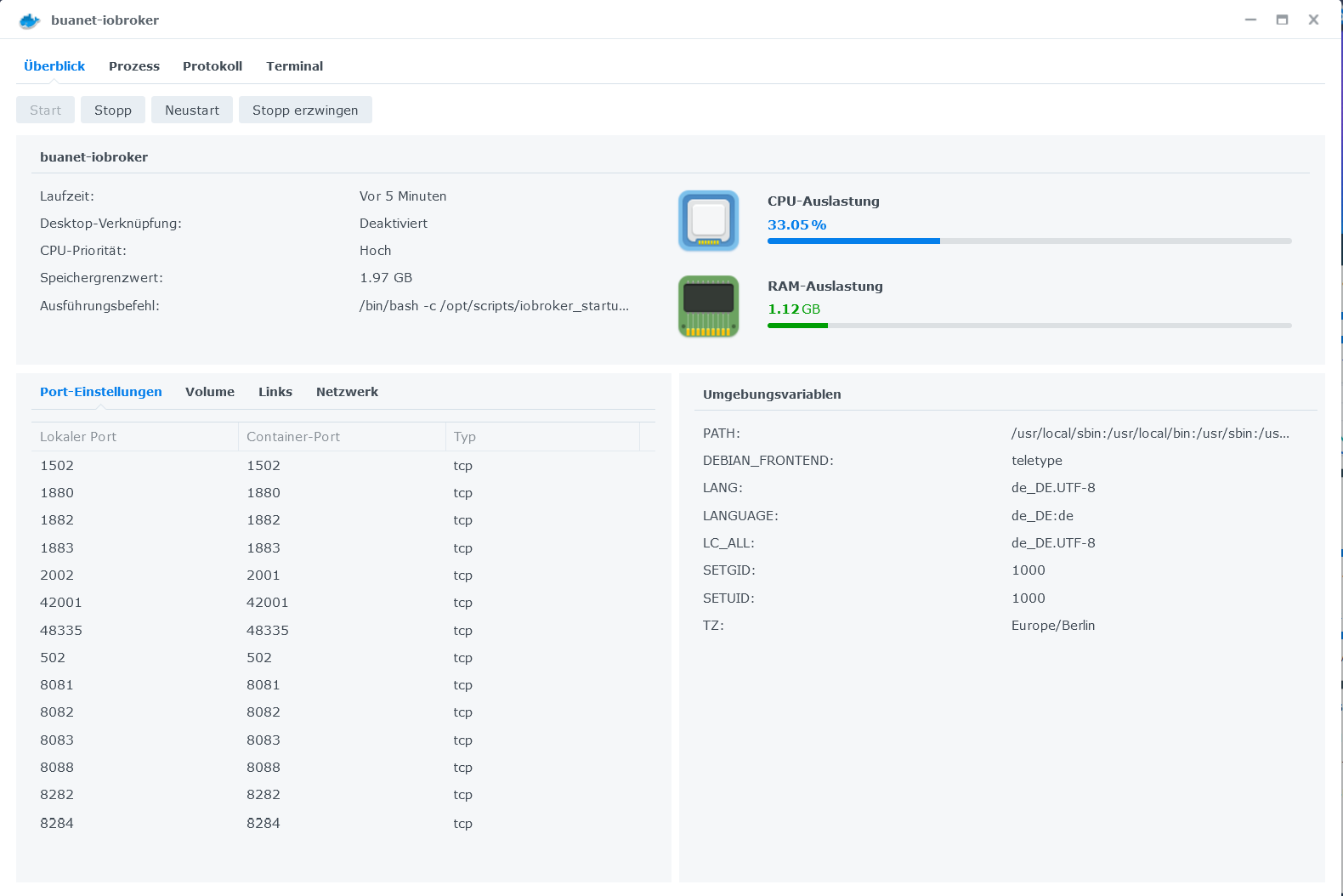
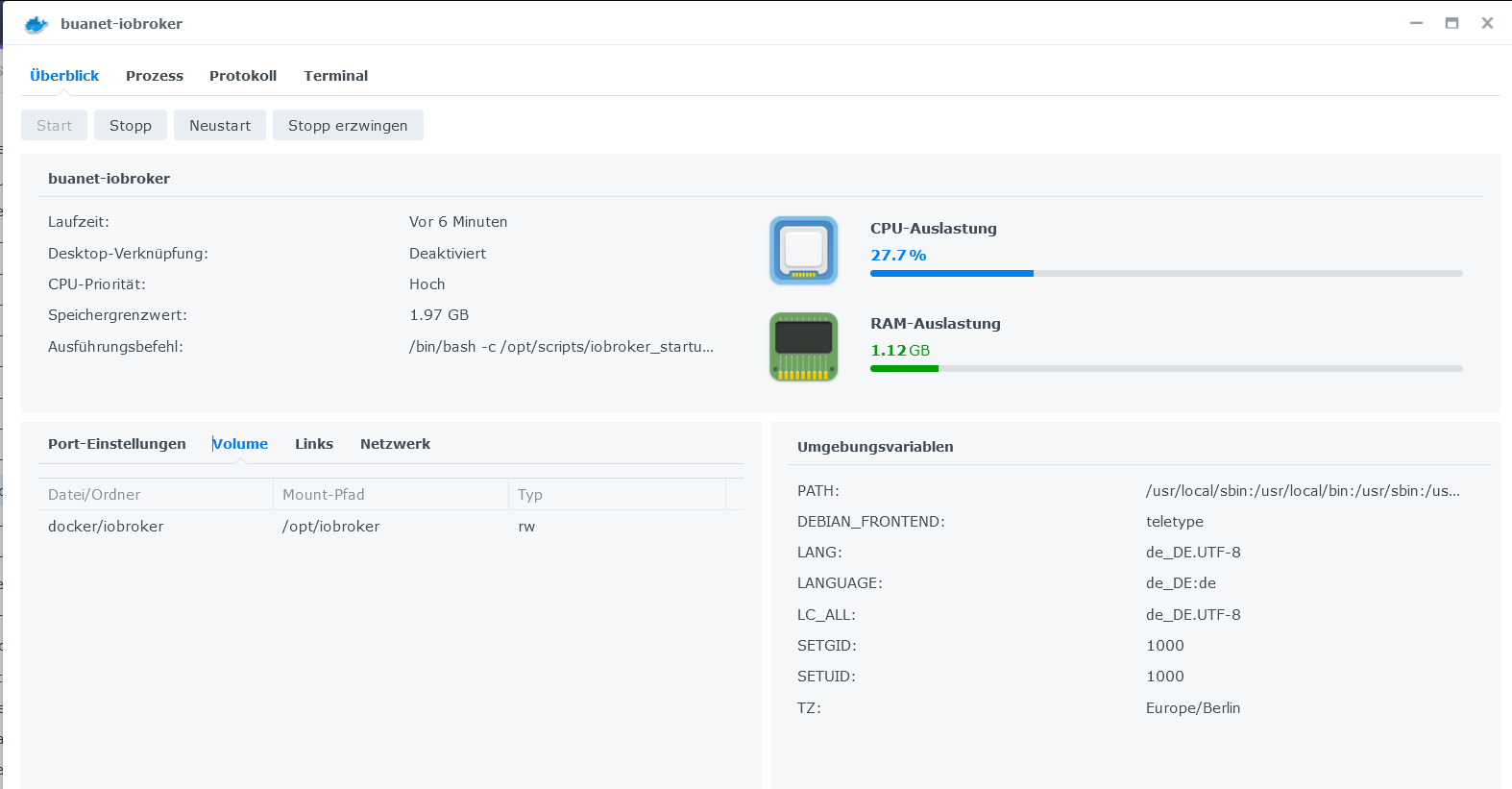
-
@glasfaser said in Admin zeigt nur noch eine leere Webseite an?:
Zeige mal deine Einstellungen davon . inkl. ENV und der Port Einstellungen .
Die kann ich oben nicht im Syn Log von dir sehen fehlt da jetzt nicht 8089
-
@glasfaser said in Admin zeigt nur noch eine leere Webseite an?:
??
Was ist jetzt hiermit , auch nicht mehr aktuell !?Doch, es ist noch aktuell. Die Logs sehen jetzt so an der Stelle aus:
-------------------------------------------------------------------------------- ----- Step 4 of 5: Applying special settings ----- -------------------------------------------------------------------------------- Some adapters have special requirements/ settings which can be activated by the use of environment variables. For more information take a look at readme.md on Github! -------------------------------------------------------------------------------- ----- Step 5 of 5: ioBroker startup ----- -------------------------------------------------------------------------------- Starting ioBroker... ================================== > LOG REDIRECT system.adapter.admin.0 => true [starting] host.buanet-iobroker-Broken check instance "system.adapter.admin.0" for host "buanet-iobroker-Broken" host.buanet-iobroker-Broken check instance "system.adapter.javascript.0" for host "buanet-iobroker-Broken" host.buanet-iobroker-Broken check instance "system.adapter.email.0" for host "buanet-iobroker-Broken" host.buanet-iobroker-Broken check instance "system.adapter.telegram.0" for host "buanet-iobroker-Broken" host.buanet-iobroker-Broken check instance "system.adapter.history.0" for host "buanet-iobroker-Broken" host.buanet-iobroker-Broken check instance "system.adapter.hm-rpc.0" for host "buanet-iobroker-Broken" host.buanet-iobroker-Broken check instance "system.adapter.hm-rega.0" for host "buanet-iobroker-Broken" host.buanet-iobroker-Broken check instance "system.adapter.sonoff.0" for host "buanet-iobroker-Broken" host.buanet-iobroker-Broken check instance "system.adapter.tr-064.0" for host "buanet-iobroker-Broken" host.buanet-iobroker-Broken check instance "system.adapter.ping.0" for host "buanet-iobroker-Broken" host.buanet-iobroker-Broken check instance "system.adapter.modbus.0" for host "buanet-iobroker-Broken" host.buanet-iobroker-Broken check instance "system.adapter.info.0" for host "buanet-iobroker-Broken" host.buanet-iobroker-Broken check instance "system.adapter.backitup.0" for host "buanet-iobroker-Broken" host.buanet-iobroker-Broken check instance "system.adapter.web.0" for host "buanet-iobroker-Broken" host.buanet-iobroker-Broken check instance "system.adapter.worx.0" for host "buanet-iobroker-Broken" host.buanet-iobroker-Broken check instance "system.adapter.text2command.0" for host "buanet-iobroker-Broken" host.buanet-iobroker-Broken check instance "system.adapter.vis.0" for host "buanet-iobroker-Broken" host.buanet-iobroker-Broken check instance "system.adapter.vis-material.0" for host "buanet-iobroker-Broken" host.buanet-iobroker-Broken check instance "system.adapter.vis-material-webfont.0" for host "buanet-iobroker-Broken" host.buanet-iobroker-Broken check instance "system.adapter.vw-connect.0" for host "buanet-iobroker-Broken" host.buanet-iobroker-Broken check instance "system.adapter.web-speedy.0" for host "buanet-iobroker-Broken" host.buanet-iobroker-Broken check instance "system.adapter.vis-inventwo.0" for host "buanet-iobroker-Broken" host.buanet-iobroker-Broken check instance "system.adapter.vis-material-advanced.0" for host "buanet-iobroker-Broken" host.buanet-iobroker-Broken check instance "system.adapter.vis-hqwidgets.0" for host "buanet-iobroker-Broken" host.buanet-iobroker-Broken check instance "system.adapter.feiertage.0" for host "buanet-iobroker-Broken" host.buanet-iobroker-Broken check instance "system.adapter.daswetter.0" for host "buanet-iobroker-Broken" host.buanet-iobroker-Broken check instance "system.adapter.shelly.0" for host "buanet-iobroker-Broken" host.buanet-iobroker-Broken check instance "system.adapter.sql.0" for host "buanet-iobroker-Broken" host.buanet-iobroker-Broken check instance "system.adapter.vis-jqui-mfd.0" for host "buanet-iobroker-Broken" host.buanet-iobroker-Broken check instance "system.adapter.vis-metro.0" for host "buanet-iobroker-Broken" host.buanet-iobroker-Broken check instance "system.adapter.vis-canvas-gauges.0" for host "buanet-iobroker-Broken" host.buanet-iobroker-Broken check instance "system.adapter.vis-justgage.0" for host "buanet-iobroker-Broken" host.buanet-iobroker-Broken check instance "system.adapter.vis-materialdesign.0" for host "buanet-iobroker-Broken" host.buanet-iobroker-Broken check instance "system.adapter.echarts.0" for host "buanet-iobroker-Broken" /bin/sh: 1: iw: not found /bin/sh: 1: iw: not found /bin/sh: 1: hcitool: not found@paradoxxa sagte in Admin zeigt nur noch eine leere Webseite an?:
host.buanet-iobroker-Broken check instance "system.adapter.admin.0" for host "buanet-iobroker-Broken"
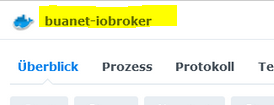
Hast du da was verstellt , dein Container laut Screenshot heißt ... ohne Broken :
-
@paradoxxa sagte in Admin zeigt nur noch eine leere Webseite an?:
host.buanet-iobroker-Broken check instance "system.adapter.admin.0" for host "buanet-iobroker-Broken"
Hast du da was verstellt , dein Container laut Screenshot heißt ... ohne Broken :
@glasfaser said in Admin zeigt nur noch eine leere Webseite an?:
host.buanet-iobroker-Broken check instance "system.adapter.admin.0" for host "buanet-iobroker-Broken"
Hast du da was verstellt , dein Container laut Screenshot heißt ... ohne Broken :
Ja, bei den Tests um das zu reparieren habe ich ihn mal umbenannt und wieder Rückgängig gemacht.
Hatte mal den Container zurückgesetzt und das gemoutete Filesystem aus dem Backup wieder hergestellt.
Der Container läuft seit ca. einem 3/4 Jahr. -
@paradoxxa sagte in Admin zeigt nur noch eine leere Webseite an?:
host.buanet-iobroker-Broken check instance "system.adapter.admin.0" for host "buanet-iobroker-Broken"
Hast du da was verstellt , dein Container laut Screenshot heißt ... ohne Broken :

Hey! Du scheinst an dieser Unterhaltung interessiert zu sein, hast aber noch kein Konto.
Hast du es satt, bei jedem Besuch durch die gleichen Beiträge zu scrollen? Wenn du dich für ein Konto anmeldest, kommst du immer genau dorthin zurück, wo du zuvor warst, und kannst dich über neue Antworten benachrichtigen lassen (entweder per E-Mail oder Push-Benachrichtigung). Du kannst auch Lesezeichen speichern und Beiträge positiv bewerten, um anderen Community-Mitgliedern deine Wertschätzung zu zeigen.
Mit deinem Input könnte dieser Beitrag noch besser werden 💗
Registrieren Anmelden452
Online33.0k
Benutzer83.6k
Themen1.3m
Beiträge