Skip to content
  • Home
  • Aktuell
  • Tags
  • 0 Ungelesen 0
  • Kategorien
  • Unreplied
  • Beliebt
  • GitHub
  • Docu
  • Hilfe
Skins
  • Light
  • Brite
  • Cerulean
  • Cosmo
  • Flatly
  • Journal
  • Litera
  • Lumen
  • Lux
  • Materia
  • Minty
  • Morph
  • Pulse
  • Sandstone
  • Simplex
  • Sketchy
  • Spacelab
  • United
  • Yeti
  • Zephyr
  • Dark
  • Cyborg
  • Darkly
  • Quartz
  • Slate
  • Solar
  • Superhero
  • Vapor

  • Standard: (Kein Skin)
  • Kein Skin
Einklappen
ioBroker Logo

Community Forum

donate donate
  1. ioBroker Community Home
  2. Deutsch
  3. Hardware
  4. ZigBee Probleme mit dem CC2531 - irgendwie behebbar??
NEWS

  • UPDATE 31.10.: Amazon Alexa - ioBroker Skill läuft aus ?
    apollon77A
    apollon77
    48
    3
    8.8k

  • Monatsrückblick – September 2025
    BluefoxB
    Bluefox
    13
    1
    2.2k

  • Neues Video "KI im Smart Home" - ioBroker plus n8n
    BluefoxB
    Bluefox
    16
    1
    3.3k

ZigBee Probleme mit dem CC2531 - irgendwie behebbar??

Geplant Angeheftet Gesperrt Verschoben Hardware
75 Beiträge 10 Kommentatoren 8.3k Aufrufe 7 Watching
  • Älteste zuerst
  • Neuste zuerst
  • Meiste Stimmen
Antworten
  • In einem neuen Thema antworten
Anmelden zum Antworten
Dieses Thema wurde gelöscht. Nur Nutzer mit entsprechenden Rechten können es sehen.
  • I ioThomas

    @tenno2k5 Screenshot 2022-01-07 125213.jpg

    die hatte ich auch schon gesucht. Es kommt keine Reaktion auf die Anfrage.

    Und schon mal vielen Dank, dass du dich kümmerst. :+1:

    TeNNo2k5T Offline
    TeNNo2k5T Offline
    TeNNo2k5
    schrieb am zuletzt editiert von
    #16

    @iothomas

    Setze mal bitte folgenden Befehl ab, und poste die Ausgabe.

    systemctl status pve-cluster
    

    Proxmox VE 7.4 [Shuttle DH310V2] = LXC [Ubuntu 22.04]
    ioBroker – Pi-hole – InfluxDB – Grafana – WireGuard – Ansible - Mosquitto - Zigbee2MQTT

    I 1 Antwort Letzte Antwort
    0
    • TeNNo2k5T TeNNo2k5

      @iothomas

      Setze mal bitte folgenden Befehl ab, und poste die Ausgabe.

      systemctl status pve-cluster
      
      I Offline
      I Offline
      ioThomas
      schrieb am zuletzt editiert von
      #17

      @tenno2k5 sagte in ZigBee Probleme mit dem CC2531 - irgendwie behebbar??:

      systemctl status pve-cluster

      root@ProxMox:~# systemctl status pve-cluster
      ● pve-cluster.service - The Proxmox VE cluster filesystem
           Loaded: loaded (/lib/systemd/system/pve-cluster.service; enabled; vendor preset: enabled)
           Active: active (running) since Sun 2022-01-02 09:17:10 CET; 5 days ago
         Main PID: 2096055 (pmxcfs)
            Tasks: 8 (limit: 18988)
           Memory: 54.3M
              CPU: 5min 13.375s
           CGroup: /system.slice/pve-cluster.service
                   └─2096055 /usr/bin/pmxcfs
      
      Jan 02 09:17:09 ProxMox systemd[1]: Starting The Proxmox VE cluster filesystem...
      Jan 02 09:17:10 ProxMox systemd[1]: Started The Proxmox VE cluster filesystem.
      root@ProxMox:~# 
      

      LG
      Thomas

      TeNNo2k5T 1 Antwort Letzte Antwort
      0
      • I ioThomas

        @tenno2k5 sagte in ZigBee Probleme mit dem CC2531 - irgendwie behebbar??:

        systemctl status pve-cluster

        root@ProxMox:~# systemctl status pve-cluster
        ● pve-cluster.service - The Proxmox VE cluster filesystem
             Loaded: loaded (/lib/systemd/system/pve-cluster.service; enabled; vendor preset: enabled)
             Active: active (running) since Sun 2022-01-02 09:17:10 CET; 5 days ago
           Main PID: 2096055 (pmxcfs)
              Tasks: 8 (limit: 18988)
             Memory: 54.3M
                CPU: 5min 13.375s
             CGroup: /system.slice/pve-cluster.service
                     └─2096055 /usr/bin/pmxcfs
        
        Jan 02 09:17:09 ProxMox systemd[1]: Starting The Proxmox VE cluster filesystem...
        Jan 02 09:17:10 ProxMox systemd[1]: Started The Proxmox VE cluster filesystem.
        root@ProxMox:~# 
        
        TeNNo2k5T Offline
        TeNNo2k5T Offline
        TeNNo2k5
        schrieb am zuletzt editiert von TeNNo2k5
        #18

        @iothomas

        ok sieht soweit gut aus, aber irgendetwas stimmt bei deinem System nicht, starte doch mal bitte dein Proxmox System neu und prüfe ob unter /etc der pve Ordner erscheint.

        Proxmox VE 7.4 [Shuttle DH310V2] = LXC [Ubuntu 22.04]
        ioBroker – Pi-hole – InfluxDB – Grafana – WireGuard – Ansible - Mosquitto - Zigbee2MQTT

        I 1 Antwort Letzte Antwort
        0
        • TeNNo2k5T TeNNo2k5

          @iothomas

          ok sieht soweit gut aus, aber irgendetwas stimmt bei deinem System nicht, starte doch mal bitte dein Proxmox System neu und prüfe ob unter /etc der pve Ordner erscheint.

          I Offline
          I Offline
          ioThomas
          schrieb am zuletzt editiert von ioThomas
          #19
          root@ProxMox:~# cd /etc
          root@ProxMox:/etc# ls
          adduser.conf            deluser.conf     inputrc         manpath.config  python3           smartmontools
          aliases                 dhcp             insserv.conf.d  mediaprm        python3.9         ssh
          aliases.db              dpkg             iproute2        mime.types      rc0.d             ssl
          alternatives            e2scrub.conf     iscsi           mke2fs.conf     rc1.d             subgid
          apparmor                environment      issue           modprobe.d      rc2.d             subgid-
          apparmor.d              ethertypes       issue.net       modules         rc3.d             subuid
          apt                     fdmount.conf     kernel          modules-load.d  rc4.d             subuid-
          bash.bashrc             fonts            ksmtuned.conf   motd            rc5.d             sudoers.d
          bash_completion         fstab            kvm             mtab            rc6.d             sv
          bash_completion.d       fuse.conf        ld.so.cache     nanorc          rcS.d             swtpm-localca.conf
          bindresvport.blacklist  gai.conf         ld.so.conf      netconfig       reportbug.conf    swtpm-localca.options
          binfmt.d                groff            ld.so.conf.d    network         request-key.conf  swtpm_setup.conf
          ca-certificates         group            libaudit.conf   networks        request-key.d     sysctl.conf
          ca-certificates.conf    group-           libnl-3         nftables.conf   resolv.conf       sysctl.d
          ceph                    grub.d           locale.alias    nsswitch.conf   resolvconf        systemd
          chrony                  gshadow          locale.gen      opt             rmt               terminfo
          cifs-utils              gshadow-         localtime       os-release      rpc               timezone
          console-setup           gss              logcheck        pam.conf        rsyslog.conf      tmpfiles.d
          corosync                hdparm.conf      login.defs      pam.d           rsyslog.d         ucf.conf
          cron.d                  host.conf        logrotate.conf  passwd          runit             udev
          cron.daily              hostid           logrotate.d     passwd-         samba             ufw
          cron.hourly             hostname         lvm             perl            security          update-motd.d
          cron.monthly            hosts            lxc             postfix         selinux           vim
          crontab                 hosts.allow      machine-id      ppp             services          vzdump.conf
          cron.weekly             hosts.deny       magic           profile         shadow            wgetrc
          dbus-1                  idmapd.conf      magic.mime      profile.d       shadow-           X11
          debconf.conf            init.d           mailcap         protocols       shells            xattr.conf
          debian_version          initramfs        mailcap.order   pulse           skel              xdg
          default                 initramfs-tools  mail.rc         pve             smartd.conf       zfs
          root@ProxMox:/etc# cd /pve
          -bash: cd: /pve: No such file or directory
          root@ProxMox:/etc# 
          

          alles über reboot

          LG
          Thomas

          TeNNo2k5T 1 Antwort Letzte Antwort
          0
          • I ioThomas
            root@ProxMox:~# cd /etc
            root@ProxMox:/etc# ls
            adduser.conf            deluser.conf     inputrc         manpath.config  python3           smartmontools
            aliases                 dhcp             insserv.conf.d  mediaprm        python3.9         ssh
            aliases.db              dpkg             iproute2        mime.types      rc0.d             ssl
            alternatives            e2scrub.conf     iscsi           mke2fs.conf     rc1.d             subgid
            apparmor                environment      issue           modprobe.d      rc2.d             subgid-
            apparmor.d              ethertypes       issue.net       modules         rc3.d             subuid
            apt                     fdmount.conf     kernel          modules-load.d  rc4.d             subuid-
            bash.bashrc             fonts            ksmtuned.conf   motd            rc5.d             sudoers.d
            bash_completion         fstab            kvm             mtab            rc6.d             sv
            bash_completion.d       fuse.conf        ld.so.cache     nanorc          rcS.d             swtpm-localca.conf
            bindresvport.blacklist  gai.conf         ld.so.conf      netconfig       reportbug.conf    swtpm-localca.options
            binfmt.d                groff            ld.so.conf.d    network         request-key.conf  swtpm_setup.conf
            ca-certificates         group            libaudit.conf   networks        request-key.d     sysctl.conf
            ca-certificates.conf    group-           libnl-3         nftables.conf   resolv.conf       sysctl.d
            ceph                    grub.d           locale.alias    nsswitch.conf   resolvconf        systemd
            chrony                  gshadow          locale.gen      opt             rmt               terminfo
            cifs-utils              gshadow-         localtime       os-release      rpc               timezone
            console-setup           gss              logcheck        pam.conf        rsyslog.conf      tmpfiles.d
            corosync                hdparm.conf      login.defs      pam.d           rsyslog.d         ucf.conf
            cron.d                  host.conf        logrotate.conf  passwd          runit             udev
            cron.daily              hostid           logrotate.d     passwd-         samba             ufw
            cron.hourly             hostname         lvm             perl            security          update-motd.d
            cron.monthly            hosts            lxc             postfix         selinux           vim
            crontab                 hosts.allow      machine-id      ppp             services          vzdump.conf
            cron.weekly             hosts.deny       magic           profile         shadow            wgetrc
            dbus-1                  idmapd.conf      magic.mime      profile.d       shadow-           X11
            debconf.conf            init.d           mailcap         protocols       shells            xattr.conf
            debian_version          initramfs        mailcap.order   pulse           skel              xdg
            default                 initramfs-tools  mail.rc         pve             smartd.conf       zfs
            root@ProxMox:/etc# cd /pve
            -bash: cd: /pve: No such file or directory
            root@ProxMox:/etc# 
            

            alles über reboot

            TeNNo2k5T Offline
            TeNNo2k5T Offline
            TeNNo2k5
            schrieb am zuletzt editiert von
            #20

            @iothomas

            ach das ist mir vorhin gar nicht aufgefallen, du musst

            cd pve eingeben und nicht cd /pve

            Proxmox VE 7.4 [Shuttle DH310V2] = LXC [Ubuntu 22.04]
            ioBroker – Pi-hole – InfluxDB – Grafana – WireGuard – Ansible - Mosquitto - Zigbee2MQTT

            I 1 Antwort Letzte Antwort
            0
            • TeNNo2k5T TeNNo2k5

              @iothomas

              ach das ist mir vorhin gar nicht aufgefallen, du musst

              cd pve eingeben und nicht cd /pve

              I Offline
              I Offline
              ioThomas
              schrieb am zuletzt editiert von ioThomas
              #21

              @tenno2k5 ```

              root@ProxMox:/etc# cd /pve
              -bash: cd: /pve: No such file or directory
              root@ProxMox:/etc# cd pve
              root@ProxMox:/etc/pve# ls
              authkey.pub      ha        lxc     priv             qemu-server      storage.cfg    vzdump.cron
              authkey.pub.old  jobs.cfg  nodes   pve-root-ca.pem  replication.cfg  user.cfg
              datacenter.cfg   local     openvz  pve-www.key      sdn              virtual-guest
              root@ProxMox:/etc/pve# cd qemu-server
              root@ProxMox:/etc/pve/qemu-server# ls
              root@ProxMox:/etc/pve/qemu-server# ls -l
              total 0
              root@ProxMox:/etc/pve/qemu-server#```

              LG
              Thomas

              FredFF TeNNo2k5T 2 Antworten Letzte Antwort
              0
              • I ioThomas

                @tenno2k5 ```

                root@ProxMox:/etc# cd /pve
                -bash: cd: /pve: No such file or directory
                root@ProxMox:/etc# cd pve
                root@ProxMox:/etc/pve# ls
                authkey.pub      ha        lxc     priv             qemu-server      storage.cfg    vzdump.cron
                authkey.pub.old  jobs.cfg  nodes   pve-root-ca.pem  replication.cfg  user.cfg
                datacenter.cfg   local     openvz  pve-www.key      sdn              virtual-guest
                root@ProxMox:/etc/pve# cd qemu-server
                root@ProxMox:/etc/pve/qemu-server# ls
                root@ProxMox:/etc/pve/qemu-server# ls -l
                total 0
                root@ProxMox:/etc/pve/qemu-server#```
                FredFF Online
                FredFF Online
                FredF
                Most Active Forum Testing
                schrieb am zuletzt editiert von
                #22

                @iothomas Ich sagte doch schon du musst dich in der pve einloggen

                I 1 Antwort Letzte Antwort
                0
                • I ioThomas

                  @tenno2k5 ```

                  root@ProxMox:/etc# cd /pve
                  -bash: cd: /pve: No such file or directory
                  root@ProxMox:/etc# cd pve
                  root@ProxMox:/etc/pve# ls
                  authkey.pub      ha        lxc     priv             qemu-server      storage.cfg    vzdump.cron
                  authkey.pub.old  jobs.cfg  nodes   pve-root-ca.pem  replication.cfg  user.cfg
                  datacenter.cfg   local     openvz  pve-www.key      sdn              virtual-guest
                  root@ProxMox:/etc/pve# cd qemu-server
                  root@ProxMox:/etc/pve/qemu-server# ls
                  root@ProxMox:/etc/pve/qemu-server# ls -l
                  total 0
                  root@ProxMox:/etc/pve/qemu-server#```
                  TeNNo2k5T Offline
                  TeNNo2k5T Offline
                  TeNNo2k5
                  schrieb am zuletzt editiert von
                  #23

                  @iothomas

                  ja und jetzt in lxc ordner navigieren mit cd lxc^^

                  Proxmox VE 7.4 [Shuttle DH310V2] = LXC [Ubuntu 22.04]
                  ioBroker – Pi-hole – InfluxDB – Grafana – WireGuard – Ansible - Mosquitto - Zigbee2MQTT

                  I 1 Antwort Letzte Antwort
                  0
                  • TeNNo2k5T TeNNo2k5

                    @iothomas

                    ja und jetzt in lxc ordner navigieren mit cd lxc^^

                    I Offline
                    I Offline
                    ioThomas
                    schrieb am zuletzt editiert von
                    #24

                    @TeNNo2k5

                    root@ProxMox:/etc/pve# ls
                    authkey.pub      ha        lxc     priv             qemu-server      storage.cfg    vzdump.cron
                    authkey.pub.old  jobs.cfg  nodes   pve-root-ca.pem  replication.cfg  user.cfg
                    datacenter.cfg   local     openvz  pve-www.key      sdn              virtual-guest
                    root@ProxMox:/etc/pve# cd lxc
                    root@ProxMox:/etc/pve/lxc# ls
                    110.conf  120.conf
                    root@ProxMox:/etc/pve/lxc#
                    

                    okee, da sind sie ja.

                    LG
                    Thomas

                    I 1 Antwort Letzte Antwort
                    0
                    • I ioThomas

                      @TeNNo2k5

                      root@ProxMox:/etc/pve# ls
                      authkey.pub      ha        lxc     priv             qemu-server      storage.cfg    vzdump.cron
                      authkey.pub.old  jobs.cfg  nodes   pve-root-ca.pem  replication.cfg  user.cfg
                      datacenter.cfg   local     openvz  pve-www.key      sdn              virtual-guest
                      root@ProxMox:/etc/pve# cd lxc
                      root@ProxMox:/etc/pve/lxc# ls
                      110.conf  120.conf
                      root@ProxMox:/etc/pve/lxc#
                      

                      okee, da sind sie ja.

                      I Offline
                      I Offline
                      ioThomas
                      schrieb am zuletzt editiert von
                      #25
                        GNU nano 5.4                                         120.conf                                                   
                      arch: amd64
                      cores: 1
                      features: nesting=1
                      hostname: ioBroker
                      memory: 4096
                      net0: name=eth0,bridge=vmbr0,firewall=1,gw=192.168.178.1,hwaddr=0E:45:A6:8B:EE:EB,ip=192.168.178.36/24,ip6=dhcp,t>
                      onboot: 1
                      ostype: debian
                      rootfs: DiskStation:120/vm-120-disk-1.raw,size=8G
                      swap: 512
                      unprivileged: 1
                      

                      LG
                      Thomas

                      TeNNo2k5T 1 Antwort Letzte Antwort
                      0
                      • I ioThomas
                          GNU nano 5.4                                         120.conf                                                   
                        arch: amd64
                        cores: 1
                        features: nesting=1
                        hostname: ioBroker
                        memory: 4096
                        net0: name=eth0,bridge=vmbr0,firewall=1,gw=192.168.178.1,hwaddr=0E:45:A6:8B:EE:EB,ip=192.168.178.36/24,ip6=dhcp,t>
                        onboot: 1
                        ostype: debian
                        rootfs: DiskStation:120/vm-120-disk-1.raw,size=8G
                        swap: 512
                        unprivileged: 1
                        
                        TeNNo2k5T Offline
                        TeNNo2k5T Offline
                        TeNNo2k5
                        schrieb am zuletzt editiert von
                        #26

                        @iothomas

                        Ok ja das ist der Inhalt deiner Conig Datei :)

                        Um deinen Stick einzubinden, befolge Punkt 3&4 von der Anleitung die Fredf vorhin verlinkt hat.

                        Proxmox VE 7.4 [Shuttle DH310V2] = LXC [Ubuntu 22.04]
                        ioBroker – Pi-hole – InfluxDB – Grafana – WireGuard – Ansible - Mosquitto - Zigbee2MQTT

                        I 1 Antwort Letzte Antwort
                        -1
                        • TeNNo2k5T TeNNo2k5

                          @iothomas

                          Ok ja das ist der Inhalt deiner Conig Datei :)

                          Um deinen Stick einzubinden, befolge Punkt 3&4 von der Anleitung die Fredf vorhin verlinkt hat.

                          I Offline
                          I Offline
                          ioThomas
                          schrieb am zuletzt editiert von
                          #27

                          @tenno2k5 ich gebe mein Bestes. Allerdings noch nicht von Erfolg gekrönt :confused:

                          LG
                          Thomas

                          1 Antwort Letzte Antwort
                          0
                          • FredFF FredF

                            @iothomas Ich sagte doch schon du musst dich in der pve einloggen

                            I Offline
                            I Offline
                            ioThomas
                            schrieb am zuletzt editiert von
                            #28

                            @fredf

                            Naabend, ich habe mal alles nach der Anleitung eingespielt, und vermutlich einen Fehler gemacht. Im ioBroker Container kann ich den ttyZigbee sehen, sind die Rechte so ok?

                            root@ioBroker:/dev# ls -l
                            total 0
                            crw--w---- 1 root   tty     136, 0 Jan  7 16:23 console
                            lrwxrwxrwx 1 root   root        11 Jan  7 16:18 core -> /proc/kcore
                            lrwxrwxrwx 1 root   root        13 Jan  7 16:18 fd -> /proc/self/fd
                            crw-rw-rw- 1 nobody nogroup   1, 7 Jan  7 16:18 full
                            lrwxrwxrwx 1 root   root        12 Jan  7 16:18 initctl -> /run/initctl
                            lrwxrwxrwx 1 root   root        28 Jan  7 16:18 log -> /run/systemd/journal/dev-log
                            drwxrwxrwt 2 nobody nogroup     40 Jan  7 16:18 mqueue
                            crw-rw-rw- 1 nobody nogroup   1, 3 Jan  7 16:18 null
                            crw-rw-rw- 1 root   root      5, 2 Jan  7 16:33 ptmx
                            drwxr-xr-x 2 root   root         0 Jan  7 16:18 pts
                            crw-rw-rw- 1 nobody nogroup   1, 8 Jan  7 16:18 random
                            drwxrwxrwt 2 root   root        40 Jan  7 16:18 shm
                            lrwxrwxrwx 1 root   root        15 Jan  7 16:18 stderr -> /proc/self/fd/2
                            lrwxrwxrwx 1 root   root        15 Jan  7 16:18 stdin -> /proc/self/fd/0
                            lrwxrwxrwx 1 root   root        15 Jan  7 16:18 stdout -> /proc/self/fd/1
                            crw-rw-rw- 1 nobody nogroup   5, 0 Jan  7 16:18 tty
                            crw------- 1 root   tty     136, 1 Jan  7 16:33 tty1
                            crw--w---- 1 root   tty     136, 2 Jan  7 16:23 tty2
                            crw-rw-rw- 1 nobody nogroup 166, 0 Jan  7 16:18 ttyZigbee
                            crw-rw-rw- 1 nobody nogroup   1, 9 Jan  7 16:18 urandom
                            crw-rw-rw- 1 nobody nogroup   1, 5 Jan  7 16:18 zero
                            root@ioBroker:/dev# ^C
                            root@ioBroker:/dev#
                            

                            LG
                            Thomas

                            TeNNo2k5T 1 Antwort Letzte Antwort
                            0
                            • I ioThomas

                              @fredf

                              Naabend, ich habe mal alles nach der Anleitung eingespielt, und vermutlich einen Fehler gemacht. Im ioBroker Container kann ich den ttyZigbee sehen, sind die Rechte so ok?

                              root@ioBroker:/dev# ls -l
                              total 0
                              crw--w---- 1 root   tty     136, 0 Jan  7 16:23 console
                              lrwxrwxrwx 1 root   root        11 Jan  7 16:18 core -> /proc/kcore
                              lrwxrwxrwx 1 root   root        13 Jan  7 16:18 fd -> /proc/self/fd
                              crw-rw-rw- 1 nobody nogroup   1, 7 Jan  7 16:18 full
                              lrwxrwxrwx 1 root   root        12 Jan  7 16:18 initctl -> /run/initctl
                              lrwxrwxrwx 1 root   root        28 Jan  7 16:18 log -> /run/systemd/journal/dev-log
                              drwxrwxrwt 2 nobody nogroup     40 Jan  7 16:18 mqueue
                              crw-rw-rw- 1 nobody nogroup   1, 3 Jan  7 16:18 null
                              crw-rw-rw- 1 root   root      5, 2 Jan  7 16:33 ptmx
                              drwxr-xr-x 2 root   root         0 Jan  7 16:18 pts
                              crw-rw-rw- 1 nobody nogroup   1, 8 Jan  7 16:18 random
                              drwxrwxrwt 2 root   root        40 Jan  7 16:18 shm
                              lrwxrwxrwx 1 root   root        15 Jan  7 16:18 stderr -> /proc/self/fd/2
                              lrwxrwxrwx 1 root   root        15 Jan  7 16:18 stdin -> /proc/self/fd/0
                              lrwxrwxrwx 1 root   root        15 Jan  7 16:18 stdout -> /proc/self/fd/1
                              crw-rw-rw- 1 nobody nogroup   5, 0 Jan  7 16:18 tty
                              crw------- 1 root   tty     136, 1 Jan  7 16:33 tty1
                              crw--w---- 1 root   tty     136, 2 Jan  7 16:23 tty2
                              crw-rw-rw- 1 nobody nogroup 166, 0 Jan  7 16:18 ttyZigbee
                              crw-rw-rw- 1 nobody nogroup   1, 9 Jan  7 16:18 urandom
                              crw-rw-rw- 1 nobody nogroup   1, 5 Jan  7 16:18 zero
                              root@ioBroker:/dev# ^C
                              root@ioBroker:/dev#
                              
                              TeNNo2k5T Offline
                              TeNNo2k5T Offline
                              TeNNo2k5
                              schrieb am zuletzt editiert von TeNNo2k5
                              #29

                              @iothomas

                              Sieht soweit gut aus, vorrausgesetzt du hast die Anleitung genau befolgt musst du noch den Zigbee Adapter im iobroker konfigurieren.

                              Einstellungen -> COM-Anschlussname -> /dev/ttyZigbee

                              Proxmox VE 7.4 [Shuttle DH310V2] = LXC [Ubuntu 22.04]
                              ioBroker – Pi-hole – InfluxDB – Grafana – WireGuard – Ansible - Mosquitto - Zigbee2MQTT

                              I 1 Antwort Letzte Antwort
                              0
                              • TeNNo2k5T TeNNo2k5

                                @iothomas

                                Sieht soweit gut aus, vorrausgesetzt du hast die Anleitung genau befolgt musst du noch den Zigbee Adapter im iobroker konfigurieren.

                                Einstellungen -> COM-Anschlussname -> /dev/ttyZigbee

                                I Offline
                                I Offline
                                ioThomas
                                schrieb am zuletzt editiert von
                                #30

                                @tenno2k5
                                habe ich so eingestellt und den Link geprüft. Er will noch nicht. Die ACL ID (Beispiel und bei mir auch 7) kommt von Proxmox oder aus dem LXC (166)? Beide funktionieren nicht, aber mir ist das aus der Anleitung nicht 100% klar geworden.

                                Last login: Sat Jan  8 08:48:32 UTC 2022 on tty1
                                root@ioBroker:~# ls -l /dev/ttyZigbee
                                crw-rw-rw- 1 nobody nogroup 166, 0 Jan  8 08:54 /dev/ttyZigbee
                                root@ioBroker:~#
                                

                                Dann fehlt mir auch der eingekringelte Bereich. Oder ist das nur ein Hinweis?
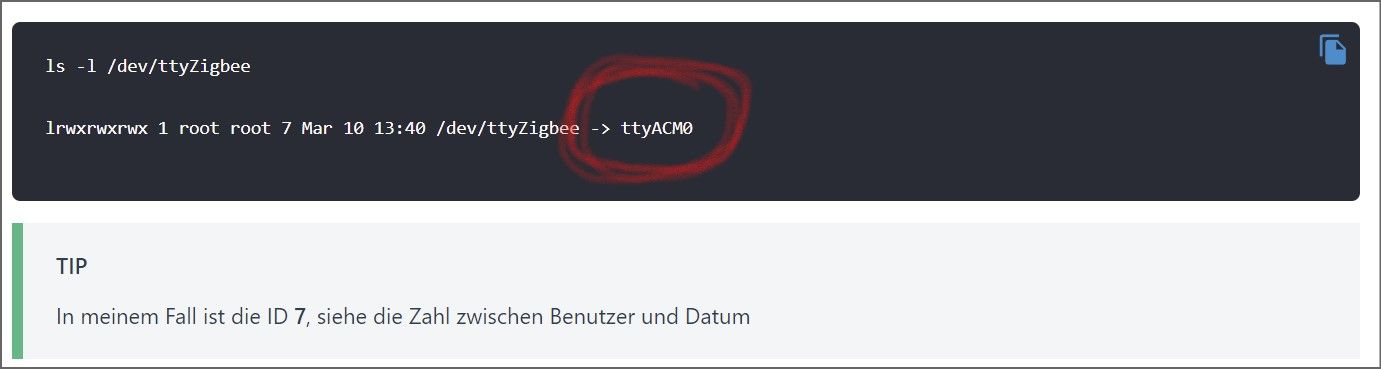
                                Screenshot 2022-01-08 101145.jpg

                                LG
                                Thomas

                                TeNNo2k5T 1 Antwort Letzte Antwort
                                0
                                • I ioThomas

                                  @tenno2k5
                                  habe ich so eingestellt und den Link geprüft. Er will noch nicht. Die ACL ID (Beispiel und bei mir auch 7) kommt von Proxmox oder aus dem LXC (166)? Beide funktionieren nicht, aber mir ist das aus der Anleitung nicht 100% klar geworden.

                                  Last login: Sat Jan  8 08:48:32 UTC 2022 on tty1
                                  root@ioBroker:~# ls -l /dev/ttyZigbee
                                  crw-rw-rw- 1 nobody nogroup 166, 0 Jan  8 08:54 /dev/ttyZigbee
                                  root@ioBroker:~#
                                  

                                  Dann fehlt mir auch der eingekringelte Bereich. Oder ist das nur ein Hinweis?
                                  Screenshot 2022-01-08 101145.jpg

                                  TeNNo2k5T Offline
                                  TeNNo2k5T Offline
                                  TeNNo2k5
                                  schrieb am zuletzt editiert von
                                  #31

                                  @iothomas

                                  Mach mal bitte erstmal einen sauberen cold reboot auf deinem Lxc Container, also über die Proxmox Weboberfläche: deine iobroker lxc auswählen -> shutdown -> warten bis lxc ausgeschalten ist -> start

                                  Sollte das nicht helfen setze bitte folgende Befehle einzeln auf deinem Proxmox Host ab, und poste die Ausgabe:

                                  udevadm info -a -p $(udevadm info -q path -n /dev/ttyACM0) | grep "ATTRS{idVendor}" && udevadm info -a -p $(udevadm info -q path -n /dev/ttyACM0) | grep "ATTRS{idProduct}"
                                  
                                  cat /etc/udev/rules.d/49-custom.rules
                                  
                                  cat /etc/pve/lxc/120.conf
                                  

                                  Proxmox VE 7.4 [Shuttle DH310V2] = LXC [Ubuntu 22.04]
                                  ioBroker – Pi-hole – InfluxDB – Grafana – WireGuard – Ansible - Mosquitto - Zigbee2MQTT

                                  I 1 Antwort Letzte Antwort
                                  0
                                  • TeNNo2k5T TeNNo2k5

                                    @iothomas

                                    Mach mal bitte erstmal einen sauberen cold reboot auf deinem Lxc Container, also über die Proxmox Weboberfläche: deine iobroker lxc auswählen -> shutdown -> warten bis lxc ausgeschalten ist -> start

                                    Sollte das nicht helfen setze bitte folgende Befehle einzeln auf deinem Proxmox Host ab, und poste die Ausgabe:

                                    udevadm info -a -p $(udevadm info -q path -n /dev/ttyACM0) | grep "ATTRS{idVendor}" && udevadm info -a -p $(udevadm info -q path -n /dev/ttyACM0) | grep "ATTRS{idProduct}"
                                    
                                    cat /etc/udev/rules.d/49-custom.rules
                                    
                                    cat /etc/pve/lxc/120.conf
                                    
                                    I Offline
                                    I Offline
                                    ioThomas
                                    schrieb am zuletzt editiert von
                                    #32
                                    root@ProxMox:~# udevadm info -a -p $(udevadm info -q path -n /dev/ttyACM0) | grep "ATTRS{idVendor}" && udevadm info -a -p $(udevadm info -q path -n /dev/ttyACM0) | grep "ATTRS{idProduct}"
                                        ATTRS{idVendor}=="0451"
                                        ATTRS{idVendor}=="1d6b"
                                        ATTRS{idProduct}=="16a8"
                                        ATTRS{idProduct}=="0002"
                                    root@ProxMox:~# 
                                    
                                    root@ProxMox:~# cat /etc/udev/rules.d/49-custom.rules
                                    KERNEL=="ttyACM0*", SUBSYSTEM=="tty", ATTRS{idVendor}=="0451", ATTRS{idProduct}=="16a8", SYMLINK="ttyZigbee"
                                    SUBSYSTEMS=="usb", ATTRS{idVendor}=="0451", ATTRS{idProduct}=="16a8", GROUP="users", MODE="0666"
                                    root@ProxMox:~#
                                    
                                    root@ProxMox:~# cat /etc/pve/lxc/120.conf
                                    arch: amd64
                                    cores: 1
                                    features: nesting=1
                                    hostname: ioBroker
                                    memory: 4096
                                    net0: name=eth0,bridge=vmbr0,firewall=1,gw=192.168.178.1,hwaddr=0E:45:A6:8B:EE:EB,ip=192.168.178.36/24,ip6=dhcp,type=veth
                                    onboot: 1
                                    ostype: debian
                                    rootfs: DiskStation:120/vm-120-disk-1.raw,size=8G
                                    swap: 512
                                    unprivileged: 1
                                    lxc.cgroup.devices.allow: c 166:* rwm
                                    lxc.mount.entry: /dev/ttyZigbee dev/ttyZigbee none bind,optional,create=file
                                    root@ProxMox:~#
                                    

                                    ich hatte auch die 7 schon unter "lxc.cgroup.devices.allow:"

                                    /dev/ttyzigbee/usb-Texas_Instruments_TI_CC2531_USB_CDC___0X00124B00014EF171-if00
                                    

                                    der Pfad im ioBroker zum Stick

                                    LG
                                    Thomas

                                    1 Antwort Letzte Antwort
                                    0
                                    • TeNNo2k5T Offline
                                      TeNNo2k5T Offline
                                      TeNNo2k5
                                      schrieb am zuletzt editiert von TeNNo2k5
                                      #33

                                      @iothomas

                                      hmm sieht alles soweit ok aus, nur bei der udev rule ist beim Kernel Parameter die Wildcard anders gesetzt als in der Anleitung aber ich glaube nicht das der Fehler daran liegt.

                                      Bei meinem System habe ich die Anleitung von Coldcorner befolgt, probiere es doch bitte mal so vielleicht passt die vorgensweise von drozmotix nicht zum cc2531.

                                      Edit: Sollte es mit der Anleitung von Coldcorner funktionieren musst du noch eine udev rule auf dem proxmox Host anlegen damit der USB-Passthrough auch nach einem Neustart vom Proxmox Host funktioniert:

                                      nano /etc/udev/rules.d/50-myusb.rules
                                      

                                      Inhalt:

                                      SUBSYSTEMS=="usb", ATTRS{idVendor}=="0451", ATTRS{idProduct}=="16a8", GROUP="users", MODE="0666"
                                      

                                      Proxmox VE 7.4 [Shuttle DH310V2] = LXC [Ubuntu 22.04]
                                      ioBroker – Pi-hole – InfluxDB – Grafana – WireGuard – Ansible - Mosquitto - Zigbee2MQTT

                                      I 1 Antwort Letzte Antwort
                                      0
                                      • TeNNo2k5T TeNNo2k5

                                        @iothomas

                                        hmm sieht alles soweit ok aus, nur bei der udev rule ist beim Kernel Parameter die Wildcard anders gesetzt als in der Anleitung aber ich glaube nicht das der Fehler daran liegt.

                                        Bei meinem System habe ich die Anleitung von Coldcorner befolgt, probiere es doch bitte mal so vielleicht passt die vorgensweise von drozmotix nicht zum cc2531.

                                        Edit: Sollte es mit der Anleitung von Coldcorner funktionieren musst du noch eine udev rule auf dem proxmox Host anlegen damit der USB-Passthrough auch nach einem Neustart vom Proxmox Host funktioniert:

                                        nano /etc/udev/rules.d/50-myusb.rules
                                        

                                        Inhalt:

                                        SUBSYSTEMS=="usb", ATTRS{idVendor}=="0451", ATTRS{idProduct}=="16a8", GROUP="users", MODE="0666"
                                        
                                        I Offline
                                        I Offline
                                        ioThomas
                                        schrieb am zuletzt editiert von
                                        #34

                                        @tenno2k5
                                        was ein Käse. Kann ich im Container prüfen, was sich hinter dem ttyACM0 verbirgt? Folgende Fehlermeldung kommt im ioBroker:

                                        Starting zigbee-herdsman problem : "Error while opening serialport 'Error: Error: Not a directory, cannot open /dev/ttyACM0/usb-Texas_Instruments_TI_CC2531_USB_CDC___0X00124B00014EF171-if00'"
                                        

                                        Ich werde noch einmal alles in Ruhe durchgehen.

                                        LG
                                        Thomas

                                        1 Antwort Letzte Antwort
                                        0
                                        • Thomas BraunT Online
                                          Thomas BraunT Online
                                          Thomas Braun
                                          Most Active
                                          schrieb am zuletzt editiert von Thomas Braun
                                          #35

                                          @iothomas sagte in ZigBee Probleme mit dem CC2531 - irgendwie behebbar??:

                                          ls -la /dev/ttyACM0/usb-Texas_Instruments_TI_CC2531_USB_CDC___0X00124B00014EF171-if00
                                          

                                          Das ist ja auch Käse...

                                          Der Geräte-Link ist bestimmt hier zu finden:

                                          ls -l /dev/serial/by-id/Texas_Instruments_TI_CC2531_USB_CDC___0X00124B00014EF171-if00
                                          

                                          [Edit:] Ach, ich vergaß... Container-Gedöns...
                                          Linux-Werkzeugkasten:
                                          https://forum.iobroker.net/topic/42952/der-kleine-iobroker-linux-werkzeugkasten
                                          NodeJS Fixer Skript:
                                          https://forum.iobroker.net/topic/68035/iob-node-fix-skript
                                          iob_diag: curl -sLf -o diag.sh https://iobroker.net/diag.sh && bash diag.sh

                                          I 1 Antwort Letzte Antwort
                                          0
                                          Antworten
                                          • In einem neuen Thema antworten
                                          Anmelden zum Antworten
                                          • Älteste zuerst
                                          • Neuste zuerst
                                          • Meiste Stimmen


                                          Support us

                                          ioBroker
                                          Community Adapters
                                          Donate

                                          478

                                          Online

                                          32.4k

                                          Benutzer

                                          81.5k

                                          Themen

                                          1.3m

                                          Beiträge
                                          Community
                                          Impressum | Datenschutz-Bestimmungen | Nutzungsbedingungen | Einwilligungseinstellungen
                                          ioBroker Community 2014-2025
                                          logo
                                          • Anmelden

                                          • Du hast noch kein Konto? Registrieren

                                          • Anmelden oder registrieren, um zu suchen
                                          • Erster Beitrag
                                            Letzter Beitrag
                                          0
                                          • Home
                                          • Aktuell
                                          • Tags
                                          • Ungelesen 0
                                          • Kategorien
                                          • Unreplied
                                          • Beliebt
                                          • GitHub
                                          • Docu
                                          • Hilfe