




Z-wave2 mit iobroker verbinden (im Netzwerk)
-
Ah, da liegt vermutlich der Denkfehler. Z-Wave.me wird nicht benötigt für den Adapter und darf auch nicht gleichzeitig laufen. Alles was du brauchst, ist die Funk-Platine bzw. die Variante als USB-Stick. Damit hast du 3 Möglichkeiten:
- Direkt auf dem Host wo ioBroker läuft und per
/dev/wasauchimmer...verbinden - Adapter auf einem ioBroker-Slave installieren und dort per
/dev/wasauchimmer...verbinden - Auf einem Host ohne ioBroker die serielle Schnittstelle mittels
ser2netins Netzwerk streamen
ser2netfunktioniert mit folgenden Einstellungen:1234:raw:0:/dev/ttyAMA0:115200 8DATABITS NONE 1STOPBITDabei
1234durch die gewünschte Port-Nr. und/dev/ttyAMA0durch den tatsächlichen Pfad auf dem Host ersetzen. Dann kannst du im Z-Wave2 Adapter folgende Adresse eintragen (Platzhalter wieder ersetzt):tcp://<zwave-hostname>:<port>@alcalzone so ich habe jetzte nochmal alles neu aufgesetzt und den io-broker auf dem z-wave Raspberry neu installiert.
Leider bekomme ich es aber immer noch nicht hin.
was habe ich gemacht!?
- raspberry frisch aufgesetzt
- io broker neu installiert
- zwave2 Adapter installiert
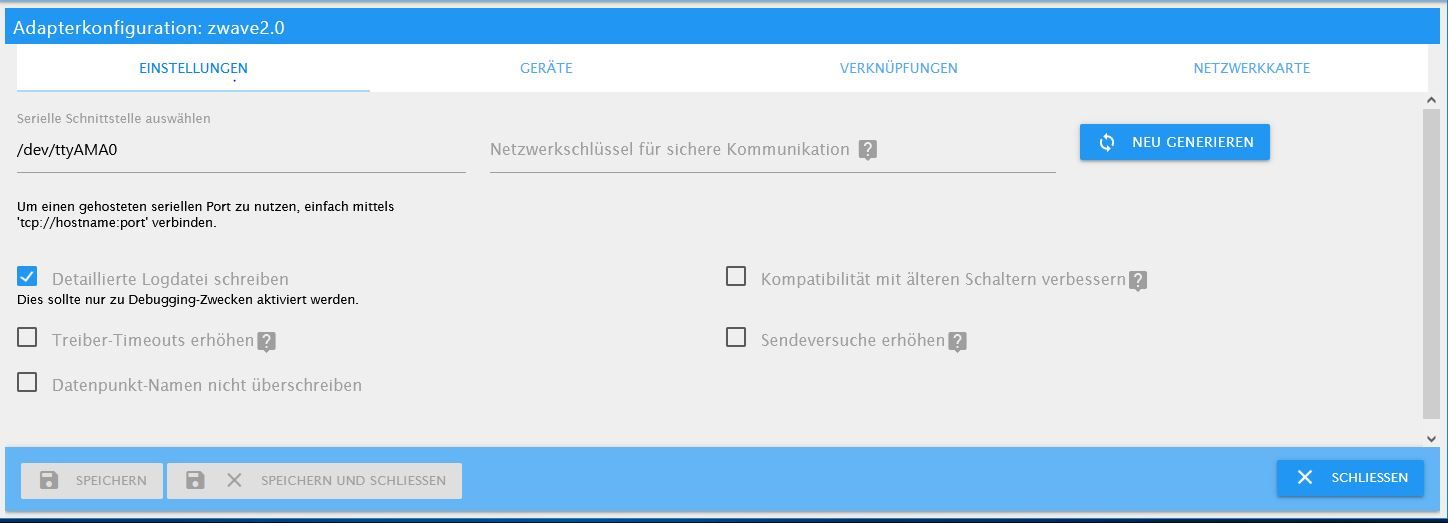
- port /dev/ttyAMA0
Was ist falsch? Hilfe bitte
- Direkt auf dem Host wo ioBroker läuft und per
-
@alcalzone so ich habe jetzte nochmal alles neu aufgesetzt und den io-broker auf dem z-wave Raspberry neu installiert.
Leider bekomme ich es aber immer noch nicht hin.
was habe ich gemacht!?
- raspberry frisch aufgesetzt
- io broker neu installiert
- zwave2 Adapter installiert
- port /dev/ttyAMA0
Was ist falsch? Hilfe bitte
-
Ich vermute mal das hier fehlt noch?
http://raspberry.tips/raspberrypi-einsteiger/uart-auf-dem-raspberrypi-nutzen@alcalzone Danke für den Tipp. Leider nicht die Lösung.
UART war bereits aktiviert. console=serial0,115200 habe ich aus der cmd gelöscht.Gibt es ggf. eine Schritt für Schritt Anleitung, die ich nochmal durchgehen kann?
Log zeigt mir folgendes:
2021-07-31T04:11:31.446Z DRIVER   ███████╗ ██╗    ██╗  █████╗  ██╗   ██╗ ███████╗             ██╗ ███████╗
                                  ╚══███╔╝ ██║    ██║ ██╔══██╗ ██║   ██║ ██╔════╝             ██║ ██╔════╝
                                    ███╔╝  ██║ █╗ ██║ ███████║ ██║   ██║ █████╗   █████╗      ██║ ███████╗
                                   ███╔╝   ██║███╗██║ ██╔══██║ ╚██╗ ██╔╝ ██╔══╝   ╚════╝ ██   ██║ ╚════██║
                                  ███████╗ ╚███╔███╔╝ ██║  ██║  ╚████╔╝  ███████╗        ╚█████╔╝ ███████║
                                  ╚══════╝  ╚══╝╚══╝  ╚═╝  ╚═╝   ╚═══╝   ╚══════╝         ╚════╝  ╚══════╝
2021-07-31T04:11:31.449Z DRIVER   version 7.12.1
2021-07-31T04:11:31.450Z DRIVER
2021-07-31T04:11:31.451Z DRIVER   starting driver...
2021-07-31T04:11:31.497Z DRIVER   opening serial port /dev/ttyAMA0
2021-07-31T04:11:31.534Z DRIVER   serial port opened
2021-07-31T04:11:31.536Z SERIAL » [NAK]                                                                   (0x15)
2021-07-31T04:17:35.071Z DRIVER   ███████╗ ██╗    ██╗  █████╗  ██╗   ██╗ ███████╗             ██╗ ███████╗
                                  ╚══███╔╝ ██║    ██║ ██╔══██╗ ██║   ██║ ██╔════╝             ██║ ██╔════╝
                                    ███╔╝  ██║ █╗ ██║ ███████║ ██║   ██║ █████╗   █████╗      ██║ ███████╗
                                   ███╔╝   ██║███╗██║ ██╔══██║ ╚██╗ ██╔╝ ██╔══╝   ╚════╝ ██   ██║ ╚════██║
                                  ███████╗ ╚███╔███╔╝ ██║  ██║  ╚████╔╝  ███████╗        ╚█████╔╝ ███████║
                                  ╚══════╝  ╚══╝╚══╝  ╚═╝  ╚═╝   ╚═══╝   ╚══════╝         ╚════╝  ╚══════╝
2021-07-31T04:17:35.073Z DRIVER   version 7.12.1
2021-07-31T04:17:35.075Z DRIVER
2021-07-31T04:17:35.075Z DRIVER   starting driver...
2021-07-31T04:17:35.121Z DRIVER   opening serial port /dev/ttyAMA0
2021-07-31T04:17:35.156Z DRIVER   serial port opened
2021-07-31T04:17:35.159Z SERIAL » [NAK]                                                                   (0x15)
2021-07-31T04:20:55.194Z DRIVER   destroying driver instance...
2021-07-31T04:21:10.385Z DRIVER   ███████╗ ██╗    ██╗  █████╗  ██╗   ██╗ ███████╗             ██╗ ███████╗
                                  ╚══███╔╝ ██║    ██║ ██╔══██╗ ██║   ██║ ██╔════╝             ██║ ██╔════╝
                                    ███╔╝  ██║ █╗ ██║ ███████║ ██║   ██║ █████╗   █████╗      ██║ ███████╗
                                   ███╔╝   ██║███╗██║ ██╔══██║ ╚██╗ ██╔╝ ██╔══╝   ╚════╝ ██   ██║ ╚════██║
                                  ███████╗ ╚███╔███╔╝ ██║  ██║  ╚████╔╝  ███████╗        ╚█████╔╝ ███████║
                                  ╚══════╝  ╚══╝╚══╝  ╚═╝  ╚═╝   ╚═══╝   ╚══════╝         ╚════╝  ╚══════╝
2021-07-31T04:21:10.393Z DRIVER   version 7.12.1
2021-07-31T04:21:10.395Z DRIVER
2021-07-31T04:21:10.396Z DRIVER   starting driver...
2021-07-31T04:21:10.499Z DRIVER   opening serial port /dev/ttyAMA0
2021-07-31T04:21:10.570Z DRIVER   serial port opened
2021-07-31T04:21:10.575Z SERIAL » [NAK]                                                                   (0x15)
2021-07-31T04:22:52.199Z DRIVER   destroying driver instance...
2021-07-31T04:23:01.279Z DRIVER   ███████╗ ██╗    ██╗  █████╗  ██╗   ██╗ ███████╗             ██╗ ███████╗
                                  ╚══███╔╝ ██║    ██║ ██╔══██╗ ██║   ██║ ██╔════╝             ██║ ██╔════╝
                                    ███╔╝  ██║ █╗ ██║ ███████║ ██║   ██║ █████╗   █████╗      ██║ ███████╗
                                   ███╔╝   ██║███╗██║ ██╔══██║ ╚██╗ ██╔╝ ██╔══╝   ╚════╝ ██   ██║ ╚════██║
                                  ███████╗ ╚███╔███╔╝ ██║  ██║  ╚████╔╝  ███████╗        ╚█████╔╝ ███████║
                                  ╚══════╝  ╚══╝╚══╝  ╚═╝  ╚═╝   ╚═══╝   ╚══════╝         ╚════╝  ╚══════╝
2021-07-31T04:23:01.282Z DRIVER   version 7.12.1
2021-07-31T04:23:01.283Z DRIVER
2021-07-31T04:23:01.284Z DRIVER   starting driver...
2021-07-31T04:23:01.329Z DRIVER   opening serial port /dev/ttyAMA0
2021-07-31T04:23:01.366Z DRIVER   serial port opened
2021-07-31T04:23:01.368Z SERIAL » [NAK]                                                                   (0x15)
2021-07-31T04:29:12.561Z DRIVER   ███████╗ ██╗    ██╗  █████╗  ██╗   ██╗ ███████╗             ██╗ ███████╗
                                  ╚══███╔╝ ██║    ██║ ██╔══██╗ ██║   ██║ ██╔════╝             ██║ ██╔════╝
                                    ███╔╝  ██║ █╗ ██║ ███████║ ██║   ██║ █████╗   █████╗      ██║ ███████╗
                                   ███╔╝   ██║███╗██║ ██╔══██║ ╚██╗ ██╔╝ ██╔══╝   ╚════╝ ██   ██║ ╚════██║
                                  ███████╗ ╚███╔███╔╝ ██║  ██║  ╚████╔╝  ███████╗        ╚█████╔╝ ███████║
                                  ╚══════╝  ╚══╝╚══╝  ╚═╝  ╚═╝   ╚═══╝   ╚══════╝         ╚════╝  ╚══════╝
2021-07-31T04:29:12.564Z DRIVER   version 7.12.1
2021-07-31T04:29:12.565Z DRIVER
2021-07-31T04:29:12.566Z DRIVER   starting driver...
2021-07-31T04:29:12.612Z DRIVER   opening serial port /dev/ttyAMA0
2021-07-31T04:29:12.645Z DRIVER   serial port opened
2021-07-31T04:29:12.648Z SERIAL » [NAK]                                                                   (0x15)

    ███╔╝  ██║ █╗ ██║ ███████║ ██║   ██║ █████╗   █████╗      ██║ ███████╗
                                   ███╔╝   ██║███╗██║ ██╔══██║ ╚██╗ ██╔╝ ██╔══╝   ╚════╝ ██   ██║ ╚════██║
                                  ███████╗ ╚███╔███╔╝ ██║  ██║  ╚████╔╝  ███████╗        ╚█████╔╝ ███████║
                                  ╚══════╝  ╚══╝╚══╝  ╚═╝  ╚═╝   ╚═══╝   ╚══════╝         ╚════╝  ╚══════╝
2021-07-31T07:53:26.585Z DRIVER   version 7.12.1
2021-07-31T07:53:26.586Z DRIVER
2021-07-31T07:53:26.587Z DRIVER   starting driver...
2021-07-31T07:53:26.632Z DRIVER   opening serial port /dev/ttyAMA0
2021-07-31T07:53:26.667Z DRIVER   serial port opened
2021-07-31T07:53:26.670Z SERIAL » [NAK]                                                                   (0x15)
2021-07-31T07:59:20.334Z DRIVER   ███████╗ ██╗    ██╗  █████╗  ██╗   ██╗ ███████╗             ██╗ ███████╗
                                  ╚══███╔╝ ██║    ██║ ██╔══██╗ ██║   ██║ ██╔════╝             ██║ ██╔════╝
                                    ███╔╝  ██║ █╗ ██║ ███████║ ██║   ██║ █████╗   █████╗      ██║ ███████╗
                                   ███╔╝   ██║███╗██║ ██╔══██║ ╚██╗ ██╔╝ ██╔══╝   ╚════╝ ██   ██║ ╚════██║
                                  ███████╗ ╚███╔███╔╝ ██║  ██║  ╚████╔╝  ███████╗        ╚█████╔╝ ███████║
                                  ╚══════╝  ╚══╝╚══╝  ╚═╝  ╚═╝   ╚═══╝   ╚══════╝         ╚════╝  ╚══════╝
2021-07-31T07:59:20.340Z DRIVER   version 7.12.1
2021-07-31T07:59:20.342Z DRIVER
2021-07-31T07:59:20.343Z DRIVER   starting driver...
2021-07-31T07:59:20.429Z DRIVER   opening serial port /dev/ttyAMA0
2021-07-31T07:59:20.494Z DRIVER   serial port opened
2021-07-31T07:59:20.499Z SERIAL » [NAK]                                                                   (0x15)
2021-07-31T08:00:52.661Z DRIVER   destroying driver instance...
2021-07-31T08:01:01.102Z DRIVER   ███████╗ ██╗    ██╗  █████╗  ██╗   ██╗ ███████╗             ██╗ ███████╗
                                  ╚══███╔╝ ██║    ██║ ██╔══██╗ ██║   ██║ ██╔════╝             ██║ ██╔════╝
                                    ███╔╝  ██║ █╗ ██║ ███████║ ██║   ██║ █████╗   █████╗      ██║ ███████╗
                                   ███╔╝   ██║███╗██║ ██╔══██║ ╚██╗ ██╔╝ ██╔══╝   ╚════╝ ██   ██║ ╚════██║
                                  ███████╗ ╚███╔███╔╝ ██║  ██║  ╚████╔╝  ███████╗        ╚█████╔╝ ███████║
                                  ╚══════╝  ╚══╝╚══╝  ╚═╝  ╚═╝   ╚═══╝   ╚══════╝         ╚════╝  ╚══════╝
2021-07-31T08:01:01.105Z DRIVER   version 7.12.1
2021-07-31T08:01:01.106Z DRIVER
2021-07-31T08:01:01.107Z DRIVER   starting driver...
2021-07-31T08:01:01.152Z DRIVER   opening serial port /dev/ttyAMA0
2021-07-31T08:01:01.181Z DRIVER   serial port opened
2021-07-31T08:01:01.184Z SERIAL » [NAK]                                                                   (0x15)
2021-07-31 05:22:51.641 - info: zwave2.0 (1330) Got terminate signal TERMINATE_YOURSELF 2021-07-31 05:22:51.653 - info: zwave2.0 (1330) Shutting down driver... 2021-07-31 05:22:51.655 - info: zwave2.0 (1330) terminating 2021-07-31 05:22:51.658 - info: zwave2.0 (1330) Terminated (ADAPTER_REQUESTED_TERMINATION): Without reason 2021-07-31 05:22:52.319 - info: host.iobroker-pi instance system.adapter.zwave2.0 terminated with code 11 (ADAPTER_REQUESTED_TERMINATION) 2021-07-31 05:22:54.864 - info: host.iobroker-pi "system.adapter.zwave2.0" enabled 2021-07-31 05:22:54.977 - info: host.iobroker-pi instance system.adapter.zwave2.0 started with pid 1769 2021-07-31 05:23:01.146 - info: zwave2.0 (1769) starting. Version 1.10.2 in /opt/iobroker/node_modules/iobroker.zwave2, node: v12.22.2, js-controller: 3.2.16 2021-07-31 05:28:36.247 - error: host.iobroker-pi Caught by controller[0]: FATAL ERROR: Ineffective mark-compacts near heap limit Allocation failed - JavaScript heap out of memory 2021-07-31 05:28:36.249 - warn: host.iobroker-pi instance system.adapter.zwave2.0 terminated due to SIGABRT 2021-07-31 05:28:36.250 - info: host.iobroker-pi instance system.adapter.zwave2.0 terminated with code NaN () 2021-07-31 05:28:36.251 - info: host.iobroker-pi Restart adapter system.adapter.zwave2.0 because enabled 2021-07-31 05:29:06.303 - info: host.iobroker-pi instance system.adapter.zwave2.0 started with pid 1810 2021-07-31 05:29:12.412 - info: zwave2.0 (1810) starting. Version 1.10.2 in /opt/iobroker/node_modules/iobroker.zwave2, node: v12.22.2, js-controller: 3.2.16 2021-07-31 05:34:51.993 - error: host.iobroker-pi Caught by controller[0]: FATAL ERROR: Ineffective mark-compacts near heap limit Allocation failed - JavaScript heap out of memory 2021-07-31 05:34:52.020 - warn: host.iobroker-pi instance system.adapter.zwave2.0 terminated due to SIGABRT 2021-07-31 05:34:52.023 - info: host.iobroker-pi instance system.adapter.zwave2.0 terminated with code NaN () 2021-07-31 05:34:52.025 - info: host.iobroker-pi Restart adapter system.adapter.zwave2.0 because enabled 2021-07-31 05:35:22.069 - info: host.iobroker-pi instance system.adapter.zwave2.0 started with pid 1891 2021-07-31 05:35:28.131 - info: zwave2.0 (1891) starting. Version 1.10.2 in /opt/iobroker/node_modules/iobroker.zwave2, node: v12.22.2, js-controller: 3.2.16 2021-07-31 05:40:49.947 - error: host.iobroker-pi Caught by controller[0]: FATAL ERROR: Ineffective mark-compacts near heap limit Allocation failed - JavaScript heap out of memory 2021-07-31 05:40:49.955 - warn: host.iobroker-pi instance system.adapter.zwave2.0 terminated due to SIGABRT 2021-07-31 05:40:49.956 - info: host.iobroker-pi instance system.adapter.zwave2.0 terminated with code NaN () 2021-07-31 05:40:49.957 - info: host.iobroker-pi Restart adapter system.adapter.zwave2.0 because enabled 2021-07-31 05:41:20.021 - info: host.iobroker-pi instance system.adapter.zwave2.0 started with pid 1934 2021-07-31 05:41:26.146 - info: zwave2.0 (1934) starting. Version 1.10.2 in /opt/iobroker/node_modules/iobroker.zwave2, node: v12.22.2, js-controller: -
@alcalzone Danke für den Tipp. Leider nicht die Lösung.
UART war bereits aktiviert. console=serial0,115200 habe ich aus der cmd gelöscht.Gibt es ggf. eine Schritt für Schritt Anleitung, die ich nochmal durchgehen kann?
Log zeigt mir folgendes:
2021-07-31T04:11:31.446Z DRIVER   ███████╗ ██╗    ██╗  █████╗  ██╗   ██╗ ███████╗             ██╗ ███████╗
                                  ╚══███╔╝ ██║    ██║ ██╔══██╗ ██║   ██║ ██╔════╝             ██║ ██╔════╝
                                    ███╔╝  ██║ █╗ ██║ ███████║ ██║   ██║ █████╗   █████╗      ██║ ███████╗
                                   ███╔╝   ██║███╗██║ ██╔══██║ ╚██╗ ██╔╝ ██╔══╝   ╚════╝ ██   ██║ ╚════██║
                                  ███████╗ ╚███╔███╔╝ ██║  ██║  ╚████╔╝  ███████╗        ╚█████╔╝ ███████║
                                  ╚══════╝  ╚══╝╚══╝  ╚═╝  ╚═╝   ╚═══╝   ╚══════╝         ╚════╝  ╚══════╝
2021-07-31T04:11:31.449Z DRIVER   version 7.12.1
2021-07-31T04:11:31.450Z DRIVER
2021-07-31T04:11:31.451Z DRIVER   starting driver...
2021-07-31T04:11:31.497Z DRIVER   opening serial port /dev/ttyAMA0
2021-07-31T04:11:31.534Z DRIVER   serial port opened
2021-07-31T04:11:31.536Z SERIAL » [NAK]                                                                   (0x15)
2021-07-31T04:17:35.071Z DRIVER   ███████╗ ██╗    ██╗  █████╗  ██╗   ██╗ ███████╗             ██╗ ███████╗
                                  ╚══███╔╝ ██║    ██║ ██╔══██╗ ██║   ██║ ██╔════╝             ██║ ██╔════╝
                                    ███╔╝  ██║ █╗ ██║ ███████║ ██║   ██║ █████╗   █████╗      ██║ ███████╗
                                   ███╔╝   ██║███╗██║ ██╔══██║ ╚██╗ ██╔╝ ██╔══╝   ╚════╝ ██   ██║ ╚════██║
                                  ███████╗ ╚███╔███╔╝ ██║  ██║  ╚████╔╝  ███████╗        ╚█████╔╝ ███████║
                                  ╚══════╝  ╚══╝╚══╝  ╚═╝  ╚═╝   ╚═══╝   ╚══════╝         ╚════╝  ╚══════╝
2021-07-31T04:17:35.073Z DRIVER   version 7.12.1
2021-07-31T04:17:35.075Z DRIVER
2021-07-31T04:17:35.075Z DRIVER   starting driver...
2021-07-31T04:17:35.121Z DRIVER   opening serial port /dev/ttyAMA0
2021-07-31T04:17:35.156Z DRIVER   serial port opened
2021-07-31T04:17:35.159Z SERIAL » [NAK]                                                                   (0x15)
2021-07-31T04:20:55.194Z DRIVER   destroying driver instance...
2021-07-31T04:21:10.385Z DRIVER   ███████╗ ██╗    ██╗  █████╗  ██╗   ██╗ ███████╗             ██╗ ███████╗
                                  ╚══███╔╝ ██║    ██║ ██╔══██╗ ██║   ██║ ██╔════╝             ██║ ██╔════╝
                                    ███╔╝  ██║ █╗ ██║ ███████║ ██║   ██║ █████╗   █████╗      ██║ ███████╗
                                   ███╔╝   ██║███╗██║ ██╔══██║ ╚██╗ ██╔╝ ██╔══╝   ╚════╝ ██   ██║ ╚════██║
                                  ███████╗ ╚███╔███╔╝ ██║  ██║  ╚████╔╝  ███████╗        ╚█████╔╝ ███████║
                                  ╚══════╝  ╚══╝╚══╝  ╚═╝  ╚═╝   ╚═══╝   ╚══════╝         ╚════╝  ╚══════╝
2021-07-31T04:21:10.393Z DRIVER   version 7.12.1
2021-07-31T04:21:10.395Z DRIVER
2021-07-31T04:21:10.396Z DRIVER   starting driver...
2021-07-31T04:21:10.499Z DRIVER   opening serial port /dev/ttyAMA0
2021-07-31T04:21:10.570Z DRIVER   serial port opened
2021-07-31T04:21:10.575Z SERIAL » [NAK]                                                                   (0x15)
2021-07-31T04:22:52.199Z DRIVER   destroying driver instance...
2021-07-31T04:23:01.279Z DRIVER   ███████╗ ██╗    ██╗  █████╗  ██╗   ██╗ ███████╗             ██╗ ███████╗
                                  ╚══███╔╝ ██║    ██║ ██╔══██╗ ██║   ██║ ██╔════╝             ██║ ██╔════╝
                                    ███╔╝  ██║ █╗ ██║ ███████║ ██║   ██║ █████╗   █████╗      ██║ ███████╗
                                   ███╔╝   ██║███╗██║ ██╔══██║ ╚██╗ ██╔╝ ██╔══╝   ╚════╝ ██   ██║ ╚════██║
                                  ███████╗ ╚███╔███╔╝ ██║  ██║  ╚████╔╝  ███████╗        ╚█████╔╝ ███████║
                                  ╚══════╝  ╚══╝╚══╝  ╚═╝  ╚═╝   ╚═══╝   ╚══════╝         ╚════╝  ╚══════╝
2021-07-31T04:23:01.282Z DRIVER   version 7.12.1
2021-07-31T04:23:01.283Z DRIVER
2021-07-31T04:23:01.284Z DRIVER   starting driver...
2021-07-31T04:23:01.329Z DRIVER   opening serial port /dev/ttyAMA0
2021-07-31T04:23:01.366Z DRIVER   serial port opened
2021-07-31T04:23:01.368Z SERIAL » [NAK]                                                                   (0x15)
2021-07-31T04:29:12.561Z DRIVER   ███████╗ ██╗    ██╗  █████╗  ██╗   ██╗ ███████╗             ██╗ ███████╗
                                  ╚══███╔╝ ██║    ██║ ██╔══██╗ ██║   ██║ ██╔════╝             ██║ ██╔════╝
                                    ███╔╝  ██║ █╗ ██║ ███████║ ██║   ██║ █████╗   █████╗      ██║ ███████╗
                                   ███╔╝   ██║███╗██║ ██╔══██║ ╚██╗ ██╔╝ ██╔══╝   ╚════╝ ██   ██║ ╚════██║
                                  ███████╗ ╚███╔███╔╝ ██║  ██║  ╚████╔╝  ███████╗        ╚█████╔╝ ███████║
                                  ╚══════╝  ╚══╝╚══╝  ╚═╝  ╚═╝   ╚═══╝   ╚══════╝         ╚════╝  ╚══════╝
2021-07-31T04:29:12.564Z DRIVER   version 7.12.1
2021-07-31T04:29:12.565Z DRIVER
2021-07-31T04:29:12.566Z DRIVER   starting driver...
2021-07-31T04:29:12.612Z DRIVER   opening serial port /dev/ttyAMA0
2021-07-31T04:29:12.645Z DRIVER   serial port opened
2021-07-31T04:29:12.648Z SERIAL » [NAK]                                                                   (0x15)

    ███╔╝  ██║ █╗ ██║ ███████║ ██║   ██║ █████╗   █████╗      ██║ ███████╗
                                   ███╔╝   ██║███╗██║ ██╔══██║ ╚██╗ ██╔╝ ██╔══╝   ╚════╝ ██   ██║ ╚════██║
                                  ███████╗ ╚███╔███╔╝ ██║  ██║  ╚████╔╝  ███████╗        ╚█████╔╝ ███████║
                                  ╚══════╝  ╚══╝╚══╝  ╚═╝  ╚═╝   ╚═══╝   ╚══════╝         ╚════╝  ╚══════╝
2021-07-31T07:53:26.585Z DRIVER   version 7.12.1
2021-07-31T07:53:26.586Z DRIVER
2021-07-31T07:53:26.587Z DRIVER   starting driver...
2021-07-31T07:53:26.632Z DRIVER   opening serial port /dev/ttyAMA0
2021-07-31T07:53:26.667Z DRIVER   serial port opened
2021-07-31T07:53:26.670Z SERIAL » [NAK]                                                                   (0x15)
2021-07-31T07:59:20.334Z DRIVER   ███████╗ ██╗    ██╗  █████╗  ██╗   ██╗ ███████╗             ██╗ ███████╗
                                  ╚══███╔╝ ██║    ██║ ██╔══██╗ ██║   ██║ ██╔════╝             ██║ ██╔════╝
                                    ███╔╝  ██║ █╗ ██║ ███████║ ██║   ██║ █████╗   █████╗      ██║ ███████╗
                                   ███╔╝   ██║███╗██║ ██╔══██║ ╚██╗ ██╔╝ ██╔══╝   ╚════╝ ██   ██║ ╚════██║
                                  ███████╗ ╚███╔███╔╝ ██║  ██║  ╚████╔╝  ███████╗        ╚█████╔╝ ███████║
                                  ╚══════╝  ╚══╝╚══╝  ╚═╝  ╚═╝   ╚═══╝   ╚══════╝         ╚════╝  ╚══════╝
2021-07-31T07:59:20.340Z DRIVER   version 7.12.1
2021-07-31T07:59:20.342Z DRIVER
2021-07-31T07:59:20.343Z DRIVER   starting driver...
2021-07-31T07:59:20.429Z DRIVER   opening serial port /dev/ttyAMA0
2021-07-31T07:59:20.494Z DRIVER   serial port opened
2021-07-31T07:59:20.499Z SERIAL » [NAK]                                                                   (0x15)
2021-07-31T08:00:52.661Z DRIVER   destroying driver instance...
2021-07-31T08:01:01.102Z DRIVER   ███████╗ ██╗    ██╗  █████╗  ██╗   ██╗ ███████╗             ██╗ ███████╗
                                  ╚══███╔╝ ██║    ██║ ██╔══██╗ ██║   ██║ ██╔════╝             ██║ ██╔════╝
                                    ███╔╝  ██║ █╗ ██║ ███████║ ██║   ██║ █████╗   █████╗      ██║ ███████╗
                                   ███╔╝   ██║███╗██║ ██╔══██║ ╚██╗ ██╔╝ ██╔══╝   ╚════╝ ██   ██║ ╚════██║
                                  ███████╗ ╚███╔███╔╝ ██║  ██║  ╚████╔╝  ███████╗        ╚█████╔╝ ███████║
                                  ╚══════╝  ╚══╝╚══╝  ╚═╝  ╚═╝   ╚═══╝   ╚══════╝         ╚════╝  ╚══════╝
2021-07-31T08:01:01.105Z DRIVER   version 7.12.1
2021-07-31T08:01:01.106Z DRIVER
2021-07-31T08:01:01.107Z DRIVER   starting driver...
2021-07-31T08:01:01.152Z DRIVER   opening serial port /dev/ttyAMA0
2021-07-31T08:01:01.181Z DRIVER   serial port opened
2021-07-31T08:01:01.184Z SERIAL » [NAK]                                                                   (0x15)
2021-07-31 05:22:51.641 - info: zwave2.0 (1330) Got terminate signal TERMINATE_YOURSELF 2021-07-31 05:22:51.653 - info: zwave2.0 (1330) Shutting down driver... 2021-07-31 05:22:51.655 - info: zwave2.0 (1330) terminating 2021-07-31 05:22:51.658 - info: zwave2.0 (1330) Terminated (ADAPTER_REQUESTED_TERMINATION): Without reason 2021-07-31 05:22:52.319 - info: host.iobroker-pi instance system.adapter.zwave2.0 terminated with code 11 (ADAPTER_REQUESTED_TERMINATION) 2021-07-31 05:22:54.864 - info: host.iobroker-pi "system.adapter.zwave2.0" enabled 2021-07-31 05:22:54.977 - info: host.iobroker-pi instance system.adapter.zwave2.0 started with pid 1769 2021-07-31 05:23:01.146 - info: zwave2.0 (1769) starting. Version 1.10.2 in /opt/iobroker/node_modules/iobroker.zwave2, node: v12.22.2, js-controller: 3.2.16 2021-07-31 05:28:36.247 - error: host.iobroker-pi Caught by controller[0]: FATAL ERROR: Ineffective mark-compacts near heap limit Allocation failed - JavaScript heap out of memory 2021-07-31 05:28:36.249 - warn: host.iobroker-pi instance system.adapter.zwave2.0 terminated due to SIGABRT 2021-07-31 05:28:36.250 - info: host.iobroker-pi instance system.adapter.zwave2.0 terminated with code NaN () 2021-07-31 05:28:36.251 - info: host.iobroker-pi Restart adapter system.adapter.zwave2.0 because enabled 2021-07-31 05:29:06.303 - info: host.iobroker-pi instance system.adapter.zwave2.0 started with pid 1810 2021-07-31 05:29:12.412 - info: zwave2.0 (1810) starting. Version 1.10.2 in /opt/iobroker/node_modules/iobroker.zwave2, node: v12.22.2, js-controller: 3.2.16 2021-07-31 05:34:51.993 - error: host.iobroker-pi Caught by controller[0]: FATAL ERROR: Ineffective mark-compacts near heap limit Allocation failed - JavaScript heap out of memory 2021-07-31 05:34:52.020 - warn: host.iobroker-pi instance system.adapter.zwave2.0 terminated due to SIGABRT 2021-07-31 05:34:52.023 - info: host.iobroker-pi instance system.adapter.zwave2.0 terminated with code NaN () 2021-07-31 05:34:52.025 - info: host.iobroker-pi Restart adapter system.adapter.zwave2.0 because enabled 2021-07-31 05:35:22.069 - info: host.iobroker-pi instance system.adapter.zwave2.0 started with pid 1891 2021-07-31 05:35:28.131 - info: zwave2.0 (1891) starting. Version 1.10.2 in /opt/iobroker/node_modules/iobroker.zwave2, node: v12.22.2, js-controller: 3.2.16 2021-07-31 05:40:49.947 - error: host.iobroker-pi Caught by controller[0]: FATAL ERROR: Ineffective mark-compacts near heap limit Allocation failed - JavaScript heap out of memory 2021-07-31 05:40:49.955 - warn: host.iobroker-pi instance system.adapter.zwave2.0 terminated due to SIGABRT 2021-07-31 05:40:49.956 - info: host.iobroker-pi instance system.adapter.zwave2.0 terminated with code NaN () 2021-07-31 05:40:49.957 - info: host.iobroker-pi Restart adapter system.adapter.zwave2.0 because enabled 2021-07-31 05:41:20.021 - info: host.iobroker-pi instance system.adapter.zwave2.0 started with pid 1934 2021-07-31 05:41:26.146 - info: zwave2.0 (1934) starting. Version 1.10.2 in /opt/iobroker/node_modules/iobroker.zwave2, node: v12.22.2, js-controller: -
@arteck said in Z-wave2 mit iobroker verbinden (im Netzwerk):
ls -l /dev/serial/by-id
@arteck said in Z-wave2 mit iobroker verbinden (im Netzwerk):
ls -l /dev/serial/by-id
iobroker@iobroker-pi:~ $ ls -l /dev/serial/by-id
ls: cannot access '/dev/serial/by-id': No such file or directoryklappt nicht
ls -ltr/dev bringt u.a. folgendes
crw-rw---- 1 root dialout 204, 64 Jul 31 09:15 ttyAMA0 -
@rhartmann76 dann hast du ein rechte problem würde ich behaupten..
mach mal
sudo -H -u iobroker ls -l /dev/serial/by-idwenn das nicht geht dann
sudo ls -l /dev/serial/by-id -
@rhartmann76 dann hast du ein rechte problem würde ich behaupten..
mach mal
sudo -H -u iobroker ls -l /dev/serial/by-idwenn das nicht geht dann
sudo ls -l /dev/serial/by-id@arteck said in Z-wave2 mit iobroker verbinden (im Netzwerk):
sudo ls -l /dev/serial/by-id
leider wieder die Fehlermeldungen
iobroker@iobroker-pi:~ $ sudo -H -u iobroker ls -l /dev/serial/by-id
ls: cannot access '/dev/serial/by-id': No such file or directory
iobroker@iobroker-pi:~ $ sudo ls -l /dev/serial/by-id
[sudo] password for iobroker:
ls: cannot access '/dev/serial/by-id': No such file or directory
iobroker@iobroker-pi:/dev $ ls -ltr /dev total 0 drwxrwxrwt 2 root root 40 Jan 1 1970 mqueue drwxr-xr-x 2 root root 60 Jan 1 1970 raw drwxr-xr-x 2 root root 80 Jan 1 1970 dma_heap drwxr-xr-x 2 root root 60 Jan 1 1970 input drwxr-xr-x 3 root root 60 Jan 1 1970 bus drwxrwxrwt 2 root root 40 Feb 14 2019 shm drwxr-xr-x 2 root root 0 Feb 14 2019 pts lrwxrwxrwx 1 root root 15 Feb 14 2019 stdout -> /proc/self/fd/1 lrwxrwxrwx 1 root root 15 Feb 14 2019 stdin -> /proc/self/fd/0 lrwxrwxrwx 1 root root 15 Feb 14 2019 stderr -> /proc/self/fd/2 lrwxrwxrwx 1 root root 13 Feb 14 2019 fd -> /proc/self/fd lrwxrwxrwx 1 root root 28 Feb 14 2019 log -> /run/systemd/journal/dev-log lrwxrwxrwx 1 root root 12 Feb 14 2019 initctl -> /run/initctl crw------- 1 root root 10, 137 Jul 31 09:15 vhci crw------- 1 root root 10, 223 Jul 31 09:15 uinput crw------- 1 root root 10, 239 Jul 31 09:15 uhid crw------- 1 root root 108, 0 Jul 31 09:15 ppp drwxr-xr-x 2 root root 60 Jul 31 09:15 net drwxr-xr-x 2 root root 60 Jul 31 09:15 mapper crw------- 1 root root 10, 203 Jul 31 09:15 cuse crw------- 1 root root 10, 234 Jul 31 09:15 btrfs-control crw-rw-rw- 1 root root 10, 229 Jul 31 09:15 fuse crw------- 1 root root 250, 0 Jul 31 09:15 watchdog0 crw------- 1 root root 10, 130 Jul 31 09:15 watchdog crw-rw---- 1 root video 243, 0 Jul 31 09:15 vchiq crw-rw---- 1 root gpio 254, 1 Jul 31 09:15 gpiochip1 lrwxrwxrwx 1 root root 7 Jul 31 09:15 serial1 -> ttyAMA0 brw-rw---- 1 root disk 179, 0 Jul 31 09:15 mmcblk0 crw-rw---- 1 root dialout 4, 64 Jul 31 09:15 ttyS0 lrwxrwxrwx 1 root root 5 Jul 31 09:15 serial0 -> ttyS0 crw-rw---- 1 root video 29, 0 Jul 31 09:15 fb0 brw-rw---- 1 root disk 179, 2 Jul 31 09:15 mmcblk0p2 crw-rw---- 1 root gpio 254, 0 Jul 31 09:15 gpiochip0 drwxr-xr-x 7 root root 140 Jul 31 09:15 disk crw-rw---- 1 root video 247, 0 Jul 31 09:15 vcio crw-rw---- 1 root gpio 246, 0 Jul 31 09:15 gpiomem brw-rw---- 1 root disk 7, 0 Jul 31 09:15 loop0 brw-rw---- 1 root disk 7, 2 Jul 31 09:15 loop2 brw-rw---- 1 root disk 7, 1 Jul 31 09:15 loop1 brw-rw---- 1 root disk 7, 4 Jul 31 09:15 loop4 brw-rw---- 1 root disk 7, 3 Jul 31 09:15 loop3 brw-rw---- 1 root disk 1, 1 Jul 31 09:15 ram1 brw-rw---- 1 root disk 1, 0 Jul 31 09:15 ram0 brw-rw---- 1 root disk 7, 7 Jul 31 09:15 loop7 brw-rw---- 1 root disk 7, 6 Jul 31 09:15 loop6 brw-rw---- 1 root disk 7, 5 Jul 31 09:15 loop5 brw-rw---- 1 root disk 1, 10 Jul 31 09:15 ram10 brw-rw---- 1 root disk 1, 12 Jul 31 09:15 ram12 brw-rw---- 1 root disk 1, 11 Jul 31 09:15 ram11 brw-rw---- 1 root disk 1, 15 Jul 31 09:15 ram15 brw-rw---- 1 root disk 1, 14 Jul 31 09:15 ram14 brw-rw---- 1 root disk 1, 13 Jul 31 09:15 ram13 brw-rw---- 1 root disk 1, 2 Jul 31 09:15 ram2 brw-rw---- 1 root disk 1, 4 Jul 31 09:15 ram4 crw-rw---- 1 root gpio 254, 2 Jul 31 09:15 gpiochip2 brw-rw---- 1 root disk 1, 9 Jul 31 09:15 ram9 brw-rw---- 1 root disk 1, 7 Jul 31 09:15 ram7 brw-rw---- 1 root disk 1, 6 Jul 31 09:15 ram6 brw-rw---- 1 root disk 1, 5 Jul 31 09:15 ram5 brw-rw---- 1 root disk 1, 8 Jul 31 09:15 ram8 brw-rw---- 1 root disk 1, 3 Jul 31 09:15 ram3 crw-rw-rw- 1 root root 1, 7 Jul 31 09:15 full drwxr-xr-x 2 root root 580 Jul 31 09:15 block crw-rw-rw- 1 root root 1, 3 Jul 31 09:15 null crw-rw-rw- 1 root root 1, 9 Jul 31 09:15 urandom crw-rw-rw- 1 root root 1, 5 Jul 31 09:15 zero crw-rw-rw- 1 root root 1, 8 Jul 31 09:15 random crw-r----- 1 root kmem 1, 1 Jul 31 09:15 mem crw-r--r-- 1 root root 1, 11 Jul 31 09:15 kmsg crw------- 1 root root 10, 63 Jul 31 09:15 cachefiles crw-rw---- 1 root disk 10, 237 Jul 31 09:15 loop-control crw------- 1 root root 10, 183 Jul 31 09:15 hwrng crw-r--r-- 1 root root 10, 235 Jul 31 09:15 autofs crw--w---- 1 root tty 4, 11 Jul 31 09:15 tty11 crw--w---- 1 root tty 4, 10 Jul 31 09:15 tty10 crw--w---- 1 root tty 4, 13 Jul 31 09:15 tty13 crw--w---- 1 root tty 4, 12 Jul 31 09:15 tty12 crw--w---- 1 root tty 4, 0 Jul 31 09:15 tty0 crw--w---- 1 root tty 4, 2 Jul 31 09:15 tty2 crw--w---- 1 root tty 4, 19 Jul 31 09:15 tty19 crw--w---- 1 root tty 4, 18 Jul 31 09:15 tty18 crw--w---- 1 root tty 4, 17 Jul 31 09:15 tty17 crw--w---- 1 root tty 4, 16 Jul 31 09:15 tty16 crw--w---- 1 root tty 4, 14 Jul 31 09:15 tty14 crw--w---- 1 root tty 4, 24 Jul 31 09:15 tty24 crw--w---- 1 root tty 4, 23 Jul 31 09:15 tty23 crw--w---- 1 root tty 4, 22 Jul 31 09:15 tty22 crw--w---- 1 root tty 4, 21 Jul 31 09:15 tty21 crw--w---- 1 root tty 4, 20 Jul 31 09:15 tty20 crw--w---- 1 root tty 4, 15 Jul 31 09:15 tty15 crw--w---- 1 root tty 4, 25 Jul 31 09:15 tty25 crw--w---- 1 root tty 4, 32 Jul 31 09:15 tty32 crw--w---- 1 root tty 4, 30 Jul 31 09:15 tty30 crw--w---- 1 root tty 4, 3 Jul 31 09:15 tty3 crw--w---- 1 root tty 4, 29 Jul 31 09:15 tty29 crw--w---- 1 root tty 4, 35 Jul 31 09:15 tty35 crw--w---- 1 root tty 4, 34 Jul 31 09:15 tty34 crw--w---- 1 root tty 4, 33 Jul 31 09:15 tty33 crw--w---- 1 root tty 4, 31 Jul 31 09:15 tty31 crw--w---- 1 root tty 4, 28 Jul 31 09:15 tty28 crw--w---- 1 root tty 4, 27 Jul 31 09:15 tty27 crw--w---- 1 root tty 4, 26 Jul 31 09:15 tty26 crw--w---- 1 root tty 4, 40 Jul 31 09:15 tty40 crw--w---- 1 root tty 4, 4 Jul 31 09:15 tty4 crw--w---- 1 root tty 4, 36 Jul 31 09:15 tty36 crw--w---- 1 root tty 4, 43 Jul 31 09:15 tty43 crw--w---- 1 root tty 4, 41 Jul 31 09:15 tty41 crw--w---- 1 root tty 4, 39 Jul 31 09:15 tty39 crw--w---- 1 root tty 4, 38 Jul 31 09:15 tty38 crw--w---- 1 root tty 4, 37 Jul 31 09:15 tty37 crw--w---- 1 root tty 4, 5 Jul 31 09:15 tty5 crw--w---- 1 root tty 4, 48 Jul 31 09:15 tty48 crw--w---- 1 root tty 4, 45 Jul 31 09:15 tty45 crw--w---- 1 root tty 4, 44 Jul 31 09:15 tty44 crw--w---- 1 root tty 4, 42 Jul 31 09:15 tty42 crw--w---- 1 root tty 4, 51 Jul 31 09:15 tty51 crw--w---- 1 root tty 4, 50 Jul 31 09:15 tty50 crw--w---- 1 root tty 4, 49 Jul 31 09:15 tty49 crw--w---- 1 root tty 4, 47 Jul 31 09:15 tty47 crw--w---- 1 root tty 4, 46 Jul 31 09:15 tty46 crw--w---- 1 root tty 4, 60 Jul 31 09:15 tty60 crw--w---- 1 root tty 4, 6 Jul 31 09:15 tty6 crw--w---- 1 root tty 4, 59 Jul 31 09:15 tty59 crw--w---- 1 root tty 4, 58 Jul 31 09:15 tty58 crw--w---- 1 root tty 4, 56 Jul 31 09:15 tty56 crw--w---- 1 root tty 4, 54 Jul 31 09:15 tty54 crw--w---- 1 root tty 4, 9 Jul 31 09:15 tty9 crw--w---- 1 root tty 4, 7 Jul 31 09:15 tty7 crw--w---- 1 root tty 4, 63 Jul 31 09:15 tty63 crw--w---- 1 root tty 4, 62 Jul 31 09:15 tty62 crw--w---- 1 root tty 4, 61 Jul 31 09:15 tty61 crw--w---- 1 root tty 4, 57 Jul 31 09:15 tty57 crw--w---- 1 root tty 4, 55 Jul 31 09:15 tty55 crw--w---- 1 root tty 4, 53 Jul 31 09:15 tty53 crw--w---- 1 root tty 4, 52 Jul 31 09:15 tty52 crw-rw---- 1 root tty 7, 3 Jul 31 09:15 vcs3 crw-rw---- 1 root tty 7, 1 Jul 31 09:15 vcs1 crw-rw---- 1 root tty 7, 0 Jul 31 09:15 vcs crw------- 1 root root 248, 0 Jul 31 09:15 vc-mem crw------- 1 root root 5, 3 Jul 31 09:15 ttyprintk crw--w---- 1 root tty 4, 8 Jul 31 09:15 tty8 crw-rw---- 1 root tty 7, 130 Jul 31 09:15 vcsa2 crw-rw---- 1 root tty 7, 129 Jul 31 09:15 vcsa1 crw-rw---- 1 root tty 7, 5 Jul 31 09:15 vcs5 crw-rw---- 1 root tty 7, 4 Jul 31 09:15 vcs4 crw-rw---- 1 root tty 7, 2 Jul 31 09:15 vcs2 crw-rw---- 1 root tty 7, 66 Jul 31 09:15 vcsu2 crw-rw---- 1 root tty 7, 64 Jul 31 09:15 vcsu crw-rw---- 1 root tty 7, 134 Jul 31 09:15 vcsa6 crw-rw---- 1 root tty 7, 70 Jul 31 09:15 vcsu6 crw-rw---- 1 root tty 7, 69 Jul 31 09:15 vcsu5 crw-rw---- 1 root tty 7, 133 Jul 31 09:15 vcsa5 crw-rw---- 1 root tty 7, 68 Jul 31 09:15 vcsu4 crw-rw---- 1 root tty 7, 67 Jul 31 09:15 vcsu3 crw-rw---- 1 root tty 7, 131 Jul 31 09:15 vcsa3 crw-rw---- 1 root tty 7, 6 Jul 31 09:15 vcs6 crw-rw---- 1 root tty 7, 132 Jul 31 09:15 vcsa4 crw-rw---- 1 root tty 7, 65 Jul 31 09:15 vcsu1 crw-rw---- 1 root tty 7, 128 Jul 31 09:15 vcsa drwxr-xr-x 3 root root 140 Jul 31 09:15 snd crw-rw-r-- 1 root netdev 10, 242 Jul 31 09:15 rfkill drwxr-xr-x 2 root root 2500 Jul 31 09:15 char brw-rw---- 1 root disk 179, 1 Jul 31 09:15 mmcblk0p1 crwxrwxrwx 1 root dialout 204, 64 Jul 31 09:15 ttyAMA0 crw--w---- 1 root tty 4, 1 Jul 31 09:15 tty1 crw------- 1 root root 5, 1 Jul 31 09:16 console crw-rw-rw- 1 root tty 5, 0 Aug 2 07:18 tty crw-rw-rw- 1 root tty 5, 2 Aug 2 07:23 ptmx -
iobroker@iobroker-pi
Wieso bist du überhaupt als
iobrokerangemeldet? Der User wird normalerweise von ioBroker angelegt und hat gar keine Login-Shell. Ohne Details zu kennen, würde ich behaupten, du hast irgendwie komisch installiert. -
iobroker@iobroker-pi
Wieso bist du überhaupt als
iobrokerangemeldet? Der User wird normalerweise von ioBroker angelegt und hat gar keine Login-Shell. Ohne Details zu kennen, würde ich behaupten, du hast irgendwie komisch installiert.@alcalzone Danke, ich habe das iobroker Raspberry image installiert. Dies sollte doch passen!?
Grüße
-
@alcalzone Danke, ich habe das iobroker Raspberry image installiert. Dies sollte doch passen!?
Grüße
Welches Image?
Und warum überhaupt ein Image?
Man sollte eh immer von Hand installieren.Üblicherweise haben die Images den Standarduser 'pi' aktiv.
-
Scheint das von der Homepage zu sein.
https://www.iobroker.net/#de/download bzw. https://forum.iobroker.net/topic/41520/test-image-raspberry-pi-os-v1-0-0Also offiziell endorsed.
@andre hast du ne Idee, warum
/dev/serial/by-idfehlt?Warum `sudo` böse ist: https://forum.iobroker.net/post/17109
-
Scheint das von der Homepage zu sein.
https://www.iobroker.net/#de/download bzw. https://forum.iobroker.net/topic/41520/test-image-raspberry-pi-os-v1-0-0Also offiziell endorsed.
@andre hast du ne Idee, warum
/dev/serial/by-idfehlt?@alcalzone ja, genau das ist es.
Für "normal-User" ist sowas nun mal ganz gut. "Wir" wollen nun mal nicht immer auf Code-Ebene unterwegs sein ;-)
Danke Euch
-
Scheint das von der Homepage zu sein.
https://www.iobroker.net/#de/download bzw. https://forum.iobroker.net/topic/41520/test-image-raspberry-pi-os-v1-0-0Also offiziell endorsed.
@andre hast du ne Idee, warum
/dev/serial/by-idfehlt?@alcalzone Da gibt es den user iobroker aber auch nicht (mehr?)...
-
@alcalzone Da gibt es den user iobroker aber auch nicht (mehr?)...
nochmal alles manuell installiert. Trotzdem bekomme ich diese Meldungen....
pi@raspberrypi:~ $ ls -l /dev/serial/by-id ls: cannot access '/dev/serial/by-id': No such file or directory pi@raspberrypi:~ $ ls -l /dev/serial/by-id ls: cannot access '/dev/serial/by-id': No such file or directory pi@raspberrypi:~ $ sudo -H -u iobroker ls -l /dev/serial/by-id ls: cannot access '/dev/serial/by-id': No such file or directory pi@raspberrypi:~ $ sudo ls -l /dev/serial/by-id ls: cannot access '/dev/serial/by-id': No such file or directory pi@raspberrypi:~ $ -
@rhartmann76
Stick raus, nach einer kurzen Bedenkzeit wieder rein,dmesg -Taufrufen, am Ende müsste dann etwas zu dem Stick stehen .
-
@rhartmann76
Stick raus, nach einer kurzen Bedenkzeit wieder rein,dmesg -Taufrufen, am Ende müsste dann etwas zu dem Stick stehen .
ist kein Stick, ist die Platine auf den Pi 3. Trotzdem runter nehmen?
-
ist kein Stick, ist die Platine auf den Pi 3. Trotzdem runter nehmen?
@rhartmann76 Oh, sorry. Nee, dann läuft das anders.
Der serial Bus ist aktiv bei dem Raspberry? Kann man ggf. unter
sudo raspi-configirgendwo einstellen.
-
Hab gerade mal geschaut. Bei mir gibts den Pfad
/dev/serial/by-idauch nicht. Unter/dev/serial0(Raspberry 4) bzw./dev/ttyAMA0(Raspberry 3) erreiche ich das Gerät dennoch.@alcalzone ich kann doch nicht so doof sein - aber scheinbar mache ich was falsch.
-
@alcalzone ich kann doch nicht so doof sein - aber scheinbar mache ich was falsch.




Hey! Du scheinst an dieser Unterhaltung interessiert zu sein, hast aber noch kein Konto.
Hast du es satt, bei jedem Besuch durch die gleichen Beiträge zu scrollen? Wenn du dich für ein Konto anmeldest, kommst du immer genau dorthin zurück, wo du zuvor warst, und kannst dich über neue Antworten benachrichtigen lassen (entweder per E-Mail oder Push-Benachrichtigung). Du kannst auch Lesezeichen speichern und Beiträge positiv bewerten, um anderen Community-Mitgliedern deine Wertschätzung zu zeigen.
Mit deinem Input könnte dieser Beitrag noch besser werden 💗
Registrieren AnmeldenSupport us
433
Online33.0k
Benutzer83.5k
Themen1.3m
Beiträge