Skip to content
  • Home
  • Aktuell
  • Tags
  • 0 Ungelesen 0
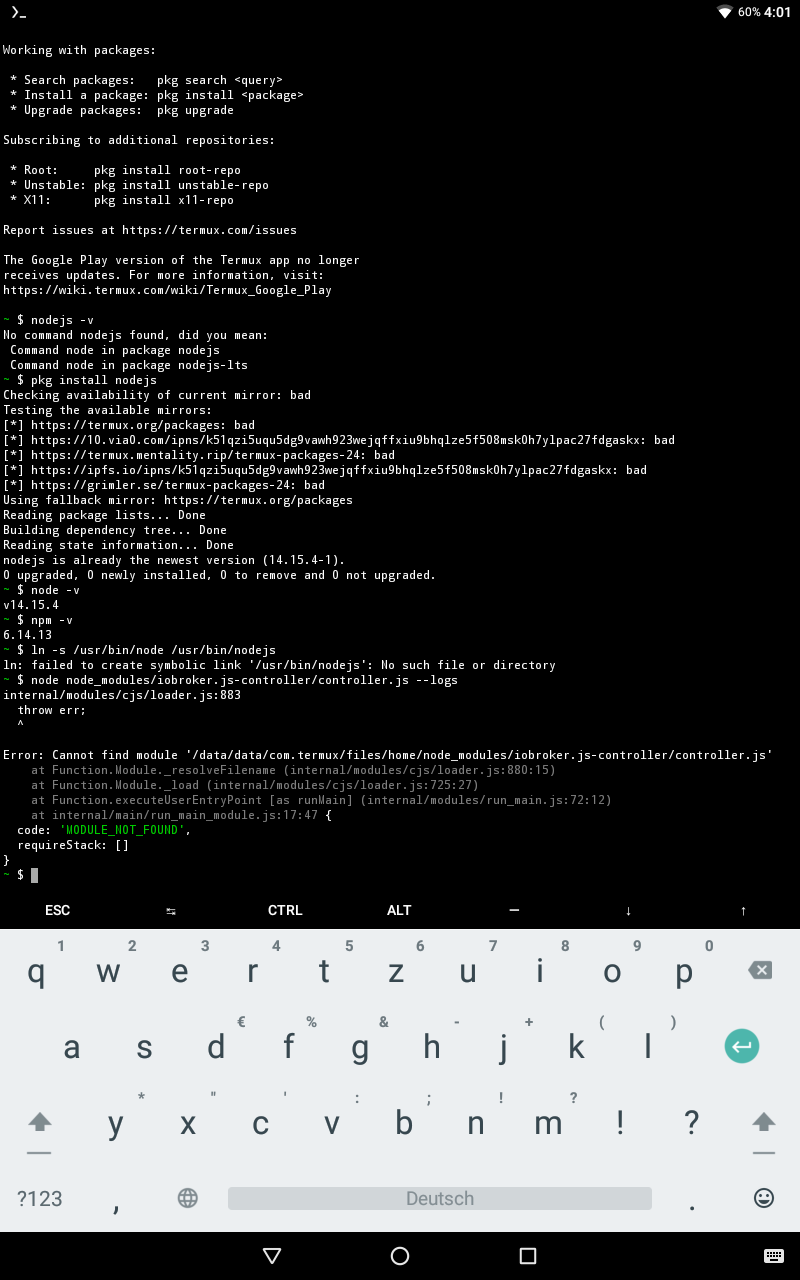
  • Kategorien
  • Unreplied
  • Beliebt
  • GitHub
  • Docu
  • Hilfe
Skins
  • Light
  • Brite
  • Cerulean
  • Cosmo
  • Flatly
  • Journal
  • Litera
  • Lumen
  • Lux
  • Materia
  • Minty
  • Morph
  • Pulse
  • Sandstone
  • Simplex
  • Sketchy
  • Spacelab
  • United
  • Yeti
  • Zephyr
  • Dark
  • Cyborg
  • Darkly
  • Quartz
  • Slate
  • Solar
  • Superhero
  • Vapor

  • Standard: (Kein Skin)
  • Kein Skin
Einklappen
ioBroker Logo

Community Forum

donate donate
  1. ioBroker Community Home
  2. Deutsch
  3. ioBroker Allgemein
  4. ioBroker Android (Gelöst (für mich))

NEWS

  • UPDATE 31.10.: Amazon Alexa - ioBroker Skill läuft aus ?
    apollon77A
    apollon77
    48
    3
    8.8k

  • Monatsrückblick – September 2025
    BluefoxB
    Bluefox
    13
    1
    2.2k

  • Neues Video "KI im Smart Home" - ioBroker plus n8n
    BluefoxB
    Bluefox
    16
    1
    3.2k

ioBroker Android (Gelöst (für mich))

Geplant Angeheftet Gesperrt Verschoben ioBroker Allgemein
20 Beiträge 5 Kommentatoren 1.4k Aufrufe 5 Watching
  • Älteste zuerst
  • Neuste zuerst
  • Meiste Stimmen
Antworten
  • In einem neuen Thema antworten
Anmelden zum Antworten
Dieses Thema wurde gelöscht. Nur Nutzer mit entsprechenden Rechten können es sehen.
  • P Offline
    P Offline
    PhoenixCR
    schrieb am zuletzt editiert von PhoenixCR
    #1

    Lieber Forum. Zuerst möchte ich mich bedanken für eure gutes Arbeit rund um ioBroker.
    Ich versuche seid 3 Tagen um das ioBroker Server auf einem Android laufen zu bekommen. Android ist 7.01 sowie Root ist vorhanden und neuste Termux. Leider kommen immer verschiedene Fehlern beim der Installation vom ioBroker. Vielleicht habt ihr eine neue Anleitung dafür ? Oder vielleicht schon ein Script ?

    Vielen Dank
    Liebe Grüße aus Wertheim

    1 Antwort Letzte Antwort
    0
    • Thomas BraunT Online
      Thomas BraunT Online
      Thomas Braun
      Most Active
      schrieb am zuletzt editiert von
      #2

      @phoenixcr
      So ganz verstehe ich nicht was da genau auf welcher Hardware installiert werden soll.

      Linux-Werkzeugkasten:
      https://forum.iobroker.net/topic/42952/der-kleine-iobroker-linux-werkzeugkasten
      NodeJS Fixer Skript:
      https://forum.iobroker.net/topic/68035/iob-node-fix-skript
      iob_diag: curl -sLf -o diag.sh https://iobroker.net/diag.sh && bash diag.sh

      P 1 Antwort Letzte Antwort
      0
      • Thomas BraunT Thomas Braun

        @phoenixcr
        So ganz verstehe ich nicht was da genau auf welcher Hardware installiert werden soll.

        P Offline
        P Offline
        PhoenixCR
        schrieb am zuletzt editiert von
        #3

        @thomas-braun
        Es ist einen Android Tablett wo ich der Server im Hintergrund laufen lassen möchte...
        Qualcomm Snapdragon 210 MSM8909 4 x 1.1 GHz, Cortex-A7.
        Qualcomm Adreno 304

        Jey CeeJ 1 Antwort Letzte Antwort
        0
        • P PhoenixCR

          @thomas-braun
          Es ist einen Android Tablett wo ich der Server im Hintergrund laufen lassen möchte...
          Qualcomm Snapdragon 210 MSM8909 4 x 1.1 GHz, Cortex-A7.
          Qualcomm Adreno 304

          Jey CeeJ Online
          Jey CeeJ Online
          Jey Cee
          Developer
          schrieb am zuletzt editiert von
          #4

          @phoenixcr welche nodejs version hast du auf dem android laufen?

          Persönlicher Support
          Spenden -> paypal.me/J3YC33

          P 1 Antwort Letzte Antwort
          0
          • Jey CeeJ Jey Cee

            @phoenixcr welche nodejs version hast du auf dem android laufen?

            P Offline
            P Offline
            PhoenixCR
            schrieb am zuletzt editiert von
            #5

            @jey-cee
            Wenn ich nodejs -v angebe kommt „no command nodejs found“
            Wenn ich das pkg installiere sagt er aber das es schon gibt mit der neueste Version 14.15.4-1

            Thomas BraunT 1 Antwort Letzte Antwort
            0
            • P PhoenixCR

              @jey-cee
              Wenn ich nodejs -v angebe kommt „no command nodejs found“
              Wenn ich das pkg installiere sagt er aber das es schon gibt mit der neueste Version 14.15.4-1

              Thomas BraunT Online
              Thomas BraunT Online
              Thomas Braun
              Most Active
              schrieb am zuletzt editiert von Thomas Braun
              #6

              @phoenixcr

              node -v
              npm -v
              

              liefert?

              Linux-Werkzeugkasten:
              https://forum.iobroker.net/topic/42952/der-kleine-iobroker-linux-werkzeugkasten
              NodeJS Fixer Skript:
              https://forum.iobroker.net/topic/68035/iob-node-fix-skript
              iob_diag: curl -sLf -o diag.sh https://iobroker.net/diag.sh && bash diag.sh

              P 1 Antwort Letzte Antwort
              0
              • Thomas BraunT Thomas Braun

                @phoenixcr

                node -v
                npm -v
                

                liefert?

                P Offline
                P Offline
                PhoenixCR
                schrieb am zuletzt editiert von
                #7

                @thomas-braun
                node v14.15.4
                Und
                npm 6.14.13

                Thomas BraunT 1 Antwort Letzte Antwort
                0
                • P PhoenixCR

                  @thomas-braun
                  node v14.15.4
                  Und
                  npm 6.14.13

                  Thomas BraunT Online
                  Thomas BraunT Online
                  Thomas Braun
                  Most Active
                  schrieb am zuletzt editiert von Thomas Braun
                  #8

                  @phoenixcr Scheint mir alles okay zu sein.
                  Ich kenne das mit termux/Android zwar nicht, aber bei Ubuntu sollte man nodejs noch mit node verlinken.

                  Ungefähr so:

                  ln -s /usr/bin/node /usr/bin/nodejs
                  

                  Linux-Werkzeugkasten:
                  https://forum.iobroker.net/topic/42952/der-kleine-iobroker-linux-werkzeugkasten
                  NodeJS Fixer Skript:
                  https://forum.iobroker.net/topic/68035/iob-node-fix-skript
                  iob_diag: curl -sLf -o diag.sh https://iobroker.net/diag.sh && bash diag.sh

                  P 2 Antworten Letzte Antwort
                  0
                  • Thomas BraunT Thomas Braun

                    @phoenixcr Scheint mir alles okay zu sein.
                    Ich kenne das mit termux/Android zwar nicht, aber bei Ubuntu sollte man nodejs noch mit node verlinken.

                    Ungefähr so:

                    ln -s /usr/bin/node /usr/bin/nodejs
                    
                    P Offline
                    P Offline
                    PhoenixCR
                    schrieb am zuletzt editiert von
                    #9

                    @thomas-braun ich bin auch keine Experte. Aber es gibt in Forum eine alte Anleitung und bei mir funktioniert es nicht ...

                    Thomas BraunT 1 Antwort Letzte Antwort
                    0
                    • P PhoenixCR

                      @thomas-braun ich bin auch keine Experte. Aber es gibt in Forum eine alte Anleitung und bei mir funktioniert es nicht ...

                      Thomas BraunT Online
                      Thomas BraunT Online
                      Thomas Braun
                      Most Active
                      schrieb am zuletzt editiert von
                      #10

                      @phoenixcr
                      So ohne weitere Informationen kann man dir auch nicht helfen. Welche Anleitung? Welche Fehlermeldungen?

                      Linux-Werkzeugkasten:
                      https://forum.iobroker.net/topic/42952/der-kleine-iobroker-linux-werkzeugkasten
                      NodeJS Fixer Skript:
                      https://forum.iobroker.net/topic/68035/iob-node-fix-skript
                      iob_diag: curl -sLf -o diag.sh https://iobroker.net/diag.sh && bash diag.sh

                      P 1 Antwort Letzte Antwort
                      0
                      • Thomas BraunT Thomas Braun

                        @phoenixcr Scheint mir alles okay zu sein.
                        Ich kenne das mit termux/Android zwar nicht, aber bei Ubuntu sollte man nodejs noch mit node verlinken.

                        Ungefähr so:

                        ln -s /usr/bin/node /usr/bin/nodejs
                        
                        P Offline
                        P Offline
                        PhoenixCR
                        schrieb am zuletzt editiert von
                        #11

                        @thomas-braun

                        ~ $ ln -s /usr/bin/node /usr/bin/nodejs
                        ln: failed to create symbolic link '/usr/bin/nodejs': No such file or directory

                        Thomas BraunT 1 Antwort Letzte Antwort
                        0
                        • P PhoenixCR

                          @thomas-braun

                          ~ $ ln -s /usr/bin/node /usr/bin/nodejs
                          ln: failed to create symbolic link '/usr/bin/nodejs': No such file or directory

                          Thomas BraunT Online
                          Thomas BraunT Online
                          Thomas Braun
                          Most Active
                          schrieb am zuletzt editiert von Thomas Braun
                          #12

                          @phoenixcr
                          Keine Ahnung wie Android organisiert ist.
                          Unbedingt erforderlich dürfte der Link aber eh nicht sein.

                          Linux-Werkzeugkasten:
                          https://forum.iobroker.net/topic/42952/der-kleine-iobroker-linux-werkzeugkasten
                          NodeJS Fixer Skript:
                          https://forum.iobroker.net/topic/68035/iob-node-fix-skript
                          iob_diag: curl -sLf -o diag.sh https://iobroker.net/diag.sh && bash diag.sh

                          P 2 Antworten Letzte Antwort
                          0
                          • Thomas BraunT Thomas Braun

                            @phoenixcr
                            Keine Ahnung wie Android organisiert ist.
                            Unbedingt erforderlich dürfte der Link aber eh nicht sein.

                            P Offline
                            P Offline
                            PhoenixCR
                            schrieb am zuletzt editiert von
                            #13

                            @thomas-braun
                            Nach der Installation geht er nicht an

                            1 Antwort Letzte Antwort
                            0
                            • Thomas BraunT Thomas Braun

                              @phoenixcr
                              Keine Ahnung wie Android organisiert ist.
                              Unbedingt erforderlich dürfte der Link aber eh nicht sein.

                              P Offline
                              P Offline
                              PhoenixCR
                              schrieb am zuletzt editiert von
                              #14

                              @thomas-braun

                              https://forum.iobroker.net/topic/6673/iobroker-auf-android-laufen-lassen

                              1 Antwort Letzte Antwort
                              0
                              • Thomas BraunT Thomas Braun

                                @phoenixcr
                                So ohne weitere Informationen kann man dir auch nicht helfen. Welche Anleitung? Welche Fehlermeldungen?

                                P Offline
                                P Offline
                                PhoenixCR
                                schrieb am zuletzt editiert von
                                #15

                                @thomas-braun

                                Screenshot_20210424-160137.png

                                D 1 Antwort Letzte Antwort
                                0
                                • P PhoenixCR

                                  @thomas-braun

                                  Screenshot_20210424-160137.png

                                  D Offline
                                  D Offline
                                  darkiop
                                  Most Active
                                  schrieb am zuletzt editiert von
                                  #16

                                  @PhoenixCR

                                  which node
                                  

                                  Proxmox-ioBroker-Redis-HA Doku: https://forum.iobroker.net/topic/47478/dokumentation-einer-proxmox-iobroker-redis-ha-umgebung

                                  P 1 Antwort Letzte Antwort
                                  0
                                  • D darkiop

                                    @PhoenixCR

                                    which node
                                    
                                    P Offline
                                    P Offline
                                    PhoenixCR
                                    schrieb am zuletzt editiert von
                                    #17

                                    @darkiop
                                    Hi

                                    ~ $ which node
                                    /data/data/com.termux/files/usr/bin/node
                                    
                                    1 Antwort Letzte Antwort
                                    0
                                    • P Offline
                                      P Offline
                                      PhoenixCR
                                      schrieb am zuletzt editiert von
                                      #18

                                      Habe es über einem andere link nochmal versucht. Anbei der Ergebnis

                                      $ curl -sLf https://iobroker.net/install.sh | bash -
                                      library: loaded
                                      Library version=2021-04-07
                                      
                                      ==========================================================================
                                      
                                          Welcome to the ioBroker installer!
                                          Installer version: 2021-04-07
                                      
                                          You might need to enter your password a couple of times.
                                      
                                      ==========================================================================
                                      
                                      
                                      ==========================================================================
                                          Installing prerequisites (1/4)
                                      ==========================================================================
                                      
                                      stty: 'standard input': Not a typewriter
                                      Changing npm registry to https://registry.npmjs.org
                                      Installed acl
                                      Installed sudo
                                      Installed libcap2-bin
                                      Installed gcc-c++
                                      Installed libavahi-compat-libdnssd-dev
                                      Installed libudev-dev
                                      Installed libpam0g-dev
                                      Installed libcairo2-dev
                                      Installed libpango1.0-dev
                                      Installed libjpeg-dev
                                      Installed libgif-dev
                                      Installed librsvg2-dev
                                      Installed libpixman-1-dev
                                      Installed python-dev
                                      stty: 'standard input': Not a typewriter
                                      
                                      ==========================================================================
                                          Creating ioBroker user and directory (2/4)
                                      ==========================================================================
                                      
                                      
                                      Command useradd not found
                                      Check your spelling and try again
                                      
                                      stty: 'standard input': Not a typewriter
                                      User iobroker created
                                      
                                      Command usermod not found
                                      Check your spelling and try again
                                      
                                      stty: 'standard input': Not a typewriter
                                      stty: 'standard input': Not a typewriter
                                      
                                      Command visudo not found
                                      Check your spelling and try again
                                      
                                      stty: 'standard input': Not a typewriter
                                      stty: 'standard input': Not a typewriter
                                      stty: 'standard input': Not a typewriter
                                      bash: line 901: cd: /opt/iobroker: No such file or directory
                                      Directory /opt/iobroker created
                                      touch: cannot touch '/opt/iobroker/INSTALLER_INFO.txt': No such file or directory
                                      chmod: cannot access '/opt/iobroker/INSTALLER_INFO.txt': No such file or directory
                                      bash: line 907: /opt/iobroker/INSTALLER_INFO.txt: No such file or directory
                                      bash: line 908: /opt/iobroker/INSTALLER_INFO.txt: No such file or directory
                                      bash: line 909: /opt/iobroker/INSTALLER_INFO.txt: No such file or directory
                                      
                                      ==========================================================================
                                          Installing ioBroker (3/4)
                                      ==========================================================================
                                      
                                      stty: 'standard input': Not a typewriter
                                      stty: 'standard input': Not a typewriter
                                      stty: 'standard input': Not a typewriter
                                      stty: 'standard input': Not a typewriter
                                      stty: 'standard input': Not a typewriter
                                      stty: 'standard input': Not a typewriter
                                      npm ERR! code EBADPLATFORM
                                      npm ERR! notsup Unsupported platform for systeminformation@4.34.20: wanted {"os":"darwin,linux,win32,freebsd,openbsd,netbsd,sunos","arch":"any"} (current: {"os":"android","arch":"arm"})
                                      npm ERR! notsup Valid OS:    darwin,linux,win32,freebsd,openbsd,netbsd,sunos
                                      npm ERR! notsup Valid Arch:  any
                                      npm ERR! notsup Actual OS:   android
                                      npm ERR! notsup Actual Arch: arm
                                      
                                      npm ERR! A complete log of this run can be found in:
                                      npm ERR!     /data/data/com.termux/files/home/.npm/_logs/2021-04-25T08_01_59_323Z-debug.log
                                      
                                      ==========================================================================
                                          Finalizing installation (4/4)
                                      ==========================================================================
                                      
                                      bash: line 966: /opt/iobroker/INSTALLER_INFO.txt: No such file or directory
                                      stty: 'standard input': Not a typewriter
                                      stty: 'standard input': Not a typewriter
                                      stty: 'standard input': Not a typewriter
                                      stty: 'standard input': Not a typewriter
                                      Unsupported init system, cannot enable autostart!
                                      bash: line 1256: /opt/iobroker/INSTALLER_INFO.txt: No such file or directory
                                      Fixing directory permissions...
                                      stty: 'standard input': Not a typewriter
                                      
                                      Command usermod not found
                                      Check your spelling and try again
                                      
                                      stty: 'standard input': Not a typewriter
                                      This system does not support setting default permissions.
                                      Do not use npm to manually install adapters unless you know what you are doing!
                                      main: line 767: /opt/iobroker/INSTALLER_INFO.txt: No such file or directory
                                      stty: 'standard input': Not a typewriter
                                      stty: 'standard input': Not a typewriter
                                      
                                      ==========================================================================
                                      
                                          ioBroker was installed successfully
                                          Open http://192.168.1.50:8081 in a browser and start configuring!
                                      
                                      ==========================================================================
                                      
                                      
                                      You need to re-login before doing anything else on the console!
                                      
                                      UncleSamU 1 Antwort Letzte Antwort
                                      0
                                      • P PhoenixCR

                                        Habe es über einem andere link nochmal versucht. Anbei der Ergebnis

                                        $ curl -sLf https://iobroker.net/install.sh | bash -
                                        library: loaded
                                        Library version=2021-04-07
                                        
                                        ==========================================================================
                                        
                                            Welcome to the ioBroker installer!
                                            Installer version: 2021-04-07
                                        
                                            You might need to enter your password a couple of times.
                                        
                                        ==========================================================================
                                        
                                        
                                        ==========================================================================
                                            Installing prerequisites (1/4)
                                        ==========================================================================
                                        
                                        stty: 'standard input': Not a typewriter
                                        Changing npm registry to https://registry.npmjs.org
                                        Installed acl
                                        Installed sudo
                                        Installed libcap2-bin
                                        Installed gcc-c++
                                        Installed libavahi-compat-libdnssd-dev
                                        Installed libudev-dev
                                        Installed libpam0g-dev
                                        Installed libcairo2-dev
                                        Installed libpango1.0-dev
                                        Installed libjpeg-dev
                                        Installed libgif-dev
                                        Installed librsvg2-dev
                                        Installed libpixman-1-dev
                                        Installed python-dev
                                        stty: 'standard input': Not a typewriter
                                        
                                        ==========================================================================
                                            Creating ioBroker user and directory (2/4)
                                        ==========================================================================
                                        
                                        
                                        Command useradd not found
                                        Check your spelling and try again
                                        
                                        stty: 'standard input': Not a typewriter
                                        User iobroker created
                                        
                                        Command usermod not found
                                        Check your spelling and try again
                                        
                                        stty: 'standard input': Not a typewriter
                                        stty: 'standard input': Not a typewriter
                                        
                                        Command visudo not found
                                        Check your spelling and try again
                                        
                                        stty: 'standard input': Not a typewriter
                                        stty: 'standard input': Not a typewriter
                                        stty: 'standard input': Not a typewriter
                                        bash: line 901: cd: /opt/iobroker: No such file or directory
                                        Directory /opt/iobroker created
                                        touch: cannot touch '/opt/iobroker/INSTALLER_INFO.txt': No such file or directory
                                        chmod: cannot access '/opt/iobroker/INSTALLER_INFO.txt': No such file or directory
                                        bash: line 907: /opt/iobroker/INSTALLER_INFO.txt: No such file or directory
                                        bash: line 908: /opt/iobroker/INSTALLER_INFO.txt: No such file or directory
                                        bash: line 909: /opt/iobroker/INSTALLER_INFO.txt: No such file or directory
                                        
                                        ==========================================================================
                                            Installing ioBroker (3/4)
                                        ==========================================================================
                                        
                                        stty: 'standard input': Not a typewriter
                                        stty: 'standard input': Not a typewriter
                                        stty: 'standard input': Not a typewriter
                                        stty: 'standard input': Not a typewriter
                                        stty: 'standard input': Not a typewriter
                                        stty: 'standard input': Not a typewriter
                                        npm ERR! code EBADPLATFORM
                                        npm ERR! notsup Unsupported platform for systeminformation@4.34.20: wanted {"os":"darwin,linux,win32,freebsd,openbsd,netbsd,sunos","arch":"any"} (current: {"os":"android","arch":"arm"})
                                        npm ERR! notsup Valid OS:    darwin,linux,win32,freebsd,openbsd,netbsd,sunos
                                        npm ERR! notsup Valid Arch:  any
                                        npm ERR! notsup Actual OS:   android
                                        npm ERR! notsup Actual Arch: arm
                                        
                                        npm ERR! A complete log of this run can be found in:
                                        npm ERR!     /data/data/com.termux/files/home/.npm/_logs/2021-04-25T08_01_59_323Z-debug.log
                                        
                                        ==========================================================================
                                            Finalizing installation (4/4)
                                        ==========================================================================
                                        
                                        bash: line 966: /opt/iobroker/INSTALLER_INFO.txt: No such file or directory
                                        stty: 'standard input': Not a typewriter
                                        stty: 'standard input': Not a typewriter
                                        stty: 'standard input': Not a typewriter
                                        stty: 'standard input': Not a typewriter
                                        Unsupported init system, cannot enable autostart!
                                        bash: line 1256: /opt/iobroker/INSTALLER_INFO.txt: No such file or directory
                                        Fixing directory permissions...
                                        stty: 'standard input': Not a typewriter
                                        
                                        Command usermod not found
                                        Check your spelling and try again
                                        
                                        stty: 'standard input': Not a typewriter
                                        This system does not support setting default permissions.
                                        Do not use npm to manually install adapters unless you know what you are doing!
                                        main: line 767: /opt/iobroker/INSTALLER_INFO.txt: No such file or directory
                                        stty: 'standard input': Not a typewriter
                                        stty: 'standard input': Not a typewriter
                                        
                                        ==========================================================================
                                        
                                            ioBroker was installed successfully
                                            Open http://192.168.1.50:8081 in a browser and start configuring!
                                        
                                        ==========================================================================
                                        
                                        
                                        You need to re-login before doing anything else on the console!
                                        
                                        UncleSamU Offline
                                        UncleSamU Offline
                                        UncleSam
                                        Developer
                                        schrieb am zuletzt editiert von
                                        #19

                                        @phoenixcr Um es kurz zu fassen: Android wird von ioBroker nicht unterstützt.

                                        Die längere Version: der Installer unterstützt Android nicht, du kannst aber versuchen, ioBroker manuell zu installieren.

                                        Aber: erwarte bitte keinen Support für sowas. Es gibt wahrscheinlich etwa zehn Leute, die das machen. Viele Adapter werden nicht laufen und es wird sich wohl kein Entwickler finden, der sich die Mühe macht für die wenigen Leute, die das Experiment wagen, etwas zu programmieren.

                                        Fazit: wenn du es hinkriegst, freuen sich die anderen sicher über deine Erfahrungen.

                                        Vorschlag: Kauf dir für wenige Euros einen Raspberry Pi (wenn du nicht viele Adapter hast, würde sogar ein alter 3b reichen) und du hast zahllose Leute, die dich unterstützen werden und alle Adapter werden einwandfrei funktionieren.


                                        Bitte bei Problemen mit meinen Adaptern, Issue auf GitHub erfassen: Loxone | I2C | Luxtronik2
                                        ♡-lichen Dank an meine Sponsoren

                                        P 1 Antwort Letzte Antwort
                                        2
                                        • UncleSamU UncleSam

                                          @phoenixcr Um es kurz zu fassen: Android wird von ioBroker nicht unterstützt.

                                          Die längere Version: der Installer unterstützt Android nicht, du kannst aber versuchen, ioBroker manuell zu installieren.

                                          Aber: erwarte bitte keinen Support für sowas. Es gibt wahrscheinlich etwa zehn Leute, die das machen. Viele Adapter werden nicht laufen und es wird sich wohl kein Entwickler finden, der sich die Mühe macht für die wenigen Leute, die das Experiment wagen, etwas zu programmieren.

                                          Fazit: wenn du es hinkriegst, freuen sich die anderen sicher über deine Erfahrungen.

                                          Vorschlag: Kauf dir für wenige Euros einen Raspberry Pi (wenn du nicht viele Adapter hast, würde sogar ein alter 3b reichen) und du hast zahllose Leute, die dich unterstützen werden und alle Adapter werden einwandfrei funktionieren.
                                          P Offline
                                          P Offline
                                          PhoenixCR
                                          schrieb am zuletzt editiert von
                                          #20

                                          @unclesam Danke für den Hinweis. Habe jetzt ein Mini PC erworben, Ubuntu draufgestellt und da funktioniert es einwandfrei.
                                          Vielen Dank an alle die es versucht haben.
                                          :+1: :pray: :blush:

                                          1 Antwort Letzte Antwort
                                          1
                                          Antworten
                                          • In einem neuen Thema antworten
                                          Anmelden zum Antworten
                                          • Älteste zuerst
                                          • Neuste zuerst
                                          • Meiste Stimmen


                                          Support us

                                          ioBroker
                                          Community Adapters
                                          Donate
                                          FAQ Cloud / IOT
                                          HowTo: Node.js-Update
                                          HowTo: Backup/Restore
                                          Downloads
                                          BLOG

                                          912

                                          Online

                                          32.4k

                                          Benutzer

                                          81.5k

                                          Themen

                                          1.3m

                                          Beiträge
                                          Community
                                          Impressum | Datenschutz-Bestimmungen | Nutzungsbedingungen | Einwilligungseinstellungen
                                          ioBroker Community 2014-2025
                                          logo
                                          • Anmelden

                                          • Du hast noch kein Konto? Registrieren

                                          • Anmelden oder registrieren, um zu suchen
                                          • Erster Beitrag
                                            Letzter Beitrag
                                          0
                                          • Home
                                          • Aktuell
                                          • Tags
                                          • Ungelesen 0
                                          • Kategorien
                                          • Unreplied
                                          • Beliebt
                                          • GitHub
                                          • Docu
                                          • Hilfe