




[gelöst] Backitup kann influxdb Datenbank nicht sichern.
-
Alles klar, dann mit sudo ...
Jetzt wirds wieder komisch, immernoch Permission denied
pi@raspberrypi:~ $ wget -qO- https://repos.influxdata.com/influxdb.key | sudo gpg --dearmor > /etc/apt/trusted.gpg.d/influxdb.gpg -bash: /etc/apt/trusted.gpg.d/influxdb.gpg: Permission deniedFühre mal ab hier aus. Die anderen befehle sollten bereits durch deine erste Installation erledigt sein.
sudo apt-get update && sudo apt-get install influxdb sudo systemctl unmask influxdb.service sudo systemctl start influxdb -
Führe mal ab hier aus. Die anderen befehle sollten bereits durch deine erste Installation erledigt sein.
sudo apt-get update && sudo apt-get install influxdb sudo systemctl unmask influxdb.service sudo systemctl start influxdbIn der Datei /etc/influxdb/influxdb.conf waren folgende Punkte schon aktiviert. Das habe ich so gelassen.
[http]
  # Determines whether HTTP endpoint is enabled.
  enabled = true

  # The bind address used by the HTTP service.
  bind-address = ":8086"
Beim Restore zeigt er nun folgendes an:
pi@raspberrypi:~ $ influxd restore -portable /home/pi/influxdb_backup
2021/04/09 12:56:21 error updating meta: DB metadata not changed. database may already exist
restore: DB metadata not changed. database may already exist
Scheint als ob die alte Datenbank nicht gelöscht wurde. Einfach dann weitermachen, oder doch nicht?
-
In der Datei /etc/influxdb/influxdb.conf waren folgende Punkte schon aktiviert. Das habe ich so gelassen.
[http]
  # Determines whether HTTP endpoint is enabled.
  enabled = true

  # The bind address used by the HTTP service.
  bind-address = ":8086"
Beim Restore zeigt er nun folgendes an:
pi@raspberrypi:~ $ influxd restore -portable /home/pi/influxdb_backup
2021/04/09 12:56:21 error updating meta: DB metadata not changed. database may already exist
restore: DB metadata not changed. database may already exist
Scheint als ob die alte Datenbank nicht gelöscht wurde. Einfach dann weitermachen, oder doch nicht?
@christian-kohlöffel @simatec
Der Befehl zum kompletten löschen hätte doch lauten sollensudo apt-get purge --auto-remove influxdbOhne purge bleibt die config erhalten
umgestiegen von Proxmox auf Unraid
-
@christian-kohlöffel @simatec
Der Befehl zum kompletten löschen hätte doch lauten sollensudo apt-get purge --auto-remove influxdbOhne purge bleibt die config erhalten
Dann habe ich ab hier nochmals gestartet, dabei kam folgende Warnung:
pi@raspberrypi:~ $ sudo apt-get purge --auto-remove influxdb
Reading package lists... Done
Building dependency tree
Reading state information... Done
The following packages will be REMOVED:
  influxdb*
0 upgraded, 0 newly installed, 1 to remove and 9 not upgraded.
After this operation, 153 MB disk space will be freed.
Do you want to continue? [Y/n] y
(Reading database ... 55570 files and directories currently installed.)
Removing influxdb (1.8.4-1) ...
Processing triggers for man-db (2.8.5-2) ...
(Reading database ... 55548 files and directories currently installed.)
Purging configuration files for influxdb (1.8.4-1) ...
dpkg: warning: while removing influxdb, directory '/var/lib/influxdb' not empty                                                                                                                                                              so not removed
Und tatsächlich die config hatte diesmal keine bereits vorhandenen Einträge.
Aber die Datenbank kann trotzdem nich wiederhergestellt werden, da bereits vorhanden wie es scheint, ist das OK? ....
pi@raspberrypi:~ $ influxd restore -portable /home/pi/influxdb_backup 2021/04/09 14:10:24 error updating meta: DB metadata not changed. database may already exist restore: DB metadata not changed. database may already exist -
In der Datei /etc/influxdb/influxdb.conf waren folgende Punkte schon aktiviert. Das habe ich so gelassen.
[http]
  # Determines whether HTTP endpoint is enabled.
  enabled = true

  # The bind address used by the HTTP service.
  bind-address = ":8086"
Beim Restore zeigt er nun folgendes an:
pi@raspberrypi:~ $ influxd restore -portable /home/pi/influxdb_backup
2021/04/09 12:56:21 error updating meta: DB metadata not changed. database may already exist
restore: DB metadata not changed. database may already exist
Scheint als ob die alte Datenbank nicht gelöscht wurde. Einfach dann weitermachen, oder doch nicht?
@christian-kohlöffel sagte in Backitup kann influxdb Datenbank nicht sichern.:
Beim Restore zeigt er nun folgendes an:
pi@raspberrypi:~ $ influxd restore -portable /home/pi/influxdb_backup 2021/04/09 12:56:21 error updating meta: DB metadata not changed. database may already exist restore: DB metadata not changed. database may already exist
Scheint als ob die alte Datenbank nicht gelöscht wurde. Einfach dann weitermachen, oder doch nicht?Da ist die Datenbank noch vorhanden. Wenn das nun nach der zweiten Neuinstallation auch noch kommt, dann folgendes ausführen
sudo influxDROP DATABASE iobroker exitIm Anschluss dann den restore ausführen
-
@christian-kohlöffel sagte in Backitup kann influxdb Datenbank nicht sichern.:
Beim Restore zeigt er nun folgendes an:
pi@raspberrypi:~ $ influxd restore -portable /home/pi/influxdb_backup 2021/04/09 12:56:21 error updating meta: DB metadata not changed. database may already exist restore: DB metadata not changed. database may already exist
Scheint als ob die alte Datenbank nicht gelöscht wurde. Einfach dann weitermachen, oder doch nicht?Da ist die Datenbank noch vorhanden. Wenn das nun nach der zweiten Neuinstallation auch noch kommt, dann folgendes ausführen
sudo influxDROP DATABASE iobroker exitIm Anschluss dann den restore ausführen
Der Restore läuft nun durch.
Für
CREATE USER "admin" WITH PASSWORD 'deinAdminPasswort' WITH ALL PRIVILEGES
CREATE USER "DeinUser" WITH PASSWORD 'deinUserpasswort'
GRANT ALL ON "iobroker" TO "user"
exit
war noch zuvor folgendes nötig:
use iobrokerDann ist mir glaub noch ein Typo aufgefallen:
(Sollte wohl heißen: GRANT ALL ON "iobroker" TO "DeinUser"; oder?)Influxdb Adapter startet und Daten sind vorhanden
Aber nun das interessante, der Fehler ist immernoch da ...:
[DEBUG] [influxDB] - InfluxDB tmp directory was successfully deleted [ERROR] [influxDB] - [IGNORED] Error: Command failed: influxd backup -portable -database iobroker "/opt/iobroker/backups/influxDB_2021_04_09-14_51_44_backupiobroker" backup: copy: read /opt/iobroker/backups/influxDB_2021_04_09-14_51_44_backupiobroker/meta.00: input/output error -
@christian-kohlöffel sagte in Backitup kann influxdb Datenbank nicht sichern.:
Beim Restore zeigt er nun folgendes an:
pi@raspberrypi:~ $ influxd restore -portable /home/pi/influxdb_backup 2021/04/09 12:56:21 error updating meta: DB metadata not changed. database may already exist restore: DB metadata not changed. database may already exist
Scheint als ob die alte Datenbank nicht gelöscht wurde. Einfach dann weitermachen, oder doch nicht?Da ist die Datenbank noch vorhanden. Wenn das nun nach der zweiten Neuinstallation auch noch kommt, dann folgendes ausführen
sudo influxDROP DATABASE iobroker exitIm Anschluss dann den restore ausführen
Jetzt noch ein Gedanke. Ich habe beim inlfuxdb Adapter den User "DeinUser" drin. Ich habe es auch schon gesehen dass manche dort "Admin" stehen haben. Daran kanns nicht liegen, oder?
-
Jetzt noch ein Gedanke. Ich habe beim inlfuxdb Adapter den User "DeinUser" drin. Ich habe es auch schon gesehen dass manche dort "Admin" stehen haben. Daran kanns nicht liegen, oder?
@christian-kohlöffel
Sicherst du lokal oder wieder auf dem NAS? -
Jetzt noch ein Gedanke. Ich habe beim inlfuxdb Adapter den User "DeinUser" drin. Ich habe es auch schon gesehen dass manche dort "Admin" stehen haben. Daran kanns nicht liegen, oder?
@simatec
Ich sichere aktuell weiterhin auf dem NAS (Fritzbox).Ich stelle mal um und berichte ...
Hier das. Log:
Scheint alles zu klappen ...
Started iobroker ...
[DEBUG] [iobroker] - host.raspberrypi 2156 states saved

[DEBUG] [iobroker] - host.raspberrypi 2575 objects saved

[DEBUG] [iobroker] - Backup created: /opt/iobroker/backups/iobroker_2021_04_10-11_26_47_backupiobroker.tar.gz

[DEBUG] [iobroker] - done
[DEBUG] [influxDB] - Start InfluxDB Backup ...
[DEBUG] [influxDB] - InfluxDB Backup tmp directory created
[DEBUG] [influxDB] - Packed 36MB so far...
[DEBUG] [influxDB] - Packed 42MB so far...
[DEBUG] [influxDB] - Packed 57MB so far...
[DEBUG] [influxDB] - Packed 81MB so far...
[DEBUG] [influxDB] - Packed 85MB so far...
[DEBUG] [influxDB] - Packed 111MB so far...
[DEBUG] [influxDB] - Packed 152MB so far...
[DEBUG] [influxDB] - Packed 165MB so far...
[DEBUG] [influxDB] - Packed 186MB so far...
[DEBUG] [influxDB] - Packed 211MB so far...
[DEBUG] [influxDB] - Backup created: /opt/iobroker/backups/influxDB_2021_04_10-11_26_55_backupiobroker.tar.gz
[DEBUG] [influxDB] - Try deleting the InfluxDB tmp directory
[DEBUG] [influxDB] - InfluxDB tmp directory was successfully deleted
[DEBUG] [influxDB] - done
[DEBUG] [clean] - done
[DEBUG] [historyHTML] - new history html values created
[DEBUG] [historyHTML] - done
[DEBUG] [historyJSON] - new history json values created
[DEBUG] [historyJSON] - done
[EXIT] 0
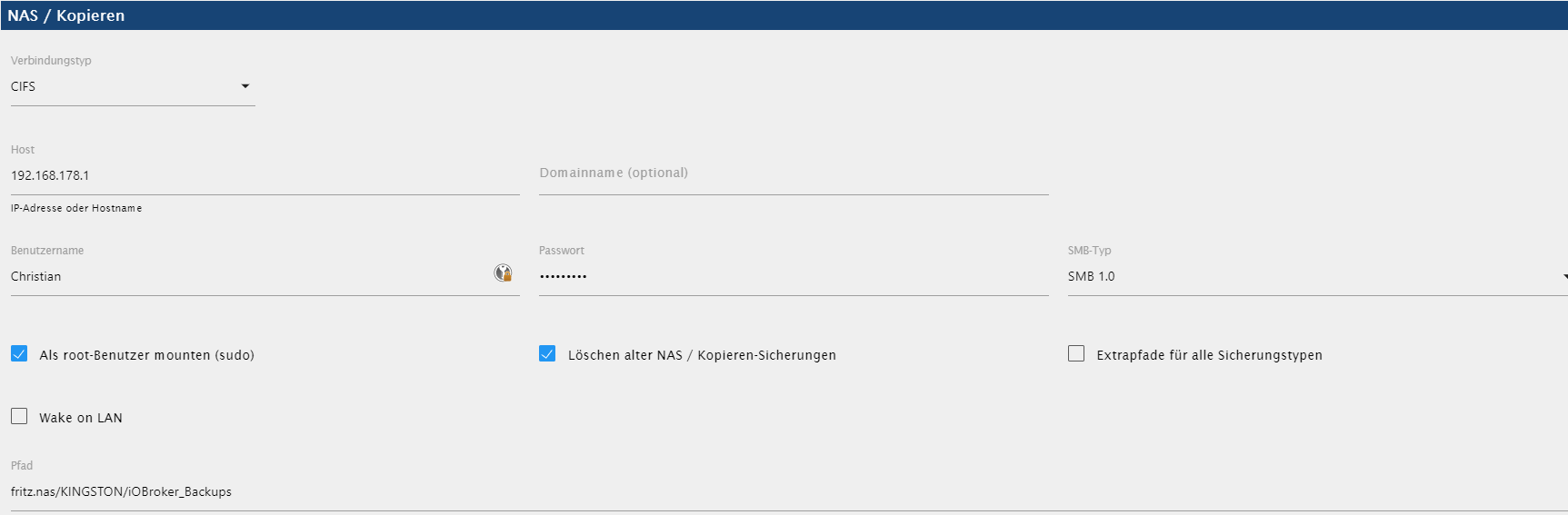
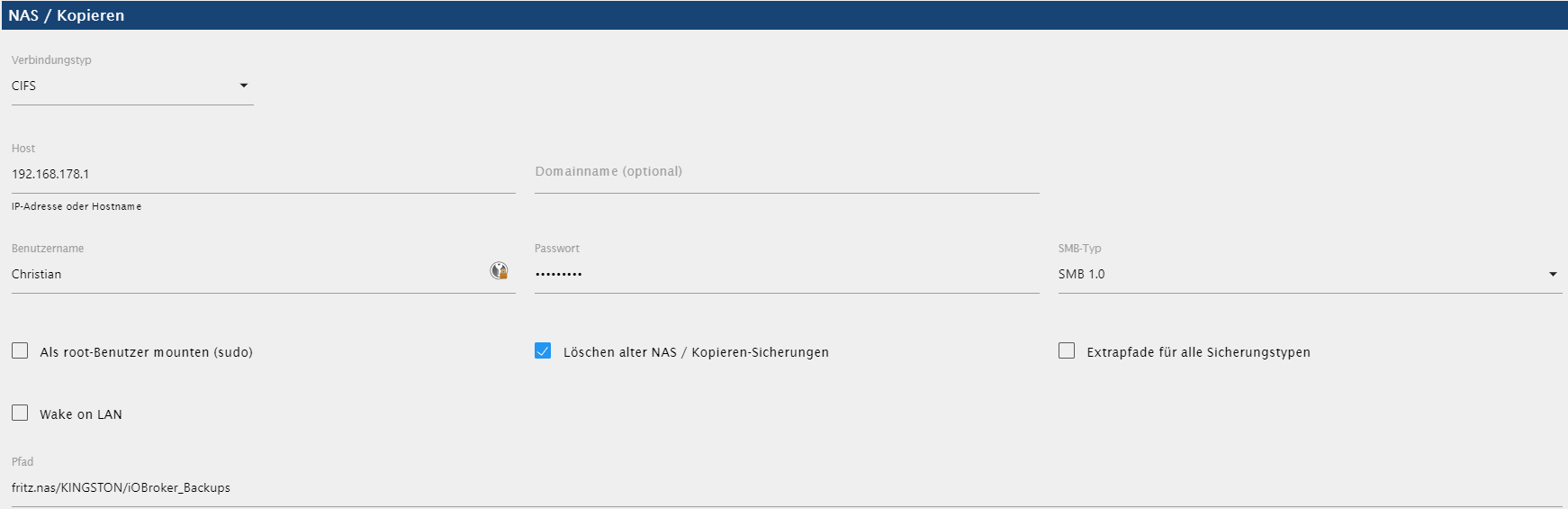
Hier mal noch die Einstellungen zum NAS:
-
@simatec
Ich sichere aktuell weiterhin auf dem NAS (Fritzbox).Ich stelle mal um und berichte ...
Hier das. Log:
Scheint alles zu klappen ...
Started iobroker ...
[DEBUG] [iobroker] - host.raspberrypi 2156 states saved

[DEBUG] [iobroker] - host.raspberrypi 2575 objects saved

[DEBUG] [iobroker] - Backup created: /opt/iobroker/backups/iobroker_2021_04_10-11_26_47_backupiobroker.tar.gz

[DEBUG] [iobroker] - done
[DEBUG] [influxDB] - Start InfluxDB Backup ...
[DEBUG] [influxDB] - InfluxDB Backup tmp directory created
[DEBUG] [influxDB] - Packed 36MB so far...
[DEBUG] [influxDB] - Packed 42MB so far...
[DEBUG] [influxDB] - Packed 57MB so far...
[DEBUG] [influxDB] - Packed 81MB so far...
[DEBUG] [influxDB] - Packed 85MB so far...
[DEBUG] [influxDB] - Packed 111MB so far...
[DEBUG] [influxDB] - Packed 152MB so far...
[DEBUG] [influxDB] - Packed 165MB so far...
[DEBUG] [influxDB] - Packed 186MB so far...
[DEBUG] [influxDB] - Packed 211MB so far...
[DEBUG] [influxDB] - Backup created: /opt/iobroker/backups/influxDB_2021_04_10-11_26_55_backupiobroker.tar.gz
[DEBUG] [influxDB] - Try deleting the InfluxDB tmp directory
[DEBUG] [influxDB] - InfluxDB tmp directory was successfully deleted
[DEBUG] [influxDB] - done
[DEBUG] [clean] - done
[DEBUG] [historyHTML] - new history html values created
[DEBUG] [historyHTML] - done
[DEBUG] [historyJSON] - new history json values created
[DEBUG] [historyJSON] - done
[EXIT] 0
Hier mal noch die Einstellungen zum NAS:
@christian-kohlöffel
Auf aktuellen FritzBoxen (Firmware 7.2x) würde ich smb 3.1.1 einstellen. Läuft hier super. -
@christian-kohlöffel
Auf aktuellen FritzBoxen (Firmware 7.2x) würde ich smb 3.1.1 einstellen. Läuft hier super.@Christian-Kohlöffel Wir hatten hier im Forum gerade ein ähnliches Problem mit der FB.
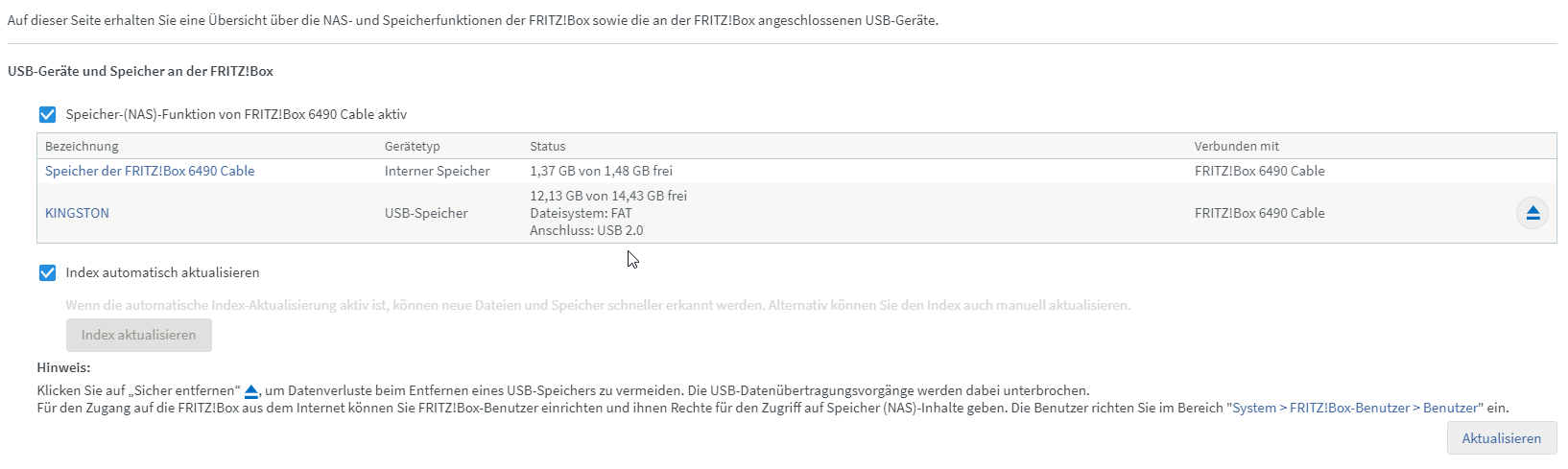
Zeige mal bitte deine NAS Einstellungen der FB und in welchem Dateiformat ist der Speichermedium an der FB formatiert? -
@Christian-Kohlöffel Wir hatten hier im Forum gerade ein ähnliches Problem mit der FB.
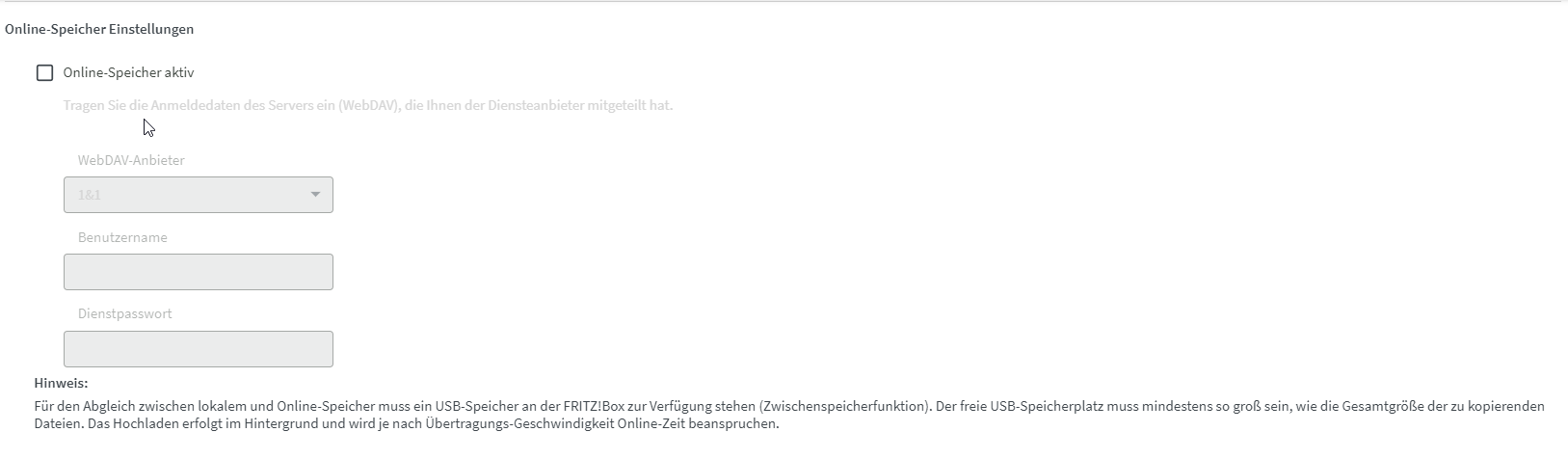
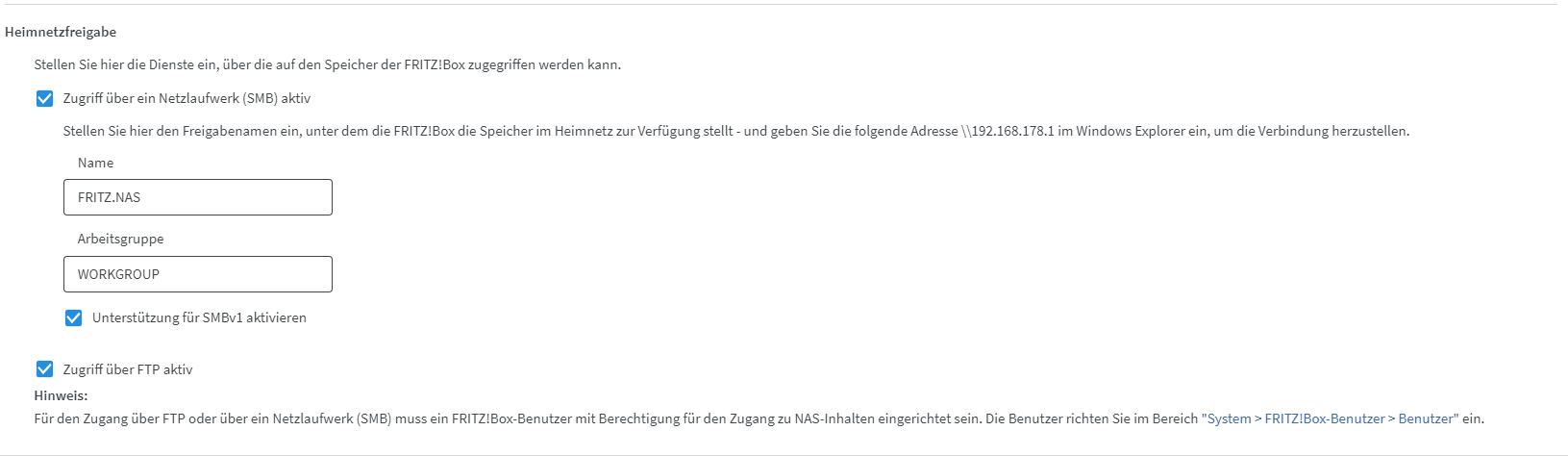
Zeige mal bitte deine NAS Einstellungen der FB und in welchem Dateiformat ist der Speichermedium an der FB formatiert?Ich habe die Version 07.20, also aktuellste Version für die 6490 cable installiert. Anbei die Einstellungen. Ich versuche auch mal das smb 3.1.1, vielleicht ändert sich was.
-
Ich habe die Version 07.20, also aktuellste Version für die 6490 cable installiert. Anbei die Einstellungen. Ich versuche auch mal das smb 3.1.1, vielleicht ändert sich was.
@christian-kohlöffel
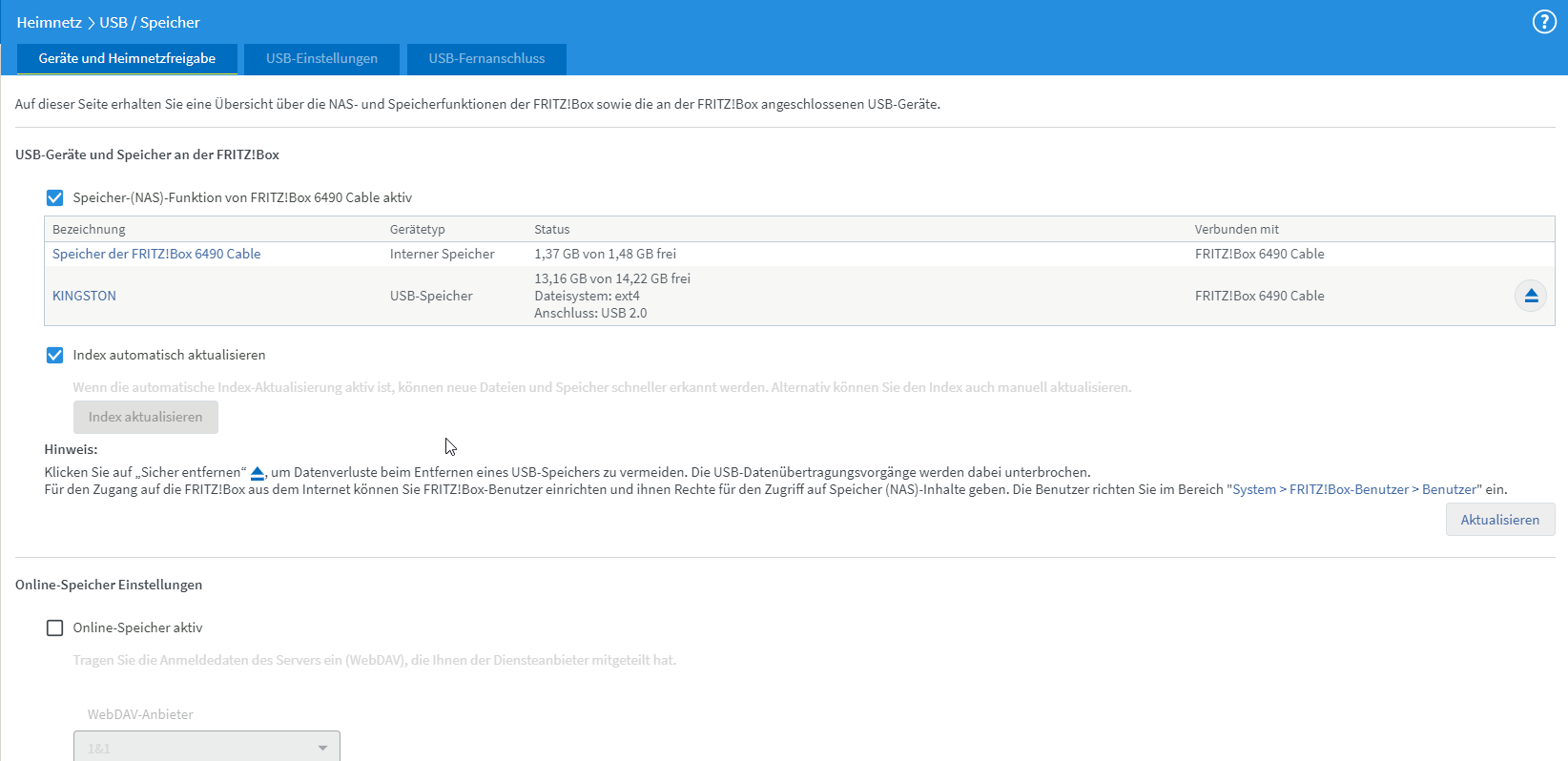
OK da liegt dann wohl das Problem. Stelle in Backitup auf smb v1
Des Weiteren würde ich den USB Speicher auf ext4 formatieren.
Hier im Forum gab es ein vergleichbares Problem und das war die Lösung -
Ich habe die Version 07.20, also aktuellste Version für die 6490 cable installiert. Anbei die Einstellungen. Ich versuche auch mal das smb 3.1.1, vielleicht ändert sich was.
Mit SMB 3.1.1 scheint es keinen Fehler zu geben, aber es bleibt bei 0MB hängen.
[DEBUG] [iobroker] - Backup created: /opt/iobroker/backups/iobroker_2021_04_10-13_41_46_backupiobroker.tar.gz

[DEBUG] [iobroker] - done
[DEBUG] [influxDB] - Start InfluxDB Backup ...
[DEBUG] [influxDB] - InfluxDB Backup tmp directory created
[DEBUG] [influxDB] - Packed 0MB so far...
Ich stelle jetzt mal wieder auf SMB v1 um und formatiere auf ext4. Dann gebe ich Bescheid was passiert ...
-
@christian-kohlöffel
OK da liegt dann wohl das Problem. Stelle in Backitup auf smb v1
Des Weiteren würde ich den USB Speicher auf ext4 formatieren.
Hier im Forum gab es ein vergleichbares Problem und das war die LösungNun habe ich genau das gemacht was du gesagt hast. Aber leider hat es auch nicht den Erfolg gebracht.
Influxdb Backup wird ausgeführt wenn ich den Hacken bei "Als root-Benutzer mounten (sudo)" raus nehme. Aber er speichert es nicht auf dem NAS, siehe angehängtes log.
backitup.0	2021-04-10 14:30:28.348	debug	(7444) [iobroker/historyJSON] done
backitup.0	2021-04-10 14:30:28.346	debug	(7444) [iobroker/historyJSON] new history json values created
backitup.0	2021-04-10 14:30:28.183	debug	(7444) [iobroker/historyHTML] done
backitup.0	2021-04-10 14:30:28.179	debug	(7444) [iobroker/historyHTML] new history html values created
backitup.0	2021-04-10 14:30:27.406	debug	(7444) [iobroker/clean] done
backitup.0	2021-04-10 14:30:27.405	debug	(7444) [iobroker/clean] Backup files not deleted from /opt/iobroker/backups because some errors.
backitup.0	2021-04-10 14:30:26.799	debug	(7444) [iobroker/cifs] done
backitup.0	2021-04-10 14:30:25.137	debug	(7444) [iobroker/influxDB] done
backitup.0	2021-04-10 14:30:25.136	debug	(7444) [iobroker/influxDB] InfluxDB tmp directory was successfully deleted
backitup.0	2021-04-10 14:30:25.056	debug	(7444) [iobroker/influxDB] Try deleting the InfluxDB tmp directory
backitup.0	2021-04-10 14:30:25.056	debug	(7444) [iobroker/influxDB] Backup created: /opt/iobroker/backups/influxDB_2021_04_10-14_25_24_backupiobroker.tar.gz
backitup.0	2021-04-10 14:30:22.063	debug	(7444) [iobroker/influxDB] Packed 210MB so far...
backitup.0	2021-04-10 14:30:12.064	debug	(7444) [iobroker/influxDB] Packed 175MB so far...
backitup.0	2021-04-10 14:30:02.063	debug	(7444) [iobroker/influxDB] Packed 133MB so far...
backitup.0	2021-04-10 14:29:52.063	debug	(7444) [iobroker/influxDB] Packed 92MB so far...
backitup.0	2021-04-10 14:29:46.883	debug	(7444) sendTo "getTelegramUser" to system.adapter.admin.0 from system.adapter.backitup.0: {"911690681":{"firstName":"Christian"}}
backitup.0	2021-04-10 14:29:46.879	debug	(7444) telegram-instance: telegram.0
backitup.0	2021-04-10 14:29:42.063	debug	(7444) [iobroker/influxDB] Packed 70MB so far...
backitup.0	2021-04-10 14:29:32.062	debug	(7444) [iobroker/influxDB] Packed 68MB so far...
backitup.0	2021-04-10 14:29:22.062	debug	(7444) [iobroker/influxDB] Packed 67MB so far...
backitup.0	2021-04-10 14:29:12.062	debug	(7444) [iobroker/influxDB] Packed 67MB so far...
backitup.0	2021-04-10 14:29:02.061	debug	(7444) [iobroker/influxDB] Packed 67MB so far...
backitup.0	2021-04-10 14:28:52.061	debug	(7444) [iobroker/influxDB] Packed 67MB so far...
backitup.0	2021-04-10 14:28:42.060	debug	(7444) [iobroker/influxDB] Packed 66MB so far...
backitup.0	2021-04-10 14:28:32.060	debug	(7444) [iobroker/influxDB] Packed 66MB so far...
backitup.0	2021-04-10 14:28:22.058	debug	(7444) [iobroker/influxDB] Packed 60MB so far...
backitup.0	2021-04-10 14:28:12.057	debug	(7444) [iobroker/influxDB] Packed 48MB so far...
backitup.0	2021-04-10 14:28:02.056	debug	(7444) [iobroker/influxDB] Packed 36MB so far...
backitup.0	2021-04-10 14:27:52.057	debug	(7444) [iobroker/influxDB] Packed 11MB so far...
backitup.0	2021-04-10 14:27:41.333	debug	(7444) system.adapter.admin.0: logging true
backitup.0	2021-04-10 14:27:10.062	debug	(7444) system.adapter.admin.0: logging false
backitup.0	2021-04-10 14:26:12.021	debug	(7444) sendTo "getTelegramUser" to system.adapter.admin.0 from system.adapter.backitup.0: {"911690681":{"firstName":"Christian"}}
backitup.0	2021-04-10 14:26:12.016	debug	(7444) telegram-instance: telegram.0
backitup.0	2021-04-10 14:25:25.002	debug	(7444) [iobroker/influxDB] InfluxDB Backup tmp directory created
backitup.0	2021-04-10 14:25:24.999	debug	(7444) [iobroker/influxDB] Start InfluxDB Backup ...
backitup.0	2021-04-10 14:25:24.845	debug	(7444) [iobroker/iobroker] done
backitup.0	2021-04-10 14:25:23.789	debug	(7444) [iobroker/iobroker] Backup created: /opt/iobroker/backups/iobroker_2021_04_10-14_25_16_backupiobroker.tar.gz
backitup.0	2021-04-10 14:25:18.999	debug	(7444) [iobroker/iobroker] host.raspberrypi 2575 objects saved
backitup.0	2021-04-10 14:25:18.978	debug	(7444) [iobroker/iobroker] host.raspberrypi 2134 states saved
backitup.0	2021-04-10 14:25:16.165	debug	(7444) [iobroker/mount] mount: only root can use "--options" option
backitup.0	2021-04-10 14:25:16.165	debug	(7444) [iobroker/mount] [IGNORED] Error: Command failed: mount -t cifs -o username=Christian,password=****,rw,file_mode=0777,dir_mode=0777 //192.168.178.1/fritz.nas/KINGSTON/iOBroker_Backups /opt/iob
backitup.0	2021-04-10 14:25:16.164	debug	(7444) [iobroker/mount] mount: only root can use "--options" option
backitup.0	2021-04-10 14:25:16.163	debug	(7444) [iobroker/mount] [undefined Error: Command failed: mount -t cifs -o username=Christian,password=****,rw,file_mode=0777,dir_mode=0777 //192.168.178.1/fritz.nas/KINGSTON/iOBroker_Backups /opt/io
backitup.0	2021-04-10 14:25:16.138	debug	(7444) [iobroker/mount] first mount attempt with smb option failed. try next mount attempt without smb option ...
backitup.0	2021-04-10 14:25:07.528	debug	(7444) detect last backup file: iobroker_2021_04_10-14_15_51_backupiobroker.tar.gz
backitup.0	2021-04-10 14:25:07.526	debug	(7444) detect backup file 6 from cifs: iobroker_2021_04_10-14_15_51_backupiobroker.tar.gz
backitup.0	2021-04-10 14:25:07.525	debug	(7444) detect backup file 5 from cifs: iobroker_2021_04_10-14_09_31_backupiobroker.tar.gz
backitup.0	2021-04-10 14:25:07.524	debug	(7444) detect backup file 4 from cifs: iobroker_2021_04_10-11_26_47_backupiobroker.tar.gz
backitup.0	2021-04-10 14:25:07.523	debug	(7444) detect backup file 3 from cifs: iobroker_2021_04_10-11_19_29_backupiobroker.tar.gz
backitup.0	2021-04-10 14:25:07.522	debug	(7444) detect backup file 2 from cifs: iobroker_2021_04_10-11_15_57_backupiobroker.tar.gz
backitup.0	2021-04-10 14:25:07.520	debug	(7444) detect backup file 1 from cifs: iobroker_2021_04_06-13_08_01_backupiobroker.tar.gz
backitup.0	2021-04-10 14:25:06.114	debug	(7444) Backup has started ...
backitup.0	2021-04-10 14:25:05.505	error	mount: only root can use "--options" option
backitup.0	2021-04-10 14:25:05.505	error	(7444) Error: Command failed: mount -t cifs -o username=Christian,password=****,rw,file_mode=0777,dir_mode=0777 //192.168.178.1/fritz.nas/KINGSTON/iOBroker_Backups /opt/iobroker/backups
backitup.0	2021-04-10 14:25:05.470	debug	(7444) first mount attempt with smb option failed. try next mount attempt without smb option ...
backitup.0	2021-04-10 14:25:05.347	info	(7444) [iobroker] backup was activated at 02:40 every 1 day(s)
backitup.0	2021-04-10 14:25:05.259	info	(7444) starting. Version 2.1.0 in /opt/iobroker/node_modules/iobroker.backitup, node: v12.22.0, js-controller: 3.2.16
Mit ROOT rechten angekreuzt:
Welche SMB Version ich verwende scheint einen Unterschied zu ergeben:
1.0, und 2.0 probiert bei beidern derselbe Effekt mit der bekannten Fehlermeldung.
3.1.1. Scheint anderst zu sein. Er bleibt. bei 0MB hängen.backitup.0 2021-04-10 14:40:07.334 debug (18736) [iobroker/influxDB] Packed 0MB so far... backitup.0 2021-04-10 14:39:57.332 debug (18736) [iobroker/influxDB] Packed 0MB so far... backitup.0 2021-04-10 14:39:47.333 debug (18736) [iobroker/influxDB] Packed 0MB so far... backitup.0 2021-04-10 14:39:37.327 debug (18736) [iobroker/influxDB] Packed 0MB so far... backitup.0 2021-04-10 14:39:27.327 debug (18736) [iobroker/influxDB] Packed 0MB so far... backitup.0 2021-04-10 14:39:17.328 debug (18736) [iobroker/influxDB] Packed 0MB so far... backitup.0 2021-04-10 14:39:07.326 debug (18736) [iobroker/influxDB] Packed 0MB so far... backitup.0 2021-04-10 14:38:57.325 debug (18736) [iobroker/influxDB] Packed 0MB so far... backitup.0 2021-04-10 14:38:47.323 debug (18736) [iobroker/influxDB] Packed 0MB so far... backitup.0 2021-04-10 14:38:37.322 debug (18736) [iobroker/influxDB] Packed 0MB so far... backitup.0 2021-04-10 14:38:27.323 debug (18736) [iobroker/influxDB] Packed 0MB so far... backitup.0 2021-04-10 14:38:17.323 debug (18736) [iobroker/influxDB] Packed 0MB so far... backitup.0 2021-04-10 14:38:07.323 debug (18736) [iobroker/influxDB] Packed 0MB so far... backitup.0 2021-04-10 14:37:57.323 debug (18736) [iobroker/influxDB] Packed 0MB so far... backitup.0 2021-04-10 14:37:47.323 debug (18736) [iobroker/influxDB] Packed 0MB so far... backitup.0 2021-04-10 14:37:37.318 debug (18736) [iobroker/influxDB] Packed 0MB so far... backitup.0 2021-04-10 14:37:27.318 debug (18736) [iobroker/influxDB] Packed 0MB so far... backitup.0 2021-04-10 14:37:17.318 debug (18736) [iobroker/influxDB] Packed 0MB so far... backitup.0 2021-04-10 14:37:07.317 debug (18736) [iobroker/influxDB] Packed 0MB so far... backitup.0 2021-04-10 14:36:57.318 debug (18736) [iobroker/influxDB] Packed 0MB so far... backitup.0 2021-04-10 14:36:47.319 debug (18736) [iobroker/influxDB] Packed 0MB so far... backitup.0 2021-04-10 14:36:37.317 debug (18736) [iobroker/influxDB] Packed 0MB so far... backitup.0 2021-04-10 14:36:27.324 debug (18736) [iobroker/influxDB] Packed 0MB so far... backitup.0 2021-04-10 14:35:06.677 debug (18736) system.adapter.admin.0: logging true backitup.0 2021-04-10 14:34:55.873 debug (18736) system.adapter.admin.0: logging false backitup.0 2021-04-10 14:34:48.544 debug (18736) sendTo "getTelegramUser" to system.adapter.admin.0 from system.adapter.backitup.0: {"911690681":{"firstName":"Christian"}} backitup.0 2021-04-10 14:34:48.531 debug (18736) telegram-instance: telegram.0 backitup.0 2021-04-10 14:34:03.262 debug (18736) [iobroker/influxDB] InfluxDB Backup tmp directory created backitup.0 2021-04-10 14:34:03.205 debug (18736) [iobroker/influxDB] Start InfluxDB Backup ... backitup.0 2021-04-10 14:34:03.053 debug (18736) [iobroker/iobroker] done backitup.0 2021-04-10 14:34:01.995 debug (18736) [iobroker/iobroker] Backup created: /opt/iobroker/backups/iobroker_2021_04_10-14_33_55_backupiobroker.tar.gz backitup.0 2021-04-10 14:33:58.072 debug (18736) [iobroker/iobroker] host.raspberrypi 2575 objects saved backitup.0 2021-04-10 14:33:58.044 debug (18736) [iobroker/iobroker] host.raspberrypi 2134 states saved backitup.0 2021-04-10 14:33:55.140 debug (18736) [iobroker/mount] done backitup.0 2021-04-10 14:33:55.137 debug (18736) [iobroker/mount] mount successfully completed backitup.0 2021-04-10 14:33:46.380 debug (18736) detect last backup file: iobroker_2021_04_10-14_24_29_backupiobroker.tar.gz backitup.0 2021-04-10 14:33:46.378 debug (18736) detect backup file 3 from cifs: iobroker_2021_04_10-14_24_29_backupiobroker.tar.gz backitup.0 2021-04-10 14:33:46.374 debug (18736) detect backup file 2 from cifs: iobroker_2021_04_10-14_23_19_backupiobroker.tar.gz backitup.0 2021-04-10 14:33:46.371 debug (18736) detect backup file 1 from cifs: iobroker_2021_04_10-14_15_02_backupiobroker.tar.gz backitup.0 2021-04-10 14:33:45.053 debug (18736) [iobroker/mount] umount successfully completed backitup.0 2021-04-10 14:33:44.997 debug (18736) [iobroker/mount] mount activ... umount is started before mount!! backitup.0 2021-04-10 14:33:44.985 debug (18736) Backup has started ... backitup.0 2021-04-10 14:33:44.969 error (18736) [iobroker] Backup folder not created: Error: EPERM: operation not permitted, chmod '/opt/iobroker/backups'Please reinstall backitup and run "iobroker fix"!! backitup.0 2021-04-10 14:33:44.340 debug (18736) mount successfully completed backitup.0 2021-04-10 14:33:44.009 info (18736) [iobroker] backup was activated at 02:40 every 1 day(s) backitup.0 2021-04-10 14:33:43.849 info (18736) starting. Version 2.1.0 in /opt/iobroker/node_modules/iobroker.backitup, node: v12.22.0, js-controller: 3.2.16 -
Nun habe ich genau das gemacht was du gesagt hast. Aber leider hat es auch nicht den Erfolg gebracht.
Influxdb Backup wird ausgeführt wenn ich den Hacken bei "Als root-Benutzer mounten (sudo)" raus nehme. Aber er speichert es nicht auf dem NAS, siehe angehängtes log.
backitup.0	2021-04-10 14:30:28.348	debug	(7444) [iobroker/historyJSON] done
backitup.0	2021-04-10 14:30:28.346	debug	(7444) [iobroker/historyJSON] new history json values created
backitup.0	2021-04-10 14:30:28.183	debug	(7444) [iobroker/historyHTML] done
backitup.0	2021-04-10 14:30:28.179	debug	(7444) [iobroker/historyHTML] new history html values created
backitup.0	2021-04-10 14:30:27.406	debug	(7444) [iobroker/clean] done
backitup.0	2021-04-10 14:30:27.405	debug	(7444) [iobroker/clean] Backup files not deleted from /opt/iobroker/backups because some errors.
backitup.0	2021-04-10 14:30:26.799	debug	(7444) [iobroker/cifs] done
backitup.0	2021-04-10 14:30:25.137	debug	(7444) [iobroker/influxDB] done
backitup.0	2021-04-10 14:30:25.136	debug	(7444) [iobroker/influxDB] InfluxDB tmp directory was successfully deleted
backitup.0	2021-04-10 14:30:25.056	debug	(7444) [iobroker/influxDB] Try deleting the InfluxDB tmp directory
backitup.0	2021-04-10 14:30:25.056	debug	(7444) [iobroker/influxDB] Backup created: /opt/iobroker/backups/influxDB_2021_04_10-14_25_24_backupiobroker.tar.gz
backitup.0	2021-04-10 14:30:22.063	debug	(7444) [iobroker/influxDB] Packed 210MB so far...
backitup.0	2021-04-10 14:30:12.064	debug	(7444) [iobroker/influxDB] Packed 175MB so far...
backitup.0	2021-04-10 14:30:02.063	debug	(7444) [iobroker/influxDB] Packed 133MB so far...
backitup.0	2021-04-10 14:29:52.063	debug	(7444) [iobroker/influxDB] Packed 92MB so far...
backitup.0	2021-04-10 14:29:46.883	debug	(7444) sendTo "getTelegramUser" to system.adapter.admin.0 from system.adapter.backitup.0: {"911690681":{"firstName":"Christian"}}
backitup.0	2021-04-10 14:29:46.879	debug	(7444) telegram-instance: telegram.0
backitup.0	2021-04-10 14:29:42.063	debug	(7444) [iobroker/influxDB] Packed 70MB so far...
backitup.0	2021-04-10 14:29:32.062	debug	(7444) [iobroker/influxDB] Packed 68MB so far...
backitup.0	2021-04-10 14:29:22.062	debug	(7444) [iobroker/influxDB] Packed 67MB so far...
backitup.0	2021-04-10 14:29:12.062	debug	(7444) [iobroker/influxDB] Packed 67MB so far...
backitup.0	2021-04-10 14:29:02.061	debug	(7444) [iobroker/influxDB] Packed 67MB so far...
backitup.0	2021-04-10 14:28:52.061	debug	(7444) [iobroker/influxDB] Packed 67MB so far...
backitup.0	2021-04-10 14:28:42.060	debug	(7444) [iobroker/influxDB] Packed 66MB so far...
backitup.0	2021-04-10 14:28:32.060	debug	(7444) [iobroker/influxDB] Packed 66MB so far...
backitup.0	2021-04-10 14:28:22.058	debug	(7444) [iobroker/influxDB] Packed 60MB so far...
backitup.0	2021-04-10 14:28:12.057	debug	(7444) [iobroker/influxDB] Packed 48MB so far...
backitup.0	2021-04-10 14:28:02.056	debug	(7444) [iobroker/influxDB] Packed 36MB so far...
backitup.0	2021-04-10 14:27:52.057	debug	(7444) [iobroker/influxDB] Packed 11MB so far...
backitup.0	2021-04-10 14:27:41.333	debug	(7444) system.adapter.admin.0: logging true
backitup.0	2021-04-10 14:27:10.062	debug	(7444) system.adapter.admin.0: logging false
backitup.0	2021-04-10 14:26:12.021	debug	(7444) sendTo "getTelegramUser" to system.adapter.admin.0 from system.adapter.backitup.0: {"911690681":{"firstName":"Christian"}}
backitup.0	2021-04-10 14:26:12.016	debug	(7444) telegram-instance: telegram.0
backitup.0	2021-04-10 14:25:25.002	debug	(7444) [iobroker/influxDB] InfluxDB Backup tmp directory created
backitup.0	2021-04-10 14:25:24.999	debug	(7444) [iobroker/influxDB] Start InfluxDB Backup ...
backitup.0	2021-04-10 14:25:24.845	debug	(7444) [iobroker/iobroker] done
backitup.0	2021-04-10 14:25:23.789	debug	(7444) [iobroker/iobroker] Backup created: /opt/iobroker/backups/iobroker_2021_04_10-14_25_16_backupiobroker.tar.gz
backitup.0	2021-04-10 14:25:18.999	debug	(7444) [iobroker/iobroker] host.raspberrypi 2575 objects saved
backitup.0	2021-04-10 14:25:18.978	debug	(7444) [iobroker/iobroker] host.raspberrypi 2134 states saved
backitup.0	2021-04-10 14:25:16.165	debug	(7444) [iobroker/mount] mount: only root can use "--options" option
backitup.0	2021-04-10 14:25:16.165	debug	(7444) [iobroker/mount] [IGNORED] Error: Command failed: mount -t cifs -o username=Christian,password=****,rw,file_mode=0777,dir_mode=0777 //192.168.178.1/fritz.nas/KINGSTON/iOBroker_Backups /opt/iob
backitup.0	2021-04-10 14:25:16.164	debug	(7444) [iobroker/mount] mount: only root can use "--options" option
backitup.0	2021-04-10 14:25:16.163	debug	(7444) [iobroker/mount] [undefined Error: Command failed: mount -t cifs -o username=Christian,password=****,rw,file_mode=0777,dir_mode=0777 //192.168.178.1/fritz.nas/KINGSTON/iOBroker_Backups /opt/io
backitup.0	2021-04-10 14:25:16.138	debug	(7444) [iobroker/mount] first mount attempt with smb option failed. try next mount attempt without smb option ...
backitup.0	2021-04-10 14:25:07.528	debug	(7444) detect last backup file: iobroker_2021_04_10-14_15_51_backupiobroker.tar.gz
backitup.0	2021-04-10 14:25:07.526	debug	(7444) detect backup file 6 from cifs: iobroker_2021_04_10-14_15_51_backupiobroker.tar.gz
backitup.0	2021-04-10 14:25:07.525	debug	(7444) detect backup file 5 from cifs: iobroker_2021_04_10-14_09_31_backupiobroker.tar.gz
backitup.0	2021-04-10 14:25:07.524	debug	(7444) detect backup file 4 from cifs: iobroker_2021_04_10-11_26_47_backupiobroker.tar.gz
backitup.0	2021-04-10 14:25:07.523	debug	(7444) detect backup file 3 from cifs: iobroker_2021_04_10-11_19_29_backupiobroker.tar.gz
backitup.0	2021-04-10 14:25:07.522	debug	(7444) detect backup file 2 from cifs: iobroker_2021_04_10-11_15_57_backupiobroker.tar.gz
backitup.0	2021-04-10 14:25:07.520	debug	(7444) detect backup file 1 from cifs: iobroker_2021_04_06-13_08_01_backupiobroker.tar.gz
backitup.0	2021-04-10 14:25:06.114	debug	(7444) Backup has started ...
backitup.0	2021-04-10 14:25:05.505	error	mount: only root can use "--options" option
backitup.0	2021-04-10 14:25:05.505	error	(7444) Error: Command failed: mount -t cifs -o username=Christian,password=****,rw,file_mode=0777,dir_mode=0777 //192.168.178.1/fritz.nas/KINGSTON/iOBroker_Backups /opt/iobroker/backups
backitup.0	2021-04-10 14:25:05.470	debug	(7444) first mount attempt with smb option failed. try next mount attempt without smb option ...
backitup.0	2021-04-10 14:25:05.347	info	(7444) [iobroker] backup was activated at 02:40 every 1 day(s)
backitup.0	2021-04-10 14:25:05.259	info	(7444) starting. Version 2.1.0 in /opt/iobroker/node_modules/iobroker.backitup, node: v12.22.0, js-controller: 3.2.16
Mit ROOT rechten angekreuzt:
Welche SMB Version ich verwende scheint einen Unterschied zu ergeben:
1.0, und 2.0 probiert bei beidern derselbe Effekt mit der bekannten Fehlermeldung.
3.1.1. Scheint anderst zu sein. Er bleibt. bei 0MB hängen.backitup.0 2021-04-10 14:40:07.334 debug (18736) [iobroker/influxDB] Packed 0MB so far... backitup.0 2021-04-10 14:39:57.332 debug (18736) [iobroker/influxDB] Packed 0MB so far... backitup.0 2021-04-10 14:39:47.333 debug (18736) [iobroker/influxDB] Packed 0MB so far... backitup.0 2021-04-10 14:39:37.327 debug (18736) [iobroker/influxDB] Packed 0MB so far... backitup.0 2021-04-10 14:39:27.327 debug (18736) [iobroker/influxDB] Packed 0MB so far... backitup.0 2021-04-10 14:39:17.328 debug (18736) [iobroker/influxDB] Packed 0MB so far... backitup.0 2021-04-10 14:39:07.326 debug (18736) [iobroker/influxDB] Packed 0MB so far... backitup.0 2021-04-10 14:38:57.325 debug (18736) [iobroker/influxDB] Packed 0MB so far... backitup.0 2021-04-10 14:38:47.323 debug (18736) [iobroker/influxDB] Packed 0MB so far... backitup.0 2021-04-10 14:38:37.322 debug (18736) [iobroker/influxDB] Packed 0MB so far... backitup.0 2021-04-10 14:38:27.323 debug (18736) [iobroker/influxDB] Packed 0MB so far... backitup.0 2021-04-10 14:38:17.323 debug (18736) [iobroker/influxDB] Packed 0MB so far... backitup.0 2021-04-10 14:38:07.323 debug (18736) [iobroker/influxDB] Packed 0MB so far... backitup.0 2021-04-10 14:37:57.323 debug (18736) [iobroker/influxDB] Packed 0MB so far... backitup.0 2021-04-10 14:37:47.323 debug (18736) [iobroker/influxDB] Packed 0MB so far... backitup.0 2021-04-10 14:37:37.318 debug (18736) [iobroker/influxDB] Packed 0MB so far... backitup.0 2021-04-10 14:37:27.318 debug (18736) [iobroker/influxDB] Packed 0MB so far... backitup.0 2021-04-10 14:37:17.318 debug (18736) [iobroker/influxDB] Packed 0MB so far... backitup.0 2021-04-10 14:37:07.317 debug (18736) [iobroker/influxDB] Packed 0MB so far... backitup.0 2021-04-10 14:36:57.318 debug (18736) [iobroker/influxDB] Packed 0MB so far... backitup.0 2021-04-10 14:36:47.319 debug (18736) [iobroker/influxDB] Packed 0MB so far... backitup.0 2021-04-10 14:36:37.317 debug (18736) [iobroker/influxDB] Packed 0MB so far... backitup.0 2021-04-10 14:36:27.324 debug (18736) [iobroker/influxDB] Packed 0MB so far... backitup.0 2021-04-10 14:35:06.677 debug (18736) system.adapter.admin.0: logging true backitup.0 2021-04-10 14:34:55.873 debug (18736) system.adapter.admin.0: logging false backitup.0 2021-04-10 14:34:48.544 debug (18736) sendTo "getTelegramUser" to system.adapter.admin.0 from system.adapter.backitup.0: {"911690681":{"firstName":"Christian"}} backitup.0 2021-04-10 14:34:48.531 debug (18736) telegram-instance: telegram.0 backitup.0 2021-04-10 14:34:03.262 debug (18736) [iobroker/influxDB] InfluxDB Backup tmp directory created backitup.0 2021-04-10 14:34:03.205 debug (18736) [iobroker/influxDB] Start InfluxDB Backup ... backitup.0 2021-04-10 14:34:03.053 debug (18736) [iobroker/iobroker] done backitup.0 2021-04-10 14:34:01.995 debug (18736) [iobroker/iobroker] Backup created: /opt/iobroker/backups/iobroker_2021_04_10-14_33_55_backupiobroker.tar.gz backitup.0 2021-04-10 14:33:58.072 debug (18736) [iobroker/iobroker] host.raspberrypi 2575 objects saved backitup.0 2021-04-10 14:33:58.044 debug (18736) [iobroker/iobroker] host.raspberrypi 2134 states saved backitup.0 2021-04-10 14:33:55.140 debug (18736) [iobroker/mount] done backitup.0 2021-04-10 14:33:55.137 debug (18736) [iobroker/mount] mount successfully completed backitup.0 2021-04-10 14:33:46.380 debug (18736) detect last backup file: iobroker_2021_04_10-14_24_29_backupiobroker.tar.gz backitup.0 2021-04-10 14:33:46.378 debug (18736) detect backup file 3 from cifs: iobroker_2021_04_10-14_24_29_backupiobroker.tar.gz backitup.0 2021-04-10 14:33:46.374 debug (18736) detect backup file 2 from cifs: iobroker_2021_04_10-14_23_19_backupiobroker.tar.gz backitup.0 2021-04-10 14:33:46.371 debug (18736) detect backup file 1 from cifs: iobroker_2021_04_10-14_15_02_backupiobroker.tar.gz backitup.0 2021-04-10 14:33:45.053 debug (18736) [iobroker/mount] umount successfully completed backitup.0 2021-04-10 14:33:44.997 debug (18736) [iobroker/mount] mount activ... umount is started before mount!! backitup.0 2021-04-10 14:33:44.985 debug (18736) Backup has started ... backitup.0 2021-04-10 14:33:44.969 error (18736) [iobroker] Backup folder not created: Error: EPERM: operation not permitted, chmod '/opt/iobroker/backups'Please reinstall backitup and run "iobroker fix"!! backitup.0 2021-04-10 14:33:44.340 debug (18736) mount successfully completed backitup.0 2021-04-10 14:33:44.009 info (18736) [iobroker] backup was activated at 02:40 every 1 day(s) backitup.0 2021-04-10 14:33:43.849 info (18736) starting. Version 2.1.0 in /opt/iobroker/node_modules/iobroker.backitup, node: v12.22.0, js-controller: 3.2.16@christian-kohlöffel
sudo für den mount muss aktiv bleiben.
Zeige jetzt nochmal deine Config der FB -
@christian-kohlöffel
sudo für den mount muss aktiv bleiben.
Zeige jetzt nochmal deine Config der FB -
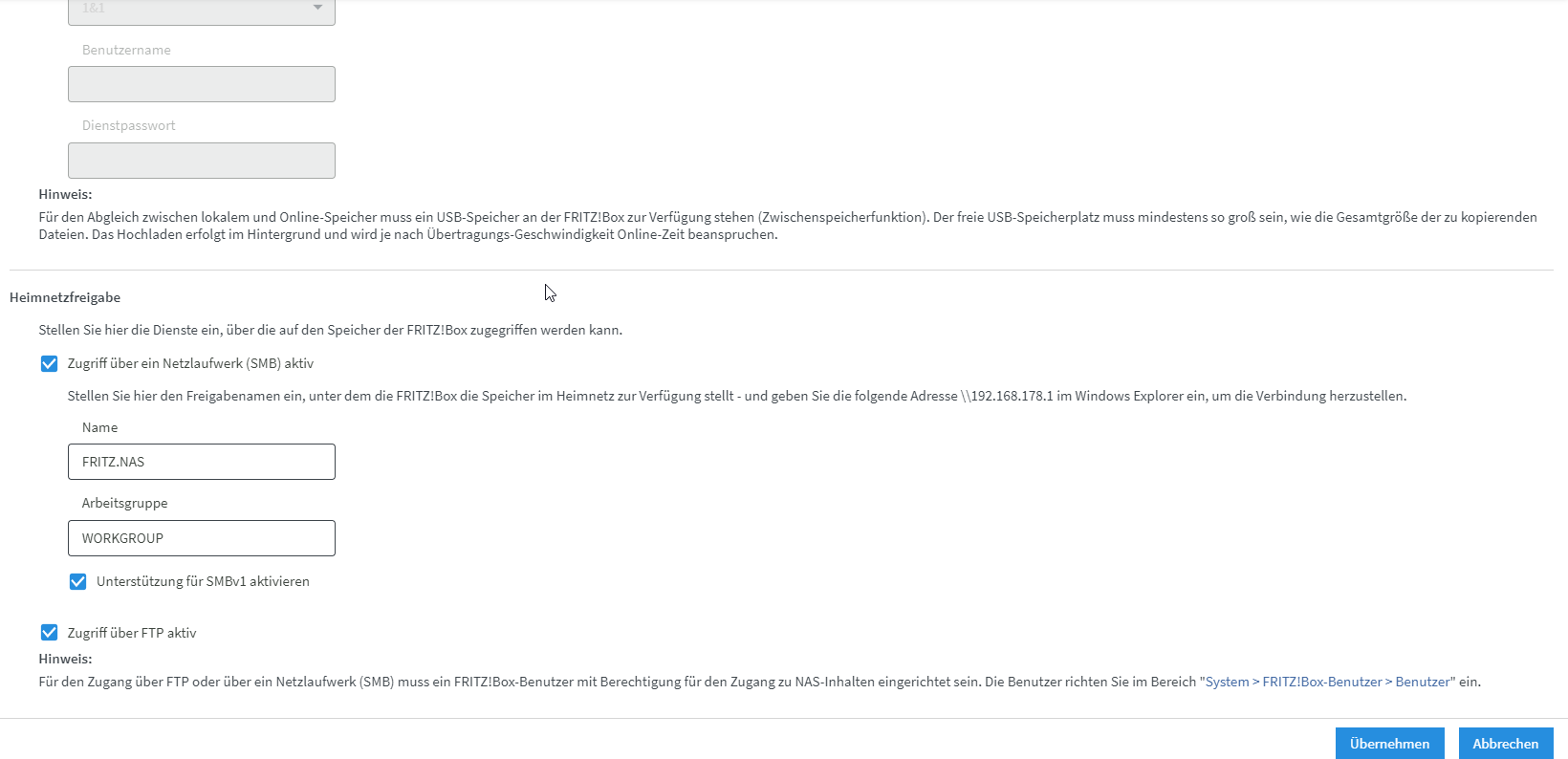
Hier nochmals die Konfiguration der Fritzbox:
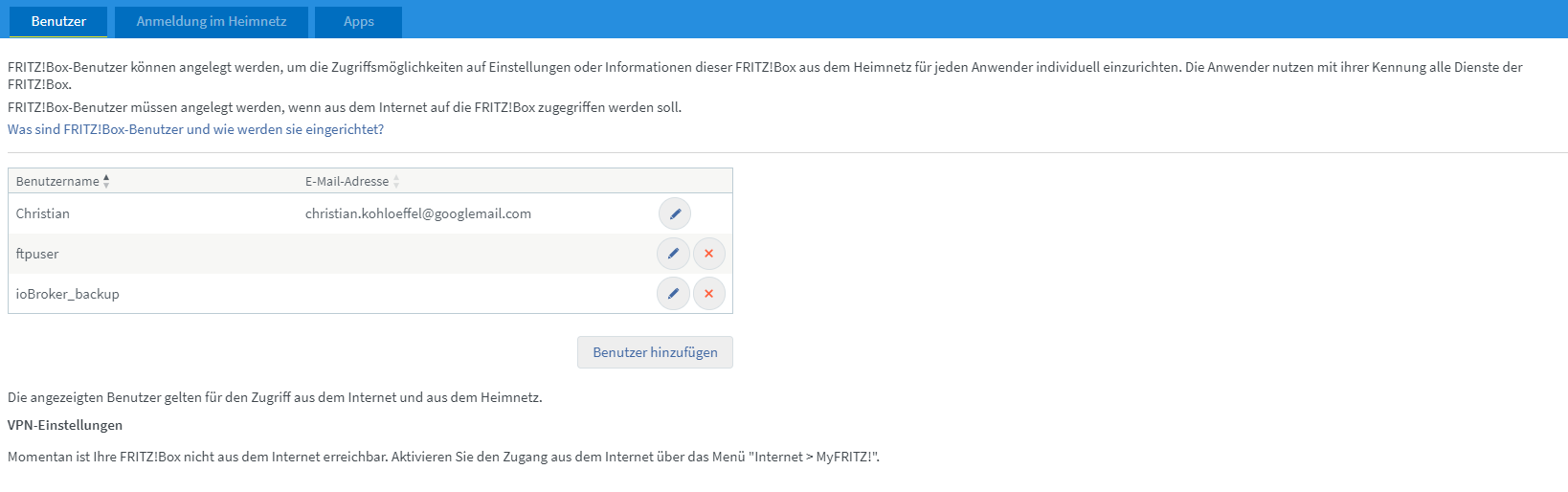
Und hier nochz die Benutzer, falls es hilft ...
@christian-kohlöffel
Schaue mal in den Thread ... Hier hatte ein User das selbe Problem ...
ext4 und in backitup und FB smb v1 aktiv war die Lösung.
Prüfe auch nochmal die Rechte ... Am sinnvollsten war glaube ich, den kompletten Speicher freizugeben. -
@christian-kohlöffel
Schaue mal in den Thread ... Hier hatte ein User das selbe Problem ...
ext4 und in backitup und FB smb v1 aktiv war die Lösung.
Prüfe auch nochmal die Rechte ... Am sinnvollsten war glaube ich, den kompletten Speicher freizugeben.Ich glaube du meintest diesen Thread:
Hab mir das alles genau angeschaut. Und Du hast Recht wahrscheinlich war SMBv1 und ext4 die Lösung. Das habe ich bereits ebenfalls probiert. Leider ohne Erfolg.
Was mich irritiert hat war FTP und NAS unter Backitup Einstellungen. Habe ich ebenfalls probiert, aber keine Veränderung. Macht es Sinn mal mit FTP weiter zu machen?
Zur Bestätigung habe ich auch mal Backitup ohne Influxdb und mit REDIS laufen lassen so wie im anderen Thread. Das läuft ohne Probleme (nur influxdb will ums verrecken nicht ... :-) ): )
Started iobroker ... [DEBUG] [mount] - mount successfully completed [DEBUG] [mount] - done [DEBUG] [iobroker] - host.raspberrypi 2134 states saved [DEBUG] [iobroker] - host.raspberrypi 2583 objects saved [DEBUG] [iobroker] - Backup created: /opt/iobroker/backups/iobroker_2021_04_11-11_16_22_backupiobroker.tar.gz [DEBUG] [iobroker] - done [DEBUG] [redis] - Start Redis Backup ... [DEBUG] [redis] - Created redistmp directory [DEBUG] [redis] - Backup created: /opt/iobroker/backups/redis_2021_04_11-11_16_31_backupiobroker.tar.gz [DEBUG] [redis] - Try deleting the redis tmp directory: "/opt/iobroker/backups/redistmp" [DEBUG] [redis] - redis tmp directory "/opt/iobroker/backups/redistmp" successfully deleted [DEBUG] [redis] - done [DEBUG] [cifs] - done [DEBUG] [clean] - done [DEBUG] [historyHTML] - new history html values created [DEBUG] [historyHTML] - done [DEBUG] [historyJSON] - new history json values created [DEBUG] [historyJSON] - done [DEBUG] [umount] - mount activ, umount is started ... [DEBUG] [umount] - umount successfully completed [DEBUG] [umount] - done [EXIT] 0 -
Ich glaube du meintest diesen Thread:
Hab mir das alles genau angeschaut. Und Du hast Recht wahrscheinlich war SMBv1 und ext4 die Lösung. Das habe ich bereits ebenfalls probiert. Leider ohne Erfolg.
Was mich irritiert hat war FTP und NAS unter Backitup Einstellungen. Habe ich ebenfalls probiert, aber keine Veränderung. Macht es Sinn mal mit FTP weiter zu machen?
Zur Bestätigung habe ich auch mal Backitup ohne Influxdb und mit REDIS laufen lassen so wie im anderen Thread. Das läuft ohne Probleme (nur influxdb will ums verrecken nicht ... :-) ): )
Started iobroker ... [DEBUG] [mount] - mount successfully completed [DEBUG] [mount] - done [DEBUG] [iobroker] - host.raspberrypi 2134 states saved [DEBUG] [iobroker] - host.raspberrypi 2583 objects saved [DEBUG] [iobroker] - Backup created: /opt/iobroker/backups/iobroker_2021_04_11-11_16_22_backupiobroker.tar.gz [DEBUG] [iobroker] - done [DEBUG] [redis] - Start Redis Backup ... [DEBUG] [redis] - Created redistmp directory [DEBUG] [redis] - Backup created: /opt/iobroker/backups/redis_2021_04_11-11_16_31_backupiobroker.tar.gz [DEBUG] [redis] - Try deleting the redis tmp directory: "/opt/iobroker/backups/redistmp" [DEBUG] [redis] - redis tmp directory "/opt/iobroker/backups/redistmp" successfully deleted [DEBUG] [redis] - done [DEBUG] [cifs] - done [DEBUG] [clean] - done [DEBUG] [historyHTML] - new history html values created [DEBUG] [historyHTML] - done [DEBUG] [historyJSON] - new history json values created [DEBUG] [historyJSON] - done [DEBUG] [umount] - mount activ, umount is started ... [DEBUG] [umount] - umount successfully completed [DEBUG] [umount] - done [EXIT] 0@christian-kohlöffel
Ich habe nun nochmal versucht, die Rechtevergabe beim erstellen des Temp-Ordners zu modifizieren.
Teste mal bitte die Version 2.1.1 vom Dev-BranchDev-URL: https://github.com/simatec/ioBroker.backitup/tarball/dev
Installieren über Github wie folgt ausführen:
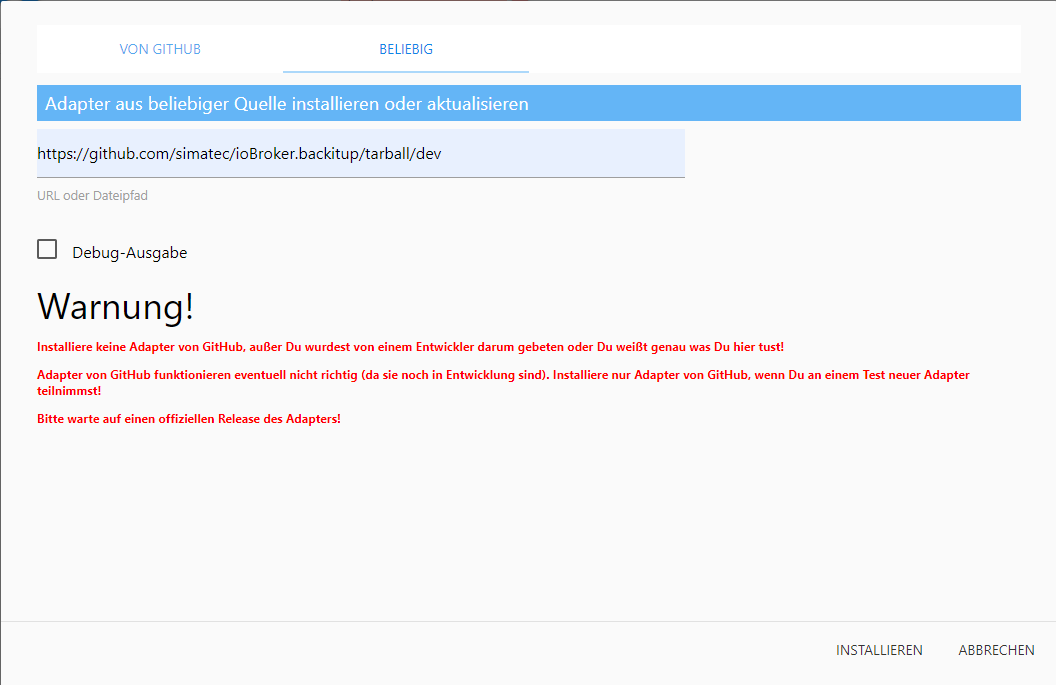
Nach Abschluss der Installation noch einen Upload ausführen ...





Hey! Du scheinst an dieser Unterhaltung interessiert zu sein, hast aber noch kein Konto.
Hast du es satt, bei jedem Besuch durch die gleichen Beiträge zu scrollen? Wenn du dich für ein Konto anmeldest, kommst du immer genau dorthin zurück, wo du zuvor warst, und kannst dich über neue Antworten benachrichtigen lassen (entweder per E-Mail oder Push-Benachrichtigung). Du kannst auch Lesezeichen speichern und Beiträge positiv bewerten, um anderen Community-Mitgliedern deine Wertschätzung zu zeigen.
Mit deinem Input könnte dieser Beitrag noch besser werden 💗
Registrieren AnmeldenSupport us
393
Online33.0k
Benutzer83.6k
Themen1.3m
Beiträge