




[Gelöst] brauche Hilfe - iobroker im Browser nicht aufrufbar
-
@glasfaser Glaube ich muss mir mal so ein Docker teil basteln, kann doch nicht so schwer sein die Installation.
Dann kann ich wenigstens richtig mit reden :-)
Jein ....
... so wie schon @Homoran immer wieder schreibt " nichts für Anfänger " .
Das Murmeltier kommt jeden Tag .... :)Synology 918+ 16GB - ioBroker in Docker v9 , VISO auf Trekstor Primebook C13 13,3" , Hikvision Domkameras mit Surveillance Station .. CCU RaspberryMatic in Synology VM .. Zigbee CC2538+CC2592 .. Sonoff .. KNX .. Modbus ..
-
Jein ....
... so wie schon @Homoran immer wieder schreibt " nichts für Anfänger " .
Das Murmeltier kommt jeden Tag .... :) -
@glasfaser OK.
Habe zwar keine DS aber kann im OMV den Kram ja mal versuchen... wenn ich mal Langeweile habe.
Das Problem ist ... jeder Newbie hat seine Synology anders konfiguriert , Admin , Rechte , Https , Ports usw. , also nichts einheitlich deshalb sind die Videos nicht gerade empfehleswert.
Beispiel .... deshalb auch immer das leidige Problem mit dem Backitup , warum immer den Sicherungspfad mit cifs machen , einfach den Ordner im Docker " Backup " mounten ... fertig .
Wenn eine Syn mit ioBroker , dann VMM draufmachen , Linux Dietpi installieren und dann mit einem Befehl ioBroker installieren ... fertig .
-
@elgander sagte in Newby braucht Hilfe - iobroker im Browser nicht aufrufbar:
Im Browser kommt die Meldung, das der Server nicht antwortet.
und auf der DS: Docker-Container portainer wurde unerwartet gestoppt.Der Container iobroker hat doch nichts mit dem Container Portainer zu tun .
Warum jetzt Portainer , lege ihn doch ganz normal an , wie im Video mit der Synology Oberfläche an.!EDIT :
Zeige mal deine ganzen Einstellungen vom Docker !und den ganzen Log , den du im DockerContainer im Terminal siehst und nicht nur ein bruchteil posten !!!
-
@elgander sagte in Newby braucht Hilfe - iobroker im Browser nicht aufrufbar:
Existing installation of ioBroker detected in /opt/iobroker.
Lösche den Container iobroker1
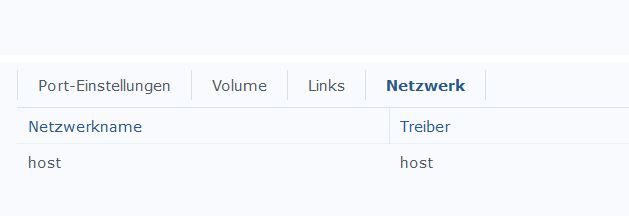
Erstelle einen neuen Container " iobroker2 "Beispielsweise , achte darauf das Host ist , so wie auch im Video gezeigt .
-
@elgander Und du hast Portainer nach dieser Anleitung installiert und auch das mit den PORTS beachtet:
https://smarthome.buanet.de/2018/12/portainer-auf-der-synology-diskstation/
???
@wendy2702 said in Newby braucht Hilfe - iobroker im Browser nicht aufrufbar:
@elgander Und du hast Portainer nach dieser Anleitung installiert und auch das mit den PORTS beachtet:
https://smarthome.buanet.de/2018/12/portainer-auf-der-synology-diskstation/
???
Wenn du das mit dem Port 8889 meinst ... ja
-
@wendy2702 said in Newby braucht Hilfe - iobroker im Browser nicht aufrufbar:
@elgander Und du hast Portainer nach dieser Anleitung installiert und auch das mit den PORTS beachtet:
https://smarthome.buanet.de/2018/12/portainer-auf-der-synology-diskstation/
???
Wenn du das mit dem Port 8889 meinst ... ja
-
@elgander sagte in Newby braucht Hilfe - iobroker im Browser nicht aufrufbar:
Existing installation of ioBroker detected in /opt/iobroker.
Lösche den Container iobroker1
Erstelle einen neuen Container " iobroker2 "Beispielsweise , achte darauf das Host ist , so wie auch im Video gezeigt .
@glasfaser said in Newby braucht Hilfe - iobroker im Browser nicht aufrufbar:
@elgander sagte in Newby braucht Hilfe - iobroker im Browser nicht aufrufbar:
Existing installation of ioBroker detected in /opt/iobroker.
Lösche den Container iobroker1
Erstelle einen neuen Container " iobroker2 "Beispielsweise , achte darauf das Host ist , so wie auch im Video gezeigt .
)Habe ich, gleiches Ergebnis.
-
@glasfaser said in Newby braucht Hilfe - iobroker im Browser nicht aufrufbar:
@elgander sagte in Newby braucht Hilfe - iobroker im Browser nicht aufrufbar:
Existing installation of ioBroker detected in /opt/iobroker.
Lösche den Container iobroker1
Erstelle einen neuen Container " iobroker2 "Beispielsweise , achte darauf das Host ist , so wie auch im Video gezeigt .
)Habe ich, gleiches Ergebnis.
-
@glasfaser said in Newby braucht Hilfe - iobroker im Browser nicht aufrufbar:
@elgander sagte in Newby braucht Hilfe - iobroker im Browser nicht aufrufbar:
Existing installation of ioBroker detected in /opt/iobroker.
Lösche den Container iobroker1
Erstelle einen neuen Container " iobroker2 "Beispielsweise , achte darauf das Host ist , so wie auch im Video gezeigt .
)Habe ich, gleiches Ergebnis.
Zeige auch mal den Log ( bei Protokoll ) wo auch die iobroker Version zu sehen ist .
Beispiel:
2020-01-07 07:12:08 stdout ----- SETUID: 1000 ----- 2020-01-07 07:12:08 stdout ----- SETGID: 1000 ----- 2020-01-07 07:12:08 stdout ----- PACKAGES: nano ----- 2020-01-07 07:12:08 stdout ----- AVAHI: false ----- 2020-01-07 07:12:08 stdout ----- ENV ----- 2020-01-07 07:12:08 stdout ----- ----- 2020-01-07 07:12:08 stdout ----- npm: 6.13.4 ----- 2020-01-07 07:12:06 stdout ----- node: v10.18.0 ----- 2020-01-07 07:12:06 stdout ----- image: v4.0.0 ----- 2020-01-07 07:12:06 stdout ----- Versions ----- 2020-01-07 07:12:06 stdout ----- ----- 2020-01-07 07:12:06 stdout ----- arch: x86_64 ----- 2020-01-07 07:12:06 stdout ----- System ----- 2020-01-07 07:12:06 stdout ----- ----- 2020-01-07 07:12:06 stdout ----- Debugging information ----- 2020-01-07 07:12:06 stdout ------------------------------------------------------------ 2020-01-07 07:12:06 stdout 2020-01-07 07:12:06 stdout ------------------------------------------------------------ 2020-01-07 07:12:06 stdout ----- Please be patient! ----- 2020-01-07 07:12:06 stdout ----- Startupscript is now running. ----- 2020-01-07 07:12:06 stdout ----- Welcome to your ioBroker-container! ----- 2020-01-07 07:12:06 stdout ------------------------------------------------------------ 2020-01-07 07:12:06 stdout 2020-01-07 07:12:06 stdout ------------------------------------------------------------ 2020-01-07 07:12:06 stdout --------------- 2020-01-07 08:12:06 --------------- 2020-01-07 07:12:06 stdout ------------------------------------------------------------ -
-
Er läuft doch !
Er muß doch jetzt aufrufbar sein
Beispiel :
DSM ist http://192.168.178.11:5000/
IoBroker http://192.168.178.11:8081/ -
Er läuft doch !
Er muß doch jetzt aufrufbar sein
Beispiel :
DSM ist http://192.168.178.11:5000/
IoBroker http://192.168.178.11:8081/@glasfaser said in Newby braucht Hilfe - iobroker im Browser nicht aufrufbar:
Er läuft doch !
Er muß doch jetzt aufrufbar sein
Beispiel :
Leider nicht. Hier noch das Protokoll:
17:52:25
------------------------------------------------------------
stdout
17:52:25
-----         Step 1 of 5: Preparing container         -----
stdout
17:52:25
------------------------------------------------------------
stdout
17:52:25

stdout
17:52:25
Registering maintenance script as command.
stdout
17:52:25
Done.
stdout
17:52:25

stdout
17:52:25
------------------------------------------------------------
stdout
17:52:25
-----   Step 2 of 5: Detecting ioBroker installation   -----
stdout
17:52:25
------------------------------------------------------------
stdout
17:52:25

stdout
17:52:25
There is no data detected in /opt/iobroker. Restoring initial ioBroker installation...
stdout
17:52:49
Done.
stdout
17:52:49

stdout
17:52:49
------------------------------------------------------------
stdout
17:52:49
-----   Step 3 of 5: Checking ioBroker installation    -----
stdout
17:52:49
------------------------------------------------------------
stdout
17:52:49

stdout
17:52:49
(Re)Setting folder permissions (This might take a while! Please be patient!)...
stdout
17:52:49
Done.
stdout
17:52:49

stdout
17:52:49
Fixing "sudo-bug" by replacing sudo in iobroker with gosu...
stdout
17:52:49
Done.
stdout
17:52:49

stdout
17:52:49
Looks like this is a new and empty installation of ioBroker.
stdout
17:52:49
Hostname needs to be updated to  iobroker3...
stdout
17:52:52
The host for instance "system.adapter.admin.0" was changed from "7b832b48a10c" to "iobroker3".
stdout
17:52:52
The host for instance "system.adapter.discovery.0" was changed from "7b832b48a10c" to "iobroker3".
stdout
17:52:52
The host for instance "system.adapter.info.0" was changed from "7b832b48a10c" to "iobroker3".
stdout
17:52:53
Done.
stdout
17:52:53

stdout
17:52:53
------------------------------------------------------------
stdout
17:52:53
-----      Step 4 of 5: Applying special settings      -----
stdout
17:52:53
------------------------------------------------------------
stdout
17:52:53

stdout
17:52:53
Some adapters have special requirements/ settings which can be activated by the use of environment variables.
stdout
17:52:53
For more information take a look at readme.md on Github!
stdout
17:52:53

stdout
17:52:54
------------------------------------------------------------
stdout
17:52:54
-----          Step 5 of 5: ioBroker startup           -----
stdout
17:52:54
------------------------------------------------------------
stdout
17:52:54

stdout
17:52:54
Starting ioBroker...
stdout
17:52:54

stdout
17:52:55
host.iobroker3 check instance "system.adapter.admin.0" for host "iobroker3"
stdout
17:52:55
host.iobroker3 check instance "system.adapter.discovery.0" for host "iobroker3"
stdout
17:52:55
host.iobroker3 check instance "system.adapter.info.0" for host "iobroker3"
stdout
17:52:58
Send diag info: {"uuid":"ab265f4a-67f9-a46a-c0b2-61e4b95cefe5","language":"","country":"","hosts":[{"version":"3.2.16","platform":"Javascript/Node.js","type":"linux"}],"node":"v12.21.0","arch":"x64","adapters":{"admin":{"version":"4.2.1","platform":"Javascript/Node.js"},"discovery":{"version":"2.5.0","platform":"Javascript/Node.js"},"info":{"version":"1.7.10","platform":"Javascript/Node.js"}},"statesType":"file","objectsType":"file","model":"Intel(R) Celeron(R) CPU  N3060  @ 1.60GHz","cpus":2,"mem":8287653888,"ostype":"Linux","city":""}
stdout
17:52:58
hash changed or no sources cached => force download of new sources
stdout
17:53:07
hostname: Name or service not known
stdout
17:53:07
stdout
17:53:08
ls: Zugriff auf '/dev/disk/by-id/' nicht möglich: Datei oder Verzeichnis nicht gefunden
stdout
17:53:08
stdout
17:53:08
ls: Zugriff auf '/dev/disk/by-id/' nicht möglich: Datei oder Verzeichnis nicht gefunden
MOD EDIT: LOG IN CODE TAGS </> GESETZT
-
@glasfaser said in Newby braucht Hilfe - iobroker im Browser nicht aufrufbar:
Er läuft doch !
Er muß doch jetzt aufrufbar sein
Beispiel :
Leider nicht. Hier noch das Protokoll:
17:52:25
------------------------------------------------------------
stdout
17:52:25
-----         Step 1 of 5: Preparing container         -----
stdout
17:52:25
------------------------------------------------------------
stdout
17:52:25

stdout
17:52:25
Registering maintenance script as command.
stdout
17:52:25
Done.
stdout
17:52:25

stdout
17:52:25
------------------------------------------------------------
stdout
17:52:25
-----   Step 2 of 5: Detecting ioBroker installation   -----
stdout
17:52:25
------------------------------------------------------------
stdout
17:52:25

stdout
17:52:25
There is no data detected in /opt/iobroker. Restoring initial ioBroker installation...
stdout
17:52:49
Done.
stdout
17:52:49

stdout
17:52:49
------------------------------------------------------------
stdout
17:52:49
-----   Step 3 of 5: Checking ioBroker installation    -----
stdout
17:52:49
------------------------------------------------------------
stdout
17:52:49

stdout
17:52:49
(Re)Setting folder permissions (This might take a while! Please be patient!)...
stdout
17:52:49
Done.
stdout
17:52:49

stdout
17:52:49
Fixing "sudo-bug" by replacing sudo in iobroker with gosu...
stdout
17:52:49
Done.
stdout
17:52:49

stdout
17:52:49
Looks like this is a new and empty installation of ioBroker.
stdout
17:52:49
Hostname needs to be updated to  iobroker3...
stdout
17:52:52
The host for instance "system.adapter.admin.0" was changed from "7b832b48a10c" to "iobroker3".
stdout
17:52:52
The host for instance "system.adapter.discovery.0" was changed from "7b832b48a10c" to "iobroker3".
stdout
17:52:52
The host for instance "system.adapter.info.0" was changed from "7b832b48a10c" to "iobroker3".
stdout
17:52:53
Done.
stdout
17:52:53

stdout
17:52:53
------------------------------------------------------------
stdout
17:52:53
-----      Step 4 of 5: Applying special settings      -----
stdout
17:52:53
------------------------------------------------------------
stdout
17:52:53

stdout
17:52:53
Some adapters have special requirements/ settings which can be activated by the use of environment variables.
stdout
17:52:53
For more information take a look at readme.md on Github!
stdout
17:52:53

stdout
17:52:54
------------------------------------------------------------
stdout
17:52:54
-----          Step 5 of 5: ioBroker startup           -----
stdout
17:52:54
------------------------------------------------------------
stdout
17:52:54

stdout
17:52:54
Starting ioBroker...
stdout
17:52:54

stdout
17:52:55
host.iobroker3 check instance "system.adapter.admin.0" for host "iobroker3"
stdout
17:52:55
host.iobroker3 check instance "system.adapter.discovery.0" for host "iobroker3"
stdout
17:52:55
host.iobroker3 check instance "system.adapter.info.0" for host "iobroker3"
stdout
17:52:58
Send diag info: {"uuid":"ab265f4a-67f9-a46a-c0b2-61e4b95cefe5","language":"","country":"","hosts":[{"version":"3.2.16","platform":"Javascript/Node.js","type":"linux"}],"node":"v12.21.0","arch":"x64","adapters":{"admin":{"version":"4.2.1","platform":"Javascript/Node.js"},"discovery":{"version":"2.5.0","platform":"Javascript/Node.js"},"info":{"version":"1.7.10","platform":"Javascript/Node.js"}},"statesType":"file","objectsType":"file","model":"Intel(R) Celeron(R) CPU  N3060  @ 1.60GHz","cpus":2,"mem":8287653888,"ostype":"Linux","city":""}
stdout
17:52:58
hash changed or no sources cached => force download of new sources
stdout
17:53:07
hostname: Name or service not known
stdout
17:53:07
stdout
17:53:08
ls: Zugriff auf '/dev/disk/by-id/' nicht möglich: Datei oder Verzeichnis nicht gefunden
stdout
17:53:08
stdout
17:53:08
ls: Zugriff auf '/dev/disk/by-id/' nicht möglich: Datei oder Verzeichnis nicht gefunden
MOD EDIT: LOG IN CODE TAGS </> GESETZT
-
Er läuft doch !
Er muß doch jetzt aufrufbar sein
Beispiel :
DSM ist http://192.168.178.11:5000/
IoBroker http://192.168.178.11:8081/ -
@glasfaser
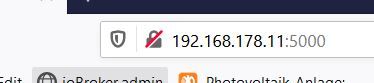
ist es normal, das wenn ich im browser http:// (IP NAS):8081 eingebe und dann enter drücke in der Adresszeile dann nur noch die IP :8081 zu sehen ist? -
Nimm einen Browser den du nie nutzt und öffne damit iobroker .... :8081 und zeige davon einen Screenshot !
@glasfaser said in Newby braucht Hilfe - iobroker im Browser nicht aufrufbar:
Nimm einen Browser den du nie nutzt und öffne damit iobroker .... :8081 und zeige davon einen Screenshot !
ich hab nur safari oder chrome und bei beiden geht es nicht.
-
@glasfaser said in Newby braucht Hilfe - iobroker im Browser nicht aufrufbar:
Nimm einen Browser den du nie nutzt und öffne damit iobroker .... :8081 und zeige davon einen Screenshot !
ich hab nur safari oder chrome und bei beiden geht es nicht.
Synology 918+ 16GB - ioBroker in Docker v9 , VISO auf Trekstor Primebook C13 13,3" , Hikvision Domkameras mit Surveillance Station .. CCU RaspberryMatic in Synology VM .. Zigbee CC2538+CC2592 .. Sonoff .. KNX .. Modbus ..
-
@glasfaser Müssen die Ports nicht durchgereicht werden!?
Bitte keine Fragen per PN, die gehören ins Forum!
Benutzt das Voting rechts unten im Beitrag wenn er euch geholfen hat.
-
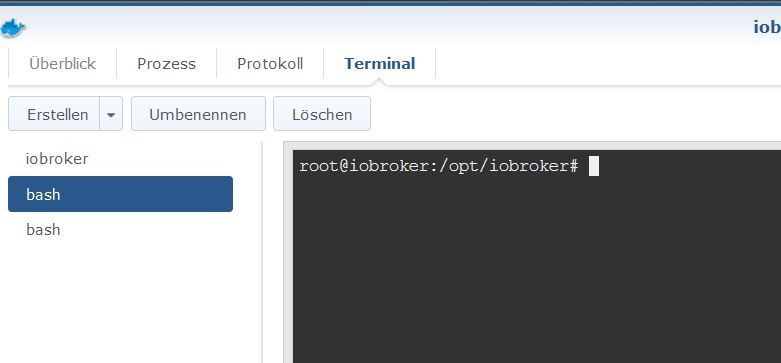
@glasfaser said in Newby braucht Hilfe - iobroker im Browser nicht aufrufbar:
Da ist was anders faul .... ioBroker läuft .
das befürchte ich auch, da ich ja den Portainer im browser auch nicht aufrufen konnte. :(


Hey! Du scheinst an dieser Unterhaltung interessiert zu sein, hast aber noch kein Konto.
Hast du es satt, bei jedem Besuch durch die gleichen Beiträge zu scrollen? Wenn du dich für ein Konto anmeldest, kommst du immer genau dorthin zurück, wo du zuvor warst, und kannst dich über neue Antworten benachrichtigen lassen (entweder per E-Mail oder Push-Benachrichtigung). Du kannst auch Lesezeichen speichern und Beiträge positiv bewerten, um anderen Community-Mitgliedern deine Wertschätzung zu zeigen.
Mit deinem Input könnte dieser Beitrag noch besser werden 💗
Registrieren Anmelden104
Online33.0k
Benutzende83.7k
Themen1.3m
Beiträge