




JS-Controller Update, danach Admin und Web nicht erreichbar
-
@Jan1 Hatte ich aber oben gefragt

Bisher läuft aber scheinbar alles. -
@Jan1 - kurze Frage: wie starte ich den npm update/upgrade?
Bei mir wird mit npm update oder npm upgrade leider nix hochgezogen??Liebe Grüße
tom…ist schon sehr lange begeisterter ioBroker Nutzer! 1x zu Hause und 1x auf der Alm. ioBroker ist das 'Hirn' des Smarthome und steuert HomeMatic und Shellys, loggt was so passiert, zeigt es auf Tabletts schön an und ermöglicht mir via Cloud Adapter den Fernzugriff...
-
@Jan1 - kurze Frage: wie starte ich den npm update/upgrade?
Bei mir wird mit npm update oder npm upgrade leider nix hochgezogen??Liebe Grüße
tom -
@Jan1 - kurze Frage: wie starte ich den npm update/upgrade?
Bei mir wird mit npm update oder npm upgrade leider nix hochgezogen??Liebe Grüße
tom -
Ich kann hier kaum folgen bin kein linux crack...
Dieses npm auf 6.14.10 hat keinen erfolg gebracht....
Ich nutze iobroker auf eine PI 4 was mein ihr mit Redis oder file ?
Wie kann es sein das nur noch ein Backup bei mir da ist Standart sind doch die letzten 5 .....
-
@Rushmed sagte in JS-Controller Update, danach Admin und Web nicht erreichbar:
@Jan1 Danke!
Hab erstmal wieder downgegraded.npm i iobroker.js-controller@3.1.6 --productionDas funktioniert bei mir leider nicht 😞
@MichMein sagte in JS-Controller Update, danach Admin und Web nicht erreichbar:
Das funktioniert bei mir leider nicht
wo bist du denn da?
Wenn du vorher nicht ins Installationsvereichnis (üblicherweise /opt/iobroker) wechselst kann es nicht helfen, eher noch weiteren Schaden anrichten
kein Support per PN! - Fragen im Forum stellen - Benutzt das Voting rechts unten im Beitrag wenn er euch geholfen hat.
Das Forum freut sich über eine Spende. Benutzt dazu den Spendenbutton oben rechts. Danke!
der Installationsfixer: curl -fsL https://iobroker.net/fix.sh | bash - -
@SBorg sagte in JS-Controller Update, danach Admin und Web nicht erreichbar:
Habt ihr eine aktuelle NPM-Version? Bei mir hat ein Update auf 6.14.10 geholfen:
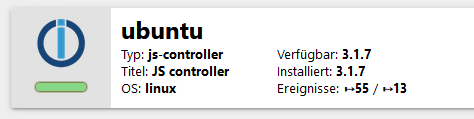
Danke !
Kan das jemand bestätigen?PS: Core team ist informiert und schauen
@Dutchman @Bluefox
Mein Update war Erfolgreich.Last login: Fri Dec 25 09:17:08 2020 from 192.168.178.201 pi@raspberrypi:~ $ iobroker stop pi@raspberrypi:~ $ iobroker update Used repository: Beta (alt_latest) hash unchanged, use cached sources update done Adapter "accuweather" : 1.1.4 Adapter "adb" : 0.0.5 Adapter "admin" : 4.1.12 , installed 4.1.12 Adapter "alarm" : 1.8.2 Adapter "alexa2" : 3.5.0 , installed 3.5.0 Adapter "alpha2" : 1.0.0 Adapter "amazon-dash" : 1.1.0 Adapter "artnet" : 1.2.2 Adapter "asterisk" : 1.0.6 Adapter "asuswrt" : 1.0.1 Adapter "b-control-em" : 0.2.1 Adapter "backitup" : 1.8.3 , installed 1.8.3 Adapter "beckhoff" : 1.2.2 Adapter "benq" : 0.2.2 Adapter "binance" : 1.1.3 Adapter "ble" : 0.12.0 , installed 0.12.0 Adapter "blink4home" : 0.1.1 Adapter "bmw" : 1.4.0 Adapter "boblight" : 0.0.1 Adapter "bosesoundtouch": 0.9.2 Adapter "botvac" : 1.0.0 Adapter "bring" : 1.7.7 Adapter "broadlink2" : 2.1.5 Adapter "bsblan" : 0.2.0 Adapter "bshb" : 0.1.10 Adapter "calendar" : 1.2.0 Adapter "cameras" : 0.1.3 Adapter "canbus" : 1.0.0-beta.4 Adapter "chromecast" : 2.3.1 Adapter "cloud" : 4.0.0 Adapter "comfoair" : 1.1.1 Adapter "contact" : 1.1.3 Adapter "contactid" : 1.0.2 Adapter "coronavirus-statistics": 0.6.3 Adapter "corrently" : 0.0.2 Adapter "countdown" : 1.1.0 Adapter "cul" : 1.3.4 Adapter "daikin" : 1.1.3 Adapter "daswetter" : 3.0.4 Adapter "deconz" : 1.3.11 , installed 1.3.11 Adapter "denon" : 1.9.1 Adapter "device-reminder": 0.7.4 Adapter "devices" : 0.3.15 , installed 0.3.15 Adapter "digitalstrom" : 2.0.5 Adapter "discovergy" : 0.5.4 Adapter "discovery" : 2.4.1 Adapter "doorbird" : 0.1.5 Adapter "doorio" : 1.1.1 Adapter "ds18b20" : 1.2.0 Adapter "dwd" : 2.5.1 Adapter "ebus" : 2.2.3 Adapter "echarts" : 0.4.9 Adapter "ecovacs-deebot": 1.0.7 Adapter "egigeozone" : 0.1.2 Adapter "ekey" : 1.1.0 Adapter "email" : 1.0.7 Adapter "emby" : 1.0.2 Adapter "energymanager" : 1.2.3 Adapter "enet" : 1.0.1 Adapter "epson_stylus_px830": 0.2.1 Adapter "eventlist" : 0.4.2 Adapter "exchangerates" : 0.0.13 Adapter "fahrplan" : 1.0.0 Adapter "fakeroku" : 0.2.1 Adapter "fb-checkpresence": 1.1.0 Adapter "feiertage" : 1.0.19 Adapter "fhem" : 1.5.3 Adapter "find-my-iphone": 0.2.17 Adapter "firetv" : 1.0.0 , installed 1.0.0 Adapter "fitbit-api" : 0.1.1 Adapter "flot" : 1.10.6 Adapter "followthesun" : 0.2.5 Adapter "foobar2000" : 2.0.3 Adapter "fritzbox" : 0.2.1 Adapter "fritzdect" : 1.1.4 Adapter "fronius" : 1.1.1 Adapter "frontier_silicon": 0.0.10 Adapter "fullcalendar" : 1.1.0 Adapter "fullybrowser" : 2.0.1 Adapter "g-homa" : 0.5.3 Adapter "geofency" : 0.3.2 Adapter "go-e" : 0.2.0 Adapter "growatt" : 0.0.15 Adapter "gruenbeck" : 0.0.24 Adapter "habpanel" : 0.4.3 Adapter "haier" : 1.0.3 Adapter "ham" : 3.0.2 Adapter "ham-wemo" : 1.1.0 Adapter "harmony" : 1.2.2 Adapter "hass" : 1.0.0 Adapter "hass-mqtt" : 0.0.7 Adapter "heatingcontrol": 1.1.2 Adapter "heos" : 1.6.1 Adapter "heytech" : 1.0.1 Adapter "hid" : 0.1.17 Adapter "hilink" : 0.2.7 Adapter "history" : 1.9.10 Adapter "hm-rega" : 3.0.5 Adapter "hm-rpc" : 1.14.24 Adapter "hmip" : 1.6.0 Adapter "hombot" : 0.1.3 Adapter "homeconnect" : 0.0.31 Adapter "homee" : 1.1.0 Adapter "homepilot" : 1.1.4 Adapter "hp-ilo" : 1.0.6 Adapter "hs100" : 2.0.1 Adapter "hue" : 3.3.8 Adapter "hue-extended" : 2.0.0 Adapter "hyperion" : 0.0.9 Adapter "i2c" : 1.1.1 Adapter "ical" : 1.8.3 Adapter "icons-addictive-flavour-png": 0.1.0 Adapter "icons-fatcow-hosting": 0.1.0 Adapter "icons-icons8" : 0.0.1 Adapter "icons-material-png": 0.1.0 Adapter "icons-material-svg": 0.1.0 Adapter "icons-mfd-png" : 1.0.2 Adapter "icons-mfd-svg" : 1.0.2 Adapter "icons-open-icon-library-png": 0.1.2 Adapter "icons-ultimate-png": 1.0.1 Adapter "influxdb" : 1.9.3 Adapter "info" : 1.7.13 , installed 1.7.13 Adapter "innogy-smarthome": 0.3.6 Adapter "intesishome" : 0.1.2 Adapter "iogo" : 0.6.5 Adapter "iot" : 1.8.8 , installed 1.8.8 Adapter "iqontrol" : 1.5.4 Adapter "jarvis" : 2.0.0 Adapter "javascript" : 4.10.8 , installed 4.10.8 Adapter "jeelink" : 0.1.3 Controller "js-controller" : 3.1.7 , installed 3.1.6 [Updateable] Adapter "js2fs" : 0.1.5 Adapter "kecontact" : 1.0.1 Adapter "klf200" : 1.0.1 Adapter "km200" : 2.0.3 Adapter "knmi-weather" : 1.0.0 Adapter "knx" : 1.0.42 Adapter "kodi" : 2.0.4 Adapter "kostal-piko-ba": 1.1.5 Adapter "kress" : 2.5.5 Adapter "lametric" : 1.0.0 Adapter "landroid" : 1.0.3 Adapter "lcn" : 1.0.2 Adapter "legrand-ecocompteur": 1.0.0 Adapter "letrika_comgw" : 0.0.5 Adapter "lgtv" : 1.1.10 Adapter "lgtv-rs" : 0.1.0 Adapter "lgtv11" : 1.0.5 Adapter "lifx" : 0.1.1 Adapter "lightify" : 0.2.16 Adapter "link" : 0.5.10 Adapter "linkeddevices" : 1.4.1 Adapter "linux-control" : 1.1.0 Adapter "logparser" : 1.1.0 Adapter "lovelace" : 1.3.3 Adapter "loxone" : 2.1.0 Adapter "luftdaten" : 1.0.1 Adapter "lupusec" : 1.2.9 Adapter "luxtronik1" : 0.2.7 Adapter "material" : 0.13.9 Adapter "maxcube" : 1.0.2 Adapter "maxcul" : 1.3.1 Adapter "mbus" : 2.3.1 Adapter "mclighting" : 0.1.1 Adapter "megad" : 1.2.1 Adapter "megadd" : 0.2.0 Adapter "megaesp" : 0.1.0 Adapter "melcloud" : 1.0.6 Adapter "mercedesme" : 0.0.42 Adapter "mercury" : 0.1.3 Adapter "meross" : 1.5.1 Adapter "meteoalarm" : 1.1.1 Adapter "midea" : 0.0.6 Adapter "miele" : 0.1.5 Adapter "mielecloudservice": 2.0.3 Adapter "mihome" : 1.3.6 , installed 1.3.6 Adapter "mihome-airpurifier": 0.1.8 Adapter "mihome-lamp" : 1.1.0 Adapter "mihome-plug" : 0.2.1 Adapter "mihome-vacuum" : 2.1.1 , installed 2.1.1 Adapter "miio" : 0.0.13 , installed 0.0.13 Adapter "mikrotik" : 1.0.12 Adapter "milight" : 0.3.6 Adapter "milight-smart-light": 1.0.1 Adapter "minuvis" : 1.2.0 Adapter "mobile" : 1.0.1 Adapter "modbus" : 3.2.2 Adapter "moma" : 1.2.7 Adapter "mpd" : 1.0.5 Adapter "mqtt" : 2.1.14 Adapter "mqtt-client" : 1.3.1 Adapter "multicast" : 0.1.5 Adapter "musiccast" : 0.1.3 Adapter "mydlink" : 1.1.7 Adapter "myq" : 0.1.1 Adapter "mysensors" : 2.0.1 Adapter "mystrom" : 0.0.2 Adapter "mytime" : 0.6.1 Adapter "myvbus" : 0.0.6 Adapter "nanoleaf-lightpanels": 1.0.6 Adapter "net-tools" : 0.1.1 Adapter "netatmo" : 1.3.3 Adapter "netatmo-crawler": 0.3.8 Adapter "nibeuplink" : 0.4.0 Adapter "nina" : 0.0.23 Adapter "node-red" : 2.0.1 Adapter "noolitef" : 0.0.2 Adapter "nuki" : 1.4.2 Adapter "nuki-extended" : 2.3.0 , installed 2.3.0 Adapter "nut" : 1.1.3 Adapter "octoprint" : 1.0.5 Adapter "odl" : 1.1.2 Adapter "oilfox" : 2.1.0 Adapter "onkyo" : 2.0.3 Adapter "onvif" : 0.4.4 Adapter "openhab" : 1.1.0 Adapter "openligadb" : 1.2.0 Adapter "opentherm" : 0.1.9 Adapter "openweathermap": 0.1.0 Adapter "opi" : 0.1.1 Adapter "oppoplayer" : 0.2.1 Adapter "owfs" : 0.6.4 Adapter "owntracks" : 1.0.0 Adapter "panasonic-viera": 1.0.2 Adapter "parser" : 1.0.7 Adapter "paw" : 0.3.2 Adapter "phantomjs" : 1.1.2 Adapter "philips-air" : 0.1.0 Adapter "pi-hole" : 1.3.1 Adapter "piface" : 1.0.0 Adapter "pimatic" : 0.3.0 Adapter "ping" : 1.4.12 Adapter "places" : 1.0.0 Adapter "plenticore" : 2.1.3 Adapter "plex" : 0.9.1 Adapter "plexconnect" : 0.0.7 Adapter "pollenflug" : 1.0.6 Adapter "procon-ip" : 1.0.2 Adapter "proxmox" : 1.1.0 Adapter "proxy" : 1.2.1 Adapter "pushbullet" : 0.0.11 Adapter "pushover" : 2.0.3 Adapter "pushsafer" : 0.1.8 Adapter "radar2" : 2.0.1 Adapter "radiohead" : 1.1.0 Adapter "rainbird" : 0.2.2 Adapter "rflink" : 2.1.6 Adapter "rickshaw" : 1.0.0 Adapter "ring" : 1.1.3 Adapter "roadtraffic" : 0.2.0 Adapter "robonect" : 0.1.3 Adapter "roomba" : 1.1.1 Adapter "rpi2" : 1.2.0 Adapter "rssfeed" : 0.0.30 Adapter "s7" : 1.1.9 Adapter "samsung" : 0.2.9 Adapter "sanext" : 0.0.4 Adapter "sayit" : 1.12.2 Adapter "sbfspot" : 4.0.2 Adapter "scenes" : 2.3.3 Adapter "schoolfree" : 0.7.0 Adapter "schwoerer-ventcube": 1.3.0 Adapter "senec" : 1.0.12 Adapter "seq" : 0.2.1 Adapter "shelly" : 4.0.4 Adapter "shuttercontrol": 1.1.0 Adapter "sia" : 1.0.4 Adapter "siegenia" : 1.0.1 Adapter "simple-api" : 2.4.8 , installed 2.4.8 Adapter "sma-em" : 0.5.7 Adapter "smappee" : 0.2.2 Adapter "smartcontrol" : 1.2.1 Adapter "smartgarden" : 1.0.2 Adapter "smartmeter" : 3.1.6 Adapter "snips" : 1.5.1 Adapter "snmp" : 0.5.0 Adapter "socketio" : 3.0.13 , installed 3.0.13 Adapter "solarlog" : 2.0.0 Adapter "solarviewdatareader": 0.2.1 Adapter "solarwetter" : 1.0.0 Adapter "sonnen" : 1.7.0 Adapter "sonoff" : 2.3.3 Adapter "sonos" : 2.1.1 Adapter "sonus" : 0.1.1 Adapter "sony-bravia" : 1.0.3 Adapter "sourceanalytix": 0.4.8-alpha.2 Adapter "spotify-premium": 1.0.0 Adapter "sprinklecontrol": 0.1.1 Adapter "sql" : 1.15.3 Adapter "squeezebox" : 1.0.0 Adapter "squeezeboxrpc" : 1.3.0 Adapter "starline" : 1.0.0 Adapter "statistics" : 1.0.1 Adapter "stiebel-isg" : 1.5.3 Adapter "stockmarket" : 0.0.2 Adapter "sunnyportal" : 0.1.5 Adapter "swiss-weather-api": 0.3.2 Adapter "synology" : 0.1.18 Adapter "systeminfo" : 0.3.1 Adapter "tado" : 0.2.5 , installed 0.2.5 Adapter "tahoma" : 0.3.3 Adapter "tankerkoenig" : 2.0.9 Adapter "telegram" : 1.6.1 Adapter "terminal" : 0.1.2 Adapter "tesla-motors" : 0.2.3 Adapter "text2command" : 2.0.7 Adapter "tileboard" : 0.3.1 Adapter "tinker" : 1.1.0 Adapter "tino" : 1.0.0 Adapter "tinyrx4" : 1.0.0 Adapter "todoist2" : 0.8.5 Adapter "tr-064" : 4.2.1 , installed 4.2.1 Adapter "tradfri" : 2.6.5 , installed 2.6.5 Adapter "trashschedule" : 1.0.3 Adapter "tunnelbroker-endpoint-updater": 0.0.1 Adapter "tuya" : 3.5.2 Adapter "tvspielfilm" : 2.0.1 Adapter "unifi" : 0.5.8 Adapter "unifi-protect" : 0.0.11 Adapter "upnp" : 1.0.16 Adapter "vaillant" : 0.0.10 Adapter "valloxmv" : 1.1.1 Adapter "vcard" : 0.0.9 Adapter "vedirect" : 0.1.2 Adapter "velux" : 0.0.6 Adapter "viessmann" : 1.3.2 Adapter "viessmannapi" : 1.3.2 Adapter "virtualpowermeter": 1.2.1 Adapter "vis" : 1.3.6 Adapter "vis-bars" : 0.1.4 Adapter "vis-canvas-gauges": 0.1.5 Adapter "vis-colorpicker": 1.2.0 Adapter "vis-fancyswitch": 1.1.0 Adapter "vis-google-fonts": 0.1.0 Adapter "vis-history" : 1.0.0 Adapter "vis-hqwidgets" : 1.1.7 Adapter "vis-icontwo" : 0.36.0 Adapter "vis-inventwo" : 2.6.0 Adapter "vis-jqui-mfd" : 1.0.12 Adapter "vis-justgage" : 1.0.2 Adapter "vis-keyboard" : 0.0.2 Adapter "vis-lcars" : 1.0.4 Adapter "vis-map" : 1.0.4 Adapter "vis-material" : 0.1.3 Adapter "vis-material-advanced": 1.3.0 Adapter "vis-material-webfont": 0.0.3 Adapter "vis-materialdesign": 0.3.19 Adapter "vis-metro" : 1.1.2 Adapter "vis-players" : 0.1.6 Adapter "vis-plumb" : 1.0.2 Adapter "vis-rgraph" : 0.0.2 Adapter "vis-timeandweather": 1.1.7 Adapter "vis-weather" : 2.5.2 Adapter "vodafone-speedtest": 0.0.5 , installed 0.0.5 Adapter "volvo" : 0.0.3 Adapter "vr200" : 1.0.0 Adapter "vw-connect" : 0.0.21 Adapter "weatherflow_udp": 0.0.11 Adapter "weatherunderground": 3.2.2 Adapter "web" : 3.1.0 , installed 3.1.0 Adapter "web-speedy" : 0.2.0 Adapter "weishaupt-wem" : 0.0.8 Adapter "whatsapp-cmb" : 0.1.6 , installed 0.1.6 Adapter "wiffi-wz" : 2.2.0 Adapter "wifilight" : 1.1.0 Adapter "windows-control": 0.1.5 Adapter "wlanthermo-nano": 0.1.1 Adapter "wled" : 0.5.4 Adapter "wm-bus" : 0.3.1 Adapter "wolf" : 1.2.1 Adapter "worx" : 1.2.7 Adapter "xbox" : 0.7.2 Adapter "xs1" : 1.0.2 Adapter "yahka" : 0.12.0 Adapter "yamaha" : 0.4.0 Adapter "yeelight-2" : 1.0.3 Adapter "youtube" : 1.0.0 Adapter "yr" : 2.0.3 Adapter "zigbee" : 1.4.0 , installed 1.4.0 Adapter "zoneminder" : 0.3.3 Adapter "zont" : 0.5.4 Adapter "zwave" : 2.0.1 Adapter "zwave2" : 1.8.2 pi@raspberrypi:~ $ iobroker upgrade self Update js-controller from @3.1.6 to @3.1.7 NPM version: 7.3.0 npm install iobroker.js-controller@3.1.7 --loglevel error --unsafe-perm --prefix "/opt/iobroker" (System call) Starting node restart.js pi@raspberrypi:~ $ iobroker status iobroker is not running on this host. No iobroker host is running. Objects type: file States type: redis pi@raspberrypi:~ $ iobroker start pi@raspberrypi:~ $ iobroker status iobroker is running on this host. At least one iobroker host is running. Objects type: file States type: redis pi@raspberrypi:~ $ -
Bei allen, bei wem es nicht funktioniert: welche redis Version habt ihr?
SCAN is available since 2.8.0.
redis-cli -v
redis-cli 5.0.3
redis-server -v Redis server v=5.0.3 sha=00000000:0 malloc=jemalloc-5.1.0 bits=32 build=1b271fe49834c463Das war der Fehler im Log:
2020-12-25 09:48:57.552 - error: host.raspberrypi Caught by controller[0]: Error scan NOT SUPPORTED 2020-12-25 09:48:57.553 - error: host.raspberrypi Caught by controller[0]: ReplyError: Error scan NOT SUPPORTED 2020-12-25 09:48:57.553 - error: host.raspberrypi Caught by controller[0]: at parseError (/opt/iobroker/node_modules/redis-parser/lib/parser.js:179:12) 2020-12-25 09:48:57.553 - error: host.raspberrypi Caught by controller[0]: at parseType (/opt/iobroker/node_modules/redis-parser/lib/parser.js:302:14) -
Bei allen, bei wem es nicht funktioniert: welche redis Version habt ihr?
SCAN is available since 2.8.0.
@Bluefox @Dutchman
Ich ziehe meine Aussage zurück und behaupte das Gegenteil:Last login: Fri Dec 25 10:57:39 2020 from 192.168.178.201 pi@raspberrypi:~ $ iobroker list instances /opt/iobroker/node_modules/standard-as-callback/built/index.js:6 throw e; ^ ReplyError: Error scan NOT SUPPORTED at parseError (/opt/iobroker/node_modules/redis-parser/lib/parser.js:179:12) at parseType (/opt/iobroker/node_modules/redis-parser/lib/parser.js:302:14) Emitted 'error' event on ScanStream instance at: at /opt/iobroker/node_modules/ioredis/built/ScanStream.js:35:22 at tryCatcher (/opt/iobroker/node_modules/standard-as-callback/built/utils.js:11:23) at /opt/iobroker/node_modules/standard-as-callback/built/index.js:30:51 at processTicksAndRejections (node:internal/process/task_queues:93:5) { command: { name: 'scan', args: [ '0', 'MATCH', 'cfg.o.system.adapter.*', 'COUNT', '500' ] } } pi@raspberrypi:~ $Last login: Fri Dec 25 11:01:41 2020 from 192.168.178.201 pi@raspberrypi:~ $ redis-server -v Redis server v=5.0.3 sha=00000000:0 malloc=jemalloc-5.1.0 bits=32 build=1b271fe49834c463 pi@raspberrypi:~ $ -
Bei mir der selbe Fehler.
Ich bin auch erst mal wieder zurück.Habe keinen Redis-Server installiert, warum sollte er installiert sein? Welchen Vorteil hätte das?
NPM ist auf 6.4.10
-
@Bluefox @Dutchman
Ich ziehe meine Aussage zurück und behaupte das Gegenteil:Last login: Fri Dec 25 10:57:39 2020 from 192.168.178.201 pi@raspberrypi:~ $ iobroker list instances /opt/iobroker/node_modules/standard-as-callback/built/index.js:6 throw e; ^ ReplyError: Error scan NOT SUPPORTED at parseError (/opt/iobroker/node_modules/redis-parser/lib/parser.js:179:12) at parseType (/opt/iobroker/node_modules/redis-parser/lib/parser.js:302:14) Emitted 'error' event on ScanStream instance at: at /opt/iobroker/node_modules/ioredis/built/ScanStream.js:35:22 at tryCatcher (/opt/iobroker/node_modules/standard-as-callback/built/utils.js:11:23) at /opt/iobroker/node_modules/standard-as-callback/built/index.js:30:51 at processTicksAndRejections (node:internal/process/task_queues:93:5) { command: { name: 'scan', args: [ '0', 'MATCH', 'cfg.o.system.adapter.*', 'COUNT', '500' ] } } pi@raspberrypi:~ $Last login: Fri Dec 25 11:01:41 2020 from 192.168.178.201 pi@raspberrypi:~ $ redis-server -v Redis server v=5.0.3 sha=00000000:0 malloc=jemalloc-5.1.0 bits=32 build=1b271fe49834c463 pi@raspberrypi:~ $@All
Bitte auf 3.1.6 bleiben, 3.1.7 wird aus dem Verkehr gezogen wegen inkompatiblen object-Redis.
Entschuldigt bitte diese Bescherung !
-
@MichMein sagte in JS-Controller Update, danach Admin und Web nicht erreichbar:
Das funktioniert bei mir leider nicht
wo bist du denn da?
Wenn du vorher nicht ins Installationsvereichnis (üblicherweise /opt/iobroker) wechselst kann es nicht helfen, eher noch weiteren Schaden anrichten
@Homoran sagte in JS-Controller Update, danach Admin und Web nicht erreichbar:
@MichMein sagte in JS-Controller Update, danach Admin und Web nicht erreichbar:
Das funktioniert bei mir leider nicht
wo bist du denn da?
Wenn du vorher nicht ins Installationsvereichnis (üblicherweise /opt/iobroker) wechselst kann es nicht helfen, eher noch weiteren Schaden anrichten
Hi,
ich bin hierpi@raspberrypi:/opt/iobroker $ npm i iobroker.js-controller@3.1.6 --production npm WARN deprecated request@2.88.2: request has been deprecated, see https://github.com/request/request/issues/3142 > iobroker.js-controller@3.1.6 preinstall /opt/iobroker/node_modules/iobroker.js-controller > node lib/preinstallCheck.js NPM version: 6.14.10 > canvas@2.6.1 install /opt/iobroker/node_modules/canvas > node-pre-gyp install --fallback-to-build node-pre-gyp WARN Using request for node-pre-gyp https download node-pre-gyp WARN Tried to download(404): https://github.com/node-gfx/node-canvas-prebuilt/releases/download/v2.6.1/canvas-v2.6.1-node-v72-linux-glibc-arm.tar.gz node-pre-gyp WARN Pre-built binaries not found for canvas@2.6.1 and node@12.20.0 (node-v72 ABI, glibc) (falling back to source compile with node-gyp) Package pixman-1 was not found in the pkg-config search path. Perhaps you should add the directory containing `pixman-1.pc' to the PKG_CONFIG_PATH environment variable No package 'pixman-1' found gyp: Call to 'pkg-config pixman-1 --libs' returned exit status 1 while in binding.gyp. while trying to load binding.gyp gyp ERR! configure error gyp ERR! stack Error: `gyp` failed with exit code: 1 gyp ERR! stack at ChildProcess.onCpExit (/usr/lib/node_modules/npm/node_modules/node-gyp/lib/configure.js:351:16) gyp ERR! stack at ChildProcess.emit (events.js:314:20) gyp ERR! stack at Process.ChildProcess._handle.onexit (internal/child_process.js:276:12) gyp ERR! System Linux 5.4.79-v7l+ gyp ERR! command "/usr/bin/node" "/usr/lib/node_modules/npm/node_modules/node-gyp/bin/node-gyp.js" "configure" "--fallback-to-build" "--module=/opt/iobroker/node_modules/canvas/build/Release/canvas.node" "--module_name=canvas" "--module_path=/opt/iobroker/node_modules/canvas/build/Release" "--napi_version=7" "--node_abi_napi=napi" "--napi_build_version=0" "--node_napi_label=node-v72" gyp ERR! cwd /opt/iobroker/node_modules/canvas gyp ERR! node -v v12.20.0 gyp ERR! node-gyp -v v5.1.0 gyp ERR! not ok node-pre-gyp ERR! build error node-pre-gyp ERR! stack Error: Failed to execute '/usr/bin/node /usr/lib/node_modules/npm/node_modules/node-gyp/bin/node-gyp.js configure --fallback-to-build --module=/opt/iobroker/node_modules/canvas/build/Release/canvas.node --module_name=canvas --module_path=/opt/iobroker/node_modules/canvas/build/Release --napi_version=7 --node_abi_napi=napi --napi_build_version=0 --node_napi_label=node-v72' (1) node-pre-gyp ERR! stack at ChildProcess.<anonymous> (/opt/iobroker/node_modules/canvas/node_modules/node-pre-gyp/lib/util/compile.js:83:29) node-pre-gyp ERR! stack at ChildProcess.emit (events.js:314:20) node-pre-gyp ERR! stack at maybeClose (internal/child_process.js:1022:16) node-pre-gyp ERR! stack at Process.ChildProcess._handle.onexit (internal/child_process.js:287:5) node-pre-gyp ERR! System Linux 5.4.79-v7l+ node-pre-gyp ERR! command "/usr/bin/node" "/opt/iobroker/node_modules/canvas/node_modules/.bin/node-pre-gyp" "install" "--fallback-to-build" node-pre-gyp ERR! cwd /opt/iobroker/node_modules/canvas node-pre-gyp ERR! node -v v12.20.0 node-pre-gyp ERR! node-pre-gyp -v v0.11.0 node-pre-gyp ERR! not ok Failed to execute '/usr/bin/node /usr/lib/node_modules/npm/node_modules/node-gyp/bin/node-gyp.js configure --fallback-to-build --module=/opt/iobroker/node_modules/canvas/build/Release/canvas.node --module_name=canvas --module_path=/opt/iobroker/node_modules/canvas/build/Release --napi_version=7 --node_abi_napi=napi --napi_build_version=0 --node_napi_label=node-v72' (1) > iobroker.js-controller@3.1.6 install /opt/iobroker/node_modules/iobroker.js-controller > node iobroker.js setup first Existing earlier generated certificate is invalid (too old, validity longer then 345 days or keylength too short). Generating new Certificate! object system.certificates updated The following notifications happened during sync: - Ignoring Directory "admin" because officially not created as meta object. Please remove directory! - Ignoring Directory "cloud.admin" because officially not created as meta object. Please remove directory! - Ignoring Directory "coronavirus-statistics.admin" because officially not created as meta object. Please remove directory! - Ignoring Directory "energymanager.admin" because officially not created as meta object. Please remove directory! - Ignoring Directory "lovelace.admin" because officially not created as meta object. Please remove directory! - Ignoring Directory "mobile" because officially not created as meta object. Please remove directory! - Ignoring Directory "mobile.admin" because officially not created as meta object. Please remove directory! - Ignoring Directory "terminal" because officially not created as meta object. Please remove directory! - Ignoring Directory "terminal.admin" because officially not created as meta object. Please remove directory! - Ignoring Directory "tr-064.admin" because officially not created as meta object. Please remove directory! - Ignoring Directory "weishaupt-wem.admin" because officially not created as meta object. Please remove directory! npm WARN optional SKIPPING OPTIONAL DEPENDENCY: fsevents@~2.1.2 (node_modules/chokidar/node_modules/fsevents): npm WARN notsup SKIPPING OPTIONAL DEPENDENCY: Unsupported platform for fsevents@2.1.3: wanted {"os":"darwin","arch":"any"} (current: {"os":"linux","arch":"arm"}) npm WARN optional SKIPPING OPTIONAL DEPENDENCY: osx-temperature-sensor@^1.0.7 (node_modules/iobroker.info/node_modules/osx-temperature-sensor): npm WARN notsup SKIPPING OPTIONAL DEPENDENCY: Unsupported platform for osx-temperature-sensor@1.0.7: wanted {"os":"darwin","arch":"any"} (current: {"os":"linux","arch":"arm"}) npm WARN svg-inline-react@1.0.3 requires a peer of react@^0.14.0 || ^15.0.0 but none is installed. You must install peer dependencies yourself. npm WARN optional SKIPPING OPTIONAL DEPENDENCY: canvas@2.6.1 (node_modules/canvas): npm WARN optional SKIPPING OPTIONAL DEPENDENCY: canvas@2.6.1 install: `node-pre-gyp install --fallback-to-build` npm WARN optional SKIPPING OPTIONAL DEPENDENCY: Exit status 1 + iobroker.js-controller@3.1.6 updated 2 packages in 45.689s 12 packages are looking for funding run `npm fund` for details pi@raspberrypi:/opt/iobroker $Danach bleibt alles beim anderen, leider.
Wie komme ich zurück auf 3.1.6?
Gruß Michael
Sofern Beiträge hilfreich für Dich sind, nutze das Voting unten rechts. -
@Homoran sagte in JS-Controller Update, danach Admin und Web nicht erreichbar:
@MichMein sagte in JS-Controller Update, danach Admin und Web nicht erreichbar:
Das funktioniert bei mir leider nicht
wo bist du denn da?
Wenn du vorher nicht ins Installationsvereichnis (üblicherweise /opt/iobroker) wechselst kann es nicht helfen, eher noch weiteren Schaden anrichten
Hi,
ich bin hierpi@raspberrypi:/opt/iobroker $ npm i iobroker.js-controller@3.1.6 --production npm WARN deprecated request@2.88.2: request has been deprecated, see https://github.com/request/request/issues/3142 > iobroker.js-controller@3.1.6 preinstall /opt/iobroker/node_modules/iobroker.js-controller > node lib/preinstallCheck.js NPM version: 6.14.10 > canvas@2.6.1 install /opt/iobroker/node_modules/canvas > node-pre-gyp install --fallback-to-build node-pre-gyp WARN Using request for node-pre-gyp https download node-pre-gyp WARN Tried to download(404): https://github.com/node-gfx/node-canvas-prebuilt/releases/download/v2.6.1/canvas-v2.6.1-node-v72-linux-glibc-arm.tar.gz node-pre-gyp WARN Pre-built binaries not found for canvas@2.6.1 and node@12.20.0 (node-v72 ABI, glibc) (falling back to source compile with node-gyp) Package pixman-1 was not found in the pkg-config search path. Perhaps you should add the directory containing `pixman-1.pc' to the PKG_CONFIG_PATH environment variable No package 'pixman-1' found gyp: Call to 'pkg-config pixman-1 --libs' returned exit status 1 while in binding.gyp. while trying to load binding.gyp gyp ERR! configure error gyp ERR! stack Error: `gyp` failed with exit code: 1 gyp ERR! stack at ChildProcess.onCpExit (/usr/lib/node_modules/npm/node_modules/node-gyp/lib/configure.js:351:16) gyp ERR! stack at ChildProcess.emit (events.js:314:20) gyp ERR! stack at Process.ChildProcess._handle.onexit (internal/child_process.js:276:12) gyp ERR! System Linux 5.4.79-v7l+ gyp ERR! command "/usr/bin/node" "/usr/lib/node_modules/npm/node_modules/node-gyp/bin/node-gyp.js" "configure" "--fallback-to-build" "--module=/opt/iobroker/node_modules/canvas/build/Release/canvas.node" "--module_name=canvas" "--module_path=/opt/iobroker/node_modules/canvas/build/Release" "--napi_version=7" "--node_abi_napi=napi" "--napi_build_version=0" "--node_napi_label=node-v72" gyp ERR! cwd /opt/iobroker/node_modules/canvas gyp ERR! node -v v12.20.0 gyp ERR! node-gyp -v v5.1.0 gyp ERR! not ok node-pre-gyp ERR! build error node-pre-gyp ERR! stack Error: Failed to execute '/usr/bin/node /usr/lib/node_modules/npm/node_modules/node-gyp/bin/node-gyp.js configure --fallback-to-build --module=/opt/iobroker/node_modules/canvas/build/Release/canvas.node --module_name=canvas --module_path=/opt/iobroker/node_modules/canvas/build/Release --napi_version=7 --node_abi_napi=napi --napi_build_version=0 --node_napi_label=node-v72' (1) node-pre-gyp ERR! stack at ChildProcess.<anonymous> (/opt/iobroker/node_modules/canvas/node_modules/node-pre-gyp/lib/util/compile.js:83:29) node-pre-gyp ERR! stack at ChildProcess.emit (events.js:314:20) node-pre-gyp ERR! stack at maybeClose (internal/child_process.js:1022:16) node-pre-gyp ERR! stack at Process.ChildProcess._handle.onexit (internal/child_process.js:287:5) node-pre-gyp ERR! System Linux 5.4.79-v7l+ node-pre-gyp ERR! command "/usr/bin/node" "/opt/iobroker/node_modules/canvas/node_modules/.bin/node-pre-gyp" "install" "--fallback-to-build" node-pre-gyp ERR! cwd /opt/iobroker/node_modules/canvas node-pre-gyp ERR! node -v v12.20.0 node-pre-gyp ERR! node-pre-gyp -v v0.11.0 node-pre-gyp ERR! not ok Failed to execute '/usr/bin/node /usr/lib/node_modules/npm/node_modules/node-gyp/bin/node-gyp.js configure --fallback-to-build --module=/opt/iobroker/node_modules/canvas/build/Release/canvas.node --module_name=canvas --module_path=/opt/iobroker/node_modules/canvas/build/Release --napi_version=7 --node_abi_napi=napi --napi_build_version=0 --node_napi_label=node-v72' (1) > iobroker.js-controller@3.1.6 install /opt/iobroker/node_modules/iobroker.js-controller > node iobroker.js setup first Existing earlier generated certificate is invalid (too old, validity longer then 345 days or keylength too short). Generating new Certificate! object system.certificates updated The following notifications happened during sync: - Ignoring Directory "admin" because officially not created as meta object. Please remove directory! - Ignoring Directory "cloud.admin" because officially not created as meta object. Please remove directory! - Ignoring Directory "coronavirus-statistics.admin" because officially not created as meta object. Please remove directory! - Ignoring Directory "energymanager.admin" because officially not created as meta object. Please remove directory! - Ignoring Directory "lovelace.admin" because officially not created as meta object. Please remove directory! - Ignoring Directory "mobile" because officially not created as meta object. Please remove directory! - Ignoring Directory "mobile.admin" because officially not created as meta object. Please remove directory! - Ignoring Directory "terminal" because officially not created as meta object. Please remove directory! - Ignoring Directory "terminal.admin" because officially not created as meta object. Please remove directory! - Ignoring Directory "tr-064.admin" because officially not created as meta object. Please remove directory! - Ignoring Directory "weishaupt-wem.admin" because officially not created as meta object. Please remove directory! npm WARN optional SKIPPING OPTIONAL DEPENDENCY: fsevents@~2.1.2 (node_modules/chokidar/node_modules/fsevents): npm WARN notsup SKIPPING OPTIONAL DEPENDENCY: Unsupported platform for fsevents@2.1.3: wanted {"os":"darwin","arch":"any"} (current: {"os":"linux","arch":"arm"}) npm WARN optional SKIPPING OPTIONAL DEPENDENCY: osx-temperature-sensor@^1.0.7 (node_modules/iobroker.info/node_modules/osx-temperature-sensor): npm WARN notsup SKIPPING OPTIONAL DEPENDENCY: Unsupported platform for osx-temperature-sensor@1.0.7: wanted {"os":"darwin","arch":"any"} (current: {"os":"linux","arch":"arm"}) npm WARN svg-inline-react@1.0.3 requires a peer of react@^0.14.0 || ^15.0.0 but none is installed. You must install peer dependencies yourself. npm WARN optional SKIPPING OPTIONAL DEPENDENCY: canvas@2.6.1 (node_modules/canvas): npm WARN optional SKIPPING OPTIONAL DEPENDENCY: canvas@2.6.1 install: `node-pre-gyp install --fallback-to-build` npm WARN optional SKIPPING OPTIONAL DEPENDENCY: Exit status 1 + iobroker.js-controller@3.1.6 updated 2 packages in 45.689s 12 packages are looking for funding run `npm fund` for details pi@raspberrypi:/opt/iobroker $Danach bleibt alles beim anderen, leider.
Wie komme ich zurück auf 3.1.6?
-
@Homoran sagte in JS-Controller Update, danach Admin und Web nicht erreichbar:
@MichMein sagte in JS-Controller Update, danach Admin und Web nicht erreichbar:
Das funktioniert bei mir leider nicht
wo bist du denn da?
Wenn du vorher nicht ins Installationsvereichnis (üblicherweise /opt/iobroker) wechselst kann es nicht helfen, eher noch weiteren Schaden anrichten
Hi,
ich bin hierpi@raspberrypi:/opt/iobroker $ npm i iobroker.js-controller@3.1.6 --production npm WARN deprecated request@2.88.2: request has been deprecated, see https://github.com/request/request/issues/3142 > iobroker.js-controller@3.1.6 preinstall /opt/iobroker/node_modules/iobroker.js-controller > node lib/preinstallCheck.js NPM version: 6.14.10 > canvas@2.6.1 install /opt/iobroker/node_modules/canvas > node-pre-gyp install --fallback-to-build node-pre-gyp WARN Using request for node-pre-gyp https download node-pre-gyp WARN Tried to download(404): https://github.com/node-gfx/node-canvas-prebuilt/releases/download/v2.6.1/canvas-v2.6.1-node-v72-linux-glibc-arm.tar.gz node-pre-gyp WARN Pre-built binaries not found for canvas@2.6.1 and node@12.20.0 (node-v72 ABI, glibc) (falling back to source compile with node-gyp) Package pixman-1 was not found in the pkg-config search path. Perhaps you should add the directory containing `pixman-1.pc' to the PKG_CONFIG_PATH environment variable No package 'pixman-1' found gyp: Call to 'pkg-config pixman-1 --libs' returned exit status 1 while in binding.gyp. while trying to load binding.gyp gyp ERR! configure error gyp ERR! stack Error: `gyp` failed with exit code: 1 gyp ERR! stack at ChildProcess.onCpExit (/usr/lib/node_modules/npm/node_modules/node-gyp/lib/configure.js:351:16) gyp ERR! stack at ChildProcess.emit (events.js:314:20) gyp ERR! stack at Process.ChildProcess._handle.onexit (internal/child_process.js:276:12) gyp ERR! System Linux 5.4.79-v7l+ gyp ERR! command "/usr/bin/node" "/usr/lib/node_modules/npm/node_modules/node-gyp/bin/node-gyp.js" "configure" "--fallback-to-build" "--module=/opt/iobroker/node_modules/canvas/build/Release/canvas.node" "--module_name=canvas" "--module_path=/opt/iobroker/node_modules/canvas/build/Release" "--napi_version=7" "--node_abi_napi=napi" "--napi_build_version=0" "--node_napi_label=node-v72" gyp ERR! cwd /opt/iobroker/node_modules/canvas gyp ERR! node -v v12.20.0 gyp ERR! node-gyp -v v5.1.0 gyp ERR! not ok node-pre-gyp ERR! build error node-pre-gyp ERR! stack Error: Failed to execute '/usr/bin/node /usr/lib/node_modules/npm/node_modules/node-gyp/bin/node-gyp.js configure --fallback-to-build --module=/opt/iobroker/node_modules/canvas/build/Release/canvas.node --module_name=canvas --module_path=/opt/iobroker/node_modules/canvas/build/Release --napi_version=7 --node_abi_napi=napi --napi_build_version=0 --node_napi_label=node-v72' (1) node-pre-gyp ERR! stack at ChildProcess.<anonymous> (/opt/iobroker/node_modules/canvas/node_modules/node-pre-gyp/lib/util/compile.js:83:29) node-pre-gyp ERR! stack at ChildProcess.emit (events.js:314:20) node-pre-gyp ERR! stack at maybeClose (internal/child_process.js:1022:16) node-pre-gyp ERR! stack at Process.ChildProcess._handle.onexit (internal/child_process.js:287:5) node-pre-gyp ERR! System Linux 5.4.79-v7l+ node-pre-gyp ERR! command "/usr/bin/node" "/opt/iobroker/node_modules/canvas/node_modules/.bin/node-pre-gyp" "install" "--fallback-to-build" node-pre-gyp ERR! cwd /opt/iobroker/node_modules/canvas node-pre-gyp ERR! node -v v12.20.0 node-pre-gyp ERR! node-pre-gyp -v v0.11.0 node-pre-gyp ERR! not ok Failed to execute '/usr/bin/node /usr/lib/node_modules/npm/node_modules/node-gyp/bin/node-gyp.js configure --fallback-to-build --module=/opt/iobroker/node_modules/canvas/build/Release/canvas.node --module_name=canvas --module_path=/opt/iobroker/node_modules/canvas/build/Release --napi_version=7 --node_abi_napi=napi --napi_build_version=0 --node_napi_label=node-v72' (1) > iobroker.js-controller@3.1.6 install /opt/iobroker/node_modules/iobroker.js-controller > node iobroker.js setup first Existing earlier generated certificate is invalid (too old, validity longer then 345 days or keylength too short). Generating new Certificate! object system.certificates updated The following notifications happened during sync: - Ignoring Directory "admin" because officially not created as meta object. Please remove directory! - Ignoring Directory "cloud.admin" because officially not created as meta object. Please remove directory! - Ignoring Directory "coronavirus-statistics.admin" because officially not created as meta object. Please remove directory! - Ignoring Directory "energymanager.admin" because officially not created as meta object. Please remove directory! - Ignoring Directory "lovelace.admin" because officially not created as meta object. Please remove directory! - Ignoring Directory "mobile" because officially not created as meta object. Please remove directory! - Ignoring Directory "mobile.admin" because officially not created as meta object. Please remove directory! - Ignoring Directory "terminal" because officially not created as meta object. Please remove directory! - Ignoring Directory "terminal.admin" because officially not created as meta object. Please remove directory! - Ignoring Directory "tr-064.admin" because officially not created as meta object. Please remove directory! - Ignoring Directory "weishaupt-wem.admin" because officially not created as meta object. Please remove directory! npm WARN optional SKIPPING OPTIONAL DEPENDENCY: fsevents@~2.1.2 (node_modules/chokidar/node_modules/fsevents): npm WARN notsup SKIPPING OPTIONAL DEPENDENCY: Unsupported platform for fsevents@2.1.3: wanted {"os":"darwin","arch":"any"} (current: {"os":"linux","arch":"arm"}) npm WARN optional SKIPPING OPTIONAL DEPENDENCY: osx-temperature-sensor@^1.0.7 (node_modules/iobroker.info/node_modules/osx-temperature-sensor): npm WARN notsup SKIPPING OPTIONAL DEPENDENCY: Unsupported platform for osx-temperature-sensor@1.0.7: wanted {"os":"darwin","arch":"any"} (current: {"os":"linux","arch":"arm"}) npm WARN svg-inline-react@1.0.3 requires a peer of react@^0.14.0 || ^15.0.0 but none is installed. You must install peer dependencies yourself. npm WARN optional SKIPPING OPTIONAL DEPENDENCY: canvas@2.6.1 (node_modules/canvas): npm WARN optional SKIPPING OPTIONAL DEPENDENCY: canvas@2.6.1 install: `node-pre-gyp install --fallback-to-build` npm WARN optional SKIPPING OPTIONAL DEPENDENCY: Exit status 1 + iobroker.js-controller@3.1.6 updated 2 packages in 45.689s 12 packages are looking for funding run `npm fund` for details pi@raspberrypi:/opt/iobroker $Danach bleibt alles beim anderen, leider.
Wie komme ich zurück auf 3.1.6?
@MichMein sagte in JS-Controller Update, danach Admin und Web nicht erreichbar:
No package 'pixman-1' found gyp: Call to 'pkg-config pixman-1 --libs' returned exit status 1 while in binding.gyp. while trying to load binding.gyp gyp ERR! configure error
Dann fehlt dir das Paket!
Such mal bitte nach der Meldung (pixman) und der lösung - ist mehrfach hier im Forum vorhanden -
@Homoran sagte in JS-Controller Update, danach Admin und Web nicht erreichbar:
@MichMein sagte in JS-Controller Update, danach Admin und Web nicht erreichbar:
Das funktioniert bei mir leider nicht
wo bist du denn da?
Wenn du vorher nicht ins Installationsvereichnis (üblicherweise /opt/iobroker) wechselst kann es nicht helfen, eher noch weiteren Schaden anrichten
Hi,
ich bin hierpi@raspberrypi:/opt/iobroker $ npm i iobroker.js-controller@3.1.6 --production npm WARN deprecated request@2.88.2: request has been deprecated, see https://github.com/request/request/issues/3142 > iobroker.js-controller@3.1.6 preinstall /opt/iobroker/node_modules/iobroker.js-controller > node lib/preinstallCheck.js NPM version: 6.14.10 > canvas@2.6.1 install /opt/iobroker/node_modules/canvas > node-pre-gyp install --fallback-to-build node-pre-gyp WARN Using request for node-pre-gyp https download node-pre-gyp WARN Tried to download(404): https://github.com/node-gfx/node-canvas-prebuilt/releases/download/v2.6.1/canvas-v2.6.1-node-v72-linux-glibc-arm.tar.gz node-pre-gyp WARN Pre-built binaries not found for canvas@2.6.1 and node@12.20.0 (node-v72 ABI, glibc) (falling back to source compile with node-gyp) Package pixman-1 was not found in the pkg-config search path. Perhaps you should add the directory containing `pixman-1.pc' to the PKG_CONFIG_PATH environment variable No package 'pixman-1' found gyp: Call to 'pkg-config pixman-1 --libs' returned exit status 1 while in binding.gyp. while trying to load binding.gyp gyp ERR! configure error gyp ERR! stack Error: `gyp` failed with exit code: 1 gyp ERR! stack at ChildProcess.onCpExit (/usr/lib/node_modules/npm/node_modules/node-gyp/lib/configure.js:351:16) gyp ERR! stack at ChildProcess.emit (events.js:314:20) gyp ERR! stack at Process.ChildProcess._handle.onexit (internal/child_process.js:276:12) gyp ERR! System Linux 5.4.79-v7l+ gyp ERR! command "/usr/bin/node" "/usr/lib/node_modules/npm/node_modules/node-gyp/bin/node-gyp.js" "configure" "--fallback-to-build" "--module=/opt/iobroker/node_modules/canvas/build/Release/canvas.node" "--module_name=canvas" "--module_path=/opt/iobroker/node_modules/canvas/build/Release" "--napi_version=7" "--node_abi_napi=napi" "--napi_build_version=0" "--node_napi_label=node-v72" gyp ERR! cwd /opt/iobroker/node_modules/canvas gyp ERR! node -v v12.20.0 gyp ERR! node-gyp -v v5.1.0 gyp ERR! not ok node-pre-gyp ERR! build error node-pre-gyp ERR! stack Error: Failed to execute '/usr/bin/node /usr/lib/node_modules/npm/node_modules/node-gyp/bin/node-gyp.js configure --fallback-to-build --module=/opt/iobroker/node_modules/canvas/build/Release/canvas.node --module_name=canvas --module_path=/opt/iobroker/node_modules/canvas/build/Release --napi_version=7 --node_abi_napi=napi --napi_build_version=0 --node_napi_label=node-v72' (1) node-pre-gyp ERR! stack at ChildProcess.<anonymous> (/opt/iobroker/node_modules/canvas/node_modules/node-pre-gyp/lib/util/compile.js:83:29) node-pre-gyp ERR! stack at ChildProcess.emit (events.js:314:20) node-pre-gyp ERR! stack at maybeClose (internal/child_process.js:1022:16) node-pre-gyp ERR! stack at Process.ChildProcess._handle.onexit (internal/child_process.js:287:5) node-pre-gyp ERR! System Linux 5.4.79-v7l+ node-pre-gyp ERR! command "/usr/bin/node" "/opt/iobroker/node_modules/canvas/node_modules/.bin/node-pre-gyp" "install" "--fallback-to-build" node-pre-gyp ERR! cwd /opt/iobroker/node_modules/canvas node-pre-gyp ERR! node -v v12.20.0 node-pre-gyp ERR! node-pre-gyp -v v0.11.0 node-pre-gyp ERR! not ok Failed to execute '/usr/bin/node /usr/lib/node_modules/npm/node_modules/node-gyp/bin/node-gyp.js configure --fallback-to-build --module=/opt/iobroker/node_modules/canvas/build/Release/canvas.node --module_name=canvas --module_path=/opt/iobroker/node_modules/canvas/build/Release --napi_version=7 --node_abi_napi=napi --napi_build_version=0 --node_napi_label=node-v72' (1) > iobroker.js-controller@3.1.6 install /opt/iobroker/node_modules/iobroker.js-controller > node iobroker.js setup first Existing earlier generated certificate is invalid (too old, validity longer then 345 days or keylength too short). Generating new Certificate! object system.certificates updated The following notifications happened during sync: - Ignoring Directory "admin" because officially not created as meta object. Please remove directory! - Ignoring Directory "cloud.admin" because officially not created as meta object. Please remove directory! - Ignoring Directory "coronavirus-statistics.admin" because officially not created as meta object. Please remove directory! - Ignoring Directory "energymanager.admin" because officially not created as meta object. Please remove directory! - Ignoring Directory "lovelace.admin" because officially not created as meta object. Please remove directory! - Ignoring Directory "mobile" because officially not created as meta object. Please remove directory! - Ignoring Directory "mobile.admin" because officially not created as meta object. Please remove directory! - Ignoring Directory "terminal" because officially not created as meta object. Please remove directory! - Ignoring Directory "terminal.admin" because officially not created as meta object. Please remove directory! - Ignoring Directory "tr-064.admin" because officially not created as meta object. Please remove directory! - Ignoring Directory "weishaupt-wem.admin" because officially not created as meta object. Please remove directory! npm WARN optional SKIPPING OPTIONAL DEPENDENCY: fsevents@~2.1.2 (node_modules/chokidar/node_modules/fsevents): npm WARN notsup SKIPPING OPTIONAL DEPENDENCY: Unsupported platform for fsevents@2.1.3: wanted {"os":"darwin","arch":"any"} (current: {"os":"linux","arch":"arm"}) npm WARN optional SKIPPING OPTIONAL DEPENDENCY: osx-temperature-sensor@^1.0.7 (node_modules/iobroker.info/node_modules/osx-temperature-sensor): npm WARN notsup SKIPPING OPTIONAL DEPENDENCY: Unsupported platform for osx-temperature-sensor@1.0.7: wanted {"os":"darwin","arch":"any"} (current: {"os":"linux","arch":"arm"}) npm WARN svg-inline-react@1.0.3 requires a peer of react@^0.14.0 || ^15.0.0 but none is installed. You must install peer dependencies yourself. npm WARN optional SKIPPING OPTIONAL DEPENDENCY: canvas@2.6.1 (node_modules/canvas): npm WARN optional SKIPPING OPTIONAL DEPENDENCY: canvas@2.6.1 install: `node-pre-gyp install --fallback-to-build` npm WARN optional SKIPPING OPTIONAL DEPENDENCY: Exit status 1 + iobroker.js-controller@3.1.6 updated 2 packages in 45.689s 12 packages are looking for funding run `npm fund` for details pi@raspberrypi:/opt/iobroker $Danach bleibt alles beim anderen, leider.
Wie komme ich zurück auf 3.1.6?
-
@MichMein
nein bleibt es nicht, es wird schlimmer ;)
falsches Verzeichnis, da NPM nix im IOBroker Verzeichnis zu suchen hat. -
@MichMein
Man weiß auch nicht was da jetzt noch alles versaut wurde und wann sich das dann negativ auswirkt ;)NPM ist Bestandteil von Node und Node eben kein Bestandteil von IOBroker. Somit ist alles was Du dann im IOBroker Verzeichnis macht falsch.






Hey! Du scheinst an dieser Unterhaltung interessiert zu sein, hast aber noch kein Konto.
Hast du es satt, bei jedem Besuch durch die gleichen Beiträge zu scrollen? Wenn du dich für ein Konto anmeldest, kommst du immer genau dorthin zurück, wo du zuvor warst, und kannst dich über neue Antworten benachrichtigen lassen (entweder per E-Mail oder Push-Benachrichtigung). Du kannst auch Lesezeichen speichern und Beiträge positiv bewerten, um anderen Community-Mitgliedern deine Wertschätzung zu zeigen.
Mit deinem Input könnte dieser Beitrag noch besser werden 💗
Registrieren AnmeldenSupport us
459
Online33.0k
Benutzer83.6k
Themen1.3m
Beiträge