




Suche anwesensheits skript
-
pi@raspberrypi:~ $ ping fritz.box PING fritz.box (192.168.178.1) 56(84) bytes of data. 64 bytes from fritz.box (192.168.178.1): icmp_seq=1 ttl=64 time=0.499 ms 64 bytes from fritz.box (192.168.178.1): icmp_seq=2 ttl=64 time=0.468 ms 64 bytes from fritz.box (192.168.178.1): icmp_seq=3 ttl=64 time=0.558 ms 64 bytes from fritz.box (192.168.178.1): icmp_seq=4 ttl=64 time=0.513 ms 64 bytes from fritz.box (192.168.178.1): icmp_seq=5 ttl=64 time=0.432 ms 64 bytes from fritz.box (192.168.178.1): icmp_seq=6 ttl=64 time=0.486 ms 64 bytes from fritz.box (192.168.178.1): icmp_seq=7 ttl=64 time=0.521 ms 64 bytes from fritz.box (192.168.178.1): icmp_seq=8 ttl=64 time=0.479 ms 64 bytes from fritz.box (192.168.178.1): icmp_seq=9 ttl=64 time=0.486 ms 64 bytes from fritz.box (192.168.178.1): icmp_seq=10 ttl=64 time=0.510 ms 64 bytes from fritz.box (192.168.178.1): icmp_seq=11 ttl=64 time=0.515 ms 64 bytes from fritz.box (192.168.178.1): icmp_seq=12 ttl=64 time=0.587 ms 64 bytes from fritz.box (192.168.178.1): icmp_seq=13 ttl=64 time=1.64 ms ^C --- fritz.box ping statistics --- 13 packets transmitted, 13 received, 0% packet loss, time 492ms rtt min/avg/max/mdev = 0.432/0.591/1.640/0.306 ms -
pi@raspberrypi:~ $ ping fritz.box PING fritz.box (192.168.178.1) 56(84) bytes of data. 64 bytes from fritz.box (192.168.178.1): icmp_seq=1 ttl=64 time=0.499 ms 64 bytes from fritz.box (192.168.178.1): icmp_seq=2 ttl=64 time=0.468 ms 64 bytes from fritz.box (192.168.178.1): icmp_seq=3 ttl=64 time=0.558 ms 64 bytes from fritz.box (192.168.178.1): icmp_seq=4 ttl=64 time=0.513 ms 64 bytes from fritz.box (192.168.178.1): icmp_seq=5 ttl=64 time=0.432 ms 64 bytes from fritz.box (192.168.178.1): icmp_seq=6 ttl=64 time=0.486 ms 64 bytes from fritz.box (192.168.178.1): icmp_seq=7 ttl=64 time=0.521 ms 64 bytes from fritz.box (192.168.178.1): icmp_seq=8 ttl=64 time=0.479 ms 64 bytes from fritz.box (192.168.178.1): icmp_seq=9 ttl=64 time=0.486 ms 64 bytes from fritz.box (192.168.178.1): icmp_seq=10 ttl=64 time=0.510 ms 64 bytes from fritz.box (192.168.178.1): icmp_seq=11 ttl=64 time=0.515 ms 64 bytes from fritz.box (192.168.178.1): icmp_seq=12 ttl=64 time=0.587 ms 64 bytes from fritz.box (192.168.178.1): icmp_seq=13 ttl=64 time=1.64 ms ^C --- fritz.box ping statistics --- 13 packets transmitted, 13 received, 0% packet loss, time 492ms rtt min/avg/max/mdev = 0.432/0.591/1.640/0.306 ms -
pi@raspberrypi:~ $ ping fritz.box PING fritz.box (192.168.178.1) 56(84) bytes of data. 64 bytes from fritz.box (192.168.178.1): icmp_seq=1 ttl=64 time=0.476 ms 64 bytes from fritz.box (192.168.178.1): icmp_seq=2 ttl=64 time=0.602 ms 64 bytes from fritz.box (192.168.178.1): icmp_seq=3 ttl=64 time=0.530 ms 64 bytes from fritz.box (192.168.178.1): icmp_seq=4 ttl=64 time=0.571 ms 64 bytes from fritz.box (192.168.178.1): icmp_seq=5 ttl=64 time=0.588 ms 64 bytes from fritz.box (192.168.178.1): icmp_seq=6 ttl=64 time=0.591 ms 64 bytes from fritz.box (192.168.178.1): icmp_seq=7 ttl=64 time=0.421 ms 64 bytes from fritz.box (192.168.178.1): icmp_seq=8 ttl=64 time=0.553 ms 64 bytes from fritz.box (192.168.178.1): icmp_seq=9 ttl=64 time=0.616 ms 64 bytes from fritz.box (192.168.178.1): icmp_seq=10 ttl=64 time=0.425 ms 64 bytes from fritz.box (192.168.178.1): icmp_seq=11 ttl=64 time=0.440 ms 64 bytes from fritz.box (192.168.178.1): icmp_seq=12 ttl=64 time=0.568 ms 64 bytes from fritz.box (192.168.178.1): icmp_seq=13 ttl=64 time=0.509 ms 64 bytes from fritz.box (192.168.178.1): icmp_seq=14 ttl=64 time=0.448 ms 64 bytes from fritz.box (192.168.178.1): icmp_seq=15 ttl=64 time=0.555 ms 64 bytes from fritz.box (192.168.178.1): icmp_seq=16 ttl=64 time=0.597 ms 64 bytes from fritz.box (192.168.178.1): icmp_seq=17 ttl=64 time=0.576 ms 64 bytes from fritz.box (192.168.178.1): icmp_seq=18 ttl=64 time=0.558 ms 64 bytes from fritz.box (192.168.178.1): icmp_seq=19 ttl=64 time=0.573 ms 64 bytes from fritz.box (192.168.178.1): icmp_seq=20 ttl=64 time=0.541 ms 64 bytes from fritz.box (192.168.178.1): icmp_seq=21 ttl=64 time=0.587 ms 64 bytes from fritz.box (192.168.178.1): icmp_seq=22 ttl=64 time=0.354 ms 64 bytes from fritz.box (192.168.178.1): icmp_seq=23 ttl=64 time=0.622 ms 64 bytes from fritz.box (192.168.178.1): icmp_seq=24 ttl=64 time=0.556 ms 64 bytes from fritz.box (192.168.178.1): icmp_seq=25 ttl=64 time=1.30 ms 64 bytes from fritz.box (192.168.178.1): icmp_seq=26 ttl=64 time=0.546 ms 64 bytes from fritz.box (192.168.178.1): icmp_seq=27 ttl=64 time=0.576 ms 64 bytes from fritz.box (192.168.178.1): icmp_seq=28 ttl=64 time=0.565 ms 64 bytes from fritz.box (192.168.178.1): icmp_seq=29 ttl=64 time=0.539 ms 64 bytes from fritz.box (192.168.178.1): icmp_seq=30 ttl=64 time=0.474 ms 64 bytes from fritz.box (192.168.178.1): icmp_seq=31 ttl=64 time=0.600 ms 64 bytes from fritz.box (192.168.178.1): icmp_seq=32 ttl=64 time=0.579 ms 64 bytes from fritz.box (192.168.178.1): icmp_seq=33 ttl=64 time=0.438 ms 64 bytes from fritz.box (192.168.178.1): icmp_seq=34 ttl=64 time=0.615 ms 64 bytes from fritz.box (192.168.178.1): icmp_seq=35 ttl=64 time=0.557 ms 64 bytes from fritz.box (192.168.178.1): icmp_seq=36 ttl=64 time=0.633 ms 64 bytes from fritz.box (192.168.178.1): icmp_seq=37 ttl=64 time=0.604 ms 64 bytes from fritz.box (192.168.178.1): icmp_seq=38 ttl=64 time=0.616 ms 64 bytes from fritz.box (192.168.178.1): icmp_seq=39 ttl=64 time=0.549 ms 64 bytes from fritz.box (192.168.178.1): icmp_seq=40 ttl=64 time=0.724 ms 64 bytes from fritz.box (192.168.178.1): icmp_seq=41 ttl=64 time=0.419 ms 64 bytes from fritz.box (192.168.178.1): icmp_seq=42 ttl=64 time=0.624 ms 64 bytes from fritz.box (192.168.178.1): icmp_seq=43 ttl=64 time=0.604 ms 64 bytes from fritz.box (192.168.178.1): icmp_seq=44 ttl=64 time=0.550 ms 64 bytes from fritz.box (192.168.178.1): icmp_seq=45 ttl=64 time=0.714 ms 64 bytes from fritz.box (192.168.178.1): icmp_seq=46 ttl=64 time=0.543 ms 64 bytes from fritz.box (192.168.178.1): icmp_seq=47 ttl=64 time=0.647 ms 64 bytes from fritz.box (192.168.178.1): icmp_seq=48 ttl=64 time=0.721 ms 64 bytes from fritz.box (192.168.178.1): icmp_seq=49 ttl=64 time=0.540 ms 64 bytes from fritz.box (192.168.178.1): icmp_seq=50 ttl=64 time=0.635 ms 64 bytes from fritz.box (192.168.178.1): icmp_seq=51 ttl=64 time=0.508 ms 64 bytes from fritz.box (192.168.178.1): icmp_seq=52 ttl=64 time=0.602 ms 64 bytes from fritz.box (192.168.178.1): icmp_seq=53 ttl=64 time=0.643 ms 64 bytes from fritz.box (192.168.178.1): icmp_seq=54 ttl=64 time=0.530 ms 64 bytes from fritz.box (192.168.178.1): icmp_seq=55 ttl=64 time=0.510 ms 64 bytes from fritz.box (192.168.178.1): icmp_seq=56 ttl=64 time=0.390 ms 64 bytes from fritz.box (192.168.178.1): icmp_seq=57 ttl=64 time=1.20 ms 64 bytes from fritz.box (192.168.178.1): icmp_seq=58 ttl=64 time=0.610 ms 64 bytes from fritz.box (192.168.178.1): icmp_seq=59 ttl=64 time=0.580 ms 64 bytes from fritz.box (192.168.178.1): icmp_seq=60 ttl=64 time=0.633 ms 64 bytes from fritz.box (192.168.178.1): icmp_seq=61 ttl=64 time=0.629 ms 64 bytes from fritz.box (192.168.178.1): icmp_seq=62 ttl=64 time=0.627 ms 64 bytes from fritz.box (192.168.178.1): icmp_seq=63 ttl=64 time=0.711 ms 64 bytes from fritz.box (192.168.178.1): icmp_seq=64 ttl=64 time=0.616 ms 64 bytes from fritz.box (192.168.178.1): icmp_seq=65 ttl=64 time=0.533 ms 64 bytes from fritz.box (192.168.178.1): icmp_seq=66 ttl=64 time=0.633 ms 64 bytes from fritz.box (192.168.178.1): icmp_seq=67 ttl=64 time=0.608 ms ^C --- fritz.box ping statistics --- 67 packets transmitted, 67 received, 0% packet loss, time 708ms rtt min/avg/max/mdev = 0.354/0.587/1.303/0.139 ms pi@raspberrypi:~ $ -
pi@raspberrypi:~ $ ping fritz.box PING fritz.box (192.168.178.1) 56(84) bytes of data. 64 bytes from fritz.box (192.168.178.1): icmp_seq=1 ttl=64 time=0.476 ms 64 bytes from fritz.box (192.168.178.1): icmp_seq=2 ttl=64 time=0.602 ms 64 bytes from fritz.box (192.168.178.1): icmp_seq=3 ttl=64 time=0.530 ms 64 bytes from fritz.box (192.168.178.1): icmp_seq=4 ttl=64 time=0.571 ms 64 bytes from fritz.box (192.168.178.1): icmp_seq=5 ttl=64 time=0.588 ms 64 bytes from fritz.box (192.168.178.1): icmp_seq=6 ttl=64 time=0.591 ms 64 bytes from fritz.box (192.168.178.1): icmp_seq=7 ttl=64 time=0.421 ms 64 bytes from fritz.box (192.168.178.1): icmp_seq=8 ttl=64 time=0.553 ms 64 bytes from fritz.box (192.168.178.1): icmp_seq=9 ttl=64 time=0.616 ms 64 bytes from fritz.box (192.168.178.1): icmp_seq=10 ttl=64 time=0.425 ms 64 bytes from fritz.box (192.168.178.1): icmp_seq=11 ttl=64 time=0.440 ms 64 bytes from fritz.box (192.168.178.1): icmp_seq=12 ttl=64 time=0.568 ms 64 bytes from fritz.box (192.168.178.1): icmp_seq=13 ttl=64 time=0.509 ms 64 bytes from fritz.box (192.168.178.1): icmp_seq=14 ttl=64 time=0.448 ms 64 bytes from fritz.box (192.168.178.1): icmp_seq=15 ttl=64 time=0.555 ms 64 bytes from fritz.box (192.168.178.1): icmp_seq=16 ttl=64 time=0.597 ms 64 bytes from fritz.box (192.168.178.1): icmp_seq=17 ttl=64 time=0.576 ms 64 bytes from fritz.box (192.168.178.1): icmp_seq=18 ttl=64 time=0.558 ms 64 bytes from fritz.box (192.168.178.1): icmp_seq=19 ttl=64 time=0.573 ms 64 bytes from fritz.box (192.168.178.1): icmp_seq=20 ttl=64 time=0.541 ms 64 bytes from fritz.box (192.168.178.1): icmp_seq=21 ttl=64 time=0.587 ms 64 bytes from fritz.box (192.168.178.1): icmp_seq=22 ttl=64 time=0.354 ms 64 bytes from fritz.box (192.168.178.1): icmp_seq=23 ttl=64 time=0.622 ms 64 bytes from fritz.box (192.168.178.1): icmp_seq=24 ttl=64 time=0.556 ms 64 bytes from fritz.box (192.168.178.1): icmp_seq=25 ttl=64 time=1.30 ms 64 bytes from fritz.box (192.168.178.1): icmp_seq=26 ttl=64 time=0.546 ms 64 bytes from fritz.box (192.168.178.1): icmp_seq=27 ttl=64 time=0.576 ms 64 bytes from fritz.box (192.168.178.1): icmp_seq=28 ttl=64 time=0.565 ms 64 bytes from fritz.box (192.168.178.1): icmp_seq=29 ttl=64 time=0.539 ms 64 bytes from fritz.box (192.168.178.1): icmp_seq=30 ttl=64 time=0.474 ms 64 bytes from fritz.box (192.168.178.1): icmp_seq=31 ttl=64 time=0.600 ms 64 bytes from fritz.box (192.168.178.1): icmp_seq=32 ttl=64 time=0.579 ms 64 bytes from fritz.box (192.168.178.1): icmp_seq=33 ttl=64 time=0.438 ms 64 bytes from fritz.box (192.168.178.1): icmp_seq=34 ttl=64 time=0.615 ms 64 bytes from fritz.box (192.168.178.1): icmp_seq=35 ttl=64 time=0.557 ms 64 bytes from fritz.box (192.168.178.1): icmp_seq=36 ttl=64 time=0.633 ms 64 bytes from fritz.box (192.168.178.1): icmp_seq=37 ttl=64 time=0.604 ms 64 bytes from fritz.box (192.168.178.1): icmp_seq=38 ttl=64 time=0.616 ms 64 bytes from fritz.box (192.168.178.1): icmp_seq=39 ttl=64 time=0.549 ms 64 bytes from fritz.box (192.168.178.1): icmp_seq=40 ttl=64 time=0.724 ms 64 bytes from fritz.box (192.168.178.1): icmp_seq=41 ttl=64 time=0.419 ms 64 bytes from fritz.box (192.168.178.1): icmp_seq=42 ttl=64 time=0.624 ms 64 bytes from fritz.box (192.168.178.1): icmp_seq=43 ttl=64 time=0.604 ms 64 bytes from fritz.box (192.168.178.1): icmp_seq=44 ttl=64 time=0.550 ms 64 bytes from fritz.box (192.168.178.1): icmp_seq=45 ttl=64 time=0.714 ms 64 bytes from fritz.box (192.168.178.1): icmp_seq=46 ttl=64 time=0.543 ms 64 bytes from fritz.box (192.168.178.1): icmp_seq=47 ttl=64 time=0.647 ms 64 bytes from fritz.box (192.168.178.1): icmp_seq=48 ttl=64 time=0.721 ms 64 bytes from fritz.box (192.168.178.1): icmp_seq=49 ttl=64 time=0.540 ms 64 bytes from fritz.box (192.168.178.1): icmp_seq=50 ttl=64 time=0.635 ms 64 bytes from fritz.box (192.168.178.1): icmp_seq=51 ttl=64 time=0.508 ms 64 bytes from fritz.box (192.168.178.1): icmp_seq=52 ttl=64 time=0.602 ms 64 bytes from fritz.box (192.168.178.1): icmp_seq=53 ttl=64 time=0.643 ms 64 bytes from fritz.box (192.168.178.1): icmp_seq=54 ttl=64 time=0.530 ms 64 bytes from fritz.box (192.168.178.1): icmp_seq=55 ttl=64 time=0.510 ms 64 bytes from fritz.box (192.168.178.1): icmp_seq=56 ttl=64 time=0.390 ms 64 bytes from fritz.box (192.168.178.1): icmp_seq=57 ttl=64 time=1.20 ms 64 bytes from fritz.box (192.168.178.1): icmp_seq=58 ttl=64 time=0.610 ms 64 bytes from fritz.box (192.168.178.1): icmp_seq=59 ttl=64 time=0.580 ms 64 bytes from fritz.box (192.168.178.1): icmp_seq=60 ttl=64 time=0.633 ms 64 bytes from fritz.box (192.168.178.1): icmp_seq=61 ttl=64 time=0.629 ms 64 bytes from fritz.box (192.168.178.1): icmp_seq=62 ttl=64 time=0.627 ms 64 bytes from fritz.box (192.168.178.1): icmp_seq=63 ttl=64 time=0.711 ms 64 bytes from fritz.box (192.168.178.1): icmp_seq=64 ttl=64 time=0.616 ms 64 bytes from fritz.box (192.168.178.1): icmp_seq=65 ttl=64 time=0.533 ms 64 bytes from fritz.box (192.168.178.1): icmp_seq=66 ttl=64 time=0.633 ms 64 bytes from fritz.box (192.168.178.1): icmp_seq=67 ttl=64 time=0.608 ms ^C --- fritz.box ping statistics --- 67 packets transmitted, 67 received, 0% packet loss, time 708ms rtt min/avg/max/mdev = 0.354/0.587/1.303/0.139 ms pi@raspberrypi:~ $ -
-
-
@Albert-K 10 sekunden, kann es sein das meine fritzbox überlastet ist mit den ganzen wlan geräten. habe durch iobroker usw in den letzten jahren halt echt viele.
habe gerade 34 geräte online und fritzbox 7580Glaube ich nicht. Ich habe etwa 70 Smart Home Geräte und noch fast keine Probleme.
Wo allerdings ein von AVM bestätigtes Problem besteht ist die Auslastung bei bestimmten Anzeigen. ZB die Auflistung aller Netzwerk Geräte, speziell wenn viele davon dhcp nutzen. Dort sollte öfter mal ganz unten nach der Liste der Button "Entfernen" geklickt werden.
Meine 7490 war dadurch so lahm dass sie gar nicht mehr reagiert hat. Das hatte dann auch Auswirkungen auf meinen iobroker.
-
Glaube ich nicht. Ich habe etwa 70 Smart Home Geräte und noch fast keine Probleme.
Wo allerdings ein von AVM bestätigtes Problem besteht ist die Auslastung bei bestimmten Anzeigen. ZB die Auflistung aller Netzwerk Geräte, speziell wenn viele davon dhcp nutzen. Dort sollte öfter mal ganz unten nach der Liste der Button "Entfernen" geklickt werden.
Meine 7490 war dadurch so lahm dass sie gar nicht mehr reagiert hat. Das hatte dann auch Auswirkungen auf meinen iobroker.
-
Es gibt eine nette App für android "RasPi Check". Damit kannst Du die Auslastung sehen und SSH Befehle absetzen.
Ich habe einen Raspi 4/4GB, etwa 30 Adapter. CPU Auslastung etwa30 bis 40%, RAM unter 50%. Mit einem 2GB Raspi könnte es also u.U schon knapp werden.
-
die 7.21 ist zT der größte Verhau.
Bei meiner 7580 hab ich die selben Probleme wie du.Ich steig auf Unifi um, da funktionierts wunderbar.
° Node.js & System Update ---> sudo apt update, iob stop, sudo apt full-upgrade
° Node.js Fixer ---> iob nodejs-update
° Fixer ---> iob fix -
die 7.21 ist zT der größte Verhau.
Bei meiner 7580 hab ich die selben Probleme wie du.Ich steig auf Unifi um, da funktionierts wunderbar.
-
@denjo Da klemmt es eher nicht auf dem Pi, sondern auf der Fritte.
Also deswegen hättest du keinen neuen Pi bestellen müssen. -
die 7.21 ist zT der größte Verhau.
Bei meiner 7580 hab ich die selben Probleme wie du.Ich steig auf Unifi um, da funktionierts wunderbar.
Unifi ist schon nice. Vor allem wenn USG/USwitch/APs und Cloud Key vorhanden. Aber glaube nicht dass es da keine Probleme gibt :)
Da habe ich schon Nächte durchgeschwitzt
 (kommerzielles Umfeld) Brauchst auf jeden Fall gute Englisch Kenntnisse :)
Meine Fritzbox 7490 läuft nach mehrmaliger Säuberungs Aktion nun aber wieder spürbar besser.
-
die 7.21 ist zT der größte Verhau.
Bei meiner 7580 hab ich die selben Probleme wie du.Ich steig auf Unifi um, da funktionierts wunderbar.
-
@Negalein kurze frage ich kenne mich damit aber nicht so aus wie ihr:
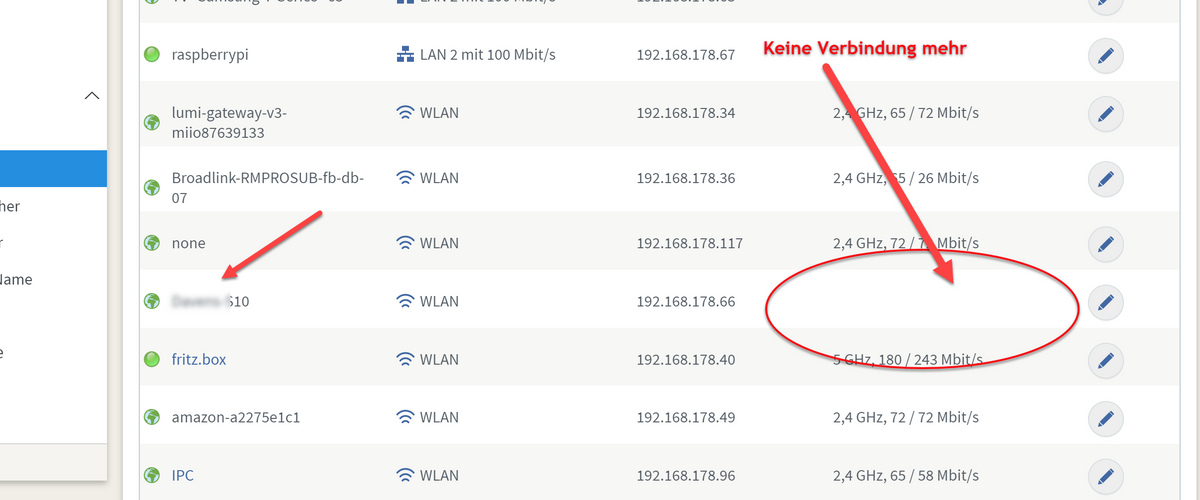
kann der Adapter nicht angepasst werden das er merk wie in den einem bild von mir wenn das gerät keine verbindung mehr hat?@denjo Wenn die Fritzbox es erst nach 10 Minuten als offline meldet, kann der Adapter es vorher auch nicht wissen
-
@denjo Wenn die Fritzbox es erst nach 10 Minuten als offline meldet, kann der Adapter es vorher auch nicht wissen
-
TR-064 4 Sekunden vom deaktivieren des Handy WLAN bis zur false Meldung im Adapter. Also bei Euch stimmt was nicht. Auf true wars dann nach 3 Sekunden beim Aktivieren.
Ich habe die 7590 mit BETA 7.24
-
TR-064 4 Sekunden vom deaktivieren des Handy WLAN bis zur false Meldung im Adapter. Also bei Euch stimmt was nicht. Auf true wars dann nach 3 Sekunden beim Aktivieren.
Ich habe die 7590 mit BETA 7.24



Hey! Du scheinst an dieser Unterhaltung interessiert zu sein, hast aber noch kein Konto.
Hast du es satt, bei jedem Besuch durch die gleichen Beiträge zu scrollen? Wenn du dich für ein Konto anmeldest, kommst du immer genau dorthin zurück, wo du zuvor warst, und kannst dich über neue Antworten benachrichtigen lassen (entweder per E-Mail oder Push-Benachrichtigung). Du kannst auch Lesezeichen speichern und Beiträge positiv bewerten, um anderen Community-Mitgliedern deine Wertschätzung zu zeigen.
Mit deinem Input könnte dieser Beitrag noch besser werden 💗
Registrieren AnmeldenSupport us
407
Online33.0k
Benutzer83.6k
Themen1.3m
Beiträge