




Iobroker läuft nicht mehr richtig, nur noch Logfehler
-
Leider kein Erfolg
michaela@ioBroker-Pi:~$ iobroker fix library: loaded Library version=2020-06-12 ioBroker or some processes are still running: io.admin.0 io.discovery.0 io.terminal.0 io.alexa2.0 io.backitup.0 io.hue.0 io.zigbee.0 io.tankerkoenig.0 io.denon.0 io.email.0 io.ping.0 io.web.0 io.pollenflug.0 io.pushover.0 io.telegram.0 io.javascript.0 io.sonoff.0 io.iot.0 io.harmony.0 io.sql.0 io.iqontrol.0 Please stop them first and try again! michaela@ioBroker-Pi:~$ sudo iobroker stop michaela@ioBroker-Pi:~$ iobroker fix library: loaded Library version=2020-06-12 ========================================================================== Welcome to the ioBroker installation fixer! Script version: 2020-06-15 You might need to enter your password a couple of times. ========================================================================== ========================================================================== Installing prerequisites (1/3) ========================================================================== OK:1 http://phoscon.de/apt/deconz stretch InRelease Ign:2 http://ftp.de.debian.org/debian stretch InRelease OK:3 http://ftp.de.debian.org/debian stretch-updates InRelease OK:4 http://ftp.de.debian.org/debian stretch Release OK:5 https://deb.nodesource.com/node_12.x stretch InRelease OK:6 http://security.debian.org/debian-security stretch/updates InRelease Paketlisten werden gelesen... Fertig Installed gcc-c++ ========================================================================== Checking ioBroker user and directory permissions (2/3) ========================================================================== Created /etc/sudoers.d/iobroker Fixing directory permissions... ========================================================================== Checking autostart (3/3) ========================================================================== Enabling autostart... Autostart enabled! ========================================================================== Your installation was fixed successfully Run iobroker start to start ioBroker again! ========================================================================== michaela@ioBroker-Pi:~$ sudo iobroker start michaela@ioBroker-Pi:~$ ^C michaela@ioBroker-Pi:~$ ^C michaela@ioBroker-Pi:~$ ^C michaela@ioBroker-Pi:~$ iobroker fix Library version=2020-06-12 ioBroker or some processes are still running: io.admin.0 io.discovery.0 io.terminal.0 io.alexa2.0 io.backitup.0 io.hue.0 io.zigbee.0 io.tankerkoenig.0 io.denon.0 io.email.0 io.ping.0 io.web.0 io.pollenflug.0 io.pushover.0 io.telegram.0 io.javascript.0 io.sonoff.0 io.iot.0 io.harmony.0 io.sql.0 io.iqontrol.0 Please stop them first and try again! michaela@ioBroker-Pi:~$ sudo iobroker stop michaela@ioBroker-Pi:~$ iobroker fix library: loaded Library version=2020-06-12 ========================================================================== Welcome to the ioBroker installation fixer! Script version: 2020-06-15 You might need to enter your password a couple of times. ========================================================================== ========================================================================== Installing prerequisites (1/3) ========================================================================== OK:1 http://phoscon.de/apt/deconz stretch InRelease Ign:2 http://ftp.de.debian.org/debian stretch InRelease OK:3 http://ftp.de.debian.org/debian stretch-updates InRelease OK:4 http://ftp.de.debian.org/debian stretch Release OK:5 https://deb.nodesource.com/node_12.x stretch InRelease OK:6 http://security.debian.org/debian-security stretch/updates InRelease Paketlisten werden gelesen... Fertig Installed gcc-c++ ========================================================================== Checking ioBroker user and directory permissions (2/3) ========================================================================== Created /etc/sudoers.d/iobroker Fixing directory permissions... ========================================================================== Checking autostart (3/3) ========================================================================== Enabling autostart... Autostart enabled! ========================================================================== Your installation was fixed successfully Run iobroker start to start ioBroker again! ========================================================================== -
Leider kein Erfolg
michaela@ioBroker-Pi:~$ iobroker fix library: loaded Library version=2020-06-12 ioBroker or some processes are still running: io.admin.0 io.discovery.0 io.terminal.0 io.alexa2.0 io.backitup.0 io.hue.0 io.zigbee.0 io.tankerkoenig.0 io.denon.0 io.email.0 io.ping.0 io.web.0 io.pollenflug.0 io.pushover.0 io.telegram.0 io.javascript.0 io.sonoff.0 io.iot.0 io.harmony.0 io.sql.0 io.iqontrol.0 Please stop them first and try again! michaela@ioBroker-Pi:~$ sudo iobroker stop michaela@ioBroker-Pi:~$ iobroker fix library: loaded Library version=2020-06-12 ========================================================================== Welcome to the ioBroker installation fixer! Script version: 2020-06-15 You might need to enter your password a couple of times. ========================================================================== ========================================================================== Installing prerequisites (1/3) ========================================================================== OK:1 http://phoscon.de/apt/deconz stretch InRelease Ign:2 http://ftp.de.debian.org/debian stretch InRelease OK:3 http://ftp.de.debian.org/debian stretch-updates InRelease OK:4 http://ftp.de.debian.org/debian stretch Release OK:5 https://deb.nodesource.com/node_12.x stretch InRelease OK:6 http://security.debian.org/debian-security stretch/updates InRelease Paketlisten werden gelesen... Fertig Installed gcc-c++ ========================================================================== Checking ioBroker user and directory permissions (2/3) ========================================================================== Created /etc/sudoers.d/iobroker Fixing directory permissions... ========================================================================== Checking autostart (3/3) ========================================================================== Enabling autostart... Autostart enabled! ========================================================================== Your installation was fixed successfully Run iobroker start to start ioBroker again! ========================================================================== michaela@ioBroker-Pi:~$ sudo iobroker start michaela@ioBroker-Pi:~$ ^C michaela@ioBroker-Pi:~$ ^C michaela@ioBroker-Pi:~$ ^C michaela@ioBroker-Pi:~$ iobroker fix Library version=2020-06-12 ioBroker or some processes are still running: io.admin.0 io.discovery.0 io.terminal.0 io.alexa2.0 io.backitup.0 io.hue.0 io.zigbee.0 io.tankerkoenig.0 io.denon.0 io.email.0 io.ping.0 io.web.0 io.pollenflug.0 io.pushover.0 io.telegram.0 io.javascript.0 io.sonoff.0 io.iot.0 io.harmony.0 io.sql.0 io.iqontrol.0 Please stop them first and try again! michaela@ioBroker-Pi:~$ sudo iobroker stop michaela@ioBroker-Pi:~$ iobroker fix library: loaded Library version=2020-06-12 ========================================================================== Welcome to the ioBroker installation fixer! Script version: 2020-06-15 You might need to enter your password a couple of times. ========================================================================== ========================================================================== Installing prerequisites (1/3) ========================================================================== OK:1 http://phoscon.de/apt/deconz stretch InRelease Ign:2 http://ftp.de.debian.org/debian stretch InRelease OK:3 http://ftp.de.debian.org/debian stretch-updates InRelease OK:4 http://ftp.de.debian.org/debian stretch Release OK:5 https://deb.nodesource.com/node_12.x stretch InRelease OK:6 http://security.debian.org/debian-security stretch/updates InRelease Paketlisten werden gelesen... Fertig Installed gcc-c++ ========================================================================== Checking ioBroker user and directory permissions (2/3) ========================================================================== Created /etc/sudoers.d/iobroker Fixing directory permissions... ========================================================================== Checking autostart (3/3) ========================================================================== Enabling autostart... Autostart enabled! ========================================================================== Your installation was fixed successfully Run iobroker start to start ioBroker again! ==========================================================================@Lady-Ela
Sorry...iobroker stop iobroker fix -
-
@Lady-Ela Welcher Fehler?
-
Das einmal beim Terminal das Icon fehlt und das der Infoadapter nicht richtig läuft, sowie der ganz oben genannter Logfehler.
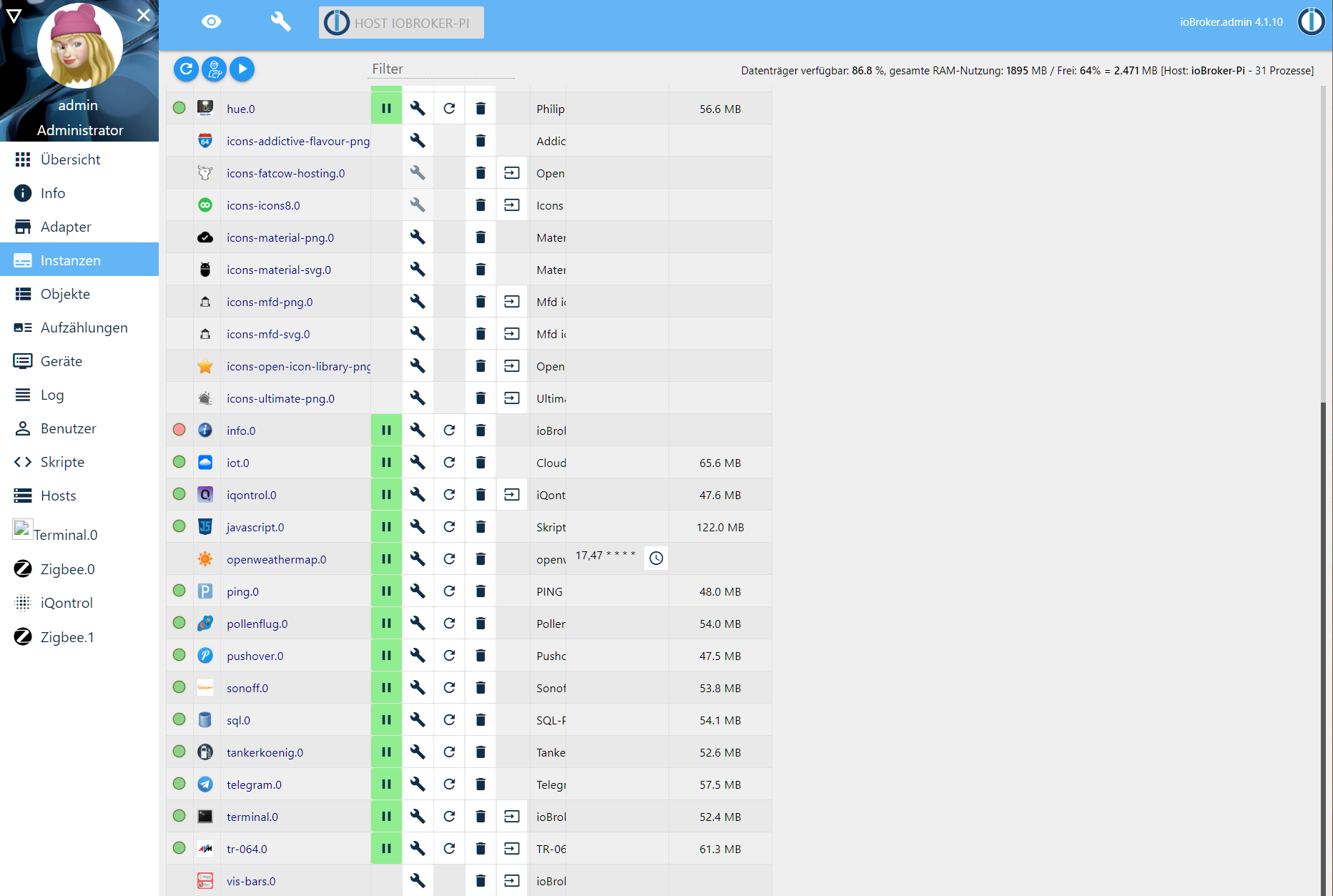
Fehlendes Icon im Terminal-Adapter ist bekannt.
IMHO kann man den Adapter auch deinstallieren, auf dem Debian hast du ja ohnehin diverse Konsolen zur Verfügung.info-Adapter: Starte das Ding mal neu, Einträge dazu im Logfile hier posten.
Zu den Meldungen im Log:
cd /opt/iobroker sudo -H -u iobroker npm install iobroker.js-controller -
@Lady-Ela
Ja. Bitte vergiss ab sofort den root. Der ist tabu! -
So wie es ausschaut ist das sogar der Infoadapter der folgende Fehler im Log anzeigt.
host.ioBroker-Pi 2020-11-25 21:11:39.510 info instance system.adapter.info.0 started with pid 6412 host.ioBroker-Pi 2020-11-25 21:11:09.472 info Restart adapter system.adapter.info.0 because enabled host.ioBroker-Pi 2020-11-25 21:11:09.472 error instance system.adapter.info.0 terminated with code 1 (JS_CONTROLLER_STOPPED) host.ioBroker-Pi 2020-11-25 21:11:09.471 error Caught by controller[0]: at Object.<anonymous> (/opt/iobroker/node_modules/file-stream-rotator/FileStreamRotator.js:15:14) host.ioBroker-Pi 2020-11-25 21:11:09.470 error Caught by controller[0]: at require (internal/modules/cjs/helpers.js:74:18) host.ioBroker-Pi 2020-11-25 21:11:09.469 error Caught by controller[0]: at Module.require (internal/modules/cjs/loader.js:887:19) host.ioBroker-Pi 2020-11-25 21:11:09.469 error Caught by controller[0]: at Function.Module._load (internal/modules/cjs/loader.js:708:14) host.ioBroker-Pi 2020-11-25 21:11:09.469 error Caught by controller[0]: at Module.load (internal/modules/cjs/loader.js:863:32) host.ioBroker-Pi 2020-11-25 21:11:09.469 error Caught by controller[0]: at Object.Module._extensions..js (internal/modules/cjs/loader.js:1027:10) host.ioBroker-Pi 2020-11-25 21:11:09.469 error Caught by controller[0]: at Module._compile (internal/modules/cjs/loader.js:999:30) host.ioBroker-Pi 2020-11-25 21:11:09.468 error Caught by controller[0]: at Object.<anonymous> (/opt/iobroker/node_modules/moment/moment.js:11:2) host.ioBroker-Pi 2020-11-25 21:11:09.468 error Caught by controller[0]: at /opt/iobroker/node_modules/moment/moment.js:8:85 host.ioBroker-Pi 2020-11-25 21:11:09.468 error Caught by controller[0]: at /opt/iobroker/node_modules/moment/moment.js:4919:20 host.ioBroker-Pi 2020-11-25 21:11:09.468 error Caught by controller[0]: TypeError: Cannot assign to read only property 'toString' of object '#<Moment>' host.ioBroker-Pi 2020-11-25 21:11:09.468 error Caught by controller[0]: ^ host.ioBroker-Pi 2020-11-25 21:11:09.467 error Caught by controller[0]: proto.toString = toString; host.ioBroker-Pi 2020-11-25 21:11:09.467 error Caught by controller[0]: /opt/iobroker/node_modules/moment/moment.js:4919 host.ioBroker-Pi 2020-11-25 21:11:07.818 info instance system.adapter.info.0 started with pid 6389 host.ioBroker-Pi 2020-11-25 21:10:37.786 info Restart adapter system.adapter.info.0 because enabled host.ioBroker-Pi 2020-11-25 21:10:37.785 error instance system.adapter.info.0 terminated with code 1 (JS_CONTROLLER_STOPPED) host.ioBroker-Pi 2020-11-25 21:10:37.785 error Caught by controller[0]: at Object.<anonymous> (/opt/iobroker/node_modules/file-stream-rotator/FileStreamRotator.js:15:14) host.ioBroker-Pi 2020-11-25 21:10:37.785 error Caught by controller[0]: at require (internal/modules/cjs/helpers.js:74:18) host.ioBroker-Pi 2020-11-25 21:10:37.785 error Caught by controller[0]: at Module.require (internal/modules/cjs/loader.js:887:19) host.ioBroker-Pi 2020-11-25 21:10:37.785 error Caught by controller[0]: at Function.Module._load (internal/modules/cjs/loader.js:708:14) host.ioBroker-Pi 2020-11-25 21:10:37.784 error Caught by controller[0]: at Module.load (internal/modules/cjs/loader.js:863:32) host.ioBroker-Pi 2020-11-25 21:10:37.784 error Caught by controller[0]: at Object.Module._extensions..js (internal/modules/cjs/loader.js:1027:10) host.ioBroker-Pi 2020-11-25 21:10:37.784 error Caught by controller[0]: at Module._compile (internal/modules/cjs/loader.js:999:30) host.ioBroker-Pi 2020-11-25 21:10:37.784 error Caught by controller[0]: at Object.<anonymous> (/opt/iobroker/node_modules/moment/moment.js:11:2) host.ioBroker-Pi 2020-11-25 21:10:37.783 error Caught by controller[0]: at /opt/iobroker/node_modules/moment/moment.js:8:85 host.ioBroker-Pi 2020-11-25 21:10:37.783 error Caught by controller[0]: at /opt/iobroker/node_modules/moment/moment.js:4919:20 host.ioBroker-Pi 2020-11-25 21:10:37.783 error Caught by controller[0]: TypeError: Cannot assign to read only property 'toString' of object '#<Moment>' host.ioBroker-Pi 2020-11-25 21:10:37.783 error Caught by controller[0]: ^ host.ioBroker-Pi 2020-11-25 21:10:37.782 error Caught by controller[0]: proto.toString = toString; host.ioBroker-Pi 2020-11-25 21:10:37.781 error Caught by controller[0]: /opt/iobroker/node_modules/moment/moment.js:4919 -
So wie es ausschaut ist das sogar der Infoadapter der folgende Fehler im Log anzeigt.
host.ioBroker-Pi 2020-11-25 21:11:39.510 info instance system.adapter.info.0 started with pid 6412 host.ioBroker-Pi 2020-11-25 21:11:09.472 info Restart adapter system.adapter.info.0 because enabled host.ioBroker-Pi 2020-11-25 21:11:09.472 error instance system.adapter.info.0 terminated with code 1 (JS_CONTROLLER_STOPPED) host.ioBroker-Pi 2020-11-25 21:11:09.471 error Caught by controller[0]: at Object.<anonymous> (/opt/iobroker/node_modules/file-stream-rotator/FileStreamRotator.js:15:14) host.ioBroker-Pi 2020-11-25 21:11:09.470 error Caught by controller[0]: at require (internal/modules/cjs/helpers.js:74:18) host.ioBroker-Pi 2020-11-25 21:11:09.469 error Caught by controller[0]: at Module.require (internal/modules/cjs/loader.js:887:19) host.ioBroker-Pi 2020-11-25 21:11:09.469 error Caught by controller[0]: at Function.Module._load (internal/modules/cjs/loader.js:708:14) host.ioBroker-Pi 2020-11-25 21:11:09.469 error Caught by controller[0]: at Module.load (internal/modules/cjs/loader.js:863:32) host.ioBroker-Pi 2020-11-25 21:11:09.469 error Caught by controller[0]: at Object.Module._extensions..js (internal/modules/cjs/loader.js:1027:10) host.ioBroker-Pi 2020-11-25 21:11:09.469 error Caught by controller[0]: at Module._compile (internal/modules/cjs/loader.js:999:30) host.ioBroker-Pi 2020-11-25 21:11:09.468 error Caught by controller[0]: at Object.<anonymous> (/opt/iobroker/node_modules/moment/moment.js:11:2) host.ioBroker-Pi 2020-11-25 21:11:09.468 error Caught by controller[0]: at /opt/iobroker/node_modules/moment/moment.js:8:85 host.ioBroker-Pi 2020-11-25 21:11:09.468 error Caught by controller[0]: at /opt/iobroker/node_modules/moment/moment.js:4919:20 host.ioBroker-Pi 2020-11-25 21:11:09.468 error Caught by controller[0]: TypeError: Cannot assign to read only property 'toString' of object '#<Moment>' host.ioBroker-Pi 2020-11-25 21:11:09.468 error Caught by controller[0]: ^ host.ioBroker-Pi 2020-11-25 21:11:09.467 error Caught by controller[0]: proto.toString = toString; host.ioBroker-Pi 2020-11-25 21:11:09.467 error Caught by controller[0]: /opt/iobroker/node_modules/moment/moment.js:4919 host.ioBroker-Pi 2020-11-25 21:11:07.818 info instance system.adapter.info.0 started with pid 6389 host.ioBroker-Pi 2020-11-25 21:10:37.786 info Restart adapter system.adapter.info.0 because enabled host.ioBroker-Pi 2020-11-25 21:10:37.785 error instance system.adapter.info.0 terminated with code 1 (JS_CONTROLLER_STOPPED) host.ioBroker-Pi 2020-11-25 21:10:37.785 error Caught by controller[0]: at Object.<anonymous> (/opt/iobroker/node_modules/file-stream-rotator/FileStreamRotator.js:15:14) host.ioBroker-Pi 2020-11-25 21:10:37.785 error Caught by controller[0]: at require (internal/modules/cjs/helpers.js:74:18) host.ioBroker-Pi 2020-11-25 21:10:37.785 error Caught by controller[0]: at Module.require (internal/modules/cjs/loader.js:887:19) host.ioBroker-Pi 2020-11-25 21:10:37.785 error Caught by controller[0]: at Function.Module._load (internal/modules/cjs/loader.js:708:14) host.ioBroker-Pi 2020-11-25 21:10:37.784 error Caught by controller[0]: at Module.load (internal/modules/cjs/loader.js:863:32) host.ioBroker-Pi 2020-11-25 21:10:37.784 error Caught by controller[0]: at Object.Module._extensions..js (internal/modules/cjs/loader.js:1027:10) host.ioBroker-Pi 2020-11-25 21:10:37.784 error Caught by controller[0]: at Module._compile (internal/modules/cjs/loader.js:999:30) host.ioBroker-Pi 2020-11-25 21:10:37.784 error Caught by controller[0]: at Object.<anonymous> (/opt/iobroker/node_modules/moment/moment.js:11:2) host.ioBroker-Pi 2020-11-25 21:10:37.783 error Caught by controller[0]: at /opt/iobroker/node_modules/moment/moment.js:8:85 host.ioBroker-Pi 2020-11-25 21:10:37.783 error Caught by controller[0]: at /opt/iobroker/node_modules/moment/moment.js:4919:20 host.ioBroker-Pi 2020-11-25 21:10:37.783 error Caught by controller[0]: TypeError: Cannot assign to read only property 'toString' of object '#<Moment>' host.ioBroker-Pi 2020-11-25 21:10:37.783 error Caught by controller[0]: ^ host.ioBroker-Pi 2020-11-25 21:10:37.782 error Caught by controller[0]: proto.toString = toString; host.ioBroker-Pi 2020-11-25 21:10:37.781 error Caught by controller[0]: /opt/iobroker/node_modules/moment/moment.js:4919@Lady-Ela
Ja, hier hat jemand das gleiche Problem, wie mir scheint:
https://forum.iobroker.net/topic/39024/info-0-fehler-instanz-steht-auf-rotDa würde ich ein Issue auf github für den info-Adapter aufmachen.
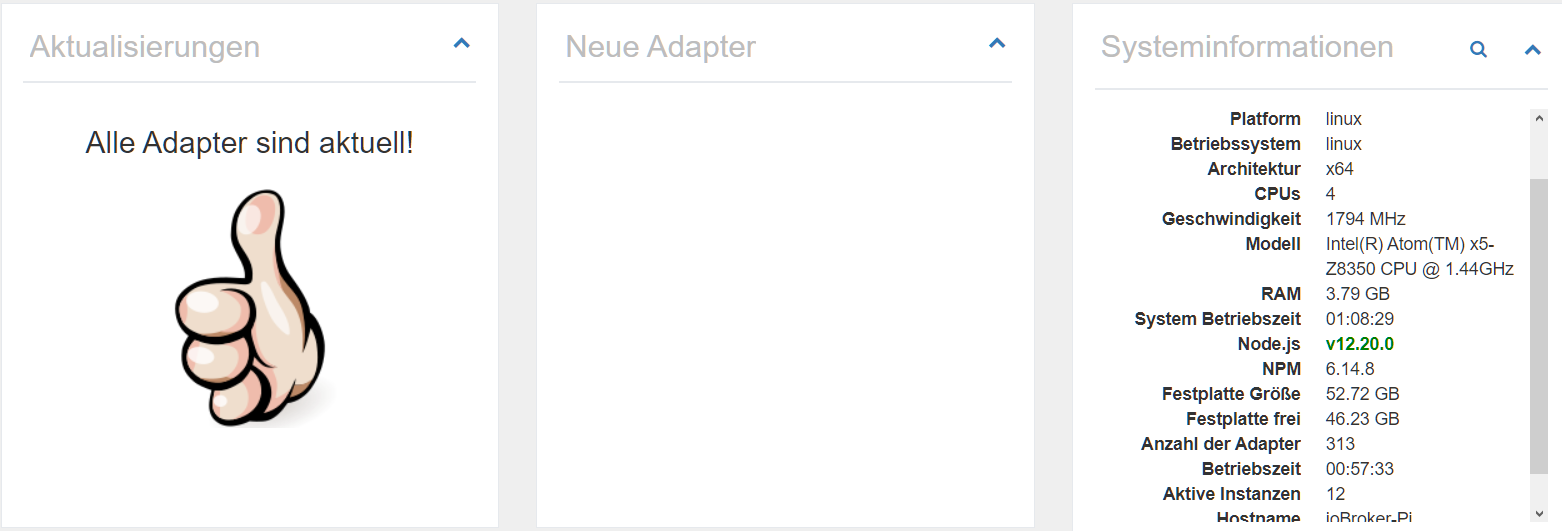
Ich habe jetzt mal auf node 12.20.0 gewechselt (war auf einer anderen), bei mir läuft der info-Adapter allerdings unauffällig durch:
(12862) starting. Version 1.7.10 in /opt/iobroker/node_modules/iobroker.info, node: v12.20.0, js-controller: 3.1.6Welche Version des info-Adapters läuft da bei dir?
-
Bei mir auch der 1.7.10 dann muß ich ihn erstmal ausstellen bis das Problem behoben ist. Trotzdem nochmal vielen Dank für die Hilfe.
-
Bei mir auch der 1.7.10 dann muß ich ihn erstmal ausstellen bis das Problem behoben ist. Trotzdem nochmal vielen Dank für die Hilfe.
@Lady-Ela
Hab mal ein Issue eröffnet:https://github.com/iobroker-community-adapters/ioBroker.info/issues/190
-
@Lady-Ela
Hab mal ein Issue eröffnet:https://github.com/iobroker-community-adapters/ioBroker.info/issues/190
Moin,
Letztens hat sich mein iobroker so aufgehängt, dass ich selbst per Proxmox UI nicht mehr auf die Konsole des iobroker kam, so dass ich die iobroker VM abschießen musste. Auf runterfahren / Neustart hat er auch nicht reagiert. Der letzte Eintrag im Log war, dass sich der Info Adapter Updates geholt hat.
Irgendwie blöd, wenn man trotz 3 zugewiesenen CPUs nicht mehr drauf kommt. Die Prozessorlast hing auf etwa 33 Prozent fest. Also ein Kern voll ausgelastet gewesen.
War unter der Woche. Am WE habe ich mehr Zeit mir das anzusehen.
Gruß
Peterfido
-
Moin,
Letztens hat sich mein iobroker so aufgehängt, dass ich selbst per Proxmox UI nicht mehr auf die Konsole des iobroker kam, so dass ich die iobroker VM abschießen musste. Auf runterfahren / Neustart hat er auch nicht reagiert. Der letzte Eintrag im Log war, dass sich der Info Adapter Updates geholt hat.
Irgendwie blöd, wenn man trotz 3 zugewiesenen CPUs nicht mehr drauf kommt. Die Prozessorlast hing auf etwa 33 Prozent fest. Also ein Kern voll ausgelastet gewesen.
War unter der Woche. Am WE habe ich mehr Zeit mir das anzusehen.
@peterfido
Und wo ist jetzt der Bezug zum Fehlerbild von @Lady-Ela ?@Lady-Ela
Bitte malcd /opt/iobroker npm list moment npm -v node -v nodejs -vausführen und die Rückmeldungen hier bekannt geben.
-
@peterfido
Und wo ist jetzt der Bezug zum Fehlerbild von @Lady-Ela ?@Lady-Ela
Bitte malcd /opt/iobroker npm list moment npm -v node -v nodejs -vausführen und die Rückmeldungen hier bekannt geben.
@Thomas-Braun
Der Info Adapter wird auch hier erwähnt. Möglich, dass er die eine Maschine zum Totalabsturz bringt und auf der anderen Maschine bloß nicht vernünftig läuft.

Hey! Du scheinst an dieser Unterhaltung interessiert zu sein, hast aber noch kein Konto.
Hast du es satt, bei jedem Besuch durch die gleichen Beiträge zu scrollen? Wenn du dich für ein Konto anmeldest, kommst du immer genau dorthin zurück, wo du zuvor warst, und kannst dich über neue Antworten benachrichtigen lassen (entweder per E-Mail oder Push-Benachrichtigung). Du kannst auch Lesezeichen speichern und Beiträge positiv bewerten, um anderen Community-Mitgliedern deine Wertschätzung zu zeigen.
Mit deinem Input könnte dieser Beitrag noch besser werden 💗
Registrieren Anmelden272
Online33.0k
Benutzer83.6k
Themen1.3m
Beiträge