




Ble.0 Adapter bremst ganzen IObroker in 2 Min.
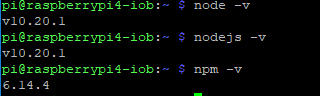

-
arp-scan mit dem Befehl sudi remove arp-scan brachte keine besserung.
Zudem ist es egal, ob Radar2 laeft oder nicht. Was ich aber herausgefunden habe, wenn sich der Raspberry per Wlan mit dem 5,8Ghz Netz verbindet laeuft es. Wenn er sich mit dem 2,4 Ghz Netz verbindet habe ich sofot schwierigkeiten.
Kann mir jemand helfen. Bei wem l'uft die Kombi Rasbpi4 und Wlan2,4ghz und Ble und Radar. Welche Softwarestaende? -
arp-scan mit dem Befehl sudi remove arp-scan brachte keine besserung.
Zudem ist es egal, ob Radar2 laeft oder nicht. Was ich aber herausgefunden habe, wenn sich der Raspberry per Wlan mit dem 5,8Ghz Netz verbindet laeuft es. Wenn er sich mit dem 2,4 Ghz Netz verbindet habe ich sofot schwierigkeiten.
Kann mir jemand helfen. Bei wem l'uft die Kombi Rasbpi4 und Wlan2,4ghz und Ble und Radar. Welche Softwarestaende? -
meine /var/log/syslog (über winscp )
Jul 25 16:58:19 raspberrypi4-iob bash[25674]: cat: /sys/devices/system/cpu/cpu0/cpufreq/cpuinfo_cur_freq: Keine Berechtigung
Jul 25 16:59:19 raspberrypi4-iob bash[25674]: cat: /sys/devices/system/cpu/cpu0/cpufreq/cpuinfo_cur_freq: Keine Berechtigung
Jul 25 16:59:28 raspberrypi4-iob rngd[348]: stats: bits received from HRNG source: 80064
Jul 25 16:59:28 raspberrypi4-iob rngd[348]: stats: bits sent to kernel pool: 34336
Jul 25 16:59:28 raspberrypi4-iob rngd[348]: stats: entropy added to kernel pool: 34336
Jul 25 16:59:28 raspberrypi4-iob rngd[348]: stats: FIPS 140-2 successes: 4
Jul 25 16:59:28 raspberrypi4-iob rngd[348]: stats: FIPS 140-2 failures: 0
Jul 25 16:59:28 raspberrypi4-iob rngd[348]: stats: FIPS 140-2(2001-10-10) Monobit: 0
Jul 25 16:59:28 raspberrypi4-iob rngd[348]: stats: FIPS 140-2(2001-10-10) Poker: 0
Jul 25 16:59:28 raspberrypi4-iob rngd[348]: stats: FIPS 140-2(2001-10-10) Runs: 0
Jul 25 16:59:28 raspberrypi4-iob rngd[348]: stats: FIPS 140-2(2001-10-10) Long run: 0
Jul 25 16:59:28 raspberrypi4-iob rngd[348]: stats: FIPS 140-2(2001-10-10) Continuous run: 0
Jul 25 16:59:28 raspberrypi4-iob rngd[348]: stats: HRNG source speed: (min=190.938; avg=337.874; max=504.319)Kibits/s
Jul 25 16:59:28 raspberrypi4-iob rngd[348]: stats: FIPS tests speed: (min=11.109; avg=11.998; max=12.345)Mibits/s
Jul 25 16:59:28 raspberrypi4-iob rngd[348]: stats: Lowest ready-buffers level: 2
Jul 25 16:59:28 raspberrypi4-iob rngd[348]: stats: Entropy starvations: 0
Jul 25 16:59:28 raspberrypi4-iob rngd[348]: stats: Time spent starving for entropy: (min=0; avg=0.000; max=0)us
Jul 25 17:00:19 raspberrypi4-iob bash[25674]: cat: /sys/devices/system/cpu/cpu0/cpufreq/cpuinfo_cur_freq: Keine Berechtigung
Jul 25 17:01:19 raspberrypi4-iob bash[25674]: cat: /sys/devices/system/cpu/cpu0/cpufreq/cpuinfo_cur_freq: Keine Berechtigung
Jul 25 17:02:19 raspberrypi4-iob bash[25674]: cat: /sys/devices/system/cpu/cpu0/cpufreq/cpuinfo_cur_freq: Keine Berechtigung
Jul 25 17:03:19 raspberrypi4-iob bash[25674]: cat: /sys/devices/system/cpu/cpu0/cpufreq/cpuinfo_cur_freq: Keine Berechtigung
Jul 25 17:04:19 raspberrypi4-iob bash[25674]: cat: /sys/devices/system/cpu/cpu0/cpufreq/cpuinfo_cur_freq: Keine Berechtigung
Jul 25 17:04:30 raspberrypi4-iob systemd[1]: Started Session c3 of user pi.
Jul 25 17:05:04 raspberrypi4-iob dhcpcd[403]: wlan0: Router Advertisement from fe80::f2b0:14ff:fe18:2216
Jul 25 17:05:19 raspberrypi4-iob bash[25674]: cat: /sys/devices/system/cpu/cpu0/cpufreq/cpuinfo_cur_freq: Keine Berechtigung
Jul 25 17:06:19 raspberrypi4-iob bash[25674]: cat: /sys/devices/system/cpu/cpu0/cpufreq/cpuinfo_cur_freq: Keine Berechtigung
Jul 25 17:07:19 raspberrypi4-iob bash[25674]: cat: /sys/devices/system/cpu/cpu0/cpufreq/cpuinfo_cur_freq: Keine Berechtigung
Jul 25 17:08:19 raspberrypi4-iob bash[25674]: cat: /sys/devices/system/cpu/cpu0/cpufreq/cpuinfo_cur_freq: Keine Berechtigung
Jul 25 17:08:34 raspberrypi4-iob bash[25674]: ================================== > LOG REDIRECT system.adapter.admin.0 => false [system.adapter.admin.0.logging]
Jul 25 17:09:19 raspberrypi4-iob bash[25674]: cat: /sys/devices/system/cpu/cpu0/cpufreq/cpuinfo_cur_freq: Keine Berechtigung
Jul 25 17:10:19 raspberrypi4-iob bash[25674]: cat: /sys/devices/system/cpu/cpu0/cpufreq/cpuinfo_cur_freq: Keine Berechtigung
Jul 25 17:11:19 raspberrypi4-iob bash[25674]: cat: /sys/devices/system/cpu/cpu0/cpufreq/cpuinfo_cur_freq: Keine Berechtigung
Jul 25 17:12:19 raspberrypi4-iob bash[25674]: cat: /sys/devices/system/cpu/cpu0/cpufreq/cpuinfo_cur_freq: Keine Berechtigung
MOD-Edit: Code in code-tags gesetzt!
-
meine /var/log/syslog (über winscp )
Jul 25 16:58:19 raspberrypi4-iob bash[25674]: cat: /sys/devices/system/cpu/cpu0/cpufreq/cpuinfo_cur_freq: Keine Berechtigung
Jul 25 16:59:19 raspberrypi4-iob bash[25674]: cat: /sys/devices/system/cpu/cpu0/cpufreq/cpuinfo_cur_freq: Keine Berechtigung
Jul 25 16:59:28 raspberrypi4-iob rngd[348]: stats: bits received from HRNG source: 80064
Jul 25 16:59:28 raspberrypi4-iob rngd[348]: stats: bits sent to kernel pool: 34336
Jul 25 16:59:28 raspberrypi4-iob rngd[348]: stats: entropy added to kernel pool: 34336
Jul 25 16:59:28 raspberrypi4-iob rngd[348]: stats: FIPS 140-2 successes: 4
Jul 25 16:59:28 raspberrypi4-iob rngd[348]: stats: FIPS 140-2 failures: 0
Jul 25 16:59:28 raspberrypi4-iob rngd[348]: stats: FIPS 140-2(2001-10-10) Monobit: 0
Jul 25 16:59:28 raspberrypi4-iob rngd[348]: stats: FIPS 140-2(2001-10-10) Poker: 0
Jul 25 16:59:28 raspberrypi4-iob rngd[348]: stats: FIPS 140-2(2001-10-10) Runs: 0
Jul 25 16:59:28 raspberrypi4-iob rngd[348]: stats: FIPS 140-2(2001-10-10) Long run: 0
Jul 25 16:59:28 raspberrypi4-iob rngd[348]: stats: FIPS 140-2(2001-10-10) Continuous run: 0
Jul 25 16:59:28 raspberrypi4-iob rngd[348]: stats: HRNG source speed: (min=190.938; avg=337.874; max=504.319)Kibits/s
Jul 25 16:59:28 raspberrypi4-iob rngd[348]: stats: FIPS tests speed: (min=11.109; avg=11.998; max=12.345)Mibits/s
Jul 25 16:59:28 raspberrypi4-iob rngd[348]: stats: Lowest ready-buffers level: 2
Jul 25 16:59:28 raspberrypi4-iob rngd[348]: stats: Entropy starvations: 0
Jul 25 16:59:28 raspberrypi4-iob rngd[348]: stats: Time spent starving for entropy: (min=0; avg=0.000; max=0)us
Jul 25 17:00:19 raspberrypi4-iob bash[25674]: cat: /sys/devices/system/cpu/cpu0/cpufreq/cpuinfo_cur_freq: Keine Berechtigung
Jul 25 17:01:19 raspberrypi4-iob bash[25674]: cat: /sys/devices/system/cpu/cpu0/cpufreq/cpuinfo_cur_freq: Keine Berechtigung
Jul 25 17:02:19 raspberrypi4-iob bash[25674]: cat: /sys/devices/system/cpu/cpu0/cpufreq/cpuinfo_cur_freq: Keine Berechtigung
Jul 25 17:03:19 raspberrypi4-iob bash[25674]: cat: /sys/devices/system/cpu/cpu0/cpufreq/cpuinfo_cur_freq: Keine Berechtigung
Jul 25 17:04:19 raspberrypi4-iob bash[25674]: cat: /sys/devices/system/cpu/cpu0/cpufreq/cpuinfo_cur_freq: Keine Berechtigung
Jul 25 17:04:30 raspberrypi4-iob systemd[1]: Started Session c3 of user pi.
Jul 25 17:05:04 raspberrypi4-iob dhcpcd[403]: wlan0: Router Advertisement from fe80::f2b0:14ff:fe18:2216
Jul 25 17:05:19 raspberrypi4-iob bash[25674]: cat: /sys/devices/system/cpu/cpu0/cpufreq/cpuinfo_cur_freq: Keine Berechtigung
Jul 25 17:06:19 raspberrypi4-iob bash[25674]: cat: /sys/devices/system/cpu/cpu0/cpufreq/cpuinfo_cur_freq: Keine Berechtigung
Jul 25 17:07:19 raspberrypi4-iob bash[25674]: cat: /sys/devices/system/cpu/cpu0/cpufreq/cpuinfo_cur_freq: Keine Berechtigung
Jul 25 17:08:19 raspberrypi4-iob bash[25674]: cat: /sys/devices/system/cpu/cpu0/cpufreq/cpuinfo_cur_freq: Keine Berechtigung
Jul 25 17:08:34 raspberrypi4-iob bash[25674]: ================================== > LOG REDIRECT system.adapter.admin.0 => false [system.adapter.admin.0.logging]
Jul 25 17:09:19 raspberrypi4-iob bash[25674]: cat: /sys/devices/system/cpu/cpu0/cpufreq/cpuinfo_cur_freq: Keine Berechtigung
Jul 25 17:10:19 raspberrypi4-iob bash[25674]: cat: /sys/devices/system/cpu/cpu0/cpufreq/cpuinfo_cur_freq: Keine Berechtigung
Jul 25 17:11:19 raspberrypi4-iob bash[25674]: cat: /sys/devices/system/cpu/cpu0/cpufreq/cpuinfo_cur_freq: Keine Berechtigung
Jul 25 17:12:19 raspberrypi4-iob bash[25674]: cat: /sys/devices/system/cpu/cpu0/cpufreq/cpuinfo_cur_freq: Keine Berechtigung
MOD-Edit: Code in code-tags gesetzt!
@arnold
Bitte in CodeTags setzen </> -
@Thomas-Braun said in Ble.0 Adapter bremst ganzen IObroker in 2 Min.:
CodeTags setzen </>
<Jul 25 16:58:19 raspberrypi4-iob bash[25674]: cat: /sys/devices/system/cpu/cpu0/cpufreq/cpuinfo_cur_freq: Keine Berechtigung Jul 25 16:59:19 raspberrypi4-iob bash[25674]: cat: /sys/devices/system/cpu/cpu0/cpufreq/cpuinfo_cur_freq: Keine Berechtigung Jul 25 16:59:28 raspberrypi4-iob rngd[348]: stats: bits received from HRNG source: 80064 Jul 25 16:59:28 raspberrypi4-iob rngd[348]: stats: bits sent to kernel pool: 34336 Jul 25 16:59:28 raspberrypi4-iob rngd[348]: stats: entropy added to kernel pool: 34336 Jul 25 16:59:28 raspberrypi4-iob rngd[348]: stats: FIPS 140-2 successes: 4 Jul 25 16:59:28 raspberrypi4-iob rngd[348]: stats: FIPS 140-2 failures: 0 Jul 25 16:59:28 raspberrypi4-iob rngd[348]: stats: FIPS 140-2(2001-10-10) Monobit: 0 Jul 25 16:59:28 raspberrypi4-iob rngd[348]: stats: FIPS 140-2(2001-10-10) Poker: 0 Jul 25 16:59:28 raspberrypi4-iob rngd[348]: stats: FIPS 140-2(2001-10-10) Runs: 0 Jul 25 16:59:28 raspberrypi4-iob rngd[348]: stats: FIPS 140-2(2001-10-10) Long run: 0 Jul 25 16:59:28 raspberrypi4-iob rngd[348]: stats: FIPS 140-2(2001-10-10) Continuous run: 0 Jul 25 16:59:28 raspberrypi4-iob rngd[348]: stats: HRNG source speed: (min=190.938; avg=337.874; max=504.319)Kibits/s Jul 25 16:59:28 raspberrypi4-iob rngd[348]: stats: FIPS tests speed: (min=11.109; avg=11.998; max=12.345)Mibits/s Jul 25 16:59:28 raspberrypi4-iob rngd[348]: stats: Lowest ready-buffers level: 2 Jul 25 16:59:28 raspberrypi4-iob rngd[348]: stats: Entropy starvations: 0 Jul 25 16:59:28 raspberrypi4-iob rngd[348]: stats: Time spent starving for entropy: (min=0; avg=0.000; max=0)us Jul 25 17:00:19 raspberrypi4-iob bash[25674]: cat: /sys/devices/system/cpu/cpu0/cpufreq/cpuinfo_cur_freq: Keine Berechtigung Jul 25 17:01:19 raspberrypi4-iob bash[25674]: cat: /sys/devices/system/cpu/cpu0/cpufreq/cpuinfo_cur_freq: Keine Berechtigung Jul 25 17:02:19 raspberrypi4-iob bash[25674]: cat: /sys/devices/system/cpu/cpu0/cpufreq/cpuinfo_cur_freq: Keine Berechtigung Jul 25 17:03:19 raspberrypi4-iob bash[25674]: cat: /sys/devices/system/cpu/cpu0/cpufreq/cpuinfo_cur_freq: Keine Berechtigung Jul 25 17:04:19 raspberrypi4-iob bash[25674]: cat: /sys/devices/system/cpu/cpu0/cpufreq/cpuinfo_cur_freq: Keine Berechtigung Jul 25 17:04:30 raspberrypi4-iob systemd[1]: Started Session c3 of user pi. Jul 25 17:05:04 raspberrypi4-iob dhcpcd[403]: wlan0: Router Advertisement from fe80::f2b0:14ff:fe18:2216 Jul 25 17:05:19 raspberrypi4-iob bash[25674]: cat: /sys/devices/system/cpu/cpu0/cpufreq/cpuinfo_cur_freq: Keine Berechtigung Jul 25 17:06:19 raspberrypi4-iob bash[25674]: cat: /sys/devices/system/cpu/cpu0/cpufreq/cpuinfo_cur_freq: Keine Berechtigung Jul 25 17:07:19 raspberrypi4-iob bash[25674]: cat: /sys/devices/system/cpu/cpu0/cpufreq/cpuinfo_cur_freq: Keine Berechtigung Jul 25 17:08:19 raspberrypi4-iob bash[25674]: cat: /sys/devices/system/cpu/cpu0/cpufreq/cpuinfo_cur_freq: Keine Berechtigung Jul 25 17:08:34 raspberrypi4-iob bash[25674]: ================================== > LOG REDIRECT system.adapter.admin.0 => false [system.adapter.admin.0.logging] Jul 25 17:09:19 raspberrypi4-iob bash[25674]: cat: /sys/devices/system/cpu/cpu0/cpufreq/cpuinfo_cur_freq: Keine Berechtigung Jul 25 17:10:19 raspberrypi4-iob bash[25674]: cat: /sys/devices/system/cpu/cpu0/cpufreq/cpuinfo_cur_freq: Keine Berechtigung Jul 25 17:11:19 raspberrypi4-iob bash[25674]: cat: /sys/devices/system/cpu/cpu0/cpufreq/cpuinfo_cur_freq: Keine Berechtigung Jul 25 17:12:19 raspberrypi4-iob bash[25674]: cat: /sys/devices/system/cpu/cpu0/cpufreq/cpuinfo_cur_freq: Keine BerechtigungMOD-Edit: Code in code-tags gesetzt!
-
@Thomas-Braun said in Ble.0 Adapter bremst ganzen IObroker in 2 Min.:
CodeTags setzen </>
<Jul 25 16:58:19 raspberrypi4-iob bash[25674]: cat: /sys/devices/system/cpu/cpu0/cpufreq/cpuinfo_cur_freq: Keine Berechtigung Jul 25 16:59:19 raspberrypi4-iob bash[25674]: cat: /sys/devices/system/cpu/cpu0/cpufreq/cpuinfo_cur_freq: Keine Berechtigung Jul 25 16:59:28 raspberrypi4-iob rngd[348]: stats: bits received from HRNG source: 80064 Jul 25 16:59:28 raspberrypi4-iob rngd[348]: stats: bits sent to kernel pool: 34336 Jul 25 16:59:28 raspberrypi4-iob rngd[348]: stats: entropy added to kernel pool: 34336 Jul 25 16:59:28 raspberrypi4-iob rngd[348]: stats: FIPS 140-2 successes: 4 Jul 25 16:59:28 raspberrypi4-iob rngd[348]: stats: FIPS 140-2 failures: 0 Jul 25 16:59:28 raspberrypi4-iob rngd[348]: stats: FIPS 140-2(2001-10-10) Monobit: 0 Jul 25 16:59:28 raspberrypi4-iob rngd[348]: stats: FIPS 140-2(2001-10-10) Poker: 0 Jul 25 16:59:28 raspberrypi4-iob rngd[348]: stats: FIPS 140-2(2001-10-10) Runs: 0 Jul 25 16:59:28 raspberrypi4-iob rngd[348]: stats: FIPS 140-2(2001-10-10) Long run: 0 Jul 25 16:59:28 raspberrypi4-iob rngd[348]: stats: FIPS 140-2(2001-10-10) Continuous run: 0 Jul 25 16:59:28 raspberrypi4-iob rngd[348]: stats: HRNG source speed: (min=190.938; avg=337.874; max=504.319)Kibits/s Jul 25 16:59:28 raspberrypi4-iob rngd[348]: stats: FIPS tests speed: (min=11.109; avg=11.998; max=12.345)Mibits/s Jul 25 16:59:28 raspberrypi4-iob rngd[348]: stats: Lowest ready-buffers level: 2 Jul 25 16:59:28 raspberrypi4-iob rngd[348]: stats: Entropy starvations: 0 Jul 25 16:59:28 raspberrypi4-iob rngd[348]: stats: Time spent starving for entropy: (min=0; avg=0.000; max=0)us Jul 25 17:00:19 raspberrypi4-iob bash[25674]: cat: /sys/devices/system/cpu/cpu0/cpufreq/cpuinfo_cur_freq: Keine Berechtigung Jul 25 17:01:19 raspberrypi4-iob bash[25674]: cat: /sys/devices/system/cpu/cpu0/cpufreq/cpuinfo_cur_freq: Keine Berechtigung Jul 25 17:02:19 raspberrypi4-iob bash[25674]: cat: /sys/devices/system/cpu/cpu0/cpufreq/cpuinfo_cur_freq: Keine Berechtigung Jul 25 17:03:19 raspberrypi4-iob bash[25674]: cat: /sys/devices/system/cpu/cpu0/cpufreq/cpuinfo_cur_freq: Keine Berechtigung Jul 25 17:04:19 raspberrypi4-iob bash[25674]: cat: /sys/devices/system/cpu/cpu0/cpufreq/cpuinfo_cur_freq: Keine Berechtigung Jul 25 17:04:30 raspberrypi4-iob systemd[1]: Started Session c3 of user pi. Jul 25 17:05:04 raspberrypi4-iob dhcpcd[403]: wlan0: Router Advertisement from fe80::f2b0:14ff:fe18:2216 Jul 25 17:05:19 raspberrypi4-iob bash[25674]: cat: /sys/devices/system/cpu/cpu0/cpufreq/cpuinfo_cur_freq: Keine Berechtigung Jul 25 17:06:19 raspberrypi4-iob bash[25674]: cat: /sys/devices/system/cpu/cpu0/cpufreq/cpuinfo_cur_freq: Keine Berechtigung Jul 25 17:07:19 raspberrypi4-iob bash[25674]: cat: /sys/devices/system/cpu/cpu0/cpufreq/cpuinfo_cur_freq: Keine Berechtigung Jul 25 17:08:19 raspberrypi4-iob bash[25674]: cat: /sys/devices/system/cpu/cpu0/cpufreq/cpuinfo_cur_freq: Keine Berechtigung Jul 25 17:08:34 raspberrypi4-iob bash[25674]: ================================== > LOG REDIRECT system.adapter.admin.0 => false [system.adapter.admin.0.logging] Jul 25 17:09:19 raspberrypi4-iob bash[25674]: cat: /sys/devices/system/cpu/cpu0/cpufreq/cpuinfo_cur_freq: Keine Berechtigung Jul 25 17:10:19 raspberrypi4-iob bash[25674]: cat: /sys/devices/system/cpu/cpu0/cpufreq/cpuinfo_cur_freq: Keine Berechtigung Jul 25 17:11:19 raspberrypi4-iob bash[25674]: cat: /sys/devices/system/cpu/cpu0/cpufreq/cpuinfo_cur_freq: Keine Berechtigung Jul 25 17:12:19 raspberrypi4-iob bash[25674]: cat: /sys/devices/system/cpu/cpu0/cpufreq/cpuinfo_cur_freq: Keine BerechtigungMOD-Edit: Code in code-tags gesetzt!
@arnold
Fast...Text markieren und dann das fünfte Icon in der Icon-Leiste anklicken. Sieht so aus: </>
-
Jul 25 16:58:19 raspberrypi4-iob bash[25674]: cat: /sys/devices/system/cpu/cpu0/cpufreq/cpuinfo_cur_freq: Keine Berechtigung Jul 25 16:59:19 raspberrypi4-iob bash[25674]: cat: /sys/devices/system/cpu/cpu0/cpufreq/cpuinfo_cur_freq: Keine Berechtigung Jul 25 16:59:28 raspberrypi4-iob rngd[348]: stats: bits received from HRNG source: 80064 Jul 25 16:59:28 raspberrypi4-iob rngd[348]: stats: bits sent to kernel pool: 34336 Jul 25 16:59:28 raspberrypi4-iob rngd[348]: stats: entropy added to kernel pool: 34336 Jul 25 16:59:28 raspberrypi4-iob rngd[348]: stats: FIPS 140-2 successes: 4 Jul 25 16:59:28 raspberrypi4-iob rngd[348]: stats: FIPS 140-2 failures: 0 Jul 25 16:59:28 raspberrypi4-iob rngd[348]: stats: FIPS 140-2(2001-10-10) Monobit: 0 Jul 25 16:59:28 raspberrypi4-iob rngd[348]: stats: FIPS 140-2(2001-10-10) Poker: 0 Jul 25 16:59:28 raspberrypi4-iob rngd[348]: stats: FIPS 140-2(2001-10-10) Runs: 0 Jul 25 16:59:28 raspberrypi4-iob rngd[348]: stats: FIPS 140-2(2001-10-10) Long run: 0 Jul 25 16:59:28 raspberrypi4-iob rngd[348]: stats: FIPS 140-2(2001-10-10) Continuous run: 0 Jul 25 16:59:28 raspberrypi4-iob rngd[348]: stats: HRNG source speed: (min=190.938; avg=337.874; max=504.319)Kibits/s Jul 25 16:59:28 raspberrypi4-iob rngd[348]: stats: FIPS tests speed: (min=11.109; avg=11.998; max=12.345)Mibits/s Jul 25 16:59:28 raspberrypi4-iob rngd[348]: stats: Lowest ready-buffers level: 2 Jul 25 16:59:28 raspberrypi4-iob rngd[348]: stats: Entropy starvations: 0 Jul 25 16:59:28 raspberrypi4-iob rngd[348]: stats: Time spent starving for entropy: (min=0; avg=0.000; max=0)us Jul 25 17:00:19 raspberrypi4-iob bash[25674]: cat: /sys/devices/system/cpu/cpu0/cpufreq/cpuinfo_cur_freq: Keine Berechtigung Jul 25 17:01:19 raspberrypi4-iob bash[25674]: cat: /sys/devices/system/cpu/cpu0/cpufreq/cpuinfo_cur_freq: Keine Berechtigung Jul 25 17:02:19 raspberrypi4-iob bash[25674]: cat: /sys/devices/system/cpu/cpu0/cpufreq/cpuinfo_cur_freq: Keine Berechtigung Jul 25 17:03:19 raspberrypi4-iob bash[25674]: cat: /sys/devices/system/cpu/cpu0/cpufreq/cpuinfo_cur_freq: Keine Berechtigung Jul 25 17:04:19 raspberrypi4-iob bash[25674]: cat: /sys/devices/system/cpu/cpu0/cpufreq/cpuinfo_cur_freq: Keine Berechtigung Jul 25 17:04:30 raspberrypi4-iob systemd[1]: Started Session c3 of user pi. Jul 25 17:05:04 raspberrypi4-iob dhcpcd[403]: wlan0: Router Advertisement from fe80::f2b0:14ff:fe18:2216 Jul 25 17:05:19 raspberrypi4-iob bash[25674]: cat: /sys/devices/system/cpu/cpu0/cpufreq/cpuinfo_cur_freq: Keine Berechtigung Jul 25 17:06:19 raspberrypi4-iob bash[25674]: cat: /sys/devices/system/cpu/cpu0/cpufreq/cpuinfo_cur_freq: Keine Berechtigung Jul 25 17:07:19 raspberrypi4-iob bash[25674]: cat: /sys/devices/system/cpu/cpu0/cpufreq/cpuinfo_cur_freq: Keine Berechtigung Jul 25 17:08:19 raspberrypi4-iob bash[25674]: cat: /sys/devices/system/cpu/cpu0/cpufreq/cpuinfo_cur_freq: Keine Berechtigung Jul 25 17:08:34 raspberrypi4-iob bash[25674]: ================================== > LOG REDIRECT system.adapter.admin.0 => false [system.adapter.admin.0.logging] Jul 25 17:09:19 raspberrypi4-iob bash[25674]: cat: /sys/devices/system/cpu/cpu0/cpufreq/cpuinfo_cur_freq: Keine Berechtigung Jul 25 17:10:19 raspberrypi4-iob bash[25674]: cat: /sys/devices/system/cpu/cpu0/cpufreq/cpuinfo_cur_freq: Keine Berechtigung Jul 25 17:11:19 raspberrypi4-iob bash[25674]: cat: /sys/devices/system/cpu/cpu0/cpufreq/cpuinfo_cur_freq: Keine Berechtigung Jul 25 17:12:19 raspberrypi4-iob bash[25674]: cat: /sys/devices/system/cpu/cpu0/cpufreq/cpuinfo_cur_freq: Keine Berechtigung -
wenn ich Ble. 0 starte dann geht meine wlan verbindung in 80 sek von 72Mbit/s auf
1Mbit/s und somit kein Zugriff auf iobroker !!!
Wenn ich Ble.0 Stoppe (rechtzeitig ) geht meine Verbindung wieder auf 72Mbit/suname -a who -r sudo apt update -
pi@raspberrypi4-iob:~ $ uname -a Linux raspberrypi4-iob 5.4.51-v7l+ #1327 SMP Thu Jul 23 11:04:39 BST 2020 armv7l GNU/Linux pi@raspberrypi4-iob:~ $ who -r Runlevel 5 2020-07-25 16:52 pi@raspberrypi4-iob:~ $ sudo apt update OK:1 http://raspbian.raspberrypi.org/raspbian buster InRelease OK:2 http://archive.raspberrypi.org/debian buster InRelease OK:3 https://deb.nodesource.com/node_10.x buster InRelease Paketlisten werden gelesen... Fertig Abhängigkeitsbaum wird aufgebaut. Statusinformationen werden eingelesen.... Fertig Aktualisierung für 7 Pakete verfügbar. Führen Sie »apt list --upgradable« aus, um sie anzuzeigen. pi@raspberrypi4-iob:~ $ -
pi@raspberrypi4-iob:~ $ uname -a Linux raspberrypi4-iob 5.4.51-v7l+ #1327 SMP Thu Jul 23 11:04:39 BST 2020 armv7l GNU/Linux pi@raspberrypi4-iob:~ $ who -r Runlevel 5 2020-07-25 16:52 pi@raspberrypi4-iob:~ $ sudo apt update OK:1 http://raspbian.raspberrypi.org/raspbian buster InRelease OK:2 http://archive.raspberrypi.org/debian buster InRelease OK:3 https://deb.nodesource.com/node_10.x buster InRelease Paketlisten werden gelesen... Fertig Abhängigkeitsbaum wird aufgebaut. Statusinformationen werden eingelesen.... Fertig Aktualisierung für 7 Pakete verfügbar. Führen Sie »apt list --upgradable« aus, um sie anzuzeigen. pi@raspberrypi4-iob:~ $@arnold
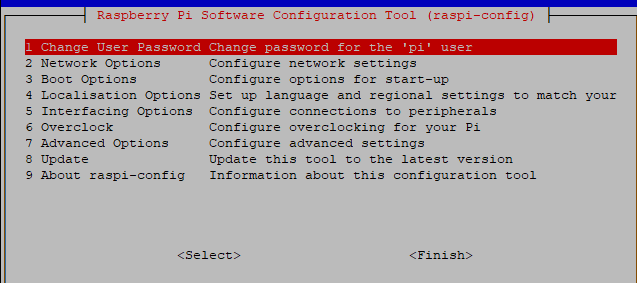
Lass den Server in Runlevel 3 laufen.sudo raspi-config3 Boot Options
B1 Desktop / CLI
B1 oder B2 (Je nach Vorliebe, ich würde B1 empfehlen) -
@Thomas-Braun said in Ble.0 Adapter bremst ganzen IObroker in 2 Min.:
Server in Runlevel 3
wie mache ich das --Server in Runlevel 3 laufen ???
-
@Thomas-Braun said in Ble.0 Adapter bremst ganzen IObroker in 2 Min.:
Server in Runlevel 3
wie mache ich das --Server in Runlevel 3 laufen ???
@arnold Siehe Edit oben.
-
@arnold
?
Steht doch alles da.
Du rufstsudo raspi-configauf und gehst dann in die genannten Menüpunkte rein.
Mit der Tab-Taste wechselst du mit dem Cursor die Menüpunkte. -
3 Boot Options
B1 Desktop / CLI
B1 oder B2 (Je nach Vorliebe, ich würde B1 empfehlen)



Hey! Du scheinst an dieser Unterhaltung interessiert zu sein, hast aber noch kein Konto.
Hast du es satt, bei jedem Besuch durch die gleichen Beiträge zu scrollen? Wenn du dich für ein Konto anmeldest, kommst du immer genau dorthin zurück, wo du zuvor warst, und kannst dich über neue Antworten benachrichtigen lassen (entweder per E-Mail oder Push-Benachrichtigung). Du kannst auch Lesezeichen speichern und Beiträge positiv bewerten, um anderen Community-Mitgliedern deine Wertschätzung zu zeigen.
Mit deinem Input könnte dieser Beitrag noch besser werden 💗
Registrieren Anmelden475
Online33.0k
Benutzer83.5k
Themen1.3m
Beiträge