Skip to content
  • Home
  • Aktuell
  • Tags
  • 0 Ungelesen 0
  • Kategorien
  • Unreplied
  • Beliebt
  • GitHub
  • Docu
  • Hilfe
Skins
  • Light
  • Brite
  • Cerulean
  • Cosmo
  • Flatly
  • Journal
  • Litera
  • Lumen
  • Lux
  • Materia
  • Minty
  • Morph
  • Pulse
  • Sandstone
  • Simplex
  • Sketchy
  • Spacelab
  • United
  • Yeti
  • Zephyr
  • Dark
  • Cyborg
  • Darkly
  • Quartz
  • Slate
  • Solar
  • Superhero
  • Vapor

  • Standard: (Kein Skin)
  • Kein Skin
Einklappen
ioBroker Logo

Community Forum

donate donate
  1. ioBroker Community Home
  2. Deutsch
  3. ioBroker Allgemein
  4. Ble.0 Adapter bremst ganzen IObroker in 2 Min.
NEWS

  • UPDATE 31.10.: Amazon Alexa - ioBroker Skill läuft aus ?
    apollon77A
    apollon77
    48
    3
    8.9k

  • Monatsrückblick – September 2025
    BluefoxB
    Bluefox
    13
    1
    2.3k

  • Neues Video "KI im Smart Home" - ioBroker plus n8n
    BluefoxB
    Bluefox
    16
    1
    3.5k

Ble.0 Adapter bremst ganzen IObroker in 2 Min.

Geplant Angeheftet Gesperrt Verschoben ioBroker Allgemein
ble adapter
124 Beiträge 12 Kommentatoren 11.3k Aufrufe 11 Watching
  • Älteste zuerst
  • Neuste zuerst
  • Meiste Stimmen
Antworten
  • In einem neuen Thema antworten
Anmelden zum Antworten
Dieses Thema wurde gelöscht. Nur Nutzer mit entsprechenden Rechten können es sehen.
  • A Offline
    A Offline
    arnold
    schrieb am zuletzt editiert von
    #34
    Jul 25 16:58:19 raspberrypi4-iob bash[25674]: cat: /sys/devices/system/cpu/cpu0/cpufreq/cpuinfo_cur_freq: Keine Berechtigung
    Jul 25 16:59:19 raspberrypi4-iob bash[25674]: cat: /sys/devices/system/cpu/cpu0/cpufreq/cpuinfo_cur_freq: Keine Berechtigung
    Jul 25 16:59:28 raspberrypi4-iob rngd[348]: stats: bits received from HRNG source: 80064
    Jul 25 16:59:28 raspberrypi4-iob rngd[348]: stats: bits sent to kernel pool: 34336
    Jul 25 16:59:28 raspberrypi4-iob rngd[348]: stats: entropy added to kernel pool: 34336
    Jul 25 16:59:28 raspberrypi4-iob rngd[348]: stats: FIPS 140-2 successes: 4
    Jul 25 16:59:28 raspberrypi4-iob rngd[348]: stats: FIPS 140-2 failures: 0
    Jul 25 16:59:28 raspberrypi4-iob rngd[348]: stats: FIPS 140-2(2001-10-10) Monobit: 0
    Jul 25 16:59:28 raspberrypi4-iob rngd[348]: stats: FIPS 140-2(2001-10-10) Poker: 0
    Jul 25 16:59:28 raspberrypi4-iob rngd[348]: stats: FIPS 140-2(2001-10-10) Runs: 0
    Jul 25 16:59:28 raspberrypi4-iob rngd[348]: stats: FIPS 140-2(2001-10-10) Long run: 0
    Jul 25 16:59:28 raspberrypi4-iob rngd[348]: stats: FIPS 140-2(2001-10-10) Continuous run: 0
    Jul 25 16:59:28 raspberrypi4-iob rngd[348]: stats: HRNG source speed: (min=190.938; avg=337.874; max=504.319)Kibits/s
    Jul 25 16:59:28 raspberrypi4-iob rngd[348]: stats: FIPS tests speed: (min=11.109; avg=11.998; max=12.345)Mibits/s
    Jul 25 16:59:28 raspberrypi4-iob rngd[348]: stats: Lowest ready-buffers level: 2
    Jul 25 16:59:28 raspberrypi4-iob rngd[348]: stats: Entropy starvations: 0
    Jul 25 16:59:28 raspberrypi4-iob rngd[348]: stats: Time spent starving for entropy: (min=0; avg=0.000; max=0)us
    Jul 25 17:00:19 raspberrypi4-iob bash[25674]: cat: /sys/devices/system/cpu/cpu0/cpufreq/cpuinfo_cur_freq: Keine Berechtigung
    Jul 25 17:01:19 raspberrypi4-iob bash[25674]: cat: /sys/devices/system/cpu/cpu0/cpufreq/cpuinfo_cur_freq: Keine Berechtigung
    Jul 25 17:02:19 raspberrypi4-iob bash[25674]: cat: /sys/devices/system/cpu/cpu0/cpufreq/cpuinfo_cur_freq: Keine Berechtigung
    Jul 25 17:03:19 raspberrypi4-iob bash[25674]: cat: /sys/devices/system/cpu/cpu0/cpufreq/cpuinfo_cur_freq: Keine Berechtigung
    Jul 25 17:04:19 raspberrypi4-iob bash[25674]: cat: /sys/devices/system/cpu/cpu0/cpufreq/cpuinfo_cur_freq: Keine Berechtigung
    Jul 25 17:04:30 raspberrypi4-iob systemd[1]: Started Session c3 of user pi.
    Jul 25 17:05:04 raspberrypi4-iob dhcpcd[403]: wlan0: Router Advertisement from fe80::f2b0:14ff:fe18:2216
    Jul 25 17:05:19 raspberrypi4-iob bash[25674]: cat: /sys/devices/system/cpu/cpu0/cpufreq/cpuinfo_cur_freq: Keine Berechtigung
    Jul 25 17:06:19 raspberrypi4-iob bash[25674]: cat: /sys/devices/system/cpu/cpu0/cpufreq/cpuinfo_cur_freq: Keine Berechtigung
    Jul 25 17:07:19 raspberrypi4-iob bash[25674]: cat: /sys/devices/system/cpu/cpu0/cpufreq/cpuinfo_cur_freq: Keine Berechtigung
    Jul 25 17:08:19 raspberrypi4-iob bash[25674]: cat: /sys/devices/system/cpu/cpu0/cpufreq/cpuinfo_cur_freq: Keine Berechtigung
    Jul 25 17:08:34 raspberrypi4-iob bash[25674]: ================================== > LOG REDIRECT system.adapter.admin.0 => false [system.adapter.admin.0.logging]
    Jul 25 17:09:19 raspberrypi4-iob bash[25674]: cat: /sys/devices/system/cpu/cpu0/cpufreq/cpuinfo_cur_freq: Keine Berechtigung
    Jul 25 17:10:19 raspberrypi4-iob bash[25674]: cat: /sys/devices/system/cpu/cpu0/cpufreq/cpuinfo_cur_freq: Keine Berechtigung
    Jul 25 17:11:19 raspberrypi4-iob bash[25674]: cat: /sys/devices/system/cpu/cpu0/cpufreq/cpuinfo_cur_freq: Keine Berechtigung
    Jul 25 17:12:19 raspberrypi4-iob bash[25674]: cat: /sys/devices/system/cpu/cpu0/cpufreq/cpuinfo_cur_freq: Keine Berechtigung
    
    
    1 Antwort Letzte Antwort
    0
    • A Offline
      A Offline
      arnold
      schrieb am zuletzt editiert von
      #35

      wenn ich Ble. 0 starte dann geht meine wlan verbindung in 80 sek von 72Mbit/s auf
      1Mbit/s und somit kein Zugriff auf iobroker !!!
      Wenn ich Ble.0 Stoppe (rechtzeitig ) geht meine Verbindung wieder auf 72Mbit/s

      Thomas BraunT apollon77A 2 Antworten Letzte Antwort
      0
      • A arnold

        wenn ich Ble. 0 starte dann geht meine wlan verbindung in 80 sek von 72Mbit/s auf
        1Mbit/s und somit kein Zugriff auf iobroker !!!
        Wenn ich Ble.0 Stoppe (rechtzeitig ) geht meine Verbindung wieder auf 72Mbit/s

        Thomas BraunT Online
        Thomas BraunT Online
        Thomas Braun
        Most Active
        schrieb am zuletzt editiert von
        #36

        @arnold

        uname -a 
        who -r
        sudo apt update
        

        Linux-Werkzeugkasten:
        https://forum.iobroker.net/topic/42952/der-kleine-iobroker-linux-werkzeugkasten
        NodeJS Fixer Skript:
        https://forum.iobroker.net/topic/68035/iob-node-fix-skript
        iob_diag: curl -sLf -o diag.sh https://iobroker.net/diag.sh && bash diag.sh

        1 Antwort Letzte Antwort
        0
        • A Offline
          A Offline
          arnold
          schrieb am zuletzt editiert von
          #37
          pi@raspberrypi4-iob:~ $ uname -a
          Linux raspberrypi4-iob 5.4.51-v7l+ #1327 SMP Thu Jul 23 11:04:39 BST 2020 armv7l GNU/Linux
          pi@raspberrypi4-iob:~ $ who -r
                   Runlevel 5   2020-07-25 16:52
          pi@raspberrypi4-iob:~ $ sudo apt update
          OK:1 http://raspbian.raspberrypi.org/raspbian buster InRelease
          OK:2 http://archive.raspberrypi.org/debian buster InRelease
          OK:3 https://deb.nodesource.com/node_10.x buster InRelease
          Paketlisten werden gelesen... Fertig
          Abhängigkeitsbaum wird aufgebaut.
          Statusinformationen werden eingelesen.... Fertig
          Aktualisierung für 7 Pakete verfügbar. Führen Sie »apt list --upgradable« aus, um sie anzuzeigen.
          pi@raspberrypi4-iob:~ $
          
          
          Thomas BraunT 1 Antwort Letzte Antwort
          0
          • A arnold
            pi@raspberrypi4-iob:~ $ uname -a
            Linux raspberrypi4-iob 5.4.51-v7l+ #1327 SMP Thu Jul 23 11:04:39 BST 2020 armv7l GNU/Linux
            pi@raspberrypi4-iob:~ $ who -r
                     Runlevel 5   2020-07-25 16:52
            pi@raspberrypi4-iob:~ $ sudo apt update
            OK:1 http://raspbian.raspberrypi.org/raspbian buster InRelease
            OK:2 http://archive.raspberrypi.org/debian buster InRelease
            OK:3 https://deb.nodesource.com/node_10.x buster InRelease
            Paketlisten werden gelesen... Fertig
            Abhängigkeitsbaum wird aufgebaut.
            Statusinformationen werden eingelesen.... Fertig
            Aktualisierung für 7 Pakete verfügbar. Führen Sie »apt list --upgradable« aus, um sie anzuzeigen.
            pi@raspberrypi4-iob:~ $
            
            
            Thomas BraunT Online
            Thomas BraunT Online
            Thomas Braun
            Most Active
            schrieb am zuletzt editiert von Thomas Braun
            #38

            @arnold
            Lass den Server in Runlevel 3 laufen.

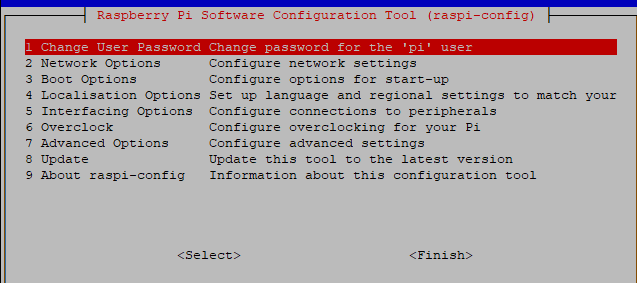
            sudo raspi-config
            

            3 Boot Options
            B1 Desktop / CLI
            B1 oder B2 (Je nach Vorliebe, ich würde B1 empfehlen)

            Linux-Werkzeugkasten:
            https://forum.iobroker.net/topic/42952/der-kleine-iobroker-linux-werkzeugkasten
            NodeJS Fixer Skript:
            https://forum.iobroker.net/topic/68035/iob-node-fix-skript
            iob_diag: curl -sLf -o diag.sh https://iobroker.net/diag.sh && bash diag.sh

            1 Antwort Letzte Antwort
            0
            • A Offline
              A Offline
              arnold
              schrieb am zuletzt editiert von
              #39

              @Thomas-Braun said in Ble.0 Adapter bremst ganzen IObroker in 2 Min.:

              Server in Runlevel 3

              wie mache ich das --Server in Runlevel 3 laufen ???

              Thomas BraunT 1 Antwort Letzte Antwort
              0
              • A arnold

                @Thomas-Braun said in Ble.0 Adapter bremst ganzen IObroker in 2 Min.:

                Server in Runlevel 3

                wie mache ich das --Server in Runlevel 3 laufen ???

                Thomas BraunT Online
                Thomas BraunT Online
                Thomas Braun
                Most Active
                schrieb am zuletzt editiert von
                #40

                @arnold Siehe Edit oben.

                Linux-Werkzeugkasten:
                https://forum.iobroker.net/topic/42952/der-kleine-iobroker-linux-werkzeugkasten
                NodeJS Fixer Skript:
                https://forum.iobroker.net/topic/68035/iob-node-fix-skript
                iob_diag: curl -sLf -o diag.sh https://iobroker.net/diag.sh && bash diag.sh

                1 Antwort Letzte Antwort
                0
                • A Offline
                  A Offline
                  arnold
                  schrieb am zuletzt editiert von
                  #41

                  kann ich nicht finden ,brauche Anweisung .

                  Thomas BraunT 1 Antwort Letzte Antwort
                  0
                  • A arnold

                    kann ich nicht finden ,brauche Anweisung .

                    Thomas BraunT Online
                    Thomas BraunT Online
                    Thomas Braun
                    Most Active
                    schrieb am zuletzt editiert von Thomas Braun
                    #42

                    @arnold
                    ?
                    Steht doch alles da.
                    Du rufst

                    sudo raspi-config
                    

                    auf und gehst dann in die genannten Menüpunkte rein.
                    Mit der Tab-Taste wechselst du mit dem Cursor die Menüpunkte.

                    Linux-Werkzeugkasten:
                    https://forum.iobroker.net/topic/42952/der-kleine-iobroker-linux-werkzeugkasten
                    NodeJS Fixer Skript:
                    https://forum.iobroker.net/topic/68035/iob-node-fix-skript
                    iob_diag: curl -sLf -o diag.sh https://iobroker.net/diag.sh && bash diag.sh

                    1 Antwort Letzte Antwort
                    0
                    • A Offline
                      A Offline
                      arnold
                      schrieb am zuletzt editiert von
                      #43

                      welche MenüPunkte ? wo stecht das in Edit oben

                      1f9401d1-616f-4bb2-8de7-54c1a110ef51-image.png

                      Thomas BraunT 1 Antwort Letzte Antwort
                      0
                      • A arnold

                        welche MenüPunkte ? wo stecht das in Edit oben

                        1f9401d1-616f-4bb2-8de7-54c1a110ef51-image.png

                        Thomas BraunT Online
                        Thomas BraunT Online
                        Thomas Braun
                        Most Active
                        schrieb am zuletzt editiert von
                        #44

                        @arnold

                        3 Boot Options
                        B1 Desktop / CLI
                        B1 oder B2 (Je nach Vorliebe, ich würde B1 empfehlen)

                        Linux-Werkzeugkasten:
                        https://forum.iobroker.net/topic/42952/der-kleine-iobroker-linux-werkzeugkasten
                        NodeJS Fixer Skript:
                        https://forum.iobroker.net/topic/68035/iob-node-fix-skript
                        iob_diag: curl -sLf -o diag.sh https://iobroker.net/diag.sh && bash diag.sh

                        1 Antwort Letzte Antwort
                        0
                        • A Offline
                          A Offline
                          arnold
                          schrieb am zuletzt editiert von
                          #45

                          habe
                          Boot Options >B1 Desktop / CLI > und B1 mit ok und reboot .

                          keine Besserung

                          Thomas BraunT 1 Antwort Letzte Antwort
                          0
                          • A arnold

                            habe
                            Boot Options >B1 Desktop / CLI > und B1 mit ok und reboot .

                            keine Besserung

                            Thomas BraunT Online
                            Thomas BraunT Online
                            Thomas Braun
                            Most Active
                            schrieb am zuletzt editiert von Thomas Braun
                            #46

                            @arnold

                            who -r
                            

                            Und die 7 ausstehenden Updates könntest du auch einspielen.

                            Linux-Werkzeugkasten:
                            https://forum.iobroker.net/topic/42952/der-kleine-iobroker-linux-werkzeugkasten
                            NodeJS Fixer Skript:
                            https://forum.iobroker.net/topic/68035/iob-node-fix-skript
                            iob_diag: curl -sLf -o diag.sh https://iobroker.net/diag.sh && bash diag.sh

                            1 Antwort Letzte Antwort
                            0
                            • A Offline
                              A Offline
                              arnold
                              schrieb am zuletzt editiert von
                              #47

                              @Thomas-Braun said in Ble.0 Adapter bremst ganzen IObroker in 2 Min.:

                              who -r

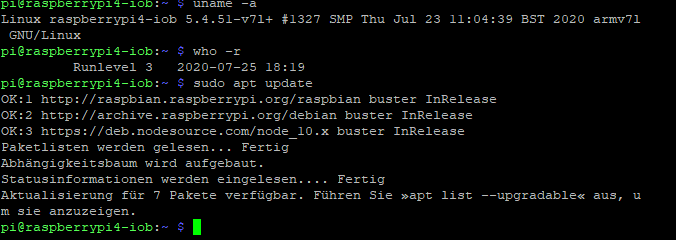
                              1f47438f-9ea2-4bbd-b82a-b476d3906224-image.png

                              und was jetzt ?

                              Thomas BraunT 1 Antwort Letzte Antwort
                              0
                              • A arnold

                                @Thomas-Braun said in Ble.0 Adapter bremst ganzen IObroker in 2 Min.:

                                who -r

                                1f47438f-9ea2-4bbd-b82a-b476d3906224-image.png

                                und was jetzt ?

                                Thomas BraunT Online
                                Thomas BraunT Online
                                Thomas Braun
                                Most Active
                                schrieb am zuletzt editiert von
                                #48

                                @arnold
                                Was heißt eigentlich

                                gelaufen am Rpi3,aber nach dem Umzug auf Rpi4 jedoch nicht

                                Wie bist du denn umgezogen? OS neuinstalliert auf dem RPI4 oder nur die Karte umgesteckt?

                                Linux-Werkzeugkasten:
                                https://forum.iobroker.net/topic/42952/der-kleine-iobroker-linux-werkzeugkasten
                                NodeJS Fixer Skript:
                                https://forum.iobroker.net/topic/68035/iob-node-fix-skript
                                iob_diag: curl -sLf -o diag.sh https://iobroker.net/diag.sh && bash diag.sh

                                1 Antwort Letzte Antwort
                                0
                                • A Offline
                                  A Offline
                                  arnold
                                  schrieb am zuletzt editiert von
                                  #49

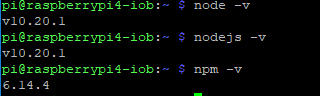
                                  200ec84f-afd1-4674-b269-f55f9b634036-image.png

                                  Thomas BraunT 1 Antwort Letzte Antwort
                                  0
                                  • A arnold

                                    200ec84f-afd1-4674-b269-f55f9b634036-image.png

                                    Thomas BraunT Online
                                    Thomas BraunT Online
                                    Thomas Braun
                                    Most Active
                                    schrieb am zuletzt editiert von
                                    #50

                                    @arnold Jetzt die Pakete per

                                    sudo apt dist-upgrade
                                    sudo reboot
                                    

                                    auch installieren.

                                    Linux-Werkzeugkasten:
                                    https://forum.iobroker.net/topic/42952/der-kleine-iobroker-linux-werkzeugkasten
                                    NodeJS Fixer Skript:
                                    https://forum.iobroker.net/topic/68035/iob-node-fix-skript
                                    iob_diag: curl -sLf -o diag.sh https://iobroker.net/diag.sh && bash diag.sh

                                    A 1 Antwort Letzte Antwort
                                    0
                                    • A Offline
                                      A Offline
                                      arnold
                                      schrieb am zuletzt editiert von
                                      #51

                                      Habe Neu Installation von iobroker , dann backitup instalieren und wiederherstellen mit Backitup aber datei von Rpi 3

                                      1 Antwort Letzte Antwort
                                      0
                                      • Thomas BraunT Thomas Braun

                                        @arnold Jetzt die Pakete per

                                        sudo apt dist-upgrade
                                        sudo reboot
                                        

                                        auch installieren.

                                        A Offline
                                        A Offline
                                        arnold
                                        schrieb am zuletzt editiert von
                                        #52

                                        @Thomas-Braun keine Besserung

                                        Thomas BraunT 1 Antwort Letzte Antwort
                                        0
                                        • A arnold

                                          @Thomas-Braun keine Besserung

                                          Thomas BraunT Online
                                          Thomas BraunT Online
                                          Thomas Braun
                                          Most Active
                                          schrieb am zuletzt editiert von
                                          #53

                                          @arnold

                                          free -h
                                          

                                          Und per

                                          htop
                                          

                                          mal schauen, was da so auf das System hämmert.

                                          Linux-Werkzeugkasten:
                                          https://forum.iobroker.net/topic/42952/der-kleine-iobroker-linux-werkzeugkasten
                                          NodeJS Fixer Skript:
                                          https://forum.iobroker.net/topic/68035/iob-node-fix-skript
                                          iob_diag: curl -sLf -o diag.sh https://iobroker.net/diag.sh && bash diag.sh

                                          1 Antwort Letzte Antwort
                                          0
                                          Antworten
                                          • In einem neuen Thema antworten
                                          Anmelden zum Antworten
                                          • Älteste zuerst
                                          • Neuste zuerst
                                          • Meiste Stimmen


                                          Support us

                                          ioBroker
                                          Community Adapters
                                          Donate
                                          FAQ Cloud / IOT
                                          HowTo: Node.js-Update
                                          HowTo: Backup/Restore
                                          Downloads
                                          BLOG

                                          759

                                          Online

                                          32.5k

                                          Benutzer

                                          81.6k

                                          Themen

                                          1.3m

                                          Beiträge
                                          Community
                                          Impressum | Datenschutz-Bestimmungen | Nutzungsbedingungen | Einwilligungseinstellungen
                                          ioBroker Community 2014-2025
                                          logo
                                          • Anmelden

                                          • Du hast noch kein Konto? Registrieren

                                          • Anmelden oder registrieren, um zu suchen
                                          • Erster Beitrag
                                            Letzter Beitrag
                                          0
                                          • Home
                                          • Aktuell
                                          • Tags
                                          • Ungelesen 0
                                          • Kategorien
                                          • Unreplied
                                          • Beliebt
                                          • GitHub
                                          • Docu
                                          • Hilfe