Skip to content
  • Home
  • Aktuell
  • Tags
  • 0 Ungelesen 0
  • Kategorien
  • Unreplied
  • Beliebt
  • GitHub
  • Docu
  • Hilfe
Skins
  • Light
  • Brite
  • Cerulean
  • Cosmo
  • Flatly
  • Journal
  • Litera
  • Lumen
  • Lux
  • Materia
  • Minty
  • Morph
  • Pulse
  • Sandstone
  • Simplex
  • Sketchy
  • Spacelab
  • United
  • Yeti
  • Zephyr
  • Dark
  • Cyborg
  • Darkly
  • Quartz
  • Slate
  • Solar
  • Superhero
  • Vapor

  • Standard: (Kein Skin)
  • Kein Skin
Einklappen
ioBroker Logo

Community Forum

donate donate
  1. ioBroker Community Home
  2. Deutsch
  3. ioBroker Allgemein
  4. iobroker + Docker + Synology: Problem mit Admin-Oberfläche

NEWS

  • Jahresrückblick 2025 – unser neuer Blogbeitrag ist online! ✨
    BluefoxB
    Bluefox
    16
    1
    945

  • Neuer Blogbeitrag: Monatsrückblick - Dezember 2025 🎄
    BluefoxB
    Bluefox
    13
    1
    690

  • Weihnachtsangebot 2025! 🎄
    BluefoxB
    Bluefox
    25
    1
    2.0k

iobroker + Docker + Synology: Problem mit Admin-Oberfläche

Geplant Angeheftet Gesperrt Verschoben ioBroker Allgemein
adminiobrokerdockersynologyredis
18 Beiträge 4 Kommentatoren 1.7k Aufrufe 4 Watching
  • Älteste zuerst
  • Neuste zuerst
  • Meiste Stimmen
Antworten
  • In einem neuen Thema antworten
Anmelden zum Antworten
Dieses Thema wurde gelöscht. Nur Nutzer mit entsprechenden Rechten können es sehen.
  • ? Ein ehemaliger Benutzer

    @McD_HRTS Log vom Container:

     
    stdout
    13:13:05
    ------------------------------------------------------------
    stdout
    13:13:05
    ---------------     2020-06-07 15:13:05      ---------------
    stdout
    13:13:05
    ------------------------------------------------------------
    stdout
    13:13:05
     
    stdout
    13:13:05
    ------------------------------------------------------------
    stdout
    13:13:05
    -----       Welcome to your ioBroker-container!        -----
    stdout
    13:13:05
    -----          Startupscript is now running.           -----
    stdout
    13:13:05
    -----                Please be patient!                -----
    stdout
    13:13:05
    ------------------------------------------------------------
    stdout
    13:13:05
     
    stdout
    13:13:05
    ------------------------------------------------------------
    stdout
    13:13:05
    -----              Debugging information               -----
    stdout
    13:13:05
    -----                                                  -----
    stdout
    13:13:05
    -----                      System                      -----
    stdout
    13:13:05
    -----               arch:      x86_64                  -----
    stdout
    13:13:05
    -----                                                  -----
    stdout
    13:13:05
    -----                     Versions                     -----
    stdout
    13:13:05
    -----               image:     v4.2.0                  -----
    stdout
    13:13:06
    -----               node:      v10.20.1                -----
    stdout
    13:13:07
    -----               npm:       6.14.4                  -----
    stdout
    13:13:08
    -----                                                  -----
    stdout
    13:13:08
    -----                       ENV                        -----
    stdout
    13:13:08
    -----               PACKAGES:  vi                      -----
    stdout
    13:13:08
    -----               SETGID:    1000                    -----
    stdout
    13:13:08
    -----               SETUID:    1000                    -----
    stdout
    13:13:08
    -----               USBDEVICES: /dev/ttyUSB0            -----
    stdout
    13:13:08
    ------------------------------------------------------------
    stdout
    13:13:08
     
    stdout
    13:13:08
    ------------------------------------------------------------
    stdout
    13:13:08
    -----         Step 1 of 5: Preparing container         -----
    stdout
    13:13:08
    ------------------------------------------------------------
    stdout
    13:13:08
     
    stdout
    13:13:08
    Installing additional packages is set by ENV.
    stdout
    13:13:08
    The following packages will be installed: vi...
    stdout
    13:13:16
    E: Paket vi kann nicht gefunden werden.
    stderr
    13:13:16
    Done.
    stdout
    13:13:16
     
    stdout
    13:13:16
    ------------------------------------------------------------
    stdout
    13:13:16
    -----   Step 2 of 5: Detecting ioBroker installation   -----
    stdout
    13:13:16
    ------------------------------------------------------------
    stdout
    13:13:16
     
    stdout
    13:13:17
    Existing installation of ioBroker detected in /opt/iobroker.
    stdout
    13:13:17
     
    stdout
    13:13:17
    ------------------------------------------------------------
    stdout
    13:13:17
    -----   Step 3 of 5: Checking ioBroker installation    -----
    stdout
    13:13:17
    ------------------------------------------------------------
    stdout
    13:13:17
     
    stdout
    13:13:17
    (Re)Setting folder permissions (This might take a while! Please be patient!)...
    stdout
    13:13:18
    Done.
    stdout
    13:13:18
     
    stdout
    13:13:18
    Fixing "sudo-bug" by replacing sudo in iobroker with gosu...
    stdout
    13:13:18
    Done.
    stdout
    13:13:18
     
    stdout
    13:13:22
    /opt/scripts/iobroker_startup.sh: Zeile 173: [: !=: Einstelliger (unärer) Operator erwartet.
    stderr
    13:13:22
    ------------------------------------------------------------
    stdout
    13:13:22
    -----      Step 4 of 5: Applying special settings      -----
    stdout
    13:13:22
    ------------------------------------------------------------
    stdout
    13:13:22
     
    stdout
    13:13:22
    Some adapters have special requirements/ settings which can be activated by the use of environment variables.
    stdout
    13:13:22
    For more information take a look at readme.md on Github!
    stdout
    13:13:22
     
    stdout
    13:13:22
    Usb-device-support is activated by ENV.
    stdout
    13:13:22
    Setting permissions for /dev/ttyUSB0...
    stdout
    13:13:22
    Done.
    stdout
    13:13:22
     
    stdout
    13:13:27
    ------------------------------------------------------------
    stdout
    13:13:27
    -----          Step 5 of 5: ioBroker startup           -----
    stdout
    13:13:27
    ------------------------------------------------------------
    stdout
    13:13:27
     
    stdout
    

    Die nachträglichen Änderungen habe ich gemacht, um das durchreichen des Stick zu ermöglichen. Ohne Portainer war es mir nur möglich durch --privileged den Stick durchzureichen. Mit Portainer gibt es die Möglichkeit, das Durchreichen des USB-Ports zu konfigurieren und nicht eben alles pauschal durchzureichen, was ja ein Sicherheitsrisiko ist. Nachträglich, weil ich eben den Container ohne Portainer angelegt hatte.

    arteckA Offline
    arteckA Offline
    arteck
    Developer Most Active
    schrieb am zuletzt editiert von
    #4

    @moongringo

    pkill io
    

    so stoppt man den iobroker im doker

    und mit

    node node_modules/iobroker.js-controller/controller.js >/opt/scripts/docker_iobroker_log.txt 2>&1 &
    

    startest du den wieder

    nicht mit iobroker start/stop

    zigbee hab ich, zwave auch, nuc's genauso und HA auch

    1 Antwort Letzte Antwort
    0
    • ? Offline
      ? Offline
      Ein ehemaliger Benutzer
      schrieb am zuletzt editiert von
      #5

      @arteck said in iobroker + Docker + Synology: Problem mit Admin-Oberfläche:

      node node_modules/iobroker.js-controller/controller.js >/opt/scripts/docker_iobroker_log.txt 2>&1 &

      Hi und danke für die Antwort. Ich habe deine Befehle ausprobiert, ohne Ergebnis:

      root@3eaae20aff9c:/opt/iobroker# pkill io
      root@3eaae20aff9c:/opt/iobroker# node node_modules/iobroker.js-controller/controller.js >/opt/scripts/docker_iobroker_log.txt 2>&1 &
      [1] 550
      root@3eaae20aff9c:/opt/iobroker# 
      
      arteckA 1 Antwort Letzte Antwort
      0
      • ? Ein ehemaliger Benutzer

        @arteck said in iobroker + Docker + Synology: Problem mit Admin-Oberfläche:

        node node_modules/iobroker.js-controller/controller.js >/opt/scripts/docker_iobroker_log.txt 2>&1 &

        Hi und danke für die Antwort. Ich habe deine Befehle ausprobiert, ohne Ergebnis:

        root@3eaae20aff9c:/opt/iobroker# pkill io
        root@3eaae20aff9c:/opt/iobroker# node node_modules/iobroker.js-controller/controller.js >/opt/scripts/docker_iobroker_log.txt 2>&1 &
        [1] 550
        root@3eaae20aff9c:/opt/iobroker# 
        
        arteckA Offline
        arteckA Offline
        arteck
        Developer Most Active
        schrieb am zuletzt editiert von arteck
        #6

        @moongringo was heisst ohne Ergebniss ?? wie kommst du dadrauf ??

        der js-controller wurde gestartet mit der pid 550

        zigbee hab ich, zwave auch, nuc's genauso und HA auch

        ? 1 Antwort Letzte Antwort
        0
        • arteckA arteck

          @moongringo was heisst ohne Ergebniss ?? wie kommst du dadrauf ??

          der js-controller wurde gestartet mit der pid 550

          ? Offline
          ? Offline
          Ein ehemaliger Benutzer
          schrieb am zuletzt editiert von
          #7

          @arteck Wie in dem Codeschnipsel im vorherigen Post angegeben wurde "[1] 550" ausgegeben, auf die Admin-Oberfläche komme ich aber weiterhin nicht.

          arteckA 1 Antwort Letzte Antwort
          0
          • ? Ein ehemaliger Benutzer

            @arteck Wie in dem Codeschnipsel im vorherigen Post angegeben wurde "[1] 550" ausgegeben, auf die Admin-Oberfläche komme ich aber weiterhin nicht.

            arteckA Offline
            arteckA Offline
            arteck
            Developer Most Active
            schrieb am zuletzt editiert von arteck
            #8

            @moongringo dann schau mal ins log vom iobroker.. ob der admin gestartet wird ..

            zigbee hab ich, zwave auch, nuc's genauso und HA auch

            ? 1 Antwort Letzte Antwort
            0
            • arteckA arteck

              @moongringo dann schau mal ins log vom iobroker.. ob der admin gestartet wird ..

              ? Offline
              ? Offline
              Ein ehemaliger Benutzer
              schrieb am zuletzt editiert von
              #9

              @arteck Nein, offenbar werden die Instanzen wie Admin nicht gestartet. Die wurden zuvor immer unter "Starting ioBroker..." aufgelistet. Das Log zeigt dasselbe Startverhalten wie vorher:


              ------------------------------------------------------------
              
              ---------------     2020-06-07 21:20:18      ---------------
              
              ------------------------------------------------------------


              ------------------------------------------------------------
              
              -----       Welcome to your ioBroker-container!        -----
              
              -----          Startupscript is now running.           -----
              
              -----                Please be patient!                -----
              
              ------------------------------------------------------------


              ------------------------------------------------------------
              
              -----              Debugging information               -----
              
              -----                                                  -----
              
              -----                      System                      -----
              
              -----               arch:      x86_64                  -----
              
              -----                                                  -----
              
              -----                     Versions                     -----
              
              -----               image:     v4.2.0                  -----
              
              -----               node:      v10.20.1                -----
              
              -----               npm:       6.14.4                  -----
              
              -----                                                  -----
              
              -----                       ENV                        -----
              
              -----               PACKAGES:  vi                      -----
              
              -----               SETGID:    1000                    -----
              
              -----               SETUID:    1000                    -----
              
              -----               USBDEVICES: /dev/ttyUSB0            -----
              
              ------------------------------------------------------------


              ------------------------------------------------------------
              
              -----         Step 1 of 5: Preparing container         -----
              
              ------------------------------------------------------------


              Installing additional packages is set by ENV.
              
              The following packages will be installed: vi...
              
              E: Paket vi kann nicht gefunden werden.
              
              Done.


              ------------------------------------------------------------
              
              -----   Step 2 of 5: Detecting ioBroker installation   -----
              
              ------------------------------------------------------------


              Existing installation of ioBroker detected in /opt/iobroker.


              ------------------------------------------------------------
              
              -----   Step 3 of 5: Checking ioBroker installation    -----
              
              ------------------------------------------------------------


              (Re)Setting folder permissions (This might take a while! Please be patient!)...
              
              Done.


              Fixing "sudo-bug" by replacing sudo in iobroker with gosu...
              
              Done.


              /opt/scripts/iobroker_startup.sh: Zeile 173: [: !=: Einstelliger (unärer) Operator erwartet.
              
              ------------------------------------------------------------
              
              -----      Step 4 of 5: Applying special settings      -----
              
              ------------------------------------------------------------


              Some adapters have special requirements/ settings which can be activated by the use of environment variables.
              
              For more information take a look at readme.md on Github!


              Usb-device-support is activated by ENV.
              
              Setting permissions for /dev/ttyUSB0...
              
              Done.


              ------------------------------------------------------------
              
              -----          Step 5 of 5: ioBroker startup           -----
              
              ------------------------------------------------------------


              Starting ioBroker...```
              GlasfaserG 1 Antwort Letzte Antwort
              0
              • ? Ein ehemaliger Benutzer

                @arteck Nein, offenbar werden die Instanzen wie Admin nicht gestartet. Die wurden zuvor immer unter "Starting ioBroker..." aufgelistet. Das Log zeigt dasselbe Startverhalten wie vorher:


                ------------------------------------------------------------
                
                ---------------     2020-06-07 21:20:18      ---------------
                
                ------------------------------------------------------------


                ------------------------------------------------------------
                
                -----       Welcome to your ioBroker-container!        -----
                
                -----          Startupscript is now running.           -----
                
                -----                Please be patient!                -----
                
                ------------------------------------------------------------


                ------------------------------------------------------------
                
                -----              Debugging information               -----
                
                -----                                                  -----
                
                -----                      System                      -----
                
                -----               arch:      x86_64                  -----
                
                -----                                                  -----
                
                -----                     Versions                     -----
                
                -----               image:     v4.2.0                  -----
                
                -----               node:      v10.20.1                -----
                
                -----               npm:       6.14.4                  -----
                
                -----                                                  -----
                
                -----                       ENV                        -----
                
                -----               PACKAGES:  vi                      -----
                
                -----               SETGID:    1000                    -----
                
                -----               SETUID:    1000                    -----
                
                -----               USBDEVICES: /dev/ttyUSB0            -----
                
                ------------------------------------------------------------


                ------------------------------------------------------------
                
                -----         Step 1 of 5: Preparing container         -----
                
                ------------------------------------------------------------


                Installing additional packages is set by ENV.
                
                The following packages will be installed: vi...
                
                E: Paket vi kann nicht gefunden werden.
                
                Done.


                ------------------------------------------------------------
                
                -----   Step 2 of 5: Detecting ioBroker installation   -----
                
                ------------------------------------------------------------


                Existing installation of ioBroker detected in /opt/iobroker.


                ------------------------------------------------------------
                
                -----   Step 3 of 5: Checking ioBroker installation    -----
                
                ------------------------------------------------------------


                (Re)Setting folder permissions (This might take a while! Please be patient!)...
                
                Done.


                Fixing "sudo-bug" by replacing sudo in iobroker with gosu...
                
                Done.


                /opt/scripts/iobroker_startup.sh: Zeile 173: [: !=: Einstelliger (unärer) Operator erwartet.
                
                ------------------------------------------------------------
                
                -----      Step 4 of 5: Applying special settings      -----
                
                ------------------------------------------------------------


                Some adapters have special requirements/ settings which can be activated by the use of environment variables.
                
                For more information take a look at readme.md on Github!


                Usb-device-support is activated by ENV.
                
                Setting permissions for /dev/ttyUSB0...
                
                Done.


                ------------------------------------------------------------
                
                -----          Step 5 of 5: ioBroker startup           -----
                
                ------------------------------------------------------------


                Starting ioBroker...```
                GlasfaserG Offline
                GlasfaserG Offline
                Glasfaser
                schrieb am zuletzt editiert von
                #10

                @moongringo

                zeige mal :

                iobroker list instances
                iobroker list adapters
                

                Synology 918+ 16GB - ioBroker in Docker v9 , VISO auf Trekstor Primebook C13 13,3" , Hikvision Domkameras mit Surveillance Station .. CCU RaspberryMatic in Synology VM .. Zigbee CC2538+CC2592 .. Sonoff .. KNX .. Modbus ..

                1 Antwort Letzte Antwort
                0
                • ? Offline
                  ? Offline
                  Ein ehemaliger Benutzer
                  schrieb am zuletzt editiert von
                  #11

                  @Glasfaser said in iobroker + Docker + Synology: Problem mit Admin-Oberfläche:

                  iobroker list adapters

                  Gern, dann erhalte ich die Redis-Fehlermeldung:

                  root@3eaae20aff9c:/opt/iobroker# iobroker list instances
                  No connection to states 192.168.0.3:6379[redis]
                  root@3eaae20aff9c:/opt/iobroker# iobroker list adapters
                  No connection to states 192.168.0.3:6379[redis]
                  root@3eaae20aff9c:/opt/iobroker# 
                  
                  GlasfaserG 1 Antwort Letzte Antwort
                  0
                  • ? Ein ehemaliger Benutzer

                    @Glasfaser said in iobroker + Docker + Synology: Problem mit Admin-Oberfläche:

                    iobroker list adapters

                    Gern, dann erhalte ich die Redis-Fehlermeldung:

                    root@3eaae20aff9c:/opt/iobroker# iobroker list instances
                    No connection to states 192.168.0.3:6379[redis]
                    root@3eaae20aff9c:/opt/iobroker# iobroker list adapters
                    No connection to states 192.168.0.3:6379[redis]
                    root@3eaae20aff9c:/opt/iobroker# 
                    
                    GlasfaserG Offline
                    GlasfaserG Offline
                    Glasfaser
                    schrieb am zuletzt editiert von Glasfaser
                    #12

                    @moongringo
                    Dein Log sieht mir am Anfang sehr kurz aus .

                    Hast du die anderen Einstellungen auch entfernt !?

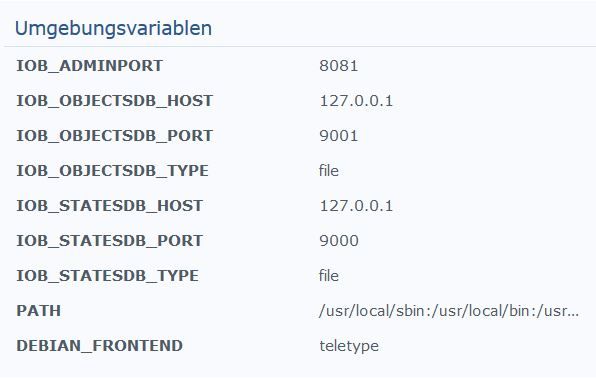
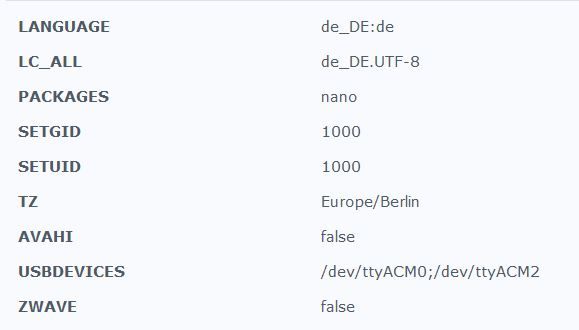
                    So sieht meins aus :
                    .


                    ------------------------------------------------------------
                    
                    ---------------     2020-06-04 21:17:40      ---------------
                    
                    ------------------------------------------------------------


                    ------------------------------------------------------------
                    
                    -----       Welcome to your ioBroker-container!        -----
                    
                    -----          Startupscript is now running.           -----
                    
                    -----                Please be patient!                -----
                    
                    ------------------------------------------------------------


                    ------------------------------------------------------------
                    
                    -----              Debugging information               -----
                    
                    -----                                                  -----
                    
                    -----                      System                      -----
                    
                    -----               arch:      x86_64                  -----
                    
                    -----                                                  -----
                    
                    -----                     Versions                     -----
                    
                    -----               image:     v4.2.0                  -----
                    
                    -----               node:      v12.17.0                -----
                    
                    -----               npm:       6.14.4                  -----
                    
                    -----                                                  -----
                    
                    -----                       ENV                        -----
                    
                    -----               ADMINPORT: 8081                    -----
                    
                    -----               AVAHI:     false                   -----
                    
                    -----               IOB_OBJECTSDB_HOST: 127.0.0.1               -----
                    
                    -----               IOB_OBJECTSDB_PORT: 9001                    -----
                    
                    -----               IOB_OBJECTSDB_TYPE: file                    -----
                    
                    -----               PACKAGES:  nano                    -----
                    
                    -----               SETGID:    1000                    -----
                    
                    -----               SETUID:    1000                    -----
                    
                    -----               IOB_STATESDB_HOST: 127.0.0.1               -----
                    
                    -----               IOB_STATESDB_PORT: 9000                    -----
                    
                    -----               IOB_STATESDB_TYPE: file                    -----
                    
                    -----               USBDEVICES: /dev/ttyACM0;/dev/ttyACM2 -----
                    
                    -----               ZWAVE:     false                   -----
                    

                    .
                    1.JPG
                    1.JPG

                    Synology 918+ 16GB - ioBroker in Docker v9 , VISO auf Trekstor Primebook C13 13,3" , Hikvision Domkameras mit Surveillance Station .. CCU RaspberryMatic in Synology VM .. Zigbee CC2538+CC2592 .. Sonoff .. KNX .. Modbus ..

                    ? 2 Antworten Letzte Antwort
                    0
                    • ? Ein ehemaliger Benutzer

                      Hallo,

                      vorweg: Ich bin verzweifelt und habe nach dem lesen unzähliger Forenbeiträge keine Idee mehr... Es geht sogar so weit, dass ich - ohne anständiges Backup - meinen Biobroker-Container gelöscht und komplett neu aufgesetzt habe - ohne Erfolg.

                      Mein Problem:
                      Seit 2 Tagen komme ich nicht mehr auf meine iobroker Admin-Oberfläche. Ich habe zuvor einen USB-300 Stick zur EnOcean-Integration (erfolgreich) bei iobroker hinzugefügt. Da ich das Device anständig integrieren wollte, habe ich mich mit der Buanet-Portainer-Anleitung Portainer installiert und den Container bearbeitet. Seit dem komme ich nicht mehr auf die Admin-Oberfläche. Ich habe alles mögliche, was ich im Forum gefunden habe, probiert, ohne erfolg. Dann habe ich den Container gelöscht und neu aufgesetzt. Leider hat es weiterhin nicht funktioniert, auch ohne Portainer.
                      Erst als ich einen neunen Admin auf Port 8089 angelegt habe, bin ich kurzzeitig auf die Admin-Oberfläche gekommen. Als ich den Container dann wieder mit Portainer editiert habe, ging wieder nichts. Seit dem habe ich zusätzlich das Problem, dass ich bei fast jeder Komandozeileneingabe eine Redis-Fehlermeldung bekomme, die trotz Redis-Installation weiterhin auftritt:

                      root@3eaae20aff9c:/opt/iobroker# iobroker start
                      Starting iobroker controller daemon...
                      iobroker controller daemon started. PID: 483
                      root@3eaae20aff9c:/opt/iobroker# npm -v
                      6.14.4
                      root@3eaae20aff9c:/opt/iobroker# iobroker version admin
                      4.0.10
                      root@3eaae20aff9c:/opt/iobroker# node -v
                      v10.20.1
                      root@3eaae20aff9c:/opt/iobroker# 
                      root@3eaae20aff9c:/opt/iobroker# nodejs -v
                      v10.20.1
                      root@3eaae20aff9c:/opt/iobroker# iobroker list instances --enabled
                      No connection to states 192.168.0.3:6379[redis]
                      

                      Ich hoffe, ihr habt eine Idee und könnt mir helfen?!

                      GlasfaserG Offline
                      GlasfaserG Offline
                      Glasfaser
                      schrieb am zuletzt editiert von
                      #13

                      @moongringo sagte in iobroker + Docker + Synology: Problem mit Admin-Oberfläche:

                      die trotz Redis-Installation weiterhin auftritt:

                      hast du es auch hiermit eingestellt :

                      iobroker setup custom
                      

                      Synology 918+ 16GB - ioBroker in Docker v9 , VISO auf Trekstor Primebook C13 13,3" , Hikvision Domkameras mit Surveillance Station .. CCU RaspberryMatic in Synology VM .. Zigbee CC2538+CC2592 .. Sonoff .. KNX .. Modbus ..

                      ? 1 Antwort Letzte Antwort
                      0
                      • GlasfaserG Glasfaser

                        @moongringo
                        Dein Log sieht mir am Anfang sehr kurz aus .

                        Hast du die anderen Einstellungen auch entfernt !?

                        So sieht meins aus :
                        .


                        ------------------------------------------------------------
                        
                        ---------------     2020-06-04 21:17:40      ---------------
                        
                        ------------------------------------------------------------


                        ------------------------------------------------------------
                        
                        -----       Welcome to your ioBroker-container!        -----
                        
                        -----          Startupscript is now running.           -----
                        
                        -----                Please be patient!                -----
                        
                        ------------------------------------------------------------


                        ------------------------------------------------------------
                        
                        -----              Debugging information               -----
                        
                        -----                                                  -----
                        
                        -----                      System                      -----
                        
                        -----               arch:      x86_64                  -----
                        
                        -----                                                  -----
                        
                        -----                     Versions                     -----
                        
                        -----               image:     v4.2.0                  -----
                        
                        -----               node:      v12.17.0                -----
                        
                        -----               npm:       6.14.4                  -----
                        
                        -----                                                  -----
                        
                        -----                       ENV                        -----
                        
                        -----               ADMINPORT: 8081                    -----
                        
                        -----               AVAHI:     false                   -----
                        
                        -----               IOB_OBJECTSDB_HOST: 127.0.0.1               -----
                        
                        -----               IOB_OBJECTSDB_PORT: 9001                    -----
                        
                        -----               IOB_OBJECTSDB_TYPE: file                    -----
                        
                        -----               PACKAGES:  nano                    -----
                        
                        -----               SETGID:    1000                    -----
                        
                        -----               SETUID:    1000                    -----
                        
                        -----               IOB_STATESDB_HOST: 127.0.0.1               -----
                        
                        -----               IOB_STATESDB_PORT: 9000                    -----
                        
                        -----               IOB_STATESDB_TYPE: file                    -----
                        
                        -----               USBDEVICES: /dev/ttyACM0;/dev/ttyACM2 -----
                        
                        -----               ZWAVE:     false                   -----
                        

                        .
                        1.JPG
                        1.JPG

                        ? Offline
                        ? Offline
                        Ein ehemaliger Benutzer
                        schrieb am zuletzt editiert von
                        #14

                        @Glasfaser Ich habe nichts entfernt, nur eine frische Installation vom ioBroker aufgesetzt. Bin nicht einmal danach auf den Admin gekommen und habe nicht eingestellt oder verändert.

                        GlasfaserG 1 Antwort Letzte Antwort
                        0
                        • GlasfaserG Glasfaser

                          @moongringo sagte in iobroker + Docker + Synology: Problem mit Admin-Oberfläche:

                          die trotz Redis-Installation weiterhin auftritt:

                          hast du es auch hiermit eingestellt :

                          iobroker setup custom
                          
                          ? Offline
                          ? Offline
                          Ein ehemaliger Benutzer
                          schrieb am zuletzt editiert von
                          #15

                          @Glasfaser Ja, habe ich - nach bestem Wissen und Gewissen - an den Tutorials zu dem Redis-Problem langgehangelt und mit diesem Befehl auch eingestellt. Seit dem steht die IP-Adresse und der Port in der Fehlermeldung. Davor hatte ich die Fehlermeldung ohne IP und Port erhalten.

                          1 Antwort Letzte Antwort
                          0
                          • ? Ein ehemaliger Benutzer

                            @Glasfaser Ich habe nichts entfernt, nur eine frische Installation vom ioBroker aufgesetzt. Bin nicht einmal danach auf den Admin gekommen und habe nicht eingestellt oder verändert.

                            GlasfaserG Offline
                            GlasfaserG Offline
                            Glasfaser
                            schrieb am zuletzt editiert von
                            #16

                            @moongringo sagte in iobroker + Docker + Synology: Problem mit Admin-Oberfläche:

                            nur eine frische Installation vom ioBroker aufgesetzt.

                            dann installiere es neu ... aber erstmal ohne Redis

                            und hier die Seite dazu !

                            Link Text

                            Synology 918+ 16GB - ioBroker in Docker v9 , VISO auf Trekstor Primebook C13 13,3" , Hikvision Domkameras mit Surveillance Station .. CCU RaspberryMatic in Synology VM .. Zigbee CC2538+CC2592 .. Sonoff .. KNX .. Modbus ..

                            1 Antwort Letzte Antwort
                            0
                            • GlasfaserG Glasfaser

                              @moongringo
                              Dein Log sieht mir am Anfang sehr kurz aus .

                              Hast du die anderen Einstellungen auch entfernt !?

                              So sieht meins aus :
                              .


                              ------------------------------------------------------------
                              
                              ---------------     2020-06-04 21:17:40      ---------------
                              
                              ------------------------------------------------------------


                              ------------------------------------------------------------
                              
                              -----       Welcome to your ioBroker-container!        -----
                              
                              -----          Startupscript is now running.           -----
                              
                              -----                Please be patient!                -----
                              
                              ------------------------------------------------------------


                              ------------------------------------------------------------
                              
                              -----              Debugging information               -----
                              
                              -----                                                  -----
                              
                              -----                      System                      -----
                              
                              -----               arch:      x86_64                  -----
                              
                              -----                                                  -----
                              
                              -----                     Versions                     -----
                              
                              -----               image:     v4.2.0                  -----
                              
                              -----               node:      v12.17.0                -----
                              
                              -----               npm:       6.14.4                  -----
                              
                              -----                                                  -----
                              
                              -----                       ENV                        -----
                              
                              -----               ADMINPORT: 8081                    -----
                              
                              -----               AVAHI:     false                   -----
                              
                              -----               IOB_OBJECTSDB_HOST: 127.0.0.1               -----
                              
                              -----               IOB_OBJECTSDB_PORT: 9001                    -----
                              
                              -----               IOB_OBJECTSDB_TYPE: file                    -----
                              
                              -----               PACKAGES:  nano                    -----
                              
                              -----               SETGID:    1000                    -----
                              
                              -----               SETUID:    1000                    -----
                              
                              -----               IOB_STATESDB_HOST: 127.0.0.1               -----
                              
                              -----               IOB_STATESDB_PORT: 9000                    -----
                              
                              -----               IOB_STATESDB_TYPE: file                    -----
                              
                              -----               USBDEVICES: /dev/ttyACM0;/dev/ttyACM2 -----
                              
                              -----               ZWAVE:     false                   -----
                              

                              .
                              1.JPG
                              1.JPG

                              ? Offline
                              ? Offline
                              Ein ehemaliger Benutzer
                              schrieb am zuletzt editiert von
                              #17

                              @Glasfaser Ich habe mal spaßeshalber deine Umgebungsvariablen übernommen. Log sieht jetzt so aus:

                              Unselect
                                     
                              -----                                                  -----
                              
                              -----                     Versions                     -----
                              
                              -----               image:     v4.2.0                  -----
                              
                              -----               node:      v10.20.1                -----
                              
                              -----               npm:       6.14.4                  -----
                              
                              -----                                                  -----
                              
                              -----                       ENV                        -----
                              
                              -----               ADMINPORT: 8081                    -----
                              
                              -----               AVAHI:     false                   -----
                              
                              -----               IOB_OBJECTSDB_HOST: 127.0.0.1               -----
                              
                              -----               IOB_OBJECTSDB_PORT: 9001                    -----
                              
                              -----               IOB_OBJECTSDB_TYPE: file                    -----
                              
                              -----               PACKAGES:  nano                    -----
                              
                              -----               SETGID:    1000                    -----
                              
                              -----               SETUID:    1000                    -----
                              
                              -----               IOB_STATESDB_HOST: 127.0.0.1               -----
                              
                              -----               IOB_STATESDB_PORT: 9000                    -----
                              
                              -----               IOB_STATESDB_TYPE: file                    -----
                              
                              -----               USBDEVICES: /dev/ttyUSB0            -----
                              
                              -----               ZWAVE:     false                   -----
                              
                              ------------------------------------------------------------


                              ------------------------------------------------------------
                              
                              -----         Step 1 of 5: Preparing container         -----
                              
                              ------------------------------------------------------------


                              Installing additional packages is set by ENV.
                              
                              The following packages will be installed: nano...
                              
                              debconf: unable to initialize frontend: Dialog
                              
                              debconf: (Dialog frontend will not work on a dumb terminal, an emacs shell buffer, or without a controlling terminal.)
                              
                              debconf: falling back to frontend: Readline
                              
                              debconf: unable to initialize frontend: Readline
                              
                              debconf: (This frontend requires a controlling tty.)
                              
                              debconf: falling back to frontend: Teletype
                              
                              dpkg-preconfigure: unable to re-open stdin: 
                              
                              Vormals nicht ausgewähltes Paket nano wird gewählt.
                              
                              (Lese Datenbank ... 
                              (Lese Datenbank ... 5%
                              (Lese Datenbank ... 10%
                              (Lese Datenbank ... 15%
                              (Lese Datenbank ... 20%
                              (Lese Datenbank ... 25%
                              (Lese Datenbank ... 30%
                              (Lese Datenbank ... 35%
                              (Lese Datenbank ... 40%
                              (Lese Datenbank ... 45%
                              (Lese Datenbank ... 50%
                              (Lese Datenbank ... 55%
                              (Lese Datenbank ... 60%
                              (Lese Datenbank ... 65%
                              (Lese Datenbank ... 70%
                              (Lese Datenbank ... 75%
                              (Lese Datenbank ... 80%
                              (Lese Datenbank ... 85%
                              (Lese Datenbank ... 90%
                              (Lese Datenbank ... 95%
                              (Lese Datenbank ... 100%
                              (Lese Datenbank ... 25499 Dateien und Verzeichnisse sind derzeit installiert.)
                              
                              Vorbereitung zum Entpacken von .../archives/nano_3.2-3_amd64.deb ...
                              
                              Entpacken von nano (3.2-3) ...
                              
                              nano (3.2-3) wird eingerichtet ...
                              
                              update-alternatives: /bin/nano wird verwendet, um /usr/bin/editor (editor) im automatischen Modus bereitzustellen
                              
                              update-alternatives: /bin/nano wird verwendet, um /usr/bin/pico (pico) im automatischen Modus bereitzustellen
                              
                              Done.


                              ------------------------------------------------------------
                              
                              -----   Step 2 of 5: Detecting ioBroker installation   -----
                              
                              ------------------------------------------------------------


                              Existing installation of ioBroker detected in /opt/iobroker.


                              ------------------------------------------------------------
                              
                              -----   Step 3 of 5: Checking ioBroker installation    -----
                              
                              ------------------------------------------------------------


                              (Re)Setting folder permissions (This might take a while! Please be patient!)...
                              
                              Done.


                              Fixing "sudo-bug" by replacing sudo in iobroker with gosu...
                              
                              Done.


                              /opt/scripts/iobroker_startup.sh: Zeile 173: [: !=: Einstelliger (unärer) Operator erwartet.
                              
                              ------------------------------------------------------------
                              
                              -----      Step 4 of 5: Applying special settings      -----
                              
                              ------------------------------------------------------------


                              Some adapters have special requirements/ settings which can be activated by the use of environment variables.
                              
                              For more information take a look at readme.md on Github!


                              /opt/scripts/iobroker_startup.sh: Zeile 199: [: 8081: Einstelliger (unärer) Operator erwartet.
                              
                              Usb-device-support is activated by ENV.
                              
                              Setting permissions for /dev/ttyUSB0...
                              
                              Done.


                              ENV IOB_OBJECTSDB_TYPE is set and value is different from detected ioBroker installation.
                              
                              Setting type of objects db to "file"...
                              
                              Done.
                              
                              ENV IOB_OBJECTSDB_HOST is set and value is different from detected ioBroker installation.
                              
                              Setting host of objects db to "127.0.0.1"...
                              
                              Done.
                              
                              ENV IOB_OBJECTSDB_PORT is set and value meets detected ioBroker installation. Nothing to do here.


                              ENV IOB_STATESDB_TYPE is set and value is different from detected ioBroker installation.
                              
                              Setting type of states db to "file"...
                              
                              Done.
                              
                              ENV IOB_STATESDB_HOST is set and value is different from detected ioBroker installation.
                              
                              Setting host of states db to "127.0.0.1"...
                              
                              Done.
                              
                              ENV IOB_STATESDB_PORT is set and value is different from detected ioBroker installation.
                              
                              Setting port of states db to "9000"...
                              
                              Done.


                              ------------------------------------------------------------
                              
                              -----          Step 5 of 5: ioBroker startup           -----
                              
                              ------------------------------------------------------------


                              Starting ioBroker...


                              host.iobroker check instance "system.adapter.admin.0" for host "a2ea88cc42b7"
                              
                              host.iobroker check instance "system.adapter.discovery.0" for host "a2ea88cc42b7"
                              
                              host.iobroker check instance "system.adapter.info.0" for host "a2ea88cc42b7"
                              

                              Und List liefert auch wieder etwas:

                              root@3eaae20aff9c:/opt/iobroker# iobroker list instances
                                system.adapter.admin.0                 : admin                 -  enabled, port: 8081, bind: 0.0.0.0, run as: admin
                                system.adapter.discovery.0             : discovery             -  enabled
                                system.adapter.info.0                  : info                  -  enabled
                              
                              + instance is alive
                              root@3eaae20aff9c:/opt/iobroker# iobroker list adapters
                              system.adapter.admin                   : admin          - v4.0.10
                              system.adapter.discovery               : discovery      - v2.3.5
                              system.adapter.info                    : info           - v1.7.2
                              

                              Aber auf die Admin-Oberfläche komme ich weiterhin nicht...

                              ? 1 Antwort Letzte Antwort
                              0
                              • ? Ein ehemaliger Benutzer

                                @Glasfaser Ich habe mal spaßeshalber deine Umgebungsvariablen übernommen. Log sieht jetzt so aus:

                                Unselect
                                       
                                -----                                                  -----
                                
                                -----                     Versions                     -----
                                
                                -----               image:     v4.2.0                  -----
                                
                                -----               node:      v10.20.1                -----
                                
                                -----               npm:       6.14.4                  -----
                                
                                -----                                                  -----
                                
                                -----                       ENV                        -----
                                
                                -----               ADMINPORT: 8081                    -----
                                
                                -----               AVAHI:     false                   -----
                                
                                -----               IOB_OBJECTSDB_HOST: 127.0.0.1               -----
                                
                                -----               IOB_OBJECTSDB_PORT: 9001                    -----
                                
                                -----               IOB_OBJECTSDB_TYPE: file                    -----
                                
                                -----               PACKAGES:  nano                    -----
                                
                                -----               SETGID:    1000                    -----
                                
                                -----               SETUID:    1000                    -----
                                
                                -----               IOB_STATESDB_HOST: 127.0.0.1               -----
                                
                                -----               IOB_STATESDB_PORT: 9000                    -----
                                
                                -----               IOB_STATESDB_TYPE: file                    -----
                                
                                -----               USBDEVICES: /dev/ttyUSB0            -----
                                
                                -----               ZWAVE:     false                   -----
                                
                                ------------------------------------------------------------


                                ------------------------------------------------------------
                                
                                -----         Step 1 of 5: Preparing container         -----
                                
                                ------------------------------------------------------------


                                Installing additional packages is set by ENV.
                                
                                The following packages will be installed: nano...
                                
                                debconf: unable to initialize frontend: Dialog
                                
                                debconf: (Dialog frontend will not work on a dumb terminal, an emacs shell buffer, or without a controlling terminal.)
                                
                                debconf: falling back to frontend: Readline
                                
                                debconf: unable to initialize frontend: Readline
                                
                                debconf: (This frontend requires a controlling tty.)
                                
                                debconf: falling back to frontend: Teletype
                                
                                dpkg-preconfigure: unable to re-open stdin: 
                                
                                Vormals nicht ausgewähltes Paket nano wird gewählt.
                                
                                (Lese Datenbank ... 
                                (Lese Datenbank ... 5%
                                (Lese Datenbank ... 10%
                                (Lese Datenbank ... 15%
                                (Lese Datenbank ... 20%
                                (Lese Datenbank ... 25%
                                (Lese Datenbank ... 30%
                                (Lese Datenbank ... 35%
                                (Lese Datenbank ... 40%
                                (Lese Datenbank ... 45%
                                (Lese Datenbank ... 50%
                                (Lese Datenbank ... 55%
                                (Lese Datenbank ... 60%
                                (Lese Datenbank ... 65%
                                (Lese Datenbank ... 70%
                                (Lese Datenbank ... 75%
                                (Lese Datenbank ... 80%
                                (Lese Datenbank ... 85%
                                (Lese Datenbank ... 90%
                                (Lese Datenbank ... 95%
                                (Lese Datenbank ... 100%
                                (Lese Datenbank ... 25499 Dateien und Verzeichnisse sind derzeit installiert.)
                                
                                Vorbereitung zum Entpacken von .../archives/nano_3.2-3_amd64.deb ...
                                
                                Entpacken von nano (3.2-3) ...
                                
                                nano (3.2-3) wird eingerichtet ...
                                
                                update-alternatives: /bin/nano wird verwendet, um /usr/bin/editor (editor) im automatischen Modus bereitzustellen
                                
                                update-alternatives: /bin/nano wird verwendet, um /usr/bin/pico (pico) im automatischen Modus bereitzustellen
                                
                                Done.


                                ------------------------------------------------------------
                                
                                -----   Step 2 of 5: Detecting ioBroker installation   -----
                                
                                ------------------------------------------------------------


                                Existing installation of ioBroker detected in /opt/iobroker.


                                ------------------------------------------------------------
                                
                                -----   Step 3 of 5: Checking ioBroker installation    -----
                                
                                ------------------------------------------------------------


                                (Re)Setting folder permissions (This might take a while! Please be patient!)...
                                
                                Done.


                                Fixing "sudo-bug" by replacing sudo in iobroker with gosu...
                                
                                Done.


                                /opt/scripts/iobroker_startup.sh: Zeile 173: [: !=: Einstelliger (unärer) Operator erwartet.
                                
                                ------------------------------------------------------------
                                
                                -----      Step 4 of 5: Applying special settings      -----
                                
                                ------------------------------------------------------------


                                Some adapters have special requirements/ settings which can be activated by the use of environment variables.
                                
                                For more information take a look at readme.md on Github!


                                /opt/scripts/iobroker_startup.sh: Zeile 199: [: 8081: Einstelliger (unärer) Operator erwartet.
                                
                                Usb-device-support is activated by ENV.
                                
                                Setting permissions for /dev/ttyUSB0...
                                
                                Done.


                                ENV IOB_OBJECTSDB_TYPE is set and value is different from detected ioBroker installation.
                                
                                Setting type of objects db to "file"...
                                
                                Done.
                                
                                ENV IOB_OBJECTSDB_HOST is set and value is different from detected ioBroker installation.
                                
                                Setting host of objects db to "127.0.0.1"...
                                
                                Done.
                                
                                ENV IOB_OBJECTSDB_PORT is set and value meets detected ioBroker installation. Nothing to do here.


                                ENV IOB_STATESDB_TYPE is set and value is different from detected ioBroker installation.
                                
                                Setting type of states db to "file"...
                                
                                Done.
                                
                                ENV IOB_STATESDB_HOST is set and value is different from detected ioBroker installation.
                                
                                Setting host of states db to "127.0.0.1"...
                                
                                Done.
                                
                                ENV IOB_STATESDB_PORT is set and value is different from detected ioBroker installation.
                                
                                Setting port of states db to "9000"...
                                
                                Done.


                                ------------------------------------------------------------
                                
                                -----          Step 5 of 5: ioBroker startup           -----
                                
                                ------------------------------------------------------------


                                Starting ioBroker...


                                host.iobroker check instance "system.adapter.admin.0" for host "a2ea88cc42b7"
                                
                                host.iobroker check instance "system.adapter.discovery.0" for host "a2ea88cc42b7"
                                
                                host.iobroker check instance "system.adapter.info.0" for host "a2ea88cc42b7"
                                

                                Und List liefert auch wieder etwas:

                                root@3eaae20aff9c:/opt/iobroker# iobroker list instances
                                  system.adapter.admin.0                 : admin                 -  enabled, port: 8081, bind: 0.0.0.0, run as: admin
                                  system.adapter.discovery.0             : discovery             -  enabled
                                  system.adapter.info.0                  : info                  -  enabled
                                
                                + instance is alive
                                root@3eaae20aff9c:/opt/iobroker# iobroker list adapters
                                system.adapter.admin                   : admin          - v4.0.10
                                system.adapter.discovery               : discovery      - v2.3.5
                                system.adapter.info                    : info           - v1.7.2
                                

                                Aber auf die Admin-Oberfläche komme ich weiterhin nicht...

                                ? Offline
                                ? Offline
                                Ein ehemaliger Benutzer
                                schrieb am zuletzt editiert von
                                #18

                                Ich bin mit folgender Anleitung jetzt erst mal wieder drauf gekommen:

                                cd /opt/iobroker
                                sudo iobroker stop
                                sudo iobroker add admin --enabled --port 808X <- X durch eigenen Port ändern
                                iobroker start
                                

                                "Admin-Oberfläche über den neuen Port versuchen.

                                Dann kam ich rein und hab mich erst umgeschaut.

                                Wenn soweit okay, hab ich beide admin instanzen deinstalliert, und nur eine wieder neu installiert."


                                1 Antwort Letzte Antwort
                                0
                                Antworten
                                • In einem neuen Thema antworten
                                Anmelden zum Antworten
                                • Älteste zuerst
                                • Neuste zuerst
                                • Meiste Stimmen


                                Support us

                                ioBroker
                                Community Adapters
                                Donate
                                FAQ Cloud / IOT
                                HowTo: Node.js-Update
                                HowTo: Backup/Restore
                                Downloads
                                BLOG

                                739

                                Online

                                32.6k

                                Benutzer

                                82.0k

                                Themen

                                1.3m

                                Beiträge
                                Community
                                Impressum | Datenschutz-Bestimmungen | Nutzungsbedingungen | Einwilligungseinstellungen
                                ioBroker Community 2014-2025
                                logo
                                • Anmelden

                                • Du hast noch kein Konto? Registrieren

                                • Anmelden oder registrieren, um zu suchen
                                • Erster Beitrag
                                  Letzter Beitrag
                                0
                                • Home
                                • Aktuell
                                • Tags
                                • Ungelesen 0
                                • Kategorien
                                • Unreplied
                                • Beliebt
                                • GitHub
                                • Docu
                                • Hilfe