




Nach Update läuft nichts mehr!
-
Wenn ich jetzt eh wieder bei 0 anfangen muss..Habt ihr eine Empfehlung welches Basis-Betriebssystem (Raspian Stretch, Ubuntu, Debian, usw.) ich für den Pi 3 Model B + verwenden sollte.
@SaschaS
Raspbian Buster Lite -
@SaschaS
Raspbian Buster Lite@Thomas-Braun Kurze Rückmeldung.
Ich habe in einen PI 4 investiert. Da war Buster, wenn auch nicht Lite, bereits vorinstalliert. Habe ich halt noch ne grafische Ausgabe dazu. Update auf Node 12 und ioBroker Installation sind in weniger als 60 Min sauber durchgelaufen. :-D
Morgen kümmere ich mich dann um die Neueinrichtung und dem Einspielen alter Daten. -
@Thomas-Braun Kurze Rückmeldung.
Ich habe in einen PI 4 investiert. Da war Buster, wenn auch nicht Lite, bereits vorinstalliert. Habe ich halt noch ne grafische Ausgabe dazu. Update auf Node 12 und ioBroker Installation sind in weniger als 60 Min sauber durchgelaufen. :-D
Morgen kümmere ich mich dann um die Neueinrichtung und dem Einspielen alter Daten.@SaschaS sagte in Nach Update läuft nichts mehr!:
Habe ich halt noch ne grafische Ausgabe dazu.
Die man ausschalten kann (und sollte) für den Serverbetrieb.
-
Hi All,
ich habe gerade versuch mich durch die 280 Meldungen zu kämpfen und irgendwann aufgegeben,
wo steht Ihr denn? Noch irgendwas wo ich unterstützen kann? Irgendwas war mit einer Doku-Update Idee? Welche genau?
So vom überfliegen hab ich ein paar generelle Anmerkungen/Gedanken (auch wenn teilweise 2 Tage zu spät, also nehmts mir nicht krumm und ja von der Seitenlinie 2 JTage später kann man immer gut klugscheissen ;-))
- Wenn jemand ein Produktivsystem issue hat dann spielt eine nodejs Upgrade in meiner Welt überhaupt keinerlei Rolle weil es alles nur viel komplexer macht. Weil: Wenn es vorher mit node 8 tut dann sollte es mit gleicher controller Version auch danach tun. ein 2.2.x er controller tut wunderbar mit nodejs 8 :-) Nicht schön, aber es geht erstmal darum so easy wie möglich das Produktisytem wieder ans laufen zu bekommen
- Wenn ein System mit SD Karte "plötzlich" über ungültige Files oder Zeichen oder "unexpected Token" meckert als allererstes mal das angemeckerte File anschauen. Meistens hat es irgendein File verdreht oder ein erster Bitfehler einer sterbenden SD Karte ist die Ursache. Da ist auch alles andere erstmal egal und man muss da weiterschauen und versuchen zu retten
- (ok der ist sehr speziell) Ein 2.2.x mit x<9 js-controller der auf nodejs 8 läuft geht durch den fixer quasi kaputt. Es muss dann auf 2.2.9 hoch gegangen werden. Grund: ein neuer Lauf des Fixers setzt den npm strict mode und in contreoller 2.2.7 oder 8 hatte sich eine Lib eingeschlichen die erst ab nodejs 10 läuft. Das wurde mit controller 2.2.9 erst gefixt :-)
Ingo
Beitrag hat geholfen? Votet rechts unten im Beitrag :-) https://paypal.me/Apollon77 / https://github.com/sponsors/Apollon77
- Debug-Log für Instanz einschalten? Admin -> Instanzen -> Expertenmodus -> Instanz aufklappen - Loglevel ändern
- Logfiles auf Platte /opt/iobroker/log/… nutzen, Admin schneidet Zeilen ab
-
Hi All,
ich habe gerade versuch mich durch die 280 Meldungen zu kämpfen und irgendwann aufgegeben,
wo steht Ihr denn? Noch irgendwas wo ich unterstützen kann? Irgendwas war mit einer Doku-Update Idee? Welche genau?
So vom überfliegen hab ich ein paar generelle Anmerkungen/Gedanken (auch wenn teilweise 2 Tage zu spät, also nehmts mir nicht krumm und ja von der Seitenlinie 2 JTage später kann man immer gut klugscheissen ;-))
- Wenn jemand ein Produktivsystem issue hat dann spielt eine nodejs Upgrade in meiner Welt überhaupt keinerlei Rolle weil es alles nur viel komplexer macht. Weil: Wenn es vorher mit node 8 tut dann sollte es mit gleicher controller Version auch danach tun. ein 2.2.x er controller tut wunderbar mit nodejs 8 :-) Nicht schön, aber es geht erstmal darum so easy wie möglich das Produktisytem wieder ans laufen zu bekommen
- Wenn ein System mit SD Karte "plötzlich" über ungültige Files oder Zeichen oder "unexpected Token" meckert als allererstes mal das angemeckerte File anschauen. Meistens hat es irgendein File verdreht oder ein erster Bitfehler einer sterbenden SD Karte ist die Ursache. Da ist auch alles andere erstmal egal und man muss da weiterschauen und versuchen zu retten
- (ok der ist sehr speziell) Ein 2.2.x mit x<9 js-controller der auf nodejs 8 läuft geht durch den fixer quasi kaputt. Es muss dann auf 2.2.9 hoch gegangen werden. Grund: ein neuer Lauf des Fixers setzt den npm strict mode und in contreoller 2.2.7 oder 8 hatte sich eine Lib eingeschlichen die erst ab nodejs 10 läuft. Das wurde mit controller 2.2.9 erst gefixt :-)
Ingo
@apollon77 Nö, die SD-Karte ist unterwegs 'verstorben'.
-
Hi All,
ich habe gerade versuch mich durch die 280 Meldungen zu kämpfen und irgendwann aufgegeben,
wo steht Ihr denn? Noch irgendwas wo ich unterstützen kann? Irgendwas war mit einer Doku-Update Idee? Welche genau?
So vom überfliegen hab ich ein paar generelle Anmerkungen/Gedanken (auch wenn teilweise 2 Tage zu spät, also nehmts mir nicht krumm und ja von der Seitenlinie 2 JTage später kann man immer gut klugscheissen ;-))
- Wenn jemand ein Produktivsystem issue hat dann spielt eine nodejs Upgrade in meiner Welt überhaupt keinerlei Rolle weil es alles nur viel komplexer macht. Weil: Wenn es vorher mit node 8 tut dann sollte es mit gleicher controller Version auch danach tun. ein 2.2.x er controller tut wunderbar mit nodejs 8 :-) Nicht schön, aber es geht erstmal darum so easy wie möglich das Produktisytem wieder ans laufen zu bekommen
- Wenn ein System mit SD Karte "plötzlich" über ungültige Files oder Zeichen oder "unexpected Token" meckert als allererstes mal das angemeckerte File anschauen. Meistens hat es irgendein File verdreht oder ein erster Bitfehler einer sterbenden SD Karte ist die Ursache. Da ist auch alles andere erstmal egal und man muss da weiterschauen und versuchen zu retten
- (ok der ist sehr speziell) Ein 2.2.x mit x<9 js-controller der auf nodejs 8 läuft geht durch den fixer quasi kaputt. Es muss dann auf 2.2.9 hoch gegangen werden. Grund: ein neuer Lauf des Fixers setzt den npm strict mode und in contreoller 2.2.7 oder 8 hatte sich eine Lib eingeschlichen die erst ab nodejs 10 läuft. Das wurde mit controller 2.2.9 erst gefixt :-)
Ingo
@apollon77
Zur Doku und was da meiner Meinung nicht mehr ganz passt.
Hier der direkte Link, da steht am Ende noch etwas das sich meiner Meinung erledigt hat und so nicht mehr ganz passt:sudo systemctl stop iobrokerDas war doch mal nötig bei ner Umstellung des Host oder und ist nun einfach wieder?
stop iobrokerDann noch der Hinweis zum Fixer Script, läuft ja noch, wobei das mittlerweile auch noch einfacher geht :-)
-
@apollon77
Zur Doku und was da meiner Meinung nicht mehr ganz passt.
Hier der direkte Link, da steht am Ende noch etwas das sich meiner Meinung erledigt hat und so nicht mehr ganz passt:sudo systemctl stop iobrokerDas war doch mal nötig bei ner Umstellung des Host oder und ist nun einfach wieder?
stop iobrokerDann noch der Hinweis zum Fixer Script, läuft ja noch, wobei das mittlerweile auch noch einfacher geht :-)
@Jan1
Beides ist richtig, aber es gibt immer noch reichlich Installationen wo das notwendig ist.Deswegen steht da auch:
mit der Installationsroutine funktionierten Anfang bis Mitte Januar
ok. die Jahreszahl 2019 fehlt, aber das steht ja im Änderungsdatum.
Der Fixer mag zwar jetzt mit iobroker fix laufen, aber nicht auf allen Systemen.
Die alte Version dagegen funktioniert immer -
@Jan1
Beides ist richtig, aber es gibt immer noch reichlich Installationen wo das notwendig ist.Deswegen steht da auch:
mit der Installationsroutine funktionierten Anfang bis Mitte Januar
ok. die Jahreszahl 2019 fehlt, aber das steht ja im Änderungsdatum.
Der Fixer mag zwar jetzt mit iobroker fix laufen, aber nicht auf allen Systemen.
Die alte Version dagegen funktioniert immer -
@Homoran
und was ist mit "sudo"? Wird dann wohl auch noch bei den "älteren" Systemen benötigt.@Jan1 sagte in Nach Update läuft nichts mehr!:
@Homoran
und was ist mit "sudo"? Wird dann wohl auch noch bei den "älteren" Systemen benötigt.Da muss ich nochmal genau hinsehen.
sudo bei Befehlen mitiobroker ....sollte natürlich nicht vorkommen.
sudo npm schon gar nicht, aber es gibt noch eine ganze Menge Befehle, bei denen sudo nötig ist, wie apt o.ä.kein Support per PN! - Fragen im Forum stellen - Benutzt das Voting rechts unten im Beitrag wenn er euch geholfen hat.
Das Forum freut sich über eine Spende. Benutzt dazu den Spendenbutton oben rechts. Danke!
der Installationsfixer: curl -fsL https://iobroker.net/fix.sh | bash - -
@Jan1 sagte in Nach Update läuft nichts mehr!:
@Homoran
und was ist mit "sudo"? Wird dann wohl auch noch bei den "älteren" Systemen benötigt.Da muss ich nochmal genau hinsehen.
sudo bei Befehlen mitiobroker ....sollte natürlich nicht vorkommen.
sudo npm schon gar nicht, aber es gibt noch eine ganze Menge Befehle, bei denen sudo nötig ist, wie apt o.ä.@Homoran apt hat aber auch überhaupt keinen Bezug zu ioBroker. Das ist ja systemnah.
-
@Homoran apt hat aber auch überhaupt keinen Bezug zu ioBroker. Das ist ja systemnah.
@Thomas-Braun sagte in Nach Update läuft nichts mehr!:
@Homoran apt hat aber auch überhaupt keinen Bezug zu ioBroker. Das ist ja systemnah.
auch korrekt, aber es geht doch gerade um die Befehle, die dort in der verlinkten Doku stehen
-
@SaschaS sagte in Nach Update läuft nichts mehr!:
Habe ich halt noch ne grafische Ausgabe dazu.
Die man ausschalten kann (und sollte) für den Serverbetrieb.
@Thomas-Braun said in Nach Update läuft nichts mehr!:
@SaschaS sagte in Nach Update läuft nichts mehr!:
Habe ich halt noch ne grafische Ausgabe dazu.
Die man ausschalten kann (und sollte) für den Serverbetrieb.
Wieso sollte man die ausschalten? Und weiter: Geht das einfach? Kann man bestimmt Googlen wie das geht.
-
@Thomas-Braun said in Nach Update läuft nichts mehr!:
@SaschaS sagte in Nach Update läuft nichts mehr!:
Habe ich halt noch ne grafische Ausgabe dazu.
Die man ausschalten kann (und sollte) für den Serverbetrieb.
Wieso sollte man die ausschalten? Und weiter: Geht das einfach? Kann man bestimmt Googlen wie das geht.
@SaschaS
Weil die im Serverbetrieb nicht benötigt wird. Du geht doch eh per ssh in die Kiste rein. (Jedenfalls in der Regel).
Ist nur unnötiger Kram der da läuft und Ressourcen frisst. Du lässt einen Campingwagen ja auch nicht ganzjährig hinter dem Auto hängen.
Bei einem Raspi am besten mit 'sudo raspi-config' einstellen, dass die Kiste beim booten nur in die CLI / Eingabezeile bootet. -
@SaschaS
Weil die im Serverbetrieb nicht benötigt wird. Du geht doch eh per ssh in die Kiste rein. (Jedenfalls in der Regel).
Ist nur unnötiger Kram der da läuft und Ressourcen frisst. Du lässt einen Campingwagen ja auch nicht ganzjährig hinter dem Auto hängen.
Bei einem Raspi am besten mit 'sudo raspi-config' einstellen, dass die Kiste beim booten nur in die CLI / Eingabezeile bootet.bei mir wird angezeigt, dass nodejs 20.7.0 bereits installiert ist, aber wenn ich auf die weboberfläche gehe, wird mir noch v16.17.0 angezeigt...woran kann dies liegen?
pi@RaspberryPi4:/opt/iobroker $ sudo apt install nodejs
Paketlisten werden gelesen... Fertig
Abhängigkeitsbaum wird aufgebaut.
Statusinformationen werden eingelesen.... Fertig
nodejs ist schon die neueste Version (20.7.0-1nodesource1).
0 aktualisiert, 0 neu installiert, 0 zu entfernen und 0 nicht aktualisiert.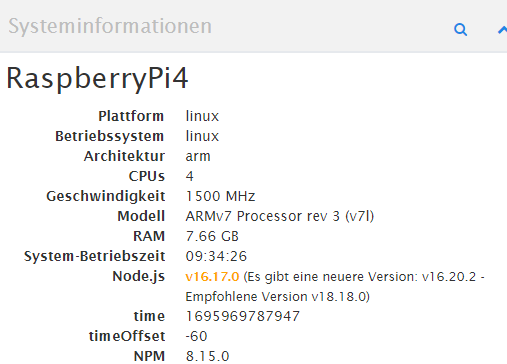
diese Meldung bekomme ich halt jedesmal beim Entfernen von nodejs
Entfernen von nodejs (20.7.0-1nodesource1) ... dpkg: Warnung: Während Entfernens von nodejs ist Verzeichnis »/usr/lib/node_modules« nicht leer, wird daher nicht gelöscht Trigger für man-db (2.8.5-2) werden verarbeitet ... -
bei mir wird angezeigt, dass nodejs 20.7.0 bereits installiert ist, aber wenn ich auf die weboberfläche gehe, wird mir noch v16.17.0 angezeigt...woran kann dies liegen?
pi@RaspberryPi4:/opt/iobroker $ sudo apt install nodejs
Paketlisten werden gelesen... Fertig
Abhängigkeitsbaum wird aufgebaut.
Statusinformationen werden eingelesen.... Fertig
nodejs ist schon die neueste Version (20.7.0-1nodesource1).
0 aktualisiert, 0 neu installiert, 0 zu entfernen und 0 nicht aktualisiert.
diese Meldung bekomme ich halt jedesmal beim Entfernen von nodejs
Entfernen von nodejs (20.7.0-1nodesource1) ... dpkg: Warnung: Während Entfernens von nodejs ist Verzeichnis »/usr/lib/node_modules« nicht leer, wird daher nicht gelöscht Trigger für man-db (2.8.5-2) werden verarbeitet ...@speedyblade und was sagt
iob diag? -
@speedyblade und was sagt
iob diag?@homoran sagte in Nach Update läuft nichts mehr!:
iob diag
nodejs: /lib/arm-linux-gnueabihf/libstdc++.so.6: version `GLIBCXX_3.4.26' not found (required by nodejs)
Nodejs-Installation:    /usr/bin/nodejs
                        /usr/local/bin/node             v16.17.0
                        /usr/local/bin/npm              8.15.0
                        /usr/local/bin/npx              8.15.0

Recommended versions are nodejs 18.x.y and npm 9.x.y
*** nodejs is NOT correctly installed ***
ich bin eigentlich genau nach der Anleitung vor gegangen:
-
@homoran sagte in Nach Update läuft nichts mehr!:
iob diag
nodejs: /lib/arm-linux-gnueabihf/libstdc++.so.6: version `GLIBCXX_3.4.26' not found (required by nodejs)
Nodejs-Installation:    /usr/bin/nodejs
                        /usr/local/bin/node             v16.17.0
                        /usr/local/bin/npm              8.15.0
                        /usr/local/bin/npx              8.15.0

Recommended versions are nodejs 18.x.y and npm 9.x.y
*** nodejs is NOT correctly installed ***
ich bin eigentlich genau nach der Anleitung vor gegangen:
@speedyblade sagte in Nach Update läuft nichts mehr!:
iob diag
das ist nicht vollständig!
@speedyblade sagte in Nach Update läuft nichts mehr!:
ich bin eigentlich genau nach der Anleitung vor gegangen:
node und npm wird automatisch mit iobroker korrekt installiert
-
@speedyblade sagte in Nach Update läuft nichts mehr!:
iob diag
das ist nicht vollständig!
@speedyblade sagte in Nach Update läuft nichts mehr!:
ich bin eigentlich genau nach der Anleitung vor gegangen:
node und npm wird automatisch mit iobroker korrekt installiert
  Operating System: Raspbian GNU/Linux 10 (buster)
            Kernel: Linux 5.10.103-v7l+
      Architecture: arm

Model           : Raspberry Pi 4 Model B Rev 1.4
Docker          : false
Virtualization  : none
Kernel          : armv7l
Userland        : armhf

Systemuptime and Load:
 07:59:33 up  9:49,  1 user,  load average: 0.14, 0.35, 0.42
CPU threads: 4

Raspberry only:
throttled=0x0
Other values than 0x0 hint to temperature/voltage problems
temp=45.7'C
volt=0.8700V

*** Time and Time Zones ***
               Local time: Fri 2023-09-29 07:59:33 BST
           Universal time: Fri 2023-09-29 06:59:33 UTC
                 RTC time: n/a
                Time zone: Europe/London (BST, +0100)
System clock synchronized: yes
              NTP service: active
          RTC in local TZ: no

*** User and Groups ***
pi
/home/pi
pi adm dialout cdrom sudo audio video plugdev games users input netdev gpio i2c spi iobroker

*** X-Server-Setup ***
X-Server:       false
Desktop:
Terminal:       tty
Boot Target:    graphical.target

*** MEMORY ***
              total        used        free      shared  buff/cache   available
Mem:           7.8G        572M        6.4G         16M        856M        7.2G
Swap:           99M          0B         99M
Total:         7.9G        572M        6.5G

         7846 M total memory
          572 M used memory
          387 M active memory
          903 M inactive memory
         6417 M free memory
          134 M buffer memory
          721 M swap cache
           99 M total swap
            0 M used swap
           99 M free swap

Raspberry only:
oom events: 0
lifetime oom required: 0 Mbytes
total time in oom handler: 0 ms
max time spent in oom handler: 0 ms

*** FILESYSTEM ***
Filesystem     Type      Size  Used Avail Use% Mounted on
/dev/root      ext4      916G  3.4G  866G   1% /
devtmpfs       devtmpfs  3.7G     0  3.7G   0% /dev
tmpfs          tmpfs     3.9G     0  3.9G   0% /dev/shm
tmpfs          tmpfs     3.9G   17M  3.9G   1% /run
tmpfs          tmpfs     5.0M  4.0K  5.0M   1% /run/lock
tmpfs          tmpfs     3.9G     0  3.9G   0% /sys/fs/cgroup
/dev/sda1      vfat      253M   49M  204M  20% /boot
tmpfs          tmpfs     785M     0  785M   0% /run/user/1000

Messages concerning ext4 filesystem in dmesg:
[Thu Sep 28 22:09:40 2023] Kernel command line: coherent_pool=1M 8250.nr_uarts=1 snd_bcm2835.enable_compat_alsa=0 snd_bcm2835.enable_hdmi=1  smsc95xx.macaddr=DC:A6:32:D6:FD:D6 vc_mem.mem_base=0x3eb00000 vc_mem.mem_size=0x3ff00000  console=ttyS0,115200 console=tty1 root=PARTUUID=206cf84d-02 rootfstype=ext4 elevator=deadline fsck.repair=yes rootwait
[Thu Sep 28 22:09:43 2023] EXT4-fs (sda2): mounted filesystem with ordered data mode. Opts: (null)
[Thu Sep 28 22:09:43 2023] VFS: Mounted root (ext4 filesystem) readonly on device 8:2.
[Thu Sep 28 22:09:47 2023] EXT4-fs (sda2): re-mounted. Opts: (null)

Show mounted filesystems (real ones only):
TARGET        SOURCE    FSTYPE OPTIONS
/             /dev/sda2 ext4   rw,noatime,stripe=8191
|-/sys/fs/bpf none      bpf    rw,nosuid,nodev,noexec,relatime,mode=700
`-/boot       /dev/sda1 vfat   rw,relatime,fmask=0022,dmask=0022,codepage=437,iocharset=ascii,shortname=mixed,errors=remount-ro

Files in neuralgic directories:

/var:
367M    /var/
169M    /var/cache
163M    /var/cache/apt
104M    /var/cache/apt/archives
93M     /var/lib

Archived and active journals take up 16.0M in the file system.

/opt/iobroker/backups:
17M     /opt/iobroker/backups/

/opt/iobroker/iobroker-data:
128M    /opt/iobroker/iobroker-data/
59M     /opt/iobroker/iobroker-data/backup-objects
25M     /opt/iobroker/iobroker-data/files
23M     /opt/iobroker/iobroker-data/node-red/node_modules
23M     /opt/iobroker/iobroker-data/node-red

The five largest files in iobroker-data are:
9.3M    /opt/iobroker/iobroker-data/objects.jsonl
6.3M    /opt/iobroker/iobroker-data/files/admin.admin/custom/static/js/vendors-node_modules_iobroker_adapter-react-v5_assets_devices_parseNames_js-node_modules_iobr-99c23e.847b8ad9.chunk.js.map
5.2M    /opt/iobroker/iobroker-data/files/knx.admin/static/js/main.fcc1088d.js.map
5.1M    /opt/iobroker/iobroker-data/objects.json.migrated
5.1M    /opt/iobroker/iobroker-data/objects.json.bak.migrated

*** NodeJS-Installation ***

nodejs: /lib/arm-linux-gnueabihf/libstdc++.so.6: version `GLIBCXX_3.4.26' not found (required by nodejs)
/usr/bin/nodejs
/usr/local/bin/node             v16.17.0
/usr/local/bin/npm              8.15.0
/usr/local/bin/npx              8.15.0
nodejs: /lib/arm-linux-gnueabihf/libstdc++.so.6: version `GLIBCXX_3.4.26' not found (required by nodejs)
*** nodejs is NOT correctly installed ***

nodejs:
  Installed: 20.7.0-1nodesource1
  Candidate: 20.7.0-1nodesource1
  Version table:
 *** 20.7.0-1nodesource1 500
        500 https://deb.nodesource.com/node_20.x nodistro/main armhf Packages
        100 /var/lib/dpkg/status
     20.6.1-1nodesource1 500
        500 https://deb.nodesource.com/node_20.x nodistro/main armhf Packages
     20.6.0-1nodesource1 500
        500 https://deb.nodesource.com/node_20.x nodistro/main armhf Packages
     20.5.1-1nodesource1 500
        500 https://deb.nodesource.com/node_20.x nodistro/main armhf Packages
     20.5.0-1nodesource1 500
        500 https://deb.nodesource.com/node_20.x nodistro/main armhf Packages
     20.4.0-1nodesource1 500
        500 https://deb.nodesource.com/node_20.x nodistro/main armhf Packages
     20.3.1-1nodesource1 500
        500 https://deb.nodesource.com/node_20.x nodistro/main armhf Packages
     20.3.0-1nodesource1 500
        500 https://deb.nodesource.com/node_20.x nodistro/main armhf Packages
     20.2.0-1nodesource1 500
        500 https://deb.nodesource.com/node_20.x nodistro/main armhf Packages
     20.1.0-1nodesource1 500
        500 https://deb.nodesource.com/node_20.x nodistro/main armhf Packages
     20.0.0-1nodesource1 500
        500 https://deb.nodesource.com/node_20.x nodistro/main armhf Packages
     10.24.0~dfsg-1~deb10u3 500
        500 http://raspbian.raspberrypi.org/raspbian buster/main armhf Packages

Temp directories causing npm8 problem: 0
No problems detected

Errors in npm tree: 0

*** ioBroker-Installation ***

ioBroker Status
iobroker is running on this host.


Objects type: jsonl
States  type: jsonl

No configuration change needed.


Multihost discovery server: disabled
Discovery authentication:   enabled
Persistent activation:      disabled
Objects:                    jsonl on 127.0.0.1
States:                     jsonl on 127.0.0.1

Core adapters versions
js-controller:  5.0.12
admin:          6.10.1
javascript:     "javascript" not found

Adapters from github:   0

Adapter State
+ system.adapter.admin.0                  : admin                 : RaspberryPi4                             -  enabled, port: 8081, bind: 0.0.0.0, run as: admin
+ system.adapter.backitup.0               : backitup              : RaspberryPi4                             -  enabled
+ system.adapter.discovery.0              : discovery             : RaspberryPi4                             -  enabled
+ system.adapter.info.0                   : info                  : RaspberryPi4                             -  enabled
+ system.adapter.knx.0                    : knx                   : RaspberryPi4                             -  enabled, bind: 192.168.1.6
+ system.adapter.mqtt.0                   : mqtt                  : RaspberryPi4                             -  enabled, port: 1883, bind: 0.0.0.0
+ system.adapter.node-red.0               : node-red              : RaspberryPi4                             -  enabled, port: 1880, bind: 0.0.0.0
+ system.adapter.rpi2.0                   : rpi2                  : RaspberryPi4                             -  enabled

+ instance is alive

Enabled adapters with bindings
+ system.adapter.admin.0                  : admin                 : RaspberryPi4                             -  enabled, port: 8081, bind: 0.0.0.0, run as: admin
+ system.adapter.mqtt.0                   : mqtt                  : RaspberryPi4                             -  enabled, port: 1883, bind: 0.0.0.0
+ system.adapter.node-red.0               : node-red              : RaspberryPi4                             -  enabled, port: 1880, bind: 0.0.0.0

ioBroker-Repositories
Stable (default): http://download.iobroker.net/sources-dist.json
Beta (latest) : http://download.iobroker.net/sources-dist-latest.json

Active repo(s): Stable (default)

Installed ioBroker-Instances
Used repository: Stable (default)
Adapter    "admin"        : 6.10.1   , installed 6.10.1
Adapter    "backitup"     : 2.8.1    , installed 2.8.1
Adapter    "discovery"    : 3.1.0    , installed 3.1.0
Adapter    "info"         : 1.9.26   , installed 1.9.26
Controller "js-controller": 5.0.12   , installed 5.0.12
Adapter    "knx"          : 2.0.22   , installed 2.0.22
Adapter    "mqtt"         : 4.1.1    , installed 4.1.1
Adapter    "node-red"     : 4.0.3    , installed 4.0.3
Adapter    "rpi2"         : 1.3.2    , installed 1.3.2

Objects and States
Please stand by - This may take a while
Objects:        1100
States:         745

*** OS-Repositories and Updates ***
Hit:1 http://archive.raspberrypi.org/debian buster InRelease
Hit:2 http://raspbian.raspberrypi.org/raspbian buster InRelease
Hit:3 https://deb.nodesource.com/node_20.x nodistro InRelease
Reading package lists...
Pending Updates: 0

*** Listening Ports ***
Active Internet connections (only servers)
Proto Recv-Q Send-Q Local Address           Foreign Address         State       User       Inode      PID/Program name
tcp        0      0 0.0.0.0:22              0.0.0.0:*               LISTEN      0          17012      615/sshd
tcp        0      0 0.0.0.0:1880            0.0.0.0:*               LISTEN      1001       214278     698/node-red
tcp        0      0 0.0.0.0:1883            0.0.0.0:*               LISTEN      1001       213731     780/io.mqtt.0
tcp        0      0 127.0.0.1:9000          0.0.0.0:*               LISTEN      1001       215157     638/iobroker.js-con
tcp        0      0 127.0.0.1:9001          0.0.0.0:*               LISTEN      1001       215150     638/iobroker.js-con
tcp6       0      0 :::80                   :::*                    LISTEN      1001       214280     698/node-red
tcp6       0      0 :::8081                 :::*                    LISTEN      1001       213624     656/io.admin.0
tcp6       0      0 :::22                   :::*                    LISTEN      0          17014      615/sshd
udp        0      0 192.168.1.6:55752       0.0.0.0:*                           1001       216243     1010/io.knx.0
udp        0      0 0.0.0.0:68              0.0.0.0:*                           0          15082      606/dhcpcd
udp        0      0 0.0.0.0:54363           0.0.0.0:*                           108        16606      383/avahi-daemon: r
udp        0      0 192.168.1.6:53448       0.0.0.0:*                           1001       217149     698/node-red
udp        0      0 0.0.0.0:5353            0.0.0.0:*                           108        16604      383/avahi-daemon: r
udp        0      0 0.0.0.0:1900            0.0.0.0:*                           1001       214281     698/node-red
udp6       0      0 :::546                  :::*                                0          16674      606/dhcpcd
udp6       0      0 :::5353                 :::*                                108        16605      383/avahi-daemon: r
udp6       0      0 :::36145                :::*                                108        16607      383/avahi-daemon: r

*** Log File - Last 25 Lines ***


2023-09-29 07:50:23.920  - info: host.RaspberryPi4 instance system.adapter.discovery.0 started with pid 795
2023-09-29 07:50:25.964  - info: discovery.0 (795) Plugin sentry Sentry Plugin disabled for this process because sending of statistic data is disabled for the system
2023-09-29 07:50:26.091  - info: discovery.0 (795) starting. Version 3.1.0 in /opt/iobroker/node_modules/iobroker.discovery, node: v16.17.0, js-controller: 5.0.12
2023-09-29 07:50:27.962  - info: host.RaspberryPi4 instance system.adapter.info.0 started with pid 810
2023-09-29 07:50:31.416  - info: info.0 (810) Plugin sentry Sentry Plugin disabled for this process because sending of statistic data is disabled for the system
2023-09-29 07:50:31.928  - info: host.RaspberryPi4 instance system.adapter.backitup.0 started with pid 834
2023-09-29 07:50:32.131  - info: info.0 (810) starting. Version 1.9.26 in /opt/iobroker/node_modules/iobroker.info, node: v16.17.0, js-controller: 5.0.12
2023-09-29 07:50:32.328  - info: info.0 (810) Reading/updating systemdata.
2023-09-29 07:50:33.188  - info: info.0 (810) State value to set for "info.0.sysinfo.cpu.info.speed" has to be type "string" but received type "number"
2023-09-29 07:50:33.306  - info: info.0 (810) State value to set for "info.0.sysinfo.cpu.info.cache-l1d" has to be type "number" but received type "string"
2023-09-29 07:50:33.314  - info: info.0 (810) State value to set for "info.0.sysinfo.cpu.info.cache-l1i" has to be type "number" but received type "string"
2023-09-29 07:50:33.322  - info: info.0 (810) State value to set for "info.0.sysinfo.cpu.info.cache-l2" has to be type "number" but received type "string"
2023-09-29 07:50:33.330  - info: info.0 (810) State value to set for "info.0.sysinfo.cpu.info.cache-l3" has to be type "number" but received type "string"
2023-09-29 07:50:33.637  - info: info.0 (810) cpu Temp res = {"main":46.738,"cores":[],"max":46.738,"socket":[],"chipset":null}
2023-09-29 07:50:34.786  - info: backitup.0 (834) starting. Version 2.8.1 in /opt/iobroker/node_modules/iobroker.backitup, node: v16.17.0, js-controller: 5.0.12
2023-09-29 07:50:34.961  - info: backitup.0 (834) [iobroker] backup will be activated at 03:10 every 5 day(s)
2023-09-29 07:50:35.959  - info: host.RaspberryPi4 instance system.adapter.knx.0 started with pid 1010
2023-09-29 07:50:39.621  - info: knx.0 (1010) starting. Version 2.0.22 in /opt/iobroker/node_modules/iobroker.knx, node: v16.17.0, js-controller: 5.0.12
2023-09-29 07:50:39.769  - warn: knx.0 (1010) No license found for knx. You can use 500DP for free or you can get a license on https://iobroker.net/accountLicenses !
2023-09-29 07:50:39.774  - info: knx.0 (1010) Connecting to knx GW: 192.168.1.5:3674 with phy. Adr: 1.0.70
2023-09-29 07:52:47.734  - error: backitup.0 (834) Error: Command failed: sudo mount 192.168.1.3:/volume1/Backups/ioBroker /opt/iobroker/backups
mount.nfs: Connection timed out

2023-09-29 07:53:22.489  - info: admin.0 (656) ==> Connected system.user.admin from ::ffff:192.168.1.5
============ Mark until here for C&P =============
iob diag has finished.
-
  Operating System: Raspbian GNU/Linux 10 (buster)
            Kernel: Linux 5.10.103-v7l+
      Architecture: arm

Model           : Raspberry Pi 4 Model B Rev 1.4
Docker          : false
Virtualization  : none
Kernel          : armv7l
Userland        : armhf

Systemuptime and Load:
 07:59:33 up  9:49,  1 user,  load average: 0.14, 0.35, 0.42
CPU threads: 4

Raspberry only:
throttled=0x0
Other values than 0x0 hint to temperature/voltage problems
temp=45.7'C
volt=0.8700V

*** Time and Time Zones ***
               Local time: Fri 2023-09-29 07:59:33 BST
           Universal time: Fri 2023-09-29 06:59:33 UTC
                 RTC time: n/a
                Time zone: Europe/London (BST, +0100)
System clock synchronized: yes
              NTP service: active
          RTC in local TZ: no

*** User and Groups ***
pi
/home/pi
pi adm dialout cdrom sudo audio video plugdev games users input netdev gpio i2c spi iobroker

*** X-Server-Setup ***
X-Server:       false
Desktop:
Terminal:       tty
Boot Target:    graphical.target

*** MEMORY ***
              total        used        free      shared  buff/cache   available
Mem:           7.8G        572M        6.4G         16M        856M        7.2G
Swap:           99M          0B         99M
Total:         7.9G        572M        6.5G

         7846 M total memory
          572 M used memory
          387 M active memory
          903 M inactive memory
         6417 M free memory
          134 M buffer memory
          721 M swap cache
           99 M total swap
            0 M used swap
           99 M free swap

Raspberry only:
oom events: 0
lifetime oom required: 0 Mbytes
total time in oom handler: 0 ms
max time spent in oom handler: 0 ms

*** FILESYSTEM ***
Filesystem     Type      Size  Used Avail Use% Mounted on
/dev/root      ext4      916G  3.4G  866G   1% /
devtmpfs       devtmpfs  3.7G     0  3.7G   0% /dev
tmpfs          tmpfs     3.9G     0  3.9G   0% /dev/shm
tmpfs          tmpfs     3.9G   17M  3.9G   1% /run
tmpfs          tmpfs     5.0M  4.0K  5.0M   1% /run/lock
tmpfs          tmpfs     3.9G     0  3.9G   0% /sys/fs/cgroup
/dev/sda1      vfat      253M   49M  204M  20% /boot
tmpfs          tmpfs     785M     0  785M   0% /run/user/1000

Messages concerning ext4 filesystem in dmesg:
[Thu Sep 28 22:09:40 2023] Kernel command line: coherent_pool=1M 8250.nr_uarts=1 snd_bcm2835.enable_compat_alsa=0 snd_bcm2835.enable_hdmi=1  smsc95xx.macaddr=DC:A6:32:D6:FD:D6 vc_mem.mem_base=0x3eb00000 vc_mem.mem_size=0x3ff00000  console=ttyS0,115200 console=tty1 root=PARTUUID=206cf84d-02 rootfstype=ext4 elevator=deadline fsck.repair=yes rootwait
[Thu Sep 28 22:09:43 2023] EXT4-fs (sda2): mounted filesystem with ordered data mode. Opts: (null)
[Thu Sep 28 22:09:43 2023] VFS: Mounted root (ext4 filesystem) readonly on device 8:2.
[Thu Sep 28 22:09:47 2023] EXT4-fs (sda2): re-mounted. Opts: (null)

Show mounted filesystems (real ones only):
TARGET        SOURCE    FSTYPE OPTIONS
/             /dev/sda2 ext4   rw,noatime,stripe=8191
|-/sys/fs/bpf none      bpf    rw,nosuid,nodev,noexec,relatime,mode=700
`-/boot       /dev/sda1 vfat   rw,relatime,fmask=0022,dmask=0022,codepage=437,iocharset=ascii,shortname=mixed,errors=remount-ro

Files in neuralgic directories:

/var:
367M    /var/
169M    /var/cache
163M    /var/cache/apt
104M    /var/cache/apt/archives
93M     /var/lib

Archived and active journals take up 16.0M in the file system.

/opt/iobroker/backups:
17M     /opt/iobroker/backups/

/opt/iobroker/iobroker-data:
128M    /opt/iobroker/iobroker-data/
59M     /opt/iobroker/iobroker-data/backup-objects
25M     /opt/iobroker/iobroker-data/files
23M     /opt/iobroker/iobroker-data/node-red/node_modules
23M     /opt/iobroker/iobroker-data/node-red

The five largest files in iobroker-data are:
9.3M    /opt/iobroker/iobroker-data/objects.jsonl
6.3M    /opt/iobroker/iobroker-data/files/admin.admin/custom/static/js/vendors-node_modules_iobroker_adapter-react-v5_assets_devices_parseNames_js-node_modules_iobr-99c23e.847b8ad9.chunk.js.map
5.2M    /opt/iobroker/iobroker-data/files/knx.admin/static/js/main.fcc1088d.js.map
5.1M    /opt/iobroker/iobroker-data/objects.json.migrated
5.1M    /opt/iobroker/iobroker-data/objects.json.bak.migrated

*** NodeJS-Installation ***

nodejs: /lib/arm-linux-gnueabihf/libstdc++.so.6: version `GLIBCXX_3.4.26' not found (required by nodejs)
/usr/bin/nodejs
/usr/local/bin/node             v16.17.0
/usr/local/bin/npm              8.15.0
/usr/local/bin/npx              8.15.0
nodejs: /lib/arm-linux-gnueabihf/libstdc++.so.6: version `GLIBCXX_3.4.26' not found (required by nodejs)
*** nodejs is NOT correctly installed ***

nodejs:
  Installed: 20.7.0-1nodesource1
  Candidate: 20.7.0-1nodesource1
  Version table:
 *** 20.7.0-1nodesource1 500
        500 https://deb.nodesource.com/node_20.x nodistro/main armhf Packages
        100 /var/lib/dpkg/status
     20.6.1-1nodesource1 500
        500 https://deb.nodesource.com/node_20.x nodistro/main armhf Packages
     20.6.0-1nodesource1 500
        500 https://deb.nodesource.com/node_20.x nodistro/main armhf Packages
     20.5.1-1nodesource1 500
        500 https://deb.nodesource.com/node_20.x nodistro/main armhf Packages
     20.5.0-1nodesource1 500
        500 https://deb.nodesource.com/node_20.x nodistro/main armhf Packages
     20.4.0-1nodesource1 500
        500 https://deb.nodesource.com/node_20.x nodistro/main armhf Packages
     20.3.1-1nodesource1 500
        500 https://deb.nodesource.com/node_20.x nodistro/main armhf Packages
     20.3.0-1nodesource1 500
        500 https://deb.nodesource.com/node_20.x nodistro/main armhf Packages
     20.2.0-1nodesource1 500
        500 https://deb.nodesource.com/node_20.x nodistro/main armhf Packages
     20.1.0-1nodesource1 500
        500 https://deb.nodesource.com/node_20.x nodistro/main armhf Packages
     20.0.0-1nodesource1 500
        500 https://deb.nodesource.com/node_20.x nodistro/main armhf Packages
     10.24.0~dfsg-1~deb10u3 500
        500 http://raspbian.raspberrypi.org/raspbian buster/main armhf Packages

Temp directories causing npm8 problem: 0
No problems detected

Errors in npm tree: 0

*** ioBroker-Installation ***

ioBroker Status
iobroker is running on this host.


Objects type: jsonl
States  type: jsonl

No configuration change needed.


Multihost discovery server: disabled
Discovery authentication:   enabled
Persistent activation:      disabled
Objects:                    jsonl on 127.0.0.1
States:                     jsonl on 127.0.0.1

Core adapters versions
js-controller:  5.0.12
admin:          6.10.1
javascript:     "javascript" not found

Adapters from github:   0

Adapter State
+ system.adapter.admin.0                  : admin                 : RaspberryPi4                             -  enabled, port: 8081, bind: 0.0.0.0, run as: admin
+ system.adapter.backitup.0               : backitup              : RaspberryPi4                             -  enabled
+ system.adapter.discovery.0              : discovery             : RaspberryPi4                             -  enabled
+ system.adapter.info.0                   : info                  : RaspberryPi4                             -  enabled
+ system.adapter.knx.0                    : knx                   : RaspberryPi4                             -  enabled, bind: 192.168.1.6
+ system.adapter.mqtt.0                   : mqtt                  : RaspberryPi4                             -  enabled, port: 1883, bind: 0.0.0.0
+ system.adapter.node-red.0               : node-red              : RaspberryPi4                             -  enabled, port: 1880, bind: 0.0.0.0
+ system.adapter.rpi2.0                   : rpi2                  : RaspberryPi4                             -  enabled

+ instance is alive

Enabled adapters with bindings
+ system.adapter.admin.0                  : admin                 : RaspberryPi4                             -  enabled, port: 8081, bind: 0.0.0.0, run as: admin
+ system.adapter.mqtt.0                   : mqtt                  : RaspberryPi4                             -  enabled, port: 1883, bind: 0.0.0.0
+ system.adapter.node-red.0               : node-red              : RaspberryPi4                             -  enabled, port: 1880, bind: 0.0.0.0

ioBroker-Repositories
Stable (default): http://download.iobroker.net/sources-dist.json
Beta (latest) : http://download.iobroker.net/sources-dist-latest.json

Active repo(s): Stable (default)

Installed ioBroker-Instances
Used repository: Stable (default)
Adapter    "admin"        : 6.10.1   , installed 6.10.1
Adapter    "backitup"     : 2.8.1    , installed 2.8.1
Adapter    "discovery"    : 3.1.0    , installed 3.1.0
Adapter    "info"         : 1.9.26   , installed 1.9.26
Controller "js-controller": 5.0.12   , installed 5.0.12
Adapter    "knx"          : 2.0.22   , installed 2.0.22
Adapter    "mqtt"         : 4.1.1    , installed 4.1.1
Adapter    "node-red"     : 4.0.3    , installed 4.0.3
Adapter    "rpi2"         : 1.3.2    , installed 1.3.2

Objects and States
Please stand by - This may take a while
Objects:        1100
States:         745

*** OS-Repositories and Updates ***
Hit:1 http://archive.raspberrypi.org/debian buster InRelease
Hit:2 http://raspbian.raspberrypi.org/raspbian buster InRelease
Hit:3 https://deb.nodesource.com/node_20.x nodistro InRelease
Reading package lists...
Pending Updates: 0

*** Listening Ports ***
Active Internet connections (only servers)
Proto Recv-Q Send-Q Local Address           Foreign Address         State       User       Inode      PID/Program name
tcp        0      0 0.0.0.0:22              0.0.0.0:*               LISTEN      0          17012      615/sshd
tcp        0      0 0.0.0.0:1880            0.0.0.0:*               LISTEN      1001       214278     698/node-red
tcp        0      0 0.0.0.0:1883            0.0.0.0:*               LISTEN      1001       213731     780/io.mqtt.0
tcp        0      0 127.0.0.1:9000          0.0.0.0:*               LISTEN      1001       215157     638/iobroker.js-con
tcp        0      0 127.0.0.1:9001          0.0.0.0:*               LISTEN      1001       215150     638/iobroker.js-con
tcp6       0      0 :::80                   :::*                    LISTEN      1001       214280     698/node-red
tcp6       0      0 :::8081                 :::*                    LISTEN      1001       213624     656/io.admin.0
tcp6       0      0 :::22                   :::*                    LISTEN      0          17014      615/sshd
udp        0      0 192.168.1.6:55752       0.0.0.0:*                           1001       216243     1010/io.knx.0
udp        0      0 0.0.0.0:68              0.0.0.0:*                           0          15082      606/dhcpcd
udp        0      0 0.0.0.0:54363           0.0.0.0:*                           108        16606      383/avahi-daemon: r
udp        0      0 192.168.1.6:53448       0.0.0.0:*                           1001       217149     698/node-red
udp        0      0 0.0.0.0:5353            0.0.0.0:*                           108        16604      383/avahi-daemon: r
udp        0      0 0.0.0.0:1900            0.0.0.0:*                           1001       214281     698/node-red
udp6       0      0 :::546                  :::*                                0          16674      606/dhcpcd
udp6       0      0 :::5353                 :::*                                108        16605      383/avahi-daemon: r
udp6       0      0 :::36145                :::*                                108        16607      383/avahi-daemon: r

*** Log File - Last 25 Lines ***


2023-09-29 07:50:23.920  - info: host.RaspberryPi4 instance system.adapter.discovery.0 started with pid 795
2023-09-29 07:50:25.964  - info: discovery.0 (795) Plugin sentry Sentry Plugin disabled for this process because sending of statistic data is disabled for the system
2023-09-29 07:50:26.091  - info: discovery.0 (795) starting. Version 3.1.0 in /opt/iobroker/node_modules/iobroker.discovery, node: v16.17.0, js-controller: 5.0.12
2023-09-29 07:50:27.962  - info: host.RaspberryPi4 instance system.adapter.info.0 started with pid 810
2023-09-29 07:50:31.416  - info: info.0 (810) Plugin sentry Sentry Plugin disabled for this process because sending of statistic data is disabled for the system
2023-09-29 07:50:31.928  - info: host.RaspberryPi4 instance system.adapter.backitup.0 started with pid 834
2023-09-29 07:50:32.131  - info: info.0 (810) starting. Version 1.9.26 in /opt/iobroker/node_modules/iobroker.info, node: v16.17.0, js-controller: 5.0.12
2023-09-29 07:50:32.328  - info: info.0 (810) Reading/updating systemdata.
2023-09-29 07:50:33.188  - info: info.0 (810) State value to set for "info.0.sysinfo.cpu.info.speed" has to be type "string" but received type "number"
2023-09-29 07:50:33.306  - info: info.0 (810) State value to set for "info.0.sysinfo.cpu.info.cache-l1d" has to be type "number" but received type "string"
2023-09-29 07:50:33.314  - info: info.0 (810) State value to set for "info.0.sysinfo.cpu.info.cache-l1i" has to be type "number" but received type "string"
2023-09-29 07:50:33.322  - info: info.0 (810) State value to set for "info.0.sysinfo.cpu.info.cache-l2" has to be type "number" but received type "string"
2023-09-29 07:50:33.330  - info: info.0 (810) State value to set for "info.0.sysinfo.cpu.info.cache-l3" has to be type "number" but received type "string"
2023-09-29 07:50:33.637  - info: info.0 (810) cpu Temp res = {"main":46.738,"cores":[],"max":46.738,"socket":[],"chipset":null}
2023-09-29 07:50:34.786  - info: backitup.0 (834) starting. Version 2.8.1 in /opt/iobroker/node_modules/iobroker.backitup, node: v16.17.0, js-controller: 5.0.12
2023-09-29 07:50:34.961  - info: backitup.0 (834) [iobroker] backup will be activated at 03:10 every 5 day(s)
2023-09-29 07:50:35.959  - info: host.RaspberryPi4 instance system.adapter.knx.0 started with pid 1010
2023-09-29 07:50:39.621  - info: knx.0 (1010) starting. Version 2.0.22 in /opt/iobroker/node_modules/iobroker.knx, node: v16.17.0, js-controller: 5.0.12
2023-09-29 07:50:39.769  - warn: knx.0 (1010) No license found for knx. You can use 500DP for free or you can get a license on https://iobroker.net/accountLicenses !
2023-09-29 07:50:39.774  - info: knx.0 (1010) Connecting to knx GW: 192.168.1.5:3674 with phy. Adr: 1.0.70
2023-09-29 07:52:47.734  - error: backitup.0 (834) Error: Command failed: sudo mount 192.168.1.3:/volume1/Backups/ioBroker /opt/iobroker/backups
mount.nfs: Connection timed out

2023-09-29 07:53:22.489  - info: admin.0 (656) ==> Connected system.user.admin from ::ffff:192.168.1.5
============ Mark until here for C&P =============
iob diag has finished.
@speedyblade versuch mal
https://forum.iobroker.net/post/1038493 -
  Operating System: Raspbian GNU/Linux 10 (buster)
            Kernel: Linux 5.10.103-v7l+
      Architecture: arm

Model           : Raspberry Pi 4 Model B Rev 1.4
Docker          : false
Virtualization  : none
Kernel          : armv7l
Userland        : armhf

Systemuptime and Load:
 07:59:33 up  9:49,  1 user,  load average: 0.14, 0.35, 0.42
CPU threads: 4

Raspberry only:
throttled=0x0
Other values than 0x0 hint to temperature/voltage problems
temp=45.7'C
volt=0.8700V

*** Time and Time Zones ***
               Local time: Fri 2023-09-29 07:59:33 BST
           Universal time: Fri 2023-09-29 06:59:33 UTC
                 RTC time: n/a
                Time zone: Europe/London (BST, +0100)
System clock synchronized: yes
              NTP service: active
          RTC in local TZ: no

*** User and Groups ***
pi
/home/pi
pi adm dialout cdrom sudo audio video plugdev games users input netdev gpio i2c spi iobroker

*** X-Server-Setup ***
X-Server:       false
Desktop:
Terminal:       tty
Boot Target:    graphical.target

*** MEMORY ***
              total        used        free      shared  buff/cache   available
Mem:           7.8G        572M        6.4G         16M        856M        7.2G
Swap:           99M          0B         99M
Total:         7.9G        572M        6.5G

         7846 M total memory
          572 M used memory
          387 M active memory
          903 M inactive memory
         6417 M free memory
          134 M buffer memory
          721 M swap cache
           99 M total swap
            0 M used swap
           99 M free swap

Raspberry only:
oom events: 0
lifetime oom required: 0 Mbytes
total time in oom handler: 0 ms
max time spent in oom handler: 0 ms

*** FILESYSTEM ***
Filesystem     Type      Size  Used Avail Use% Mounted on
/dev/root      ext4      916G  3.4G  866G   1% /
devtmpfs       devtmpfs  3.7G     0  3.7G   0% /dev
tmpfs          tmpfs     3.9G     0  3.9G   0% /dev/shm
tmpfs          tmpfs     3.9G   17M  3.9G   1% /run
tmpfs          tmpfs     5.0M  4.0K  5.0M   1% /run/lock
tmpfs          tmpfs     3.9G     0  3.9G   0% /sys/fs/cgroup
/dev/sda1      vfat      253M   49M  204M  20% /boot
tmpfs          tmpfs     785M     0  785M   0% /run/user/1000

Messages concerning ext4 filesystem in dmesg:
[Thu Sep 28 22:09:40 2023] Kernel command line: coherent_pool=1M 8250.nr_uarts=1 snd_bcm2835.enable_compat_alsa=0 snd_bcm2835.enable_hdmi=1  smsc95xx.macaddr=DC:A6:32:D6:FD:D6 vc_mem.mem_base=0x3eb00000 vc_mem.mem_size=0x3ff00000  console=ttyS0,115200 console=tty1 root=PARTUUID=206cf84d-02 rootfstype=ext4 elevator=deadline fsck.repair=yes rootwait
[Thu Sep 28 22:09:43 2023] EXT4-fs (sda2): mounted filesystem with ordered data mode. Opts: (null)
[Thu Sep 28 22:09:43 2023] VFS: Mounted root (ext4 filesystem) readonly on device 8:2.
[Thu Sep 28 22:09:47 2023] EXT4-fs (sda2): re-mounted. Opts: (null)

Show mounted filesystems (real ones only):
TARGET        SOURCE    FSTYPE OPTIONS
/             /dev/sda2 ext4   rw,noatime,stripe=8191
|-/sys/fs/bpf none      bpf    rw,nosuid,nodev,noexec,relatime,mode=700
`-/boot       /dev/sda1 vfat   rw,relatime,fmask=0022,dmask=0022,codepage=437,iocharset=ascii,shortname=mixed,errors=remount-ro

Files in neuralgic directories:

/var:
367M    /var/
169M    /var/cache
163M    /var/cache/apt
104M    /var/cache/apt/archives
93M     /var/lib

Archived and active journals take up 16.0M in the file system.

/opt/iobroker/backups:
17M     /opt/iobroker/backups/

/opt/iobroker/iobroker-data:
128M    /opt/iobroker/iobroker-data/
59M     /opt/iobroker/iobroker-data/backup-objects
25M     /opt/iobroker/iobroker-data/files
23M     /opt/iobroker/iobroker-data/node-red/node_modules
23M     /opt/iobroker/iobroker-data/node-red

The five largest files in iobroker-data are:
9.3M    /opt/iobroker/iobroker-data/objects.jsonl
6.3M    /opt/iobroker/iobroker-data/files/admin.admin/custom/static/js/vendors-node_modules_iobroker_adapter-react-v5_assets_devices_parseNames_js-node_modules_iobr-99c23e.847b8ad9.chunk.js.map
5.2M    /opt/iobroker/iobroker-data/files/knx.admin/static/js/main.fcc1088d.js.map
5.1M    /opt/iobroker/iobroker-data/objects.json.migrated
5.1M    /opt/iobroker/iobroker-data/objects.json.bak.migrated

*** NodeJS-Installation ***

nodejs: /lib/arm-linux-gnueabihf/libstdc++.so.6: version `GLIBCXX_3.4.26' not found (required by nodejs)
/usr/bin/nodejs
/usr/local/bin/node             v16.17.0
/usr/local/bin/npm              8.15.0
/usr/local/bin/npx              8.15.0
nodejs: /lib/arm-linux-gnueabihf/libstdc++.so.6: version `GLIBCXX_3.4.26' not found (required by nodejs)
*** nodejs is NOT correctly installed ***

nodejs:
  Installed: 20.7.0-1nodesource1
  Candidate: 20.7.0-1nodesource1
  Version table:
 *** 20.7.0-1nodesource1 500
        500 https://deb.nodesource.com/node_20.x nodistro/main armhf Packages
        100 /var/lib/dpkg/status
     20.6.1-1nodesource1 500
        500 https://deb.nodesource.com/node_20.x nodistro/main armhf Packages
     20.6.0-1nodesource1 500
        500 https://deb.nodesource.com/node_20.x nodistro/main armhf Packages
     20.5.1-1nodesource1 500
        500 https://deb.nodesource.com/node_20.x nodistro/main armhf Packages
     20.5.0-1nodesource1 500
        500 https://deb.nodesource.com/node_20.x nodistro/main armhf Packages
     20.4.0-1nodesource1 500
        500 https://deb.nodesource.com/node_20.x nodistro/main armhf Packages
     20.3.1-1nodesource1 500
        500 https://deb.nodesource.com/node_20.x nodistro/main armhf Packages
     20.3.0-1nodesource1 500
        500 https://deb.nodesource.com/node_20.x nodistro/main armhf Packages
     20.2.0-1nodesource1 500
        500 https://deb.nodesource.com/node_20.x nodistro/main armhf Packages
     20.1.0-1nodesource1 500
        500 https://deb.nodesource.com/node_20.x nodistro/main armhf Packages
     20.0.0-1nodesource1 500
        500 https://deb.nodesource.com/node_20.x nodistro/main armhf Packages
     10.24.0~dfsg-1~deb10u3 500
        500 http://raspbian.raspberrypi.org/raspbian buster/main armhf Packages

Temp directories causing npm8 problem: 0
No problems detected

Errors in npm tree: 0

*** ioBroker-Installation ***

ioBroker Status
iobroker is running on this host.


Objects type: jsonl
States  type: jsonl

No configuration change needed.


Multihost discovery server: disabled
Discovery authentication:   enabled
Persistent activation:      disabled
Objects:                    jsonl on 127.0.0.1
States:                     jsonl on 127.0.0.1

Core adapters versions
js-controller:  5.0.12
admin:          6.10.1
javascript:     "javascript" not found

Adapters from github:   0

Adapter State
+ system.adapter.admin.0                  : admin                 : RaspberryPi4                             -  enabled, port: 8081, bind: 0.0.0.0, run as: admin
+ system.adapter.backitup.0               : backitup              : RaspberryPi4                             -  enabled
+ system.adapter.discovery.0              : discovery             : RaspberryPi4                             -  enabled
+ system.adapter.info.0                   : info                  : RaspberryPi4                             -  enabled
+ system.adapter.knx.0                    : knx                   : RaspberryPi4                             -  enabled, bind: 192.168.1.6
+ system.adapter.mqtt.0                   : mqtt                  : RaspberryPi4                             -  enabled, port: 1883, bind: 0.0.0.0
+ system.adapter.node-red.0               : node-red              : RaspberryPi4                             -  enabled, port: 1880, bind: 0.0.0.0
+ system.adapter.rpi2.0                   : rpi2                  : RaspberryPi4                             -  enabled

+ instance is alive

Enabled adapters with bindings
+ system.adapter.admin.0                  : admin                 : RaspberryPi4                             -  enabled, port: 8081, bind: 0.0.0.0, run as: admin
+ system.adapter.mqtt.0                   : mqtt                  : RaspberryPi4                             -  enabled, port: 1883, bind: 0.0.0.0
+ system.adapter.node-red.0               : node-red              : RaspberryPi4                             -  enabled, port: 1880, bind: 0.0.0.0

ioBroker-Repositories
Stable (default): http://download.iobroker.net/sources-dist.json
Beta (latest) : http://download.iobroker.net/sources-dist-latest.json

Active repo(s): Stable (default)

Installed ioBroker-Instances
Used repository: Stable (default)
Adapter    "admin"        : 6.10.1   , installed 6.10.1
Adapter    "backitup"     : 2.8.1    , installed 2.8.1
Adapter    "discovery"    : 3.1.0    , installed 3.1.0
Adapter    "info"         : 1.9.26   , installed 1.9.26
Controller "js-controller": 5.0.12   , installed 5.0.12
Adapter    "knx"          : 2.0.22   , installed 2.0.22
Adapter    "mqtt"         : 4.1.1    , installed 4.1.1
Adapter    "node-red"     : 4.0.3    , installed 4.0.3
Adapter    "rpi2"         : 1.3.2    , installed 1.3.2

Objects and States
Please stand by - This may take a while
Objects:        1100
States:         745

*** OS-Repositories and Updates ***
Hit:1 http://archive.raspberrypi.org/debian buster InRelease
Hit:2 http://raspbian.raspberrypi.org/raspbian buster InRelease
Hit:3 https://deb.nodesource.com/node_20.x nodistro InRelease
Reading package lists...
Pending Updates: 0

*** Listening Ports ***
Active Internet connections (only servers)
Proto Recv-Q Send-Q Local Address           Foreign Address         State       User       Inode      PID/Program name
tcp        0      0 0.0.0.0:22              0.0.0.0:*               LISTEN      0          17012      615/sshd
tcp        0      0 0.0.0.0:1880            0.0.0.0:*               LISTEN      1001       214278     698/node-red
tcp        0      0 0.0.0.0:1883            0.0.0.0:*               LISTEN      1001       213731     780/io.mqtt.0
tcp        0      0 127.0.0.1:9000          0.0.0.0:*               LISTEN      1001       215157     638/iobroker.js-con
tcp        0      0 127.0.0.1:9001          0.0.0.0:*               LISTEN      1001       215150     638/iobroker.js-con
tcp6       0      0 :::80                   :::*                    LISTEN      1001       214280     698/node-red
tcp6       0      0 :::8081                 :::*                    LISTEN      1001       213624     656/io.admin.0
tcp6       0      0 :::22                   :::*                    LISTEN      0          17014      615/sshd
udp        0      0 192.168.1.6:55752       0.0.0.0:*                           1001       216243     1010/io.knx.0
udp        0      0 0.0.0.0:68              0.0.0.0:*                           0          15082      606/dhcpcd
udp        0      0 0.0.0.0:54363           0.0.0.0:*                           108        16606      383/avahi-daemon: r
udp        0      0 192.168.1.6:53448       0.0.0.0:*                           1001       217149     698/node-red
udp        0      0 0.0.0.0:5353            0.0.0.0:*                           108        16604      383/avahi-daemon: r
udp        0      0 0.0.0.0:1900            0.0.0.0:*                           1001       214281     698/node-red
udp6       0      0 :::546                  :::*                                0          16674      606/dhcpcd
udp6       0      0 :::5353                 :::*                                108        16605      383/avahi-daemon: r
udp6       0      0 :::36145                :::*                                108        16607      383/avahi-daemon: r

*** Log File - Last 25 Lines ***


2023-09-29 07:50:23.920  - info: host.RaspberryPi4 instance system.adapter.discovery.0 started with pid 795
2023-09-29 07:50:25.964  - info: discovery.0 (795) Plugin sentry Sentry Plugin disabled for this process because sending of statistic data is disabled for the system
2023-09-29 07:50:26.091  - info: discovery.0 (795) starting. Version 3.1.0 in /opt/iobroker/node_modules/iobroker.discovery, node: v16.17.0, js-controller: 5.0.12
2023-09-29 07:50:27.962  - info: host.RaspberryPi4 instance system.adapter.info.0 started with pid 810
2023-09-29 07:50:31.416  - info: info.0 (810) Plugin sentry Sentry Plugin disabled for this process because sending of statistic data is disabled for the system
2023-09-29 07:50:31.928  - info: host.RaspberryPi4 instance system.adapter.backitup.0 started with pid 834
2023-09-29 07:50:32.131  - info: info.0 (810) starting. Version 1.9.26 in /opt/iobroker/node_modules/iobroker.info, node: v16.17.0, js-controller: 5.0.12
2023-09-29 07:50:32.328  - info: info.0 (810) Reading/updating systemdata.
2023-09-29 07:50:33.188  - info: info.0 (810) State value to set for "info.0.sysinfo.cpu.info.speed" has to be type "string" but received type "number"
2023-09-29 07:50:33.306  - info: info.0 (810) State value to set for "info.0.sysinfo.cpu.info.cache-l1d" has to be type "number" but received type "string"
2023-09-29 07:50:33.314  - info: info.0 (810) State value to set for "info.0.sysinfo.cpu.info.cache-l1i" has to be type "number" but received type "string"
2023-09-29 07:50:33.322  - info: info.0 (810) State value to set for "info.0.sysinfo.cpu.info.cache-l2" has to be type "number" but received type "string"
2023-09-29 07:50:33.330  - info: info.0 (810) State value to set for "info.0.sysinfo.cpu.info.cache-l3" has to be type "number" but received type "string"
2023-09-29 07:50:33.637  - info: info.0 (810) cpu Temp res = {"main":46.738,"cores":[],"max":46.738,"socket":[],"chipset":null}
2023-09-29 07:50:34.786  - info: backitup.0 (834) starting. Version 2.8.1 in /opt/iobroker/node_modules/iobroker.backitup, node: v16.17.0, js-controller: 5.0.12
2023-09-29 07:50:34.961  - info: backitup.0 (834) [iobroker] backup will be activated at 03:10 every 5 day(s)
2023-09-29 07:50:35.959  - info: host.RaspberryPi4 instance system.adapter.knx.0 started with pid 1010
2023-09-29 07:50:39.621  - info: knx.0 (1010) starting. Version 2.0.22 in /opt/iobroker/node_modules/iobroker.knx, node: v16.17.0, js-controller: 5.0.12
2023-09-29 07:50:39.769  - warn: knx.0 (1010) No license found for knx. You can use 500DP for free or you can get a license on https://iobroker.net/accountLicenses !
2023-09-29 07:50:39.774  - info: knx.0 (1010) Connecting to knx GW: 192.168.1.5:3674 with phy. Adr: 1.0.70
2023-09-29 07:52:47.734  - error: backitup.0 (834) Error: Command failed: sudo mount 192.168.1.3:/volume1/Backups/ioBroker /opt/iobroker/backups
mount.nfs: Connection timed out

2023-09-29 07:53:22.489  - info: admin.0 (656) ==> Connected system.user.admin from ::ffff:192.168.1.5
============ Mark until here for C&P =============
iob diag has finished.
Da sind gleich mehrere Kinken drin.
Zu nodejs: Versuch es mit dem Skript aus meiner Signatur.Da ist in der Vergangenheit mal eine nicht zur Distribution passende Version von nodejs von Hand reingedübelt worden. Und die nodejs@20 ist zu hoch.
Dann ist deine Systemzeit vermutlich falsch, es sei denn du hockst in England.
Und Buster muss in nächster Zeit auch angehoben werden. Ich würde dann gleich eine 64Bit-Variante vom Raspberry OS installieren.


Hey! Du scheinst an dieser Unterhaltung interessiert zu sein, hast aber noch kein Konto.
Hast du es satt, bei jedem Besuch durch die gleichen Beiträge zu scrollen? Wenn du dich für ein Konto anmeldest, kommst du immer genau dorthin zurück, wo du zuvor warst, und kannst dich über neue Antworten benachrichtigen lassen (entweder per E-Mail oder Push-Benachrichtigung). Du kannst auch Lesezeichen speichern und Beiträge positiv bewerten, um anderen Community-Mitgliedern deine Wertschätzung zu zeigen.
Mit deinem Input könnte dieser Beitrag noch besser werden 💗
Registrieren Anmelden442
Online33.0k
Benutzer83.6k
Themen1.3m
Beiträge