




Google Home/Assistant ioBroker einrichten/nutzen

-
@tombox Danke für die tolle Hilfe es läuft alles super. Nur eine frage noch wird es noch implementiert das das Licht gedimmt werden kann?
-
Hallo,
ich habe auch jeden Fall keine Rollläden, das sind Virtuelle Schalter der CCU2
iot.0 2019-09-08 22:51:34.804 debug [GHOME] hm-rega.0.NEQ1531999.0.DUTY_CYCLE => action.devices.types.SENSOR iot.0 2019-09-08 22:51:34.804 debug [GHOME] hm-rpc.0.CUX2801006.9 => action.devices.types.BLINDS iot.0 2019-09-08 22:51:34.804 debug [GHOME] hm-rpc.0.CUX2801006.8 => action.devices.types.BLINDS iot.0 2019-09-08 22:51:34.804 debug [GHOME] hm-rpc.0.CUX2801006.7 => action.devices.types.BLINDS iot.0 2019-09-08 22:51:34.804 debug [GHOME] hm-rpc.0.CUX2801006.6 => action.devices.types.BLINDS iot.0 2019-09-08 22:51:34.804 debug [GHOME] hm-rpc.0.CUX2801006.5 => action.devices.types.BLINDS iot.0 2019-09-08 22:51:34.804 debug [GHOME] hm-rpc.0.CUX2801006.4 => action.devices.types.BLINDS iot.0 2019-09-08 22:51:34.804 debug [GHOME] hm-rpc.0.CUX2801006.3 => action.devices.types.BLINDS iot.0 2019-09-08 22:51:34.804 debug [GHOME] hm-rpc.0.CUX2801006.2 => action.devices.types.BLINDS iot.0 2019-09-08 22:51:34.804 debug [GHOME] hm-rpc.0.CUX2801006.16 => action.devices.types.BLINDS iot.0 2019-09-08 22:51:34.804 debug [GHOME] hm-rpc.0.CUX2801006.15 => action.devices.types.BLINDS iot.0 2019-09-08 22:51:34.804 debug [GHOME] hm-rpc.0.CUX2801006.14 => action.devices.types.BLINDS iot.0 2019-09-08 22:51:34.804 debug [GHOME] hm-rpc.0.CUX2801006.13 => action.devices.types.BLINDS iot.0 2019-09-08 22:51:34.804 debug [GHOME] hm-rpc.0.CUX2801006.12 => action.devices.types.BLINDS iot.0 2019-09-08 22:51:34.804 debug [GHOME] hm-rpc.0.CUX2801006.11 => action.devices.types.BLINDS iot.0 2019-09-08 22:51:34.804 debug [GHOME] hm-rpc.0.CUX2801006.10 => action.devices.types.BLINDS iot.0 2019-09-08 22:51:34.804 debug [GHOME] hm-rpc.0.CUX2801006.1 => action.devices.types.BLINDS iot.0 2019-09-08 22:51:34.804 debug [GHOME] hm-rpc.1.NEQ1662322.5 => action.devices.types.SENSOR iot.0 2019-09-08 22:51:34.804 debug [GHOME] hm-rpc.1.NEQ1662322.1 => action.devices.types.OUTLET iot.0 2019-09-08 22:51:34.804 debug [GHOME] hm-rpc.1.NEQ1662322.2 => action.devices.types.SENSOR iot.0 2019-09-08 22:51:34.804 debug [GHOME] hm-rpc.1.NEQ1662322.3 => action.devices.types.SENSOR iot.0 2019-09-08 22:51:34.804 debug [GHOME] hm-rpc.1.NEQ1662322.6 => action.devices.types.SENSOR iot.0 2019-09-08 22:51:34.804 debug [GHOME] hm-rega.0.10951.ProgramExecute => action.devices.types.SENSOR iot.0 2019-09-08 22:51:34.804 debug [GHOME] hm-rpc.0.CUX2801002.6 => action.devices.types.BLINDS iot.0 2019-09-08 22:51:34.804 debug [GHOME] hm-rpc.0.CUX2801002.1 => action.devices.types.BLINDS iot.0 2019-09-08 22:51:34.804 debug [GHOME] hm-rpc.0.CUX2801002.7 => action.devices.types.BLINDS iot.0 2019-09-08 22:51:34.804 debug [GHOME] hm-rpc.0.CUX2801001.8 => action.devices.types.BLINDS iot.0 2019-09-08 22:51:34.804 debug [GHOME] hm-rpc.0.CUX2801001.6 => action.devices.types.BLINDS iot.0 2019-09-08 22:51:34.804 debug [GHOME] hm-rpc.0.CUX2801002.8 => action.devices.types.BLINDS iot.0 2019-09-08 22:51:34.804 debug [GHOME] hm-rpc.0.CUX2801002.2 => action.devices.types.BLINDS iot.0 2019-09-08 22:51:34.803 debug [GHOME] hm-rpc.0.CUX2801003.10 => action.devices.types.BLINDS iot.0 2019-09-08 22:51:34.803 debug [GHOME] hm-rpc.0.CUX2801001.5 => action.devices.types.BLINDS iot.0 2019-09-08 22:51:34.803 debug [GHOME] hm-rpc.0.CUX2801001.9 => action.devices.types.BLINDS iot.0 2019-09-08 22:51:34.803 debug [GHOME] hm-rpc.0.CUX2801001.7 => action.devices.types.BLINDS iot.0 2019-09-08 22:51:34.803 debug [GHOME] hm-rpc.0.CUX2801001.16 => action.devices.types.BLINDS iot.0 2019-09-08 22:51:34.803 debug [GHOME] hm-rpc.0.CUX2801001.15 => action.devices.types.BLINDS iot.0 2019-09-08 22:51:34.803 debug [GHOME] hm-rpc.0.CUX2801001.14 => action.devices.types.BLINDS iot.0 2019-09-08 22:51:34.803 debug [GHOME] hm-rpc.0.CUX2801001.13 => action.devices.types.BLINDS iot.0 2019-09-08 22:51:34.803 debug [GHOME] hm-rpc.0.CUX2801001.12 => action.devices.types.BLINDS iot.0 2019-09-08 22:51:34.803 debug [GHOME] hm-rpc.0.CUX2801001.11 => action.devices.types.BLINDS iot.0 2019-09-08 22:51:34.803 debug [GHOME] hm-rpc.0.CUX2801001.10 => action.devices.types.BLINDS iot.0 2019-09-08 22:51:34.803 debug [GHOME] hm-rpc.0.CUX2801001.3 => action.devices.types.BLINDS iot.0 2019-09-08 22:51:34.803 debug [GHOME] hm-rpc.0.CUX2801003.3 => action.devices.types.BLINDS iot.0 2019-09-08 22:51:34.803 debug [GHOME] hm-rpc.0.CUX9100004.1 => action.devices.types.SENSOR iot.0 2019-09-08 22:51:34.803 debug [GHOME] hm-rpc.0.CUX2801005.1 => action.devices.types.BLINDS iot.0 2019-09-08 22:51:34.803 debug [GHOME] hm-rpc.0.CUX2801004.1 => action.devices.types.BLINDS iot.0 2019-09-08 22:51:34.803 debug [GHOME] hm-rpc.0.CUX2801003.9 => action.devices.types.BLINDS iot.0 2019-09-08 22:51:34.803 debug [GHOME] hm-rpc.0.CUX2801003.8 => action.devices.types.BLINDS iot.0 2019-09-08 22:51:34.803 debug [GHOME] hm-rpc.0.CUX2801003.7 => action.devices.types.BLINDS iot.0 2019-09-08 22:51:34.803 debug [GHOME] hm-rpc.0.CUX2801003.6 => action.devices.types.BLINDS iot.0 2019-09-08 22:51:34.803 debug [GHOME] hm-rpc.0.CUX2801003.5 => action.devices.types.BLINDS iot.0 2019-09-08 22:51:34.803 debug [GHOME] hm-rpc.0.CUX2801003.4 => action.devices.types.BLINDS iot.0 2019-09-08 22:51:34.803 debug [GHOME] hm-rpc.0.CUX2801003.16 => action.devices.types.BLINDS iot.0 2019-09-08 22:51:34.803 debug [GHOME] hm-rpc.0.CUX2801003.15 => action.devices.types.BLINDS iot.0 2019-09-08 22:51:34.803 debug [GHOME] hm-rpc.0.CUX2801003.14 => action.devices.types.BLINDS iot.0 2019-09-08 22:51:34.803 debug [GHOME] hm-rpc.0.CUX2801003.13 => action.devices.types.BLINDS iot.0 2019-09-08 22:51:34.803 debug [GHOME] hm-rpc.0.CUX2801003.12 => action.devices.types.BLINDS iot.0 2019-09-08 22:51:34.803 debug [GHOME] hm-rpc.0.CUX2801003.11 => action.devices.types.BLINDS iot.0 2019-09-08 22:51:34.803 debug [GHOME] hm-rpc.0.CUX2801002.4 => action.devices.types.BLINDS iot.0 2019-09-08 22:51:34.803 debug [GHOME] hm-rpc.0.CUX2801002.3 => action.devices.types.BLINDS iot.0 2019-09-08 22:51:34.803 debug [GHOME] hm-rpc.0.CUX2801001.4 => action.devices.types.BLINDS iot.0 2019-09-08 22:51:34.803 debug [GHOME] hm-rpc.0.CUX2801002.9 => action.devices.types.BLINDS iot.0 2019-09-08 22:51:34.803 debug [GHOME] hm-rpc.0.CUX2801002.5 => action.devices.types.BLINDS iot.0 2019-09-08 22:51:34.803 debug [GHOME] hm-rpc.0.CUX2801002.16 => action.devices.types.BLINDS iot.0 2019-09-08 22:51:34.803 debug [GHOME] hm-rpc.0.CUX2801002.15 => action.devices.types.BLINDS iot.0 2019-09-08 22:51:34.803 debug [GHOME] hm-rpc.0.CUX2801002.14 => action.devices.types.BLINDS iot.0 2019-09-08 22:51:34.803 debug [GHOME] hm-rpc.0.CUX2801002.13 => action.devices.types.BLINDS iot.0 2019-09-08 22:51:34.803 debug [GHOME] hm-rpc.0.CUX2801002.12 => action.devices.types.BLINDS iot.0 2019-09-08 22:51:34.803 debug [GHOME] hm-rpc.0.CUX2801002.11 => action.devices.types.BLINDS iot.0 2019-09-08 22:51:34.803 debug [GHOME] hm-rpc.0.CUX2801002.10 => action.devices.types.BLINDS iot.0 2019-09-08 22:51:34.803 debug [GHOME] hm-rpc.0.CUX2801001.1 => action.devices.types.BLINDS iot.0 2019-09-08 22:51:34.803 debug [GHOME] hm-rpc.0.CUX2801003.1 => action.devices.types.BLINDS iot.0 2019-09-08 22:51:34.803 debug [GHOME] hm-rpc.0.CUX2801003.2 => action.devices.types.BLINDS iot.0 2019-09-08 22:51:34.800 debug [GHOME] hm-rpc.1.OEQ0655913.4 => action.devices.types.THERMOSTAT iot.0 2019-09-08 22:51:34.800 debug [GHOME] hm-rpc.1.OEQ0655913.6 => undefined iot.0 2019-09-08 22:51:34.800 debug [GHOME] hm-rpc.1.OEQ0655913.5 => undefined iot.0 2019-09-08 22:51:34.800 debug [GHOME] hm-rpc.1.OEQ0655913.3 => undefined iot.0 2019-09-08 22:51:34.800 debug [GHOME] hm-rpc.1.OEQ0655913.2 => undefined iot.0 2019-09-08 22:51:34.800 debug [GHOME] hm-rpc.1.OEQ0655913.1 => undefined iot.0 2019-09-08 22:51:34.800 debug [GHOME] hm-rpc.1.NEQ1826414.1 => action.devices.types.SENSOR iot.0 2019-09-08 22:51:34.800 debug [GHOME] hm-rpc.1.NEQ0007328.1 => undefined iot.0 2019-09-08 22:51:34.800 debug [GHOME] hm-rpc.1._NEQ0007328.1 => action.devices.types.SENSOR -
Hallo,
ich habe auch jeden Fall keine Rollläden, das sind Virtuelle Schalter der CCU2
iot.0 2019-09-08 22:51:34.804 debug [GHOME] hm-rega.0.NEQ1531999.0.DUTY_CYCLE => action.devices.types.SENSOR iot.0 2019-09-08 22:51:34.804 debug [GHOME] hm-rpc.0.CUX2801006.9 => action.devices.types.BLINDS iot.0 2019-09-08 22:51:34.804 debug [GHOME] hm-rpc.0.CUX2801006.8 => action.devices.types.BLINDS iot.0 2019-09-08 22:51:34.804 debug [GHOME] hm-rpc.0.CUX2801006.7 => action.devices.types.BLINDS iot.0 2019-09-08 22:51:34.804 debug [GHOME] hm-rpc.0.CUX2801006.6 => action.devices.types.BLINDS iot.0 2019-09-08 22:51:34.804 debug [GHOME] hm-rpc.0.CUX2801006.5 => action.devices.types.BLINDS iot.0 2019-09-08 22:51:34.804 debug [GHOME] hm-rpc.0.CUX2801006.4 => action.devices.types.BLINDS iot.0 2019-09-08 22:51:34.804 debug [GHOME] hm-rpc.0.CUX2801006.3 => action.devices.types.BLINDS iot.0 2019-09-08 22:51:34.804 debug [GHOME] hm-rpc.0.CUX2801006.2 => action.devices.types.BLINDS iot.0 2019-09-08 22:51:34.804 debug [GHOME] hm-rpc.0.CUX2801006.16 => action.devices.types.BLINDS iot.0 2019-09-08 22:51:34.804 debug [GHOME] hm-rpc.0.CUX2801006.15 => action.devices.types.BLINDS iot.0 2019-09-08 22:51:34.804 debug [GHOME] hm-rpc.0.CUX2801006.14 => action.devices.types.BLINDS iot.0 2019-09-08 22:51:34.804 debug [GHOME] hm-rpc.0.CUX2801006.13 => action.devices.types.BLINDS iot.0 2019-09-08 22:51:34.804 debug [GHOME] hm-rpc.0.CUX2801006.12 => action.devices.types.BLINDS iot.0 2019-09-08 22:51:34.804 debug [GHOME] hm-rpc.0.CUX2801006.11 => action.devices.types.BLINDS iot.0 2019-09-08 22:51:34.804 debug [GHOME] hm-rpc.0.CUX2801006.10 => action.devices.types.BLINDS iot.0 2019-09-08 22:51:34.804 debug [GHOME] hm-rpc.0.CUX2801006.1 => action.devices.types.BLINDS iot.0 2019-09-08 22:51:34.804 debug [GHOME] hm-rpc.1.NEQ1662322.5 => action.devices.types.SENSOR iot.0 2019-09-08 22:51:34.804 debug [GHOME] hm-rpc.1.NEQ1662322.1 => action.devices.types.OUTLET iot.0 2019-09-08 22:51:34.804 debug [GHOME] hm-rpc.1.NEQ1662322.2 => action.devices.types.SENSOR iot.0 2019-09-08 22:51:34.804 debug [GHOME] hm-rpc.1.NEQ1662322.3 => action.devices.types.SENSOR iot.0 2019-09-08 22:51:34.804 debug [GHOME] hm-rpc.1.NEQ1662322.6 => action.devices.types.SENSOR iot.0 2019-09-08 22:51:34.804 debug [GHOME] hm-rega.0.10951.ProgramExecute => action.devices.types.SENSOR iot.0 2019-09-08 22:51:34.804 debug [GHOME] hm-rpc.0.CUX2801002.6 => action.devices.types.BLINDS iot.0 2019-09-08 22:51:34.804 debug [GHOME] hm-rpc.0.CUX2801002.1 => action.devices.types.BLINDS iot.0 2019-09-08 22:51:34.804 debug [GHOME] hm-rpc.0.CUX2801002.7 => action.devices.types.BLINDS iot.0 2019-09-08 22:51:34.804 debug [GHOME] hm-rpc.0.CUX2801001.8 => action.devices.types.BLINDS iot.0 2019-09-08 22:51:34.804 debug [GHOME] hm-rpc.0.CUX2801001.6 => action.devices.types.BLINDS iot.0 2019-09-08 22:51:34.804 debug [GHOME] hm-rpc.0.CUX2801002.8 => action.devices.types.BLINDS iot.0 2019-09-08 22:51:34.804 debug [GHOME] hm-rpc.0.CUX2801002.2 => action.devices.types.BLINDS iot.0 2019-09-08 22:51:34.803 debug [GHOME] hm-rpc.0.CUX2801003.10 => action.devices.types.BLINDS iot.0 2019-09-08 22:51:34.803 debug [GHOME] hm-rpc.0.CUX2801001.5 => action.devices.types.BLINDS iot.0 2019-09-08 22:51:34.803 debug [GHOME] hm-rpc.0.CUX2801001.9 => action.devices.types.BLINDS iot.0 2019-09-08 22:51:34.803 debug [GHOME] hm-rpc.0.CUX2801001.7 => action.devices.types.BLINDS iot.0 2019-09-08 22:51:34.803 debug [GHOME] hm-rpc.0.CUX2801001.16 => action.devices.types.BLINDS iot.0 2019-09-08 22:51:34.803 debug [GHOME] hm-rpc.0.CUX2801001.15 => action.devices.types.BLINDS iot.0 2019-09-08 22:51:34.803 debug [GHOME] hm-rpc.0.CUX2801001.14 => action.devices.types.BLINDS iot.0 2019-09-08 22:51:34.803 debug [GHOME] hm-rpc.0.CUX2801001.13 => action.devices.types.BLINDS iot.0 2019-09-08 22:51:34.803 debug [GHOME] hm-rpc.0.CUX2801001.12 => action.devices.types.BLINDS iot.0 2019-09-08 22:51:34.803 debug [GHOME] hm-rpc.0.CUX2801001.11 => action.devices.types.BLINDS iot.0 2019-09-08 22:51:34.803 debug [GHOME] hm-rpc.0.CUX2801001.10 => action.devices.types.BLINDS iot.0 2019-09-08 22:51:34.803 debug [GHOME] hm-rpc.0.CUX2801001.3 => action.devices.types.BLINDS iot.0 2019-09-08 22:51:34.803 debug [GHOME] hm-rpc.0.CUX2801003.3 => action.devices.types.BLINDS iot.0 2019-09-08 22:51:34.803 debug [GHOME] hm-rpc.0.CUX9100004.1 => action.devices.types.SENSOR iot.0 2019-09-08 22:51:34.803 debug [GHOME] hm-rpc.0.CUX2801005.1 => action.devices.types.BLINDS iot.0 2019-09-08 22:51:34.803 debug [GHOME] hm-rpc.0.CUX2801004.1 => action.devices.types.BLINDS iot.0 2019-09-08 22:51:34.803 debug [GHOME] hm-rpc.0.CUX2801003.9 => action.devices.types.BLINDS iot.0 2019-09-08 22:51:34.803 debug [GHOME] hm-rpc.0.CUX2801003.8 => action.devices.types.BLINDS iot.0 2019-09-08 22:51:34.803 debug [GHOME] hm-rpc.0.CUX2801003.7 => action.devices.types.BLINDS iot.0 2019-09-08 22:51:34.803 debug [GHOME] hm-rpc.0.CUX2801003.6 => action.devices.types.BLINDS iot.0 2019-09-08 22:51:34.803 debug [GHOME] hm-rpc.0.CUX2801003.5 => action.devices.types.BLINDS iot.0 2019-09-08 22:51:34.803 debug [GHOME] hm-rpc.0.CUX2801003.4 => action.devices.types.BLINDS iot.0 2019-09-08 22:51:34.803 debug [GHOME] hm-rpc.0.CUX2801003.16 => action.devices.types.BLINDS iot.0 2019-09-08 22:51:34.803 debug [GHOME] hm-rpc.0.CUX2801003.15 => action.devices.types.BLINDS iot.0 2019-09-08 22:51:34.803 debug [GHOME] hm-rpc.0.CUX2801003.14 => action.devices.types.BLINDS iot.0 2019-09-08 22:51:34.803 debug [GHOME] hm-rpc.0.CUX2801003.13 => action.devices.types.BLINDS iot.0 2019-09-08 22:51:34.803 debug [GHOME] hm-rpc.0.CUX2801003.12 => action.devices.types.BLINDS iot.0 2019-09-08 22:51:34.803 debug [GHOME] hm-rpc.0.CUX2801003.11 => action.devices.types.BLINDS iot.0 2019-09-08 22:51:34.803 debug [GHOME] hm-rpc.0.CUX2801002.4 => action.devices.types.BLINDS iot.0 2019-09-08 22:51:34.803 debug [GHOME] hm-rpc.0.CUX2801002.3 => action.devices.types.BLINDS iot.0 2019-09-08 22:51:34.803 debug [GHOME] hm-rpc.0.CUX2801001.4 => action.devices.types.BLINDS iot.0 2019-09-08 22:51:34.803 debug [GHOME] hm-rpc.0.CUX2801002.9 => action.devices.types.BLINDS iot.0 2019-09-08 22:51:34.803 debug [GHOME] hm-rpc.0.CUX2801002.5 => action.devices.types.BLINDS iot.0 2019-09-08 22:51:34.803 debug [GHOME] hm-rpc.0.CUX2801002.16 => action.devices.types.BLINDS iot.0 2019-09-08 22:51:34.803 debug [GHOME] hm-rpc.0.CUX2801002.15 => action.devices.types.BLINDS iot.0 2019-09-08 22:51:34.803 debug [GHOME] hm-rpc.0.CUX2801002.14 => action.devices.types.BLINDS iot.0 2019-09-08 22:51:34.803 debug [GHOME] hm-rpc.0.CUX2801002.13 => action.devices.types.BLINDS iot.0 2019-09-08 22:51:34.803 debug [GHOME] hm-rpc.0.CUX2801002.12 => action.devices.types.BLINDS iot.0 2019-09-08 22:51:34.803 debug [GHOME] hm-rpc.0.CUX2801002.11 => action.devices.types.BLINDS iot.0 2019-09-08 22:51:34.803 debug [GHOME] hm-rpc.0.CUX2801002.10 => action.devices.types.BLINDS iot.0 2019-09-08 22:51:34.803 debug [GHOME] hm-rpc.0.CUX2801001.1 => action.devices.types.BLINDS iot.0 2019-09-08 22:51:34.803 debug [GHOME] hm-rpc.0.CUX2801003.1 => action.devices.types.BLINDS iot.0 2019-09-08 22:51:34.803 debug [GHOME] hm-rpc.0.CUX2801003.2 => action.devices.types.BLINDS iot.0 2019-09-08 22:51:34.800 debug [GHOME] hm-rpc.1.OEQ0655913.4 => action.devices.types.THERMOSTAT iot.0 2019-09-08 22:51:34.800 debug [GHOME] hm-rpc.1.OEQ0655913.6 => undefined iot.0 2019-09-08 22:51:34.800 debug [GHOME] hm-rpc.1.OEQ0655913.5 => undefined iot.0 2019-09-08 22:51:34.800 debug [GHOME] hm-rpc.1.OEQ0655913.3 => undefined iot.0 2019-09-08 22:51:34.800 debug [GHOME] hm-rpc.1.OEQ0655913.2 => undefined iot.0 2019-09-08 22:51:34.800 debug [GHOME] hm-rpc.1.OEQ0655913.1 => undefined iot.0 2019-09-08 22:51:34.800 debug [GHOME] hm-rpc.1.NEQ1826414.1 => action.devices.types.SENSOR iot.0 2019-09-08 22:51:34.800 debug [GHOME] hm-rpc.1.NEQ0007328.1 => undefined iot.0 2019-09-08 22:51:34.800 debug [GHOME] hm-rpc.1._NEQ0007328.1 => action.devices.types.SENSOR -
@tombox sagte in Google Home/Assistant ioBroker einrichten/nutzen:
@sigi234 Kannst du mal so ein Gerät hier hochladen. Für was werden die angelegt?
@sigi234 sagte in Google Home/Assistant ioBroker einrichten/nutzen:
Für was werden die angelegt?
Wurden automatisch angelegt.
Das ist ein Programm in der CCU2 -
@tombox sagte in Google Home/Assistant ioBroker einrichten/nutzen:
@sigi234 Kannst du mal so ein Gerät hier hochladen. Für was werden die angelegt?
@sigi234 sagte in Google Home/Assistant ioBroker einrichten/nutzen:
Für was werden die angelegt?
Wurden automatisch angelegt.
Das ist ein Programm in der CCU2 -
@tombox sagte in Google Home/Assistant ioBroker einrichten/nutzen:
@sigi234 Ist leider nicht das korrekte Gerät
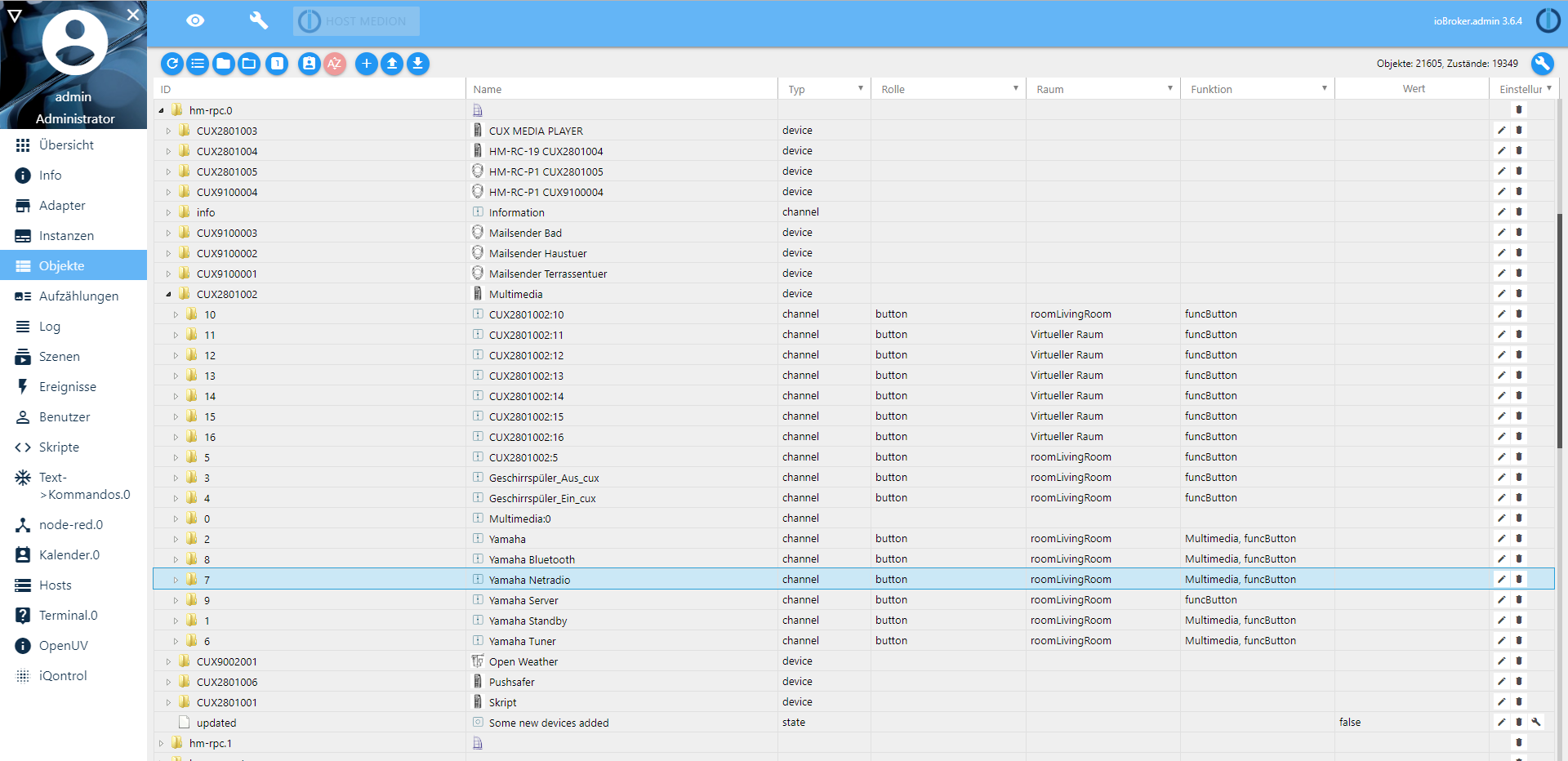
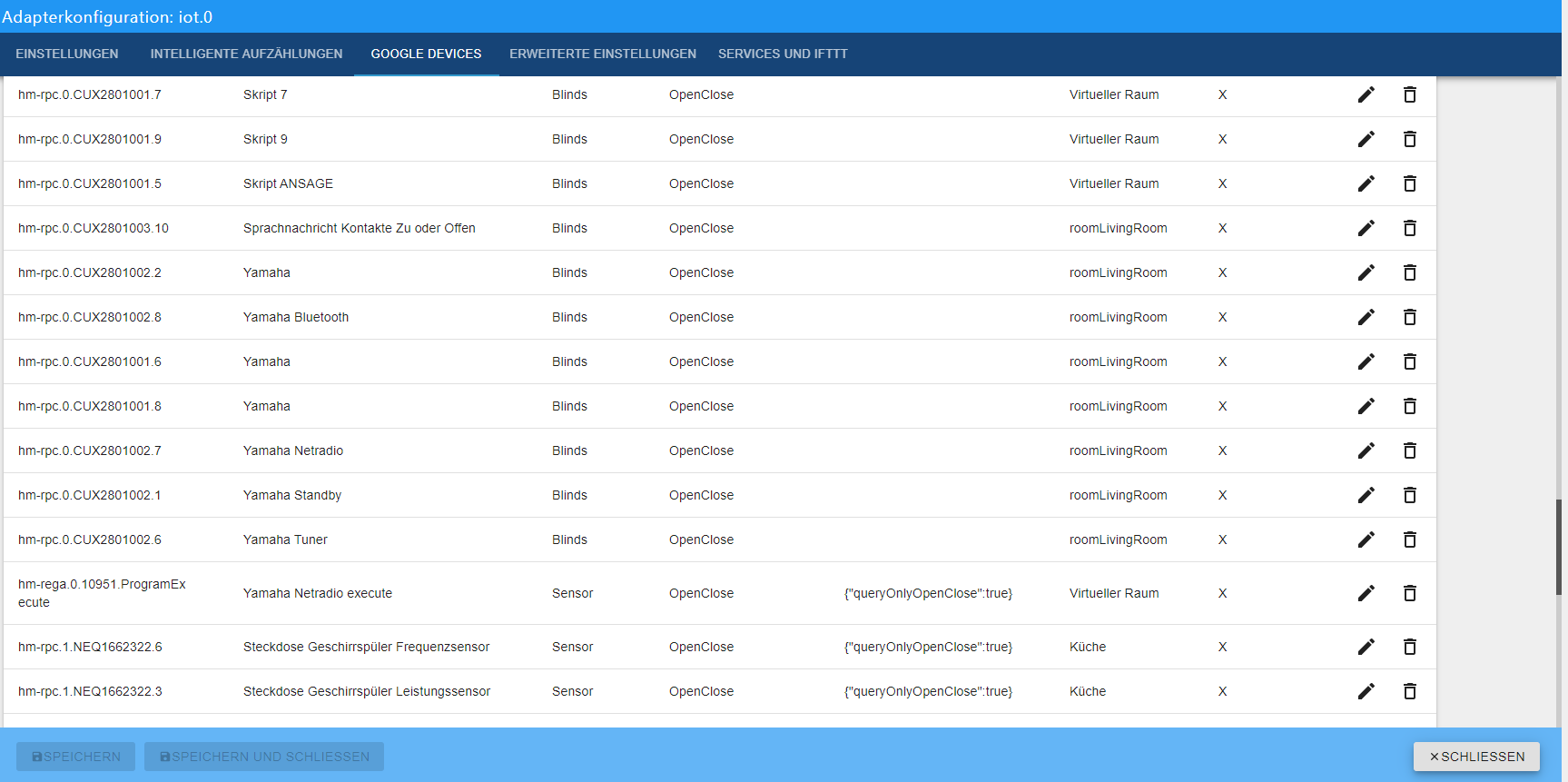
Info:
Eigene Einstellungen Pro sind angehakt! -
@tombox sagte in Google Home/Assistant ioBroker einrichten/nutzen:
@sigi234 Ist leider nicht das korrekte Gerät
Info:
Eigene Einstellungen Pro sind angehakt! -
@tombox sagte in Google Home/Assistant ioBroker einrichten/nutzen:
@sigi234 was ist hm-rega
CCU Adapter
https://github.com/ioBroker/ioBroker.hm-rega -
@tombox sagte in Google Home/Assistant ioBroker einrichten/nutzen:
@sigi234 Ist leider nicht das korrekte Gerät
Info:
Eigene Einstellungen Pro sind angehakt! -
@tombox sagte in Google Home/Assistant ioBroker einrichten/nutzen:
@sigi234 Ich habe mal ein ignore für die CUX Objekte in der github version eingefügt.
Ja, das sind Virtuelle Geräte in der CCU2.
Beispiel:
Also, ich habe keine Homematic Fernbedienung (Hardware) , mit den CUX kann ich in der Zentrale eine erstellen und simulieren als wäre eines vorhanden. Diese FB hat 8 Tasten mir jeweils 2 Datenpunkte. Jede Taste kann ich dann einzeln belegen. -
@tombox sagte in Google Home/Assistant ioBroker einrichten/nutzen:
@sigi234 Ich habe mal ein ignore für die CUX Objekte in der github version eingefügt.
Das kommt auch immer:
iot.0 2019-09-08 23:19:07.514 error [GHOME] Cannot updateState: Request contains an invalid argument. -
@tombox sagte in Google Home/Assistant ioBroker einrichten/nutzen:
@sigi234 Ich habe mal ein ignore für die CUX Objekte in der github version eingefügt.
Das kommt auch immer:
iot.0 2019-09-08 23:19:07.514 error [GHOME] Cannot updateState: Request contains an invalid argument. -
@tombox sagte in Google Home/Assistant ioBroker einrichten/nutzen:
@sigi234 müsstest mir mal privat den darauf folgenden log schicken
Edit
-
@tombox sagte in Google Home/Assistant ioBroker einrichten/nutzen:
@sigi234 Ich habe mal ein ignore für die CUX Objekte in der github version eingefügt.
Ja, sind jetzt weg.
-
@tombox Danke für die tolle Hilfe es läuft alles super. Nur eine frage noch wird es noch implementiert das das Licht gedimmt werden kann?
-
@tombox Danke für die tolle Hilfe es läuft alles super. Nur eine frage noch wird es noch implementiert das das Licht gedimmt werden kann?
-
@tombox Danke für die tolle Hilfe es läuft alles super. Nur eine frage noch wird es noch implementiert das das Licht gedimmt werden kann?
-
For Thomas, following discussion on Github (https://github.com/TA2k/ioBroker.iot/issues/4)
Here is the part of my linkeddevices: linkeddevices.0.Livingroom.json -
Yet another strange behavior.
With this thermostat:

which is defined in adapter like this:
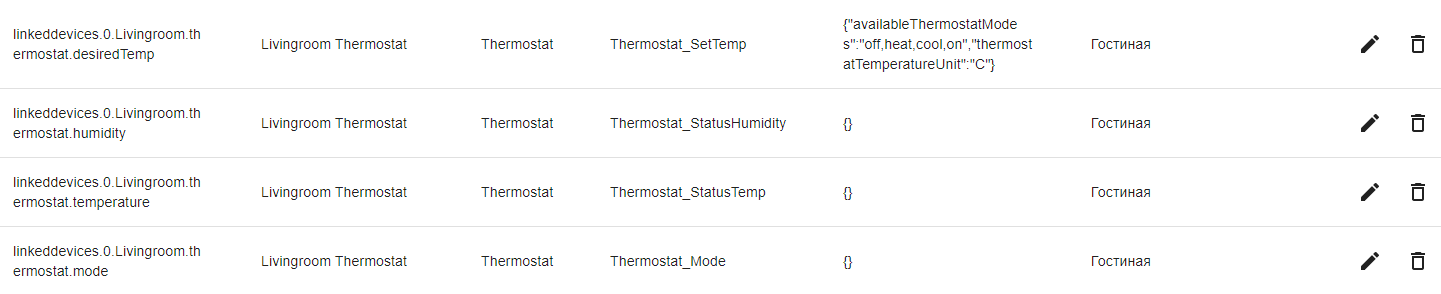
Voice control in GH, e.g. "Set temperature to 22" works only once. After that GH responds that it Can't connect to thermostat", whereas it is still controllable manually from GH menu on the phone.
btw, thermostat is only working with standard json settings in _SetTemp. If I, e.g. change ThermostatMode to "auto", it is not created correctly in GH.
And, I can't understand how to control Thermostat_Mode. It changes the state in Iobroker when I change in GH, but this change does not refreshed back in GH - it is always "Cooling". Is it possible to make it working at all (as well as humidity)?
-
Yet another strange behavior.
With this thermostat:
which is defined in adapter like this:
Voice control in GH, e.g. "Set temperature to 22" works only once. After that GH responds that it Can't connect to thermostat", whereas it is still controllable manually from GH menu on the phone.
btw, thermostat is only working with standard json settings in _SetTemp. If I, e.g. change ThermostatMode to "auto", it is not created correctly in GH.
And, I can't understand how to control Thermostat_Mode. It changes the state in Iobroker when I change in GH, but this change does not refreshed back in GH - it is always "Cooling". Is it possible to make it working at all (as well as humidity)?
@algar thermostat have some bugs on google side. I created a ticket for the humidity and they are working on this.
Thermostate mode is not controable because in the auto detected device because iobroker type has not such a mode it set depending if the set temp higher than the current than the mode is heating.


Hey! Du scheinst an dieser Unterhaltung interessiert zu sein, hast aber noch kein Konto.
Hast du es satt, bei jedem Besuch durch die gleichen Beiträge zu scrollen? Wenn du dich für ein Konto anmeldest, kommst du immer genau dorthin zurück, wo du zuvor warst, und kannst dich über neue Antworten benachrichtigen lassen (entweder per E-Mail oder Push-Benachrichtigung). Du kannst auch Lesezeichen speichern und Beiträge positiv bewerten, um anderen Community-Mitgliedern deine Wertschätzung zu zeigen.
Mit deinem Input könnte dieser Beitrag noch besser werden 💗
Registrieren Anmelden463
Online33.1k
Benutzende83.7k
Themen1.3m
Beiträge