




BLE Adapter und xiaomi temperature humidity sensor
-
Ne habe ich noch nicht. Das werde ich heute Nachmittag sofort probieren.
-
Hi
Gestern habe ich den Sensor mit der App verbunden (Als Info für anderen: Das geht nur wenn man als Server "Festland-China" auswählt).
Es gab kein Firmware Update. Für das verbinden hatte ich den Adapter ausgeschaltet und als ich ihn wieder angeschaltet hatte wurde er nicht mehr Grün.
Im nachbar Thema gibt es folgenden Tipp der bei mir funktioniert hat.
setcap cap_net_raw+eip $(eval readlink -f
which node)usermod -a -G bluetooth iobroker
Das Thema kann also geschlossen werden.
-
Guten Morgen!
Habe mir auch die Xiaomi Sensoren mit Bildschirm gegönnt und den BLE-Adapter installiert (inkl. eingetragenem Plugin xiaomi).
Es werden auch Geräte gefunden, allerdings nicht korrekt - siehe Screenshot. Hat jemand eine Idee, woran das liegen könnte?
Firmware ist aktuell, ble scheint auch zu laufen (es wird ja etwas erkannt). Scheint am Plugin zu liegen?

Danke für eure Hilfe
VG
Mario -
Guten Morgen!
Habe mir auch die Xiaomi Sensoren mit Bildschirm gegönnt und den BLE-Adapter installiert (inkl. eingetragenem Plugin xiaomi).
Es werden auch Geräte gefunden, allerdings nicht korrekt - siehe Screenshot. Hat jemand eine Idee, woran das liegen könnte?
Firmware ist aktuell, ble scheint auch zu laufen (es wird ja etwas erkannt). Scheint am Plugin zu liegen?
Danke für eure Hilfe
VG
Mario@MarioG schaut so aus als ob du auch schon eins von den "neuen" hast...
guck mal hier: https://forum.iobroker.net/topic/7500/aufruf-ble-adapter-testen-v0-6-0/329 -
Hi,
ich klinke mich hier mal ein,
und zwar habe ich ein Beelink J45 mit Proxmox und Debian mit Iobroker als VM laufen.
Durch suchen und Dokus durchwurschdeln habe ich rausgefunden wie man den internen Bluetooth Adapter durchreicht zur VM.
Hat anscheinend auch geklappt, der ble Adapter lässt sich installieren und starten. (Er wird zumindest mal grün).
Allerdings findet er meinen Xiaomi Bluetooth Sensor nicht. Xiaomi hab ich in den Einstellungen des ble Adapters eingetragen
Habe dann irgendwo gefunden das man selber schauen kann ob der Adapter den Sensor überhaupt sieht mit hciconfig lescan oder so irgendwie,
jedenfalls spuckt er mir dann einen Error aus. (EDIT: Funktioniert, wenn ble Adapter gestoppt, findet aber auch keine Geräte)
Habe dann auch versucht den ble Adapter nochmal neu zu installieren, was mit x Errormeldungen durchläuft, am Ende startet er aber und wird grün.
Gehen tut es aber immernoch nicht.
Da ich kein Linux Profi bin, wäre es super wenn mir da jemand beistehen könnte, da ich um Anzufangen erstmal schon gar nicht sicher bin ob Bluetooth überhaupt richtig funktioniert oder wo das Problem liegt das er meinen Xiaomi Sensor nicht sieht.Hier mal der Log vom ble Adapter installieren:
code_text$ ./iobroker upgrade ble@0.7.3 Update ble from @0.7.3 to @0.7.3 NPM version: 6.4.1 npm install iobroker.ble@0.7.3 --production --save --prefix "/opt/iobroker" (System call) ../src/linux/DeviceINQ.cc:35:37: fatal error: bluetooth/bluetooth.h: Datei oder Verzeichnis nicht gefunden #include <bluetooth/bluetooth.h> ^ compilation terminated. make: *** [Release/obj.target/BluetoothSerialPort/src/linux/DeviceINQ.o] Fehler 1 gyp ERR! build error gyp ERR! stack Error: `make` failed with exit code: 2 gyp ERR! stack at ChildProcess.onExit (/usr/lib/node_modules/npm/node_modules/node-gyp/lib/build.js:262:23) gyp ERR! stack at emitTwo (events.js:126:13)gyp ERR! stack at ChildProcess.emit (events.js:214:7)gyp ERR! stack at Process.ChildProcess._handle.onexit (internal/child_process.js:198:12) gyp ERR! System Linux 4.9.0-8-amd64 gyp ERR! command "/usr/bin/node" "/usr/lib/node_modules/npm/node_modules/node-gyp/bin/node-gyp.js" "configure" "build" gyp ERR! cwd /opt/iobroker/node_modules/node-bluetooth gyp ERR! node -v v8.15.1 gyp ERR! node-gyp -v v3.8.0 gyp ERR! not ok npm WARN optional SKIPPING OPTIONAL DEPENDENCY: osx-temperature-sensor@1.0.3 (node_modules/osx-temperature-sensor):npm WARN notsup SKIPPING OPTIONAL DEPENDENCY: Unsupported platform for osx-temperature-sensor@1.0.3: wanted {"os":"darwin","arch":"any"} (current: {"os":"linux","arch":"x64"}) npm WARN optional SKIPPING OPTIONAL DEPENDENCY: xpc-connection@0.1.4 (node_modules/xpc-connection):npm WARN notsup SKIPPING OPTIONAL DEPENDENCY: Unsupported platform for xpc-connection@0.1.4: wanted {"os":"darwin","arch":"any"} (current: {"os":"linux","arch":"x64"}) npm WARN optional SKIPPING OPTIONAL DEPENDENCY: node-bluetooth@1.2.5 (node_modules/node-bluetooth): npm WARN optional SKIPPING OPTIONAL DEPENDENCY: node-bluetooth@1.2.5 install: `node-gyp configure build` npm WARN optional SKIPPING OPTIONAL DEPENDENCY: Exit status 1 npm install --production (System call) in "/opt/iobroker/node_modules/iobroker.ble" npm WARN deprecated core-js@1.2.7: core-js@<2.6.5 is no longer maintained. Please, upgrade to core-js@3 or at least to actual version of core-js@2. npm notice created a lockfile as package-lock.json. You should commit this file. node-pre-gyp WARN Using request for node-pre-gyp https download node-pre-gyp WARN Tried to download(404): https://github.com/tessel/node-usb/releases/download/1.5.0/usb_bindings-v1.5.0-node-v57-linux-x64.tar.gz node-pre-gyp WARN Pre-built binaries not found for usb@1.5.0 and node@8.15.1 (node-v57 ABI, glibc) (falling back to source compile with node-gyp) ../src/node_usb.cc: In function 'void handleHotplug(std::pair<libusb_device*, libusb_hotplug_event>)':../src/node_usb.cc:151:58: warning: 'v8::Local<v8::Value> Nan::MakeCallback(v8::Local<v8::Object>, const char*, int, v8::Local<v8::Value>*)' is deprecated [-Wdeprecated-declarations] Nan::MakeCallback(Nan::New(hotplugThis), "emit", 2, argv); ^ In file included from ../src/helpers.h:3:0, from ../src/node_usb.h:21, from ../src/node_usb.cc:1: ../../nan/nan.h:1001:46: note: declared here NAN_DEPRECATED inline v8::Local<v8::Value> MakeCallback( ^~~~~~~~~~~~ ../src/device.cc: In static member function 'static void Req::default_after(uv_work_t*)':../src/device.cc:237:64: warning: 'v8::Local<v8::Value> Nan::MakeCallback(v8::Local<v8::Object>, v8::Local<v8::Function>, int, v8::Local<v8::Value>*)' is deprecated [-Wdeprecated-declarations] Nan::MakeCallback(device, Nan::New(baton->callback), 1, argv); ^ In file included from ../src/helpers.h:3:0, from ../src/node_usb.h:21, from ../src/device.cc:1: ../../nan/nan.h:959:46: note: declared here NAN_DEPRECATED inline v8::Local<v8::Value> MakeCallback( ^~~~~~~~~~~~ ../src/transfer.cc: In function 'void handleCompletion(Transfer*)':../src/transfer.cc:126:72: warning: 'v8::Local<v8::Value> Nan::MakeCallback(v8::Local<v8::Object>, v8::Local<v8::Function>, int, v8::Local<v8::Value>*)' is deprecated [-Wdeprecated-declarations] Nan::MakeCallback(self->handle(), Nan::New(self->v8callback), 3, argv); ^ In file included from ../src/helpers.h:3:0, from ../src/node_usb.h:21, from ../src/transfer.cc:1: ../../nan/nan.h:959:46: note: declared here NAN_DEPRECATED inline v8::Local<v8::Value> MakeCallback( ^~~~~~~~~~~~ node-pre-gyp WARN Using request for node-pre-gyp https download node-pre-gyp WARN Tried to download(404): https://github.com/sandeepmistry/node-bluetooth-hci-socket/releases/download/0.5.3-1/binding-0.5.3-1-node-v57-linux-x64.tar.gz node-pre-gyp WARN Pre-built binaries not found for @abandonware/bluetooth-hci-socket@0.5.3-1 and node@8.15.1 (node-v57 ABI, glibc) (falling back to source compile with node-gyp) ../src/BluetoothHciSocket.cpp: In member function 'void BluetoothHciSocket::poll()':../src/BluetoothHciSocket.cpp:252:95: warning: 'v8::Local<v8::Value> Nan::MakeCallback(v8::Local<v8::Object>, v8::Local<v8::String>, int, v8::Local<v8::Value>*)' is deprecated [-Wdeprecated-declarations] Nan::MakeCallback(Nan::New<Object>(this->This), Nan::New("emit").ToLocalChecked(), 2, argv); ^ In file included from ../src/BluetoothHciSocket.cpp:8:0: ../../../nan/nan.h:980:46: note: declared here NAN_DEPRECATED inline v8::Local<v8::Value> MakeCallback( ^~~~~~~~~~~~ ../src/BluetoothHciSocket.cpp: In member function 'void BluetoothHciSocket::emitErrnoError()':../src/BluetoothHciSocket.cpp:283:93: warning: 'v8::Local<v8::Value> Nan::MakeCallback(v8::Local<v8::Object>, v8::Local<v8::String>, int, v8::Local<v8::Value>*)' is deprecated [-Wdeprecated-declarations] Nan::MakeCallback(Nan::New<Object>(this->This), Nan::New("emit").ToLocalChecked(), 2, argv); ^ In file included from ../src/BluetoothHciSocket.cpp:8:0: ../../../nan/nan.h:980:46: note: declared here NAN_DEPRECATED inline v8::Local<v8::Value> MakeCallback( ^~~~~~~~~~~~ npm notice created a lockfile as package-lock.json. You should commit this file. got /opt/iobroker/node_modules/iobroker.ble/admin upload [7] ble.admin /opt/iobroker/node_modules/iobroker.ble/admin/words.js words.js application/javascript Update "system.adapter.ble.0" upload [6] ble.admin /opt/iobroker/node_modules/iobroker.ble/admin/style.css style.css text/css upload [5] ble.admin /opt/iobroker/node_modules/iobroker.ble/admin/index_m.html index_m.html text/html upload [4] ble.admin /opt/iobroker/node_modules/iobroker.ble/admin/index.html index.html text/html upload [3] ble.admin /opt/iobroker/node_modules/iobroker.ble/admin/build/index.map build/index.map application/json upload [2] ble.admin /opt/iobroker/node_modules/iobroker.ble/admin/build/index.js.map build/index.js.map application/json upload [1] ble.admin /opt/iobroker/node_modules/iobroker.ble/admin/build/index.js build/index.js application/javascript upload [0] ble.admin /opt/iobroker/node_modules/iobroker.ble/admin/ble.png ble.png image/png Adapter "ble" updated process exited with code 0Das kommt wenn ich hciconfig auf der VM eingebe (sollte ja so passen oder?)
hci0:   Type: Primary  Bus: USB
        BD Address: A0:A4:C5:CB:B7:2B  ACL MTU: 1021:5  SCO MTU: 96:6
        UP RUNNING
        RX bytes:1187 acl:0 sco:0 events:95 errors:0
        TX bytes:2955 acl:0 sco:0 commands:89 errors:0
Hier mal die Adapter Einstellungen und Objekte:

sudo hciconfig -i lescan bringt folgendes:
sudo hcitool -i hci0 lescan
Set scan parameters failed: Input/output error
EDIT:
Das lescan Problem hab ich gelöst, geht nur wenn ble Adapter im ioBroker gestoppt ist.
Er findet aber keine Devices. Muss ich den Xiaomi Sensor irgendwie noch pairen mit dem Beelink oder geht das so?
Bisher hab ich ihn nur mit dem Handy und der MiHome App gepaired, was auch funktioniert.
Falls man pairen muss, wie mach ich das dann am Beelink? Im ble Adapter gibts ja keine Option dafür und am Xaomi Sensor ist der Knopf dafür?
Soweit ich verstanden habe muss ich dafür ja nichts pairen...
Muss man evtl. im Bios vom Beelink noch etwas verstellen damit das funktioniert?
Habe den Adapter jetzt schon mehrere Stunden laufen und den Bluetooth Sensor mit LCD neben dem Beelink liegen, es taucht aber nichts auf unter den Objekten :(Danke vorab!
-
Hi,
ich klinke mich hier mal ein,
und zwar habe ich ein Beelink J45 mit Proxmox und Debian mit Iobroker als VM laufen.
Durch suchen und Dokus durchwurschdeln habe ich rausgefunden wie man den internen Bluetooth Adapter durchreicht zur VM.
Hat anscheinend auch geklappt, der ble Adapter lässt sich installieren und starten. (Er wird zumindest mal grün).
Allerdings findet er meinen Xiaomi Bluetooth Sensor nicht. Xiaomi hab ich in den Einstellungen des ble Adapters eingetragen
Habe dann irgendwo gefunden das man selber schauen kann ob der Adapter den Sensor überhaupt sieht mit hciconfig lescan oder so irgendwie,
jedenfalls spuckt er mir dann einen Error aus. (EDIT: Funktioniert, wenn ble Adapter gestoppt, findet aber auch keine Geräte)
Habe dann auch versucht den ble Adapter nochmal neu zu installieren, was mit x Errormeldungen durchläuft, am Ende startet er aber und wird grün.
Gehen tut es aber immernoch nicht.
Da ich kein Linux Profi bin, wäre es super wenn mir da jemand beistehen könnte, da ich um Anzufangen erstmal schon gar nicht sicher bin ob Bluetooth überhaupt richtig funktioniert oder wo das Problem liegt das er meinen Xiaomi Sensor nicht sieht.Hier mal der Log vom ble Adapter installieren:
code_text$ ./iobroker upgrade ble@0.7.3 Update ble from @0.7.3 to @0.7.3 NPM version: 6.4.1 npm install iobroker.ble@0.7.3 --production --save --prefix "/opt/iobroker" (System call) ../src/linux/DeviceINQ.cc:35:37: fatal error: bluetooth/bluetooth.h: Datei oder Verzeichnis nicht gefunden #include <bluetooth/bluetooth.h> ^ compilation terminated. make: *** [Release/obj.target/BluetoothSerialPort/src/linux/DeviceINQ.o] Fehler 1 gyp ERR! build error gyp ERR! stack Error: `make` failed with exit code: 2 gyp ERR! stack at ChildProcess.onExit (/usr/lib/node_modules/npm/node_modules/node-gyp/lib/build.js:262:23) gyp ERR! stack at emitTwo (events.js:126:13)gyp ERR! stack at ChildProcess.emit (events.js:214:7)gyp ERR! stack at Process.ChildProcess._handle.onexit (internal/child_process.js:198:12) gyp ERR! System Linux 4.9.0-8-amd64 gyp ERR! command "/usr/bin/node" "/usr/lib/node_modules/npm/node_modules/node-gyp/bin/node-gyp.js" "configure" "build" gyp ERR! cwd /opt/iobroker/node_modules/node-bluetooth gyp ERR! node -v v8.15.1 gyp ERR! node-gyp -v v3.8.0 gyp ERR! not ok npm WARN optional SKIPPING OPTIONAL DEPENDENCY: osx-temperature-sensor@1.0.3 (node_modules/osx-temperature-sensor):npm WARN notsup SKIPPING OPTIONAL DEPENDENCY: Unsupported platform for osx-temperature-sensor@1.0.3: wanted {"os":"darwin","arch":"any"} (current: {"os":"linux","arch":"x64"}) npm WARN optional SKIPPING OPTIONAL DEPENDENCY: xpc-connection@0.1.4 (node_modules/xpc-connection):npm WARN notsup SKIPPING OPTIONAL DEPENDENCY: Unsupported platform for xpc-connection@0.1.4: wanted {"os":"darwin","arch":"any"} (current: {"os":"linux","arch":"x64"}) npm WARN optional SKIPPING OPTIONAL DEPENDENCY: node-bluetooth@1.2.5 (node_modules/node-bluetooth): npm WARN optional SKIPPING OPTIONAL DEPENDENCY: node-bluetooth@1.2.5 install: `node-gyp configure build` npm WARN optional SKIPPING OPTIONAL DEPENDENCY: Exit status 1 npm install --production (System call) in "/opt/iobroker/node_modules/iobroker.ble" npm WARN deprecated core-js@1.2.7: core-js@<2.6.5 is no longer maintained. Please, upgrade to core-js@3 or at least to actual version of core-js@2. npm notice created a lockfile as package-lock.json. You should commit this file. node-pre-gyp WARN Using request for node-pre-gyp https download node-pre-gyp WARN Tried to download(404): https://github.com/tessel/node-usb/releases/download/1.5.0/usb_bindings-v1.5.0-node-v57-linux-x64.tar.gz node-pre-gyp WARN Pre-built binaries not found for usb@1.5.0 and node@8.15.1 (node-v57 ABI, glibc) (falling back to source compile with node-gyp) ../src/node_usb.cc: In function 'void handleHotplug(std::pair<libusb_device*, libusb_hotplug_event>)':../src/node_usb.cc:151:58: warning: 'v8::Local<v8::Value> Nan::MakeCallback(v8::Local<v8::Object>, const char*, int, v8::Local<v8::Value>*)' is deprecated [-Wdeprecated-declarations] Nan::MakeCallback(Nan::New(hotplugThis), "emit", 2, argv); ^ In file included from ../src/helpers.h:3:0, from ../src/node_usb.h:21, from ../src/node_usb.cc:1: ../../nan/nan.h:1001:46: note: declared here NAN_DEPRECATED inline v8::Local<v8::Value> MakeCallback( ^~~~~~~~~~~~ ../src/device.cc: In static member function 'static void Req::default_after(uv_work_t*)':../src/device.cc:237:64: warning: 'v8::Local<v8::Value> Nan::MakeCallback(v8::Local<v8::Object>, v8::Local<v8::Function>, int, v8::Local<v8::Value>*)' is deprecated [-Wdeprecated-declarations] Nan::MakeCallback(device, Nan::New(baton->callback), 1, argv); ^ In file included from ../src/helpers.h:3:0, from ../src/node_usb.h:21, from ../src/device.cc:1: ../../nan/nan.h:959:46: note: declared here NAN_DEPRECATED inline v8::Local<v8::Value> MakeCallback( ^~~~~~~~~~~~ ../src/transfer.cc: In function 'void handleCompletion(Transfer*)':../src/transfer.cc:126:72: warning: 'v8::Local<v8::Value> Nan::MakeCallback(v8::Local<v8::Object>, v8::Local<v8::Function>, int, v8::Local<v8::Value>*)' is deprecated [-Wdeprecated-declarations] Nan::MakeCallback(self->handle(), Nan::New(self->v8callback), 3, argv); ^ In file included from ../src/helpers.h:3:0, from ../src/node_usb.h:21, from ../src/transfer.cc:1: ../../nan/nan.h:959:46: note: declared here NAN_DEPRECATED inline v8::Local<v8::Value> MakeCallback( ^~~~~~~~~~~~ node-pre-gyp WARN Using request for node-pre-gyp https download node-pre-gyp WARN Tried to download(404): https://github.com/sandeepmistry/node-bluetooth-hci-socket/releases/download/0.5.3-1/binding-0.5.3-1-node-v57-linux-x64.tar.gz node-pre-gyp WARN Pre-built binaries not found for @abandonware/bluetooth-hci-socket@0.5.3-1 and node@8.15.1 (node-v57 ABI, glibc) (falling back to source compile with node-gyp) ../src/BluetoothHciSocket.cpp: In member function 'void BluetoothHciSocket::poll()':../src/BluetoothHciSocket.cpp:252:95: warning: 'v8::Local<v8::Value> Nan::MakeCallback(v8::Local<v8::Object>, v8::Local<v8::String>, int, v8::Local<v8::Value>*)' is deprecated [-Wdeprecated-declarations] Nan::MakeCallback(Nan::New<Object>(this->This), Nan::New("emit").ToLocalChecked(), 2, argv); ^ In file included from ../src/BluetoothHciSocket.cpp:8:0: ../../../nan/nan.h:980:46: note: declared here NAN_DEPRECATED inline v8::Local<v8::Value> MakeCallback( ^~~~~~~~~~~~ ../src/BluetoothHciSocket.cpp: In member function 'void BluetoothHciSocket::emitErrnoError()':../src/BluetoothHciSocket.cpp:283:93: warning: 'v8::Local<v8::Value> Nan::MakeCallback(v8::Local<v8::Object>, v8::Local<v8::String>, int, v8::Local<v8::Value>*)' is deprecated [-Wdeprecated-declarations] Nan::MakeCallback(Nan::New<Object>(this->This), Nan::New("emit").ToLocalChecked(), 2, argv); ^ In file included from ../src/BluetoothHciSocket.cpp:8:0: ../../../nan/nan.h:980:46: note: declared here NAN_DEPRECATED inline v8::Local<v8::Value> MakeCallback( ^~~~~~~~~~~~ npm notice created a lockfile as package-lock.json. You should commit this file. got /opt/iobroker/node_modules/iobroker.ble/admin upload [7] ble.admin /opt/iobroker/node_modules/iobroker.ble/admin/words.js words.js application/javascript Update "system.adapter.ble.0" upload [6] ble.admin /opt/iobroker/node_modules/iobroker.ble/admin/style.css style.css text/css upload [5] ble.admin /opt/iobroker/node_modules/iobroker.ble/admin/index_m.html index_m.html text/html upload [4] ble.admin /opt/iobroker/node_modules/iobroker.ble/admin/index.html index.html text/html upload [3] ble.admin /opt/iobroker/node_modules/iobroker.ble/admin/build/index.map build/index.map application/json upload [2] ble.admin /opt/iobroker/node_modules/iobroker.ble/admin/build/index.js.map build/index.js.map application/json upload [1] ble.admin /opt/iobroker/node_modules/iobroker.ble/admin/build/index.js build/index.js application/javascript upload [0] ble.admin /opt/iobroker/node_modules/iobroker.ble/admin/ble.png ble.png image/png Adapter "ble" updated process exited with code 0Das kommt wenn ich hciconfig auf der VM eingebe (sollte ja so passen oder?)
hci0:   Type: Primary  Bus: USB
        BD Address: A0:A4:C5:CB:B7:2B  ACL MTU: 1021:5  SCO MTU: 96:6
        UP RUNNING
        RX bytes:1187 acl:0 sco:0 events:95 errors:0
        TX bytes:2955 acl:0 sco:0 commands:89 errors:0
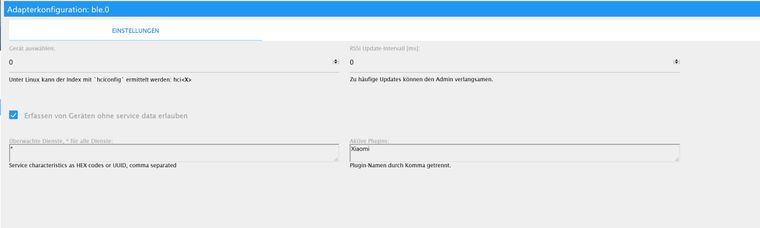
Hier mal die Adapter Einstellungen und Objekte:
sudo hciconfig -i lescan bringt folgendes:
sudo hcitool -i hci0 lescan
Set scan parameters failed: Input/output error
EDIT:
Das lescan Problem hab ich gelöst, geht nur wenn ble Adapter im ioBroker gestoppt ist.
Er findet aber keine Devices. Muss ich den Xiaomi Sensor irgendwie noch pairen mit dem Beelink oder geht das so?
Bisher hab ich ihn nur mit dem Handy und der MiHome App gepaired, was auch funktioniert.
Falls man pairen muss, wie mach ich das dann am Beelink? Im ble Adapter gibts ja keine Option dafür und am Xaomi Sensor ist der Knopf dafür?
Soweit ich verstanden habe muss ich dafür ja nichts pairen...
Muss man evtl. im Bios vom Beelink noch etwas verstellen damit das funktioniert?
Habe den Adapter jetzt schon mehrere Stunden laufen und den Bluetooth Sensor mit LCD neben dem Beelink liegen, es taucht aber nichts auf unter den Objekten :(Danke vorab!
@W0RSCHD wie siehts hier aus bei Dir?

Ps: intervall solltest ändern z.b auf 5000
-
@crunchip sagte in BLE Adapter und xiaomi temperature humidity sensor:
@W0RSCHD wie siehts hier aus bei Dir?
Ps: intervall solltest ändern z.b auf 5000
Da siehts genau so aus, siehe die Bilder die ich angehängt hab im vorigen Post.
Intervall ändere ich mal.EDIT: Intervall geändert, es tauchen aber leider immernoch keine Devices auf. Ich habe kA wo jetzt der Fehler liegt :(
-
Hi,
ich klinke mich hier mal ein,
und zwar habe ich ein Beelink J45 mit Proxmox und Debian mit Iobroker als VM laufen.
Durch suchen und Dokus durchwurschdeln habe ich rausgefunden wie man den internen Bluetooth Adapter durchreicht zur VM.
Hat anscheinend auch geklappt, der ble Adapter lässt sich installieren und starten. (Er wird zumindest mal grün).
Allerdings findet er meinen Xiaomi Bluetooth Sensor nicht. Xiaomi hab ich in den Einstellungen des ble Adapters eingetragen
Habe dann irgendwo gefunden das man selber schauen kann ob der Adapter den Sensor überhaupt sieht mit hciconfig lescan oder so irgendwie,
jedenfalls spuckt er mir dann einen Error aus. (EDIT: Funktioniert, wenn ble Adapter gestoppt, findet aber auch keine Geräte)
Habe dann auch versucht den ble Adapter nochmal neu zu installieren, was mit x Errormeldungen durchläuft, am Ende startet er aber und wird grün.
Gehen tut es aber immernoch nicht.
Da ich kein Linux Profi bin, wäre es super wenn mir da jemand beistehen könnte, da ich um Anzufangen erstmal schon gar nicht sicher bin ob Bluetooth überhaupt richtig funktioniert oder wo das Problem liegt das er meinen Xiaomi Sensor nicht sieht.Hier mal der Log vom ble Adapter installieren:
code_text$ ./iobroker upgrade ble@0.7.3 Update ble from @0.7.3 to @0.7.3 NPM version: 6.4.1 npm install iobroker.ble@0.7.3 --production --save --prefix "/opt/iobroker" (System call) ../src/linux/DeviceINQ.cc:35:37: fatal error: bluetooth/bluetooth.h: Datei oder Verzeichnis nicht gefunden #include <bluetooth/bluetooth.h> ^ compilation terminated. make: *** [Release/obj.target/BluetoothSerialPort/src/linux/DeviceINQ.o] Fehler 1 gyp ERR! build error gyp ERR! stack Error: `make` failed with exit code: 2 gyp ERR! stack at ChildProcess.onExit (/usr/lib/node_modules/npm/node_modules/node-gyp/lib/build.js:262:23) gyp ERR! stack at emitTwo (events.js:126:13)gyp ERR! stack at ChildProcess.emit (events.js:214:7)gyp ERR! stack at Process.ChildProcess._handle.onexit (internal/child_process.js:198:12) gyp ERR! System Linux 4.9.0-8-amd64 gyp ERR! command "/usr/bin/node" "/usr/lib/node_modules/npm/node_modules/node-gyp/bin/node-gyp.js" "configure" "build" gyp ERR! cwd /opt/iobroker/node_modules/node-bluetooth gyp ERR! node -v v8.15.1 gyp ERR! node-gyp -v v3.8.0 gyp ERR! not ok npm WARN optional SKIPPING OPTIONAL DEPENDENCY: osx-temperature-sensor@1.0.3 (node_modules/osx-temperature-sensor):npm WARN notsup SKIPPING OPTIONAL DEPENDENCY: Unsupported platform for osx-temperature-sensor@1.0.3: wanted {"os":"darwin","arch":"any"} (current: {"os":"linux","arch":"x64"}) npm WARN optional SKIPPING OPTIONAL DEPENDENCY: xpc-connection@0.1.4 (node_modules/xpc-connection):npm WARN notsup SKIPPING OPTIONAL DEPENDENCY: Unsupported platform for xpc-connection@0.1.4: wanted {"os":"darwin","arch":"any"} (current: {"os":"linux","arch":"x64"}) npm WARN optional SKIPPING OPTIONAL DEPENDENCY: node-bluetooth@1.2.5 (node_modules/node-bluetooth): npm WARN optional SKIPPING OPTIONAL DEPENDENCY: node-bluetooth@1.2.5 install: `node-gyp configure build` npm WARN optional SKIPPING OPTIONAL DEPENDENCY: Exit status 1 npm install --production (System call) in "/opt/iobroker/node_modules/iobroker.ble" npm WARN deprecated core-js@1.2.7: core-js@<2.6.5 is no longer maintained. Please, upgrade to core-js@3 or at least to actual version of core-js@2. npm notice created a lockfile as package-lock.json. You should commit this file. node-pre-gyp WARN Using request for node-pre-gyp https download node-pre-gyp WARN Tried to download(404): https://github.com/tessel/node-usb/releases/download/1.5.0/usb_bindings-v1.5.0-node-v57-linux-x64.tar.gz node-pre-gyp WARN Pre-built binaries not found for usb@1.5.0 and node@8.15.1 (node-v57 ABI, glibc) (falling back to source compile with node-gyp) ../src/node_usb.cc: In function 'void handleHotplug(std::pair<libusb_device*, libusb_hotplug_event>)':../src/node_usb.cc:151:58: warning: 'v8::Local<v8::Value> Nan::MakeCallback(v8::Local<v8::Object>, const char*, int, v8::Local<v8::Value>*)' is deprecated [-Wdeprecated-declarations] Nan::MakeCallback(Nan::New(hotplugThis), "emit", 2, argv); ^ In file included from ../src/helpers.h:3:0, from ../src/node_usb.h:21, from ../src/node_usb.cc:1: ../../nan/nan.h:1001:46: note: declared here NAN_DEPRECATED inline v8::Local<v8::Value> MakeCallback( ^~~~~~~~~~~~ ../src/device.cc: In static member function 'static void Req::default_after(uv_work_t*)':../src/device.cc:237:64: warning: 'v8::Local<v8::Value> Nan::MakeCallback(v8::Local<v8::Object>, v8::Local<v8::Function>, int, v8::Local<v8::Value>*)' is deprecated [-Wdeprecated-declarations] Nan::MakeCallback(device, Nan::New(baton->callback), 1, argv); ^ In file included from ../src/helpers.h:3:0, from ../src/node_usb.h:21, from ../src/device.cc:1: ../../nan/nan.h:959:46: note: declared here NAN_DEPRECATED inline v8::Local<v8::Value> MakeCallback( ^~~~~~~~~~~~ ../src/transfer.cc: In function 'void handleCompletion(Transfer*)':../src/transfer.cc:126:72: warning: 'v8::Local<v8::Value> Nan::MakeCallback(v8::Local<v8::Object>, v8::Local<v8::Function>, int, v8::Local<v8::Value>*)' is deprecated [-Wdeprecated-declarations] Nan::MakeCallback(self->handle(), Nan::New(self->v8callback), 3, argv); ^ In file included from ../src/helpers.h:3:0, from ../src/node_usb.h:21, from ../src/transfer.cc:1: ../../nan/nan.h:959:46: note: declared here NAN_DEPRECATED inline v8::Local<v8::Value> MakeCallback( ^~~~~~~~~~~~ node-pre-gyp WARN Using request for node-pre-gyp https download node-pre-gyp WARN Tried to download(404): https://github.com/sandeepmistry/node-bluetooth-hci-socket/releases/download/0.5.3-1/binding-0.5.3-1-node-v57-linux-x64.tar.gz node-pre-gyp WARN Pre-built binaries not found for @abandonware/bluetooth-hci-socket@0.5.3-1 and node@8.15.1 (node-v57 ABI, glibc) (falling back to source compile with node-gyp) ../src/BluetoothHciSocket.cpp: In member function 'void BluetoothHciSocket::poll()':../src/BluetoothHciSocket.cpp:252:95: warning: 'v8::Local<v8::Value> Nan::MakeCallback(v8::Local<v8::Object>, v8::Local<v8::String>, int, v8::Local<v8::Value>*)' is deprecated [-Wdeprecated-declarations] Nan::MakeCallback(Nan::New<Object>(this->This), Nan::New("emit").ToLocalChecked(), 2, argv); ^ In file included from ../src/BluetoothHciSocket.cpp:8:0: ../../../nan/nan.h:980:46: note: declared here NAN_DEPRECATED inline v8::Local<v8::Value> MakeCallback( ^~~~~~~~~~~~ ../src/BluetoothHciSocket.cpp: In member function 'void BluetoothHciSocket::emitErrnoError()':../src/BluetoothHciSocket.cpp:283:93: warning: 'v8::Local<v8::Value> Nan::MakeCallback(v8::Local<v8::Object>, v8::Local<v8::String>, int, v8::Local<v8::Value>*)' is deprecated [-Wdeprecated-declarations] Nan::MakeCallback(Nan::New<Object>(this->This), Nan::New("emit").ToLocalChecked(), 2, argv); ^ In file included from ../src/BluetoothHciSocket.cpp:8:0: ../../../nan/nan.h:980:46: note: declared here NAN_DEPRECATED inline v8::Local<v8::Value> MakeCallback( ^~~~~~~~~~~~ npm notice created a lockfile as package-lock.json. You should commit this file. got /opt/iobroker/node_modules/iobroker.ble/admin upload [7] ble.admin /opt/iobroker/node_modules/iobroker.ble/admin/words.js words.js application/javascript Update "system.adapter.ble.0" upload [6] ble.admin /opt/iobroker/node_modules/iobroker.ble/admin/style.css style.css text/css upload [5] ble.admin /opt/iobroker/node_modules/iobroker.ble/admin/index_m.html index_m.html text/html upload [4] ble.admin /opt/iobroker/node_modules/iobroker.ble/admin/index.html index.html text/html upload [3] ble.admin /opt/iobroker/node_modules/iobroker.ble/admin/build/index.map build/index.map application/json upload [2] ble.admin /opt/iobroker/node_modules/iobroker.ble/admin/build/index.js.map build/index.js.map application/json upload [1] ble.admin /opt/iobroker/node_modules/iobroker.ble/admin/build/index.js build/index.js application/javascript upload [0] ble.admin /opt/iobroker/node_modules/iobroker.ble/admin/ble.png ble.png image/png Adapter "ble" updated process exited with code 0Das kommt wenn ich hciconfig auf der VM eingebe (sollte ja so passen oder?)
hci0:   Type: Primary  Bus: USB
        BD Address: A0:A4:C5:CB:B7:2B  ACL MTU: 1021:5  SCO MTU: 96:6
        UP RUNNING
        RX bytes:1187 acl:0 sco:0 events:95 errors:0
        TX bytes:2955 acl:0 sco:0 commands:89 errors:0
Hier mal die Adapter Einstellungen und Objekte:
sudo hciconfig -i lescan bringt folgendes:
sudo hcitool -i hci0 lescan
Set scan parameters failed: Input/output error
EDIT:
Das lescan Problem hab ich gelöst, geht nur wenn ble Adapter im ioBroker gestoppt ist.
Er findet aber keine Devices. Muss ich den Xiaomi Sensor irgendwie noch pairen mit dem Beelink oder geht das so?
Bisher hab ich ihn nur mit dem Handy und der MiHome App gepaired, was auch funktioniert.
Falls man pairen muss, wie mach ich das dann am Beelink? Im ble Adapter gibts ja keine Option dafür und am Xaomi Sensor ist der Knopf dafür?
Soweit ich verstanden habe muss ich dafür ja nichts pairen...
Muss man evtl. im Bios vom Beelink noch etwas verstellen damit das funktioniert?
Habe den Adapter jetzt schon mehrere Stunden laufen und den Bluetooth Sensor mit LCD neben dem Beelink liegen, es taucht aber nichts auf unter den Objekten :(Danke vorab!
@W0RSCHD sagte in BLE Adapter und xiaomi temperature humidity sensor:
Muss ich den Xiaomi Sensor irgendwie noch pairen
Nein, der sollte eigentlich seine aktuellen Werte ungefragt broadcasten. Mit der Handy-App "nRF Connect" kannst du herausfinden, ob er das tut. Nicht mit dem Sensor verbinden, einfach scan laufen lassen.
Oder hast du eine aktive Verbindung mit dem Handy zum Sensor? Dann tut er das nicht.
-
Ich hab 2 von den Sensoren, einer gepaired mit Handy und den anderen (der kam heute mit der Post) ungepaired. Erscheinen aber beide nicht als devices...
Ich habe irgendwie die Vermutung das bei mir mit dem Bluetooth noch was faul ist.
Habe noch etwas rumgesucht, manchmal stand was von firmwarefiles usw usf....
Ich suche da grade noch rum. Für mich als Linux Neuling ists halt schwierig, es erscheint ein Device hci0,
der ble Adapter startet, aber findet halt keine Geräte.... Aber woher dann feststellen ob der Bluetooth Adapter überhaupt korrekt funktioniert?!?
Um überhaupt mal das Problem einzugrenzen, ich denke das kommt irgendwo auch daher, ich kann mir nicht vorstellen das 2 der Sensoren dann beide nichts Senden oder defekt sind.EDIT:
habe jetzt mal die Firmware von intel manuell geladen und in den Firmware ordner in lib.dmesg | grep bluetooth spuckt auch keinen Fehler aus und mit lescan werden Geräte gefunden :)
Bis jetzt taucht aber im ble Adapter noch nichts auf unter Objekten :(
EDIT2:
Nach langem hin und her suchen, hats nun endlich geklappt, die Geräte tauchen auf.
Es lag dann wohl an den fehlenden Firmwarefiles.
Habe diese manuell in den Ordner und dann nochmal die VM neu gestartet...
Getestet mit lescan -> geht
ble Adapter neu gestartet -> gewartet -> tadaaaaaaa :) puh was eine Geburt ^^ -
Ich hab 2 von den Sensoren, einer gepaired mit Handy und den anderen (der kam heute mit der Post) ungepaired. Erscheinen aber beide nicht als devices...
Ich habe irgendwie die Vermutung das bei mir mit dem Bluetooth noch was faul ist.
Habe noch etwas rumgesucht, manchmal stand was von firmwarefiles usw usf....
Ich suche da grade noch rum. Für mich als Linux Neuling ists halt schwierig, es erscheint ein Device hci0,
der ble Adapter startet, aber findet halt keine Geräte.... Aber woher dann feststellen ob der Bluetooth Adapter überhaupt korrekt funktioniert?!?
Um überhaupt mal das Problem einzugrenzen, ich denke das kommt irgendwo auch daher, ich kann mir nicht vorstellen das 2 der Sensoren dann beide nichts Senden oder defekt sind.EDIT:
habe jetzt mal die Firmware von intel manuell geladen und in den Firmware ordner in lib.dmesg | grep bluetooth spuckt auch keinen Fehler aus und mit lescan werden Geräte gefunden :)
Bis jetzt taucht aber im ble Adapter noch nichts auf unter Objekten :(
EDIT2:
Nach langem hin und her suchen, hats nun endlich geklappt, die Geräte tauchen auf.
Es lag dann wohl an den fehlenden Firmwarefiles.
Habe diese manuell in den Ordner und dann nochmal die VM neu gestartet...
Getestet mit lescan -> geht
ble Adapter neu gestartet -> gewartet -> tadaaaaaaa :) puh was eine Geburt ^^@W0RSCHD said in BLE Adapter und xiaomi temperature humidity sensor:
Ich hab 2 von den Sensoren, einer gepaired mit Handy und den anderen (der kam heute mit der Post) ungepaired. Erscheinen aber beide nicht als devices...
Ich habe irgendwie die Vermutung das bei mir mit dem Bluetooth noch was faul ist.
Habe noch etwas rumgesucht, manchmal stand was von firmwarefiles usw usf....
Ich suche da grade noch rum. Für mich als Linux Neuling ists halt schwierig, es erscheint ein Device hci0,
der ble Adapter startet, aber findet halt keine Geräte.... Aber woher dann feststellen ob der Bluetooth Adapter überhaupt korrekt funktioniert?!?
Um überhaupt mal das Problem einzugrenzen, ich denke das kommt irgendwo auch daher, ich kann mir nicht vorstellen das 2 der Sensoren dann beide nichts Senden oder defekt sind.EDIT:
habe jetzt mal die Firmware von intel manuell geladen und in den Firmware ordner in lib.dmesg | grep bluetooth spuckt auch keinen Fehler aus und mit lescan werden Geräte gefunden :)
Bis jetzt taucht aber im ble Adapter noch nichts auf unter Objekten :(
EDIT2:
Nach langem hin und her suchen, hats nun endlich geklappt, die Geräte tauchen auf.
Es lag dann wohl an den fehlenden Firmwarefiles.
Habe diese manuell in den Ordner und dann nochmal die VM neu gestartet...
Getestet mit lescan -> geht
ble Adapter neu gestartet -> gewartet -> tadaaaaaaa :) puh was eine Geburt ^^Kannst du mal schreiben, welches Dongle Du genutzt hast? Ich habe das
0a12:0001 Cambridge Silicon Radio
und bekomme es nicht zum Laufen.



Hey! Du scheinst an dieser Unterhaltung interessiert zu sein, hast aber noch kein Konto.
Hast du es satt, bei jedem Besuch durch die gleichen Beiträge zu scrollen? Wenn du dich für ein Konto anmeldest, kommst du immer genau dorthin zurück, wo du zuvor warst, und kannst dich über neue Antworten benachrichtigen lassen (entweder per E-Mail oder Push-Benachrichtigung). Du kannst auch Lesezeichen speichern und Beiträge positiv bewerten, um anderen Community-Mitgliedern deine Wertschätzung zu zeigen.
Mit deinem Input könnte dieser Beitrag noch besser werden 💗
Registrieren Anmelden459
Online33.0k
Benutzende83.7k
Themen1.3m
Beiträge