




Fhem Adapter bricht 04:00 Verbindung ab, ist das ein Problem in meinem System oder im Fhem.0 Adapter
-
@Homoran sagte in [Fhem Adapter bricht 04:00 Verbindung ab, ist das ein Problem in
node: v8.12.0Das hat ein Speicherleck
Stimmt nicht. 8.12 behebt das Leck.
Außerdem äußert sich das Leck nicht so regelmäßig um eine bestimmte Uhrzeit.@AlCalzone
War das Leck dann bis 8.12 (ausschließlich) ?kein Support per PN! - Fragen im Forum stellen - Benutzt das Voting rechts unten im Beitrag wenn er euch geholfen hat.
Das Forum freut sich über eine Spende. Benutzt dazu den Spendenbutton oben rechts. Danke!
der Installationsfixer: curl -fsL https://iobroker.net/fix.sh | bash - -
@Wildbill sagte in Fhem Adapter bricht 04:00 Verbindung ab, ist das ein Problem in meinem System oder im Fhem.0 Adapter:
Dito, auch 1.1.1 die im stable Repo als letzte drin ist.
Gruss, Jürgen
Um den FHEM Adapter auszuschliessen würde ich wie die Kollegen oben mit Version 1.1.1 an den Start gehen.
@Homoran sagte in Fhem Adapter bricht 04:00 Verbindung ab, ist das ein Problem in meinem System oder im Fhem.0 Adapter:
@Altersrentner sagte in Fhem Adapter bricht 04:00 Verbindung ab, ist das ein Problem in meinem System oder im Fhem.0 Adapter:
node: v8.12.0
Habe mal gesucht:
wenn du das nicht zwischenzeitlich geändert hast hast dunode: v8.12.0Das hat ein Speicherleck
Solltest du auch beachten, habe hier node 8.15.1 im Einsatz
Gruß
LausiD@LausiD Guten Morgen, nein ich hatte nicht aktualisiert, aber wurde eben nachgeholt.
pi@ioBroker-RasPi:~ $ npm -v
6.7.0
pi@ioBroker-RasPi:~ $
pi@ioBroker-RasPi:~ $ node -v
v11.12.0
Jetzt gibt es im Log wieder Fehler.
ost.ioBroker-RasPi	2019-03-18 08:36:31.419	info	Restart adapter system.adapter.zigbee.0 because enabled
host.ioBroker-RasPi	2019-03-18 08:36:31.419	error	instance system.adapter.zigbee.0 terminated with code 1 ()
host.ioBroker-RasPi	2019-03-18 08:36:31.419	error	Caught by controller[0]: at Object.Module._extensions..js (internal/modules/cjs/loader.js:810:10)
host.ioBroker-RasPi	2019-03-18 08:36:31.418	error	Caught by controller[0]: at Module._compile (internal/modules/cjs/loader.js:799:30)
host.ioBroker-RasPi	2019-03-18 08:36:31.418	error	Caught by controller[0]: at Object.<anonymous> (/opt/iobroker/node_modules/iobroker.zigbee/node_modules/@serialport/bindings/lib/linux.js:1:36)
host.ioBroker-RasPi	2019-03-18 08:36:31.418	error	Caught by controller[0]: at bindings (/opt/iobroker/node_modules/iobroker.zigbee/node_modules/bindings/bindings.js:81:44)
host.ioBroker-RasPi	2019-03-18 08:36:31.418	error	Caught by controller[0]: at require (internal/modules/cjs/helpers.js:14:16)
host.ioBroker-RasPi	2019-03-18 08:36:31.418	error	Caught by controller[0]: at Module.require (internal/modules/cjs/loader.js:705:19)
host.ioBroker-RasPi	2019-03-18 08:36:31.418	error	Caught by controller[0]: at Function.Module._load (internal/modules/cjs/loader.js:598:3)
host.ioBroker-RasPi	2019-03-18 08:36:31.418	error	Caught by controller[0]: at tryModuleLoad (internal/modules/cjs/loader.js:606:12)
host.ioBroker-RasPi	2019-03-18 08:36:31.418	error	Caught by controller[0]: at Module.load (internal/modules/cjs/loader.js:666:32)
host.ioBroker-RasPi	2019-03-18 08:36:31.417	error	Caught by controller[0]: at Object.Module._extensions..node (internal/modules/cjs/loader.js:840:18)
host.ioBroker-RasPi	2019-03-18 08:36:31.417	error	Caught by controller[0]: the module (for instance, using `npm rebuild` or `npm install`).
host.ioBroker-RasPi	2019-03-18 08:36:31.417	error	Caught by controller[0]: NODE_MODULE_VERSION 67. Please try re-compiling or re-installing
host.ioBroker-RasPi	2019-03-18 08:36:31.417	error	Caught by controller[0]: NODE_MODULE_VERSION 57. This version of Node.js requires
host.ioBroker-RasPi	2019-03-18 08:36:31.417	error	Caught by controller[0]: was compiled against a different Node.js version using
host.ioBroker-RasPi	2019-03-18 08:36:31.417	error	Caught by controller[0]: Error: The module '/opt/iobroker/node_modules/iobroker.zigbee/node_modules/@serialport/bindings/build/Release/bindings.node'
host.ioBroker-RasPi	2019-03-18 08:36:31.416	error	Caught by controller[0]: ^
host.ioBroker-RasPi	2019-03-18 08:36:31.416	error	Caught by controller[0]: throw e
host.ioBroker-RasPi	2019-03-18 08:36:31.416	error	Caught by controller[0]: /opt/iobroker/node_modules/iobroker.zigbee/node_modules/bindings/bindings.js:88
host.ioBroker-RasPi	2019-03-18 08:36:30.555	info	instance system.adapter.zigbee.0 started with pid 16049
fhem.0	2019-03-18 08:36:20.423	info	event ioBroker "fhem.0.VentilWandhzg_HK1.state_switch off" > set VentilWandhzg_HK1 off
fhem.0	2019-03-18 08:36:04.574	warn	Reconnection to DB.
fhem.0	2019-03-18 08:36:04.574	warn	Reconnection to DB.
host.ioBroker-RasPi	2019-03-18 08:36:00.559	info	Restart adapter system.adapter.zigbee.0 because enabled
host.ioBroker-RasPi	2019-03-18 08:36:00.559	error	instance system.adapter.zigbee.0 terminated with code 1 ()
host.ioBroker-RasPi	2019-03-18 08:36:00.559	error	Caught by controller[0]: at Object.Module._extensions..js (internal/modules/cjs/loader.js:810:10)
host.ioBroker-RasPi	2019-03-18 08:36:00.559	error	Caught by controller[0]: at Module._compile (internal/modules/cjs/loader.js:799:30)
host.ioBroker-RasPi	2019-03-18 08:36:00.558	error	Caught by controller[0]: at Object.<anonymous> (/opt/iobroker/node_modules/iobroker.zigbee/node_modules/@serialport/bindings/lib/linux.js:1:36)
host.ioBroker-RasPi	2019-03-18 08:36:00.558	error	Caught by controller[0]: at bindings (/opt/iobroker/node_modul
Gruß Michael
-
@AlCalzone
War das Leck dann bis 8.12 (ausschließlich) ? -
@LausiD Guten Morgen, nein ich hatte nicht aktualisiert, aber wurde eben nachgeholt.
pi@ioBroker-RasPi:~ $ npm -v
6.7.0
pi@ioBroker-RasPi:~ $
pi@ioBroker-RasPi:~ $ node -v
v11.12.0
Jetzt gibt es im Log wieder Fehler.
ost.ioBroker-RasPi	2019-03-18 08:36:31.419	info	Restart adapter system.adapter.zigbee.0 because enabled
host.ioBroker-RasPi	2019-03-18 08:36:31.419	error	instance system.adapter.zigbee.0 terminated with code 1 ()
host.ioBroker-RasPi	2019-03-18 08:36:31.419	error	Caught by controller[0]: at Object.Module._extensions..js (internal/modules/cjs/loader.js:810:10)
host.ioBroker-RasPi	2019-03-18 08:36:31.418	error	Caught by controller[0]: at Module._compile (internal/modules/cjs/loader.js:799:30)
host.ioBroker-RasPi	2019-03-18 08:36:31.418	error	Caught by controller[0]: at Object.<anonymous> (/opt/iobroker/node_modules/iobroker.zigbee/node_modules/@serialport/bindings/lib/linux.js:1:36)
host.ioBroker-RasPi	2019-03-18 08:36:31.418	error	Caught by controller[0]: at bindings (/opt/iobroker/node_modules/iobroker.zigbee/node_modules/bindings/bindings.js:81:44)
host.ioBroker-RasPi	2019-03-18 08:36:31.418	error	Caught by controller[0]: at require (internal/modules/cjs/helpers.js:14:16)
host.ioBroker-RasPi	2019-03-18 08:36:31.418	error	Caught by controller[0]: at Module.require (internal/modules/cjs/loader.js:705:19)
host.ioBroker-RasPi	2019-03-18 08:36:31.418	error	Caught by controller[0]: at Function.Module._load (internal/modules/cjs/loader.js:598:3)
host.ioBroker-RasPi	2019-03-18 08:36:31.418	error	Caught by controller[0]: at tryModuleLoad (internal/modules/cjs/loader.js:606:12)
host.ioBroker-RasPi	2019-03-18 08:36:31.418	error	Caught by controller[0]: at Module.load (internal/modules/cjs/loader.js:666:32)
host.ioBroker-RasPi	2019-03-18 08:36:31.417	error	Caught by controller[0]: at Object.Module._extensions..node (internal/modules/cjs/loader.js:840:18)
host.ioBroker-RasPi	2019-03-18 08:36:31.417	error	Caught by controller[0]: the module (for instance, using `npm rebuild` or `npm install`).
host.ioBroker-RasPi	2019-03-18 08:36:31.417	error	Caught by controller[0]: NODE_MODULE_VERSION 67. Please try re-compiling or re-installing
host.ioBroker-RasPi	2019-03-18 08:36:31.417	error	Caught by controller[0]: NODE_MODULE_VERSION 57. This version of Node.js requires
host.ioBroker-RasPi	2019-03-18 08:36:31.417	error	Caught by controller[0]: was compiled against a different Node.js version using
host.ioBroker-RasPi	2019-03-18 08:36:31.417	error	Caught by controller[0]: Error: The module '/opt/iobroker/node_modules/iobroker.zigbee/node_modules/@serialport/bindings/build/Release/bindings.node'
host.ioBroker-RasPi	2019-03-18 08:36:31.416	error	Caught by controller[0]: ^
host.ioBroker-RasPi	2019-03-18 08:36:31.416	error	Caught by controller[0]: throw e
host.ioBroker-RasPi	2019-03-18 08:36:31.416	error	Caught by controller[0]: /opt/iobroker/node_modules/iobroker.zigbee/node_modules/bindings/bindings.js:88
host.ioBroker-RasPi	2019-03-18 08:36:30.555	info	instance system.adapter.zigbee.0 started with pid 16049
fhem.0	2019-03-18 08:36:20.423	info	event ioBroker "fhem.0.VentilWandhzg_HK1.state_switch off" > set VentilWandhzg_HK1 off
fhem.0	2019-03-18 08:36:04.574	warn	Reconnection to DB.
fhem.0	2019-03-18 08:36:04.574	warn	Reconnection to DB.
host.ioBroker-RasPi	2019-03-18 08:36:00.559	info	Restart adapter system.adapter.zigbee.0 because enabled
host.ioBroker-RasPi	2019-03-18 08:36:00.559	error	instance system.adapter.zigbee.0 terminated with code 1 ()
host.ioBroker-RasPi	2019-03-18 08:36:00.559	error	Caught by controller[0]: at Object.Module._extensions..js (internal/modules/cjs/loader.js:810:10)
host.ioBroker-RasPi	2019-03-18 08:36:00.559	error	Caught by controller[0]: at Module._compile (internal/modules/cjs/loader.js:799:30)
host.ioBroker-RasPi	2019-03-18 08:36:00.558	error	Caught by controller[0]: at Object.<anonymous> (/opt/iobroker/node_modules/iobroker.zigbee/node_modules/@serialport/bindings/lib/linux.js:1:36)
host.ioBroker-RasPi	2019-03-18 08:36:00.558	error	Caught by controller[0]: at bindings (/opt/iobroker/node_modul
Gruß Michael
@Altersrentner sagte in Fhem Adapter bricht 04:00 Verbindung ab, ist das ein Problem in meinem System oder im Fhem.0 Adapter:
Error: The module '/opt/iobroker/node_modules/iobroker.zigbee/node_modules/@serialport/bindings/build/Release/bindings.node'
was compiled against a different Node.js version using
NODE_MODULE_VERSION 57. This version of Node.js requires
NODE_MODULE_VERSION 67. Please try re-compiling or re-installing
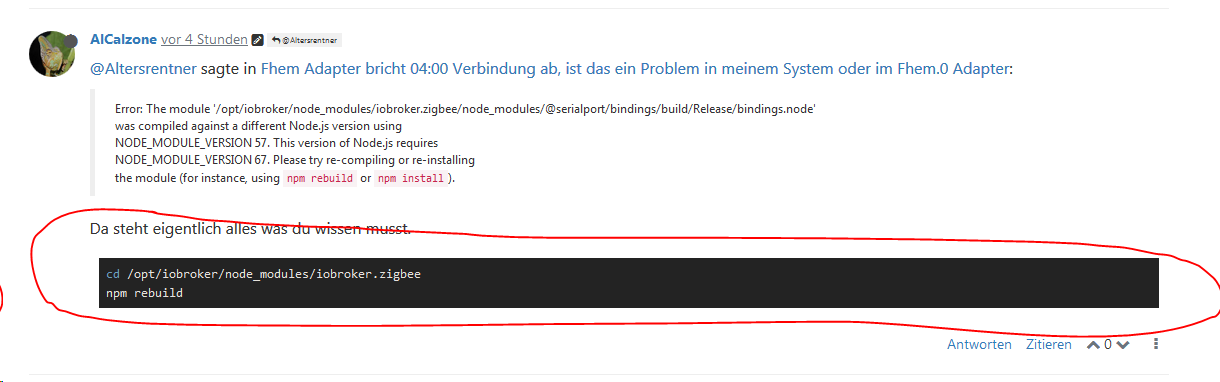
the module (for instance, usingnpm rebuildornpm install).Da steht eigentlich alles was du wissen musst.
cd /opt/iobroker/node_modules/iobroker.zigbee npm rebuild -
@LausiD Guten Morgen, nein ich hatte nicht aktualisiert, aber wurde eben nachgeholt.
pi@ioBroker-RasPi:~ $ npm -v
6.7.0
pi@ioBroker-RasPi:~ $
pi@ioBroker-RasPi:~ $ node -v
v11.12.0
Jetzt gibt es im Log wieder Fehler.
ost.ioBroker-RasPi	2019-03-18 08:36:31.419	info	Restart adapter system.adapter.zigbee.0 because enabled
host.ioBroker-RasPi	2019-03-18 08:36:31.419	error	instance system.adapter.zigbee.0 terminated with code 1 ()
host.ioBroker-RasPi	2019-03-18 08:36:31.419	error	Caught by controller[0]: at Object.Module._extensions..js (internal/modules/cjs/loader.js:810:10)
host.ioBroker-RasPi	2019-03-18 08:36:31.418	error	Caught by controller[0]: at Module._compile (internal/modules/cjs/loader.js:799:30)
host.ioBroker-RasPi	2019-03-18 08:36:31.418	error	Caught by controller[0]: at Object.<anonymous> (/opt/iobroker/node_modules/iobroker.zigbee/node_modules/@serialport/bindings/lib/linux.js:1:36)
host.ioBroker-RasPi	2019-03-18 08:36:31.418	error	Caught by controller[0]: at bindings (/opt/iobroker/node_modules/iobroker.zigbee/node_modules/bindings/bindings.js:81:44)
host.ioBroker-RasPi	2019-03-18 08:36:31.418	error	Caught by controller[0]: at require (internal/modules/cjs/helpers.js:14:16)
host.ioBroker-RasPi	2019-03-18 08:36:31.418	error	Caught by controller[0]: at Module.require (internal/modules/cjs/loader.js:705:19)
host.ioBroker-RasPi	2019-03-18 08:36:31.418	error	Caught by controller[0]: at Function.Module._load (internal/modules/cjs/loader.js:598:3)
host.ioBroker-RasPi	2019-03-18 08:36:31.418	error	Caught by controller[0]: at tryModuleLoad (internal/modules/cjs/loader.js:606:12)
host.ioBroker-RasPi	2019-03-18 08:36:31.418	error	Caught by controller[0]: at Module.load (internal/modules/cjs/loader.js:666:32)
host.ioBroker-RasPi	2019-03-18 08:36:31.417	error	Caught by controller[0]: at Object.Module._extensions..node (internal/modules/cjs/loader.js:840:18)
host.ioBroker-RasPi	2019-03-18 08:36:31.417	error	Caught by controller[0]: the module (for instance, using `npm rebuild` or `npm install`).
host.ioBroker-RasPi	2019-03-18 08:36:31.417	error	Caught by controller[0]: NODE_MODULE_VERSION 67. Please try re-compiling or re-installing
host.ioBroker-RasPi	2019-03-18 08:36:31.417	error	Caught by controller[0]: NODE_MODULE_VERSION 57. This version of Node.js requires
host.ioBroker-RasPi	2019-03-18 08:36:31.417	error	Caught by controller[0]: was compiled against a different Node.js version using
host.ioBroker-RasPi	2019-03-18 08:36:31.417	error	Caught by controller[0]: Error: The module '/opt/iobroker/node_modules/iobroker.zigbee/node_modules/@serialport/bindings/build/Release/bindings.node'
host.ioBroker-RasPi	2019-03-18 08:36:31.416	error	Caught by controller[0]: ^
host.ioBroker-RasPi	2019-03-18 08:36:31.416	error	Caught by controller[0]: throw e
host.ioBroker-RasPi	2019-03-18 08:36:31.416	error	Caught by controller[0]: /opt/iobroker/node_modules/iobroker.zigbee/node_modules/bindings/bindings.js:88
host.ioBroker-RasPi	2019-03-18 08:36:30.555	info	instance system.adapter.zigbee.0 started with pid 16049
fhem.0	2019-03-18 08:36:20.423	info	event ioBroker "fhem.0.VentilWandhzg_HK1.state_switch off" > set VentilWandhzg_HK1 off
fhem.0	2019-03-18 08:36:04.574	warn	Reconnection to DB.
fhem.0	2019-03-18 08:36:04.574	warn	Reconnection to DB.
host.ioBroker-RasPi	2019-03-18 08:36:00.559	info	Restart adapter system.adapter.zigbee.0 because enabled
host.ioBroker-RasPi	2019-03-18 08:36:00.559	error	instance system.adapter.zigbee.0 terminated with code 1 ()
host.ioBroker-RasPi	2019-03-18 08:36:00.559	error	Caught by controller[0]: at Object.Module._extensions..js (internal/modules/cjs/loader.js:810:10)
host.ioBroker-RasPi	2019-03-18 08:36:00.559	error	Caught by controller[0]: at Module._compile (internal/modules/cjs/loader.js:799:30)
host.ioBroker-RasPi	2019-03-18 08:36:00.558	error	Caught by controller[0]: at Object.<anonymous> (/opt/iobroker/node_modules/iobroker.zigbee/node_modules/@serialport/bindings/lib/linux.js:1:36)
host.ioBroker-RasPi	2019-03-18 08:36:00.558	error	Caught by controller[0]: at bindings (/opt/iobroker/node_modul
Gruß Michael
@Altersrentner sagte in Fhem Adapter bricht 04:00 Verbindung ab, ist das ein Problem in meinem System oder im Fhem.0 Adapter:
pi@ioBroker-RasPi:~ $ node -v
v11.12.0Kommando zurück, erst auf eine unterstützte Node-Version (8.x oder 10.x) downgraden! Ungerade Versionen sind Entwicklerversionen und sollten nicht genutzt werden!
-
@Altersrentner sagte in Fhem Adapter bricht 04:00 Verbindung ab, ist das ein Problem in meinem System oder im Fhem.0 Adapter:
pi@ioBroker-RasPi:~ $ node -v
v11.12.0Kommando zurück, erst auf eine unterstützte Node-Version (8.x oder 10.x) downgraden! Ungerade Versionen sind Entwicklerversionen und sollten nicht genutzt werden!
@AlCalzone Danke für die Nachricht.
Habe jetzt n 8.15.1 installiert.
"Da steht eigentlich alles was du wissen musst."
Bitte entschuldige; wenn ich es wüsste würde ich nicht fragen.
Jetzt wieder diese Fehler und es geht um Zigbee. der Adapter ist aber aktualisiert v 0.10.2.host.ioBroker-RasPi 2019-03-18 10:46:16.725 info Restart adapter system.adapter.zigbee.0 because enabled host.ioBroker-RasPi 2019-03-18 10:46:16.725 error instance system.adapter.zigbee.0 terminated with code 1 () host.ioBroker-RasPi 2019-03-18 10:46:16.724 error Caught by controller[0]: at Object.Module._extensions..js (module.js:664:10) host.ioBroker-RasPi 2019-03-18 10:46:16.723 error Caught by controller[0]: at Module._compile (module.js:653:30) host.ioBroker-RasPi 2019-03-18 10:46:16.723 error Caught by controller[0]: at Object.<anonymous> (/opt/iobroker/node_modules/iobroker.zigbee/node_modules/serialport/lib/bindings/linux.js:2:36) host.ioBroker-RasPi 2019-03-18 10:46:16.722 error Caught by controller[0]: at bindings (/opt/iobroker/node_modules/iobroker.zigbee/node_modules/bindings/bindings.js:81:44) host.ioBroker-RasPi 2019-03-18 10:46:16.721 error Caught by controller[0]: at require (internal/module.js:11:18) host.ioBroker-RasPi 2019-03-18 10:46:16.721 error Caught by controller[0]: at Module.require (module.js:597:17) host.ioBroker-RasPi 2019-03-18 10:46:16.720 error Caught by controller[0]: at Function.Module._load (module.js:498:3) host.ioBroker-RasPi 2019-03-18 10:46:16.720 error Caught by controller[0]: at tryModuleLoad (module.js:506:12) host.ioBroker-RasPi 2019-03-18 10:46:16.719 error Caught by controller[0]: at Module.load (module.js:566:32) host.ioBroker-RasPi 2019-03-18 10:46:16.718 error Caught by controller[0]: at Object.Module._extensions..node (module.js:682:18) host.ioBroker-RasPi 2019-03-18 10:46:16.718 error Caught by controller[0]: the module (for instance, using `npm rebuild` or `npm install`). host.ioBroker-RasPi 2019-03-18 10:46:16.717 error Caught by controller[0]: NODE_MODULE_VERSION 57. Please try re-compiling or re-installing host.ioBroker-RasPi 2019-03-18 10:46:16.716 error Caught by controller[0]: NODE_MODULE_VERSION 67. This version of Node.js requires host.ioBroker-RasPi 2019-03-18 10:46:16.716 error Caught by controller[0]: was compiled against a different Node.js version using host.ioBroker-RasPi 2019-03-18 10:46:16.715 error Caught by controller[0]: Error: The module '/opt/iobroker/node_modules/iobroker.zigbee/node_modules/serialport/build/Release/serialport.node' host.ioBroker-RasPi 2019-03-18 10:46:16.714 error Caught by controller[0]: ^ host.ioBroker-RasPi 2019-03-18 10:46:16.714 error Caught by controller[0]: throw e host.ioBroker-RasPi 2019-03-18 10:46:16.713 error Caught by controller[0]: /opt/iobroker/node_modules/iobroker.zigbee/node_modules/bindings/bindings.js:88 host.ioBroker-RasPi 2019-03-18 10:46:15.708 info instance system.adapter.zigbee.0 started with pid 25054 host.ioBroker-RasPi 2019-03-18 10:45:45.687 info Restart adapter system.adapter.zigbee.0 because enabledGruß Michael
-
Übrigens der Zigbee Adapter läuft nicht. Aller Startversuche scheitern,
-
Da steht ja auch immer noch der gleiche Fehler. Hast du die Befehle mal ausgeführt? Wenn ja, was war die Ausgabe davon?
Kann auch sein, dass dunpm rebuildim Ordner/opt/iobroker/node_modules/iobroker.zigbee/node_modules/serialportausführen musst. -
@AlCalzone said in Fhem Adapter bricht 04:00 Verbindung ab, ist das ein Problem in meinem System oder im Fhem.0 Adapter:
Hast du die Befehle mal ausgeführt
Welche Befehle?
-
@AlCalzone said in Fhem Adapter bricht 04:00 Verbindung ab, ist das ein Problem in meinem System oder im Fhem.0 Adapter:
Hast du die Befehle mal ausgeführt
Welche Befehle?
-
@Altersrentner Na die aus meinem Post, auf den du dich vorhin bezogen hast:
@AlCalzone habe npm rebuiild ausgeführt.
Nun sieht es im Log schon besser aus.
Leider läuft der Zigbee Adapter nur mit gelb.
Laut Log muss der serielle Port eingestellt werden.zigbee.0 2019-03-18 12:41:51.036 error Serial port not selected! Go to settings page. zigbee.0 2019-03-18 12:41:51.029 info starting. Version 0.10.2 in /opt/iobroker/node_modules/iobroker.zigbee, node: v8.15.1 zigbee.0 2019-03-18 12:41:49.914 info States connected to redis: 127.0.0.1:6379 host.ioBroker-RasPi 2019-03-18 12:41:48.235 info instance system.adapter.zigbee.0 started with pid 311 host.ioBroker-RasPi 2019-03-18 12:41:48.209 info object change system.adapter.zigbee.0 host.ioBroker-RasPi 2019-03-18 12:41:46.747 info instance system.adapter.zigbee.0 terminated with code 0 (OK) host.ioBroker-RasPi 2019-03-18 12:41:46.640 info stopInstance system.adapter.zigbee.0 killing pid 32677 host.ioBroker-RasPi 2019-03-18 12:41:46.640 info stopInstance system.adapter.zigbee.0 host.ioBroker-RasPi 2019-03-18 12:41:46.639 info object change system.adapter.zigbee.0 zigbee.0 2019-03-18 12:40:44.196 error Serial port not selected! Go to settings page.Kann das an der node v 8.15.1 liegen?
-
@AlCalzone habe npm rebuiild ausgeführt.
Nun sieht es im Log schon besser aus.
Leider läuft der Zigbee Adapter nur mit gelb.
Laut Log muss der serielle Port eingestellt werden.zigbee.0 2019-03-18 12:41:51.036 error Serial port not selected! Go to settings page. zigbee.0 2019-03-18 12:41:51.029 info starting. Version 0.10.2 in /opt/iobroker/node_modules/iobroker.zigbee, node: v8.15.1 zigbee.0 2019-03-18 12:41:49.914 info States connected to redis: 127.0.0.1:6379 host.ioBroker-RasPi 2019-03-18 12:41:48.235 info instance system.adapter.zigbee.0 started with pid 311 host.ioBroker-RasPi 2019-03-18 12:41:48.209 info object change system.adapter.zigbee.0 host.ioBroker-RasPi 2019-03-18 12:41:46.747 info instance system.adapter.zigbee.0 terminated with code 0 (OK) host.ioBroker-RasPi 2019-03-18 12:41:46.640 info stopInstance system.adapter.zigbee.0 killing pid 32677 host.ioBroker-RasPi 2019-03-18 12:41:46.640 info stopInstance system.adapter.zigbee.0 host.ioBroker-RasPi 2019-03-18 12:41:46.639 info object change system.adapter.zigbee.0 zigbee.0 2019-03-18 12:40:44.196 error Serial port not selected! Go to settings page.Kann das an der node v 8.15.1 liegen?
@Altersrentner sagte in Fhem Adapter bricht 04:00 Verbindung ab, ist das ein Problem in meinem System oder im Fhem.0 Adapter:
Laut Log muss der serielle Port eingestellt werden.
Na, dann mach das doch ;)
-
@Altersrentner sagte in Fhem Adapter bricht 04:00 Verbindung ab, ist das ein Problem in meinem System oder im Fhem.0 Adapter:
Laut Log muss der serielle Port eingestellt werden.
Na, dann mach das doch ;)
@AlCalzone ist gemacht,

/dev/serial/by-id/usb-Texas_Instruments_TI_CC2531_USB_CDC___0X00124B0012013B01-if00mal sehen was um 04:00 passiert
Danke
Gruß Michael -
@Altersrentner sagte in Fhem Adapter bricht 04:00 Verbindung ab, ist das ein Problem in meinem System oder im Fhem.0 Adapter:
Laut Log muss der serielle Port eingestellt werden.
Na, dann mach das doch ;)
@AlCalzone Hallo,
Die Situation nach Aktualisierung ist hinsichtlich Stopp um 04:00 ist unverändert.9-03-19 03:55:21.199 - warn: fhem.0 Reconnection to DB. 2019-03-19 03:56:36.377 - info: fhem.0 event ioBroker "fhem.0.GewaechshausLED_Ventilation.state_switch on" > set GewaechshausLED_Ventilation on 2019-03-19 03:56:37.375 - info: fhem.0 event ioBroker "fhem.0.Ventilation.state_switch on" > set Ventilation on 2019-03-19 03:58:52.860 - info: fhem.0 event ioBroker "fhem.0.VentilWandhzg_HK2.state_switch off" > set VentilWandhzg_HK2 off 2019-03-19 03:59:24.444 - info: fhem.0 event ioBroker "fhem.0.GewaechshausLED_Ventilation.state_switch on" > set GewaechshausLED_Ventilation on 2019-03-19 03:59:25.443 - info: fhem.0 event ioBroker "fhem.0.Ventilation.state_switch on" > set Ventilation on 2019-03-19 04:00:00.030 - info: host.ioBroker-RasPi instance system.adapter.dwd.0 started with pid 8325 2019-03-19 04:00:01.841 - info: dwd.0 States connected to redis: 127.0.0.1:6379 2019-03-19 04:00:02.006 - info: dwd.0 starting. Version 2.4.3 in /opt/iobroker/node_modules/iobroker.dwd, node: v8.15.1 2019-03-19 04:00:02.913 - info: host.ioBroker-RasPi received SIGTERM 2019-03-19 04:00:02.932 - info: web.0 terminating http server on port 8082 2019-03-19 04:00:02.932 - info: web.0 terminated http server on port 8082 2019-03-19 04:00:02.937 - info: admin.0 terminating http server on port 8081 2019-03-19 04:00:02.946 - info: web.0 terminating http server on port 8082 2019-03-19 04:00:02.972 - info: terminal.0 terminating http server on port 8088 2019-03-19 04:00:02.976 - info: terminal.0 terminated http server on port 8088 2019-03-19 04:00:02.985 - info: terminal.0 terminating http server on port 8088 2019-03-19 04:00:02.984 - info: admin.0 terminating http server on port 8081 2019-03-19 04:00:02.918 - info: host.ioBroker-RasPi stopInstance system.adapter.admin.0 2019-03-19 04:00:02.919 - info: host.ioBroker-RasPi stopInstance system.adapter.admin.0 killing pid 993 2019-03-19 04:00:02.919 - info: host.ioBroker-RasPi stopInstance system.adapter.discovery.0 2019-03-19 04:00:02.920 - info: host.ioBroker-RasPi stopInstance system.adapter.discovery.0 killing pid 1004 2019-03-19 04:00:02.923 - info: host.ioBroker-RasPi stopInstance system.adapter.web.0 2019-03-19 04:00:02.924 - info: host.ioBroker-RasPi stopInstance system.adapter.web.0 killing pid 1014 2019-03-19 04:00:02.924 - info: host.ioBroker-RasPi stopInstance system.adapter.rpi2.0 2019-03-19 04:00:02.925 - info: host.ioBroker-RasPi stopInstance system.adapter.rpi2.0 killing pid 1024 2019-03-19 04:00:02.925 - info: host.ioBroker-RasPi stopInstance system.adapter.socketio.0 2019-03-19 04:00:02.927 - info: host.ioBroker-RasPi stopInstance system.adapter.socketio.0 killing pid 1034 2019-03-19 04:00:02.929 - info: host.ioBroker-RasPi stopInstance system.adapter.vis.0 2019-03-19 04:00:02.931 - info: host.ioBroker-RasPi stopInstance system.adapter.history.0 2019-03-19 04:00:02.934 - info: host.ioBroker-RasPi stopInstance system.adapter.javascript.0 2019-03-19 04:00:02.935 - info: host.ioBroker-RasPi stopInstance system.adapter.javascript.0 killing pid 1295 2019-03-19 04:00:02.939 - info: host.ioBroker-RasPi stopInstance system.adapter.cul.0 2019-03-19 04:00:02.940 - info: host.ioBroker-RasPi stopInstance system.adapter.cul.0 killing pid 1122 2019-03-19 04:00:02.941 - info: host.ioBroker-RasPi stopInstance system.adapter.fhem.0 2019-03-19 04:00:02.944 - info: host.ioBroker-RasPi stopInstance system.adapter.fhem.0 killing pid 2575 2019-03-19 04:00:02.956 - info: host.ioBroker-RasPi stopInstance system.adapter.javascript.1 2019-03-19 04:00:02.957 - info: host.ioBroker-RasPi stopInstance system.adapter.javascript.1 killing pid 1146 2019-03-19 04:00:02.958 - info: host.ioBroker-RasPi stopInstance system.adapter.mihome-vacuum.0 2019-03-19 04:00:02.958 - info: host.ioBroker-RasPi stopInstance system.adapter.mihome-vacuum.0 killing pid 1157 2019-03-19 04:00:02.961 - info: host.ioBroker-RasPi stopInstance system.adapter.mihome.0 2019-03-19 04:00:02.962 - info: host.ioBroker-RasPi stopInstance system.adapter.mihome.0 killing pid 1167 2019-03-19 04:00:02.962 - info: host.ioBroker-RasPi stopInstance system.adapter.scenes.0 2019-03-19 04:00:02.962 - info: host.ioBroker-RasPi stopInstance system.adapter.scenes.0 killing pid 1180 2019-03-19 04:00:02.966 - info: host.ioBroker-RasPi stopInstance system.adapter.terminal.0 2019-03-19 04:00:02.967 - info: host.ioBroker-RasPi stopInstance system.adapter.terminal.0 killing pid 1181 2019-03-19 04:00:02.967 - info: host.ioBroker-RasPi stopInstance system.adapter.harmony.0 2019-03-19 04:00:02.967 - warn: host.ioBroker-RasPi stopInstance system.adapter.harmony.0 not running 2019-03-19 04:00:02.968 - info: host.ioBroker-RasPi stopInstance system.adapter.vis-hqwidgets.0 2019-03-19 04:00:02.968 - info: host.ioBroker-RasPi stopInstance system.adapter.alexa2.0 2019-03-19 04:00:02.968 - warn: host.ioBroker-RasPi stopInstance system.adapter.alexa2.0 not running 2019-03-19 04:00:02.968 - info: host.ioBroker-RasPi stopInstance system.adapter.tr-064.0 2019-03-19 04:00:02.969 - info: host.ioBroker-RasPi stopInstance system.adapter.tr-064.0 killing pid 1182 2019-03-19 04:00:02.969 - info: host.ioBroker-RasPi stopInstance system.adapter.cloud.0 2019-03-19 04:00:02.970 - warn: host.ioBroker-RasPi stopInstance system.adapter.cloud.0 not running 2019-03-19 04:00:02.970 - info: host.ioBroker-RasPi stopInstance system.adapter.vis-timeandweather.0 2019-03-19 04:00:02.970 - info: host.ioBroker-RasPi stopInstance system.adapter.vis-weather.0 2019-03-19 04:00:02.975 - info: host.ioBroker-RasPi stopInstance system.adapter.vis-metro.0 2019-03-19 04:00:02.975 - info: host.ioBroker-RasPi stopInstance system.adapter.dwd.0 2019-03-19 04:00:02.978 - info: host.ioBroker-RasPi stopInstance canceled schedule system.adapter.dwd.0 2019-03-19 04:00:02.979 - info: host.ioBroker-RasPi stopInstance system.adapter.vis-fancyswitch.0 2019-03-19 04:00:02.979 - info: host.ioBroker-RasPi stopInstance system.adapter.vis-plumb.0 2019-03-19 04:00:02.980 - info: host.ioBroker-RasPi stopInstance system.adapter.samsung.0 2019-03-19 04:00:02.981 - warn: host.ioBroker-RasPi stopInstance system.adapter.samsung.0 not running 2019-03-19 04:00:02.981 - info: host.ioBroker-RasPi stopInstance system.adapter.daswetter.0 2019-03-19 04:00:02.988 - warn: host.ioBroker-RasPi stopInstance system.adapter.daswetter.0 not scheduled 2019-03-19 04:00:02.988 - info: host.ioBroker-RasPi stopInstance system.adapter.yr.0 2019-03-19 04:00:02.989 - info: host.ioBroker-RasPi stopInstance canceled schedule system.adapter.yr.0 2019-03-19 04:00:02.989 - info: host.ioBroker-RasPi stopInstance system.adapter.feiertage.0 2019-03-19 04:00:02.990 - info: host.ioBroker-RasPi stopInstance canceled schedule system.adapter.feiertage.0 2019-03-19 04:00:02.990 - info: host.ioBroker-RasPi stopInstance system.adapter.ical.0 2019-03-19 04:00:02.990 - warn: host.ioBroker-RasPi stopInstance system.adapter.ical.0 not scheduled 2019-03-19 04:00:02.991 - info: host.ioBroker-RasPi stopInstance system.adapter.shelly.0 2019-03-19 04:00:02.991 - info: host.ioBroker-RasPi stopInstance system.adapter.shelly.0 killing pid 1285 2019-03-19 04:00:02.991 - info: host.ioBroker-RasPi stopInstance system.adapter.backitup.0 2019-03-19 04:00:02.992 - info: host.ioBroker-RasPi stopInstance system.adapter.backitup.0 killing pid 1301 2019-03-19 04:00:02.996 - info: host.ioBroker-RasPi stopInstance system.adapter.zigbee.0 2019-03-19 04:00:02.997 - info: host.ioBroker-RasPi stopInstance system.adapter.zigbee.0 killing pid 1315 2019-03-19 04:00:03.057 - info: host.ioBroker-RasPi instance system.adapter.fhem.0 terminated with code 0 (OK) 2019-03-19 04:00:03.123 - info: host.ioBroker-RasPi instance system.adapter.rpi2.0 terminated with code 0 (OK) 2019-03-19 04:00:03.144 - info: socketio.0 terminating http server on port 8084 2019-03-19 04:00:03.168 - info: host.ioBroker-RasPi instance system.adapter.shelly.0 terminated with code 0 (OK) 2019-03-19 04:00:03.201 - info: host.ioBroker-RasPi instance system.adapter.javascript.0 terminated with code 0 (OK) 2019-03-19 04:00:03.225 - info: socketio.0 terminating http server on port 8084 2019-03-19 04:00:03.254 - info: host.ioBroker-RasPi instance system.adapter.admin.0 terminated with code 0 (OK) 2019-03-19 04:00:03.282 - info: host.ioBroker-RasPi instance system.adapter.discovery.0 terminated with code 0 (OK) 2019-03-19 04:00:03.305 - info: host.ioBroker-RasPi instance system.adapter.mihome.0 terminated with code 0 (OK) 2019-03-19 04:00:03.330 - info: host.ioBroker-RasPi instance system.adapter.terminal.0 terminated with code 0 (OK) 2019-03-19 04:00:03.354 - info: host.ioBroker-RasPi instance system.adapter.zigbee.0 terminated with code 0 (OK) 2019-03-19 04:00:03.377 - info: host.ioBroker-RasPi instance system.adapter.web.0 terminated with code 0 (OK) 2019-03-19 04:00:03.401 - info: host.ioBroker-RasPi instance system.adapter.socketio.0 terminated with code 0 (OK) 2019-03-19 04:00:03.424 - info: host.ioBroker-RasPi instance system.adapter.cul.0 terminated with code 0 (OK) 2019-03-19 04:00:03.448 - info: host.ioBroker-RasPi instance system.adapter.javascript.1 terminated with code 0 (OK) 2019-03-19 04:00:03.474 - info: host.ioBroker-RasPi instance system.adapter.mihome-vacuum.0 terminated with code 0 (OK) 2019-03-19 04:00:03.505 - info: host.ioBroker-RasPi instance system.adapter.tr-064.0 terminated with code 0 (OK) 2019-03-19 04:00:03.533 - info: host.ioBroker-RasPi instance system.adapter.scenes.0 terminated with code 0 (OK) 2019-03-19 04:00:03.558 - info: host.ioBroker-RasPi instance system.adapter.backitup.0 terminated with code 0 (OK) 2019-03-19 04:00:03.877 - info: host.ioBroker-RasPi instance system.adapter.history.0 terminated with code 0 (OK) 2019-03-19 04:00:05.307 - info: host.ioBroker-RasPi instance system.adapter.dwd.0 terminated with code 0 (OK) 2019-03-19 04:00:08.926 - info: host.ioBroker-RasPi received SIGTERM 2019-03-19 04:00:08.927 - info: host.ioBroker-RasPi stopInstance system.adapter.admin.0 2019-03-19 04:00:08.927 - warn: host.ioBroker-RasPi stopInstance system.adapter.admin.0 not running 2019-03-19 04:00:08.928 - info: host.ioBroker-RasPi stopInstance system.adapter.discovery.0 2019-03-19 04:00:08.928 - warn: host.ioBroker-RasPi stopInstance system.adapter.discovery.0 not running 2019-03-19 04:00:08.928 - info: host.ioBroker-RasPi stopInstance system.adapter.web.0 2019-03-19 04:00:08.929 - warn: host.ioBroker-RasPi stopInstance system.adapter.web.0 not running 2019-03-19 04:00:08.929 - info: host.ioBroker-RasPi stopInstance system.adapter.rpi2.0 2019-03-19 04:00:08.929 - warn: host.ioBroker-RasPi stopInstance system.adapter.rpi2.0 not running 2019-03-19 04:00:08.930 - info: host.ioBroker-RasPi stopInstance system.adapter.socketio.0 2019-03-19 04:00:08.930 - warn: host.ioBroker-RasPi stopInstance system.adapter.socketio.0 not running 2019-03-19 04:00:08.930 - info: host.ioBroker-RasPi stopInstance system.adapter.vis.0 2019-03-19 04:00:08.930 - info: host.ioBroker-RasPi stopInstance system.adapter.history.0 2019-03-19 04:00:08.931 - warn: host.ioBroker-RasPi stopInstance system.adapter.history.0 not running 2019-03-19 04:00:08.931 - info: host.ioBroker-RasPi stopInstance system.adapter.javascript.0 2019-03-19 04:00:08.932 - warn: host.ioBroker-RasPi stopInstance system.adapter.javascript.0 not running 2019-03-19 04:00:08.932 - info: host.ioBroker-RasPi stopInstance system.adapter.cul.0 2019-03-19 04:00:08.932 - warn: host.ioBroker-RasPi stopInstance system.adapter.cul.0 not running 2019-03-19 04:00:08.933 - info: host.ioBroker-RasPi stopInstance system.adapter.fhem.0 2019-03-19 04:00:08.933 - warn: host.ioBroker-RasPi stopInstance system.adapter.fhem.0 not running 2019-03-19 04:00:08.933 - info: host.ioBroker-RasPi stopInstance system.adapter.javascript.1 2019-03-19 04:00:08.934 - warn: host.ioBroker-RasPi stopInstance system.adapter.javascript.1 not running 2019-03-19 04:00:08.934 - info: host.ioBroker-RasPi stopInstance system.adapter.mihome-vacuum.0 2019-03-19 04:00:08.934 - warn: host.ioBroker-RasPi stopInstance system.adapter.mihome-vacuum.0 not running 2019-03-19 04:00:08.934 - info: host.ioBroker-RasPi stopInstance system.adapter.mihome.0 2019-03-19 04:00:08.935 - warn: host.ioBroker-RasPi stopInstance system.adapter.mihome.0 not running 2019-03-19 04:00:08.935 - info: host.ioBroker-RasPi stopInstance system.adapter.scenes.0 2019-03-19 04:00:08.935 - warn: host.ioBroker-RasPi stopInstance system.adapter.scenes.0 not running 2019-03-19 04:00:08.936 - info: host.ioBroker-RasPi stopInstance system.adapter.terminal.0 2019-03-19 04:00:08.936 - warn: host.ioBroker-RasPi stopInstance system.adapter.terminal.0 not running 2019-03-19 04:00:08.936 - info: host.ioBroker-RasPi stopInstance system.adapter.harmony.0 2019-03-19 04:00:08.937 - warn: host.ioBroker-RasPi stopInstance system.adapter.harmony.0 not running 2019-03-19 04:00:08.937 - info: host.ioBroker-RasPi stopInstance system.adapter.vis-hqwidgets.0 2019-03-19 04:00:08.937 - info: host.ioBroker-RasPi stopInstance system.adapter.alexa2.0 2019-03-19 04:00:08.938 - warn: host.ioBroker-RasPi stopInstance system.adapter.alexa2.0 not running 2019-03-19 04:00:08.938 - info: host.ioBroker-RasPi stopInstance system.adapter.tr-064.0 2019-03-19 04:00:08.938 - warn: host.ioBroker-RasPi stopInstance system.adapter.tr-064.0 not running 2019-03-19 04:00:08.939 - info: host.ioBroker-RasPi stopInstance system.adapter.cloud.0 2019-03-19 04:00:08.939 - warn: host.ioBroker-RasPi stopInstance system.adapter.cloud.0 not running 2019-03-19 04:00:08.939 - info: host.ioBroker-RasPi stopInstance system.adapter.vis-timeandweather.0 2019-03-19 04:00:08.939 - info: host.ioBroker-RasPi stopInstance system.adapter.vis-weather.0 2019-03-19 04:00:08.940 - info: host.ioBroker-RasPi stopInstance system.adapter.vis-metro.0 2019-03-19 04:00:08.940 - info: host.ioBroker-RasPi stopInstance system.adapter.dwd.0 2019-03-19 04:00:08.940 - warn: host.ioBroker-RasPi stopInstance system.adapter.dwd.0 not scheduled 2019-03-19 04:00:08.941 - info: host.ioBroker-RasPi stopInstance system.adapter.vis-fancyswitch.0 2019-03-19 04:00:08.941 - info: host.ioBroker-RasPi stopInstance system.adapter.vis-plumb.0 2019-03-19 04:00:08.941 - info: host.ioBroker-RasPi stopInstance system.adapter.samsung.0 2019-03-19 04:00:08.942 - warn: host.ioBroker-RasPi stopInstance system.adapter.samsung.0 not running 2019-03-19 04:00:08.942 - info: host.ioBroker-RasPi stopInstance system.adapter.daswetter.0 2019-03-19 04:00:08.942 - warn: host.ioBroker-RasPi stopInstance system.adapter.daswetter.0 not scheduled 2019-03-19 04:00:08.943 - info: host.ioBroker-RasPi stopInstance system.adapter.yr.0 2019-03-19 04:00:08.943 - warn: host.ioBroker-RasPi stopInstance system.adapter.yr.0 not scheduled 2019-03-19 04:00:08.943 - info: host.ioBroker-RasPi stopInstance system.adapter.feiertage.0 2019-03-19 04:00:08.944 - warn: host.ioBroker-RasPi stopInstance system.adapter.feiertage.0 not scheduled 2019-03-19 04:00:08.944 - info: host.ioBroker-RasPi stopInstance system.adapter.ical.0 2019-03-19 04:00:08.944 - warn: host.ioBroker-RasPi stopInstance system.adapter.ical.0 not scheduled 2019-03-19 04:00:08.945 - info: host.ioBroker-RasPi stopInstance system.adapter.shelly.0 2019-03-19 04:00:08.945 - warn: host.ioBroker-RasPi stopInstance system.adapter.shelly.0 not running 2019-03-19 04:00:08.945 - info: host.ioBroker-RasPi stopInstance system.adapter.backitup.0 2019-03-19 04:00:08.945 - warn: host.ioBroker-RasPi stopInstance system.adapter.backitup.0 not running 2019-03-19 04:00:08.946 - info: host.ioBroker-RasPi stopInstance system.adapter.zigbee.0 2019-03-19 04:00:08.946 - warn: host.ioBroker-RasPi stopInstance system.adapter.zigbee.0 not running 2019-03-19 04:00:13.010 - info: host.ioBroker-RasPi force terminating 2019-03-19 04:01:41.109 - info: host.ioBroker-RasPi iobroker.js-controller version 1.4.2 js-controller starting 2019-03-19 04:01:41.116 - info: host.ioBroker-RasPi Copyright (c) 2014-2018 bluefox, 2014 hobbyquaker 2019-03-19 04:01:41.117 - info: host.ioBroker-RasPi hostname: ioBroker-RasPi, node: v8.11.3 2019-03-19 04:01:41.121 - info: host.ioBroker-RasPi ip addresses: 192.168.178.144 2003:dc:9bd7:3300:fbc8:59d4:babf:3078 fe80::50e8:da28:a103:30a2 2019-03-19 04:01:43.275 - info: host.ioBroker-RasPi inMem-objects listening on port 9001 2019-03-19 04:01:43.300 - info: host.ioBroker-RasPi InMemoryDB connected 2019-03-19 04:01:43.426 - info: host.ioBroker-RasPi 36 instances found 2019-03-19 04:01:43.489 - info: host.ioBroker-RasPi starting 28 instances 2019-03-19 04:01:43.587 - info: host.ioBroker-RasPi instance system.adapter.admin.0 started with pid 638 2019-03-19 04:01:43.604 - info: host.ioBroker-RasPi States connected to redis: 127.0.0.1:6379 2019-03-19 04:01:46.449 - info: admin.0 States connected to redis: 127.0.0.1:6379 2019-03-19 04:01:46.645 - error: admin.0 setObject id missing!! 2019-03-19 04:01:46.654 - info: admin.0 starting. Version 3.6.0 in /opt/iobroker/node_modules/iobroker.admin, node: v8.11.3 2019-03-19 04:01:46.676 - info: admin.0 requesting all states 2019-03-19 04:01:46.679 - info: admin.0 requesting all objects 2019-03-19 04:01:46.681 - info: admin.0 Request actual repository... 2019-03-19 04:01:49.370 - info: host.ioBroker-RasPi instance system.adapter.discovery.0 started with pid 648 2019-03-19 04:01:51.928 - info: host.ioBroker-RasPi instance system.adapter.web.0 started with pid 654 2019-03-19 04:01:53.084 - info: discovery.0 States connected to redis: 127.0.0.1:6379 2019-03-19 04:01:53.327 - info: discovery.0 starting. Version 1.2.4 in /opt/iobroker/node_modules/iobroker.discovery, node: v8.11.3 2019-03-19 04:01:54.116 - info: admin.0 received all states 2019-03-19 04:01:54.101 - info: web.0 States connected to redis: 127.0.0.1:6379 2019-03-19 04:01:54.267 - error: web.0 setObject id missing!! 2019-03-19 04:01:54.277 - info: web.0 starting. Version 2.4.1 in /opt/iobroker/node_modules/iobroker.web, node: v8.11.3 2019-03-19 04:01:55.075 - info: web.0 socket.io server listening on port 8082 2019-03-19 04:01:55.083 - info: web.0 http server listening on port 8082 2019-03-19 04:01:55.523 - info: host.ioBroker-RasPi instance system.adapter.rpi2.0 started with pid 668 2019-03-19 04:01:56.557 - info: rpi2.0 States connected to redis: 127.0.0.1:6379 2019-03-19 04:01:56.734 - info: rpi2.0 starting. Version 1.0.0 in /opt/iobroker/node_modules/iobroker.rpi2, node: v8.11.3 2019-03-19 04:01:58.115 - info: admin.0 received all objects 2019-03-19 04:01:58.885 - info: admin.0 http server listening on port 8081 2019-03-19 04:01:58.886 - info: admin.0 Use link "http://localhost:8081" to configure. 2019-03-19 04:01:59.446 - info: host.ioBroker-RasPi Update repository "stable" under "http://download.iobroker.net/sources-dist-latest.json" 2019-03-19 04:02:00.220 - info: host.ioBroker-RasPi instance system.adapter.socketio.0 started with pid 678 2019-03-19 04:02:08.738 - info: admin.0 Repository received successfully.Es muss doch eine Erklärung dafür geben.
Gruß Michael -
Hallo,
Heute Morgen das selbe Spiel. 04:00 wurde alles gestoppt. Die Adapter sind dann neu gestartet aber fehm.0 nicht. Nach Neustart von f.0 lief wieder alles normal. Es muss doch einen Grund dafür geben und ich kann mir fast nicht vorstellen, das mein System ein Einzelfall ist.
Gruß Michael -
Hallo Michael,
du hast 36 Instanzen am Start, davon werden 28 beim Neustart gestartet.
Ob das nicht alles etwas viel für den Pi ist?
Um 04:00 Uhr löst der Start von Instanz dwd.0 das ganze aus......
Zeige doch mal hier von der Konsole den Befehl "top" wenn alles läuft.
Hast du FHEM Adapter auf Version 1.1.1 ?
Würde mal dwd.0 und alle nicht unbedingt benötigten Instanzen beenden und nochmal eine Nacht abwarten...
Gruß
LausiD -
Hallo Michael,
du hast 36 Instanzen am Start, davon werden 28 beim Neustart gestartet.
Ob das nicht alles etwas viel für den Pi ist?
Um 04:00 Uhr löst der Start von Instanz dwd.0 das ganze aus......
Zeige doch mal hier von der Konsole den Befehl "top" wenn alles läuft.
Hast du FHEM Adapter auf Version 1.1.1 ?
Würde mal dwd.0 und alle nicht unbedingt benötigten Instanzen beenden und nochmal eine Nacht abwarten...
Gruß
LausiD@LausiD
Natürlich ist das zu viel. :-D
Da brauch man nicht groß nachdenken, da reicht ein simpler Taschenrechner.
Kein einziger Adapter dürfte dann mehr als im Schnitt 27MB RAM verbrauchen. Und da ist der Eigenbedarf des Betriebssystem nicht mal drin ! Und selbst wenn der ordentlich anfangen würde zu swappen (was bei einem PI KEINE gute Idee ist), könnten die Probleme alle daher kommen.Bei 36 Adaptern, würde ich tatsächlich mal ein geeigneteres Gerät ausprobieren und wenn es zum testen nur eine virtuelle Linux Maschine mit 4GB Ram ist.
Wegen ähnlicher Probleme habe ich in den Multihost Modus gewechselt. Auf dem PI läuft jetzt nur noch das, was unbedingt dort laufen muss (Zigbee und BLE) den Rest habe auf eine virtuelle Maschine in den Keller verbannt.
Seitdem kein Problem mehr.Bevor ich jetzt noch stundenlang auf Fehlersuche gehe, würde ich einfach die 2 Stunden in Kauf nehmen und alles mal eben flott auf einer geeigneten Maschine neu aufsetzen :-/
-
Hallo Michael,
du hast 36 Instanzen am Start, davon werden 28 beim Neustart gestartet.
Ob das nicht alles etwas viel für den Pi ist?
Um 04:00 Uhr löst der Start von Instanz dwd.0 das ganze aus......
Zeige doch mal hier von der Konsole den Befehl "top" wenn alles läuft.
Hast du FHEM Adapter auf Version 1.1.1 ?
Würde mal dwd.0 und alle nicht unbedingt benötigten Instanzen beenden und nochmal eine Nacht abwarten...
Gruß
LausiD@LausiD said in Fhem Adapter bricht 04:00 Verbindung ab, ist das ein Problem in meinem System oder im Fhem.0 Adapter:
Zeige doch mal hier von der Konsole den Befehl "top" wenn alles läuft.
Hast du FHEM Adapter auf Version 1.1.1 ?
Würde mal dwd.0 und alle nicht unbedingt benötigten Instanzen beenden und nochmal eine Nacht abwarten...Hallo,
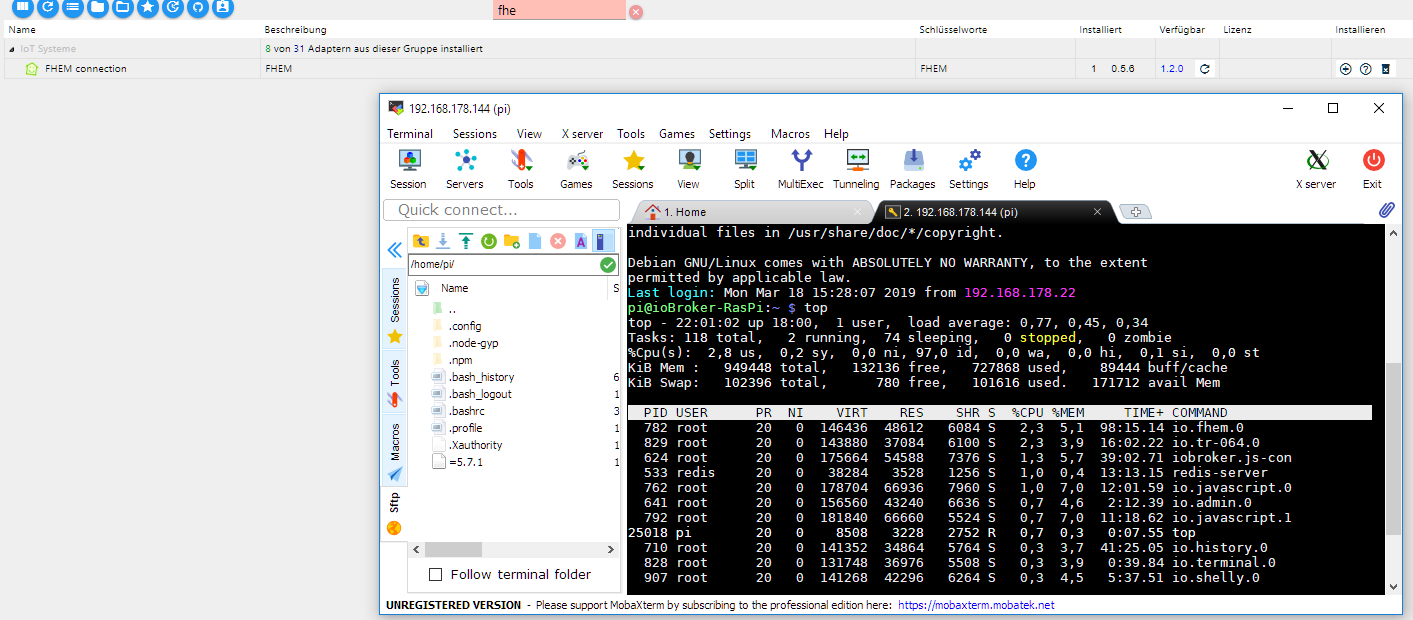
Danke für Deine Bemühungen. Wie zu sehen habe ich fhem.0 in Version 0.5.6. Mit höheren Versionen gab es immer wieder Probleme.
Hier der gewünschte Ausschnitt.
Gruß Michael -
@LausiD
Natürlich ist das zu viel. :-D
Da brauch man nicht groß nachdenken, da reicht ein simpler Taschenrechner.
Kein einziger Adapter dürfte dann mehr als im Schnitt 27MB RAM verbrauchen. Und da ist der Eigenbedarf des Betriebssystem nicht mal drin ! Und selbst wenn der ordentlich anfangen würde zu swappen (was bei einem PI KEINE gute Idee ist), könnten die Probleme alle daher kommen.Bei 36 Adaptern, würde ich tatsächlich mal ein geeigneteres Gerät ausprobieren und wenn es zum testen nur eine virtuelle Linux Maschine mit 4GB Ram ist.
Wegen ähnlicher Probleme habe ich in den Multihost Modus gewechselt. Auf dem PI läuft jetzt nur noch das, was unbedingt dort laufen muss (Zigbee und BLE) den Rest habe auf eine virtuelle Maschine in den Keller verbannt.
Seitdem kein Problem mehr.Bevor ich jetzt noch stundenlang auf Fehlersuche gehe, würde ich einfach die 2 Stunden in Kauf nehmen und alles mal eben flott auf einer geeigneten Maschine neu aufsetzen :-/
@ramses said in Fhem Adapter bricht 04:00 Verbindung ab, ist das ein Problem in meinem System oder im Fhem.0 Adapter:
Bevor ich jetzt noch stundenlang auf Fehlersuche gehe, würde ich einfach die 2 Stunden in Kauf nehmen und alles mal eben flott auf einer geeigneten Maschine neu aufsetzen
Ich habe einen WIN 10 PC 24 Stunden am Netz. Darauf läuft die FHZ Haussteuerung.und da ist genug Platz. Könnte ich mein jetziges System unter Windows einbinden?
Gruß Michael -
@ramses said in Fhem Adapter bricht 04:00 Verbindung ab, ist das ein Problem in meinem System oder im Fhem.0 Adapter:
Bevor ich jetzt noch stundenlang auf Fehlersuche gehe, würde ich einfach die 2 Stunden in Kauf nehmen und alles mal eben flott auf einer geeigneten Maschine neu aufsetzen
Ich habe einen WIN 10 PC 24 Stunden am Netz. Darauf läuft die FHZ Haussteuerung.und da ist genug Platz. Könnte ich mein jetziges System unter Windows einbinden?
Gruß Michael@Altersrentner
Ob eine Migrations von Linux auf ein Windows System einfach so machbar ist, da fehlen mir leider die Erfahrungswerte und da habe ich auch noch nicht viel drüber gelesen.
Theoretisch, da es Node und Javascript basierend ist, sollte da nichts gegen sprechen. In der Praxis könnte es natürlich anders aussehen.
Das erste was zu tun ist, ist natürlich ein Backup auf dem Raspberry zu erstellen auf den üblichen wegen. Dieses kannst du dann natürlich versuchen unter Windows einzuspielen.Ansonsten (ich weiss leider nicht wieviel RAM dein Windows 10 PC hat), könntest du dir ja unter Windows 10 auch eine isolierte Umgebung in einer virtuellen Maschine machen (z.B. mit Virtualbox) und dort ein Linux installieren.
Ist manchmal sogar die bessere Wahl, da einige Adapter schlichtweg nicht unter Windows gescheit laufen (zb Amazon-Dash).


Hey! Du scheinst an dieser Unterhaltung interessiert zu sein, hast aber noch kein Konto.
Hast du es satt, bei jedem Besuch durch die gleichen Beiträge zu scrollen? Wenn du dich für ein Konto anmeldest, kommst du immer genau dorthin zurück, wo du zuvor warst, und kannst dich über neue Antworten benachrichtigen lassen (entweder per E-Mail oder Push-Benachrichtigung). Du kannst auch Lesezeichen speichern und Beiträge positiv bewerten, um anderen Community-Mitgliedern deine Wertschätzung zu zeigen.
Mit deinem Input könnte dieser Beitrag noch besser werden 💗
Registrieren AnmeldenSupport us
142
Online33.0k
Benutzende83.7k
Themen1.3m
Beiträge