




Probleme nach js-controller 1.5.6->1.4.2 Downgrade
-
Wenn Du magst, kannst Du genau die Befehle ausführen, die da im Log stehen (die mit sudo) und dann versuchen, den ioBroker wieder zu starten.
Hab es versucht, danach wieder npm i
> iobroker.inst@1.3.1 install /opt/iobroker > node lib/checkVersions.js NPM version: 6.5.0 > iobroker.inst@1.3.1 postinstall /opt/iobroker > node lib/install.js Cannot create file /usr/bin/iobroker!. Non critical ----------------------------------------------------- You can manually copy file into /usr/bin/. Just write: sudo cp /opt/iobroker/iobroker /usr/bin/ sudo chmod 755 /usr/bin/iobroker ----------------------------------------------------- Non-critical error: EACCES: permission denied, open '/lib/systemd/system/iobroker.service' audited 4463 packages in 49.6s found 53 vulnerabilities (38 low, 1 moderate, 14 high) run `npm audit fix` to fix them, or `npm audit` for details -
Hab es versucht, danach wieder npm i
> iobroker.inst@1.3.1 install /opt/iobroker > node lib/checkVersions.js NPM version: 6.5.0 > iobroker.inst@1.3.1 postinstall /opt/iobroker > node lib/install.js Cannot create file /usr/bin/iobroker!. Non critical ----------------------------------------------------- You can manually copy file into /usr/bin/. Just write: sudo cp /opt/iobroker/iobroker /usr/bin/ sudo chmod 755 /usr/bin/iobroker ----------------------------------------------------- Non-critical error: EACCES: permission denied, open '/lib/systemd/system/iobroker.service' audited 4463 packages in 49.6s found 53 vulnerabilities (38 low, 1 moderate, 14 high) run `npm audit fix` to fix them, or `npm audit` for details -
Eine Option ist das Neuinstallieren von ioBroker. Das geht am einfachsten so:
- Altes Verzeichnis umbenennen.
- Neu installieren nach Anleitung http://www.iobroker.net/docu/?page_id=8323&lang=de
- iobroker stoppen, falls läuft
- iobroker-data Verzeichnis aus altem Ordner kopieren in die neue Installation, vorhandene Dateien überschreiben
- „sudo chown -R iobroker.iobroker iobroker-data“ im iobroker-Ordner
- iobroker neu starten
- warten bis alle Adapter wieder automatisch installiert wurden.
Aber wahrscheinlich stelle ich mich nur unwissend an und man müsste zur Reparatur nur „sudo npm i“ ausführen? Bin mit dem neuen Setup noch nicht sattelfest.
-
npm ERR! code ELOCKVERIFY
npm ERR! Errors were found in your package-lock.json, run npm install to fix them.
npm ERR! Invalid: lock file's iobroker.admin@3.5.10 does not satisfy iobroker.admin@^3.6.0
npm ERR! Missing: iobroker.alexa2@^1.1.3
npm ERR! Missing: iobroker.cloud@^2.6.2
npm ERR! Missing: iobroker.fritzbox@^0.2.1
npm ERR! Missing: iobroker.ham@^1.0.0
npm ERR! Missing: iobroker.javascript@^4.0.12
npm ERR! Missing: iobroker.material@^0.10.6
npm ERR! Missing: iobroker.mihome@^1.2.5
npm ERR! Missing: iobroker.pushover@^1.0.4
npm ERR! Missing: iobroker.rpi2@^1.0.0
npm ERR! Missing: iobroker.samsung@^0.2.9
npm ERR! Missing: iobroker.scenes@^1.1.0
npm ERR! Missing: iobroker.shelly@^2.1.0
npm ERR! Missing: iobroker.telegram@^1.3.6
npm ERR! Missing: iobroker.terminal@^0.1.2
npm ERR! Missing: iobroker.text2command@^1.2.5
npm ERR! Missing: iobroker.tradfri@^2.1.0
npm ERR! Missing: iobroker.vis@^1.1.10
npm ERR! Missing: iobroker.vis-colorpicker@^1.1.1
npm ERR! Missing: iobroker.vis-hqwidgets@https://github.com/ioBroker/ioBroker.vis-hqwidgets/tarball/master
npm ERR! Missing: iobroker.vis-players@^0.1.5
npm ERR! Missing: iobroker.vis-timeandweather@^1.1.7
npm ERR! Missing: iobroker.vis-weather@^2.2.1
npm ERR! Missing: iobroker.web@^2.4.1 -
Okay, ich ignoriere erst einmal. DANKE!
-
Seit dem versuchten Update hab ich leider nur Probleme. Kann mir jemand das hier erklären?
telegram.0 2019-02-16 08:51:41.946 error polling_error:ETELEGRAM, ETELEGRAM: 409 Conflict: terminated by other getUpdates request; make sure that only one bot instance is running host.raspberrypi 2019-02-16 08:51:39.675 info Restart adapter system.adapter.pushover.0 because enabled host.raspberrypi 2019-02-16 08:51:39.672 error instance system.adapter.pushover.0 terminated with code 7 (Adapter already running) telegram.0 2019-02-16 08:51:38.612 error polling_error:ETELEGRAM, ETELEGRAM: 409 Conflict: terminated by other getUpdates request; make sure that only one bot instance is running telegram.0 2019-02-16 08:51:38.611 error polling_error:ETELEGRAM, ETELEGRAM: 409 Conflict: terminated by other getUpdates request; make sure that only one bot instance is running telegram.0 2019-02-16 08:51:38.610 error polling_error:ETELEGRAM, ETELEGRAM: 409 Conflict: terminated by other getUpdates request; make sure that only one bot instance is running host.raspberrypi 2019-02-16 08:51:38.503 info instance system.adapter.pushover.0 started with pid 19516 telegram.0 2019-02-16 08:51:35.137 error polling_error:ETELEGRAM, ETELEGRAM: 409 Conflict: terminated by other getUpdates request; make sure that only one bot instance is running telegram.0 2019-02-16 08:51:31.800 error polling_error:ETELEGRAM, ETELEGRAM: 409 Conflict: terminated by other getUpdates request; make sure that only one bot instance is running telegram.0 2019-02-16 08:51:31.800 error polling_error:ETELEGRAM, ETELEGRAM: 409 Conflict: terminated by other getUpdates request; make sure that only one bot instance is running telegram.0 2019-02-16 08:51:31.799 error polling_error:ETELEGRAM, ETELEGRAM: 409 Conflict: terminated by other getUpdates request; make sure that only one bot instance is running host.raspberrypi 2019-02-16 08:51:30.012 info Restart adapter system.adapter.shelly.0 because enabled host.raspberrypi 2019-02-16 08:51:30.011 error instance system.adapter.shelly.0 terminated with code 7 (Adapter already running) host.raspberrypi 2019-02-16 08:51:28.864 info Restart adapter system.adapter.discovery.0 because enabled host.raspberrypi 2019-02-16 08:51:28.861 error instance system.adapter.discovery.0 terminated with code 7 (Adapter already running) host.raspberrypi 2019-02-16 08:51:28.668 info instance system.adapter.shelly.0 started with pid 19498 telegram.0 2019-02-16 08:51:28.329 error polling_error:ETELEGRAM, ETELEGRAM: 409 Conflict: terminated by other getUpdates request; make sure that only one bot instance is running host.raspberrypi 2019-02-16 08:51:27.873 info Restart adapter system.adapter.javascript.0 because enabled host.raspberrypi 2019-02-16 08:51:27.872 error instance system.adapter.javascript.0 terminated with code 7 (Adapter already running) host.raspberrypi 2019-02-16 08:51:27.686 info instance system.adapter.discovery.0 started with pid 19488 mihome.0 2019-02-16 08:51:26.307 info Change connection status: true mihome.0 2019-02-16 08:51:26.307 info Change connection status: true mihome.0 2019-02-16 08:51:26.307 info Change connection status: true mihome.0 2019-02-16 08:51:26.307 info Change connection status: true mihome.0 2019-02-16 08:51:26.307 info Change connection status: true telegram.0 2019-02-16 08:51:24.996 error polling_error:ETELEGRAM, ETELEGRAM: 409 Conflict: terminated by other getUpdates request; make sure that only one bot instance is running telegram.0 2019-02-16 08:51:24.996 error polling_error:ETELEGRAM, ETELEGRAM: 409 Conflict: terminated by other getUpdates request; make sure that only one bot instance is running telegram.0 2019-02-16 08:51:24.995 error polling_error:ETELEGRAM, ETELEGRAM: 409 Conflict: terminated by other getUpdates request; make sure that only one bot instance is running host.raspberrypi 2019-02-16 08:51:24.071 info instance system.adapter.javascript.0 started with pid 19478 telegram.0 2019-02-16 08:51:21.533 error polling_error:ETELEGRAM, ETELEGRAM: 409 Conflict: terminated by other getUpdates request; make sure that only one bot instance is running mihome.0 2019-02-16 08:51:19.579 error Error: bind EADDRINUSE 0.0.0.0:9898 mihome.0 2019-02-16 08:51:19.579 error Error: bind EADDRINUSE 0.0.0.0:9898 mihome.0 2019-02-16 08:51:19.579 error Error: bind EADDRINUSE 0.0.0.0:9898 mihome.0 2019-02-16 08:51:19.579 error Error: bind EADDRINUSE 0.0.0.0:9898 mihome.0 2019-02-16 08:51:19.578 error Error: bind EADDRINUSE 0.0.0.0:9898 mihome.0 2019-02-16 08:51:19.578 info Change connection status: false mihome.0 2019-02-16 08:51:19.578 info Change connection status: false mihome.0 2019-02-16 08:51:19.578 info Change connection status: false mihome.0 2019-02-16 08:51:19.578 info Change connection status: false mihome.0 2019-02-16 08:51:19.577 info Change connection status: false mihome.0 2019-02-16 08:51:19.109 info Change connection status: true mihome.0 2019-02-16 08:51:19.109 info Change connection status: true mihome.0 2019-02-16 08:51:19.109 info Change connection status: true mihome.0 2019-02-16 08:51:19.109 info Change connection status: true mihome.0 2019-02-16 08:51:19.109 info Change connection status: true mihome.0 2019-02-16 08:51:18.917 error Error: bind EADDRINUSE 0.0.0.0:9898 mihome.0 2019-02-16 08:51:18.916 error Error: bind EADDRINUSE 0.0.0.0:9898 mihome.0 2019-02-16 08:51:18.916 error Error: bind EADDRINUSE 0.0.0.0:9898 mihome.0 2019-02-16 08:51:18.916 error Error: bind EADDRINUSE 0.0.0.0:9898 mihome.0 2019-02-16 08:51:18.915 error Error: bind EADDRINUSE 0.0.0.0:9898 mihome.0 2019-02-16 08:51:18.897 error Error: bind EADDRINUSE 0.0.0.0:9898 mihome.0 2019-02-16 08:51:18.896 error Error: bind EADDRINUSE 0.0.0.0:9898 mihome.0 2019-02-16 08:51:18.896 error Error: bind EADDRINUSE 0.0.0.0:9898 mihome.0 2019-02-16 08:51:18.896 error Error: bind EADDRINUSE 0.0.0.0:9898 mihome.0 2019-02-16 08:51:18.896 error Error: bind EADDRINUSE 0.0.0.0:9898 mihome.0 2019-02-16 08:51:18.896 info Change connection status: false mihome.0 2019-02-16 08:51:18.896 info Change connection status: false mihome.0 2019-02-16 08:51:18.896 info Change connection status: false mihome.0 2019-02-16 08:51:18.896 info Change connection status: false mihome.0 2019-02-16 08:51:18.895 info Change connection status: false telegram.0 2019-02-16 08:51:18.198 error polling_error:ETELEGRAM, ETELEGRAM: 409 Conflict: terminated by other getUpdates request; make sure that only one bot instance is running telegram.0 2019-02-16 08:51:18.197 error polling_error:ETELEGRAM, ETELEGRAM: 409 Conflict: terminated by other getUpdates request; make sure that only one bot instance is running telegram.0 2019-02-16 08:51:18.196 error polling_error:ETELEGRAM, ETELEGRAM: 409 Conflict: terminated by other getUpdates request; make sure that only one bot instance is running telegram.0 2019-02-16 08:51:14.718 error polling_error:ETELEGRAM, ETELEGRAM: 409 Conflict: terminated by other getUpdates request; make sure that only one bot instance is running host.raspberrypi 2019-02-16 08:51:13.396 info Restart adapter system.adapter.mihome.0 because enabled host.raspberrypi 2019-02-16 08:51:13.396 error instance system.adapter.mihome.0 terminated with code 7 (Adapter already running) host.raspberrypi 2019-02-16 08:51:12.133 info instance system.adapter.mihome.0 started with pid 19464 telegram.0 2019-02-16 08:51:11.385 error polling_error:ETELEGRAM, ETELEGRAM: 409 Conflict: terminated by other getUpdates request; make sure that only one bot instance is running telegram.0 2019-02-16 08:51:11.385 error polling_error:ETELEGRAM, ETELEGRAM: 409 Conflict: terminated by other getUpdates request; make sure that only one bot instance is running telegram.0 2019-02-16 08:51:11.384 error polling_error:ETELEGRAM, ETELEGRAM: 409 Conflict: terminated by other getUpdates request; make sure that only one bot instance is running host.raspberrypi 2019-02-16 08:51:08.467 info Restart adapter system.adapter.pushover.0 because enabled host.raspberrypi 2019-02-16 08:51:08.466 error instance system.adapter.pushover.0 terminated with code 7 (Adapter already running) telegram.0 2019-02-16 08:51:07.916 error polling_error:ETELEGRAM, ETELEGRAM: 409 Conflict: terminated by other getUpdates request; make sure that only one bot instance is running host.raspberrypi 2019-02-16 08:51:07.270 info instance system.adapter.pushover.0 started with pid 19454 telegram.0 2019-02-16 08:51:01.100 error polling_error:ETELEGRAM, ETELEGRAM: 409 Conflict: terminated by other getUpdates request; make sure that only one bot instance is running host.raspberrypi 2019-02-16 08:50:58.647 info Restart adapter system.adapter.shelly.0 because enabled host.raspberrypi 2019-02-16 08:50:58.646 error instance system.adapter.shelly.0 terminated with code 7 (Adapter already running) telegram.0 2019-02-16 08:50:57.766 error polling_error:ETELEGRAM, ETELEGRAM: 409 Conflict: terminated by other getUpdates request; make sure that only one bot instance is running host.raspberrypi 2019-02-16 08:50:57.669 info Restart adapter system.adapter.discovery.0 because enabled host.raspberrypi 2019-02-16 08:50:57.668 error instance system.adapter.discovery.0 terminated with code 7 (Adapter already running) host.raspberrypi 2019-02-16 08:50:57.237 info instance system.adapter.shelly.0 started with pid 19436 host.raspberrypi 2019-02-16 08:50:56.366 info instance system.adapter.discovery.0 started with pid 19430 mihome.0 2019-02-16 08:50:55.701 info Change connection status: true telegram.0 2019-02-16 08:50:54.300 error polling_error:ETELEGRAM, ETELEGRAM: 409 Conflict: terminated by other getUpdates request; make sure that only one bot instance is running host.raspberrypi 2019-02-16 08:50:54.042 info Restart adapter system.adapter.javascript.0 because enabled host.raspberrypi 2019-02-16 08:50:54.041 error instance system.adapter.javascript.0 terminated with code 7 (Adapter already running) telegram.0 2019-02-16 08:50:50.963 error polling_error:ETELEGRAM, ETELEGRAM: 409 Conflict: terminated by other getUpdates request; make sure that only one bot instance is running host.raspberrypi 2019-02-16 08:50:50.193 info instance system.adapter.javascript.0 started with pid 19416 mihome.0 2019-02-16 08:50:49.573 error Error: bind EADDRINUSE 0.0.0.0:9898 mihome.0 2019-02-16 08:50:49.572 info Change connection status: false mihome.0 2019-02-16 08:50:49.191 info Change connection status: true mihome.0 2019-02-16 08:50:48.913 error Error: bind EADDRINUSE 0.0.0.0:9898 mihome.0 2019-02-16 08:50:48.891 error Error: bind EADDRINUSE 0.0.0.0:9898 mihome.0 2019-02-16 08:50:48.889 info Change connection status: false telegram.0 2019-02-16 08:50:47.474 error polling_error:ETELEGRAM, ETELEGRAM: 409 Conflict: terminated by other getUpdates request; make sure that only one bot instance is running telegram.0 2019-02-16 08:50:44.136 error polling_error:ETELEGRAM, ETELEGRAM: 409 Conflict: terminated by other getUpdates request; make sure that only one bot instance is running host.raspberrypi 2019-02-16 08:50:42.107 info Restart adapter system.adapter.mihome.0 because enabled host.raspberrypi 2019-02-16 08:50:42.106 error instance system.adapter.mihome.0 terminated with code 7 (Adapter already running) host.raspberrypi 2019-02-16 08:50:40.847 info instance system.adapter.mihome.0 started with pid 19402 telegram.0 2019-02-16 08:50:40.663 error polling_error:ETELEGRAM, ETELEGRAM: 409 Conflict: terminated by other getUpdates request; make sure that only one bot instance is running telegram.0 2019-02-16 08:50:37.326 error polling_error:ETELEGRAM, ETELEGRAM: 409 Conflict: terminated by other getUpdates request; make sure that only one bot instance is running host.raspberrypi 2019-02-16 08:50:37.253 info Restart adapter system.adapter.pushover.0 because enabled host.raspberrypi 2019-02-16 08:50:37.252 error instance system.adapter.pushover.0 terminated with code 7 (Adapter already running) host.raspberrypi 2019-02-16 08:50:36.056 info instance system.adapter.pushover.0 started with pid 19392 telegram.0 2019-02-16 08:50:33.868 error polling_error:ETELEGRAM, ETELEGRAM: 409 Conflict: terminated by other getUpdates request; make sure that only one bot instance is running telegram.0 2019-02-16 08:50:30.534 error polling_error:ETELEGRAM, ETELEGRAM: 409 Conflict: terminated by other getUpdates request; make sure that only one bot instance is running cloud.0 2019-02-16 08:50:29.855 info Connection changed: connect cloud.0 2019-02-16 08:50:29.719 info Trying to connect as system.user.admin mihome.0 2019-02-16 08:50:28.357 info Change connection status: true host.raspberrypi 2019-02-16 08:50:27.222 info Restart adapter system.adapter.shelly.0 because enabled host.raspberrypi 2019-02-16 08:50:27.221 error instance system.adapter.shelly.0 terminated with code 7 (Adapter already running) telegram.0 2019-02-16 08:50:27.067 error polling_error:ETELEGRAM, ETELEGRAM: 409 Conflict: terminated by other getUpdates request; make sure that only one bot instance is running host.raspberrypi 2019-02-16 08:50:26.344 info Restart adapter system.adapter.discovery.0 because enabled host.raspberrypi 2019-02-16 08:50:26.344 error instance system.adapter.discovery.0 terminated with code 7 (Adapter already running) host.raspberrypi 2019-02-16 08:50:25.829 info instance system.adapter.shelly.0 started with pid 19374 host.raspberrypi 2019-02-16 08:50:25.138 info instance system.adapter.discovery.0 started with pid 19364 telegram.0 2019-02-16 08:50:23.725 error polling_error:ETELEGRAM, ETELEGRAM: 409 Conflict: terminated by other getUpdates request; make sure that only one bot instance is running telegram.0 2019-02-16 08:50:20.257 error polling_error:ETELEGRAM, ETELEGRAM: 409 Conflict: terminated by other getUpdates request; make sure that only one bot instance is running host.raspberrypi 2019-02-16 08:50:20.171 info Restart adapter system.adapter.javascript.0 because enabled host.raspberrypi 2019-02-16 08:50:20.170 error instance system.adapter.javascript.0 terminated with code 7 (Adapter already running) mihome.0 2019-02-16 08:50:19.572 error Error: bind EADDRINUSE 0.0.0.0:9898 mihome.0 2019-02-16 08:50:19.570 info Change connection status: false mihome.0 2019-02-16 08:50:19.269 info Change connection status: true mihome.0 2019-02-16 08:50:18.911 error Error: bind EADDRINUSE 0.0.0.0:9898 mihome.0 2019-02-16 08:50:18.888 error Error: bind EADDRINUSE 0.0.0.0:9898 mihome.0 2019-02-16 08:50:18.886 info Change connection status: false telegram.0 2019-02-16 08:50:16.913 error polling_error:ETELEGRAM, ETELEGRAM: 409 Conflict: terminated by other getUpdates request; make sure that only one bot instance is running host.raspberrypi 2019-02-16 08:50:16.261 info instance system.adapter.javascript.0 started with pid 19354 telegram.0 2019-02-16 08:50:13.423 error polling_error:ETELEGRAM, ETELEGRAM: 409 Conflict: terminated by other getUpdates request; make sure that only one bot instance is running host.raspberrypi 2019-02-16 08:50:10.834 info Restart adapter system.adapter.mihome.0 because enabled host.raspberrypi 2019-02-16 08:50:10.834 error instance system.adapter.mihome.0 terminated with code 7 (Adapter already running) telegram.0 2019-02-16 08:50:10.088 error polling_error:ETELEGRAM, ETELEGRAM: 409 Conflict: terminated by other getUpdates request; make sure that only one bot instance is running host.raspberrypi 2019-02-16 08:50:09.554 info instance system.adapter.mihome.0 started with pid 19339 telegram.0 2019-02-16 08:50:06.602 error polling_error:ETELEGRAM, ETELEGRAM: 409 Conflict: terminated by other getUpdates request; make sure that only one bot instance is running host.raspberrypi 2019-02-16 08:50:06.036 info Restart adapter system.adapter.pushover.0 because enabled host.raspberrypi 2019-02-16 08:50:06.035 error instance system.adapter.pushover.0 terminated with code 7 (Adapter already running) host.raspberrypi 2019-02-16 08:50:04.852 info instance system.adapter.pushover.0 started with pid 19325 telegram.0 2019-02-16 08:50:03.266 error polling_error:ETELEGRAM, ETELEGRAM: 409 Conflict: terminated by other getUpdates request; make sure that only one bot instance is running telegram.0 2019-02-16 08:49:59.795 error polling_error:ETELEGRAM, ETELEGRAM: 409 Conflict: terminated by other getUpdates request; make sure that only one bot instance is running telegram.0 2019-02-16 08:49:56.451 error polling_error:ETELEGRAM, ETELEGRAM: 409 Conflict: terminated by other getUpdates request; make sure that only one bot instance is running host.raspberrypi 2019-02-16 08:49:55.815 info Restart adapter system.adapter.shelly.0 because enabled host.raspberrypi 2019-02-16 08:49:55.814 error instance system.adapter.shelly.0 terminated with code 7 (Adapter already running) host.raspberrypi 2019-02-16 08:49:55.110 info Restart adapter system.adapter.discovery.0 because enabled host.raspberrypi 2019-02-16 08:49:55.109 error instance system.adapter.discovery.0 terminated with code 7 (Adapter already running) host.raspberrypi 2019-02-16 08:49:54.342 info instance system.adapter.shelly.0 started with pid 19306 host.raspberrypi 2019-02-16 08:49:53.878 info instance system.adapter.discovery.0 started with pid 19300 mihome.0 2019-02-16 08:49:53.776 info Change connection status: true telegram.0 2019-02-16 08:49:53.327 info getMe: {"id":776274381,"is_bot":true,"first_name":"ZuhauseBot","username":"UnserAsgardbot"} telegram.0 2019-02-16 08:49:52.786 info starting. Version 1.3.6 in /opt/iobroker/node_modules/iobroker.telegram, node: v8.15.0 text2command.0 2019-02-16 08:49:51.787 info starting. Version 1.2.5 in /opt/iobroker/node_modules/iobroker.text2command, node: v8.15.0 host.raspberrypi 2019-02-16 08:49:50.341 info instance system.adapter.text2command.0 started with pid 19286 host.raspberrypi 2019-02-16 08:49:49.993 info instance system.adapter.telegram.0 started with pid 19280 mihome.0 2019-02-16 08:49:49.569 error Error: bind EADDRINUSE 0.0.0.0:9898 mihome.0 2019-02-16 08:49:49.567 info Change connection status: false mihome.0 2019-02-16 08:49:49.313 info Change connection status: true host.raspberrypi 2019-02-16 08:49:48.972 info Restart adapter system.adapter.telegram.0 because enabled host.raspberrypi 2019-02-16 08:49:48.972 error instance system.adapter.telegram.0 terminated with code 7 (Adapter already running) Caught 2019-02-16 08:49:48.972 error by controller[0]: See https://github.com/yagop/node-telegram-bot-api/issues/319. at module.js:653:30 Caught 2019-02-16 08:49:48.971 error by controller[0]: In the future, you will have to enable it yourself. Caught 2019-02-16 08:49:48.971 error by controller[0]: Sat, 16 Feb 2019 07:49:48 GMT node-telegram-bot-api deprecated Automatic enabling of cancellation of promises is deprecated. mihome.0 2019-02-16 08:49:48.909 error Error: bind EADDRINUSE 0.0.0.0:9898 mihome.0 2019-02-16 08:49:48.886 error Error: bind EADDRINUSE 0.0.0.0:9898 mihome.0 2019-02-16 08:49:48.884 info Change connection status: false host.raspberrypi 2019-02-16 08:49:46.339 info instance system.adapter.telegram.0 started with pid 19270 host.raspberrypi 2019-02-16 08:49:46.241 info Restart adapter system.adapter.javascript.0 because enabled host.raspberrypi 2019-02-16 08:49:46.240 error instance system.adapter.javascript.0 terminated with code 7 (Adapter already running) host.raspberrypi 2019-02-16 08:49:42.357 info instance system.adapter.javascript.0 started with pid 19256 host.raspberrypi 2019-02-16 08:49:39.535 info Restart adapter system.adapter.mihome.0 because enabled host.raspberrypi 2019-02-16 08:49:39.534 error instance system.adapter.mihome.0 terminated with code 7 (Adapter already running) host.raspberrypi 2019-02-16 08:49:38.364 info instance system.adapter.mihome.0 started with pid 19246 host.raspberrypi 2019-02-16 08:49:34.831 info Restart adapter system.adapter.pushover.0 because enabled host.raspberrypi 2019-02-16 08:49:34.831 error instance system.adapter.pushover.0 terminated with code 7 (Adapter already running) host.raspberrypi 2019-02-16 08:49:33.618 info instance system.adapter.pushover.0 started with pid 19232 web.0 2019-02-16 08:49:32.161 info http server listening on port 8082 web.0 2019-02-16 08:49:32.156 info socket.io server listening on port 8082 web.0 2019-02-16 08:49:31.633 info starting. Version 2.4.1 in /opt/iobroker/node_modules/iobroker.web, node: v8.15.0 -
iobroker neustart hilft nicht wenn ein Prozess zombie noch läuft. Entweder iobroker stoppen und dann noch laufende prozesse killen oder rebooten
Danke wieder was gelernt -Prozess Zombie-. Wie kille ich denn laufende Prozesse?
-
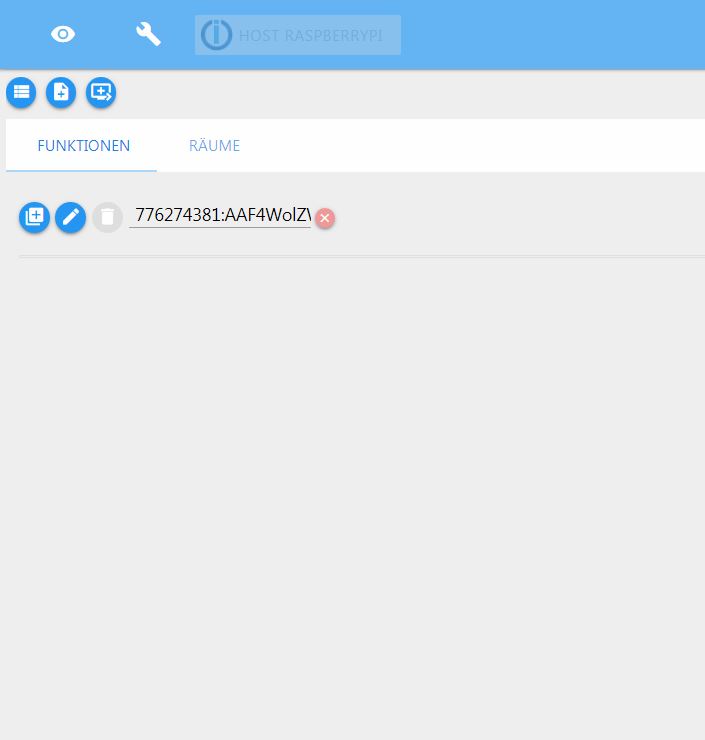
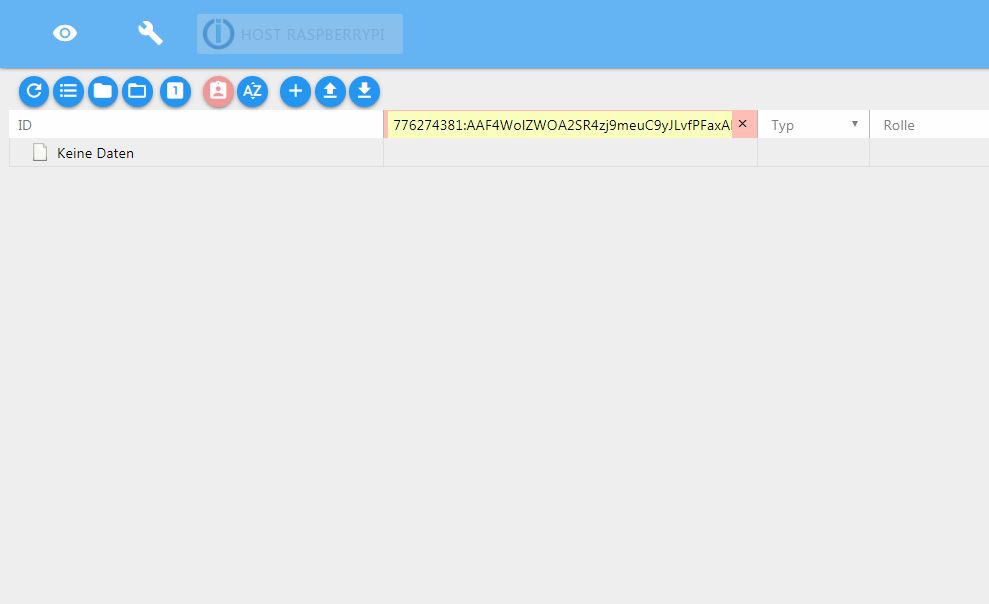
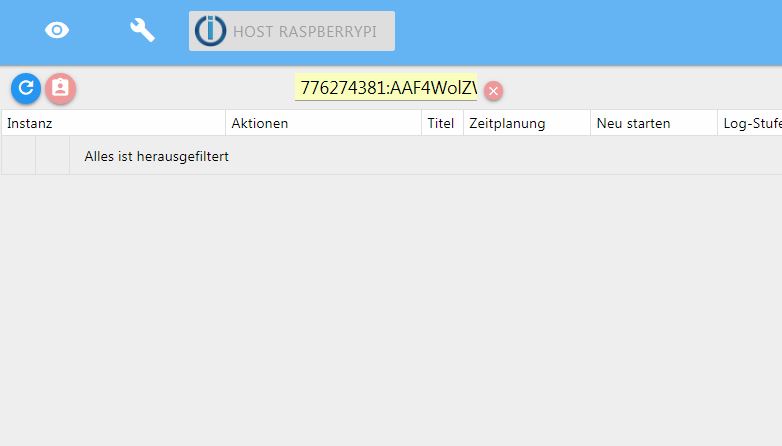
Hier wieder etwas neues, ich weiß nicht womit das zusammen hängt und wollte jetzt nicht extra ein neues Thema öffnen.
Aber egal was ich anklicke, ob Objekte instanzen usw. immer ist automatisch etwas in die Filterleiste kopiert.



Hey! Du scheinst an dieser Unterhaltung interessiert zu sein, hast aber noch kein Konto.
Hast du es satt, bei jedem Besuch durch die gleichen Beiträge zu scrollen? Wenn du dich für ein Konto anmeldest, kommst du immer genau dorthin zurück, wo du zuvor warst, und kannst dich über neue Antworten benachrichtigen lassen (entweder per E-Mail oder Push-Benachrichtigung). Du kannst auch Lesezeichen speichern und Beiträge positiv bewerten, um anderen Community-Mitgliedern deine Wertschätzung zu zeigen.
Mit deinem Input könnte dieser Beitrag noch besser werden 💗
Registrieren Anmelden443
Online33.0k
Benutzer83.6k
Themen1.3m
Beiträge