




Test Adapter SourceAnalytix v0.2.x

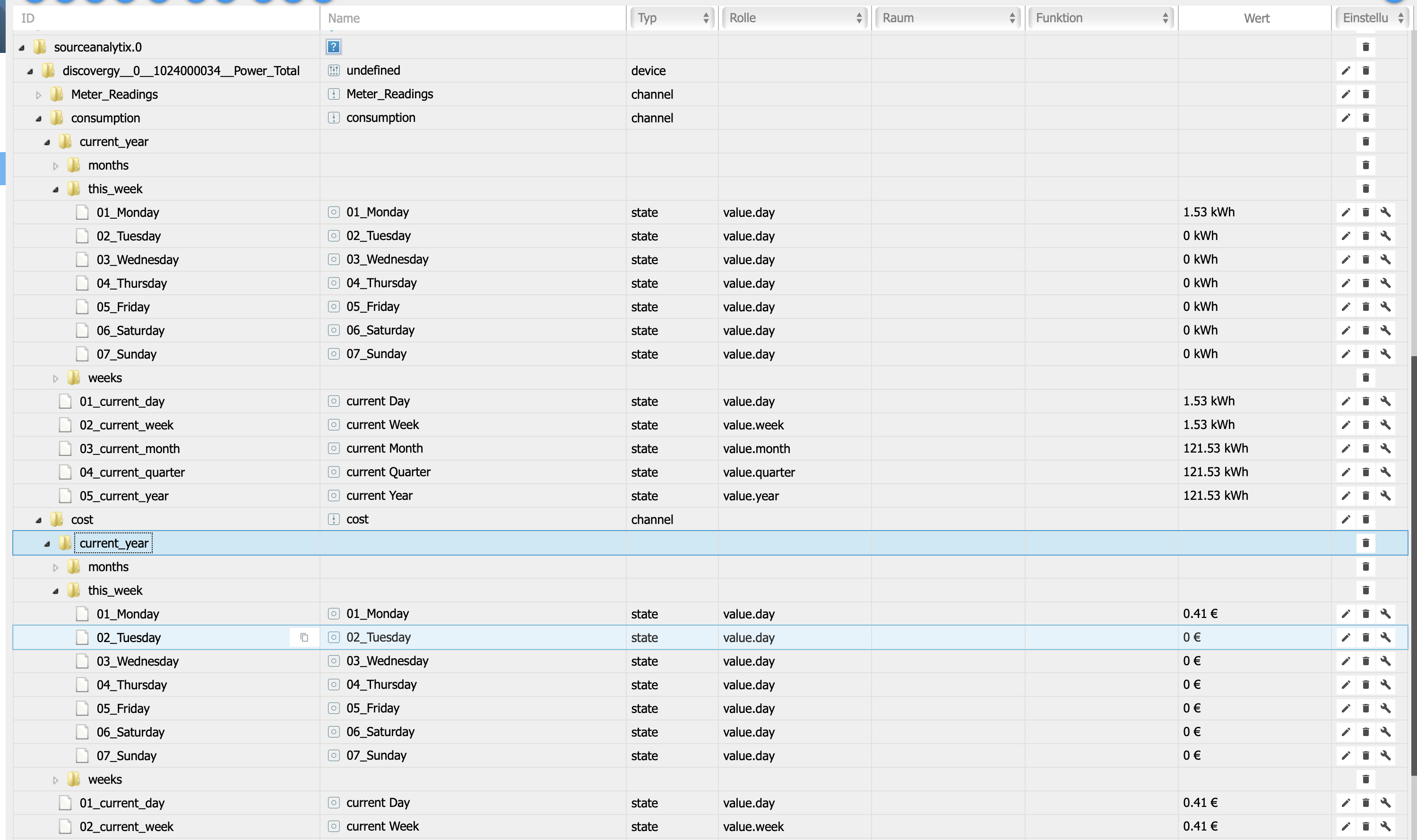
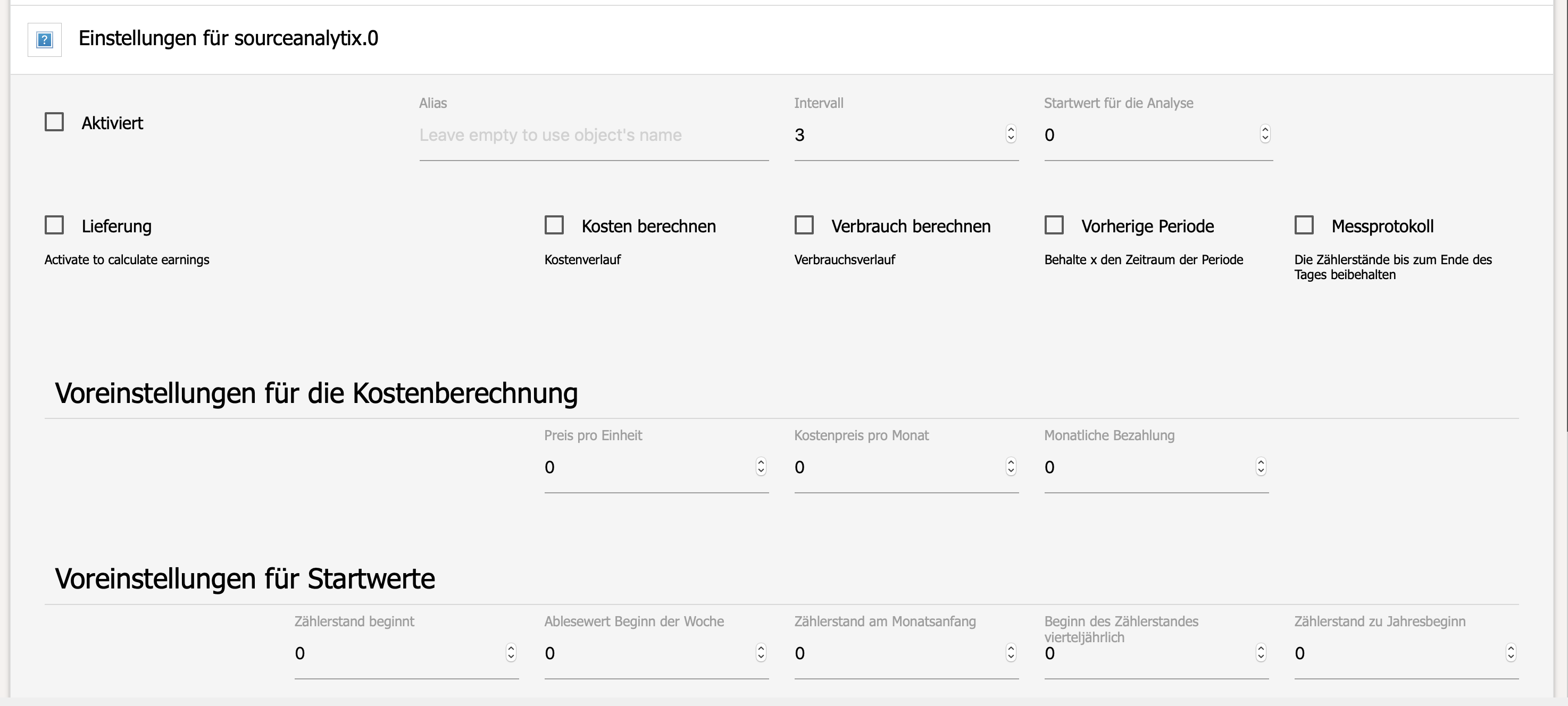
-
Hallo,
wie kann ich zu einem Wert alle Daten löschen. Hab meine Wasseruhr eingebunden und den Wert im Nachhinein korrigiert, jetzt natürlich einen Verbrauch von "-34.000m³". Objekte löschen half nicht, Adapter löschen auch nicht… Die Werte als Anfangswerte eintragen hat er auch nicht übernommen...
Grüße
Brati
-
Wie hast du denn deine Wasseruhr eingebunden? Wie liest du sie aus?
-
Wie hast du denn deine Wasseruhr eingebunden? Wie liest du sie aus? `
Läuft mittlerweile zuverlässig und die Temperatur im Wasserkessel wird auch übermittelt.
Grüße Brati
-
Hallo,
wie kann ich zu einem Wert alle Daten löschen. Hab meine Wasseruhr eingebunden und den Wert im Nachhinein korrigiert, jetzt natürlich einen Verbrauch von "-34.000m³". Objekte löschen half nicht, Adapter löschen auch nicht… Die Werte als Anfangswerte eintragen hat er auch nicht übernommen...
Grüße
Brati `
Adapter stoppen, im SourceAnalytix Baum bei der device auf Papierkorb klicken jetzt wird alles zu dieser device gelöscht.
Dan Adapter wieder starten, alle states werden neu erstellt mit lehren werten.
Deine neuen Startwerte bleiben anwesend das diese auf dem state des Wertes eingestellt werden
PS : musst du in Liter oder m3?
Startwerte sind immer Kilo also wen du Liter hast da den werten geteilt durch 1000 eintragen!
Sent from my iPhone using Tapatalk
-
PS : musst du in Liter oder m3?
Startwerte sind immer Kilo also wen du Liter hast da den werten geteilt durch 1000 eintragen! `
Das war der Knackpunkt. Steht jetzt ordentlich auf 0. Die Objekte zeigen allerdings "m³" an, obwohl ich "l" ausgewählt habe.
Grüße
Brati
-
Das war der Knackpunkt. Steht jetzt ordentlich auf 0. Die Objekte zeigen allerdings "m³" an, obwohl ich "l" ausgewählt habe. `
Wie erwähnt die Berechnungen sind immer in Kilo also diesem Fall m3.
Die Eingabe von Liter ist nötig damit der Adapter weiß was er zur Berechnung nutzen soll ( l oder m3)
Sent from my iPhone using Tapatalk
-
Ich wollte den Adapter grade im Multihost nutzen, da erhalte ich im Log den Fehler:
startInstance system.adapter.sourceanalytix.0: required adapter "admin" not found!Hab die Instanz dann auf den Host gepackt, wo admin liegt, hat aber auch nichts gebracht. Dann Instanz deinstalliert und versucht neu zu installieren auf dem admin- Host, allerdings schließt sich dann das Fenster wo man den Host und die Instanznummer auswählt und nichts passiert.
Adapter komplett deinstalliert, neu installiert, neue Instanz auf adminHost versucht zu installieren:, Einstellungs- Fenster schließt sich wieder und Instanz wird nicht installiert.
-
Kan das jemand reproduzieren ?
Sent from my iPhone using Tapatalk
-
Hallo Dutchman,
cooler Adapter. Läuft bei mir bis jetzt ohne Probleme, jedoch habe ich bei der Weiterverarbeitung ein Problem
Ich möchte das die zwei Datenpunkte
sourceanalytix.0.sonoff__0__SDM220_DG__ENERGY_Total.delivery.01_current_day und
sourceanalytix.0.sonoff__0__SDM220_EG__ENERGY_Total.delivery.01_current_day
am Tagesende seinen Wert in eine Variable fest einträgt, sodass ich über den Flot Adapter mir einen Graf mittels
History Adapter über den Wochenverbrauch anzeigen kann. Ich hatte schon mit einem Script versucht, aber
da komme ich nicht weiter, bin noch am Anfang mit Scripte schreiben. Irgendwie wird nichts eingetragen.
Kannst Du mir da weiter helfen ? :D
`var path = 'sourceanalytix.'; // Pfad der String-Datenpunkte var listd = ['VerbrauchStromTagDG','VerbrauchStromTagEG']; for(i = 0; i < listd.length; i++){ createState(path+listd[i], 0, { read: true, write: true, name: 'Tagesverbrauchswert', type: 'string', def: '0' }); } schedule('11 59 30 * * *', function(){ setState(path+listd[0], getState('sourceanalytix.0.sonoff__0__SDM220_DG__ENERGY_Total.delivery.01_current_day').val); // Strom OG setState(path+listd[0], getState('sourceanalytix.0.sonoff__0__SDM220_EG__ENERGY_Total.delivery.01_current_day').val); // Strom EG });` Gruß Michael[/i] -
-
Ich wollte gerade deinen Adapter ( 0.2.27 ) testen.
In der Oberfläche über GIT installiert soweit alles gut.
Möchte ich jetzt aber eine Instanz hinzufügen, bekommen ich folgendes:
Fertig mit Fehler: /opt/iobroker/node_modules/iobroker.js-controller/lib/tools.js:799 if (adapter.substring(0, appName.length + 1) === appName + '.') { ^ TypeError: Cannot read property 'substring' of undefined at Object.getAdapterDir (/opt/iobroker/node_modules/iobroker.js-controller/lib/tools.js:799:17) at Install.createInstance (/opt/iobroker/node_modules/iobroker.js-controller/lib/setup/setupInstall.js:683:34) at Socket. (/opt/iobroker/node_modules/iobroker.js-controller/lib/setup/setupInstall.js:529:34) at Socket.onack (/opt/iobroker/node_modules/iobroker.js-controller/node_modules/socket.io-client/lib/socket.js:319:9) at Socket.onpacket (/opt/iobroker/node_modules/iobroker.js-controller/node_modules/socket.io-client/lib/socket.js:244:12) at Manager. (/opt/iobroker/node_modules/component-bind/index.js:21:15) at Manager.Emitter.emit (/opt/iobroker/node_modules/iobroker.js-controller/node_modules/component-emitter/index.js:133:20) at Manager.ondecoded (/opt/iobroker/node_modules/iobroker.js-controller/node_modules/socket.io-client/lib/manager.js:345:8) at Decoder. (/opt/iobroker/node_modules/component-bind/index.js:21:15) at Decoder.Emitter.emit (/opt/iobroker/node_modules/iobroker.js-controller/node_modules/component-emitter/index.js:133:20)Und noch was:
ERROR: /opt/iobroker/node_modules/iobroker.js-controller/lib/tools.js:799    if (adapter.substring(0, appName.length + 1) === appName + '.') {
                ^

TypeError: Cannot read property 'substring' of undefined
    at Object.getAdapterDir (/opt/iobroker/node_modules/iobroker.js-controller/lib/tools.js:799:17)
    at Install.createInstance (/opt/iobroker/node_modules/iobroker.js-controller/lib/setup/setupInstall.js:683:34)
    at Socket. <anonymous>(/opt/iobroker/node_modules/iobroker.js-controller/lib/setup/setupInstall.js:529:34)
    at Socket.onack (/opt/iobroker/node_modules/iobroker.js-controller/node_modules/socket.io-client/lib/socket.js:319:9)
    at Socket.onpacket (/opt/iobroker/node_modules/iobroker.js-controller/node_modules/socket.io-client/lib/socket.js:244:12)
    at Manager. <anonymous>(/opt/iobroker/node_modules/component-bind/index.js:21:15)
    at Manager.Emitter.emit (/opt/iobroker/node_modules/iobroker.js-controller/node_modules/component-emitter/index.js:133:20)
    at Manager.ondecoded (/opt/iobroker/node_modules/iobroker.js-controller/node_modules/socket.io-client/lib/manager.js:345:8)
    at Decoder. <anonymous>(/opt/iobroker/node_modules/component-bind/index.js:21:15)
    at Decoder.Emitter.emit (/opt/iobroker/node_modules/iobroker.js-controller/node_modules/component-emitter/index.js:133:20)

ERROR: process exited with code 1</anonymous></anonymous></anonymous>
Fehlt mir was?
Node ist auf 8.15 glaub. Sollte also alles passen.
-
Bitte auf 0.2.26 bleiben da ist was schief gegangen :)
Also bis auf weiteres Bitte nur per Admin installieren und nicht git
Sent from my iPhone using Tapatalk
-
Ich wollte auch mal testen und hatte den 0.2.27 mit den Fehlern. Nun versuche ich den zu löschen um auf 0.2.26 zu kommen.
Mit wenig Erfolg. Ein Rechteproblem?
> user "root" does not have permission to access the dev dir "/home/iobroker/.node-gyp/8.15.0"gyp! ````
$ ./iobroker add sourceanalytix --host iobroker-ubuntu
NPM version: 6.4.1
npm install iobroker.sourceanalytix --production --save --prefix "/opt/iobroker" (System call)
npm notice created a lockfile as package-lock.json. You should commit this file.
node-pre-gyp
WARN Using request for node-pre-gyp https download
node-pre-gyp WARN Tried to download(404): https://github.com/tessel/node-usb/releases/download/1.5.0/usb_bindings-v1.5.0-node-v57-linux-x64.tar.gz node-pre-gyp WARN Pre-built binaries not found for usb@1.5.0 and node@8.15.0 (node-v57 ABI, glibc) (falling back to source compile with node-gyp)
! gyp
WARN EACCES user "root" does not have permission to access the dev dir "/home/iobroker/.node-gyp/8.15.0"gyp
WARN EACCES attempting to reinstall using temporary dev dir "/opt/iobroker/node_modules/usb/.node-gyp"
make: *** No rule to make target '../.node-gyp/8.15.0/include/node/common.gypi', needed by 'Makefile'. Stop.
gypERR! build error
gyp ERR!
stack Error:makefailed with exit code: 2gyp ERR! stack at ChildProcess.onExit (/usr/lib/node_modules/npm/node_modules/node-gyp/lib/build.js:262:23)
gyp ERR! stack at emitTwo (events.js:126:13)! gyp ERR! stack at ChildProcess.emit (events.js:214:7)gyp ERR! stack at Process.ChildProcess._handle.onexit (internal/child_process.js:198:12)
gyp
ERR! System Linux 4.15.0-45-genericgyp ERR! command "/usr/bin/node" "/usr/lib/node_modules/npm/node_modules/node-gyp/bin/node-gyp.js" "build" "--fallback-to-build" "--module=/opt/iobroker/node_modules/usb/src/binding/usb_bindings.node" "--module_name=usb_bindings" "--module_path=/opt/iobroker/node_modules/usb/src/binding" "--napi_version=3" "--node_abi_napi=napi" "--napi_build_version=0" "--node_napi_label=node-v57"
! gyp ERR! cwd /opt/iobroker/node_modules/usbgyp ERR! node -v v8.15.0
! gyp ERR! node-gyp -v v3.8.0gyp ERR! not ok
! node-pre-gyp ERR! build errornode-pre-gyp ERR! stack Error: Failed to execute '/usr/bin/node /usr/lib/node_modules/npm/node_modules/node-gyp/bin/node-gyp.js build --fallback-to-build --module=/opt/iobroker/node_modules/usb/src/binding/usb_bindings.node --module_name=usb_bindings --module_path=/opt/iobroker/node_modules/usb/src/binding --napi_version=3 --node_abi_napi=napi --napi_build_version=0 --node_napi_label=node-v57' (1)node-pre-gyp ERR! stack at ChildProcess. <anonymous>(/opt/iobroker/node_modules/usb/node_modules/node-pre-gyp/lib/util/compile.js:83:29)
node-pre-gyp ERR! stack
at emitTwo (events.js:126:13)node-pre-gyp ERR! stack at ChildProcess.emit (events.js:214:7)
node-pre-gyp ERR! stack at maybeClose (internal/child_process.js:915:16)
node-pre-gyp ERR! stack at Process.ChildProcess._handle.onexit (internal/child_process.js:209:5)! node-pre-gyp ERR!
System Linux 4.15.0-45-generic
node-pre-gyp ERR! command "/usr/bin/node" "/opt/iobroker/node_modules/usb/node_modules/.bin/node-pre-gyp" "install" "--fallback-to-build"node-pre-gyp
ERR! cwd /opt/iobroker/node_modules/usbnode-pre-gyp ERR! node -v v8.15.0
node-pre-gyp ERR! node-pre-gyp -v v0.11.0
node-pre-gyp ERR! not ok! node-pre-gyp
WARN Using request for node-pre-gyp https download
node-pre-gyp
WARN Tried to download(404): https://github.com/sandeepmistry/node-bluetooth-hci-socket/releases/download/0.5.3-1/binding-0.5.3-1-node-v57-linux-x64.tar.gz node-pre-gyp WARN Pre-built binaries not found for @abandonware/bluetooth-hci-socket@0.5.3-1 and node@8.15.0 (node-v57 ABI, glibc) (falling back to source compile with node-gyp)
! gyp
WARN EACCES user "root" does not have permission to access the dev dir "/home/iobroker/.node-gyp/8.15.0"gyp WARN EACCES attempting to reinstall using temporary dev dir "/opt/iobroker/node_modules/@abandonware/bluetooth-hci-socket/.node-gyp"
! make: *** No rule to make target '../.node-gyp/8.15.0/include/node/common.gypi', needed by 'Makefile'. Stop.
gyp
ERR! build error
gyp
ERR! stack Error:makefailed with exit code: 2gyp ERR! stack at ChildProcess.onExit (/usr/lib/node_modules/npm/node_modules/node-gyp/lib/build.js:262:23)
gyp ERR! stack at emitTwo (events.js:126:13)
gyp ERR! stack at ChildProcess.emit (events.js:214:7)
gyp
ERR! stack at Process.ChildProcess._handle.onexit (internal/child_process.js:198:12)
gyp ERR! System Linux 4.15.0-45-generic
gyp ERR! command "/usr/bin/node" "/usr/lib/node_modules/npm/node_modules/node-gyp/bin/node-gyp.js" "build" "--fallback-to-build" "--module=/opt/iobroker/node_modules/@abandonware/bluetooth-hci-socket/lib/binding/binding.node" "--module_name=binding" "--module_path=/opt/iobroker/node_modules/@abandonware/bluetooth-hci-socket/lib/binding" "--napi_version=3" "--node_abi_napi=napi" "--napi_build_version=0" "--node_napi_label=node-v57"gyp ERR! cwd
/opt/iobroker/node_modules/@abandonware/bluetooth-hci-socketgyp ERR! node -v v8.15.0
gyp ERR! node-gyp -v v3.8.0
gyp
ERR! not ok
node-pre-gyp ERR! build error
node-pre-gyp ERR!
stack Error: Failed to execute '/usr/bin/node /usr/lib/node_modules/npm/node_modules/node-gyp/bin/node-gyp.js build --fallback-to-build --module=/opt/iobroker/node_modules/@abandonware/bluetooth-hci-socket/lib/binding/binding.node --module_name=binding --module_path=/opt/iobroker/node_modules/@abandonware/bluetooth-hci-socket/lib/binding --napi_version=3 --node_abi_napi=napi --napi_build_version=0 --node_napi_label=node-v57' (1)node-pre-gyp ERR! stack at ChildProcess. <anonymous>(/opt/iobroker/node_modules/@abandonware/bluetooth-hci-socket/node_modules/node-pre-gyp/lib/util/compile.js:83:29)
node-pre-gyp ERR! stack at emitTwo (events.js:126:13)
node-pre-gyp
ERR! stack at ChildProcess.emit (events.js:214:7)node-pre-gyp ERR! stack at maybeClose (internal/child_process.js:915:16)
node-pre-gyp ERR! stack at Process.ChildProcess._handle.onexit (internal/child_process.js:209:5)
! node-pre-gyp
ERR! System Linux 4.15.0-45-genericnode-pre-gyp ERR! command "/usr/bin/node" "/opt/iobroker/node_modules/@abandonware/bluetooth-hci-socket/node_modules/.bin/node-pre-gyp" "install" "--fallback-to-build"
! node-pre-gyp ERR! cwd /opt/iobroker/node_modules/@abandonware/bluetooth-hci-socketnode-pre-gyp ERR! node -v v8.15.0
node-pre-gyp
ERR! node-pre-gyp -v v0.12.0node-pre-gyp ERR! not ok
! npm
WARN onvif-snapshot@1.0.2 requires a peer of onvif@^0.5.5 but none is installed. You must install peer dependencies yourself.
npm WARN optional SKIPPING OPTIONAL DEPENDENCY: xpc-connection@0.1.4 (node_modules/xpc-connection):
npm WARN notsup SKIPPING OPTIONAL DEPENDENCY: Unsupported platform for xpc-connection@0.1.4: wanted {"os":"darwin","arch":"any"} (current: {"os":"linux","arch":"x64"})npm
WARN optional SKIPPING OPTIONAL DEPENDENCY: usb@1.5.0 (node_modules/usb):npm WARN optional SKIPPING OPTIONAL DEPENDENCY: usb@1.5.0 install:node-pre-gyp install --fallback-to-build
! npm WARN optional SKIPPING OPTIONAL DEPENDENCY: Exit status 1npm WARN optional
SKIPPING OPTIONAL DEPENDENCY: @abandonware/bluetooth-hci-socket@0.5.3-1 (node_modules/@abandonware/bluetooth-hci-socket):npm WARN optional SKIPPING OPTIONAL DEPENDENCY: @abandonware/bluetooth-hci-socket@0.5.3-1 install:node-pre-gyp install --fallback-to-build
npm WARN optional SKIPPING OPTIONAL DEPENDENCY: Exit status 1
! host.iobroker-ubuntu install adapter sourceanalytix
got /opt/iobroker/node_modules/iobroker.sourceanalytix/admin
upload [17] sourceanalytix.admin /opt/iobroker/node_modules/iobroker.sourceanalytix/admin/words.js words.js application/javascript
upload [16] sourceanalytix.admin /opt/iobroker/node_modules/iobroker.sourceanalytix/admin/tsconfig.json tsconfig.json application/json
upload [15] sourceanalytix.admin /opt/iobroker/node_modules/iobroker.sourceanalytix/admin/style.css style.css text/css
upload [14] sourceanalytix.admin /opt/iobroker/node_modules/iobroker.sourceanalytix/admin/sourceanalytix.png sourceanalytix.png image/png
upload [13] sourceanalytix.admin /opt/iobroker/node_modules/iobroker.sourceanalytix/admin/settings_open.png settings_open.png image/png
upload [12] sourceanalytix.admin /opt/iobroker/node_modules/iobroker.sourceanalytix/admin/settings_details.png settings_details.png image/png
upload [11] sourceanalytix.admin /opt/iobroker/node_modules/iobroker.sourceanalytix/admin/index_m.html index_m.html text/html
upload [10] sourceanalytix.admin /opt/iobroker/node_modules/iobroker.sourceanalytix/admin/i18n/zh-cn/translations.json i18n/zh-cn/translations.json application/json
upload [9] sourceanalytix.admin /opt/iobroker/node_modules/iobroker.sourceanalytix/admin/i18n/ru/translations.json i18n/ru/translations.json application/json
upload [8] sourceanalytix.admin /opt/iobroker/node_modules/iobroker.sourceanalytix/admin/i18n/pt/translations.json i18n/pt/translations.json application/json
upload [7] sourceanalytix.admin /opt/iobroker/node_modules/iobroker.sourceanalytix/admin/i18n/pl/translations.json i18n/pl/translations.json application/json
upload [6] sourceanalytix.admin /opt/iobroker/node_modules/iobroker.sourceanalytix/admin/i18n/nl/translations.json i18n/nl/translations.json application/json
upload [5] sourceanalytix.admin /opt/iobroker/node_modules/iobroker.sourceanalytix/admin/i18n/it/translations.json i18n/it/translations.json application/json
upload [4] sourceanalytix.admin /opt/iobroker/node_modules/iobroker.sourceanalytix/admin/i18n/fr/translations.json i18n/fr/translations.json application/json
upload [3] sourceanalytix.admin /opt/iobroker/node_modules/iobroker.sourceanalytix/admin/i18n/es/translations.json i18n/es/translations.json application/json
upload [2] sourceanalytix.admin /opt/iobroker/node_modules/iobroker.sourceanalytix/admin/i18n/en/translations.json i18n/en/translations.json application/json
upload [1] sourceanalytix.admin /opt/iobroker/node_modules/iobroker.sourceanalytix/admin/i18n/de/translations.json i18n/de/translations.json application/json
upload [0] sourceanalytix.admin /opt/iobroker/node_modules/iobroker.sourceanalytix/admin/custom_m.html custom_m.html text/html
ERROR: /opt/iobroker/node_modules/iobroker.js-controller/lib/tools.js:805 if (adapter.substring(0, appName.length + 1) === appName + '.') {
^
! TypeError: Cannot read property 'substring' of undefined
at Object.getAdapterDir (/opt/iobroker/node_modules/iobroker.js-controller/lib/tools.js:805:17)
at Install.createInstance (/opt/iobroker/node_modules/iobroker.js-controller/lib/setup/setupInstall.js:672:34)
at Socket.objects.getObjectView (/opt/iobroker/node_modules/iobroker.js-controller/lib/setup/setupInstall.js:522:34)
at Socket.onack (/opt/iobroker/node_modules/socket.io-client/lib/socket.js:312:9)
at Socket.onpacket (/opt/iobroker/node_modules/socket.io-client/lib/socket.js:236:12)
at Manager. <anonymous>(/opt/iobroker/node_modules/component-bind/index.js:21:15)
at Manager.Emitter.emit (/opt/iobroker/node_modules/component-emitter/index.js:133:20)
at Manager.ondecoded (/opt/iobroker/node_modules/socket.io-client/lib/manager.js:332:8)
at Decoder. <anonymous>(/opt/iobroker/node_modules/component-bind/index.js:21:15)
at Decoder.Emitter.emit (/opt/iobroker/node_modules/socket.io-parser/node_modules/component-emitter/index.js:134:20)
! ERROR: process exited with code 1</anonymous></anonymous></anonymous></anonymous> -
Probier Mal bitte aus Admin anstatt Konsole zu installieren.
Hoffentlich finde ich heute Zeit weiter zu machen…
Sent from my iPhone using Tapatalk
-
Hi
mir sind gerade ein paar Logs aufgefallen:
sourceanalytix.0	2019-02-06 12:24:00.200	info	Object array of trigger : {"type":"state","common":{"name":"Letzte Regeneration Über","type":"number","role":"number","desc":"Letzte Regeneration Über","read":true,"write":true,"def":0,"min":0,"unit"
sourceanalytix.0	2019-02-06 12:24:00.200	info	Object array from trigger : ["smartmeter.0.1-0:1_8_0_255.value","smartmeter.1.1_8_1.value"]
sourceanalytix.0	2019-02-06 12:24:00.200	info	Object array of trigger : {"type":"state","common":{"name":"Letzte Regeneration","type":"string","role":"string","desc":"Letzte Regeneration vor x h","read":true,"write":true,"def":0,"min":0,"unit":"
sourceanalytix.0	2019-02-06 12:24:00.199	info	Object array from trigger : ["smartmeter.0.1-0:1_8_0_255.value","smartmeter.1.1_8_1.value"]
sourceanalytix.0	2019-02-06 12:24:00.199	info	Object array of trigger : {"type":"state","common":{"name":"Restzeit/-menge Reg.Schritt","type":"number","role":"number","desc":"Restzeit/-menge Reg.Schritt","read":true,"write":true,"def":0,"min":0,
sourceanalytix.0	2019-02-06 12:24:00.199	info	Object array from trigger : ["smartmeter.0.1-0:1_8_0_255.value","smartmeter.1.1_8_1.value"]
sourceanalytix.0	2019-02-06 12:24:00.199	info	Object array of trigger : {"type":"state","common":{"name":"Kapazitätszahl","type":"number","role":"number","desc":"Kapazitätszahl","read":true,"write":true,"def":0,"min":0,"unit":"m³*°dH"},"from":"s
sourceanalytix.0	2019-02-06 12:24:00.197	info	Object array from trigger : ["smartmeter.0.1-0:1_8_0_255.value","smartmeter.1.1_8_1.value"]
sourceanalytix.0	2019-02-06 12:24:00.197	info	Object array of trigger : {"type":"state","common":{"name":"Restkapazität","type":"number","role":"number","desc":"Restkapazität","read":true,"write":true,"def":0,"min":0,"unit":"m³*°dH"},"from":"sys
sourceanalytix.0	2019-02-06 12:24:00.197	info	Object array from trigger : ["smartmeter.0.1-0:1_8_0_255.value","smartmeter.1.1_8_1.value"]
sourceanalytix.0	2019-02-06 12:24:00.197	info	Object array of trigger : {"type":"state","common":{"name":"Aktueller Durchfluss","type":"number","role":"number","desc":"Aktueller Durchfluss","read":true,"write":true,"def":0,"min":0,"unit":"m³/h",
sourceanalytix.0	2019-02-06 12:24:00.196	info	Object array from trigger : ["smartmeter.0.1-0:1_8_0_255.value","smartmeter.1.1_8_1.value"]
sourceanalytix.0	2019-02-06 12:24:00.196	info	Object array of trigger : {"type":"state","common":{"name":"Regeneration aktiv","type":"number","role":"number","desc":"Regeneration aktiv","read":true,"write":true,"def":0,"min":0,"unit":""},"from":
sourceanalytix.0	2019-02-06 12:24:00.196	info	Object array from trigger : ["smartmeter.0.1-0:1_8_0_255.value","smartmeter.1.1_8_1.value"]
sourceanalytix.0	2019-02-06 12:24:00.193	info	Object array of trigger : {"type":"state","common":{"name":"Voraussichtliche nächste Regeneration","type":"string","role":"string","desc":"Voraussichtliche nächste Regeneration","read":true,"write":t
sourceanalytix.0	2019-02-06 12:24:00.192	info	Object array from trigger : ["smartmeter.0.1-0:1_8_0_255.value","smartmeter.1.1_8_1.value"]
sourceanalytix.0	2019-02-06 12:24:00.192	info	Object array of trigger : {"type":"state","common":{"name":"0= Austauscher gestört/in Regeneration 1= Austauscher in Betrieb","type":"number","role":"number","desc":"0= Austauscher gestört/in Regener
sourceanalytix.0	2019-02-06 12:24:00.192	info	Object array from trigger : ["smartmeter.0.1-0:1_8_0_255.value","smartmeter.1.1_8_1.value"]
sourceanalytix.0	2019-02-06 12:24:00.192	info	Object array of trigger : {"type":"state","common":{"name":"Aktuelle Restkapazität Austauscher","type":"number","role":"number","desc":"Aktuelle Restkapazität Austauscher","read":true,"write":true,"d
sourceanalytix.0	2019-02-06 12:24:00.192	info	Object array from trigger : ["smartmeter.0.1-0:1_8_0_255.value","smartmeter.1.1_8_1.value"]
sourceanalytix.0	2019-02-06 12:24:00.192	info	Object array of trigger : {"type":"state","common":{"name":"Ergebnis letzter E-Mail Versand 0=keine Mail versandt 1=Mail erfolgreich versandt 2=Benutzerdaten fehlerhaft 3= kein Internetzugang/Server
sourceanalytix.0	2019-02-06 12:24:00.191	info	Object array from trigger : ["smartmeter.0.1-0:1_8_0_255.value","smartmeter.1.1_8_1.value"]
warum "vergreift" sich denn sourceanalytix an meiner Wasserenthärtungsanlage?
Eigestellt ist bei den Datenpunkten nichts
-
Probier Mal bitte aus Admin anstatt Konsole zu installieren.
Hoffentlich finde ich heute Zeit weiter zu machen…
Sent from my iPhone using Tapatalk `
Ich habe es immer per Admin gemacht. Ich bekomme es nur nicht vernünftig de- und installiert. Er sagt unter "latest", Version 2.2.26 verfügbar.Nach der Installation steht aber 2.2.27. installiert. Aber richtig zuende installieren tut er auch nicht mehr. Ich glaube ich bekomme 2.2.27 nicht richtig deinstalliert.
Beim Versuch zu installieren:
! ````
cloud.0 2019-02-06 12:51:06.133 warn Unknown command: cmdExit
cloud.0 2019-02-06 12:51:05.137 warn Unknown command: cmdExit
cloud.0 2019-02-06 12:51:05.136 warn Unknown command: cmdStderr
iobroker 2019-02-06 12:51:05.129 info exit 1
iobroker 2019-02-06 12:51:05.125 error at Decoder.Emitter.emit (/opt/iobroker/node_modules/socket.io-parser/node_modules/component-emitter/index.js:134:20)
iobroker 2019-02-06 12:51:05.125 error at Decoder. <anonymous>(/opt/iobroker/node_modules/component-bind/index.js:21:15)
iobroker 2019-02-06 12:51:05.125 error at Manager.ondecoded (/opt/iobroker/node_modules/socket.io-client/lib/manager.js:332:8)
iobroker 2019-02-06 12:51:05.125 error at Manager.Emitter.emit (/opt/iobroker/node_modules/component-emitter/index.js:133:20)
iobroker 2019-02-06 12:51:05.125 error at Manager. <anonymous>(/opt/iobroker/node_modules/component-bind/index.js:21:15)
iobroker 2019-02-06 12:51:05.125 error at Socket.onpacket (/opt/iobroker/node_modules/socket.io-client/lib/socket.js:236:12)
iobroker 2019-02-06 12:51:05.125 error at Socket.onack (/opt/iobroker/node_modules/socket.io-client/lib/socket.js:312:9)
iobroker 2019-02-06 12:51:05.125 error at Socket.objects.getObjectView (/opt/iobroker/node_modules/iobroker.js-controller/lib/setup/setupInstall.js:522:34)
iobroker 2019-02-06 12:51:05.125 error at Install.createInstance (/opt/iobroker/node_modules/iobroker.js-controller/lib/setup/setupInstall.js:672:34)
iobroker 2019-02-06 12:51:05.125 error at Object.getAdapterDir (/opt/iobroker/node_modules/iobroker.js-controller/lib/tools.js:805:17)
iobroker 2019-02-06 12:51:05.125 error TypeError: Cannot read property 'substring' of undefined
iobroker 2019-02-06 12:51:05.125 error ^
iobroker 2019-02-06 12:51:05.125 error /opt/iobroker/node_modules/iobroker.js-controller/lib/tools.js:805 if (adapter.substring(0, appName.length + 1) === appName + '.') {
cloud.0 2019-02-06 12:51:04.830 warn Unknown command: cmdStdout
iobroker 2019-02-06 12:51:04.828 info upload [0] sourceanalytix.admin /opt/iobroker/node_modules/iobroker.sourceanalytix/admin/custom_m.html custom_m.html text/html
cloud.0 2019-02-06 12:51:04.769 warn Unknown command: cmdStdout
iobroker 2019-02-06 12:51:04.766 info upload [1] sourceanalytix.admin /opt/iobroker/node_modules/iobroker.sourceanalytix/admin/i18n/de/translations.json i18n/de/translations.json application/json
cloud.0 2019-02-06 12:51:04.708 warn Unknown command: cmdStdout
iobroker 2019-02-06 12:51:04.706 info upload [2] sourceanalytix.admin /opt/iobroker/node_modules/iobroker.sourceanalytix/admin/i18n/en/translations.json i18n/en/translations.json application/json
cloud.0 2019-02-06 12:51:04.649 warn Unknown command: cmdStdout
iobroker 2019-02-06 12:51:04.647 info upload [3] sourceanalytix.admin /opt/iobroker/node_modules/iobroker.sourceanalytix/admin/i18n/es/translations.json i18n/es/translations.json application/json
cloud.0 2019-02-06 12:51:04.586 warn Unknown command: cmdStdout
iobroker 2019-02-06 12:51:04.583 info upload [4] sourceanalytix.admin /opt/iobroker/node_modules/iobroker.sourceanalytix/admin/i18n/fr/translations.json i18n/fr/translations.json application/json
cloud.0 2019-02-06 12:51:04.527 warn Unknown command: cmdStdout
iobroker 2019-02-06 12:51:04.525 info upload [5] sourceanalytix.admin /opt/iobroker/node_modules/iobroker.sourceanalytix/admin/i18n/it/translations.json i18n/it/translations.json application/json
cloud.0 2019-02-06 12:51:04.454 warn Unknown command: cmdStdout
iobroker 2019-02-06 12:51:04.451 info upload [6] sourceanalytix.admin /opt/iobroker/node_modules/iobroker.sourceanalytix/admin/i18n/nl/translations.json i18n/nl/translations.json application/json
cloud.0 2019-02-06 12:51:04.393 warn Unknown command: cmdStdout
iobroker 2019-02-06 12:51:04.390 info upload [7] sourceanalytix.admin /opt/iobroker/node_modules/iobroker.sourceanalytix/admin/i18n/pl/translations.json i18n/pl/translations.json application/json
cloud.0 2019-02-06 12:51:04.331 warn Unknown command: cmdStdout
iobroker 2019-02-06 12:51:04.329 info upload [8] sourceanalytix.admin /opt/iobroker/node_modules/iobroker.sourceanalytix/admin/i18n/pt/translations.json i18n/pt/translations.json application/json
cloud.0 2019-02-06 12:51:04.242 warn Unknown command: cmdStdout
iobroker 2019-02-06 12:51:04.239 info upload [9] sourceanalytix.admin /opt/iobroker/node_modules/iobroker.sourceanalytix/admin/i18n/ru/translations.json i18n/ru/translations.json application/json
cloud.0 2019-02-06 12:51:03.989 warn Unknown command: cmdStdout
iobroker 2019-02-06 12:51:03.986 info upload [10] sourceanalytix.admin /opt/iobroker/node_modules/iobroker.sourceanalytix/admin/i18n/zh-cn/translations.json i18n/zh-cn/translations.json application/json
cloud.0 2019-02-06 12:51:03.916 warn Unknown command: cmdStdout
iobroker 2019-02-06 12:51:03.914 info upload [11] sourceanalytix.admin /opt/iobroker/node_modules/iobroker.sourceanalytix/admin/index_m.html index_m.html text/html
cloud.0 2019-02-06 12:51:03.812 warn Unknown command: cmdStdout
iobroker 2019-02-06 12:51:03.810 info upload [12] sourceanalytix.admin /opt/iobroker/node_modules/iobroker.sourceanalytix/admin/settings_details.png settings_details.png image/png
cloud.0 2019-02-06 12:51:03.748 warn Unknown command: cmdStdout
iobroker 2019-02-06 12:51:03.745 info upload [13] sourceanalytix.admin /opt/iobroker/node_modules/iobroker.sourceanalytix/admin/settings_open.png settings_open.png image/png
cloud.0 2019-02-06 12:51:03.672 warn Unknown command: cmdStdout
iobroker 2019-02-06 12:51:03.670 info upload [14] sourceanalytix.admin /opt/iobroker/node_modules/iobroker.sourceanalytix/admin/sourceanalytix.png sourceanalytix.png image/png
cloud.0 2019-02-06 12:51:03.613 warn Unknown command: cmdStdout
iobroker 2019-02-06 12:51:03.611 info upload [15] sourceanalytix.admin /opt/iobroker/node_modules/iobroker.sourceanalytix/admin/style.css style.css text/css
cloud.0 2019-02-06 12:51:03.554 warn Unknown command: cmdStdout
iobroker 2019-02-06 12:51:03.551 info upload [16] sourceanalytix.admin /opt/iobroker/node_modules/iobroker.sourceanalytix/admin/tsconfig.json tsconfig.json application/json
cloud.0 2019-02-06 12:51:03.462 warn Unknown command: cmdStdout
iobroker 2019-02-06 12:51:03.458 info upload [17] sourceanalytix.admin /opt/iobroker/node_modules/iobroker.sourceanalytix/admin/words.js words.js application/javascript
cloud.0 2019-02-06 12:51:03.434 warn Unknown command: cmdStdout
iobroker 2019-02-06 12:51:03.431 info got /opt/iobroker/node_modules/iobroker.sourceanalytix/admin
cloud.0 2019-02-06 12:51:03.406 warn Unknown command: cmdStdout
iobroker 2019-02-06 12:51:03.404 info host.iobroker-ubuntu install adapter sourceanalytix
iobroker 2019-02-06 12:51:02.476 info add sourceanalytix --host iobroker-ubuntu</anonymous></anonymous>Installationsdialog zeigt aber keine Einträge, als wenn nicths passieren würde. ABer log zeigt, dass etwas passiert. Dann beim Versuch zu deinstallieren: >! ```` cloud.0 2019-02-06 12:59:56.365 warn Unknown command: cmdStdout iobroker 2019-02-06 12:59:56.362 info path: '/home/iobroker/.npm/_logs' } iobroker 2019-02-06 12:59:56.362 info syscall: 'scandir', iobroker 2019-02-06 12:59:56.362 info code: 'EACCES', iobroker 2019-02-06 12:59:56.362 info errno: -13, iobroker 2019-02-06 12:59:56.362 info glob error { Error: EACCES: permission denied, scandir '/home/iobroker/.npm/_logs' stack: 'Error: EACCES: permission denied, scandir \'/home/iobroker/.npm/_logs\'', host.iobroker-ubuntu 2019-02-06 12:58:51.796 error Cannot write files: /opt/iobroker/iobroker-data/files/sourceanalytix.admin/_data.json: ENOENT: no such file or directory, open '/opt/iobroker/iobroker-data/files/sourceanalytix.admin/_data.json' cloud.0 2019-02-06 12:58:51.457 warn Unknown command: cmdStdout iobroker 2019-02-06 12:58:51.454 info npm uninstall iobroker.sourceanalytix --silent --save --prefix "/opt/iobroker" (System call) cloud.0 2019-02-06 12:58:50.833 warn Unknown command: cmdStdout iobroker 2019-02-06 12:58:50.816 info host.iobroker-ubuntu Deleting 1 state(s). cloud.0 2019-02-06 12:58:50.812 warn Unknown command: cmdStdout iobroker 2019-02-06 12:58:50.807 info host.iobroker-ubuntu Deleting 1 object(s). cloud.0 2019-02-06 12:58:50.785 warn Unknown command: cmdStdout iobroker 2019-02-06 12:58:50.778 info host.iobroker-ubuntu Counted 1 states (system.adapter.sourceanalytix.*) from states cloud.0 2019-02-06 12:58:50.652 warn Unknown command: cmdStdout iobroker 2019-02-06 12:58:50.649 info host.iobroker-ubuntu Counted 1 states of sourceanalytix cloud.0 2019-02-06 12:58:48.441 warn Unknown command: cmdStdout iobroker 2019-02-06 12:58:48.438 info host.iobroker-ubuntu no instances of adapter sourceanalytix found cloud.0 2019-02-06 12:58:48.415 warn Unknown command: cmdStdout iobroker 2019-02-06 12:58:48.412 info Delete adapter "sourceanalytix" iobroker 2019-02-06 12:58:47.559 info del sourceanalytixEdit: habe scheinbar allgemein einen bug. Oder ist es normal, dass sich über cloud iobroker.pro das Dialogfeld beim Installieren sich nicht aktualisiert? Habe eben anderen Adapter installiert und es kommt nix. Es steht einfach: Gestartet… $ ./iobroker upgrade "Adaptername"
-
Mal ne blöde Fragen..
Welchen Datenpunkt muss ich loggen um eine Tägliche / Monatliche /Jährliche Auswertung zu erhalten?
Vermutlich ENERGY_TODAY?
Oder passiert das Live mit Current?
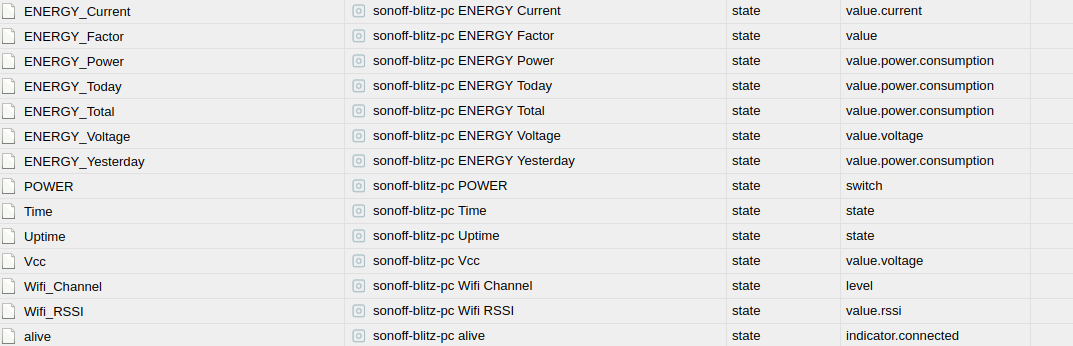
https://i.postimg.cc/xTktVh29/Download.png" /> -
Mal ne blöde Fragen..
Welchen Datenpunkt muss ich loggen um eine Tägliche / Monatliche /Jährliche Auswertung zu erhalten?
Vermutlich ENERGY_TODAY?
Oder passiert das Live mit Current?
https://i.postimg.cc/xTktVh29/Download.png" />`Energy total Rest geht von alleine.





Hey! Du scheinst an dieser Unterhaltung interessiert zu sein, hast aber noch kein Konto.
Hast du es satt, bei jedem Besuch durch die gleichen Beiträge zu scrollen? Wenn du dich für ein Konto anmeldest, kommst du immer genau dorthin zurück, wo du zuvor warst, und kannst dich über neue Antworten benachrichtigen lassen (entweder per E-Mail oder Push-Benachrichtigung). Du kannst auch Lesezeichen speichern und Beiträge positiv bewerten, um anderen Community-Mitgliedern deine Wertschätzung zu zeigen.
Mit deinem Input könnte dieser Beitrag noch besser werden 💗
Registrieren AnmeldenSupport us
508
Online33.0k
Benutzer83.6k
Themen1.3m
Beiträge