Skip to content
  • Home
  • Aktuell
  • Tags
  • 0 Ungelesen 0
  • Kategorien
  • Unreplied
  • Beliebt
  • GitHub
  • Docu
  • Hilfe
Skins
  • Light
  • Brite
  • Cerulean
  • Cosmo
  • Flatly
  • Journal
  • Litera
  • Lumen
  • Lux
  • Materia
  • Minty
  • Morph
  • Pulse
  • Sandstone
  • Simplex
  • Sketchy
  • Spacelab
  • United
  • Yeti
  • Zephyr
  • Dark
  • Cyborg
  • Darkly
  • Quartz
  • Slate
  • Solar
  • Superhero
  • Vapor

  • Standard: (Kein Skin)
  • Kein Skin
Einklappen
ioBroker Logo

Community Forum

donate donate
  1. ioBroker Community Home
  2. Deutsch
  3. ioBroker Allgemein
  4. Adapter: iobroker.backitup (stable Release)

NEWS

  • Weihnachtsangebot 2025! 🎄
    BluefoxB
    Bluefox
    22
    1
    1.1k

  • UPDATE 31.10.: Amazon Alexa - ioBroker Skill läuft aus ?
    apollon77A
    apollon77
    48
    3
    9.1k

  • Monatsrückblick – September 2025
    BluefoxB
    Bluefox
    14
    1
    2.4k

Adapter: iobroker.backitup (stable Release)

Geplant Angeheftet Gesperrt Verschoben ioBroker Allgemein
adapterbackitupiobroker backupbackupiobroker.backitup
2.3k Beiträge 185 Kommentatoren 1.2m Aufrufe 50 Watching
  • Älteste zuerst
  • Neuste zuerst
  • Meiste Stimmen
Antworten
  • In einem neuen Thema antworten
Anmelden zum Antworten
Dieses Thema wurde gelöscht. Nur Nutzer mit entsprechenden Rechten können es sehen.
  • TomTT Offline
    TomTT Offline
    TomT
    schrieb am zuletzt editiert von
    #1259

    Gibt es eigentlich Pläne für den Adapter bei der Pushover Benachrichtigung nur 1 GeräteID eintragen zu können?

    Momentan bekomme ich die Backup Nachricht auf alle Pushover GeräteIDs

    Grüße

    Tom

    PI3B > Raspimatic / Opi+2 > ioBroker / ESP8266
    if (System == "running") {finger = "weg";} else {lastAction = "Rückgängig";}

    1 Antwort Letzte Antwort
    0
    • simatecS Offline
      simatecS Offline
      simatec
      Developer Most Active
      schrieb am zuletzt editiert von
      #1260

      Können wir einbauen.

      Da ich aber selber Pushover nicht nutze, wäre gut zu wissen, wie die Id ausschaut.

      Gesendet von iPhone mit Tapatalk

      • Besuche meine Github Seite
      • Beitrag hat geholfen oder willst du mich unterstützen
      • HowTo Restore ioBroker
      1 Antwort Letzte Antwort
      0
      • TomTT Offline
        TomTT Offline
        TomT
        schrieb am zuletzt editiert von
        #1261

        Ja :D

        Das müsste das hier sein :

        https://pushover.net/api

        Some optional parameters may be included:

        device - your user's device name to send the message directly to that device, rather than all of the user's devices (multiple devices may be separated by a comma)

        Kommt bei dem Pushover Adapter unter Gerät ID als Text (Name den man selbst dem Gerät bei Pushover eingetragen hat)

        Grüße

        Tom

        PI3B > Raspimatic / Opi+2 > ioBroker / ESP8266
        if (System == "running") {finger = "weg";} else {lastAction = "Rückgängig";}

        1 Antwort Letzte Antwort
        0
        • simatecS Offline
          simatecS Offline
          simatec
          Developer Most Active
          schrieb am zuletzt editiert von
          #1262

          OK ich schaue mir mal den Pushover Adapter an.

          Eventuell kann ich die User wie bei Telegram von backitup auslesen lassen und ein Auswahlmenü darstellen.

          Gesendet von iPhone mit Tapatalk

          • Besuche meine Github Seite
          • Beitrag hat geholfen oder willst du mich unterstützen
          • HowTo Restore ioBroker
          1 Antwort Letzte Antwort
          0
          • P Offline
            P Offline
            passuff
            schrieb am zuletzt editiert von
            #1263

            Hallo zusammen,

            backitup hat bei mir früher immer wunderbar funktioniert. Leider kann ich neuerdings keine Backups wiederherstellen, bzw die abgelegten Backups werden nicht mehr gefunden. Ich nutze lediglich FTP Zugang, die Backups werden einwandfrei erstellt und abgelegt. Wenn ich jetzt auf Wiederherstellen klicke und FTP auswähle, werden dennoch nur lokale Backups angezeigt.

            1 Antwort Letzte Antwort
            0
            • simatecS Offline
              simatecS Offline
              simatec
              Developer Most Active
              schrieb am zuletzt editiert von
              #1264

              Nach der Auswahl von FTP im Wiederherstellungsmenü bitte vorher speichern.

              Sonst wird die Auswahl FTP nicht übernommen und nur die lokalen Backups werden angezeigt.

              • Besuche meine Github Seite
              • Beitrag hat geholfen oder willst du mich unterstützen
              • HowTo Restore ioBroker
              1 Antwort Letzte Antwort
              0
              • simatecS Offline
                simatecS Offline
                simatec
                Developer Most Active
                schrieb am zuletzt editiert von
                #1265

                Ab sofort ist auf Github und ab heute Nacht im latest die Version 0.4.3 verfügbar.

                0.4.3 (17.12.2018)

                (simatec) Add device ID for pushover

                • Besuche meine Github Seite
                • Beitrag hat geholfen oder willst du mich unterstützen
                • HowTo Restore ioBroker
                1 Antwort Letzte Antwort
                0
                • P Offline
                  P Offline
                  passuff
                  schrieb am zuletzt editiert von
                  #1266

                  Wenn ich NAS auswähle, kann ich meine FTP Backups finden. Scheint ein BUG zu sein, denn ich habe lediglich FTP konfiguriert.

                  Gebt mir Bescheid wenn ihr zwecks root cause Hilfe benötigt.

                  Edit: Nachdem ich einmalig über NAS gesucht habe, funktioniert nun auch FTP… verstehs einer ;)

                  1 Antwort Letzte Antwort
                  0
                  • simatecS Offline
                    simatecS Offline
                    simatec
                    Developer Most Active
                    schrieb am zuletzt editiert von
                    #1267

                    @passuff:

                    Gebt mir Bescheid wenn ihr zwecks root cause Hilfe benötigt. `

                    Was meinst du damit genau?

                    • Besuche meine Github Seite
                    • Beitrag hat geholfen oder willst du mich unterstützen
                    • HowTo Restore ioBroker
                    1 Antwort Letzte Antwort
                    0
                    • HALH Offline
                      HALH Offline
                      HAL
                      schrieb am zuletzt editiert von
                      #1268

                      Hallo, bei mir hat der mount bisher funktioniert aber jetzt nicht mehr. Der mount (CFIS , Synology NAS ) funktioniert, wenn ich manuell den Befehl von

                      sudo mount -t cifs -o user=hm-iob,password=password,rw,file_mode=0777,dir_mode=0777,vers=1.0 //192.168.7.200/TMBackup/IOB /opt/iobroker/backups

                      in

                      sudo mount -t cifs -o username=hm-iob,password=password,rw,file_mode=0777,dir_mode=0777,vers=1.0 //192.168.7.200/TMBackup/IOB /opt/iobroker/backups

                      ändere.

                      Kann man das anpassen ?

                      VG Uwe

                      Alle Raspberry ( 5 ) gegen NUC (N100, 16GB Ram und 500GB M2 SSD, extern 2TB SSD ) mit Proxmox 8.3.3 gewechselt. Läuft absolut super !
                      (Iobroker, Grafana, Teslalogger, Nextcloud, go2rtc, PiHole, IOB-VIS2, Teslamate, homeassistant nur als test)

                      1 Antwort Letzte Antwort
                      0
                      • simatecS Offline
                        simatecS Offline
                        simatec
                        Developer Most Active
                        schrieb am zuletzt editiert von
                        #1269

                        @HAL:

                        Hallo, bei mir hat der mount bisher funktioniert aber jetzt nicht mehr. Der mount (CFIS , Synology NAS ) funktioniert, wenn ich manuell den Befehl von

                        sudo mount -t cifs -o user=hm-iob,password=password,rw,file_mode=0777,dir_mode=0777,vers=1.0 //192.168.7.200/TMBackup/IOB /opt/iobroker/backups

                        in

                        sudo mount -t cifs -o username=hm-iob,password=password,rw,file_mode=0777,dir_mode=0777,vers=1.0 //192.168.7.200/TMBackup/IOB /opt/iobroker/backups

                        ändere.

                        Kann man das anpassen ?

                        VG Uwe `

                        schauen wir uns an.

                        • Besuche meine Github Seite
                        • Beitrag hat geholfen oder willst du mich unterstützen
                        • HowTo Restore ioBroker
                        1 Antwort Letzte Antwort
                        0
                        • simatecS Offline
                          simatecS Offline
                          simatec
                          Developer Most Active
                          schrieb am zuletzt editiert von
                          #1270

                          Ab sofort ist die Version 0.4.4 auf dem Github Online und ab heute Nacht im latest.

                          0.4.4 (19.12.2018)

                          (simatec) Fix cifs-mount User

                          • Besuche meine Github Seite
                          • Beitrag hat geholfen oder willst du mich unterstützen
                          • HowTo Restore ioBroker
                          1 Antwort Letzte Antwort
                          0
                          • greyhoundG Offline
                            greyhoundG Offline
                            greyhound
                            schrieb am zuletzt editiert von
                            #1271

                            @simatec:

                            Also da sehe ich schon das erste Problem mit dem js-Controller.

                            1.5.3 würde ich aktuell noch nicht unbedingt laufen lassen und erst recht nicht mit npm 3 in Kombi.

                            Mach mal ein Upgrade von node und npm und ggfs. ein downgrade des js-Controllers … `

                            Habe meine Installation neu aufgesetzt:

                            npm 6.4.1

                            node v8.14.0

                            js-controller 1.4.2

                            Nebeneffekt: Backupgröße (manuell erstellt) "nur" noch ca. 450 MB.

                            Aber, das Backup bleibt immer noch hängen (NAS-Copy deaktiviert, mit ioBroker stopp, Redis läuft). Heute Morgen:

                            iobroker 13938 1 0 03:00 ? 00:00:00 bash stopIOB.sh

                            iobroker 14097 13938 0 03:00 ? 00:00:18 node execute.js

                            Log (102 KB):

                            [DEBUG] [total/total] TAR started…

                            [DEBUG] [total/total] Ignore dir: /opt/iobroker/backups

                            [DEBUG] [total/total] Packed 7MB so far…

                            [DEBUG] [total/total] Packed 9MB so far…

                            [DEBUG] [total/total] Packed 9MB so far…

                            . . .

                            [2430 Zeilen]

                            Wie schon einmal angemerkt, wird tar irgendwo blockiert.

                            Ich kann aber keine Zombies im ioBroker-Verzeichnis finden:

                            # lsof|grep \/opt\/iobroker
                            bash      13938         iobroker  cwd       DIR        8,1     4096   11272992 /opt/iobroker/node_modules/iobroker.backitup/lib
                            bash      13938         iobroker  255r      REG        8,1      107   11272547 /opt/iobroker/node_modules/iobroker.backitup/lib/stopIOB.sh
                            node      14097         iobroker  cwd       DIR        8,1     4096   11272992 /opt/iobroker/node_modules/iobroker.backitup/lib
                            node      14097         iobroker  txt       REG        8,1 31514670   11148547 /opt/iobroker/.nvm/versions/node/v8.14.0/bin/node
                            node      14097         iobroker    9w      REG        8,1  9618161   12326309 /opt/iobroker/backups/total_2018_12_20-03_00_23_XOU4_backupiobroker.tar.gz
                            node      14097 14098   iobroker  cwd       DIR        8,1     4096   11272992 /opt/iobroker/node_modules/iobroker.backitup/lib
                            node      14097 14098   iobroker  txt       REG        8,1 31514670   11148547 /opt/iobroker/.nvm/versions/node/v8.14.0/bin/node
                            node      14097 14098   iobroker    9w      REG        8,1  9618161   12326309 /opt/iobroker/backups/total_2018_12_20-03_00_23_XOU4_backupiobroker.tar.gz
                            node      14097 14099   iobroker  cwd       DIR        8,1     4096   11272992 /opt/iobroker/node_modules/iobroker.backitup/lib
                            node      14097 14099   iobroker  txt       REG        8,1 31514670   11148547 /opt/iobroker/.nvm/versions/node/v8.14.0/bin/node
                            node      14097 14099   iobroker    9w      REG        8,1  9618161   12326309 /opt/iobroker/backups/total_2018_12_20-03_00_23_XOU4_backupiobroker.tar.gz
                            node      14097 14100   iobroker  cwd       DIR        8,1     4096   11272992 /opt/iobroker/node_modules/iobroker.backitup/lib
                            node      14097 14100   iobroker  txt       REG        8,1 31514670   11148547 /opt/iobroker/.nvm/versions/node/v8.14.0/bin/node
                            node      14097 14100   iobroker    9w      REG        8,1  9618161   12326309 /opt/iobroker/backups/total_2018_12_20-03_00_23_XOU4_backupiobroker.tar.gz
                            node      14097 14101   iobroker  cwd       DIR        8,1     4096   11272992 /opt/iobroker/node_modules/iobroker.backitup/lib
                            node      14097 14101   iobroker  txt       REG        8,1 31514670   11148547 /opt/iobroker/.nvm/versions/node/v8.14.0/bin/node
                            node      14097 14101   iobroker    9w      REG        8,1  9618161   12326309 /opt/iobroker/backups/total_2018_12_20-03_00_23_XOU4_backupiobroker.tar.gz
                            node      14097 14102   iobroker  cwd       DIR        8,1     4096   11272992 /opt/iobroker/node_modules/iobroker.backitup/lib
                            node      14097 14102   iobroker  txt       REG        8,1 31514670   11148547 /opt/iobroker/.nvm/versions/node/v8.14.0/bin/node
                            node      14097 14102   iobroker    9w      REG        8,1  9618161   12326309 /opt/iobroker/backups/total_2018_12_20-03_00_23_XOU4_backupiobroker.tar.gz
                            node      14097 14103   iobroker  cwd       DIR        8,1     4096   11272992 /opt/iobroker/node_modules/iobroker.backitup/lib
                            node      14097 14103   iobroker  txt       REG        8,1 31514670   11148547 /opt/iobroker/.nvm/versions/node/v8.14.0/bin/node
                            node      14097 14103   iobroker    9w      REG        8,1  9618161   12326309 /opt/iobroker/backups/total_2018_12_20-03_00_23_XOU4_backupiobroker.tar.gz
                            node      14097 14104   iobroker  cwd       DIR        8,1     4096   11272992 /opt/iobroker/node_modules/iobroker.backitup/lib
                            node      14097 14104   iobroker  txt       REG        8,1 31514670   11148547 /opt/iobroker/.nvm/versions/node/v8.14.0/bin/node
                            node      14097 14104   iobroker    9w      REG        8,1  9618161   12326309 /opt/iobroker/backups/total_2018_12_20-03_00_23_XOU4_backupiobroker.tar.gz
                            node      14097 14105   iobroker  cwd       DIR        8,1     4096   11272992 /opt/iobroker/node_modules/iobroker.backitup/lib
                            node      14097 14105   iobroker  txt       REG        8,1 31514670   11148547 /opt/iobroker/.nvm/versions/node/v8.14.0/bin/node
                            node      14097 14105   iobroker    9w      REG        8,1  9618161   12326309 /opt/iobroker/backups/total_2018_12_20-03_00_23_XOU4_backupiobroker.tar.gz
                            node      14097 14106   iobroker  cwd       DIR        8,1     4096   11272992 /opt/iobroker/node_modules/iobroker.backitup/lib
                            node      14097 14106   iobroker  txt       REG        8,1 31514670   11148547 /opt/iobroker/.nvm/versions/node/v8.14.0/bin/node
                            node      14097 14106   iobroker    9w      REG        8,1  9618161   12326309 /opt/iobroker/backups/total_2018_12_20-03_00_23_XOU4_backupiobroker.tar.gz
                            bash      17503           odroid  cwd       DIR        8,1     4096   12326194 /opt/iobroker/backups


                            Platz zum Schreiben ist auch

                            Filesystem     1K-blocks     Used Available Use% Mounted on
                            /dev/mmcblk0p2  59039349  1575504  57459749   3% /
                            udev               10240        0     10240   0% /dev
                            tmpfs             407712    42280    365432  11% /run
                            tmpfs            1019272        0   1019272   0% /dev/shm
                            tmpfs               5120        0      5120   0% /run/lock
                            tmpfs            1019272        0   1019272   0% /sys/fs/cgroup
                            /dev/mmcblk0p1     72542    24436     48106  34% /boot
                            /dev/sda1      229701512 28209708 189753920  13% /opt


                            Hätte nun nur noch die Idee, dass im Debugmodus eine verbose-Ausgabe aktiviert werden kann, damit man sieht, was er gerade sichert bzw. versucht wird zu sichern.

                            ioBroker auf ODROID-XU4 / Influx u. a. auf FUJITSU D3400-B, Celeron G3900, 16 GB RAM / CCU2 / Nuki

                            1 Antwort Letzte Antwort
                            0
                            • simatecS Offline
                              simatecS Offline
                              simatec
                              Developer Most Active
                              schrieb am zuletzt editiert von
                              #1272

                              Wie hast du iobroker aufgesetzt?

                              Nach der neuen oder alten Methode?

                              Bei der neuen gab es wohl einen noch nicht behobenen Bug mit der Rechtevergabe.

                              Läuft dein iob unter root?

                              Was passiert, wenn du iob nicht vorm backup stoppst?

                              • Besuche meine Github Seite
                              • Beitrag hat geholfen oder willst du mich unterstützen
                              • HowTo Restore ioBroker
                              1 Antwort Letzte Antwort
                              0
                              • greyhoundG Offline
                                greyhoundG Offline
                                greyhound
                                schrieb am zuletzt editiert von
                                #1273

                                @simatec:

                                Wie hast du iobroker aufgesetzt?

                                Nach der neuen oder alten Methode?

                                Bei der neuen gab es wohl einen noch nicht behobenen Bug mit der Rechtevergabe.

                                Läuft dein iob unter root? `

                                Nach meiner Methode ;-)

                                • stop Redis

                                • altes Verzeichnis sichern/löschen

                                alles weitere als User iobroker

                                • neues leeres Verzeichnis /opt/iobroker

                                • Installation nvm, nmp, node, node-gyp

                                • npm install –unsafe-perm iobroker

                                • npm i --production --unsafe-perm

                                • alle Adapter die ich vorher hatte mit derselben Anzahl Instanzen installiert

                                • iobroker beenden

                                • appendonly.aof, influxdata.json, object.json, objects.json, states.rdb von alter Installation rückspielen

                                • Redis starten

                                • iobroker starten

                                • View-Projekte zurückspielen

                                @simatec:

                                Was passiert, wenn du iob nicht vorm backup stoppst? `

                                Das selbe leider, deswegen hatte ich ja die Umgebung neu aufgesetzt, vorher ging es meiner Meinung zumindest, wenn ioBroker gestoppt war, dauerte aber auf Grund der Größe meiner Installation fast 20 Minuten.

                                Ich teste jetzt mal mit frisch gestartetem System und mit und ohne Stop ioBroker …

                                ioBroker auf ODROID-XU4 / Influx u. a. auf FUJITSU D3400-B, Celeron G3900, 16 GB RAM / CCU2 / Nuki

                                1 Antwort Letzte Antwort
                                0
                                • simatecS Offline
                                  simatecS Offline
                                  simatec
                                  Developer Most Active
                                  schrieb am zuletzt editiert von
                                  #1274

                                  Hmmm die Methode kommt mir etwas fragwürdig vor.

                                  ich denke nicht, dass du damit deine Probleme beheben kannst.

                                  Ich würde vorher iob richtig deinstallieren und dann mit folgender Methode neu aufsetzen.

                                  sudo mkdir /opt/iobroker
                                  sudo chmod 777 /opt/iobroker
                                  cd /opt/iobroker
                                  sudo npm install iobroker --unsafe-perm
                                  
                                  • Besuche meine Github Seite
                                  • Beitrag hat geholfen oder willst du mich unterstützen
                                  • HowTo Restore ioBroker
                                  1 Antwort Letzte Antwort
                                  0
                                  • greyhoundG Offline
                                    greyhoundG Offline
                                    greyhound
                                    schrieb am zuletzt editiert von
                                    #1275

                                    backitup 0.4.4

                                    Test Vollsicherung ohne NAS, ohne Stopp ioBroker …

                                    Gestartet...
                                    [DEBUG] [total] start with {"type":"creator","time":"03:00","debugging":true,"everyXDays":"1","nameSuffix":"XOU4","deleteBackupAfter":0,"history":{"enabled":true,"type":"message","entriesNumber":"25","systemLang":"de"},"telegram":{"enabled":true,"notificationsType":"Telegram","type":"message","instance":"telegram.2","SilentNotice":true,"NoticeType":"longTelegramNotice","User":"allTelegramUsers","systemLang":"de"},"email":{"enabled":true,"notificationsType":"Telegram","type":"message","instance":"email.0","NoticeType":"longEmailNotice","emailReceiver":"xxx@xxx.com","emailSender":"xxx@xxx.com","systemLang":"de"},"pushover":{"enabled":true,"notificationsType":"Telegram","type":"message","instance":"","SilentNotice":false,"NoticeType":"longPushoverNotice","deviceID":"","systemLang":"de"},"dir":"/opt/iobroker","redis":{"enabled":true,"ftp":{"enabled":false,"type":"storage","source":"Local","host":"192.168.200.156","deleteOldBackup":false,"ownDir":false,"bkpType":"Minimal","dir":"","dirMinimal":"/backupDir/minimal","dirTotal":"/backupDir/total","user":"iobroker","pass":"iobroker.Pty92","port":"21"},"cifs":{"enabled":false,"mountType":"CIFS","type":"storage","source":"Local","mount":"192.168.200.156","fileDir":"/opt/iobroker/node_modules/iobroker.backitup","smb":"vers=2.0","sudo":true,"deleteOldBackup":true,"ownDir":true,"bkpType":"Minimal","dir":"bu/iobroker/Odroid_XU4/complete","dirMinimal":"bu/iobroker/Odroid_XU4/Standard","dirTotal":"bu/iobroker/Odroid_XU4/complete","user":"iobroker","pass":"iobroker.Pty92"},"dropbox":{"enabled":false,"type":"storage","source":"Local","deleteOldBackup":false,"accessToken":"","ownDir":false,"bkpType":"Minimal","dir":"","dirMinimal":"","dirTotal":""},"path":"/opt/iobroker/iobroker-data/states.rdb"},"stopIoB":false,"backupDir":"/opt/iobroker/backups"}
                                    [DEBUG] [total] - TAR started...
                                    [DEBUG] [total] - Ignore dir: /opt/iobroker/backups
                                    [DEBUG] [total] - Packed 7MB so far...
                                    [DEBUG] [total] - Packed 9MB so far...
                                    

                                    Test Vollsicherung ohne NAS, mit Stopp ioBroker

                                    hängt ebenso wieder bei 9 MB, gleiches "Bild" wie heute morgen
                                    

                                    ioBroker auf ODROID-XU4 / Influx u. a. auf FUJITSU D3400-B, Celeron G3900, 16 GB RAM / CCU2 / Nuki

                                    1 Antwort Letzte Antwort
                                    0
                                    • greyhoundG Offline
                                      greyhoundG Offline
                                      greyhound
                                      schrieb am zuletzt editiert von
                                      #1276

                                      @simatec:

                                      Hmmm die Methode kommt mir etwas fragwürdig vor.

                                      ich denke nicht, dass du damit deine Probleme beheben kannst.

                                      Ich würde vorher iob richtig deinstallieren und dann mit folgender Methode neu aufsetzen.

                                      sudo mkdir /opt/iobroker
                                      sudo chmod 777 /opt/iobroker
                                      cd /opt/iobroker
                                      sudo npm install iobroker --unsafe-perm
                                      ```` `  
                                      

                                      ioBroker selbst läuft, meine Skripte laufen, die Views Funktionieren. Historie, etc.

                                      Ich werde noch einen Test direkt auf node mit node execute.js machen

                                      $ iobroker stop````
                                      Stopping iobroker controller daemon...
                                      iobroker controller daemon stopped.
                                      Exit code for "killall.sh": 0

                                      $ cd node_modules/iobroker.backitup/lib/
                                      
                                      $ node execute.js
                                      

                                      [DEBUG] [total/total] TAR started...
                                      [DEBUG] [total/total] Ignore dir: /opt/iobroker/backups
                                      [DEBUG] [total/total] Packed 7MB so far...
                                      [DEBUG] [total/total] Packed 15MB so far...
                                      [DEBUG] [total/total] Packed 19MB so far...
                                      [DEBUG] [total/total] Packed 24MB so far...
                                      [DEBUG] [total/total] Packed 29MB so far...
                                      [DEBUG] [total/total] Packed 33MB so far...
                                      [DEBUG] [total/total] Packed 37MB so far...
                                      [DEBUG] [total/total] Packed 42MB so far...
                                      [DEBUG] [total/total] Packed 46MB so far...
                                      [DEBUG] [total/total] Packed 52MB so far...
                                      [DEBUG] [total/total] Packed 57MB so far...
                                      [DEBUG] [total/total] Packed 62MB so far...
                                      [DEBUG] [total/total] Packed 90MB so far...
                                      [DEBUG] [total/total] Packed 97MB so far...
                                      [DEBUG] [total/total] Packed 104MB so far...
                                      [DEBUG] [total/total] Packed 111MB so far...
                                      [DEBUG] [total/total] Packed 121MB so far...
                                      [DEBUG] [total/total] Packed 130MB so far...
                                      [DEBUG] [total/total] Packed 138MB so far...
                                      [DEBUG] [total/total] Packed 153MB so far...
                                      [DEBUG] [total/total] Packed 176MB so far...
                                      [DEBUG] [total/total] Packed 201MB so far...
                                      [DEBUG] [total/total] Packed 216MB so far...
                                      [DEBUG] [total/total] Packed 227MB so far...
                                      [DEBUG] [total/total] Packed 235MB so far...
                                      [DEBUG] [total/total] Packed 237MB so far...
                                      [DEBUG] [total/total] Packed 245MB so far...
                                      [DEBUG] [total/total] Packed 254MB so far...
                                      [DEBUG] [total/total] Packed 263MB so far...
                                      [DEBUG] [total/total] Packed 271MB so far...
                                      [DEBUG] [total/total] Packed 287MB so far...
                                      [DEBUG] [total/total] Packed 297MB so far...
                                      [DEBUG] [total/total] Packed 321MB so far...
                                      [DEBUG] [total/total] Packed 344MB so far...
                                      [DEBUG] [total/total] Packed 371MB so far...
                                      [DEBUG] [total/total] Packed 396MB so far...
                                      [DEBUG] [total/total] Packed 412MB so far...
                                      [DEBUG] [total/total] Packed 422MB so far...
                                      [DEBUG] [total/total] Packed 433MB so far...
                                      [DEBUG] [total/total] Packed 443MB so far...
                                      [DEBUG] [total/total] Packed 448MB so far...
                                      [DEBUG] [total/total] Packed 454MB so far...
                                      [DEBUG] [total/total] done
                                      [DEBUG] [total/redis] done
                                      [DEBUG] [total/clean] done
                                      [DEBUG] [total/start] done
                                      [DEBUG] [total/telegram] done
                                      iobroker@O-XU4-ioB-M1:~/node_modules/iobroker.backitup/lib$

                                      
                                      Das funktioniert! Warum?

                                      ioBroker auf ODROID-XU4 / Influx u. a. auf FUJITSU D3400-B, Celeron G3900, 16 GB RAM / CCU2 / Nuki

                                      1 Antwort Letzte Antwort
                                      0
                                      • simatecS Offline
                                        simatecS Offline
                                        simatec
                                        Developer Most Active
                                        schrieb am zuletzt editiert von
                                        #1277

                                        Was anderes macht backitup ja bei einem stop auch nicht …

                                        Hast du die Rechte vom iob-dir auf 0777?

                                        Irgendwo ist dein System bugi ...

                                        Probiere mal ein reinstall vom kompletten iob ... Du hast irgendwo ein Fehler im System drin.

                                        • Besuche meine Github Seite
                                        • Beitrag hat geholfen oder willst du mich unterstützen
                                        • HowTo Restore ioBroker
                                        1 Antwort Letzte Antwort
                                        0
                                        • fu_zhouF Offline
                                          fu_zhouF Offline
                                          fu_zhou
                                          schrieb am zuletzt editiert von
                                          #1278

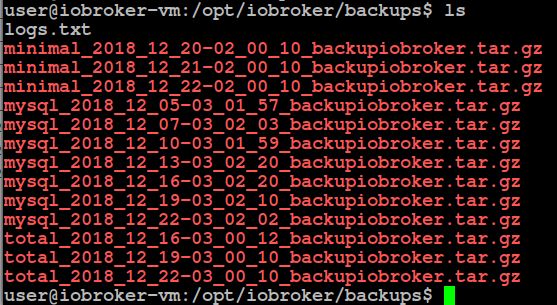
                                          Die Backups passen - nur die letzten 3 Versionen werden behalten (jeweils minimal und total - so wie im Adapter eingestellt). Das mysql Backup, das mit jedem total-Backup angelegt wird, wird allerdings nicht auf 3 limtiert. Ist das so gewollt? Das würde nämlich langsam die lokale Festplatte abfüllen…
                                          356_clipboard_1.jpg

                                          Synology DS920+ VM, S7-315 PN mit ET200S

                                          1 Antwort Letzte Antwort
                                          0
                                          Antworten
                                          • In einem neuen Thema antworten
                                          Anmelden zum Antworten
                                          • Älteste zuerst
                                          • Neuste zuerst
                                          • Meiste Stimmen


                                          Support us

                                          ioBroker
                                          Community Adapters
                                          Donate
                                          FAQ Cloud / IOT
                                          HowTo: Node.js-Update
                                          HowTo: Backup/Restore
                                          Downloads
                                          BLOG

                                          382

                                          Online

                                          32.5k

                                          Benutzer

                                          81.6k

                                          Themen

                                          1.3m

                                          Beiträge
                                          Community
                                          Impressum | Datenschutz-Bestimmungen | Nutzungsbedingungen | Einwilligungseinstellungen
                                          ioBroker Community 2014-2025
                                          logo
                                          • Anmelden

                                          • Du hast noch kein Konto? Registrieren

                                          • Anmelden oder registrieren, um zu suchen
                                          • Erster Beitrag
                                            Letzter Beitrag
                                          0
                                          • Home
                                          • Aktuell
                                          • Tags
                                          • Ungelesen 0
                                          • Kategorien
                                          • Unreplied
                                          • Beliebt
                                          • GitHub
                                          • Docu
                                          • Hilfe