




[gelöst] Surveillance Station Home Mode steuern
-
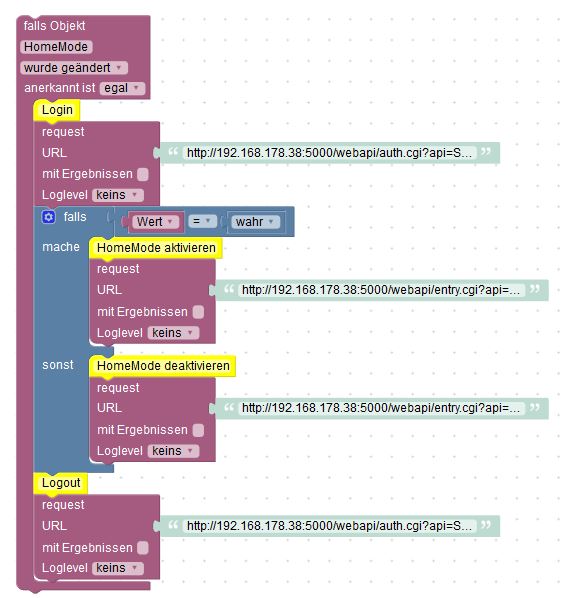
wenn ich eine Variable erstelle, in Diesem Fall die "SSI" und "result". Muss ich da etwas beachten?
Ich habe die einfach in Blockly angelegt, sonst nichts. Ist das korrekt?
Wo könnte es noch dranhängen?
-
Ich kann Dir leider nicht sagen, was bei Dir im Skript falsch ist. Allerdings gibt es ja die Möglichkeit, ein Blockly-Skript zu ex- und importieren. Außerdem kann man sich ja auch den Java Script Code anzeigen lassen. Ich poste das mal hier. Achtung, natürlich müssen URL zum Synology, User und Password passend eingetragen werden.
Blockly:
 <xml xmlns="http://www.w3.org/1999/xhtml"><block type="comment" id="?eH]L9k:Ib4wfolmT[cy" x="87" y="-838"><field name="COMMENT">Skript ändert den HomeMode der Synology</field>
    <next><block type="comment" id="qwy:_@:WY|8mC9_eS9VZ"><field name="COMMENT">Surveillance Station - True oder False</field>
        <next><block type="comment" id="pYyx,Cg!,cdg:|,-?u]a"><field name="COMMENT">Trigger ist eine Objektänderung</field>
            <next><block type="on" id="bcuLKEa;9pP{IH#th[!4"><field name="OID">control.0.SurveillanceStation.HomeMode</field>
                <field name="CONDITION">ne</field>

                <statement name="STATEMENT"><block type="comment" id="N;:SDq:TI*zH~2%Q!USS"><field name="COMMENT">Login URL - Hardcoded</field>
                    <next><block type="comment" id="OA!{bdbR=I{~*en2b:)q"><field name="COMMENT">IP-Adresse, User und Password</field>
                        <next><block type="request" id="]5K08@Y}juiF3ry_yR,5"><mutation with_statement="true"></mutation>
                            <field name="WITH_STATEMENT">TRUE</field>
                            <field name="LOG">log</field>
                            <value name="URL"><shadow type="text" id="6xTZA,IEA?{.C1Vdb?Cy"><field name="TEXT">http://<ip>:<port>/webapi/auth.cgi?api=SYNO.API.Auth&method=Login&version=3&account=<user>&passwd=<password>&session=SurveillanceStation&format=sid</password></user></port></ip></field></shadow></value>
                            <statement name="STATEMENT"><block type="comment" id="kfmW-jlXfUvR7zTJ~foA"><field name="COMMENT">Session Token speichern</field>
                                <next><block type="variables_set" id="(p/#.2{RZ:jCLk:|fDem"><field name="VAR">SID</field>
                                    <value name="VALUE"><block type="text_getSubstring" id="%lkY=i]*JF@E0myBY?BW"><mutation at1="true" at2="true"></mutation>
                                        <field name="WHERE1">FROM_START</field>
                                        <field name="WHERE2">FROM_START</field>
                                        <value name="STRING"><block type="variables_get" id="#PF-urAJ.U[8f*`Y-zo_"><field name="VAR">result</field></block></value>
                                        <value name="AT1"><block type="math_number" id="SY!!u?`fRv~OB~mV#.Xa"><field name="NUM">16</field></block></value>
                                        <value name="AT2"><block type="math_number" id="w`gmrBn9Q6m~w+03E?m-"><field name="NUM">44</field></block></value></block></value>
                                    <next><block type="controls_if" id="Db`]sKv_sx4,FmCL6fSw"><mutation else="1"></mutation>
                                        <value name="IF0"><block type="logic_compare" id="spM:Gz:Z[P.]1]ox35}{"><field name="OP">EQ</field>
                                            <value name="A"><block type="on_source" id="Y^d7bV_BZgTPBw;H2iSq"><field name="ATTR">state.val</field></block></value>
                                            <value name="B"><block type="logic_boolean" id="-(aA^IEaKFj7wR.rFAv9"><field name="BOOL">TRUE</field></block></value></block></value>
                                        <statement name="DO0"><block type="comment" id="I2{%uXwh=5QeIBDx~Ael"><field name="COMMENT">HomeMode aktivieren</field>
                                            <next><block type="request" id="3aL?,iT88;4Oqr8%,Ld("><mutation with_statement="false"></mutation>
                                                <field name="WITH_STATEMENT">FALSE</field>
                                                <field name="LOG">log</field>
                                                <value name="URL"><shadow type="text" id="F[va5([*)3rV3Rg@6~wi"><field name="TEXT">text</field></shadow>
                                                  <block type="text_join" id="8R*S`Q[e9i{fAL1@!k-N"><mutation items="3"></mutation>
                                                    <value name="ADD0"><block type="text" id="jd]vc_DXPp^Tw*ZaLRfX"><field name="TEXT">http://<ip>:<port>/webapi/entry.cgi?api=SYNO.SurveillanceStation.HomeMode&version=1&method=Switch&on=true</port></ip></field></block></value>
                                                    <value name="ADD1"><block type="text" id="oZlPa`0xRseA13.]CJY{"><field name="TEXT">&_sid=</field></block></value>
                                                    <value name="ADD2"><block type="variables_get" id="q*X^^TUvaA2isu8i)*I/"><field name="VAR">SID</field></block></value></block></value></block></next></block></statement>
                                        <statement name="ELSE"><block type="comment" id="KHLxjEaDm@8@r)d`97%s"><field name="COMMENT">HomeMode deaktivieren</field>
                                            <next><block type="request" id="]93]eVKY/acmPP(XI1.2"><mutation with_statement="false"></mutation>
                                                <field name="WITH_STATEMENT">FALSE</field>
                                                <field name="LOG">log</field>
                                                <value name="URL"><shadow type="text" id="tu@raUM{Bs7+bD51l3O{"><field name="TEXT">text</field></shadow>
                                                  <block type="text_join" id="32wM[yij4H};]B.qIh?|"><mutation items="3"></mutation>
                                                    <value name="ADD0"><block type="text" id="t[o_dsQTIqL3Ei_uI2rD"><field name="TEXT">http:/<ip>:<port>/webapi/entry.cgi?api=SYNO.SurveillanceStation.HomeMode&version=1&method=Switch&on=false</port></ip></field></block></value>
                                                    <value name="ADD1"><block type="text" id="YH`Zf[axlAw4o)A6TkU8"><field name="TEXT">&_sid=</field></block></value>
                                                    <value name="ADD2"><block type="variables_get" id="h!d5UEvaUZtV~b3L8vTX"><field name="VAR">SID</field></block></value></block></value></block></next></block></statement></block></next></block></next></block></statement></block></next></block></next></block></statement></block></next></block></next></block></next></block></xml>
Skript:
var SID, result;

// Skript ändert den HomeMode der Synology
// Surveillance Station - True oder False
// Trigger ist eine Objektänderung
on({id: "control.0.SurveillanceStation.HomeMode"/*HomeMode*/, change: "ne"}, function (obj) {
  var value = obj.state.val;
  var oldValue = obj.oldState.val;
  // Login URL - Hardcoded
  // IP-Adresse, User und Password
  try {
    require("request")('http://<ip>:<port>/webapi/auth.cgi?api=SYNO.API.Auth&method=Login&version=3&account=<user>&passwd=<password>&session=SurveillanceStation&format=sid', function (error, response, result) {
      // Session Token speichern
    SID = result.slice(15, 44);
    if ((obj.state ? obj.state.val : "") == true) {
      // HomeMode aktivieren
      try {
        require("request")((['http://<ip>:<port>/webapi/entry.cgi?api=SYNO.SurveillanceStation.HomeMode&version=1&method=Switch&on=true','&_sid=',SID].join(''))).on("error", function (e) {console.error(e);});
      } catch (e) { console.error(e); }
      console.log("request: " + (['http://<ip>:<port>/webapi/entry.cgi?api=SYNO.SurveillanceStation.HomeMode&version=1&method=Switch&on=true','&_sid=',SID].join('')));
    } else {
      // HomeMode deaktivieren
      try {
        require("request")((['http://<ip>:<port>/webapi/entry.cgi?api=SYNO.SurveillanceStation.HomeMode&version=1&method=Switch&on=false','&_sid=',SID].join(''))).on("error", function (e) {console.error(e);});
      } catch (e) { console.error(e); }
      console.log("request: " + (['http://<ip>:<port>/webapi/entry.cgi?api=SYNO.SurveillanceStation.HomeMode&version=1&method=Switch&on=false','&_sid=',SID].join('')));
    }
    }).on("error", function (e) {console.error(e);});
  } catch (e) { console.error(e); }
  console.log("request: " + 'http://<ip>:<port>/webapi/auth.cgi?api=SYNO.API.Auth&method=Login&version=3&account=<user>&passwd=<password>&session=SurveillanceStation&format=sid');
});</password></user></port></ip></port></ip></port></ip></port></ip></port></ip></password></user></port></ip>
Vielleicht hilft Dir das ja.
-
Danke… eine Frage noch dazu.
Wo wird das script eingefügt?
Blockly ist ja klar :-)
-
ja das wusste ich aber die Frage ist, warum 2 scripte aufgeführt sind.
einmal "blockly" und einmal "script".
Muss ich beide scripte importieren?
wenn ich einen script importiere ist nur ein kleines schwarzes Symbol zu sehen :roll:
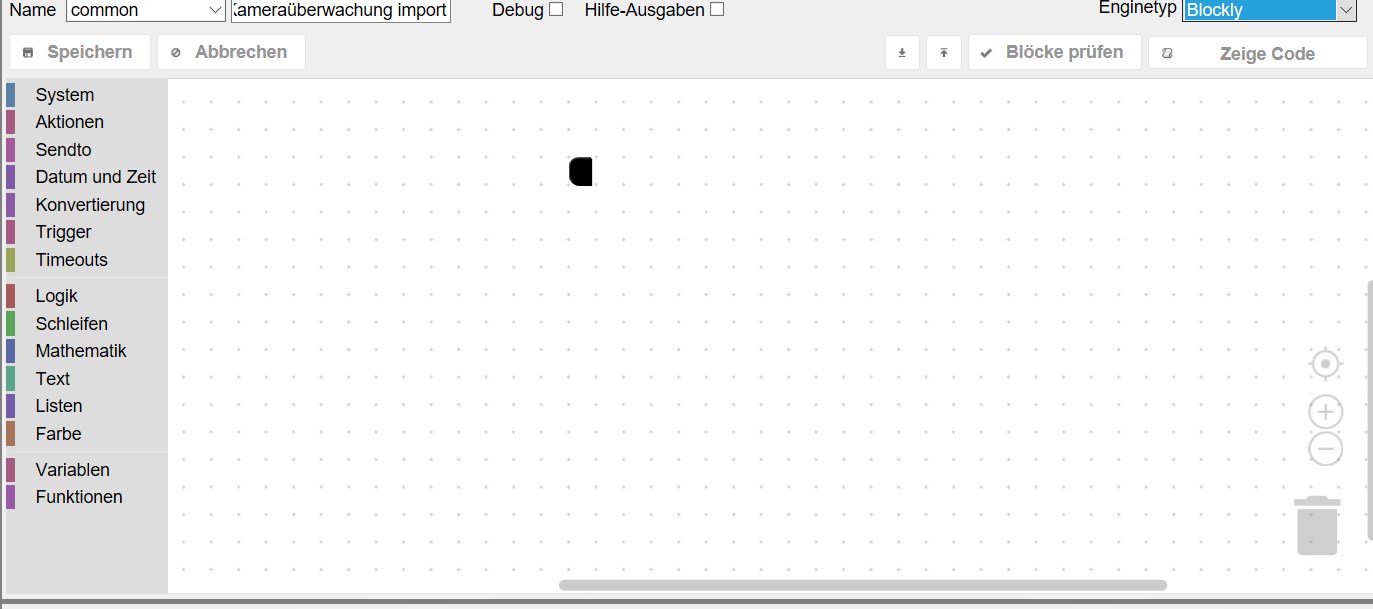
ist das korrekt?
-
Nee, der schwarze Klecks ist nicht normal.
Ich habe ein Blockly, was annähernd so aussieht, wie Du es aus dem Thread hier kennst. Genau das, solltest Du importieren können.
Wenn Du ein Blockly im Editor hast, dann kannst Du Dir mit "Zeige Code" den Java Script Code dazu anzeigen lassen. Den habe ich halt (zur Info für Dich) ebenfalls gepostet.
Aber irgendwas ist an dem geposteten Blockly faul. Wenn ich das importiere, habe ich auch nur den schwarzen Klecks. Lass mich nochmal schauen…
-
Probiere es mit dem nochmal:
<xml xmlns="http://www.w3.org/1999/xhtml"><block type="comment" id="?eH]L9k:Ib4wfolmT[cy" x="87" y="-838"><field name="COMMENT">Skript ändert den HomeMode der Synology</field> <next><block type="comment" id="qwy:_@:WY|8mC9_eS9VZ"><field name="COMMENT">Surveillance Station - True oder False</field> <next><block type="comment" id="pYyx,Cg!,cdg:|,-?u]a"><field name="COMMENT">Trigger ist eine Objektänderung</field> <next><block type="on" id="bcuLKEa;9pP{IH#th[!4"><field name="OID">control.0.SurveillanceStation.HomeMode</field> <field name="CONDITION">ne</field> <statement name="STATEMENT"><block type="comment" id="N;:SDq:TI*zH~2%Q!USS"><field name="COMMENT">Login URL - Hardcoded</field> <next><block type="comment" id="OA!{bdbR=I{~*en2b:)q"><field name="COMMENT">IP-Adresse, User und Password</field> <next><block type="request" id="]5K08@Y}juiF3ry_yR,5"><mutation with_statement="true"></mutation> <field name="WITH_STATEMENT">TRUE</field> <field name="LOG">log</field> <value name="URL"><shadow type="text" id="6xTZA,IEA?{.C1Vdb?Cy"><field name="TEXT">http://192.168.1.100:5000/webapi/auth.cgi?api=SYNO.API.Auth&method=Login&version=3&account=username&passwd=password&session=SurveillanceStation&format=sid</field></shadow></value> <statement name="STATEMENT"><block type="comment" id="kfmW-jlXfUvR7zTJ~foA"><field name="COMMENT">Session Token speichern</field> <next><block type="variables_set" id="(p/#.2{RZ:jCLk:|fDem"><field name="VAR">SID</field> <value name="VALUE"><block type="text_getSubstring" id="%lkY=i]*JF@E0myBY?BW"><mutation at1="true" at2="true"></mutation> <field name="WHERE1">FROM_START</field> <field name="WHERE2">FROM_START</field> <value name="STRING"><block type="variables_get" id="#PF-urAJ.U[8f*`Y-zo_"><field name="VAR">result</field></block></value> <value name="AT1"><block type="math_number" id="SY!!u?`fRv~OB~mV#.Xa"><field name="NUM">16</field></block></value> <value name="AT2"><block type="math_number" id="w`gmrBn9Q6m~w+03E?m-"><field name="NUM">44</field></block></value></block></value> <next><block type="controls_if" id="Db`]sKv_sx4,FmCL6fSw"><mutation else="1"></mutation> <value name="IF0"><block type="logic_compare" id="spM:Gz:Z[P.]1]ox35}{"><field name="OP">EQ</field> <value name="A"><block type="on_source" id="Y^d7bV_BZgTPBw;H2iSq"><field name="ATTR">state.val</field></block></value> <value name="B"><block type="logic_boolean" id="-(aA^IEaKFj7wR.rFAv9"><field name="BOOL">TRUE</field></block></value></block></value> <statement name="DO0"><block type="comment" id="I2{%uXwh=5QeIBDx~Ael"><field name="COMMENT">HomeMode aktivieren</field> <next><block type="request" id="3aL?,iT88;4Oqr8%,Ld("><mutation with_statement="false"></mutation> <field name="WITH_STATEMENT">FALSE</field> <field name="LOG">log</field> <value name="URL"><shadow type="text" id="F[va5([*)3rV3Rg@6~wi"><field name="TEXT">text</field></shadow> <block type="text_join" id="8R*S`Q[e9i{fAL1@!k-N"><mutation items="3"></mutation> <value name="ADD0"><block type="text" id="jd]vc_DXPp^Tw*ZaLRfX"><field name="TEXT">http://192.168.1.100:5000/webapi/entry.cgi?api=SYNO.SurveillanceStation.HomeMode&version=1&method=Switch&on=true</field></block></value> <value name="ADD1"><block type="text" id="oZlPa`0xRseA13.]CJY{"><field name="TEXT">&_sid=</field></block></value> <value name="ADD2"><block type="variables_get" id="q*X^^TUvaA2isu8i)*I/"><field name="VAR">SID</field></block></value></block></value></block></next></block></statement> <statement name="ELSE"><block type="comment" id="KHLxjEaDm@8@r)d`97%s"><field name="COMMENT">HomeMode deaktivieren</field> <next><block type="request" id="]93]eVKY/acmPP(XI1.2"><mutation with_statement="false"></mutation> <field name="WITH_STATEMENT">FALSE</field> <field name="LOG">log</field> <value name="URL"><shadow type="text" id="tu@raUM{Bs7+bD51l3O{"><field name="TEXT">text</field></shadow> <block type="text_join" id="32wM[yij4H};]B.qIh?|"><mutation items="3"></mutation> <value name="ADD0"><block type="text" id="t[o_dsQTIqL3Ei_uI2rD"><field name="TEXT">http://192.168.1.100:5000/webapi/entry.cgi?api=SYNO.SurveillanceStation.HomeMode&version=1&method=Switch&on=false</field></block></value> <value name="ADD1"><block type="text" id="YH`Zf[axlAw4o)A6TkU8"><field name="TEXT">&_sid=</field></block></value> <value name="ADD2"><block type="variables_get" id="h!d5UEvaUZtV~b3L8vTX"><field name="VAR">SID</field></block></value></block></value></block></next></block></statement></block></next></block></next></block></statement></block></next></block></next></block></statement></block></next></block></next></block></next></block></xml> -
seit dem Import lahm mein Rechner trotz Neustart…
kanns grad net testen.... wie verhext....
ich versuchs gleich nochmal....
Importieren lies es sich jetzt aber
-
also das script ist jetzt zwar da, aber genau in Diesem script lahmt der Rechner ungemeim. Der Mausklick wird erst nach ca. 6s angenommen. Mann kann also fasst nichts damit anstellen.
Wenn ich in ein anderes script reinklicke geht alles normal, auch alle anderen Funktionen des PC´s sind i.O.
Nur Dieses script lahmt wie eine Ente
-
Ja, habe da zum test einen türkontakt drin
-
also es funktioniert soweit…. wenn ich es bearbeiten möchte dauert es EEEWWIIIIIGGGGG, aber die Funktion ist gegeben...
-
Hab´s nachgebaut und es funktioniert !! :-)
Sehr sehr gut !! Vielen Dank !!! :lol:
-
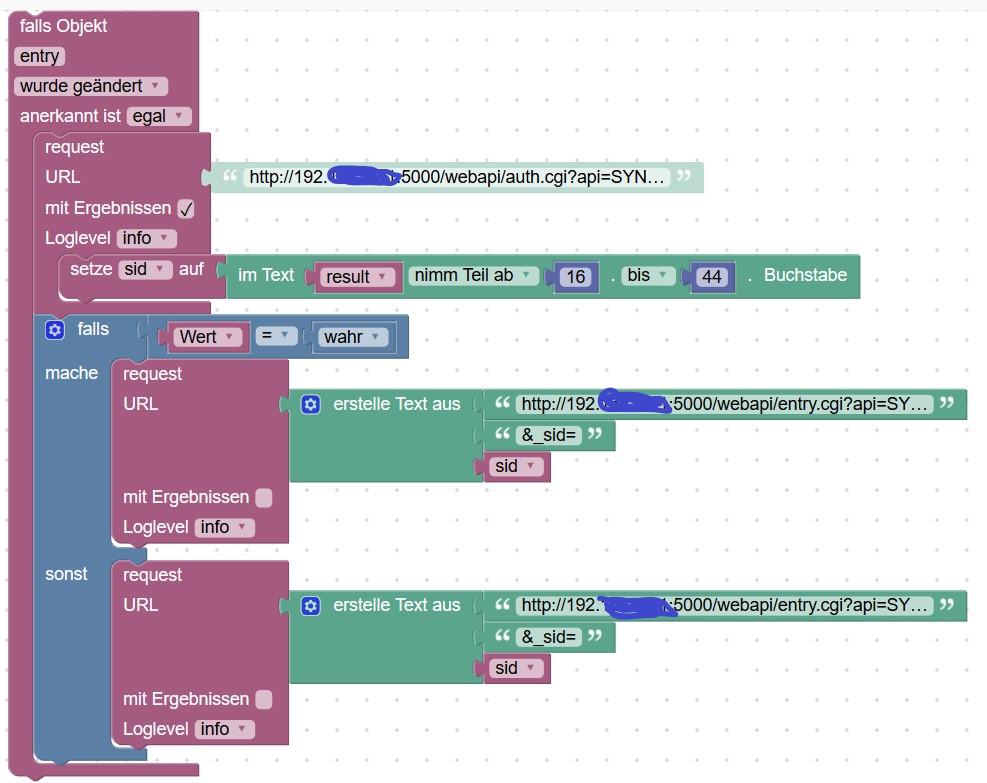
Mir ist nicht ganz klar wieso ihr die SID benötigt? Vielleicht habe ich es auch übersehen.
Ich mache seit glaub zwei Jahren die Steuerung des HomeMode einfach per Request. SetHomeMode wird entsprechend aufgerufen wenn jemand zuhause ist oder niemand mehr.
var textHomeModeOn  = 'https://<ip>:<port>/webapi/entry.cgi?api=SYNO.SurveillanceStation.ExternalEvent&method="Trigger"&version=1&eventId=1&eventName="HomeModeEingeschaltet"&account="<accountname>"&password="<passwort>"';
var textHomeModeOff = 'https://<ip>:<port>/webapi/entry.cgi?api=SYNO.SurveillanceStation.ExternalEvent&method="Trigger"&version=1&eventId=2&eventName="HomeModeAusgeschaltet"&account="<accountname>"&password="<passwort>"';

function setHomeMode(parameter) {
    console.log('Home Mode Starten Funktion ausgeführt mit Parameter ' + String(parameter));
    if (parameter === true) {
        try {
            require("request")(textHomeModeOn);
        } catch (e) { console.error(e); }
    } else {
        try {
            require("request")(textHomeModeOff);
        } catch (e) { console.error(e); }
    }
}
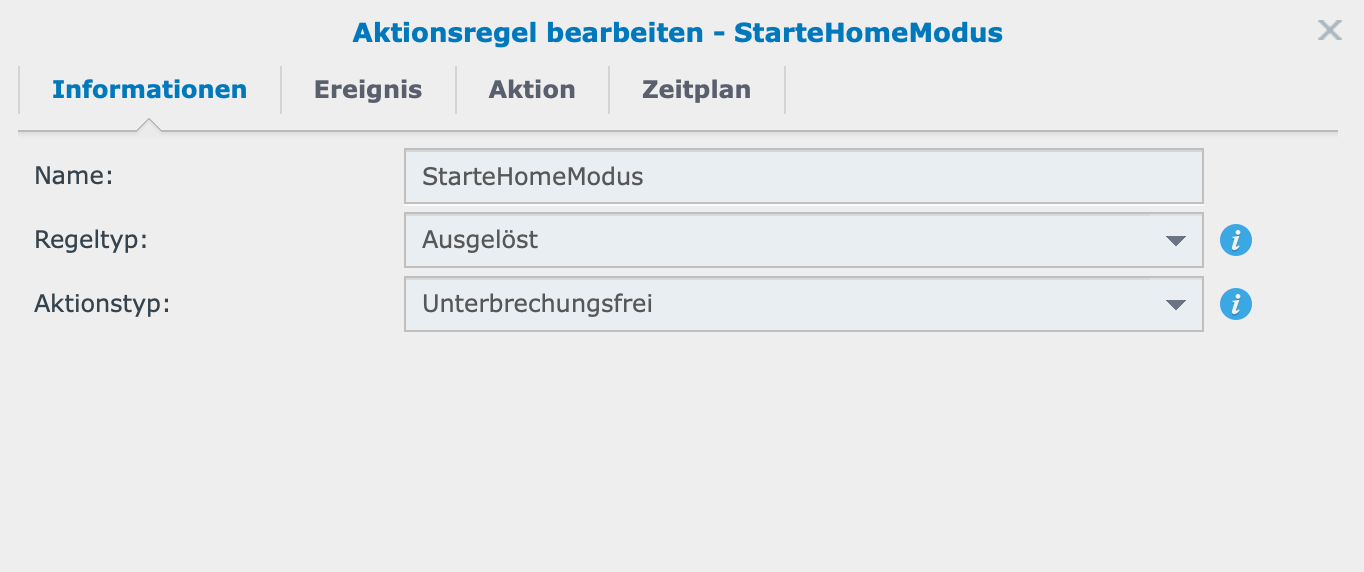
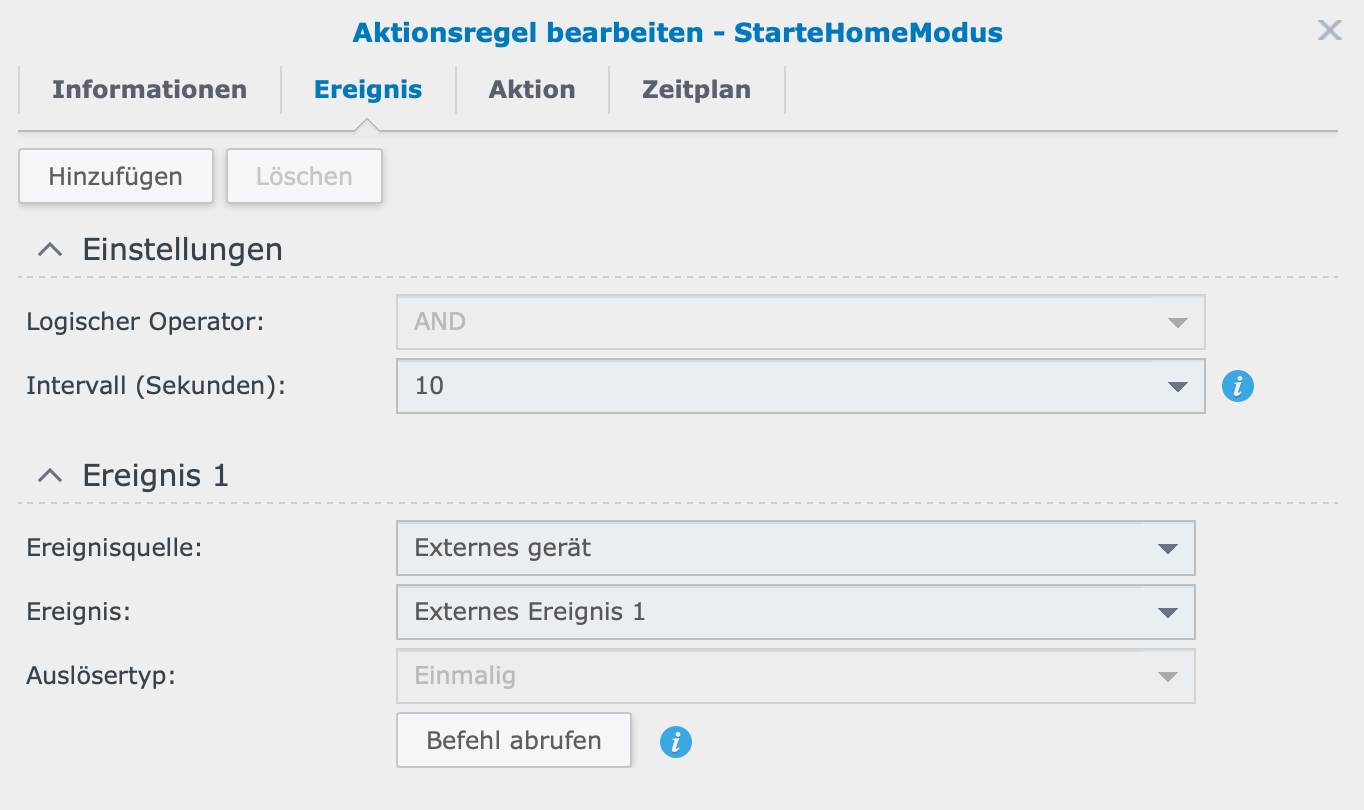
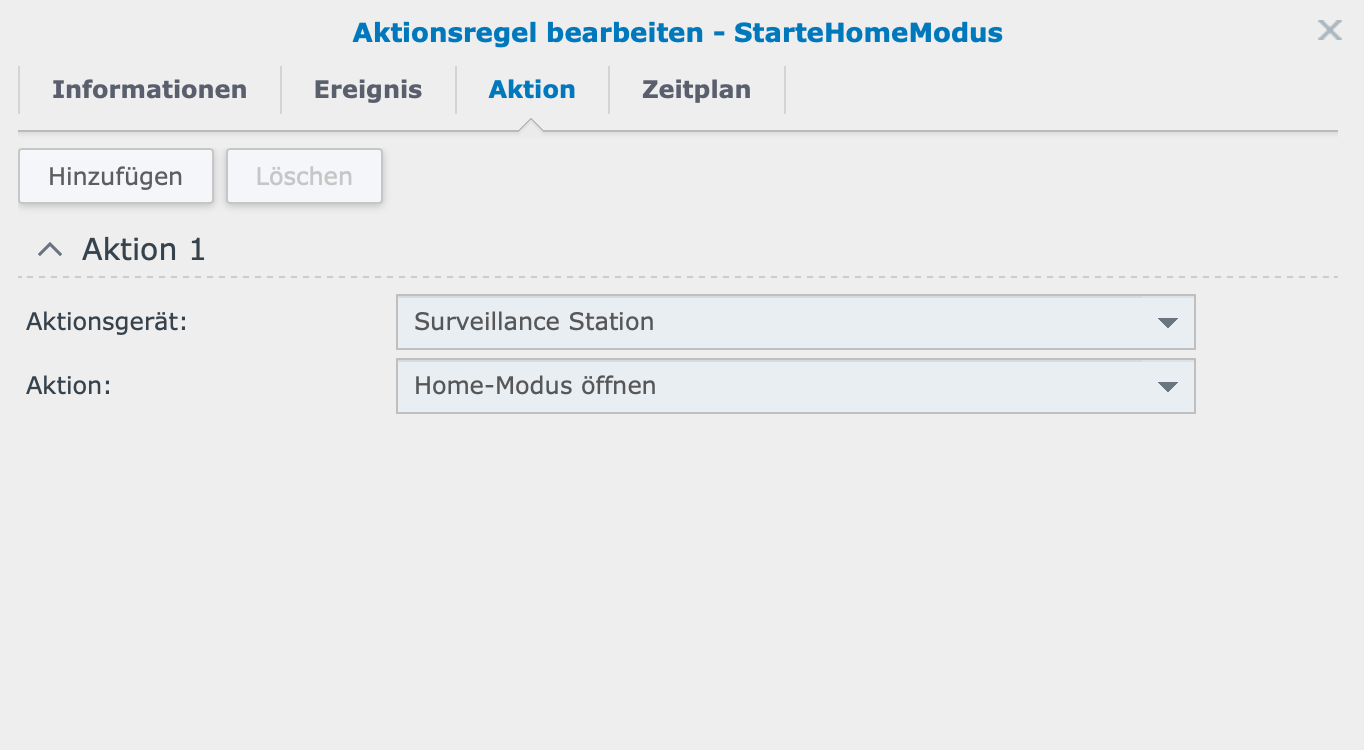
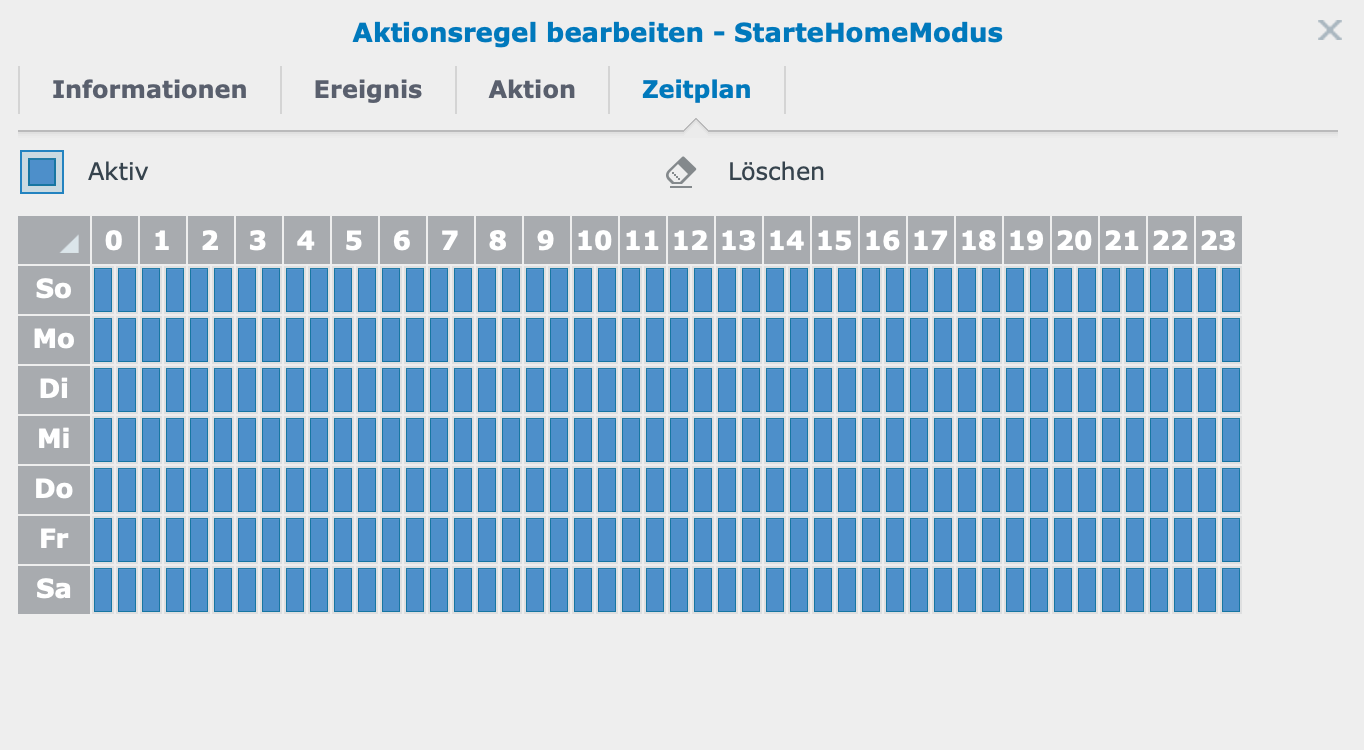
Die beiden Befehle sind in der Surveillance Station als Aktionsregel eingerichtet


Hey! Du scheinst an dieser Unterhaltung interessiert zu sein, hast aber noch kein Konto.
Hast du es satt, bei jedem Besuch durch die gleichen Beiträge zu scrollen? Wenn du dich für ein Konto anmeldest, kommst du immer genau dorthin zurück, wo du zuvor warst, und kannst dich über neue Antworten benachrichtigen lassen (entweder per E-Mail oder Push-Benachrichtigung). Du kannst auch Lesezeichen speichern und Beiträge positiv bewerten, um anderen Community-Mitgliedern deine Wertschätzung zu zeigen.
Mit deinem Input könnte dieser Beitrag noch besser werden 💗
Registrieren AnmeldenSupport us
462
Online33.1k
Benutzende83.7k
Themen1.3m
Beiträge