Skip to content
  • Home
  • Aktuell
  • Tags
  • 0 Ungelesen 0
  • Kategorien
  • Unreplied
  • Beliebt
  • GitHub
  • Docu
  • Hilfe
Skins
  • Light
  • Brite
  • Cerulean
  • Cosmo
  • Flatly
  • Journal
  • Litera
  • Lumen
  • Lux
  • Materia
  • Minty
  • Morph
  • Pulse
  • Sandstone
  • Simplex
  • Sketchy
  • Spacelab
  • United
  • Yeti
  • Zephyr
  • Dark
  • Cyborg
  • Darkly
  • Quartz
  • Slate
  • Solar
  • Superhero
  • Vapor

  • Standard: (Kein Skin)
  • Kein Skin
Einklappen
ioBroker Logo

Community Forum

donate donate
  1. ioBroker Community Home
  2. Deutsch
  3. ioBroker Allgemein
  4. Nodejs und npm Update

NEWS

  • Neuer Blogbeitrag: Monatsrückblick - Dezember 2025 🎄
    BluefoxB
    Bluefox
    11
    1
    508

  • Weihnachtsangebot 2025! 🎄
    BluefoxB
    Bluefox
    24
    1
    1.7k

  • UPDATE 31.10.: Amazon Alexa - ioBroker Skill läuft aus ?
    apollon77A
    apollon77
    48
    3
    9.6k

Nodejs und npm Update

Geplant Angeheftet Gesperrt Verschoben ioBroker Allgemein
124 Beiträge 21 Kommentatoren 34.1k Aufrufe
  • Älteste zuerst
  • Neuste zuerst
  • Meiste Stimmen
Antworten
  • In einem neuen Thema antworten
Anmelden zum Antworten
Dieses Thema wurde gelöscht. Nur Nutzer mit entsprechenden Rechten können es sehen.
  • chucky666C Online
    chucky666C Online
    chucky666
    schrieb am zuletzt editiert von
    #102

    Gute Idee

    Gesendet von iPhone mit Tapatalk Pro

    1 Antwort Letzte Antwort
    0
    • VumerV Offline
      VumerV Offline
      Vumer
      schrieb am zuletzt editiert von
      #103

      folgendes Problem

      debian-9.5.0-amd64-netinst.iso installier

      bei curl -sL https://deb.nodesource.com/setup_8.x | sudo -E bash -

      sudo npm install -g npm@4 bringt
      ` > npm ERR! Invalid argument: family must be 4 or 6

      npm ERR! A complete log of this run can be found in:

      npm ERR! /root/.npm/_logs/2018-08-09T10_14_53_524Z-debug.log `
      bei curl -sL https://deb.nodesource.com/setup_6.x | sudo -E bash -

      sudo npm install -g npm@latest bringt
      ` > npm ERR! Linux 4.9.0-7-686-pae

      npm ERR! argv "/usr/bin/node" "/usr/bin/npm" "install" "-g" "npm@latest"

      npm ERR! node v6.14.3

      npm ERR! npm v3.10.10

      npm ERR! path /usr/lib/node_modules/.staging/abbrev-7fff8000

      npm ERR! code ENOENT

      npm ERR! errno -2

      npm ERR! syscall rename

      npm ERR! enoent ENOENT: no such file or directory, rename '/usr/lib/node_modules/.staging/abbrev-7fff8000' -> '/usr/lib/node_modules/npm/node_modules/abbrev'

      npm ERR! enoent ENOENT: no such file or directory, rename '/usr/lib/node_modules/.staging/abbrev-7fff8000' -> '/usr/lib/node_modules/npm/node_modules/abbrev'

      npm ERR! enoent This is most likely not a problem with npm itself

      npm ERR! enoent and is related to npm not being able to find a file.

      npm ERR! enoent

      npm ERR! Please include the following file with any support request:

      npm ERR! /root/npm-debug.log

      npm ERR! code 1 danach npm -v > -bash: /usr/bin/npm: Datei oder Verzeichnis nicht gefunden `
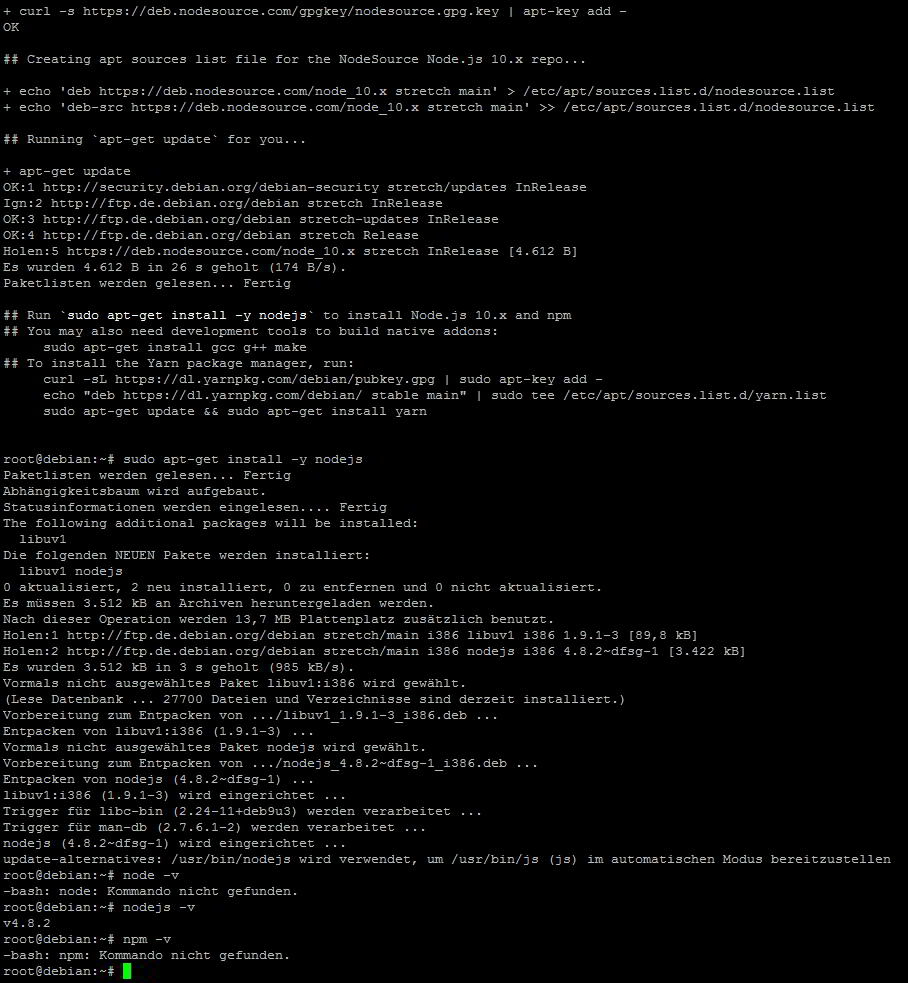
      bei curl -sL https://deb.nodesource.com/setup_10.x | sudo -E bash -

      node -v

      -bash: node: Kommando nicht gefunden.

      nodejs -v

      v4.8.2

      npm -v

      -bash: npm: Kommando nicht gefunden.

      build-essential ist installiert

      Was mache ich falsch?

      1 Antwort Letzte Antwort
      0
      • HomoranH Nicht stören
        HomoranH Nicht stören
        Homoran
        Global Moderator Administrators
        schrieb am zuletzt editiert von
        #104

        Hast du nachbdem curl…. überhaupt nodejs installiert?

        Auf jeden Fall jetzt erst mal node v4 deinstallieren!

        Gruß Rainer

        kein Support per PN! - Fragen im Forum stellen - es gibt fast nichts, was nicht auch für andere interessant ist.

        Benutzt das Voting rechts unten im Beitrag wenn er euch geholfen hat.

        der Installationsfixer: curl -fsL https://iobroker.net/fix.sh | bash -

        1 Antwort Letzte Antwort
        0
        • VumerV Offline
          VumerV Offline
          Vumer
          schrieb am zuletzt editiert von
          #105

          habe ich, alles nach der Anleitung

          http://www.iobroker.net/docu/?page_id=5106&lang=de

          und vor jeden curl…. ein neuer, sauberer Image

          1 Antwort Letzte Antwort
          0
          • HomoranH Nicht stören
            HomoranH Nicht stören
            Homoran
            Global Moderator Administrators
            schrieb am zuletzt editiert von
            #106

            Sehe ich aber bei dir nicht. Da fehlt ein Schritt.

            Trotz allem musst du erst mal nodrjs 4.x loswerden.

            So wie es in der Anleitung steht.

            Gruß Rainer

            kein Support per PN! - Fragen im Forum stellen - es gibt fast nichts, was nicht auch für andere interessant ist.

            Benutzt das Voting rechts unten im Beitrag wenn er euch geholfen hat.

            der Installationsfixer: curl -fsL https://iobroker.net/fix.sh | bash -

            1 Antwort Letzte Antwort
            0
            • VumerV Offline
              VumerV Offline
              Vumer
              schrieb am zuletzt editiert von
              #107

              das mit nodejs 4. kommt ja nur bei curl -sL https://deb.nodesource.com/setup_10.x | sudo -E bash -

              eigentlich wollte ich curl -sL https://deb.nodesource.com/setup_8.x | sudo -E bash -

              und sudo npm install -g npm@4 durchführen

              habe nur auch andere node getestet und überall läuft was schief

              1 Antwort Letzte Antwort
              0
              • HomoranH Nicht stören
                HomoranH Nicht stören
                Homoran
                Global Moderator Administrators
                schrieb am zuletzt editiert von
                #108

                @Vumer:

                das mit nodejs 4. kommt ja nur bei curl -sL https://deb.nodesource.com/setup_10.x | sudo -E bash - `
                Nein! Dann käme bei node -v etwas wie 10.1.x

                Nodejs 4.x war wahrscheinlich schon vorher drauf.

                Bitte entfernen

                kein Support per PN! - Fragen im Forum stellen - es gibt fast nichts, was nicht auch für andere interessant ist.

                Benutzt das Voting rechts unten im Beitrag wenn er euch geholfen hat.

                der Installationsfixer: curl -fsL https://iobroker.net/fix.sh | bash -

                1 Antwort Letzte Antwort
                0
                • VumerV Offline
                  VumerV Offline
                  Vumer
                  schrieb am zuletzt editiert von
                  #109

                  100% sauberer Image ohne node

                  bin grade am debian neu zu installieren

                  aber was leuft bei node8 schief?

                  1 Antwort Letzte Antwort
                  0
                  • paul53P Offline
                    paul53P Offline
                    paul53
                    schrieb am zuletzt editiert von
                    #110

                    @Vumer:

                    100% sauberer Image ohne node `
                    Bist Du sicher ?

                    <u>Bevor</u> Du nodejs 8 installierst, solltest Du es überprüfen.

                    node -v
                    nodejs -v
                    npm -v


                    Bitte verzichtet auf Chat-Nachrichten, denn die Handhabung ist grauenhaft !
                    Produktiv: RPi 2 mit S.USV, HM-MOD-RPI und SLC-USB-Stick mit root fs

                    1 Antwort Letzte Antwort
                    0
                    • VumerV Offline
                      VumerV Offline
                      Vumer
                      schrieb am zuletzt editiert von
                      #111

                      also, ich hätte mich selber auch nicht geglaubt :lol:

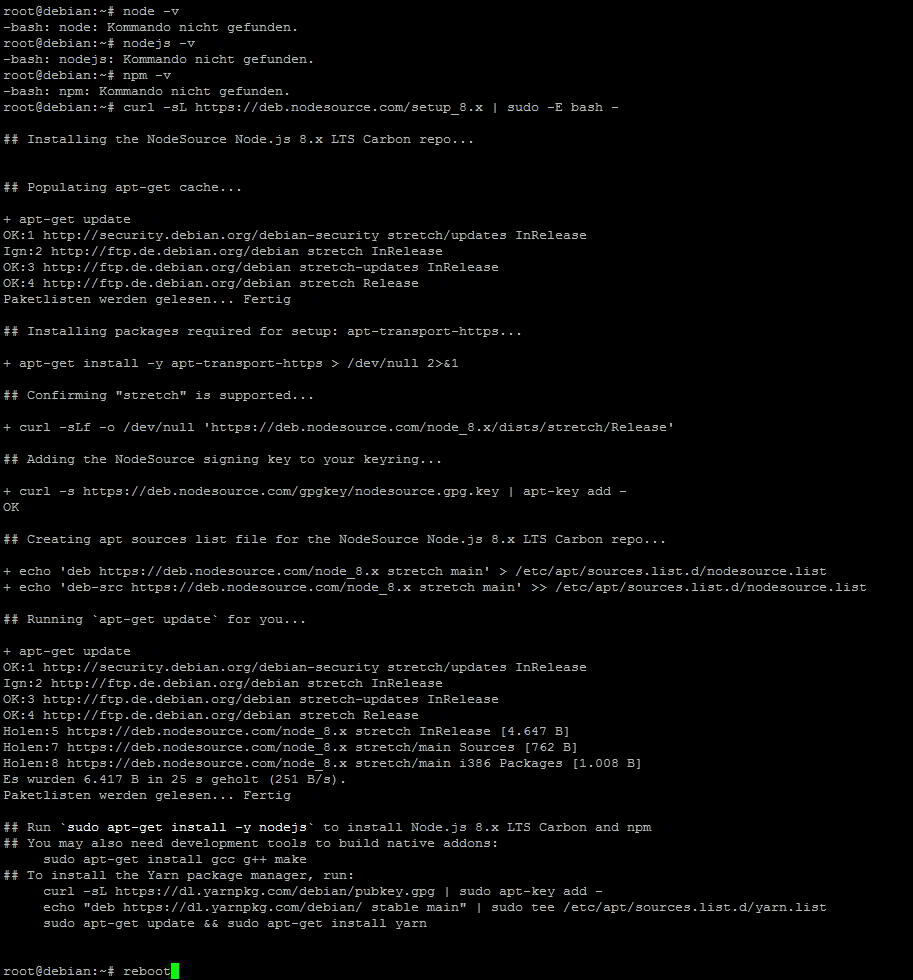
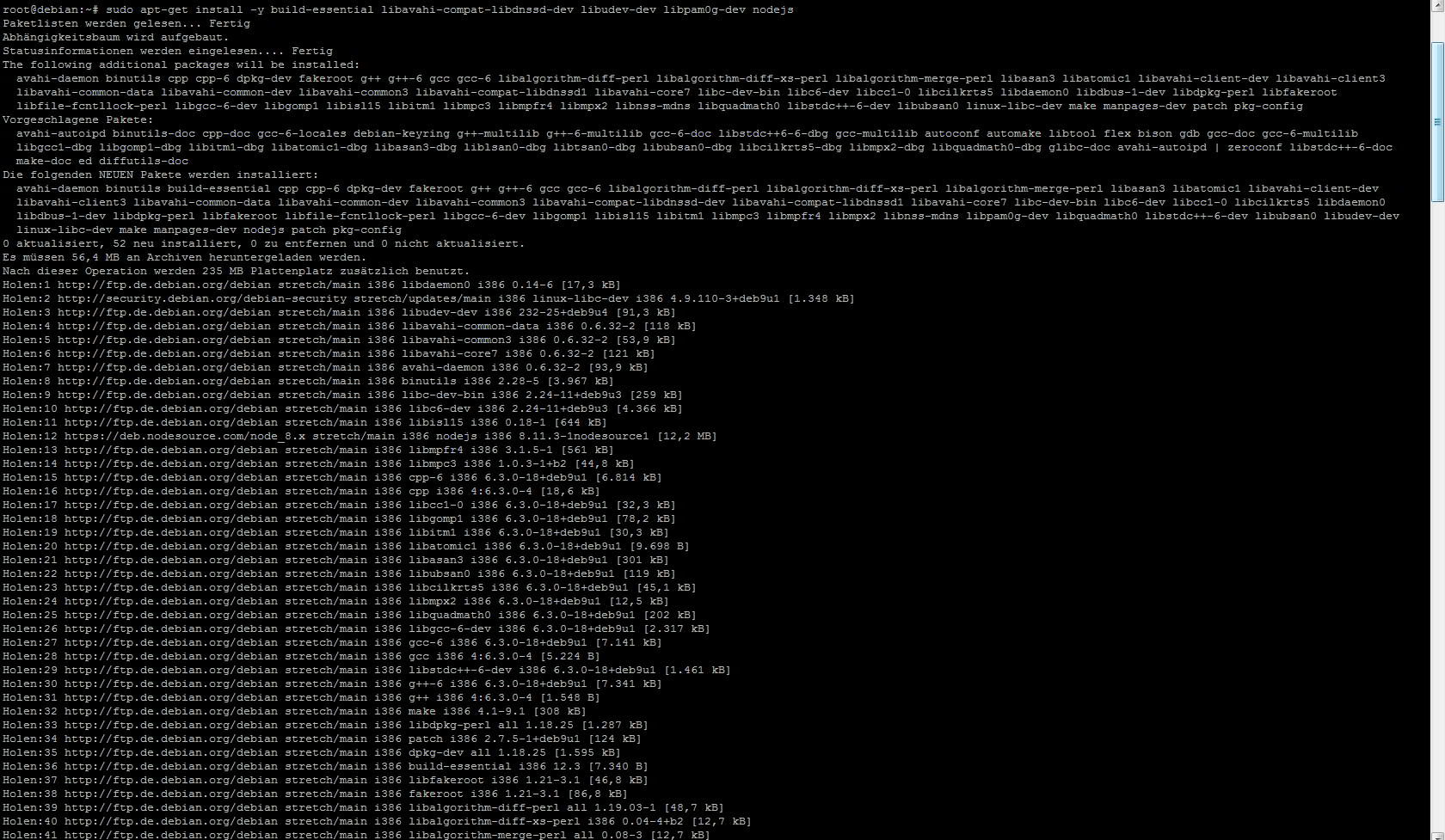
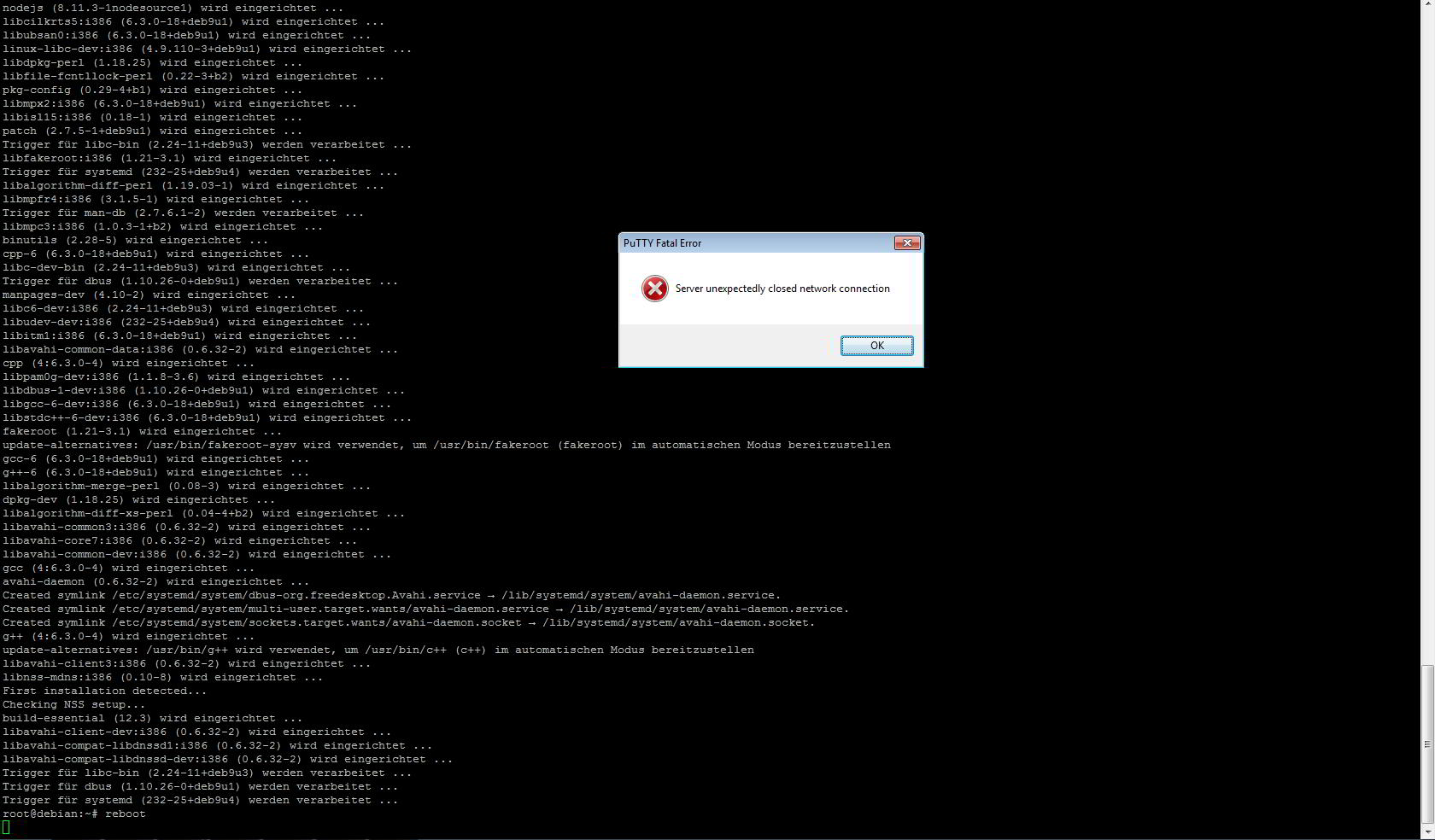
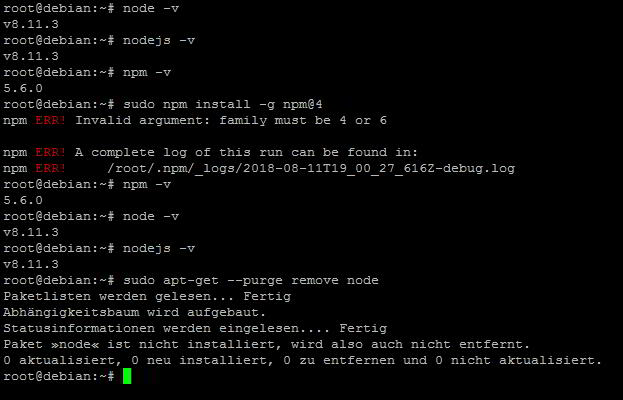
                      aber hier kommt nodejs 8
                      2071_node6-1.jpg
                      2071_node6-2.jpg
                      2071_node6-3.jpg
                      2071_node6-4.jpg

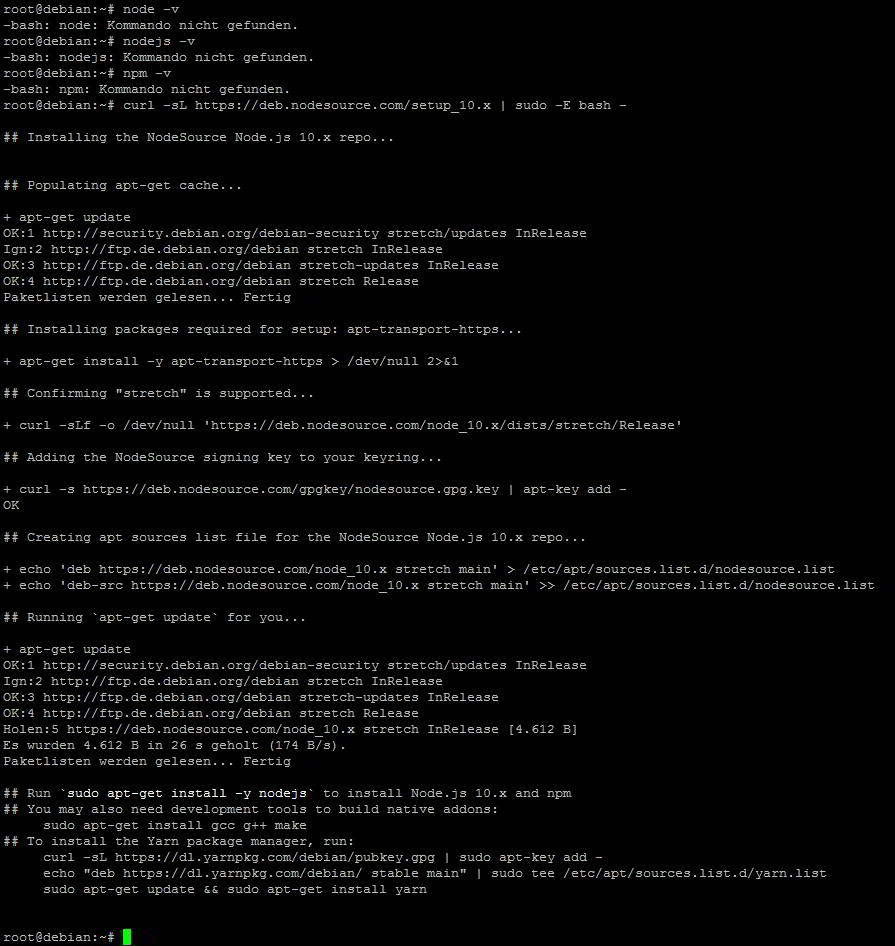
                      gleich kommt ein frischer Image mit nodejs 10

                      1 Antwort Letzte Antwort
                      0
                      • HomoranH Nicht stören
                        HomoranH Nicht stören
                        Homoran
                        Global Moderator Administrators
                        schrieb am zuletzt editiert von
                        #112

                        Wo ist jetzt dein problem mit node 8.x?

                        Lediglich beim downgrade von npm hängtves.

                        Warum jetzt das noch nicht vollständig fertige node 10 installieren?

                        Gruß Rainer

                        kein Support per PN! - Fragen im Forum stellen - es gibt fast nichts, was nicht auch für andere interessant ist.

                        Benutzt das Voting rechts unten im Beitrag wenn er euch geholfen hat.

                        der Installationsfixer: curl -fsL https://iobroker.net/fix.sh | bash -

                        1 Antwort Letzte Antwort
                        0
                        • StabilostickS Offline
                          StabilostickS Offline
                          Stabilostick
                          schrieb am zuletzt editiert von
                          #113

                          Das mit „family must be 4 or 6“ kann auf ein Problem mit der DNS Namensauflösung bei Dir sein.

                          Prüfe z.B. die Datei(en) .npmrc auf folgende Zeile und lösche diese ggf.

                          repository=http://registry.npmjs.org/npm in ~/.npmrc

                          1 Antwort Letzte Antwort
                          0
                          • VumerV Offline
                            VumerV Offline
                            Vumer
                            schrieb am zuletzt editiert von
                            #114

                            hier node 10
                            2071_node10-1.jpg
                            2071_node10-2.jpg

                            1 Antwort Letzte Antwort
                            0
                            • StabilostickS Offline
                              StabilostickS Offline
                              Stabilostick
                              schrieb am zuletzt editiert von
                              #115

                              Was für ein durcheinander…

                              Du bist übrigens „root“, d.h. Admin. Da kannst Du Dir das „sudo“ sparen.

                              1 Antwort Letzte Antwort
                              0
                              • VumerV Offline
                                VumerV Offline
                                Vumer
                                schrieb am zuletzt editiert von
                                #116

                                @Stabilostick:

                                Das mit „family must be 4 or 6“ kann auf ein Problem mit der DNS Namensauflösung bei Dir sein. `
                                :?: ist eine VM von proxmox

                                1 Antwort Letzte Antwort
                                0
                                • StabilostickS Offline
                                  StabilostickS Offline
                                  Stabilostick
                                  schrieb am zuletzt editiert von
                                  #117

                                  Management Summary zum Problem von Vumer: 8-)

                                  • Proxmox 5.x, aktuellste Version

                                  • Verschiedene VMs mit Debian 8, 9.0 und 9.5, 32 und 64bit getestet, installiert aus netboot-CD

                                  • Netzwerkkonfig "Bridged", Intel als Netzwerkkarte eingestellt

                                  • Host Netzwerk Konfig````
                                    auto lo
                                    iface lo inet loopback

                                    iface eno1 inet manual

                                    auto vmbr0
                                    iface vmbr0 inet static
                                    address 192.168.10.2
                                    netmask 255.255.255.0
                                    gateway 192.168.10.1
                                    bridge_ports eno1
                                    bridge_stp off
                                    bridge_fd 0


                                  • Guest hat DHCP eingeschaltet, eigene MAC jeweils pro VM

                                  • Fritzbox in Standardkonfiguration als DHCP- und DNS-Server, leitet DNS-Anfrage an Provider-DNS

                                  • Fritzbox keine Filter oder Portfreiganben für VM

                                  • Proxmox-Firewall in Standardkonfiguration

                                  • interfaces am Guest passt. dhcp. "ip addr" Ausgabe passt.````
                                    iface ens18 inet dhcp


                                  • ipv6 in Debian aktiv/ausgeschaltet ändert nichts

                                  • Debian.Image ist blank, kein ioBroker und kein nodejs vorher drauf.

                                  • Kein Proxy konfiguriert

                                  Ergebnis: Debian Stretch läuft. DNS-Abfragen, wget, apt-get usw. machen was sie sollen.(*)

                                  ****Aber: npm funktioniert unter node 8.x und 10.x nicht.

                                  Unabhänging von der installierten Debian-Version****

                                  Mit node 6 läuft npm 3 und 4, jedoch mit Verzögerung bei jeder Befehlsausführung, die sich wie ein Timeout anfühlen.

                                  <u>Details</u>

                                  Ausgabe eine npm-Installationsversuchs unter node 10:

                                  root@debian:~# npm i -g npm@latest --verbose
                                  npm info it worked if it ends with ok
                                  npm verb cli [ '/usr/bin/node',
                                  npm verb cli   '/usr/bin/npm',
                                  npm verb cli   'i',
                                  npm verb cli   '-g',
                                  npm verb cli   'npm@latest',
                                  npm verb cli   '--verbose' ]
                                  npm info using npm@6.2.0
                                  npm info using node@v10.8.0
                                  npm verb npm-session f2039f9ef13dcb59
                                  npm timing stage:rollbackFailedOptional Completed in 37ms
                                  npm timing stage:runTopLevelLifecycles Completed in 4739ms
                                  npm verb stack TypeError [ERR_INVALID_OPT_VALUE]: The value "4294967295" is invalid for option "family"
                                  npm verb stack     at lookup (dns.js:112:11)
                                  npm verb stack     at net.js:1056:5
                                  npm verb stack     at defaultTriggerAsyncIdScope (internal/async_hooks.js:294:19)
                                  npm verb stack     at lookupAndConnect (net.js:1055:3)
                                  npm verb stack     at TLSSocket.Socket.connect (net.js:990:5)
                                  npm verb stack     at Object.connect (_tls_wrap.js:1147:12)
                                  npm verb stack     at HttpsAgent.createConnection (https.js:119:22)
                                  npm verb stack     at HttpsAgent.createSocket (/usr/lib/node_modules/npm/node_modules/agentkeepalive/lib/_http_agent.js:265:26)
                                  npm verb stack     at HttpsAgent.createSocket (/usr/lib/node_modules/npm/node_modules/agentkeepalive/lib/agent.js:77:11)
                                  npm verb stack     at HttpsAgent.addRequest (/usr/lib/node_modules/npm/node_modules/agentkeepalive/lib/_http_agent.js:239:10)
                                  npm verb stack     at new ClientRequest (_http_client.js:239:16)
                                  npm verb stack     at request (https.js:272:10)
                                  npm verb stack     at fetch.Promise (/usr/lib/node_modules/npm/node_modules/node-fetch-npm/src/index.js:54:17)
                                  npm verb stack     at new Promise (<anonymous>)
                                  npm verb stack     at fetch (/usr/lib/node_modules/npm/node_modules/node-fetch-npm/src/index.js:41:10)
                                  npm verb stack     at retry (/usr/lib/node_modules/npm/node_modules/make-fetch-happen/index.js:332:14)
                                  npm verb cwd /root
                                  npm verb Linux 4.9.0-7-amd64
                                  npm verb argv "/usr/bin/node" "/usr/bin/npm" "i" "-g" "npm@latest" "--verbose"
                                  npm verb node v10.8.0
                                  npm verb npm  v6.2.0
                                  npm ERR! code ERR_INVALID_OPT_VALUE
                                  npm ERR! The value "4294967295" is invalid for option "family"
                                  npm verb exit [ 1, true ]
                                  npm timing npm Completed in 14000ms</anonymous>
                                  

                                  -> The value "4294967295" is invalid for option "family"

                                  -> "4294967295" ist -1 bei unsigned 32bit Integer.

                                  Nachdem npm sich Daten von https://registry.npmjs.org/npm zieht, gleich mal mit

                                  curl -sL https://registry.npmjs.org/npm
                                  

                                  probiert: Klappt alles.

                                  Also zurück zum Thema.

                                  ****Hallo Poxmox-Kenner :D

                                  Was ist hier mit dem System und damit mit npm los?

                                  Warum läuft npm unter node 8 und 10 hier nicht?

                                  Weshalb sagt npm bei jeder Befehlsausführung, dass ein Fehler im DNS-Umfeld & falsche family (must be 4 or 6) vorliegt?****

                                  (+) PS: Mit der Installationsquellenauswahl von nodejs gab es hier auch Probleme. Debian hat das Debian-eigene Node bevorzugt. Das ist mir unverständlich, da wenn zwei oder mehrere Versionen eines Paketes die gleiche Priorität haben, so wird die Version mit der höchsten Versionsnummer installiert.

                                  Test:

                                  root@debian:~# apt-cache policy nodejs
                                  nodejs:
                                    Installiert:           (keine)
                                    Installationskandidat: 8.11.3-1nodesource1
                                    Versionstabelle:
                                       8.11.3-1nodesource1 500
                                          500 https://deb.nodesource.com/node_8.x stretch/main amd64 Packages
                                       4.8.2~dfsg-1 500
                                          500 http://ftp.de.debian.org/debian stretch/main amd64 Packages
                                  

                                  -> Beide Installationsquellen 500. Ist bei mir am Raspberry genau so, aber warum kommt hier node von debian.org (4.8.2) statt die 8.11.3?

                                  Deshalb manuelles Pinning (Steuerdatei 10node in /etc/apt/preferences.d) mit Inhalt

                                  Package: *
                                  Pin: origin deb.nodesource.com
                                  Pin-Priority: 1001
                                  

                                  führt zu

                                  root@debian:/etc/apt/preferences.d# apt-cache policy nodejs
                                  nodejs:
                                    Installiert:           (keine)
                                    Installationskandidat: 8.11.3-1nodesource1
                                    Versionstabelle:
                                       8.11.3-1nodesource1 1001
                                         1001 https://deb.nodesource.com/node_8.x stretch/main amd64 Packages
                                       4.8.2~dfsg-1 500
                                          500 http://ftp.de.debian.org/debian stretch/main amd64 Packages
                                  

                                  und damit zu klaren Verhältnissen beim Installieren.

                                  1 Antwort Letzte Antwort
                                  0
                                  • VumerV Offline
                                    VumerV Offline
                                    Vumer
                                    schrieb am zuletzt editiert von
                                    #118

                                    an dieser stelle möchte ich mich bei Stabilostick noch einmal bedanken

                                    besonders für die ruhige Art und verständliche Erklärung :)

                                    @Stabilostick:

                                    ****Aber: npm funktioniert unter node 8.x und 10.x nicht.

                                    Unabhänging von der installierten Debian-Version****

                                    Mit node 6 läuft npm 3 und 4, jedoch mit Verzögerung bei jeder Befehlsausführung, die sich wie ein Timeout anfühlen. `
                                    habe heute zum ersten mal Ubuntu 18.04 LTS installiert ( eigentlich alles das gleiche aber anders :D )

                                    hier tritt der Fehler auch auf

                                    schöne Grüße

                                    1 Antwort Letzte Antwort
                                    0
                                    • StabilostickS Offline
                                      StabilostickS Offline
                                      Stabilostick
                                      schrieb am zuletzt editiert von
                                      #119

                                      Versuche die Neuinstallation bitte auch mit dem VirtIO-Treiber von Proxmox statt mit dem Intel 1000.

                                      1 Antwort Letzte Antwort
                                      0
                                      • VumerV Offline
                                        VumerV Offline
                                        Vumer
                                        schrieb am zuletzt editiert von
                                        #120

                                        das habe ich, aber dann bekommt die VM keine IP

                                        Intel, Realtek und VMware komen alle mit dem npm Fehler

                                        1 Antwort Letzte Antwort
                                        0
                                        • StabilostickS Offline
                                          StabilostickS Offline
                                          Stabilostick
                                          schrieb am zuletzt editiert von
                                          #121

                                          Network Device

                                          Each VM can have many Network interface controllers (NIC), of four different types:

                                          Intel E1000 is the default, and emulates an Intel Gigabit network card.

                                          the VirtIO paravirtualized NIC should be used if you aim for maximum performance. Like all VirtIO devices, the guest OS should have the proper driver

                                          the Realtek 8139 emulates an older 100 MB/s network card, and should only be used when emulating older operating systems ( released before 2002 )

                                          the vmxnet3 is another paravirtualized device, which should only be used when importing a VM from another hypervisor.

                                          Proxmox VE will generate for each NIC a random MAC address, so that your VM is addressable on Ethernet networks.

                                          The NIC you added to the VM can follow one of two different models:

                                          in the default Bridged mode each virtual NIC is backed on the host by a tap device, ( a software loopback device simulating an Ethernet NIC ). This tap device is added to a bridge, by default vmbr0 in Proxmox VE. In this mode, VMs have direct access to the Ethernet LAN on which the host is located.


                                          1 Antwort Letzte Antwort
                                          0
                                          Antworten
                                          • In einem neuen Thema antworten
                                          Anmelden zum Antworten
                                          • Älteste zuerst
                                          • Neuste zuerst
                                          • Meiste Stimmen


                                          Support us

                                          ioBroker
                                          Community Adapters
                                          Donate
                                          FAQ Cloud / IOT
                                          HowTo: Node.js-Update
                                          HowTo: Backup/Restore
                                          Downloads
                                          BLOG

                                          827

                                          Online

                                          32.5k

                                          Benutzer

                                          81.8k

                                          Themen

                                          1.3m

                                          Beiträge
                                          Community
                                          Impressum | Datenschutz-Bestimmungen | Nutzungsbedingungen | Einwilligungseinstellungen
                                          ioBroker Community 2014-2025
                                          logo
                                          • Anmelden

                                          • Du hast noch kein Konto? Registrieren

                                          • Anmelden oder registrieren, um zu suchen
                                          • Erster Beitrag
                                            Letzter Beitrag
                                          0
                                          • Home
                                          • Aktuell
                                          • Tags
                                          • Ungelesen 0
                                          • Kategorien
                                          • Unreplied
                                          • Beliebt
                                          • GitHub
                                          • Docu
                                          • Hilfe