




[Develop] Onkyo Adapter - VIS Weiterentwicklung
-
Der Adapter ist leider genau so konfiguriert, der Haken sitzt, aber leider keine Änderung. Ohne IP Vorgabe und mit fester IP habe ich auch mal ausprobiert.
Beim Neustart des Adapter geht es im Log bis:
Onkyo-vis.0 2018-03-04 22:24:02.183 info Connecting to AVR 192.168.178.12:60128
Danach kommt allerdings nichts mehr, sollte da noch was kommen?
-
Funktioniert denn die Verbindung mit der App? Ich vermute hier ein Problem auf der Receiver Seite. Der Adapter muß mit dem Status connected auf True gehen.
Eventuell muss die Netzwerkschnittstelle noch aus den Energiespar Einstellungen entfernt werden, damit sie auch aktiv ist, wenn der Receiver in Stndby ist.
Und Ja, da sollten jede Menge Daten in den Objekten erscheinen. Der Adapter fragt Werte ab, siehe Screenshot. Auch wenn der Receiver aus ist. Das Log ist in dem Fall nicht sehr gesprächig.
Gruß Eisbaeeer
-
So eine Einstellung findet sich in den Netzwerkeinstellungen meines Receivers leider nicht.
Die Onkyo App verbindet sich einwandfrei mit dem Verstärker.
Ich habe auch noch mal von fester IP Adresse auf DHCP umgestellt, aber der Adapter findet den Verstärker trotzdem nicht.
Wo könnte ich denn noch nach dem Fehler suchen?
-
Muss ich noch irgendetwas zusätzlich auf IOBroker installiert haben?
Mit dem Ping Adapter lässt sich der Verstärker anpingen.
Wenn ich mich mit Putty auf den Port verbinde, dann bekomme ich auch die Rückmeldungen des Verstärkers angezeigt, wenn ich ihn per Fernbedienung umschalte.
Allerdings habe ich es hierüber auch nicht geschafft ihn anzusteuern.
-
Hi
Nein, wirklich nur den Adapter. Das gibt's doch nicht. Dein Receiver kann auf jeden Fall ISCP. Er ist in der Excel Liste mit drin. Hast du mit Putty den ISCP Port verwendet? Der Adapter baut einen Socket auf und empfängt dann alle Änderungen, auch wenn du mit der Fernbedienung (IR) was änderst bekommt das der Adapter mit.
Gruß Eisbaeeer
-
Genau, in der Liste ist er gelistet, unterstützt wohl nur nicht alle Kommandos. Mit Putty sehe ich die Signale. Es scheint die Verbindung zwischen Adapter und Verstärker nicht aufgebaut zu werden.
Kann ich da noch etwas tiefer im Adapter nach der Ursache suchen?
Gruß
-
Genau, in der Liste ist er gelistet, unterstützt wohl nur nicht alle Kommandos. Mit Putty sehe ich die Signale. Es scheint die Verbindung zwischen Adapter und Verstärker nicht aufgebaut zu werden.
Kann ich da noch etwas tiefer im Adapter nach der Ursache suchen?
Gruß `
Dazu müsstest du das Logging im Expertenmodus des Adapters auf Debug setzen. Dann bekommst du mehr logmeldungen angezeigt. Eventuell sieht man da mehr.Gruß Eisbaeeer
-
Mit der Meldung hört der Log im Debug auf, danach passiert nichts mehr.
Es scheint, als wenn er keine Antwort von dem Receiver bekommt.
onkyo-vis.0 2018-03-07 21:25:30.743 debug DEBUG (sent_discovery) Sent broadcast discovery packet to 192.168.178.29:60128
onkyo-vis.0 2018-03-07 21:25:30.742 info Connecting to AVR 192.168.178.29:60128
Wie kann ich denn die Kommunikation mit dem Receiver per Putty o.ä. testen? Ich sehe da nur die Signale des Receivers, wenn ich ihn per Fernbedienung umschalte.
Wenn ich ein Kommando wie PWR01 eintippe und per Enter bestätige, bekomme ich auch in Putty keine Antwort, sollte da schon etwas passieren?
-
Hallo zusammen,
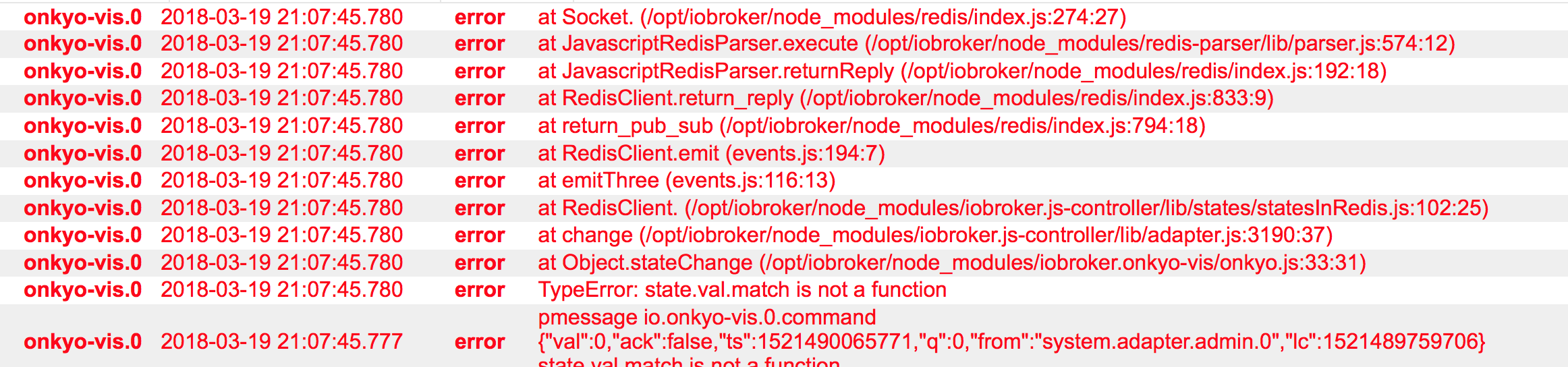
hätte da auch mal ne Frage. Finde den Onkyo Adapter echt klasse wenn er bei mir funktionieren würde.Nachdem ich die Version 1.0.2 installiert habe und die IP eingegeben hab verbindet sich auch der Adapter und leuchtet Grün.Es erscheinen auch allmöglichen Werte unter Objekten aber leider kann ich bis auf die Lautstärke kaum was steuern. Sobald ich unter commands zb PWR01 oder PWR00 eingebe passiert nicht ausser Fehler im Log. Irgendwas muss ich doch falsch machen….
6387_bildschirmfoto_2018-03-19_um_21.07.52.png -
Hey …
benutze den TX NR 509
6387_bildschirmfoto_2018-03-19_um_21.19.41.png -
Laut Log interpretiert er ein Zeichen Falsch. Versuche mal bitte den Receiver über das Objekt "Power_Zone1" ein- bzw. auszuschalten. Funktioniert das denn?
Einfach mal unter Objekte dort "true" oder "false" eintragen. Das "ack" flag darf nicht gesetzt werden.
Gruß Eisbaeeer
-
Danke erstmal für deine Hilfe Eisbaeeer…...
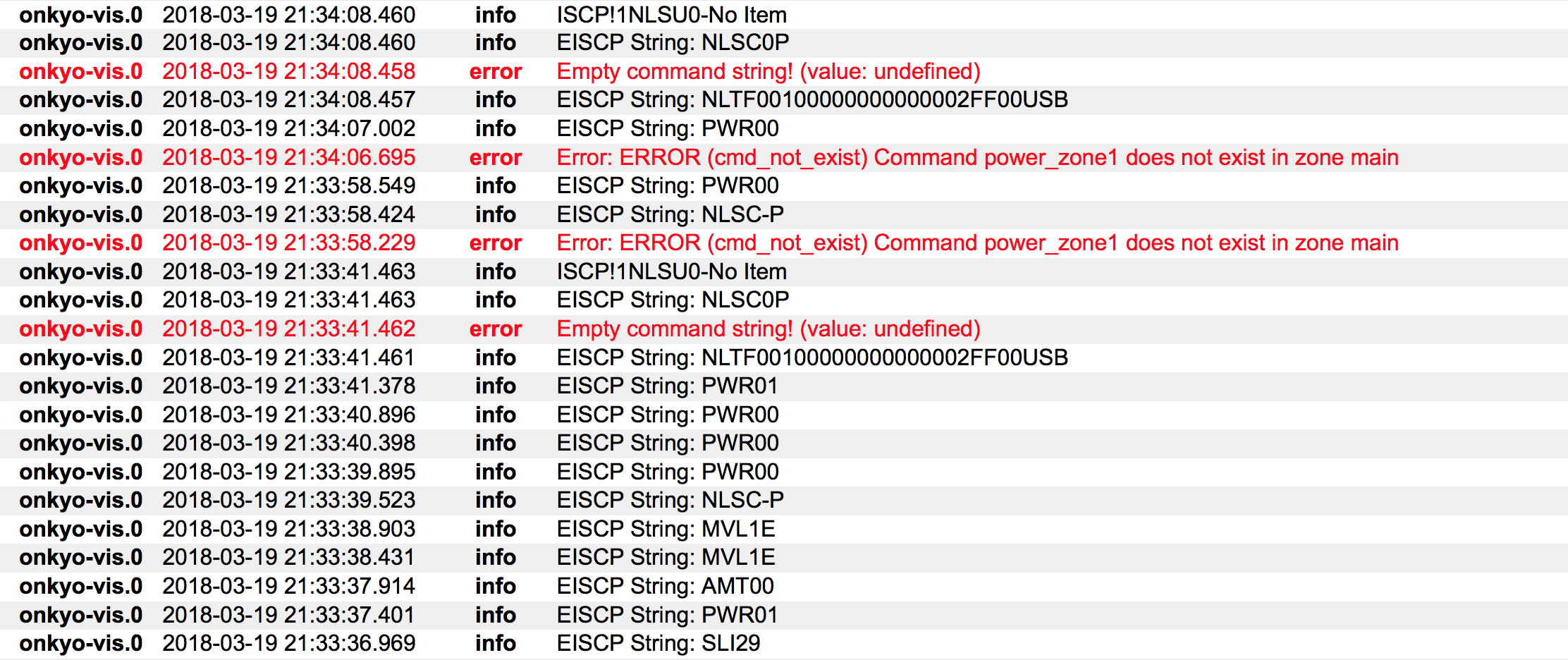
also wenn der Receiver an ist kann ich ihn tatsächlich mit "false" bei "Power Zone 1" ausschalten. Aber leider nicht wieder ein wenn ich "true" eintippe. Hier der Log...
Was meinst du mit: Das "ack" flag darf nicht gesetzt werden???
6387_bildschirmfoto_2018-03-19_um_21.34.15.png -
Ja da kommen wir der Sache schon näher.
Also ausschalten geht, einschalten nicht mehr. Kannst du mal mit deinem PC versuchen, den Receiver zu pingen, wenn er ausgeschaltet wurde?
Ich vermute hier, dass die Energiespar Einstellung des Receivers die Netzwerkschnittstelle ausschaltet. Das muss explizit in den Settings des Receivers eingestellt werden, dass die LAN Schnittstelle noch aktiv ist. Leider verbraucht er dann aber ein wenig mehr Strom im Standby.
Gruß Eisbaeeer
-
Setzte den Adapter mal bitte auf Debug Level. Erweiterte Admin Settings, dann kann man den Loglevel des Adapters hochsetzen, falls nicht schon gemacht.
Dann bitte mal das log löschen, den Filter auf onkyo setzen und den Adapter neu starten. Wenn der Onkyo alle infos an iobroker (der Adapter fragt den Onkyo erstmal jede Menge ab) gesendet hat (log wird ruhiger) bitte mal über das Objekt ausschalten und wieder einschalten versuchen.
Dann bitte den log hier posten (mit dem BBCode "Code" macht es sich einfacher zu lesen). Bin gerade nicht zuhause, aber ich schau mir das dann mal an. Sollte funktionieren. Deinen Receiver haben auch andere schon erfolgreich in Benutzung.
Gruß
-
Hoffe ich hab das jetzt richtig gemacht so wie du es wolltest…..
Aufgefallen ist mir das ich das Gerät mit dem "Power" Button unter Objekte Einschalten kann (Nicht aber ausschalten) und wie grade schon gesagt mit false ausschalten. Bei Commands kann ich eingeben was ich will es passier nichts.
Drücke Strg+A und danach Strg+C, um den Inhalt in die Zwischenablage zu kopieren. Klicke irgendwo, um das Fenster zu schliessen. onkyo-vis.0 2018-03-19 22:10:01.179 info EISCP String: PWR00 onkyo-vis.0 2018-03-19 22:10:00.775 info EISCP String: NLSC-P onkyo-vis.0 2018-03-19 22:09:59.677 info EISCP String: ZPW00 onkyo-vis.0 2018-03-19 22:09:48.657 error at Socket. (/opt/iobroker/node_modules/redis/index.js:274:27) onkyo-vis.0 2018-03-19 22:09:48.657 error at JavascriptRedisParser.execute (/opt/iobroker/node_modules/redis-parser/lib/parser.js:574:12) onkyo-vis.0 2018-03-19 22:09:48.657 error at JavascriptRedisParser.returnReply (/opt/iobroker/node_modules/redis/index.js:192:18) onkyo-vis.0 2018-03-19 22:09:48.657 error at RedisClient.return_reply (/opt/iobroker/node_modules/redis/index.js:833:9) onkyo-vis.0 2018-03-19 22:09:48.657 error at return_pub_sub (/opt/iobroker/node_modules/redis/index.js:794:18) onkyo-vis.0 2018-03-19 22:09:48.657 error at RedisClient.emit (events.js:194:7) onkyo-vis.0 2018-03-19 22:09:48.657 error at emitThree (events.js:116:13) onkyo-vis.0 2018-03-19 22:09:48.657 error at RedisClient. (/opt/iobroker/node_modules/iobroker.js-controller/lib/states/statesInRedis.js:102:25) onkyo-vis.0 2018-03-19 22:09:48.657 error at change (/opt/iobroker/node_modules/iobroker.js-controller/lib/adapter.js:3190:37) onkyo-vis.0 2018-03-19 22:09:48.657 error at Object.stateChange (/opt/iobroker/node_modules/iobroker.onkyo-vis/onkyo.js:33:31) onkyo-vis.0 2018-03-19 22:09:48.657 error TypeError: state.val.match is not a function onkyo-vis.0 2018-03-19 22:09:48.654 error pmessage io.onkyo-vis.0.command {'val':0,'ack':false,'ts':1521493788648,'q':0,'from':'system.adapter.admin.0','lc':1521493788648} state.val.match is not a function onkyo-vis.0 2018-03-19 22:09:37.945 info EISCP String: PWR01 onkyo-vis.0 2018-03-19 22:09:37.866 info EISCP String: NLSU0-No Item onkyo-vis.0 2018-03-19 22:09:37.862 info EISCP String: NLSC0P onkyo-vis.0 2018-03-19 22:09:37.860 error Empty command string! (value: undefined) onkyo-vis.0 2018-03-19 22:09:37.858 info EISCP String: NLTF00100000000000002FF00USB onkyo-vis.0 2018-03-19 22:09:28.970 info EISCP String: NLSC-P onkyo-vis.0 2018-03-19 22:09:25.934 info EISCP String: PWR00 onkyo-vis.0 2018-03-19 22:09:25.869 error Error: ERROR (cmd_not_exist) Command power_zone1 does not exist in zone main onkyo-vis.0 2018-03-19 22:09:19.456 info EISCP String: PWR00 onkyo-vis.0 2018-03-19 22:09:18.986 info EISCP String: NLSC-P onkyo-vis.0 2018-03-19 22:09:15.755 error at Socket. (/opt/iobroker/node_modules/redis/index.js:274:27) onkyo-vis.0 2018-03-19 22:09:15.755 error at JavascriptRedisParser.execute (/opt/iobroker/node_modules/redis-parser/lib/parser.js:574:12) onkyo-vis.0 2018-03-19 22:09:15.755 error at JavascriptRedisParser.returnReply (/opt/iobroker/node_modules/redis/index.js:192:18) onkyo-vis.0 2018-03-19 22:09:15.755 error at RedisClient.return_reply (/opt/iobroker/node_modules/redis/index.js:833:9) onkyo-vis.0 2018-03-19 22:09:15.755 error at return_pub_sub (/opt/iobroker/node_modules/redis/index.js:794:18) onkyo-vis.0 2018-03-19 22:09:15.755 error at RedisClient.emit (events.js:194:7) onkyo-vis.0 2018-03-19 22:09:15.755 error at emitThree (events.js:116:13) onkyo-vis.0 2018-03-19 22:09:15.755 error at RedisClient. (/opt/iobroker/node_modules/iobroker.js-controller/lib/states/statesInRedis.js:102:25) onkyo-vis.0 2018-03-19 22:09:15.755 error at change (/opt/iobroker/node_modules/iobroker.js-controller/lib/adapter.js:3190:37) onkyo-vis.0 2018-03-19 22:09:15.755 error at Object.stateChange (/opt/iobroker/node_modules/iobroker.onkyo-vis/onkyo.js:33:31) onkyo-vis.0 2018-03-19 22:09:15.755 error TypeError: state.val.match is not a function onkyo-vis.0 2018-03-19 22:09:15.746 error pmessage io.onkyo-vis.0.command {'val':0,'ack':false,'ts':1521493755740,'q':0,'from':'system.adapter.admin.0','lc':1521493755740} state.val.match is not a function onkyo-vis.0 2018-03-19 22:09:09.024 info EISCP String: NLSC-P onkyo-vis.0 2018-03-19 22:08:59.052 info EISCP String: NLSC-P onkyo-vis.0 2018-03-19 22:08:49.087 info EISCP String: NLSC-P onkyo-vis.0 2018-03-19 22:08:39.102 info EISCP String: NLSC-P onkyo-vis.0 2018-03-19 22:08:29.131 info EISCP String: NLSC-P onkyo-vis.0 2018-03-19 22:08:19.168 info EISCP String: NLSC-P onkyo-vis.0 2018-03-19 22:08:09.186 info EISCP String: NLSC-P onkyo-vis.0 2018-03-19 22:07:59.255 info EISCP String: PWR00 onkyo-vis.0 2018-03-19 22:07:59.177 info EISCP String: NLSC-P onkyo-vis.0 2018-03-19 22:07:58.933 error Error: ERROR (cmd_not_exist) Command power_zone1 does not exist in zone main onkyo-vis.0 2018-03-19 22:07:51.164 error at Socket. (/opt/iobroker/node_modules/redis/index.js:274:27) onkyo-vis.0 2018-03-19 22:07:51.164 error at JavascriptRedisParser.execute (/opt/iobroker/node_modules/redis-parser/lib/parser.js:574:12) onkyo-vis.0 2018-03-19 22:07:51.164 error at JavascriptRedisParser.returnReply (/opt/iobroker/node_modules/redis/index.js:192:18) onkyo-vis.0 2018-03-19 22:07:51.164 error at RedisClient.return_reply (/opt/iobroker/node_modules/redis/index.js:833:9) onkyo-vis.0 2018-03-19 22:07:51.164 error at return_pub_sub (/opt/iobroker/node_modules/redis/index.js:794:18) onkyo-vis.0 2018-03-19 22:07:51.164 error at RedisClient.emit (events.js:194:7) onkyo-vis.0 2018-03-19 22:07:51.164 error at emitThree (events.js:116:13) onkyo-vis.0 2018-03-19 22:07:51.164 error at RedisClient. (/opt/iobroker/node_modules/iobroker.js-controller/lib/states/statesInRedis.js:102:25) onkyo-vis.0 2018-03-19 22:07:51.164 error at change (/opt/iobroker/node_modules/iobroker.js-controller/lib/adapter.js:3190:37) onkyo-vis.0 2018-03-19 22:07:51.164 error at Object.stateChange (/opt/iobroker/node_modules/iobroker.onkyo-vis/onkyo.js:33:31) onkyo-vis.0 2018-03-19 22:07:51.164 error TypeError: state.val.match is not a function onkyo-vis.0 2018-03-19 22:07:51.147 error pmessage io.onkyo-vis.0.command {'val':0,'ack':false,'ts':1521493671144,'q':0,'from':'system.adapter.admin.0','lc':1521493671144} state.val.match is not a function onkyo-vis.0 2018-03-19 22:07:42.671 info EISCP String: PWR01 onkyo-vis.0 2018-03-19 22:07:25.070 info EISCP String: PWR01 onkyo-vis.0 2018-03-19 22:07:24.620 info ISCP���������!1NLSU0-No Item onkyo-vis.0 2018-03-19 22:07:24.620 info EISCP String: NLSC0P onkyo-vis.0 2018-03-19 22:07:24.618 error Empty command string! (value: undefined) onkyo-vis.0 2018-03-19 22:07:24.616 info EISCP String: NLTF00100000000000002FF00USB onkyo-vis.0 2018-03-19 22:07:18.510 info EISCP String: NLSC-P onkyo-vis.0 2018-03-19 22:07:14.900 info EISCP String: PWR00 onkyo-vis.0 2018-03-19 22:07:14.450 error Error: ERROR (cmd_not_exist) Command power_zone1 does not exist in zone main onkyo-vis.0 2018-03-19 22:07:08.532 info EISCP String: NLSC-P onkyo-vis.0 2018-03-19 22:06:59.240 info EISCP String: MVL19 onkyo-vis.0 2018-03-19 22:06:58.769 info EISCP String: MVL19 onkyo-vis.0 2018-03-19 22:06:58.561 info EISCP String: NLSC-P onkyo-vis.0 2018-03-19 22:06:58.231 info EISCP String: AMT00 onkyo-vis.0 2018-03-19 22:06:57.718 info EISCP String: PWR00 onkyo-vis.0 2018-03-19 22:06:57.217 info EISCP String: SLI29 onkyo-vis.0 2018-03-19 22:06:55.959 info EISCP String: PRZ00 onkyo-vis.0 2018-03-19 22:06:55.718 info EISCP String: PRS00 onkyo-vis.0 2018-03-19 22:06:55.220 info EISCP String: TUZ10555 onkyo-vis.0 2018-03-19 22:06:54.719 info EISCP String: SLZ80 onkyo-vis.0 2018-03-19 22:06:53.207 info EISCP String: ZVLN/A onkyo-vis.0 2018-03-19 22:06:52.711 info EISCP String: ZMT00 onkyo-vis.0 2018-03-19 22:06:52.200 info EISCP String: ZPW01 onkyo-vis.0 2018-03-19 22:06:50.699 info EISCP String: ISTN/A onkyo-vis.0 2018-03-19 22:06:50.199 info EISCP String: ITRN/A onkyo-vis.0 2018-03-19 22:06:49.703 info EISCP String: ITMN/A onkyo-vis.0 2018-03-19 22:06:49.204 info EISCP String: ITIN/A onkyo-vis.0 2018-03-19 22:06:48.779 info EISCP String: IALN/A onkyo-vis.0 2018-03-19 22:06:48.588 info EISCP String: NLSC-P onkyo-vis.0 2018-03-19 22:06:48.194 info EISCP String: IATN/A onkyo-vis.0 2018-03-19 22:06:47.694 info EISCP String: IMDN/A onkyo-vis.0 2018-03-19 22:06:47.196 info EISCP String: NSTS-- onkyo-vis.0 2018-03-19 22:06:46.707 info EISCP String: NTR----/---- onkyo-vis.0 2018-03-19 22:06:46.188 info EISCP String: NTM00:56/--:-- onkyo-vis.0 2018-03-19 22:06:40.662 info EISCP String: SCTN/A onkyo-vis.0 2018-03-19 22:06:40.151 info EISCP String: SCHN/A onkyo-vis.0 2018-03-19 22:06:39.650 info EISCP String: STIN/A onkyo-vis.0 2018-03-19 22:06:39.154 info EISCP String: SATN/A onkyo-vis.0 2018-03-19 22:06:38.684 info EISCP String: SCNN/A onkyo-vis.0 2018-03-19 22:06:38.615 info EISCP String: NLSC-P onkyo-vis.0 2018-03-19 22:06:35.636 info EISCP String: PRS00 onkyo-vis.0 2018-03-19 22:06:34.632 info EISCP String: MOT00 onkyo-vis.0 2018-03-19 22:06:34.133 info EISCP String: DVLN/A onkyo-vis.0 2018-03-19 22:06:33.635 info EISCP String: ADV00 onkyo-vis.0 2018-03-19 22:06:33.134 info EISCP String: ADQ01 onkyo-vis.0 2018-03-19 22:06:32.621 info EISCP String: ADY01 onkyo-vis.0 2018-03-19 22:06:32.124 info EISCP String: RAS00 onkyo-vis.0 2018-03-19 22:06:31.627 info EISCP String: LTN00 onkyo-vis.0 2018-03-19 22:06:31.115 info EISCP String: LMD0B onkyo-vis.0 2018-03-19 22:06:29.619 info EISCP String: ISFN/A onkyo-vis.0 2018-03-19 22:06:28.644 info EISCP String: NLSC-P onkyo-vis.0 2018-03-19 22:06:28.595 info EISCP String: HAO02 onkyo-vis.0 2018-03-19 22:06:27.104 info EISCP String: SLA02 onkyo-vis.0 2018-03-19 22:06:26.092 info EISCP String: SLI29 onkyo-vis.0 2018-03-19 22:06:25.082 info EISCP String: IFA onkyo-vis.0 2018-03-19 22:06:24.579 info EISCP String: DIM00 onkyo-vis.0 2018-03-19 22:06:24.081 info EISCP String: DIF00 onkyo-vis.0 2018-03-19 22:06:23.584 info EISCP String: CTL-7 onkyo-vis.0 2018-03-19 22:06:23.075 info EISCP String: SWL-2 onkyo-vis.0 2018-03-19 22:06:22.590 info EISCP String: SLP00 onkyo-vis.0 2018-03-19 22:06:20.491 info Initial query: master-volume onkyo-vis.0 2018-03-19 22:06:20.490 info Initial query: volume onkyo-vis.0 2018-03-19 22:06:20.489 info Initial query: audio-muting onkyo-vis.0 2018-03-19 22:06:20.488 info Initial query: system-power onkyo-vis.0 2018-03-19 22:06:20.485 info Initial query: input-selector onkyo-vis.0 2018-03-19 22:06:19.073 info EISCP String: TFRB-2T-2 onkyo-vis.0 2018-03-19 22:06:18.674 info EISCP String: NLSC-P onkyo-vis.0 2018-03-19 22:06:18.573 info EISCP String: MVL19 onkyo-vis.0 2018-03-19 22:06:18.079 info EISCP String: MVL19 onkyo-vis.0 2018-03-19 22:06:17.561 info EISCP String: SPLN/A onkyo-vis.0 2018-03-19 22:06:17.063 info EISCP String: SPBN/A onkyo-vis.0 2018-03-19 22:06:16.564 info EISCP String: SPAN/A onkyo-vis.0 2018-03-19 22:06:16.068 info EISCP String: AMT00 onkyo-vis.0 2018-03-19 22:06:15.549 info EISCP String: PWR00 onkyo-vis.0 2018-03-19 22:06:15.493 info EISCP String: NLSC-P onkyo-vis.0 2018-03-19 22:06:15.482 error Error: ERROR (arg_not_exist) Argument query does not exist in command listening-mode onkyo-vis.0 2018-03-19 22:06:15.482 error Error: ERROR (arg_not_exist) Argument query does not exist in command internet-radio-preset onkyo-vis.0 2018-03-19 22:06:15.481 error Error: ERROR (arg_not_exist) Argument query does not exist in command net-tune-network onkyo-vis.0 2018-03-19 22:06:15.475 error Error: ERROR (arg_not_exist) Argument query does not exist in command dab-display-info onkyo-vis.0 2018-03-19 22:06:15.470 error Error: ERROR (arg_not_exist) Argument query does not exist in command ipod-list-info onkyo-vis.0 2018-03-19 22:06:15.467 error Error: ERROR (arg_not_exist) Argument query does not exist in command universal-port onkyo-vis.0 2018-03-19 22:06:15.466 error Error: ERROR (arg_not_exist) Argument query does not exist in command cd-r-recorder onkyo-vis.0 2018-03-19 22:06:15.464 error Error: ERROR (arg_not_exist) Argument query does not exist in command md-recorder onkyo-vis.0 2018-03-19 22:06:15.462 error Error: ERROR (arg_not_exist) Argument query does not exist in command dvd-player onkyo-vis.0 2018-03-19 22:06:15.461 error Error: ERROR (arg_not_exist) Argument query does not exist in command dat-recorder onkyo-vis.0 2018-03-19 22:06:15.460 error Error: ERROR (arg_not_exist) Argument query does not exist in command graphics-equalizer onkyo-vis.0 2018-03-19 22:06:15.459 error Error: ERROR (arg_not_exist) Argument query does not exist in command tape2-b onkyo-vis.0 2018-03-19 22:06:15.458 error Error: ERROR (arg_not_exist) Argument query does not exist in command tape1-a onkyo-vis.0 2018-03-19 22:06:15.457 error Error: ERROR (arg_not_exist) Argument query does not exist in command cd-player onkyo-vis.0 2018-03-19 22:06:15.456 error Error: ERROR (arg_not_exist) Argument query does not exist in command net-popup-message onkyo-vis.0 2018-03-19 22:06:15.454 error Error: ERROR (arg_not_exist) Argument query does not exist in command net-keyboard onkyo-vis.0 2018-03-19 22:06:15.452 error Error: ERROR (arg_not_exist) Argument query does not exist in command net-service onkyo-vis.0 2018-03-19 22:06:15.451 error Error: ERROR (arg_not_exist) Argument query does not exist in command net-usb-jacket-art onkyo-vis.0 2018-03-19 22:06:15.450 error Error: ERROR (arg_not_exist) Argument query does not exist in command net-usb-list-info onkyo-vis.0 2018-03-19 22:06:15.449 error Error: ERROR (arg_not_exist) Argument query does not exist in command internet-radio-preset onkyo-vis.0 2018-03-19 22:06:15.446 error Error: ERROR (arg_not_exist) Argument query does not exist in command network-usb onkyo-vis.0 2018-03-19 22:06:15.440 error Error: ERROR (arg_not_exist) Argument query does not exist in command sirius-parental-lock onkyo-vis.0 2018-03-19 22:06:15.436 error Error: ERROR (arg_not_exist) Argument query does not exist in command tp-scan onkyo-vis.0 2018-03-19 22:06:15.436 error Error: ERROR (arg_not_exist) Argument query does not exist in command pty-scan onkyo-vis.0 2018-03-19 22:06:15.435 error Error: ERROR (arg_not_exist) Argument query does not exist in command rds-information onkyo-vis.0 2018-03-19 22:06:15.435 error Error: ERROR (arg_not_exist) Argument query does not exist in command preset-memory onkyo-vis.0 2018-03-19 22:06:15.421 error Error: ERROR (arg_not_exist) Argument query does not exist in command 12v-trigger-c onkyo-vis.0 2018-03-19 22:06:15.421 error Error: ERROR (arg_not_exist) Argument query does not exist in command 12v-trigger-b onkyo-vis.0 2018-03-19 22:06:15.420 error Error: ERROR (arg_not_exist) Argument query does not exist in command 12v-trigger-a onkyo-vis.0 2018-03-19 22:06:15.418 error Error: ERROR (arg_not_exist) Argument query does not exist in command memory-setup onkyo-vis.0 2018-03-19 22:06:15.418 error Error: ERROR (arg_not_exist) Argument query does not exist in command setup onkyo-vis.0 2018-03-19 22:06:15.416 error Error: ERROR (arg_not_exist) Argument query does not exist in command speaker-level-calibration onkyo-vis.0 2018-03-19 22:06:15.392 info Successfully connected to AVR onkyo-vis.0 2018-03-19 22:06:15.340 info Connecting to AVR 192.168.178.43:60128 onkyo-vis.0 2018-03-19 22:06:15.017 info Create new object: onkyo-vis.0.Video_Information, role = switch onkyo-vis.0 2018-03-19 22:06:15.017 info My array objects: onkyo-vis.0.Video_Information, role = switch onkyo-vis.0 2018-03-19 22:06:15.016 info Create new object: onkyo-vis.0.Audio_Information, role = switch onkyo-vis.0 2018-03-19 22:06:15.016 info My array objects: onkyo-vis.0.Audio_Information, role = switch onkyo-vis.0 2018-03-19 22:06:15.016 info Create new object: onkyo-vis.0.Listening_Mode, role = switch onkyo-vis.0 2018-03-19 22:06:15.015 info My array objects: onkyo-vis.0.Listening_Mode, role = switch onkyo-vis.0 2018-03-19 22:06:15.014 info Create new object: onkyo-vis.0.Tuner_Preset_Zone2, role = switch onkyo-vis.0 2018-03-19 22:06:15.014 info My array objects: onkyo-vis.0.Tuner_Preset_Zone2, role = switch onkyo-vis.0 2018-03-19 22:06:15.013 info Create new object: onkyo-vis.0.Tuner_Preset_Zone1, role = switch onkyo-vis.0 2018-03-19 22:06:15.012 info My array objects: onkyo-vis.0.Tuner_Preset_Zone1, role = switch onkyo-vis.0 2018-03-19 22:06:15.011 info Create new object: onkyo-vis.0.Audio_Mute_Zone2, role = switch onkyo-vis.0 2018-03-19 22:06:15.011 info My array objects: onkyo-vis.0.Audio_Mute_Zone2, role = switch onkyo-vis.0 2018-03-19 22:06:15.011 info Create new object: onkyo-vis.0.Audio_Mute_Zone1, role = switch onkyo-vis.0 2018-03-19 22:06:15.010 info My array objects: onkyo-vis.0.Audio_Mute_Zone1, role = switch onkyo-vis.0 2018-03-19 22:06:15.010 info Create new object: onkyo-vis.0.Input_Select_Zone2, role = switch onkyo-vis.0 2018-03-19 22:06:15.009 info My array objects: onkyo-vis.0.Input_Select_Zone2, role = switch onkyo-vis.0 2018-03-19 22:06:15.008 info Create new object: onkyo-vis.0.Input_Select_Zone1, role = switch onkyo-vis.0 2018-03-19 22:06:15.008 info My array objects: onkyo-vis.0.Input_Select_Zone1, role = switch onkyo-vis.0 2018-03-19 22:06:15.005 info Create new object: onkyo-vis.0.Internet_Radio_Preset_Zone2, role = switch onkyo-vis.0 2018-03-19 22:06:15.005 info My array objects: onkyo-vis.0.Internet_Radio_Preset_Zone2, role = switch onkyo-vis.0 2018-03-19 22:06:15.002 info Create new object: onkyo-vis.0.Internet_Radio_Preset_Zone1, role = switch onkyo-vis.0 2018-03-19 22:06:15.002 info My array objects: onkyo-vis.0.Internet_Radio_Preset_Zone1, role = switch onkyo-vis.0 2018-03-19 22:06:15.001 info Create new object: onkyo-vis.0.Tuning_Zone2, role = switch onkyo-vis.0 2018-03-19 22:06:15.001 info My array objects: onkyo-vis.0.Tuning_Zone2, role = switch onkyo-vis.0 2018-03-19 22:06:15.000 info Create new object: onkyo-vis.0.Tuning_Zone1, role = switch onkyo-vis.0 2018-03-19 22:06:14.999 info My array objects: onkyo-vis.0.Tuning_Zone1, role = switch onkyo-vis.0 2018-03-19 22:06:14.999 info Create new object: onkyo-vis.0.Volume_Zone2, role = switch onkyo-vis.0 2018-03-19 22:06:14.999 info My array objects: onkyo-vis.0.Volume_Zone2, role = switch onkyo-vis.0 2018-03-19 22:06:14.998 info Create new object: onkyo-vis.0.Volume_Zone1, role = switch onkyo-vis.0 2018-03-19 22:06:14.998 info My array objects: onkyo-vis.0.Volume_Zone1, role = switch onkyo-vis.0 2018-03-19 22:06:14.997 info Create new object: onkyo-vis.0.NET_Shuffle_Status, role = switch onkyo-vis.0 2018-03-19 22:06:14.997 info My array objects: onkyo-vis.0.NET_Shuffle_Status, role = switch onkyo-vis.0 2018-03-19 22:06:14.997 info Create new object: onkyo-vis.0.NET_Repeat_Status, role = switch onkyo-vis.0 2018-03-19 22:06:14.996 info My array objects: onkyo-vis.0.NET_Repeat_Status, role = switch onkyo-vis.0 2018-03-19 22:06:14.995 info Create new object: onkyo-vis.0.NET_Play_Status, role = switch onkyo-vis.0 2018-03-19 22:06:14.995 info My array objects: onkyo-vis.0.NET_Play_Status, role = switch onkyo-vis.0 2018-03-19 22:06:14.994 info Create new object: onkyo-vis.0.NET/USB_Track_Info, role = switch onkyo-vis.0 2018-03-19 22:06:14.993 info My array objects: onkyo-vis.0.NET/USB_Track_Info, role = switch onkyo-vis.0 2018-03-19 22:06:14.991 info Create new object: onkyo-vis.0.NET/USB_Album_Name_Info, role = switch onkyo-vis.0 2018-03-19 22:06:14.990 info My array objects: onkyo-vis.0.NET/USB_Album_Name_Info, role = switch onkyo-vis.0 2018-03-19 22:06:14.989 info Create new object: onkyo-vis.0.NET/USB_Time, role = switch onkyo-vis.0 2018-03-19 22:06:14.988 info My array objects: onkyo-vis.0.NET/USB_Time, role = switch onkyo-vis.0 2018-03-19 22:06:14.987 info Create new object: onkyo-vis.0.NET/USB_Time_Current, role = switch onkyo-vis.0 2018-03-19 22:06:14.986 info My array objects: onkyo-vis.0.NET/USB_Time_Current, role = switch onkyo-vis.0 2018-03-19 22:06:14.985 info Create new object: onkyo-vis.0.NET/USB_Time_Info, role = switch onkyo-vis.0 2018-03-19 22:06:14.984 info My array objects: onkyo-vis.0.NET/USB_Time_Info, role = switch onkyo-vis.0 2018-03-19 22:06:14.983 info Create new object: onkyo-vis.0.NET/USB_Title_Name, role = switch onkyo-vis.0 2018-03-19 22:06:14.982 info My array objects: onkyo-vis.0.NET/USB_Title_Name, role = switch onkyo-vis.0 2018-03-19 22:06:14.981 info Create new object: onkyo-vis.0.NET/USB_Artist_Name_Info, role = switch onkyo-vis.0 2018-03-19 22:06:14.981 info My array objects: onkyo-vis.0.NET/USB_Artist_Name_Info, role = switch onkyo-vis.0 2018-03-19 22:06:14.980 info Create new object: onkyo-vis.0.Power_Zone2, role = switch onkyo-vis.0 2018-03-19 22:06:14.979 info My array objects: onkyo-vis.0.Power_Zone2, role = switch onkyo-vis.0 2018-03-19 22:06:14.978 info Create new object: onkyo-vis.0.Power_Zone1, role = switch onkyo-vis.0 2018-03-19 22:06:14.976 info My array objects: onkyo-vis.0.Power_Zone1, role = switch onkyo-vis.0 2018-03-19 22:06:14.965 info Create new object: onkyo-vis.0.command, role = switch onkyo-vis.0 2018-03-19 22:06:14.965 info My array objects: onkyo-vis.0.command, role = switch onkyo-vis.0 2018-03-19 22:06:14.951 info starting. Version 1.0.2 in /opt/iobroker/node_modules/iobroker.onkyo-vis, node: v6.12.0 onkyo-vis.0 2018-03-19 22:06:14.877 info States connected to redis: 127.0.0.1:6379 onkyo-vis.0 2018-03-19 22:06:10.662 info terminating onkyo-vis.0 2018-03-19 22:06:10.644 info AVR disconnected -
Hey, prima. Alles richtig gemacht.
Ich glaube ich hab da noch eine Idee. Und eventuell ist das auch das Problem von einem anderen User.
Kann es sein, dass du deinen Receiver mit nur einer Zone betreibst? Also gar keine 2. Zone benutzt?
Wenn das so ist, hast du schon weiter geholfen. Dann liegt der Fehler noch in meinem Adapter. Denn ich bin immer davon ausgegangen, dass 2 Zonen verwendet werden (mea culpa).
Wenn du kein 7.1 verwendest, kannst du mal versuchen, die 2. Zone in deinem Onkyo zu aktivieren/konfigurieren. Wenn es dann geht, muss ich den Adapter nochmal anpassen. Laut deinem erweiterten Log bekomme ich nämlich für Zone2 keine Daten.
Gruß Eisbaeeer
-
Hey Eisbaeer….
also du hast recht das ich Zone 2 nicht nutze. Ich hab heut morgen mal versucht die Zone 2 zu aktivieren( am Reciever eingeschaltet) um zu gucken ob ich dann über Objekte was steuern kann doch leider mit dem selben Ergebnis. Du meinst ich sollte Zone 2 aktivieren bzw. einstellen. Was genau meinst du damit ? Reicht nicht das einschalten der Zone 2 ????
-
Du meinst ich sollte Zone 2 aktivieren bzw. einstellen. Was genau meinst du damit ? Reicht nicht das einschalten der Zone 2 ???? `
Da ich den 509 nicht habe, bin ich mal die Anleitung durchgegangen. Bei muss für die Zone 2 nichts konfiguriert werden. Das ist bei meinem anders, da er für die Zone2 schon eine Endstufe mit eingebaut hat.-
Prüfe mal bitte noch die folgende Einstellung des Onkyo: Setup -> Hardware -> Network -> Network Control option . Die bitte auf an, sollte aber wohl schon so sein, sonst könntest du nicht über die App einschalten.
-
Das node-module, das für den Adapter verwendet wird, hat noch "high-level" commands integriert. Kannst du mal versuchen, in das Objekt "command" die folgenden Befehle einzutragen:
- power on
power off

power:on

power:off

main.power on

main.power off

main power on

main power off

main.power=on

main.power=off
Ich kann das alles im Moment nur leider nicht testen, da ich im Hotel sitze. Bitte gib mir dann eine Rückmeldung, ob und welche Befehle geklappt haben.
Und könntest du mir noch einen Screenshot der Adaptereinstellung in iobroker vom onkyo-vis hier reinstellen?
Danke und Grüße
-


Hey! Du scheinst an dieser Unterhaltung interessiert zu sein, hast aber noch kein Konto.
Hast du es satt, bei jedem Besuch durch die gleichen Beiträge zu scrollen? Wenn du dich für ein Konto anmeldest, kommst du immer genau dorthin zurück, wo du zuvor warst, und kannst dich über neue Antworten benachrichtigen lassen (entweder per E-Mail oder Push-Benachrichtigung). Du kannst auch Lesezeichen speichern und Beiträge positiv bewerten, um anderen Community-Mitgliedern deine Wertschätzung zu zeigen.
Mit deinem Input könnte dieser Beitrag noch besser werden 💗
Registrieren Anmelden404
Online33.0k
Benutzer83.7k
Themen1.3m
Beiträge