




Proxmox-Updater (Host/LXC/VM) auch ioBroker,piHole,etc
-
ich steh hier schon an.
installer=$(mktemp)
curl -4 -fSL --retry 0 https://raw.githubusercontent.com/BassT23/Proxmox/master/install.sh -o "$installer" && \
  bash -n "$installer" && bash "$installer"
rm -f "$installer"
https://github.com/BassT23/Proxmox The __ ______ _ __ / / / / / /_(_)___ ___ ____ _/ /____ / / / / / __/ / __ `__ \/ __ `/ __/ _ \ / /_/ / / /_/ / / / / / / /_/ / /_/ __/ \____/_/\__/_/_/ /_/ /_/\____/\__/\___/ __ __ __ __ / / / /___ ____/ /___ _/ /____ ____ / / / / __ \/ __ / __ `/ __/ _ \/ __/ / /_/ / /_/ / /_/ / /_/ / /_/ __/ / \____/ ____/\____/\____/\__/\___/_/ /_/ for Proxmox VE *** Install and/or Update *** *** Version : 2.1 *** ℹ Installing The Ultimate Updater cp: cannot stat '/root/Ultimate-Updater-Temp/update.sh': No such file or directory root@proxmox2:~#
Edit:
bei mir liegt die
update.shin/root/Ultimate-Updater-Temp/BassT23-Proxmox-d6a2d86/Kann ich sie dort ausführen, oder bringt es das Script durcheinander, wenn es nicht in
/root/Ultimate-Updater-Temp/liegt?ich steh hier schon an.
installer=$(mktemp)
curl -4 -fSL --retry 0 https://raw.githubusercontent.com/BassT23/Proxmox/master/install.sh -o "$installer" && \
  bash -n "$installer" && bash "$installer"
rm -f "$installer"
https://github.com/BassT23/Proxmox The __ ______ _ __ / / / / / /_(_)___ ___ ____ _/ /____ / / / / / __/ / __ `__ \/ __ `/ __/ _ \ / /_/ / / /_/ / / / / / / /_/ / /_/ __/ \____/_/\__/_/_/ /_/ /_/\____/\__/\___/ __ __ __ __ / / / /___ ____/ /___ _/ /____ ____ / / / / __ \/ __ / __ `/ __/ _ \/ __/ / /_/ / /_/ / /_/ / /_/ / /_/ __/ / \____/ ____/\____/\____/\__/\___/_/ /_/ for Proxmox VE *** Install and/or Update *** *** Version : 2.1 *** ℹ Installing The Ultimate Updater cp: cannot stat '/root/Ultimate-Updater-Temp/update.sh': No such file or directory root@proxmox2:~#
Edit:
bei mir liegt die
update.shin/root/Ultimate-Updater-Temp/BassT23-Proxmox-d6a2d86/Kann ich sie dort ausführen, oder bringt es das Script durcheinander, wenn es nicht in
/root/Ultimate-Updater-Temp/liegt?Danke für den Hinweis – du hast hier tatsächlich einen echten Fehler im Installer gefunden.
Die Anzeige
Version: 2.1im Banner ist nur die interne Version voninstall.shund nicht die Versionsnummer des Ultimate Updaters.Das Verzeichnis
/root/Ultimate-Updater-Temp/BassT23-Proxmox-<commit>/ist lediglich ein temporäres Download-/Entpack-Verzeichnis. Bitte die dort liegende
update.shnicht manuell ausführen.Die eigentliche Ursache war, dass der Installer aus dem
master-Branch ohne gesetztesUU_TARGET_BRANCHfälschlicherweise aufdevelopzurückgefallen ist.Das ist jetzt auf
masterbehoben:152131d1a13f8ea14aab8af309e91f142a7a355eEine normale Installation über
masterverwendet damit wieder korrekt das aktuelle Stable-Release. Explizite Installationen überbetaoderdevelopfunktionieren weiterhin wie vorgesehen.Bitte den normalen Installationsbefehl einfach noch einmal ausführen. GitHubs Raw-Content-Cache kann eventuell noch kurze Zeit den alten Stand ausliefern.
Danke nochmal fürs Finden und Melden! 👍
Proxmox Cluster
- NUC7i5 ioBroker Server (Proxmox)
- HP Elitedesk 800 G4 SSF (Proxmox)
- HP Elitedesk 800 G2 DM (Proxmox)
mein Proxmox-Updater für euch
KNX / Broadlink / Tasmota ESPs / Zigbee
Vis: 15" Touchmonitor mit Raspi4 / 10" Tablet (Dauerstrom umbau) / Sonoff NSPanel (alle) -

🚀 Ultimate Updater v5.1.2 veröffentlicht
v5.1.2 ist ein kleiner, aber wichtiger Hotfix für die aktuelle 5.1-Version.
Behoben wurde unter anderem:
- Self-Update von bestehenden v5.0-Installationen korrigiert
- Release-Archiv / Konfigurationsmigration repariert
- QGA-Updates robuster gemacht, wenn der Guest Agent während eines Updates neu startet
- Remote-QGA für VMs auf anderen Proxmox-Cluster-Nodes korrigiert
- fehlerhafte Post-Update-Statusprüfung behoben
- kleine Ausrichtungsverbesserungen in der WebUI-Übersicht
Falls ein Update auf v5.1.1 zuvor mit
Target release has no valid configuration migration helperabgebrochen ist:
Die bestehende Installation wurde durch den eingebauten Fail-safe nicht verändert.
Das Update kann jetzt einfach erneut gestartet werden:
update master -up🔗 https://github.com/BassT23/Proxmox
Ultimate Updater – the easy way to keep your Proxmox systems updated.
-
ich steh hier schon an.
installer=$(mktemp)
curl -4 -fSL --retry 0 https://raw.githubusercontent.com/BassT23/Proxmox/master/install.sh -o "$installer" && \
  bash -n "$installer" && bash "$installer"
rm -f "$installer"
https://github.com/BassT23/Proxmox The __ ______ _ __ / / / / / /_(_)___ ___ ____ _/ /____ / / / / / __/ / __ `__ \/ __ `/ __/ _ \ / /_/ / / /_/ / / / / / / /_/ / /_/ __/ \____/_/\__/_/_/ /_/ /_/\____/\__/\___/ __ __ __ __ / / / /___ ____/ /___ _/ /____ ____ / / / / __ \/ __ / __ `/ __/ _ \/ __/ / /_/ / /_/ / /_/ / /_/ / /_/ __/ / \____/ ____/\____/\____/\__/\___/_/ /_/ for Proxmox VE *** Install and/or Update *** *** Version : 2.1 *** ℹ Installing The Ultimate Updater cp: cannot stat '/root/Ultimate-Updater-Temp/update.sh': No such file or directory root@proxmox2:~#
Edit:
bei mir liegt die
update.shin/root/Ultimate-Updater-Temp/BassT23-Proxmox-d6a2d86/Kann ich sie dort ausführen, oder bringt es das Script durcheinander, wenn es nicht in
/root/Ultimate-Updater-Temp/liegt?Danke für den Hinweis – du hast hier tatsächlich einen echten Fehler im Installer gefunden.
Die Anzeige
Version: 2.1im Banner ist nur die interne Version voninstall.shund nicht die Versionsnummer des Ultimate Updaters.Das Verzeichnis
/root/Ultimate-Updater-Temp/BassT23-Proxmox-<commit>/ist lediglich ein temporäres Download-/Entpack-Verzeichnis. Bitte die dort liegende
update.shnicht manuell ausführen.Die eigentliche Ursache war, dass der Installer aus dem
master-Branch ohne gesetztesUU_TARGET_BRANCHfälschlicherweise aufdevelopzurückgefallen ist.Das ist jetzt auf
masterbehoben:152131d1a13f8ea14aab8af309e91f142a7a355eEine normale Installation über
masterverwendet damit wieder korrekt das aktuelle Stable-Release. Explizite Installationen überbetaoderdevelopfunktionieren weiterhin wie vorgesehen.Bitte den normalen Installationsbefehl einfach noch einmal ausführen. GitHubs Raw-Content-Cache kann eventuell noch kurze Zeit den alten Stand ausliefern.
Danke nochmal fürs Finden und Melden! 👍
Danke nochmal fürs Finden und Melden! 👍
noch was mit dem Welcome-Screen
       *** Install and/or Update ***
       ***   Version :   2.1   ***


ℹ  Installing The Ultimate Updater

Created symlink '/etc/systemd/system/multi-user.target.wants/ultimate-updater-web.service' → '/etc/systemd/system/ultimate-updater-web.service'.
✅ Web UI ready on port 8765.
✅ Initial system inventory started.
✅ Ultimate Updater installed successfully.
   Installed: master
Also want to install the Welcome-Screen?
Type [Y/y] or Enter for yes - anything else will exit:
cp: cannot stat '/root/Ultimate-Updater-Temp/welcome-screen.sh': No such file or directory
EDIT
eigentlich braucht man den Welcome Screen eh nicht ;)
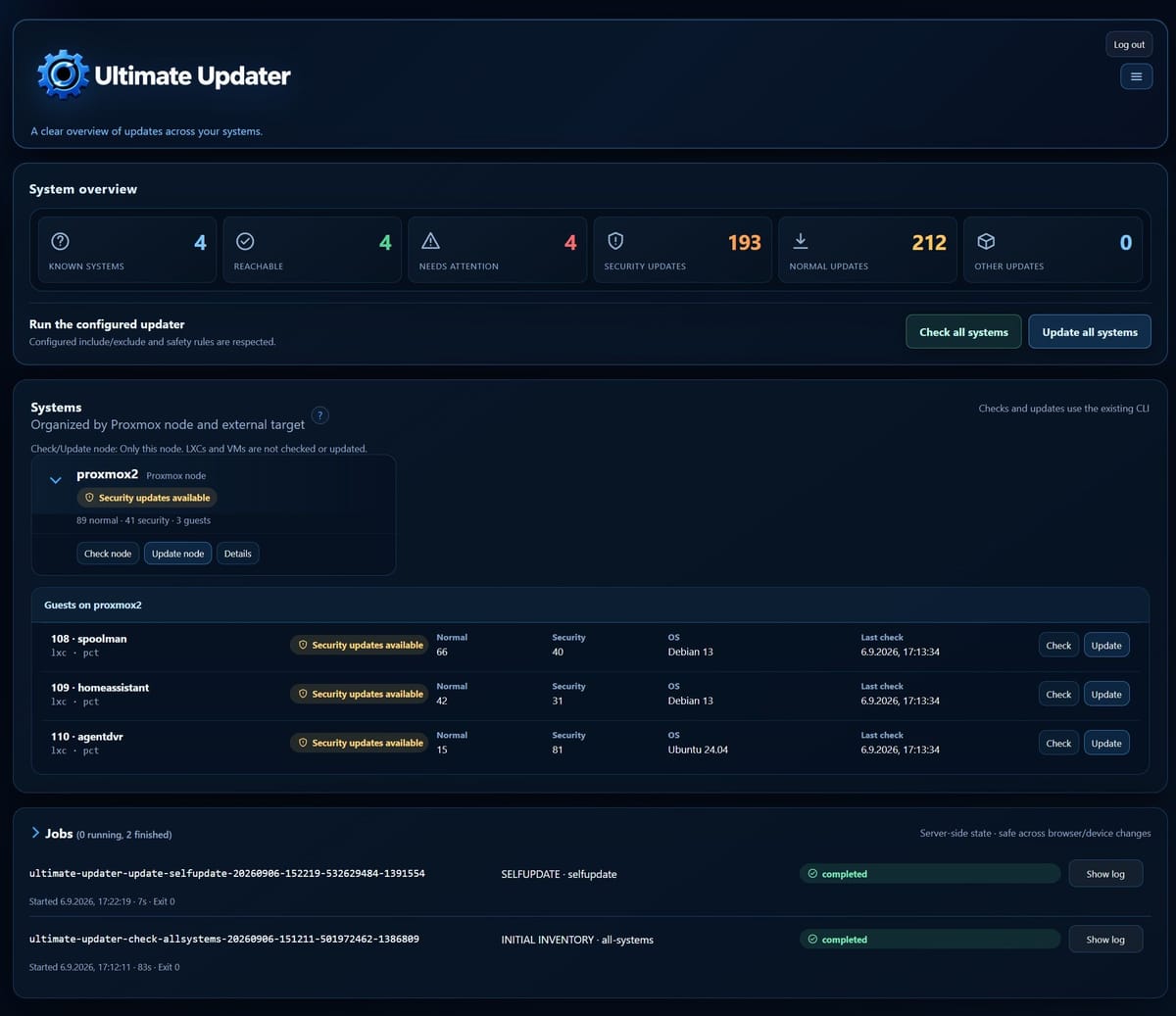
Update vom Updater lief über GUI auch perfekt :)
EDIT 2
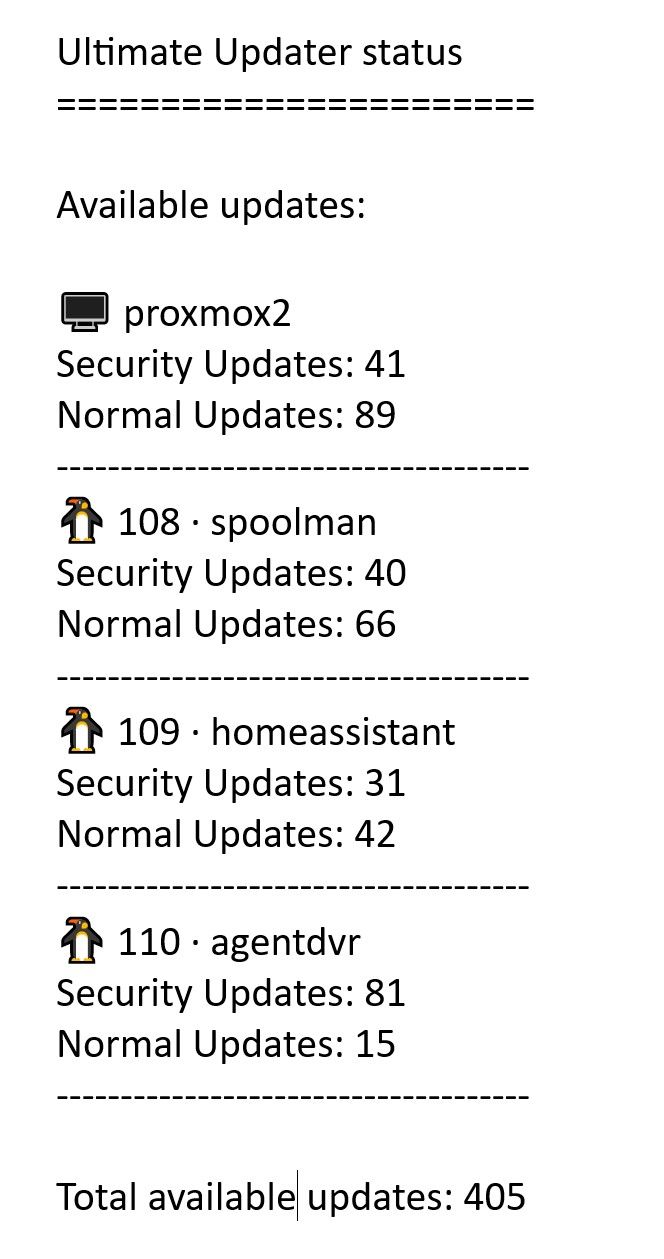
kann man die Emailausgabe ändern?
Ultimate Updater status
Available updates:
🖥️ proxmox2
S: 41 / N: 89
🐧 108 · spoolman
S: 40 / N: 66
🐧 109 · homeassistant
S: 31 / N: 42
🐧 110 · agentdvr
S: 81 / N: 15Total available updates: 405
S & N wäre ausgeschrieben schöner
eventuell so?
° Node.js & System Update ---> sudo apt update, iob stop, sudo apt full-upgrade
° Node.js Fixer ---> iob nodejs-update
° Fixer ---> iob fix -
Danke nochmal fürs Finden und Melden! 👍
noch was mit dem Welcome-Screen
       *** Install and/or Update ***
       ***   Version :   2.1   ***


ℹ  Installing The Ultimate Updater

Created symlink '/etc/systemd/system/multi-user.target.wants/ultimate-updater-web.service' → '/etc/systemd/system/ultimate-updater-web.service'.
✅ Web UI ready on port 8765.
✅ Initial system inventory started.
✅ Ultimate Updater installed successfully.
   Installed: master
Also want to install the Welcome-Screen?
Type [Y/y] or Enter for yes - anything else will exit:
cp: cannot stat '/root/Ultimate-Updater-Temp/welcome-screen.sh': No such file or directory
EDIT
eigentlich braucht man den Welcome Screen eh nicht ;)
Update vom Updater lief über GUI auch perfekt :)
EDIT 2
kann man die Emailausgabe ändern?
Ultimate Updater status
Available updates:
🖥️ proxmox2
S: 41 / N: 89
🐧 108 · spoolman
S: 40 / N: 66
🐧 109 · homeassistant
S: 31 / N: 42
🐧 110 · agentdvr
S: 81 / N: 15Total available updates: 405
S & N wäre ausgeschrieben schöner
eventuell so?
-
-
der läuft seit 17:30 (jetzt 19:14).
Sind aber nur 3 LXC und 1 Host.Denke der hängt am Host fest.
Kann ich das wo überprüfen?
Log hüpft nur.
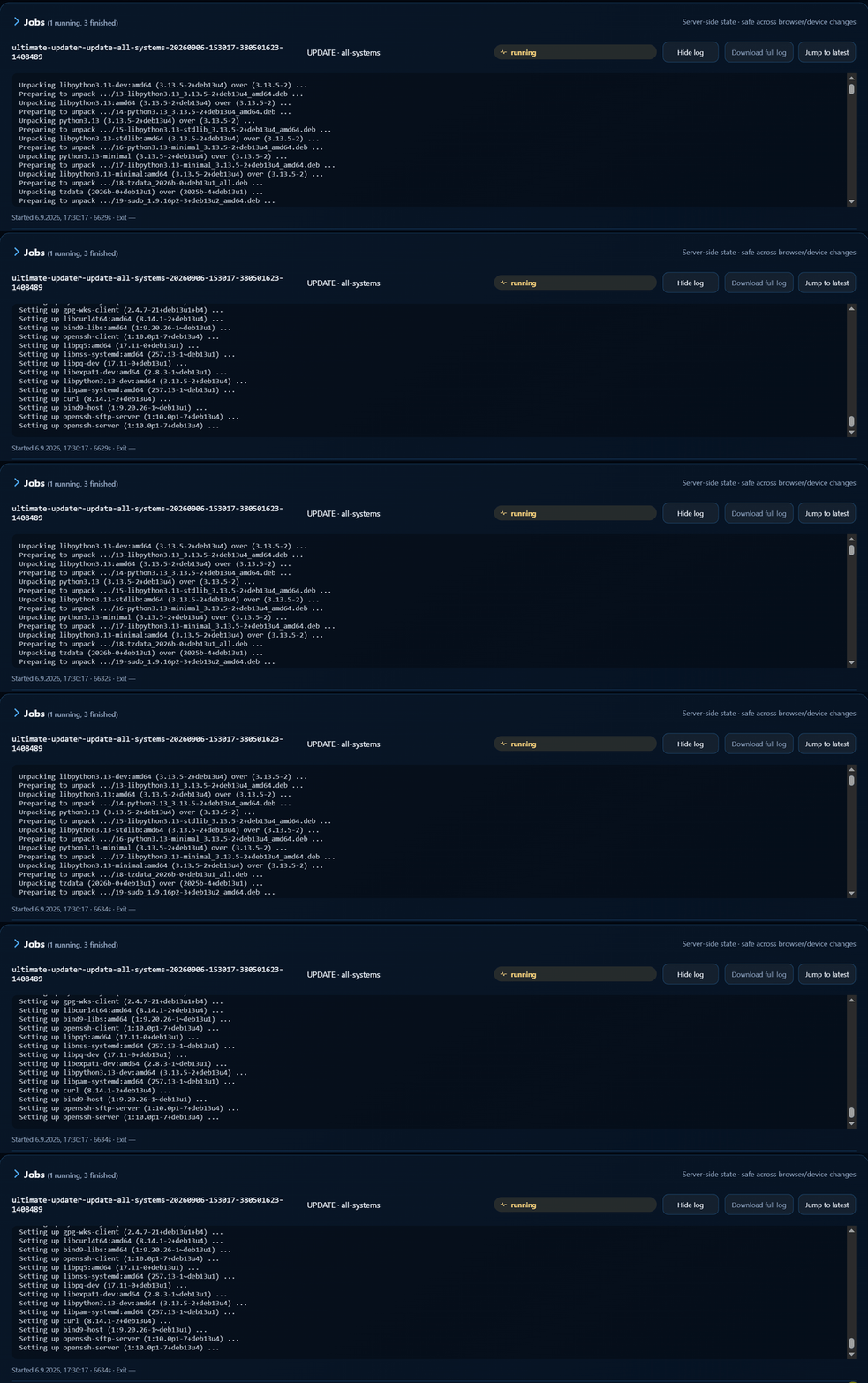
journalctlbringtJan 10 19:51:04 proxmox2 pveproxy[897]: starting 2 worker(s) Jan 10 19:51:04 proxmox2 pveproxy[897]: worker 3854731 started Jan 10 19:51:04 proxmox2 pveproxy[897]: worker 3854732 started Jan 10 19:51:04 proxmox2 pveproxy[3854731]: /etc/pve/local/pve-ssl.key: failed to load local private key (key_file or key) at /usr/share/perl5/PVE/APIServer/AnyEvent.pm line 1917. Jan 10 19:51:04 proxmox2 pveproxy[3854732]: /etc/pve/local/pve-ssl.key: failed to load local private key (key_file or key) at /usr/share/perl5/PVE/APIServer/AnyEvent.pm line 1917. Jan 10 19:51:09 proxmox2 pveproxy[3854730]: worker exit Jan 10 19:51:09 proxmox2 pveproxy[897]: worker 3854730 finished Jan 10 19:51:09 proxmox2 pveproxy[897]: starting 1 worker(s) Jan 10 19:51:09 proxmox2 pveproxy[897]: worker 3854733 started Jan 10 19:51:09 proxmox2 pveproxy[3854731]: worker exit Jan 10 19:51:09 proxmox2 pveproxy[3854732]: worker exit Jan 10 19:51:09 proxmox2 pveproxy[3854733]: /etc/pve/local/pve-ssl.key: failed to load local private key (key_file or key) at /usr/share/perl5/PVE/APIServer/AnyEvent.pm line 1917. Jan 10 19:51:09 proxmox2 pveproxy[897]: worker 3854731 finished Jan 10 19:51:09 proxmox2 pveproxy[897]: starting 1 worker(s) Jan 10 19:51:09 proxmox2 pveproxy[897]: worker 3854734 started Jan 10 19:51:09 proxmox2 pveproxy[897]: worker 3854732 finished Jan 10 19:51:09 proxmox2 pveproxy[897]: starting 1 worker(s) Jan 10 19:51:09 proxmox2 pveproxy[897]: worker 3854735 started Jan 10 19:51:09 proxmox2 pveproxy[3854734]: /etc/pve/local/pve-ssl.key: failed to load local private key (key_file or key) at /usr/share/perl5/PVE/APIServer/AnyEvent.pm line 1917. Jan 10 19:51:09 proxmox2 pveproxy[3854735]: /etc/pve/local/pve-ssl.key: failed to load local private key (key_file or key) at /usr/share/perl5/PVE/APIServer/AnyEvent.pm line 1917. Jan 10 19:51:14 proxmox2 pveproxy[3854733]: worker exit Jan 10 19:51:14 proxmox2 pveproxy[897]: worker 3854733 finished Jan 10 19:51:14 proxmox2 pveproxy[897]: starting 1 worker(s) Jan 10 19:51:14 proxmox2 pveproxy[897]: worker 3854736 started Jan 10 19:51:14 proxmox2 pveproxy[3854736]: /etc/pve/local/pve-ssl.key: failed to load local private key (key_file or key) at /usr/share/perl5/PVE/APIServer/AnyEvent.pm line 1917. Jan 10 19:51:14 proxmox2 pveproxy[3854734]: worker exit Jan 10 19:51:14 proxmox2 pveproxy[3854735]: worker exit Jan 10 19:51:14 proxmox2 pveproxy[897]: worker 3854734 finished Jan 10 19:51:14 proxmox2 pveproxy[897]: starting 1 worker(s) Jan 10 19:51:14 proxmox2 pveproxy[897]: worker 3854735 finished Jan 10 19:51:14 proxmox2 pveproxy[897]: worker 3854737 started Jan 10 19:51:14 proxmox2 pveproxy[3854737]: /etc/pve/local/pve-ssl.key: failed to load local private key (key_file or key) at /usr/share/perl5/PVE/APIServer/AnyEvent.pm line 1917. Jan 10 19:51:19 proxmox2 pveproxy[3854736]: worker exit Jan 10 19:51:19 proxmox2 pveproxy[897]: worker 3854736 finished Jan 10 19:51:19 proxmox2 pveproxy[897]: starting 2 worker(s) Jan 10 19:51:19 proxmox2 pveproxy[897]: worker 3854738 started lines 1-78ultimate-updater statusbringtroot@proxmox2:~# ultimate-updater status Status schema 1 Generated: 2026-09-06T15:29:41Z Target / friendly name Reachable Updates Status Last check ---------------------- --------- ------- ------ ---------- proxmox2 yes 130 updates_ava... 2026-09-06T15:29:41Z 108 · spoolman yes 106 updates_ava... 2026-09-06T15:29:41Z 109 · homeassistant yes 73 updates_ava... 2026-09-06T15:29:41Z 110 · agentdvr yes 96 updates_ava... 2026-09-06T15:29:41Z Jobs Type Target / friendly name State Exit JOB all-systems completed 0 CHECK all-systems completed 0 JOB all-systems running pending JOB selfupdate completed 0 -
Woher bekommst du die Daten?
Wollte Mittwoch wenn mein Claude wiederbelebt wird das Thema mal angehen.Würde das Script gerne aus dem ioBroker auslesen und ggf aucu Updates anstoßen können.
-
Woher bekommst du die Daten?
Wollte Mittwoch wenn mein Claude wiederbelebt wird das Thema mal angehen.Würde das Script gerne aus dem ioBroker auslesen und ggf aucu Updates anstoßen können.
-
-
Auf welchen Weg?
in Proxmox Email konfiguriert.
Und der Updater schickt dann den Mail-Befehl (siehe /etc/ultimate-updater/update.conf)https://github.com/BassT23/Proxmox/blob/master/docs/configuration.md#notifications-and-logging
Notifications and logging
EMAIL_USER,EMAIL_SENDER,EMAIL_DAILY_CHECK,EMAIL_NO_UPDATES,
EMAIL_ONLY_SECURITY, andEMAIL_ONLY_ERRORcontrol email behavior.
DEBUGenables technical diagnostics and detailed job output. Keep it false
for normal user-facing output and enable it temporarily for troubleshooting.
LOG_FILEandERROR_LOG_FILEselect the local log files. -
Danke euch für die Rückmeldungen. 👍
Den Fehler mit dem Welcome-Screen schaue ich mir an. Die eigentliche Installation scheint ja durchgelaufen zu sein, nur die optionale Installation des Welcome-Screens findet die Datei offenbar nicht mehr am erwarteten Pfad. Das kommt auf die To-do-Liste.
Die Mail-Ausgabe mit "S / N" nehme ich ebenfalls als kleinen Verbesserungswunsch mit auf. Ausgeschrieben als "Security / Normal" ist das natürlich eindeutiger.
Zum sehr lange laufenden Update-Job würde ich gern noch genauer sehen, wo er tatsächlich hängt. Die Meldungen von "pveproxy" deuten erstmal auf ein separates Problem mit dem lokalen Proxmox-SSL-Key hin. Interessant wäre daher vor allem das Log des betreffenden Ultimate-Updater-Jobs bzw. an welchem System/Schritt er stehen geblieben ist.
Zur ioBroker-Anbindung:
Eine separate API ist dafür aktuell eigentlich nicht notwendig. Der Ultimate Updater lässt sich bereits über seine CLI steuern. Mit dem JavaScript-Adapter in ioBroker, "exec" und einer SSH-Key-Verbindung zum Proxmox-Host könntest du die gewünschten Befehle remote ausführen und die Ausgaben anschließend selbst in ioBroker-Datenpunkte schreiben.Damit wären z. B. Statusabfragen, Checks und auch das Starten von Update-Jobs grundsätzlich schon heute möglich.
Die genannten Fehler und Wünsche nehme ich jetzt der Reihe nach mit und arbeite sie einzeln ab. 🙂
Proxmox Cluster
- NUC7i5 ioBroker Server (Proxmox)
- HP Elitedesk 800 G4 SSF (Proxmox)
- HP Elitedesk 800 G2 DM (Proxmox)
mein Proxmox-Updater für euch
KNX / Broadlink / Tasmota ESPs / Zigbee
Vis: 15" Touchmonitor mit Raspi4 / 10" Tablet (Dauerstrom umbau) / Sonoff NSPanel (alle) -
Danke euch für die Rückmeldungen. 👍
Den Fehler mit dem Welcome-Screen schaue ich mir an. Die eigentliche Installation scheint ja durchgelaufen zu sein, nur die optionale Installation des Welcome-Screens findet die Datei offenbar nicht mehr am erwarteten Pfad. Das kommt auf die To-do-Liste.
Die Mail-Ausgabe mit "S / N" nehme ich ebenfalls als kleinen Verbesserungswunsch mit auf. Ausgeschrieben als "Security / Normal" ist das natürlich eindeutiger.
Zum sehr lange laufenden Update-Job würde ich gern noch genauer sehen, wo er tatsächlich hängt. Die Meldungen von "pveproxy" deuten erstmal auf ein separates Problem mit dem lokalen Proxmox-SSL-Key hin. Interessant wäre daher vor allem das Log des betreffenden Ultimate-Updater-Jobs bzw. an welchem System/Schritt er stehen geblieben ist.
Zur ioBroker-Anbindung:
Eine separate API ist dafür aktuell eigentlich nicht notwendig. Der Ultimate Updater lässt sich bereits über seine CLI steuern. Mit dem JavaScript-Adapter in ioBroker, "exec" und einer SSH-Key-Verbindung zum Proxmox-Host könntest du die gewünschten Befehle remote ausführen und die Ausgaben anschließend selbst in ioBroker-Datenpunkte schreiben.Damit wären z. B. Statusabfragen, Checks und auch das Starten von Update-Jobs grundsätzlich schon heute möglich.
Die genannten Fehler und Wünsche nehme ich jetzt der Reihe nach mit und arbeite sie einzeln ab. 🙂
das Log des betreffenden Ultimate-Updater-Jobs
hoffe das ist das richtige
Kann ich den laufenden Job irgendwie abbrechen?
Oder Maschine rebooten und hoffen dass er wieder bootet?° Node.js & System Update ---> sudo apt update, iob stop, sudo apt full-upgrade
° Node.js Fixer ---> iob nodejs-update
° Fixer ---> iob fix -
das Log des betreffenden Ultimate-Updater-Jobs
hoffe das ist das richtige
Kann ich den laufenden Job irgendwie abbrechen?
Oder Maschine rebooten und hoffen dass er wieder bootet?das Log des betreffenden Ultimate-Updater-Jobs
hoffe das ist das richtige
Kann ich den laufenden Job irgendwie abbrechen?
Oder Maschine rebooten und hoffen dass er wieder bootet?Danke für die Rückmeldung und die Logs. 👍
Bitte den Host erstmal nicht rebooten und
apt/dpkgauch nicht blind beenden.Ich habe den Hänger inzwischen genauer nachvollzogen.
Der Ultimate-Updater-Job selbst ist nicht kaputt. Das Host-Update wartet auf eine interaktive Paketfrage zu
/etc/ssh/sshd_config.Genauer gesagt wartet
apt-get dist-upgradewährend desopenssh-server-Updates auf eine Maintainer-/Conffile-Entscheidung.Damit haben wir allerdings eine echte Lücke im aktuellen Jobmodell gefunden:
Der Updatejob läuft bewusst serverseitig weiter, damit ein geschlossenes Browserfenster oder eine getrennte SSH-Verbindung kein laufendes
apt/dpkgabschießt. Das funktioniert auch.Wenn der Paketmanager aber eine Benutzereingabe benötigt, gibt es momentan noch keinen Rückkanal von WebUI/CLI zum laufenden Job. Der Job sieht dann einfach weiterhin wie
runningaus und wartet auf die Eingabe.Das wird auf
developentsprechend weiter bearbeitet. Der normale Updatebetrieb soll dabei interaktiv bleiben – gerade bei Konfigurationsfragen möchte ich solche Entscheidungen nicht einfach automatisch treffen lassen. Für unbeaufsichtigte/scheduled Updates gibt es separat den Headless-/Non-Interactive-Betrieb.Für deinen aktuell laufenden Job bitte einmal auf dem betroffenen Proxmox-Host ausführen:
ps aux | grep -E 'apt|apt-get|dpkg'und:
ps -ef --forest | grep -A20 -B5 -E 'apt|apt-get|dpkg'Wenn dort noch
apt-get dist-upgrade,aptoderdpkgläuft, bitte nicht killen.Zusätzlich bitte noch:
dpkg --auditund:
systemctl list-units --type=service | grep ultimate-updaterPoste mir die Ausgaben bitte hier. Dann können wir den aktuell laufenden Zustand gezielt und möglichst sicher auflösen.
Die gleichzeitig in deinen Logs sichtbaren
pveproxy-/pve-ssl.key-Fehler sind übrigens ein separates Proxmox-Problem. Sie erklären den konkreten Hänger beim Update nicht.
Den anderen von dir gemeldeten Fehler bei der Welcome-Screen-Installation konnte ich ebenfalls nachvollziehen und habe ihn bereits auf
developbehoben. 👍Ursache war, dass die Hauptinstallation bei verschachtelten Release-Archiven bereits den korrekt ermittelten Pfad verwendet hat, die anschließende Welcome-Screen-Installation aber noch auf den alten festen Temp-Pfad zugegriffen hat.
Fix auf
develop:0bcb3dfe8d2ebef61f6400626934af4a06e9fae8Der Welcome-Screen wird jetzt ebenfalls aus dem tatsächlich ermittelten Payload-Verzeichnis installiert.
Danke fürs Testen und insbesondere für die Logs – dadurch konnten wir beide Punkte ziemlich eindeutig eingrenzen. 🙂
Proxmox Cluster
- NUC7i5 ioBroker Server (Proxmox)
- HP Elitedesk 800 G4 SSF (Proxmox)
- HP Elitedesk 800 G2 DM (Proxmox)
mein Proxmox-Updater für euch
KNX / Broadlink / Tasmota ESPs / Zigbee
Vis: 15" Touchmonitor mit Raspi4 / 10" Tablet (Dauerstrom umbau) / Sonoff NSPanel (alle) -
Ich finde ein händisch Updaten eigentlich ganz praktisch. Ich arbeite mich von weniger wichtigen zu wichtigen Instanzen auf meinem Proxmox-PVE vor, wenn da beim Update von "debian-test" etwas klemmt, kann man erstmal untersuchen, was es ist.
Ich finde das irgendwann eingeführte "mit nächsten LXC/VM weitermachen bei Fehler" etwas bedenklich. Ggfs macht das bequeme Script dann alle Container/VMs der Reihe nach kaputt wenn es ein systematisches Problem im Repository gibt...
Intel(R) Celeron(R) CPU N3000 @1.04GHz 8G RAM 480G SSD * Virtualization : unprivileged lxc container on Proxmox * 6 GByte RAM für den iobroker Container * Remote-Access über Wireguard meiner Fritzbox
-
das Log des betreffenden Ultimate-Updater-Jobs
hoffe das ist das richtige
Kann ich den laufenden Job irgendwie abbrechen?
Oder Maschine rebooten und hoffen dass er wieder bootet?Danke für die Rückmeldung und die Logs. 👍
Bitte den Host erstmal nicht rebooten und
apt/dpkgauch nicht blind beenden.Ich habe den Hänger inzwischen genauer nachvollzogen.
Der Ultimate-Updater-Job selbst ist nicht kaputt. Das Host-Update wartet auf eine interaktive Paketfrage zu
/etc/ssh/sshd_config.Genauer gesagt wartet
apt-get dist-upgradewährend desopenssh-server-Updates auf eine Maintainer-/Conffile-Entscheidung.Damit haben wir allerdings eine echte Lücke im aktuellen Jobmodell gefunden:
Der Updatejob läuft bewusst serverseitig weiter, damit ein geschlossenes Browserfenster oder eine getrennte SSH-Verbindung kein laufendes
apt/dpkgabschießt. Das funktioniert auch.Wenn der Paketmanager aber eine Benutzereingabe benötigt, gibt es momentan noch keinen Rückkanal von WebUI/CLI zum laufenden Job. Der Job sieht dann einfach weiterhin wie
runningaus und wartet auf die Eingabe.Das wird auf
developentsprechend weiter bearbeitet. Der normale Updatebetrieb soll dabei interaktiv bleiben – gerade bei Konfigurationsfragen möchte ich solche Entscheidungen nicht einfach automatisch treffen lassen. Für unbeaufsichtigte/scheduled Updates gibt es separat den Headless-/Non-Interactive-Betrieb.Für deinen aktuell laufenden Job bitte einmal auf dem betroffenen Proxmox-Host ausführen:
ps aux | grep -E 'apt|apt-get|dpkg'und:
ps -ef --forest | grep -A20 -B5 -E 'apt|apt-get|dpkg'Wenn dort noch
apt-get dist-upgrade,aptoderdpkgläuft, bitte nicht killen.Zusätzlich bitte noch:
dpkg --auditund:
systemctl list-units --type=service | grep ultimate-updaterPoste mir die Ausgaben bitte hier. Dann können wir den aktuell laufenden Zustand gezielt und möglichst sicher auflösen.
Die gleichzeitig in deinen Logs sichtbaren
pveproxy-/pve-ssl.key-Fehler sind übrigens ein separates Proxmox-Problem. Sie erklären den konkreten Hänger beim Update nicht.
Den anderen von dir gemeldeten Fehler bei der Welcome-Screen-Installation konnte ich ebenfalls nachvollziehen und habe ihn bereits auf
developbehoben. 👍Ursache war, dass die Hauptinstallation bei verschachtelten Release-Archiven bereits den korrekt ermittelten Pfad verwendet hat, die anschließende Welcome-Screen-Installation aber noch auf den alten festen Temp-Pfad zugegriffen hat.
Fix auf
develop:0bcb3dfe8d2ebef61f6400626934af4a06e9fae8Der Welcome-Screen wird jetzt ebenfalls aus dem tatsächlich ermittelten Payload-Verzeichnis installiert.
Danke fürs Testen und insbesondere für die Logs – dadurch konnten wir beide Punkte ziemlich eindeutig eingrenzen. 🙂
ps aux | grep -E 'apt|apt-get|dpkg'root@proxmox2:~# ps aux | grep -E 'apt|apt-get|dpkg' root 436538 0.0 0.0 6528 2376 pts/0 S+ 10:47 0:00 grep -E apt|apt-get|dpkg root 1448924 0.0 0.0 6652 3632 ? S Sep06 0:01 lxc-attach -n 108 --keep-env -- bash -c apt-get -o Dpkg::Options::=--force-confdef -o Dpkg::Options::=--force-confold dist-upgrade -y 100000 1449016 0.1 0.9 90888 71624 ? S Sep06 1:49 apt-get -o Dpkg::Options::=--force-confdef -o Dpkg::Options::=--force-confold dist-upgrade -y 100000 1455020 0.0 0.0 10612 5012 ? Ss+ Sep06 0:00 /usr/bin/dpkg --force-confdef --force-confold --status-fd 24 --configure --pending 100000 1457403 0.0 0.2 22936 17592 ? S+ Sep06 0:00 /usr/bin/perl /usr/share/debconf/frontend /var/lib/dpkg/info/openssh-server.postinst configure 1:10.0p1-7 100000 1457519 0.0 0.0 2680 1880 ? S+ Sep06 0:00 /bin/sh /var/lib/dpkg/info/openssh-server.postinst configure 1:10.0p1-7ps -ef --forest | grep -A20 -B5 -E 'apt|apt-get|dpkg'root@proxmox2:~# ps -ef --forest | grep -A20 -B5 -E 'apt|apt-get|dpkg' root 930 1 0 Aug25 ? 00:00:00 sshd: /usr/sbin/sshd -D [listener] 0 of 10-100 startups root 414595 930 0 10:42 ? 00:00:00 \_ sshd-session: root [priv] root 414633 414595 0 10:42 ? 00:00:00 | \_ sshd-session: root@pts/0 root 414636 414633 0 10:42 pts/0 00:00:00 | \_ -bash root 440215 414636 0 10:48 pts/0 00:00:00 | \_ ps -ef --forest root 440216 414636 0 10:48 pts/0 00:00:00 | \_ grep -A20 -B5 -E apt|apt-get|dpkg root 414600 930 0 10:42 ? 00:00:00 \_ sshd-session: root [priv] root 414635 414600 0 10:42 ? 00:00:00 \_ sshd-session: root@notty root 414637 414635 0 10:42 ? 00:00:00 \_ /usr/lib/openssh/sftp-server root 941 1 0 Aug25 tty1 00:00:00 /sbin/agetty -o -- \u --noreset --noclear - linux root 1075 1 0 Aug25 ? 00:00:03 /usr/sbin/cron -f root 1076 1 0 Aug25 ? 00:03:26 /usr/libexec/proxmox/proxmox-firewall start root 1097 1 0 Aug25 ? 01:46:56 pve-firewall root 1104 1 2 Aug25 ? 06:17:25 pvestatd root 1128 1 0 Aug25 ? 00:00:34 pvedaemon root 3834705 1128 0 05:37 ? 00:00:33 \_ pvedaemon worker root 3854893 1128 0 06:37 ? 00:00:31 \_ pvedaemon worker root 4479 1128 0 08:59 ? 00:00:11 \_ pvedaemon worker www-data 1141 1 0 Aug25 ? 00:01:05 pveproxy www-data 161013 1141 0 09:38 ? 00:00:04 \_ pveproxy worker www-data 173411 1141 0 09:42 ? 00:00:04 \_ pveproxy worker www-data 197959 1141 0 09:48 ? 00:00:03 \_ pveproxy worker www-data 1152 1 0 Aug25 ? 00:00:40 spiceproxy www-data 3433683 1152 0 00:04 ? 00:00:02 \_ spiceproxy worker root 1178 1 0 Aug25 ? 00:02:32 /usr/bin/lxc-start -F -n 108 100000 1248 1178 0 Aug25 ? 00:04:47 \_ /usr/lib/systemd/systemd --system --deserialize=34 -- root 1392096 1 0 Sep06 ? 00:02:44 /usr/bin/python3 /etc/ultimate-updater/web-ui/server.py --bind 0.0.0.0 --port 8765 root 1408660 1 0 Sep06 ? 00:00:00 /bin/bash /etc/ultimate-updater/job-runner.sh run-global ultimate-updater-update-all-systems-20260906-153017-380501623-1408489 /etc/ultimate-updater/global-update.sh root 1408698 1408660 0 Sep06 ? 00:00:00 \_ /bin/bash /etc/ultimate-updater/global-update.sh root 1408709 1408698 0 Sep06 ? 00:00:00 \_ /bin/bash /etc/ultimate-updater/update.sh root 1408811 1408709 0 Sep06 ? 00:00:00 \_ tee /var/log/ultimate-updater.log root 1448924 1408709 0 Sep06 ? 00:00:01 \_ lxc-attach -n 108 --keep-env -- bash -c apt-get -o Dpkg::Options::=--force-confdef -o Dpkg::Options::=--force-confold dist-upgrade -y 100000 1449016 1448924 0 Sep06 ? 00:01:49 \_ apt-get -o Dpkg::Options::=--force-confdef -o Dpkg::Options::=--force-confold dist-upgrade -y 100000 1455020 1449016 0 Sep06 ? 00:00:00 \_ /usr/bin/dpkg --force-confdef --force-confold --status-fd 24 --configure --pending 100000 1457403 1455020 0 Sep06 ? 00:00:00 \_ /usr/bin/perl /usr/share/debconf/frontend /var/lib/dpkg/info/openssh-server.postinst configure 1:10.0p1-7 100000 1457519 1457403 0 Sep06 ? 00:00:00 \_ /bin/sh /var/lib/dpkg/info/openssh-server.postinst configure 1:10.0p1-7 100000 1457533 1457519 0 Sep06 ? 00:00:00 | \_ /bin/sh /usr/bin/ucf --three-way --debconf-ok --sum-file /usr/share/openssh/sshd_config.md5sum /tmp/tmp.wUhDAEjyQn /etc/ssh/sshd_config 100000 1457635 1457403 0 Sep06 ? 00:00:00 \_ whiptail --backtitle Package configuration --title Configuring openssh-server --output-fd 11 --nocancel --default-item keep the local version currently installed --menu A new version (/tmp/tmp.wUhDAEjyQn) of configuration file /etc/ssh/sshd_config is available, but the version installed currently has been locally modified. What do you want to do about modified configuration file sshd_config? 19 76 7 -- install the package maintainer's version keep the local version currently installed show the differences between the versions show a side-by-side difference between the versions show a 3-way difference between available versions do a 3-way merge between available versions start a new shell to examine the situation _chrony 1429618 1 0 Sep06 ? 00:00:00 /usr/sbin/chronyd -n -F 1 _chrony 1429623 1429618 0 Sep06 ? 00:00:00 \_ /usr/sbin/chronyd -n -F 1 root 1431494 1 0 Sep06 ? 00:00:00 /usr/sbin/zed -F root 1432298 1 0 Sep06 ? 00:01:39 /usr/bin/pmxcfs root 1433736 1 0 Sep06 ? 00:00:00 /usr/sbin/qmeventd /var/run/qmeventd.sock root 1441793 1 0 Sep06 ? 00:00:00 /usr/sbin/rsyslogd -n -iNONE root 1441927 1 0 Sep06 ? 00:00:00 /usr/lib/postfix/sbin/master -w postfix 1441929 1441927 0 Sep06 ? 00:00:00 \_ qmgr -l -t unix -u postfix 299199 1441927 0 10:13 ? 00:00:00 \_ pickup -l -t unix -u -c root 1442345 1 0 Sep06 ? 00:00:16 pve-ha-lrm root 1442740 1 0 Sep06 ? 00:00:10 pve-ha-crm root 3433677 1 0 00:04 ? 00:00:10 /usr/sbin/pvefw-logger root 414602 1 0 10:42 ? 00:00:00 /usr/lib/systemd/systemd --user root 414604 414602 0 10:42 ? 00:00:00 \_ (sd-pam)dpkg --auditroot@proxmox2:~# dpkg --audit root@proxmox2:~#systemctl list-units --type=service | grep ultimate-updaterroot@proxmox2:~# systemctl list-units --type=service | grep ultimate-updater ● ultimate-updater-update-all-systems-20260906-153017-380501623-1408489.service loaded activating start start Ultimate Updater update for all systems ultimate-updater-web.service loaded active running Ultimate Updater web UI° Node.js & System Update ---> sudo apt update, iob stop, sudo apt full-upgrade
° Node.js Fixer ---> iob nodejs-update
° Fixer ---> iob fix -
Ich finde ein händisch Updaten eigentlich ganz praktisch. Ich arbeite mich von weniger wichtigen zu wichtigen Instanzen auf meinem Proxmox-PVE vor, wenn da beim Update von "debian-test" etwas klemmt, kann man erstmal untersuchen, was es ist.
Ich finde das irgendwann eingeführte "mit nächsten LXC/VM weitermachen bei Fehler" etwas bedenklich. Ggfs macht das bequeme Script dann alle Container/VMs der Reihe nach kaputt wenn es ein systematisches Problem im Repository gibt...
Ich finde ein händisch Updaten eigentlich ganz praktisch. Ich arbeite mich von weniger wichtigen zu wichtigen Instanzen auf meinem Proxmox-PVE vor, wenn da beim Update von "debian-test" etwas klemmt, kann man erstmal untersuchen, was es ist.
Ich finde das irgendwann eingeführte "mit nächsten LXC/VM weitermachen bei Fehler" etwas bedenklich. Ggfs macht das bequeme Script dann alle Container/VMs der Reihe nach kaputt wenn es ein systematisches Problem im Repository gibt...
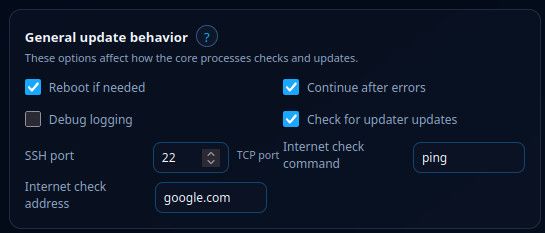
Vielen Dank erstmal für dein input. Und ich muss dir recht geben. Unter bestimmten kriterien und bei kritischen Systemen bin ich voll bei dir.
Daher gibt es unter Settings die Option "continue after errors".
Nach belieben einfach deaktivieren ;)
-
ps aux | grep -E 'apt|apt-get|dpkg'root@proxmox2:~# ps aux | grep -E 'apt|apt-get|dpkg' root 436538 0.0 0.0 6528 2376 pts/0 S+ 10:47 0:00 grep -E apt|apt-get|dpkg root 1448924 0.0 0.0 6652 3632 ? S Sep06 0:01 lxc-attach -n 108 --keep-env -- bash -c apt-get -o Dpkg::Options::=--force-confdef -o Dpkg::Options::=--force-confold dist-upgrade -y 100000 1449016 0.1 0.9 90888 71624 ? S Sep06 1:49 apt-get -o Dpkg::Options::=--force-confdef -o Dpkg::Options::=--force-confold dist-upgrade -y 100000 1455020 0.0 0.0 10612 5012 ? Ss+ Sep06 0:00 /usr/bin/dpkg --force-confdef --force-confold --status-fd 24 --configure --pending 100000 1457403 0.0 0.2 22936 17592 ? S+ Sep06 0:00 /usr/bin/perl /usr/share/debconf/frontend /var/lib/dpkg/info/openssh-server.postinst configure 1:10.0p1-7 100000 1457519 0.0 0.0 2680 1880 ? S+ Sep06 0:00 /bin/sh /var/lib/dpkg/info/openssh-server.postinst configure 1:10.0p1-7ps -ef --forest | grep -A20 -B5 -E 'apt|apt-get|dpkg'root@proxmox2:~# ps -ef --forest | grep -A20 -B5 -E 'apt|apt-get|dpkg' root 930 1 0 Aug25 ? 00:00:00 sshd: /usr/sbin/sshd -D [listener] 0 of 10-100 startups root 414595 930 0 10:42 ? 00:00:00 \_ sshd-session: root [priv] root 414633 414595 0 10:42 ? 00:00:00 | \_ sshd-session: root@pts/0 root 414636 414633 0 10:42 pts/0 00:00:00 | \_ -bash root 440215 414636 0 10:48 pts/0 00:00:00 | \_ ps -ef --forest root 440216 414636 0 10:48 pts/0 00:00:00 | \_ grep -A20 -B5 -E apt|apt-get|dpkg root 414600 930 0 10:42 ? 00:00:00 \_ sshd-session: root [priv] root 414635 414600 0 10:42 ? 00:00:00 \_ sshd-session: root@notty root 414637 414635 0 10:42 ? 00:00:00 \_ /usr/lib/openssh/sftp-server root 941 1 0 Aug25 tty1 00:00:00 /sbin/agetty -o -- \u --noreset --noclear - linux root 1075 1 0 Aug25 ? 00:00:03 /usr/sbin/cron -f root 1076 1 0 Aug25 ? 00:03:26 /usr/libexec/proxmox/proxmox-firewall start root 1097 1 0 Aug25 ? 01:46:56 pve-firewall root 1104 1 2 Aug25 ? 06:17:25 pvestatd root 1128 1 0 Aug25 ? 00:00:34 pvedaemon root 3834705 1128 0 05:37 ? 00:00:33 \_ pvedaemon worker root 3854893 1128 0 06:37 ? 00:00:31 \_ pvedaemon worker root 4479 1128 0 08:59 ? 00:00:11 \_ pvedaemon worker www-data 1141 1 0 Aug25 ? 00:01:05 pveproxy www-data 161013 1141 0 09:38 ? 00:00:04 \_ pveproxy worker www-data 173411 1141 0 09:42 ? 00:00:04 \_ pveproxy worker www-data 197959 1141 0 09:48 ? 00:00:03 \_ pveproxy worker www-data 1152 1 0 Aug25 ? 00:00:40 spiceproxy www-data 3433683 1152 0 00:04 ? 00:00:02 \_ spiceproxy worker root 1178 1 0 Aug25 ? 00:02:32 /usr/bin/lxc-start -F -n 108 100000 1248 1178 0 Aug25 ? 00:04:47 \_ /usr/lib/systemd/systemd --system --deserialize=34 -- root 1392096 1 0 Sep06 ? 00:02:44 /usr/bin/python3 /etc/ultimate-updater/web-ui/server.py --bind 0.0.0.0 --port 8765 root 1408660 1 0 Sep06 ? 00:00:00 /bin/bash /etc/ultimate-updater/job-runner.sh run-global ultimate-updater-update-all-systems-20260906-153017-380501623-1408489 /etc/ultimate-updater/global-update.sh root 1408698 1408660 0 Sep06 ? 00:00:00 \_ /bin/bash /etc/ultimate-updater/global-update.sh root 1408709 1408698 0 Sep06 ? 00:00:00 \_ /bin/bash /etc/ultimate-updater/update.sh root 1408811 1408709 0 Sep06 ? 00:00:00 \_ tee /var/log/ultimate-updater.log root 1448924 1408709 0 Sep06 ? 00:00:01 \_ lxc-attach -n 108 --keep-env -- bash -c apt-get -o Dpkg::Options::=--force-confdef -o Dpkg::Options::=--force-confold dist-upgrade -y 100000 1449016 1448924 0 Sep06 ? 00:01:49 \_ apt-get -o Dpkg::Options::=--force-confdef -o Dpkg::Options::=--force-confold dist-upgrade -y 100000 1455020 1449016 0 Sep06 ? 00:00:00 \_ /usr/bin/dpkg --force-confdef --force-confold --status-fd 24 --configure --pending 100000 1457403 1455020 0 Sep06 ? 00:00:00 \_ /usr/bin/perl /usr/share/debconf/frontend /var/lib/dpkg/info/openssh-server.postinst configure 1:10.0p1-7 100000 1457519 1457403 0 Sep06 ? 00:00:00 \_ /bin/sh /var/lib/dpkg/info/openssh-server.postinst configure 1:10.0p1-7 100000 1457533 1457519 0 Sep06 ? 00:00:00 | \_ /bin/sh /usr/bin/ucf --three-way --debconf-ok --sum-file /usr/share/openssh/sshd_config.md5sum /tmp/tmp.wUhDAEjyQn /etc/ssh/sshd_config 100000 1457635 1457403 0 Sep06 ? 00:00:00 \_ whiptail --backtitle Package configuration --title Configuring openssh-server --output-fd 11 --nocancel --default-item keep the local version currently installed --menu A new version (/tmp/tmp.wUhDAEjyQn) of configuration file /etc/ssh/sshd_config is available, but the version installed currently has been locally modified. What do you want to do about modified configuration file sshd_config? 19 76 7 -- install the package maintainer's version keep the local version currently installed show the differences between the versions show a side-by-side difference between the versions show a 3-way difference between available versions do a 3-way merge between available versions start a new shell to examine the situation _chrony 1429618 1 0 Sep06 ? 00:00:00 /usr/sbin/chronyd -n -F 1 _chrony 1429623 1429618 0 Sep06 ? 00:00:00 \_ /usr/sbin/chronyd -n -F 1 root 1431494 1 0 Sep06 ? 00:00:00 /usr/sbin/zed -F root 1432298 1 0 Sep06 ? 00:01:39 /usr/bin/pmxcfs root 1433736 1 0 Sep06 ? 00:00:00 /usr/sbin/qmeventd /var/run/qmeventd.sock root 1441793 1 0 Sep06 ? 00:00:00 /usr/sbin/rsyslogd -n -iNONE root 1441927 1 0 Sep06 ? 00:00:00 /usr/lib/postfix/sbin/master -w postfix 1441929 1441927 0 Sep06 ? 00:00:00 \_ qmgr -l -t unix -u postfix 299199 1441927 0 10:13 ? 00:00:00 \_ pickup -l -t unix -u -c root 1442345 1 0 Sep06 ? 00:00:16 pve-ha-lrm root 1442740 1 0 Sep06 ? 00:00:10 pve-ha-crm root 3433677 1 0 00:04 ? 00:00:10 /usr/sbin/pvefw-logger root 414602 1 0 10:42 ? 00:00:00 /usr/lib/systemd/systemd --user root 414604 414602 0 10:42 ? 00:00:00 \_ (sd-pam)dpkg --auditroot@proxmox2:~# dpkg --audit root@proxmox2:~#systemctl list-units --type=service | grep ultimate-updaterroot@proxmox2:~# systemctl list-units --type=service | grep ultimate-updater ● ultimate-updater-update-all-systems-20260906-153017-380501623-1408489.service loaded activating start start Ultimate Updater update for all systems ultimate-updater-web.service loaded active running Ultimate Updater web UI@Negalein danke, damit ist jetzt ziemlich eindeutig zu sehen, wo der Job hängt. 👍
Der Proxmox-Host selbst hängt nicht in
apt/dpkg.Der Updatejob befindet sich aktuell in LXC 108 und wartet dort auf eine interaktive Frage von
openssh-server:apt-get └─ dpkg └─ openssh-server.postinst └─ ucf └─ whiptailKonkret wartet dieser Dialog auf eine Entscheidung zu:
/etc/ssh/sshd_configDie Auswahl ist momentan sogar bereits auf
keep the local version currently installedvoreingestellt.
Das bestätigt genau die inzwischen gefundene Lücke:
Der Ultimate-Updater-Job läuft korrekt serverseitig weiter, kann die interaktivewhiptail-Abfrage derzeit aber noch nicht zurück an die WebUI/CLI geben.Bitte weiterhin nicht rebooten und auch nicht die komplette Ultimate-Updater-Service-Unit abschießen.
Dein
dpkg --auditwar übrigens auf dem Proxmox-Host. Relevant ist jetzt CT 108.Bitte zunächst einmal prüfen:
pct exec 108 -- dpkg --auditund:
pct exec 108 -- ps -ef | grep -E 'apt|apt-get|dpkg|ucf|whiptail'Wenn dort weiterhin der
whiptail-Prozess wartet, würde ich diesen einzelnen Dialog kontrolliert beenden und nichtaptoderdpkgselbst killen.Auf deinem bisherigen Prozessbaum wäre das PID
1457635, bitte die aktuelle PID vorher nochmals prüfen:pgrep -a whiptailDann nur diesen Prozess mit
TERMbeenden:kill -TERM <WHIPTAIL-PID>Danach bitte kurz warten und kontrollieren:
ps aux | grep -E 'apt|apt-get|dpkg|ucf|whiptail'Sobald die laufende
apt/dpkg-Kette beendet ist, direkt interaktiv in den Container:pct enter 108Dort:
dpkg --auditund anschließend:
dpkg --configure -aJetzt läuft die Paketkonfiguration in einem echten Terminal und die Frage zu
sshd_configsollte sichtbar und beantwortbar sein.In deinem Fall würde ich bei einer bewusst angepassten SSH-Konfiguration in der Regel:
keep the local version currently installedwählen.
Danach nochmals:
dpkg --auditWenn das ohne Ausgabe zurückkommt, ist der dpkg-Zustand wieder sauber.
Bitte poste danach noch kurz die Ausgabe bzw. ob
dpkg --configure -asauber durchgelaufen ist.Der Fall ist für die Weiterentwicklung übrigens sehr hilfreich: Wir haben inzwischen auf dem Testcluster bereits erfolgreich nachgewiesen, dass sich genau solche Paketdialoge über einen persistenten PTY-/Reconnect-Kanal lösen lassen. Das wird jetzt sauber in den Ultimate Updater integriert.
Proxmox Cluster
- NUC7i5 ioBroker Server (Proxmox)
- HP Elitedesk 800 G4 SSF (Proxmox)
- HP Elitedesk 800 G2 DM (Proxmox)
mein Proxmox-Updater für euch
KNX / Broadlink / Tasmota ESPs / Zigbee
Vis: 15" Touchmonitor mit Raspi4 / 10" Tablet (Dauerstrom umbau) / Sonoff NSPanel (alle) -
@Negalein danke, damit ist jetzt ziemlich eindeutig zu sehen, wo der Job hängt. 👍
Der Proxmox-Host selbst hängt nicht in
apt/dpkg.Der Updatejob befindet sich aktuell in LXC 108 und wartet dort auf eine interaktive Frage von
openssh-server:apt-get └─ dpkg └─ openssh-server.postinst └─ ucf └─ whiptailKonkret wartet dieser Dialog auf eine Entscheidung zu:
/etc/ssh/sshd_configDie Auswahl ist momentan sogar bereits auf
keep the local version currently installedvoreingestellt.
Das bestätigt genau die inzwischen gefundene Lücke:
Der Ultimate-Updater-Job läuft korrekt serverseitig weiter, kann die interaktivewhiptail-Abfrage derzeit aber noch nicht zurück an die WebUI/CLI geben.Bitte weiterhin nicht rebooten und auch nicht die komplette Ultimate-Updater-Service-Unit abschießen.
Dein
dpkg --auditwar übrigens auf dem Proxmox-Host. Relevant ist jetzt CT 108.Bitte zunächst einmal prüfen:
pct exec 108 -- dpkg --auditund:
pct exec 108 -- ps -ef | grep -E 'apt|apt-get|dpkg|ucf|whiptail'Wenn dort weiterhin der
whiptail-Prozess wartet, würde ich diesen einzelnen Dialog kontrolliert beenden und nichtaptoderdpkgselbst killen.Auf deinem bisherigen Prozessbaum wäre das PID
1457635, bitte die aktuelle PID vorher nochmals prüfen:pgrep -a whiptailDann nur diesen Prozess mit
TERMbeenden:kill -TERM <WHIPTAIL-PID>Danach bitte kurz warten und kontrollieren:
ps aux | grep -E 'apt|apt-get|dpkg|ucf|whiptail'Sobald die laufende
apt/dpkg-Kette beendet ist, direkt interaktiv in den Container:pct enter 108Dort:
dpkg --auditund anschließend:
dpkg --configure -aJetzt läuft die Paketkonfiguration in einem echten Terminal und die Frage zu
sshd_configsollte sichtbar und beantwortbar sein.In deinem Fall würde ich bei einer bewusst angepassten SSH-Konfiguration in der Regel:
keep the local version currently installedwählen.
Danach nochmals:
dpkg --auditWenn das ohne Ausgabe zurückkommt, ist der dpkg-Zustand wieder sauber.
Bitte poste danach noch kurz die Ausgabe bzw. ob
dpkg --configure -asauber durchgelaufen ist.Der Fall ist für die Weiterentwicklung übrigens sehr hilfreich: Wir haben inzwischen auf dem Testcluster bereits erfolgreich nachgewiesen, dass sich genau solche Paketdialoge über einen persistenten PTY-/Reconnect-Kanal lösen lassen. Das wird jetzt sauber in den Ultimate Updater integriert.
pct exec 108 -- dpkg --auditroot@proxmox2:~# pct exec 108 -- dpkg --audit Another process has locked the database for writing, and might currently be modifying it, some of the following problems might just be due to that. The following packages have been unpacked but not yet configured. They must be configured using dpkg --configure or the configure menu option in dselect for them to work: bind9-dnsutils Clients provided with BIND 9 python3.13-dev Header files and a static library for Python (v3.13) ssh secure shell client and server (metapackage) The following packages are only half configured, probably due to problems configuring them the first time. The configuration should be retried using dpkg --configure <package> or the configure menu option in dselect: openssh-server secure shell (SSH) server, for secure access from remote The following packages have been triggered, but the trigger processing has not yet been done. Trigger processing can be requested using dselect or dpkg --configure --pending (or dpkg --triggers-only): dbus simple interprocess messaging system (system message bus) debianutils Miscellaneous utilities specific to Debian libc-bin GNU C Library: Binaries mailcap Debian's mailcap system, and support programs man-db tools for reading manual pages postfix High-performance mail transport agent procps /proc file system utilities shared-mime-info FreeDesktop.org shared MIME database and specpct exec 108 -- ps -ef | grep -E 'apt|apt-get|dpkg|ucf|whiptail'root@proxmox2:~# pct exec 108 -- ps -ef | grep -E 'apt|apt-get|dpkg|ucf|whiptail' root 157822 0 0 Sep06 ? 00:01:52 apt-get -o Dpkg::Options::=--force-confdef -o Dpkg::Options::=--force-confold dist-upgrade -y root 160812 157822 0 Sep06 pts/3 00:00:00 /usr/bin/dpkg --force-confdef --force-confold --status-fd 24 --configure --pending root 161796 160812 0 Sep06 pts/3 00:00:00 /usr/bin/perl /usr/share/debconf/frontend /var/lib/dpkg/info/openssh-server.postinst configure 1:10.0p1-7 root 161809 161796 0 Sep06 pts/3 00:00:00 /bin/sh /var/lib/dpkg/info/openssh-server.postinst configure 1:10.0p1-7 root 161814 161809 0 Sep06 pts/3 00:00:00 /bin/sh /usr/bin/ucf --three-way --debconf-ok --sum-file /usr/share/openssh/sshd_config.md5sum /tmp/tmp.wUhDAEjyQn /etc/ssh/sshd_config root 161852 161796 0 Sep06 pts/3 00:00:00 whiptail --backtitle Package configuration --title Configuring openssh-server --output-fd 11 --nocancel --default-item keep the local version currently installed --menu A new version (/tmp/tmp.wUhDAEjyQn) of configuration file /etc/ssh/sshd_config is available, but the version installed currently has been locally modified. What do you want to do about modified configuration file sshd_config? 19 76 7 -- install the package maintainer's version keep the local version currently installed show the differences between the versions show a side-by-side difference between the versions show a 3-way difference between available versions do a 3-way merge between available versions start a new shell to examine the situationpgrep -a whiptailroot@proxmox2:~# pgrep -a whiptail 1457635 whiptail --backtitle Package configuration --title Configuring openssh-server --output-fd 11 --nocancel --default-item keep the local version currently installed --menu A new version (/tmp/tmp.wUhDAEjyQn) of configuration file /etc/ssh/sshd_config is available, but the version installed currently has been locally modified. What do you want to do about modified configuration file sshd_config? 19 76 7 -- install the package maintainer's version keep the local version currently installed show the differences between the versions show a side-by-side difference between the versions show a 3-way difference between available versions do a 3-way merge between available versions start a new shell to examine the situationkill -TERM 1457635root@proxmox2:~# kill -TERM 1457635 root@proxmox2:~#ps aux | grep -E 'apt|apt-get|dpkg|ucf|whiptail'root@proxmox2:~# ps aux | grep -E 'apt|apt-get|dpkg|ucf|whiptail' 100000 570046 0.3 0.1 17788 14536 ? S 11:20 0:00 bash -c #!/usr/bin/env bash _CS_DEFAULT_URL="https://raw.githubusercontent.com/community-scripts/ProxmoxVE/main" _cs_boot="${COMMUNITY_SCRIPTS_CORE_DIR:-$(dirname "${BASH_SOURCE[0]}")/../../core}/core/build.func" source "$_cs_boot" 2>/dev/null || source <(curl -fsSL "${COMMUNITY_SCRIPTS_CORE_URL:-https://raw.githubusercontent.com/community-scripts/core/main}/core/build.func") # Copyright (c) 2021-2026 tteck # Author: tteck (tteckster) # License: MIT | https://github.com/community-scripts/ProxmoxVE/raw/main/LICENSE # Source: https://www.home-assistant.io/ APP="Home Assistant" var_tags="${var_tags:-automation;smarthome;docker}" var_cpu="${var_cpu:-2}" var_ram="${var_ram:-2048}" var_disk="${var_disk:-16}" var_os="${var_os:-debian}" var_version="${var_version:-13}" var_arm64="${var_arm64:-yes}" var_unprivileged="${var_unprivileged:-1}" header_info "$APP" variables color catch_errors function update_script() { header_info check_container_storage check_container_resources if [[ ! -d /var/lib/docker/volumes/hass_config/_data ]]; then msg_error "No ${APP} Installation Found!" exit fi UPD=$(msg_menu "Home Assistant Update Options" \ "1" "Update ALL Containers" \ "2" "Remove ALL Unused Images" \ "3" "Install HACS" \ "4" "Install FileBrowser") if [ "$UPD" == "1" ]; then msg_info "Updating All Containers" CONTAINER_LIST="${1:-$(docker ps -q)}" for container in ${CONTAINER_LIST}; do CONTAINER_IMAGE="$(docker inspect --format "{{.Config.Image}}" --type container "${container}")" RUNNING_IMAGE="$(docker inspect --format "{{.Image}}" --type container "${container}")" docker pull "${CONTAINER_IMAGE}" LATEST_IMAGE="$(docker inspect --format "{{.Id}}" --type image "${CONTAINER_IMAGE}")" if [[ "${RUNNING_IMAGE}" != "${LATEST_IMAGE}" ]]; then pip install -U runlike echo "Updating ${container} image ${CONTAINER_IMAGE}" DOCKER_COMMAND="$(runlike --use-volume-id "${container}")" docker rm --force "${container}" eval "${DOCKER_COMMAND}" fi done msg_ok "Updated All Containers" exit fi if [ "$UPD" == "2" ]; then msg_info "Removing ALL Unused Images" docker image prune -af msg_ok "Removed ALL Unused Images" exit fi if [ "$UPD" == "3" ]; then msg_info "Installing Home Assistant Community Store (HACS)" $STD apt update cd /var/lib/docker/volumes/hass_config/_data $STD bash <(curl -fsSL https://get.hacs.xyz) msg_ok "Installed Home Assistant Community Store (HACS)" echo -e "\n Reboot Home Assistant and clear browser cache then Add HACS integration.\n" exit fi if [ "$UPD" == "4" ]; then msg_info "Installing FileBrowser" RELEASE=$(curl -fsSL https://api.github.com/repos/filebrowser/filebrowser/releases/latest | grep -o '"tag_name": ".*"' | sed 's/"//g' | sed 's/tag_name: //g') $STD curl -fsSL https://github.com/filebrowser/filebrowser/releases/download/v2.23.0/linux-$(arch_resolve)-filebrowser.tar.gz | tar -xzv -C /usr/local/bin $STD filebrowser config init -a '0.0.0.0' $STD filebrowser config set -a '0.0.0.0' $STD filebrowser users add admin community-scripts.org --perm.admin msg_ok "Installed FileBrowser" msg_info "Creating Service" service_path="/etc/systemd/system/filebrowser.service" echo "[Unit] Description=Filebrowser After=network-online.target [Service] User=root WorkingDirectory=/root/ ExecStart=/usr/local/bin/filebrowser -r / [Install] WantedBy=default.target" >$service_path $STD systemctl enable --now filebrowser msg_ok "Created Service" msg_ok "Completed successfully!\n" echo -e "FileBrowser should be reachable by going to the following URL. ${BL}http://$LOCAL_IP:8080${CL} admin|community-scripts.org\n" exit fi } start build_container description msg_ok "Completed successfully!\n" echo -e "${CREATING}${GN}${APP} setup has been successfully initialized!${CL}" echo -e "${INFO}${YW}Access it using the following URL:${CL}" echo -e "${GATEWAY}${BGN}HA: http://${IP}:8123${CL}" echo -e "${GATEWAY}${BGN}Portainer: https://${IP}:9443${CL}" root 574939 0.0 0.0 6660 2352 pts/0 S+ 11:21 0:00 grep -E apt|apt-get|dpkg|ucf|whiptailjetzt hier weiter?
Sobald die laufende apt/dpkg-Kette beendet ist, direkt interaktiv in den Container:
Copy to Clipboard
pct enter 108
Dort:
Copy to Clipboard
dpkg --audit
und anschließend:
Copy to Clipboard
dpkg --configure -a
° Node.js & System Update ---> sudo apt update, iob stop, sudo apt full-upgrade
° Node.js Fixer ---> iob nodejs-update
° Fixer ---> iob fix -
pct exec 108 -- dpkg --auditroot@proxmox2:~# pct exec 108 -- dpkg --audit Another process has locked the database for writing, and might currently be modifying it, some of the following problems might just be due to that. The following packages have been unpacked but not yet configured. They must be configured using dpkg --configure or the configure menu option in dselect for them to work: bind9-dnsutils Clients provided with BIND 9 python3.13-dev Header files and a static library for Python (v3.13) ssh secure shell client and server (metapackage) The following packages are only half configured, probably due to problems configuring them the first time. The configuration should be retried using dpkg --configure <package> or the configure menu option in dselect: openssh-server secure shell (SSH) server, for secure access from remote The following packages have been triggered, but the trigger processing has not yet been done. Trigger processing can be requested using dselect or dpkg --configure --pending (or dpkg --triggers-only): dbus simple interprocess messaging system (system message bus) debianutils Miscellaneous utilities specific to Debian libc-bin GNU C Library: Binaries mailcap Debian's mailcap system, and support programs man-db tools for reading manual pages postfix High-performance mail transport agent procps /proc file system utilities shared-mime-info FreeDesktop.org shared MIME database and specpct exec 108 -- ps -ef | grep -E 'apt|apt-get|dpkg|ucf|whiptail'root@proxmox2:~# pct exec 108 -- ps -ef | grep -E 'apt|apt-get|dpkg|ucf|whiptail' root 157822 0 0 Sep06 ? 00:01:52 apt-get -o Dpkg::Options::=--force-confdef -o Dpkg::Options::=--force-confold dist-upgrade -y root 160812 157822 0 Sep06 pts/3 00:00:00 /usr/bin/dpkg --force-confdef --force-confold --status-fd 24 --configure --pending root 161796 160812 0 Sep06 pts/3 00:00:00 /usr/bin/perl /usr/share/debconf/frontend /var/lib/dpkg/info/openssh-server.postinst configure 1:10.0p1-7 root 161809 161796 0 Sep06 pts/3 00:00:00 /bin/sh /var/lib/dpkg/info/openssh-server.postinst configure 1:10.0p1-7 root 161814 161809 0 Sep06 pts/3 00:00:00 /bin/sh /usr/bin/ucf --three-way --debconf-ok --sum-file /usr/share/openssh/sshd_config.md5sum /tmp/tmp.wUhDAEjyQn /etc/ssh/sshd_config root 161852 161796 0 Sep06 pts/3 00:00:00 whiptail --backtitle Package configuration --title Configuring openssh-server --output-fd 11 --nocancel --default-item keep the local version currently installed --menu A new version (/tmp/tmp.wUhDAEjyQn) of configuration file /etc/ssh/sshd_config is available, but the version installed currently has been locally modified. What do you want to do about modified configuration file sshd_config? 19 76 7 -- install the package maintainer's version keep the local version currently installed show the differences between the versions show a side-by-side difference between the versions show a 3-way difference between available versions do a 3-way merge between available versions start a new shell to examine the situationpgrep -a whiptailroot@proxmox2:~# pgrep -a whiptail 1457635 whiptail --backtitle Package configuration --title Configuring openssh-server --output-fd 11 --nocancel --default-item keep the local version currently installed --menu A new version (/tmp/tmp.wUhDAEjyQn) of configuration file /etc/ssh/sshd_config is available, but the version installed currently has been locally modified. What do you want to do about modified configuration file sshd_config? 19 76 7 -- install the package maintainer's version keep the local version currently installed show the differences between the versions show a side-by-side difference between the versions show a 3-way difference between available versions do a 3-way merge between available versions start a new shell to examine the situationkill -TERM 1457635root@proxmox2:~# kill -TERM 1457635 root@proxmox2:~#ps aux | grep -E 'apt|apt-get|dpkg|ucf|whiptail'root@proxmox2:~# ps aux | grep -E 'apt|apt-get|dpkg|ucf|whiptail' 100000 570046 0.3 0.1 17788 14536 ? S 11:20 0:00 bash -c #!/usr/bin/env bash _CS_DEFAULT_URL="https://raw.githubusercontent.com/community-scripts/ProxmoxVE/main" _cs_boot="${COMMUNITY_SCRIPTS_CORE_DIR:-$(dirname "${BASH_SOURCE[0]}")/../../core}/core/build.func" source "$_cs_boot" 2>/dev/null || source <(curl -fsSL "${COMMUNITY_SCRIPTS_CORE_URL:-https://raw.githubusercontent.com/community-scripts/core/main}/core/build.func") # Copyright (c) 2021-2026 tteck # Author: tteck (tteckster) # License: MIT | https://github.com/community-scripts/ProxmoxVE/raw/main/LICENSE # Source: https://www.home-assistant.io/ APP="Home Assistant" var_tags="${var_tags:-automation;smarthome;docker}" var_cpu="${var_cpu:-2}" var_ram="${var_ram:-2048}" var_disk="${var_disk:-16}" var_os="${var_os:-debian}" var_version="${var_version:-13}" var_arm64="${var_arm64:-yes}" var_unprivileged="${var_unprivileged:-1}" header_info "$APP" variables color catch_errors function update_script() { header_info check_container_storage check_container_resources if [[ ! -d /var/lib/docker/volumes/hass_config/_data ]]; then msg_error "No ${APP} Installation Found!" exit fi UPD=$(msg_menu "Home Assistant Update Options" \ "1" "Update ALL Containers" \ "2" "Remove ALL Unused Images" \ "3" "Install HACS" \ "4" "Install FileBrowser") if [ "$UPD" == "1" ]; then msg_info "Updating All Containers" CONTAINER_LIST="${1:-$(docker ps -q)}" for container in ${CONTAINER_LIST}; do CONTAINER_IMAGE="$(docker inspect --format "{{.Config.Image}}" --type container "${container}")" RUNNING_IMAGE="$(docker inspect --format "{{.Image}}" --type container "${container}")" docker pull "${CONTAINER_IMAGE}" LATEST_IMAGE="$(docker inspect --format "{{.Id}}" --type image "${CONTAINER_IMAGE}")" if [[ "${RUNNING_IMAGE}" != "${LATEST_IMAGE}" ]]; then pip install -U runlike echo "Updating ${container} image ${CONTAINER_IMAGE}" DOCKER_COMMAND="$(runlike --use-volume-id "${container}")" docker rm --force "${container}" eval "${DOCKER_COMMAND}" fi done msg_ok "Updated All Containers" exit fi if [ "$UPD" == "2" ]; then msg_info "Removing ALL Unused Images" docker image prune -af msg_ok "Removed ALL Unused Images" exit fi if [ "$UPD" == "3" ]; then msg_info "Installing Home Assistant Community Store (HACS)" $STD apt update cd /var/lib/docker/volumes/hass_config/_data $STD bash <(curl -fsSL https://get.hacs.xyz) msg_ok "Installed Home Assistant Community Store (HACS)" echo -e "\n Reboot Home Assistant and clear browser cache then Add HACS integration.\n" exit fi if [ "$UPD" == "4" ]; then msg_info "Installing FileBrowser" RELEASE=$(curl -fsSL https://api.github.com/repos/filebrowser/filebrowser/releases/latest | grep -o '"tag_name": ".*"' | sed 's/"//g' | sed 's/tag_name: //g') $STD curl -fsSL https://github.com/filebrowser/filebrowser/releases/download/v2.23.0/linux-$(arch_resolve)-filebrowser.tar.gz | tar -xzv -C /usr/local/bin $STD filebrowser config init -a '0.0.0.0' $STD filebrowser config set -a '0.0.0.0' $STD filebrowser users add admin community-scripts.org --perm.admin msg_ok "Installed FileBrowser" msg_info "Creating Service" service_path="/etc/systemd/system/filebrowser.service" echo "[Unit] Description=Filebrowser After=network-online.target [Service] User=root WorkingDirectory=/root/ ExecStart=/usr/local/bin/filebrowser -r / [Install] WantedBy=default.target" >$service_path $STD systemctl enable --now filebrowser msg_ok "Created Service" msg_ok "Completed successfully!\n" echo -e "FileBrowser should be reachable by going to the following URL. ${BL}http://$LOCAL_IP:8080${CL} admin|community-scripts.org\n" exit fi } start build_container description msg_ok "Completed successfully!\n" echo -e "${CREATING}${GN}${APP} setup has been successfully initialized!${CL}" echo -e "${INFO}${YW}Access it using the following URL:${CL}" echo -e "${GATEWAY}${BGN}HA: http://${IP}:8123${CL}" echo -e "${GATEWAY}${BGN}Portainer: https://${IP}:9443${CL}" root 574939 0.0 0.0 6660 2352 pts/0 S+ 11:21 0:00 grep -E apt|apt-get|dpkg|ucf|whiptailjetzt hier weiter?
Sobald die laufende apt/dpkg-Kette beendet ist, direkt interaktiv in den Container:
Copy to Clipboard
pct enter 108
Dort:
Copy to Clipboard
dpkg --audit
und anschließend:
Copy to Clipboard
dpkg --configure -a
@Negalein ja, grundsätzlich wäre
dpkg --configure -ader nächste Reparaturschritt – aber bitte noch einen Moment warten und nicht direkt ausführen. 👍Das Beenden von
whiptailhat funktioniert:
Die vorher festhängende Ketteapt-get → dpkg → openssh-server.postinst → ucf → whiptailist jetzt nicht mehr in der Prozessliste.
Allerdings sieht man inzwischen einen neuen Community-Scripts-Prozess. Das heißt sehr wahrscheinlich, dass der globale Ultimate-Updater-Job nach dem abgebrochenen Paketdialog bereits weitergelaufen ist.
Bevor wir jetzt manuell
dpkg --configure -ain CT 108 starten, müssen wir deshalb kurz sicherstellen, dass dort nicht erneut bzw. parallel etwas arbeitet.Bitte einmal:
pct exec 108 -- ps -ef | grep -E 'apt|apt-get|dpkg|ucf|whiptail'und:
pct exec 108 -- dpkg --auditZusätzlich bitte den aktuellen Ultimate-Updater-Status:
ultimate-updater statusund den aktuellen Stand des laufenden Jobs:
systemctl status ultimate-updater-update-all-systems-20260906-153017-380501623-1408489.service --no-pagersowie die letzten Zeilen:
journalctl -u ultimate-updater-update-all-systems-20260906-153017-380501623-1408489.service -n 80 --no-pagerWenn in CT 108 kein
apt/dpkgmehr läuft, können wir anschließend dort sauber interaktiv fortsetzen mit:pct enter 108und dann:
dpkg --configure -aBei der Frage zu
/etc/ssh/sshd_configwürde ich bei einer bewusst angepassten SSH-Konfiguration weiterhinkeep the local version currently installedwählen.
Aber erst die obigen Ausgaben – ich möchte vermeiden, dass wir jetzt einen zweiten
dpkgstarten, während der Ultimate Updater noch irgendwo im selben Container arbeitet.Proxmox Cluster
- NUC7i5 ioBroker Server (Proxmox)
- HP Elitedesk 800 G4 SSF (Proxmox)
- HP Elitedesk 800 G2 DM (Proxmox)
mein Proxmox-Updater für euch
KNX / Broadlink / Tasmota ESPs / Zigbee
Vis: 15" Touchmonitor mit Raspi4 / 10" Tablet (Dauerstrom umbau) / Sonoff NSPanel (alle) -
@Negalein danke, damit ist jetzt ziemlich eindeutig zu sehen, wo der Job hängt. 👍
Der Proxmox-Host selbst hängt nicht in
apt/dpkg.Der Updatejob befindet sich aktuell in LXC 108 und wartet dort auf eine interaktive Frage von
openssh-server:apt-get └─ dpkg └─ openssh-server.postinst └─ ucf └─ whiptailKonkret wartet dieser Dialog auf eine Entscheidung zu:
/etc/ssh/sshd_configDie Auswahl ist momentan sogar bereits auf
keep the local version currently installedvoreingestellt.
Das bestätigt genau die inzwischen gefundene Lücke:
Der Ultimate-Updater-Job läuft korrekt serverseitig weiter, kann die interaktivewhiptail-Abfrage derzeit aber noch nicht zurück an die WebUI/CLI geben.Bitte weiterhin nicht rebooten und auch nicht die komplette Ultimate-Updater-Service-Unit abschießen.
Dein
dpkg --auditwar übrigens auf dem Proxmox-Host. Relevant ist jetzt CT 108.Bitte zunächst einmal prüfen:
pct exec 108 -- dpkg --auditund:
pct exec 108 -- ps -ef | grep -E 'apt|apt-get|dpkg|ucf|whiptail'Wenn dort weiterhin der
whiptail-Prozess wartet, würde ich diesen einzelnen Dialog kontrolliert beenden und nichtaptoderdpkgselbst killen.Auf deinem bisherigen Prozessbaum wäre das PID
1457635, bitte die aktuelle PID vorher nochmals prüfen:pgrep -a whiptailDann nur diesen Prozess mit
TERMbeenden:kill -TERM <WHIPTAIL-PID>Danach bitte kurz warten und kontrollieren:
ps aux | grep -E 'apt|apt-get|dpkg|ucf|whiptail'Sobald die laufende
apt/dpkg-Kette beendet ist, direkt interaktiv in den Container:pct enter 108Dort:
dpkg --auditund anschließend:
dpkg --configure -aJetzt läuft die Paketkonfiguration in einem echten Terminal und die Frage zu
sshd_configsollte sichtbar und beantwortbar sein.In deinem Fall würde ich bei einer bewusst angepassten SSH-Konfiguration in der Regel:
keep the local version currently installedwählen.
Danach nochmals:
dpkg --auditWenn das ohne Ausgabe zurückkommt, ist der dpkg-Zustand wieder sauber.
Bitte poste danach noch kurz die Ausgabe bzw. ob
dpkg --configure -asauber durchgelaufen ist.Der Fall ist für die Weiterentwicklung übrigens sehr hilfreich: Wir haben inzwischen auf dem Testcluster bereits erfolgreich nachgewiesen, dass sich genau solche Paketdialoge über einen persistenten PTY-/Reconnect-Kanal lösen lassen. Das wird jetzt sauber in den Ultimate Updater integriert.



Hey! Du scheinst an dieser Unterhaltung interessiert zu sein, hast aber noch kein Konto.
Hast du es satt, bei jedem Besuch durch die gleichen Beiträge zu scrollen? Wenn du dich für ein Konto anmeldest, kommst du immer genau dorthin zurück, wo du zuvor warst, und kannst dich über neue Antworten benachrichtigen lassen (entweder per E-Mail oder Push-Benachrichtigung). Du kannst auch Lesezeichen speichern und Beiträge positiv bewerten, um anderen Community-Mitgliedern deine Wertschätzung zu zeigen.
Mit deinem Input könnte dieser Beitrag noch besser werden 💗
Registrieren AnmeldenSupport us
483
Online33.1k
Benutzer84.1k
Themen1.4m
Beiträge