




Test iobroker.vis-mapwidgets

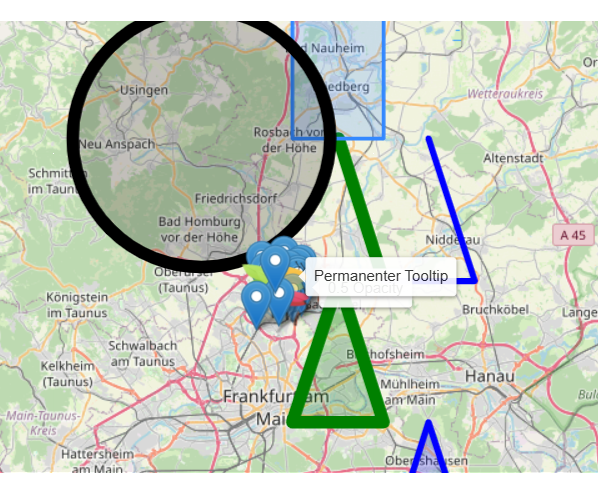

-
Ich häng mal das TypeScript dran, dann siehte ja:
Edit: 10.07.26 21:33// ============================================================================= // Konfiguration // ============================================================================= const DP_LAT: string = 'traccar.0.devices.1.latitude'; const DP_LON: string = 'traccar.0.devices.1.longitude'; const DP_MOTION: string = 'traccar.0.devices.1.motion'; const DP_ROUTE_JSON: string = '0_userdata.0.CarLoad.CurrentRouteJSON'; const DP_LAST_DATE: string = '0_userdata.0.CarLoad.LastDriveDate'; const DP_LAST_STOP_TIME: string = '0_userdata.0.CarLoad.LastStopTime'; // NEU: Mindestabstand in Metern, bevor ein neuer Punkt gespeichert wird const MIN_DISTANCE_METERS: number = 50; // Farben für die verschiedenen Fahrten des Tages (max 5) const DRIVE_COLORS: string[] = ['#3d3d5c', '#e65c00', '#009933', '#cc0000', '#9900cc']; // Interfaces für die Struktur interface LeafletMarker { latlng: [number, number]; options: { icon: string; title: string; }; tooltip?: string; } interface LeafletIcon { iconUrl: string; iconSize: [number, number]; iconAnchor: [number, number]; popupAnchor?: [number, number]; shadowSize?: [number, number]; shadowAnchor?: [number, number]; } interface PolylineConfig { latlng: [number, number][]; options: { color: string; weight: number }; iobOptions?: { fitBounds: boolean }; } interface MapContent { marker: LeafletMarker[]; icons: { honda: LeafletIcon; }; polyline: PolylineConfig[]; } interface DriveTrip { map: MapContent; } interface LeafletRouteContainer { [isoTimestamp: string]: DriveTrip; } // Hilfsfunktion: Berechnet die Distanz zwischen zwei Koordinaten in Metern (Haversine-Formel) function getDistanceInMeters(lat1: number, lon1: number, lat2: number, lon2: number): number { const R = 6371000; // Erdradius in Metern const dLat = (lat2 - lat1) * Math.PI / 180; const dLon = (lon2 - lon1) * Math.PI / 180; const a = Math.sin(dLat / 2) * Math.sin(dLat / 2) + Math.cos(lat1 * Math.PI / 180) * Math.cos(lat2 * Math.PI / 180) * Math.sin(dLon / 2) * Math.sin(dLon / 2); const c = 2 * Math.atan2(Math.sqrt(a), Math.sqrt(1 - a)); return R * c; } // Erzeugt eine frische Map-Struktur für eine einzelne Fahrt function createNewTripStructure(colorIndex: number): DriveTrip { return { map: { marker: [ { latlng: [0.0, 0.0], options: { icon: "honda", title: "Default" }, tooltip: "Hover me" } ], icons: { honda: { iconUrl: "/vis-2.0/SmartHome/tanken/honda_sv1.png", iconSize: [45, 30], iconAnchor: [15, 30], popupAnchor: [0, -26], shadowSize: [36, 36], shadowAnchor: [15, 30] } }, polyline: [ { latlng: [], options: { color: DRIVE_COLORS[colorIndex % DRIVE_COLORS.length], weight: 3 }, iobOptions: { fitBounds: true } } ] } }; } // ============================================================================= // Initialisierung // ============================================================================= async function init(): Promise<void> { await createStateAsync(DP_LAST_DATE, '', { type: 'string' }); await createStateAsync(DP_LAST_STOP_TIME, 0, { type: 'number', name: 'Zeitstempel letzter Stop' }); if (!(await existsStateAsync(DP_ROUTE_JSON))) { await createStateAsync(DP_ROUTE_JSON, '{}', { name: 'Aktuelle Route für Leaflet', type: 'string', role: 'json' }); } } // ============================================================================= // Logik: Koordinaten hinzufügen mit zeitbasierter Objekt-Struktur & 50m Filter // ============================================================================= async function addCoordinateToRoute(lat: number, lon: number): Promise<void> { try { const heute = new Date().toISOString().split('T')[0]; const lastDateState = await getStateAsync(DP_LAST_DATE); const lastDate = lastDateState ? lastDateState.val : ''; const state = await getStateAsync(DP_ROUTE_JSON); let routeData: LeafletRouteContainer = {}; // 1. Reset bei neuem Tag if (lastDate !== heute) { log(`[Traccar-Route] Neuer Tag erkannt. Reset der Route.`); routeData = {}; await setStateAsync(DP_LAST_DATE, heute, true); await setStateAsync(DP_LAST_STOP_TIME, 0, true); } else if (state && typeof state.val === 'string' && state.val !== '') { routeData = JSON.parse(state.val) as LeafletRouteContainer; } // Alle vorhandenen Keys (Fahrten) ermitteln und sortieren let tripKeys = Object.keys(routeData).sort(); const lastStopState = await getStateAsync(DP_LAST_STOP_TIME); const lastStopTime = lastStopState ? (lastStopState.val as number) : 0; const jetzt = Date.now(); let currentTripKey: string; // Prüfen, ob eine neue Fahrt begonnen werden muss const isNewTripNeeded = tripKeys.length === 0 || (lastStopTime > 0 && (jetzt - lastStopTime) > (30 * 60 * 1000)); if (isNewTripNeeded) { if (tripKeys.length < 5) { currentTripKey = new Date().toISOString(); log(`[Traccar-Route] Erstelle neue Fahrt unter Key: ${currentTripKey}`); routeData[currentTripKey] = createNewTripStructure(tripKeys.length); tripKeys.push(currentTripKey); } else { log(`[Traccar-Route] Pause > 30 Min, aber Maximum von 5 Fahrten erreicht. Nutze letzte Fahrt weiter.`, 'warn'); currentTripKey = tripKeys[tripKeys.length - 1]; } await setStateAsync(DP_LAST_STOP_TIME, 0, true); } else { currentTripKey = tripKeys[tripKeys.length - 1]; } // Typisierte Referenz auf die aktive Fahrt holen const activeTrip: MapContent = routeData[currentTripKey].map; // 3. Polyline-Logik mit 50-Meter-Prüfung const latlngs = activeTrip.polyline[0].latlng; if (latlngs.length > 0) { const lastPoint = latlngs[latlngs.length - 1]; // Exakter Dubletten-Check if (lastPoint[0] === lat && lastPoint[1] === lon) return; // NEU: Berechne Abstand zum letzten aufgezeichneten Punkt der aktuellen Fahrt const distance = getDistanceInMeters(lastPoint[0], lastPoint[1], lat, lon); if (distance < MIN_DISTANCE_METERS) { // Der Punkt ist zu nah am vorherigen Punkt (GPS Drift in der Garage), wir ignorieren ihn für die Route // Aber: Wir aktualisieren trotzdem den Live-Marker, damit das Auto auf der Karte exakt steht if (activeTrip.marker && activeTrip.marker.length > 0) { activeTrip.marker[0].latlng = [lat, lon]; await setStateAsync(DP_ROUTE_JSON, JSON.stringify(routeData), true); } return; } } // 2. Live-Position des Markers aktualisieren (wenn Punkt gültig oder erster Punkt) if (activeTrip.marker && activeTrip.marker.length > 0) { activeTrip.marker[0].latlng = [lat, lon]; } // Punkt zur Fahrt hinzufügen latlngs.push([lat, lon]); // Performance-Schutz pro Fahrt if (latlngs.length > 1500) latlngs.shift(); await setStateAsync(DP_ROUTE_JSON, JSON.stringify(routeData), true); } catch (e) { log(`[Leaflet-Route] Fehler beim Hinzufügen der Koordinate: ${e}`, 'error'); } } // ============================================================================= // Trigger // ============================================================================= on({ id: DP_LAT, change: 'ne' }, async (obj) => { const lat = obj.state ? parseFloat(obj.state.val as string) : null; const lonState = await getStateAsync(DP_LON); const motionState = await getStateAsync(DP_MOTION); if (lat !== null && lonState && lonState.val !== null) { const lon = parseFloat(lonState.val as string); const isMoving = motionState ? !!motionState.val : true; // Wenn Traccar meldet, dass sich das Auto bewegt, jagen wir es durch die Prüfung if (isMoving && !isNaN(lat) && !isNaN(lon)) { await addCoordinateToRoute(lat, lon); } } }); on({ id: DP_MOTION, change: 'ne' }, async (obj) => { if (obj.state) { const isMoving = !!obj.state.val; if (!isMoving) { log(`[Traccar-Route] Fahrzeug steht. Starte Haltezeit-Überwachung.`); await setStateAsync(DP_LAST_STOP_TIME, Date.now(), true); } else { const lastStopState = await getStateAsync(DP_LAST_STOP_TIME); const lastStopTime = lastStopState ? (lastStopState.val as number) : 0; if (lastStopTime > 0 && (Date.now() - lastStopTime) <= (30 * 60 * 1000)) { log(`[Traccar-Route] Fahrt nach kurzem Zwischenstopp (< 30 Min) fortgesetzt.`); await setStateAsync(DP_LAST_STOP_TIME, 0, true); } } } }); init();Kleine Anmerkung was mir aufgefallen ist
Wen dp_lon nach dp_lat aktualisiert wird, könnte es in der Aufzeichnung ein kleine Differenz geben, da dein Skript nur auf Änderung von dp_lat horcht -
Kleine Anmerkung was mir aufgefallen ist
Wen dp_lon nach dp_lat aktualisiert wird, könnte es in der Aufzeichnung ein kleine Differenz geben, da dein Skript nur auf Änderung von dp_lat horchtWen dp_lon nach dp_lat aktualisiert wird, könnte es in der Aufzeichnung ein kleine Differenz geben, da dein Skript nur auf Änderung von dp_lat horcht
Passt aber ganz gut, mit der Route bin ich eigentlich zufrieden, ich hab jetzt mal den ersten Test mit nur einer Fahrt gemacht, und so wie es ausieht funktioniert das schonmal.
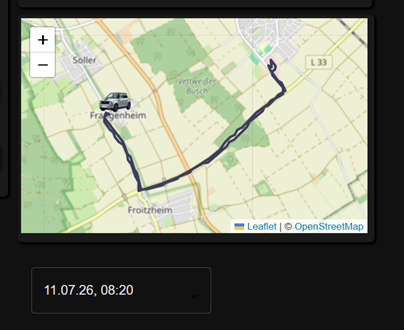
Eine Frage hab ich noch, ich hab zwar gefunden wie ich die Farbe vom Auswahl-Widget ändern kann, kann man auch die Farbe von dem Icon ändern? Das schwarze Icon sieht man jetzt nich mehr.
Ich hab wohl immernoch das Problem das die Route und der Marker immer nur einmal angezeigt wird, wenn ich View wechsel und wieder zurück gehe, dann ist die Karte leer.
ich hab mal F12 aufgerufen und bekomme diese Meldung:
Uncaught TypeError: Cannot read properties of undefined (reading 'map')
    at onSelectionChanged (<anonymous>:28:135)
    at <anonymous>:19:13
    at <anonymous>:30:11
    at <anonymous>:38:3
    at JSONTemplateWidget-CFWfawQI.js:1462:1320
    at br (index-5AUwr9-i.js:4430:23)
    at Yn (index-5AUwr9-i.js:5443:21)
    at wo (index-5AUwr9-i.js:5106:5)
    at dn (index-5AUwr9-i.js:2416:17)
    at Ec (index-5AUwr9-i.js:5360:132)
onSelectionChanged @ VM12429:28
(anonymous) @ VM12429:19
(anonymous) @ VM12429:30
(anonymous) @ VM12429:38
(anonymous) @ JSONTemplateWidget-CFWfawQI.js:1462
br @ index-5AUwr9-i.js:4430
Yn @ index-5AUwr9-i.js:5443
wo @ index-5AUwr9-i.js:5106
dn @ index-5AUwr9-i.js:2416
Ec @ index-5AUwr9-i.js:5360
hn @ index-5AUwr9-i.js:5329
da @ index-5AUwr9-i.js:5056
E @ index-5AUwr9-i.js:101
rt @ index-5AUwr9-i.js:126
PendingScript
(anonymous) @ JSONTemplateWidget-CFWfawQI.js:1462
br @ index-5AUwr9-i.js:4430
Yn @ index-5AUwr9-i.js:5443
wo @ index-5AUwr9-i.js:5106
dn @ index-5AUwr9-i.js:2416
Ec @ index-5AUwr9-i.js:5360
hn @ index-5AUwr9-i.js:5329
da @ index-5AUwr9-i.js:5056
E @ index-5AUwr9-i.js:101
rt @ index-5AUwr9-i.js:126
postMessage
lt @ index-5AUwr9-i.js:139
rt @ index-5AUwr9-i.js:128
postMessage
lt @ index-5AUwr9-i.js:139
il @ index-5AUwr9-i.js:145
e.unstable_scheduleCallback @ index-5AUwr9-i.js:224
wa @ index-5AUwr9-i.js:5669
fe @ index-5AUwr9-i.js:4991
Te @ index-5AUwr9-i.js:4963
enqueueSetState @ index-5AUwr9-i.js:3530
p.setState @ index-DN8zaYv1.js:31
(anonymous) @ visRxWidget-CKSPQ3Fi.js:2459
setTimeout
onStateChanged @ visRxWidget-CKSPQ3Fi.js:2456
(anonymous) @ index-CySOTs8E.js:55167
(anonymous) @ index-CySOTs8E.js:55167
(anonymous) @ socket.io.js:8
(anonymous) @ socket.io.js:8
(anonymous) @ socket.io.js:8
(anonymous) @ socket.io.js:6
(anonymous) @ socket.io.js:6
(anonymous) @ socket.io.js:8
(anonymous) @ socket.io.js:6
(anonymous) @ socket.io.js:6
(anonymous) @ socket.io.js:6
(anonymous) @ socket.io.js:8
(anonymous) @ socket.io.js:6
(anonymous) @ socket.io.js:6
(anonymous) @ socket.io.js:6
(anonymous) @ socket.io.js:6
(anonymous) @ socket.io.js:7
(anonymous) @ socket.io.js:7
(anonymous) @ socket.io.js:8
Edit:
Hier hab ich nochmal was ich in den Widgets eingetragen hab:
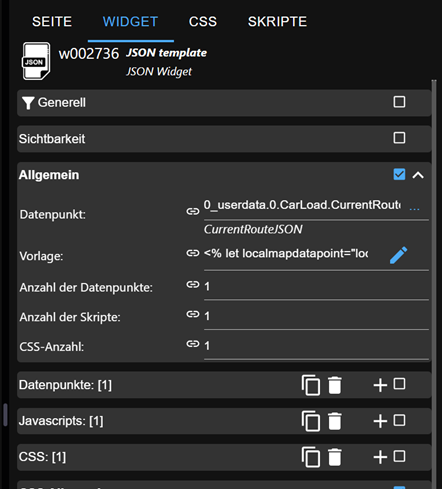
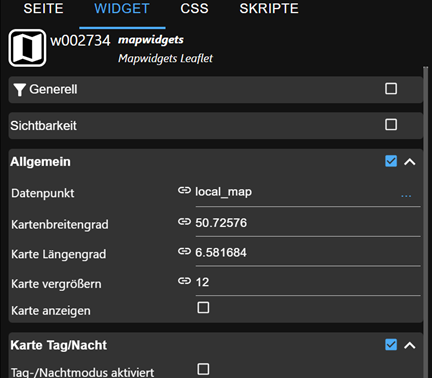
-
Wen dp_lon nach dp_lat aktualisiert wird, könnte es in der Aufzeichnung ein kleine Differenz geben, da dein Skript nur auf Änderung von dp_lat horcht
Passt aber ganz gut, mit der Route bin ich eigentlich zufrieden, ich hab jetzt mal den ersten Test mit nur einer Fahrt gemacht, und so wie es ausieht funktioniert das schonmal.
Eine Frage hab ich noch, ich hab zwar gefunden wie ich die Farbe vom Auswahl-Widget ändern kann, kann man auch die Farbe von dem Icon ändern? Das schwarze Icon sieht man jetzt nich mehr.
Ich hab wohl immernoch das Problem das die Route und der Marker immer nur einmal angezeigt wird, wenn ich View wechsel und wieder zurück gehe, dann ist die Karte leer.
ich hab mal F12 aufgerufen und bekomme diese Meldung:
Uncaught TypeError: Cannot read properties of undefined (reading 'map')
    at onSelectionChanged (<anonymous>:28:135)
    at <anonymous>:19:13
    at <anonymous>:30:11
    at <anonymous>:38:3
    at JSONTemplateWidget-CFWfawQI.js:1462:1320
    at br (index-5AUwr9-i.js:4430:23)
    at Yn (index-5AUwr9-i.js:5443:21)
    at wo (index-5AUwr9-i.js:5106:5)
    at dn (index-5AUwr9-i.js:2416:17)
    at Ec (index-5AUwr9-i.js:5360:132)
onSelectionChanged @ VM12429:28
(anonymous) @ VM12429:19
(anonymous) @ VM12429:30
(anonymous) @ VM12429:38
(anonymous) @ JSONTemplateWidget-CFWfawQI.js:1462
br @ index-5AUwr9-i.js:4430
Yn @ index-5AUwr9-i.js:5443
wo @ index-5AUwr9-i.js:5106
dn @ index-5AUwr9-i.js:2416
Ec @ index-5AUwr9-i.js:5360
hn @ index-5AUwr9-i.js:5329
da @ index-5AUwr9-i.js:5056
E @ index-5AUwr9-i.js:101
rt @ index-5AUwr9-i.js:126
PendingScript
(anonymous) @ JSONTemplateWidget-CFWfawQI.js:1462
br @ index-5AUwr9-i.js:4430
Yn @ index-5AUwr9-i.js:5443
wo @ index-5AUwr9-i.js:5106
dn @ index-5AUwr9-i.js:2416
Ec @ index-5AUwr9-i.js:5360
hn @ index-5AUwr9-i.js:5329
da @ index-5AUwr9-i.js:5056
E @ index-5AUwr9-i.js:101
rt @ index-5AUwr9-i.js:126
postMessage
lt @ index-5AUwr9-i.js:139
rt @ index-5AUwr9-i.js:128
postMessage
lt @ index-5AUwr9-i.js:139
il @ index-5AUwr9-i.js:145
e.unstable_scheduleCallback @ index-5AUwr9-i.js:224
wa @ index-5AUwr9-i.js:5669
fe @ index-5AUwr9-i.js:4991
Te @ index-5AUwr9-i.js:4963
enqueueSetState @ index-5AUwr9-i.js:3530
p.setState @ index-DN8zaYv1.js:31
(anonymous) @ visRxWidget-CKSPQ3Fi.js:2459
setTimeout
onStateChanged @ visRxWidget-CKSPQ3Fi.js:2456
(anonymous) @ index-CySOTs8E.js:55167
(anonymous) @ index-CySOTs8E.js:55167
(anonymous) @ socket.io.js:8
(anonymous) @ socket.io.js:8
(anonymous) @ socket.io.js:8
(anonymous) @ socket.io.js:6
(anonymous) @ socket.io.js:6
(anonymous) @ socket.io.js:8
(anonymous) @ socket.io.js:6
(anonymous) @ socket.io.js:6
(anonymous) @ socket.io.js:6
(anonymous) @ socket.io.js:8
(anonymous) @ socket.io.js:6
(anonymous) @ socket.io.js:6
(anonymous) @ socket.io.js:6
(anonymous) @ socket.io.js:6
(anonymous) @ socket.io.js:7
(anonymous) @ socket.io.js:7
(anonymous) @ socket.io.js:8
Edit:
Hier hab ich nochmal was ich in den Widgets eingetragen hab:
Gib mir mal deinen aktuellen Stand des templates und welche Version vis-2 und jsontemplate nutzt du?
-
Gib mir mal deinen aktuellen Stand des templates und welche Version vis-2 und jsontemplate nutzt du?
Gib mir mal deinen aktuellen Stand des templates und welche Version vis-2 und jsontemplate nutzt du?
Ich hab bei mir die Versionen:
-
VIS-2 v2.14.3
-
vis-mapwidgets v0.1.1
-
vis-jsontemplate v4.4.3
Ich häng dir auchnochmal das json von heute Mittag dran:
{ "2026-07-11T11:31:55.044Z": { "map": { "marker": [ { "latlng": [ 50.7258209, 6.5616916 ], "options": { "icon": "honda", "title": "Default" }, "tooltip": "Hover me", "iobOptions": { "fitBounds": true } } ], "icons": { "honda": { "iconUrl": "/vis-2.0/SmartHome/tanken/honda_sv1.png", "iconSize": [ 45, 30 ], "iconAnchor": [ 15, 30 ], "popupAnchor": [ 0, -26 ], "shadowSize": [ 36, 36 ], "shadowAnchor": [ 15, 30 ] } }, "polyline": [ { "latlng": [ [ 50.725799, 6.5616099 ], [ 50.7251238, 6.5605654 ], [ 50.7246166, 6.5609528 ], [ 50.7240711, 6.561601 ], [ 50.723522, 6.5622009 ], [ 50.7230547, 6.5628025 ], [ 50.7225897, 6.5633924 ], [ 50.7219501, 6.5644493 ], [ 50.7211811, 6.5647788 ], [ 50.7207659, 6.5650656 ], [ 50.7203349, 6.5656474 ], [ 50.7198957, 6.5659433 ], [ 50.7190173, 6.5662387 ], [ 50.718582, 6.5665369 ], [ 50.7181532, 6.5668324 ], [ 50.717732, 6.5671206 ], [ 50.7173251, 6.5676627 ], [ 50.7165625, 6.567859 ], [ 50.7159213, 6.5680011 ], [ 50.7159217, 6.5690802 ], [ 50.7162137, 6.5703503 ], [ 50.7163688, 6.5710893 ], [ 50.7165208, 6.5718595 ], [ 50.7166787, 6.5726256 ], [ 50.7168475, 6.5733845 ], [ 50.7170238, 6.5741235 ], [ 50.7171892, 6.5748408 ], [ 50.7173636, 6.5755007 ], [ 50.7176644, 6.5766643 ], [ 50.7177859, 6.5775401 ], [ 50.7179652, 6.5783119 ], [ 50.7184016, 6.5794199 ], [ 50.7187902, 6.5799019 ], [ 50.7190182, 6.5810498 ], [ 50.7195261, 6.5816723 ], [ 50.7198009, 6.5823029 ], [ 50.7200899, 6.5829285 ], [ 50.7203958, 6.5841725 ], [ 50.7210481, 6.5847941 ], [ 50.7213975, 6.5854123 ], [ 50.7217527, 6.5860382 ], [ 50.7221206, 6.5866526 ], [ 50.7228596, 6.5878512 ], [ 50.7232216, 6.5884268 ], [ 50.7235814, 6.5895314 ], [ 50.7242882, 6.590077 ], [ 50.7246376, 6.5906174 ], [ 50.724991, 6.5911495 ], [ 50.7253374, 6.5922095 ], [ 50.7260145, 6.5932597 ], [ 50.7266419, 6.5937876 ], [ 50.7271892, 6.5947667 ], [ 50.7276852, 6.5963161 ], [ 50.7281664, 6.5968287 ], [ 50.728378, 6.5977711 ], [ 50.728757, 6.5981952 ], [ 50.7289921, 6.5989111 ], [ 50.7297176, 6.598413 ], [ 50.7303885, 6.5972797 ], [ 50.7310067, 6.5969014 ], [ 50.7315278, 6.5962554 ], [ 50.7319837, 6.5956623 ], [ 50.7325074, 6.5950903 ], [ 50.7329774, 6.5943489 ], [ 50.7334461, 6.5942692 ], [ 50.7336491, 6.5949733 ], [ 50.7332343, 6.5945766 ], [ 50.7330614, 6.5939065 ], [ 50.7323787, 6.5947169 ], [ 50.7317675, 6.5951215 ], [ 50.7311164, 6.595912 ], [ 50.7307921, 6.5967118 ], [ 50.7301439, 6.5970905 ], [ 50.7295434, 6.597821 ], [ 50.7290658, 6.59839 ], [ 50.7286366, 6.5986282 ], [ 50.7282548, 6.5978259 ], [ 50.7277666, 6.5968633 ], [ 50.7274929, 6.5957611 ], [ 50.7268985, 6.5946084 ], [ 50.7262481, 6.5940331 ], [ 50.7259021, 6.5929041 ], [ 50.7251837, 6.591794 ], [ 50.724445, 6.5912374 ], [ 50.7240686, 6.590676 ], [ 50.7237026, 6.5901055 ], [ 50.7235015, 6.5892436 ], [ 50.7227379, 6.588662 ], [ 50.7223558, 6.58807 ], [ 50.7219749, 6.5874671 ], [ 50.721601, 6.5865422 ], [ 50.7210562, 6.5859094 ], [ 50.7207213, 6.5852672 ], [ 50.7202175, 6.584299 ], [ 50.7199076, 6.5829942 ], [ 50.7196087, 6.582337 ], [ 50.7191027, 6.5817123 ], [ 50.7187135, 6.5801152 ], [ 50.7182688, 6.5792968 ], [ 50.7182556, 6.5784151 ], [ 50.7178702, 6.5780466 ], [ 50.7175446, 6.5771647 ], [ 50.7171914, 6.576015 ], [ 50.7168716, 6.5746561 ], [ 50.7167147, 6.5732628 ], [ 50.7164239, 6.5725964 ], [ 50.7162866, 6.5712233 ], [ 50.7160372, 6.5705925 ], [ 50.7158421, 6.5694239 ], [ 50.7157773, 6.5684483 ], [ 50.7163356, 6.5681035 ], [ 50.7170592, 6.5679911 ], [ 50.717881, 6.5673416 ], [ 50.7193092, 6.5667069 ], [ 50.7197753, 6.5663782 ], [ 50.7202366, 6.5657502 ], [ 50.7206875, 6.5657502 ], [ 50.7211247, 6.5654476 ], [ 50.7218717, 6.5648738 ], [ 50.7224139, 6.5642734 ], [ 50.7228701, 6.5636795 ], [ 50.7234011, 6.5631349 ], [ 50.7239938, 6.5623962 ], [ 50.7245283, 6.5617643 ], [ 50.7250234, 6.56116 ], [ 50.7254054, 6.5607061 ], [ 50.7259625, 6.5610327 ], [ 50.7258509, 6.5617928 ] ], "options": { "color": "#3d3d5c", "weight": 3 }, "iobOptions": { "fitBounds": true } } ] } } }Ich habs grad auchnochmal ausprobiert, wenn ich die View wechsel, und wieder zurück gehe in der 'Runtime' dann zeigt die Karte manchmal ein Zoom auf das Haus mit dem Marker und beim nächstenmal die Karte in Zoom-Stufe 12 ohne Marker, Route oder sonstwas.
Manchmal kann ich im jsontemplate ein Datum auswählen und manchmal nicht. -
-
Gib mir mal deinen aktuellen Stand des templates und welche Version vis-2 und jsontemplate nutzt du?
Ich hab bei mir die Versionen:
-
VIS-2 v2.14.3
-
vis-mapwidgets v0.1.1
-
vis-jsontemplate v4.4.3
Ich häng dir auchnochmal das json von heute Mittag dran:
{ "2026-07-11T11:31:55.044Z": { "map": { "marker": [ { "latlng": [ 50.7258209, 6.5616916 ], "options": { "icon": "honda", "title": "Default" }, "tooltip": "Hover me", "iobOptions": { "fitBounds": true } } ], "icons": { "honda": { "iconUrl": "/vis-2.0/SmartHome/tanken/honda_sv1.png", "iconSize": [ 45, 30 ], "iconAnchor": [ 15, 30 ], "popupAnchor": [ 0, -26 ], "shadowSize": [ 36, 36 ], "shadowAnchor": [ 15, 30 ] } }, "polyline": [ { "latlng": [ [ 50.725799, 6.5616099 ], [ 50.7251238, 6.5605654 ], [ 50.7246166, 6.5609528 ], [ 50.7240711, 6.561601 ], [ 50.723522, 6.5622009 ], [ 50.7230547, 6.5628025 ], [ 50.7225897, 6.5633924 ], [ 50.7219501, 6.5644493 ], [ 50.7211811, 6.5647788 ], [ 50.7207659, 6.5650656 ], [ 50.7203349, 6.5656474 ], [ 50.7198957, 6.5659433 ], [ 50.7190173, 6.5662387 ], [ 50.718582, 6.5665369 ], [ 50.7181532, 6.5668324 ], [ 50.717732, 6.5671206 ], [ 50.7173251, 6.5676627 ], [ 50.7165625, 6.567859 ], [ 50.7159213, 6.5680011 ], [ 50.7159217, 6.5690802 ], [ 50.7162137, 6.5703503 ], [ 50.7163688, 6.5710893 ], [ 50.7165208, 6.5718595 ], [ 50.7166787, 6.5726256 ], [ 50.7168475, 6.5733845 ], [ 50.7170238, 6.5741235 ], [ 50.7171892, 6.5748408 ], [ 50.7173636, 6.5755007 ], [ 50.7176644, 6.5766643 ], [ 50.7177859, 6.5775401 ], [ 50.7179652, 6.5783119 ], [ 50.7184016, 6.5794199 ], [ 50.7187902, 6.5799019 ], [ 50.7190182, 6.5810498 ], [ 50.7195261, 6.5816723 ], [ 50.7198009, 6.5823029 ], [ 50.7200899, 6.5829285 ], [ 50.7203958, 6.5841725 ], [ 50.7210481, 6.5847941 ], [ 50.7213975, 6.5854123 ], [ 50.7217527, 6.5860382 ], [ 50.7221206, 6.5866526 ], [ 50.7228596, 6.5878512 ], [ 50.7232216, 6.5884268 ], [ 50.7235814, 6.5895314 ], [ 50.7242882, 6.590077 ], [ 50.7246376, 6.5906174 ], [ 50.724991, 6.5911495 ], [ 50.7253374, 6.5922095 ], [ 50.7260145, 6.5932597 ], [ 50.7266419, 6.5937876 ], [ 50.7271892, 6.5947667 ], [ 50.7276852, 6.5963161 ], [ 50.7281664, 6.5968287 ], [ 50.728378, 6.5977711 ], [ 50.728757, 6.5981952 ], [ 50.7289921, 6.5989111 ], [ 50.7297176, 6.598413 ], [ 50.7303885, 6.5972797 ], [ 50.7310067, 6.5969014 ], [ 50.7315278, 6.5962554 ], [ 50.7319837, 6.5956623 ], [ 50.7325074, 6.5950903 ], [ 50.7329774, 6.5943489 ], [ 50.7334461, 6.5942692 ], [ 50.7336491, 6.5949733 ], [ 50.7332343, 6.5945766 ], [ 50.7330614, 6.5939065 ], [ 50.7323787, 6.5947169 ], [ 50.7317675, 6.5951215 ], [ 50.7311164, 6.595912 ], [ 50.7307921, 6.5967118 ], [ 50.7301439, 6.5970905 ], [ 50.7295434, 6.597821 ], [ 50.7290658, 6.59839 ], [ 50.7286366, 6.5986282 ], [ 50.7282548, 6.5978259 ], [ 50.7277666, 6.5968633 ], [ 50.7274929, 6.5957611 ], [ 50.7268985, 6.5946084 ], [ 50.7262481, 6.5940331 ], [ 50.7259021, 6.5929041 ], [ 50.7251837, 6.591794 ], [ 50.724445, 6.5912374 ], [ 50.7240686, 6.590676 ], [ 50.7237026, 6.5901055 ], [ 50.7235015, 6.5892436 ], [ 50.7227379, 6.588662 ], [ 50.7223558, 6.58807 ], [ 50.7219749, 6.5874671 ], [ 50.721601, 6.5865422 ], [ 50.7210562, 6.5859094 ], [ 50.7207213, 6.5852672 ], [ 50.7202175, 6.584299 ], [ 50.7199076, 6.5829942 ], [ 50.7196087, 6.582337 ], [ 50.7191027, 6.5817123 ], [ 50.7187135, 6.5801152 ], [ 50.7182688, 6.5792968 ], [ 50.7182556, 6.5784151 ], [ 50.7178702, 6.5780466 ], [ 50.7175446, 6.5771647 ], [ 50.7171914, 6.576015 ], [ 50.7168716, 6.5746561 ], [ 50.7167147, 6.5732628 ], [ 50.7164239, 6.5725964 ], [ 50.7162866, 6.5712233 ], [ 50.7160372, 6.5705925 ], [ 50.7158421, 6.5694239 ], [ 50.7157773, 6.5684483 ], [ 50.7163356, 6.5681035 ], [ 50.7170592, 6.5679911 ], [ 50.717881, 6.5673416 ], [ 50.7193092, 6.5667069 ], [ 50.7197753, 6.5663782 ], [ 50.7202366, 6.5657502 ], [ 50.7206875, 6.5657502 ], [ 50.7211247, 6.5654476 ], [ 50.7218717, 6.5648738 ], [ 50.7224139, 6.5642734 ], [ 50.7228701, 6.5636795 ], [ 50.7234011, 6.5631349 ], [ 50.7239938, 6.5623962 ], [ 50.7245283, 6.5617643 ], [ 50.7250234, 6.56116 ], [ 50.7254054, 6.5607061 ], [ 50.7259625, 6.5610327 ], [ 50.7258509, 6.5617928 ] ], "options": { "color": "#3d3d5c", "weight": 3 }, "iobOptions": { "fitBounds": true } } ] } } }Ich habs grad auchnochmal ausprobiert, wenn ich die View wechsel, und wieder zurück gehe in der 'Runtime' dann zeigt die Karte manchmal ein Zoom auf das Haus mit dem Marker und beim nächstenmal die Karte in Zoom-Stufe 12 ohne Marker, Route oder sonstwas.
Manchmal kann ich im jsontemplate ein Datum auswählen und manchmal nicht.Kannst du mir da mal testendaten bereitstellen. Gerne auch per persönlichem Chat
-
-
Kannst du mir da mal testendaten bereitstellen. Gerne auch per persönlichem Chat
-
@icebear
Deinen Datenpunkt mit Inhalt mit dem du diesen Effekt festgestellt hast -
Deinen Datenpunkt mit Inhalt mit dem du diesen Effekt festgestellt hast
Du meinst den DP wo das json liegt, welches ich dann in dem Dropdown auswählen kann (mit Datum und Uhrzeit)?
Das hab ich schon 3 posts drüber eingefügt.
Ich hab auch grad nochmal probiert, wenn ich das json im DP im Admin aufmache, und bei der Polyline die erste Koordinate an der letzten Stelle verändere z.B 50,78654 zu 50,78653 und unten auf Wert setzten klicke, dann zurück in die VIS im Editor gehe bekomme ich die Route angezeigt, wenn ich dann auf Runtime umschalte ist die Route weg, ich kann zwar noch auf das Datum klicken aber es passiert nix.
-
Deinen Datenpunkt mit Inhalt mit dem du diesen Effekt festgestellt hast
Du meinst den DP wo das json liegt, welches ich dann in dem Dropdown auswählen kann (mit Datum und Uhrzeit)?
Das hab ich schon 3 posts drüber eingefügt.
Ich hab auch grad nochmal probiert, wenn ich das json im DP im Admin aufmache, und bei der Polyline die erste Koordinate an der letzten Stelle verändere z.B 50,78654 zu 50,78653 und unten auf Wert setzten klicke, dann zurück in die VIS im Editor gehe bekomme ich die Route angezeigt, wenn ich dann auf Runtime umschalte ist die Route weg, ich kann zwar noch auf das Datum klicken aber es passiert nix.
-
Deinen Datenpunkt mit Inhalt mit dem du diesen Effekt festgestellt hast
Du meinst den DP wo das json liegt, welches ich dann in dem Dropdown auswählen kann (mit Datum und Uhrzeit)?
Das hab ich schon 3 posts drüber eingefügt.
Ich hab auch grad nochmal probiert, wenn ich das json im DP im Admin aufmache, und bei der Polyline die erste Koordinate an der letzten Stelle verändere z.B 50,78654 zu 50,78653 und unten auf Wert setzten klicke, dann zurück in die VIS im Editor gehe bekomme ich die Route angezeigt, wenn ich dann auf Runtime umschalte ist die Route weg, ich kann zwar noch auf das Datum klicken aber es passiert nix.
also das problem aus der obigen fehlermeldung konnte ich verbessern,
das liegt daran, das vis immer mehrfach den datenpunkt aktualisiert. einmal ohne daten und einmal mit daten. der fehler kommt davon, wenn der datenpunkt keine daten enthält.
ist aber ein vis typisches verhalten.leider hast du mir dein template mitgeschickt, daher habe ich auf basis meiner version dass auf dunkel umgestellt. alle eigenschaften der auswahlbox sind in den css-anweisungen im template enthalten
das verhalten das bei einem reiter wechsel hin und zurück die marker weg sind konnte ich nicht nachvollziehen. in der runtime hat das immer gut funktioniert.
die versionen von dir sind identisch zu meinen.
da bei mir der effekt nicht auftritt, ist es schwer nachzuvollziehen. tritt das nur im vis edit mode auf oder auch im runtime? dann bitte nach der aktualisierung auch nochmal auf die fehler schauen. ggfs muss ich auch mal noch die debug ausgaben des map widgets nachschärfen, so das man im browser log besser nachvollziehen kann, was passiert oder auch was nicht passiert.im edit modus hat es auch etwas mit dem vis verhalten zu tun. da habe ich 2 dinge festgestellt, die ich unabhängig von deinem problem mal noch mal tiefer untersuchen muss. das ist leider debug technisch etwas aufwändiger.
eigentlich abonniert vis/vis2 im edit mode alle datenpunkte. da scheint sich etwas geändert zu haben, auch bekomme ich im browser log (nicht immer) den hinweis:
only admin allowed
wo ich vermute das es damit zu tun hat.
auch bekommt im edit modus nicht immer die daten aus dem datenpunkt an. da aber die dynamische aktualisierung unter vis im edit mode deaktiviert ist, kommen da keine weiteren aktualisierungen, wie es im runtime mode der fall ist. das ist/war eigentlich auch ok. auch hier will ich mal schauen ob ich das noch verbessern kann. hat aber evtl auswirkungen auf das erstellen und debuggen von den templates -
Neue Version 0.2.0
Es wurde ein Location Timeline widget hinzugefügt.
Das widget kann bis zu 5 Tracking Datenpunkte aufnehmen
Der Datenpunkt muss in der Form 50.11552,8.68417 beschrieben werden
Der Datenpunkt muss historisiert sein um einen Verlauf zu erhalten.
Das widget kann umfangreich in der Darstellung konfiguriert werden- Timeline seitlich oder drunter oder Automatisch nach Breite des widgts
- Auto/Hell/Dunkel Theme
- Farben für die verschiedenen Personen
Anhand des zeitlichen Verlaufs errechnet das widget dann Aufenthaltsorte.
Die Grenzwerte können konfiguriert werden - Ein Aufenthalt wird registriert wenn man sich mehr wie x Minuten im Umkreis von y Metern befindet
Die Aufenthaltsorte können optional anhand der Aufenthaltsorte reverse Geocoded werden. Als Dienst wird hier der kostenlose Dienst nominatim (steht mit openstreetmaps in Verbindung) genutzt.
Um die Nutzungslimits zu erhöhen sollte man eine gültige EMail eintragen.
Das widget beachtet die bekannten Nutzungslimits und führt das Geocoding über eine Warteschlange (sofern der Browser und das widget läuft) ggfs verzögert durch. Allerdings dürften die Nutzungslimits für den Alltagsgebrauch ausreichend sein.
https://operations.osmfoundation.org/policies/nominatim
maximale Obergrenze von einer Abfrage pro Sekunde
Bitte mit Massenabfragen oder zu kleinteiligen Umkreisen je Minuten vorsichtig sein. Die vorgegeben Standardwerte sollten ausreichend sein. Ansonsten könnte eure IP für weitere Abfragen gesperrt werden.Alle Abfragen werden zum einen lokal im Browser und in einem datenpunkt gespeichert um Mehrfachabfragen zu verhindern und auch beim Einsatz verschiedener Browser das weitgehend zu reduzieren.
Alle Abfragen erfolgen direkt aus dem browser heraus.
Falls das probleme macht werde ich die Funktionalität im adapter auf den iobroker schieben. Aber wir schauen mal wie das funktioniert.Falls das reverse GeoCoding keinen Punkt findet, wird unbekannter Ort angezeigt. Das kann man dann über das Favoriten Icon bearbeiten und selbst einen sinnigen Namen eingeben (zu Hause, Arbeit, etc.)
Wer das widget testen möchte aber noch keine Trackingdaten hat, kann das folgende Skript in den iobroker javascript-Adapter kopieren (Datenpunkt zuvor anlegen, history adapter installieren und die Historisierung für den Datenpunkt aktivieren) und ausführen.
https://github.com/oweitman/ioBroker.vis-mapwidgets/blob/main/example/LocationTimeline/create-example-track.js
Um einen aktuellen Track zu erhalten kann man das Startdatum ebenfalls im Skript konfigurieren. Dann werden die timestamps entsprechend berechnet.Das Ergebnis sieht dann so aus:
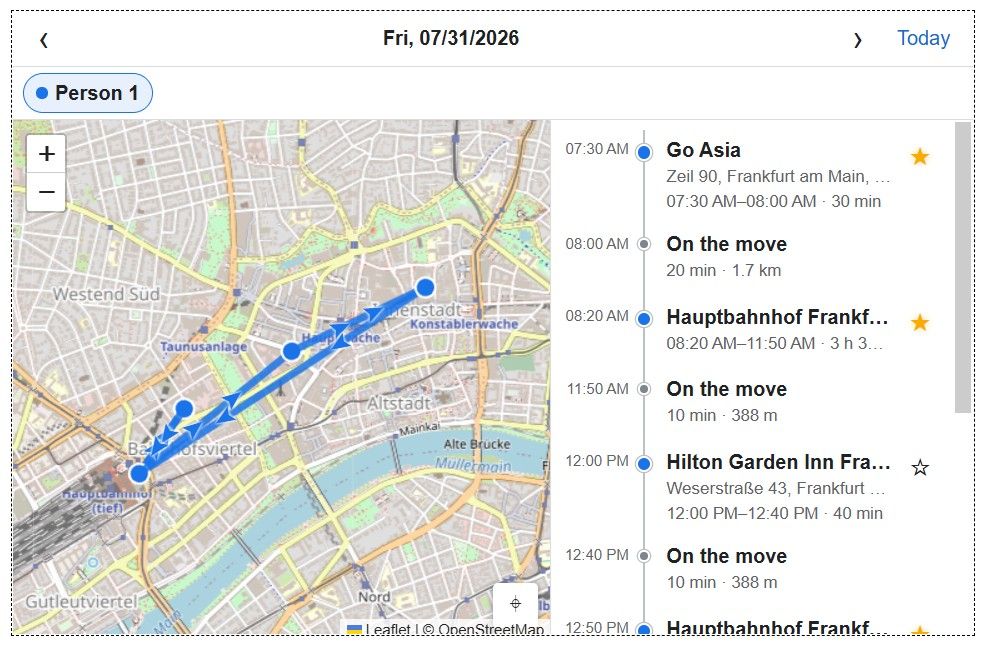
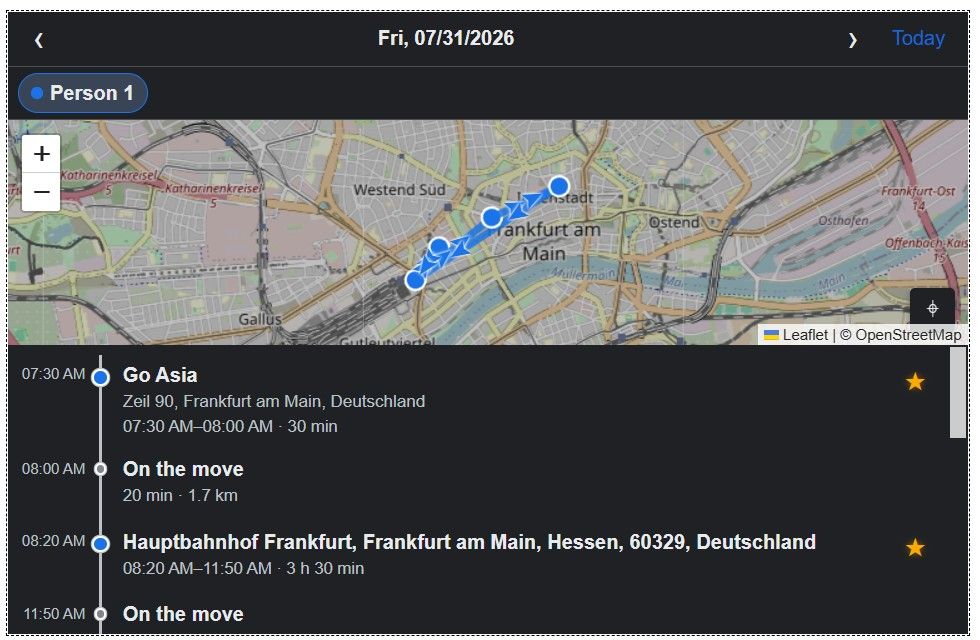
Konfigurationsmöglichkeiten
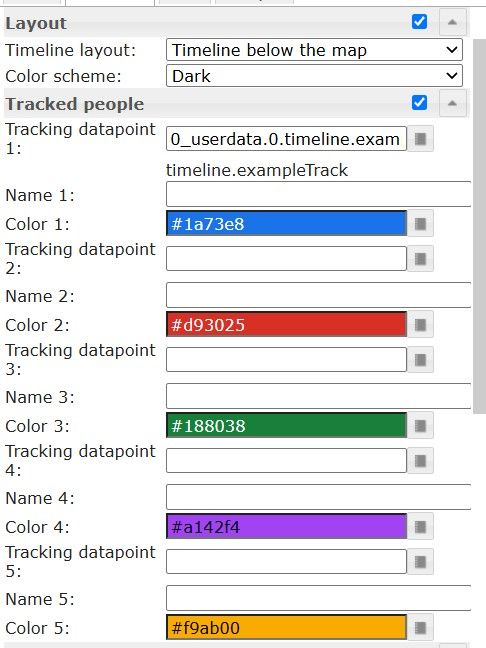
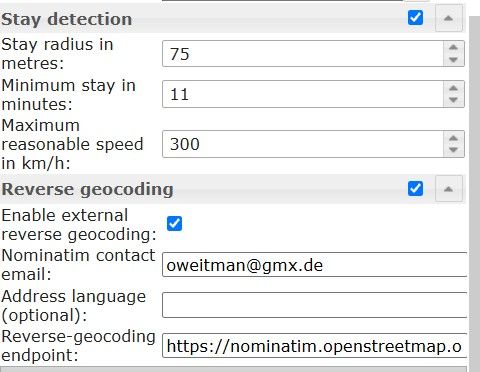
Das widget habe ich in vis1 getestet
(allerdings nur mit dem einen Beispiels track)
Läuft in vis-2 ebenfalls. Das Problem mit den Layout einstellungen hat sich wohl nach vis-2 neustart behoben.Zu Problemen oder Vorschläge bitte hier berichten
Das widget ist aktuell beta.
Es können sich auch noch generelle Dinge ändern. -
Neue Version 0.2.0
Es wurde ein Location Timeline widget hinzugefügt.
Das widget kann bis zu 5 Tracking Datenpunkte aufnehmen
Der Datenpunkt muss in der Form 50.11552,8.68417 beschrieben werden
Der Datenpunkt muss historisiert sein um einen Verlauf zu erhalten.
Das widget kann umfangreich in der Darstellung konfiguriert werden- Timeline seitlich oder drunter oder Automatisch nach Breite des widgts
- Auto/Hell/Dunkel Theme
- Farben für die verschiedenen Personen
Anhand des zeitlichen Verlaufs errechnet das widget dann Aufenthaltsorte.
Die Grenzwerte können konfiguriert werden - Ein Aufenthalt wird registriert wenn man sich mehr wie x Minuten im Umkreis von y Metern befindet
Die Aufenthaltsorte können optional anhand der Aufenthaltsorte reverse Geocoded werden. Als Dienst wird hier der kostenlose Dienst nominatim (steht mit openstreetmaps in Verbindung) genutzt.
Um die Nutzungslimits zu erhöhen sollte man eine gültige EMail eintragen.
Das widget beachtet die bekannten Nutzungslimits und führt das Geocoding über eine Warteschlange (sofern der Browser und das widget läuft) ggfs verzögert durch. Allerdings dürften die Nutzungslimits für den Alltagsgebrauch ausreichend sein.
https://operations.osmfoundation.org/policies/nominatim
maximale Obergrenze von einer Abfrage pro Sekunde
Bitte mit Massenabfragen oder zu kleinteiligen Umkreisen je Minuten vorsichtig sein. Die vorgegeben Standardwerte sollten ausreichend sein. Ansonsten könnte eure IP für weitere Abfragen gesperrt werden.Alle Abfragen werden zum einen lokal im Browser und in einem datenpunkt gespeichert um Mehrfachabfragen zu verhindern und auch beim Einsatz verschiedener Browser das weitgehend zu reduzieren.
Alle Abfragen erfolgen direkt aus dem browser heraus.
Falls das probleme macht werde ich die Funktionalität im adapter auf den iobroker schieben. Aber wir schauen mal wie das funktioniert.Falls das reverse GeoCoding keinen Punkt findet, wird unbekannter Ort angezeigt. Das kann man dann über das Favoriten Icon bearbeiten und selbst einen sinnigen Namen eingeben (zu Hause, Arbeit, etc.)
Wer das widget testen möchte aber noch keine Trackingdaten hat, kann das folgende Skript in den iobroker javascript-Adapter kopieren (Datenpunkt zuvor anlegen, history adapter installieren und die Historisierung für den Datenpunkt aktivieren) und ausführen.
https://github.com/oweitman/ioBroker.vis-mapwidgets/blob/main/example/LocationTimeline/create-example-track.js
Um einen aktuellen Track zu erhalten kann man das Startdatum ebenfalls im Skript konfigurieren. Dann werden die timestamps entsprechend berechnet.Das Ergebnis sieht dann so aus:
Konfigurationsmöglichkeiten
Das widget habe ich in vis1 getestet
(allerdings nur mit dem einen Beispiels track)
Läuft in vis-2 ebenfalls. Das Problem mit den Layout einstellungen hat sich wohl nach vis-2 neustart behoben.Zu Problemen oder Vorschläge bitte hier berichten
Das widget ist aktuell beta.
Es können sich auch noch generelle Dinge ändern. -
Ich wollte das Location Timeline widget grad mal ausprobieren, aber ich kann links in den Widget-Einstellungen den Punkt 'Allgemein' nicht aktivieren.
vis-2 Adapter hab ich neu gestartet.
-
Das Problem was ich jetzt auch mit dem Location Timeline widget habe, ist das ich da auch schon wieder ein Script brauche welches mir die Koordinaten in den DP im richtigen Format schreibt.
Ich dachte z.B. das das Format für die Koordinaten so gewählt ist, das man es z.B. aus dem cloud-Adapter direkt übernehmen kann ohne noch zusätzlich irgendwas zu machen.
Jetzt hab ich aber festgestellt, das im cloud-Adapter das Format genau umgekehrt und mit ; getrennt geschrieben wird.Siehe:

Ich weiß ja nicht wo du deine Koordinaten herbekommst, vielleicht gibt es ja auch noch was anderes an "Boardmitteln" was ich benutzen kann.
Traccar z.B. schreibt die Koordinaten getrennt in zwei DP einen für lat und einen für long. Da müsste ich auch mit einem Script die Daten aufbereiten, was ja prinzipiell kein Problem wäre.
-
Das Problem was ich jetzt auch mit dem Location Timeline widget habe, ist das ich da auch schon wieder ein Script brauche welches mir die Koordinaten in den DP im richtigen Format schreibt.
Ich dachte z.B. das das Format für die Koordinaten so gewählt ist, das man es z.B. aus dem cloud-Adapter direkt übernehmen kann ohne noch zusätzlich irgendwas zu machen.
Jetzt hab ich aber festgestellt, das im cloud-Adapter das Format genau umgekehrt und mit ; getrennt geschrieben wird.Siehe:
Ich weiß ja nicht wo du deine Koordinaten herbekommst, vielleicht gibt es ja auch noch was anderes an "Boardmitteln" was ich benutzen kann.
Traccar z.B. schreibt die Koordinaten getrennt in zwei DP einen für lat und einen für long. Da müsste ich auch mit einem Script die Daten aufbereiten, was ja prinzipiell kein Problem wäre.
die Koordinaten sind in der WGS84 notation
zuerst latitude, dann longitudediese notation und Systematik wird von vielen diensten
verwendet. bspw auch google oder OpenStreetMap oder auch home assistantBeispiel
https://www.google.com/maps/search/?api=1&query=50.1109,8.6821traccar schreibt das ebenfalls in dieser reihenfolge in den datenpunkt
position_urlden cloud adapter nutze ich nicht
was ich noch einbauen könnte, wäre eine Erkennung auf json objekt, wo dann bspw folgende Struktur enthalten sein könnte
{
  "longitude": 50.1109 ,
  "latitude": 8.6821
}
oder
{
  "lon": 50.1109 ,
  "lat": 8.6821
}
gegen getrennte datenpunkte habe ich mich wegen eines evtl. drifts entschieden. beide Koordinaten gehören zusammen. wenn die beiden getrennt gemessen und geschrieben werden kann es zu einem drift kommen, insbesondere bei größeren Geschwindigkeiten.
Funktioniert es ansonsten bei dir?
-
Oh, sorry da hab ich mich beim flüchtigen hinschauen verguckt. Tatsächlich Traccar hat das richtig im DP stehen:

Dann könnte ich doch direkt den DP historisieren und bräuchte den anderen garnicht, oder?
Ja sieht gut aus.
Richtige Reihenfolge mit Komma getrenntdann könnte man das widget mal im lifebetrieb testen.
das habe ich noch nicht, da ich noch keinen tracker habe.
war nur interessant sowas mal umzusetzen -
Ja sieht gut aus.
Richtige Reihenfolge mit Komma getrenntdann könnte man das widget mal im lifebetrieb testen.
das habe ich noch nicht, da ich noch keinen tracker habe.
war nur interessant sowas mal umzusetzendann könnte man das widget mal im lifebetrieb testen.
Ich werde das dann morgen mal testen und berichten.
Du könntest dir aber vielleicht schonmal Gedanken machen ob man da noch einbauen kann, das man ein symbol anstatt des "blöden" Geomarkers verwenden kann, z.B. das mdi:car-connected

Aber das ist noch wunschdenken, erstmal testen ob's grundsätzlich so funktioniert.
Und dann noch eine Frage, wo muß ich mich denn bei Nominatim mit der e-mail anmelden, ich find das nich?


Hey! Du scheinst an dieser Unterhaltung interessiert zu sein, hast aber noch kein Konto.
Hast du es satt, bei jedem Besuch durch die gleichen Beiträge zu scrollen? Wenn du dich für ein Konto anmeldest, kommst du immer genau dorthin zurück, wo du zuvor warst, und kannst dich über neue Antworten benachrichtigen lassen (entweder per E-Mail oder Push-Benachrichtigung). Du kannst auch Lesezeichen speichern und Beiträge positiv bewerten, um anderen Community-Mitgliedern deine Wertschätzung zu zeigen.
Mit deinem Input könnte dieser Beitrag noch besser werden 💗
Registrieren AnmeldenSupport us
416
Online33.0k
Benutzer83.6k
Themen1.3m
Beiträge