Weiter zum Inhalt
  • Home
  • Aktuell
  • Tags
  • 0 Ungelesen 0
  • Kategorien
  • Unreplied
  • Beliebt
  • GitHub
  • Docu
  • Hilfe
Skins
  • Hell
  • Brite
  • Cerulean
  • Cosmo
  • Flatly
  • Journal
  • Litera
  • Lumen
  • Lux
  • Materia
  • Minty
  • Morph
  • Pulse
  • Sandstone
  • Simplex
  • Sketchy
  • Spacelab
  • United
  • Yeti
  • Zephyr
  • Dunkel
  • Cyborg
  • Darkly
  • Quartz
  • Slate
  • Solar
  • Superhero
  • Vapor

  • Standard: (Kein Skin)
  • Kein Skin
Einklappen
ioBroker Logo

Community Forum

donate donate
  1. ioBroker Community Home
  2. Deutsch
  3. Error/Bug
  4. Fehlendes Startdatum in Daten zu Terminen aus iCal-Adapter

NEWS

  • Neuer ioBroker-Blog online: Monatsrückblick März/April 2026
    BluefoxB
    Bluefox
    8
    1
    725

  • Verwendung von KI bitte immer deutlich kennzeichnen
    HomoranH
    Homoran
    10
    1
    559

  • Monatsrückblick Januar/Februar 2026 ist online!
    BluefoxB
    Bluefox
    18
    1
    1.1k

Fehlendes Startdatum in Daten zu Terminen aus iCal-Adapter

Geplant Angeheftet Gesperrt Verschoben Ungelöst Error/Bug
11 Beiträge 5 Kommentatoren 181 Aufrufe 5 Beobachtet
  • Älteste zuerst
  • Neuste zuerst
  • Meiste Stimmen
Antworten
  • In einem neuen Thema antworten
Anmelden zum Antworten
Dieses Thema wurde gelöscht. Nur Nutzer mit entsprechenden Rechten können es sehen.
  • S Sneak-L8
    • Adaptername: iCal.
    • Link zu Adapterrepository: https://github.com/iobroker-community-adapters/ioBroker.ical/issues/869
    • Adapterversion: 1.19.7
    • js-controller Version: 7.0.7
    • Admin Version: 7.7.22
    • Hardwaresystem: Pi4
    • Arbeitsspeicher: 4 GB
    • Festplattenart: SD-Karte
    • Betriebssystem: linux
    • Nodejs-Version: v22.22.2
    • NPM-Version: 10.9.7
    • Installationsart: Skript
    • Image, Docker genutzt: Nein
    • Ort, Name der Imagedatei: ./.

    Seit 24.03.2026 fehlt bei mir in den iCal-Objekten, die der Adapter selektiert, die Angabe seit wann ein wiederkehrendes Ereignis existiert. Hat sich da was im Adapter oder bei Google geändert?

    unter ._object.rrule.origOptions.dtstart wird ein Datum erwartet, aber da ist keins mehr:
    {
    "type":"VEVENT",
    "start":"2026-03-22T23:00:00.000Z",
    "datetype":"date",
    "end":"2026-03-23T23:00:00.000Z",
    "rrule":{
    "_rrule":{
    "tzid":"UTC",
    "originalDtstart":{},
    "opts":{"dtstart":{},"tzid":"UTC","freq":"YEARLY","interval":1},
    "maxIterations":10000,
    "includeDtstart":false,
    "hasOrdinalByDay":false,
    "canUseEpochMillisecondsPrecisionFlag":true,
    "timeSlotOffsetsMs":[0]
    },
    "_dateOnly":true
    },
    "dtstamp":"2026-03-25T02:01:03.000Z",
    "uid":"xxx@google.com",
    "created":"2026-03-01T01:23:14.000Z",
    "lastmodified":"2026-03-01T01:23:14.000Z",
    "sequence":0,
    "status":"CONFIRMED",
    "summary":"Geburtstag von xxx xxx",
    "transparency":"OPAQUE",
    "method":"PUBLISH"
    }

    Auf den Issue bei github hat leider niemand reagiert. Vielleicht liegt es auch gar nicht am Adapter sondern Google stellt die Daten anders bereit?

    Script v.2026-01-31
    
    *** BASE SYSTEM ***
    Operating System: Debian GNU/Linux 12 (bookworm)
    Static hostname: raspberrypi
          Icon name: computer
             Kernel: Linux 6.12.47+rpt-rpi-v8
       Architecture: arm64
    OS is similar to:
    
    Model           : Raspberry Pi 4 Model B Rev 1.5
    Docker          : false
    Virtualization  : none
    Kernel          : aarch64
    Userland        : 64 bit
    
    Systemuptime and Load:
    14:42:31 up 159 days,  3:46,  2 users,  load average: 0.49, 0.32, 0.23
    CPU threads: 4
    
    
    *** LIFE CYCLE STATUS ***
    Debian 'bookworm' is the current oldstable version. Please upgrade to the latest stable release 'trixie' in due time!
    
    *** RASPBERRY THROTTLING ***
    Current issues:
    No throttling issues detected.
    
    Previously detected issues:
    No throttling issues detected.
    
    *** TIME AND TIMEZONES ***
                  Local time: Sat 2026-04-18 14:42:32 CEST
              Universal time: Sat 2026-04-18 12:42:32 UTC
                    RTC time: n/a
                   Time zone: Europe/Berlin (CEST, +0200)
    System clock synchronized: yes
                 NTP service: active
             RTC in local TZ: no
    
    *** Users and Groups ***
    User that called 'iob diag':
    pi
    HOME=/home/pi
    GROUPS=pi adm dialout cdrom sudo audio video plugdev games users input render netdev gpio i2c spi iobroker
    
    User that is running 'js-controller':
    iobroker
    HOME=/home/iobroker
    GROUPS=iobroker tty dialout audio video plugdev bluetooth gpio i2c
    
    *** DISPLAY-SERVER SETUP ***
    Display-Server:         false
    Unit display-manager.service could not be found.
    Display-Manager:
    Desktop:
    Session:                tty
    
    *** MEMORY ***
                  total        used        free      shared  buff/cache   available
    Mem:            4.0G        2.5G        887M        258K        745M        1.5G
    Swap:           209M         15M        194M
    Total:          4.2G        2.5G        1.1G
    
    Active iob-Instances:   24
    
            3796 M total memory
            2343 M used memory
            1456 M active memory
            1237 M inactive memory
             846 M free memory
             113 M buffer memory
             598 M swap cache
             199 M total swap
              14 M used swap
             185 M free swap
    
    *** top - Table Of Processes  ***
    top - 14:42:32 up 159 days,  3:46,  2 users,  load average: 0.49, 0.32, 0.23
    Tasks: 209 total,   1 running, 208 sleeping,   0 stopped,   0 zombie
    %Cpu(s):  0.0 us, 16.7 sy,  0.0 ni, 83.3 id,  0.0 wa,  0.0 hi,  0.0 si,  0.0 st
    MiB Mem :   3796.9 total,    843.8 free,   2345.2 used,    711.8 buff/cache
    MiB Swap:    200.0 total,    185.7 free,     14.3 used.   1451.6 avail Mem
    
    *** FAILED SERVICES ***
    
     UNIT LOAD ACTIVE SUB DESCRIPTION
    0 loaded units listed.
    
    
    *** DMESG CRITICAL ERRORS ***
    No critical errors detected
    
    *** FILESYSTEM ***
    Filesystem     Type      Size  Used Avail Use% Mounted on
    udev           devtmpfs  1.6G     0  1.6G   0% /dev
    tmpfs          tmpfs     760M  1.2M  759M   1% /run
    /dev/mmcblk0p2 ext4       29G  9.6G   18G  35% /
    tmpfs          tmpfs     1.9G     0  1.9G   0% /dev/shm
    tmpfs          tmpfs     5.0M   16K  5.0M   1% /run/lock
    /dev/mmcblk0p1 vfat      510M   67M  444M  13% /boot/firmware
    tmpfs          tmpfs     380M     0  380M   0% /run/user/1000
    
    Messages concerning ext4 filesystem in dmesg:
    [Mon Nov 10 09:56:11 2025] EXT4-fs (mmcblk0p2): mounted filesystem 3b614a3f-4a65-4480-876a-8a998e01ac9b ro with ordered data mode. Q                                            uota mode: none.
    [Mon Nov 10 09:56:12 2025] EXT4-fs (mmcblk0p2): re-mounted 3b614a3f-4a65-4480-876a-8a998e01ac9b r/w.
    
    Show mounted filesystems:
    TARGET           SOURCE         FSTYPE OPTIONS
    /                /dev/mmcblk0p2 ext4   rw,noatime,commit=600
    `-/boot/firmware /dev/mmcblk0p1 vfat   rw,relatime,fmask=0022,dmask=0022,codepage=437,iocharset=ascii,shortname=mixed,errors=remount                                            -ro
    
    Files in neuralgic directories:
    
    /var:
    2.0G    /var/
    1.2G    /var/cache/apt
    1.2G    /var/cache
    1.1G    /var/cache/apt/archives
    441M    /var/log
    
    Archived and active journals take up 439.6M in the file system.
    
    /opt/iobroker/backups:
    1.3G    /opt/iobroker/backups/
    
    /opt/iobroker/iobroker-data:
    293M    /opt/iobroker/iobroker-data/
    173M    /opt/iobroker/iobroker-data/files
    100M    /opt/iobroker/iobroker-data/backup-objects
    47M     /opt/iobroker/iobroker-data/files/admin.admin
    46M     /opt/iobroker/iobroker-data/files/admin.admin/custom/assets
    
    The five largest files in iobroker-data are:
    16M     /opt/iobroker/iobroker-data/objects.jsonl
    8.2M    /opt/iobroker/iobroker-data/files/modbus.admin/assets/index-6vd4TbNS.js
    8.2M    /opt/iobroker/iobroker-data/files/backitup.admin/assets/index-BDfRPp5J.js
    4.8M    /opt/iobroker/iobroker-data/states.jsonl
    4.6M    /opt/iobroker/iobroker-data/files/javascript.admin/vs/language/typescript/tsWorker.js
    
    USB-Devices by-id:
    USB-Sticks - Avoid direct links to /dev/tty* in your adapter setups,
    please always prefer the links 'by-id':
    
    No Devices found 'by-id'
    
    No nvbackup.json found.
    
    *** NodeJS-Installation ***
    
    /usr/bin/nodejs         v22.22.2
    /usr/bin/node           v22.22.2
    /usr/bin/npm            10.9.7
    /usr/bin/npx            10.9.7
    
    ✓ Node.js installation is correct
    
    nodejs:
     Installed: 22.22.2-1nodesource1
     Candidate: 22.22.2-1nodesource1
     Version table:
    *** 22.22.2-1nodesource1 1001
           500 https://deb.nodesource.com/node_22.x nodistro/main arm64 Packages
           100 /var/lib/dpkg/status
        22.22.1-1nodesource1 1001
           500 https://deb.nodesource.com/node_22.x nodistro/main arm64 Packages
        22.22.0-1nodesource1 1001
           500 https://deb.nodesource.com/node_22.x nodistro/main arm64 Packages
        22.21.0-1nodesource1 1001
           500 https://deb.nodesource.com/node_22.x nodistro/main arm64 Packages
        22.20.0-1nodesource1 1001
           500 https://deb.nodesource.com/node_22.x nodistro/main arm64 Packages
        22.19.0-1nodesource1 1001
           500 https://deb.nodesource.com/node_22.x nodistro/main arm64 Packages
        22.18.0-1nodesource1 1001
           500 https://deb.nodesource.com/node_22.x nodistro/main arm64 Packages
        22.17.1-1nodesource1 1001
           500 https://deb.nodesource.com/node_22.x nodistro/main arm64 Packages
        22.17.0-1nodesource1 1001
           500 https://deb.nodesource.com/node_22.x nodistro/main arm64 Packages
        22.16.0-1nodesource1 1001
           500 https://deb.nodesource.com/node_22.x nodistro/main arm64 Packages
        22.15.1-1nodesource1 1001
           500 https://deb.nodesource.com/node_22.x nodistro/main arm64 Packages
        22.15.0-1nodesource1 1001
           500 https://deb.nodesource.com/node_22.x nodistro/main arm64 Packages
        22.14.0-1nodesource1 1001
           500 https://deb.nodesource.com/node_22.x nodistro/main arm64 Packages
        22.13.1-1nodesource1 1001
           500 https://deb.nodesource.com/node_22.x nodistro/main arm64 Packages
        22.13.0-1nodesource1 1001
           500 https://deb.nodesource.com/node_22.x nodistro/main arm64 Packages
        22.12.0-1nodesource1 1001
           500 https://deb.nodesource.com/node_22.x nodistro/main arm64 Packages
        22.11.0-1nodesource1 1001
           500 https://deb.nodesource.com/node_22.x nodistro/main arm64 Packages
        22.10.0-1nodesource1 1001
           500 https://deb.nodesource.com/node_22.x nodistro/main arm64 Packages
        22.9.0-1nodesource1 1001
           500 https://deb.nodesource.com/node_22.x nodistro/main arm64 Packages
        22.8.0-1nodesource1 1001
           500 https://deb.nodesource.com/node_22.x nodistro/main arm64 Packages
        22.7.0-1nodesource1 1001
           500 https://deb.nodesource.com/node_22.x nodistro/main arm64 Packages
        22.6.0-1nodesource1 1001
           500 https://deb.nodesource.com/node_22.x nodistro/main arm64 Packages
        22.5.1-1nodesource1 1001
           500 https://deb.nodesource.com/node_22.x nodistro/main arm64 Packages
        22.5.0-1nodesource1 1001
           500 https://deb.nodesource.com/node_22.x nodistro/main arm64 Packages
        22.4.1-1nodesource1 1001
           500 https://deb.nodesource.com/node_22.x nodistro/main arm64 Packages
        22.4.0-1nodesource1 1001
           500 https://deb.nodesource.com/node_22.x nodistro/main arm64 Packages
        22.3.0-1nodesource1 1001
           500 https://deb.nodesource.com/node_22.x nodistro/main arm64 Packages
        22.2.0-1nodesource1 1001
           500 https://deb.nodesource.com/node_22.x nodistro/main arm64 Packages
        22.1.0-1nodesource1 1001
           500 https://deb.nodesource.com/node_22.x nodistro/main arm64 Packages
        22.0.0-1nodesource1 1001
           500 https://deb.nodesource.com/node_22.x nodistro/main arm64 Packages
        18.20.4+dfsg-1~deb12u1 500
           500 http://deb.debian.org/debian bookworm/main arm64 Packages
           500 http://deb.debian.org/debian-security bookworm-security/main arm64 Packages
    
    Temp directories causing deletion problem: 0
    No problems detected
    
    Errors in npm tree: 0
    No problems detected
    
    Checking for nodejs vulnerability:
    
    
    █████  ██      ██           ██████   ██████   ██████  ██████         ██
    ██   ██ ██      ██          ██       ██    ██ ██    ██ ██   ██     ██  ██
    ███████ ██      ██          ██   ███ ██    ██ ██    ██ ██   ██         ██
    ██   ██ ██      ██          ██    ██ ██    ██ ██    ██ ██   ██     ██  ██
    ██   ██ ███████ ███████      ██████   ██████   ██████  ██████         ██


    *** ioBroker-Installation ***
    
    ioBroker Status
    iobroker is running on this host.
    
    
    Objects type: jsonl
    States  type: jsonl
    
    Hosts:
    raspberrypi         raspberrypi (version: 7.0.7, hostname: raspberrypi   , alive, uptime: 1047641)
    
    Core adapters versions
    js-controller:  7.0.7
    admin:          7.7.22
    javascript:     9.0.18
    
    nodejs modules from github:     4
    +-- iobroker.kecontact@3.5.0 (git+ssh://git@github.com/iobroker-community-adapters/ioBroker.kecontact.git#799fc72b1101fccbb3df19026b                                            b3d8c8263ae5f3)
    +-- iobroker.pioneer_sc_vsx@0.0.1 (git+ssh://git@github.com/Sneak-L8/ioBroker.pioneer_sc_vsx.git#37cb50cf74d3e7117ffcd31557b8977edfd                                            2b19d)
    +-- iobroker.sma-speedwire@0.7.0 (git+ssh://git@github.com/Apollon77/iobroker.sma-speedwire.git#3dce8e5d3fb9112502ba697a0f41ec0ab0aa                                            90f4)
    +-- iobroker.vw-connect@0.7.15 (git+ssh://git@github.com/ta2k/ioBroker.vw-connect.git#f756508d8a444a476296f880c2ae1ac3e3010beb)
    
    Adapter State
    + system.adapter.admin.0                  : admin                 : raspberrypi                              -  enabled, compact dis                                            abled, port: 8081, bind: 0.0.0.0, run as: admin
    + system.adapter.backitup.0               : backitup              : raspberrypi                              -  enabled, compact dis                                            abled
     system.adapter.discovery.0              : discovery             : raspberrypi                              - disabled, compact dis                                            abled
    + system.adapter.email.0                  : email                 : raspberrypi                              -  enabled, compact dis                                            abled
     system.adapter.fahrplan.0               : fahrplan              : raspberrypi                              - disabled, compact dis                                            abled
     system.adapter.feiertage.0              : feiertage             : raspberrypi                              -  enabled, compact dis                                            abled
     system.adapter.flot.0                   : flot                  : raspberrypi                              -  enabled
     system.adapter.history.0                : history               : raspberrypi                              - disabled, compact dis                                            abled
    + system.adapter.hm-rega.0                : hm-rega               : raspberrypi                              -  enabled, compact dis                                            abled
    + system.adapter.hm-rpc.0                 : hm-rpc                : raspberrypi                              -  enabled, compact dis                                            abled, port: 0
    + system.adapter.hm-rpc.1                 : hm-rpc                : raspberrypi                              -  enabled, compact dis                                            abled, port: 0
     system.adapter.ical.0                   : ical                  : raspberrypi                              -  enabled, compact dis                                            abled
     system.adapter.ical.1                   : ical                  : raspberrypi                              -  enabled, compact dis                                            abled
     system.adapter.icons-addictive-flavour-png.0: icons-addictive-flavour-png: raspberrypi                              -  enabled
    + system.adapter.javascript.0             : javascript            : raspberrypi                              -  enabled, compact dis                                            abled
     system.adapter.javascript.1             : javascript            : raspberrypi                              - disabled, compact dis                                            abled
    + system.adapter.kecontact.0              : kecontact             : raspberrypi                              -  enabled, compact dis                                            abled
     system.adapter.kecontact.1              : kecontact             : raspberrypi                              - disabled, compact dis                                            abled
     system.adapter.mobile.0                 : mobile                : raspberrypi                              -  enabled
    + system.adapter.modbus.1                 : modbus                : raspberrypi                              -  enabled, compact dis                                            abled
     system.adapter.musiccast.0              : musiccast             : raspberrypi                              - disabled, compact dis                                            abled
    + system.adapter.netatmo.0                : netatmo               : raspberrypi                              -  enabled, compact dis                                            abled
    + system.adapter.ping.0                   : ping                  : raspberrypi                              -  enabled, compact dis                                            abled
     system.adapter.pioneer_sc_vsx.0         : pioneer_sc_vsx        : raspberrypi                              - disabled, compact dis                                            abled, port: 8102
    + system.adapter.rest-api.0               : rest-api              : raspberrypi                              -  enabled, compact dis                                            abled, port: 8093, bind: 0.0.0.0, run as: admin
    + system.adapter.rpi2.0                   : rpi2                  : raspberrypi                              -  enabled, compact dis                                            abled
    + system.adapter.shelly.0                 : shelly                : raspberrypi                              -  enabled, compact dis                                            abled, port: 1882, bind: 0.0.0.0
    + system.adapter.sma-em.0                 : sma-em                : raspberrypi                              -  enabled, compact dis                                            abled
     system.adapter.sma-speedwire.0          : sma-speedwire         : raspberrypi                              - disabled, port: 9522
     system.adapter.socketio.0               : socketio              : raspberrypi                              - disabled, compact dis                                            abled, port: 8084, bind: 0.0.0.0, run as: admin
    + system.adapter.sonos.1                  : sonos                 : raspberrypi                              -  enabled, compact dis                                            abled
    + system.adapter.sql.0                    : sql                   : raspberrypi                              -  enabled, compact dis                                            abled, port: 3307
    + system.adapter.tr-064.0                 : tr-064                : raspberrypi                              -  enabled, compact dis                                            abled
     system.adapter.vis-icontwo.0            : vis-icontwo           : raspberrypi                              -  enabled, compact dis                                            abled
    + system.adapter.vis-inventwo.0           : vis-inventwo          : raspberrypi                              -  enabled, compact dis                                            abled
     system.adapter.vis.0                    : vis                   : raspberrypi                              -  enabled, compact dis                                            abled
    + system.adapter.vw-connect.0             : vw-connect            : raspberrypi                              -  enabled, compact dis                                            abled
    + system.adapter.web.0                    : web                   : raspberrypi                              -  enabled, compact dis                                            abled, port: 8082, bind: 0.0.0.0, run as: admin
    + system.adapter.whatsapp-cmb.0           : whatsapp-cmb          : raspberrypi                              -  enabled, compact dis                                            abled
    + system.adapter.yamaha.0                 : yamaha                : raspberrypi                              -  enabled, compact dis                                            abled
    
    + instance is alive
    
    Enabled adapters with bindings
    + system.adapter.admin.0                  : admin                 : raspberrypi                              -  enabled, compact dis                                            abled, port: 8081, bind: 0.0.0.0, run as: admin
    + system.adapter.hm-rpc.0                 : hm-rpc                : raspberrypi                              -  enabled, compact dis                                            abled, port: 0
    + system.adapter.hm-rpc.1                 : hm-rpc                : raspberrypi                              -  enabled, compact dis                                            abled, port: 0
    + system.adapter.rest-api.0               : rest-api              : raspberrypi                              -  enabled, compact dis                                            abled, port: 8093, bind: 0.0.0.0, run as: admin
    + system.adapter.shelly.0                 : shelly                : raspberrypi                              -  enabled, compact dis                                            abled, port: 1882, bind: 0.0.0.0
    + system.adapter.sql.0                    : sql                   : raspberrypi                              -  enabled, compact dis                                            abled, port: 3307
    + system.adapter.web.0                    : web                   : raspberrypi                              -  enabled, compact dis                                            abled, port: 8082, bind: 0.0.0.0, run as: admin
    
    ioBroker-Repositories
    ┌─────────┬──────────┬─────────────────────────────────────────────────────────┬──────────────┐
    │ (index) │ name     │ url                                                     │ auto upgrade │
    ├─────────┼──────────┼─────────────────────────────────────────────────────────┼──────────────┤
    │ 0       │ 'stable' │ 'http://download.iobroker.net/sources-dist.json'        │ false        │
    │ 1       │ 'beta'   │ 'http://download.iobroker.net/sources-dist-latest.json' │ false        │
    └─────────┴──────────┴─────────────────────────────────────────────────────────┴──────────────┘
    
    Active repo(s): stable
    Upgrade policy: none
    
    Installed ioBroker-Adapters
    Used repository: stable
    Adapter    "admin"        : 7.7.22   , installed 7.7.22
    Adapter    "backitup"     : 3.3.14   , installed 3.3.14
    Adapter    "discovery"    : 5.0.0    , installed 5.0.0
    Adapter    "email"        : 2.0.4    , installed 2.0.4
    Adapter    "fahrplan"     : 1.4.1    , installed 1.4.1
    Adapter    "feiertage"    : 1.3.0    , installed 1.3.0
    Adapter    "history"      : 4.0.0    , installed 4.0.0
    Adapter    "hm-rega"      : 5.1.0    , installed 5.1.0
    Adapter    "hm-rpc"       : 3.0.1    , installed 3.0.1
    Adapter    "ical"         : 1.19.7   , installed 1.19.7
    Adapter    "icons-addictive-flavour-png": 0.1.0, installed 0.1.0
    Adapter    "javascript"   : 9.0.18   , installed 9.0.18
    Controller "js-controller": 7.0.7    , installed 7.0.7
    Adapter    "kecontact"    : 3.5.0    , installed 3.5.0
    Adapter    "mobile"       : 1.0.1    , installed 1.0.1
    Adapter    "modbus"       : 8.0.3    , installed 8.0.3
    Adapter    "musiccast"    : 1.1.4    , installed 1.1.4
    Adapter    "netatmo"      : 3.1.0    , installed 3.1.0
    Adapter    "ping"         : 1.7.9    , installed 1.7.9
    Adapter    "rest-api"     : 4.0.1    , installed 4.0.1
    Adapter    "rpi2"         : 3.0.2    , installed 2.4.0  [Updatable]
    Adapter    "shelly"       : 10.6.1   , installed 10.6.1
    Adapter    "simple-api"   : 3.0.7    , installed 3.0.7
    Adapter    "sma-em"       : 1.3.1    , installed 1.3.1
    Adapter    "socketio"     : 7.0.8    , installed 7.0.8
    Adapter    "sonos"        : 3.0.0    , installed 3.0.0
    Adapter    "sql"          : 3.0.1    , installed 3.0.1
    Adapter    "tr-064"       : 4.3.0    , installed 4.3.0
    Adapter    "vis"          : 1.5.6    , installed 1.5.6
    Adapter    "vis-icontwo"  : 2.11.1   , installed 2.11.1
    Adapter    "vis-inventwo" : 3.3.5    , installed 3.3.5
    Adapter    "web"          : 8.0.0    , installed 8.0.0
    Adapter    "whatsapp-cmb" : 0.3.0    , installed 0.3.0
    Adapter    "ws"           : 4.0.0    , installed 4.0.0
    Adapter    "yamaha"       : 0.5.4    , installed 0.5.4
    
    Objects and States
    Please stand by - This may take a while
    Objects:        6121
    States:         4944
    
    *** OS-Repositories and Updates ***
    Hit:1 http://deb.debian.org/debian bookworm InRelease
    Hit:2 http://deb.debian.org/debian-security bookworm-security InRelease
    Hit:3 http://deb.debian.org/debian bookworm-updates InRelease
    Hit:4 http://archive.raspberrypi.com/debian bookworm InRelease
    Hit:5 https://deb.nodesource.com/node_22.x nodistro InRelease
    Reading package lists...
    Pending systemupdates: 14
    
    *** Listening Ports ***
    Active Internet connections (only servers)
    Proto Recv-Q Send-Q Local Address           Foreign Address         State       User       Inode      PID/Program name
    tcp        0      0 127.0.0.1:9000          0.0.0.0:*               LISTEN      1001       94353823   485195/iobroker.js-
    tcp        0      0 127.0.0.1:9001          0.0.0.0:*               LISTEN      1001       94353818   485195/iobroker.js-
    tcp        0      0 0.0.0.0:22              0.0.0.0:*               LISTEN      0          1598       681/sshd: /usr/sbin
    tcp        0      0 0.0.0.0:1882            0.0.0.0:*               LISTEN      1001       94354942   485594/io.shelly.0
    tcp        0      0 192.168.97.59:42001     0.0.0.0:*               LISTEN      1001       94352278   485389/io.hm-rpc.0
    tcp        0      0 192.168.97.59:42010     0.0.0.0:*               LISTEN      1001       94354743   485408/io.hm-rpc.1
    tcp6       0      0 :::22                   :::*                    LISTEN      0          1600       681/sshd: /usr/sbin
    tcp6       0      0 :::8093                 :::*                    LISTEN      1001       94357524   485734/io.rest-api.
    tcp6       0      0 :::8082                 :::*                    LISTEN      1001       94356712   485670/io.web.0
    tcp6       0      0 :::8081                 :::*                    LISTEN      1001       94352062   485217/io.admin.0
    udp        0      0 192.168.97.59:5353      0.0.0.0:*                           1001       94356683   485642/io.tr-064.0
    udp        0      0 0.0.0.0:5353            0.0.0.0:*                           104        5595       545/avahi-daemon: r
    udp        0      0 0.0.0.0:9522            0.0.0.0:*                           1001       94355561   485610/io.sma-em.0
    udp        0      0 192.168.97.59:1905      0.0.0.0:*                           1001       101756164  485626/io.sonos.1
    udp        0      0 0.0.0.0:45967           0.0.0.0:*                           104        5597       545/avahi-daemon: r
    udp        0      0 0.0.0.0:7090            0.0.0.0:*                           1001       99994781   1032797/io.kecontac
    udp        0      0 0.0.0.0:7092            0.0.0.0:*                           1001       99994782   1032797/io.kecontac
    udp        0      0 0.0.0.0:52162           0.0.0.0:*                           1001       99994783   1032797/io.kecontac
    udp6       0      0 :::5353                 :::*                                104        5596       545/avahi-daemon: r
    udp6       0      0 :::57692                :::*                                104        5598       545/avahi-daemon: r
    udp6       0      0 fe80::e6aa:7dec:3cf:546 :::*                                0          96566969   620/NetworkManager
    
    *** Log File - Last 25 Lines ***
    
    2026-04-18 13:53:36.778  - info: kecontact.0 (1032797) regulate wallbox from 10500 to 6000mA
    2026-04-18 13:54:06.854  - info: kecontact.0 (1032797) minimum grid consumption time of 300sec not reached, continuing charging session. ConsumptionTimestamp: Sat Apr 18 2026 13:53:36 GMT+0200 (Central European Summer Time)
    2026-04-18 13:54:33.873  - info: kecontact.0 (1032797) minimum grid consumption time of 300sec not reached, continuing charging session. ConsumptionTimestamp: Sat Apr 18 2026 13:53:36 GMT+0200 (Central European Summer Time)
    2026-04-18 13:55:06.795  - info: kecontact.0 (1032797) regulate wallbox from 6000 to 11000mA
    2026-04-18 13:56:06.787  - info: kecontact.0 (1032797) regulate wallbox from 11000 to 10500mA
    2026-04-18 13:56:36.874  - info: kecontact.0 (1032797) regulate wallbox from 10500 to 11000mA
    2026-04-18 13:57:06.785  - info: kecontact.0 (1032797) regulate wallbox from 11000 to 10500mA
    2026-04-18 14:00:36.791  - info: kecontact.0 (1032797) regulate wallbox from 10500 to 10000mA
    2026-04-18 14:01:32.742  - info: kecontact.0 (1032797) regulate wallbox from 10000 to 9000mA
    2026-04-18 14:02:06.787  - info: kecontact.0 (1032797) regulate wallbox from 9000 to 10500mA
    2026-04-18 14:02:36.786  - info: kecontact.0 (1032797) regulate wallbox from 10500 to 10000mA
    2026-04-18 14:03:06.787  - info: kecontact.0 (1032797) regulate wallbox from 10000 to 10500mA
    2026-04-18 14:03:36.790  - info: kecontact.0 (1032797) regulate wallbox from 10500 to 10000mA
    2026-04-18 14:08:06.795  - info: kecontact.0 (1032797) regulate wallbox from 10000 to 9500mA
    2026-04-18 14:08:36.793  - info: kecontact.0 (1032797) regulate wallbox from 9500 to 10000mA
    2026-04-18 14:22:06.802  - info: kecontact.0 (1032797) regulate wallbox from 10000 to 9500mA
    2026-04-18 14:23:06.847  - info: kecontact.0 (1032797) regulate wallbox from 9500 to 10000mA
    2026-04-18 14:31:06.811  - info: kecontact.0 (1032797) regulate wallbox from 10000 to 9500mA
    2026-04-18 14:31:36.810  - info: kecontact.0 (1032797) regulate wallbox from 9500 to 10000mA
    2026-04-18 14:32:32.350  - info: kecontact.0 (1032797) regulate wallbox from 10000 to 9500mA
    2026-04-18 14:33:06.812  - info: kecontact.0 (1032797) regulate wallbox from 9500 to 10000mA
    2026-04-18 14:37:00.506  - info: admin.0 (485217) ==> Connected system.user.admin from ::ffff:192.168.97.51
    2026-04-18 14:41:06.821  - info: kecontact.0 (1032797) regulate wallbox from 10000 to 9500mA
    2026-04-18 14:41:36.830  - info: kecontact.0 (1032797) regulate wallbox from 9500 to 10000mA
    2026-04-18 14:43:08.058  - info: kecontact.0 (1032797) regulate wallbox from 10000 to 9500mA


    Thomas BraunT Online
    Thomas BraunT Online
    Thomas Braun
    Most Active
    schrieb am zuletzt editiert von
    #2

    @Sneak-L8 sagte:

    Losgelöst vom 'Problem'. Bring es auf das aktuelle Release Debian 13 'Trixie'.

    Debian GNU/Linux 12 (bookworm)

    Leg dir einen user an, der nicht 'pi' heißt.

    System updaten (und neustarten):

    Pending systemupdates: 14

    Den kecontact.0 würde ich mal etwas weniger geschwätzig einstellen.

    Linux-Werkzeugkasten:
    https://forum.iobroker.net/topic/42952/der-kleine-iobroker-linux-werkzeugkasten
    NodeJS Fixer Skript:
    https://forum.iobroker.net/topic/68035/iob-node-fix-skript
    iob_diag: curl -sLf -o diag.sh https://iobroker.net/diag.sh && bash diag.sh

    1 Antwort Letzte Antwort
    0
    • S Offline
      S Offline
      skorpil
      schrieb am zuletzt editiert von
      #3

      Ich habe das gleiche Problem - unabhängig von Google. Ich habe einen eigenen lokalen Kalender und ical liest in der aktuellen Version offenbar dtstart nicht mehr aus. Ich denke, das ist ein bug und der müßte in einer nächsten Version behoben werden.

      1 Antwort Letzte Antwort
      0
      • wendy2702W Offline
        wendy2702W Offline
        wendy2702
        schrieb am zuletzt editiert von
        #4

        Probiert mal die letzte Version im latest.

        Mit der 1.19.7 hatte ich auch Probleme

        Bitte keine Fragen per PN, die gehören ins Forum!

        Benutzt das Voting rechts unten im Beitrag wenn er euch geholfen hat.

        1 Antwort Letzte Antwort
        0
        • S Offline
          S Offline
          Sneak-L8
          schrieb am zuletzt editiert von
          #5

          Auf die 1.20.0 hatte ich schon aktualisiert. Das brachte keine Besserung. Hab jetzt die neuste Version von github geholt, auch das hat leider keine Verbesserung gebracht.
          Die Widerholungsdaten sind weiterhin lückenhaft: "rrule":{"_rrule":{"tzid":"UTC","originalDtstart":{},"opts":{"dtstart":{},"tzid":"UTC","freq":"YEARLY","interval":1}

          HomoranH 1 Antwort Letzte Antwort
          0
          • S Sneak-L8

            Auf die 1.20.0 hatte ich schon aktualisiert. Das brachte keine Besserung. Hab jetzt die neuste Version von github geholt, auch das hat leider keine Verbesserung gebracht.
            Die Widerholungsdaten sind weiterhin lückenhaft: "rrule":{"_rrule":{"tzid":"UTC","originalDtstart":{},"opts":{"dtstart":{},"tzid":"UTC","freq":"YEARLY","interval":1}

            HomoranH Nicht stören
            HomoranH Nicht stören
            Homoran
            Global Moderator Administrators
            schrieb am zuletzt editiert von
            #6

            @Sneak-L8 sagte:

            Hab jetzt die neuste Version von github geholt,

            Auch ein upload gemacht?

            kein Support per PN! - Fragen im Forum stellen -
            Benutzt das Voting rechts unten im Beitrag wenn er euch geholfen hat.
            Das Forum freut sich über eine Spende. Benutzt dazu den Spendenbutton oben rechts. Danke!
            der Installationsfixer: curl -fsL https://iobroker.net/fix.sh | bash -

            1 Antwort Letzte Antwort
            0
            • S Offline
              S Offline
              Sneak-L8
              schrieb am zuletzt editiert von
              #7

              Wieso upload? Was soll das bewirken? Umstellung auf Admin und Installation mit Katzen-Symbol ist doch m.W. ausreichend.

              HomoranH 1 Antwort Letzte Antwort
              0
              • S Sneak-L8

                Wieso upload? Was soll das bewirken? Umstellung auf Admin und Installation mit Katzen-Symbol ist doch m.W. ausreichend.

                HomoranH Nicht stören
                HomoranH Nicht stören
                Homoran
                Global Moderator Administrators
                schrieb am zuletzt editiert von
                #8

                @Sneak-L8 sagte:

                Was soll das bewirken?

                Siehe Doku!

                Eine Installation aus Github installiert nur neue Adapter-Dateien.

                Erst der Upload schiebt sie in die Instanzen

                kein Support per PN! - Fragen im Forum stellen -
                Benutzt das Voting rechts unten im Beitrag wenn er euch geholfen hat.
                Das Forum freut sich über eine Spende. Benutzt dazu den Spendenbutton oben rechts. Danke!
                der Installationsfixer: curl -fsL https://iobroker.net/fix.sh | bash -

                1 Antwort Letzte Antwort
                0
                • S Offline
                  S Offline
                  Sneak-L8
                  schrieb am zuletzt editiert von
                  #9

                  siehe Doku
                  Welche Doku? Es gibt einige.

                  Und seit wann ist das so?
                  Wenn ich meinen Adapter entwickle ziehe ich die neuste Version immer über die Installation von github. Manchmal muss ich den Adapter neu starten, aber er zieht immer die neuste Änderung. Upload habe ich dafür nie gemacht.
                  Dann wären ja auch alle Adapter veraltet und die Versionsnummer im Admin wäre falsch, wenn ich die Updates immer über die GUI ziehe.

                  Ich sehe auch keinen Unterschied:

                  2026-05-04 10:38:32.803 - info: host.RaspberryPi4B iobroker url iobroker-community-adapters/ioBroker.ical --host RaspberryPi4B --debug
                  2026-05-04 10:38:35.141 - info: host.RaspberryPi4B iobroker install iobroker-community-adapters/ioBroker.ical
                  2026-05-04 10:38:35.569 - info: host.RaspberryPi4B iobroker NPM version: 10.9.7
                  2026-05-04 10:38:35.570 - info: host.RaspberryPi4B iobroker Installing iobroker-community-adapters/ioBroker.ical... (System call)
                  2026-05-04 10:38:48.449 - info: host.RaspberryPi4B iobroker
                  2026-05-04 10:38:48.450 - info: host.RaspberryPi4B iobroker changed 2 packages in 13s
                  2026-05-04 10:38:48.453 - info: host.RaspberryPi4B iobroker 295 packages are looking for funding run `npm fund` for details
                  2026-05-04 10:38:48.862 - info: host.RaspberryPi4B iobroker upload [14] ical.admin /opt/iobroker/node_modules/iobroker.ical/admin/i18n/de/translations.json i18n/de/translations.json application/json
                  2026-05-04 10:38:48.877 - info: host.RaspberryPi4B iobroker upload [13] ical.admin /opt/iobroker/node_modules/iobroker.ical/admin/i18n/en/translations.json i18n/en/translations.json application/json
                  2026-05-04 10:38:48.887 - info: host.RaspberryPi4B iobroker upload [12] ical.admin /opt/iobroker/node_modules/iobroker.ical/admin/i18n/es/translations.json i18n/es/translations.json application/json
                  2026-05-04 10:38:48.899 - info: host.RaspberryPi4B iobroker upload [11] ical.admin /opt/iobroker/node_modules/iobroker.ical/admin/i18n/fr/translations.json i18n/fr/translations.json application/json
                  2026-05-04 10:38:48.907 - info: host.RaspberryPi4B iobroker upload [10] ical.admin /opt/iobroker/node_modules/iobroker.ical/admin/i18n/it/translations.json i18n/it/translations.json application/json
                  2026-05-04 10:38:48.915 - info: host.RaspberryPi4B iobroker upload [9] ical.admin /opt/iobroker/node_modules/iobroker.ical/admin/i18n/nl/translations.json i18n/nl/translations.json application/json
                  2026-05-04 10:38:48.924 - info: host.RaspberryPi4B iobroker upload [8] ical.admin /opt/iobroker/node_modules/iobroker.ical/admin/i18n/pl/translations.json i18n/pl/translations.json application/json
                  2026-05-04 10:38:48.932 - info: host.RaspberryPi4B iobroker upload [7] ical.admin /opt/iobroker/node_modules/iobroker.ical/admin/i18n/pt/translations.json i18n/pt/translations.json application/json
                  2026-05-04 10:38:48.975 - info: host.RaspberryPi4B iobroker upload [6] ical.admin /opt/iobroker/node_modules/iobroker.ical/admin/i18n/ru/translations.json i18n/ru/translations.json application/json
                  2026-05-04 10:38:48.986 - info: host.RaspberryPi4B iobroker upload [5] ical.admin /opt/iobroker/node_modules/iobroker.ical/admin/i18n/uk/translations.json i18n/uk/translations.json application/json
                  2026-05-04 10:38:48.994 - info: host.RaspberryPi4B iobroker upload [4] ical.admin /opt/iobroker/node_modules/iobroker.ical/admin/i18n/zh-cn/translations.json i18n/zh-cn/translations.json application/json
                  2026-05-04 10:38:49.000 - info: host.RaspberryPi4B iobroker upload [3] ical.admin /opt/iobroker/node_modules/iobroker.ical/admin/ical.png ical.png image/png
                  2026-05-04 10:38:49.009 - info: host.RaspberryPi4B iobroker upload [2] ical.admin /opt/iobroker/node_modules/iobroker.ical/admin/img/info-big.png img/info-big.png image/png
                  2026-05-04 10:38:49.016 - info: host.RaspberryPi4B iobroker upload [1] ical.admin /opt/iobroker/node_modules/iobroker.ical/admin/jsonConfig.json jsonConfig.json application/json
                  2026-05-04 10:38:49.023 - info: host.RaspberryPi4B iobroker upload [0] ical.admin /opt/iobroker/node_modules/iobroker.ical/admin/words.js words.js application/javascript
                  2026-05-04 10:38:49.036 - info: host.RaspberryPi4B iobroker Updating objects from io-package.json for adapter "ical" with version "1.20.0"
                  2026-05-04 10:38:49.101 - info: host.RaspberryPi4B iobroker Update "system.adapter.ical.0"


                  iob upload ical
                  upload [14] ical.admin /opt/iobroker/node_modules/iobroker.ical/admin/i18n/de/translations.json i18n/de/translations.json application/json
                  upload [13] ical.admin /opt/iobroker/node_modules/iobroker.ical/admin/i18n/en/translations.json i18n/en/translations.json application/json
                  upload [12] ical.admin /opt/iobroker/node_modules/iobroker.ical/admin/i18n/es/translations.json i18n/es/translations.json application/json
                  upload [11] ical.admin /opt/iobroker/node_modules/iobroker.ical/admin/i18n/fr/translations.json i18n/fr/translations.json application/json
                  upload [10] ical.admin /opt/iobroker/node_modules/iobroker.ical/admin/i18n/it/translations.json i18n/it/translations.json application/json
                  upload [9] ical.admin /opt/iobroker/node_modules/iobroker.ical/admin/i18n/nl/translations.json i18n/nl/translations.json application/json
                  upload [8] ical.admin /opt/iobroker/node_modules/iobroker.ical/admin/i18n/pl/translations.json i18n/pl/translations.json application/json
                  upload [7] ical.admin /opt/iobroker/node_modules/iobroker.ical/admin/i18n/pt/translations.json i18n/pt/translations.json application/json
                  upload [6] ical.admin /opt/iobroker/node_modules/iobroker.ical/admin/i18n/ru/translations.json i18n/ru/translations.json application/json
                  upload [5] ical.admin /opt/iobroker/node_modules/iobroker.ical/admin/i18n/uk/translations.json i18n/uk/translations.json application/json
                  upload [4] ical.admin /opt/iobroker/node_modules/iobroker.ical/admin/i18n/zh-cn/translations.json i18n/zh-cn/translations.json application/json
                  upload [3] ical.admin /opt/iobroker/node_modules/iobroker.ical/admin/ical.png ical.png image/png
                  upload [2] ical.admin /opt/iobroker/node_modules/iobroker.ical/admin/img/info-big.png img/info-big.png image/png
                  upload [1] ical.admin /opt/iobroker/node_modules/iobroker.ical/admin/jsonConfig.json jsonConfig.json application/json
                  upload [0] ical.admin /opt/iobroker/node_modules/iobroker.ical/admin/words.js words.js application/javascript
                  Updating objects from io-package.json for adapter "ical" with version "1.20.0"
                  

                  Habe dennoch iob upload ical gemacht => das Ergebnis bleibt dasselbe.

                  HomoranH 1 Antwort Letzte Antwort
                  0
                  • S Sneak-L8

                    siehe Doku
                    Welche Doku? Es gibt einige.

                    Und seit wann ist das so?
                    Wenn ich meinen Adapter entwickle ziehe ich die neuste Version immer über die Installation von github. Manchmal muss ich den Adapter neu starten, aber er zieht immer die neuste Änderung. Upload habe ich dafür nie gemacht.
                    Dann wären ja auch alle Adapter veraltet und die Versionsnummer im Admin wäre falsch, wenn ich die Updates immer über die GUI ziehe.

                    Ich sehe auch keinen Unterschied:

                    2026-05-04 10:38:32.803 - info: host.RaspberryPi4B iobroker url iobroker-community-adapters/ioBroker.ical --host RaspberryPi4B --debug
                    2026-05-04 10:38:35.141 - info: host.RaspberryPi4B iobroker install iobroker-community-adapters/ioBroker.ical
                    2026-05-04 10:38:35.569 - info: host.RaspberryPi4B iobroker NPM version: 10.9.7
                    2026-05-04 10:38:35.570 - info: host.RaspberryPi4B iobroker Installing iobroker-community-adapters/ioBroker.ical... (System call)
                    2026-05-04 10:38:48.449 - info: host.RaspberryPi4B iobroker
                    2026-05-04 10:38:48.450 - info: host.RaspberryPi4B iobroker changed 2 packages in 13s
                    2026-05-04 10:38:48.453 - info: host.RaspberryPi4B iobroker 295 packages are looking for funding run `npm fund` for details
                    2026-05-04 10:38:48.862 - info: host.RaspberryPi4B iobroker upload [14] ical.admin /opt/iobroker/node_modules/iobroker.ical/admin/i18n/de/translations.json i18n/de/translations.json application/json
                    2026-05-04 10:38:48.877 - info: host.RaspberryPi4B iobroker upload [13] ical.admin /opt/iobroker/node_modules/iobroker.ical/admin/i18n/en/translations.json i18n/en/translations.json application/json
                    2026-05-04 10:38:48.887 - info: host.RaspberryPi4B iobroker upload [12] ical.admin /opt/iobroker/node_modules/iobroker.ical/admin/i18n/es/translations.json i18n/es/translations.json application/json
                    2026-05-04 10:38:48.899 - info: host.RaspberryPi4B iobroker upload [11] ical.admin /opt/iobroker/node_modules/iobroker.ical/admin/i18n/fr/translations.json i18n/fr/translations.json application/json
                    2026-05-04 10:38:48.907 - info: host.RaspberryPi4B iobroker upload [10] ical.admin /opt/iobroker/node_modules/iobroker.ical/admin/i18n/it/translations.json i18n/it/translations.json application/json
                    2026-05-04 10:38:48.915 - info: host.RaspberryPi4B iobroker upload [9] ical.admin /opt/iobroker/node_modules/iobroker.ical/admin/i18n/nl/translations.json i18n/nl/translations.json application/json
                    2026-05-04 10:38:48.924 - info: host.RaspberryPi4B iobroker upload [8] ical.admin /opt/iobroker/node_modules/iobroker.ical/admin/i18n/pl/translations.json i18n/pl/translations.json application/json
                    2026-05-04 10:38:48.932 - info: host.RaspberryPi4B iobroker upload [7] ical.admin /opt/iobroker/node_modules/iobroker.ical/admin/i18n/pt/translations.json i18n/pt/translations.json application/json
                    2026-05-04 10:38:48.975 - info: host.RaspberryPi4B iobroker upload [6] ical.admin /opt/iobroker/node_modules/iobroker.ical/admin/i18n/ru/translations.json i18n/ru/translations.json application/json
                    2026-05-04 10:38:48.986 - info: host.RaspberryPi4B iobroker upload [5] ical.admin /opt/iobroker/node_modules/iobroker.ical/admin/i18n/uk/translations.json i18n/uk/translations.json application/json
                    2026-05-04 10:38:48.994 - info: host.RaspberryPi4B iobroker upload [4] ical.admin /opt/iobroker/node_modules/iobroker.ical/admin/i18n/zh-cn/translations.json i18n/zh-cn/translations.json application/json
                    2026-05-04 10:38:49.000 - info: host.RaspberryPi4B iobroker upload [3] ical.admin /opt/iobroker/node_modules/iobroker.ical/admin/ical.png ical.png image/png
                    2026-05-04 10:38:49.009 - info: host.RaspberryPi4B iobroker upload [2] ical.admin /opt/iobroker/node_modules/iobroker.ical/admin/img/info-big.png img/info-big.png image/png
                    2026-05-04 10:38:49.016 - info: host.RaspberryPi4B iobroker upload [1] ical.admin /opt/iobroker/node_modules/iobroker.ical/admin/jsonConfig.json jsonConfig.json application/json
                    2026-05-04 10:38:49.023 - info: host.RaspberryPi4B iobroker upload [0] ical.admin /opt/iobroker/node_modules/iobroker.ical/admin/words.js words.js application/javascript
                    2026-05-04 10:38:49.036 - info: host.RaspberryPi4B iobroker Updating objects from io-package.json for adapter "ical" with version "1.20.0"
                    2026-05-04 10:38:49.101 - info: host.RaspberryPi4B iobroker Update "system.adapter.ical.0"


                    iob upload ical
                    upload [14] ical.admin /opt/iobroker/node_modules/iobroker.ical/admin/i18n/de/translations.json i18n/de/translations.json application/json
                    upload [13] ical.admin /opt/iobroker/node_modules/iobroker.ical/admin/i18n/en/translations.json i18n/en/translations.json application/json
                    upload [12] ical.admin /opt/iobroker/node_modules/iobroker.ical/admin/i18n/es/translations.json i18n/es/translations.json application/json
                    upload [11] ical.admin /opt/iobroker/node_modules/iobroker.ical/admin/i18n/fr/translations.json i18n/fr/translations.json application/json
                    upload [10] ical.admin /opt/iobroker/node_modules/iobroker.ical/admin/i18n/it/translations.json i18n/it/translations.json application/json
                    upload [9] ical.admin /opt/iobroker/node_modules/iobroker.ical/admin/i18n/nl/translations.json i18n/nl/translations.json application/json
                    upload [8] ical.admin /opt/iobroker/node_modules/iobroker.ical/admin/i18n/pl/translations.json i18n/pl/translations.json application/json
                    upload [7] ical.admin /opt/iobroker/node_modules/iobroker.ical/admin/i18n/pt/translations.json i18n/pt/translations.json application/json
                    upload [6] ical.admin /opt/iobroker/node_modules/iobroker.ical/admin/i18n/ru/translations.json i18n/ru/translations.json application/json
                    upload [5] ical.admin /opt/iobroker/node_modules/iobroker.ical/admin/i18n/uk/translations.json i18n/uk/translations.json application/json
                    upload [4] ical.admin /opt/iobroker/node_modules/iobroker.ical/admin/i18n/zh-cn/translations.json i18n/zh-cn/translations.json application/json
                    upload [3] ical.admin /opt/iobroker/node_modules/iobroker.ical/admin/ical.png ical.png image/png
                    upload [2] ical.admin /opt/iobroker/node_modules/iobroker.ical/admin/img/info-big.png img/info-big.png image/png
                    upload [1] ical.admin /opt/iobroker/node_modules/iobroker.ical/admin/jsonConfig.json jsonConfig.json application/json
                    upload [0] ical.admin /opt/iobroker/node_modules/iobroker.ical/admin/words.js words.js application/javascript
                    Updating objects from io-package.json for adapter "ical" with version "1.20.0"
                    

                    Habe dennoch iob upload ical gemacht => das Ergebnis bleibt dasselbe.

                    HomoranH Nicht stören
                    HomoranH Nicht stören
                    Homoran
                    Global Moderator Administrators
                    schrieb am zuletzt editiert von Homoran
                    #10

                    @Sneak-L8 sagte:

                    Dann wären ja auch alle Adapter veraltet und die Versionsnummer im Admin wäre falsch, wenn ich die Updates immer über die GUI ziehe.

                    Wieso???
                    Die Daten des Adapters sind ja auch ohne Upload aktualisiert! Und die werden im Admin angezeigt.

                    Upload von Adapterdateien

                    Diese Funktion wird nur in Sonderfällen benötigt. Wird die oben genannte Vorgehensweise verwendet ist diese Funktion nicht notwendig.

                    nur wenn erfahrene Anwender, die wissen was sie tun, selber Dateien ändern, oder wenn eine Beta-Version aus Github geladen wird ist diese Funktion notwendig

                    kein Support per PN! - Fragen im Forum stellen -
                    Benutzt das Voting rechts unten im Beitrag wenn er euch geholfen hat.
                    Das Forum freut sich über eine Spende. Benutzt dazu den Spendenbutton oben rechts. Danke!
                    der Installationsfixer: curl -fsL https://iobroker.net/fix.sh | bash -

                    1 Antwort Letzte Antwort
                    0
                    • S Offline
                      S Offline
                      Sneak-L8
                      schrieb am zuletzt editiert von
                      #11

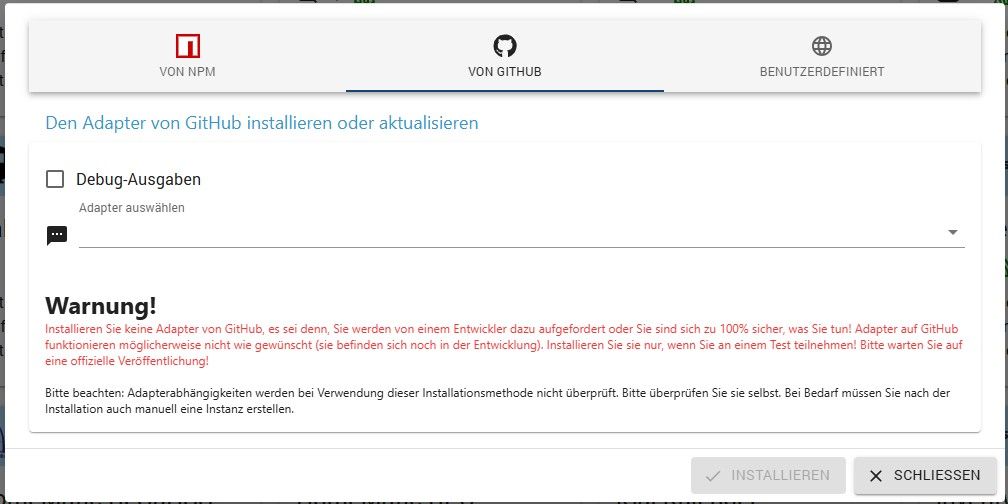
                      Vielleicht reden wir auch aneinander vorbei?
                      Ich meine diese Funktion:

                      90d5fd5f-cb64-48ec-93f2-2d975002c5f9-image.jpeg

                      Da steht nichts von Upload, sondern von installieren. Den von Dir eingefügten Hinweistext kenne ich nicht und weiß auch nicht, wo ich den finden soll.

                      Aber in diesem Thread geht es eigentlich um das Problem bei iCal, wir sollte wieder dahin zurück....

                      1 Antwort Letzte Antwort
                      0

                      Hey! Du scheinst an dieser Unterhaltung interessiert zu sein, hast aber noch kein Konto.

                      Hast du es satt, bei jedem Besuch durch die gleichen Beiträge zu scrollen? Wenn du dich für ein Konto anmeldest, kommst du immer genau dorthin zurück, wo du zuvor warst, und kannst dich über neue Antworten benachrichtigen lassen (entweder per E-Mail oder Push-Benachrichtigung). Du kannst auch Lesezeichen speichern und Beiträge positiv bewerten, um anderen Community-Mitgliedern deine Wertschätzung zu zeigen.

                      Mit deinem Input könnte dieser Beitrag noch besser werden 💗

                      Registrieren Anmelden
                      Antworten
                      • In einem neuen Thema antworten
                      Anmelden zum Antworten
                      • Älteste zuerst
                      • Neuste zuerst
                      • Meiste Stimmen


                      Support us

                      ioBroker
                      Community Adapters
                      Donate

                      586

                      Online

                      32.8k

                      Benutzer

                      82.9k

                      Themen

                      1.3m

                      Beiträge
                      Community
                      Impressum | Datenschutz-Bestimmungen | Nutzungsbedingungen | Einwilligungseinstellungen
                      ioBroker Community 2014-2025
                      logo
                      • Anmelden

                      • Du hast noch kein Konto? Registrieren

                      • Anmelden oder registrieren, um zu suchen
                      • Erster Beitrag
                        Letzter Beitrag
                      0
                      • Home
                      • Aktuell
                      • Tags
                      • Ungelesen 0
                      • Kategorien
                      • Unreplied
                      • Beliebt
                      • GitHub
                      • Docu
                      • Hilfe