
NEWS




Neuer Alexa-Skill "iobroker.assistant"
-
Was ist SlatPos für ein Datenpunkt ?
Der steht bei dir bei Actual im Screenshot .@haselchen Gute Frage. Den Datenpunkt übernimmt der IOT Adapter "SlatPos" automatisch, wenn man nur "position" angibt. Mit meinen neuen Datenpunkten übernimmt der IOT Adapter nur den Set Datenpunkt:

Unabhängig davon stelle ich fest, dass bei der Auswahl über die Alexa-App wird immer
0auf den SET-State geschrieben wird, während ich per Spracheingabe tatsächlich numerische Werte bekomme.Der aus der Alexa-App kommende Wert ist nicht 0.5, 0.6 oder ein anderer Dezimalwert, sondern tatsächlich numerisch 0.
Hier mein Debug Script:
/************************************************************ * Shelly Cover -> Alexa V3 Alias (SET / ACTUAL) * MAX DEBUG VERSION ************************************************************/ const CONFIG = { name: 'Wohnzimmer_Rollo_Rechts', SHELLY_ACTUAL_ID: 'shelly.0.shellyplus2pm#e86beae602b0#1.Cover0.Position', SHELLY_WRITE_ID: 'shelly.0.shellyplus2pm#e86beae602b0#1.Cover0.TargetPosition', BASE_PATH: '0_userdata.0.Alexa.blinds.Wohnzimmer_Rollo_Rechts', LOG: true, DEBUG: true }; const DP = { SET: `${CONFIG.BASE_PATH}.set`, ACTUAL: `${CONFIG.BASE_PATH}.actual`, INFO: `${CONFIG.BASE_PATH}.info.lastCommand`, DEBUG: `${CONFIG.BASE_PATH}.info.lastRawEvent` }; let suppressActualEchoUntil = 0; let lastForwardedTarget = null; let lastForwardedTs = 0; function logx(msg, level = 'info') { if (CONFIG.LOG) log(`[AlexaBlind] ${msg}`, level); } function debugLog(msg) { if (CONFIG.DEBUG) log(`[AlexaBlind][DEBUG] ${msg}`, 'info'); } function clampPercent(val) { let n = Number(val); if (isNaN(n)) return null; if (n < 0) n = 0; if (n > 100) n = 100; return Math.round(n); } function describeValue(val) { return `value=${JSON.stringify(val)} | typeof=${typeof val} | Number()=${Number(val)} | parseFloat=${parseFloat(val)}`; } function fmtState(obj) { if (!obj || !obj.state) return 'kein state'; return JSON.stringify({ val: obj.state.val, valJson: JSON.stringify(obj.state.val), typeOfVal: typeof obj.state.val, numberVal: Number(obj.state.val), parseFloatVal: parseFloat(obj.state.val), ack: obj.state.ack, from: obj.state.from, ts: obj.state.ts, lc: obj.state.lc, user: obj.state.user, q: obj.state.q, c: obj.state.c }); } function logObjectInfo(id) { try { const obj = getObject(id); if (!obj) { debugLog(`getObject(${id}) -> kein Objekt gefunden`); return; } debugLog(`Objektinfo ${id}: ${JSON.stringify({ type: obj.type, common: obj.common, native: obj.native })}`); } catch (e) { logx(`Fehler bei getObject(${id}): ${e}`, 'warn'); } } // States anlegen createState(DP.SET, 0, { name: `${CONFIG.name} SET`, type: 'number', role: 'level.blind', read: true, write: true, unit: '%', min: 0, max: 100, def: 0, desc: 'Sollwert für Alexa / Blind' }, async () => { createState(DP.ACTUAL, 0, { name: `${CONFIG.name} ACTUAL`, type: 'number', role: 'value.blind', read: true, write: false, unit: '%', min: 0, max: 100, def: 0, desc: 'Istwert für Alexa / Blind' }, async () => { createState(DP.INFO, '', { name: `${CONFIG.name} Last Command`, type: 'string', role: 'text', read: true, write: false, def: '' }, async () => { createState(DP.DEBUG, '', { name: `${CONFIG.name} Last Raw Event`, type: 'string', role: 'text', read: true, write: false, def: '' }, init); }); }); }); function init() { logx(`Initialisierung für "${CONFIG.name}" gestartet`); logx(`SET-State: ${DP.SET}`); logx(`ACTUAL-State: ${DP.ACTUAL}`); logx(`SHELLY_WRITE_ID: ${CONFIG.SHELLY_WRITE_ID}`); logx(`SHELLY_ACTUAL_ID: ${CONFIG.SHELLY_ACTUAL_ID}`); logObjectInfo(DP.SET); logObjectInfo(DP.ACTUAL); logObjectInfo(CONFIG.SHELLY_WRITE_ID); logObjectInfo(CONFIG.SHELLY_ACTUAL_ID); const current = getState(CONFIG.SHELLY_ACTUAL_ID); if (current && current.val !== null && current.val !== undefined) { const pos = clampPercent(current.val); if (pos !== null) { setState(DP.ACTUAL, pos, true); setState(DP.SET, pos, true); logx(`Initialposition übernommen: ${pos}%`); } } else { logx(`Warnung: ACTUAL-State nicht lesbar: ${CONFIG.SHELLY_ACTUAL_ID}`, 'warn'); } /******************************************************** * 1) GLOBAL DEBUG auf ganzen Alexa-Zweig ********************************************************/ on({ id: new RegExp('^' + CONFIG.BASE_PATH.replace(/\./g, '\\.') + '\\..*'), change: 'any' }, obj => { const oldVal = obj.oldState ? obj.oldState.val : undefined; const newVal = obj.state ? obj.state.val : undefined; const msg = `BRANCH EVENT | id=${obj.id} | ` + `old=${JSON.stringify(oldVal)} | new=${JSON.stringify(newVal)} | ` + `typeof=${typeof newVal} | Number=${Number(newVal)} | parseFloat=${parseFloat(newVal)} | ` + `ack=${obj.state.ack} | from=${obj.state.from} | user=${obj.state.user} | ` + `ts=${obj.state.ts} | lc=${obj.state.lc} | q=${obj.state.q} | c=${obj.state.c}`; debugLog(msg); if (obj.id === DP.SET) { setState(DP.DEBUG, msg, true); } }); /******************************************************** * 2) Speziell DP.SET überwachen ********************************************************/ on({ id: DP.SET, change: 'any' }, obj => { debugLog(`SET RAW -> ${fmtState(obj)}`); }); /******************************************************** * 3) Jede echte Wertänderung auf SET verarbeiten ********************************************************/ on({ id: DP.SET, change: 'ne' }, obj => { debugLog(`SET Trigger(change:ne) -> ${fmtState(obj)}`); debugLog(`SET Detail -> ${describeValue(obj.state.val)}`); const target = clampPercent(obj.state.val); if (target === null) { logx(`Ungültiger SET-Wert empfangen: ${JSON.stringify(obj.state.val)}`, 'warn'); return; } const now = Date.now(); if ( obj.state.ack === true && lastForwardedTarget === target && (now - lastForwardedTs) < 5000 ) { debugLog(`Ignoriere Echo auf SET (${target}%), vermutlich von uns selbst.`); return; } suppressActualEchoUntil = now + 3000; lastForwardedTarget = target; lastForwardedTs = now; logx(`SET empfangen: ${target}% | raw=${JSON.stringify(obj.state.val)} | ack=${obj.state.ack} | from=${obj.state.from} -> schreibe an Shelly (${CONFIG.SHELLY_WRITE_ID})`); setState(DP.INFO, `SET ${target}% | raw=${JSON.stringify(obj.state.val)} | ack=${obj.state.ack} | from=${obj.state.from} @ ${new Date().toISOString()}`, true); if (obj.state.ack !== true) { setState(DP.SET, target, true); } setState(CONFIG.SHELLY_WRITE_ID, target); }); /******************************************************** * 4) Shelly ACTUAL ********************************************************/ on({ id: CONFIG.SHELLY_ACTUAL_ID, change: 'any' }, obj => { debugLog(`Shelly ACTUAL Event -> ${fmtState(obj)}`); }); on({ id: CONFIG.SHELLY_ACTUAL_ID, change: 'ne' }, obj => { const actual = clampPercent(obj.state.val); if (actual === null) { logx(`Ungültiger ACTUAL-Wert vom Shelly: ${JSON.stringify(obj.state.val)}`, 'warn'); return; } setState(DP.ACTUAL, actual, true); if (Date.now() > suppressActualEchoUntil) { setState(DP.SET, actual, true); } logx(`Shelly ACTUAL aktualisiert: ${actual}%`); }); /******************************************************** * 5) Shelly WRITE/TARGET ********************************************************/ on({ id: CONFIG.SHELLY_WRITE_ID, change: 'any' }, obj => { debugLog(`Shelly WRITE/TARGET Event -> ${fmtState(obj)}`); }); logx(`Fertig initialisiert.`); } -
@haselchen Gute Frage. Den Datenpunkt übernimmt der IOT Adapter "SlatPos" automatisch, wenn man nur "position" angibt. Mit meinen neuen Datenpunkten übernimmt der IOT Adapter nur den Set Datenpunkt:
Unabhängig davon stelle ich fest, dass bei der Auswahl über die Alexa-App wird immer
0auf den SET-State geschrieben wird, während ich per Spracheingabe tatsächlich numerische Werte bekomme.Der aus der Alexa-App kommende Wert ist nicht 0.5, 0.6 oder ein anderer Dezimalwert, sondern tatsächlich numerisch 0.
Hier mein Debug Script:
/************************************************************ * Shelly Cover -> Alexa V3 Alias (SET / ACTUAL) * MAX DEBUG VERSION ************************************************************/ const CONFIG = { name: 'Wohnzimmer_Rollo_Rechts', SHELLY_ACTUAL_ID: 'shelly.0.shellyplus2pm#e86beae602b0#1.Cover0.Position', SHELLY_WRITE_ID: 'shelly.0.shellyplus2pm#e86beae602b0#1.Cover0.TargetPosition', BASE_PATH: '0_userdata.0.Alexa.blinds.Wohnzimmer_Rollo_Rechts', LOG: true, DEBUG: true }; const DP = { SET: `${CONFIG.BASE_PATH}.set`, ACTUAL: `${CONFIG.BASE_PATH}.actual`, INFO: `${CONFIG.BASE_PATH}.info.lastCommand`, DEBUG: `${CONFIG.BASE_PATH}.info.lastRawEvent` }; let suppressActualEchoUntil = 0; let lastForwardedTarget = null; let lastForwardedTs = 0; function logx(msg, level = 'info') { if (CONFIG.LOG) log(`[AlexaBlind] ${msg}`, level); } function debugLog(msg) { if (CONFIG.DEBUG) log(`[AlexaBlind][DEBUG] ${msg}`, 'info'); } function clampPercent(val) { let n = Number(val); if (isNaN(n)) return null; if (n < 0) n = 0; if (n > 100) n = 100; return Math.round(n); } function describeValue(val) { return `value=${JSON.stringify(val)} | typeof=${typeof val} | Number()=${Number(val)} | parseFloat=${parseFloat(val)}`; } function fmtState(obj) { if (!obj || !obj.state) return 'kein state'; return JSON.stringify({ val: obj.state.val, valJson: JSON.stringify(obj.state.val), typeOfVal: typeof obj.state.val, numberVal: Number(obj.state.val), parseFloatVal: parseFloat(obj.state.val), ack: obj.state.ack, from: obj.state.from, ts: obj.state.ts, lc: obj.state.lc, user: obj.state.user, q: obj.state.q, c: obj.state.c }); } function logObjectInfo(id) { try { const obj = getObject(id); if (!obj) { debugLog(`getObject(${id}) -> kein Objekt gefunden`); return; } debugLog(`Objektinfo ${id}: ${JSON.stringify({ type: obj.type, common: obj.common, native: obj.native })}`); } catch (e) { logx(`Fehler bei getObject(${id}): ${e}`, 'warn'); } } // States anlegen createState(DP.SET, 0, { name: `${CONFIG.name} SET`, type: 'number', role: 'level.blind', read: true, write: true, unit: '%', min: 0, max: 100, def: 0, desc: 'Sollwert für Alexa / Blind' }, async () => { createState(DP.ACTUAL, 0, { name: `${CONFIG.name} ACTUAL`, type: 'number', role: 'value.blind', read: true, write: false, unit: '%', min: 0, max: 100, def: 0, desc: 'Istwert für Alexa / Blind' }, async () => { createState(DP.INFO, '', { name: `${CONFIG.name} Last Command`, type: 'string', role: 'text', read: true, write: false, def: '' }, async () => { createState(DP.DEBUG, '', { name: `${CONFIG.name} Last Raw Event`, type: 'string', role: 'text', read: true, write: false, def: '' }, init); }); }); }); function init() { logx(`Initialisierung für "${CONFIG.name}" gestartet`); logx(`SET-State: ${DP.SET}`); logx(`ACTUAL-State: ${DP.ACTUAL}`); logx(`SHELLY_WRITE_ID: ${CONFIG.SHELLY_WRITE_ID}`); logx(`SHELLY_ACTUAL_ID: ${CONFIG.SHELLY_ACTUAL_ID}`); logObjectInfo(DP.SET); logObjectInfo(DP.ACTUAL); logObjectInfo(CONFIG.SHELLY_WRITE_ID); logObjectInfo(CONFIG.SHELLY_ACTUAL_ID); const current = getState(CONFIG.SHELLY_ACTUAL_ID); if (current && current.val !== null && current.val !== undefined) { const pos = clampPercent(current.val); if (pos !== null) { setState(DP.ACTUAL, pos, true); setState(DP.SET, pos, true); logx(`Initialposition übernommen: ${pos}%`); } } else { logx(`Warnung: ACTUAL-State nicht lesbar: ${CONFIG.SHELLY_ACTUAL_ID}`, 'warn'); } /******************************************************** * 1) GLOBAL DEBUG auf ganzen Alexa-Zweig ********************************************************/ on({ id: new RegExp('^' + CONFIG.BASE_PATH.replace(/\./g, '\\.') + '\\..*'), change: 'any' }, obj => { const oldVal = obj.oldState ? obj.oldState.val : undefined; const newVal = obj.state ? obj.state.val : undefined; const msg = `BRANCH EVENT | id=${obj.id} | ` + `old=${JSON.stringify(oldVal)} | new=${JSON.stringify(newVal)} | ` + `typeof=${typeof newVal} | Number=${Number(newVal)} | parseFloat=${parseFloat(newVal)} | ` + `ack=${obj.state.ack} | from=${obj.state.from} | user=${obj.state.user} | ` + `ts=${obj.state.ts} | lc=${obj.state.lc} | q=${obj.state.q} | c=${obj.state.c}`; debugLog(msg); if (obj.id === DP.SET) { setState(DP.DEBUG, msg, true); } }); /******************************************************** * 2) Speziell DP.SET überwachen ********************************************************/ on({ id: DP.SET, change: 'any' }, obj => { debugLog(`SET RAW -> ${fmtState(obj)}`); }); /******************************************************** * 3) Jede echte Wertänderung auf SET verarbeiten ********************************************************/ on({ id: DP.SET, change: 'ne' }, obj => { debugLog(`SET Trigger(change:ne) -> ${fmtState(obj)}`); debugLog(`SET Detail -> ${describeValue(obj.state.val)}`); const target = clampPercent(obj.state.val); if (target === null) { logx(`Ungültiger SET-Wert empfangen: ${JSON.stringify(obj.state.val)}`, 'warn'); return; } const now = Date.now(); if ( obj.state.ack === true && lastForwardedTarget === target && (now - lastForwardedTs) < 5000 ) { debugLog(`Ignoriere Echo auf SET (${target}%), vermutlich von uns selbst.`); return; } suppressActualEchoUntil = now + 3000; lastForwardedTarget = target; lastForwardedTs = now; logx(`SET empfangen: ${target}% | raw=${JSON.stringify(obj.state.val)} | ack=${obj.state.ack} | from=${obj.state.from} -> schreibe an Shelly (${CONFIG.SHELLY_WRITE_ID})`); setState(DP.INFO, `SET ${target}% | raw=${JSON.stringify(obj.state.val)} | ack=${obj.state.ack} | from=${obj.state.from} @ ${new Date().toISOString()}`, true); if (obj.state.ack !== true) { setState(DP.SET, target, true); } setState(CONFIG.SHELLY_WRITE_ID, target); }); /******************************************************** * 4) Shelly ACTUAL ********************************************************/ on({ id: CONFIG.SHELLY_ACTUAL_ID, change: 'any' }, obj => { debugLog(`Shelly ACTUAL Event -> ${fmtState(obj)}`); }); on({ id: CONFIG.SHELLY_ACTUAL_ID, change: 'ne' }, obj => { const actual = clampPercent(obj.state.val); if (actual === null) { logx(`Ungültiger ACTUAL-Wert vom Shelly: ${JSON.stringify(obj.state.val)}`, 'warn'); return; } setState(DP.ACTUAL, actual, true); if (Date.now() > suppressActualEchoUntil) { setState(DP.SET, actual, true); } logx(`Shelly ACTUAL aktualisiert: ${actual}%`); }); /******************************************************** * 5) Shelly WRITE/TARGET ********************************************************/ on({ id: CONFIG.SHELLY_WRITE_ID, change: 'any' }, obj => { debugLog(`Shelly WRITE/TARGET Event -> ${fmtState(obj)}`); }); logx(`Fertig initialisiert.`); } -
sondern tatsächlich numerisch 0.
Möglicherweise ist das ein 0/1 für false/true
-
sondern tatsächlich numerisch 0.
Möglicherweise ist das ein 0/1 für false/true
Nope, da kommt immer 0 raus. Egal, ob ich 0, 20,40,60,80,100 drücke.
-
Nope, da kommt immer 0 raus
Ja und?
Das kann trotzdem false bedeuten.Ich weiß ja nicht was die Dame versteht
-
@Homoran Von Alexa kommt 0 bei Iobroker als Zahl an.
Ich bin mir nicht sicher, ob der IOT Skill irgendetwas falsch umrechnet. -
Von Alexa kommt 0 bei Iobroker als Zahl an
Das habe ich verstanden!
Könnte an der implizite Typumwandlung liegen -
@Homoran okay, sollte ich dafür ein Github issue öffnen? Ich bin mit meinem Troubleshooting irgendwie am Ende.
Ich bin mit meinem Troubleshooting irgendwie am Ende.
Und bei mir hat Alexa Hausverbot.
Natürlich ist ein issue immer der beste Weg, allerdings wäre es schön, wenn hier zu deinem Problem jemand mit Erfahrung mit der Alexa App und dem Adapter dieses Verhalten reproduzieren oder entkräften kann.
-
Nach Update auf .11 kam bei mir bei Temperaturabfragen auch "Ich weiß nicht was schief gelaufen ist ... ". Zurück auf .7 ist alles wieder gut. Stand Jetzt.
-
@1Topf
Habe ich heute morgen versucht inkl. Neustart des iobroker. Leider nach nun 4 Stunden immer noch "Ich weiß nicht was schief gelaufen ist" bei Abfragen zu Raumtemperaturen unter homematic ip.
Hat jemand eine Lösung?Du hast einen besseren Überblick als ich. Wußte gar nicht mehr, daß das hier bereits mal Thema war. Schau mal hier: https://forum.iobroker.net/post/1332689 . 😇
-
Du hast einen besseren Überblick als ich. Wußte gar nicht mehr, daß das hier bereits mal Thema war. Schau mal hier: https://forum.iobroker.net/post/1332689 . 😇
@1Topf
Danke für den Hinweis! Ich musste noch Alexa nach neuen Geräten suchen lassen, das hat es wieder zum Laufen gebracht! -
Hallo zusammen,
seit einigen Tagen habe ich Probleme mit alexa2.0 v3.27.4 und iot.0 v5.0.12.
Bei der Fehlersuche habe ich mir vermutlich mehr "zerschossen", als gut ist.
Habt Ihr einen Tip zum Thema "Alexa Login Daten" und dem Hinweis "Bitte den folgenden Link zur einmaligen Anmeldung im Amazon-Konto nutzen, um die Adapterverbindung zu Ihren Alexa-Geräten zu aktivieren."
Ich komme da nicht weiter, da der link "http://192.168.178.xx:44947/www.amazon.com/ap/signin" aufgerufen wird (xx steht für die lokale IP im Home-Netzwerk) und immer der Fehler "Ein Problem ist aufgetreten: Gib eine gültige E-Mail-Adresse oder Mobiltelefonnummer ein." ausgegeben wird.
Vielen Dank für Tips.
Michael -
@michaeld-0 ich habe das identische Problem. meine frau dreht schon durch da man ständig das amazon konto passwort ändern muss
-
Hallo zusammen,
seit einigen Tagen habe ich Probleme mit alexa2.0 v3.27.4 und iot.0 v5.0.12.
Bei der Fehlersuche habe ich mir vermutlich mehr "zerschossen", als gut ist.
Habt Ihr einen Tip zum Thema "Alexa Login Daten" und dem Hinweis "Bitte den folgenden Link zur einmaligen Anmeldung im Amazon-Konto nutzen, um die Adapterverbindung zu Ihren Alexa-Geräten zu aktivieren."
Ich komme da nicht weiter, da der link "http://192.168.178.xx:44947/www.amazon.com/ap/signin" aufgerufen wird (xx steht für die lokale IP im Home-Netzwerk) und immer der Fehler "Ein Problem ist aufgetreten: Gib eine gültige E-Mail-Adresse oder Mobiltelefonnummer ein." ausgegeben wird.
Vielen Dank für Tips.
Michaelxx steht für die lokale IP im Home-Netzwerk
und warum gibst du die nicht an... deine lokale adresse interessiert keinen..
mal neben bei.. -
Hallo zusammen!
Ich verzweifle momentan ein wenig.- Die Alexa-Verblödung.... das Ding versteht immer schlechtet
- Der iot Adapter und Hue Lampen wollen nicht mehr richtig
2.1 Ist die Lampe aus und ich gebe per Sprache einen %-Wert an, wird auf 100% eingeschalten; danach klappt die %-Steuerung - Stelle ich im Adapter die Automatische Datenpunkterkennung aus - wird nur .level als Datenpunkt angeboten und das Verhalten passt hier wieder.
2.2 Echo zeigt(e) immer eine Meldung "Etwas ist schief gelaufen" - Gestern hat Echo wohl ein Update erhalten.... jetzt ist die Oberfläche etwas anders
2.3 Die manuelle Steuerung über die %-Tasten am Echo tut nichts
2.4 Die manuelle Steuerung über die %-Tasten in der Alexa-App tut nichts (gibt aber eine Fehlermeldung zurück)
2.3 und 2.4 schaut fast so aus wie weiter oben mit den Shelly-Rolos
Hier ist z.B. das Küchenlicht.

Seit dem letzten Update 5.0.12 hab ich folgende Effekte:
- Ist die Lampe aus, und man gibt per Stimme einen Prozentwert an, wird die Lampe dennoch auf 100% eingeschalten.
- Auch wenn alles klappt meldet Alexa über den Echo "Da ist etwas schief gelaufen".
Hab bereits die Geräte gelöscht und neu eingerichtet (auch alle in der Alexa App raus geschmissen).
Hab nun mal die Version 6.0.3 installiert die Thread zu den Thermostaten erwähnt wird.Leider wirds nicht besser
-
Hallo zusammen!
Ich verzweifle momentan ein wenig.- Die Alexa-Verblödung.... das Ding versteht immer schlechtet
- Der iot Adapter und Hue Lampen wollen nicht mehr richtig
2.1 Ist die Lampe aus und ich gebe per Sprache einen %-Wert an, wird auf 100% eingeschalten; danach klappt die %-Steuerung - Stelle ich im Adapter die Automatische Datenpunkterkennung aus - wird nur .level als Datenpunkt angeboten und das Verhalten passt hier wieder.
2.2 Echo zeigt(e) immer eine Meldung "Etwas ist schief gelaufen" - Gestern hat Echo wohl ein Update erhalten.... jetzt ist die Oberfläche etwas anders
2.3 Die manuelle Steuerung über die %-Tasten am Echo tut nichts
2.4 Die manuelle Steuerung über die %-Tasten in der Alexa-App tut nichts (gibt aber eine Fehlermeldung zurück)
2.3 und 2.4 schaut fast so aus wie weiter oben mit den Shelly-Rolos
Hier ist z.B. das Küchenlicht.
Seit dem letzten Update 5.0.12 hab ich folgende Effekte:
- Ist die Lampe aus, und man gibt per Stimme einen Prozentwert an, wird die Lampe dennoch auf 100% eingeschalten.
- Auch wenn alles klappt meldet Alexa über den Echo "Da ist etwas schief gelaufen".
Hab bereits die Geräte gelöscht und neu eingerichtet (auch alle in der Alexa App raus geschmissen).
Hab nun mal die Version 6.0.3 installiert die Thread zu den Thermostaten erwähnt wird.Leider wirds nicht besser
@tltm_smarthome sagte:
Ich verzweifle momentan ein wenig.Ich auch (an solchen Posts
 )
)- Die Alexa-Verblödung.... das Ding versteht immer schlechtet
Liegt wohl eher an undeutlicher Aussprache oder was auch immer, hat aber sicher nichts mit dem Skill an sich zu tun.
2.1 Ist die Lampe aus und ich gebe per Sprache einen %-Wert an, wird auf 100% eingeschalten; danach klappt die %-Steuerung - Stelle ich im Adapter die Automatische Datenpunkterkennung aus - wird nur .level als Datenpunkt angeboten und das Verhalten passt hier wieder.
Das Thema Typenerkennung unter V3 mit seinen Besonderheiten kennst Du und hast Du gelesen?
https://forum.iobroker.net/topic/82719/typerkennung-iot-adapter-5-x-tab-alexa-v32.2 Echo zeigt(e) immer eine Meldung "Etwas ist schief gelaufen" - Gestern hat Echo wohl ein Update erhalten.... jetzt ist die Oberfläche etwas anders
2.3 Die manuelle Steuerung über die %-Tasten am Echo tut nichts
2.4 Die manuelle Steuerung über die %-Tasten in der Alexa-App tut nichts (gibt aber eine Fehlermeldung zurück)Verstehe ich nicht. Siehe meinen ersten Antwortsatz. Meine Echos "zeigen" nichts und sie haben auch keine %-Tasten. Nur +/- für laut/leise.
Seit dem letzten Update 5.0.12 hab ich folgende Effekte:
- Ist die Lampe aus, und man gibt per Stimme einen Prozentwert an, wird die Lampe dennoch auf 100% eingeschalten.
- Auch wenn alles klappt meldet Alexa über den Echo "Da ist etwas schief gelaufen".
Ob das mit an der Typendefinition hängt kann ich mangels Nutzung von Hue nicht sagen, aber evtl. spielt das mit rein
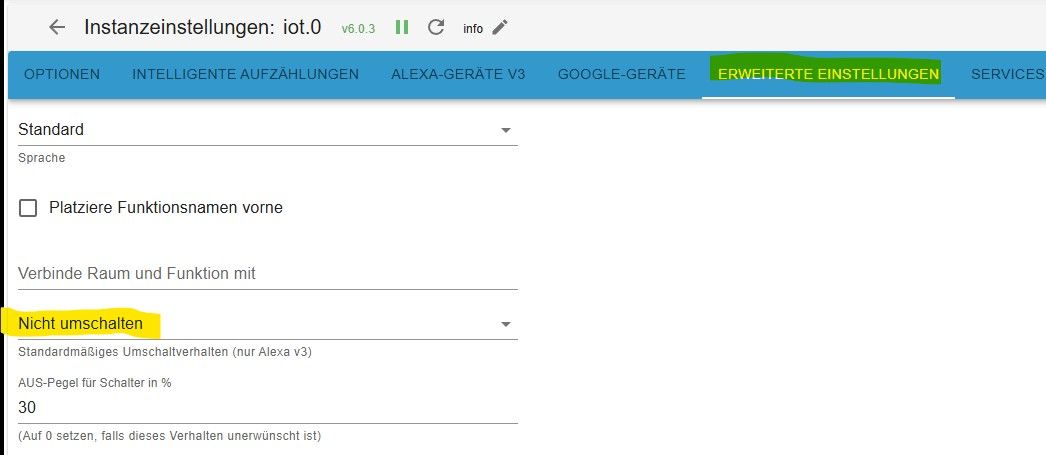
Hab nun mal die Version 6.0.3 installiert
Genau die sollte verwendet werden nach der 5.0.7 - nicht die 5.0.12
Nach der Installation nochmal Geräteerkennung gestartet? -
@tltm_smarthome sagte:
Ich verzweifle momentan ein wenig.Ich auch (an solchen Posts
)- Die Alexa-Verblödung.... das Ding versteht immer schlechtet
Liegt wohl eher an undeutlicher Aussprache oder was auch immer, hat aber sicher nichts mit dem Skill an sich zu tun.
2.1 Ist die Lampe aus und ich gebe per Sprache einen %-Wert an, wird auf 100% eingeschalten; danach klappt die %-Steuerung - Stelle ich im Adapter die Automatische Datenpunkterkennung aus - wird nur .level als Datenpunkt angeboten und das Verhalten passt hier wieder.
Das Thema Typenerkennung unter V3 mit seinen Besonderheiten kennst Du und hast Du gelesen?
https://forum.iobroker.net/topic/82719/typerkennung-iot-adapter-5-x-tab-alexa-v32.2 Echo zeigt(e) immer eine Meldung "Etwas ist schief gelaufen" - Gestern hat Echo wohl ein Update erhalten.... jetzt ist die Oberfläche etwas anders
2.3 Die manuelle Steuerung über die %-Tasten am Echo tut nichts
2.4 Die manuelle Steuerung über die %-Tasten in der Alexa-App tut nichts (gibt aber eine Fehlermeldung zurück)Verstehe ich nicht. Siehe meinen ersten Antwortsatz. Meine Echos "zeigen" nichts und sie haben auch keine %-Tasten. Nur +/- für laut/leise.
Seit dem letzten Update 5.0.12 hab ich folgende Effekte:
- Ist die Lampe aus, und man gibt per Stimme einen Prozentwert an, wird die Lampe dennoch auf 100% eingeschalten.
- Auch wenn alles klappt meldet Alexa über den Echo "Da ist etwas schief gelaufen".
Ob das mit an der Typendefinition hängt kann ich mangels Nutzung von Hue nicht sagen, aber evtl. spielt das mit rein
Hab nun mal die Version 6.0.3 installiert
Genau die sollte verwendet werden nach der 5.0.7 - nicht die 5.0.12
Nach der Installation nochmal Geräteerkennung gestartet?Nach der Installation nochmal Geräteerkennung gestartet?
Hast vermutlich übersehen - natürlich musste ich die Geräteerkennung nach dem Löschen in der App neu starten.
@tltm_smarthome sagte:
Hab bereits die Geräte gelöscht und neu eingerichtet (auch alle in der Alexa App raus geschmissen).
Ich kann kann das ja gut verstehen, da du ja auch schon verzweifelt bist.
Ich auch (an solchen Posts
)Liegt wohl eher an undeutlicher Aussprache oder was auch immer, hat aber sicher nichts mit dem Skill an sich zu tun.
Ich dann hab dann übrigens gleich noch einen für dich:
Tschüss baba auf Wiederschaun, mir tuat da ioBroker nix mehr taugn!Nach doch einigen Jahren der Nutzung schmeiß ich das Ding nun raus, und melde mich hier ab.
(Ob ich mit was anderem glücklicher werde... wird die Zeit zeigen)Warum?
- Selten brauche ich Hilfe, und wenn ich dann doch mal danach suche, erhält man von Forumsgurus oft als erstes eine blöde/sarkastische Antwort; bevor man Hilfe erhält!
- Leider hat die iOBroker Plattform hinsichtlich Alexa Integration für mich komplett versagt. Ewig wurde für die v3 benötigt, im Herbst dann der notwendige Umzug auf den neuen Skill, mit kompletter Neueinrichtung, da ja leider das Update des alten nicht durch gegangen ist.
Ja ich versteh OpenSource, ja ich verstehe das Engagement, dass viele in so ein Projekt stecken;
dennoch ist das wohl nichts mehr für mich. -
Nach der Installation nochmal Geräteerkennung gestartet?
Hast vermutlich übersehen - natürlich musste ich die Geräteerkennung nach dem Löschen in der App neu starten.
@tltm_smarthome sagte:
Hab bereits die Geräte gelöscht und neu eingerichtet (auch alle in der Alexa App raus geschmissen).
Ich kann kann das ja gut verstehen, da du ja auch schon verzweifelt bist.
Ich auch (an solchen Posts
)Liegt wohl eher an undeutlicher Aussprache oder was auch immer, hat aber sicher nichts mit dem Skill an sich zu tun.
Ich dann hab dann übrigens gleich noch einen für dich:
Tschüss baba auf Wiederschaun, mir tuat da ioBroker nix mehr taugn!Nach doch einigen Jahren der Nutzung schmeiß ich das Ding nun raus, und melde mich hier ab.
(Ob ich mit was anderem glücklicher werde... wird die Zeit zeigen)Warum?
- Selten brauche ich Hilfe, und wenn ich dann doch mal danach suche, erhält man von Forumsgurus oft als erstes eine blöde/sarkastische Antwort; bevor man Hilfe erhält!
- Leider hat die iOBroker Plattform hinsichtlich Alexa Integration für mich komplett versagt. Ewig wurde für die v3 benötigt, im Herbst dann der notwendige Umzug auf den neuen Skill, mit kompletter Neueinrichtung, da ja leider das Update des alten nicht durch gegangen ist.
Ja ich versteh OpenSource, ja ich verstehe das Engagement, dass viele in so ein Projekt stecken;
dennoch ist das wohl nichts mehr für mich.@Ein-ehemaliger-Benutzer sagte:
erhält man von Forumsgurus oft als erstes eine blöde/sarkastische Antwort; bevor man Hilfe erhält!
ist ja hier kein Kindergarten und ich kann mir gut Vorstellen wenn hier ein "Helfer" schon dutzende mal und immer wieder das selbe erklärt (ich sag nur zb "root" ), dass das dann nerven kann.
Wir sind alles nur Menschen und geholfen wurde mir hier schon sehr sehr oft. Da meistens die Fehler/Probleme von mir verursacht wurden.
Also toi toi toi und gute Reise.Gruß Michael
btw: Sarkasmus ist genau mein DING





Hey! Du scheinst an dieser Unterhaltung interessiert zu sein, hast aber noch kein Konto.
Hast du es satt, bei jedem Besuch durch die gleichen Beiträge zu scrollen? Wenn du dich für ein Konto anmeldest, kommst du immer genau dorthin zurück, wo du zuvor warst, und kannst dich über neue Antworten benachrichtigen lassen (entweder per E-Mail oder Push-Benachrichtigung). Du kannst auch Lesezeichen speichern und Beiträge positiv bewerten, um anderen Community-Mitgliedern deine Wertschätzung zu zeigen.
Mit deinem Input könnte dieser Beitrag noch besser werden 💗
Registrieren Anmelden163
Online33.1k
Benutzende83.7k
Themen1.3m
Beiträge