




Mein nuc ist scheinbar am Limit
-
Sooooo Update ist durch ...hoffe ich zumindest:
Script v.2026-01-31 *** BASE SYSTEM *** Operating System: Debian GNU/Linux 13 (trixie) Static hostname: nuc Icon name: computer-desktop Chassis: desktop 🖥️ Kernel: Linux 6.12.74+deb13+1-amd64 Architecture: x86-64 Hardware Vendor: Intel Corporation Hardware Model: NUC7i3BNK Firmware Version: BNKBL357.86A.0083.2020.0714.1344 Firmware Date: Tue 2020-07-14 Firmware Age: 5y 8month 3d OS is similar to: model name : Intel(R) Core(TM) i3-7100U CPU @ 2.40GHz Docker : false Virtualization : none Kernel : x86_64 Userland : 64 bit Systemuptime and Load: 20:09:12 up 1 min, 1 user, load average: 1.30, 0.43, 0.15 CPU threads: 4 *** LIFE CYCLE STATUS *** Operating System is the current Debian stable version codenamed 'trixie'! *** TIME AND TIMEZONES *** Local time: Tue 2026-03-17 20:09:13 CET Universal time: Tue 2026-03-17 19:09:13 UTC RTC time: Tue 2026-03-17 19:09:13 Time zone: Europe/Berlin (CET, +0100) System clock synchronized: no NTP service: active RTC in local TZ: no *** Users and Groups *** User that called 'iob diag': jens HOME=/home/jens GROUPS=jens cdrom floppy sudo audio dip video plugdev users netdev iobroker User that is running 'js-controller': iobroker HOME=/home/iobroker SUDO_HOME=/home/jens GROUPS=iobroker tty dialout audio video plugdev *** DISPLAY-SERVER SETUP *** Display-Server: false Unit display-manager.service could not be found. Display-Manager: Desktop: Session: tty *** MEMORY *** total used free shared buff/cache available Mem: 16G 2.1G 14G 2.0M 660M 14G Swap: 1.0G 0B 1.0G Total: 17G 2.1G 15G Active iob-Instances: 12 15882 M total memory 1955 M used memory 1648 M active memory 424 M inactive memory 13578 M free memory 52 M buffer memory 577 M swap cache 975 M total swap 0 M used swap 975 M free swap *** top - Table Of Processes *** top - 20:09:13 up 1 min, 1 user, load average: 1.30, 0.43, 0.15 Tasks: 161 total, 2 running, 159 sleeping, 0 stopped, 0 zombie %Cpu(s): 32.6 us, 2.3 sy, 0.0 ni, 65.1 id, 0.0 wa, 0.0 hi, 0.0 si, 0.0 st MiB Mem : 15882.7 total, 13565.5 free, 1968.1 used, 631.4 buff/cache MiB Swap: 976.0 total, 976.0 free, 0.0 used. 13914.6 avail Mem *** FAILED SERVICES *** UNIT LOAD ACTIVE SUB DESCRIPTION 0 loaded units listed. *** DMESG CRITICAL ERRORS *** No critical errors detected *** FILESYSTEM *** Filesystem Type Size Used Avail Use% Mounted on udev devtmpfs 7.8G 0 7.8G 0% /dev tmpfs tmpfs 1.6G 800K 1.6G 1% /run /dev/nvme0n1p1 ext4 116G 15G 96G 13% / tmpfs tmpfs 7.8G 0 7.8G 0% /dev/shm tmpfs tmpfs 5.0M 0 5.0M 0% /run/lock tmpfs tmpfs 1.0M 0 1.0M 0% /run/credentials/systemd-journald.service tmpfs tmpfs 7.8G 2.0M 7.8G 1% /tmp tmpfs tmpfs 1.0M 0 1.0M 0% /run/credentials/getty@tty1.service tmpfs tmpfs 1.6G 8.0K 1.6G 1% /run/user/1000 Messages concerning ext4 filesystem in dmesg: [Tue Mar 17 20:08:10 2026] EXT4-fs (nvme0n1p1): mounted filesystem 59b1f09e-4134-4f42-9ebd-23b24ce0ef05 ro with ordered data mode. Quota mode: none. [Tue Mar 17 20:08:11 2026] EXT4-fs (nvme0n1p1): re-mounted 59b1f09e-4134-4f42-9ebd-23b24ce0ef05 r/w. Show mounted filesystems: TARGET SOURCE FSTYPE OPTIONS / /dev/nvme0n1p1 ext4 rw,relatime,errors=remount-ro Files in neuralgic directories: /var: 2.4G /var/ 1.8G /var/log/journal/71f4ccb046934bb889999d75429a60cc 1.8G /var/log/journal 1.8G /var/log 433M /var/cache Hint: You are currently not seeing messages from other users and the system. Users in groups 'adm', 'systemd-journal' can see all messages. Pass -q to turn off this notice. Archived and active journals take up 102.5M in the file system. /opt/iobroker/backups: 4.6G /opt/iobroker/backups/ /opt/iobroker/iobroker-data: 628M /opt/iobroker/iobroker-data/ 329M /opt/iobroker/iobroker-data/files 145M /opt/iobroker/iobroker-data/backup-objects 47M /opt/iobroker/iobroker-data/history 47M /opt/iobroker/iobroker-data/files/admin.admin The five largest files in iobroker-data are: 58M /opt/iobroker/iobroker-data/states.jsonl 41M /opt/iobroker/iobroker-data/objects.jsonl 27M /opt/iobroker/iobroker-data/files/tankerkoenig.admin/build/index.js.map 19M /opt/iobroker/iobroker-data/files/text2command.admin/static/js/main.02fc3820.js.map 13M /opt/iobroker/iobroker-data/files/vis.0/main/vis-views.json USB-Devices by-id: USB-Sticks - Avoid direct links to /dev/tty* in your adapter setups, please always prefer the links 'by-id': No Devices found 'by-id' *** ZigBee Settings *** No nvbackup.json found. *** NodeJS-Installation *** /usr/bin/nodejs v22.22.1 /usr/bin/node v22.22.1 /usr/bin/npm 10.9.4 /usr/bin/npx 10.9.4 ✓ Node.js installation is correct nodejs: Installed: 22.22.1-1nodesource1 Candidate: 22.22.1-1nodesource1 Version table: *** 22.22.1-1nodesource1 1001 500 https://deb.nodesource.com/node_22.x nodistro/main amd64 Packages 100 /var/lib/dpkg/status 22.22.0-1nodesource1 1001 500 https://deb.nodesource.com/node_22.x nodistro/main amd64 Packages 22.21.0-1nodesource1 1001 500 https://deb.nodesource.com/node_22.x nodistro/main amd64 Packages 22.20.0-1nodesource1 1001 500 https://deb.nodesource.com/node_22.x nodistro/main amd64 Packages 22.19.0-1nodesource1 1001 500 https://deb.nodesource.com/node_22.x nodistro/main amd64 Packages 22.18.0-1nodesource1 1001 500 https://deb.nodesource.com/node_22.x nodistro/main amd64 Packages 22.17.1-1nodesource1 1001 500 https://deb.nodesource.com/node_22.x nodistro/main amd64 Packages 22.17.0-1nodesource1 1001 500 https://deb.nodesource.com/node_22.x nodistro/main amd64 Packages 22.16.0-1nodesource1 1001 500 https://deb.nodesource.com/node_22.x nodistro/main amd64 Packages 22.15.1-1nodesource1 1001 500 https://deb.nodesource.com/node_22.x nodistro/main amd64 Packages 22.15.0-1nodesource1 1001 500 https://deb.nodesource.com/node_22.x nodistro/main amd64 Packages 22.14.0-1nodesource1 1001 500 https://deb.nodesource.com/node_22.x nodistro/main amd64 Packages 22.13.1-1nodesource1 1001 500 https://deb.nodesource.com/node_22.x nodistro/main amd64 Packages 22.13.0-1nodesource1 1001 500 https://deb.nodesource.com/node_22.x nodistro/main amd64 Packages 22.12.0-1nodesource1 1001 500 https://deb.nodesource.com/node_22.x nodistro/main amd64 Packages 22.11.0-1nodesource1 1001 500 https://deb.nodesource.com/node_22.x nodistro/main amd64 Packages 22.10.0-1nodesource1 1001 500 https://deb.nodesource.com/node_22.x nodistro/main amd64 Packages 22.9.0-1nodesource1 1001 500 https://deb.nodesource.com/node_22.x nodistro/main amd64 Packages 22.8.0-1nodesource1 1001 500 https://deb.nodesource.com/node_22.x nodistro/main amd64 Packages 22.7.0-1nodesource1 1001 500 https://deb.nodesource.com/node_22.x nodistro/main amd64 Packages 22.6.0-1nodesource1 1001 500 https://deb.nodesource.com/node_22.x nodistro/main amd64 Packages 22.5.1-1nodesource1 1001 500 https://deb.nodesource.com/node_22.x nodistro/main amd64 Packages 22.5.0-1nodesource1 1001 500 https://deb.nodesource.com/node_22.x nodistro/main amd64 Packages 22.4.1-1nodesource1 1001 500 https://deb.nodesource.com/node_22.x nodistro/main amd64 Packages 22.4.0-1nodesource1 1001 500 https://deb.nodesource.com/node_22.x nodistro/main amd64 Packages 22.3.0-1nodesource1 1001 500 https://deb.nodesource.com/node_22.x nodistro/main amd64 Packages 22.2.0-1nodesource1 1001 500 https://deb.nodesource.com/node_22.x nodistro/main amd64 Packages 22.1.0-1nodesource1 1001 500 https://deb.nodesource.com/node_22.x nodistro/main amd64 Packages 22.0.0-1nodesource1 1001 500 https://deb.nodesource.com/node_22.x nodistro/main amd64 Packages 20.19.2+dfsg-1 500 500 http://deb.debian.org/debian trixie/main amd64 Packages Temp directories causing deletion problem: 0 No problems detected Errors in npm tree: 0 No problems detected Checking for nodejs vulnerability: █████ ██ ██ ██████ ██████ ██████ ██████ ██ ██ ██ ██ ██ ██ ██ ██ ██ ██ ██ ██ ██ ██ ███████ ██ ██ ██ ███ ██ ██ ██ ██ ██ ██ ██ ██ ██ ██ ██ ██ ██ ██ ██ ██ ██ ██ ██ ██ ██ ██ ██ ███████ ███████ ██████ ██████ ██████ ██████ ██ *** ioBroker-Installation *** ioBroker Status iobroker is running on this host. Objects type: jsonl States type: jsonl Hosts: nuc nuc (version: 7.0.7, hostname: nuc , alive, uptime: 63) Core adapters versions js-controller: 7.0.7 admin: 7.7.22 javascript: 9.0.18 nodejs modules from github: 4 +-- iobroker.bambulab@0.4.2 (git+ssh://git@github.com/DrozmotiX/ioBroker.bambulab.git#53e3ab3393d16f1939ceadc25da611f21574cbc8) +-- iobroker.smartthings@0.2.2 (git+ssh://git@github.com/TA2k/ioBroker.smartthings.git#b055221990231cf4c8b7fbfd6bee94ff59b0fd75) +-- iobroker.sourceanalytix@0.4.15-alpha.1 (git+ssh://git@github.com/DrozmotiX/ioBroker.sourceanalytix.git#1010e11d126dc2e9639b70f17b79d082dead83ba) | +-- syno@3.0.0 (git+https://git@github.com/MeisterTR/syno.git#0104a973d33fe332aa6b1ab5be7fe8c57d3c68b0) Adapter State + system.adapter.admin.0 : admin : nuc - enabled, port: 8081, bind: 0.0.0.0, run as: admin + system.adapter.backitup.0 : backitup : nuc - enabled system.adapter.bambulab.2 : bambulab : nuc - enabled, port: 8883 system.adapter.bambulab.3 : bambulab : nuc - enabled, port: 8883 system.adapter.daswetter.0 : daswetter : nuc - enabled + system.adapter.denon.0 : denon : nuc - enabled system.adapter.discovery.0 : discovery : nuc - enabled system.adapter.fb-checkpresence.0 : fb-checkpresence : nuc - enabled system.adapter.firetv.0 : firetv : nuc - disabled + system.adapter.fullybrowser.0 : fullybrowser : nuc - enabled + system.adapter.harmony.0 : harmony : nuc - enabled + system.adapter.heos.0 : heos : nuc - enabled + system.adapter.history.0 : history : nuc - enabled + system.adapter.ical.0 : ical : nuc - enabled system.adapter.ical.1 : ical : nuc - enabled system.adapter.ical.2 : ical : nuc - enabled system.adapter.ical.3 : ical : nuc - enabled + system.adapter.javascript.0 : javascript : nuc - enabled system.adapter.shelly.0 : shelly : nuc - enabled, port: 1882, bind: 0.0.0.0 system.adapter.shelly.1 : shelly : nuc - enabled, port: 1882, bind: 0.0.0.0 system.adapter.smartthings.0 : smartthings : nuc - disabled system.adapter.sourceanalytix.0 : sourceanalytix : nuc - enabled + system.adapter.sql.0 : sql : nuc - enabled system.adapter.synology.0 : synology : nuc - disabled, port: 5000 system.adapter.synology.1 : synology : nuc - enabled, port: 5002 system.adapter.synology.2 : synology : nuc - enabled, port: 5003 system.adapter.tankerkoenig.0 : tankerkoenig : nuc - enabled system.adapter.tankerkoenig.1 : tankerkoenig : nuc - enabled + system.adapter.telegram.0 : telegram : nuc - enabled, port: 8443, bind: 0.0.0.0 system.adapter.tr-064.0 : tr-064 : nuc - enabled system.adapter.tr-064.2 : tr-064 : nuc - enabled system.adapter.tr-064.3 : tr-064 : nuc - enabled system.adapter.upnp.0 : upnp : nuc - enabled system.adapter.vis-icontwo.0 : vis-icontwo : nuc - enabled system.adapter.vis-inventwo.0 : vis-inventwo : nuc - enabled system.adapter.vis-lcars.0 : vis-lcars : nuc - enabled system.adapter.vis-materialdesign.0 : vis-materialdesign : nuc - enabled system.adapter.vis-rgraph.0 : vis-rgraph : nuc - enabled system.adapter.vis-timeandweather.0 : vis-timeandweather : nuc - enabled system.adapter.vis.0 : vis : nuc - enabled system.adapter.web.0 : web : nuc - enabled, port: 8082, bind: 0.0.0.0, run as: admin system.adapter.wled.0 : wled : nuc - enabled system.adapter.wled.1 : wled : nuc - disabled + instance is alive Enabled adapters with bindings + system.adapter.admin.0 : admin : nuc - enabled, port: 8081, bind: 0.0.0.0, run as: admin system.adapter.bambulab.2 : bambulab : nuc - enabled, port: 8883 system.adapter.bambulab.3 : bambulab : nuc - enabled, port: 8883 system.adapter.shelly.0 : shelly : nuc - enabled, port: 1882, bind: 0.0.0.0 system.adapter.shelly.1 : shelly : nuc - enabled, port: 1882, bind: 0.0.0.0 system.adapter.synology.1 : synology : nuc - enabled, port: 5002 system.adapter.synology.2 : synology : nuc - enabled, port: 5003 + system.adapter.telegram.0 : telegram : nuc - enabled, port: 8443, bind: 0.0.0.0 system.adapter.web.0 : web : nuc - enabled, port: 8082, bind: 0.0.0.0, run as: admin ioBroker-Repositories ┌─────────┬──────────┬─────────────────────────────────────────────────────────┬──────────────┐ │ (index) │ name │ url │ auto upgrade │ ├─────────┼──────────┼─────────────────────────────────────────────────────────┼──────────────┤ │ 0 │ 'stable' │ 'http://download.iobroker.net/sources-dist.json' │ false │ │ 1 │ 'beta' │ 'http://download.iobroker.net/sources-dist-latest.json' │ false │ └─────────┴──────────┴─────────────────────────────────────────────────────────┴──────────────┘ Active repo(s): stable Upgrade policy: none Installed ioBroker-Adapters Used repository: stable Adapter "admin" : 7.7.22 , installed 7.7.22 Adapter "backitup" : 3.3.14 , installed 3.3.14 Adapter "daswetter" : 4.5.3 , installed 4.5.3 Adapter "denon" : 1.15.12 , installed 1.15.12 Adapter "discovery" : 5.0.0 , installed 5.0.0 Adapter "fb-checkpresence": 1.4.2 , installed 1.4.2 Adapter "firetv" : 2.1.0 , installed 2.1.0 Adapter "fullybrowser" : 3.1.2 , installed 3.1.2 Adapter "harmony" : 2.0.5 , installed 2.0.5 Adapter "heos" : 3.0.4 , installed 3.0.4 Adapter "history" : 3.0.1 , installed 3.0.1 Adapter "homeconnect" : 1.5.2 , installed 1.5.2 Adapter "ical" : 1.18.1 , installed 1.18.1 Adapter "javascript" : 9.0.18 , installed 9.0.18 Controller "js-controller": 7.0.7 , installed 7.0.7 Adapter "shelly" : 10.5.2 , installed 10.5.2 Adapter "socketio" : 6.7.1 , installed 7.0.8 Adapter "sql" : 3.0.1 , installed 3.0.1 Adapter "synology" : 3.1.0 , installed 3.1.0 Adapter "tankerkoenig" : 3.4.0 , installed 3.4.0 Adapter "telegram" : 4.1.0 , installed 4.1.0 Adapter "tr-064" : 4.3.0 , installed 4.3.0 Adapter "upnp" : 1.1.0 , installed 1.1.0 Adapter "vis" : 1.5.6 , installed 1.5.6 Adapter "vis-icontwo" : 2.11.1 , installed 2.11.1 Adapter "vis-inventwo" : 3.3.5 , installed 3.3.5 Adapter "vis-lcars" : 1.1.1 , installed 1.1.1 Adapter "vis-materialdesign": 0.5.9, installed 0.5.9 Adapter "vis-rgraph" : 0.0.2 , installed 0.0.2 Adapter "vis-timeandweather": 1.2.2, installed 1.2.2 Adapter "web" : 7.0.8 , installed 7.0.8 Adapter "wled" : 0.7.3 , installed 0.7.3 Adapter "ws" : 2.6.2 , installed 3.0.19 Objects and States Please stand by - This may take a while Objects: 39780 States: 32740 *** OS-Repositories and Updates *** Hit:1 http://security.debian.org/debian-security trixie-security InRelease Hit:2 http://deb.debian.org/debian trixie InRelease Hit:3 http://deb.debian.org/debian trixie-updates InRelease Hit:4 https://deb.nodesource.com/node_22.x nodistro InRelease Hit:5 https://packagecloud.io/ookla/speedtest-cli/debian trixie InRelease Reading package lists... Pending systemupdates: 0 *** Listening Ports *** Active Internet connections (only servers) Proto Recv-Q Send-Q Local Address Foreign Address State User Inode PID/Program name tcp 5 0 0.0.0.0:1882 0.0.0.0:* LISTEN 1001 12794 1733/io.shelly.1 tcp 0 0 0.0.0.0:22 0.0.0.0:* LISTEN 0 6046 757/sshd: /usr/sbin tcp 0 0 0.0.0.0:111 0.0.0.0:* LISTEN 0 1400 1/init tcp 0 0 127.0.0.1:9001 0.0.0.0:* LISTEN 1001 968 700/iobroker.js-con tcp 0 0 127.0.0.1:9000 0.0.0.0:* LISTEN 1001 7681 700/iobroker.js-con tcp 0 0 127.0.0.1:25 0.0.0.0:* LISTEN 0 6105 979/exim4 tcp 0 0 127.0.0.1:8088 0.0.0.0:* LISTEN 104 6694 699/influxd tcp6 0 0 :::22 :::* LISTEN 0 6048 757/sshd: /usr/sbin tcp6 0 0 :::111 :::* LISTEN 0 1402 1/init tcp6 0 0 ::1:25 :::* LISTEN 0 6106 979/exim4 tcp6 0 0 :::61991 :::* LISTEN 1001 7146 1314/io.harmony.0 tcp6 0 0 :::8086 :::* LISTEN 104 6732 699/influxd tcp6 0 0 :::8081 :::* LISTEN 1001 7789 1012/io.admin.0 udp 0 0 0.0.0.0:68 0.0.0.0:* 0 7575 661/dhclient udp 0 0 0.0.0.0:111 0.0.0.0:* 0 1401 1/init udp 0 0 192.168.178.28:123 0.0.0.0:* 0 9231 1057/ntpd udp 0 0 127.0.0.1:123 0.0.0.0:* 0 9229 1057/ntpd udp 0 0 0.0.0.0:123 0.0.0.0:* 0 9225 1057/ntpd udp 0 0 0.0.0.0:50497 0.0.0.0:* 1001 8651 1341/io.heos.0 udp 0 0 0.0.0.0:61991 0.0.0.0:* 1001 7147 1314/io.harmony.0 udp 0 0 192.168.178.28:5353 0.0.0.0:* 1001 10237 1911/io.tr-064.0 udp 0 0 0.0.0.0:5683 0.0.0.0:* 1001 11729 1670/io.shelly.0 udp6 0 0 :::111 :::* 0 1403 1/init udp6 0 0 fe80::96c6:91ff:fea:123 :::* 0 9235 1057/ntpd udp6 0 0 ::1:123 :::* 0 9233 1057/ntpd udp6 0 0 :::123 :::* 0 9222 1057/ntpd *** Log File - Last 25 Lines *** 2026-03-17 20:09:41.996 - info: synology.2 (1818) DSM 7 detected, set all to true 2026-03-17 20:09:42.767 - info: host.nuc instance system.adapter.tr-064.3 in version "4.3.0" started with pid 1981 2026-03-17 20:09:42.780 - info: tr-064.2 (1941) starting. Version 4.3.0 in /opt/iobroker/node_modules/iobroker.tr-064, node: v22.22.1, js-controller: 7.0.7 2026-03-17 20:09:43.567 - info: shelly.1 (1733) [MQTT] Device with client id "shellyplus1pm-4855199d1ee8" connected from 192.168.178.148! 2026-03-17 20:09:44.522 - info: admin.0 (1012) ==> Connected system.user.admin from ::ffff:192.168.178.10 2026-03-17 20:09:47.248 - info: host.nuc instance system.adapter.bambulab.2 in version "0.4.2" (non-npm: DrozmotiX/ioBroker.bambulab#53e3ab3393d16f1939ceadc25da611f21574cbc8) started with pid 2011 2026-03-17 20:09:48.363 - info: tr-064.3 (1981) starting. Version 4.3.0 in /opt/iobroker/node_modules/iobroker.tr-064, node: v22.22.1, js-controller: 7.0.7 2026-03-17 20:09:50.105 - info: shelly.1 (1733) [MQTT] Device with client id "shellyplus1pm-a0dd6c30eb80" connected from 192.168.178.80! 2026-03-17 20:09:51.477 - info: shelly.1 (1733) [MQTT] Device with client id "shellyplus1pm-d4d4da359380" connected from 192.168.178.118! 2026-03-17 20:09:52.718 - info: shelly.1 (1733) [MQTT] Device with client id "shellyplus1pm-485519995a74" connected from 192.168.178.155! 2026-03-17 20:09:53.022 - info: shelly.1 (1733) [MQTT] Device with client id "shellyplus1pm-e86beae6ad68" connected from 192.168.178.173! 2026-03-17 20:09:53.635 - info: host.nuc instance system.adapter.discovery.0 in version "5.0.0" started with pid 2052 2026-03-17 20:09:54.415 - info: shelly.1 (1733) [MQTT] Device with client id "shellyplus1pm-0cdc7ef659d8" connected from 192.168.178.145! 2026-03-17 20:09:54.423 - info: shelly.1 (1733) [MQTT] Device with client id "shellyplus1pm-485519999a18" connected from 192.168.178.158! 2026-03-17 20:09:55.456 - info: shelly.1 (1733) [MQTT] Device with client id "shellyplus1pm-0cdc7ef5a954" connected from 192.168.178.144! 2026-03-17 20:09:55.457 - info: shelly.1 (1733) [MQTT] Device with client id "shellyplus1pm-d4d4daeafe14" connected from 192.168.178.168! 2026-03-17 20:09:56.777 - info: shelly.1 (1733) [MQTT] Device with client id "shellyplus1pm-08b61f6ea000" connected from 192.168.178.170! 2026-03-17 20:09:56.911 - info: shelly.1 (1733) [MQTT] Device with client id "shellyplus1pm-4855199c1ee8" connected from 192.168.178.151! 2026-03-17 20:09:57.034 - info: shelly.1 (1733) [MQTT] Device with client id "shellyplus1pm-48551999cd30" connected from 192.168.178.182! 2026-03-17 20:09:57.252 - info: host.nuc instance system.adapter.fb-checkpresence.0 in version "1.4.2" started with pid 2082 2026-03-17 20:10:00.085 - info: shelly.1 (1733) [MQTT] Device with client id "shellyplus1pm-b0b21c1b2274" connected from 192.168.178.166! 2026-03-17 20:10:01.323 - info: shelly.1 (1733) [MQTT] Device with client id "shellyplus1pm-48551999cdcc" connected from 192.168.178.157! 2026-03-17 20:10:01.341 - info: shelly.1 (1733) [MQTT] Device with client id "shellyplus1pm-4855199c05e8" connected from 192.168.178.152! 2026-03-17 20:10:02.203 - info: shelly.1 (1733) [MQTT] Device with client id "shellyplus1pm-e86beae73c98" connected from 192.168.178.172! 2026-03-17 20:10:02.381 - info: shelly.1 (1733) [MQTT] Device with client id "shellyplus1pm-a0dd6c312d20" connected from 192.168.178.136!============ Mark until here for C&P =============
iob diag has finished.
-
sudo usermod -aG adm jens -
@Dr.Pie sagte in Mein nuc ist scheinbar am Limit:
Aber die CPU ist noch immer über 100%.
wo siehst du das?
@Dr.Pie sagte in Mein nuc ist scheinbar am Limit:
%Cpu(s): 32.6 us,
32,6% used
-
@dr.pie Primär:
halte mal den history an. und den JavaScript sowie die beiden Bambulab und schaue ob es besser wird.
Könnte ein Javascript sein was ständig viele Datenpunkte ändert bzw. eine irgendwie geartete Schleife (hatten wir mit MQTT schon mal) die ständig viele Datenpunkte ändert. Könnte also auch aus einen der anderen Adapter kommen.@BananaJoe sagte in Mein nuc ist scheinbar am Limit:
@dr.pie Primär:
halte mal den history an. und den JavaScript sowie die beiden Bambulab und schaue ob es besser wird.
Könnte ein Javascript sein was ständig viele Datenpunkte ändert bzw. eine irgendwie geartete Schleife (hatten wir mit MQTT schon mal) die ständig viele Datenpunkte ändert. Könnte also auch aus einen der anderen Adapter kommen.Also weder history noch JavaScript half die Last zu verringern.
Erst als ich die die beiden Bambulab gestoppt hatte viel die Last auf unter 10%. -
@BananaJoe sagte in Mein nuc ist scheinbar am Limit:
@dr.pie Primär:
halte mal den history an. und den JavaScript sowie die beiden Bambulab und schaue ob es besser wird.
Könnte ein Javascript sein was ständig viele Datenpunkte ändert bzw. eine irgendwie geartete Schleife (hatten wir mit MQTT schon mal) die ständig viele Datenpunkte ändert. Könnte also auch aus einen der anderen Adapter kommen.Also weder history noch JavaScript half die Last zu verringern.
Erst als ich die die beiden Bambulab gestoppt hatte viel die Last auf unter 10%.@Dr.Pie sagte in Mein nuc ist scheinbar am Limit:
Erst als ich die die beiden Bambulab gestoppt hatte viel die Last auf unter 10%.
Mein Ender hat diese Probleme zwar nicht. Aber trotzdem schalte ich den über eine NOUS ein und starte auch nur dann die Instanz.
"Any fool can write code that a computer can understand. Good programmers write code that humans can understand." (Martin Fowler, "Refactoring")
Proxmox 9.1.1 LXC|8 GB|Core i7-6700
HmIP|ZigBee|Tasmota|Unifi
Zabbix Certified Specialist
Konnte ich Dir helfen? Dann benutze bitte das Voting unten rechts im Beitrag -
@Dr.Pie sagte in Mein nuc ist scheinbar am Limit:
Erst als ich die die beiden Bambulab gestoppt hatte viel die Last auf unter 10%.
Mein Ender hat diese Probleme zwar nicht. Aber trotzdem schalte ich den über eine NOUS ein und starte auch nur dann die Instanz.
@Codierknecht sagte in Mein nuc ist scheinbar am Limit:
@Dr.Pie sagte in Mein nuc ist scheinbar am Limit:
Erst als ich die die beiden Bambulab gestoppt hatte viel die Last auf unter 10%.
Mein Ender hat diese Probleme zwar nicht. Aber trotzdem schalte ich den über eine NOUS ein und starte auch nur dann die Instanz.
NOUS ??????
-
@Codierknecht sagte in Mein nuc ist scheinbar am Limit:
@Dr.Pie sagte in Mein nuc ist scheinbar am Limit:
Erst als ich die die beiden Bambulab gestoppt hatte viel die Last auf unter 10%.
Mein Ender hat diese Probleme zwar nicht. Aber trotzdem schalte ich den über eine NOUS ein und starte auch nur dann die Instanz.
NOUS ??????
@Dr.Pie schaltbare Steckdose / Zwischenstecker, z.B. https://www.amazon.de/dp/B0054PSIPA
ioBroker@Ubuntu 24.04 LTS (Proxmox VM) für: >260 Geräte, 6 Switche, 7 AP, 10 IP-Cam, 1 NAS 42TB, 1 Proxmox 128GB 15TB, 2 Proxmox 32GB 1TB, 1 Hyper-V 52GB 42TB, 14 x Echo, 5x FireTV, 5 x Tablett/Handy VIS || >=160 Tasmota/Shelly || >=95 ZigBee || PV 8.1kW / Akku 14kWh || 2x USV APC 750W kaskadiert || Kobra S1 Max
-
@Dr.Pie schaltbare Steckdose / Zwischenstecker, z.B. https://www.amazon.de/dp/B0054PSIPA
@BananaJoe sagte in Mein nuc ist scheinbar am Limit:
@Dr.Pie schaltbare Steckdose / Zwischenstecker, z.B. https://www.amazon.de/dp/B0054PSIPA
Aha ... bei mir läuft das alles über Shelly.
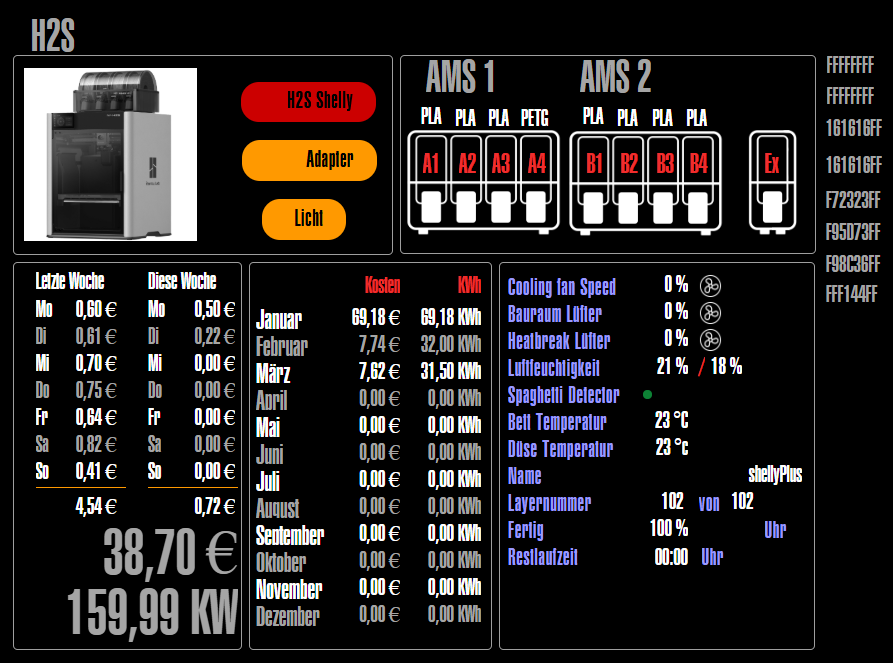
Aber Shellys ersetzen halt nicht den Adapter.In der Vis sieht das dann so aus.
-
Du sollst die Bambulab-Adapter stoppen. Und nur starten wenn die Drucker an sind.
Kannst du auch über den Ping-Adapter machen und ein Skript. Wenn der Drucker per ping erreichbar ist = Adapter starten, wenn nicht dann stoppen.
Ich hatte den Klipper-Moonraker im Ensatz, der hat das gleiche Problem. Abgesehen davon das die Adapter unfassbar viele Daten + -änderungen pro Sekunde liefern.
und rum zicken wenn die den Drucker nicht erreichen können.Wird es besser wenn die Drucker an sind mit der Leistung?
-
Von der Performance her ist der Prozessor zwar keine Rakete, aber z.B. deutlich schneller, als ein Pi4. Ein N100 wäre doppelt so schnell
Wenn die Adapter für die 3D Drucker Panik schieben, wenn sie die Drucker nicht finden, könnten sie auch stärkere Prozessoren auf 100% bringen....
Intel(R) Celeron(R) CPU N3000 @1.04GHz 8G RAM 480G SSD * Virtualization : unprivileged lxc container on Proxmox * 6 GByte RAM für den iobroker Container * Remote-Access über Wireguard meiner Fritzbox
-
Von der Performance her ist der Prozessor zwar keine Rakete, aber z.B. deutlich schneller, als ein Pi4. Ein N100 wäre doppelt so schnell
Wenn die Adapter für die 3D Drucker Panik schieben, wenn sie die Drucker nicht finden, könnten sie auch stärkere Prozessoren auf 100% bringen....
@oliverio
@thomas-braun
@homoran
@bananajoe
@martinpVielen Danke für eure Hilfe.
Auch Danke für den Anstoß wegen trixie @thomas-braun ;-)Mein System scheint nun viel flotter zu laufen.
Die CPU hat was um die 15%...aber ohne Bambu.Ich werde mir eine Script machen, um die Bambu-Instanz nur zu starten wenn ich sie brauche.
Schöne Rest-Woche euch allen ;-)
-
sudo usermod -aG adm jenssudo usermod -aG adm jensIst das dann das Resultat ?
Synology strongly advises you not to run commands as the root user, who has
the highest privileges on the system. Doing so may cause major damages
to the system. Please note that if you choose to proceed, all consequences are
at your own risk.

Could not chdir to home directory /var/services/homes/jens: No such file or directory
jens@Server2:/$
Kein Kommando funktioniert mehr.
-
sudo usermod -aG adm jensIst das dann das Resultat ?
Synology strongly advises you not to run commands as the root user, who has
the highest privileges on the system. Doing so may cause major damages
to the system. Please note that if you choose to proceed, all consequences are
at your own risk.

Could not chdir to home directory /var/services/homes/jens: No such file or directory
jens@Server2:/$
Kein Kommando funktioniert mehr.





Hey! Du scheinst an dieser Unterhaltung interessiert zu sein, hast aber noch kein Konto.
Hast du es satt, bei jedem Besuch durch die gleichen Beiträge zu scrollen? Wenn du dich für ein Konto anmeldest, kommst du immer genau dorthin zurück, wo du zuvor warst, und kannst dich über neue Antworten benachrichtigen lassen (entweder per E-Mail oder Push-Benachrichtigung). Du kannst auch Lesezeichen speichern und Beiträge positiv bewerten, um anderen Community-Mitgliedern deine Wertschätzung zu zeigen.
Mit deinem Input könnte dieser Beitrag noch besser werden 💗
Registrieren Anmelden218
Online33.0k
Benutzer83.6k
Themen1.3m
Beiträge